In this guide, you will learn how to install Dre4Ever Dragonborn Kodi Add-on. This is a third-party Kodi add-on with entertainment sections which include movies, TV shows, music, news, and lots more.
This add-on is found within the EzzerMacs Wizard Repository and features Regular add-on updates with an easy to use interface. You will be able to customize the skin and themes of this add-on.
Legal Disclaimer: ReviewVPN.com does not encourage or endorse any illegal activity involved in the usage of services and applications referenced on this site. We do not verify the licensing agreements of services. The end-user is wholly responsible for ensuring that any media accessed through these services does not violate copyright and/or licensing laws. ReviewVPN does not promote, link to, or receive compensation from any Apps and IPTV services.
Instructions On How To Install Dre4Ever DragonBorn Kodi Addon
Installing Dre4Ever DragonBorn Kodi Add-on involves enabling the unknown sources and then downloading and installing the repository.
Step 1. Open the Kodi app and scroll up to the setting icon found at the top left-hand side of your screen.
Step 2. When it comes up, move down to the system option and click on it.
Step 3. Now, move your mouse downwards to add-ons and click on it.
Step 4. Scroll to the UNKNOWN SOURCES option and click on it and the warning message, select YES to switch on the unknown sources of your Kodi app.
Step 5. Return to the home screen by hitting the backspace key on your keyboard or back/arrow button on your remote.
Step 6. From the home screen, scroll to the setting icon, and click it open.
Step 7. Navigate your mouse to the file manager option and click on it.
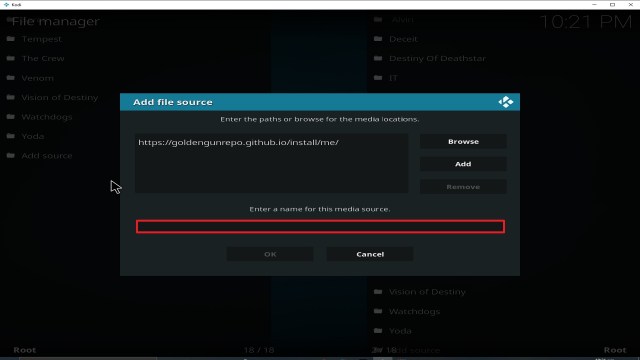
Step 8. click on add source.
Step 9. Hover on and type the media source link: ‘http://ezzer-mac.com/repo/ and select OK.
Note: Type the media source link correctly.
Step 10. Select “Enter a name for this media source” textbox and input a name. We are using “sup” for this tutorial guide.
Note: sometimes Kodi will automatically input a name for the media source, select OK to proceed with the installation process.
Step 11. Return to the home menu by hitting the back/arrow button on your remote or the BACKSPACE key on your keyboard.
Step 12. Scroll to add-ons and click on it.
Step 13. Move your mouse upwards and click on the add-on browser icon.
Step 14. navigate to install from the zip file and click on it.
Step 15. select the name you saved the media source file and click on it. We used “sup”
Step 16. choose repository.EzzerMacsWizard.zip. Wait for Add-on enabled notification.
Step 17. Click on Install from Repository
Step 18. select EzzerMacs Wizard Repository
Step 19. On the new window, click on Program add-ons
Step 20. Click on Ezzermacs Wizard
Step 21. Click on Install
Step 22. If you are using the latest version of Kodi, select YES on the dialog box with “ the following additional add-ons will be installed” and wait for Add-on installed message notification.
Step 23. Return to the home screen by hitting the back or arrow button on your remote or the escape or backspace key on your keyboard. you will find this add-on installed under the add-on section of your Kodi app.
YOUR INTERNET ACTIVITY IS BEING WATCHED
ReviewVPN cannot attest to the legality, security and privacy of the applications discussed on this site. It is highly recommended that you use a VPN service while streaming or using Kodi.
Currently, your IP 14.191.20.143 is visible to everyone and your Browser is being tracked by Advertisers & ISP Provider.
Your activities are hidden from your ISP, the government, and from the apps you are using.
You can access additional movies and TV streams.
ISP attempts to throttle are thrwarted thus reducing buffering issues.
Geographically restricted content like Netflix and Hulu can be unblocked.
A VPN works be replacing your ISP-assigned IP address and creating an encrypted tunnel. We recommend the no log service offered by IPVanish. It works well on a Firestick and offers the fastest possible speeds.
A VPN is a software that encrypts and masks your internet protocol address to appear as a secure and private user. What VPN does to your IP address is to hide it so that whatever activity you are doing online will be private and anonymous.
There are many VPN services in the market, but Surfshark offers you the best VPN service with friendly subscription plans.
Features of Surfshark
A 30-day money-back guarantee
Zero traffic
Leak protection policy so you need not worry about your browsing history being leaked or stored.
Bypassing location restrictions
Minimizes internet service provider throttling for an improved streaming experience.
Note: For more information about Surfshark, please read our Surfshark Review.
In this article, we will help you install Fishermans Friend Kodi Addon on Firestick.
Fishermans Friend Kodi is a third-party Kodi add-on offering Carp Fishing, Fishing, Barbel Fishing, TV Shows, YouTube Videos, movies, live TV, Live radio, music, and so much more.
This Kodi Add-on Features a customizable search bar for rating, trending, and new releases. This add-on has a User-friendly interface with a standard layout and easy-to-customize themes and skin. Fishermans Friend Kodi Add-on has daily add-on updates with the latest movies, live TV channels, live radio channels, and documentaries.
Steps on How to install Fishermans Friend Kodi Addon
1. Launch your Kodi app and from the home screen, scroll up and click on the setting icon located at the top left-hand side of your screen.
2. Scroll down to the system option and click on it.
3. Now, move your mouse downwards to add-ons and click on it.
4. Navigate rightward and click on the UNKNOWN SOURCES. When you click on it, a warning dialog box will appear on the screen, click on YES to enable the unknown sources.
5. Go back to the home screen by pressing the backspace key on your keyboard or back/arrow button on your remote.
6. Scroll up, locate the setting icon, and click it open.
7. Move your mouse to the file manager option and click on it.
8. Scroll down to add source and click on it.
9. Next, select and enter the media source URL: ‘http://repozip.zerotolerance.gq and click OK.
Note: Check the media source URL to avoid an error.
10. Select “Enter a name for this media source” and enter a name. We are going to use ” sup ” for this guide.
Note: if Kodi auto-populates a name for the media source, just click OK to continue with the installation process.
11. Go back to the home screen by pressing the back/arrow button on your remote or the escape key on your keyboard.
12. Scroll to add-ons and click on it.
13. Click on the add-on browser icon.
14. Navigate to install from the zip file and click on it.
15. Scroll to the name you saved the media source file and click on it.
16. Click the repository.zt-x.x.zip. Wait for Add-on enabled notification at the top right-hand side of your screen.
17. Next, click on Install from Repository
18. select Zero Tolerance Repository
19. Choose the Video addons
20. select Fishermans Friend
21. On the new window that will appear, scroll down and click on Install
22. If you are using Kodi Leia 18, click on YES on the textbox that says “ the following additional add-ons will be installed” and wait for Add-on installed message notification.
YOUR INTERNET ACTIVITY IS BEING WATCHED
ReviewVPN cannot attest to the legality, security and privacy of the applications discussed on this site. It is highly recommended that you use a VPN service while streaming or using Kodi.
Currently, your IP 14.191.20.143 is visible to everyone and your Browser is being tracked by Advertisers & ISP Provider.
Your activities are hidden from your ISP, the government, and from the apps you are using.
You can access additional movies and TV streams.
ISP attempts to throttle are thrwarted thus reducing buffering issues.
Geographically restricted content like Netflix and Hulu can be unblocked.
A VPN works be replacing your ISP-assigned IP address and creating an encrypted tunnel. We recommend the no log service offered by IPVanish. It works well on a Firestick and offers the fastest possible speeds.
Legal Disclaimer: ReviewVPN.com does not encourage or endorse any illegal activity involved in the usage of services and applications referenced on this site. We do not verify the licensing agreements of services. The end-user is wholly responsible for ensuring that any media accessed through these services does not violate copyright and/or licensing laws. ReviewVPN does not promote, link to, or receive compensation from any Apps and IPTV services.
If you are a fan of streaming content online, it is advisable to install a VPN on your device for security reasons.
A VPN is software that does encryption on your IP address. When this happens, your IP address becomes private and you will appear as an anonymous user on the ISP network.
For maximum online privacy, security, and protection, we recommend installing Surfshark on your device. It provides the best VPN service with pocket-friendly subscription plans and allows refunding up to 30-days.
Surfshark features leak protection and a zero-log policy. You will be able to bypass restrictions due to location and stream from anywhere around the world. This VPN minimizes ISP throttling for a smooth streaming experience.
Note: For more information about SurfShark, please read our SURFSHARK REVIEW.
If your Firestick still has the older interface, read this article to learn how to update it: Update Firestick Interface.
You can download Surfshark directly from the Amazon App store. It will be easy for you to find Surfshark with your Firestick’s Find feature. Refer to our screenshots below.
1. Go to the Home screen of your Firestick.
2. Navigate towards the Find tab. Press the Search button from the resulting dropdown.
3. Type in the keyword of SurfShark and select from the suggestions that will appear.
4. Click the official SurfShark icon from your search results.
5. Press the Download (You own it) button.
6. The SurfShark VPN installer will download on your device.
7. SurfShark VPN’s app will automatically install itself on your Fire TV stick.
8. Press the Open button after completing SurfShark VPN’s installation process.
9. Please wait for the SurfShark VPN to load its user interface.
10. You can now log in with your SurfShark VPN account credentials.
This article talks about how to install Atriox for Kodi addon. This add-on comes with pre-loaded entertainment sections such as IMDB Top marvel movies, IMDB movies, search, tools, latest movies release, IMDB TV shows, IMDB top DC movies, network, top IMDB movies, IMDB top horror movies, concert, IMDB trending movies, documentaries, music and so much more.
Atriox for Kodi addon also houses a huge database of kids box sets, kids movies, and kids shows. This add-on is a third-party Kodi add-on found within the supremacy repository.
Step By Step Instructions On How To Install Atriox For Kodi Addon
To install Atriox for Kodi addon, first, you need to enable the unknown sources of your Kodi app.
1. Launch your Kodi app and wait for it to open properly. Now, from the home screen or main menu, scroll up and click on the setting icon found at the top left-hand side of your screen.
2. Once the setting menu comes up, scroll down to the system option and click on it.
3. Next, on the system menu, move your mouse downwards to add-ons and click on it.
4. Next, navigate rightward and click on the UNKNOWN SOURCES option. Once you click on it, a warning message will appear on the screen, select YES and this will enable the unknown sources of your Kodi app.
5. Return to the main menu or home screen of your Kodi app by hitting the backspace key on your keyboard or back/arrow button on your remote.
Installing Atriox for Kodi addon
1. Now, you are already on the home screen or main menu of your Kodi app. Next, scroll up locate the setting icon, and click it open.
2. On the setting menu, move your mouse to the file manager option and click on it.
3. On the new window that will appear, scroll down to add source and click on it.
4. Now, click and enter the media source link: ‘http://2supremacy.uk/repo/ and then click OK when you are done.
Note: Ensure you type the media source link correctly. We recommend cross-checking it to avoid errors.
5. Click on “Enter a name for this media source” textbox and type a name. For this installation tutorial, we are going to use ” sup ”
Note: for some add-on, Kodi will auto-populate a name for the media source, when this happens at your end, just click OK to continue with the installation process.
6. Return to the home menu by hitting the back/arrow button on your remote or the BACKSPACE key on your keyboard.
7. From the home screen, scroll to add-ons and click on it.
8. Next, move your mouse upwards and click on the add-on browser icon.
9. On the new window that will appear, navigate to install from the zip file and click on it.
Step 10. Scroll to the name you saved the media source file and click on it.
Step 11. Scroll to repository.supremacy-x.x and click on it. Wait for Add-on enabled notification at the top right-hand side of your screen.
Step 12. Next, click on Install from Repository
Step 13. Click on supremacy
Step 14. Click on Video addons
Step 15. Click on Atriox
Step 16. Click on Install
Step 17. If you are using the latest version of Kodi, select YES on the dialog box with “ the following additional add-ons will be installed” and wait for Add-on installed message notification at the top right-hand side of your screen.
Features of Atriox for Kodi Addon
Huge collection of IMDB movies, shows, and documentaries
Allows customizing of themes and skin
Cluster-free and well-structured interface
Add-on has a regular update
Well structured layout
YOUR INTERNET ACTIVITY IS BEING WATCHED
ReviewVPN cannot attest to the legality, security and privacy of the applications discussed on this site. It is highly recommended that you use a VPN service while streaming or using Kodi.
Currently, your IP 14.191.20.143 is visible to everyone and your Browser is being tracked by Advertisers & ISP Provider.
Your activities are hidden from your ISP, the government, and from the apps you are using.
You can access additional movies and TV streams.
ISP attempts to throttle are thrwarted thus reducing buffering issues.
Geographically restricted content like Netflix and Hulu can be unblocked.
A VPN works be replacing your ISP-assigned IP address and creating an encrypted tunnel. We recommend the no log service offered by IPVanish. It works well on a Firestick and offers the fastest possible speeds.
Legal Disclaimer: ReviewVPN.com does not encourage or endorse any illegal activity involved in the usage of services and applications referenced on this site. We do not verify the licensing agreements of services. The end-user is wholly responsible for ensuring that any media accessed through these services does not violate copyright and/or licensing laws. ReviewVPN does not promote, link to, or receive compensation from any Apps and IPTV services.
Use Kodi with a VPN
Streaming online with Kodi without a VPN is not advisable. This is because you will appear publicly on the ISP network and whatever you are doing might be monitored or tracked. That is why we strongly recommend installing a VPN on your device. Surfshark is the best VPN service provider out there and they offer affordable yet maximum online security. Subscribing to Surfshark gives you a 7-day free trial
Features Of Surfshark
Leak protection policy
Zero log policy.
Note: For more information about Surfshark, please read our Surfshark Review.
Odin is a pretty new Kodi addon having only come out this year but has fast gained in popularity. The most important reason being the repo it comes from. The Golden Gun repository has a long track record of producing quality Kodi add ons, so Odin comes from good stock.
Odin primarily is for Movies and TV Shows, they do have a “Test IPTV Zone” which is exactly what it is. A place where Live Tv Channels are tested, but there is no guarantee they will work, and currently it doesn’t seem like Odin has serious plans to become a multipurpose add on serving Live TV as well. Which is just as well as most add ons fail on that front.
You can integrate Odin with Real Debrid and Trakt.TV. We always recommend using a Kodi add on with Real Debrid. For a few dollars a month you can save yourself the trouble of finding great links, Real Debrid will do that for you from its 50+ paid servers. Just sit back and enjoy all your content in high-quality HD or above.
Odin has a diverse toolbox, and you can turn downloads on, to download content and watch offline. As well as being able to turn on subtitles with a wide range of languages. Though subtitles do tend to be hit and miss, so you might be better off downloading Open Subtitles instead.
Common Errors
Use Kodi for any period and you will get used to seeing errors. Find our quick fix guides and simple suggestions here for the most common errors you might come across with Odin.
No Link Found. You tend to get no link found most often with Live TV. With Odin bear in mind, their Live TV function is not stable. So, chances are there just isn’t a working link currently. But you can also try and refresh the page, check your internet connection and make sure you are using a VPN. Your Internet Service Provider may be blocking the content. Find more fixes here. <LINK>
Olpair Streaming Error. Olpair handles all the streaming for free users. You need to refresh your key every 4 hours. Normally this is straight forward just following the link, or you can disable Captcha streaming providers. To find more fixes click here.
Script Error. A script error can arise with either a script missing in the Odin add on (unlikely if you have downloaded it from the Golden Gun repository) or a script is missing with your Kodi installation. The quickest fix is a fresh install of Kodi, or one of our other fixes which you can find here.
Cannot download Odin. Check the URL you have entered is correct, also that you are using a VPN as your ISP may be blocking that content. If that doesn’t work, go through all the steps in our guide here.
Review
Categories include:
TV Shows
Movies
Test IPTV Zone
Tunes
Bone Crusher Old (Includes Boxsets, Classics and more sections)
My Movies
My TV Shows
New Movies
New Episodes
Channels
Tools
Search
Odin is a solid Kodi addon, which is probably going to continue to get better over time. They don’t have the range of content of some of the older add ons but that will change. They also have some unique sections like Tunes where you can tune into digital radio stations and Bone Crusher Old to get a tonne of classic content.
The fact you can download content with Odin is a big plus, as most new add ons tend to avoid this feature. Certainly, one to watch for the future.
YOUR INTERNET ACTIVITY IS BEING WATCHED
ReviewVPN cannot attest to the legality, security and privacy of the applications discussed on this site. It is highly recommended that you use a VPN service while streaming or using Kodi.
Currently, your IP 14.191.20.143 is visible to everyone and your Browser is being tracked by Advertisers & ISP Provider.
Your activities are hidden from your ISP, the government, and from the apps you are using.
You can access additional movies and TV streams.
ISP attempts to throttle are thrwarted thus reducing buffering issues.
Geographically restricted content like Netflix and Hulu can be unblocked.
A VPN works be replacing your ISP-assigned IP address and creating an encrypted tunnel. We recommend the no log service offered by IPVanish. It works well on a Firestick and offers the fastest possible speeds.
Click here to get the lowest price on SurfShark through our exclusive limited-time offer.
Install SurfShark on Firestick with Screenshots
If your Firestick still has the older interface, read this article to learn how to update it: Update Firestick Interface.
You can download Surfshark directly from the Amazon App store. It will be easy for you to find Surfshark with your Firestick’s Find feature. Refer to our screenshots below.
Follow our screenshots below to install the SurfShark VPN app on your Fire TV stick.
1. Go to the Home screen of your Firestick.
2. Navigate towards the Find tab. Press the Search button from the resulting dropdown.
3. Type in the keyword of SurfShark and select from the suggestions that will appear.
4. Click the official SurfShark icon from your search results.
5. Press the Download (You own it) button.
6. The SurfShark VPN installer will download on your device.
7. SurfShark VPN’s app will automatically install itself on your Fire TV stick.
8. Press the Open button after completing SurfShark VPN’s installation process.
9. Please wait for the SurfShark VPN to load its user interface.
10. You can now log in with your SurfShark VPN account credentials.
Techstreams Fork is a clone of the popular Techstreams addon. Coming from the well-respected Man Cave repo, this is a great addon for content and keeping up to date with sources.
Techstreams Fork pulls content directly from torrents, which is awesome, but it also means you will need to use a VPN with this addon or much of the content will be blocked straight away.
The addon is compatible with both Trakt and Real Debrid. We are advising using both to really get the best out of Techstreams Fork.
Trakt will allow you to start off programs where you left off, even when crossing over from watching the same film or episode on one addon to another. You can also get intelligent suggestions for the next thing to watch, and access content lists from people all around the world who share the same interests and viewing habits as you.
Real Debrid is a premium service you can get for as little as $2 a month when paying for an annual pass. They fix a real problem, which is a common issue with so much free information. You may get 100 links to the same piece of content, but chances are most of the links are old and dead, don’t load, or give you access to poor-quality content. Real Debrid gives you access to a network of 50+ paid servers and the best high-quality links for any content you want to watch.
Legal Disclaimer: ReviewVPN.com does not encourage or endorse any illegal activity involved in the usage of services and applications referenced on this site. We do not verify the licensing agreements of services. The end-user is wholly responsible for ensuring that any media accessed through these services does not violate copyright and/or licensing laws. ReviewVPN does not promote, link to, or receive compensation from any Apps and IPTV services.
Common Errors
Here are the most common errors and fixes for Techstreams Fork:
Kodi check log error: A Kodi check log error is nothing to worry about. This has no relation to a corrupted script, or a missing dependency, and will only happen once you have installed Genesis and are streaming content within the add on. A check log error in most cases simply means that your media cache is full and needs to be emptied. Just like your web browser, Kodi will cache snippets of content, to make loading instant the next time you try to watch it. Over time this cache fills up. To learn how to empty your cache, download helpful system tools and more read on here.<LINK>
Could not Download/ Web URL failure. Check that you have typed in the right URL. If the repository has changed, refer to Google and Reddit to find the latest link. Also, you can try again just to make sure that it isn’t a problem with the server receiving too many requests. If those quick fixes don’t work, find more steps here
No stream available. An unlikely error with Techstreams Fork, but you can turn on and search for updated scraper lists in the Scraper settings. If the problem persists, check our step by step fix guide <LINK>
YOUR INTERNET ACTIVITY IS BEING WATCHED
ReviewVPN cannot attest to the legality, security and privacy of the applications discussed on this site. It is highly recommended that you use a VPN service while streaming or using Kodi.
Currently, your IP 14.191.20.143 is visible to everyone and your Browser is being tracked by Advertisers & ISP Provider.
Your activities are hidden from your ISP, the government, and from the apps you are using.
You can access additional movies and TV streams.
ISP attempts to throttle are thrwarted thus reducing buffering issues.
Geographically restricted content like Netflix and Hulu can be unblocked.
A VPN works be replacing your ISP-assigned IP address and creating an encrypted tunnel. We recommend the no log service offered by IPVanish. It works well on a Firestick and offers the fastest possible speeds.
The original Techstreams was awesome and this fork really does it justice. There are several features worth mentioning. The direct clear cache function is rarely seen elsewhere and a good way for quickly checking if you can free up space.
Being able to check and upMarch 13, 2026
2. Select System in the bottom right corner.
3. Select Add-ons on the left side of the screen.
4. Select Unknown sources.
5. Click Yes to allow uknown sources.
6. Select File manager.
7. Click Add source.
8. Click on .
9. Type exactly: http://octopus246.esy.es/octopus/
10. Click on OK.
11. Select enter a name for this media source.
12. Name is Techstreams Fork(this part isn’t critical as long as you remember the name).
13. Click on OK.
14. Click on OK.
15. Take one step back and click on Add-ons.
16. Select install from zip file.
17. Click on Techstreams Fork (or whatever you named the source).
18. Click on repository.octopus-0.1.54.zip
19. Select on Install from repository.
20. Click on Octopus Repo.
21. Pick Video add-ons.
22. Select Techstreams Fork again.
23. Click on Install.
24. Select OK after reviewing the add-ons that will be installed.
25. You should see a popup in the upper right corner saying Techstreams Fork has been installed. There will actually be multiple popups for the various components.
26. Click on Open to start the Techstreams Fork add-on.
With over 1,100+ reviews on its site and an average rating of 4.6/5 Live NetTV is one of the most popular live tv streaming applications around. With great features and a solid team of developers, it has remained a firm favorite among its faithful users.
The application also has history on its side first hitting the scene in June 2017, meaning it has seen lots of competitors come and go. A great application for live TV that consistently works and has been persistently stable in an industry where many apps either come and go or users have to come to terms with regular downtime.
Is Live NetTV Safe and Virus-free?
We tested this application using VirusTotal and found that there is/are malicious file/files. You can see the above result for your reference.
Because of this, we highly recommend using a VPN that can protect your privacy against any threat from Live NetTV.
2. Open Downloader App. Type https://reviewvpn.com/livenet and click Go.
3. Then wait for the APK to download.
4. Choose “Install”.
5. Click “Open”.
YOUR INTERNET ACTIVITY IS BEING WATCHED
ReviewVPN cannot attest to the legality, security and privacy of the applications discussed on this site. It is highly recommended that you use a VPN service while streaming or using Kodi.
Currently, your IP 14.191.20.143 is visible to everyone and your Browser is being tracked by Advertisers & ISP Provider.
Your activities are hidden from your ISP, the government, and from the apps you are using.
You can access additional movies and TV streams.
ISP attempts to throttle are thrwarted thus reducing buffering issues.
Geographically restricted content like Netflix and Hulu can be unblocked.
A VPN works be replacing your ISP-assigned IP address and creating an encrypted tunnel. We recommend the no log service offered by IPVanish. It works well on a Firestick and offers the fastest possible speeds.
Legal Disclaimer: ReviewVPN.com does not encourage or endorse any illegal activity involved in the usage of services and applications referenced on this site. We do not verify the licensing agreements of services. The end-user is wholly responsible for ensuring that any media accessed through these services does not violate copyright and/or licensing laws. ReviewVPN does not promote, link to, or receive compensation from any Apps and IPTV services.
Live NetTV aggregates links using scrapers from across the web and allows you to fetch the best link within their application. You can choose from over 800 channels including channels in HD.
None of the content on Live NetTV is hosted on their servers, they simply act as a searching and indexing tool.
What Platforms Does it Work On?
Works on all Android devices
Features
800+ channels in a wide range of categories and genres
Access to Video on Demand
Supports Chromecast
Access to a wide range of premium sports channels
Supports of a number of popular external media players
100% free without ads
Simple and easy to use user interface
Filter and sorting system
Request channels from the developers
Report links that are broken
Access to movies and TV Shows in HD
No need to register
Video playback supported on certain external media players
Live Event scheduler
Get notified when your latest show is added
Live NetTV Pros and Cons
Pros
Massive range of channels only beaten by Mobdro and Red Box
Consistently stable over a long period of time
Constantly updated
The ability to report broken links is invaluable
Being able to requests new channels means a responsive development team
100% free without ads is rare
Chrome cast support means you can cast to your TV
Support for a wide range of external media players means it works on a wide range of devices
No sign-up or email means you can maintain anonymity
Easy to use and clean interface
Swipe function means it’s easy to use on your phone
An active community and development team
Burden of social proof with a large number of positive reviews over 2 years
Cons
Some reports of needing to restart app and links not working, but it’s always hard to know whether people are trying to use the application with or without a VPN player
Live NetTV FAQs
Is it Safe to Use?
Live TV has been around since 2015 and has a long history of being safe and stable. Just beware of downloading the application from copycat websites or unknown sources. Be safe and use the website instead.
Is it Legal or Grey?
It’s a grey area but Live TV has done well to not go down more. Live TV providers are pretty hot on shutting down unofficial feeds or having people decode their encrypted signals.
We always recommend that you use the application with a VPN provider otherwise you run the risk of having your connection cut if your Internet Service Provider sees you accessing blocked IP addresses
Should I Use This App With a VPN?
Always use a VPN, even if you’re not using Live TV Net. We love VPNs because they keep our data safe and encrypted and prevent malicious third parties from tracking our data or seeing what IP addresses we are visiting.
VPNs can also be used on multiple devices, which means you can keep your mobile, tablet, and computer security. Allowing you to change your IP address, log onto different servers around the world and be safe wherever you go however insecure the public Wi-Fi is.
Live Net TV has been around since at least June 2017
What is the Development Team Like?
We couldn’t find much about the development team though you can contact them through their website and also the application. They have made themselves pretty invisible on Reddit and Facebook.
Best Alternatives
Live Net TV is probably one of the longest working live TV apps out there. Just bear in mind if you want bigger libraries of films and TV Show you can find them at Zion TV, Cyberflix, Cinema HD, Bee TV or Tea TV.
Alternatively, if you want more options in terms of live TV then pick Mobdro or Red Box.
Our Opinion
Live Net TV is a great application that has managed to fly under the radar for a long time. They have a consistent history of having working TV channels. Their feedback and request function is great because you know as well as us how bloody annoying it is to constantly find broken links and not be able to report them.
No application gets this far without an active development team and community and we feel that Live Net TV should be in everyone’s backup list of applications if they not the first choice for Live TV.
In this article, we will show the best torrent sites for games “game torrents”.
Lately, downloading games has been easier than before. Not only are there tons of games, but PC torrent files for games are available for everyone. However, when it comes to torrenting, users can always experience confusion on where they can find the best torrent websites, only to find out later that the site they are on has been shut down.
Other than that, opening the incorrect website can bring you a lot of trouble. So, if you want the best torrenting websites for games and also be kept secure and safe online, then you have come to the right place.
With that being said, take time to read the list below of the best and top websites for games, and how you can unblock these websites if it is needed.
Legal Disclaimer: ReviewVPN.com does not encourage or endorse any illegal activity involved in the usage of services and applications referenced on this site. We do not verify the licensing agreements of services. The end-user is wholly responsible for ensuring that any media accessed through these services does not violate copyright and/or licensing laws. ReviewVPN does not promote, link to, or receive compensation from any Apps and IPTV services.
How To Safely Download Torrents?
Torrent websites are recognized to be the best and easiest way to get any content that you want. However, there are some risks, but if you carefully follow these precautionary measures, then the risks will be less.
Avoid harmful viruses.
Begin by making sure that your device has already installed an antivirus program. A decent antivirus program will protect your device against viruses. A device such as Windows has its own built-in Windows Defender program, which captures many of the viruses.
As long as there is only one antivirus being installed, then you can easily enable the Windows Defender from your device’s Control Panel. You may also install third-party programs such as Kaspersky or BitDefender instead.
It won’t matter what you choose, as long as there is only one antivirus program installed in your device.
Make sure you look for torrents with many seeders.
Torrent has tons of seeders, this means that it is free from any virus. This may be because other people have used this website and did not find any virus, that is why they then start to share the website with others.
Although this is not an assurance, it does help in lessening the list. With it having a lot of seeders, this makes transferring files faster.
Check on the comment section before downloading it from the website.
This is not a full assured solution. It is known that the review or comment section of a torrent website helps in figuring out if the site stores any viruses. If you read that it does not say anything about viruses, then the website is clean. However, if it does mention viruses, then you should stay clear from that site.
Avoid any file types that are easily transmitting viruses.
Remember not to download any torrents that are meant for programs. You should perhaps avoid downloading files like EXE of BAT. These files are known to transmit viruses easily.
Cracked programs are usually the ones prone to having viruses in their files. Therefore, you should refrain from downloading these files.
Be sure to use a secured VPN to guarantee safety.
The surest way of keeping yourself safe online is by using a VPN while streaming torrent websites. A VPN conceals your IP address and prevents any ISPs from knowing what website you are on or if you are torrenting. The VPN works by placing a tiny piece of its own software into your device, which will then encrypt all your data.
The process makes it hard for the ISP to have any idea of what websites you are using to stream or to download.
Take note, always make sure that you are using a good and secured VPN so that it will impede any logging or tracking on your browsing activities.
YOUR INTERNET ACTIVITY IS BEING WATCHED
ReviewVPN cannot attest to the legality, security and privacy of the applications discussed on this site. It is highly recommended that you use a VPN service while streaming or using Kodi.
Currently, your IP 14.191.20.143 is visible to everyone and your Browser is being tracked by Advertisers & ISP Provider.
Your activities are hidden from your ISP, the government, and from the apps you are using.
You can access additional movies and TV streams.
ISP attempts to throttle are thrwarted thus reducing buffering issues.
Geographically restricted content like Netflix and Hulu can be unblocked.
A VPN works be replacing your ISP-assigned IP address and creating an encrypted tunnel. We recommend the no log service offered by IPVanish. It works well on a Firestick and offers the fastest possible speeds.
If your Firestick still has the older interface, read this article to learn how to update it: Update Firestick Interface.
You can download Surfshark directly from the Amazon App store. It will be easy for you to find Surfshark with your Firestick’s Find feature. Refer to our screenshots below.
1. Go to the Home screen of your Firestick.
2. Navigate towards the Find tab. Press the Search button from the resulting dropdown.
3. Type in the keyword of SurfShark and select from the suggestions that will appear.
4. Click the official SurfShark icon from your search results.
5. Press the Download (You own it) button.
6. The SurfShark VPN installer will download on your device.
7. SurfShark VPN’s app will automatically install itself on your Fire TV stick.
8. Press the Open button after completing SurfShark VPN’s installation process.
9. Please wait for the SurfShark VPN to load its user interface.
10. You can now log in with your SurfShark VPN account credentials.
For more VPN discounts, go to ReviewVPN Deals and purchase the best VPN for you.
Click here to get the lowest price on Surfshark through our exclusive limited-time offer.
Is Torrenting Safe?
Yes, tormenting is safe, but it will be safer if you choose to pair it with a VPN.
If you are using torrent websites, then you already know that not all of the websites are safe and easy to use. That implies that your ISP can trace you anywhere while you are downloading anything copyrighted on any torrent website
That is the sole purpose of using a VPN. It will provide a safer way for you to use any torrent website. Using a VPN is very helpful because it maintains your anonymity while you are online. When using a VPN, it can help you download as much content as you want no matter what time of day, without having to worry about being logged or traced by your ISP.
Best Torrent Sites For Games
The Pirate Bay
Website: https://www.thepiratebay.org/
This list won’t even be complete if The Pirate Bay website is not mentioned first. This website is known to be the largest torrent website where you can download over 10,000 files easily every day.
You can download games using this website and it’s all for free. Just browse through its wide collection apart from apps or movies. The website has evolved so much and now it is one of the most visited and famous torrent websites. You can see speed details for downloading and offer an option to choose the right link to download games.
This famous torrent website is the King of all torrent websites and has all the games torrent files that you want and demand. Generally, Pirate Bay should be your go-to for all your torrenting and downloading needs.
Zooqle
Website: https://zooqle.com/
This website was known as the very first Bitsnoop, which is an internet crawler that fetches the best torrents. You can easily download content such as software for PCs, audiobooks, and HD movies.
You can also find nearly all your favorite games that are perfect for laptops and PCs for you to enjoy. This website is free for anyone to use, so you don’t have to worry about spending money on these games. Just go through the categories or use the search bar and find the game you want.
Apart from games, you can also download TV shows and movies on this website. It is so easy to use that all you have to do is click on the “Games” category and browse through it.
1337X is best known for being a popular torrent website where you can download games and other content such as web series, comics, movies, and even music. This website has a very user-friendly interface and simple options that allow you to find and download games without hassle.
It is a free website, meaning that anyone can use it and it does not need any fees to download content. The website features a peer-to-peer file sharing option and you can use this feature through proxy websites as well.
This website is the next best website right after The Pirate Bay.
Brave Browser is another website and it is the best gaming browser you can play games eight times faster than on any website. Another benefit of this website is that it prevents the charge of useless content and it also has no ads or trackers.
The website can be used on any device, the size of the screen does not matter, and it is free for everyone to use. Another aspect of this website is that you can also earn points with Brave Browser and redeem them to use later.
01Torrent
Website: https://www2.01torrent.net/
If you are looking for the newest music, games, movies, or animes, then the 01Torrent is for you. It is the best option because it works as one and it’s one of the best torrent websites for downloading games and should be considered a go-to website for games.
This website is known to be reliable, especially when you are downloading games. The games you could get are GTA 5 and many more. You can also use your PC, PlayStation, Android Smartphone, or Mac to download free games. It does not require any sign-ups, as it lets you immediately download the games you want.
IsoHunt is known for being one of the best peer-to-peer torrent websites and lets you download various kinds of media content, which includes online games. You can find nearly all of the games when you browse the website, which is very simple.
The website has an advanced search option that allows you to discover games without you wasting any time. IsoHunt is placed as the 5th popular torrent website based on downloads and searches of games and oftentimes it has been browsed through by over 40 million users.
Kickass Torrents
Website: https://kickasstorrents.to/
The new and improved Kickass Torrents is very well-known, and it delivers everything that you need when it comes to games. Apart from that, you can uncover other different contents, too. Using Kickass Torrents, whatever game you want to find, will offer the exact information so that you will have an idea of what you are getting.
The game for renting website is also known as “KAT” and it is part of the veteran torrent websites when it comes to searching torrent websites. It is very popular, and you can discover tons of games, TV shows, movies, or music just by using uTorrent.
On this website, there are games here for you to download that other website doesn’t have and the resolution is great. More importantly, the website is free for anyone to use.
GameTrex
Website: https://gametrex.com/
This torrent website allows you to download games for free which are fixed into multiple categories. You can find games from modern famous games to retro games and be able to download these games on your PC for you to enjoy.
Game Trex is considered to be one of the best torrent websites for game enthusiasts and lovers, and if you can’t look for the games you want, which is very unusual, the admin will upload the game later on.
When it comes to variety, LimeTorrents has tons to give. This website may not look luxurious, but don’t be fooled. You can find lots of torrent files on this site. The website’s platform is great due to it being easy to use when finding games. This site is also very useful for those who have just begun using torrents.
This website is very straightforward. You open up to thousands of games just by going through its categories and downloading them later on to play. LimeTorrents is known to have the best backup source for fetching games as you can see a large collection of these games. This site is free for anyone to use and enjoy.
RARBG
Website: https://rarbg.to/
If you want a reliable and safe torrent website to download games, then all you need is RARBG. This torrent website has been around for many years, and it still continues to provide quality content to its users. RARBG is very reliable and it allows you to download anything such as movies, games, or even ebooks.
Similar to TPB, you are not limited to downloading any type of content on the website. You can look for a game as easily as singing the alphabet on RARBG. All you need to do is browse the “Games” category and find the game you want, then download the torrent file and you won’t have to worry about any annoying redirects.
If you want games that can be easily downloaded and played directly on your PC, then this website is the right one for you. Games World requires registration, however, that is optional, and you can still download the games for free even without any registration.
The magnet links of the games operate well and the website itself is free from any viruses. You won’t have to worry about your device’s software since it won’t get damaged when you download games from this torrent website.
Don’t doubt or think negatively about this site’s name. You can simply see that just like other websites, you can download games and see its large collection of online games. You can also get the latest updated games from this torrent website so quickly just by clicking on the kinks. Enter the game’s title and you can get the link to download the game for free.
Even other users can immediately see the details about the game’s publication. There is no registration required and it’s free for everybody to use.
If you want the latest updated games, and you want to download these games from torrent websites, then you should use Skootie Games. You browse the website and download games once you have searched the game according to its genres like action, fighting, adventure, and a lot more.
The website comes with a single link option. This implies that you will be able to find the game you want and be able to download it for free. It is also free from ads and you can be able to see the game’s set-up size and its requirements before you start downloading the game. Skootie Games is a free torrent website that anyone can use.
This torrent website is known to be one of the best, especially if you want to download games for free. You can download the latest games and it comes with updates, features, and specifications. CroTorrents allows you to access over 100 streaming games just by going through its website, and you will be shocked to know how huge the website’s collection is.
The website is free from viruses, it is very fast, and it is very flexible to use as well. It has a wide collection of various games that certainly keep you or any gamer busy by just playing.
PC Games Lab
Website: https://pcgameslab.net/
If you are worried about memory space while downloading games, then the best option is to download games using PC Games Lab and you will get the full version of the game. You can download arcade games, racing games, or adventure games and you can download them at fast speeds and enjoy playing the game.
PC Games Lab is always updating its games, and you can simply download the newest version of any game you want. What’s even better is that PC Lab Games is free to use by anyone.
Wrap Up
All in all, by browsing through the torrent websites mentioned for downloading games, you will be able to have a great experience in downloading games that are for free and free from any virus. You should at least try out these websites in order to fetch the games you want and start enjoying them.
Well, that is it for the top best 15 torrenting websites for downloading games. Always remember to always use a secured VPN while you are trying these websites.
In this article, we will show the 10 best torrent sites for textbooks.
There are tons of things that are now in a digital form, from movies to food deliveries, to fitness equipment. With that being said, how can great novels and good books be not part of it? A book lover knows that can ever compare to hard bounded, printed books and that’s true. Still, the convenience and comfort of ebooks can’t be disregarded.
Think of a school, for example, that has everything digitized. Then, imagine as well that all of its students could find and download their reading materials or textbooks through Amazon.com or from textbook torrents before their classes start. All.of those textbooks can be saved in their PDA or personal digital assistant.
The primary downfall with printed books is the limited space, although ebooks only use digital space. More importantly, they are really affordable. The procedure of printing books makes them more pricey and heavy to bring around. Luckily, you won’t have to experience this when you use ebooks. Using an ebook reader, you can simply read anything while you are on the road to work or to school. Just download the books you need using the best textbook torrent website anytime.
Since now you know all your textbooks and favorite novels are online, the only thing left to ask is where should you get them and how much will it be? Honestly, you don’t have to worry since the top textbook torrenting websites are always evolving.
Legal Disclaimer: ReviewVPN.com does not encourage or endorse any illegal activity involved in the usage of services and applications referenced on this site. We do not verify the licensing agreements of services. The end-user is wholly responsible for ensuring that any media accessed through these services does not violate copyright and/or licensing laws. ReviewVPN does not promote, link to, or receive compensation from any Apps and IPTV services.
Why Download Textbook Torrents?
There are a lot of books that can be hard to find online, especially if you want the books for free. Textbooks are books that you can easily find on sale on any website such as Amazon.com. However, purchasing one can cut a huge part in your wallet if you are an avid bookworm. So, the question is, where do you buy the books from?
Now, there are tons of torrent sites that are known to be the best textbook torrents. These sites have been used as free sources, not only for downloading textbooks but as well as various contents such as movies, TV shows, games, music, and a lot more.
YOUR INTERNET ACTIVITY IS BEING WATCHED
ReviewVPN cannot attest to the legality, security and privacy of the applications discussed on this site. It is highly recommended that you use a VPN service while streaming or using Kodi.
Currently, your IP 14.191.20.143 is visible to everyone and your Browser is being tracked by Advertisers & ISP Provider.
Your activities are hidden from your ISP, the government, and from the apps you are using.
You can access additional movies and TV streams.
ISP attempts to throttle are thrwarted thus reducing buffering issues.
Geographically restricted content like Netflix and Hulu can be unblocked.
A VPN works be replacing your ISP-assigned IP address and creating an encrypted tunnel. We recommend the no log service offered by IPVanish. It works well on a Firestick and offers the fastest possible speeds.
One of the simplest and best ways to fetch any file that you desire is by downloading it from torrents. However, it’s very easy to get viruses as it is normal when transferring files from torrent, or even worse, you will get caught for downloading illegal or copyrighted files.
Now, if you take extra measures of precautions, then the risks of getting caught or getting viruses will be lower.
Avoiding dangerous viruses.
Be sure that you have installed an antivirus program in your device. A reliable program will easily protect your device from harmful viruses. For example, Windows has its own built-in Windows Defender, which is good for capturing many viruses.
As long as you don’t have more than one antivirus program installed, you can just easily enable the Windows Defender from the Control Panel in your device. You can also choose a third-party antivirus such as BitDefender or Kaspersky. It won’t matter what program you pick, just make sure that there is only one antivirus program being installed while you torrent for textbooks.
Be sure to look for torrents with a lot of seeders.
Tons of seeders generally means that the torrent you picked has no viruses. That may be because other users have tried the website and they did not find any. Then they start to share the torrent website with others.
Still, this is not an entire guarantee, but it can help you lessen the list of worries. With tons of seeders, this will give faster transfer of files.
Carefully check the reviews or comments before downloading them from the site.
Always remember that this is not a solution. Hence, the reviews and comments section of the website can be really helpful when you want to find out if the site has viruses.
If you read in the comments section and it does not say anything about viruses, then chances are that the torrent website is clean. But, if it does talk or mention any virus, then you should refrain from using that website.
Avoid file types that are easily infected by viruses.
Don’t download torrent files that are used for programs, like executable files such as EXE of BAT. These kinds of files should be refrained from being downloaded since they are the easiest way of getting viruses. Cracked programs are the ones that are most prone to having files with viruses.
Use a secured VPN in order to stay safe.
The easiest way of keeping yourself safe online is by using a VPN while you are for rent. A VPN will both hide your IP address and conceal you from your internet service provider, preventing them from seeing what you are using torrents for. A VPN works by putting a small piece of its software in your device which will then encrypt all your data. The encryption process makes it harder for ISPs to check what websites you are on or you are streaming or downloading. Take note, make sure that you are using a secured VPN to avoid any logging of your internet activities.
Install IPVanish on Firestick with Screenshots
If your Firestick still has the older interface, read this article to learn how to update it: Update Firestick Interface.
1. Click Home on your remote and click “Find”.
2. Click “Search”
3. You can either say IPVanish to your Alexa’s voice-enabled remote or start typing it. If you typed it, click on the suggestion when it appears.
Yes, torrenting is safe to use. As was mentioned above, it’s only safe to use torrent when it is being paired with a VPN.
If you love using torrents, then you already know that not everything is easy with all the torrent websites for textbooks. This implies that your ISP can simply trace you while you are using torrent to download copyrighted textbooks.
Hence, the purpose of using a VPN is to give you a safer way to use torrent websites. Using a VPN is very useful and beneficial because it maintains your anonymity online. You can even download your desired textbooks in torrents anywhere without having to worry about being logged or tracked.
10 Best Torrent Sites for Textbooks
There is a wide selection of torrenting websites for you to get textbooks. Although, there are many torrenting websites that are not that credible for downloading textbooks. To make things much easier for you below is a well-gathered list of the top ten best torrent websites for textbooks.
Manybooks.net
This website is best known to be one of the top torrent websites for textbooks. The site has a creative user interface that is made with the microcosm. It also has an easy navigation system on the site. Many books.net features categories or filters like featured authors, recommended, titles, languages, genres, and authors. You may also find many sub-genres such as non-fiction, romance paranormal, young adult, adventure, action, sci-fi, fiction, biographies, and children’s books.
As of today, the website hosts more than 33,000 free ebooks and textbook titles. If you are a writer, then you can also utilize this website as your platform to promote and publish your books and novels.
EBook Share
From the user’s opinions, if you are searching for only ebooks, then this website may be the best torrent website for you. You can find tons of different genres on this website. Genres like business, self-help, fiction, biography, computing, cooking, and history, you can certainly find here.
In addition to that, the website has great lists of various categories for you to browse. You can type the author’s name, the book’s title, or subject, then you can find and get the required textbook. As of writing this article, the website has over 400,000 books in its collection. Isn’t that great?
Yourbitorrent
Made back in the year 2003, this site offers top services. It will allow users to download any ebooks and textbooks for free. They also can download other content through torrents.
This website may not be as well-known as other websites. Now, why is this website part of this list? It’s prominent because it has safer links to download.
To get the ebooks you want, you can browse through its ebook category, and get the roster of ebooks. You won’t have to buy heavy books. The only downfall is contained a few ads. However, this site provides a safe way to download ebook torrents for all avid book readers.
Free-ebooks.net
As the name suggests, Free-ebooks.net delivers a large library of free books. It gives ebooks in multiple categories like audiobooks, non-fiction, textbooks, fiction, classics, and academics.
You can also into its sub-categories like fitness, geography, robotics, travel, politics, career, beauty, history, poetry, drama, youth, mystery, self-improvement, web design, engineering, religion, and science.
The site’s best aspect is about the budding ebook writers. It provides potential writers with the platform for them to publish and advertise their works.
What makes this site even better? It has an option to choose what format you want to download your book with. For example, in ePub, PDF, TXT, and Kindle file. Try out and join their interconnected program and obtain at least 25% of commission on each of the sales.
Limetorrents
Lime torrents are great for downloading any ebook. It offers various content like TV shows, movies, books, games, and a lot more.
Just go on their website and check it out, you can see tons of links and you can download from various regions for your textbook torrent. Browse through the site’s book category and choose either from the menu or the list displayed on the site’s home page.
Lime torrents is a public domain that allows you to download any torrent you want with one click.
Torrentz
This website is based in Finland. It incorporates different sources in order for you to download textbook torrents and also entertainment torrents. The site was known to be the second most visited website in the hears 2012 and 2015.
Torrentz was made to be special for ebook fans. It has tons of links for you to download textbook torrents of nearly all of the known textbook categories.
The site’s user interface is very simple and has a list of the latest torrents in regards to the latest ebooks, TV shows, and a lot more. Just search for the title for your favorite textbook and easily click on the search icon.
FreeBookSpot
Here is another torrent website that specifically attends to the needs of avid readers. FreeBookSpot has over 90 categories divided into multiple genres. You can find genres like hardware, psychology, DIYs, graphics, computers, astronomy, engineering, audiobooks, fiction, architecture, and many more.
Take note that this also has a great collection of fiction titles. However, the site is more known for its collection of educational and non-fiction books. You can browse through their sub-categories or genres like selections, most popular, wanted, and expired. They do have a registration, but it is not needed when accessing content. Aside from downloading ebooks, you can also share and receive feedback from other users.
RARBG
Made back in the year 2008, RARBG has nearly all the different ebook and textbook torrents. It allows you to download while being paired directly with magnet links. This website is recognized by many users but more importantly, this site still delivers you nearly everything to read in regards to textbook torrents.
From the little list of multiple torrent websites that are operating, RARBG is one of them.
This torrent website was made in the year 2008 and it is still functioning to survive without any problems. You can find a huge selection of ebooks, which includes available textbooks for download. Then, you can convert the file into any file format you want.
Take note not to get easily confused with the website’s user interface. It may seem a bit confusing at first, but soon enough you will get used to it.
The Pirate Bay
This website is known to be the world’s number one torrent website. The site is not only used for downloading ebooks, but also for download tons of other content. Here, you can download torrents such as movies, music, games, and many more.
Since 2003, this website has obtained tons of avid torrent users. The website allows you to download, view, and even take part in torrents and magnet links on any site that you want.
Because of negative views towards this website, The Pirate Bag website has now been banned on and off. Many times, this site has been banned because it has multiple proxy websites. These proxy websites have kept avid users hooked, letting them access textbooks anywhere they want. This is because you may be in a place where it is torrent-friendly.
Try to go through the website and download any textbook that you want anytime, without you having to spend a single coin from your wallet.
Extratorrents
For a lot of countries, Extratorrents pinnacles the list of the best torrent website for textbooks. You easily download your textbooks for college on this site for free. Readers such as yourself will also be updated about any important information. You can check information like available seeders and peers with the size of it being a single line.
On the site’s home page, you will be faced with tons of torrents according to various categories. You will find categories like movies, books, games, and many more.
All you need to do is click on the “Books” category and download any textbook you want for free. Users can search as well as the specific title, download it, or share the site with their friends. As long as the torrent pertains to the exact categories. Back in November 2016, this website was the second-largest torrent website right after The Pirate Bay.
Learn About The eBook Format Supported By Your Device
It is very crucial to have an idea about what kind of files are being supported by your device. An Apple or Android device may not support the same file formats. On the other hand, Kindle has a different type of file format to support textbooks or ebooks. So, you being an owner of a smart device like an ebook reader or a PDA, you have to carefully choose what specifications or formats fit your device best.
The Kindle device operates and supports Kindle Package format, TXT, Word, HTML, MOBI, PDF, RTF, ePub, and Adobe.
Apple or iOS devices support and work on formats such as ePub or PDF.
Android devices are compatible and function well with PRC, HTML, MOBI, RTF, PDF, Word, and many others.
Once you have an exact idea in the right format for your device, then you can start choosing the best torrent websites for textbooks.
Wrap Up
Hopefully, you find this detailed article on the best torrent websites for textbooks helpful and useful. Currently, these sites are getting high numbers of seeders. All of these websites have one thing in common and that is they have nearly all the textbooks in various genres. You can simply look for a textbook that has been published or released anywhere in the world.
Special offer
Get 80% Off for 29-Month Subscription + 5 Months Free on Surfshark VPN!