We all know that Kodi recently updated its version from Kodi 18.9 Leia to Kodi 19 Matrix. Well, most users got excited and expected new and better features from the app at first.
Not until upgrading, lots of addons and builds are not compatible and applicable to the new version.
The reason for this is because Kodi 19 is in Python 3 while Kodi 18.9 is in Python 2.
Although this has been announced by Kodi that they will migrate to Python 3 when they’re planning to upgrade the app’s version. Seems like many developers were not able to manage their addons and builds to be compatible ahead of time.
Python 3 has been available on the market long enough before Kodi started to upgrade the app.
This is a piece of very sad news, that is why we really need to downgrade back to the lesser version.
Because of this, we listed down all of the addons and builds that work with Kodi 19. You can read the article by going to reviewvpn.com/19.
For us to downgrade the app, we have to uninstall our Kodi 19 first from our Firestick device. And then we will install the older version from the official Kodi site. With this, we need toJailbreak your Firestick and thenInstall Downloader App.
How to Downgrade Kodi 19 Matrix to 18.9 Leia on Firestick
1. On the home screen of your firestick, scroll down to YOUR APPS AND GAMES portion
2. Scroll to the left-most portion and click on See All
3. Look for the Kodi 19 app on your list of apps and use your remote to click on the hamburger button for the options.
4. Choose to Uninstall the app
5. Confirm the action by clicking on the OK button
6. Go back to the home page and navigate to the right-most menu, Settings
7. Select Device or My Fire TV
8. Choose Developer Options
9. Turn on the ADB Debugging and the Apps from Unknown Sources
10. Click Turn On
11. Go back to Home and navigate to Search
12. Type in Downloader and click the suggestion
13. Tap the Downloader icon when it appears on the screen
14. Click Get or Download
15. Wait for the app to be installed.
16. Select the Open button to launch the app
17. Click Allow
18. Tap the OK button
19. Hover to the search engine.
20. Type in mirrors.kodi.tv and click on Go.
21. Tap on Releases/
22. Click on android/
23. Choose arm/
24. Look for the 18.9 Leia version that you need to install
25. Let the file be downloaded on your device
26. Click on Install
27. Wait for the app to be installed.
28. Choose Done
29. To save up more space for your device, click on Delete.
30. Confirm it by clicking Delete another time.
31. Go back to the home page.
32. Scroll down to YOUR APPS AND GAMES
33. Scroll to the left and click on See All
34. Scroll down to the bottom portion and look for Kodi. Click the hamburger button on your remote control to look for the options.
35. Select Move to front
36. You will now see Kodi on to of the apps. Click the app to launch.
37. Click on Continue.
38. Choose Allow
39. You now have Kodi 18.9 Leia on your firestick again
ReviewVPN cannot attest to the legality, security and privacy of the applications discussed on this site. It is highly recommended that you use a VPN service while streaming or using Kodi.
Currently, your IP 216.73.216.211 is visible to everyone and your Browser is being tracked by Advertisers & ISP Provider.
Your activities are hidden from your ISP, the government, and from the apps you are using.
You can access additional movies and TV streams.
ISP attempts to throttle are thrwarted thus reducing buffering issues.
Geographically restricted content like Netflix and Hulu can be unblocked.
A VPN works be replacing your ISP-assigned IP address and creating an encrypted tunnel. We recommend the no log service offered by IPVanish. It works well on a Firestick and offers the fastest possible speeds.
Click here to get the lowest price on SurfShark through our exclusive limited-time offer.
How to Install Surfshark on Firestick with Screenshots
If your Firestick still has the older interface, read this article to learn how to update it: Update Firestick Interface.
You can download Surfshark directly from the Amazon App store. It will be easy for you to find Surfshark with your Firestick’s Find feature. Refer to our screenshots below.
Follow our screenshots below to install the SurfShark VPN app on your Fire TV stick.
1. Go to the Home screen of your Firestick.
2. Navigate towards the Find tab. Press the Search button from the resulting dropdown.
3. Type in the keyword of SurfShark and select from the suggestions that will appear.
4. Click the official SurfShark icon from your search results.
5. Press the Download (You own it) button.
6. The SurfShark VPN installer will download on your device.
7. SurfShark VPN’s app will automatically install itself on your Fire TV stick.
8. Press the Open button after completing SurfShark VPN’s installation process.
9. Please wait for the SurfShark VPN to load its user interface.
10. You can now log in with your SurfShark VPN account credentials.
For more VPN discounts, go to ReviewVPN Deals and purchase the best VPN for you.
FAQs
Is Kodi 19 Safe to Use?
We tested Kodi 19 using Virus Total. There are no detections found in the results. But is always important to use aVPN every time you use Kodi.
Is Kodi 19 Legal?
Downloading and using Kodi 19 along with the official add-ons of the app is legal. Just to be sure, it is a must to have aVPN while streaming through the app.
Opinion
It is such a disappointment to know that Kodi 19 Matrix does not support the current good addons and builds for the app such as Xanax.
Hopefully, developers will consider working on Python 3 on their products. This will be great news for all Kodi users.
But for now, we think that it is better to stay for a while on Kodi 18.9 Leia. Because of the wonderful addons and builds that you can use on this version
We hope that this article helped downgrade your Kodi 19 to Kodi 18.9 Leia.
Note: ReviewVPN.com does not own or operate any app nor does it endorse any. The main purpose of this article is strictly for educational purposes only.
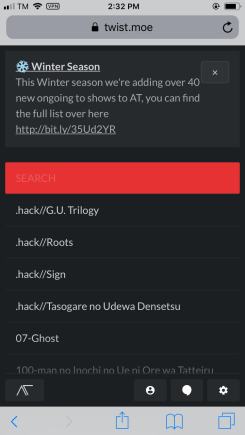
In this article, we will discuss how to stream anime shows on AnimeTwist using different devices.
AnimeTwist is another good anime streaming website. It has a one-click play on any title listed on its home page.
The interface of the website is just simple. There are no artistic, anime-themed designs. You will just see an alphabetical list of titles to watch for free.
You can also search for any anime that you like to stream.
There are no pop-ups when you watch a certain show but there are a few ads on the home page itself.
You can stream this website on different devices such as Firestick, Android, Windows, and iOS.
How to Watch AnimeTwist on Firestick
In order for you to stream AnimeTwist, you need to useSilk Browser or Firefox on your firestick device.
Using aMouse Toggle also will be a great help to easily navigate the website.
And always use a VPN service before streaming any website.
1. Click FIND.
2. Click Search.
3. Search for Silk Browser.
4. Tap on the Silk Browser icon when it appears
5. Click on the Get or Download button
6. Wait for the app to be installed
7. Select Open to launch the app
8. Hover to the search bar of the app
9. Type in twist.moe and then click on Go.
10. Click on Cancel when the suggestion box pops in.
11. You can now stream on AnimeTwist on your Firestick.
How to Watch AnimeTwist on Android
Always use a VPN when streaming through different websites on the internet.
1. Launch any browser on your device. For this example, we will use google.
2. Seach for twist.moe
3. There you go, you can now watch AnimeTwist on your android device.
How to Watch AnimeTwist on Windows
Reminder: Turn on your VPN service on your device before going to the AnimeTwist website.
1. Launch any browser on your computer, PC, or Windows. For this one, we are going to use Google.
2. Search for twist.moe
Legal Disclaimer: ReviewVPN.com does not encourage or endorse any illegal activity involved in the usage of services and applications referenced on this site. We do not verify the licensing agreements of services. The end-user is wholly responsible for ensuring that any media accessed through these services does not violate copyright and/or licensing laws. ReviewVPN does not promote, link to, or receive compensation from any Apps and IPTV services.
Click here to get the lowest price on Surfshark through our exclusive limited-time offer.
How to Install Surfshark VPN on Firestick
If your Firestick still has the older interface, read this article to learn how to update it: Update Firestick Interface.
You can download Surfshark directly from the Amazon App store. It will be easy for you to find Surfshark with your Firestick’s Find feature. Refer to our screenshots below.
1. Go to the Home screen of your Firestick.
2. Navigate towards the Find tab. Press the Search button from the resulting dropdown.
3. Type in the keyword of SurfShark and select from the suggestions that will appear.
4. Click the official SurfShark icon from your search results.
5. Press the Download (You own it) button.
6. The SurfShark VPN installer will download on your device.
7. SurfShark VPN’s app will automatically install itself on your Fire TV stick.
8. Press the Open button after completing SurfShark VPN’s installation process.
9. Please wait for the SurfShark VPN to load its user interface.
10. You can now log in with your SurfShark VPN account credentials.
For more VPN discounts, go to ReviewVPN Deals and purchase the best VPN for you.
Alternatives for AnimeTwist
There are so many websites that you can choose to stream your favorite anime shows. If you are not satisfied with AnimeTwist, here are the other anime streaming websites for you
We tested the website using Virus Total, and there is no malicious and suspicious domains present.
Is Anime Twist Legal?
We were not able to determine the legality of the site. For your safety, always use a VPN service before streaming any website.
Is AnimeTwist or twist.mow down?
It is perfectly working at the moment we tested the website.
Is AnimeTwist blocked in Australia?
You can use a VPN to access the content of AnimeTwist if you are in Australia. We suggest using Surfshark.
How to download videos from AnimeTwist?
It is hard to download content from AnimeTwist. You can create command from Github but that would take most of your time.
Is there an available app or apk for AnimeTwist?
Apparently, there is no apk or app that is hosted by the website.
Opinion
AnimeTwist is different from the rest of the Kiss Anime alternatives that we listed. It has a very different interface from the rest of them, but the content list is so massive.
Although there is a lot of buffering present on AnimeTwist. For every 5 minutes, it will stop to buffer. This must be fixed.
The website is also asking for donations to continue its service. If you happen to have the heart to donate, just be careful giving too much of your personal data, and always use a VPN while streaming.
We hope that this article helped you with streaming AnimeTwist on your firestick, android, windows, and iOS devices.
YOUR INTERNET ACTIVITY IS BEING WATCHED
ReviewVPN cannot attest to the legality, security and privacy of the applications discussed on this site. It is highly recommended that you use a VPN service while streaming or using Kodi.
Currently, your IP 216.73.216.211 is visible to everyone and your Browser is being tracked by Advertisers & ISP Provider.
Your activities are hidden from your ISP, the government, and from the apps you are using.
You can access additional movies and TV streams.
ISP attempts to throttle are thrwarted thus reducing buffering issues.
Geographically restricted content like Netflix and Hulu can be unblocked.
A VPN works be replacing your ISP-assigned IP address and creating an encrypted tunnel. We recommend the no log service offered by IPVanish. It works well on a Firestick and offers the fastest possible speeds.
Note: ReviewVPN.com does not own or operate any app nor does it endorse any. The main purpose of this article is strictly for educational purposes only.
In this article, we will tackle the best alternatives for the Streams for Us IPTV App.
Streams for Us is an Internet Protocol Television (IPTV) app that provides live TV channels to your devices.
Although this app provides a free trial, a monthly prize of $7 for one-device accessibility is a requirement.
Even though there has been funding, Streams for Us shuts down permanently. And with this shutdown, many IPTV services also follow. Some of these are The Players Klub, Area 51, and Universe IPTV.
That is why we listed down all the possible live TV apps that you can enjoy on your firestick.
If you like to learn more about Streams for Us, you can read our article: Streams For Us IPTV
Alternatives for Streams for Us
TV Tap Pro
TV Tap Apk or TV Tap Pro landed on top of our list for Streams for Us Alternatives. This is because TV Tap Pro offers a great number of working live channels to stream for free.
Features:
100% Free
100+ working channels
No registrations
Zero ads
One-click play
Provides channels not only from the USA but also from Italy, UK, and many more
Filter the channels by Categories
Works fine with Firestick remote
High Definition Videos
Many of the channels have EPG
You can add channels to Favorites
Less buffering time
Fast Playbacks
Not all channels are automatically going on fullscreen
Some Channels are muted and some do not have live streaming
Download the TV Tap Pro APK for Android
Note: ReviewVPN.com does not host this APK file. It is hosted on Archive.org.
If your Firestick still has the older interface, read this article to learn how to update it: Update Firestick Interface.
Live NetTV is another Streams for Us alternative that offers a big selection of live TV channels. You can stream for about 800 channels and video-on-demand for free without any advertisements.
Features:
Ad-free
Huge selection of live tv channels
Available on Google Chromecast
No registration required
Works perfectly with firestick remote
Less buffering
Fast playback response
Several channels do not have audio
Other channels are dead links
Download the Live NetTV APK for Android
Note: ReviewVPN.com does not host this APK file. It is hosted on Archive.org.
RedBox TV offers channels not only from America but from all over the world. Some of these are from UK, Australia, Germany, France, Nepal, Sri Lanka, Iran, Portugal, Philippines, Turkey, Indonesia, Bangladesh, Saudi Arabia, Pakistan, and Malaysia.
Features:
Works best with MX Player
Interface similar to Live NetTV
User-friendly app
Can add channels to favorites
Some channels offer high-definition videos
Fast loading time
Good playback response
No PVR
Not all channels are working
Download the RedBox TV APK for Android
Note: ReviewVPN.com does not host this APK file. It is hosted on Archive.org.
ReviewVPN cannot attest to the legality, security and privacy of the applications discussed on this site. It is highly recommended that you use a VPN service while streaming or using Kodi.
Currently, your IP 216.73.216.211 is visible to everyone and your Browser is being tracked by Advertisers & ISP Provider.
Your activities are hidden from your ISP, the government, and from the apps you are using.
You can access additional movies and TV streams.
ISP attempts to throttle are thrwarted thus reducing buffering issues.
Geographically restricted content like Netflix and Hulu can be unblocked.
A VPN works be replacing your ISP-assigned IP address and creating an encrypted tunnel. We recommend the no log service offered by IPVanish. It works well on a Firestick and offers the fastest possible speeds.
Legal Disclaimer: ReviewVPN.com does not encourage or endorse any illegal activity involved in the usage of services and applications referenced on this site. We do not verify the licensing agreements of services. The end-user is wholly responsible for ensuring that any media accessed through these services does not violate copyright and/or licensing laws. ReviewVPN does not promote, link to, or receive compensation from any Apps and IPTV services.
Streaming sometimes gives us a lot of buffering time. This is because your internet bandwidth is being throttled by your provider.
Other times when we cannot access some content because it is not available in our region.
These are just two of the many problems we face while streaming.
We can eliminate these problems if we use a VPN service.
But we have to be careful in choosing a VPN because there are some that are free but not safe. These unsafe VPNs may contain malware and host by suspicious domains.
That is why we suggest nothing but the best VPN service which is Surfshark.
Surfshark will give you all the things you need when you are streaming. Some of these are:
Gives you an additional wall of protection especially from your ISP while surfing and streaming.
Protects your online identity from hackers, especially when you are using public wi-fi
Gives easy access and downloads from different torrent sites without being caught.
Destroys geo-blocks that hinder you from accessing different contents.
Your connections and data will be kept encrypted and anonymous
Serves as a bridge that connects you to other servers
If your Firestick still has the older interface, read this article to learn how to update it: Update Firestick Interface.
You can download Surfshark directly from the Amazon App store. It will be easy for you to find Surfshark with your Firestick’s Find feature. Refer to our screenshots below.
1. Go to the Home screen of your Firestick.
2. Navigate towards the Find tab. Press the Search button from the resulting dropdown.
3. Type in the keyword of SurfShark and select from the suggestions that will appear.
4. Click the official SurfShark icon from your search results.
5. Press the Download (You own it) button.
6. The SurfShark VPN installer will download on your device.
7. SurfShark VPN’s app will automatically install itself on your Fire TV stick.
8. Press the Open button after completing SurfShark VPN’s installation process.
9. Please wait for the SurfShark VPN to load its user interface.
10. You can now log in with your SurfShark VPN account credentials.
Yes. But this time Streams for Us shuts down permanently.
Is an IPTV Legal?
There are some IPTVs that are legal and some that are not.
Do all IPTVs Safe?
We cannot speak for each and every IPTV, but most of the apps are safe to use.
Is Streams R Us for Firestick the same as Streams for Us?
No, they are two different apps.
Are Streams for Us available on Roku?
Streams for Us shuts down permanently so we can say that it is not available on Roku.
What are the best Streams for Us Alternative?
We listed down a lot of alternatives for Streams for Us, you can try to use the live TV apps. Most of them are from Amazon App Store although a lot of them are only available in the USA.
This is sad news that Streams for Us IPTV shut down permanently. The good thing is we immediately list down all the possible Streams for Us Replacements to choose from.
Now, even if we use Streams for Us even from Filelinked, we won’t be able to stream any live tv and movies for they will not be working anymore.
Just pick the best Streams for Us alternative or alternatives that we listed above and always stream with a VPN like Surfshark.
Final Thoughts
We hope that this article helped you know all the possible alternatives for Streams for Us IPTV.
Note: ReviewVPN.com does not own or operate any app nor does it endorse any. The main purpose of this article is strictly for educational purposes only.
In this article, we will tell what are the best alternatives for Putlocker.
Putlocker is a website where you can stream movies and TV series for free.
It became very famous as one of the leading movie streaming websites in the UK in 2012.
It boasts a total of over 1.6 million daily visitors.
With this, the copyright owners pressed charges against the website.
Now, putlocker is down leaving many website streamers in the hang of where they will go to watch their movies and series for free.
We listed down all the possible alternatives for the putlocker website. You can stream these websites on your firestick using Silk Browser, or Firefox. You can also stream them on Android, Windows, and iOS devices.
Stream4U website is becoming more and more famous when it comes to streaming sites. It is also an ad-free website that features popular and on-demand movies and series for free.
The best part is there is no registration need before you watch any title.
It has a big search bar on the home page. You can easily look for the show that you like to stream.
Features:
100% free
No registration required
Easy play movies and shows
Vidoe qualities are high-definition
Backup server links are available
Zero to minimal buffering time
No advertisements
Good response and fast playback
Flixtor
URL: https://flixtor.stream/
Watchability: 10/10
Presence of Advertisements: Minimal pop-ups
Flixtor is very detailed in suggesting which link to choose based on the most downloads and most popular.
This may prove that it is one of the best free streaming websites there is
Although there are a few presences of pop-ups. About 1 time for every title.
Before you play any title, this website allows users to watch trailers and previews.
It is said that an average Flixtor user can access about 2 million links.
Popcornflix is a free movie and series streaming website where you can easily sign up with.
It is available not only on Firestick, Android, iOS, Windows but also on Roku.
The very bad feature of Popcornflix is the presence of advertisements within the middle of the shows.
Features:
Easy to navigate interface
Lots of movie features
One-click movies
Geo-restricted content
Ad-supported
Can sign up but not required
VexMovies
URL: http://vexmovies.org/
Watchability: 10/10
Presence of Advertisements: 0%
VexMovies is one of the great free websites to easily locate and stream any title from their database.
It provides genres like War, Action, Romance, Love, Sci-Fi, and a lot more.
This free movies online site also comes along with core features like a recommendation, trending movies section, films in various high-quality, new titles, daily updates, and a lot more.
Click here to get the lowest price on Surfshark through our exclusive limited-time offer.
Vumoo
URL: http://vumoo.to/
Watchability: 9/10
Presence of Advertisements: Pop-ups available
Vumoo offers free, unlimited video streaming.
Vumoo provides thousands of TV shows and movies available for online streaming such as popular English TV series and Hollywood movies, with tons of international titles as well,
Click here to get the lowest price on Surfshark through our exclusive limited-time offer.
Pluto TV
URL: https://pluto.tv/
Watchability: 9/10
Presence of Advertisements: Internal Video advertisements
Pluto TV is a free online streaming site owned by the mass media company, ViacomCBS, a parent company of various popular film companies as well as TV production networks.
It offers movies and series via live streaming functions.
This streaming service provides content from popular networks like Nickelodeon, MTV, and Comedy Central.
Using Pluto TV doesn’t require a monthly subscription fee.
Presence of Advertisements: Pop-ups available (Removable upon signing in)
The Movie Bay is a free streaming website that offers tons of movies and TV shows.
Users can subscribe to actors, add titles to a watchlist, generate friends, send private messages, comment, and a lot more.
The videos that the watch movies online website provide are kept on TMB servers.
YOUR INTERNET ACTIVITY IS BEING WATCHED
ReviewVPN cannot attest to the legality, security and privacy of the applications discussed on this site. It is highly recommended that you use a VPN service while streaming or using Kodi.
Currently, your IP 216.73.216.211 is visible to everyone and your Browser is being tracked by Advertisers & ISP Provider.
Your activities are hidden from your ISP, the government, and from the apps you are using.
You can access additional movies and TV streams.
ISP attempts to throttle are thrwarted thus reducing buffering issues.
Geographically restricted content like Netflix and Hulu can be unblocked.
A VPN works be replacing your ISP-assigned IP address and creating an encrypted tunnel. We recommend the no log service offered by IPVanish. It works well on a Firestick and offers the fastest possible speeds.
Presence of Advertisements: Internal video advertisements
The IMDbTV means Internet Movie Database website where all of the contents are connected or linked.
It is a free streaming website with advertisements.
You need to have an IMDb TV account for you to stream videos within the website as well as the apps.
IMDBtv is supported by lots of devices like Android devices, Amazon Fire TV devices, iOS devices, Apple TV, Roku devices, laptops, and desktop browser.
Click here to get the lowest price on Surfshark through our exclusive limited-time offer.
Afdah
URL: http://afdah.info
Watchability: 9/10
Presence of Advertisements: pop-ups are available
Afdah is considered to be one of the best free movie streaming sites to watch movies on the web.
Users can stream thousands of popular TV Series, TV shows, and movies, which they can watch immediately with any device.
All the movies on Afdah are available in High Definition (HD) quality.
Features:
Free
Easy search function
Some ads are available
Multiple servers
High definition content
Internet Archive
URL: https://archive.org/details/moviesandfilms
Watchability: 9/10
Presence of Advertisements: No pop-ups
From the name itself, the Internet Archive offers numerous golden-aged films.
The watch movies online site captures all public domain media.
Features:
100% free
No registrations
Many black and white movies
offers copyright-free titles dating back to the 1920s and 1930s
Stream Safely with a VPN
Streaming different websites, your IP is exposed to different domains. Since it is your digital fingerprint, this might be dangerous if the link you stream belongs to a hacker domain. These hackers may use your IP to do illegal activities online.
You can prevent this from happening if you use a VPN.
We are sure that Surfshark is the best VPN to use. It protects your identity and gives you so much more benefits.
Some of these are:
Gives easy access and downloads from different torrent sites without being caught.
Destroys geo-blocks that hinder you from accessing different contents.
Serves as a bridge that connects you to other servers around the world
Makes your connections and data will be kept encrypted and anonymous
Gives you an additional wall of protection especially from your ISP while surfing and streaming.
Protects your online identity from hackers, especially when you are using public wi-fi
If your Firestick still has the older interface, read this article to learn how to update it: Update Firestick Interface.
You can download Surfshark directly from the Amazon App store. It will be easy for you to find Surfshark with your Firestick’s Find feature. Refer to our screenshots below.
1. Go to the Home screen of your Firestick.
2. Navigate towards the Find tab. Press the Search button from the resulting dropdown.
3. Type in the keyword of SurfShark and select from the suggestions that will appear.
4. Click the official SurfShark icon from your search results.
5. Press the Download (You own it) button.
6. The SurfShark VPN installer will download on your device.
7. SurfShark VPN’s app will automatically install itself on your Fire TV stick.
8. Press the Open button after completing SurfShark VPN’s installation process.
9. Please wait for the SurfShark VPN to load its user interface.
10. You can now log in with your SurfShark VPN account credentials.
For more VPN discounts, go to ReviewVPN Deals and purchase the best VPN for you.
FAQs about Putlocker
Is putlocker safe?
We cannot say that this website is safe because it is now down.
Is putlocker legal?
No. the putlocker website contains movies that are copyrighted and not legal to stream.
Opinion for Putlocker
If you like to stream movies like A Beautiful Day in the Neighborhood, A Quiet Place, What We Do in the Shadows, and How High in Putlocker, you can’t do that anymore. This is because Putlocker is not available right now.
People tend to search for putlocker com, https putlocker, putlo mer, putlock4r, putlocker uk, and putlocker 3 just to look for the website.
Sorry to disappoint you. That is why we listed these alternatives to help you have the same experience as putlocker through these other streaming websites.
Final Thoughts
We hope that this article helped you learn other possible alternative websites for putlocker.
Note: ReviewVPN.com does not own or operate any app nor does it endorse any. The main purpose of this article is strictly for educational purposes only.
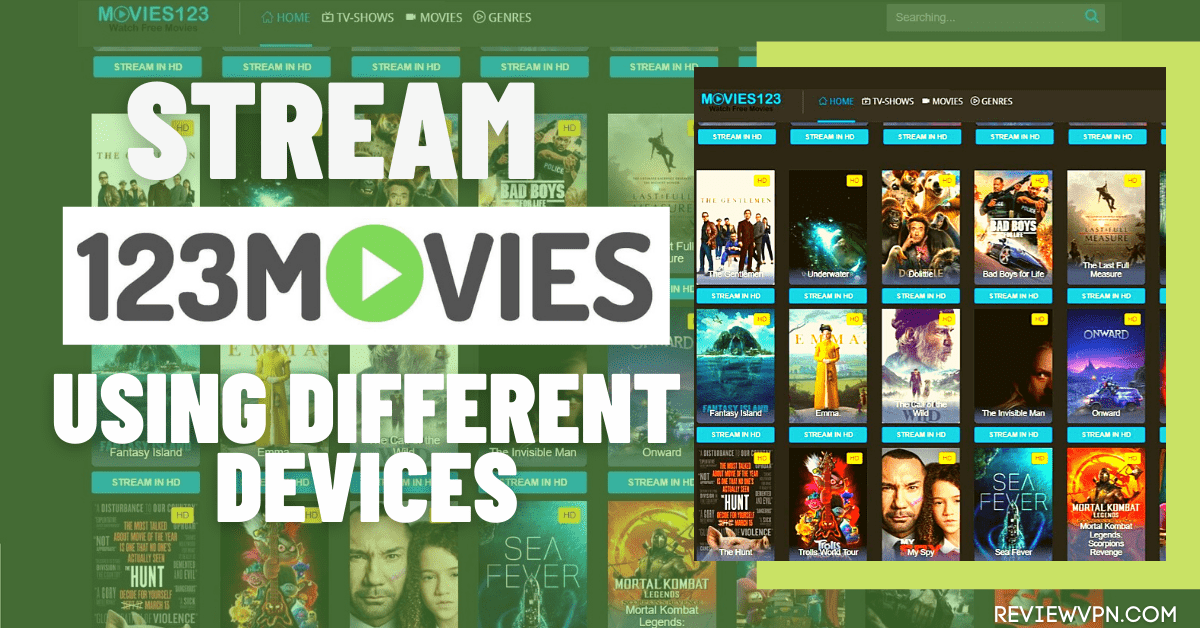
This article will show how to stream 123movies on your devices.
123Movies is a streaming website that provides a massive and up-to-date library for movies and even TV series for free. It has a simple interface where you can easily search for any title that you’d like to watch.
It works by finding the best links to watch any show.
This website has become very popular throughout the years. It had its up and down seasons due to several name and domain switches that it has undergone.
But now, 123Movies is perfectly working with a lot of new titles to offer.
There must have been a lot of websites named after 123Movies, but we consider 123movies-to.org as the official website.
You can stream this website on your Firestick, Android, Windows, and iOS.
If your Firestick still has the older interface, read this article to learn how to update it: Update Firestick Interface.
How to Stream 123Movies on Firestick
To stream 123movies, you need to have a browser installed on your firestick. You can use either Amazon Silk Browser or Firefox.
But it is important to use Mouse Toggle so you can easily navigate through any browser you use.
We always suggest having a VPN whenever you are streaming on any website on the internet.
1. Click FIND.
2. Click Search.
3. Search for Silk Browser.
4. Tap on the Silk Browser icon when it appears
5. Click on the Get or Download button
6. Wait for the app to be installed
7. Select Open to launch the app
8. Hover to the search bar of the app
9. Type in 123movies-to.org and then click on Go.
10. When the suggestion box pops in click on Cancel.
11. Now you can search any show on 123movies.
YOUR INTERNET ACTIVITY IS BEING WATCHED
ReviewVPN cannot attest to the legality, security and privacy of the applications discussed on this site. It is highly recommended that you use a VPN service while streaming or using Kodi.
Currently, your IP 216.73.216.211 is visible to everyone and your Browser is being tracked by Advertisers & ISP Provider.
Your activities are hidden from your ISP, the government, and from the apps you are using.
You can access additional movies and TV streams.
ISP attempts to throttle are thrwarted thus reducing buffering issues.
Geographically restricted content like Netflix and Hulu can be unblocked.
A VPN works be replacing your ISP-assigned IP address and creating an encrypted tunnel. We recommend the no log service offered by IPVanish. It works well on a Firestick and offers the fastest possible speeds.
Legal Disclaimer: ReviewVPN.com does not encourage or endorse any illegal activity involved in the usage of services and applications referenced on this site. We do not verify the licensing agreements of services. The end-user is wholly responsible for ensuring that any media accessed through these services does not violate copyright and/or licensing laws. ReviewVPN does not promote, link to, or receive compensation from any Apps and IPTV services.
It is very important to use a VPN when you are streaming any website on your device.
1. Launch any browser on your device. For this example, we will use google.
2. Seach for 123movies-to.org
3. There you go, you can now watch any shows on your android device.
How to Stream 123Movies on Windows
Make sure that there is a VPN running on your windows device when you stream on any website.
1. Launch any browser on your computer, PC, or Windows. For this one, we are going to use Google.
2. Search for 123movies-to.org
How to Stream 123Movies on iOS
Run your VPN on your iOS device before streaming on any website.
1. Launch the safari browser on your iOS device.
2. Type 123movies-to.org and click on Go.
3. You can now stream any show on your iOS device
Website Features
Easy-to-use interface
Simple 1 search bar home page
Provides links to different shows
Most of the links are to fmovies.to website
100% free
No registrations
Can search any title of your choice
Pros and Cons
Pros
Free
Easy-to-use
Cons
advertisements are present
pop-ups when you play any show on fmovies
Inconsistent in such a way that the website is sometimes down
Stream Safely with a VPN
In streaming any website, your IP which serves as your digital fingerprint is exposed to different domains. This might be dangerous if the link you stream belongs to a hacker domain. If this happens, hackers may use your IP to do illegal activities on the internet. This might is very harmful to your identity and safety. You can prevent this from happening if you use a VPN.
We tested and proved that Surfshark is the best VPN to use. It protects your identity and gives you so much more benefits.If you want to know more about this VPN, kindly read our Surfshark Review.
Gives easy access and downloads from different torrent sites without being caught.
Destroys geo-blocks that hinder you from accessing different contents.
Serves as a bridge that connects you to other servers around the world
Makes your connections and data will be kept encrypted and anonymous
Gives you an additional wall of protection especially from your ISP while surfing and streaming.
Protects your online identity from hackers, especially when you are using public wi-fi
The internet is filled with so many sites where you can stream movies and shows. You just have to be careful on streaming any website. So we really suggest using a VPN like Surfshark to make sure that you are safe and secure while streaming.
We listed down a lot of alternative websites to watch movies and shows aside from 123movies:
We have tested the following 123movies websites and listed down those that are currently working where you can stream movies and shows.
Here is the list of 123movies that works:
https://123moviesgo.ga/
https://ww.123moviess.gdn/
https://www9.0123movies.com/
https://wvw1.123movies.net/
https://123movies-i.net/
https://123movies.market/
https://w7.123movie.cc/
http://ww1.0123movies.su/
FAQs
Is 123movies safe?
We tested 123movies-to.org on Virus Total and found no threat or any malicious domain hosting the website.
Is 123movies legal?
We were unable to confirm if 123movies underwent all the legality that it needs to stream movies and shows for free. Just to be sure, make sure to use a VPN when you stream the site.
Is A Quiet Place 2 available on 123Movies?
Only A Quiet Place 2018 movie is available on 123movies at the moment.
Are 123movies go, 123movies la, 123movieme the same as 123movies to?
These websites have the same 123movies name but they have different domains.
Is there a 123movies downloader?
You can use the Free HD Movies Downloader to download movies from 123movies.
Is 123movies.com the official site?
We recommend this URL, 123movies-to.org when you search for 123movies.
Opinion
When you like to watch movies online, you can really rely on 123movies. This website mostly focuses on FMovies links. But it is still worth the try.
People tend to search for different sites like 123movies gomovies, and 123 movies but you can really use 123movies-to.org as the 123movies unblocked site.
We hope that this article helped you stream 123movies on your devices.
YOUR INTERNET ACTIVITY IS BEING WATCHED
ReviewVPN cannot attest to the legality, security and privacy of the applications discussed on this site. It is highly recommended that you use a VPN service while streaming or using Kodi.
Currently, your IP 216.73.216.211 is visible to everyone and your Browser is being tracked by Advertisers & ISP Provider.
Your activities are hidden from your ISP, the government, and from the apps you are using.
You can access additional movies and TV streams.
ISP attempts to throttle are thrwarted thus reducing buffering issues.
Geographically restricted content like Netflix and Hulu can be unblocked.
A VPN works be replacing your ISP-assigned IP address and creating an encrypted tunnel. We recommend the no log service offered by IPVanish. It works well on a Firestick and offers the fastest possible speeds.
Note: ReviewVPN.com does not own or operate any app nor does it endorse any. The main purpose of this article is strictly for educational purposes only.
In this article, we will tackle everything you need to know about Kodi.
Kodi is an open-source, free online media player that streams content from the internet and your local devices.
Xbox Media Center or XBMC was the first name of Kodi when it was introduced last 2002. As it transformed into Kodi, it became very popular with millions of users worldwide.
Many people find it more interesting as different developers create addons for more content to stream. These addons are unofficial and provide movies, tv-series, audio, etc. for free.
It is an advantage for Kodi to be available on many different devices, from the big screen to smartphones.
Although some might not find the interface of Kodi to be easy to understand at first. But when you finally understand the software, you will enjoy all the benefits given by Kodi.
You can use Kodi on Firestick, Android, Windows, macOS, iOS, Linux, and Raspberry Pi.
Kodi APK Download for Android Devices
Note: ReviewVPN.com does not host this APK file. It is hosted by Archive.org
How to Install Kodi on Firestick for Beginners
We will show you how to install Kodi on your firestick device. This version of Kodi is 18.9.
Since Kodi is not an official application from the Amazon App Store, we are going to sideload it.
We also suggest the use of a VPN when streaming on Kodi.
1. Go to Settings
2. Select Device or My Fire TV
3. Choose Developer Options
4. Turn on the ADB Debugging and the Apps from Unknown Sources
5. Click Turn On
6. Go back to Home and navigate to Search
7. Type in Downloader and click the suggestion
8. Tap the Downloader icon when it appears on the screen
9. Click Get or Download
10. Wait for the app to be installed
11. Select the Open button to launch the app
12. Click Allow
13. Tap the OK button
14. Hover to the search engine
15. Type https://reviwvpn.com/kodiapk on the search engine and click Go
16. Let the apk be downloaded
17. Choose Install
18. Wait for the app to be installed
19. Click on Open
20. Select Continue to accept the app’s request.
21. Click on Allow.
22. You can now use Kodi on your Firestick.
How to Install Kodi on Windows
To Install Kodi on Windows, or any other device other than Firestick, we need to go to the official Kodi Website. The version of the APK featured on the website is always the latest one.
At this moment, Kodi v19 is the latest version of Kodi that is downloadable from Kodi.tv.
1. Launch any browser on your computer, PC, or Windows. For this one, we are going to use Google.
2. Search for kodi.tv
3. Tap the Download button
4. Scroll down, and look for the icons of different devices applicable for Kodi. For this example, we are going to use Windows.
5. Choose the best installer for your device.
6. Let the file be downloaded on your device.
7. Tap the file once it is downloaded.
8. Select Next.
9. Choose I Agree.
10. Select Next one more time.
11. For Choose Install Location, click Next.
12. Click Next again.
13. Then choose Install.
14. Wait for the software to be installed.
15. Make sure to check Run Kodi then click on Finish.
ReviewVPN cannot attest to the legality, security and privacy of the applications discussed on this site. It is highly recommended that you use a VPN service while streaming or using Kodi.
Currently, your IP 216.73.216.211 is visible to everyone and your Browser is being tracked by Advertisers & ISP Provider.
Your activities are hidden from your ISP, the government, and from the apps you are using.
You can access additional movies and TV streams.
ISP attempts to throttle are thrwarted thus reducing buffering issues.
Geographically restricted content like Netflix and Hulu can be unblocked.
A VPN works be replacing your ISP-assigned IP address and creating an encrypted tunnel. We recommend the no log service offered by IPVanish. It works well on a Firestick and offers the fastest possible speeds.
An Addon provides additional features and services for Kodi. Such services are not available in the basic format of the software.
Kodi Addons are customized differently with unique features mostly for online streaming of movies, shows, music, and many more.
Although a build contains addons, you can still install an addon without the build. You just have to know also the specific URL for the repository from which an addon will come from.
For this example, we are going to use Exodus Redux to show how to install an addon on your Kodi.
How to Install Exodus Redux on Kodi with Screenshots
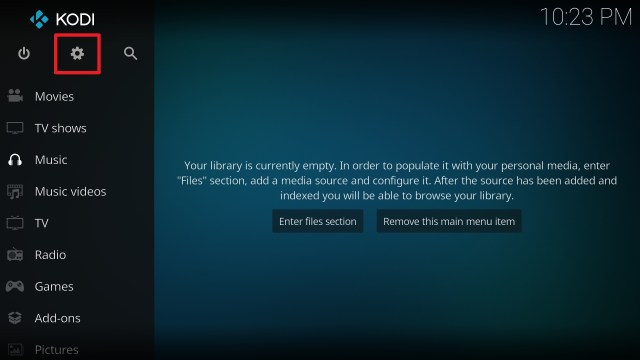
1. From the home screen, select the cogwheel at the upper left.
2. Select System in the bottom right corner.
3. Select Add-ons on the left side of the screen.
4. Select Unknown sources.
5. Click Yes to allow unknown sources.
6. Select File manager.
7. Click Add source.
8. Click on <None>.
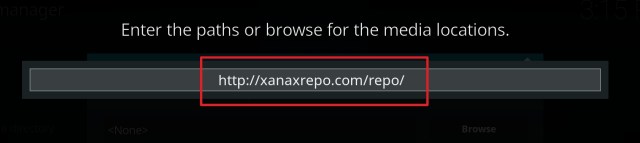
9. Type in https://i-a-c.github.io at the URL box.
10. Click on OK.
11. Select enter a name for this media source.
12. Name it Exodus Redux (this part isn’t critical as long as you remember the name).
13. Click on OK.
14. Click on OK.
15. Take one step back and click on Add-ons.
16. Select install from zip file.
17. Click on Exodus Redux (or whatever you named the source).
18. Click on repository.exodusredux-0.0.8.zip.
19. Select on Install from repository.
20. Click on Exodus Redux Repo.
21. Pick Video add-ons.
22. Select Exodus Redux again.
23. Click on Install.
24. Select OK after reviewing the add-ons that will be installed.
25. You should see a popup in the upper right corner saying Exodus Redux has installed. There will be multiple popups for the various components.
26. Click on Open to start the Exodus Redux add-on.
Legal Disclaimer: ReviewVPN.com does not encourage or endorse any illegal activity involved in the usage of services and applications referenced on this site. We do not verify the licensing agreements of services. The end-user is wholly responsible for ensuring that any media accessed through these services does not violate copyright and/or licensing laws. ReviewVPN does not promote, link to, or receive compensation from any Apps and IPTV services.
YOUR INTERNET ACTIVITY IS BEING WATCHED
ReviewVPN cannot attest to the legality, security and privacy of the applications discussed on this site. It is highly recommended that you use a VPN service while streaming or using Kodi.
Currently, your IP 216.73.216.211 is visible to everyone and your Browser is being tracked by Advertisers & ISP Provider.
Your activities are hidden from your ISP, the government, and from the apps you are using.
You can access additional movies and TV streams.
ISP attempts to throttle are thrwarted thus reducing buffering issues.
Geographically restricted content like Netflix and Hulu can be unblocked.
A VPN works be replacing your ISP-assigned IP address and creating an encrypted tunnel. We recommend the no log service offered by IPVanish. It works well on a Firestick and offers the fastest possible speeds.
Lots of available builds, addons, and repositories for additional features
Ability to browse URLs from the internet
Pros and Cons
Pros
100% free
ability to download addons
available to almost all types of devices
Cons
the interface is not that easy to use
sometimes the app experiences problems
Stream Safely with a VPN
When it comes to Kodi, we think that having a VPN is a must. Since you’ll be browsing lots of sites on the internet using Kodi, you need to protect your identity more. Having a VPN will give you an additional wall of protection from hackers, malware, and especially from your ISP
Here at reviewvpn.com, we always suggest using Surfshark. It is the best VPN for streaming. It guarantees your safety.
When you experience Kodi Buffering, it is one of the best solutions to troubleshoot the problem. If you want to know more about this VPN, kindly read ourSurfshark Review.
Other features of Surfshark:
Surfshark’s protocols are perfect for use with Kodi.
This VPN will definitely hide all of your online activities.
It has a military-grade level of encryption that will ensure your safety.
With this VPN you can access more content and even unblock Netflix and other platforms.
It also supports P2p file-sharing activities which makes it applicable to torrenting
Strictly follows No-Log Policy.
It provides 3,200 VPN servers in 65 locations worldwide.
Click here to get the lowest price on Surfshark through our exclusive limited-time offer.
How to Install Surfshark VPN on Firestick
If your Firestick still has the older interface, read this article to learn how to update it: Update Firestick Interface.
You can download Surfshark directly from the Amazon App store. It will be easy for you to find Surfshark with your Firestick’s Find feature. Refer to our screenshots below.
1. Go to the Home screen of your Firestick.
2. Navigate towards the Find tab. Press the Search button from the resulting dropdown.
3. Type in the keyword of SurfShark and select from the suggestions that will appear.
4. Click the official SurfShark icon from your search results.
5. Press the Download (You own it) button.
6. The SurfShark VPN installer will download on your device.
7. SurfShark VPN’s app will automatically install itself on your Fire TV stick.
8. Press the Open button after completing SurfShark VPN’s installation process.
9. Please wait for the SurfShark VPN to load its user interface.
10. You can now log in with your SurfShark VPN account credentials.
Since Kodi is a media player as well, it is somehow the same as VLC Media Player. Although through Kodi, you can stream not only your local files but media from the internet.
This is what separates Kodi from the other media player not only VLC.
This app is similar to Kodi when it comes to the presence of add-ons. To make your streaming capability better, you can also install addons within Stremio.
Some addons on Stremio also work like those of Kodi’s in finding the best torrent links to stream movies and series.
FAQs
Is Kodi Safe to Use?
We tested Kodi using Virus Total. There are no detections found in the results. But is always important to use a VPN every time you use Kodi.
How to install and use Kodi 16.1 Jarvis for beginners?
This question is not up to date. As years go by, Kodi developers try to update the software. You can see how to install it by referring to the above installation guide.
Is Kodi Legal?
Downloading and using this software along with the official addons of the app is legal. Just to be sure, it is a must to have a VPN while streaming through the app.
Many people find it hard to use this app at first. They tend to search for Kodi tv explained guides for beginners and dummies. This is why we create this article in order to help those who are trying to understand Kodi.
From 2017 to 2019 up until now, many individuals tried to give the best Kodi guide for beginners using different devices like android, and windows. We tried it more completely with this article.
Kodi is a very wide and flexible app. But when you tried it and become more familiar with it you will be mesmerized by its great features.
We cannot articulate more about the fact that it is free and you can stream more with it. And it is really one of the best technology to use for streaming.
Final Thoughts
We hope that this article helped you learn more about Kodi.
Note: ReviewVPN.com does not own or operate any app nor does it endorse any. The main purpose of this article is strictly for educational purposes only.
This article will teach you to stream AnimeLand on your firestick, android, windows, and iOS.
Animeland is another website to stream your favorite anime.
You can watch a lot of dubbed episodes on this website rather than reading subtitles which we all know could be a little harder for some of us.
There are some pop-ups before you can completely watch any show. This could be bothersome at some point, but once you are settled, you can definitely enjoy watching on this site.
When you go to the home page of Animeland, you will surely notice the individual tabs for top animes like Naruto.
Another thing is, Animeland also features subbed anime. It is a great help to understand the shows better especially if you can’t understand Japanese.
Legal Disclaimer: ReviewVPN.com does not encourage or endorse any illegal activity involved in the usage of services and applications referenced on this site. We do not verify the licensing agreements of services. The end-user is wholly responsible for ensuring that any media accessed through these services does not violate copyright and/or licensing laws. ReviewVPN does not promote, link to, or receive compensation from any Apps and IPTV services.
YOUR INTERNET ACTIVITY IS BEING WATCHED
ReviewVPN cannot attest to the legality, security and privacy of the applications discussed on this site. It is highly recommended that you use a VPN service while streaming or using Kodi.
Currently, your IP 216.73.216.211 is visible to everyone and your Browser is being tracked by Advertisers & ISP Provider.
Your activities are hidden from your ISP, the government, and from the apps you are using.
You can access additional movies and TV streams.
ISP attempts to throttle are thrwarted thus reducing buffering issues.
Geographically restricted content like Netflix and Hulu can be unblocked.
A VPN works be replacing your ISP-assigned IP address and creating an encrypted tunnel. We recommend the no log service offered by IPVanish. It works well on a Firestick and offers the fastest possible speeds.
Tabs for HomePage, Dubbed Anime List, Anime Movie, Dragon Ball Super, Naruto Shippuden, and One Piece
Latest Animes and New Added Animes featured on the home page
Content
Dubbed content
Subbed content
Downloadable content
High definition videos
Ads are present
Animeland Dubbed TV Anime List
This portion of the website contains hundreds of anime titles listed alphabetically. Since it is too many to mention all titles present on this potion, we only listed some anime that are popular.
Astro Boy
Attack On Titan (Seasons 1 to Finale)
Avatar, The Last Air Bender
Bakugan
Beyblade
Black Clover
Blue Exorcist
Boruto
Digimon
Doraemon
Dragon Ball
Fairy Tail
Gundam
Kimitsu No Yaiba
Naruto
One Piece
Sailor Moon
Shakugan No Shana
Shaman King
And many more.
Pros and Cons
Pros
100% Free
No registration
Dubbed content
Cons
advertisements are present
lots of pop-ups
too much buffering time
Stream Safely with a VPN
Many websites are not safe and hosted by malicious domains. Some have suspicious data that may affect our devices and hack our accounts.
To protect us from these, we need a VPN. VPNs that are safe and great such as SurfShark.
We guarantee that SurfShark is a tested and proven software that provides security and satisfaction to its users.
It is a very great technology that provides a lot of od benefits such as:
Destroys geo-blocks that hinder you from accessing different contents.
Makes your connections and data will be kept encrypted and anonymous
Serves as a bridge that connects you to other servers around the world
Gives easy access and downloads from different torrent sites without being caught.
Protects your online identity from hackers, especially when you are using public wi-fi
Click here to get the lowest price on SurfShark through our exclusive limited-time offer.
How to Install Surfshark on Firestick with Screenshots
If your Firestick still has the older interface, read this article to learn how to update it: Update Firestick Interface.
You can download Surfshark directly from the Amazon App store. It will be easy for you to find Surfshark with your Firestick’s Find feature. Refer to our screenshots below.
Follow our screenshots below to install the SurfShark VPN app on your Fire TV stick.
1. Go to the Home screen of your Firestick.
2. Navigate towards the Find tab. Press the Search button from the resulting dropdown.
3. Type in the keyword of SurfShark and select from the suggestions that will appear.
4. Click the official SurfShark icon from your search results.
5. Press the Download (You own it) button.
6. The SurfShark VPN installer will download on your device.
7. SurfShark VPN’s app will automatically install itself on your Fire TV stick.
8. Press the Open button after completing SurfShark VPN’s installation process.
9. Please wait for the SurfShark VPN to load its user interface.
10. You can now log in with your SurfShark VPN account credentials.
Yes. When you search for Animeland.tv you will be directed to animeland.us as well.
Are the animes present on ww1.animeland.tv safe?
We tested the URL of Animeland using Virus Total and found out that there are no suspicious data present on the website. Just make sure to use a VPN for extra protection.
How to change your profile name on Animeland or Animeland.tv?
You can set a name on the chatbox located in the lower right portion of the app. There you can change your name by logging in and confirming using your email address.
We suggest for you to be careful on giving your personal data to any website.
Is Animeland Down?
During the moment we stream the website, it is perfectly working and not down.
Is there an Animeland.tv app?
There is an Animeland app available on the google app store but it is not affiliated with the website.
How to download videos on Animeland?
When you watch an episode or movie on Animeland, you will see a download button on the upper right portion of the video.
Is there an Animeland.tv APK?
The APK available on other sites is not affiliated with the website.
Is www.animeland.com dubbed the same as animeland.us?
No. animeland.com is a different website from animeland.us.
Opinion
If you search for Animelandtv only, you won’t be directed to the website immediately.
Make sure to search for the correct URL to stream the site easily.
Animeland is a good website aside from the ads and the pop-ups. It is very helpful because most people find it hard to read subtitles. This website serves its purpose very well by dubbing the content in English.
Overall, this website is worth checking out.
Final Thoughts
We hope that this article helped you with streaming Animeland on your firestick, android, windows, and iOS devices.
Note: ReviewVPN.com does not own or operate any app nor does it endorse any. The main purpose of this article is strictly for educational purposes only.
This article will help you watch anime on AnimeFrenzy using different devices.
First, let’s discuss some details about AnimeFrenzy.
AnimeFrenzy streams popular and on-demand animes in different categories. You can choose from Movies, Dubbed, Ongoing, Popular, Schedule, and even Hentai.
It is one of the many good alternatives for kissanime. With its easy-to-use interface, you can quickly search, choose and play any title of your choice.
Although this website has a login and register menu, you can still watch animes without registering.
There are some advertisements present on this website, but the good thing is they are not bothersome.
One of the unique characteristics of AnimeFrenzy is the availability of a chatbox where anime fans all over the world can talk to each other and share their thoughts about any shows.
You can stream AnimeFrenzy on different devices like Firestick, Android, Windows, and iOS.
If your Firestick still has the older interface, read this article to learn how to update it: Update Firestick Interface.
How to Stream AnimeFrenzy on Firestick
In order to stream any website on your firestick device, you need to have a browser like Silk Browser or Firefox.
It is also advisable to have a Mouse Toggle for easy navigation through the browser.
We always suggest having a VPN running in the background of your firestick whenever you navigate through any website such as AnimeFrenzy.
1. Click FIND.
2. Click Search.
3. Search for Silk Browser.
4. Tap on the Silk Browser icon when it appears
5. Click on the Get or Download button
6. Wait for the app to be installed
7. Select Open to launch the app
8. Hover to the search bar of the app
9. Type in animefrenzy.org and then click on Go.
10. You can now stream any anime on AnimeFrenzy.
How to Stream AnimeFrenzy on Android.
We recommend the use of a VPN on your phone before streaming through the website. This will be very helpful because it will provide safety for you.
1. Launch any browser on your device. For this example, we will use google.
2. Seach for animefrenzy.org
3. There you go, you can now watch anime on your phone.
How to Stream AnimeFrenzy on Windows
Make sure to have a VPN on your PC, because it provides safety for you and your files when you navigate through different websites.
1. Launch any browser on your computer, PC, or Windows. For this one, we are going to use Google.
2. Search for animefrenzy.org
How to Stream AnimeFrenzy on iOS
It is very advisable to use a VPN because it will protect your identity when you stream any website such as AnimeFrenzy.
Legal Disclaimer: ReviewVPN.com does not encourage or endorse any illegal activity involved in the usage of services and applications referenced on this site. We do not verify the licensing agreements of services. The end-user is wholly responsible for ensuring that any media accessed through these services does not violate copyright and/or licensing laws. ReviewVPN does not promote, link to, or receive compensation from any Apps and IPTV services.
YOUR INTERNET ACTIVITY IS BEING WATCHED
ReviewVPN cannot attest to the legality, security and privacy of the applications discussed on this site. It is highly recommended that you use a VPN service while streaming or using Kodi.
Currently, your IP 216.73.216.211 is visible to everyone and your Browser is being tracked by Advertisers & ISP Provider.
Your activities are hidden from your ISP, the government, and from the apps you are using.
You can access additional movies and TV streams.
ISP attempts to throttle are thrwarted thus reducing buffering issues.
Geographically restricted content like Netflix and Hulu can be unblocked.
A VPN works be replacing your ISP-assigned IP address and creating an encrypted tunnel. We recommend the no log service offered by IPVanish. It works well on a Firestick and offers the fastest possible speeds.
Click here to get the lowest price on Surfshark through our exclusive limited-time offer.
How to Install Surfshark VPN on Firestick
If your Firestick still has the older interface, read this article to learn how to update it: Update Firestick Interface.
You can download Surfshark directly from the Amazon App store. It will be easy for you to find Surfshark with your Firestick’s Find feature. Refer to our screenshots below.
1. Go to the Home screen of your Firestick.
2. Navigate towards the Find tab. Press the Search button from the resulting dropdown.
3. Type in the keyword of SurfShark and select from the suggestions that will appear.
4. Click the official SurfShark icon from your search results.
5. Press the Download (You own it) button.
6. The SurfShark VPN installer will download on your device.
7. SurfShark VPN’s app will automatically install itself on your Fire TV stick.
8. Press the Open button after completing SurfShark VPN’s installation process.
9. Please wait for the SurfShark VPN to load its user interface.
10. You can now log in with your SurfShark VPN account credentials.
It is very easy to download an episode on AnimeFrenzy. When you watch a certain episode, just look for the download button and click it.
Is AnimeFrenzy a Safe Site?
We tested the URL of AnimeFrenzy using Virus Total. The results show that there are no malicious and suspicious domains or data present on this website.
We still suggest using a VPN while streaming through the site.
Is AnimeFrenzy Down Right Now?
AnimeFrenzy.org is currently working at the moment we checked it. Although if you are looking for AnimeFrenzy.eu, it is currently down at the moment.
Is AnimeFrenzy the same as animefrenzy.net?
If you are going to search for AnimeFrenzy.net, you will be directed to animefrenzy.org which is the website that we are featuring in this article.
Is AnimeFrenzy the same as animefrenzy.eu?
https://animefrenzy.eu is a different website. When we searched for animefrenzy.eu it is currently down.
Can I watch One Piece on AnimeFrenzy?
Yes, One Piece Anime is available on this website.
Can I watch Demon Slayer on AnimeFrenzy?
Yes. You can stream Demon Slayer on AnimeFrenzy.
Is there a MOD APK for AnimeFrenzy?
Currently, there is still no APK for AnimeFrenzy.
Opinion
We can really say that AnimeFrenzy is a reliable website for streaming because it provides up-to-date episodes and movies. It is really a good alternative for KissAnime.
The bad thing about this website is the presence of pop-ups. But other than that, we can say that is a very great site to stream our favorite anime.
Just be sure to search for the correct site name. Others searched for anime frenzy and frenzy anime sites.
Do not mistake AnimeFrenzy.org to be the same as AnimeFrenzy.eu, because animefrenzy.eu is a different site.
We hope that this article helped you with streaming AnimeFrenzy on your firestick, android, windows, and iOS devices.
Note: ReviewVPN.com does not own or operate any app nor does it endorse any. The main purpose of this article is strictly for educational purposes only.
This article will help you stream MyFlixer on your firestick, android, windows, and iOS devices.
MyFlixer is a streaming website that houses lots of movies and tv shows. Most of the titles on this website are popular and updated. The best part is you can stream any shows for free. You can stream videos even if you don’t register to an account.
Although there is a login and register menu on the top right portion of the website. MyFlixer made it clear that there will be no tracking, no advertisements, and no virus present on their website. This site only asks for a share on different social media like Facebook, and Twitter for it to be more popular. You can stream MyFlixer on different devices like Firestick, Android, Windows, and iOS.
If your Firestick still has the older interface, read this article to learn how to update it: Update Firestick Interface.
How to Watch MyFlixer on Firestick (Video)
How to Watch MyFlixer on Firestick with Screenshots
To stream MyFlixer on your firestick, you need to have a browser installed on your device. You can use Silk Browser or Firefox for this website.
For easy navigation, we suggest installing Mouse Toggle as well.
Reminder: Do not forget to activate or connect your VPN before streaming through this website.
1. Click FIND.
2. Click Search.
3. Type in Silk Browser and click on the suggestion
4. Tap on the Silk Browser icon when it appears
5. Click on the Get or Download button
6. Wait for the app to be installed
7. Select Open to launch the app
8. Hover to the search bar of the app
9. Type in https://myflixer.to or https://web.myflixer.ru/ then click on Go.
10. Click Cancel when the suggestion box appears.
11. Tap on the View Full Site button at the lower part of the website
Make sure to have a VPN running on your device before streaming this website.
1. Launch the safari browser on your iOS device.
2. Type myflixer.ru and click on Go.
3. Click on Go to Home Page
4. You can now stream movies on your iOS device using MyFlixer
YOUR INTERNET ACTIVITY IS BEING WATCHED
ReviewVPN cannot attest to the legality, security and privacy of the applications discussed on this site. It is highly recommended that you use a VPN service while streaming or using Kodi.
Currently, your IP 216.73.216.211 is visible to everyone and your Browser is being tracked by Advertisers & ISP Provider.
Your activities are hidden from your ISP, the government, and from the apps you are using.
You can access additional movies and TV streams.
ISP attempts to throttle are thrwarted thus reducing buffering issues.
Geographically restricted content like Netflix and Hulu can be unblocked.
A VPN works be replacing your ISP-assigned IP address and creating an encrypted tunnel. We recommend the no log service offered by IPVanish. It works well on a Firestick and offers the fastest possible speeds.
Legal Disclaimer: ReviewVPN.com does not encourage or endorse any illegal activity involved in the usage of services and applications referenced on this site. We do not verify the licensing agreements of services. The end-user is wholly responsible for ensuring that any media accessed through these services does not violate copyright and/or licensing laws. ReviewVPN does not promote, link to, or receive compensation from any Apps and IPTV services.
How to Install Surfshark on Firestick with Screenshots
If your Firestick still has the older interface, read this article to learn how to update it: Update Firestick Interface.
You can download Surfshark directly from the Amazon App store. It will be easy for you to find Surfshark with your Firestick’s Find feature. Refer to our screenshots below.
Follow our screenshots below to install the Surfshark VPN app on your Fire TV stick.
1. Go to the Home screen of your Firestick.
2. Navigate towards the Find tab. Press the Search button from the resulting dropdown.
3. Type in the keyword of Surfshark and select from the suggestions that will appear.
4. Click the official Surfshark icon from your search results.
5. Press the Download (You own it) button.
6. The Surfshark VPN installer will download on your device.
7. Surfshark VPN’s app will automatically install itself on your Fire TV stick.
8. Press the Open button after completing Surfshark VPN’s installation process.
9. Please wait for the Surfshark VPN to load its user interface.
10. You can now log in with your Surfshark VPN account credentials.
For more VPN discounts, go to ReviewVPN Deals and purchase the best VPN for you.
MyFlixer Alternatives
It is a known fact that we can watch movies and shows online for free. This may not be 100% legal but there are a lot of websites that work the same as MYFlixer in providing popular and on-demand titles to stream.
Here, we listed some of the Best Free Movie Streaming Websites for you to check out:
You can also use applications to stream movies and shows for free. But in order to install these apps, you need to use Downloader and Jailbreak your Firestick.
Here are some of the best apps to stream movies and series:
Downloading is possible on MyFlixer but it might not be safe. If downloading requires you to register and give information, we suggest not risking this one.
You can also use downloader sites to download videos on your device.
Is MyFlixer Safe?
In terms of virus or malicious domains, we tested MyFlixer on Virus Total and found that this website does contain some suspicious domains and malware. Click here to see the test result of MyFlixer.
It is still better to use a VPN while streaming this website because as a free streaming website, we are not 100% sure of our safety.
Just make sure not to give any personal information to this site.
Is MyFlixer Legal?
Many claims that MyFlixer is an illegal site. Mainly because it streams movies for free. This may be considered Piracy. Just to be on the safer side of things, always use a VPN when streaming on MyFlixer.
Is MyFlixer Not Working?
As per our last checking, MyFlixer is working fine.
Is myflixer.to one of the alternatives for MyFlixer?
If you type in myflixer.to on your browser, you will also go to MyFlixer official home page.
Is MyFlixer.com the same as MyFlixer.ru
They have almost the same interface, but advertisements are present on MyFlixer.com.
We also tried to compare the 2 websites at the same time and found out that they are not the same.
The best thing about this website is you can stream movies and shows in high definition for free. And there is no registration and no advertisements present which make it any better.
Since we are not quite sure about the legality of the site, we suggest using a VPN every time you stream it. And never give your personal data.
Well, many people tried different words while searching for MyFlixer. They search for myflix, myflix.com, and my flixer.com which are different from the original site which is MyFlixer.ru. Others even search for Myfixer movies which is just maybe a typographical error.
Final Thoughts
We hope that this article helped you with streaming MyFlixer on your firestick, android, windows, and iOS devices.
Note: ReviewVPN.com does not own or operate any app nor does it endorse any. The main purpose of this article is strictly for educational purposes only.
FMovies is a streaming website where you can watch movies for free.
Most movies are in high definition and the best part is, there is no need to register for you to watch any movie.
Like other streaming websites, FMovies has downtime as well. So sometimes, when you check for fmovies.to, you won’t be able to find it. This is mainly because sites like FMovies often have domain changes.
There will be times when you experience having advertisements, even when you click on a specific title. All you need to do is just use your remote to exit out the pop-up.
FMovies is available on any browser. You can use any devices like Amazon Firestick, Android devices, Windows, and iOS.
This website is part of our list of Best Free Movie Streaming Websites. You can find 49 other streaming websites to stream your favorite shows and movies when you read our article.
If your Firestick still has the older interface, read this article to learn how to update it: Update Firestick Interface.
How to Watch FMovies on Firestick (Video)
How to Watch FMovies on Firestick
You can use the Silk Browser or Firefox to stream this website on your firestick device. It is also better to have a Mouse Toggle installed as well.
Do not forget to activate or connect your VPN before streaming through this website.
1. Click FIND.
2. Click Search.
3. Type in Silk Browser and click on the suggestion
4. Tap on the Silk Browser icon when it appears
5. Click on the Get or Download button
6. Wait for the app to be installed
7. Select Open to launch the app
8. Hover to the search bar of the app
9. Type in fmovies.to and then click on Go.
10. Click Cancel when the suggestion box appears.
11. Tap on Go to Home Page button at the lower part of the website
12. You can now stream through the FMovies site
Click here to get the lowest price on Surfshark through our exclusive limited-time offer.
How to Watch FMovies on Android
Make sure to have a VPN running on your device before streaming this website.
1. Launch any browser on your device. For this example, we will use google.
2. Type fmovies.to in the search bar and click on GO.
3. There you go, you now have FMovies on your android device.
How to Watch FMovies on Windows
Do not forget to activate or connect your VPN before streaming through this website.
1. Launch any browser on your computer, PC, or Windows. For this one, we are going to use Google.
2. Type in fmovies.to on the search bar, and click on Go to Home Page.
3. You can now stream on FMovies on your Windows.
How to Stream FMovies using iOS Device
Make sure to have a VPN running on your device before streaming this website.
1. Launch the safari browser on your iOS device.
2. Type fmovies.to and click on Go.
3. Click on Go to Home Page
4. You can now stream movies on your iOS device using FMovies
YOUR INTERNET ACTIVITY IS BEING WATCHED
ReviewVPN cannot attest to the legality, security and privacy of the applications discussed on this site. It is highly recommended that you use a VPN service while streaming or using Kodi.
Currently, your IP 216.73.216.211 is visible to everyone and your Browser is being tracked by Advertisers & ISP Provider.
Your activities are hidden from your ISP, the government, and from the apps you are using.
You can access additional movies and TV streams.
ISP attempts to throttle are thrwarted thus reducing buffering issues.
Geographically restricted content like Netflix and Hulu can be unblocked.
A VPN works be replacing your ISP-assigned IP address and creating an encrypted tunnel. We recommend the no log service offered by IPVanish. It works well on a Firestick and offers the fastest possible speeds.
Legal Disclaimer: ReviewVPN.com does not encourage or endorse any illegal activity involved in the usage of services and applications referenced on this site. We do not verify the licensing agreements of services. The end-user is wholly responsible for ensuring that any media accessed through these services does not violate copyright and/or licensing laws. ReviewVPN does not promote, link to, or receive compensation from any Apps and IPTV services.
Features popular and on-demand movies on the home page of the website
Gives plot and description for every title
Easy to navigate with a mouse toggle
Hard to click the play button even with a mouse toggle
Pop-up of advertisement present on the home page
Search engine available
Tabs for Genre, Country, Movies, TV-Series, Top IMDb, and Request
Leave this page suggestion for every action taken within the site
Content
Popular Titles available
Supports subtitles
Good quality movies and tv series
Advertisements are present
Genres available on FMovies
Action
Biography
Crime
Family
History
Music
Romance
Thriller
Western
Adventure
Costume
Documentary
Fantasy
Horror
Mystery
Sci-Fi
TV Show
Animation
Comedy
Drama
Game-Show
Kungfu
Reality-TV
Sport
War
Shows and Movies Divided into Countries on FMovies:
United States
Canada
West Germany
Australia
International
Hong Kong
Ireland
India
Denmark
New Zealand
South Africa
Mexico
Austria
Brazil
Argentina
Poland
Israel
Luxembourg
Taiwan
United Kingdom
France
Japan
Italy
Spain
China
Korea
Belgium
Sweden
Netherlands
Norway
Switzerland
Czech Republic
Russia
Hungary
Finland
Romania
Thailand
Pros and Cons
Pros
Free movies and tv shows
No registration needed
Popular and famous titles available
Easy to navigate interface
High-quality videos
Cons
Lots of advertisements
Pop-up for every action done
Stream Safely with a VPN
There are websites that sometimes contain malicious and suspicious data and domains. It is always better to use a VPN whenever you are going to stream through different sites especially if they are for free.
A VPN will keep you protected and secured when you surf the internet.
We always suggest using Surfshark. It is the best VPN that guarantees security, especially while streaming.
Here are some of the many benefits that Surfsharkgives to its users:
Gives you an additional wall of protection especially from your ISP while surfing and streaming.
Serves as a bridge that connects you to other servers and destroys geo-blocks that hinder you from accessing different contents.
Protects your online identity from hackers, especially when you are using public wi-fi
Keeps your data and files from harmful malware
Your connections and data will be kept encrypted and anonymous
Makes your internet speed faster
Gives easy access and downloads from different torrent sites without being caught.
Additional Information: You can also watch live tv from USTVGO. You can read about our USTVGo Review to learn more about the website.
Applications for Free Movies and TV:
There are many free shows and movie apps that you can also install on your firestick device. Take a look at our list of possible alternative apps for FMovies:
Since this website provides free movies that should be paid for on other applications or websites, we are not 100% sure that FMovies is safe. It is still better to have a VPN running on your device when you stream for FMovies.
Is Don’t Be a Menace full movie available on FMovies?
On our last checking, Don’t Be a Menace is not available on FMovies.to
Is FMovies legal?
We are unable to confirm if FMovies has acquired the proper licensing to movies and films. Just to be on the safer side of things, always use a VPN when streaming on FMovies.
How to Download movies from FMovies?
You can easily download movies from FMovies if you have a browser extension.
You can have the full details of the process on this website: https://www.videoconverterfactory.com/tips/download-from-fmovies.html
Is A Bronx Tale movie available on FMovies?
Yes. A Bronx Tale movie is available on FMovies.
Is there an FMovies app?
There is a fmovies app but it is not connected or the same as the FMovies website.
Opinion
People have sometimes mistaken FMovies with fmoviez, fmovies8, and wemovies. But all of these websites are different from each other.
Overall this website is great since there are a lot of free movies. But the ads and pop-up suggestions present are so bothersome at some point.
To make sure that you are safe while streaming this app, please use a VPN. It is a must while streaming and surfing the net, especially with sites the same as fmovies.
Final Thoughts
We hope that this article helped you with streaming FMovies on your firestick, android, windows, and iOS devices.
Note: ReviewVPN.com does not own or operate any app nor does it endorse any. The main purpose of this article is strictly for educational purposes only.