Kosmos IPTV is a paid Internet Protocol Television service and utilizes the Lenox MP Android application package (APK).
The one-month subscription to Kosmos IPTV costs $24, which includes 5 connections with no IPTV lock.
The Kosmos TV IPTV features more than 1000 TV channels including VOD (Video on demand), Sports packages, Adult section, and PPV. The player functions well and the service is excellent with email support, social media support, and live chat support.
The Kosmos IPTV is an inexpensive technology replacing the typical satellite and cable services for a lot of families across the globe.
Kosmos IPTV Installation on FireStick
Turn on the FireStick device, go to the top menu bar and choose > Settings
Click My Fire TV > Developer Options
Enable Apps from Unknown Sources
Go back to FireStick’s home screen and go to the menu bar
Go to the Search option
Search & install the Downloader app on FireStick
After installing the Downloader application, launch it
Once the Kosmos IPTV file download is complete – click Install
Head back to the Downloader app
delete the APK file > click Delete again
Now, you have successfully installed the Kosmos IPTV app on FireStick
Note: ReviewVPN.com does not host any of these apps.
YOUR INTERNET ACTIVITY IS BEING WATCHED
ReviewVPN cannot attest to the legality, security and privacy of the applications discussed on this site. It is highly recommended that you use a VPN service while streaming or using Kodi.
Currently, your IP 216.73.216.109 is visible to everyone and your Browser is being tracked by Advertisers & ISP Provider.
Your activities are hidden from your ISP, the government, and from the apps you are using.
You can access additional movies and TV streams.
ISP attempts to throttle are thrwarted thus reducing buffering issues.
Geographically restricted content like Netflix and Hulu can be unblocked.
A VPN works be replacing your ISP-assigned IP address and creating an encrypted tunnel. We recommend the no log service offered by IPVanish. It works well on a Firestick and offers the fastest possible speeds.
Legal Disclaimer: ReviewVPN.com does not encourage or endorse any illegal activity involved in the usage of services and applications referenced on this site. We do not verify the licensing agreements of services. The end-user is wholly responsible for ensuring that any media accessed through these services does not violate copyright and/or licensing laws. ReviewVPN does not promote, link to, or receive compensation from any Apps and IPTV services.
Click here to get the lowest price on Surfshark through our exclusive limited-time offer.
Moving the newly installed app to the front
Go back to Fire Stick Home Screen (you may click the Home Button on the Fire Stick remote)
Go to Your Apps & Games/Channels
Scroll once to the left
Click See All
All the newly installed apps are located at the bottom – you can move the Kosmos IPTV app by clicking the Options button (at the right side of the Home Button)
Click Move > move to front > and pick any spot you want to put the app
Kosmos IPTV Features
More than 1000 Channels
6000 Movies On Demand with weekly updates
17000 TV Shows with daily updates
7 Day Catch Up Service
Local Networks & News
Included all PPV Fights
Foreign Channels – Poland, Germany, Latin America, Russian
What is IPTV?
The simplest definition of Internet Protocol Television or IPTV is that it refers to any kind of televised media content that is obtained via an internet connection rather than via typical methods such as OTT antennas, satellite dishes, or cable. By definition, IPTV includes popular streaming platforms such as Netflix, Hulu, and HBO.
Kosmos IPTV Free Trial
The Kosmos IPTV offers a 3-day Free trial without the need for a credit card. You can try the Kosmos IPTV and check out the immense amount of entertainment content it has.
Once your trial period expires, you can visit its official website and purchase the time interval you want – one or three-month access. Once the time comes to an end, you just have to repeat the process. The Kosmos IPTV doesn’t charge credit cards without authorization.
Kosmos IPTV Subscription Plans
1 Day Access – Free No Credit Card Needed
More than 800 Channels – Excluding PPV Content
Stream On Five Devices
VOD Movies and TV Series – Includes The Latest Movies & TV Shows
International Channels: Polish, German, Spanish, Russian
3 Month Access – $59
Best Value – Hottest Offer
More than 800 Channels – News, Sports, Locals, & Premium
Stream On Five Devices
Vod Movies and TV Series – Includes The Latest Movies & TV Shows
International Channels – Polish, German, Spanish, Russian
1 Month Access – $24
No Contracts
More than 800 Channels – News, Sports, Locals, & Premium
Stream On Five Devices
VOD Movies and TV Series – Includes The Latest Movies & TV Shows
International Channels – Polish, German, Spanish, Russian
How Kosmos IPTV Works
Subscribe – Choose the Kosmos IPTV package that fits your needs.
Install the App – Head to the download section of Kosmos TV IPTV to select the appropriate application for your device
Login – Enter the LogIn credentials that the Kosmos IPTV emailed you
From there, you’re all set. You can now enjoy the best IPTV provider
Best VPN Providers For Streaming
Surfshark is the best video streaming VPN service when it comes to versatile performance. This VPN provider combines security, speed, & consistent unblocking to provide an absolutely compelling service. The pricing of Surfsharkis competitive and it offers a 30-day money-back guarantee which depicts a free trial.
Kosmos IPTV has a collection of high-quality content that is fun to discover & use. The IPTV service’s media content is well-organized. With Kosmos you can:
Find the best videos & links
Get new high-quality entertainment content every day
Share your favorite media content in a new way
Have a good time with your family or friends while watching movies or TV channels
Protect yourself with a VPN
We recommend installing a VPN. A VPN masks and encrypts your IP address to appear on the internet service provider as a secure user.
For maximum online security and privacy, install Surfshark.
Features of Surfshark
Surfshark features over 3200+ servers in 65 countries. This VPN comes with a zero log policy and lots more.
For more VPN discounts, go to ReviewVPN Deals and purchase the best VPN for you.
Click here to get the lowest price on Surfshark through our exclusive limited-time offer.
Alternatives
IPTV Smarters Pro – This IPTV service has:
Support Xtream API
Live, Movies, Series & TV Catchup Streaming IPTV HD Played through our IPTV app
Support: EPG (electronic program guide), Dynamic language switching & Embedded subtitle
Support loading M3u File or URL
Attractive Layout & More User-Friendly
Parental Control
Built-in IPTV player
External Players Integration
ThopTV – This free IPTV service provides more than 3,000 live TV channels from across the world. It contains movies, TV shows, highlights, sports, and several web series.
HDTV Ultimate – It provides more than 1000 live TV channels and live radio streaming. It has multiple streaming links for TV channels so that users can enjoy uninterrupted service. It has a user-friendly and Material Design interface.
HUTV IPTV – It is a premium IPTV service. This IPTV service provides more than 1000 TV channels, over 10,000 Video-on-demand (VOD) movies, and over 1200 TV shows. The movies and TV shows on HUTV IPTV are regularly updated.
Rocket IPTV – This IPTV provider features 60 TV channels with seven-day catch-up television. It is a premium IPTV provider – 1 month costs $24 and 3 months for $55. All PPV (Pay-Per-View) Fights are Included. It has foreign TV channels (Poland, Germany, Latin America, Russian). However, it offers a 3-day free trial without requiring a credit card.
This article will help you install Pantaflix on Firestick and Android devices.
Pantaflix is a German-based streaming application that has been available to some other countries for quite some time. Now, the app officially announced that it is also available to download for free on your firestick device.
This app offers about 12,000 content including films, TV series, national, and international shows, indie films, and documentaries.
It provides a variety of genres for your viewing pleasures like comedy, kids’ shows, family shows, horror, timeless classics, and even shows about arts
Even though you can install the app easily and free, much of the content is pay-per-view, and you need to rent them using a Pantaflix account. But there are also a few other shows which are short for like about 3 to 10 minutes that are free to stream on this app.
How to Install the Pantaflix app on Firestick Guide:
Go to the home screen and navigate to “Search”
Type Pantaflix on the search engine
Click on the keyword “Pantaflix”
Tap on the icon of the app on the screen
Select the “Get” or “Download” button
Wait for the app to be installed
Click on “Open” to launch the app
Pantaflix APK Download for Android Devices:
Note: ReviewVPN.com does not host this APK file. It is hosted by Archive.org
If your Firestick still has the older interface, read this article to learn how to update it: Update Firestick Interface.
Install Pantaflix on your Firestick Device with Screenshots:
1. Click FIND.
2. Click Search.
3. Type Pantaflix on your search engine and click on the keyword that will appear
4. Click on the Pantaflix icon on the screen
5. Click on “Get” or “Download” to install the app on your device
6. Let the app be installed on your firestick
7. After downloading, click “Open” to launch the app
YOUR INTERNET ACTIVITY IS BEING WATCHED
ReviewVPN cannot attest to the legality, security and privacy of the applications discussed on this site. It is highly recommended that you use a VPN service while streaming or using Kodi.
Currently, your IP 216.73.216.109 is visible to everyone and your Browser is being tracked by Advertisers & ISP Provider.
Your activities are hidden from your ISP, the government, and from the apps you are using.
You can access additional movies and TV streams.
ISP attempts to throttle are thrwarted thus reducing buffering issues.
Geographically restricted content like Netflix and Hulu can be unblocked.
A VPN works be replacing your ISP-assigned IP address and creating an encrypted tunnel. We recommend the no log service offered by IPVanish. It works well on a Firestick and offers the fastest possible speeds.
Legal Disclaimer: ReviewVPN.com does not encourage or endorse any illegal activity involved in the usage of services and applications referenced on this site. We do not verify the licensing agreements of services. The end-user is wholly responsible for ensuring that any media accessed through these services does not violate copyright and/or licensing laws. ReviewVPN does not promote, link to, or receive compensation from any Apps and IPTV services.
Tabs are easily interchangeable from movies to series, and from free to for rent
Can easily sort genres, languages, and subtitles based on the user’s preference
User can choose between movies and series; free and rent; 28 genres; 68 languages; 39 subtitles; and 6 sort options until he comes up to the perfect show of his choice that the app offers
Has watchlist section for all the rented movies and shows
No difficulty in searching using the search feature
Not hard to log in or create an account for the app
Catalog Content
20 free movies (3 to 20 minutes each)
Thousands of movies for rent
1 free series (German)
Thousands of Series for rent (International)
Sort Options
Users can choose between the following sort options:
Trending
New Arrivals
Years (in ascending order)
Years (in descending order)
Names (A – Z)
Names (Z – A)
Audio and Video
This app gives viewers great quality of sound on its shows as well as a good resolution.
Most videos are in full 1080p HD. Some other videos are good in HD resolution even though they are classic hits.
How to Rent Movies or Series on Pantaflix:
Register or Login to a Pantaflix account
Click on the movie or series of your choice to start the in-app purchase
Pay per movie or per episode (Rented movies can be downloaded on your device)
You have 30 days to click “Watch Now” after you have clicked it; you only have 2 days (48 hours) to the show.
Should I Use a VPN for this App?
Installing Pantaflix won’t require you to have a VPN, but it is so much safer to have one when you use the app.
Most of the time, especially when streaming, your Internet Service Provider (ISP) controls the speed of your internet connection. To lessen or eliminate this, you’ll need a VPN.
A VPN will mask your identity while surfing through the internet, so your ISP won’t recognize you and your streaming activities.
Having a VPN can also protect you from hackers especially when you are using public wi-fi.
We suggest using Surfshark. Here are some of the benefits given when you have a premium subscription:
Surfshark is a very wonderful VPN that can destroy geo-blocks and give you access to other content by connecting you to a different server.
It can also make your internet speed even better.
This app also gives access to location-restricted applications or content on some of your apps which will add more shows to your list of must-watch.
Note: For more information about SurfShark, please read our SURFSHARK REVIEW.
If your Firestick still has the older interface, read this article to learn how to update it: Update Firestick Interface.
You can download Surfshark directly from the Amazon App store. It will be easy for you to find Surfshark with your Firestick’s Find feature. Refer to our screenshots below.
1. Go to the Home screen of your Firestick.
2. Navigate towards the Find tab. Press the Search button from the resulting dropdown.
3. Type in the keyword of SurfShark and select from the suggestions that will appear.
4. Click the official SurfShark icon from your search results.
5. Press the Download (You own it) button.
6. The SurfShark VPN installer will download on your device.
7. SurfShark VPN’s app will automatically install itself on your Fire TV stick.
8. Press the Open button after completing SurfShark VPN’s installation process.
9. Please wait for the SurfShark VPN to load its user interface.
10. You can now log in with your SurfShark VPN account credentials.
Aside from Pantaflix, there are also some other firestick apps for movies and series that you can rely on. Check out this list of top movie and tv shows app:
Cinema APK
Cinema APK is one of the most famous apps for movies and series. This app might not host any original content but its library of movies and shows is so overwhelming with endless shows and new arrivals.
Titanium houses a wide catalog of films and series for the viewers to binge-watch. On the app itself, you can see some great links, some of which are full HD streams.
Pantaflix was launched last 2017 but was available for download last December 2018.
Is this app free?
Pantafix is free for download but most of its content is for rent.
How much is the rental price for the movies and series on Pantaflix?
Prices vary depending on the show, most of them are $1 to $2 for 2 hours.
For how long can I rent a movie or series on Pantaflix?
When you rent a film or series episode, you will have 30 days before hitting the “Watch Now” button. Upon hitting the button, you will have 48 hours or about 2 days to watch what you rented.
Are there any ads?
Yes, there are some short ads present while streaming.
Is the app legal?
Yes, the Pantaflix is legal. You can easily download it on your firestick device.
What other devices can I use for the Pantaflix app?
You can use the app on Android, Smart TV, PC, tablet, and streaming devices like firestick.
Our Opinion
If you are willing to pay extra money for some films and other series, then you might like to check out this app. You can download it for free but its best contents are not. There are about 20 free movies that last for only 3 minutes to 20 minutes.
Well to think that the prices are not that high if you would like to rent some movies but the expiration date is not that long. And most of the contents are German and some other international shows as well, but you can choose easily what language or subtitle you prefer while watching your rented shows.
This app lets the user easily sort and navigate its content for choosing the perfect show to watch. It is very easy to use and has a wide variety of movies and series to choose from.
Final Thoughts
We hope this article was able to help you in learning about the Pantaflix app and how can you install it on your amazon firestick.
This article will provide you with an overview of the Joker IPTV service.
The Joker application is an IPTV (Internet Protocol television) for end-users that provides the ability to stream Live TV, Video on demand (VOD), TV Series, and TV channels on their Android-powered devices such as mobile phones, tablets, Fire TV Stick, Android Box, and a lot more.
This free IPTV app allows you to enjoy your best-loved entertainment. Joker IPTV is a free software app from the subcategory of Video Tools, which is part of the Audio and Multimedia category. The Joker IPTV is currently available in 36 languages and provides access to 18,000+ channels.
Joker IPTV Installation on FireStick With Screenshots
1. Click Home on your remote and scroll once to your Right. Click Setting (Gear Wheel Icon).
2. Scroll down and to the right until you get to My Fire TV. Click on it.
3. Select Developer options.
4. Turn on ADB debugging and Apps from Unknown Sources.
5. Click Turn On when the pop-up appears.
6. Click Home, click FIND.
7. Click Search.
8. You can either say Downloader to your Alexa voice-enabled remote or start typing it. If you typed it, click on the suggestion when it appears.
16. When the Joker IPTV app’s file download is complete – click Install.
17. Click Done.
18. Click Delete > click Delete again.
19. Now, you have successfully installed the Joker IPTV app on FireStick.
Note: ReviewVPN.com does not host any of these apps.
YOUR INTERNET ACTIVITY IS BEING WATCHED
ReviewVPN cannot attest to the legality, security and privacy of the applications discussed on this site. It is highly recommended that you use a VPN service while streaming or using Kodi.
Currently, your IP 216.73.216.109 is visible to everyone and your Browser is being tracked by Advertisers & ISP Provider.
Your activities are hidden from your ISP, the government, and from the apps you are using.
You can access additional movies and TV streams.
ISP attempts to throttle are thrwarted thus reducing buffering issues.
Geographically restricted content like Netflix and Hulu can be unblocked.
A VPN works be replacing your ISP-assigned IP address and creating an encrypted tunnel. We recommend the no log service offered by IPVanish. It works well on a Firestick and offers the fastest possible speeds.
The display resolution can be utilized as 4:3 or FL Scream
Easy to use
Ability to mask desired folders
Can lock the IPTV app with a password
Categorizing films within an easy & practical list
The possibility of playing video via an external player
Support feature parts television series
You can use the username & password feature instead of the code
Joker IPTV Latest Version
Version 2.4 of Joker IPTV has a 56.62 MB file size and you can download it from the app’s official website. The download link of Joker IPTV is safe. Nonetheless, for your own safety, it is recommended that you scan the downloaded application with your antivirus.
Joker IPTV’s newest and latest version allows you to easily download and install it on your Android devices. You may download the Joker IPTV app using your favorite web browser and simply click on install. Remember to enable app installation from unknown sources on your device.
Choosing the correct version of the Joker IPTV will make the app function better and faster. You can download the IPTV application directly without creating a Google account – no registration or login is needed.
What Is IPTV?
IPTV or Internet Protocol Television is the delivery of entertainment content, videos, or live TV through an IP network. It can either utilize a private local area network, a wide area network, or the public internet. IPTV service can be provided to an IP-enabled television, Android-powered mobile phone/tablet, laptop, or PC and it can be straightforwardly integrated into a video-on-demand (VoD) solution.
IPTV providers are commonly utilized by businesses and organizations to provide television to common rooms, waiting areas, and reception, and are sometimes incorporated with digital signage abilities. Also, Internet Protocol Television is a great solution for the provision of television services within a hospital, residential property, or hotel.
Reliable IPTV Service For FireStick
IPTV services are getting more popular every day. With about only $10 a month, users can acquire lots of live television channels. Whereas, some live TV services cost over $30 a month for about 100+ TV channels. Nonetheless, if you want a reliable IPTV provider for your Firestick, Joker IPTV is an ideal choice.
Joker IPTV provides over 3000 live television channels and on-demand video content from the United States. As it is based in the United States, all the videos available are US-based media content. Joker IPTV’s subscription is only $10 a month with up to 5 devices. You can pay through a bank or by credit card every month.
Aside from providing more than 3000 HD channels, over 1,200 movies, and 150 television series, the Joker IPTV allows you to request 24/7 TV channels and Video-on-Demand. The Joker IPTV features a full electronic program guide & multi-view to stream numerous channels simultaneously. Also, it features Pay-per-view (PPV), major sports packages, and adult channels.
Joker IPTV offers only one method of customer support. In Joker IPTV’s Contact Us form, you have to put your name, message, email, and subject. Joker IPTV will reply within 2 to 3 business days. Aside from email support, there’s no other method to contact Joker IPTV.
Compatibility
You can use the Joker IPTV on Android-based mobile phones/tablets, Nvidia Shield, Android Boxes, Amazon Fire Stick, Google Chromecast, iOS, and more. Once you obtain your credentials, you will receive your username & password. Also, you’ll be given an M3U playlist that you can utilize on other players.
Joker IPTV supports all video playback formats, EPG (electronic program guide), and 4K display resolution. It is very easy to use. You can use the display resolution as 4:3. You can use your username and password to log in instead of code. Also, you can straightforwardly put your own logo by communicating with Joker IPTV
Joker IPTV Alternatives
IPTV Smarters Pro
ThopTV
HDTV Ultimate
HUTV IPTV
Rocket IPTV
RawSaveTV IPTV
Vigilante Solutions IPTV
Vicom IPTV
WeWatchTV IPTV
Bomba TV IPTV
Best VPN For Streaming
Here at ReviewVPN.com, we ran all of our favorite VPN services through extensive tests and the results proved that these VPN services provide the optimal video streaming experience.
Surfshark –Great streaming performance is only the start with this Virtual Private Network service. Surfshark also provides an extra layer of security with the VPN’s self-operated server network.
How to Install Surfshark on Firestick with Screenshots
If your Firestick still has the older interface, read this article to learn how to update it: Update Firestick Interface.
You can download Surfshark directly from the Amazon App store. It will be easy for you to find Surfshark with your Firestick’s Find feature. Refer to our screenshots below.
Follow our screenshots below to install the Surfshark VPN app on your Fire TV stick.
1. Go to the Home screen of your Firestick.
2. Navigate towards the Find tab. Press the Search button from the resulting dropdown.
3. Type in the keyword of Surfshark and select from the suggestions that will appear.
4. Click the official Surfshark icon from your search results.
5. Press the Download (You own it) button.
6. The Surfshark VPN installer will download on your device.
7. Surfshark VPN’s app will automatically install itself on your Fire TV stick.
8. Press the Open button after completing Surfshark VPN’s installation process.
9. Please wait for the Surfshark VPN to load its user interface.
10. You can now log in with your Surfshark VPN account credentials.
For more VPN discounts, go to ReviewVPN Deals and purchase the best VPN for you.
Conclusion
Joker IPTV is an awesome app for watching TV channels and movies on your Firestick or other Android-powered devices. The IPTV service is simple with a clean user interface and very easy to use. By downloading & installing the Joker IPTV app, you’ll enjoy the best quality streaming experience. The Joker IPTV gives you the added advantage of being able to opt for the program you want to stream whenever & wherever you feel like watching it.
This article will help you Install Tubox TV on Firestick and android devices.
If you are guessing how to watch Live TV on the Firestick legally and free, Tubox TV is the right app for you.
Tubox TV is a streaming application that allows users to watch Live TV on Firestick this 2022.
Most channels and shows on this app are in Spanish, but there are some English-speaking shows as well.
You can use this application for free without any signing up process, but you can also login into your account if you’d like to.
It is an easy-to-use application with some user-friendly features like Guide, On Demand shows, Channels, and even an Internet Speed Test.
This app can determine how many devices you can use for streaming depending on your internet speed. It has a total of 87 live channels and 20 different categories for on-demand shows.
It also has a guide for all the channels present on the application.
How to Install the Tubox TV on Firestick Guide
The Tubox TV is listed as one of the official Amazon apps, so installing it on your firestick device would be easy. Follow these steps and you will be able to enjoy streaming on this app in no time.
Go to “Search”
Type Tubox TV (Tuboxtv) on the search engine
Click on the Tubox TV icon
Click on “Get” or “Download”
Wait for the app to be installed
Click on “Open” to launch the app
Tubox TV APK Download for Android Devices
Note: ReviewVPN.com does not host this APK file. It is hosted by Archive.org
If your Firestick still has the older interface, read this article to learn how to update it: Update Firestick Interface.
Install the Tubox TV on your Firestick Device with Screenshots
1. Click FIND.
2. Click Search.
3. Type in the Tubox TV on your search engine and click on the “Tuboxtv” when it appears
4. Click on the Tubox TV icon when it appears on your screen.
5. Click on “Get” or “Download” to install the app on your firestick device.
6. Let the app be downloaded on your firestick device.
7. Upon downloading, click on “Open” to launch the application.
Install Tubox TV on Android with Screenshots
1. Launch the Google Play Store on your android device
2. Go to the search bar of the Google Play Store
3. Type in “Tubox TV” on the search engine
4. Tap on the Tubox TV app when it appears
5. Click the “Install” button
6. Select the “Open” button to launch the app
YOUR INTERNET ACTIVITY IS BEING WATCHED
ReviewVPN cannot attest to the legality, security and privacy of the applications discussed on this site. It is highly recommended that you use a VPN service while streaming or using Kodi.
Currently, your IP 216.73.216.109 is visible to everyone and your Browser is being tracked by Advertisers & ISP Provider.
Your activities are hidden from your ISP, the government, and from the apps you are using.
You can access additional movies and TV streams.
ISP attempts to throttle are thrwarted thus reducing buffering issues.
Geographically restricted content like Netflix and Hulu can be unblocked.
A VPN works be replacing your ISP-assigned IP address and creating an encrypted tunnel. We recommend the no log service offered by IPVanish. It works well on a Firestick and offers the fastest possible speeds.
Legal Disclaimer: ReviewVPN.com does not encourage or endorse any illegal activity involved in the usage of services and applications referenced on this site. We do not verify the licensing agreements of services. The end-user is wholly responsible for ensuring that any media accessed through these services does not violate copyright and/or licensing laws. ReviewVPN does not promote, link to, or receive compensation from any Apps and IPTV services.
This app is amazingly easy to use. On the upper right corner of the home screen, you can see a location and time. On the middle portion, you can see a “Go” button. Pressing the “Go” button will easily direct you to the live channels or OTT Channels offered by this app. While on the lower portion, it has five options to navigate the app namely: login, Guide, On Demand, Channels, and Speed Test.
Login
You can log in using a Username and Password if you already have an account. If you do not have an account, you can register also on this feature. The good thing is, you can use the app even if you do not log in.
Guide
The guide section of this app shows some information for every live channel present on this app, though it is not 100% available most of the time.
On-Demand
The on-demand feature shows the video library divided into 20 categories. This feature also shows the popular videos and latest episodes of some original shows featured on this app.
Channels
This option provides the 87 channels that this app offers. Most of these channels are in the Spanish language, although there is some English content also. Most of these channels are live TV.
Speed Test
Surprisingly, this app has a speed test feature. You can use this feature to test your own internet speed. Upon testing, the app will tell you how many devices are applicable for streaming depending on your internet speed result.
Available Live Channels Offered by Tubox TV: (20 out of 87)
Tubox470
ENTV USA
305eSportsTV
Rooster Teeth TV
America’s Funniest Videos
Desconocido TV
Insolito TV
TU Documentales
Popular Science
Movie All Day
Lulu Baby
PBS Kids
Peque Radio TV
The Urban Roosters
Mega TV
Telemusica
Los 40
ENTV Radio
305eTV
CBS News
Video Quality
Even the Tubox app is a free application; it offers great quality on the resolution of its live TV. Many content are in HD (720p to 1080p) full resolution.
Pros and Cons
Pros
Easy access / User friendly
Free
Legal
Many Live TV offerings
Good video resolution
Few advertisements
Cons
There are some buffering times on some channels
Most channels are not that popular
Many Spanish contents for most people who do not know how to speak the language
Should I Use a VPN for Tubox TV?
You can easily download this app from the Amazon App Store.
You don’t need a VPN to do so. But streaming some of the content from the app might be hard for you.
This app has a lot of buffering time on some of its channels; it also has content that is not available in some areas outside of the US.
Having a VPN will solve all of those problems and more.
It can also stop your internet service provider (ISP) to restrict most of your streaming activities.
We recommend you use Surfshark. Here are the other advantages of subscribing to this service:
Surfshark is the number one fixer for firestick buffering.
It can also change your IP address to connect you to other countries’ servers and give you access to location-based content.
Surfshark can also mask your identity to give you privacy while streaming and surfing the internet.
Note: For more information about Surfshark, please read our Surfshark Review.
There are a lot of other applications that offer live TV and on-demand shows available for download on your amazon firestick. Here is a list of other applications that is worth checking out:
Airy TV
Airy TV is a free live TV streaming application that is available for download on both the Amazon App Store and Google Play Store. It provides more than 100 channels that feature Live TV and a few movies and TV Shows.
The app is 100% free for download on your amazon firestick. You can also use this app for free.
Are there any ads?
There are a few ads present on some channels and shows.
What Other Devices can I use for Tubox TV?
Aside from Firestick and Android, Tubox TV is also applicable for Roku devices, iOS devices, smart TVs, and personal computers.
Is the Tubox TV app legal?
This app is listed as one of the official apps that you can download directly on your firestick from the Amazon app store. There is no jailbreak process needed. We can say that this app is 100% legal.
Our Opinion:
Since this application is free, we can say that it is worth the try. We can also consider that it is easy to download from the Amazon App Store, so why not. Right? If you are looking for a lot of options when it comes to streaming, this app might be an additional member of your list.
If you do not fancy the Latin or Spanish language, then you might not fancy this app as well. But there are a few English channels to choose from. It also offers many “not so” popular channels that you might consider weird at some point. Another thing that caught our attention is the guide for every channel is not always available. We can say that they do not fully utilize this feature.
But when it comes to being a user-friendly application, it is a total hand-down for this app. No hard-to-access or hard-to-understand buttons and all.
This article will show you how to install Misfit Mods Lite Kodi Build on Firestick.
Misfit Mods Lite was many reviewers’ Kodi Build of the year for 2018.
The Lite version cuts down the original Misfit Mods build of 500MB down to around 250MB.
Having a Lite build is important if the device you are running it on has low RAM and needs to have an optimized application to run.
How to Install Misfit Mods Lite
Get up and running with Misfit Mods Lite in a few minutes following these simple steps.
Have Kodi open and on the home screen
Click on settings (in the top left-hand corner)
Click System and then turn on Unknown sources
Go back and click File Manager
Click add source and then “Add None”
In the “Enter the paths or browse for the media locations” pop up URL bar that type in: http://misfitmods.com/mmwiz/repo/ (Sometimes repository links can be blocked, if this link doesn’t work, just search Google for a working mirror link)
Name the source Misfit then go back to the Add ons menu
Click the box icon above the video add ons selection on the menu
Install from Zip file
Click the file named Misfit Mods Lite then install it from the repository
Select the Build Menu, navigate to Misfit Mods Build and scroll down to Misfit Mods Lite Build
Select Clean Install
Once the install is finished allow the wizard to force restart Kodi and your build will be up and running and ready to go
How to Install Misfit Mods Lite on Kodi with Screenshots
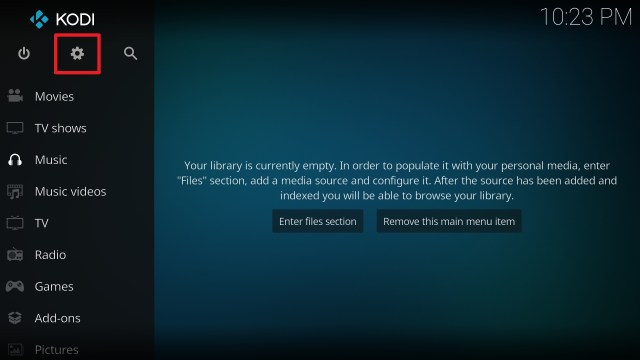
1. From the home screen, select the cogwheel at the upper left.
2. Select System in the bottom right corner.
3. Select Add-ons on the left side of the screen.
4. Select Unknown sources.
5. Click Yes to allow unknown sources.
6. Select File manager.
7. Click Add source.
8. Click on <None>.
9. Type exactly: http://misfitmods.com/mmwiz/repo/
10. Click on OK.
11. Select enter a name for this media source.
12. Name is Misfit (this part isn’t critical as long as you remember the name).
13. Click on OK.
14. Click on OK.
15. Take one step back and click on Add-ons.
16. Select install from zip file.
17. Click Yes.
18. Click on Misfit (or whatever you named the source).
19. Click on repository.misfitmods.zip
20. Wait until you see the successful installation notification on the right top corner then select on Install from repository.
21. Click on misfit mods: Repository
22. Select Program add-ons.
23. Click on Misfit Mods Wizard 19.
24. Click on Install.
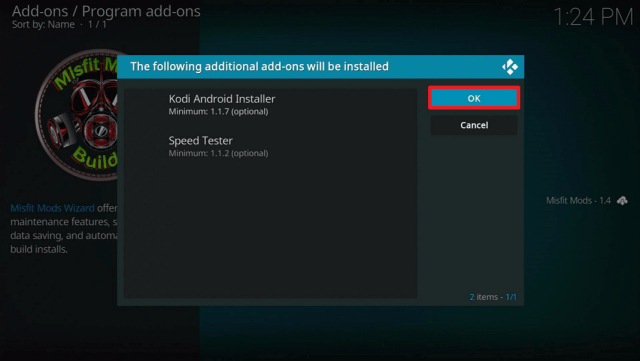
25. Click on OK.
26. Click on Continue.
27. Click on Build Menu.
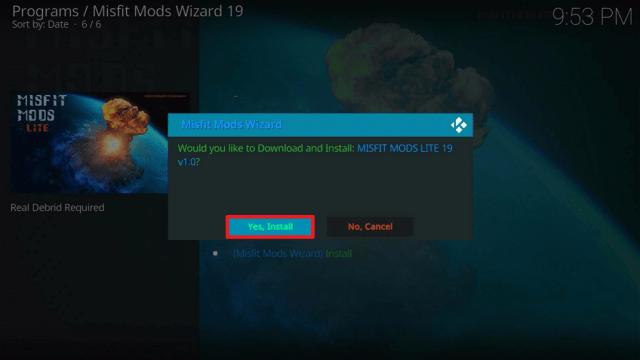
28. Click on [19.0] MISFIT MODS LITE 19 (v1.0)
29. Click on (Misfit Mods Wizard) Install
30. Click on Yes Install.
31. Click on Open.
Video on How to Install the Misfit Mods Lite Kodi Build on All Devices
YOUR INTERNET ACTIVITY IS BEING WATCHED
ReviewVPN cannot attest to the legality, security and privacy of the applications discussed on this site. It is highly recommended that you use a VPN service while streaming or using Kodi.
Currently, your IP 216.73.216.109 is visible to everyone and your Browser is being tracked by Advertisers & ISP Provider.
Your activities are hidden from your ISP, the government, and from the apps you are using.
You can access additional movies and TV streams.
ISP attempts to throttle are thrwarted thus reducing buffering issues.
Geographically restricted content like Netflix and Hulu can be unblocked.
A VPN works be replacing your ISP-assigned IP address and creating an encrypted tunnel. We recommend the no log service offered by IPVanish. It works well on a Firestick and offers the fastest possible speeds.
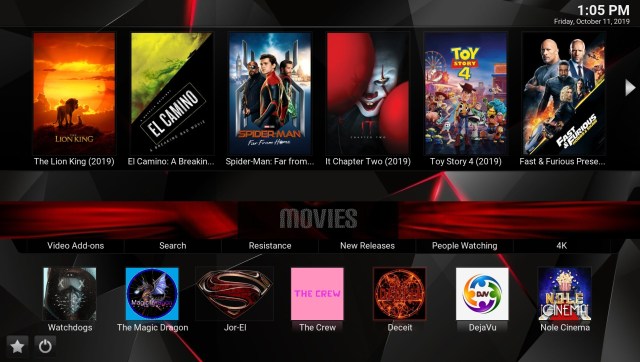
Misfit Mods Lite may be lighter on features than Misfit Mod but they have put together some of the best add ons and a lovely UI to keep you entertained for years.
Exodus Redux is one of the most famous Kodi add-ons that offers a wide range of movies, series, documentaries, kids’ shows, and many more.
You can easily look out for any movie or TV show depending on genres, year, people, languages, and many more. You can also link your IMDb or trakt account to manage your movies and TV shows. This add-on also has a different section for documentaries.
Not only does this add-on have an enormous library of shows but also does it offers the latest movies and series available in other streaming apps.
Yoda add-on provides links for movies and tv shows that can easily be filtered through different sections: genres, year, people, language, certificates, people watching, most popular, most voted, box office, Oscar winners, in theaters, and new movies.
You can also have a trakt or IMDb account linked to this add-on so you can manage all your movies and TV shows that are saved and downloaded on your Kodi app.
The Magic Dragon addon is a lair of video content especially movies, TV shows, series, documentaries, and the like. It is somehow faster than other video add-ons available on Kodi. It authorizes Real Debrid easily as it provides a section on its home page for that feature.
You can easily search for movies using this add-on.
It has a feature where you can donate through PayPal.
Full list of sections/features present on The Magic Dragon addon:
Donate Here – Paypal.me/PyramidRaider
“Movie Search”
REAL DEBRID AUTHORIZE HERE
R.I.P SEAN CONNERY (LEGEND)
New Release
Documentary’s
People Watching
Requested Movies
New Release HD Debrid Only
Movie Releases
Christmas 2020
Cams/HDTS Releases
Debrid Movies
4K Movies Debrid Only
Latest Episodes / Seasons
Kids
Movies
Music
Radio
Sports
TV/Entertainment
Crackle
Crackle offers a streaming service with a wide range of movies and series. It does not need to use a browser to stream the content.
The interface of the Crackle addon is very simple. You will just see two sections upon opening it, Movies and TV. Both sections are sub-divided into different genres.
Crackle addon can easily be downloaded from the default repository of the Kodi app. No need for a file location and a long process to download it.
Like Hulu, Netflix, and Amazon Prime, Crackle also offers original content. You can also stream these contents on the addon itself.
ESPN 3
ESPN 3 is an official addon that Kodi offers. Like Crackle, you can easily download it from the default repository of your Kodi app. It is a famous sports channel in the US that covers mostly all types of popular American sports, from collegiate to big arenas.
On the other hand, ESPN 3 addon requires the user to sign in with an official American cable subscription.
Using this addon, you will see different sections or devices to watch your favorite sports such as Android TV, Apple TV, Legacy, Roku, and tvOS.
SpinzFlix
SpinzFlix offers movies, TV shows, Kids’ shows, and Urban Empire sections to stream on your Kodi app.
This add-on lets you choose between SD and HD quality if you would like to play a video.
From the name itself, this add-on focuses more on its content on sports.
Using Sports Devil, you can browse your list of favorite sports episodes, game highlights, live sports, sports TV, and also live TV.
Under Live Sports, you can see different websites to watch your favorite sports. This add-on also lets you choose what kind of sports you like to watch.
You can also use and access Youtube on your Kodi app by installing the Youtube add-on.
As usual, you can also sign in to your Youtube account using the add-on. But aside from that, some sections show popular or trending videos right now. Even live shows, upcoming and already watched.
MP3 Streams addon is the number one pick when it comes to listening to music or MP3 files on your Kodi app. The scope of this addon is very wide. It has music in all genres and all over the world.
This addon is the den of all artists, top albums, new albums, compilations, and billboard charts. You can easily search for a specific song, album, and artist. You can even have your personalized favorites using this addon.
This addon is almost complete, with all the genres. You can easily filter until you come up with the specific song of your choice.
This add-on is really like a pack of wolves. So many different features are clustered into one. And the fun is that some sections have weird names like A Woman’s Touch, Thunder Cat, More Power, and Labyrinth. Other sections include Midian, Bollywood By Year, One Clicks By Year, Anime, Audio Books, Wolf Pack Fam Lists, and OTB Content. These sections offer some shows and movies linked to other websites.
It also has a section for clearing the cache and scraper cache.
You can also access different settings of this add-on. Through this, you can easily disable and enable some features immediately.
Wolf Pack lets the device pair with FlashX, Uptobox, Vevio, Vidup, and Videoshare.
The following add-ons are either dead or no longer working:
BoB unleashed
Cartoons8
Mobdina
Placenta
Pac 12 Network
Stream Hub
Project M
Bennu
Goodfellas
The Pyramid
Neptune Rising
Empire
What is Kodi?
Kodi has been around since 2002 and has grown from strength to strength since its humble roots as a piece of homebrew software for Xbox gamers.
It’s now been downloaded tens of millions of times and is one of the most popular open-source media players in the world.
Kodi has become the premier open-source player due to its features rich interface. As well as being customized for use with televisions and remote controls, allowing applications to be scaled from phones, computers or touch screen devices to be controlled on a TV.
In addition, Kodi features an enormous library of add ons which give users access to a wide range of free media, though these add ons are not endorsed by Kodi which remains 100% legal.
A build is a great place to start if you have never used Kodi before. Kodi is a large and complex media player with thousands of add ons, features, and settings and can be difficult to get your head around as a first-time user.
Though you could create a working setup by yourself, this would take time and probably be quite frustrating.
That’s where a build comes in.
A build is a predesigned setup that can be downloaded from a repository or a wizard, a store of add ons and builds.
These builds come pre-installed with add ons, skins, and settings meaning you can start watching straight out of the box.
Should I Use Misfit Mods Lite With a VPN?
To get the best out of Misfit Mods Lite Kodi Build, we recommend you use a premium VPN service like Surfshark.
Here are the reasons why:
Encrypt your data and keep you safe and anonymous online
Prevents your ISP from snooping on your browsing history or preventing you from accessing certain content
Protects you from snooping from other third parties
Allows you to change your IP and alter your location to circumvent geo IP restrictions
If you want to know about the other service and features it offers, kindly read our Surfshark Review.
Misfit Mods Lite was one of the most downloaded builds of 2018 and 2019 and has received rave reviews. When you download the build make sure you always use the official repository.
Downloading from repos that you have not been reviewed and signed off could lead to you opening a file filled with viruses or malware. Scan any unknown files with Malwarebytes.
Is Misfit Mods Lite Legal or Grey?
Misfit Mods Lite operates in a grey area, but honestly due to the number of add ons you can access that is loose at best.
Due to the wide range of copyrighted material distributed through the add ons, you have to accept that almost everything you watch through Misfit Mods Lite isn’t legal.
Many of the add ons and Misfit Mods Lite may not work if you try to use it without a VPN.
Builds just like add ons do have a habit of going down every so often, so if you get stuck just Google “Best working Kodi builds” and you’ll find a long list of working builds.
Misfit Mods Lite is a great lightweight app with a simple menu and navigation. One of our favorite builds for first-time Kodi users who want to venture beyond individual add ons.
Final Thoughts
We hope that this article helps you with how to install the Misfit Mods Lite Build on Kodi. Thank you for reading!
Note: ReviewVPN.com does not own or operate any app nor does it endorse any. The main purpose of this article is strictly for educational purposes only.
Probably the most popular build on Kodi. No Limits Magic Build comes in 4 sizes. The regular Build is 276MB or 271MB if you don’t install the Adult section. The Firestick Lite Build is 176MB or 171MB with the adult section.
No Limits Magic may not be the slickest looking build, though you do have plenty of interchangeable skins, they have a great development team in the form of No Limits, and the build is regularly updated.
A big problem with Builds is that add ons stop working overtime and are never removed. So, you might have a great looking build that is bloated with many add ons that don’t even work. You won’t have that problem with No Limits, which stays up to date with the best Kodi add ons.
How to Install No Limits Magic
Get up and running with No Limits Magic using these simple steps, we recommend you have a VPN up and running to avoid any issues with the content being blocked:
Start from the Kodi home screen
Click settings and then Systems
Make sure that unknown sources are turned on
Go back and click File Manager
Add source and then “Add None”
A URL bar will pop up, type in the following: https://tinyurl.com/nolimitswiz (If your running Kodi 17, you may need a separate link. If this link stops working, put it into Google and add “mirror2)
Call the file No Limits
Go back to the Add ons menu
Click the box icon above the video add ons selection menu
Install from Zip file
Click on your No Limits file and then install from the repository
Choose the build you want to install
Fresh install the build and then let the wizard restart Kodi
Video on How to Install the No Limits Kodi Build on All Devices
What is No Limits Magic?
The No Limits Magic Build gets its name from the No Limits development team who has designed a number of popular builds and add ons for Kodi. You can access all the best add ons and anything from sports, to movies and Live TV.
Features
Massive range of Quality Add ons
Live TV
TV Shows
Search by Network
Various skins
Updated regularly
Non-working add ons removed and new ones added
Movies
Adult
Kids Section
Update information
Adult Version only:
Adult Hideout
Ultimate Whitecream
YOUR INTERNET ACTIVITY IS BEING WATCHED
ReviewVPN cannot attest to the legality, security and privacy of the applications discussed on this site. It is highly recommended that you use a VPN service while streaming or using Kodi.
Currently, your IP 216.73.216.109 is visible to everyone and your Browser is being tracked by Advertisers & ISP Provider.
Your activities are hidden from your ISP, the government, and from the apps you are using.
You can access additional movies and TV streams.
ISP attempts to throttle are thrwarted thus reducing buffering issues.
Geographically restricted content like Netflix and Hulu can be unblocked.
A VPN works be replacing your ISP-assigned IP address and creating an encrypted tunnel. We recommend the no log service offered by IPVanish. It works well on a Firestick and offers the fastest possible speeds.
Legal Disclaimer: ReviewVPN.com does not encourage or endorse any illegal activity involved in the usage of services and applications referenced on this site. We do not verify the licensing agreements of services. The end-user is wholly responsible for ensuring that any media accessed through these services does not violate copyright and/or licensing laws. ReviewVPN does not promote, link to, or receive compensation from any Apps and IPTV services.
The Magic Dragon add-on is a lair of video content especially movies, TV shows, series, documentaries, and the like. It is somehow faster than other video add-ons available on Kodi. It authorizes Real Debrid easily as it provides a section on its home page for that feature.
You can easily search for movies using this add-on.
It has a feature where you can donate through PayPal.
Full list of sections/features present on The Magic Dragon add-on:
Yoda add-on provides links for movies and tv shows that can easily be filtered through different sections: genres, year, people, language, certificates, people watching, most popular, most voted, box office, Oscar winners, in theatres, and new movies.
You can also have a Trakt or IMDb account linked to this add-on so you can manage all your movies and TV shows that are saved and downloaded on your Kodi app.
UK Turk Playlist
The UK Turks is a Kodi add-on with quite impressive interface, great features, and massive content. This add-on stores fifteen different categories to stream such as live TV, Sports, Movies, TV Shows, Cartoons, Documentaries, Stand-up Comedy, Concerts, Radio, CCTV, Turkish TV, Turkish Movies, Fitness, Food Porn, and Favourites.
UK Turks add-on lets the users create their folders for their personal files, and playlists for different media such as movies, shows, music.
UK Turks also has the ability to launch all the video add-ons downloaded on your Kodi app. This is one of the great features that the UK Turks add-on has.
You need to have Google Chrome installed on your Kodi app first before using this add-on. After downloading, you will need to go to their website to get the pin, so that you can fully enjoy all the benefits and features of UK Turks.
Covenant add-on provides links for some classic and new release movies and shows. This add-on supports the integration of Trakt and IMDb accounts to maximize the full potential of its service. It also offers IPTV and documentaries.
Maverick TV
Maverick TV offers a lot of content. You can stream movies, TV shows, sports, live TV, and many more. This addon is similar to DejaVU. Both add-ons came from the same repository, both offering enormous selections to choose from. One difference is that Maverick TV does not offer music contents
This addon provides both free and Debrid links to stream the videos. It is compatible with Real-Debrid users.
Here is the list of the sections provided by Maverick TV:
Sports Devil add-on focuses more on its content on sports.
Using Sports Devil, you can browse your list of favorites sports episodes, game highlights, live sports, sports TV, and also live TV.
Under Live Sports, you can see different websites to watch your favorite sports. This add-on also lets you choose what kind of sports you like to watch.
Video Devil add-on is a den of a massive collection of adult shows or videos from different adult websites. A total of 64 websites, arranged alphabetically, are present on Video Devil add-on. These websites are Ah-Me, Analdin, AShemaleTube, BitPoro, CelebsNude, ClipHunter, DesiVdo, DesiXNXX, DoodhWali, Empflix, EPORNER, ExtremeTube, GirlfriendVideos, Hentaigasm, HQporner, IndianMasala, IndianSexMovies, KamaBaba, KissJAV, Motherless, MovieFap, PerfectGirls, PlusOne8, Porn.com, Porn300, Pornburst.xxx, PornDoe, Pornhd, Pornhub, Pornmaki, PornoMovies, PornOne, PornoXO, Porntrex, Redtube, Sexu, SmutIndia, SpankBang, Spankingtube, StileProject, SunPorno, Thumbzilla, TnAflix, TrannyOne, Tukif, xHamsster, XRUniversity, XVideos, XXXTubeDesi, YouPorn, and yuvutu.
This add-on provides a verification question if 18 years old and above the moment you enter it.
Although Video Devil has massive content to offer, not all of them are in full HD.
Dead add-ons
The following add-ons are either dead or no longer working:
Adryan List
Bennu
BoB Unleashed
Castaway
cCloud TV
Champion Sports
DC Sports
Death Streams
Duckpool
Elysium
Goodfellas 2.0
NBA Full Games
Planet MMA
Pro Sport
Pulse Fitness
Release HUB
Spectro Fork
What is Kodi?
Kodi started in 2002 and has gone on to become one of the most popular open-source media players in the world with over 50 million downloads.
Kodi works because of the foundation that supports its development and the massive community that uses it and designs add ons and builds for it.
Currently, Kodi has 1,000 official add ons, but many thousand more third party add ons, which allow you to watch any content you want online. Combined with their 10-foot user interface and unlimited configuration, there is no wonder Kodi is so popular with its users.
Kodi itself is completely free and legal, though it does not endorse add ons which allow users to watch pirated content.
What is a Build?
A build is like a starter kit for Kodi. Instead of designing a dashboard and searching out and downloading individual add ons, it makes much more sense to download a build that will redesign Kodi and have all the add ons there and ready to go.
Getting a build is a great way to start as a beginner, and then you can tweak it as you go along.
Should I Use This App With a VPN?
To get the best out of No Limits Magic we recommend you use a premium VPN service like SurfShark. Here are the reasons why:
Encrypt your data and keeps you safe and anonymous online
Prevents your ISP from snooping on your browsing history or preventing you from accessing certain content
Protects you from snooping from other third parties
Allows you to change your IP and alter your location to circumvent geo IP restrictions
Note: For more information about SurfShark, please read our SURFSHARK REVIEW.
How to Install Surfshark on Firestick with Screenshots
If your Firestick still has the older interface, read this article to learn how to update it: Update Firestick Interface.
You can download Surfshark directly from the Amazon App store. It will be easy for you to find Surfshark with your Firestick’s Find feature. Refer to our screenshots below.
Follow our screenshots below to install the SurfShark VPN app on your Fire TV stick.
1. Go to the Home screen of your Firestick.
2. Navigate towards the Find tab. Press the Search button from the resulting dropdown.

3. Type in the keyword of SurfShark and select from the suggestions that will appear.
4. Click the official SurfShark icon from your search results.
5. Press the Download (You own it) button.
6. The SurfShark VPN installer will download on your device.
7. SurfShark VPN’s app will automatically install itself on your Fire TV stick.
8. Press the Open button after completing SurfShark VPN’s installation process.
9. Please wait for the SurfShark VPN to load its user interface.
10. You can now log in with your SurfShark VPN account credentials.
For more VPN discounts, go to ReviewVPN Deals and purchase the best VPN for you.
Click here to get the lowest price on Surfshark through our exclusive limited-time offer.
FAQ
Is it Safe to Use?
Perfectly safe to use, just make sure you use the exact URL given to you in the installation instructions. There are a lot of websites, hosting the No Limits Magic Build that may have defective or malicious code embedded.
Is it Legal or Grey?
It’s a grey area, but anyone using Kodi and No Limits Magic knows they are watching content they would have to pay for. This is why we recommend that you use a VPN or you may find that many of the add ons don’t work.
Is it Free?
Yes
When Was It Released?
No Limits Magic has been out since 2018
Best Alternatives
There are lots of great builds out there, so if you feel like trying something new, check out one of these great builds.
There are always plenty of lists of best working builds, you can look for on Google. Whenever installing a new build, we recommend that you fresh install, so it gets rid of old dependencies and data. Keep your watching history synced using Trakt.
No Limits Magic Build is the most popular for 2 big reasons. The No Limits team has a great track record of producing great builds, and the teamwork hard to keep the build updated with add ons and new features.
Definitely a great first time build that will give you everything you need to get the best out of Kodi as a first-time user.
Final Thoughts
We hope that this article helps you with how to install the No Limits Magic Build on Kodi. Thank you for reading!
Note: ReviewVPN.com does not own or operate any app nor does it endorse any. The main purpose of this article is strictly for educational purposes only.
In this article, we are going to show you how to install the Slamious build on Kodi. We’ve included step by step screenshots, a link to the APK file if you are on a Firestick or Android device, videos, and links to contact the devs for even more help.
Slamious is one of the best Kodi builds out right now. It works perfectly on a Firestick / Fire TV. It also works great an Android, Mac, Xbox, Nvidia Shield, etc. Many critics agree that Slamious is the best builds because it balances size and a great UI with a good number and selection of addons.
Slamious comes with over 40 addons and yet only registers at 246 MB which still makes it a great choice for an Amazon Firestick. You even get two themes to choose from with Slamious. The Menu is clean and easy to use, and you can easily navigate titles in each section as well as add-ons.
From all the features, it’s easy to see why people stick with Slamious and vote for it consistently as one of the best Kodi builds.
How to Install Slamious on Kodi
As an added bonus, the devs have created an APK file with the build wizard integrated into it. APK files allow you to run two versions of Kodi at the same time on your Firestick, Android device, Nvidia shield, etc. We don’t host any of these files, but here is a link to download the Slamious APK file. It is currently at Kodi 19.1 Leia.
Get up and running with Slamious using these simple steps:
Start on the Kodi home screen
Click settings
Go to System and then make sure that “Unknown Sources” is turned on so that you can install Slamious
Go back one screen and click File Manager
Click on “Add Source” and click the drop-down bar and select “Add None”
A new screen will pop up with a URL bar, enter in the following: http://slamiousbuilds.com/repo
Name the file Slamious
Return to Setting and click Addons
Click install from the zip file and then select the Slamious Wizard
A message will pop up in the top right-hand corner of the screen saying “Slamious – Add on installed
Accept all the settings in the pop-up menu and go to Build Menu
Click Addons and then Program Addons
Click Builds and then scroll down until you find Slamious
Allow a fresh install and select your preference of the four theme options
Do a force close and once Kodi restarts you are good to go
Video on How to Install the Slamious Kodi Build on All Devices
Click pop-out in the upper right corner if you would like the video to be larger.
Video on How to Install the Slamious Kodi Build on Firestick and Android from APK File
How to Install the Slamious Kodi Build with Screenshots
Select the cogwheel in the upper left corner
2. Select System on the bottom left
3. Hover over or select Add-ons on the left.
4. Select Unknown sources to enable
5. Click Yes to enable third-party addons
6. Click on File manager
7. Click on Add source
8. Click on None to add the URL path source
9. Type the URL exactly as http://slamiousbuilds.com/repo (remember you can also get this from the Xanax and One Nation repositories)
10. Click on OK
11. Click on the box under Enter a name for this media source
12. Name the source Slamious (the name can actually be anything you want. you just need to remember what you named it.)
13. Click OK
14. Click OK again
15. Take one step back to the System screen
16. Click on Add-ons
17. Click on Install from zip file
18. Click on Slamious (or whatever you named the source)
19. Click on the wizard folder
20. Click on SlamiousWizard.zip
21. Wait until you see a popup in the upper right saying Slamious has installed. It might take up to a couple of minutes.
22. Click dismiss on the popup
23. Click on (Slamious Wizard) Builds
24. Select one of the Slamious servers. It is currently labeled [18.2] Slamious 18 (v5.21)
25. Select (Slamious Wizard) Fresh Install
26. Click Continue
27. Wait for the download to finish
28. Wait for all the files to install while keeping an eye out for any errors upon installation
29. Click on install theme
30. Click on your preferred theme
31. Click on Force Close
32. When you re-open Kodi. Leave it alone for about 5 minutes to give all the addons a chance to update. This is when the movie and TV show images will start to populate.
A lot of best in class add-ons with over 40 to choose from
Easy and intuitive user interface
From the One Nation Portal so has a quality pedigree
Good likelihood of staying active and updated
One of the best One nation builds
Movies
Tv Shows
Live TV
Sports
Kids
Music
YOUR INTERNET ACTIVITY IS BEING WATCHED
ReviewVPN cannot attest to the legality, security and privacy of the applications discussed on this site. It is highly recommended that you use a VPN service while streaming or using Kodi.
Currently, your IP 216.73.216.109 is visible to everyone and your Browser is being tracked by Advertisers & ISP Provider.
Your activities are hidden from your ISP, the government, and from the apps you are using.
You can access additional movies and TV streams.
ISP attempts to throttle are thrwarted thus reducing buffering issues.
Geographically restricted content like Netflix and Hulu can be unblocked.
A VPN works be replacing your ISP-assigned IP address and creating an encrypted tunnel. We recommend the no log service offered by IPVanish. It works well on a Firestick and offers the fastest possible speeds.
From the name itself, this add-on focuses more on its content on sports.
Using Sports Devil, you can browse your list of favorites sports episodes, game highlights, live sports, sports TV, and also live TV.
Under Live Sports, you can see different websites to watch your favorite sports. This add-on also lets you choose what kind of sports you like to watch.
The Magic Dragon addon is a lair of video content especially movies, TV shows, series, documentaries, and the like. It is somehow faster than other video add-ons available on Kodi. It authorizes Real Debrid easily as it provides a section on its home page for that feature.
You can easily search for movies using this add-on.
It has a feature where you can donate through paypal.
Full list of sections/features present on The Magic Dragon addon:
Exodus Redux is one of the most famous Kodi add-ons that offers a wide range of movies, series, documentaries, kids shows, and many more.
Using this add-on, you can easily lookout for any movie or TV show depending on genres, year, people, languages, and many more. You can also link your IMDb or trakt account to manage your movies and TV shows. This add-on also has a different section for documentaries.
Not only does this add-on have an enormous library of shows but also does it offer the latest movies and series available in other streaming apps.
Yoda add-on provides links for movies and tv shows that can easily be filtered through different sections: genres, year, people, language, certificates, people watching, most popular, most voted, box office, Oscar winners, in theaters, and new movies.
You can also have a trakt or IMDb account linked to this add-on so you can manage all your movies and TV shows that are saved and downloaded on your Kodi app.
Resistance has a lot to offer. Mainly it is used to stream the top movies of today. This add-on has many settings and sections that help in streaming the videos.
Open Scrappers are used in finding the links for the movies. You can also login to your real debrid account to do it so. On the other hand, there is another feature called the torrenter. This feature is the one that gets the links from Torrent sites.
List of features/sections present in Resistance addon:
Nole Cinema addon offers tons of movies to enjoy on Kodi. It provides movies for almost all genres, uniquely some of these genres are so specific like DC Comics, Marvel Universe, and Kung-Fu. It also has collections of movies with sequels or the same production in one folder.
You cannot enjoy the benefits of Nole Cinema and its unique offers without having a real debrid account. This addon has a feature where you can authorize your account.
List of genres present on Nole Cinema:
New Releases
Classics
Action
Adventure
Animation Domination
Comedy
Crime
DC Comics
Drama
Fantasy
Gangster
Horror
Kung-Fu
Marvel Universe
Mystery
Romance
Sci-Fi
Sports
Stand-up
Thrillers
War
Movie Collections on Nole Cinema:
Disney Classics
Nole Boxsets
Marvel: Beginning to End
Maverick TV
Maverick TV offers a lot of content. You can stream movies, TV shows, sports, live TV, and many more. This addon is similar to DejaVU. Both add-ons came from the same repository, both offer enormous selections to choose from. One difference is that Maverick TV does not offer music contents
This addon provides both free links and Debrids to stream the videos. It is compatible with real debrids users.
Here is the list of the sections provided by Maverick TV:
Search Movies and TV Shows
Debrid Movies 4K UHD
New Movie Releases
Debrid Classic Movies HD
Latest TV Shows
One Click TV Shows
WWE/AEW/UFC/Sports Replay
HD Sports Replay (RD Only)
The Comedians (18+)
Daily Motion TV
Documentaries and Catchup TV
Fluxus Playlist/TV Channels
Free To Air TV
Maverick World CCTV
Maverick Movie List
Classic British Cinema
Bond, James Bond
Klassic Kids TV
Kids Movie Boxsets
Movie Genres
Live in Concert
The Jukebox
Online Radio
Maverick Tool Box
DS9 Sports
Ghost
Ghost addon is a haunted house with so many features and sections to explore. You can have Movies, Series, Ghost IPTV, Live TV 24/7, Kid’s hub, and Anime 18. Some of its features include Settings, Trakt, and TMDB.
Replay Me addon came from the same repository as Rising Tide addon. It also focuses on sports content. But mostly it features replays of the games.
This addon has a feature where you can ask for a replay of the sports game that you like to watch. It also has a section for recent sports events.
Sports included on the main menus of Replay Me addon:
Soccer (on request only)
NBA
NHL
NFL
MLB
UFC/MMA
Boxing
Dead Add-ons
The following add-ons are either dead or no longer working:
StarTec
13 Clowns (Now IT)
Kiddo
Gen-X
Supremacy
Aspis
Vortex
Deceit
cCloud TV
Loki
Monster Munch
Metallik
What is Kodi?
Kodi first started in 2002 as a homebrew project to allow Xbox users to have media play on the original Xbox, from there the project grew and has turned into one of the biggest free and legal open-source media players in the world.
Kodi is now on its 18th major update and has been downloaded over 50 million times. Run and maintained by a core of developers who work for the XMBC Foundation, Kodi has increased in popularity due to its great functionality, many different settings and configurations, 10-foot user interface, and thousands of official and unofficial add-ons.
What is a Build?
A build is a custom installation of Kodi with skin(s) and addons already preconfigured. Kodi is quite complicated to use and navigate as a new user. Installing a build is a bit of a cheat code, allowing even novice users to have an expert setup. Plus adding in all the addons that you will need without having to install them one by one.
Should I Use This App With a VPN?
To get the best out of Slamious Kodi Build, we recommend you use a premium VPN service like Surfshark. Here are the reasons why:
Encrypt your data and keeps you safe and anonymous online
Prevents your ISP from snooping on your browsing history or preventing you from accessing certain content
Protects you from snooping from other third parties
Allows you to change your IP and alter your location to circumvent geo IP restrictions
For more VPN discounts, go to ReviewVPN Deals and purchase the best VPN for you.
Click here to get the lowest price on Surfshark through our exclusive limited-time offer.
FAQ
Is it Safe to Use?
The Slamious developers are obviously well connected in the Kodi community. Otherwise, their build wouldn’t be connected to One Nation and Xanax. You are in safe hands.
Is it Legal or Grey?
It’s a grey area but not by much. You may find that many of the links are blocked by your Internet Service Provider if you don’t use a VPN
Is it Free?
Yes
When Was It Released?
Slamious has been out since 2017. It is one of the most consistently updated builds available.
Best Alternatives
Slamious really is a great build at a good size, if you get tired of Slamious you can always try one of the other builds within the pack like Mega nation or Xtasy D. Honestly there are all good builds.
We totally agree with the critics who say that Slamious is one of the best One nation Portal Builds. All of their builds are great, but Slamious really does have it all.
Every one of their 43 addons has been hand-picked by someone who really knows their stuff. The menu is colorful and easy to use, but not too gaudy with some awful wallpaper.
Slamious delivers and you aren’t going to find many better builds at that package size.
Final Thoughts
We hope that this article helps you with how to install the Slamious Build on Kodi. Thank you for reading!
Note: ReviewVPN.com does not own or operate any app nor does it endorse any. The main purpose of this article is strictly for educational purposes only.
In this article, we are going to show you how to install Xanax Build on a Fire TV Stick (Firestick), Android device, PC, Mac, Xbox, etc.
Xanax has fast become the Kodi build of choice for those in the know. The Xanax Kodi Build is lightweight with over 40 addons it’s a great build to start with.
Honestly, once you are in Kodi, the steps are the same regardless of the device. In this article, we will be showing you how to install Xanax build on Firestick.
2 Ways To Install Xanax Build
Use the following steps to get Xanax up and running on Kodi. Bear in mind that if you don’t have a working VPN when installing and running Xanax that some or all parts of it may not work
Open up Kodi
Click on settings
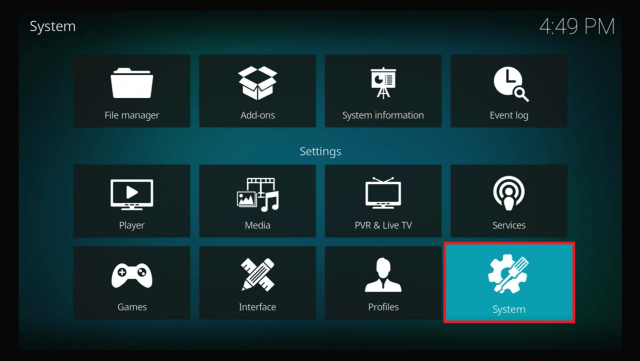
Click System
Turn on Unknown sources
Go back to the previous screen and click File Manager
Click add source
Click “Add None”
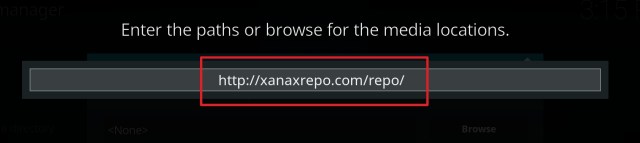
In the “Enter the paths or browse for the media locations” URL bar type in the following URL exactly: http://xanaxrepo.com/repo/ (If the link doesn’t work, Xanax is also in the Slamious repo and wizard)
Name the source Xanax
Go back to the Addons menu
Click the box icon that appears above the video addons selection on the menu
Install from Zip file
Click the Xanax file and then install from repository
Click Build Menu once the installation completes
Choose the build which you prefer
Choose Force close once the build has installed and restart Kodi
Your brand-new Xanax Build should be ready to go
Video on How to get Xanax on a Firestick
How to Install the Xanax Kodi Build with Step by Step Screenshots
Click the cogwheel in the upper left corner of the home screen (if your version of Kodi doesn’t look like this, you probably have different skin. Look for settings, system, interface, and change the skin to Estuary if you want to follow the steps with the screens looking the same.)
2. Scroll to System in the lower right corner and click it.
3. Select Add-ons in the left column.
4. Click on Unknown sources.
5. Click Yes.
6. Take one step back and click File manager in the upper left corner of the System page.
7. Click on Add source.
8. Click on <None>.
9. Type the URL exactly as: http://xanaxrepo.com/repo/ (Kodi is really finicky about URL’s, so take care to type it correctly).
10. Click OK.
11. Click on the box under “Enter a name for this media source”
12. Name is Xanax
13. Click OK again
14. Click OK again.
15. Click on Add-ons.
16. Click on Install from zip file.
17. Click on Xanax.
18. Click on xanax-repo.zip
19. Wait for a popup in the upper right corner saying the Xanax Repository Add-on Installed (be patient).
20. Click on Install from repository.
21. Click on Xanax Repository.
22. Click on Program add-ons.
23. Click on XANAX Wizard.
24. Click on Install.
25. Click on Continue.
26. Click on Build Menu.
27. Select any of the Xanax server hosts.
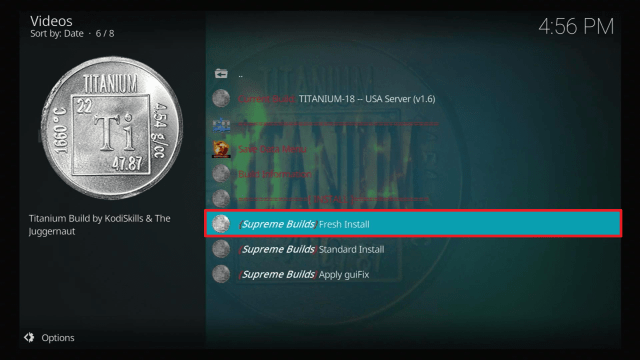
28. Select Fresh Install (note this will delete any previously added addons. if you don’t want them deleted, you can pick standard install).
29. Wait for the files to download and then install.
30. Select Force Close
31. Reload Kodi and give it about 5 minutes before using to update all the addons
Legal Disclaimer: ReviewVPN.com does not encourage or endorse any illegal activity involved in the usage of services and applications referenced on this site. We do not verify the licensing agreements of services. The end-user is wholly responsible for ensuring that any media accessed through these services does not violate copyright and/or licensing laws. ReviewVPN does not promote, link to, or receive compensation from any Apps and IPTV services.
YOUR INTERNET ACTIVITY IS BEING WATCHED
ReviewVPN cannot attest to the legality, security and privacy of the applications discussed on this site. It is highly recommended that you use a VPN service while streaming or using Kodi.
Currently, your IP 216.73.216.109 is visible to everyone and your Browser is being tracked by Advertisers & ISP Provider.
Your activities are hidden from your ISP, the government, and from the apps you are using.
You can access additional movies and TV streams.
ISP attempts to throttle are thrwarted thus reducing buffering issues.
Geographically restricted content like Netflix and Hulu can be unblocked.
A VPN works be replacing your ISP-assigned IP address and creating an encrypted tunnel. We recommend the no log service offered by IPVanish. It works well on a Firestick and offers the fastest possible speeds.
The Xanax Build comes from the makers of the popular, retired Durex Build, with reduced file size and increased usability.
Xanax Build Features
Over 40 addons
~300MB in size
Similar to Durex
Wide range of skins
Easy to navigate menu
Real Debrid compatible
Created by established developers
IPTV
Kids TV
Adults section>
How to use Xanax Build APK on a Firestick
The creators of Xanax release an APK of Kodi with the Xanax wizard integrated within it. This has the advantage of being easier to install. It also allows users to run two instances of Kodi on the same device. Keep in mind that APK files are for Android devices like the Fire TV Stick, Nvidia Shield, Android TV, etc. Also, keep in mind that the Firestick currently uses the ARM 7 32 bit version while the Nvidia Shield would work better with the 64-bit version. You can find the most updated APK in the developer’s Filelinked store using code: 45691709. Watch the video on how to install Xanax from the APK to learn how to use Filelinked.
We do not host the APK file, but we have found a link. This is the 32-bit version intended for Firestick. The version in the APK file is currently 18.8. This is updated to match the latest version of Kodi.
Exodus Redux is one of the most famous Kodi add-ons that offers a wide range of movies, series, documentaries, kids shows, and many more.
You can easily look out for any movie or TV show depending on genres, year, people, languages, and many more. You can also link your IMDb or trakt account to manage your movies and TV shows. This add-on also has a different section for documentaries.
Not only does this add-on have an enormous library of shows but also does it offer the latest movies and series available in other streaming apps.
Destiny considers itself bigger and faster than other addons, although they offer the same services when it comes to streaming videos.
It has a trakt feature for all of the TV series and shows on your on-going watch list. You can also select the “Next Up” feature immediately after every episode to play the next one.
Other features:
Offers Sports channels
Has a kids selection feature
Can build a Jen addon inside this addon
Can build a personalized list of AceStream channels
Deathstar addon offers both video content and music content. You can stream movies, series, music, sports, and many more using this Kodi addon.
It is somehow like a Kodi build although it is not because it has a feature that can also store other addons. Most of these addons are also new to the Kodi app. But because of them, you may consider Deathstar as a complete package for your streaming.
Aptoide houses over 800 000 applications, most of which are not available on the official and famous app stores like Google Play, Amazon App Store, and Apple App Store. You can have aptoide on your devices and also on Kodi app.
It has three main categories for the apps: Most Popular, Games, and Applications. You can see many different types of games like strategy games, educational, adventure, and many more. And also different types of applications such as dating app, apps about parenting, video-players-editors, and some other useful apps.
You just have to make sure that the apps you are about to download are compatible with your device. On Kodi however, you will need to identify a download location for the apps.
This addon is used to stream music, movies, and TV shows. It needs to have another addon from the same repository named 4QED Filters to find the links and play videos on torrent.
Movies are sorted into different categories such as Blockbusters, Genres, In theatres, Popular, Top Rated, Most Played, Most Watched, Trending, and many more. On the other hand, the TV shows category has the following sections: Genres, On the air, Popular, Top Rated, Most Played, Most watched, etc.
Like any other video addons, the sections of MetalliQ 4Qed are supported by TMDb and Trakt features.
NuMb3r5 which can be read as Numbers has a name that is like a code at first glance. It seems like it is not a word itself or it is like a password for your social media accounts. But NuMb3r5 is another video add-on for Kodi that can be seen under Cellar Door TV Repository. It also finds links for your videos.
Under the main menus of NuMb3r5 you will see the following options: Movies, TV Shows, Kidzone, Collections, Networks, Boxsets, Documentaries, 24/7, Music, Fitness, Screensavers, Learning, UFC, Recipes, JEN, System, and Search.
Although, some might say that NuMb3r5 is not that legal. It is prohibited to be used in some other countries. We really recommend using a VPN like Surfshark if you choose to install this add-on.
Maverick TV
Maverick TV offers a lot of content. You can stream movies, TV shows, sports, live TV, and many more. This addon is similar to DejaVU. Both add-ons came from the same repository, both offer enormous selections to choose from. One difference is that Maverick TV does not offer music contents
This addon provides both free links and Debrids to stream the videos. It is compatible with real debrids users.
Here is the list of the sections provided by Maverick TV:
The Magic Dragon addon is a lair of video contents especially movies, TV shows, series, documentaries, and the like. It is somehow faster than other video addons available on Kodi. It authorizes Real Debrid easily as it provides a section on its home page for that feature.
You can easily search for movies using this addon.
It has a feature where you can donate through paypal.
Full list of sections / features present on The Magic Dragon addon:
Donate Here – paypal.me/PyramidRaider
“Movie Search”
REAL DEBRID AUTHORIZE HERE
R.I.P SEAN CONNERY (LEGEND)
New Release
Documentary’s
People Watching
Requested Movies
New Release HD Debrid Only
Movie Releases
Christmas 2020
Cams/HDTS Releases
Debrid Movies
4K Movies Debrid Only
Latest Episodes / Seasons
Kids
Movies
Music
Radio
Sports
TV/Entertainment
Dead Addons
Some of the add-ons included on the Xanax build are not functioning or hard to download anymore. Check out this list to find out which add-ons are those.
Monster Munch
Deceit
Supremacy Sports
Just Sports
STVPro
Kiddo
JoyRide
Gen X
M-TV Guide
StarTec AIO
What is Kodi?
Kodi has been around since 2002 and is now on Version 18 .6 of the famous software. Downloaded tens of millions of times. Kodi has been downloaded over 50 million times and for good reason. The software is feature-rich and has a wealth of media playing and storage features as well as allowing playback of multiple video formats.
The software is still relatively light and also has multiple language supports.
Kodi has attracted some widespread negative attention because it works with such a large library of third-party add-ons that allow users to stream and watch content, which is of some times of questionable origin.
What is a Build?
Kodi can be a daunting piece of software to work with for the first time. As a highly versatile piece of software, it has a seemingly endless amount of functions as well as a library of thousands of add-ons.
Luckily that’s where builds come in. Builds are put together by hobbyist developers and bring together all the key elements of a great Kodi experience.
Each build will be custom designed to feature the best addons, customizable skins as well as a host of changeable features meaning that with one installation you have an experience that is ready to go.
A good build can save you hours of browsing and downloading. Check our list of Best Kodi Builds.
Should I Use Xanax Build With a VPN?
One of the reasons we always recommend utilizing a Virtual Private Network on your device is to keep private and secure when doing any online activities. Your internet service provider, on the other hand, has access to everything you do and retains logs of every activity, which makes you less private.
That is why, to stay safe and private online, we recommend using a VPN. One of the best VPNs that we highly recommend is Surfshark, as it will encrypt your real IP address, identity, and online activities automatically to keep you anonymous. Surfshark offers a variety of remarkable features and security services, including the following:
You can access more content and even unblock Netflix and other platforms.
Supports P2p file-sharing activities which makes it applicable to torrenting
Bypass restrictions and geo-blocks to access lots of content.
This VPN service has more than 3200+ servers in 65 countries
Military-grade AES-256 encryption follows FIPS that oversee the handling of sensitive data.
It follows a strict No-Logs Policy
DNS Leak Protection is active by default.
No Bandwidth limits – you can enjoy a full-speed VPN connection without any throttling.
It works on all devices and can secure an unlimited number of devices.
Xanax has plenty of trusted reviews and is widely used. The repository has a good reputation for providing virus free builds.
The biggest danger when downloading files for Kodi is that you try to get the file from a source that isn’t directly linked to the repository.
There are many websites out there, that provide very similar URL addresses or copycat sites, to entice you to download the file from them. This is why you should only use the exact URL’s you have been provided.
If you doubt the source your file comes from then be sure to scan the file with professional Malware detection software prior to opening it.
Is It Free?
Yes
When Was It Released?
Xanax is a pretty new build, released in 2019
Our Opinion
Xanax is a great build and is more lightweight than most. Also coming from an established developer fills us with confidence about its usability and also the developer’s ability to only keep addons that are up to date.
We hope that this article helps you with how to install Xanax Build on Kodi. Thank you for reading!
Note: ReviewVPN.com does not own or operate any app nor does it endorse any. The main purpose of this article is strictly for educational purposes only.
Our write-up will tackle everything you need to know on how to install Titanium Kodi Build on the Firestick, Android Touchscreen devices, and Laptop or PC.
One of the Best Builds on Kodi, Titanium comes in at a reasonable size of 250MB, considering what is included seems small.
Many people feel that once you have Titanium you don’t really need anything else. Much like the No Limits Magic Builds, Titanium really does have everything you would need to make Kodi great in terms of the add ons.
Plus, the size makes it great for Firestick, and you can download it from the closest server to you on the installation choosing the US, Canada, and European servers. We’ve never seen this option for server mirrors anywhere else. Titanium is kept up to date with the best add ons, by an active developer team.
Of course, you will need the Kodi App on your Firestick to gain access to this excellent build. First, you will need to jailbreak your Firestick. Here is how you do it:
How to Install Titanium Build 2022 with Screenshots Guide
1. Start or return to the Kodi Home Screen
2. Go to Setting (the cog icon) and then
3. Click on System
4. By the tab that says “Unknown Sources” make sure that it has been turned on
5. Return to the previous screen and click File Manager
6. Click Add Source and then when prompted scroll down to <None>
7. Type in http://repo.supremebuilds.com and select Ok
8. Name the file Titanium and click on Ok
9. Select Ok.
10. Return to the Add ons menu
11. Click on Install from zip file
12. Select Titanium
13. Click on repository.supremebuilds-1.0.2.zip and wait for it to finish downloading.
14. After that is finished, go ahead and select Install from repository.
15. Choose Supreme Builds Repository.
16. Click on Program add-ons.
17. Select Supreme Builds Wizard.
18. Click on Install and wait for the download to finish. After that, click on open
19. When this prompt appears, go ahead and select Dismiss.
20. This message will appear, be sure to tick Keep My Trakt and Keep My Real-Debrid and then choose Continue.
21. Click on Build Menu.
22. Select Titanium-18 (Choose any of the servers available where you are located).
23. Select Continue
24. Click on Fresh Install.
25. Wait for the download and installation to finish. (Once the installation finishes, Kodi will automatically shut down.)
26. Relaunch Kodi and now you will see that Titanium Build is fully integrated. Just wait for a while until all the add-ons are installed.
YOUR INTERNET ACTIVITY IS BEING WATCHED
ReviewVPN cannot attest to the legality, security and privacy of the applications discussed on this site. It is highly recommended that you use a VPN service while streaming or using Kodi.
Currently, your IP 216.73.216.109 is visible to everyone and your Browser is being tracked by Advertisers & ISP Provider.
Your activities are hidden from your ISP, the government, and from the apps you are using.
You can access additional movies and TV streams.
ISP attempts to throttle are thrwarted thus reducing buffering issues.
Geographically restricted content like Netflix and Hulu can be unblocked.
A VPN works be replacing your ISP-assigned IP address and creating an encrypted tunnel. We recommend the no log service offered by IPVanish. It works well on a Firestick and offers the fastest possible speeds.
Legal Disclaimer: ReviewVPN.com does not encourage or endorse any illegal activity involved in the usage of services and applications referenced on this site. We do not verify the licensing agreements of services. The end-user is wholly responsible for ensuring that any media accessed through these services does not violate copyright and/or licensing laws. ReviewVPN does not promote, link to, or receive compensation from any Apps and IPTV services.
The best way to enjoy streaming with Titanium Build is by integrating Trakt and Real-Debrid on it. This will help you to stay updated on the schedule of your favorite TV Shows, it will allow you to pick up where you left off, and get the best quality links available online.
This will surely give you an improved streaming experience.
Please follow the following guide:
Activate Trakt TV on Titanium Build
1. From the main menu, scroll once down and choose Authorize Trakt.
2. Take note of the code.
3. Launch a web browser on your computer or smartphone and go to https://trakt.tv/activate
4. Input the code and select Continue.
5. Select Yes.
6. Trakt TV is now Integrated on Titanium Kodi Build.
Integrate Real-Debrid on Titanium Build Leia 18.8
1. On the home screen, scroll to the left or right until RD/PR Addons is highlighted and click on it.
2. Scroll down and select The Magic Dragon.
3. Select Real Debrid Authorize Here.
4. Choose Authorize Debrid Resolveurl.
5. Take note of the code.
6. Launch a separate browser on another device and go to real-debrid.com/device
7. Type in the code given earlier and select Continue.
8. There you go, Real-Debrid is now activated on Titanium Build.
9. Yellow-colored links are all from Real-Debrid.
What is Titanium Kodi Build?
Titanium Build comes from the Supreme Builds Wizard. They have put together all the best-in-class add ons in one build. The only thing you won’t find is Live TV which Titanium recently removed. We think it’s a good thing, as builds that try to do too much tend to end up not doing anything well.
Features
Get all the best in class add ons
An active development team that keeps the build updated
Able to lock content with a PIN
Movies
TV Shows
Sports
Kids Zone
Fitness
Weather
Favorite shows to watch later
Automatic updates in the background
New add ons are added and older add ons which have stopped working will be removed
Deathstar addon offers both video content and music content. You can stream movies, series, music, sports, and many more using this Kodi addon.
It is somehow like a Kodi build although it is not because it has a feature that can also store other addons. Most of these addons are also new to the Kodi app. But because of them, you may consider Deathstar as a complete package for your streaming.
The Crew add-on has so many features and shows to offer. With a very easy-to-use interface, this add-on provides Movies, TV shows, Sports, IPTV, Kids, 1 Click, CC Collections, Radio, and other additional Add-ons.
It supports trakt and IMDb accounts for movies. The Crew also has a lot of genres included in its list of movies. Even the newest releases are present on this add-on.
Another wonderful feature of the crew add-on is its ability to have another add-on, most of which are IPTV add-ons like PUTO TV, XUMO, TUBI TV, and many more.
This is a very wonderful add-on to be added to your list.
Arconai TV is an add-on is a simple add-on that provides only three categories as its main menus. These categories are ArconaiTV TV Shows, ArconaiTV Movie Channels, and ArconaiTV Network Channels.
Exodus Redux is one of the most famous Kodi add-ons that offers a wide range of movies, series, documentaries, kids’ shows, and many more.
You can easily look out for any movie or TV show depending on genres, year, people, languages, and many more. You can also link your IMDb or trakt account to manage your movies and TV shows. This add-on also has a different section for documentaries.
Not only does this add-on have an enormous library of shows but also does it offer the latest movies and series available in other streaming apps.
Gaia add-on is used for streaming movies, shows, short films, kids shows, and documentaries. This add-on finds a variety of sources for streaming like torrents, Usenet, and other hosters. Users can be able to maximize the full features of Gaia by subscribing to the following services: Orion, Premiumize, OffCloud, Real Debrid, and Easy News.
You can sign in to Orion for free using Gaia. It has a promotion feature that you can turn off in the settings of the add-on.
Asgard add-on for Kodi is the home of so many contents and features like 4K TV and Movie One-Click Section, TV and Movie One-Click Section, Non-Debrid Section, Christmas Movies, Movies, TV Shows, CAM Movies, Kids, Sports, App Revived, Documentaries, Music, Anime, and IPTV.
Seren is another add-on to watch series and movies. When you are using it to watch multiple TV shows, you can easily continue watching all the episodes from one time to another. That is how it was designed. It has a simple interface with only four menus on its home screen: Discover Movies, Discover TV Shows, Search, and Tools.
This add-on, it requires the use of a compatible cloud service. It is a modular provider-based, cloud service streaming software and is somehow related to trakt.
You cannot enjoy the benefit of the Seren add-on without a premium account on Real Debrid.
Shadow add-on has a huge collection of movies and shows to offer. This add-on, like many other add-ons, provides premium-hosting services in searching high-quality links for the movies.
One good characteristic of the Shadow add-on is it is incredibly fast and has a lower buffer time. But without real debrid, this add-on won’t work. It also supports trakt features with no account needed.
This add-on has a resume watching feature and many other great ones like My RD History and RD Torrents.
Sports Devil add-on focuses more on its content on sports.
Using Sports Devil, you can browse your list of favorite sports episodes, game highlights, live sports, sports TV, and also live TV.
Under Live Sports, you can see different websites to watch your favorite sports. This add-on also lets you choose what kind of sports you like to watch.
Tempest add-on has huge selections of old and new movies, shows, real debrid 1 click, and live TV to stream for the Kodi app. This add-on can also find links to full HD shows and movies. The best way to stream these videos is to have a real debrid account connected to the tempest add-on.
This add-on also supports trakt accounts for its My Movies and My TV Shows features. Other features such as New Movies and New Episodes are also available on the tempest add-on.
The Magic Dragon addon is a lair of video content especially movies, TV shows, series, documentaries, and the like. It is somehow faster than other video add-ons available on Kodi. It authorizes Real Debrid easily as it provides a section on its home page for that feature.
You can easily search for movies using this add-on.
It has a feature where you can donate through PayPal.
Full list of sections/features present on The Magic Dragon addon:
Donate Here – paypal.me/PyramidRaider
“Movie Search”
REAL DEBRID AUTHORIZE HERE
R.I.P SEAN CONNERY (LEGEND)
New Release
Documentary’s
People Watching
Requested Movies
New Release HD Debrid Only
Movie Releases
Christmas 2020
Cams/HDTS Releases
Debrid Movies
4K Movies Debrid Only
Latest Episodes / Seasons
Kids
Movies
Music
Radio
Sports
TV/Entertainment
Super Favorites
Super Favorites add-on is a great tool to manage and sort out your Kodi add-ons, builds, and many more. This add-on has a feature that lets the user create new folders, and sub-folders to easily sort and locate their favorite shows, movies, and live TV channels.
Super Favorites can also make you explore your Kodi app and Kodi favorites. It even makes someone use the iPay – Kodi playlist manager for music files and more.
Youtube
Youtube add-on is very much available on the Kodi app. You can all of the available content and videos from youtube using this add-on
As usual, you can also sign in to your Youtube account using the add-on. But aside from that, some sections show popular or trending videos right now. Even live shows, upcoming and already watched.
Health and Fitness
Health and Fitness add-on is listed as one of the best add-ons to rely on when it comes to staying in shape and becoming fit. This add-on provides a lot of possible ways to exercise and more by connecting and accessing Youtube to easily locate the videos under each category.
The categories available on the Health and Fitness add-on are workouts for men, women’s workouts, motivation and inspiration, slimming world, self-defense, fun workouts, Keto/paleo/low-carb, weight watchers, Marcos and calorie counting, Myfitnesspal, and Random diets & info.
Dead Addons:
The following add-ons are either dead or no longer working:
Kodi started in 2002 and has gone on to become one of the most popular open-source media players in the world with over 50 million downloads.
Kodi works because of the foundation that supports its development and the massive community that uses it and designs add ons and builds for it.
Currently, Kodi has 1,000 official add ons, but many thousand more third-party add ons, which allow you to watch any content you want online. Combined with their 10-foot user interface and unlimited configuration, there is no wonder Kodi is so popular with its users.
Kodi itself is completely free and legal, though it does not endorse add ons which allow users to watch pirated content.
What is a Build?
A build is like a starter kit for Kodi. Instead of designing a dashboard and searching out and downloading individual add ons, it makes much more sense to download a build that will redesign Kodi and have all the add ons there and ready to go.
Getting a build is a great way to start as a beginner, and then you can tweak it as you go along.
Stream Safely With a VPN
You may find some of the content you want to watch restricted without a VPN. We recommend we use one for several reasons:
A VPN gives you access to content that your ISP may be blocking. Using encryption, you can avoid their firewalls
You can change your IP address and location to access content that may only be available in a certain country
You can ensure secure access wherever you are in the world
Avoid your ISP and any other third party from snooping on your data
Note: For more information about Surfshark, please read our Surfshark Review.
Yes, Titanium has been around for ages. The only issue you will get from security is if you try to download the build from an unofficial link.
Is Titanium Build Legal or Grey?
Titanium acts like a content aggregator. They do not store the content themselves but just direct you to links where you can find it. Having said that most of the content is distributed illegally, so if you want to ensure all the streams work from your side then use a VPN
Is Titanium Free?
Yes.
How To Update Titanium Build?
The updates are usually automatic so there is no need to manually apply them.
How To Add Addons To Titanium Build?
The addons are automatically added to the build during the installation process of the build on Kodi. You do not have to add them one by one.
When Was Titanium Build Released?
Titanium and been around since 2017.
Titanium Build Best Alternatives
If you find that Titanium Build is not working, There are some great builds out there that will offer the same feel, functionality, and add ons as Titanium. They are as follows:
You can always find newer builds on Google. Just be on the lookout for builds that have good community support, an active developer, and keep the add ons updated. Swapping out the old for the new.
Many builds die because they just don’t update their add ons which will mostly stop working overtime.
To be fair, Titanium is not the nicest-looking build. There are builds out there that put much more thought and time into the styling and elements of their UI, but these come at a price. You end up with a bulky build that might run slowly on a Firestick.
Titanium ticks all the right boxes when it comes to functionality and serving up the best add ons. The fact that it stays updated and active puts it head and shoulders over most other builds.
You may not use it, but you should definitely download it and try it out, you’ll have everything you could need at your fingertips apart from Live TV.
We hope that this article helps you with how to install the Titanium Build on Kodi. Thank you for reading!
Note: ReviewVPN.com does not own or operate any app nor does it endorse any. The main purpose of this article is strictly for educational purposes only.
In this article, we will be divulging important details on how to install Moviebase on Firestick and other devices that run on the android platform.
Moviebase APK (Android application package) provides the best reviews of all documentaries, movies, and TV shows from substantial movie review websites such as IMDB (Internet Movie Database) and Rotten-Tomatoes.
The Moviebase app allows you to easily swipe through various categories and locate the best movies & television shows. The Moviebase app provides you all the data about the movie or TV shows you like. From story to star cast and reviews, all are up for grabs on the Moviebase app for free.
The Moviebase app provides content in 39 various languages such as English, Hindi, French, Spanish, German, and several regional languages such as Telugu, Tamil, Marathi, Malayalam, and Punjabi. The app offers information about nearly all movies and TV shows around the world. Also, you can read about forthcoming films and TV shows.
If your Firestick still has the older interface, read this article to learn how to update it: Update Firestick Interface.
Is Moviebase Safe and Virus-free?
We tested this app using VirusTotal and found no threats or any malicious files and malware.
Despite having good results, we still need to be vigilant in protecting our privacy while streaming.
A Virtual Private Network or VPN will definitely help us maintain our security and anonymity while using Moviebase.
2. Open Downloader App. Type https://reviewvpn.com/mbase and click Go.
3. Click on INSTALL.
4. Click on OPEN.
5. Enjoy watching.
YOUR INTERNET ACTIVITY IS BEING WATCHED
ReviewVPN cannot attest to the legality, security and privacy of the applications discussed on this site. It is highly recommended that you use a VPN service while streaming or using Kodi.
Currently, your IP 216.73.216.109 is visible to everyone and your Browser is being tracked by Advertisers & ISP Provider.
Your activities are hidden from your ISP, the government, and from the apps you are using.
You can access additional movies and TV streams.
ISP attempts to throttle are thrwarted thus reducing buffering issues.
Geographically restricted content like Netflix and Hulu can be unblocked.
A VPN works be replacing your ISP-assigned IP address and creating an encrypted tunnel. We recommend the no log service offered by IPVanish. It works well on a Firestick and offers the fastest possible speeds.
Legal Disclaimer: ReviewVPN.com does not encourage or endorse any illegal activity involved in the usage of services and applications referenced on this site. We do not verify the licensing agreements of services. The end-user is wholly responsible for ensuring that any media accessed through these services does not violate copyright and/or licensing laws. ReviewVPN does not promote, link to, or receive compensation from any Apps and IPTV services.
Go back to Fire Stick Home Screen (you may click the Home Button on the Fire Stick remote)
Go to Your Apps & Games/Channels
Scroll once to the left
Click See All
All the newly installed apps are located at the bottom – you can move the Moviebase app by clicking the Options button (at the right side of the Home Button)
Click Move > move to front > and pick any spot you want to put the app
MovieBase Features
You can easily locate the trending films and find out the public review ratings about them
Moviebase offers the calendar having the schedules when the television shows of various channels will be broadcasted
It provides a list to read about the forthcoming films as well as other shows
You have the options to filter out the films based on various criteria such as names, rating, and year of release
You will be notified whenever a new film, TV show, or TV episode will be available.
You’ll get recommendations based on your choice
The Moviebase app’s User Interface is straightforward and very easy to use.
The content of the Moviebase app is categorized in various genres such as Drama, Action, Horror, Romance, and Sci-Fi
You can use the Moviebase on your Android mobile phone, computer (using VirtualBox & Bluestack), and smart TV (using Amazon Fire Stick device)
Compatible Devices
NVIDIA Shield
Android Smartphone
Android TV Box
Android Smart TV
Firestick
Fire TV
Fire Cube
KODI Android BOX
Ruko
Android SmartWatch
Android emulators
Moviebase Latest Version Update
Improving top navigation pages
Navigating on episode page without difficulty
Update app icon
Conceal average poster ratings
Additional data on seasons tab
Decrease user information on startup
Faster scroller for user lists
Repair incorrect episode redirection
Enhance calendar performance
The app will not add episodes with no airing date
Why Should You Use A VPN On Your Fire Stick?
If you are dealing with geo-restrictions trying to stream the entertainment content on your Fire Stick, a Virtual Private Network or VPN is the best solution. Even though the Amazon Fire TV and Fire Stick have built-in Virtual Private Network services, you can still acquire all of the Surfshark service’s advantages. The Surfshark service will encrypt the internet traffic of your Fire Stick and hide your location to go around geo-restrictions. Thus, you can easily stream your favorite videos, movies, and TV shows on your Fire Stick even if the content isn’t available in your region, regardless of where you are.
Best VPN Deal
The first thing a VPN service asks for is a username and a password. Surfshark is a premium service but it has an exclusive discount that offers 83% OFF. To obtain the user name & password and avail of the huge discount, type https://reviewvpn.com/deal into any browser.
Note: For more information about Surfshark, please read our Surfshark Review.
For more VPN discounts, go to ReviewVPN Deals and purchase the best VPN for you.
Conclusion
The Moviebase app is one of the leading apps to obtain all the information about films, TV shows, and documentaries. With this app, you can browse via the catalog like DC, Marvel, or Universal. If you do not want to waste time streaming a video you think will fail to fulfill your satisfaction, then ensure to install the Moviebase app on your Fire Stick.
The Moviebase app allows you to easily locate the entertainment content you are looking for by choosing a particular category. The app offers all the information about the media content you’re looking for. The app allows you to know about the movie cast, review the story, and see the reviews of the individuals on the media content.
Special offer
Get 80% Off for 29-Month Subscription + 5 Months Free on Surfshark VPN!