If you are using Amazon Firestick while streaming different websites, you have to use the Amazon Silk Browser. You should also maintain the safety of your identity when online. Use a VPN to secure your privacy.
How to Stream The Best Pelisplus Alternatives on Firestick
To stream the best Pelisplus alternatives on Firestick, you have to use a browser. The best browser for Firestick is Amazon Silk Browser but you can also use others like Firefox.
Amazon Silk Browser is very easy to use and it is 100% free.
How to Install Amazon Silk Browser on Firestick
1. Click Home on your remote and click “Find”.
2. Click “Search”
3. Type in Silk Browser and choose this item that appears on the results.
4. Click on the Silk Browser Icon.
5. Choose Download
6. Select Open to launch the browser.
7. You can now start browsing using Amazon Silk Browser.
YOUR INTERNET ACTIVITY IS BEING WATCHED
ReviewVPN cannot attest to the legality, security and privacy of the applications discussed on this site. It is highly recommended that you use a VPN service while streaming or using Kodi.
Currently, your IP 216.73.216.211 is visible to everyone and your Browser is being tracked by Advertisers & ISP Provider.
Your activities are hidden from your ISP, the government, and from the apps you are using.
You can access additional movies and TV streams.
ISP attempts to throttle are thrwarted thus reducing buffering issues.
Geographically restricted content like Netflix and Hulu can be unblocked.
A VPN works be replacing your ISP-assigned IP address and creating an encrypted tunnel. We recommend the no log service offered by IPVanish. It works well on a Firestick and offers the fastest possible speeds.
Legal Disclaimer: ReviewVPN.com does not encourage or endorse any illegal activity involved in the usage of services and applications referenced on this site. We do not verify the licensing agreements of services. The end-user is wholly responsible for ensuring that any media accessed through these services does not violate copyright and/or licensing laws. ReviewVPN does not promote, link to, or receive compensation from any Apps and IPTV services.
Pelisplay is very much similar to Pelisplus. You also don’t need an account to access and watch Spanish shows on this website.
All titles are in the Spanish language and you can choose from different categories like Romance, Drama, Action, Comedy, and many more.
Most movies are in great HD quality and there are available subtitles.
Pedropolis
website URL: https://pedropolis.tv/
Pedropolis is another Spanish movie website. Just like Pelisplay, it is also very similar to Pelisplus.
All categories in Pedropolis are in alphabetical order.
Spanish is also the default language on this website.
Pelis 28
website URL: https://pelis28.tv/
Pelis 28 is also a remarkable Spanish website. Like Pelisplus, it is 100% free.
What’s amazing about Pelis 28 is that it has Netflix shows present. These shows are in the Spanish language too.
Pelis 28 has an advanced filter. You can choose the right show by filtering the genre, video quality, and more.
Pepe Cine
website URL: https://pepecine.com/
Among all the Pelisplus alternatives, Pepe Cine has the best UI. It also offers HD quality content.
Pepe Cine offers Spanish movies and TV series. There are no ads present on this website.
Ver Peliculas
website URL: https://ver-peliculas.co/
This is a popular Spanish streaming website. It is really a good Pelisplus alternative.
There is no registration for this site.
You can easily search for any title you want to stream.
Gnula
website URL: https://gnula.me/
Last but not least is Gnula. Others say that Gnula is very similar to Pelisplus.
It offers a lot of genres like Action, Animation, Adventure, Science, etc. Of course, Drama, Romance, and Comedy will always be there.
Gnula provides links from YouTube, OpenLoad, Played.to, and more.
Stream Safely with a VPN
Even if you are a third-party viewer, you can never be sure that you are not at risk. Many websites offer free streaming. They provide links to unknown sources. These might be subject to copyright issues. Trackers may see your IP and associate you with some legal actions.
You have to protect yourself with a Virtual Private Network or VPN. A VPN can change your IP address. This will serve as a layer of protection for your personal one. Trackers won’t be able to locate you and see your identity.
A VPN can also give access to a lot of other content that is only available in other countries.
The best VPN to do those things is Surfshark. It serves as a tunnel that will connect you to a different server and location.
Here are some Surfshark features that you will surely like.
Lets you choose a specific location around the world
Do not log any of your online activity.
Protect you from trackers, ISP, hackers, malware, and more.
If your Firestick still has the older interface, read this article to learn how to update it: Update Firestick Interface.
You can download Surfshark directly from the Amazon App store. It will be easy for you to find Surfshark with your Firestick’s Find feature. Refer to our screenshots below.
1. Go to the Home screen of your Firestick.
2. Navigate towards the Find tab. Press the Search button from the resulting dropdown.
3. Type in the keyword of SurfShark and select from the suggestions that will appear.
4. Click the official SurfShark icon from your search results.
5. Press the Download (You own it) button.
6. The SurfShark VPN installer will download on your device.
7. SurfShark VPN’s app will automatically install itself on your Fire TV stick.
8. Press the Open button after completing SurfShark VPN’s installation process.
9. Please wait for the SurfShark VPN to load its user interface.
10. You can now log in with your SurfShark VPN account credentials.
For more VPN discounts, go to ReviewVPN Deals and purchase the best VPN for you.
Click here to get the lowest price on Surfshark through our exclusive limited-time offer.
FAQs
Are Pelisplus website users safe?
ACE considers Pelisplus as one of the top pirated websites. If you used the site with an exposed IP address, you’ve given the risk to your identity. Always use a VPN while streaming on different websites.
What are the best Pelisplus Alternatives?
We consider these top 6 websites as Pelisplus alternatives: Pelisplay, Pelis 28, Pedropolis, Pepe Cine, Ver Peliculas, and Gnula.
Conclusion
Pelisplus was really one of the most famous Spanish movie streaming websites before. Because of piracy, it was shut down by ACE.
ACE has been shutting down a lot of websites lately. We will keep you updated with all the news about this.
If you have some suggestions about other websites as Pelisplus alternatives, feel free to comment them down below.
Thank you for your time
Note: ReviewVPN.com does not own or operate any app nor does it endorse any website. The main purpose of this article is strictly for educational purposes only.
In this article, we will discuss Hydra Kodi Build and how you can install it on Kodi for Firestick. We will also answer questions like, Is Hydra Kodi Build Legal? Is Hydra Kodi Build Safe to Use? and more.
Hydra Kodi Build is one of the many available builds present in the Misfitmod repository. It is not an official Kodi repo. Take this as a warning to always keep safe every time you install addons or builds from unofficial Kodi repos.
Hydra Kodi Build offers a lot of addons to stream. Like the other, it provides links from all over the internet to stream shows and popular titles.
Installing a Kodi build has a lot of processes to take. That is why we will guide you step by step on how to install it on Kodi.
Follow the following steps below.
1. On your Firestick, open Kodi and go to Settings.
2. Select System
3. Click on the Add-ons menu and Turn ON the Unknown Sources
4. Select Yes when the box appears
5. Go back one step and click on File Manager.
6. Select the Add Source
7. A box will pop up, so click on the ‘None’ option.
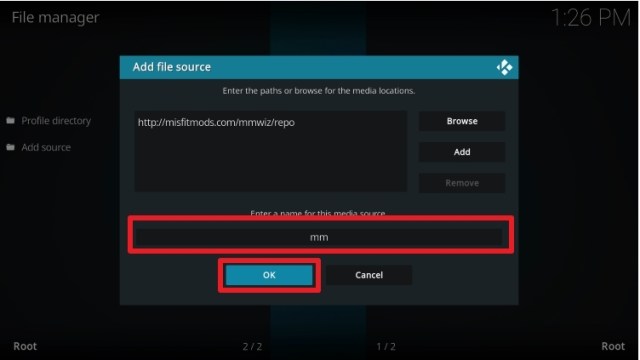
8. Now type in this URL http://misfitmods.com/mmwiz/repo and click OK.
9. Name this URL as mm and tap OK.
10. After that, go back to the system menu and select Add-ons.
11. Click Install from Zip File
12. When a box pop up, tap the Yes button
13. Select mm or any name you have given.
14. Choose repository.misfitmods.zip
15. Wait a few minutes for the addon to be installed. After that, an icon will appear at the top menu.
16. Tap the Install from Repository
17. Then select Misfitmod Repository from the list
18. Select the Program add-ons
19. Click Misfit Mods Wizard 19
20. Tap the Install button
21. Wait for the Installed message to appear
22. Return to Kodi Home screen and select Misfit Mods Wizard.
23. Select (Misfit Mods Wizard) Builds
24. Choose Hydrox Hydra
25. Scroll down and select (Misfit Mod Wizard) Install
26. Click the Yes, Install
27. Wait for the build to download.
28. Click the OK button
29. Relaunch your Kodi again
30. You can now use Hydra Kodi Build on your device.
YOUR INTERNET ACTIVITY IS BEING WATCHED
ReviewVPN cannot attest to the legality, security and privacy of the applications discussed on this site. It is highly recommended that you use a VPN service while streaming or using Kodi.
Currently, your IP 216.73.216.211 is visible to everyone and your Browser is being tracked by Advertisers & ISP Provider.
Your activities are hidden from your ISP, the government, and from the apps you are using.
You can access additional movies and TV streams.
ISP attempts to throttle are thrwarted thus reducing buffering issues.
Geographically restricted content like Netflix and Hulu can be unblocked.
A VPN works be replacing your ISP-assigned IP address and creating an encrypted tunnel. We recommend the no log service offered by IPVanish. It works well on a Firestick and offers the fastest possible speeds.
Legal Disclaimer: ReviewVPN.com does not encourage or endorse any illegal activity involved in the usage of services and applications referenced on this site. We do not verify the licensing agreements of services. The end-user is wholly responsible for ensuring that any media accessed through these services does not violate copyright and/or licensing laws. ReviewVPN does not promote, link to, or receive compensation from any Apps and IPTV services.
We check the repo link for misfitmods using Virus Total to see if there are any unsafe and malicious domains hosting this build.
The result shows that there is no virus, or any malicious files present on Hydra Kodi Build.
Because of this, we can say that it is safe to install Hydra Kodi Build on your device.
But this does not mean that you are 100% safe. Always protect your IP while using Kodi. Use a VPN to add a layer of protection to your identity when you stream any links online.
Best VPN for Kodi
When using Kodi, you will use scrappers for the links to stream movies online. We are not sure of the source for every URL that an addon or a build will provide. That is why you have to mask your identity so that trackers will not be able to see your IP address and identity that you use any illegal links or stream copyright movies. (This is not to promote streaming any copyright movies, but to protect you from any possible result you may face from the link you click).
A Virtual Private Network (VPN) will change your IP address giving access to geo-restricted contents, and protecting you from ISP, and trackers while you stream any shows on Kodi.
The best VPN for Kodi is Surfshark. It has tons of benefits that you can use while streaming
Here are the reasons why it is our VPN of choice:
VPN protocols are perfect for Kodi.
No Log Policy
Best for Torrenting
Stops buffering
Let you use a server location to change your IP and access geo-blocked contents.
It has a military-grade level of encryption that will ensure your safety.
It also supports P2p file-sharing activities which makes it applicable to torrenting
DNS Leak Protection is active by default.
24/7 customer support
30-day money-back guarantee
Note: For more information about Surfshark, please read our Surfshark Review.
Grab your subscription now!
Click here to get the lowest price on Surfshark through our exclusive limited-time offer.
How to Install Surfshark VPN on Firestick
If your Firestick still has the older interface, read this article to learn how to update it: Update Firestick Interface.
Follow our screenshots below to install the SurfShark VPN app on your Fire TV stick.
1. Go to the Home screen of your Firestick.
2. Navigate towards the Find tab. Press the Search button from the resulting dropdown.
3. Type in the keyword of SurfShark and select from the suggestions that will appear.
4. Click the official SurfShark icon from your search results.
5. Press the Download (You own it) button.
6. The SurfShark VPN installer will download on your device.
7. SurfShark VPN’s app will automatically install itself on your Fire TV stick.
8. Press the Open button after completing SurfShark VPN’s installation process.
9. Please wait for the SurfShark VPN to load its user interface.
10. You can now log in with your SurfShark VPN account credentials.
It often gets suspended which is why it comes in different domains like lookmovie.ag and lookmovie.io.
ACE and the MPA shut down the website completely. They raise the issue of copyright from a certain lookmovie domain.
What’s interesting is that the lookmovie2.io domain is still running, but we are not sure for how long.
We list down the best LookMovie alternatives where you can also watch movies and also some TV shows for free.
For safety on your part, please only watch titles and videos that are not under any copyright. To the extent of this, use a VPN that will protect you while streaming content on free movie streaming websites.
How to Stream LookMovie Alternatives on Firestick
You can always stream any website using your firestick device.
Amazon Silk Browser is the best browser to use on Firestick. Just like any browser, you can easily search and stream on different websites.
How to Install Amazon Silk Browser on Firestick
1. Click Home on your remote and click “Find”.
2. Click “Search”
3. Type in Silk Browser and choose this item that appears on the results.
4. Click on the Silk Browser Icon.
5. Choose Download
6. Select Open to launch the browser.
7. You can now start browsing using Amazon Silk Browser.
YOUR INTERNET ACTIVITY IS BEING WATCHED
ReviewVPN cannot attest to the legality, security and privacy of the applications discussed on this site. It is highly recommended that you use a VPN service while streaming or using Kodi.
Currently, your IP 216.73.216.211 is visible to everyone and your Browser is being tracked by Advertisers & ISP Provider.
Your activities are hidden from your ISP, the government, and from the apps you are using.
You can access additional movies and TV streams.
ISP attempts to throttle are thrwarted thus reducing buffering issues.
Geographically restricted content like Netflix and Hulu can be unblocked.
A VPN works be replacing your ISP-assigned IP address and creating an encrypted tunnel. We recommend the no log service offered by IPVanish. It works well on a Firestick and offers the fastest possible speeds.
Legal Disclaimer: ReviewVPN.com does not encourage or endorse any illegal activity involved in the usage of services and applications referenced on this site. We do not verify the licensing agreements of services. The end-user is wholly responsible for ensuring that any media accessed through these services does not violate copyright and/or licensing laws. ReviewVPN does not promote, link to, or receive compensation from any Apps and IPTV services.
This website requires an account for you to use it. It is also only available in some parts of the world like the USA. To access it, you can use a VPN.
Most websites are geo-restricted. It means you can only access it if you are located in a specific country. Some other websites are too risky to use because we don’t know the legality they provide with the content they offer.
All of these problems are easy to find a solution to. All you need to do is to use a VPN. A VPN will change the IP address that will help you access geo-restricted websites and at the same time protect your own IP from any legal consequences.
The best VPN to use is SurfShark. You can pick any location from around the world and certainly access different content. It will surely mask your IP without logging any of your activities.
Here are some other SurfShark features
3,200 servers in 65 locations worldwide.
No logs policy.
Prevents tracking, malware, and probable device hacks.
How to Install Surfshark on Firestick with Screenshots
If your Firestick still has the older interface, read this article to learn how to update it: Update Firestick Interface.
You can download Surfshark directly from the Amazon App store. It will be easy for you to find Surfshark with your Firestick’s Find feature. Refer to our screenshots below.
Follow our screenshots below to install the SurfShark VPN app on your Fire TV stick.
1. Go to the Home screen of your Firestick.
2. Navigate towards the Find tab. Press the Search button from the resulting dropdown.
3. Type in the keyword of SurfShark and select from the suggestions that will appear.
4. Click the official SurfShark icon from your search results.
5. Press the Download (You own it) button.
6. The SurfShark VPN installer will download on your device.
7. SurfShark VPN’s app will automatically install itself on your Fire TV stick.
8. Press the Open button after completing SurfShark VPN’s installation process.
9. Please wait for the SurfShark VPN to load its user interface.
10. You can now log in with your SurfShark VPN account credentials.
For more VPN discounts, go to ReviewVPN Deals and purchase the best VPN for you.
FAQs
Are LookMovie website users safe?
We are not 100% sure about this matter. Using your own IP address while using the website puts your identity at risk. Only stream content with no copyright and are safe to use. Always use a VPN for protection.
What are the best LookMovie Alternatives?
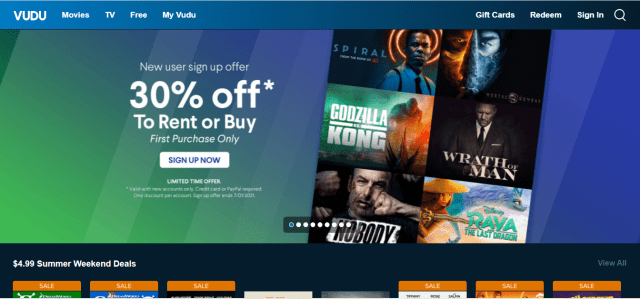
There are a lot of great websites out there. We provide the top 6 alternatives for us: Tubi TV, 123Movies, Flixtor, Sony Crackle, Vudu, and Peacock TV.
Conclusion
LookMovie is not the first website that ACE shut down. There might be more to come. We will still help you to know the best alternatives for them.
Always use a VPN while streaming on different websites for your safety and protection.
If you also have a suggestion about the best LookMovie alternatives to consider, feel free to write it on the comment section.
Note: ReviewVPN.com does not own or operate any app nor does it endorse any. The main purpose of this article is strictly for educational purposes only.
In this article, we will give you the list of the best free and paid IPTV streaming services for Firestick and Android.
First of all, let’s discuss what is IPTV.
IPTV stands for Internet Protocol Television. This is a technology that lets users watch live TV for less expensive than traditional satellite services. With IPTV, you can save a lot of money, by replacing your cable service with it.
IPTV offers live TV to cord-cutters. Whether you are looking for live News, Sports, etc. Most IPTV streaming services offer 24/7 telecasts of your favorite sports like NFL, NBA, hokey, and other pay-per-view matches.
Some IPTV services are not for free. Although, there are some that offer no fee at all and are available for Android and Amazon Firestick devices.
Every IPTV service is different from one another. We cannot determine the legality of every application. The best thing to do is to use a VPN that will protect your identity and privacy while using an IPTV.
Continue reading to find the answers to these questions: Is IPTV Legal? What is the Best IPTV to use? and more.
Best IPTV Streaming Services 2022 Edition
There are actually thousands of IPTV streaming services available in the market today. You can easily download their apks from the internet.
Some IPTV services are hosted by unsecured hoster and servers. ReviewVPN.com does not host nor is affiliated with any IPTV service mentioned below. Protect your privacy. Use Surfshark while streaming any app, especially third-party ones.
Using a VPN will alter your location and will mask your identity. This is the best way to stay anonymous while streaming.
Using a VPN such as Surfshark is a must if you are going to use any of these unverified IPTV services.
These are not for free, but we suggest you pay on a monthly basis rather than getting longer plans.
Unverified IPTV services might shut down at any time and you might not have a refund if you get a longer plan.
Apollo Group TV
One of the best IPTV streaming services is Apollo Group TV. It offers more than 1000 HD channels. The coverage of this IPTV is worldwide. You can watch shows from the USA, Canada, the UK, Germany, Italy, Latin countries, Israel, and many more.
You can also stream by genre. If you are looking for Sports, News, Lifestyle, Entertainment, Kid’s channel, etc. then you can rely on Apollo Group TV.
Aside from live TV, Apollo Group TV also provides video-on-demand (VOD) of more than 5000 movies and TV shows with no advertisements.
Price: $24.99 per month
Free trial: 10 days only
Payment Method: Debit/Credit, Bitcoin, PayPal
Number of Available Channels: 1000+
Connection Limit: 5 devices
Compatible Devices: Android, Windows, iOS, Mac, and Amazon Firestick
VPN Compatibility: Works Perfectly with Surfshark
Customer Support: Via Email, Discord, and Telegram
If you are looking for some good quality IPTV at a low price, Yeah! IPTV is the best one for you. It is among the Best IPTV Streaming Services in the market today.
Price: 9.99 EUR or approximately $12 per month
Free trial: 24 hours only
Payment Method: Cryptocurrency, Bitcoin
Number of Available Channels: Around 6000
Connection Limit: 1 device only
Compatible Devices: Android, iOS, Mac, Amazon Firestick, etc.
Yet another less expensive but good quality IPTV service, SSTV IPTV offers about 8000 live channels. It is also available to a lot of different devices, but 1 account is good for 1 device only.
Price: $17 per month
Free trial: Applicable
Payment Method: Paypal, Bitcoin
Number of Available Channels: Around 8000
Connection Limit: 1 device only (can get more with a higher price)
Compatible Devices: Android, iOS, Mac, Amazon Firestick, etc.
VPN Compatibility: Works Perfectly with Surfshark
Customer Support: Online Contact Form, Email, and Social Media
Notable Features:
M3U URL
Adult Content
EPG
VOD
PPV
No IP Location Locked
With Sports Packages
Necro IPTV
Another app to be a part of the Best IPTV Streaming Services is Necro IPTV. It offers 2000 channels to stream live sports, and other entertainment. 1 account for this service is suitable for 2 devices.
Price: $15/month (2 connections) . Other Plans: 3 months, 6 months, and 12 months
Free trial: 72 hours only
Payment Method: Paypal, Bitcoin, Debit/Credit
Number of Available Channels: 2000
Connection Limit: 1 device only (can get more with a higher price)
Compatible Devices: Android, iOS, Amazon Firestick, etc.
This IPTV is really a royalty by the number of live channels available. Using King IPTV, you can stream to its 12, 000 cable TV channels.
You can also watch video-on-demand (VOD) with over 14000 available movies and TV shows.
King IPTV provides high-quality definition up to 1080p resolution to the viewers.
Price: $18/month. Other Plans: 3 months, 6 months, 12 months, and 24 months.
Free trial: Applicable
Payment Method: Paypal, and Bitcoins
Number of Available Channels: 12000
Connection Limit: 1 device only
Compatible Devices: Android, iOS, Mac Amazon Firestick, etc.
VPN Compatibility: Works Perfectly with Surfshark
Customer Support: Online Contact Form
Notable Features:
M3U URL
Adult Content
EPG
PPV
No IP Location Locked
With Sports Packages
Falcon TV
Falcon TV IPTV is a bit pricey compared to other best IPTV streaming services. Some features are not available in this app like M3U URL.
Price: $20/month
Free trial: Applicable
Payment Method: Credit/Debit, or Bitcoins
Number of Available Channels: 4000
Connection Limit: 3
Compatible Devices: Android, iOS, Mac Amazon Firestick, etc.
VPN Compatibility: Works Perfectly with Surfshark
Customer Support: social media, online chat, and email
Notable Features:
VOD
Adult Content
EPG
PPV
No IP Location Locked
With Sports Packages
Joker IPTV
Joker IPTV is somehow similar to Falcon TV in terms of pricing but the number of channels it offers is massive. There is also no M3U URL available for Joker IPTV but some other great features are still present.
Price: $19.99/month
Free trial: Applicable
Payment Method: Credit/Debit
Number of Available Channels: 10000
Connection Limit: 1 connection
Compatible Devices: Android, iOS, Mac Amazon Firestick, etc.
Voodoo Streams IPTV also has a part on our list of the best IPTV Services. It is applicable to all Android devices and offers 12,000 channels to stream. Most of the shows you can watch on this IPTV are in great HD quality.
Price: $11/month
Free trial: applicable
Payment Method: Debit/Credit
Number of Available Channels: 12000
Connection Limit: 2 connections
Compatible Devices: Firestick, Fire TV, Android Devices, etc.
VPN Compatibility: Works Perfectly with Surfshark
Customer Support: online contact form and email
Notable Features:
VOD
Adult Content
EPG
PPV
No IP Location Locked
With Sports Packages
SuperPro IPTV
SuperPro has a massive library of channels to offer. It becomes one of the most popular best IPTV streaming services today. The quality of the videos is superb and you can even upgrade your plan for more features.
Price: $15/month
Free trial: No free trial
Payment Method: Debit/Credit, Bitcoin, and Paypal
Number of Available Channels: 15000+
Connection Limit: 2 to 3 connections
Compatible Devices: Android, Android TV, iOS, Apple TV, etc.
VPN Compatibility: Works Perfectly with Surfshark
Customer Support: Telegram, and live chat
Notable Features:
M3U URL
VOD
Adult Content
EPG
PPV
No IP Location Locked
With Sports Packages
Kemo IPTV
Kemo TV offers both live TV with over 15000 channels and Video-On-Demand with almost 30000 titles for a low price. What’s amazing is that the videos are also of good quality.
The plan is usually good for a total of 3 months. You can also get the 6-month plan at different prices depending on the number of devices to use.
Price: $25 for 3 months with 1 connection (under $9 per month); $90 for 6 months with 5 connections
Free trial: 24 hours free trial
Payment Method: Debit/Credit, and Bitcoin
Number of Available Channels: 15000+
Connection Limit: 1 connection for the basic plan but can go up to 5 devices with extra fees
Compatible Devices: Android, Android TV, iOS, etc.
VPN Compatibility: Works Perfectly with Surfshark
Customer Support: Contact Form and email
Notable Features:
M3U URL
VOD
Adult Content
EPG
PPV
IP Location Locked
With Sports Packages
XoomsTV
Another interesting service to add to our list is XoomsTV. It has great and essential features for streaming. The interface of the app even looks expensive, but it appears to be very affordable.
Legal Disclaimer: ReviewVPN.com does not encourage or endorse any illegal activity involved in the usage of services and applications referenced on this site. We do not verify the licensing agreements of services. The end-user is wholly responsible for ensuring that any media accessed through these services does not violate copyright and/or licensing laws. ReviewVPN does not promote, link to, or receive compensation from any Apps and IPTV services.
These are IPTV services that are 100% legal and verified. Most of these apps are available in the Apple App Store, Google Play Store, and Amazon App Store.
To ensure your safety while using these free apps, use a VPN such as Surfshark.
If you are using Amazon Firestick, you need to Jailbreak your Firestick and use the Downloader app. Just type in the download link and continue installing the app.
How to Install the Downloader App
1. Click Home on your remote and scroll once to your Right. Click Setting (Gear Wheel Icon)
2. Scroll down and to the right until you get to My Fire TV. Click on it.
3. Select Developer options.
4. Turn on ADB debugging and Apps from Unknown Source.
5. Click Turn On when the pop-up appears.
6. From the Home page, click FIND.
7. Click Search.
8. You can either say Downloader to your Alexa voice-enabled remote or start typing it. If you typed it, click on the suggestion when it appears.
We are not 100% of the host and providers of most IPTV applications listed above. Those free and paid but unverified services might put users at risk. This is why we need to protect ourselves with the help of a VPN.
A VPN will mask the user’s identity by changing his/her IP address. Even Internet Service Providers (ISP) won’t able to track you and your online activities.
There are also tons of great benefits to using a VPN, and the best one to use is Surfshark.
Surfshark is impressively fast than any other VPN
The price is cheaper if you choose to have a longer plan.
Provides access to geo-restricted content.
30-day money-back guarantee.
Protects your online identity from hackers, especially when you are using public wi-fi
Keeps your data and files from harmful malware
Your connections and data will be kept encrypted and anonymous
Makes your internet speed faster
Gives easy access and downloads from different torrent sites without being caught.
For more VPN discounts, go to ReviewVPN Deals and purchase the best VPN for you.
IPTV Requirements
Streaming any IPTV requires you to have the following:
Streaming device. You can use Android, iOS, and most of the time a Jailbroken Firestick.
Fast Internet Speed. Most IPTVs require at least 25Mbps internet speed for a buffer-free experience.
Subscription. Whether you looking for free or paid, choose the best IPTV service for you.
IPTV Definition of Terms
IPTV – Internet Protocol Television
EPG – Electronic Program Guide
ISP – Internet Service Provider
PPV – Pay-per-View
VOD – Video-On-Demand
VPN – Virtual Private Network
FAQs
What is M3U URL?
It is a link provided by an IPTV service alongside your username and password which you can use for any IPTV Player.
What is IP Location Locked?
Some VPNs lock the IP location the first time you use their service. This is called the IP Location Lock.
What is IPTV Catch Up?
This IPTV feature lets you watch past episodes if you are watching live programs. If you are unavailable during the time of airing, this feature is the best help for you.
Is IPTV Legal?
Verified IPTV services, or those that are downloadable from official app stores, are legal. However, there are some unverified and free IPTV services that might not have proper licensing. These apps may harm your identity and make you face some legal problems if you use them without caution.
ReviewVPN does not have the power to determine the legality of any application most especially IPTV services. We do not endorse nor are affiliated with any IPTV application stated above.
What is the Best IPTV to use?
We suggest using verified IPTV services to ensure safety. Although most of them are expensive with limited channels. If you consider free applications as standard to being the best, use a VPN like Surfshark when using any free third-party application.
Wrapping Up
Thank you for taking the time to read the best IPTV services to use. There are 3 types of IPTV programs that you can consider. They are 1. Unverified IPTV Services, 2. Verified IPTV Services, and lastly 3. Free IPTV Services.
Do you find our list helpful? If we miss out on any other applications that we can add, please write them down in the comment section.
It started last 2020 when the commission adopted a proposal for a Digital Markets Act also known as DMA.
To know more about this regulation and proposal, you can see the Digital Markets Act full article.
The main purpose of this act is to let people have their own rights to install what they want on their iOS devices.
It is said that the European Union will pass the bill early this year.
How is This Important?
If you are an iOS user living in countries under the European Union, this will benefit you a lot. As we all know, Apple App Store has limited apps that you can use.
This new bill will allow you to install 3rd party applications on your device. Sideloading is really not available on iOS devices. It is more popular and appropriate for Android devices and Amazon Firestick.
If this bill will be passed and approved, it will take effect in Europe in early 2023. This is the interesting part. Even if you are not in Europe, you can use a VPN and connect it to a European server. Because of this, you can also do iOS sideloading anywhere.
We suggest using Surfshark for a fast and reliable connection. We will show you how you can install Surfshark on your iOS device.
You usually cannot find Instagram unblocked at school. With the help of this article, you will learn to unblock Instagram and destroy censorship without your school knowing it.
Instagram is becoming a standard-setter for today’s generation. For teens, it is more of a necessity, although it might affect their mentality when it comes to body image.
Most schools and parents do not encourage using Instagram, or other social media like Facebook and Twitter for their children. This is one of the reasons why you can’t access it at school.
For some other students, using social media platforms can actually help with their research which means it is somehow a necessity.
Here’s the guide to have Instagram unblocked.
Easy Guide to Have Instagram Unblocked Anywhere
Easily unblock Instagram anywhere by following these steps:
IPVanish is the best VPN to unblock Instagram. With a VPN, you can easily change your IP address. It is as if you change your location. Your pin would not be located within your school grounds. When you connect to a new server, then open Instagram, you will have it unblocked.
This is how good a VPN is. IPVanish is the fastest VPN when it comes to connectivity. It is very safe and unlocks app features that are originally not available in some areas.
IPVanish Features
2,000 plus available servers
Provides connection to 75+ countries
Kill Switch Feature
Double VPN
Supports P2P Sharing
Fast VPN
Secured and follows a no-log policy
Allows an unlimited number of devices simultaneously
Users are the ones responsible for using any social media platforms. With Instagram, it has its own pros and cons. Here are some simple importance of having Instagram unblocked:
Sharing
Every moment is priceless. Also, files and other important data can be shared on Instagram with other people. This course helps them easily provide information for their projects and assignments.
Research
Relevant news and information can be seen on Instagram. With this, students can learn more about their projects and studies.
Record and Presentation
Instagram may help students with their audio-visual presentations.
Other Ways to Unblock Instagram at School
Aside from using a VPN, you can also use other ways to unblock Instagram at school or anywhere. You just have to bear in mind that using VPN is the safest among all the possibilities.
VPNs take care of privacy and security while others just change your IP address without giving full protection to your online identity.
Here are the other ways to unblock Instagram:
Tor Browser
You can also have Instagram unblocked by using the Tor browser. It is a series of different servers like an onion that hides and changes your IP address to make it hard to track you online.
This is 100% free and available for different devices. It is not as safe as a VPN but it works pretty much the same.
Using Instagram is never illegal. You can use it anywhere.
Can I use free VPNs for Instagram Unblocked
Free VPNs aren’t 100% safe and do not have features as good as the ones mentioned above. It cannot give you the best way to access and unblock Instagram at school. Use VPN such as Surfshark.
Final Words
You can use Instagram at school by using a VPN. You can also use other possible ways like Tor Browsers, proxy, Smart DNS, and mobile data.
If you have some other great information to achieve Instagram unblocked, feel free to write it down in the comment portion. Thank you for your time.
We are creating the lists of the best store codes from the 3 FileLinked clones and some other apps.
UnLinked, FileSynced, and AppLinked are the 3 most popular FileLinked clones. These apps emerge to fame after the shutdown of FileLinked. Each one still has its own downside, but you can still rely on them. Personally speaking, we find UnLinked as the best among the three FileLinked clones.
We all know that FileLinked was a very wonderful app where you can download or install streaming applications to your device. Most of the apps found in most FileLinked stores were third-party applications. These are apps that are not available in the Amazon App Store, Google Play Store, and other popular app stores.
From the clones mentioned above, we compiled the best codes where you can install apps for free. We also added a bonus list where you can use Downloader to easily install apks, which we tested and made sure are safe.
Note: Use a VPN to keep your privacy and your personal information safe while using the following apps or any other apps.
UnLinked
UnLinked, so far, is the best FileLinked clone for us. It possesses the most features like FileLinked which are really suitable for most users. You can easily locate any app through searching and by categories wherever store you are in. Look at the video below to learn how to install UnLinked on Firestick
Compared to other clones, this app needs more features and developments. But you can still consider this app since it still shows some promising aspects to be a great FileLinked alternative.
We actually do not suggest using this app that much, because of the questionable amount of data it requires when it was sold to a new owner at had an update. To learn about this, you can read the AppLinked Security Warning.
Legal Disclaimer: ReviewVPN.com does not encourage or endorse any illegal activity involved in the usage of services and applications referenced on this site. We do not verify the licensing agreements of services. The end-user is wholly responsible for ensuring that any media accessed through these services does not violate copyright and/or licensing laws. ReviewVPN does not promote, link to, or receive compensation from any Apps and IPTV services.
By typing a URL/link on the Downloader app, you can easily install the apps.
Here’s how you can install Downloader on Firestick.
Best URLs / Codes to Install Using Downloader
Cinema HD – code: reviewvpn.com/cin
Cyberflix – code: reviewvpn.com/cyber
Viva TV – code: reviewvpn.com/viva
Nova TV – code: reviewvpn.com/nova
Terrarium TV – code: reviewvpn.com/ter
Titanium TV – code: reviewvpn.com/tit
BeeTV – code: reviewvpn.com/bee
FilmPlus – code: reviewvpn.com/film
Live NetTV – code: reviewvpn.com/livenet
Use VPN When Installing APKs
We really suggest using a VPN when using any apps and also installing 3rd-party applications. This is to provide safety and privacy for all of your data and information.
Cybercrime is really becoming a major risk and problem today. A VPN such as Surfshark is really a great shield against criminals and hackers.
If your Firestick still has the older interface, read this article to learn how to update it: Update Firestick Interface.
You can download Surfshark directly from the Amazon App store. It will be easy for you to find Surfshark with your Firestick’s Find feature. Refer to our screenshots below.
1. Go to the Home screen of your Firestick.
2. Navigate towards the Find tab. Press the Search button from the resulting dropdown.
3. Type in the keyword of SurfShark and select from the suggestions that will appear.
4. Click the official SurfShark icon from your search results.
5. Press the Download (You own it) button.
6. The SurfShark VPN installer will download on your device.
7. SurfShark VPN’s app will automatically install itself on your Fire TV stick.
8. Press the Open button after completing SurfShark VPN’s installation process.
9. Please wait for the SurfShark VPN to load its user interface.
10. You can now log in with your SurfShark VPN account credentials.
For more VPN discounts, go to ReviewVPN Deals and purchase the best VPN for you.
Click here to get the lowest price on Surfshark through our exclusive limited-time offer.
Final Words
Thank you for your time reading this article. We hope we are able to help you learn the best store codes for UnLinked, FileSynced, AppLinked, and even Downloader. If you have suggestions about other codes and apps that we can check, please don’t hesitate to place them in the comment section.
Cinema HD – This app has always been the best free movie app you can use on your devices. It houses almost all of the latest titles for both movies and TV series. Click here to download the CinemaHD apk.
Tubi TV – A free and legal application with its own official website that offers movie streaming features as well. Click here to download the Tubi TV apk.
Kodi – One of the most popular apps for streaming. You can use Kodi not just for movies, but also for live TV, sports, adult content, and many more. With the help of builds and addons, you will be able to enjoy this app to the fullest.
Plex – An amazing app to watch not only movies, and TV series but also live TV, sports, etc. You can install this app directly from the Amazon App Store.
Stremio – It is also a versatile app that offers tons of genres for streaming. Aside from movies and TV series, you can also use this app for porn and other content.
Popcornflix – Another app available in the Amazon App Store where you can watch tons of movies and TV shows. Click here to see the other version for kids.
BeeTV – An app very similar to Cinema HD because it also functions by providing links to watch any titles. It is a Terrarium clone that offers a wide variety and an updated list of media. Click here to install the BeeTV apk.
Terrarium TV – It is one of the original apps for android devices that offers scrappers from all over the internet. This app became the standard of so many 3rd-party applications. Recently, this app became available again. Click here to download the Terrarium TV apk.
SD Maid Pro – Fix lags. Safe to install. Click here to download the apk.
DBTV Assistant – Best to make your device faster. Not 100% safe. Click here to download the apk.
Best Live TV Apps on Firestick
You can use your firestick device for streaming live TV, sports, news, etc. With the right application, you can have thousands of live TV channels from all over the world.
There are free live TV apps available on firestick. But since you are using free applications, your IP address might be at risk and become exposed to the authority. This is the reason why we are suggesting using a VPN if you wish to stream live TV for free.
In this article, we are going to help you install the NBC Sports App on Firestick.
NBC Sports is the official sports station of the National Broadcasting Channel (NBC). It is a popular channel, application, and website for sports fans out there. NBC Sports offers game highlights, live shows, replays, talk shows, score updates, and more.
You can watch NBC, NBCSN, NBC Sports Gold, Golf Channel, Olympic Channel, Telemundo Deportes, and many more using the NBC Sports app.
You can actually use your Vidgo account and integrate it with NBC Sports app. Through this, you will be able to access and stream a lot of live events and channels.
How to Install the NBC Sports App on Firestick
From your home screen, navigate to Find.
Scroll down to Search.
Search for NBC Sports App.
Choose the NBC Sports App icon.
Click the “Get” or “Download” button.
Wait for the app to be installed.
Select Open to launch the app.
How to Install the NBC Sports App with Screenshots
1. Click FIND.
2. Click Search.
3. Type NBC Sports and click on the suggestion
4. Tap the icon of the app when it appears
5. Click the Get or Download button to install the app
6. Select Open to launch the app
YOUR INTERNET ACTIVITY IS BEING WATCHED
ReviewVPN cannot attest to the legality, security and privacy of the applications discussed on this site. It is highly recommended that you use a VPN service while streaming or using Kodi.
Currently, your IP 216.73.216.211 is visible to everyone and your Browser is being tracked by Advertisers & ISP Provider.
Your activities are hidden from your ISP, the government, and from the apps you are using.
You can access additional movies and TV streams.
ISP attempts to throttle are thrwarted thus reducing buffering issues.
Geographically restricted content like Netflix and Hulu can be unblocked.
A VPN works be replacing your ISP-assigned IP address and creating an encrypted tunnel. We recommend the no log service offered by IPVanish. It works well on a Firestick and offers the fastest possible speeds.
Legal Disclaimer: ReviewVPN.com does not encourage or endorse any illegal activity involved in the usage of services and applications referenced on this site. We do not verify the licensing agreements of services. The end-user is wholly responsible for ensuring that any media accessed through these services does not violate copyright and/or licensing laws. ReviewVPN does not promote, link to, or receive compensation from any Apps and IPTV services.
NBC Sports App Features
Covers a lot of sports events from NFL, NBA, MLB, College Football, and more.
Applicable to other devices like Android, and Roku.
The app is free to download
Vidgo account integration
Not available outside the USA
How to Stream on NBC Sports using your Browser
You can stream the official NBC Sports website, just go to nbcsports.com. You can use the Amazon Silk Browser or other browsers like Firefox to stream the website.
Pros and Cons
Pros
Free to download
Available in almost all devices
Safe to use
Tons of great content to stream
Cons
Not available outside the USA
Stream Safely With a VPN
It is always best to feel secure in everything you do. Even when streaming, your privacy and safety should not always be at risk. That is why you should use a good Virtual Private Network or VPN.
A VPN will also let you unblock geo-restriction and allow you to use the NBC Sports app outside the USA. You can also use this to have more content than usual based on the IP location you will choose.
Just be careful in choosing a VPN. As much as we want to recommend you use a free one, the words free and VPN don’t match. Most VPNs that are free aren’t safe. That is why it is best to use the premium ones.
Surfshark is the best VPN not only for streaming but also for a lot of great reasons. It is compatible with various devices and continues to impress us with its features.
Here are some of the great benefits of Surfshark:
Surfshark connects you to thousands of servers from different parts of the world.
Conceal your entire internet traffic.
Access apps and media with geo-blocks.
Provides VPN protocols based on your device’s needs.
Zero log policy.
Allow you to use one account for multiple devices at the same time.
For more VPN discounts, go to ReviewVPN Deals and purchase the best VPN for you.
Click here to get the lowest price on Surfshark through our exclusive limited-time offer.
Alternative Applications for NBC Sports
There are tons of other great sports apps that you can use aside from the NBC Sports app. You can check them all out in our list of the Best Sports Apps.
NBC Sports app is the official sports application of the NBC channel and therefore it is legal.
Is the NBC Sports App Safe to Use?
Yes, this app is safe to use.
Conclusion
The NBC Sports app is such a wonderful application that you can use to stream your favorite sports event. It has great features and content. The only problem you may face is that the NBC Sports app is not available outside the USA. If you are traveling abroad, you better use a VPN like Surfshark so you can be able to still stream your favorite games wherever you are located.
We hope that this article was able to help you install the NBC Sports app on your Firestick device.
Note: ReviewVPN.com does not own or operate any app nor does it endorse any. The main purpose of this article is strictly for educational purposes only.
In this article, we will show the best VPN to use for Flixtor.
You might be familiar with Flixtor, it is one of the most popular movie and TV show streaming websites today. Most of the recent and popular titles are available on this website. There are no advertisements, no pop-ups, and no ad banners present even on its home page.
Streamers can also create and log in to an account on Flixtor.
The problem most movie website streamers are facing is that their Internet Service Provider (ISP) is monitoring their activities. Streaming on websites such as Flixtor makes ISP throttle the internet bandwidth. This affects the speed of the video. It can also block you from watching a specific title or using certain website features.
This is the reason why you need to know the best VPN to use for Flixtor.
What is a VPN?
A VPN is known as a Virtual Private Network. It is advanced software that you can install on your device to change your IP address. When you change your IP address, you will have privacy and security from your ISP, spying eyes, hacker, or even your government. You can now surf the internet anonymously.
VPNs provide encrypted tunnels that connect you to another server, that securely transmit data to a public network, giving you access to other content, features, and more.
You need the best VPN for Flixtor. Actually, when you are using the internet and streaming on different websites, you should turn on your VPN first. With this, you can assure that you are secured and can stream anything anonymously.
Just make sure to use an appropriate, working, and trustworthy VPN. Don’t just pick any VPN because some of them are not 100% safe, especially the free ones. It’s better to use the premium ones since you can assure that you get the best quality service from a VPN based on the amount you pay for.
Best VPN for Flixtor
One of the best VPNs to use on any website is Surfshark. We consider this the best VPN for Flixtor. You can certainly unblock and destroy geo-restrictions and stream websites anonymously. It has great and advanced features that boost your streaming.
If you are using Firestick when streaming on Flixtor, Surfshark is available in the Amazon App Store. There is no need to Jailbreak Your Firestick to install it.
Surfshark also works with any other device, it has VPN protocols that are flexible to any type of device you are using.
Features
3,200 servers, and 65 locations to choose from.
Military-grade AES-256 encryption
Fast download speed
Split Tunneling
Zero log policy
Unmetered connection
Unlimited simultaneous devices
Protocols: WireGuard, IKEv2, SSTP, PPTP, L2YP, and even OpenVPN (TCP and UDP)
One of the best VPNs to use on any website is IPVanish. We consider this the best VPN for Flixtor. You can certainly unblock and destroy geo-restrictions and stream websites anonymously. It has great and advanced features that boost your streaming.
One of the oldest VPNs in the market and still giving good service to its users is StrongVPN. This VPN is well known for destroying geo-restrictions and is one of the best VPNs for Flixtor.
Cyberghost incredibly offers a cheap price with good quality service. You can secure a deal within 3 years. That is why we consider this as one of the best VPNs for Flixtor.
Another best VPN for Flixtor is ExpressVPN. It provides great speed when you connect to any of its servers. This VPN also offers military-grade AES 256-bit encryption.
Like CyberGhost, NordVPN is another cheap but quality-wise VPN to checkout. It also has great features that make it one of the best VPNs for Flixtor.
Features
5,300+ serves, 62 locations
Compatible with Windows, Mac, iOS, and Android
Zero logs are kept
VPN Protocols: IKEv2/IPsec OpenVPN
30-day money-back guarantee
YOUR INTERNET ACTIVITY IS BEING WATCHED
ReviewVPN cannot attest to the legality, security and privacy of the applications discussed on this site. It is highly recommended that you use a VPN service while streaming or using Kodi.
Currently, your IP 216.73.216.211 is visible to everyone and your Browser is being tracked by Advertisers & ISP Provider.
Your activities are hidden from your ISP, the government, and from the apps you are using.
You can access additional movies and TV streams.
ISP attempts to throttle are thrwarted thus reducing buffering issues.
Geographically restricted content like Netflix and Hulu can be unblocked.
A VPN works be replacing your ISP-assigned IP address and creating an encrypted tunnel. We recommend the no log service offered by IPVanish. It works well on a Firestick and offers the fastest possible speeds.
Legal Disclaimer: ReviewVPN.com does not encourage or endorse any illegal activity involved in the usage of services and applications referenced on this site. We do not verify the licensing agreements of services. The end-user is wholly responsible for ensuring that any media accessed through these services does not violate copyright and/or licensing laws. ReviewVPN does not promote, link to, or receive compensation from any Apps and IPTV services.
Here at reviewvpn, we always recommend using Surfshark. It is the best VPN for us. You can use it not only with Flixtor but also with a lot of great websites and apps for streaming. It gives a great offer and you can surely get what you pay for. So come and check it out.
Other good VPNs to check are NordVPN, IPVanish VPN, ExpressVPN, and Surfshark.
We hope that this article was able to help you learn the best VPN for Flixtor.
Note: ReviewVPN.com does not own or operate any app nor does it endorse any. The main purpose of this article is strictly for educational purposes only.
Special offer
Get 80% Off for 29-Month Subscription + 5 Months Free on Surfshark VPN!