KissCartoon Alternatives

Overview

This article will show you the best alternative for KissCartoon.


KissCartoon is one of the best streaming websites for cartoons without any cost at all. It has a huge database of content that everyone will love to watch, including the latest and all-time favorite cartoons are all here. 

This website offers over 5,000+ cartoons like Family Guy, The Flintstones, Scooby-Doo, Batman, The Looney, and more. However, like any other website, most of its contents are provided by non-affiliated third parties.

The only downside of this app is, it is littered with ads and clickbait, which can be frustrating. Continue reading, and we will show you some of the best KissCartoon Alternatives Websites you can visit. 


ANONYMOUSLY

Alternative Streaming Websites to KissCartoon

All of the streaming websites that we will show you here are all accessible through your web browsers on any device. To watch this website on the big screen of your Firestick, you need to install the Amazon Silk Browser first. 


If your Firestick still has the older interface, read this article to learn how to update it: Update Firestick Interface.


Install the Amazon Silk Browser with Screenshots

1. Click FIND.

Movie Nite 1


2. Click Search.

Movie Nite2


3. Search for the Amazon Silk.

Step 2 Install Watch 4Anime on Firestick, Android, Windows, and iOS


4. Select the icon of Amazon Silk.

Step 3 Install Watch 4Anime on Firestick, Android, Windows, and iOS


5. Click Download.

Step 4 Install Watch 4Anime on Firestick, Android, Windows, and iOS


6. Click Open.

Step 5 Install Watch 4Anime on Firestick, Android, Windows, and iOS


7. Amazon Silk – Web Browser is Installed.

Step 6 Install Watch 4Anime on Firestick, Android, Windows, and iOS


YOUR INTERNET ACTIVITY IS BEING WATCHED

ReviewVPN cannot attest to the legality, security and privacy of the applications discussed on this site. It is highly recommended that you use a VPN service while streaming or using Kodi.

Currently, your IP 5.39.1.240 is visible to everyone and your Browser is being tracked by Advertisers & ISP Provider.

Save 65% Now

Limited Time Offer

Here are the main reasons why you must use a VPN:

  • Your activities are hidden from your ISP, the government, and from the apps you are using.
  • You can access additional movies and TV streams.
  • ISP attempts to throttle are thrwarted thus reducing buffering issues.
  • Geographically restricted content like Netflix and Hulu can be unblocked.

A VPN works be replacing your ISP-assigned IP address and creating an encrypted tunnel. We recommend the no log service offered by IPVanish. It works well on a Firestick and offers the fastest possible speeds.

Special Limited Time Offer - Get IPVanish


Legal Disclaimer: ReviewVPN.com does not encourage or endorse any illegal activity involved in the usage of services and applications referenced on this site. We do not verify the licensing agreements of services. The end-user is wholly responsible for ensuring that any media accessed through these services does not violate copyright and/or licensing laws. ReviewVPN does not promote, link to, or receive compensation from any Apps and IPTV services.


Install Surfshark on Firestick

Best Surfshark Deal


WatchCartoonsOnline

Ad Presence: This site is ad-free

WatchCartoonsOnline is a popular streaming website for cartoons for free. It is one of the best streaming sites that has a large collection of content in full-length HD quality. This site has a simple and user-friendly interface that is easy to navigate on any device. 

You can watch this site content for free and without registration. This site offers you lots of Dubbed Anime and cartoons, Subbed Anime, and more.

Features: 

  • Easy to use interface.
  • No sign-up process. 
  • Search button to quickly find contents.
  • SD and HD quality of videos.
  • Good quality of sounds. 
  • One tap 10-second playback and forward.
  • Unlimited contents of Dubbed/Subbed Animes, Cartoons, Movies, and OVA series.
  • An alphabetically ordered list of contents.


Anime Toon

Ad Presence: No pop-up notification banner but has displayed ads on the interface.

Anime Toon is a free streaming website that offers a great lineup of cartoons and animes to watch. The site interface is very simple and clean because it does not have any ads displayed on its homepage. 

The good thing about this site is it does not have any clickbait or redirect ads. You can find anything you want to watch here, including Korean drama and movies, TV shows, and Dubbed and subbed animes.

Features:

  • Easy to control UI.
  • No registration is needed. 
  • It has an updated list of content every week. 
  • Provided info for each content such as Brief synopsis, category, status, released date, ratings, and genres.
  • Complete list of cartoon and anime series. 
  • HD quality of videos.
  • It has four (4) different servers provided.
  • An alphabetically ordered list of cartoons.


WatchSeries

Ad Presence: Redirect ads when click, pop-up banner, and display ads on its UI.

WatchSeries is a good streaming website that offers you a huge database of content. You can find here every entertaining movie and TV series you want to watch. 

This website is a complete package because everything you want to watch is on this website. They have a great lineup of cartoon series and movies, anime, movies in different genres, popular TV series, and more. 

Features:

  • It has a simple and user-friendly UI.
  • No sign-up process.  
  • A huge database of contents.
  • Provided info for each content such as Brief synopsis, category, status, released date, ratings, and genres.
  • An alphabetically ordered list of cartoons.
  • It provides eight different servers such as Server m1, Gogo server, Stream SB, and more. 
  • You can download their content from different servers. 
  • Watch a Complete list of cartoon and anime series. 
  • HD quality of videos.
  • No buffering when playback. 
  • It has popular TV series, TV shows, dramas, Movies, and English dubbed content.


TooNova

Ad Presence: This site is ad-free.

TooNova is another popular streaming site with thousands of popular cartoons, anime, manga, and more. You can choose from their different categories as they provide lots of the latest and old series and movies. 

They have a huge database of new cartoon films, outdated cartoons, and all-time child favorites in different genres. You can watch their content for free without even creating an account.

Features:

  • You can watch the complete series of Family Guy, 6teen, Lego star wars, and more.
  • Alphabetically ordered contents.
  • Free and No signup process.
  • Built-in search engine.
  • Unlimited content to view in HD quality.
  • Provided info for each content such as plot summary, alternative titles, statues, release date, genres, and ratings. 
  • You can watch on different servers. 
  • Allows you to leave a comment for each content.


Chia-Anime

Ad Presence: Displayed ads on the left side of its interface.

Chia-Anime is one of the top websites that have lots of cartoon movies and series to watch. This site’s main content is more on anime, but it has a great lineup of cartoons that you will surely love to watch. 

It has a simple and user-friendly interface that is easy to control. The good thing with this site is it does not have any ads displayed and clickbait. You can watch this website smoothly without any ads popping up. 

Features:

  • No registration is needed.
  • Built-in search engine to quickly find content.
  • Content details provided like synopsis, episode number, genres, status, rating, and runtime.
  • Large collection of cartoons and anime series.
  • You can also read manga, watch Asian dramas and listen to anime soundtracks.
  • Filter comets by genre type, studio, season, and status.
  • Dubbed and Subbed contents.
  • Hd quality of videos.


Know more about Chia-Anime sites by reading the article below.

Watch Chia-Anime on Firestick and Android


GoGo anime

Ad Presence: Pop-up notification banners that are easy to close.

GoGo anime is one of the best sites to watch the latest and all-time favorite cartoons and anime movies and series. You can find all of the English and Chinese dubbed and subbed contents here. 

It provides you with a different category that has a great lineup of content to view for free. The good thing about this app is it is free and does not require its users to register. 

Features:

  • User-friendly interface. 
  • No sign-up process. 
  • Complete list of anime and cartoon series. 
  • It has a dark mode.
  • Displays content details such as type, studio, airing date, genre, country, status, duration, and video quality.
  • One tap 10nseconds video rewind. 
  • HD quality of 480p to 720p.
  • Built-in search engine.


Learn more about this website and read the article below. 

Watch GoGoAnime on Firestick and Android


AnimeDao

Ad Presence: No displayed ads and pop-up banners.

AnimeDao is a streaming site that contains thousands of cartoons from different genres available to view in full-length video. It has an updated list of the latest and all-time favorite cartoons and anime series and movies.

You can stream on this site even without creating an account. This site also looks clean because it does not have any displayed or pop-up ads to interrupt your viewing. This site interface is simple and easy to use that works well on any browser. 

Features:

  • No registration is needed. 
  • It has a dark mode theme.
  • You can watch the latest and most popular content for free. 
  • Supported with different video servers. 
  • No buffering when playback.
  • All videos are available to watch in HD quality.
  • You can bookmark your favorite content.
  • Alphabetically ordered contents.


To know more about this website, kindly read the article below.

AnimeDao on Firestick and Android


Aniwatcher

Ad Presence: Displayed and pop-up ads to interrupt.

Aniwatcher is one of the free streaming sites that offers you over 2000+ content to watch for free. This site has all of the latest and all-time favorite cartoons and anime. 

This site has been regularly updating its list of content to give its users the latest and most popular content to watch. However, just like any other website, it is also littered with ads everywhere which is one of the main reasons why streaming is a little bit frustrating. 

Features:

  • User-friendly interface.
  • No sign-up process.
  • Built-in chatbox
  • Allows you to send a request about your favorite content.
  • Different categories with a great lineup of contents.
  • Large collection of cartoon series and movies.
  • You can download their content for offline viewing.
  • Provide you with different servers.
  • HD quality of 360p,480p and 720p.


Know more about this website by reading the article below.

Watch On Aniwatcher Website On All Devices


Why do I need a VPN?

We recommend using a Virtual Private Network every time you are streaming on any website online. This VPN is to ensure that your web traffic, identity, and other data are safe and protected while you are using a public connection.

Since other websites are prone to malware and viruses, we highly recommend using the best VPN to give you the quality of benefits you deserve. 

The best choice of VPN that we can recommend is Surfshark, one of the reliable and fastest VPNs that you can use on your device to give you the privacy and security you need. Surfshark also has impressive security features that will keep you protected from hackers and trackers every time you watch on any website.

Here are other reasons why it is our VPN of choice:

  • Destroys geo-block and gains access to different content globally.
  • Has a total of 3,200 VPN servers in 65 locations to choose from.
  • A high standard of AES 256-bit encryptions will safeguard all of your data.
  • Bypass censorship and restrictions.
  • Prevent ISPs from interfering with your connection and speed up your internet.
  • It provides a secure environment for everyday internet activity.
  • Keep your file protected from harmful malware.
  • It gives you unlimited bandwidth and makes your internet speed faster. 
  • Keep your identity anonymous to protect you from hackers, especially when you are using public wi-fi.


Note: For more information about Surfshark, please read our Surfshark Review.


Grab your subscription now!

Click here to get the lowest price on Surfshark through our exclusive limited-time offer.


How to Install Surfshark VPN on Firestick

If your Firestick still has the older interface, read this article to learn how to update it: Update Firestick Interface.

You can download Surfshark directly from the Amazon App store. It will be easy for you to find Surfshark with your Firestick’s Find feature. Refer to our screenshots below.

1. Go to the Home screen of your Firestick.

step 1 Install Surfshark VPN on Firestick


2. Navigate towards the Find tab. Press the Search button from the resulting dropdown.

step 2 Install Surfshark VPN on Firestick


3. Type in the keyword of SurfShark and select from the suggestions that will appear.

step 3 Install Surfshark VPN on Firestick


4. Click the official SurfShark icon from your search results.

step 4 Install Surfshark VPN on Firestick


5. Press the Download (You own it) button.

step 5 Install Surfshark VPN on Firestick


6. The SurfShark VPN installer will download on your device.

step 6 Install Surfshark VPN on Firestick


7. SurfShark VPN’s app will automatically install itself on your Fire TV stick.

step 7 Install Surfshark VPN on Firestick


8. Press the Open button after completing SurfShark VPN’s installation process.

step 8 Install Surfshark VPN on Firestick


9. Please wait for the SurfShark VPN to load its user interface.

step 9 Install Surfshark VPN on Firestick


10. You can now log in with your SurfShark VPN account credentials.

step 10 Install Surfshark VPN on Firestick

Learn more about Surfshark and Grab the Best Surfshark Deal Now!


Other VPNs to Consider

NordVPN (Best for Streaming)

Best Features

  • 5000+ Server in 50+ Countries 
  • Military-Grade Encryption
  • Fast Connection Speed
  • Suitable to a lot of devices
  • No-Log Policy

Prices
  • Complete $5.89 per month (64% Discount)
  • Plus $4.59 per month (56% Discount)
  • Standard $3.69 per month (55% Discount)

Best Features

  • 750+ High-speed VPN Servers in 43 Locations
  • Military-Grade Encryption
  • Fastest HD Streaming and Gaming
  • 30-Day Money-Back Guarantee
  • Unlimited Data & Devices
  • No-Log Policy

Prices
  • 3 Years $1.99 per month (82% Discount)
  • 1 Years $3.29 per month (70% Discount)
  • 1 Month $10.99 per month

IPVanish VPN (Most Secure)

Best Features

  • 1200+ Servers in 60+ Countries around the world
  • Unlimited Connections
  • No-Log Policy
  • Top Notch Military-Grade VPN Protocols and Encryptions
  • 100% Safe and Secured
  • Most Trusted VPN
  • Best VPN for Firestick
  • 30-Day Money-Back Guarantee

Prices
  • Yearly $3.99 per month (63% Discount) – 30 days risk free + Ransomware & Malware Protection
  • Quarterly $5.32 per month (51% Discount)
  • Monthly $10.99 per month


For more VPN discounts, go to ReviewVPN Deals and purchase the best VPN for you.


Conclusion

There are lots of free streaming websites that offer a great lineup of cartoons and other content. You can watch on this website for free, even without registration. However, all of these websites have the same problem that you can encounter when you visit them, and it is ads interruption in your viewing. Choosing the best website is also a decision to make because some websites may be free but prone to malware that might affect your device. Yet, all of these websites are good, and before you visit them, make sure to use Surfshark. We hope that this article helps you in choosing the best alternative website for KissCartoon.

How to Install Apps on your Firestick from Android Phone

Overview

In this article, we will learn how to install Apps on your Firestick from your Android Phone.


Sideloading has been one of the helpful techniques in downloading apps. It allows you to gain access to apps that are not available for direct installation. If you are wondering, you can now instantly install apps from your android phone to your Firestick. 

All you need is an excellent internet connection and a list of available apps compatible with Fire TV. It might take a little of your extra time, but it is easy once you have the gist of what it can offer. 

Let’s take a look at how you can Install Apps on your Firestick from your Android Phone seamlessly. 


ANONYMOUSLY


How to Install Apps on your Firestick from Android Phone

Your pre-requisite to download apps from your android phone to Firestick is to make sure that you have the correct IP Address and that your internet connection matches both devices. If this is the first time you hear about sideloading or using a third-party device for an app, you can read this article for reference: How to Install the Downloader App and Enable Unknown Sources.

Here is the step by step guide that you need to follow: 

  1. On your Firestick home screen, hover around and select Settings from the menu bar. It is the gear icon.
  2. Select My Fire TV.
  3. On its options menu, choose Developer Options.
  4. Turn on debugging and Apps from Unknown Sources and then click Turn On.
  5. Once it matches, make sure that your Android phone and Firestick have the same internet connection. 
  6. On your Android phone, find the Playstore App.
  7. Type in Apps2Fire on the search bar.
  8. Click Install.
  9. After the installation, launch the application.
  10. You will see the local apps available on your android phone.
  11. On its menu bar, search for Set-Up.
  12. It will ask you to type in the IP Address of your Fire TV. If you do not know, you can click the Search Fire TV.
  13. You have to make sure that the IP Address appearing on your phone matches the one on your FireTV. To check, Go back to My Fire TV on your Firestick Settings.
  14. Select About.
  15. Click Network. You will see on the side the correct IP Address of the streaming device. 
  16. Once it is complete, on your android phone, connect both devices.
  17. Click Confirm on the pop-up box to complete the process.
  18. Now, select the app you want to install on your Fire TV.
  19. Note: Make sure that the APK works with Fire TV to have access to the app. 
  20. In this case, we will be using the TV Tap Pro App.
  21. Select the app and Install it.
  22. You have to wait for it to finish download.
  23. You will see a notification logo on your Fire TV for a successful installation.
  24. To double-check: you can go to your Fire TV Home screen and select the Apps and Games button.
  25. Look for Tap TV Pro App.
  26. Click Launch and enjoy the app’s features.


Step by Step Guide of Installing Apps on your Firestick from Android Phone

I. Jailbreak Firestick Connect Your Android Phone

1.  Click Home on your remote and scroll once to your Right. Click Setting (Gear Wheel Icon).

Installing Apps on your Firestick from Android Phone Step 1

2. Scroll down and to the right until you get to My Fire TV. Click on it.

Installing Apps on your Firestick from Android Phone Step 2


3. Select Developer options.

Installing Apps on your Firestick from Android Phone Step 3


4. Turn on ADB debugging and Apps from Unknown Sources.

Installing Apps on your Firestick from Android Phone Step 4


Click Turn On when the pop-up appears.

Installing Apps on your Firestick from Android Phone Step 4


5. Once it is okay, make sure that your Android phone and Firestick have the same internet connection. On your My FireTV options, go to Network.

Installing Apps on your Firestick from Android Phone Step 5

Installing Apps on your Firestick from Android Phone Step 5b


II. Install Apps2Fire on your Android Phone

6. Once it matches, on your Android phone, find the Playstore App.

Installing Apps on your Firestick from Android Phone Step 6


7. Type in Apps2Fire on the search bar.

Installing Apps on your Firestick from Android Phone Step 7


8. Click Install.

Installing Apps on your Firestick from Android Phone Step 8


III. Transfer apps from phone to Firestick

9. After the installation, launch the application. Click Open.

Installing Apps on your Firestick from Android Phone Step 9


10. You will see the local apps available on your android phone.

Installing Apps on your Firestick from Android Phone Step 10


11. On its menu bar, search for Setup.

Installing Apps on your Firestick from Android Phone Step 11


12. It will ask you to type in the IP Address of your Fire TV. If you do not know, you can click the Search Fire TV.

Installing Apps on your Firestick from Android Phone Step 12


13. You have to make sure that the IP Address appearing on your phone matches the one on your FireTV. To check, Go back to My Fire TV on your Firestick Settings.

Installing Apps on your Firestick from Android Phone Step 13

Installing Apps on your Firestick from Android Phone Step 13b


14. Select About.

Installing Apps on your Firestick from Android Phone Step 14


15. Click Network. You will see on the side the correct IP Address of the streaming device. 

Installing Apps on your Firestick from Android Phone Step 15


16. Once it is matched, on your android phone. Connect both devices. 

Installing Apps on your Firestick from Android Phone Step 16


17. Confirm this option on your Fire TV to complete the process. Click OK.

Installing Apps on your Firestick from Android Phone Step 17


18. Now, Select the app you want to install on your Fire TV. Note: Make sure that the APK works with Fire TV to have access to the app. In this case, we will be using the TV Tap Pro App.

Installing Apps on your Firestick from Android Phone Step 18


19. Select the app and Install.

Installing Apps on your Firestick from Android Phone Step 19


20. You have to wait for it to finish download. Click OK.

Installing Apps on your Firestick from Android Phone Step 20


21. You will see a notification logo on your Fire TV for a successful installation.

Installing Apps on your Firestick from Android Phone Step 21


22. To double-check: you can go to your Fire TV Home screen and select the Apps and Games button.

Installing Apps on your Firestick from Android Phone Step 22


23. Look for Tap TV Pro App

Installing Apps on your Firestick from Android Phone Step 23


24.Click Launch and enjoy the app’s features.

Installing Apps on your Firestick from Android Phone Step 24


Features

  • Push apps instantly from Android devices to Fire TV
  • Easy to install and launch the app
  • You can also uninstall apps from Fire TV using your mobile device
  • Allows you to rename files on Fire TV’s SD Card
  • Scan and upload files with convenience


YOUR INTERNET ACTIVITY IS BEING WATCHED

ReviewVPN cannot attest to the legality, security and privacy of the applications discussed on this site. It is highly recommended that you use a VPN service while streaming or using Kodi.

Currently, your IP 5.39.1.240 is visible to everyone and your Browser is being tracked by Advertisers & ISP Provider.

Save 65% Now

Limited Time Offer

Here are the main reasons why you must use a VPN:

  • Your activities are hidden from your ISP, the government, and from the apps you are using.
  • You can access additional movies and TV streams.
  • ISP attempts to throttle are thrwarted thus reducing buffering issues.
  • Geographically restricted content like Netflix and Hulu can be unblocked.

A VPN works be replacing your ISP-assigned IP address and creating an encrypted tunnel. We recommend the no log service offered by IPVanish. It works well on a Firestick and offers the fastest possible speeds.

Special Limited Time Offer - Get IPVanish


Legal Disclaimer: ReviewVPN.com does not encourage or endorse any illegal activity involved in the usage of services and applications referenced on this site. We do not verify the licensing agreements of services. The end-user is wholly responsible for ensuring that any media accessed through these services does not violate copyright and/or licensing laws. ReviewVPN does not promote, link to, or receive compensation from any Apps and IPTV services.


Install Surfshark on Firestick

Best Surfshark Deal


Pros and Cons

Pros

  • It is free and does not charge any payment
  • Easy to use and not complex to understand
  • Your android apps can help you have a better streaming experience.

 Cons

  • Only available on Android devices
  • Allowing debugging options can put your internet connection at risk.


Streaming Safely with VPN

surfshark logo

It is better to be safe when you are jailbreaking your Firestick devices or sideloading apps. Insecure servers can cause harm not only to your streaming activity but also to your internet connection. These issues need measures to stream everything online safely and securely.

To stop this from happening, you will need a VPN. Virtual Private Network serves as the wall that provides you with everything you need to keep your identity hidden and make you trust your internet connection without any hazards.

There are different VPNs that you can use to protect yourself. Most of them are showcasing 100% free, but not everything is accurate. We strongly recommend the use of Surfshark. It is the best VPN when streaming and also has the best security with excellent speed. 

Here are some of the reasons why:

  • It secures protection on your ISP when you are streaming the app.
  • It provides safety measures from hackers that can track your identity.
  • Your data will be encrypted and be kept anonymous all the time
  • Keeps your data from harmful malware
  • It makes your internet speed faster


How to Install Surfshark VPN on Firestick

If your Firestick still has the older interface, read this article to learn how to update it: Update Firestick Interface.

Follow our screenshots below to install the SurfShark VPN app on your Fire TV stick.

1. Go to the Home screen of your Firestick.

step 1 Install Surfshark VPN on Firestick


2. Navigate towards the Find tab. Press the Search button from the resulting dropdown.

step 2 Install Surfshark VPN on Firestick


3. Type in the keyword of SurfShark and select from the suggestions that will appear.

step 3 Install Surfshark VPN on Firestick


4. Click the official SurfShark icon from your search results.

step 4 Install Surfshark VPN on Firestick


5. Press the Download (You own it) button.

step 5 Install Surfshark VPN on Firestick


6. The SurfShark VPN installer will download on your device.

step 6 Install Surfshark VPN on Firestick


7. SurfShark VPN’s app will automatically install itself on your Fire TV stick.

step 7 Install Surfshark VPN on Firestick


8. Press the Open button after completing SurfShark VPN’s installation process.

step 8 Install Surfshark VPN on Firestick


9. Please wait for the SurfShark VPN to load its user interface.

step 9 Install Surfshark VPN on Firestick


10. You can now log in with your SurfShark VPN account credentials.

step 10 Install Surfshark VPN on Firestick

Learn more about Surfshark and Grab the Best Surfshark Deal Now!


Install Surfshark on Firestick

Best Surfshark Deal


Other VPNs to Consider

NordVPN (Best for Streaming)

Best Features

  • 5000+ Server in 50+ Countries 
  • Military-Grade Encryption
  • Fast Connection Speed
  • Suitable to a lot of devices
  • No-Log Policy

Prices
  • Complete $5.89 per month (64% Discount)
  • Plus $4.59 per month (56% Discount)
  • Standard $3.69 per month (55% Discount)

Best Features

  • 750+ High-speed VPN Servers in 43 Locations
  • Military-Grade Encryption
  • Fastest HD Streaming and Gaming
  • 30-Day Money-Back Guarantee
  • Unlimited Data & Devices
  • No-Log Policy

Prices
  • 3 Years $1.99 per month (82% Discount)
  • 1 Years $3.29 per month (70% Discount)
  • 1 Month $10.99 per month

IPVanish VPN (Most Secure)

Best Features

  • 1200+ Servers in 60+ Countries around the world
  • Unlimited Connections
  • No-Log Policy
  • Top Notch Military-Grade VPN Protocols and Encryptions
  • 100% Safe and Secured
  • Most Trusted VPN
  • Best VPN for Firestick
  • 30-Day Money-Back Guarantee

Prices
  • Yearly $3.99 per month (63% Discount) – 30 days risk free + Ransomware & Malware Protection
  • Quarterly $5.32 per month (51% Discount)
  • Monthly $10.99 per month


For more VPN discounts, go to ReviewVPN Deals and purchase the best VPN for you.

Click here to get the lowest price on Surfshark through our exclusive limited-time offer.


Alternative

Easy Fire App is an alternative app you can download aside from Apps2Fire. It also enables you to connect with Fire TV and install supported files from mobile to TV. It is free to use and easy to download. The only thing you have to take note of is that this app has location restrictions. You cannot have access to the app unless you use a VPN. 


FAQs

What app can I use to install apps from my mobile device to Fire TV?

You can use Apps2Fire on your mobile device to instantly connect apps from Fire TV. It is free to use and downloadable using Google PlayStore.


Will this process work with iOS users?

No. This sideloading process only works for Android users. 


Is it free?

Yes, it is 100% free. 


Conclusion

Sideloading is a helpful app management technique to access different apps you can use on your Firestick. You can use this process anywhere to save time and effort accessing apps already available on your mobile device. It is 100% free, but you still have to use a VPN to make sure that you are streaming on the internet safely. It is also worth noting that this process is not available for iOS users. 

We hope we provided you with the correct information on installing apps on your Firestick from your android phone.

Best Sports Streaming Apps For Firestick and Other Devices

Best Sports Streaming Apps Overview

In this article, we will discuss the Best Sports Streaming Apps for Firestick.


For sports enthusiasts out there, you will surely love this list. These apps are the best way to access and watch Sports on your Firestick.

The best Sports Streaming Apps for Firestick are CBS Sports, NBC Sports, ESPN+, Showtime, DAZN, and more. We will discuss all of them one by one.

Most people who jailbreak their Firestick search for the best free sports apps.

The applications we include here are mostly available in the Amazon App Store. We cannot guarantee that all of them are free, because most contents are for pay-per-view.

But we assure you that these are the apps where you can watch the latest sports events on football, MMA, golf, baseball, basketball, and more.

It is preferable to watch sports on apps rather than on websites. Especially while using your Amazon Firestick. This is for better navigation. Nonetheless, we still want to share with you the best websites to watch sports.


ANONYMOUSLY


Best Sports Streaming Apps


CBS Sports

CBS Sports 1

First on our list of the best sports streaming apps on Firestick is CBS Sports.

If you are looking for some game highlights, replays, live events, and more, then CBS Sports is your best choice.

This app is also available for other devices like Android and Roku.

The app covers many sports categories. You can expect content from basketball, football, soccer, hockey, golf, and many more.

Follow our guide to easily install this on your device.

How to Install CBS Sports on Firestick


NBC Sports

This app is really a great stop if you are looking for Sports. You can use the full potential of this app if you have a TV provider that you can integrate with this app.

It is also available on Android and Roku as well.

NBC Sports also offers highlights, updates, live events, and more for all sorts of Sports categories.

How to Install NBC Sports on Firestick


ESPN+

ESPN_Plus App Icon 1

ESPN+ is a very popular app when it comes to Sports. You can watch the latest Boxing match, MMA, and UFC pay-per-view events.

You can also have this app with your Android or Roku devices.

It can easily be downloaded on your Firestick or Fire TV. Just follow the link below.

How to Install ESPN+ on Firestick


Showtime

Showtime PPV Logo

With Showtime, you can watch MMA, and Boxing events as well. But this app is not free. If you are an Amazon member, you can have the app for $10.99 per month.

You will also need an account to access the full features of this app which include not only Sports but also Movies, and TV shows.

Showtime is available for Firestick, Android, Roku, and iOS devices.


DAZN

DAZN is the best option for streaming Boxing events.

You can use this app on Firestick, Android, and Roku.

This is also a paid application. Use this to watch PPV for MMA and the likes.

How to Install DAZN on Firestick


YOUR INTERNET ACTIVITY IS BEING WATCHED

ReviewVPN cannot attest to the legality, security and privacy of the applications discussed on this site. It is highly recommended that you use a VPN service while streaming or using Kodi.

Currently, your IP 5.39.1.240 is visible to everyone and your Browser is being tracked by Advertisers & ISP Provider.

Save 65% Now

Limited Time Offer

Here are the main reasons why you must use a VPN:

  • Your activities are hidden from your ISP, the government, and from the apps you are using.
  • You can access additional movies and TV streams.
  • ISP attempts to throttle are thrwarted thus reducing buffering issues.
  • Geographically restricted content like Netflix and Hulu can be unblocked.

A VPN works be replacing your ISP-assigned IP address and creating an encrypted tunnel. We recommend the no log service offered by IPVanish. It works well on a Firestick and offers the fastest possible speeds.

Special Limited Time Offer - Get IPVanish


Legal Disclaimer: ReviewVPN.com does not encourage or endorse any illegal activity involved in the usage of services and applications referenced on this site. We do not verify the licensing agreements of services. The end-user is wholly responsible for ensuring that any media accessed through these services does not violate copyright and/or licensing laws. ReviewVPN does not promote, link to, or receive compensation from any Apps and IPTV services.


Install SurfShark on Firestick

Best SurfShark Deal


Pluto TV

When it comes to free sports streaming apps, Pluto TV is the king.

You can stream thousands of free live TV channels with this app. Especially when it comes to sports. Pluto TV offers live streaming for football, soccer, baseball, basketball, and more.

You can also stream MMA Preliminaries for free.

Pluto TV might not be available everywhere but worry no more, because when you use a VPN, you can access this app in no time.

How to Install Pluto TV on Firestick

How to Watch Pluto TV Abroad


LiveNet TV

LiveNet TV

This app is usually used for streaming live TV, but you can also use it for sports.

The best part is this is 100% free. You just have to use the Downloader app before you install this on your device.

You can also use this for any Android device.

LiveNet TV provides live TV from all over the world including Canada, Germany, Portugal, and more.

How to Install LiveNet TV on Firestick


Swift Streamz

Swift Streamz IPTV Logo

This app is also used for Live TV but it is also one of the best sports streaming apps for Firestick.

Swift Streamz is 100% free but not all content is in high definition. But overall, Swift Streamz has a massive library of content and features to enjoy.

You can stream Sports, News, and Entertainment from all over the world.

How to Install Swift Streamz on Firestick


Fox Sports

fox sports logo

Fox is such an amazing app where you can watch live TV channels including Fox Sports 1 and 2, Big Ten, and many others. Take note that some of these channels might require TV providers.

Use this app on Firestick, Android, and Roku as well.

How to Install Fox Sports on Firestick


Stream Sports Videos with a VPN

Surfshark vpn

Internet Service Providers (ISP) can track your sports viewing moments. Streaming lives sports shows and video clips can strain your internet connection. Your IP requests several loads from its main server. It results in lags, stuttering, and buffering.

A slow connection can ruin your favorite sports moments. It is why we recommend using SurfShark. 


Here are the benefits of using SurfShark.

  • Access sports videos and channels with geo-blocks.
  • Conceals your identity with an anonymous IP address.
  • Hides your vital information and online activities.
  • Protects your device from viruses and malware.
  • Enhances your internet speed.
  • Streaming sports content is faster.
  • Prevents the onset of Firestick and Kodi buffering.


Note: For more information about SurfShark, please read our SurfShark REVIEW.


Grab your subscription now!


How to Install Surfshark on Firestick with Screenshots

If your Firestick still has the older interface, read this article to learn how to update it: Update Firestick Interface.

You can download Surfshark directly from the Amazon App store. It will be easy for you to find Surfshark with your Firestick’s Find feature. Refer to our screenshots below.

Follow our screenshots below to install the SurfShark VPN app on your Fire TV stick.

1. Go to the Home screen of your Firestick.

step 1 Install Surfshark VPN on Firestick


2. Navigate towards the Find tab. Press the Search button from the resulting dropdown.

step 2 Install Surfshark VPN on Firestick


3. Type in the keyword of SurfShark and select from the suggestions that will appear.

step 3 Install Surfshark VPN on Firestick


4. Click the official SurfShark icon from your search results.

step 4 Install Surfshark VPN on Firestick


5. Press the Download (You own it) button.

step 5 Install Surfshark VPN on Firestick


6. The SurfShark VPN installer will download on your device.

step 6 Install Surfshark VPN on Firestick


7. SurfShark VPN’s app will automatically install itself on your Fire TV stick.

step 7 Install Surfshark VPN on Firestick


8. Press the Open button after completing SurfShark VPN’s installation process.

step 8 Install Surfshark VPN on Firestick


9. Please wait for the SurfShark VPN to load its user interface.

step 9 Install Surfshark VPN on Firestick


10. You can now log in with your SurfShark VPN account credentials.

step 10 Install Surfshark VPN on Firestick

Learn more about Surfshark and Grab the Best Surfshark Deal Now!


Install Surfshark on Firestick

Best Surfshark Deal

Other VPNs to Consider

NordVPN (Best for Streaming)

Best Features

  • 5000+ Server in 50+ Countries 
  • Military-Grade Encryption
  • Fast Connection Speed
  • Suitable to a lot of devices
  • No-Log Policy

Prices
  • Complete $5.89 per month (64% Discount)
  • Plus $4.59 per month (56% Discount)
  • Standard $3.69 per month (55% Discount)

Best Features

  • 750+ High-speed VPN Servers in 43 Locations
  • Military-Grade Encryption
  • Fastest HD Streaming and Gaming
  • 30-Day Money-Back Guarantee
  • Unlimited Data & Devices
  • No-Log Policy

Prices
  • 3 Years $1.99 per month (82% Discount)
  • 1 Years $3.29 per month (70% Discount)
  • 1 Month $10.99 per month

IPVanish VPN (Most Secure)

Best Features

  • 1200+ Servers in 60+ Countries around the world
  • Unlimited Connections
  • No-Log Policy
  • Top Notch Military-Grade VPN Protocols and Encryptions
  • 100% Safe and Secured
  • Most Trusted VPN
  • Best VPN for Firestick
  • 30-Day Money-Back Guarantee

Prices
  • Yearly $3.99 per month (63% Discount) – 30 days risk free + Ransomware & Malware Protection
  • Quarterly $5.32 per month (51% Discount)
  • Monthly $10.99 per month

For more VPN discounts, go to ReviewVPN Deals and purchase the best VPN for you.


Best Sports Streaming Apps FAQs


What is the Best Sports Streaming App?

For us, the best one is Live NetTV, but there are tons of great choices like NBC Sports, CBS Sports, and Fox Sports.


What Are The Free Sports Streaming Apps?

The Free Sports Streaming Apps are Live NetTV, Swift Streamz, and Pluto TV.


How to Stream Live Sports?

By using sports websites and the apps stated above you can stream any live sports events.


Conclusion

Streaming sports is definitely one of the best things you can do on your Firestick device. With the help of the apps we stated above, you can definitely watch sports anytime. Just make sure to use a VPN like SurfShark for better and safer streaming.

If you have other apps you want to add to our list of the best sports streaming apps for firestick, please feel free to write the in the comment section below. Thank you for your time.

How To Install NordVPN on a Firestick

NordVPN Overview

Do you want to install one of the fastest & most secure VPNs on your Firestick? Then this guide is for you. This article will show you how to install NordVPN on your Fire TV stick.

Overall, NordVPN is one of the best VPNs we tested with our streaming devices. It works well with both your Android and Firestick. You can also install NordVPN on a PC having a Linux, Windows, or Mac OS. NordVPN also has app versions compatible with iOS and Apple devices.

Nord stands above its competitors in terms of speed, price, and easy to use apps.

Before we teach you how to install NordVPN, we will first discuss why it is crucial to have a VPN on your Firestick. We will also share what we love about NordVPN and why we enjoy using it.


Why use NordVPN with your Firestick?


Whether you intend to watch Netflix or access free Kodi content, we suggest using NordVPN for several important reasons:

  • Bypass geo-restrictions: Some countries issue restrictions with online media content. NordVPN can help you cross geo-blocks and help you open various media files.
  • Watch unavailable content: Netflix only displays 30% of what is available in the USA. If you use NordVPN, you can spoof their servers by connecting to a USA server. As a result, you can stream more videos from Netflix and other streaming services.
  • Prevent ISP Throttling: Your Internet Service Provider (ISP) can limit your bandwidth. They will block your IP address, stopping you from watching online HD videos. 
  • Military-Grade Encryption: NordVPN implements a robust encryption method to secure our entire internet traffic. Hackers and various online threats cannot bypass NordVPN’s encryptions.
  • Provide safety and security: Many malicious third parties, viruses, and malware are on the web. NordVPN can protect you from these cyber threats by concealing your device and data.
  • Make you Anonymous: Hackers employ methods to steal your data. They are now prevalent on the internet. NordVPN will encrypt your entire internet traffic and give you a proxy IP address.


ANONYMOUSLY


How to Install NordVPN on your Firestick (Video)


How to Install NordVPN on your Firestick (Screenshots)

You can download NordVPN directly from the Amazon App store. It will be easy for you to find NordVPN with your Firestick’s Find feature. Refer to our screenshots below.


1. Navigate to the Home Screen on your Firestick.


2. Press the Find tab.


3. Click the Search button from the dropdown window.


4. Type in NordVPN in the input bar and select the resulting keywords.


5. Select the official NordVPN icon.


6. Press the Get (Free to Download) button.


7. NordVPN app’s installer will download.


8. The NordVPN app will automatically install after its download.


9. Press the Open button to launch the NordVPN app.


10. Please wait while the NordVPN app loads its user interface.


11. You can now either sign up with a new account or enter your NordVPN credentials.


Install NordVPN on Firestick

Best NordVPN Deal


Why We Love NordVPN

A Brief Guide to NordVPN’s Features

Servers

NordVPN is one of the biggest VPNs on the planet regarding its total number of servers. The NordVPN service has more than 5,300 servers in 62 worldwide locations. The only other VPN with extensive coverage of servers is Express VPN, and even then, that is in terms of countries rather than servers.


Popularity

Several users love to download NordVPN. It is one of the VPN apps with many daily downloads on Google Play Store and the Amazon App Store. NordVPN has over 10 million downloads and installations.


Encryption and Protocols

  • Military-Grade Encryption (AES-256) – NordVPN shares with us a robust level of encryption that will conceal your online identity. It is suitable for performing online transactions or communicating with your peers. Military-grade AES-256 encryption follows FIPS (Federal Information Processing Standards) that oversee the handling of sensitive data.
  • NordLynx – Originally from NordVPN, it shares a double NAT (Network Address Translation) system that enables faster connections. NordLynx is a next-generation VPN feature that uses the WireGuard® protocol. The primary purpose of NordLynx is to help your NordVPN app quickly connect with its servers without compromising your safety and security.
  • OpenVPN The OpenVPN protocol is an industry-standard protocol for open source code encryption.
  • IPSec/IKev2NordVPN always uses two types of state-of-the-art cryptographic algorithms and keys: IPSec/IKev2. IKEV2 stands for Internet Key Exchange while IPSec means Internet Protocol security.
  • SHA2-384 (Integrity Assurance)


Strict No-Logs Policy

Not only is NordVPN capable of security, but it also offers a lot of additional features on top of its Strict No-logs policy. Users can try NordVPN with its 7-day free trial!

NordVPN has a feature called Cybersec, which acts as its adblocker feature. Cybersec can also effectively protect you from malicious sites and malware.


Tor Browser Compatibility

You can also increase the already impressive security offer by using VPN over Onion or Double VPN. Double VPN allows you to rout your connection through 2 of Nord’s VPN servers making your connection double secure and almost untraceable. Applying a VPN over an Onion router will connect you with a TOR router, making your connection slow and untraceable.


P2P File Sharing Support

Many of NordVPN’s servers support P2P file-sharing activities, which allows for high-speed upload and download of media files—making NordVPN ideal for watching media. In addition, you also get incredible network speeds from countries worldwide. So, wherever you are, you won’t be far from a fast connection with Nord VPN.


Pricing

NordVPN offers us the most affordable packages in the industry. Their 2-year subscriptions start as low as $3.67 per month with a 30-day money-back guarantee. A NordVPN account lets you connect up to 6 devices simultaneously!

The price we consider expensive with NordVPN is its monthly payment plan which costs $11.95. If you want a short-term VPN, we suggest trying its 7-day free trial or looking for a cheaper alternative.

  • 2 Year plan: US$ 3.67/month (US$88.08 for two years)
  • 1 Year plan: US$ 4.92/month (US$99 per year)
  • 6 Months: US$ 9.00/month (US$36 for six months)
  • 1 Month: US$ 11.95/month


Pros & Cons of NordVPN

Pros

  • Affordable 2-Year plan.
  • 30-day Money-Back Guarantee
  • 24/7 Assistance and Customer Support
  • 7-Day Free Trial
  • NordVPN’s servers support P2P file sharing.
  • Compatibility with many modern devices.

Cons

  • Expensive monthly subscription fee.


FAQs

Which devices are compatible with NordVPN?

  • For mobile devices, NordVPN works well with Android and iOS operating systems.
  • NordVPN also works with PC systems such as Windows, Mac, and Linux.
  • Amazon Fire TV devices also work well with NordVPN.


Can you watch geo-blocked content with NordVPN?

Yes. NordVPN helps you bypass typical geo-blocks allowing you to watch various videos from different online sources.


Conclusion

NordVPN is one of the fastest VPNs that offer us various next-generation VPN features. Using NordVPN ensures we have strict security measures while keeping us anonymous on the internet. We suggest NordVPN for people who like an affordable VPN in the long run.


Final Words

We hope this article helps you install NordVPN on your Firestick. Thank you for reading!

How To Watch Porn on Firestick – Anonymously and Safe For Your Device

How to Watch Porn on Firestick – Overview

In this article, we will teach you how to watch porn on Firestick.

Amazon Firestick is such a versatile device. It can become a porn lover’s dream with the help of this article.  The good news is, it is so much easy to watch porn on this device. 

There are three best ways to watch porn on Firestick. The first is by having a web browser on your device to easily navigate the internet and search for porn sites. The second one is to install the Best Porn Apps on Firestick. Last and definitely not least is by using Kodi on Firestick.

Kodi is a popular application that you can use to stream movies, shows, sports, porn videos, and a lot more.

We will discuss all of these ways to watch porn on Firestick one by one.


The best technique to watch porn on Firestick is to become anonymous. So having a virtual private network or VPN could really help you stay safe while streaming. We will talk more about this as you continue to read the article.


ANONYMOUSLY


We recommend installing an active VPN on your device before downloading and installing adult apps. This is to keep your connection encrypted and anonymous. We recommend Surfshark.


How to Watch Porn on Firestick Using a Web Browser

You can use any browser that is compatible with Firestick to watch porn. We suggest using the best one which is Amazon Silk Browser.

Here’s how you can install it on Firestick:

1.  From your Home screen,  navigate to “Find”.


2. Select the “Search” option.


3. Search for  Silk Browser and choose this item that appears on the results.


4. Click on the Silk Browser Icon.


5. Choose “Get” or “Download”.


6. After installing, select “Open” to launch the browser.


7. You can now start browsing using Amazon Silk Browser.


You can easily type any of your favorite porn sites in the search bar. Nevertheless, you can also check out all the best free movie websites.


Install Surfshark on Firestick

Best Surfshark Deal


YOUR INTERNET ACTIVITY IS BEING WATCHED

ReviewVPN cannot attest to the legality, security and privacy of the applications discussed on this site. It is highly recommended that you use a VPN service while streaming or using Kodi.

Currently, your IP 5.39.1.240 is visible to everyone and your Browser is being tracked by Advertisers & ISP Provider.

Save 65% Now

Limited Time Offer

Here are the main reasons why you must use a VPN:

  • Your activities are hidden from your ISP, the government, and from the apps you are using.
  • You can access additional movies and TV streams.
  • ISP attempts to throttle are thrwarted thus reducing buffering issues.
  • Geographically restricted content like Netflix and Hulu can be unblocked.

A VPN works be replacing your ISP-assigned IP address and creating an encrypted tunnel. We recommend the no log service offered by IPVanish. It works well on a Firestick and offers the fastest possible speeds.

Special Limited Time Offer - Get IPVanish


How to Watch Porn on Firestick Using the Best Porn Apps

There are actually a lot of porn apps that you can install on your device. Most of them are third-party applications, so this portion might require you to Jailbreak your Firestick and Use the Downloader app to install any of the following porn apps.

Some apps might also require you to use Mouse Toggle to easily navigate them.


How to Jailbreak Firestick and Install the Downloader App

1. Scroll to the right-most portion of your home screen and click the wheel gear button (Settings).

NCAA College Football Live Streaming


2. Scroll down and to the right until you get to My Fire TV. Click on it.

NCAA College Football Live Streaming


3. Select Developer options.

NCAA College Football Live Streaming


4. Turn on ADB debugging and Apps from Unknown Sources.

NCAA College Football Live Streaming


5. Click Turn On when the pop-up appears.

NCAA College Football Live Streaming


Then, after jailbreaking your Firestick, you’ll need to install the Downloader app to sideload any porn apps to your device. Downloader is easily available on the Amazon App Store that allows you to download APK files.


6. Click Home, click FIND.

NCAA College Football Live Streaming


7. Click Search.

NCAA College Football Live Streaming


8. You can either say Downloader to your Alexa voice-enabled remote or start typing it. If you typed it, click on the suggestion when it appears.

NCAA College Football Live Streaming


9. Click on the Downloader Icon.

NCAA College Football Live Streaming


10. Click Download.

NCAA College Football Live Streaming


NCAA Football Live Streaming


11. Click on Open.

NCAA Football Live Streaming


12. Click on Allow.

NCAA Football Live Streaming


13. Use the Downloader search tab.

NCAA College Football Live Streaming


Best Porn Apps For Firestick

Stremio

stremio-purple-small logo

This app has a wide range of content to offer. It is popularly known as one of the Best Movie Apps for Firestick, but you can also stream adult content on this app.

How to Install Stremio on Firestick

1. Launch the Downloader app


2. Type https://www.stremio.com/downloads and click Go.

Step 12 Install Stremio on Firestick


3. Click on Stremio 1.2.22 ARM APK.

Step 13 Install Stremio on Firestick


4. Click Install and you should be all set. Remember to delete the APK file after installation to save space.

Step 14 Install Stremio on Firestick


5. Click Open.

Step 15 Install Stremio on Firestick


Media Lounge

Before this app was known as Live Lounge. Media Lounge is another Firestick application that provides lots of genres for streaming. It offers live TV, Movies, TV Series, Sports, and of course adult content.

You can create a pin for this app so you are the only one who can access it, especially the porn part.

How to Install Media Lounge on Firestick

1. Launch the Downloader app.


2. Type https://reviewvpn.com/med and click Go.

Media Lounge2


3. Click Install.

Step 13 Install Media Lounge on firestick


4. Click Open.

Step 14 Install Media Lounge on firestick


5. Click Allow.

Step 15 Install Media Lounge on firestick


6. Create a Parental Pin. Click OK.

Step 16 Install Media Lounge on firestick


7. Type your pin. Click Next.

Step 17 Install Media Lounge on firestick


8. Click OK.

Step 18 Install Media Lounge on firestick


9. Media Lounge is installed. Enjoy watching.

Step 19 Install Media Lounge on firestick


Jizztagram

Jizztagram logo

This app is really one of the best porn apps that is compatible with Firestick. If you want to learn how to watch porn on Firestick, you better start installing this application.

The content and videos present in this app updates daily. The only problem is that it has limited genres to choose from, but you will surely enjoy this.

How to Instal Jizztagram on Firestick

1.  Launch the Downloader Appp


2. Type https://reviewvpn.com/jiz and click Go.

Step 12 install jizztagram on firestock


3. Click on INSTALL

Step 13 install jizztagram on firestock


4. Click on OPEN

Step 14 install jizztagram on firestock


5. Select Yes I Am 18+

Step 15 install jizztagram on firestock


6. Click Allow.

Step 16 install jizztagram on firestock


7. Jizztagram is now installed. Enjoy Watching.

Step 17 install jizztagram on firestock


CumTube

Cum Tube Logo

As many of the available porn apks have an interface that is not 100% applicable with Firestick, CumTube sets no boundary. You can enjoy a lot of HD videos using this application. It is truly a must when you want to know how to watch porn on Firestick.

Cum Tube also updates its content regularly and is applicable for other devices.

How to Install Cum Tube on Firestick

1. Launch the downloader app.


2. Type https://reviewvpn.com/cum  and click Go.

Step 12 Install Cumtube APK on Firestick


3. Click on Install.

Step 13 Install Cumtube APK on Firestick


4. Click Open

Step 14 Install Cumtube APK on Firestick


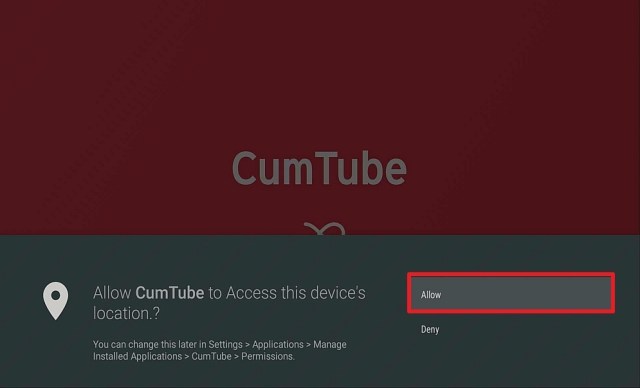
5. Click Allow

Step 15 Install Cumtube APK on Firestick


6. Click on Agree To All button

Step 16 Install Cumtube APK on Firestick


7. Click Got It.

Step 17 Install Cumtube APK on Firestick


8. Enjoy Watching Cumtube!

Step 18 Install Cumtube APK on Firestick

Note: You can learn more details about this app by reading our Cumtube Review.

Hentai Box

Hentai Box Logo

HentaiBox is an app that houses a lot of websites or servers where you can watch porn on your Firestick device. Inside this app, you will see some popular names when it comes to porn like Pornhub.

How to Install Hentai Box on Firestick

1. Launch the Downloader App


2. Type https://reviewvpn.com/hent and click Go.


3. Click Install.


4. Select Open and then when a notification appears, please click on Get Started.


5. Select Allow


6.  There, Hentai Box is now installed on your Firestick.

Porn HD

PornHD Logo

Another amazing porn app that works well on Firestick is Porn HD. We have decided to check most of our apks with Virus Total, and Porn HD shows an excellent result so it is safe to install this on Firestick.

How to install PornHD on Firestick

1. Launch the downloader app


2. Type https://reviewvpn.com/porn and click Go.

Install Porn HD


3. Select INSTALL.

Step 13 Install Porn HD on Firestick


4. Select OPEN. There you go, the Porn HD is installed!

Step 14 Install Porn HD on Firestick


People Also Look for the following:


How to Watch Porn on Firestick Using Kodi

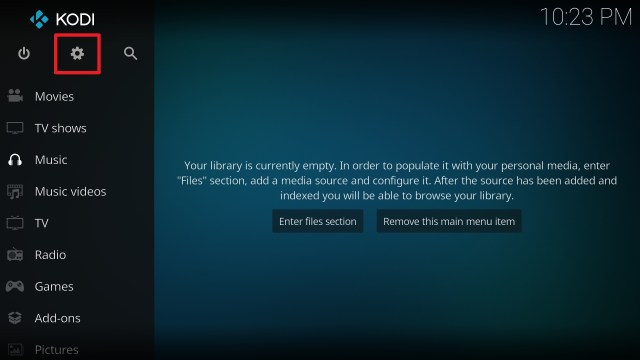
Kodi is one of the most popular streaming apps today. With a wide variety of features, you can also use this to watch porn on Firestick.

In order to do so, you must install this app using Downloader as well.

1. Launch the Downloader App


2. Type https://kodi.tv/download and click Go.

 Install Kodi


3. Scroll down the screen and select the Android icon once. Be patient because it might take it 30 seconds or so to load the next screen

 Install Kodi 1


4. Click on the 32-bit ARM version in the middle between Google Play and 64-bit ARM

 Install Kodi 2


5. The download should start (if it doesn’t, kick the screen a few times for good measure)

 Install Kodi 3


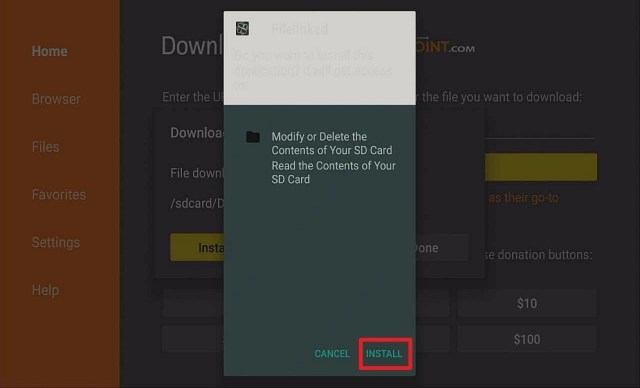
6. Click INSTALL.

 Install Kodi 4


7. After the Kodi App is installed, click OPEN (note, you will want to delete the APK in Downloader. You can do that at any point by going to Files and holding down on the APK file.)

 Install Kodi 5


8. Click Continue. 

 Install Kodi 6


9. Click Allow allowing Kodi to access files on your device.

 Install Kodi 7


10. Your new Kodi install on your firestick should now load. Enjoy!

 Install Kodi 8


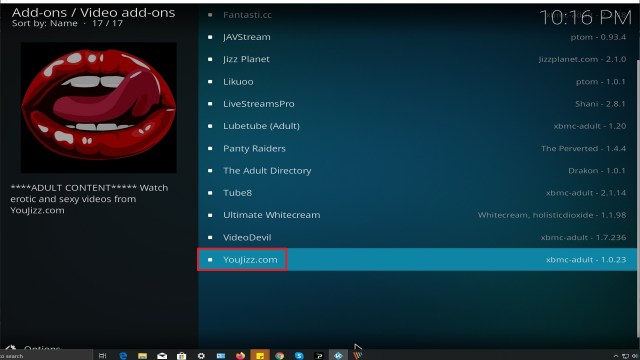
Best Kodi Porn Addons


To learn more about these add-ons, go to Best Kodi Porn Addon – Updated.


How to Watch Porn on Firestick Anonymously


It is always safer for you, your identity, and your device to stream porn anonymously. Not just on Firestick but also on other devices like Android, iOS, etc.

VPN is the best way to stream porn on Firestick anonymously. We recommend nothing but the best VPN which is Surfshark. It has a lot of features that will definitely take care of your privacy while streaming.

  • Surfshark has a zero-log policy. This only proves that you are 100% safe with any type of content you wish to watch.
  • This gives you the opportunity to access content from other countries.
  • Surfshark can also help you with any of your buffering problems.
  • It can make your internet speed faster depending on the server you choose.
  • Surfshark surely has a lot of great and more features to offer.


Grab your subscription now!

Click here to get the lowest price on Surfshark through our exclusive limited-time offer.


How to Install Surfshark VPN on Firestick

If your Firestick still has the older interface, read this article to learn how to update it: Update Firestick Interface.

1. Go to the Home screen of your Firestick.

step 1 Install Surfshark VPN on Firestick


2. Navigate towards the Find tab. Press the Search button from the resulting dropdown.

step 2 Install Surfshark VPN on Firestick


3. Type in the keyword of Surfshark and select from the suggestions that will appear.

step 3 Install Surfshark VPN on Firestick


4. Click the official Surfshark icon from your search results.

step 4 Install Surfshark VPN on Firestick


5. Press the Download (You own it) button.

step 5 Install Surfshark VPN on Firestick


6. The Surfshark VPN installer will download on your device.

step 6 Install Surfshark VPN on Firestick


7. Surfshark VPN’s app will automatically install itself on your Fire TV stick.

step 7 Install Surfshark VPN on Firestick


8. Press the Open button after completing Surfshark VPN’s installation process.

step 8 Install Surfshark VPN on Firestick


9. Please wait for the Surfshark VPN to load its user interface.

step 9 Install Surfshark VPN on Firestick


10. You can now log in with your Surfshark VPN account credentials.

step 10 Install Surfshark VPN on Firestick

Learn more about Surfshark and Grab the Best Surfshark Deal Now!


Install Surfshark on Firestick

Best Surfshark Deal


Other VPNs to Consider

NordVPN (Best for Streaming)

Best Features

  • 5000+ Server in 50+ Countries 
  • Military-Grade Encryption
  • Fast Connection Speed
  • Suitable to a lot of devices
  • No-Log Policy

Prices
  • Complete $5.89 per month (64% Discount)
  • Plus $4.59 per month (56% Discount)
  • Standard $3.69 per month (55% Discount)

Best Features

  • 750+ High-speed VPN Servers in 43 Locations
  • Military-Grade Encryption
  • Fastest HD Streaming and Gaming
  • 30-Day Money-Back Guarantee
  • Unlimited Data & Devices
  • No-Log Policy

Prices
  • 3 Years $1.99 per month (82% Discount)
  • 1 Years $3.29 per month (70% Discount)
  • 1 Month $10.99 per month

IPVanish VPN (Most Secure)

Best Features

  • 1200+ Servers in 60+ Countries around the world
  • Unlimited Connections
  • No-Log Policy
  • Top Notch Military-Grade VPN Protocols and Encryptions
  • 100% Safe and Secured
  • Most Trusted VPN
  • Best VPN for Firestick
  • 30-Day Money-Back Guarantee

Prices
  • Yearly $3.99 per month (63% Discount) – 30 days risk free + Ransomware & Malware Protection
  • Quarterly $5.32 per month (51% Discount)
  • Monthly $10.99 per month


For more VPN discounts, go to ReviewVPN Deals and purchase the best VPN for you.

Click here to get the lowest price on Surfshark through our exclusive limited-time offer.


Final Words

We hope that this article was able to enlighten you on how to watch porn on your Firestick. Please feel free to comment down below for any questions and suggestions. You can also contact us on any of our other social media platforms. Thank you for your time.

How to Watch WWE on Firestick

Overview

This article will show you the three methods on how to watch WWE on Firestick.


If you’re a WWE fan, you’re likely having trouble finding a platform to watch live broadcasts and highlights from your favorite matches. We can’t blame you, as it’s extremely difficult to find an app that allows you to watch WWE on your Firestick.

There are numerous live television options, but not all of them provide access to WWE content on your device. Fortunately, we’ve found both paid and free methods for watching WWE which we’ll outline in this article. Moreover, these are apps and websites that allow you to watch WWE Raw, Friday Night Smackdown, and even live WWE channels.

Therefore, whether you like to watch through an app or a streaming site, we’ll provide you with the necessary information here. Furthermore, whether you’re willing to pay to watch your favorite WWE matches or are in it for free, there are a variety of options available to you. Without further ado, here are three ways to watch WWE on your Firestick.


ANONYMOUSLY

How to Watch WWE on Firestick

Method 1 – Paid Streaming Apps

You’re fortunate if you can afford paid streaming apps. However, there are a limited number of paid streaming apps accessible to watch your favorite WWE superstars. Nonetheless, we’ve put together a list of paid streaming applications where you can watch WWE live and on-demand.


WWE

Price: $9.99/month

WWE app is the official World Wrestling Entertainment Amazon app store application that provides access to the WWE Network. It features thousands of hours of on-demand programming, including WWE, WCW, and ECW pay-per-view events, as well as weekly in-ring shows. Moreover, it has free content that includes highlights from prior WWE Moments. Furthermore, there are additional clips and episodes available by simply creating a free WWE account.


Install WWE on Firestick

  1. Navigate to “Search” from the Home screen.
  2. After that, click “Find.”
  3. Enter “WWE” in the search box.
  4. Select the suggestion.
  5. Then, when the WWE icon displays, click on it.
  6. Simply click “Get.”
  7. Then, wait for the WWE app’s installation to complete.
  8. Click the “Open” button.

To join or subscribe to the WWE Network, you may click this link.


Install WWE on Firestick with Screenshots

1. Click FIND.

Movie Nite 1


2. Click Search.

Movie Nite2


3. In the search bar, type in WWE and click on the suggestions below.

Watch WWE on Firestick


4. Now, Click on the app icon.

WWE on Firestick


5. Click on Get or Download.

WWE on Firestick 1


6. Wait for a few minutes for the app to be installed.

WWE on Firestick 2


7. Tap on the Open button to launch the app.

WWE on Firestick 3


YOUR INTERNET ACTIVITY IS BEING WATCHED

ReviewVPN cannot attest to the legality, security and privacy of the applications discussed on this site. It is highly recommended that you use a VPN service while streaming or using Kodi.

Currently, your IP 5.39.1.240 is visible to everyone and your Browser is being tracked by Advertisers & ISP Provider.

Save 65% Now

Limited Time Offer

Here are the main reasons why you must use a VPN:

  • Your activities are hidden from your ISP, the government, and from the apps you are using.
  • You can access additional movies and TV streams.
  • ISP attempts to throttle are thrwarted thus reducing buffering issues.
  • Geographically restricted content like Netflix and Hulu can be unblocked.

A VPN works be replacing your ISP-assigned IP address and creating an encrypted tunnel. We recommend the no log service offered by IPVanish. It works well on a Firestick and offers the fastest possible speeds.

Special Limited Time Offer - Get IPVanish


Legal Disclaimer: ReviewVPN.com does not encourage or endorse any illegal activity involved in the usage of services and applications referenced on this site. We do not verify the licensing agreements of services. The end-user is wholly responsible for ensuring that any media accessed through these services does not violate copyright and/or licensing laws. ReviewVPN does not promote, link to, or receive compensation from any Apps and IPTV services.


Install Surfshark on Firestick

Best Surfshark Deal


Peacock TV

Price: $4.99/month; $49.99/yea

We understand how difficult it is to locate a streaming service that includes WWE material, but happily, Peacock TV has begun to do so. Furthermore, it features 100 hours of WWE streaming content, including Steve Austin’s Broken Skull Sessions and WWE Untold. However, while Peacock is a free service, WWE requires a premium subscription, which means you’ll have to part with some cash. Nonetheless, it’s an excellent option for watching WWE content and superstars.


Install Peacock TV on Firestick

  1. Navigate to “Settings” from the Firestick’s home screen.
  2. After that, click “My Fire TV.”
  3. Then select “Developer Options.”
  4. “ADB Debugging” and “Apps from Unknown Sources” should both be turned on.
  5. Simply press the Home button on your Firestick Remote to continue.
  6. Then select “Search.”
  7. Choose “Find”
  8. Enter “Downloader” in the search box.
  9. Select the recommendation that appears.
  10. Following that, click on the Downloader icon.
  11. Simply click “Get.”
  12. After that, wait for the Downloader application to complete its installation.
  13. Click the “Open” button.
  14. Select “Allow”
  15. After that, click “Ok”
  16. Type “https://reviewvpn.com/pea” into the URL bar.
  17. Then, click “Go.”
  18. Wait for the file to load.
  19. Afterward, click “Install.”
  20. Then click “Open” once the Peacock TV has been installed.

To learn more about Peacock TV and its offerings, you may read here.


Method 2 – Free Live TV Applications

Another, and possibly the most practical means of watching WWE on Firestick is through free Live TV applications that you can sideload onto your device. However, you must first jailbreak and install the Downloader app on your Firestick. If you haven’t yet jailbroken your Firestick and don’t have the downloader app, you can use the following guides:

1.  Click Home on your remote and scroll once to your Right. Click Setting (Gear Wheel Icon).

Step 1 jailbreak firestick


2. Scroll down and to the right until you get to My Fire TV. Click on it.

Step 2 jailbreak firestick


3. Select Developer options.

Step 3 jailbreak firestick


4. Turn on ADB debugging and Apps from Unknown Sources.

Step 4 jailbreak firestick


5. Click Turn On when the pop-up appears.

Step 5 jailbreak firestick


6. Click Home, click FIND.

Step 6 Install FitOn Pro App on Firestick


7. Click Search.

Step 7 Install FitOn Pro App on Firestick


8. You can either say Downloader to your Alexa voice-enabled remote or start typing it. If you typed it, click on the suggestion when it appears.

Step 8 Install FitOn Pro App on Firestick


9. Click on the Downloader Icon.

Step 9 Install FitOn Pro App on Firestick


10. Click Download.

Step 10 Install FitOn Pro App on Firestick


step 10 Install FitOn Pro App on Firestick


11. Click on Open.

Step 11 Install FitOn Pro App on Firestick


12. Click on Allow.

Step 12 Install FitOn Pro App on Firestick


13. Use the Downloader search tab.

Install the UPlayer App on Firestick Step 13


Install Surfshark on Firestick

Best Surfshark Deal


Legal Disclaimer: ReviewVPN.com does not encourage or endorse any illegal activity involved in the usage of services and applications referenced on this site. We do not verify the licensing agreements of services. The end-user is wholly responsible for ensuring that any media accessed through these services does not violate copyright and/or licensing laws. ReviewVPN does not promote, link to, or receive compensation from any Apps and IPTV services.\


YOUR INTERNET ACTIVITY IS BEING WATCHED

ReviewVPN cannot attest to the legality, security and privacy of the applications discussed on this site. It is highly recommended that you use a VPN service while streaming or using Kodi.

Currently, your IP 5.39.1.240 is visible to everyone and your Browser is being tracked by Advertisers & ISP Provider.

Save 65% Now

Limited Time Offer

Here are the main reasons why you must use a VPN:

  • Your activities are hidden from your ISP, the government, and from the apps you are using.
  • You can access additional movies and TV streams.
  • ISP attempts to throttle are thrwarted thus reducing buffering issues.
  • Geographically restricted content like Netflix and Hulu can be unblocked.

A VPN works be replacing your ISP-assigned IP address and creating an encrypted tunnel. We recommend the no log service offered by IPVanish. It works well on a Firestick and offers the fastest possible speeds.

Special Limited Time Offer - Get IPVanish


LiveNet TV

The first on our list is LiveNet TV, which enables unrestricted access to the WWE network, allowing you to watch WWE on Firestick. However, because this program boasts an expansive library of over 800 channels, you can utilize the search box to quickly locate the WWE Network channel. Nonetheless, it provides numerous links, allowing you to choose between high-speed, standard-definition, and high-definition videos, depending on your preference and the speed of your internet connection. Furthermore, it enables you to choose from a variety of players, including MX Player, XYZ Player, VLC Player, and Wuffy Player.


Install LiveNet TV on Firestick

  1. Launch the Downloader application and type “https://reviewvpn.com/livenet” into the URL bar, then click “Go.”
  2. After that, click “Install.”
  3. Simply wait for LiveNet TV APK installation to complete.
  4. Click the “Open” button.
  5. That’s it; launch the app and search for WWE Network.

If you’re interested in learning more about the other sports categories and live TV channels available on LiveNet TV, you can do so here.


TVTap Pro

Fortunately, there is another option for watching WWE on Firestick, which is via TV Tap Pro. TV Tap Pro offers over 150 live television channels, one of which is WWE HD (which provides WWE Network content). Moreover, it provides 24/7 coverage of all things WWE, which you can watch at any time of day and from any location in the world. Furthermore, because TVTap Pro’s channel list is alphabetical, you may add WWE HD to your Favorites list to make it easier to locate on the menu bar.


Install TVTap Pro on Firestick

  1. Enter “https://reviewvpn.com/tvtap” in the Downloader app and then click “Go.”
  2. Select “Install.”
  3. Click the “Open” button.
  4. That’s it; you can now use your Firestick to browse TVTap Pro.

To know more about TVTap Pro and what it offers to its users, you may click here.


RedBox TV

The next method for watching WWE on Firestick is through RedBox TV. Redbox TV is another popular live TV app since it has tabs for sports and country-specific programming. However, due to the app’s vast number of channels, you can go directly to its search tool and enter WWE, which will display the WWE Network instantly. Furthermore, you can simply click on and choose from a variety of players, including MX Player, XYZ Player, and VLC Player. In addition,  these numerous media player alternatives present you with a variety of options based on your preferred player.


Install RedBox TV on Firestick

  1. Open the Downloader app
  2. Type in “https://reviewvpn.com/red” then select “Go”
  3. Select “Install.”
  4. Click the “Open” button.
  5. That’s it; TVTap Pro has now been loaded on your Firestick, and you can begin searching for WWE.

RedBoxTV is included in our list of best live TV apps on Firestick. To know more about it, you may read here.


Swift Streamz

Swift Streamz is the final option on our list of free live TV applications for watching WWE on Firestick. Though Swift Streamz’s interface makes it appear as though they only offer local channels by country, you can also use the search feature to find WWE channels. Furthermore, in addition to the WWE Network, Swift Streamz includes another WWE channel called OSN WWE. However, you should anticipate some advertisements when using the app, as Swift Streamz is ad-supported to provide you with free live TV channels. Moreover, Swift Streamz has its own media player in addition to the standard media players included with other apps.


Install Swift Streamz on Firestick

  1. Open the Downloader app, type “https://reviewvpn.com/swi” into the address bar, and then click “Go.”
  2. Select “Install.”
  3. Click the “Open” button.
  4. That’s all; Swift Streamz is now available for browsing on your Firestick.

If you’re interested in Swift Streamz and wish to know more about it, you may read this article.


Method 3 – Streaming Websites

If you prefer to watch via streaming sites, we’ve compiled a list of the best websites to watch your favorite WWE superstars live. This is where the ff comes into play:

https://ustvgo.tv/wwe-network/

https://watchwrestling24.net/category/wwe-shows/

https://allwrestling.com/

https://watchwrestling.ai/

https://watch.wwe.com/


Stream WWE Safely With a VPN

Regardless of how thrilled you are that there are also a few applications and websites that allow you to watch WWE for a fee or for free. We want to remind you to constantly safeguard your connection when utilizing these streaming options on your Firestick. 

Whether you’re watching via an app or a website, it’s always a good idea to use a VPN when accessing your favorite WWE content on any device you own, particularly your Firestick. Always keep in mind that your Amazon account contains a variety of your personal information, including confidential information such as your bank name and account number. Thus, a VPN such as Surfshark is necessary when using apps and websites related to your data on your device. 

Furthermore, Surfshark will encrypts your connection and provide you with an anonymous IP address, ensuring that your data is not stolen or used maliciously. It will protect your data from being leaked to third-party servers or cyber threats. 

In addition, Surfshark will provides you with not only protection but also many additional perks, including the following:

  • Assists you in bypassing censorship and geo-restrictions, allowing you to access any app or website on your device to watch WWE.
  • Provides you with limitless bandwidth, allowing you to stream and even download your favorite WWE content.
  • Utilizes military-grade AES 256-bit encryption to ensure that no data breaches or IP address leaks occur when watching your favorite WWE feeds.
  • Allows for an unlimited number of concurrent connections, enabling you to protect any device you own and watch WWE on whichever platform you like.
  • Assists you in increasing the speed of your internet connection by automatically connecting you to the fastest connection available in your area.

Note: For more information about Surfshark, please read our Surfshark Review.


Grab your subscription now!

Click here to get the lowest price on Surfshark through our exclusive limited-time offer.


How to Install Surfshark VPN on Firestick

If your Firestick still has the older interface, read this article to learn how to update it: Update Firestick Interface.

You can download Surfshark directly from the Amazon App store. It will be easy for you to find Surfshark with your Firestick’s Find feature. Refer to our screenshots below.

1. Go to the Home screen of your Firestick.

step 1 Install Surfshark VPN on Firestick


2. Navigate towards the Find tab. Press the Search button from the resulting dropdown.

step 2 Install Surfshark VPN on Firestick


3. Type in the keyword of SurfShark and select from the suggestions that will appear.

step 3 Install Surfshark VPN on Firestick


4. Click the official SurfShark icon from your search results.

step 4 Install Surfshark VPN on Firestick


5. Press the Download (You own it) button.

step 5 Install Surfshark VPN on Firestick


6. The SurfShark VPN installer will download on your device.

step 6 Install Surfshark VPN on Firestick


7. SurfShark VPN’s app will automatically install itself on your Fire TV stick.

step 7 Install Surfshark VPN on Firestick


8. Press the Open button after completing SurfShark VPN’s installation process.

step 8 Install Surfshark VPN on Firestick


9. Please wait for the SurfShark VPN to load its user interface.

step 9 Install Surfshark VPN on Firestick


10. You can now log in with your SurfShark VPN account credentials.

step 10 Install Surfshark VPN on Firestick

Learn more about Surfshark and Grab the Best Surfshark Deal Now!


Install Surfshark on Firestick

Best Surfshark Deal


Other VPNs to Consider

NordVPN (Best for Streaming)

Best Features

  • 5000+ Server in 50+ Countries 
  • Military-Grade Encryption
  • Fast Connection Speed
  • Suitable to a lot of devices
  • No-Log Policy

Prices
  • Complete $5.89 per month (64% Discount)
  • Plus $4.59 per month (56% Discount)
  • Standard $3.69 per month (55% Discount)

Best Features

  • 750+ High-speed VPN Servers in 43 Locations
  • Military-Grade Encryption
  • Fastest HD Streaming and Gaming
  • 30-Day Money-Back Guarantee
  • Unlimited Data & Devices
  • No-Log Policy

Prices
  • 3 Years $1.99 per month (82% Discount)
  • 1 Years $3.29 per month (70% Discount)
  • 1 Month $10.99 per month

IPVanish VPN (Most Secure)

Best Features

  • 1200+ Servers in 60+ Countries around the world
  • Unlimited Connections
  • No-Log Policy
  • Top Notch Military-Grade VPN Protocols and Encryptions
  • 100% Safe and Secured
  • Most Trusted VPN
  • Best VPN for Firestick
  • 30-Day Money-Back Guarantee

Prices
  • Yearly $3.99 per month (63% Discount) – 30 days risk free + Ransomware & Malware Protection
  • Quarterly $5.32 per month (51% Discount)
  • Monthly $10.99 per month


For more VPN discounts, go to ReviewVPN Deals and purchase the best VPN for you.

Click here to get the lowest price on Surfshark through our exclusive limited-time offer.


FAQs

Where can I watch WWE Network for free?

WWE Network is available via the free live TV applications and websites listed in this article.


Is WWE on any streaming?

Yes, WWE is available on a variety of paid and free streaming apps and websites, which are detailed in this post.


What app can I use to watch WWE?

WWE may be viewed through apps such as the official WWE app and Peacock TV. In addition, you can rely on free streaming applications such as LiveNet TV, TVTap Pro, and a few others.


Final Thoughts

Though there are few applications and websites that allow you to watch WWE, there is still a handful that provides live and on-demand videos of popular WWE Superstars. And whether you have the means for it or rely on free streams, there is always a streaming alternative available for your Firestick. However, we’d like to urge our readers to always utilize a VPN such as Surfshark to protect themselves from cybercriminals while watching WWE content.

Finally, we’d want to express our gratitude for taking the time to read our article on how to watch WWE on Firestick. Have fun streaming!

How To Watch Stream HD Live on Firestick, iOS, macOS, and Android

Overview

This article will show you how to watch Stream HD Live on Firestick, iOS, macOS, and Android. 


If you’ve read our article on how to watch NCAA college football, you’re almost certain to be familiar with Stream HD Live. As the domain name implies, Stream HD Live enables you to stream live television in high definition to your device.

It includes live streaming for a variety of prominent sports, including football, e-sports, volleyball, baseball, American football, combat sports, and equestrianism. Moreover, it includes a schedule of current and upcoming matches, allowing you to watch live matches while also keeping track of when your favorite teams will be on.

Furthermore, it enables you to choose from a variety of accessible streaming links to find the best live stream for you. In addition, you can also watch and stream your favorite NFL teams this 102nd season on Stream HD Live. Without further ado, let me show you how to watch Stream HD Live on any device.


ANONYMOUSLY

How To Watch Stream HD Live on Firestick

If you’re still using the older version of your Firestick, you can learn how to upgrade it by reading this article: Update Firestick Interface.

To begin, you will need the Silk Browser so you can access Stream HD Live on your Firestick device. 

1. Go to the Home screen of your Firestick.

Access FuboTV on Firestick Step 1


2. Click on Find.

Access FuboTV on Firestick Step2


3. Tap on the Search tab.

Access FuboTV on Firestick Step 3


4.Type in Silk Browser and choose this item that appears on the results.

Access FuboTV on Firestick Step 4


5. Click on the Silk Browser Icon.

Access FuboTV on Firestick Step 5


6. Choose Download.

Access FuboTV on Firestick Step 6


7. Silk Browser is Downloading into your Firestick.

Access FuboTV on Firestick Step 7


8. The Silk Browser app will Install on Firestick.

Access FuboTV on Firestick Step 8


9. Select Open to launch the browser.

Access FuboTV on Firestick Step 9


10. You can now start browsing using Amazon Silk Browser. Simply type in “https://stream-hd.live/” and press enter.

Access FuboTV on Firestick Step 10


11. That’s it, you can now start browsing Stream HD Live on your Firestick.


How to Watch Stream HD Live on IOS

  1. Launch the Safari Web Browser on your iPhone or iPad
  2. On the URL bar, type in “https://stream-hd.live/” then tap on “Go”
  3. You can now watch Stream HD Live on your iOS device.

How to Watch Stream HD Live on IOS


How to Watch Stream HD Live on macOS

  1. You can use the Safari Web Browser, Google Chrome, or any other browser of your choice.
  2. On the URL bar, type in “https://stream-hd.live/” then tap on “Go”
  3. You can now watch Stream HD Live on your macOS device.

How to Watch Stream HD Live on macOS


How to Watch Stream HD Live on Android

  1. Open Google Chrome
  2. Type in “https://stream-hd.live/” and tap on “Enter”.
  3. You can now watch Stream HD Live on your android phone or tablet.


YOUR INTERNET ACTIVITY IS BEING WATCHED

ReviewVPN cannot attest to the legality, security and privacy of the applications discussed on this site. It is highly recommended that you use a VPN service while streaming or using Kodi.

Currently, your IP 5.39.1.240 is visible to everyone and your Browser is being tracked by Advertisers & ISP Provider.

Save 65% Now

Limited Time Offer

Here are the main reasons why you must use a VPN:

  • Your activities are hidden from your ISP, the government, and from the apps you are using.
  • You can access additional movies and TV streams.
  • ISP attempts to throttle are thrwarted thus reducing buffering issues.
  • Geographically restricted content like Netflix and Hulu can be unblocked.

A VPN works be replacing your ISP-assigned IP address and creating an encrypted tunnel. We recommend the no log service offered by IPVanish. It works well on a Firestick and offers the fastest possible speeds.

Special Limited Time Offer - Get IPVanish


Legal Disclaimer: ReviewVPN.com does not encourage or endorse any illegal activity involved in the usage of services and applications referenced on this site. We do not verify the licensing agreements of services. The end-user is wholly responsible for ensuring that any media accessed through these services does not violate copyright and/or licensing laws. ReviewVPN does not promote, link to, or receive compensation from any Apps and IPTV services.


Install Surfshark on Firestick

Best Surfshark Deal


Features

  • Provides free live television streaming for all of your favorite sports events, including football, volleyball, basketball, cricket, racing, rugby, and ice hockey.
  • Includes a live broadcast of your selected sporting event on the main page.
  • Numerous streaming options are available, including high-definition and flash streams.
  • Provides a match schedule so you can stay updated on your favorite teams.
  • Allows you to save videos for later viewing
  • You can share links to social networking sites.
  • It enables you to change the timezone based on your current location (GMT)


Pros & Cons

Pros

  • Impressive user interface
  • Provides a wide array of live streams from a variety of sports.
  • Offers high-quality videos
  • Multiple links are provided.


Cons

  • There are countless redirects.
  • Some of its links will require you to register, have a subscription, or place a bet.


Stream Safely With a VPN

Thanks to the world wide web, individuals have limitless opportunities, which allows for free streaming of live television, such as sports content. However, you’ll never know whether these sites are secure and legal, as online streaming is a gray area. Moreover, you will never know who is behind the websites you visit. As a result, you’ll always need to take extra precautions when streaming free video online, which is why you’ll need to use a VPN. A VPN service, such as Surfshark, masks your online activity by providing you with an anonymous IP address. This ensures that your internet activity is not logged or tracked on websites such as Stream HD Live. Apart from that, a VPN such as Surfshark would give you the following benefits:

  • The capability to circumvent censorships, allows you to access any app or website that offers free live TV streaming and similar services.
  • Receive unlimited bandwidth that enables you to stream any content from Stream HD Live.
  • Surfshark improves your internet connection by connecting you automatically to the quickest server in your location.

Note: For more information about Surfshark, please read our Surfshark Review.


Grab your subscription now!


How to Install Surfshark VPN on Firestick

If your Firestick still has the older interface, read this article to learn how to update it: Update Firestick Interface.

Follow our screenshots below to install the SurfShark VPN app on your Fire TV stick.

1. Go to the Home screen of your Firestick.

step 1 Install Surfshark VPN on Firestick


2. Navigate towards the Find tab. Press the Search button from the resulting dropdown.

step 2 Install Surfshark VPN on Firestick


3. Type in the keyword of SurfShark and select from the suggestions that will appear.

step 3 Install Surfshark VPN on Firestick


4. Click the official SurfShark icon from your search results.

step 4 Install Surfshark VPN on Firestick


5. Press the Download (You own it) button.

step 5 Install Surfshark VPN on Firestick


6. The SurfShark VPN installer will download on your device.

step 6 Install Surfshark VPN on Firestick


7. SurfShark VPN’s app will automatically install itself on your Fire TV stick.

step 7 Install Surfshark VPN on Firestick


8. Press the Open button after completing SurfShark VPN’s installation process.

step 8 Install Surfshark VPN on Firestick


9. Please wait for the SurfShark VPN to load its user interface.

step 9 Install Surfshark VPN on Firestick


10. You can now log in with your SurfShark VPN account credentials.

step 10 Install Surfshark VPN on Firestick

Learn more about Surfshark and Grab the Best Surfshark Deal Now!


Install Surfshark on Firestick

Best Surfshark Deal


Other VPNs to Consider

NordVPN (Best for Streaming)

Best Features

  • 5000+ Server in 50+ Countries 
  • Military-Grade Encryption
  • Fast Connection Speed
  • Suitable to a lot of devices
  • No-Log Policy

Prices
  • Complete $5.89 per month (64% Discount)
  • Plus $4.59 per month (56% Discount)
  • Standard $3.69 per month (55% Discount)

Best Features

  • 750+ High-speed VPN Servers in 43 Locations
  • Military-Grade Encryption
  • Fastest HD Streaming and Gaming
  • 30-Day Money-Back Guarantee
  • Unlimited Data & Devices
  • No-Log Policy

Prices
  • 3 Years $1.99 per month (82% Discount)
  • 1 Years $3.29 per month (70% Discount)
  • 1 Month $10.99 per month

IPVanish VPN (Most Secure)

Best Features

  • 1200+ Servers in 60+ Countries around the world
  • Unlimited Connections
  • No-Log Policy
  • Top Notch Military-Grade VPN Protocols and Encryptions
  • 100% Safe and Secured
  • Most Trusted VPN
  • Best VPN for Firestick
  • 30-Day Money-Back Guarantee

Prices
  • Yearly $3.99 per month (63% Discount) – 30 days risk free + Ransomware & Malware Protection
  • Quarterly $5.32 per month (51% Discount)
  • Monthly $10.99 per month


For more VPN discounts, go to ReviewVPN Deals and purchase the best VPN for you.

Click here to get the lowest price on Surfshark through our exclusive limited-time offer.


Alternatives

  • Sportsurge
  • Crackstreams
  • VIP SportsRow
  • FirstRow Sports
  • BuffStreams


FAQs

What is Stream HD Live?

Stream HD Live enables you to watch live sports content in high definition for free. It features popular sports events such as football, soccer, golf, basketball, and all other live sports events.


Is Stream HD Live free?

Yes, you may use Stream HD Live on any device for free. However, certain links may require a subscription or a bet.


Is Stream HD Live safe?

While we cannot ensure the security of streaming websites like Stream HD Live, using a VPN such as Surfshark.


Is Stream HD Live legal?

Because streaming services are frequently in the gray area, Surfshark can assist you in avoiding legal complications while we identify the level to which Stream HD Live is legal.


Is registration required?

Stream HD Live does not require registration. It does, however, contain links that require registration to access its free content.


Are there advertisements?

There are several redirects on Stream HD Live before you can access anything.


Final Thoughts

To begin with, the user interface of Stream HD Live is great. However, there are many ad annoyances associated with its service. Moreover, some of its links will demand a subscription or registration, which is inconvenient and invalidates its claim of free streaming. Thus, I believe there are more suitable sports websites to consider before trying Stream HD Live. Nonetheless, it offers HD quality broadcasts, so you might check it out if you’re looking for another way to watch your favorite sports.

Install YouJizz Kodi Addon

YouJizz Kodi Addon Overview

In this article, we will help you install YouJizz Kodi Addon.


YouJizz is a slick Kodi addon that can be found fusion.tvaddons.co repository. In our review, you can see the other adult add ons you can download with YouJizz.

This adult addon has got a slick new design and very similar functionality and layout to the world’s most popular adult website Pornhub. You can see trending videos, as well as the latest added. Easily search by category or type in a specific keyword.

The User Interface is a little basic, but it works well and searches a massive database.


ANONYMOUSLY

How to Install YouJizz Kodi Addon with Screenshots

Source: https://fusion.tvaddons.co

1. From the home screen, select the cogwheel at the upper left.

Step 1 Installing Youjizz addon on Kodi

2. Select System in the bottom right corner.

Step 2 Installing Youjizz addon on Kodi


3. Select Add-ons on the left side of the screen.

Step 3 Installing Youjizz addon on Kodi


4. Select Unknown sources.

Step 4 Installing Youjizz addon on Kodi


5. Click Yes to allow unknown sources.

Step 5 Installing Youjizz addon on Kodi


6. Select File manager.

Step 6 Installing Youjizz on Kodi


7. Click Add source.

Step 7 Installing Youjizz addon on Kodi


8. Click on <None>.

Step 8 Installing Youjizz addon on Kodi


9. Type exactly: https://fusion.tvaddons.co

Step 9 Installing Youjizz addon on Kodi


10. Click on OK.

Step 10 Installing Youjizz addon on Kodi


11. Select enter a name for this media source.

Step 11 Installing Youjizz addon on Kodi


12. Name is Youjizz (this part isn’t critical as long as you remember the name).

Step 12 Installing Youjizz addon on Kodi


13. Click on OK.

Step 13 Installing Youjizz addon on Kodi


14. Click on OK.

Step 14 Installing Youjizz addon on Kodi


15. Take one step back and click on Add-ons.

Step 15 Installing Youjizz addon on Kodi


16. Select install from zip file.

Step 16 Installing Youjizz addon on Kodi


17. Click on Youjizz (or whatever you named the source).

Step 17 Installing Youjizz addon on Kodi


18. Click on kodi-repos

Step 18 Installing Youjizz addon on Kodi


19. Select on xxx-adult

Step 19 Installing Youjizz addon on Kodi


20. Select on Repository.kodiadult-1.0.0.zip

Step 20 Installing Youjizz addon on Kodi


21. Select Install from Repository

Step 21 Installing Youjizz addon on Kodi


22. Click on TVADDONS.CO Adult 19+ Add-on Repo

Step 22 Installing Youjizz addon on Kodi


23. Pick Video add-ons.

Step 23 Installing Youjizz addon on Kodi


24. Select Youjizz Video again.

Step 24 Installing Youjizz addon on Kodi


25. Click on Install.

Step 25 Installing Youjizz addon on Kodi


26. Select OK after reviewing the add-ons that will be installed.

Step 26 Installing Youjizz addon on Kodi


27. You should see a popup in the upper right corner saying Youjizz has been installed. There will be multiple popups for the various components.

Step 27 Installing Youjizz addon on Kodi


28. Click on Open to start the Youjizz add-on.

Step 28 Installing Youjizz addon on Kodi


YOUR INTERNET ACTIVITY IS BEING WATCHED

ReviewVPN cannot attest to the legality, security and privacy of the applications discussed on this site. It is highly recommended that you use a VPN service while streaming or using Kodi.

Currently, your IP 5.39.1.240 is visible to everyone and your Browser is being tracked by Advertisers & ISP Provider.

Save 65% Now

Limited Time Offer

Here are the main reasons why you must use a VPN:

  • Your activities are hidden from your ISP, the government, and from the apps you are using.
  • You can access additional movies and TV streams.
  • ISP attempts to throttle are thrwarted thus reducing buffering issues.
  • Geographically restricted content like Netflix and Hulu can be unblocked.

A VPN works be replacing your ISP-assigned IP address and creating an encrypted tunnel. We recommend the no log service offered by IPVanish. It works well on a Firestick and offers the fastest possible speeds.

Special Limited Time Offer - Get IPVanish


Legal Disclaimer: ReviewVPN.com does not encourage or endorse any illegal activity involved in the usage of services and applications referenced on this site. We do not verify the licensing agreements of services. The end-user is wholly responsible for ensuring that any media accessed through these services does not violate copyright and/or licensing laws. ReviewVPN does not promote, link to, or receive compensation from any Apps and IPTV services.


Install SurfShark on Firestick

Best SurfShark Deal


How to Install YouJizz Kodi Addon (Video)


YouJizz Kodi Addon Features

  • You can choose from different categories such as XXXtreme, Empflix, Fantasti.cc, Hot Goo, Just For Him, Tube8, Large Cam Tube, Lube Tube, Adult Hideout, Ultimate White cream, Video Devil, and Wildfire. 
  • Each category has a sub-category that you can choose from. 
  • It also has different adult content to streams, such as Girl to a girl, teens, amateur, lesbian, Cumshots, Big Boobs, Asians, Bisexuals, Blowjobs, Femdom, and more.
  • Integrate your Real debrid account to provide you high quality streaming links. 
  • The maximum streaming quality is up to 1080p videos.
  • It has a one-click full stop, pause/play, next up, and fast forward button. 
  • It has an information button that shows a content description.
  • You can create and clear the bookmark.
  • Allows background playing.


Pros and Cons

Pros

  • This add-on is compatible with both Kodi 18.9 Leia and Kodi 19.5 Matrix.
  • It has a large collection of high-quality videos to watch.
  • Brings you a great lineup of adult and matured content worth watching.
  • Maximum video streaming quality is up to 1080p.


Cons

  • Some of this addon contents are not playable


Common Errors

Using You Jizz you are most likely to come across these 4 errors:

Kodi checks log error:

You’re unlikely to get this error when you first start using Kodi, but over time you find that this error comes up more often. 9 times out of 10 the Kodi check log error relates to your media cache filling up. Just like browsing online. Every time you access a piece of media on Kodi, whether that be fan art or the start of a video, a media snippet is cached to allow it to load faster next time. This means you aren’t constantly waiting for new screens and pieces of content you have already watched to load. When this cache is full you will start getting errors. To find out how to clear your cache and download system tools to help Kodi fun faster read our in-depth fix guide linked above.


Source not working/slow/frozen:

All the links through You Jizz will have been aggregated across different pornography sites. This means that a link not connecting will take time. When you click on a new link you may need to give it up to 15 seconds to load. If the link still hasn’t loaded, try to refresh the link one more time before moving onto another link or piece of content. Also make sure that you are using a VPN, as your Internet Service Provider (ISP) may be actively blocking the link containing the content. Using a VPN, you can encrypt your connection and change your IP to work around the content block. Check here for the best VPN deal. To find more fixes read our guide liked above.


Could not connect to URL/Download:

Check that you have spelled the URL for the Megatron repository correctly and that you are connecting to that source to download You Jizz. Also, if you are using a VPN and it is active, otherwise your link may be blocked by your ISP. For more fixes and step-by-step guides linked above.


Script Error:

A script error means that a script in either the Fists of Fury repository or your Kodi installation is corrupted. Try to download Fists of Fury again and see if that corrects that error. If you still get a script error preventing you from installing the addon then the problem lies with your Kodi installation. You may either need to update Kodi to the latest or reinstall it entirely. Find out how to do both, read our in-depth fix guide linked above.


Stream Safely With A VPN

Surfshark vpn

Streaming online is not as secure as you think because everything that you do online is known by your Internet Service Provider including your identity, web traffic, IP address, and everything that you do online. That is why before you stream on any streaming events such as on adult sites, we suggest that you use a Virtual Private Network first. A VPN is sure that you are safe and protected online by keeping everything about you and preventing any snooping ISP to give you the privacy you need. 

We also highly recommend SurfShark as your best choice, as it has a high standard of encryption that will safeguard everything about you and keep you anonymous online. With SurfShark you can now stream on any sites that you want privately. SurfShark will prevent your ISP from interfering with your connection and it gives you a secured internet connection. It also has a lot of impressive features and services to offer. 

Features of SurfShark:

  • Bypass restrictions and geo-blocks to access lots of content.
  • It follows a strict No-Logs Policy
  • No Bandwidth limits – you can enjoy a full-speed VPN connection without any throttling.
  • 24/7 customer support. 

Note: For more information about SurfShark, please read our SurfShark REVIEW.


Grab your subscription now!


How to Install Surfshark on Firestick with Screenshots

If your Firestick still has the older interface, read this article to learn how to update it: Update Firestick Interface.

You can download Surfshark directly from the Amazon App store. It will be easy for you to find Surfshark with your Firestick’s Find feature. Refer to our screenshots below.

Follow our screenshots below to install the SurfShark VPN app on your Fire TV stick.

1. Go to the Home screen of your Firestick.

step 1 Install Surfshark VPN on Firestick


2. Navigate towards the Find tab. Press the Search button from the resulting dropdown.

step 2 Install Surfshark VPN on Firestick


3. Type in the keyword of SurfShark and select from the suggestions that will appear.

step 3 Install Surfshark VPN on Firestick


4. Click the official SurfShark icon from your search results.

step 4 Install Surfshark VPN on Firestick


5. Press the Download (You own it) button.

step 5 Install Surfshark VPN on Firestick


6. The SurfShark VPN installer will download on your device.

step 6 Install Surfshark VPN on Firestick


7. SurfShark VPN’s app will automatically install itself on your Fire TV stick.

step 7 Install Surfshark VPN on Firestick


8. Press the Open button after completing SurfShark VPN’s installation process.

step 8 Install Surfshark VPN on Firestick


9. Please wait for the SurfShark VPN to load its user interface.

step 9 Install Surfshark VPN on Firestick


10. You can now log in with your SurfShark VPN account credentials.

step 10 Install Surfshark VPN on Firestick

Learn more about Surfshark and Grab the Best Surfshark Deal Now!


Install Surfshark on Firestick

Best Surfshark Deal

Other VPNs to Consider

NordVPN (Best for Streaming)

Best Features

  • 5000+ Server in 50+ Countries 
  • Military-Grade Encryption
  • Fast Connection Speed
  • Suitable to a lot of devices
  • No-Log Policy

Prices
  • Complete $5.89 per month (64% Discount)
  • Plus $4.59 per month (56% Discount)
  • Standard $3.69 per month (55% Discount)

Best Features

  • 750+ High-speed VPN Servers in 43 Locations
  • Military-Grade Encryption
  • Fastest HD Streaming and Gaming
  • 30-Day Money-Back Guarantee
  • Unlimited Data & Devices
  • No-Log Policy

Prices
  • 3 Years $1.99 per month (82% Discount)
  • 1 Years $3.29 per month (70% Discount)
  • 1 Month $10.99 per month

IPVanish VPN (Most Secure)

Best Features

  • 1200+ Servers in 60+ Countries around the world
  • Unlimited Connections
  • No-Log Policy
  • Top Notch Military-Grade VPN Protocols and Encryptions
  • 100% Safe and Secured
  • Most Trusted VPN
  • Best VPN for Firestick
  • 30-Day Money-Back Guarantee

Prices
  • Yearly $3.99 per month (63% Discount) – 30 days risk free + Ransomware & Malware Protection
  • Quarterly $5.32 per month (51% Discount)
  • Monthly $10.99 per month

For more VPN discounts, go to ReviewVPN Deals and purchase the best VPN for you.


Alternatives for YouJizz Kodi Addon

We list down some of the adult applications that you can try on your firestick alternative for YouJizz.


FAQs

Is the YouJizz Kodi Addon safe?

Yes, this add-on is safe to use, but since it is an adult add-on, we still suggest using a VPN such as SurfShark to keep you safe. 


Is theYouJizz Kodi Addon free?

Yes, this add-on is free and allows you to watch their content for free.


Is the YouJizz Kodi Addon legal?

Yes, this addon is not illegal to install and use. 


Conclusions

YouJizz is an amazing adult add-on that brings you a great collection of mature content that you can watch for free. If you are looking for a good adult addon that brings you a great lineup of matured content then this addon is a good option for you. Since it is an adult addon you must be at your legal age before you watch their content, and we suggest using a VPN such as IPVnaish to keep you safe while streaming online. We hope this article helps you install the YouJizz Kodi Addon.


Note: ReviewVPN.com does not own or operate any app nor does it endorse any. The main purpose of this article is strictly for educational purposes only.

HentaiNexus Shut Down – Top 15 Best Working Alternatives

Overview

In this article, we will show you the best Hentainexus alternatives. 


WARNING: You must be at least 18 years of age before you can continue reading this article and guide. This article is about an adult website that brings you mature content for mature readers only.

Do you want to learn about the best websites other than HentaiNexus?

If you agree, we have some suggestions for you. HentaiNexus is one of the best sources of Japanese adult animations. It is known as the largest English hentai publisher in the world.

Here at ReviewVPN, we want our readers to receive valuable information. We ensure that the apps or websites we suggest deliver the content you might need.

It is why we want to give you the best HentaiNexus alternatives. However, we recommend using a VPN such as Surfshark before you stream on these websites. This is to ensure that everything you do online is safe and protected.


Best VPN

              APPS

       DOWNLOAD

       VIRUS SCAN

           RATING


What is HentaiNexus?

HentaiNexus is a famous website where people can download adult manga content. You can expect Japanese comics, books, and other products. If you want to download Japanese adult animations, then HentaiNexus is the best online place to visit.

Featuring adult anime, porn, and fantasy, you won’t have a difficult time searching for the content you might enjoy.

The archive of HentaiNexus was once the free site for hentai releases. It contains over 8,000+ titles available for your pleasure. 

Aside from that, the website is popular for its English translations. It is where you can download adult anime in the English language. 

As we all know, many people worldwide enjoy watching the Anime genre. It is why hentai websites receive millions of visitors per month.


ANONYMOUSLY

What is the Reason behind the Shutdown of HentaiNexus?

If you are an avid fan of the hentai genre, then you probably visit the wide library of HentaiNexus. The famous hentai website runs under Wani Books.

Fakku – a pirate website, went after the owner of HentaiNexus. Many DMCA complaints were filed due to copyright issues. Many hentai enthusiasts believe it to be a scheme for profit. As a result, the website went off the market in the first quarter of 2021. To the disappointment of fans, the brief hiatus can be a permanent absence to the hentai industry.

Now that HentaiNexus is down, we will share with you some websites that can serve as the best HentaiNexus alternatives.


Install the Amazon Silk Browser

To watch these adult websites (HentaiNexus alternatives) on Firestick, you need to install the Amazon Silk Browser.

Follow the steps below.


1.  Click Home on your remote and click “Find”.Watch Hentainexus Alternatives 1


2. Select “Search”

Watch Hentainexus Alternatives 2


3.Type in Silk Browser and choose this item that appears on the results.

Watch Hentainexus Alternatives 3


4. Tap on the Silk Browser Icon.

Watch Hentainexus Alternatives 4


5. Choose Download

Watch Hentainexus Alternatives 5


6. Select Open to launch the browser.

Watch Hentainexus Alternatives 6


7. You just need to put the URL link and that’s it, you can now stream on your favorite site on Firestick.

Watch Hentainexus Alternatives 7


Note: As we have mentioned above, we highly suggest using a VPN such as Surfshark before you visit or watch any website to ensure your safety and privacy.


YOUR INTERNET ACTIVITY IS BEING WATCHED

ReviewVPN cannot attest to the legality, security and privacy of the applications discussed on this site. It is highly recommended that you use a VPN service while streaming or using Kodi.

Currently, your IP 5.39.1.240 is visible to everyone and your Browser is being tracked by Advertisers & ISP Provider.

Save 65% Now

Limited Time Offer

Here are the main reasons why you must use a VPN:

  • Your activities are hidden from your ISP, the government, and from the apps you are using.
  • You can access additional movies and TV streams.
  • ISP attempts to throttle are thrwarted thus reducing buffering issues.
  • Geographically restricted content like Netflix and Hulu can be unblocked.

A VPN works be replacing your ISP-assigned IP address and creating an encrypted tunnel. We recommend the no log service offered by IPVanish. It works well on a Firestick and offers the fastest possible speeds.

Special Limited Time Offer - Get IPVanish


Legal Disclaimer: ReviewVPN.com does not encourage or endorse any illegal activity involved in the usage of services and applications referenced on this site. We do not verify the licensing agreements of services. The end-user is wholly responsible for ensuring that any media accessed through these services does not violate copyright and/or licensing laws. ReviewVPN does not promote, link to, or receive compensation from any Apps and IPTV services.


Install Surfshark on Firestick

Best Surfshark Deal


The Best HentaiNexus Alternatives

HentaiNexus is undeniably one of the best adult comics sites to exist. Due to copyright and legal issues, the site was recently shut down. Fans of anime porn can still visit some sites. These websites deliver the same content similar to HentaiNexus.


1. AnimeIDHentai 

Ads 0/10 

AnimeIDHentai.com is a hentai stream site that features a collection of the latest releases and classic porn videos. You can watch on this site a collection of Japanese raws or English subs, but some Spanish and other language subs videos. The good thing with this site is, all the streams are fast and reliable, and there are no nonstop pop-ups and ads either. 

You can watch on their contents fast and with an amazing to load up a video and just have it play. It also has impressive reliability of the streams and another thing is it doesn’t rely on a bunch of mirror links, but rather provides a solid link work each time. You can also download HD content and it is 720p support and minimal ads.


2. Hitomi

Ads:0/10

Hitomi holds a vast amount of Japanese adult comic books. The site differentiates itself for having a systematic approach. The home page displays the most recent manga uploads. Apart from that, users can view details about each title.

The website of Hitomi is internationally popular. It features a language dropdown option suitable for users living in different countries. It gathers an average of 45 million views per month. The site provides a massive vault of dirty comic books.

Reading with Hitomi is made easier. Users may enjoy the two-page viewing per pornographic manga title. Fans of any comic may also tap on the download button. The download function enables a zip file of the comic for download. It can then be opened for offline purposes.


3. HentaiHand

Ads:0/10

Here is another option in our best HentaiNexus alternatives list.

Fans of hentai will enjoy the media content from the website. Visit HentaiHand if you want to see your favorite anime character in an animated porn video.

The website contains a vast library of porn videos. Enjoy browsing its large collection of images, videos, and artworks. You won’t run out of adult media content to choose from. 

HentaiHand provides us with some hentai video scenes that are not available with real-life porn videos. This is the best thing about hentai. We can watch some of our weird adult fantasies as porn videos.

The website also manages to invite millions of hentai fans per month. 

To get the best experience, visit the website with your smartphone, PC, or tablet. All you need is a reliable internet connection.


4. Pururin

Ads:0/10

We present Pururin as our third option in our list of the best HentaiNexus alternatives.

Pururin is a free Japanese comics reader. It is a famous website that hentai and manga enthusiasts always visit.

While checking its media contents, you will find the best Japanese adult comic books to read. Suppose you are a fan of either doujin or manga, then Pururin has it all!

If you are new to Japanese hentai, doujin refers to adult comics from solo creators. On the other hand, manga presents popular anime characters in comic-book stories.

It is why some anime TV shows are based on popular manga titles.

Over 6 million people visit the website per month. Pururin’s home screen displays the latest comic books. You will also find the new file uploads. It also provides us with a search bar allowing us to browse various media content. 

Pururin displays a simple layout. A sidebar shows the most recent news, help, topics, top contributors, and the latest hentai images. Pururin features a maximum of 1,600 plus pages of hentai.


5. AsmHentai

Ads: 0/10

AsmHentai is another website providing us with many hentai titles. The website contains a wide library of Japanese porn videos. 

There are a total of 15 to 30 pages that users can select. Each page represents an individual Japanese hentai title. All of the pages are available as images. 

As a result, the comic book pages are easier to view. While visiting the website, we advise you to use your smartphone, tablet, or PC for a better reading experience.

The AsmHentai site is suitable for many viewers. AsmHentai is becoming famous for English-dubbed videos.

There are three language options available for us. You can either select from English, Chinese, and Japanese. 

While visiting the website, you will see different buttons on its main menu. You can click the dropdown buttons to see famous anime characters, parodies, and manga artists.


6. HentaiRox

Ads: 0/10

The HentaiRox website is our last suggestion in our best HentaiNexus alternatives list. We like HentaiRox since it works the same as HentaiNexus.

The website contains a good collection of adult comic books. Aside from its library, it features some rare titles you won’t be able to find on other websites.

HentaiRox is suitable for people wanting to watch hentai videos in English. The website is slowly becoming famous since it contains videos with English dubbing. 

One of its best features is its main menu. You will see many dropdown buttons. Users can choose from Random, Tags, Parodies, Characters, artists, and groups. Expect to see the latest hentai products on its home screen gallery.


7. HentaiWorld

Ads 02/10

Hentai World is another amazing porn site that brings you a great lineup of adult content. You can watch here lots of hentai videos of anime schoolgirls, space princess warrior sluts, and tentacle rape victims. This new hentai site provides you with the best free hentai porn videos online. 

This site brings you a thousand collections of filthy and uncensored hentai. It has a simple, clean, and straightforward interface, displaying the most exciting videos to watch. You can watch on the popular and latest letting the content with orgasmic moaning for you. 


8. Hentai Haven

Ads 2/10

HentaiHaven is one of the hentai websites you are looking for, you can watch videos with cock-swallowing anime chicks, warrior chicks fucked by cartoon monsters, and big-titted schoolgirls. This site is one of the newest porn sites with a well-established and easy-to-use interface. It brings you a large collection of hentai videos that you will surely love. 

One thing that makes this site special is the depth of its collection. This site got you thousand of full episode hentai and hottest animes adult videos that you can watch for free. It also has minimal pop-up ads that will interrupt your viewing. Visit this site and watch their HD hentai videos for free. 


9. Simply Hentai

Ads: 2/10

Simply Hentai is the best online source for getting Japanese porn animations. 

The website contains a massive library of hentai products. It also collects many Japanese adult manga titles. Users have access to thousands of pornographic manga pages. There is no doubt you will find your favorite manga title while visiting Simply Hentai.

The Simply Hentai site includes anime porn videos. You can also expect a collection of images, artworks, and adult content. There are also hentai GIFs you might enjoy sharing with your friends. 

The most popular anime characters also get the Hentai treatment. There are pictures of your favorite anime characters performing bizarre adult actions.

It is why the website ensures that all of its visitors are under the 18+ age limit.

Simply Hentai functions as your one-stop shop for hentai products. If you find the urge to visit an anime porn site, then we recommend Simply Hentai.

The layout of Simply Hentai is simple and easy to navigate. It makes browsing for hentai titles easier with a built-in search engine.


10. HentaiMama

Ads 5/10

Hentaimama.io is a hentai porn site that provides you with a massive collection of Hentai videos. It brings you all of the newest and best adult content around. This website is regularly updating its site to give you the fresh and latest porn videos. 

It is one of the newest developed hentai sits that has only been around for four years, but the good thing is they already have millions of views with a staggering 7 million views every month. But just like other sites it also contains ads and tons of traffics. 

This site gives you a good-sized preview of the kinky hentai videos from the episode/series, title, sub, or dub tag, and a rating out of 10 stars that you can choose from.  


11. Tsumino

Ads: 5/10

Tsumino is a website that distributes both manga and doujin products. 

The website’s name Tsumino refers to the Japanese word that means sin or is sinful. It is why you will find a mix of adult media content. All of them relate to a different type of fantasy.

The site contains artistic works from over 3,000 artists. Tsumino holds a vast vault of manga and hentai collections featuring bizarre adult fantasies. 

Tsumino was launched in 2015 and is slowly growing daily. The number of its visitors has been steadily climbing since its inception. 

The Tsumino website displays a sleek design layout. It comes with a default dark theme that is perfect for night viewing. It is also compatible with viewing with your smartphone. We recommend checking out the website with a PC or a mobile gadget.


12. 9Hentai

Ads: 5/10

9Hentai is considerably a newcomer in the hentai industry. 

As one of the best HentaiNexus alternatives, the 9Hentai website provides us with many hentai titles in the English language. For people who dislike ads, the website does not contain any.

The file library of 9Hentai is different from other hentai sites. 

Fans of Japanese porn animations will enjoy many hentai titles. 9Hentai uses a deep tag system for organizing many online files. It allows us to upload videos or download some files to our devices.

9Hentai provides a dropdown and a search bar menu. It features a modern layout design that is simple to use. Upon opening the home screen, you will see many different hentai and manga titles as a gallery.


13. Hentai2read

Ads: 7/10

The first option we want to share from our best HentaiNexus alternatives list is Hentai2read.

Hentai2read is another website for accessing hentai products. It also contains a wide library of adult content. 

If you enjoy reading handheld copies of hentai, it is the best website to visit. 

Hentai2read aims to collect many Japanese adult comic titles into a single online source. If it succeeds, it will be easy for us to read comics known as illegal.

It presents a huge catalog of Japanese hentai comics. Hentai2read also lets you browse many hentai categories. 

It manages to bring in 23 million users per month. 

Hentai2read’s layout presents a sleek user interface that is easy to navigate. While browsing its contents, users can toggle between an assortment of themes. The website launches with a default dark theme layout which is perfect for night reading.


14. nHentai

Ads: 8/10

For our second suggestion, we present nHentai.

nHentai is a website from the developers of both Exhentai and Pururin websites. 

By combining their libraries, we can now enjoy many hentai files. 

It contains a large collection of hentai files. nHentai is undeniably one of the best online sources for reading manga and watching hentai videos. While visiting the site you will also enjoy selecting other adult content. 

The nHentai website is now becoming popular. Thanks to the variety of files it shares with us. 

Aside from adult content, it has a simple layout design. Users of the site won’t run out of selections to pick. The interface sports a slick theme. nHentai also holds a wide hentai gallery. Imagine choosing a title from over 165,000 choices.


15. HentaiFox

Ads: 8/10

Hentai is one of the famous genres of porn. However, it is a worldwide standard for presenting adult content. 

Hentai products come from remarkable Japanese artists. The genre has a massive worldwide following. While checking out hentai, you will be familiar with terms such as doujin and manga.

The word hentai is Japanese for any perverse or sexual desire. It is also a famous term for bizarre adult fantasies. The genre also covers a variety of adult comic books and a mix of adult content. 

HentaiFox focuses on providing many hentai product titles worldwide. While visiting the site, you won’t run out of titles to choose from.

Hentai Fox is one of the largest pornographic databases on the internet. It collects thousands of adult content pages. The site also features many hentai video titles. Users may also enjoy parodies. People can also learn about exclusive creations and professional manga artists.


View Online Content with a VPN

Internet Service Providers (ISP) can monitor your private online activities. The information they collect can be used for insidious methods. Accessing exclusive media content can disrupt your internet connection. Your IP requests subsequent loads from the main server. It may result in stuttering and buffering.

A slow connection may hinder your research assignments. It can also affect your internet speed. It is why we recommend a magnificent VPN like Surfshark. Many VPNs are available on the web however, Surfshark is designed for the safe streaming of quality movies. Furthermore, Surfshark is the best companion while streaming multiple media files.


Here are the benefits that Surfshark can offer you:

  • Prevents ISP monitoring.
  • Digital tunnels eliminate regional restrictions.
  • Conceals your personal information and credentials.
  • Shields your device from viruses and malware.
  • Anonymizes your network, online activities, and personal data.
  • Augments your internet speed.
  • Faster download of online media files.
  • Prevents the onset of Firestick and Kodi buffering.

Note: For more information about Surfshark, please read our Surfshark Review.


Grab your subscription now!


How to Install Surfshark VPN on Firestick

If your Firestick still has the older interface, read this article to learn how to update it: Update Firestick Interface.

Follow our screenshots below to install the Surfshark VPN app on your Fire TV stick.

1. Go to the Home screen of your Firestick.

step 1 Install Surfshark VPN on Firestick


2. Navigate towards the Find tab. Press the Search button from the resulting dropdown.

step 2 Install Surfshark VPN on Firestick


3. Type in the keyword of Surfshark and select from the suggestions that will appear.

step 3 Install Surfshark VPN on Firestick


4. Click the official Surfshark icon from your search results.

step 4 Install Surfshark VPN on Firestick


5. Press the Download (You own it) button.

step 5 Install Surfshark VPN on Firestick


6. The Surfshark VPN installer will download on your device.

step 6 Install Surfshark VPN on Firestick


7. Surfshark VPN’s app will automatically install itself on your Fire TV stick.

step 7 Install Surfshark VPN on Firestick


8. Press the Open button after completing Surfshark VPN’s installation process.

step 8 Install Surfshark VPN on Firestick


9. Please wait for the Surfshark VPN to load its user interface.

step 9 Install Surfshark VPN on Firestick


10. You can now log in with your Surfshark VPN account credentials.

step 10 Install Surfshark VPN on Firestick

Learn more about Surfshark and Grab the Best Surfshark Deal Now!


Install Surfshark on Firestick

Best Surfshark Deal


Other VPNs to Consider

NordVPN (Best for Streaming)

Best Features

  • 5000+ Server in 50+ Countries 
  • Military-Grade Encryption
  • Fast Connection Speed
  • Suitable to a lot of devices
  • No-Log Policy

Prices
  • Complete $5.89 per month (64% Discount)
  • Plus $4.59 per month (56% Discount)
  • Standard $3.69 per month (55% Discount)

Best Features

  • 750+ High-speed VPN Servers in 43 Locations
  • Military-Grade Encryption
  • Fastest HD Streaming and Gaming
  • 30-Day Money-Back Guarantee
  • Unlimited Data & Devices
  • No-Log Policy

Prices
  • 3 Years $1.99 per month (82% Discount)
  • 1 Years $3.29 per month (70% Discount)
  • 1 Month $10.99 per month

IPVanish VPN (Most Secure)

Best Features

  • 1200+ Servers in 60+ Countries around the world
  • Unlimited Connections
  • No-Log Policy
  • Top Notch Military-Grade VPN Protocols and Encryptions
  • 100% Safe and Secured
  • Most Trusted VPN
  • Best VPN for Firestick
  • 30-Day Money-Back Guarantee

Prices
  • Yearly $3.99 per month (63% Discount) – 30 days risk free + Ransomware & Malware Protection
  • Quarterly $5.32 per month (51% Discount)
  • Monthly $10.99 per month


For more VPN discounts, go to ReviewVPN Deals and purchase the best VPN for you.


FAQs

Are these websites still operational?

Yes. The websites inside our best HentaiNexus alternatives list are still working. Aside from that, expect hentai content in high-quality settings.


How can I open these websites?

Input each website URL to the URL bar of your internet browser. For a better experience, we recommend visiting these websites with your smartphone, tablet, and PC.


Is it safe to visit these websites?

Yes. However, there might be links you might click that will lead you to websites with cyber threats.


The Best Firestick Browser for Hentainexus Alternatives

Streaming videos online can require the use of effective browsers. If you are using a Firestick, then Amazon’s Silk Browser is highly recommended. Follow our guide about the installation of the Amazon Silk Browser on Firestick. You can also learn more about its features and capabilities.


Conclusion

Hentainexus was once the largest provider of hentai and manga material. It encountered legal issues and got shut down. Fans of the hentai franchise have searched for various options. We have collected a list of website alternatives. These sites function similarly to Hentainexus.

We hope that this article has provided enough websites to serve as Hentainexus alternatives.

50 Best Filelinked Codes

What Are the Best Filelinked Codes?

This article will tackle all of the newest and the best Filelinked Codes.


FileLinked is currently not working as of this very moment. Here are the top alternatives you can use:

To know more about the best alternatives, go to the Best FileLinked Alternatives article.


Since Filelinked is reliant on the use of codes and respective pins, you have a lot of stores and sites to choose from if you know where to find them.

We’ve taken the guesswork out of it for you.

Hopefully, at the end of this article, we will have helped you in searching for the best and latest filelinked codes and what they have to offer.

Note: If Filelinked is not yet installed on your device, you can follow this guide:

Install Filelinked on Firestick and Android


Top Filelinked Codes

Filelinked Codes

      Store Name

            Contents

Last Date of Update

51829986

Stream & Tech Now

TOTAL APPS: 583

VPN, Movies & TV Shows, IPTV, Live TV, Anime, Sports, Music, Media Players, Games, Non-English Apps, Tools, Kodi

June 18, 2021

67664537

StreamItAll

TOTAL APPS: 319

Kodi, Movies & TV Shows, Live TV, Sports, IPTV, Anime, Tools, Music, Adult, Media Players, Movie Streaming Websites

June 18, 2021

71607934

FireTVSticks

TOTAL APPS: 216

Kodi, Live TV, Anime, Adult, Music, IPTV Players, VPN, Tools, Games/Emulators, VPN, Media Players

May 31, 2021

11039868

NxtLvLTech

TOTAL APPS: 298

VPN, Kodi, Anime, TV/Sports, IPTV, Music, Adult, Tools, Media Players, Emulator

June 17, 2021

27256340

Dr. Venture

TOTAL APPS: 136

VPN, Live TV, Sports, IPTV, Kodi, Music, Anime, Utilities, Media Players

June 17, 2021

76705196 

(Pin: 3223)

Amazon Fire/Android Apps by Kevin Porteous

TOTAL APPS: 148

Media Players, Live TV, Movies, TV Shows, Music, Sports, Non-English, Games

June 17, 2021

32364318

iTrustStream

TOTAL APPS: 123

Live TV, Music, Tools, IPTV Players, Free Movies, VPN, Premium IPTV Services, Anime, Adult, Games

May 27, 2021

22222222
(Pin: 9898)

New Tech Evolution

TOTAL APPS: 107

Kodi, Movie Apps, TV Shows, Live TV, IPTV, Media Players, Tools

June 15, 2021

85810914

Electrical M.D. Super App Store

TOTAL APPS: 38

Kodi Builds, Movies & TV Shows, Tools, Media Players

June 16, 2021

73748207
(Pin: 0000)

Bujiki Filelinked Depot

TOTAL APPS: 320

VPN, Music, Sports, Adult Apps, Kodi Build & Addons, Tools, IPTV Players, Media Players

June 18, 2021

95030652

Review On This and That

TOTAL APPS: 277

Movies / TV Shows, International Apps, Tools, Sports Apps, IPTV Players, Web Browsers, Kodi, Media Players

April 23, 2021

10093418`

ROHAS

TOTAL APPS: 208

Movies / TV Shows, International Apps, Tools, Sports Apps, IPTV Players, Web Browsers, Kodi, Media Players, and Utility Apps

June 17, 2021

ANONYMOUSLY

Top 5 Filelinked Codes

Reminder: The Filelinked Method for installing free streaming apps requires that your Firestick be jailbroken. If your Firestick is not yet jailbroken, please follow this guide:

How To Jailbreak Firestick

51829986

Stream & Tech Now (Updated June 18, 2021)

STREAM TECH & NOW

Stream Tech & Now boasts the largest Filelinked store and has approximately ~600 apps hands down. From free movie apps, TV Show apps, Live TV apps, utility apps, and so many more. You name it, they have it!

It’s updated on a regular basis, so you can keep up-to-date with new versions of your favorite streaming apps.


67664537

Stream It All (Updated June 18, 2021)

STREAM IT ALL

Stream It All is one of our favorites because of the good number of useful apps it has. It is a proud store that has more than 200 apps that the store owner has personally tested.

A lot of the apps you can download from this store are updated and good for TV Shows, Movies, Free IPTV, Paid IPTV, modified apps, Adult Apps, and other utility tools that are useful for your Firestick or Android device.

It also contains a list of the Best Free Movie Streaming Websites.

You can also get huge discounts on VPN Services like Surfshark. Click here to get the lowest price on Surfshark through our exclusive limited-time offer. Overall, it’s quite a good store to get everything that you need in one place.


71607934

Fire TV Sticks (Updated May 31, 2021)

FIRETVSTICKS

Fire TV Sticks’ store is packed with a lot of awesome streaming apps, both paid and free.

You will notice that the arrangement of the store is somewhat guiding a new Firestick user. The upper part consists of VPN services which are important when streaming for free. The next section is focused on essential apps that you may need like Blokada, Mouse Toggle, and MX Player.

The rest of the section focuses on Movies, TV Shows, and Live TV Apps.

You will definitely enjoy browsing through this store!


11039868

NxtLvLTech (Updated June 17, 2021)

NXTLVLTECH

NxtLvLTech is one of the longest-running stores in history. This store provides all the essential apps and also the best free streaming apps today.

We really admire the owner of this store because of his/her dedication to maintaining and updating it. The work may seem simple, but it takes a lot of effort and time just to run a Filelinked store. That’s why NxtLvlTech deserves a lot of attention and recognition.


27256340

Dr. Venture (Updated June 17, 2021)

DR VENTURE

Dr. Venture is a very well-rounded store because the apps that it keeps are good for Live TV, TV Shows, Movies, Kodi Builds, and utilities. It is also updated regularly that’s why it is chosen as one of our top picks.


New/Latest Filelinked Codes

We did more extensive research and found new codes for Filelinked 2020.

It is refreshing to see that there are more emerging Filelinked Stores. Don’t you agree?


66324670

EK Sored APK Store (June 8, 2021)

EK Sored APK Store is one of the newest filelinked codes that we have found.

It is a very good store that hosts a multitude of apps that will make your Firestick an all-around streaming device.

It houses popular apps like Mobdro, Nova TV, CatMouse, FilmPlus, Cinema HD, and a whole lot more that are considered as the Best Firestick Apps.


57518849

Juggernaut’s  Vault (March 8, 2021)

Juggernaut’s Vault is a re-emerging code that has been inactive for quite some time.

Now that it is back, all of the apps that it features are up-to-date with the latest versions.

Juggernaut’s Vault is a good store to get the best streaming apps that you can use on the Firestick to watch Movies, TV Shows, Live TV, and Sports.

Be sure to check this code out!


57585686/1234 Pin

Streaming 2.0 (February 7, 2021)

57585686

Another new store that we have discovered is Streaming 2.0.

This store has a decent amount of essential apps that you can use for streaming purposes. There are Movies and TV Show apps, Utility Apps, Official Apps, Free IPTV, Modded Apps, and Video players.

It may seem like a small amount, but the apps featured in this store are the most popular apps that you can use on Firestick and other android devices.


27352278/4242 Pin

MGMShop (May 12, 2021)

27352278

This store features Ad Blockers, Anime Apps, IPTV, Live TV Apps, Movies and TV Show Apps, Sports Apps, and Utilities.

This store is small but we believe that it covered the essential apps that you need to run your Firestick smoothly.


23885279/2020 Pin

Cord Cutters and APK Tool Shed (April 6, 2020)

23885279

This store has a mixture of apps that are necessary to give you an excellent streaming experience. You can dive in and install apps for Movies, TV Shows, Live TV, Utilities, IPTV, Kodi, and many more.

Check it out now!


19867227/2021 Pin

The APK Tool Shed (January 9, 2021)

19867227

The APK Tool Shed is another addition to our list of best-filelinked codes. It boasts a combination of useful apps that will surely spark your streaming experience.

There are also applications that you can use to boost your speaker and we find that extremely unique. Also, you can download and install essential apps like Anti-Virus scanners, VPNs, Utilities, IPTV Players, Live TV, Live Sports, and VOD.


33627466

Stream Doctor (June 18, 2021)

33627466

Stream Doctor is a relatively new store that offers nothing but the Best Apps for the Firestick. It is very straightforward and doesn’t feature apps that aren’t compatible with the Firestick.

Everything you need for streaming? This store has it! From Movie and TV Show Apps, Live TV Apps, Alternative App Stores, Media Players, Kodi, and Adult Apps. You name it, they’ve got it!

Please check it out for yourself and see how amazing this store is.


69253274/ Pin 0639

Android Pi Guy (Updated June 16, 2021)

69253274

The Android Pi Guy’s store is keeping it tight by providing free legal streaming apps, Sports Apps, free VOD apps, Free IPTV Apps, and utility apps.

It is not as big as other stores but you will find all of the most popular streaming apps in this store.

Please feel free to browse through the store, we guarantee that you’ll find something useful for your device.


73748207/0000 Pin

Bujiki Filelinked Depot (June 18, 2021)

BUJIKI

Bujiki Filelinked Depot is probably one of our greatest finds this year. Just like the other top stores, its developer is devoted to maintaining it and keeping it updated.

It packs a diverse list of apps that you can use for streaming, listening to music, and many other functions. What piqued our interest is that it has Adult Apps. Not a lot of stores are bold enough to feature apps like those, and we respect that.


52271895/pin 5806

Filelinked Codes and Pins (Updated June 14, 2021)

FILELINKED CODES AND PINS

We like this store because of its Facebook page. Members are always reminded if there are new updates on apps and if there are any new releases. It’s also quite active in informing when there are issues for certain apps and are keen on helping out users who have issues with their devices.


76705196/Pin 3223

Amazon Fire/Android Apps by Kevin Porteous (Updated June 17, 2021)

KEVIN PORTEOUS

Kevin Porteous is a well-known personality in the cord-cutting universe. He has a Youtube channel that gives free tutorials on apps and a website that you can use as a resource for the most updated and requested APKs.

That is why this store is one of the best. It is well-maintained and has a good variety of apps to choose from. Reliability is key in choosing a Filelinked store and this one is very reliable.


32364318

iTrustStream (Updated May 27, 2021)

ITRUSTSTREAM

Another hidden gem we found this year, iTrustStream is a good store for a diverse list of applications. There are paid apps and free apps as well.

Compared to the other stores, in terms of total APKs, it is a bit lacking. Nevertheless, the apps within are nothing but the best streaming applications. We are guessing that it is kept this way because it is easier to maintain and update.

Regardless, you can enjoy free streaming by using this Filelinked store with some of the best streaming apps available.


17779393

Jo714 Filelinked Store (Updated May 15, 2021)

JO714

Jo714 Filelinked Store is the authority when it comes to non-English streaming apps. There is a huge part of our community that looks for this type of content. So, if you are into Spanish and Latino movies and TV Shows, this store is the perfect fit for you.

Aside from that, it also keeps an updated roster of the best free streaming apps like Cinema HD, Bee TV, and Nova TV to name a few.


Other Good Filelinked Codes

85810914

Electrical M.D. Super App Store (Updated June 16, 2021)

ELECTRICAL MD

The owner of this store is a very popular Youtuber in the community, putting this store in our top 5 picks. It has apps for Tv and Movies, Kodi Builds, players, and utilities. One of the reasons we like this store is because of its regular updates. You can always count on getting the latest versions when developers drop a new update.

Aside from our top 5 filelinked codes, we will also be featuring the Best Filelinked Codes for Sports 2020, Best Filelinked Codes for Adults Only, Kodi, Live TV, Games, Modded APKs, and Free VPNs.


22222222 / 9898 Pin

New Tech Evolution (Updated June 15, 2021)

NEW TECH EVOLUTION

This code has been one of the longest-running out there because of the diligence of the code creator to always update the apps regularly. You can enjoy apps that offer Kodi Builds, Movies, TV Shows, Live TV, IPTV, External Players, and a good number of utility apps.


11111111

Web Safety Tips (Updated May 13, 2021)

11111111

Web Safety Tips Filelinked store specializes in apps that would keep your Firestick operating in optimal condition.

You will also notice those essential apps like Mouse Toggle, Set Orientation, Clean Master, and MX Player are available at this store.

These apps help you with maintenance and streaming experience, as there are movie apps that require the aforementioned ones to work properly on the Firestick.


Best Filelinked Codes for Kodi

If you are looking for the best stores for Kodi, you can refer to the table down below. These stores have already pre-installed Kodi Builds and Forks. You will find them very useful.

Filelink Code

Store Name

Last Date of Update 

51829986

Stream & Tech Now

June 18, 2021

57003108

Doomzday

May 16, 2021

73748207

Bujiki Filelinked Depot

June 18, 2021

27256340

Dr. Venture

June 17, 2021

67664537

Stream It All

June 18, 2021

28002962

Diggz Fan Store

May 9, 2021

20469053

APK Forks PyhtonBuilds45 and The Tank Show YT Channel

October 11, 2020

45691709

Xanax Build Filelinked Store

February 21, 2021

44427643

Peter's Youtube 2018 Build Wizards and Repos

March 19, 2019

Note: If by any chance you encounter buffering on Kodi, here is a guide to solving it:

Stop Buffering on Kodi


Best Filelinked Codes for Sports 2021

Keep up with the major sports events this year by accessing these stores. They are offering a lot of free Sports Live TV Apps. Stay updated with your favorite sports with these stores.

Filelink Code

Store Name

Last Date of Update

67664537

Stream It All  

June 18, 2021

51829986

Stream & Tech Now

June 18, 2021

17779393

Jo714 Filelinked Store

May 15, 2021

76908483 (Pin 2010)

Ezzer Mac Build and APK

April 15, 2019

Note: NFL Season has started. If you want to keep up with the latest news regarding it, please read our article NFL Live on Firestick and Best Sports Apps Review.


Filelinked Codes for Adults Only

Are you in the mood and you want to watch something on a bigger screen? These codes will do the trick for you. Some of the apps featured in these stores work perfectly for smartphones and tablets and when it comes to the Firestick, we would suggest that you browse through Stream It All’s Store. They have reviewed and tested several adult apps that are truly compatible with the Firestick.

Filelinked Code

Store Name

Last Date of Update

67664537

Stream It All 

June 18, 2021

73748207

Bujiki Filelinked Depot

June 18, 2021

84415042 (Pin 6464)

The Adult Zone

June 7, 2021

You can also check out our Best Adult Apps for Firestick and Best Adult Apps on Android articles.


Best Filelinked Codes for Live TV Apps

Stay updated with your favorite TV Shows. The codes featured here will give you all of the free streaming apps that will allow you to watch the best TV Shows.

Filelink Code

Store Name

Last Date of Update

51829986

Stream & Tech Now

June 18, 2021

67664537

Stream It All

June 18, 2021

71607934

Firesticks TV 

May 31, 2021

17779393

Jo714 Filelinked Store

May 15, 2021

Note: Read our Best Live TV Apps Review for the best Free Live TV Apps.


Best Filelinked Codes for Free VPN

Although we recommend Surfshark for VPN services, you can check out this store for free VPNs. We would like to remind you that these free VPNs have a limited capacity. Please refer to this article Free VPNs for Firestick to be guided accordingly.

Filelink Code

Store Name

Last Date of Update

71607934

Firesticks TV 

May 31, 2021

27256340

Dr. Venture 

June 17, 2021

80454071

KP APKS

June 5, 2021

27844165

Tech Info Store 

October 7, 2020

64246254

JM85

January 17, 2021


Best Filelinked Codes for Games

Transform your Firestick into a gaming console and enjoy your childhood games by accessing these Filelinked Stores.

Filelink Code

Store Name

Last Date of Update

11039868

NxtLvLTech 

June 17, 2021

71607934

Firesticks TV 

May 31, 2021

23119623

Myst Da-Man 

May 13, 2021

84690637 (Pin 7581)

Cut The Cable Store

August 3, 2020


Best Filelinked Codes for Modded APKs

The applications featured in these stores are modified. They can either be ad-free or free if originally paid. So, if you wish to have an uninterrupted streaming experience, these codes will help you do the trick.

Filelink Code

Store Name

Last Date of Update

51829986

Stream & Tech Now

June 18, 2021

76705196 (Pin 3223)

Apps by Kevin Porteous 

June 17, 2021

11039868

NxtLvLTech 

June 17, 2021

85810914

Electrical M.D. Super App Store

June 16, 2021

53053526

Ultraraaj 

January 4, 2021


Other Useful Filelinked Codes

         Filelink Codes

                 Store Name

    Last Date of Update 

79217215

Cord Cutters

June 16, 2021

89334588

Streamngo

March 7, 2021

52271895 (Pin: 5806)

Filelinked Code and Pin

June 14, 2021

92129404 (Pin: 7475)

Everything Streaming 2

June 7, 2021

60941388 (Pin: 8855)

StarTeq

June 6, 2021

61210554

Android Man

June 16, 2021

76115743

Kingson

May 7, 2021

45691709

Xanax Build Filelinked Store

February 21, 2021

34349226

ChemicalJaw

October 1, 2020

96031172

Mr. On Demands Store

June 7, 2021

74238464

Bobbyv123

August 28, 2019

16553983

Doug’s Filelinked List

August 18, 2019

78933681 (Pin: 9999)

Skymashi

July 3, 2019

16248134

Best Streaming Apps

June 15, 2021

91945310

Prime Tyme TV Firestick Setup Library

January 18, 2021

68429531

Carter’s Free Download Store

May 19, 2021

77688763

Metro Vancouver Android Support

June 16, 2021

64539676

Jojos AmazingVideos Apk

June 1, 2021

74861473

Jojos Amazing TV Services 

June 1, 2021

20973230

Nabil-X

April 19, 2021

42420789 (Pin:9779)

Sabre's Private Stash

May 18, 2021

37481117

SSTV - Our Custom Apps

December 30, 2020

69302536

Prime TV Apps

January 18, 2021

93989039

Superdell-TV: Cut The Cable Cord Menu

March 28, 2021

36201754 (Pin:0002)

FootyMadStreams and Global TV

June 8, 2021

89641872

Agoat's Stockpile

May 6, 2021


Filelinked Alternatives

Reviewvpn.com

Of course, we would be on top of the alternatives. We always exert an active effort to always watch out for the latest versions of apps and bring you exciting new ones.

We want nothing but the best for our readers and you surely deserve our 110%.

Please refer to our Best Firestick Apps page.


APK Time

APK Time is one of the best alternative app stores to download free movie apps.

When you visit the website, you will be treated to a plethora of free Android APKs.

Now, you have to take note that most of these apps are compatible with smartphones and tablets but not necessarily for the Firestick. Don’t worry though, all of the APKs are properly labeled with which devices they work on.

Get it on your Firestick by following this guide:

Install APK Time on Firestick

Kevin Porteous

(https://www.kpfiretv.com/)

Kevin’s Filelinked store is included in our Best Filelinked Codes. It is no wonder that his website is one major alternative for Filelinked, so to speak.

Everything in his store, you will also find on his website. These are all useful apps that range from streaming apps, utilities, media players, and Music.


FireDL

In a nutshell, FireDL operates similarly to Firelinked.

One great thing that people benefit from FireDL is its convenience.

With a simple search query, you can download apps and files, stream videos and so much more, all while installing them through 5 digit codes.

See Also:

Best Firestick Apps

Top Movie and TV Show Apps

The Best Free Movie Streaming Websites

Best Free Sports Apps

The Best Live TV Apps


YOUR INTERNET ACTIVITY IS BEING WATCHED

ReviewVPN cannot attest to the legality, security and privacy of the applications discussed on this site. It is highly recommended that you use a VPN service while streaming or using Kodi.

Currently, your IP 5.39.1.240 is visible to everyone and your Browser is being tracked by Advertisers & ISP Provider.

Save 65% Now

Limited Time Offer

Here are the main reasons why you must use a VPN:

  • Your activities are hidden from your ISP, the government, and from the apps you are using.
  • You can access additional movies and TV streams.
  • ISP attempts to throttle are thrwarted thus reducing buffering issues.
  • Geographically restricted content like Netflix and Hulu can be unblocked.

A VPN works be replacing your ISP-assigned IP address and creating an encrypted tunnel. We recommend the no log service offered by IPVanish. It works well on a Firestick and offers the fastest possible speeds.

Special Limited Time Offer - Get IPVanish


Legal Disclaimer: ReviewVPN.com does not encourage or endorse any illegal activity involved in the usage of services and applications referenced on this site. We do not verify the licensing agreements of services. The end-user is wholly responsible for ensuring that any media accessed through these services does not violate copyright and/or licensing laws. ReviewVPN does not promote, link to, or receive compensation from any Apps and IPTV services.


Install Surfshark on Firestick

Best Surfshark Deal


Filelinked: What Is It?

Filelinked can help you sort and share files such as pictures, videos, music, application files (APK), and so much more. It allows you to be a file user, file uploader, and both.

One way of using Filelinked is through the first example: if you went on a vacation and want to share excellent photographs with your friends and family, you can upload these to Filelinked. You can create a unique code, send it to your friends and family and let them privately view the files.

Launch the Filelinked, enter the code from which you’re going to download a file or an app, key in the pin, and enjoy its access.


Install Filelinked on Firestick with Screenshots

If your Firestick still has the older interface, read this article to learn how to update it: Update Firestick Interface

Note: Steps 1-5 are the process of Jailbreaking the Firestick. Steps 6-12 are How to Download Downloader App

1.  Click Home on your remote and scroll once to your Right. Click Setting (Gear Wheel Icon)

Step 1 jailbreak firestick


2. Scroll down and to the right until you get to My Fire TV. Click on it.

Step 2 jailbreak firestick

3. Select Developer options.

Step 3 jailbreak firestick

4. Turn on ADB debugging and Apps from Unknown Sources.

Step 4 jailbreak firestick

5. Click Turn On when the pop-up appears.

Step 5 jailbreak firestick

6.  Click Home, click FIND.

Step 6 jailbreak firestick

7. Click Search.

Step 7 jailbreak firestick

8. You can either say Downloader to your Alexa voice-enabled remote or start typing it. If you typed it, click on the suggestion when it appears.

Step 8 jailbreak firestick

9. Click on the Downloader icon

Step 9 jailbreak firestick

10. Click Download

Step 10 jailbreak firestick

11. Click on Open.

Step 11 jailbreak firestick

12. Click on Allow.

Step 12 jailbreak firestick

13.  Open Downloader. Type http://get.filelinked.com and click GO.

Step 12 Install Filelinked on a Firestick

13. Click Install.

Step 13 Install Filelinked on a Firestick

14. Click Open.

Step 14 Install Filelinked on a Firestick

15. Click Enter Code.

Step 15 Install Filelinked on a Firestick

16. Type Code Number and Click Next.

Step 16 Install Filelinked on a Firestick

17. Click Continue.

Step 17 Install Filelinked on a Firestick

18. There you go, Filelinked is now installed.

Step 18 Install Filelinked on a Firestick


Stream Safely with a VPN

We recommend installing an active VPN on your device before downloading and installing Filelinked to protect your online activities.

It is one of the best solutions for preventing Buffering on Kodi and Firestick.

We recommend Surfshark Review. Get the Best Surfshark Deal! Hurry while the promo lasts!

Note: For more information about Surfshark, please read on how to Install Surfshark on Firestick.


Grab your subscription now!


How to Install Surfshark VPN on Firestick

If your Firestick still has the older interface, read this article to learn how to update it: Update Firestick Interface.

Follow our screenshots below to install the Surfshark VPN app on your Fire TV stick.

1. Go to the Home screen of your Firestick.

step 1 Install Surfshark VPN on Firestick


2. Navigate towards the Find tab. Press the Search button from the resulting dropdown.

step 2 Install Surfshark VPN on Firestick


3. Type in the keyword of Surfshark and select from the suggestions that will appear.

step 3 Install Surfshark VPN on Firestick


4. Click the official Surfshark icon from your search results.

step 4 Install Surfshark VPN on Firestick


5. Press the Download (You own it) button.

step 5 Install Surfshark VPN on Firestick


6. The Surfshark VPN installer will download on your device.

step 6 Install Surfshark VPN on Firestick


7. Surfshark VPN’s app will automatically install itself on your Fire TV stick.

step 7 Install Surfshark VPN on Firestick


8. Press the Open button after completing Surfshark VPN’s installation process.

step 8 Install Surfshark VPN on Firestick


9. Please wait for the Surfshark VPN to load its user interface.

step 9 Install Surfshark VPN on Firestick


10. You can now log in with your Surfshark VPN account credentials.

step 10 Install Surfshark VPN on Firestick

Learn more about Surfshark and Grab the Best Surfshark Deal Now!


Install Surfshark on Firestick

Best Surfshark Deal


Other VPNs to Consider

NordVPN (Best for Streaming)

Best Features

  • 5000+ Server in 50+ Countries 
  • Military-Grade Encryption
  • Fast Connection Speed
  • Suitable to a lot of devices
  • No-Log Policy

Prices
  • Complete $5.89 per month (64% Discount)
  • Plus $4.59 per month (56% Discount)
  • Standard $3.69 per month (55% Discount)

Best Features

  • 750+ High-speed VPN Servers in 43 Locations
  • Military-Grade Encryption
  • Fastest HD Streaming and Gaming
  • 30-Day Money-Back Guarantee
  • Unlimited Data & Devices
  • No-Log Policy

Prices
  • 3 Years $1.99 per month (82% Discount)
  • 1 Years $3.29 per month (70% Discount)
  • 1 Month $10.99 per month

IPVanish VPN (Most Secure)

Best Features

  • 1200+ Servers in 60+ Countries around the world
  • Unlimited Connections
  • No-Log Policy
  • Top Notch Military-Grade VPN Protocols and Encryptions
  • 100% Safe and Secured
  • Most Trusted VPN
  • Best VPN for Firestick
  • 30-Day Money-Back Guarantee

Prices
  • Yearly $3.99 per month (63% Discount) – 30 days risk free + Ransomware & Malware Protection
  • Quarterly $5.32 per month (51% Discount)
  • Monthly $10.99 per month


For more VPN discounts, go to ReviewVPN Deals and purchase the best VPN for you.


Grab your subscription now!

Click here to get the lowest price on Surfshark through our exclusive limited-time offer.


Filelinked FAQ

Where Can I Find Filelinked Codes

Lucky for you, the internet is a gold mine of just about anything.

With a simple Google search, you can find relevant Filelinked codes that you can use for your file-sharing endeavors.

What’s even more amazing is that almost every code you see on the internet is free!


Where Can I Download the Filelinked APK

If you want to start using the Filelinked services and convenience for entertainment, file-sharing, and streaming services, you can head over to http://www.filelinked.com and follow the instructions on the site. You can also download the Filelinked APK on other websites. However, those may not be as secure as the ones we mentioned.


download filelinked

If you are looking for the dev and beta versions of Filelinked click here.


How Do I Use Filelinked on a FireStick

With Filelinked on your FireStick, you can download APKs, upload files and access them, watch videos and enjoy streaming services from your favorite channels

Here’s How You Can Use Filelinked on a FireStick:

  • After installing Filelinked on your FireStick, press and hold the bold HOME button found in your FireStick remote. You’ll see the Apps, Sleep, Mirroring, and Setting options displayed on the screen.
  • Find Filelinked in the options and open it. The home screen will ask for a code and input one from where you’re trying to access files. After input, click continue. Once you see the pop-up for a filelinked newsletter appear, dismiss it.
  • Once everything is set, you’ll see the files, videos, APKs, music, and other items inside. You’ll discover the download button next to the file or object.
  • If it’s an APK file, you can install the file and select yes to all the permissions and enjoy its use afterward.

How Can I Use Filelinked on Android

Aside from your FireStick, you can access files and other services of Filelinked on your Android devices. Here are the steps you can follow:

  • Go to get.filelinked.com
  • Choose “Download FileLinked”.
  • Click “Open” and click “Allow”.
  • Upon installation, you will be able to find it under Apps.
  • Open the App.


Does Filelinked Work on iOS Devices?

Unfortunately for IOS users, the IOS operating system does not support any unlicensed applications. It restricts its users to download applications from their own app store.


How to Troubleshoot Filelinked if It’s Not Working?

Like many other applications, Filelinked is not without flaws and some hassle. Here are the most common problems users tend to face and how to troubleshoot them.

App or File in Filelinked is Offline

Working similarly as Torrents, the content you see in Filelinked is user-generated. If you don’t have access to the files you want to download, better contact the Filelinked Store Creator as they may have deleted it.

Pin Not Available for Filelinked Store

Unlike other Filelinked codes where you can get pins instantly, there are files or applications where you need pins from the creator. You can contact them or click on the get pin button for more options.

Downloaded Application Not Working

There are instances when you download conflicting applications. Meaning, they are the same, sometimes even cloned. When this happens, the applications will not open.


Conclusion

FileLinked is very easy to use. As long as you know the code to a particular store, you’re all set to start downloading.

It gives you full access to a lot of content with only a click of one button.

We highly recommend it for anyone who wants to have good content hassle-free. Also, FileLinked is so popular that a lot of people are already using it.


Final Thoughts

We hope that we helped you navigate the best way to use Filelinked. If you know of any good Filelinked codes & pins, please help the community by leaving a note in the comments section.

Always remember that with technology in this space, caution is advised, and using a VPN to protect your online activities is recommended. Please let us know if you have any questions about VPNs.

Also, let us know if you see ways we can improve this article. We welcome constructive criticism. Thank you!

P.S. If you had any trouble following this guide, we have another article on how to install Filelinked on a Firestick.

Note: ReviewVPN.com does not own or operate any app nor does it endorse any. The main purpose of this article is strictly for educational purposes only.