Install AdultFlix Kodi Addon

Article Overview

This article will guide you to install the AdultFlix Kodi Addon.

Repository URL source: http://fusion.tvaddons.co

AdultFlix addon is a very popular TV addon for adult films and entertainment in different categories.


Some of these categories are Live Cams, Movies, Scenes, Virtual Reality, Hentai, Vintage, Fetish, Pictures, and Comics. The bad news is, most of the categories aren’t working well and some contents are not found.

There is a live cams category present that is hosted by Chaturbate only. All types of performers are present: males, females, teens, couples, and many more.

You can go to different tubes and porn websites using this addon.

It has different features like search, downloads, favorites, history, and even parental controls.

This addon is under the TVADDONS.CO Adult 18+ Add-on Repository along with AdultHideout, EFUKT, JavStream, and, many more.

It also offers a lot of genres for your viewing pleasures.

For more details about different adult addons for Kodi, you may check out these articles:

Best Adult Kodi Addons

Best Kodi Porn Addons


ANONYMOUSLY


To enjoy the AdultFlix addon on Kodi using your firestick, you need to jailbreak your firestick first.

How to Jailbreak Firestick.

If you haven’t installed Kodi yet on your firestick account, you need to have a downloader first before doing it so.

Install Downloader on Firestick

Guide to Install Kodi on Firestick


Install AdultFlix Kodi Addon Guide

  1. Make sure Kodi is up and running and that you have allowed add ons from unknown sources
  2. Click on settings which is the cog on the top left-hand corner of the home screen
  3. Go to System and Turn on Unknown Sources if you haven’t already done so
  4. Return to System and click File Manager
  5. Click Add source and then choose “Add None”
  6. A URL bar will pop up, enter the following exactly: https://fusion.tvaddons.co. If for any reason the URL does not work, enter it into Google and add the word mirror to find a working URL
  7. Name the Source Fusion TV Repo
  8. Return to the home screen and click add ons and then the box icon
  9.  Go to Install from Zip file
  10. Click on the Fusion TV Repository
  11. Choose Kodi-Repos
  12.  Select xxx-adult
  13. Click the repository.kodiadult-1.0.0.zip
  14. Go back to the add-on browser and click Install from Repository
  15.  Look for TVADDONS.CO Adult 18+ Add-on Repository
  16. Tap on Video Add-ons
  17. Select AdultFlix Addon
  18. Click the Install button


How to Install AdultFlix Kodi Addon with Screenshots

1. From the home screen, select the cogwheel at the upper left.
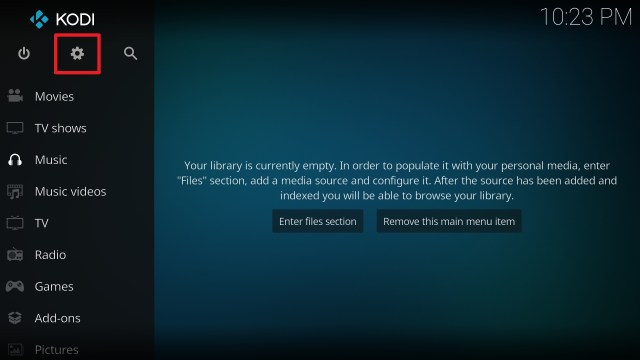
Step 1 Installing Fusion TV Repo addon on Kodi

2. Select System in the bottom right corner.

Step 2 Installing Fusion TV Repo addon on Kodi


3. Select Add-ons on the left side of the screen.

Step 3 Installing Fusion TV Repo addon on Kodi


4. Select Unknown sources.

Step 4 Installing Fusion TV Repo addon on Kodi


5. Click Yes to allow unknown sources.

Step 5 Installing Fusion TV Repo addon on Kodi


6. Select File manager.

Step 6 Installing Fusion TV Repo addon on Kodi


7. Click Add source.

Step 7 Installing Fusion TV Repo addon on Kodi


8. Click on <None>.

Step 8 Installing Fusion TV Repo addon on Kodi


9. Type exactly: https://fusion.tvaddons.co

Step 9 Installing Fusion TV Repo addon on Kodi


10. Click on OK.

Step 10 Installing Video Devil Kodi addon on Kodi


11. Select enter a name for this media source.

Step 11 Installing Video Devil Kodi addon on Kodi


12. Name is Fusion TV (this part isn’t critical as long as you remember the name).

Step 12 Installing fusion addon on Kodi


13. Click on OK.

Step 13 Installing fusion addon on Kodi


14. Click on OK.

Step 14 Installing fusion addon on Kodi


15. Take one step back and click on Add-ons.

Step 15 Installing fusion addon on Kodi


16. Select install from zip file.

Step 16 Installing fusion addon on Kodi


17. Click on Fusion TV Repo

Step 17 Installing fusion addon on Kodi


18. Click on kodi-repos

Step 18 Installing fusion addon on Kodi


19. Select xxx-adult

Step 19 Installing fusion addon on Kodi


20. Select repository.kodiadult-1.0.0.zip

Step 20 Installing fusion addon on Kodi


21. You should see a popup in the upper right corner saying TVADDONS.CO Adult 18+ Addon Repository has installed/updated

Step 21 Installing fusion addon on Kodi


22. Go to Install from Repository

AdultFlix 1


23. Look for TVADDONS.CO Adult 18+ Add-on Repository

AdultFlix 2


24. Click on video add-ons

AdultFlix 3


25. Choose AdultFlix addon

AdultFlix 4


26. Tap the Install option

AdultFlix 5


27. Select the newest version of the addon

AdultFlix 6


28. Click OK

AdultFlix 7


29. Select the Open button to launch

AdultFlix 8


YOUR INTERNET ACTIVITY IS BEING WATCHED

ReviewVPN cannot attest to the legality, security and privacy of the applications discussed on this site. It is highly recommended that you use a VPN service while streaming or using Kodi.

Currently, your IP 216.73.216.211 is visible to everyone and your Browser is being tracked by Advertisers & ISP Provider.

Save 65% Now

Limited Time Offer

Here are the main reasons why you must use a VPN:

  • Your activities are hidden from your ISP, the government, and from the apps you are using.
  • You can access additional movies and TV streams.
  • ISP attempts to throttle are thrwarted thus reducing buffering issues.
  • Geographically restricted content like Netflix and Hulu can be unblocked.

A VPN works be replacing your ISP-assigned IP address and creating an encrypted tunnel. We recommend the no log service offered by IPVanish. It works well on a Firestick and offers the fastest possible speeds.

Special Limited Time Offer - Get IPVanish


Legal Disclaimer: ReviewVPN.com does not encourage or endorse any illegal activity involved in the usage of services and applications referenced on this site. We do not verify the licensing agreements of services. The end-user is wholly responsible for ensuring that any media accessed through these services does not violate copyright and/or licensing laws. ReviewVPN does not promote, link to, or receive compensation from any Apps and IPTV services.


Install Surfshark on Firestick

Best Surfshark Deal


AdultFlix Addon Features

Interface

  • Easy to navigate interface
  • Has a lot of categories to explore
  • All features are shown immediately upon launching the app
  • Search feature
  • History feature
  • Favourites feature
  • Downloads feature
  • Reset feature
  • Parental Controls for passcode
  • Some categories may not work all the time


Contents

  • Live Cams (Chaturbate)
  • Tubes (different porn websites)
  • Porn Scenes
  • Porn Movies
  • Virtual Reality
  • Hentai
  • Vintage
  • Fetish
  • Pictures
  • Comics


Tubes present

  • 3Movs
  • 4Tube
  • Anysex
  • Collectionofbestporn
  • Drtuber
  • Eporner
  • Fuqer
  • Girlfriendvideos
  • Gotporn
  • Hqporner
  • Justporno
  • Madthubs
  • Motherless
  • Nxgx
  • Overthumbs
  • Perfectgirls
  • Porn
  • Porndig
  • Pornfun
  • Pornhd
  • Pornhub
  • Pornilly
  • Redtube
  • Spankbang
  • Tube8
  • Txxx
  • Vporn
  • Watchmygf
  • Xnxx
  • Xvideos
  • Youjizz
  • Youngpornvideos
  • Youporn


Alternative Addons for AdultFlix:

There are a lot of porn addons available on Kodi. Here is the list of alternatives to choose from:


Should I Use Kodi with a VPN?

surfshark logo

We always recommend that you use Kodi with a VPN for several reasons:

  • Much of the content that you will watch on Kodi using unofficial add on isn’t being streamed and shared legally. This means that over time many of the links that you use will be blocked, either because the content provider has served a DMCA notice, or the ISP has blocked the URL for other reasons
  • Up to 50% of all online content is blocked by your ISP. This could be because the material is illegal or of questionable origin. The problem is, that you don’t get to choose which half you see
  • A VPN helps to view any content by encrypting your connection with 256-bit AES encryption. The same type is used by the US military. This means that no one, not even your ISP can stop you from viewing content. Because they can’t see what URL your request is bound for. Only that your connection disappears into your VPN’s DNS and reappears later.
  • Watching adult content means you may come across country restrictions on content like the UK porn block, or region-restricted content. Your VPN allows you to log onto servers in countries without restrictions and access any content you want
  • You are also able to obscure and change your original IP address to stop any traffic from being traced back to you, providing your VPN has no DNS leaks and has a solid zero logs policy

We recommend installing an active VPN on your device before downloading and installing Adult Kodi addons. This is to keep your connection encrypted and anonymous.


Grab your subscription now!

Click here to get the lowest price on Surfshark through our exclusive limited-time offer.

How to Install Surfshark VPN on Firestick

If your Firestick still has the older interface, read this article to learn how to update it: Update Firestick Interface.

Follow our screenshots below to install the SurfShark VPN app on your Fire TV stick.

1. Go to the Home screen of your Firestick.

step 1 Install Surfshark VPN on Firestick


2. Navigate towards the Find tab. Press the Search button from the resulting dropdown.

step 2 Install Surfshark VPN on Firestick


3. Type in the keyword of SurfShark and select from the suggestions that will appear.

step 3 Install Surfshark VPN on Firestick


4. Click the official SurfShark icon from your search results.

step 4 Install Surfshark VPN on Firestick


5. Press the Download (You own it) button.

step 5 Install Surfshark VPN on Firestick


6. The SurfShark VPN installer will download on your device.

step 6 Install Surfshark VPN on Firestick


7. SurfShark VPN’s app will automatically install itself on your Fire TV stick.

step 7 Install Surfshark VPN on Firestick


8. Press the Open button after completing SurfShark VPN’s installation process.

step 8 Install Surfshark VPN on Firestick


9. Please wait for the SurfShark VPN to load its user interface.

step 9 Install Surfshark VPN on Firestick


10. You can now log in with your SurfShark VPN account credentials.

step 10 Install Surfshark VPN on Firestick

Learn more about Surfshark and Grab the Best Surfshark Deal Now!


Install Surfshark on Firestick

Best Surfshark Deal


Other VPNs to Consider

NordVPN (Best for Streaming)

Best Features

  • 5000+ Server in 50+ Countries 
  • Military-Grade Encryption
  • Fast Connection Speed
  • Suitable to a lot of devices
  • No-Log Policy

Prices
  • Complete $5.89 per month (64% Discount)
  • Plus $4.59 per month (56% Discount)
  • Standard $3.69 per month (55% Discount)

Best Features

  • 750+ High-speed VPN Servers in 43 Locations
  • Military-Grade Encryption
  • Fastest HD Streaming and Gaming
  • 30-Day Money-Back Guarantee
  • Unlimited Data & Devices
  • No-Log Policy

Prices
  • 3 Years $1.99 per month (82% Discount)
  • 1 Years $3.29 per month (70% Discount)
  • 1 Month $10.99 per month

IPVanish VPN (Most Secure)

Best Features

  • 1200+ Servers in 60+ Countries around the world
  • Unlimited Connections
  • No-Log Policy
  • Top Notch Military-Grade VPN Protocols and Encryptions
  • 100% Safe and Secured
  • Most Trusted VPN
  • Best VPN for Firestick
  • 30-Day Money-Back Guarantee

Prices
  • Yearly $3.99 per month (63% Discount) – 30 days risk free + Ransomware & Malware Protection
  • Quarterly $5.32 per month (51% Discount)
  • Monthly $10.99 per month


For more VPN discounts, go to ReviewVPN Deals and purchase the best VPN for you.

Click here to get the lowest price on Surfshark through our exclusive limited-time offer.


FAQ

What is Kodi?

kodi logo

Kodi first came around in 2002, when Xbox users hacked together software that would allow them to play and store media on their Xbox, since then the software has grown enormously, to become one of the most downloaded open-source media players in the world.

Kodi has become popular for several reasons, probably foremost amongst these are the thousands of addons, builds, and repositories that have been contributed by developers all around the world. These add-ons allow users to watch everything from blockbuster TV shows to obscure documentaries from foreign countries.

On top of this Kodi has had 17+ years of development and features, which means there really isn’t much it cannot do. It supports a wide range of codec or video formats and has almost 1,000 legal and legitimate add-ons to help users, as well as thousands more that are unsanctioned and added by third-party developers.

Kodi’s 10-foot user interface allows users to use the software to turn their TV into a home entertainment center and automatically scale and control Android applications effectively.


What is an Add On?

kodi add on image

An add on allows a user to carry out a specific function and can be downloaded either through the Kodi Store or for unofficial add ons you would allow access to unknown sources and download directly from a URL.

Think of Kodi as an iPhone, and the add ons as applications.

The add ons are what really bring Kodi to life, turning it from a media player into a diverse entertainment center.


Opinion

AdultFlix is a one-stop-shop for all of your sexual fantasies. It offers a lot of porn sites, movie links, and comics to enjoy.

The features of the addon are quite amazing. You can have a password so that other people, especially your children won’t access the addon when you are gone.

The bad thing is there are some features and categories that are not working all the time. But over-all, this addon is great.


Final Thoughts

We hope that this article helps you obtain the necessary information you need to install the AdultFlix Kodi Addon


See Also:

Best Adult Apps for Firestick

The Best Adult Apps for Android

Install Live Lounge APK for Free Live TV, Sports, Adult Section and Movies

Best Filelinked Codes 2020

50 Best Free Movie Streaming Sites

Install the Roku Channel App on Firestick – 2023

Application Overview

This article will help you install the Roku Channel App on Firestick.


Roku and Amazon were competitors when it comes to marketing their different streaming devices.

Now, You can install the Roku Channel App on Firestick.

This app offers about a hundred fifteen channels.

It streams video-on-demand and live TV content for free.

You can only install this app inside the USA, but last April 2020 Roku Channel became available on firestick UK.


Install the Roku Channel App on Firestick Guide

  1. Go to Search
  2. Type in Roku
  3. Click on the suggestion
  4. Choose the Roku app icon when it appears
  5. Tap on the Get or Download button
  6. Wait for the app to be installed
  7. Select the Open button to launch the app


ANONYMOUSLY


If your Firestick still has the older interface, read this article to learn how to update it: Update Firestick Interface.

Install the Roku Channel App on Firestick with Screenshots

1.   Click FIND.

Step 6 jailbreak firestick

2. Click Search.

Step 7 jailbreak firestick


3. Type in the Roku on your search engine and click the suggestion

Roku 2


4. Choose the Roku Channel App icon when it appears on the screen

Roku 3


5. Click on the Get or Download button to install the app on your firestick device.

Roku 4


6. The application is installing

Roku 5


7. Once the app is already installed on your device, click on Open to launch it.

Roku 6


Install SurfShark on Firestick

Best SurfShark Deal


Legal Disclaimer: ReviewVPN.com does not encourage or endorse any illegal activity involved in the usage of services and applications referenced on this site. We do not verify the licensing agreements of services. The end-user is wholly responsible for ensuring that any media accessed through these services does not violate copyright and/or licensing laws. ReviewVPN does not promote, link to, or receive compensation from any Apps and IPTV services.


YOUR INTERNET ACTIVITY IS BEING WATCHED

ReviewVPN cannot attest to the legality, security and privacy of the applications discussed on this site. It is highly recommended that you use a VPN service while streaming or using Kodi.

Currently, your IP 216.73.216.211 is visible to everyone and your Browser is being tracked by Advertisers & ISP Provider.

Save 65% Now

Limited Time Offer

Here are the main reasons why you must use a VPN:

  • Your activities are hidden from your ISP, the government, and from the apps you are using.
  • You can access additional movies and TV streams.
  • ISP attempts to throttle are thrwarted thus reducing buffering issues.
  • Geographically restricted content like Netflix and Hulu can be unblocked.

A VPN works be replacing your ISP-assigned IP address and creating an encrypted tunnel. We recommend the no log service offered by IPVanish. It works well on a Firestick and offers the fastest possible speeds.

Special Limited Time Offer - Get IPVanish


App Features

  • User-friendly interface
  • Has Massive selection of content for free
  • A wide selection of entertainment is constantly refreshed 
  • Has Spanish language content and six live Spanish channels
  • You can create an account using the app
  • Easily search your favorite channels and content to stream
  • Good recommendation feature
  • You can easily continue watching unfinished shows.
  • Has parental controls to customize a viewing experience appropriate for the family
  • Can subscribe to many premium channels in a one-time payment service


A Few Available Channels on the Roku App:

News and Weather

  •  ABC News
  • USA Today
  • Newsmax TV
  • Weather Nation
  • Reuters
  • Cheddar
  • Yahoo! Finance


Sports and Games

  • Game Show Central
  • Stadium
  • ACC Digital Network
  • Fubo Sports Network
  • Family Feud
  • Deal or No Deal


Food and Entertainment

  • Hell’s Kitchen
  • Bon Appetit
  • Tastemade
  • TMZ
  • People TV 
  • Vanity Fair
  • The Bob Ross Channel


Fashion and Lifestyle

  • Vogue
  • Glamour
  • GQ


Some Available Shows on the Roku Channel App:

Movies

  • Batman Begins
  • The Dark Knight
  • Miracle on 34th street
  • The Terminator
  • Concussion
  • Donnie Darko
  • Memento
  • High Fidelity
  • Caddyshack
  • Last Action Hero


TV Series

  • The Bachelorette
  • Bewitched
  • Cold Case
  • Who’s The Boss?
  • The Nanny
  • News Radio
  • I Dream of Jeannie
  • Dog the Bounty Hunter
  • The Facts of Life
  • The Partridge Family
  • Growing Pains
  • Without a Trace
  • The Beverly Hillbillies


Kid’s Show

  • Bob the Builder
  • Pink Panther
  • Care Bears
  • Teletubbies
  • Thomas and Friends
  • Babar
  • Strawberry Shortcake
  • Barbie
  • All Dogs Go To Heaven
  • Paddington Bear


Premium Channels That You Can Subscribe on the Roku Channel App

  • HBO
  • Starz
  • Showtime
  • Cinemax
  • Epix
  • Lifetime Movie Club
  • Noggin
  • Smithsonian Channel Plus
  • History Channel Vault


Pros and Cons

Pros

  • The application is free for download
  • The interface is user-friendly, responsive, and somehow clean to the eye
  • No need to login to a Roku account using firestick
  • Gives additional free channels to your firestick device
  • Provides family-friendly entertainment, especially for kids
  • Contents are broken down on genre
  • Good recommendations based on the  shows that you are watching

Cons

  • Too many ads
  • Not all channels are free
  • Some shows have a low definition
  • Few new release content are not offered for free


Stream Safely with a VPN

Surfshark vpn

In order for you to enjoy streaming without being bothered by the constant throttling done by your ISP, you need a VPN.

A VPN gives an extra layer of protection while streaming.

Here at reviewvpn.com, we always recommend SurfShark.  If you want to know more about this VPN, kindly read our SurfShark Review.

Other Features of SurfShark:

  • SurfShark VPN protocols are perfect for use with Kodi.
  • This VPN will definitely hide all of your online activities. 
  • It has a military-grade level of encryption that will ensure your safety. 
  • With this VPN you can access more content and even unblock Netflix and other platforms.
  • It also supports P2p file-sharing activities which makes it applicable to torrenting
  • Strictly follows No-Log Policy.
  • This VPN is one of the Fastest in its raging speed.
  • DNS Leak Protection is active by default.


Grab your subscription now!

Click here to get the lowest price on SurfShark through our exclusive limited-time offer.


How to Install Surfshark on Firestick with Screenshots

If your Firestick still has the older interface, read this article to learn how to update it: Update Firestick Interface.

You can download Surfshark directly from the Amazon App store. It will be easy for you to find Surfshark with your Firestick’s Find feature. Refer to our screenshots below.

Follow our screenshots below to install the SurfShark VPN app on your Fire TV stick.

1. Go to the Home screen of your Firestick.

step 1 Install Surfshark VPN on Firestick


2. Navigate towards the Find tab. Press the Search button from the resulting dropdown.

step 2 Install Surfshark VPN on Firestick


3. Type in the keyword of SurfShark and select from the suggestions that will appear.

step 3 Install Surfshark VPN on Firestick


4. Click the official SurfShark icon from your search results.

step 4 Install Surfshark VPN on Firestick


5. Press the Download (You own it) button.

step 5 Install Surfshark VPN on Firestick


6. The SurfShark VPN installer will download on your device.

step 6 Install Surfshark VPN on Firestick


7. SurfShark VPN’s app will automatically install itself on your Fire TV stick.

step 7 Install Surfshark VPN on Firestick


8. Press the Open button after completing SurfShark VPN’s installation process.

step 8 Install Surfshark VPN on Firestick


9. Please wait for the SurfShark VPN to load its user interface.

step 9 Install Surfshark VPN on Firestick


10. You can now log in with your SurfShark VPN account credentials.

step 10 Install Surfshark VPN on Firestick

Learn more about Surfshark and Grab the Best Surfshark Deal Now!


Install Surfshark on Firestick

Best Surfshark Deal

Other VPNs to Consider

NordVPN (Best for Streaming)

Best Features

  • 5000+ Server in 50+ Countries 
  • Military-Grade Encryption
  • Fast Connection Speed
  • Suitable to a lot of devices
  • No-Log Policy

Prices
  • Complete $5.89 per month (64% Discount)
  • Plus $4.59 per month (56% Discount)
  • Standard $3.69 per month (55% Discount)

Best Features

  • 750+ High-speed VPN Servers in 43 Locations
  • Military-Grade Encryption
  • Fastest HD Streaming and Gaming
  • 30-Day Money-Back Guarantee
  • Unlimited Data & Devices
  • No-Log Policy

Prices
  • 3 Years $1.99 per month (82% Discount)
  • 1 Years $3.29 per month (70% Discount)
  • 1 Month $10.99 per month

IPVanish VPN (Most Secure)

Best Features

  • 1200+ Servers in 60+ Countries around the world
  • Unlimited Connections
  • No-Log Policy
  • Top Notch Military-Grade VPN Protocols and Encryptions
  • 100% Safe and Secured
  • Most Trusted VPN
  • Best VPN for Firestick
  • 30-Day Money-Back Guarantee

Prices
  • Yearly $3.99 per month (63% Discount) – 30 days risk free + Ransomware & Malware Protection
  • Quarterly $5.32 per month (51% Discount)
  • Monthly $10.99 per month

For more VPN discounts, go to ReviewVPN Deals and purchase the best VPN for you.


Alternative Applications for Roku Channel:

Roku Channel App offers live tv and video-on-demand. Since it is only available in the USA and the UK, there are still other applications that offer the same features. Look out for this list of apps that you can also install on your firestick:


For more information about the different apps, you may refer to Best Free Live TV App for Firestick and List of Live TV (IPTV) Apps on Firestick.


FAQ

History

The Roku Channel App was developed in 2017 with the goal to deliver great and free entertainment to the public. It is only been available on Amazon Fire devices this year, 2020.


Do I need a Roku account to use the app on my firestick?

No, you won’t need a Roku account to login into the Roku Channel using your firestick


Can I hide some content in the Roku Channel App?

No. You cannot filter any content in the Roku Channel


Is it Free?

The application is free for download. But some channels are requiring some premium subscription and payment.


Is the Application Safe?

Yes. The application is safe. 


Other devices Does it Work on?

Aside from the main device which Roku, you can also download the app to your mobile phones, IOS, or android.


Is there a Premium Version of the App?

None, the free version is the only version of the app. There are just premium channels that you can subscribe to.


Can I use Roku and Firestick at the same time?

Thru the use of the Roku Channel App, you can now have Roku on Firestick.


Can I use Roku and Firestick on the same TV?

No, Roku and Firestick are two different devices with different systems and features for your TV.


Our Opinion

For free streaming of live and on-demand shows, the Roku Channel is one of the top picks. It is not bad to check out this app. Though, one might say that it is not one of a kind because as years go by, a lot of different applications with the same features are available on firestick. But one thing to consider is the shows and other channels that it adds to your Fire TV.

When it comes to navigating the app, we can say that it is clean and easy. Since the shows are allocated per genre, you will be able to look for a certain topic or show that you’d like to stream and binge-watch.

There is no harm in downloading this app as long as it’s free. It is good to have more options in your firestick as to whether what kind of shows you feel like watching.

We hope that this article will help you to know how to install the Roku Channel App on your Fire TV.


See Also:

Best Roku Private Channels

Best Live TV Apps for Firestick

List Best Movie and TV Apps for Firestick

Best Firestick Apps

Top Unlinked Codes

Free Movie Streaming Websites

Best TV Show Websites

List Best Adult Apps for Firestick

Top Live TV Apps

Install Swift Streamz on Firestick

Best Kissanime.RU Alternatives 


What Is Your Favorite Streaming App? Cast Your Vote Below.

Install VUit on Firestick and Android – 2023

Application Overview

This article will help you install the VUit App on your Firestick and Android devices.


VUit app provides hundreds of local live channels for on-demand news, sports, and weather forecasts across the United States.

Lately, this app has collaborated with other local channels to bring some original content. It also offers documentaries, original short films, concerts, and cultural events.

This app is only applicable and available for download in the USA but it is free of charge.


How to Download the VUit App on Android

If you are outside of the US, you can also install VUit by clicking on the button below. Take note that this version is only available for android devices such as smartphones and tablets only.

Upon checking, it is not applicable for Amazon Firestick.


ANONYMOUSLY

Vuit APK Download for Android Devices:

VUit apk

Note: ReviewVPN.com does not host this APK file. It is hosted on Archive.org.

Install VUit on Firestick with Screenshots

If your Firestick still has the older interface, read this article to learn how to update it: Update Firestick Interface.

1.   Click FIND.

Step 6 jailbreak firestick


2. Click Search.

Step 7 jailbreak firestick


3. Type in VUit on your search engine and click on the suggested word

VUit 3


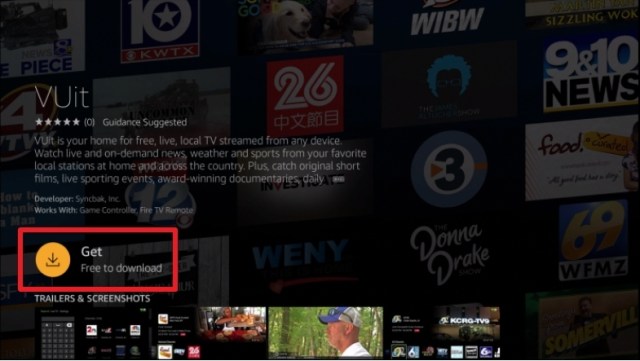
4. Choose the VUit icon when it pops up on your screen

VUit 4


5. Click on the Download or Get button

VUit 5


6. Let the VUit app be downloaded on your device

VUit 6


7. Once the app has been downloaded, click Open to launch it.

VUit 7


YOUR INTERNET ACTIVITY IS BEING WATCHED

ReviewVPN cannot attest to the legality, security and privacy of the applications discussed on this site. It is highly recommended that you use a VPN service while streaming or using Kodi.

Currently, your IP 216.73.216.211 is visible to everyone and your Browser is being tracked by Advertisers & ISP Provider.

Save 65% Now

Limited Time Offer

Here are the main reasons why you must use a VPN:

  • Your activities are hidden from your ISP, the government, and from the apps you are using.
  • You can access additional movies and TV streams.
  • ISP attempts to throttle are thrwarted thus reducing buffering issues.
  • Geographically restricted content like Netflix and Hulu can be unblocked.

A VPN works be replacing your ISP-assigned IP address and creating an encrypted tunnel. We recommend the no log service offered by IPVanish. It works well on a Firestick and offers the fastest possible speeds.

Special Limited Time Offer - Get IPVanish


Legal Disclaimer: ReviewVPN.com does not encourage or endorse any illegal activity involved in the usage of services and applications referenced on this site. We do not verify the licensing agreements of services. The end-user is wholly responsible for ensuring that any media accessed through these services does not violate copyright and/or licensing laws. ReviewVPN does not promote, link to, or receive compensation from any Apps and IPTV services.


Install Surfshark on Firestick

Best Surfshark Deal


App Features

For Viewing Experience:

  • Easy access from one channel to another
  • High definition resolution
  • Has both local and national channels
  • It has a recently viewed feature if the viewer would like to replay some shows
  • Has some featured shows and documentaries
  • Recommends shows and channels based on viewing history
  • The app has Nearby Channel Suggestions based on the user’s location
  • Full Spectrum of 172 channels on the All Channels section


Most-Viewed Channels on VUit app:

Though there are about 200 local and national channels present on this app, here is the list of the top and most-viewed channels on VUit:

  • VUit Live – a New York City Live Street Camera if you like to check on the latest traffic situation in the city.
  • VUit eSports – a 24 / 7 channel that gives an always-on stream shows from eSports.
  • Politics Uncut – another 24 / 7 channel about US government
  • VUit High School Sports 
  • Fly-Over Music Hour


List of 15 out of 172 (all channels) available on the VUit app:

  • Battleground States
  • KTUU
  • KTVF11
  • KXDF 13
  • WBRC Fox 6 News
  • WRGX Wiregrass
  • WTVY 4
  • 48 WAFF
  • FOX 10 News
  • 12 WSFA
  • KAIT 8 abc
  • KOLD News 13
  • KKCO 11
  • WCJB abc
  • WJHG 17


Other must-watch contents on the VUit app:

  • Backlash
  • Crossing the Great Lake
  • Business First AM
  • Iditarod 2020
  • Food curated
  • Investigate TV
  • Onaway Speedway Racing


Other good features:

  • 100% free of charge
  • Available also on iOS, Apple TV, and Roku devices
  • Has over 200 television station partners
  • Dedicated to add more and more contents for the viewers each year


Stream Safely with a VPN

surfshark logo

Vuit is so strict when it comes to location. Since it is only available in the USA, most of the contents are geo-restricted.

A VPN serves as a bridge that connects you to a different server inside the USA. It will give you access to all the contents that are not available in your area.

Here at reviewvpn.com, we recommend nothing but the best VPN for you. None other than Surfshark.

Surfshark gives you the following benefits:

Note: For more information about Surfshark, please read our Surfshark Review.


Grab your subscription now!


How to Install Surfshark VPN on Firestick

If your Firestick still has the older interface, read this article to learn how to update it: Update Firestick Interface.

Follow our screenshots below to install the SurfShark VPN app on your Fire TV stick.

1. Go to the Home screen of your Firestick.

step 1 Install Surfshark VPN on Firestick


2. Navigate towards the Find tab. Press the Search button from the resulting dropdown.

step 2 Install Surfshark VPN on Firestick


3. Type in the keyword of SurfShark and select from the suggestions that will appear.

step 3 Install Surfshark VPN on Firestick


4. Click the official SurfShark icon from your search results.

step 4 Install Surfshark VPN on Firestick


5. Press the Download (You own it) button.

step 5 Install Surfshark VPN on Firestick


6. The SurfShark VPN installer will download on your device.

step 6 Install Surfshark VPN on Firestick


7. SurfShark VPN’s app will automatically install itself on your Fire TV stick.

step 7 Install Surfshark VPN on Firestick


8. Press the Open button after completing SurfShark VPN’s installation process.

step 8 Install Surfshark VPN on Firestick


9. Please wait for the SurfShark VPN to load its user interface.

step 9 Install Surfshark VPN on Firestick


10. You can now log in with your SurfShark VPN account credentials.

step 10 Install Surfshark VPN on Firestick

Learn more about Surfshark and Grab the Best Surfshark Deal Now!


Install Surfshark on Firestick

Best Surfshark Deal


Other VPNs to Consider

NordVPN (Best for Streaming)

Best Features

  • 5000+ Server in 50+ Countries 
  • Military-Grade Encryption
  • Fast Connection Speed
  • Suitable to a lot of devices
  • No-Log Policy

Prices
  • Complete $5.89 per month (64% Discount)
  • Plus $4.59 per month (56% Discount)
  • Standard $3.69 per month (55% Discount)

Best Features

  • 750+ High-speed VPN Servers in 43 Locations
  • Military-Grade Encryption
  • Fastest HD Streaming and Gaming
  • 30-Day Money-Back Guarantee
  • Unlimited Data & Devices
  • No-Log Policy

Prices
  • 3 Years $1.99 per month (82% Discount)
  • 1 Years $3.29 per month (70% Discount)
  • 1 Month $10.99 per month

IPVanish VPN (Most Secure)

Best Features

  • 1200+ Servers in 60+ Countries around the world
  • Unlimited Connections
  • No-Log Policy
  • Top Notch Military-Grade VPN Protocols and Encryptions
  • 100% Safe and Secured
  • Most Trusted VPN
  • Best VPN for Firestick
  • 30-Day Money-Back Guarantee

Prices
  • Yearly $3.99 per month (63% Discount) – 30 days risk free + Ransomware & Malware Protection
  • Quarterly $5.32 per month (51% Discount)
  • Monthly $10.99 per month


For more VPN discounts, go to ReviewVPN Deals and purchase the best VPN for you.

Click here to get the lowest price on Surfshark through our exclusive limited-time offer.


Alternative Applications for Vuit

Aside from the VUit app, there are a lot of other live TV apps that you can stream on firestick. Check out this list of free live tv apps.

You can also see these links: Best Free Live TV Apps For Firestick and Best Live TV Apps (IPTV) for Firestick.


FAQ

History

VUit app is a brand new app that was recently launched in early 2020


Is it Free?

Yes, this app is 100% free to download


Is it legal?

Yes, the VUit app is an official application that you can see on the Amazon App Store


What other devices does VUit app applicable to?

The VUit app is also available for download on iOS, Apple TV, and Roku


Are there any ads?

Yes, the VUit app is one of those apps that are free but with advertisements


How can I use this app on Firestick?

This app is very easy to use and navigate on your firestick device. Once you launch it for the first time, it won’t require you to have any registration. If you want to open it from your home screen, go to Apps, and look for the VUit app. Once you have opened the app, you will find three options on top: Search, Live TV, and Settings. You can use your remote to navigate and explore the app to find the show you like to stream.


Is there an official website?

Yes, the official website of this app is www.vuit.com


Our Opinion

The VUit app is a great application for so many reasons. One of these is being free. You can be able to watch a lot of local news or even nationwide happenings using this app. We can say that it is worth it. 

Although, some might find it weird having a live channel that covers some streets of New York. It’s like watching people walk and cars rolling on the street just to kill time. Surprisingly, that channel is one of the most viewed channels on this app.

Vuit is great but there are also other applications out there that are similar and you might like to check out. But if you are really leaning towards News, we can say that VUit is one of our top picks. Through VUit, there are a lot of local and national news channels and shows even replay and live, that you can choose from.


Final Thoughts

We hope that this article helps you in installing the VUit app on your firestick device.


Note: ReviewVPN.com does not own or operate any app nor does it endorse any. The main purpose of this article is strictly for educational purposes only.


See Also:

Best Firestick Apps

Top Filelinked Codes

Free Movie Streaming Websites

Best TV Show Websites

List of Best Adult Apps for Firestick

Top Live TV Apps

Install Swift Streamz on Firestick

Best Kissanime.RU Alternatives


What Is Your Favorite Streaming App? Cast Your Vote Below.

Install XPlayer on Firestick and Android – 2023

XPlayer Overview

This article will help you Install XPlayer on Firestick and android devices.


The XPlayer is a great app with features that allows you to play any music and video on your device. This is a very flexible app because whatever the format and the size of your file, this app can play them all.

XPlayer can also give its user some privacy. It has a private folder feature where the user can store all his videos.

This app is free for download, but in order for it to be installed on firestick, you need to have a downloader app first.

XPlayer is not listed as an official application of the amazon app store, you need to jailbreak first your firestick. You may refer to this link for you to know more about firestick jailbreak.


ANONYMOUSLY

Is XPlayer Safe and Virus-free?

We tested this app using VirusTotal and found no threats or any malicious files and malware.

Despite having good results, we still need to be vigilant in protecting our privacy while streaming.

A Virtual Private Network or VPN will definitely help us maintain our security and anonymity while using XPlayer.

Here’s how you can Install The Best VPN For Firestick and All Devices.


How to Install the XPlayer on Firestick Guide

We need to install the Downloader app first before completely installing the XPlayer app on firestick. Follow this guide to download the app.

  1. From your home screen, go to Settings
  2. On your Settings, click on Device or My Fire TV
  3. Choose the Developer options
  4. Turn on the ADB debugging and Apps from Unknown Sources
  5. Go back to Home Screen and go to search
  6. Type in and click on “Downloader” on the search engine 
  7. Click on the downloader icon on the screen
  8. Click on “Get” or “Download”
  9. Wait until the app is already installed on the firestick device
  10. Click “Open” to launch the app
  11. Select “Allow”
  12. Click “OK”
  13. Type in reviewvpn.com/xplay on the search engine
  14. After typing the URL for the XPlayer APK, click “Go”.
  15. Let the APK be downloaded
  16. After downloading, click “Install”.
  17. Click “Open” to launch the XPlayer app
  18. On the application, click “Allow”


XPlayer APK Download for Android Devices


XPlayer

Note: ReviewVPN.com does not host this APK file. It is hosted by Archive.org

You can also install the app from the Google Apps Store. Follow the link below for your reference.


If your Firestick still has the older interface, read this article to learn how to update it: Update Firestick Interface.


Install the XPlayer on your Firestick Device with Screenshots:

1. Install the Downloader app and jailbreak your firestick by enabling unknown sources. To learn more about the procedure, you may read How to Install the Downloader App and Enable Unknown Sources.


2. Open Downloader. Type in reviewvpn.com/xplay and click Go.

Install Xplay


3. Click “Go”

XPlayer 17


4. Let the APK be downloaded on the app

XPlayer 19


5. Click “Install”

XPlayer 20


6. Let the app be installed

XPlayer 21


7. After installing, click “Open”

XPlayer 22


8. Launch the app click “Allow”

XPlayer 23


YOUR INTERNET ACTIVITY IS BEING WATCHED

ReviewVPN cannot attest to the legality, security and privacy of the applications discussed on this site. It is highly recommended that you use a VPN service while streaming or using Kodi.

Currently, your IP 216.73.216.211 is visible to everyone and your Browser is being tracked by Advertisers & ISP Provider.

Save 65% Now

Limited Time Offer

Here are the main reasons why you must use a VPN:

  • Your activities are hidden from your ISP, the government, and from the apps you are using.
  • You can access additional movies and TV streams.
  • ISP attempts to throttle are thrwarted thus reducing buffering issues.
  • Geographically restricted content like Netflix and Hulu can be unblocked.

A VPN works be replacing your ISP-assigned IP address and creating an encrypted tunnel. We recommend the no log service offered by IPVanish. It works well on a Firestick and offers the fastest possible speeds.

Special Limited Time Offer - Get IPVanish


Legal Disclaimer: ReviewVPN.com does not encourage or endorse any illegal activity involved in the usage of services and applications referenced on this site. We do not verify the licensing agreements of services. The end-user is wholly responsible for ensuring that any media accessed through these services does not violate copyright and/or licensing laws. ReviewVPN does not promote, link to, or receive compensation from any Apps and IPTV services.


Install Surfshark on Firestick

Best Surfshark Deal


App Features

User Interface

  1. Easy to use
  2. Good placement of ads
  3. Gives the user the ability to create a private folder for his videos
  4. Can share your files with anyone and through different platforms
  5. Can change the brightness of the videos while playing
  6. Volume can easily be controlled
  7. Allows multi-tasking
  8. Can do both slow motion and fast motion on your videos


Support the following formats:

  1. MKV
  2. MP4
  3. M4V
  4. AVI
  5. MOV
  6. 3GP
  7. FLV
  8. WMV
  9. RMVB
  10. TS


Video Quality

Another good thing about the XPlayer is it has the ability to play all formats of videos in 720p HD, 1080p full HD, or 4k video without having much trouble. Even if you are using new types of equipment, the Xplayer app can be able to play your video immediately.


Other Features

  1. Free
  2. Supports subtitle
  3. Has auto-rotation
  4. Supports Chromecast to play your videos from android to TV


Should I Use a VPN for this App?

surfshark logo

You can download this app without a VPN, but it is best to use the app with one.

Having a VPN will give you a lot of benefits while streaming especially on your firestick.

3 of the Many Benefits of using a VPN:

  • It will give you privacy while surfing the internet
  • A VPN will let you pass through some geo blockers to access some content that might not be available in your area.
  • It can even make your internet speed a little faster. 

The best VPN that we suggest having is Surfshark.

It is very suitable for your streaming activities and you can easily download it on your firestick.

Note: For more information about Surfshark, please read our Surfshark Review.


Grab your subscription now!


How to Install Surfshark VPN on Firestick

If your Firestick still has the older interface, read this article to learn how to update it: Update Firestick Interface.

1. Go to the Home screen of your Firestick.

step 1 Install Surfshark VPN on Firestick


2. Navigate towards the Find tab. Press the Search button from the resulting dropdown.

step 2 Install Surfshark VPN on Firestick


3. Type in the keyword of SurfShark and select from the suggestions that will appear.

step 3 Install Surfshark VPN on Firestick


4. Click the official SurfShark icon from your search results.

step 4 Install Surfshark VPN on Firestick


5. Press the Download (You own it) button.

step 5 Install Surfshark VPN on Firestick


6. The SurfShark VPN installer will download on your device.

step 6 Install Surfshark VPN on Firestick


7. SurfShark VPN’s app will automatically install itself on your Fire TV stick.

step 7 Install Surfshark VPN on Firestick


8. Press the Open button after completing SurfShark VPN’s installation process.

step 8 Install Surfshark VPN on Firestick


9. Please wait for the SurfShark VPN to load its user interface.

step 9 Install Surfshark VPN on Firestick


10. You can now log in with your SurfShark VPN account credentials.

step 10 Install Surfshark VPN on Firestick

Learn more about Surfshark and Grab the Best Surfshark Deal Now!


Install Surfshark on Firestick

Best Surfshark Deal


Other VPNs to Consider

NordVPN (Best for Streaming)

Best Features

  • 5000+ Server in 50+ Countries 
  • Military-Grade Encryption
  • Fast Connection Speed
  • Suitable to a lot of devices
  • No-Log Policy

Prices
  • Complete $5.89 per month (64% Discount)
  • Plus $4.59 per month (56% Discount)
  • Standard $3.69 per month (55% Discount)

Best Features

  • 750+ High-speed VPN Servers in 43 Locations
  • Military-Grade Encryption
  • Fastest HD Streaming and Gaming
  • 30-Day Money-Back Guarantee
  • Unlimited Data & Devices
  • No-Log Policy

Prices
  • 3 Years $1.99 per month (82% Discount)
  • 1 Years $3.29 per month (70% Discount)
  • 1 Month $10.99 per month

IPVanish VPN (Most Secure)

Best Features

  • 1200+ Servers in 60+ Countries around the world
  • Unlimited Connections
  • No-Log Policy
  • Top Notch Military-Grade VPN Protocols and Encryptions
  • 100% Safe and Secured
  • Most Trusted VPN
  • Best VPN for Firestick
  • 30-Day Money-Back Guarantee

Prices
  • Yearly $3.99 per month (63% Discount) – 30 days risk free + Ransomware & Malware Protection
  • Quarterly $5.32 per month (51% Discount)
  • Monthly $10.99 per month


For more VPN discounts, go to ReviewVPN Deals and purchase the best VPN for you.

Click here to get the lowest price on Surfshark through our exclusive limited-time offer.


Alternative Applications for XPlayer:

There are a lot of other media players that you can install on your firestick device.


MX Player Pro

The MX Player Pro can also play both video and music. One thing about this app is that it is often used as a supporting player for some third-party streaming apps.

How to Install MX Player on Firestick


Wuffy Media Player

Like the XPlayer, Wuffy Player can also play videos in any format. It is one of the popular media player apps on firestick. It is usually used as the media player for some third-party streaming apps as well.

Download Wuffy Player on Firestick


VLC Player (VLC for Firestick)

Another media player that supports various types of media formats. It has its own media library for audios and videos.

Stream videos and music using VLC Player on Firestick


Other apps you might like checking out:

  1. KokoTime (Premium)
  2. Ludio Player
  3. Video Mix
  4. MV Castplayer 


FAQ

Is the app free?

XPlayer app is 100% free.


Is it legal?

Absolutely, the XPlayer app is legal to install on your device. 


Are there any ads?

Yes, there are some ads while using this app.


Is it safe to download on your firestick?

Even if you need to turn on the apps from unknown sources, if you are going to use the code given for the APK of this app, we assure you that it is 100% safe.


Our Opinion

We can say that XPlayer is awesome in some ways. It has many wonderful features that you can use while streaming your videos or music. It is very easy to use, and many people find it great to use this app.

Another thing is the ads are not that annoying somehow. They are placed decently which won’t bother much of your streaming.

And as we always say, as long as this app is free, it is worth the try. It might just consume five minutes or more of your time to download this on your firestick device, but it is worth the shot.


Final Thoughts

We hope that you find this article useful in learning about the XPlayer app and how to install it on your device.


See Also

Best Video Player for Firestick

Install the Trashy Movies Channel on Firestick – 2023

About the App

This article will help you install the Trashy Movies Channel on Firestick.


What is Trashy about the Trashy Movies App?

Trashy Movies Channel is a streaming application that provides tons of horror and thriller films for the viewers. Most movies are dated during the 1940s up to the recent modern period.

This app features some free, ad-supported movies for the users. However, you can also subscribe to a premium version with some great deals from the app. You can also create and login to your account using this application.

Trashy Movies Channel is 100% free to install from the Amazon app store to your Firestick. This is a good app for those liking some classic horror films to watch anytime.


How to Install the Trashy Movies Channel on Firestick Guide

Trashy Movies Channel is an official application that you can download from the Amazon app store. Within 5 minutes or maybe more, you can be able to install and enjoy the app. Follow this guide to do it so.

  1. Go to your search bar
  2. Type Trashy Movies Channel on your search engine
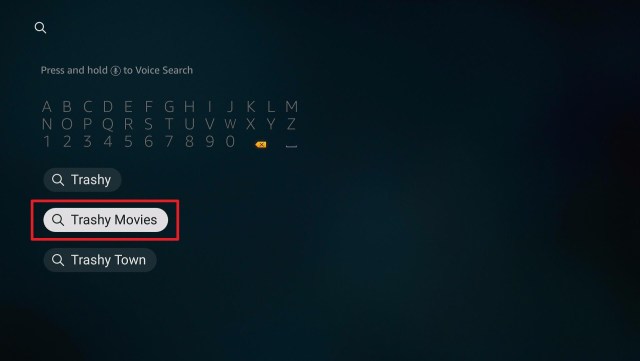
  3. Click the subject word “Trashy Movies”
  4. Tap on the icon of the app when it appears on your screen
  5. Click the “Get” or “Download” button
  6. Wait for the app to be installed on your device
  7. After installing, click “Open” to launch the app


ANONYMOUSLY


If your Firestick still has the older interface, read this article to learn how to update it: Update Firestick Interface.


Install the Trashy Movies Channel on your Firestick Device with Screenshots:

1. Click FIND.

Trashy Movies1

2. Click Search.

Movie Nite2


3. Type in the subject word “trashy movies” and click it

Trashy 3


4. Tap on the Trashy Movies icon when it appears on the screen

Trashy 4


5. Click on the “Get” or “Download” button to install the app

Trashy 5


6. Let the app be installed on your firestick device.

Trashy 8


7. After installing, click on the “Open” button to launch the Trashy Movies Channel

Trashy 9


YOUR INTERNET ACTIVITY IS BEING WATCHED

ReviewVPN cannot attest to the legality, security and privacy of the applications discussed on this site. It is highly recommended that you use a VPN service while streaming or using Kodi.

Currently, your IP 216.73.216.211 is visible to everyone and your Browser is being tracked by Advertisers & ISP Provider.

Save 65% Now

Limited Time Offer

Here are the main reasons why you must use a VPN:

  • Your activities are hidden from your ISP, the government, and from the apps you are using.
  • You can access additional movies and TV streams.
  • ISP attempts to throttle are thrwarted thus reducing buffering issues.
  • Geographically restricted content like Netflix and Hulu can be unblocked.

A VPN works be replacing your ISP-assigned IP address and creating an encrypted tunnel. We recommend the no log service offered by IPVanish. It works well on a Firestick and offers the fastest possible speeds.

Special Limited Time Offer - Get IPVanish


Install SurfShark on Firestick

Best SurfShark Deal


Legal Disclaimer: ReviewVPN.com does not encourage or endorse any illegal activity involved in the usage of services and applications referenced on this site. We do not verify the licensing agreements of services. The end-user is wholly responsible for ensuring that any media accessed through these services does not violate copyright and/or licensing laws. ReviewVPN does not promote, link to, or receive compensation from any Apps and IPTV services.


App Features

User Interface

  1. Can choose immediately if you will get the premium or free version upon installing the app
  2. Has a 60s vibe app wallpaper
  3. Can easily navigate through the app using the firestick remote
  4. You can watch the trailer before watching a movie if you’d like to
  5. Ads are also about horror
  6. Films are separated per category depending on the subscription


Video Quality

Since there are a lot of old and classic films present in this app, their video quality is not as good as the present ones have. Do not expect to have a full HD experience especially on the videos dated decades ago.


Categories of Films in the Home Screen of Trashy Movies Channel:

1. Featured Content

List of about 15 titles featured by Trashy Movies Channel. You cannot watch these films unless you subscribe or login into your Trashy Movies account.


2. Free Films/Shows (Ad-Supported)

This is the only section that you can watch your film of choice if you subscribe to the free version of the app. This feature houses about 42 titles to watch for free with advertisements. 


3. Recently Added Films

This category stores all the newly added films in this app. This does not mean that the films in this section are new. These are also oldie but goodie movies that you can enjoy upon subscribing and logging in on this app.


4. Coming Soon

This section has all the trailers of the upcoming films that are to be added to the library of films featured by Trashy Movies Channel.


5. Premium Films (Ad-Free)

This category has tons of featured titles to stream. Only if you subscribe to the premium version will you able to access all the ad-free movies that you want to watch.


6. Films by Decade

In this category, you will see the films sorted into decades. 

  • 1940s (2 films)
  • 1950s (11 films)
  • 1960s (12 films)
  • 1970s (23 films)
  • 1980s (10 films)
  • 1990s (17 films)
  • 2000s (48 films)
  • 2010s (99 films)

And since there are upcoming shows, the number of films per decade might vary from time to time.


7. Films by Region

Another sorting feature of this app is that they have a category of movies per region. It is divided into 4 sections: Asia, Australia, Europe, and North America.


Added Feature if you subscribe to the Premium Version

  • Ad-free
  • Access to 3 times the free version’s content
  • New movies added weekly


Pros and Cons

Pros

  • Free for download
  • Can easily be downloaded from the Amazon app store
  • Legal
  • Has some free movies to watch

Cons

  • Not all content is free
  • App crashes while navigating 
  • Many buffer times
  • Has a lot of long ads while watching for free


Should I Use a VPN for Trashy Movies Channel?

Surfshark vpn

Trashy Movies Channel is free to download from the Amazon App Store. 

While streaming, you might experience a lot of buffering. It is because your Internet Service Provider (ISP) is throttling your internet bandwidth while watching some shows.

If you are going to install a VPN, you will experience a faster internet connection and your ISP won’t be able to control your streaming. 

We suggest installing SurfShark. Here are some benefits you can have if you purchase SurfShark:

  • SurfShark will protect your identity while using a lot of apps on the internet.
  • It will also hide you from malicious hackers and malware that might damage your device.
  • The VPN can also connect you to a different server so that you will have access to a lot of content that might be restricted in your area.


Grab your subscription now!

Click here to get the lowest price on SurfShark through our exclusive limited-time offer.


How to Install Surfshark on Firestick with Screenshots

If your Firestick still has the older interface, read this article to learn how to update it: Update Firestick Interface.

You can download Surfshark directly from the Amazon App store. It will be easy for you to find Surfshark with your Firestick’s Find feature. Refer to our screenshots below.

Follow our screenshots below to install the SurfShark VPN app on your Fire TV stick.

1. Go to the Home screen of your Firestick.

step 1 Install Surfshark VPN on Firestick


2. Navigate towards the Find tab. Press the Search button from the resulting dropdown.

step 2 Install Surfshark VPN on Firestick


3. Type in the keyword of SurfShark and select from the suggestions that will appear.

step 3 Install Surfshark VPN on Firestick


4. Click the official SurfShark icon from your search results.

step 4 Install Surfshark VPN on Firestick


5. Press the Download (You own it) button.

step 5 Install Surfshark VPN on Firestick


6. The SurfShark VPN installer will download on your device.

step 6 Install Surfshark VPN on Firestick


7. SurfShark VPN’s app will automatically install itself on your Fire TV stick.

step 7 Install Surfshark VPN on Firestick


8. Press the Open button after completing SurfShark VPN’s installation process.

step 8 Install Surfshark VPN on Firestick


9. Please wait for the SurfShark VPN to load its user interface.

step 9 Install Surfshark VPN on Firestick


10. You can now log in with your SurfShark VPN account credentials.

step 10 Install Surfshark VPN on Firestick

Learn more about Surfshark and Grab the Best Surfshark Deal Now!


Install Surfshark on Firestick

Best Surfshark Deal


Other VPNs to Consider

NordVPN (Best for Streaming)

Best Features

  • 5000+ Server in 50+ Countries 
  • Military-Grade Encryption
  • Fast Connection Speed
  • Suitable to a lot of devices
  • No-Log Policy

Prices
  • Complete $5.89 per month (64% Discount)
  • Plus $4.59 per month (56% Discount)
  • Standard $3.69 per month (55% Discount)

Best Features

  • 750+ High-speed VPN Servers in 43 Locations
  • Military-Grade Encryption
  • Fastest HD Streaming and Gaming
  • 30-Day Money-Back Guarantee
  • Unlimited Data & Devices
  • No-Log Policy

Prices
  • 3 Years $1.99 per month (82% Discount)
  • 1 Years $3.29 per month (70% Discount)
  • 1 Month $10.99 per month

IPVanish VPN (Most Secure)

Best Features

  • 1200+ Servers in 60+ Countries around the world
  • Unlimited Connections
  • No-Log Policy
  • Top Notch Military-Grade VPN Protocols and Encryptions
  • 100% Safe and Secured
  • Most Trusted VPN
  • Best VPN for Firestick
  • 30-Day Money-Back Guarantee

Prices
  • Yearly $3.99 per month (63% Discount) – 30 days risk free + Ransomware & Malware Protection
  • Quarterly $5.32 per month (51% Discount)
  • Monthly $10.99 per month


For more VPN discounts, go to ReviewVPN Deals and purchase the best VPN for you.

Click here to get the lowest price on Surfshark through our exclusive limited-time offer.


Alternative Applications for Trashy Movies Channel

If you are somehow looking for another application that will give the chills while watching, Movie Nite is another free-to-download application that you might like to check out. It also has movies that are dated from the 1940s up to the present that is thrilling, and somehow cult-horror-centered. It is a simple-to-use app that houses many other horror movies, documentaries, and dramas.

Other Applications where you can watch movies on your firestick:

1. Cinema APK

Install Cinema HD on Firestick


2. Stremio

Watch Movies on Stremio using your Firestick 


3. CatMouse

Download CatMouse on Firestick


4. ZiniTevi

Stream movies and shows using ZiniTevi on Firestick


5. Titanium TV

How to install Titanium TV on Firestick


FAQ

History

Trashy Movies Channel was available for download last February 2020


Is this app free?

This app is free to download. You can watch some movies for free but with advertisements.


Is this app legal?

This app is 100% legal. No need for some jailbreak process to download the app.


Are there any ads?

 If you are subscribed to the free version, you’ll get a lot of ads that are also horror content. If you are going to subscribe to the premium version, there are no advertisements to bother your streaming.


Our Opinion

This app does not have a complicated interface. You can easily choose from one movie to another. While navigating, we experienced a lot of buffer times, and even application crashes so many times. The developers should work on these kinds of bugs and errors for the user to have a better streaming time.

Subscribing to the free version, you’ll get a lot of advertisements from time to time. These advertisements are so bothersome because the cut during the movies is so off the key. You’ll get shocked by all the horror advertisements that will surely blow your mind.

But this app has so many movies to offer and a lot more to add to their coming soon section. If you are looking for some horror night film shows, then it’s better to subscribe to this app.


Final Thought

We hope that this article helped you to know more about the Trashy Movies App and how will you install it on your firestick device.


See Also

Movie Apps for Firestick

Live Tv on Firestick 2020


What Is Your Favorite Streaming App? Cast Your Vote Below.

Install Movie Nite on Amazon Firestick – 2023

Application Overview

This article will help you Install Movie Nite App on Firestick.


If you are looking for some classic cult films, horror movies, dramas, and documentaries, then you might want to check out Movie Nite.

Movie Nite is a free application where you can find tons of classic movies separated into different genres. A total of 8 different categories to choose from.

Most of the films present in this app are also free, perfect for your Saturday movie nights with family and friends.

You can easily choose and play the movie of your choice.


ANONYMOUSLY


How to Install the Movie Nite on Firestick Guide

  1. Go to “search”
  2. Type “Movie Nite”
  3. Select the word “movie nite” on the screen
  4. Tap on the icon of the Movie Nite
  5. Click on “Get” or “Download” to install the app
  6. Wait until the app is completely installed on your device
  7. Click “Open” to launch the app


If your Firestick still has the older interface, read this article to learn how to update it: Update Firestick Interface.


Install the Movie Nite on your Firestick Device with Screenshots:

1. Click FIND.

Movie Nite 1

2. Click Search.

Movie Nite2


3. Type in “Movie Nite” on the search engine and click on the word “Movie Nite”

Movie Nite 3


4. Click on the Movie Nite icon when it appears on the screen

Movie Nite 4


5. Click on the “Get” or “Download” button

Movie Nite 5


6. Let the app be installed on your firestick device

Movie Nite 6


7. After installing, click the “Open” function to launch the app

Movie Nite 7


YOUR INTERNET ACTIVITY IS BEING WATCHED

ReviewVPN cannot attest to the legality, security and privacy of the applications discussed on this site. It is highly recommended that you use a VPN service while streaming or using Kodi.

Currently, your IP 216.73.216.211 is visible to everyone and your Browser is being tracked by Advertisers & ISP Provider.

Save 65% Now

Limited Time Offer

Here are the main reasons why you must use a VPN:

  • Your activities are hidden from your ISP, the government, and from the apps you are using.
  • You can access additional movies and TV streams.
  • ISP attempts to throttle are thrwarted thus reducing buffering issues.
  • Geographically restricted content like Netflix and Hulu can be unblocked.

A VPN works be replacing your ISP-assigned IP address and creating an encrypted tunnel. We recommend the no log service offered by IPVanish. It works well on a Firestick and offers the fastest possible speeds.

Special Limited Time Offer - Get IPVanish


Install Surfshark on Firestick

Best Surfshark Deal


Legal Disclaimer: ReviewVPN.com does not encourage or endorse any illegal activity involved in the usage of services and applications referenced on this site. We do not verify the licensing agreements of services. The end-user is wholly responsible for ensuring that any media accessed through these services does not violate copyright and/or licensing laws. ReviewVPN does not promote, link to, or receive compensation from any Apps and IPTV services.


App Features

User Interface

  • The Movie Nite app has a very simple user interface. When you open the app, you will be directed to all the available genres and movies. Just scroll, navigate, and look for something that you like to watch. You can choose your film easily and play it instantly. No need to register or log in, just click the movie and you are good to go.
  • There isn’t any available search engine if you want to find a specific movie. 
  • From the Home screen, when you click on the return button on your remote you will be directed to four options namely Profile, Terms of Service, Privacy Policy, and Exit.
  • You can manage your own profile on your browser after the app has given a confirmation code.


Genres Available

  1. Action and Adventure
  2. Drama
  3. Horror
  4. Thrillers
  5. Romance
  6. Science Fiction
  7. Crime and Mystery
  8. Documentaries


Content

Almost all movies offered by the app are classic films and B grade. Some content is ready to be watched in just one click, while others need profile confirmation. When you click on a certain movie, the app will give you a confirmation code that you need to register on their website.


Video and Audio Quality

Since the app offers many classic films that may be launched during the 1980s or earlier to 2000, the video quality of these movies is not that good. You will feel a real oldie but goodie vibe on most of the shows. The same with sounds, it is low quality but not that bad.


Should I Use a VPN for Movie Nite

https://get.surfshark.net/aff_c?offer_id=865&aff_id=12312

Downloading this app won’t require you to have a VPN. You can also stream and watch the movies offered by Movie Nite even if you don’t have a VPN as well. But it is always safer to have a VPN while streaming.

Streaming requires a lot of MB per second. Your Internet Service Provider (ISP) might control your internet activities causing you to have some buffering time while watching.

Having a VPN will protect your identity and provide you with a better internet speed.

We suggest using Surfshark.

Surfshark is one of the top-performing VPNs that you can purchase.


Benefits of Surfshark:

  • You can access a lot of content outside of your location using Surfshark.
  • Surfshark can also protect you from malicious hackers when you are using the internet.
  • It can protect all of your internet data
  • Connect you to different servers with faster internet speed


Grab your subscription now!

Click here to get the lowest price on Surfshark through our exclusive limited-time offer.


How to Install Surfshark VPN on Firestick

If your Firestick still has the older interface, read this article to learn how to update it: Update Firestick Interface.

You can download Surfshark directly from the Amazon App store. It will be easy for you to find Surfshark with your Firestick’s Find feature. Refer to our screenshots below.

1. Go to the Home screen of your Firestick.

step 1 Install Surfshark VPN on Firestick


2. Navigate towards the Find tab. Press the Search button from the resulting dropdown.

step 2 Install Surfshark VPN on Firestick


3. Type in the keyword of SurfShark and select from the suggestions that will appear.

step 3 Install Surfshark VPN on Firestick


4. Click the official SurfShark icon from your search results.

step 4 Install Surfshark VPN on Firestick


5. Press the Download (You own it) button.

step 5 Install Surfshark VPN on Firestick


6. The SurfShark VPN installer will download on your device.

step 6 Install Surfshark VPN on Firestick


7. SurfShark VPN’s app will automatically install itself on your Fire TV stick.

step 7 Install Surfshark VPN on Firestick


8. Press the Open button after completing SurfShark VPN’s installation process.

step 8 Install Surfshark VPN on Firestick


9. Please wait for the SurfShark VPN to load its user interface.

step 9 Install Surfshark VPN on Firestick


10. You can now log in with your SurfShark VPN account credentials.

step 10 Install Surfshark VPN on Firestick

Learn more about Surfshark and Grab the Best Surfshark Deal Now!


Install Surfshark on Firestick

Best Surfshark Deal


Other VPNs to Consider

NordVPN (Best for Streaming)

Best Features

  • 5000+ Server in 50+ Countries 
  • Military-Grade Encryption
  • Fast Connection Speed
  • Suitable to a lot of devices
  • No-Log Policy

Prices
  • Complete $5.89 per month (64% Discount)
  • Plus $4.59 per month (56% Discount)
  • Standard $3.69 per month (55% Discount)

Best Features

  • 750+ High-speed VPN Servers in 43 Locations
  • Military-Grade Encryption
  • Fastest HD Streaming and Gaming
  • 30-Day Money-Back Guarantee
  • Unlimited Data & Devices
  • No-Log Policy

Prices
  • 3 Years $1.99 per month (82% Discount)
  • 1 Years $3.29 per month (70% Discount)
  • 1 Month $10.99 per month

IPVanish VPN (Most Secure)

Best Features

  • 1200+ Servers in 60+ Countries around the world
  • Unlimited Connections
  • No-Log Policy
  • Top Notch Military-Grade VPN Protocols and Encryptions
  • 100% Safe and Secured
  • Most Trusted VPN
  • Best VPN for Firestick
  • 30-Day Money-Back Guarantee

Prices
  • Yearly $3.99 per month (63% Discount) – 30 days risk free + Ransomware & Malware Protection
  • Quarterly $5.32 per month (51% Discount)
  • Monthly $10.99 per month


For more VPN discounts, go to ReviewVPN Deals and purchase the best VPN for you.

Click here to get the lowest price on Surfshark through our exclusive limited-time offer.


Alternative Applications for Movie Nite

Movie Nite offers only horror movies to watch. If you are already frightened and want some whole new genres to explore or even look for more horror movies, you might want to check out these applications:

Cinema APK

Cinema APK has a massive collection of movies and series to stream. Even the most recent Netflix shows are present on this app. Although it is a third party application, and you cannot download it directly from the Amazon App Store.

Learn more about Cinema APK for Firestick


Titanium TV

Titanium stores a huge selection of films and series to binge. Its purpose is to find the best links to the movies that you like to watch

Watch movies and series using Titanium TV on Firestick


ZiniTevi

ZiniTevi lets you stream movies and series on your device. It has some great features to easily watch your favorite movies and series.

Install ZiniTevi on Firestick


Stremio

Stremio offers free and premium subscriptions. Like Movie Nite, it is also a very convenient app to watch movies and shows.

Download Stremio on Firestick 


CatMouse

CatMouse is another app that offers free movies and series for its viewers.

Enjoy movies and shows using CatMouse on Firestick


FAQ

History

This application was released last February 2020


Is this app free?

 This app is free for download on Amazon App Store and most content on this app is also free


Is this app safe?

Yes, this app is 100% safe.


Is this app legal?

This app is legal.


Are there any ads?

Surprisingly there aren’t any ads on this app.


What other device is this app available on?

You can also download this app on Roku devices.


Our Opinion

This app offers a great deal with its free movie. If you are into classics with a taste of some cult horror genres, action, and drama then we can say that you should give Movie Nite a try. It is simple, it has a lot to offer and it’s free.

Most of the movies are oldie but goodie. Watching the content on this app will bring you that 60’s vibe with the movies present on this app. We can say that some of them aren’t famous and popular, but you can surely enjoy them somehow. 

As the description of the app says “It’s Movie Nite” so whatever you are doing, this app got you covered with some out-of-this-world and somehow this-world movie experience.


Final Thoughts

We hope that this article was able to help in downloading the Movie Nite app on your Firestick device.


See Also

How to Install Cinema HD on Firestick

123Movies


What Is Your Favorite Streaming App? Cast Your Vote Below.

Install Freeli TV on Firestick in Just 5 Minutes

Freeli TV Overview

This article will help you install Freeli TV on Firestick.


Freeli TV is an app that provides live TV and video-on-demand shows that mostly features African American culture. This app is free and available 24/7 with 55 channels in its master list.

You can easily watch live TV upon launching the application. It has an original channel that automatically pops up every time you open the app.

Some of the contents give an urban vibe for the viewers. It is perfect for African American viewers who like to see more about the culture.


ANONYMOUSLY

Is Freeli TV Safe and Virus-free?

We tested this application using VirusTotal and found that there is/are malicious file/files. You can see the above result for your reference.

Because of this, we highly recommend using a VPN that can protect your privacy against any threat from Freeli TV.

Here’s how you can Install The Best VPN For Firestick and All Devices.


How to Install the Freeli TV on Firestick Guide

Downloading the Freeli TV on your firestick will not be that hard. Since it is an official application in the Amazon App Store, you will just need to search it and download then you are good to go. Follow this guide for you to install this app on your firestick.

  1. From your home screen, navigate to the left to go to the search bar
  2. Type “Freeli TV” on your search engine
  3. When the suggestion word appears, click it.
  4. When you see the Freeli TV icon on your screen, tap it once.
  5. Click on “Get” or “Download” to install the app on your device
  6. Wait until it is finished installing
  7. After installing, click on “Open” to launch the app


If your Firestick still has the older interface, read this article to learn how to update it: Update Firestick Interface.


Install the Freeli TV on your Firestick with Screenshots

1.   Click FIND.

Freeli TV


2. Click Search.

Freeli TV 1


3. Type “Freeli” on your search engine and click on the suggested word

Freeli 3


4. Tap the icon of the Freeli TV on your screen

Freeli 4


5. Click on “Get” or “Download” to install the app

Freeli 5


6. Let the app be installed on your firetsick device

Freeli 6


7. After installing, click the “Open” button to launch the app

Freeli 7


YOUR INTERNET ACTIVITY IS BEING WATCHED

ReviewVPN cannot attest to the legality, security and privacy of the applications discussed on this site. It is highly recommended that you use a VPN service while streaming or using Kodi.

Currently, your IP 216.73.216.211 is visible to everyone and your Browser is being tracked by Advertisers & ISP Provider.

Save 65% Now

Limited Time Offer

Here are the main reasons why you must use a VPN:

  • Your activities are hidden from your ISP, the government, and from the apps you are using.
  • You can access additional movies and TV streams.
  • ISP attempts to throttle are thrwarted thus reducing buffering issues.
  • Geographically restricted content like Netflix and Hulu can be unblocked.

A VPN works be replacing your ISP-assigned IP address and creating an encrypted tunnel. We recommend the no log service offered by IPVanish. It works well on a Firestick and offers the fastest possible speeds.

Special Limited Time Offer - Get IPVanish


Legal Disclaimer: ReviewVPN.com does not encourage or endorse any illegal activity involved in the usage of services and applications referenced on this site. We do not verify the licensing agreements of services. The end-user is wholly responsible for ensuring that any media accessed through these services does not violate copyright and/or licensing laws. ReviewVPN does not promote, link to, or receive compensation from any Apps and IPTV services.


Install SurfShark on Firestick

Best SurfShark Deal


App Features

User Interface

  • When you launch the app, you will be automatically directed to the original channel of the app which is Stars on Freeli Ch. 105.
  • Clicking any of the direction buttons of your firestick remote will let you choose a different channel available for the day.
  • You can see the schedule and available shows per channel while searching for a certain live TV channel that you like
  • While watching on a specific channel, you may click on the return button of your remote to go to other options like Watch Live, Channels, and Login.

Watch Live

It is the default channel that features mostly talk shows about popular African American artists

Channels

Provides a master channel list with 55 different channels to choose from

Login

If you login to your freeli account if you have using this application

Content

The contents offered by the application are mostly about African American Culture. There are available shows with artists that are mostly people of color as well. It has its own live TV channel that features talk shows in most parts.

Audio and Video

One good feature of the app is that it has a good quality of audio and video on its shows.


Should I use a VPN for Freeli TV?

Surfshark vpn

Online activities such as streaming require a lot of internet speed. Sometimes when you have a lot of devices connected to the same WLAN, the internet speed lessens. Your Internet Service Provider (ISP) controls your internet speed. This will cause a lot of buffering while streaming. You can fix this problem if you have a VPN.

We recommend using SurfShark as the best VPN to use on your firestick device.

  • It helps make your internet speed faster
  • SurfShark gives your account protection from a lot of bad activities that might happen online.
  • This VPN masks your identity from hackers and from your ISP as well.
  • It also gives you access to so many contents that might not be accessible in your area by connecting you to a different server. Your IP address will be different and it won’t be distinguished by other people.

Note: For more information about SurfShark, please read our SurfShark REVIEW.


Grab your subscription now!


How to Install Surfshark on Firestick with Screenshots

If your Firestick still has the older interface, read this article to learn how to update it: Update Firestick Interface.

You can download Surfshark directly from the Amazon App store. It will be easy for you to find Surfshark with your Firestick’s Find feature. Refer to our screenshots below.

Follow our screenshots below to install the SurfShark VPN app on your Fire TV stick.

1. Go to the Home screen of your Firestick.

step 1 Install Surfshark VPN on Firestick


2. Navigate towards the Find tab. Press the Search button from the resulting dropdown.

step 2 Install Surfshark VPN on Firestick


3. Type in the keyword of SurfShark and select from the suggestions that will appear.

step 3 Install Surfshark VPN on Firestick


4. Click the official SurfShark icon from your search results.

step 4 Install Surfshark VPN on Firestick


5. Press the Download (You own it) button.

step 5 Install Surfshark VPN on Firestick


6. The SurfShark VPN installer will download on your device.

step 6 Install Surfshark VPN on Firestick


7. SurfShark VPN’s app will automatically install itself on your Fire TV stick.

step 7 Install Surfshark VPN on Firestick


8. Press the Open button after completing SurfShark VPN’s installation process.

step 8 Install Surfshark VPN on Firestick


9. Please wait for the SurfShark VPN to load its user interface.

step 9 Install Surfshark VPN on Firestick


10. You can now log in with your SurfShark VPN account credentials.

step 10 Install Surfshark VPN on Firestick

Learn more about Surfshark and Grab the Best Surfshark Deal Now!


Install Surfshark on Firestick

Best Surfshark Deal

Other VPNs to Consider

NordVPN (Best for Streaming)

Best Features

  • 5000+ Server in 50+ Countries 
  • Military-Grade Encryption
  • Fast Connection Speed
  • Suitable to a lot of devices
  • No-Log Policy

Prices
  • Complete $5.89 per month (64% Discount)
  • Plus $4.59 per month (56% Discount)
  • Standard $3.69 per month (55% Discount)

Best Features

  • 750+ High-speed VPN Servers in 43 Locations
  • Military-Grade Encryption
  • Fastest HD Streaming and Gaming
  • 30-Day Money-Back Guarantee
  • Unlimited Data & Devices
  • No-Log Policy

Prices
  • 3 Years $1.99 per month (82% Discount)
  • 1 Years $3.29 per month (70% Discount)
  • 1 Month $10.99 per month

IPVanish VPN (Most Secure)

Best Features

  • 1200+ Servers in 60+ Countries around the world
  • Unlimited Connections
  • No-Log Policy
  • Top Notch Military-Grade VPN Protocols and Encryptions
  • 100% Safe and Secured
  • Most Trusted VPN
  • Best VPN for Firestick
  • 30-Day Money-Back Guarantee

Prices
  • Yearly $3.99 per month (63% Discount) – 30 days risk free + Ransomware & Malware Protection
  • Quarterly $5.32 per month (51% Discount)
  • Monthly $10.99 per month

For more VPN discounts, go to ReviewVPN Deals and purchase the best VPN for you.


Alternative Applications for Freeli TV

Since most of the content offered by Freeli TV is about African American culture, you might feel overwhelmed somehow; other apps offer a different taste of live TV experience for the viewers. You may refer to this list of applications that you might want to check out when it comes to live TV.

Tubox TV

Tubox TV is also an official amazon app where you can stream live TV for free. Most of the contents are in Spanish but there are also others that are in English.

Enjoy Tubox TV on Firestick


Airy TV

Airy TV streams more than 100 channels that feature Live TV and a few movies and TV Shows. It is also a free app that you can easily download from the amazon app store.

Install Airy TV on Firestick


Pluto TV

Pluto TV is a user-friendly live TV app that offers Latin and English content.

Watch Pluto TV on Firestick


RedBox TV

RedBox TV is also a free app that offers videos and live tv about extreme adventures that you will surely enjoy.


Mobdro

Mobdro is one of the most popular apps when it comes to live tv. It offers a lot of wonderful content for its viewers.

Download Mobdro on Firestick


Kraken TV

Kraken TV is also a free live TV  that offers videos in different categories like USA TV, UK TV, Kids TV, Sports TV, Movies, and Wildlife.

Watch Live TV Using Kraken TV on Firestick


FAQ

History

This app was launch last March 2020


Is this app free?

Yes, this app is 100% free and all the live TV shows that it offers.


Is this app legal?

Yes, this app is legal and can be easily downloaded from the Amazon App Store.


Are there any ads?

No, there aren’t any ads on this app.


Is there an official website for this app?

Yes, you can check www.freeli.tv


Our Opinion

If you are an African American or someone who is fond of the culture or people of color, then this app is perfect for you. It streams non-stop shows and live TV for the viewers. It even has a very good quality when it comes to the definition of their videos. And since this app is free without any ads, then this is so perfect.

However, the choices for the shows and live TV channels are just limited. It somehow offers the same shows on two different channels. There are also some cases wherein you can only stream a show trailer on one available channel. We are hoping that the developers will add more contents for the people to enjoy. 

Overall this application is great and worth checking out.


Final Thoughts

We hope that this article was able to help you with learning about Freeli TV and how to install it on your firestick device.


See Also

Live TV on Firestick 2020

Jailbreak Firestick


What Is Your Favorite Streaming App? Cast Your Vote Below.

Install Glewed TV on Firestick : Easy Steps

Application Overview

This article will help you Install Glewed TV on Firestick.

Glewed TV brings good entertainment to your screen with over 1000 plus hours of movies and video-on-demand (VOD) shows that you can watch for free. These movies are categorized and sorted into different genres that you can easily choose from. One good thing about this app is that most of the contents are in high definition. Even the ones dated a long time ago.

Glewed TV created their brand similar to the word, glue. This app has a tagline of “Entertainment you stick with” wherein just like glue you will be fixed onto your sits when you started streaming through this app.

It has its very own advertisement that you will be able to see in every movie. This ad is somehow similar to a lifestyle channel. Moreover, it will show all the wonderful things that this app can offer to viewers.


How to Install the Glewed TV on Firestick Guide

Since Glewed TV is an official amazon app store application, you can easily download it on your firestick device.

  1. Use your firestick remote and go to search
  2. Type Glewed TV on your search engine
  3. Click on the suggested word “glewed tv”
  4. Click on the Glewed TV icon on your screen
  5. Tap on “Get” or “Download” to install the app
  6. Wait until the app is completely installed on your firestick device
  7. Launch the app by clicking the “Open” button


ANONYMOUSLY


If your Firestick still has the older interface, read this article to learn how to update it: Update Firestick Interface.


Install the Glewed TV on your Firestick Device with Screenshots:

1.   Click FIND.

Glewed TV

2. Click Search.

Glewed TV 1


3. Type the “Glewed TV” on your search engine and click on the suggested tag word

Glewed 3


4. Click on the Glewed TV icon on the screen

Glewed 4


5. Tap the “Get” or “Download” button to install the app

Glewed 5


6. Let the app be installed on your firestick device

Glewed 6


7. After installing, click the “Open” button to launch the app

Glewed 7


YOUR INTERNET ACTIVITY IS BEING WATCHED

ReviewVPN cannot attest to the legality, security and privacy of the applications discussed on this site. It is highly recommended that you use a VPN service while streaming or using Kodi.

Currently, your IP 216.73.216.211 is visible to everyone and your Browser is being tracked by Advertisers & ISP Provider.

Save 65% Now

Limited Time Offer

Here are the main reasons why you must use a VPN:

  • Your activities are hidden from your ISP, the government, and from the apps you are using.
  • You can access additional movies and TV streams.
  • ISP attempts to throttle are thrwarted thus reducing buffering issues.
  • Geographically restricted content like Netflix and Hulu can be unblocked.

A VPN works be replacing your ISP-assigned IP address and creating an encrypted tunnel. We recommend the no log service offered by IPVanish. It works well on a Firestick and offers the fastest possible speeds.

Special Limited Time Offer - Get IPVanish

Install Surfshark on Firestick

Best Surfshark Deal


Legal Disclaimer: ReviewVPN.com does not encourage or endorse any illegal activity involved in the usage of services and applications referenced on this site. We do not verify the licensing agreements of services. The end-user is wholly responsible for ensuring that any media accessed through these services does not violate copyright and/or licensing laws. ReviewVPN does not promote, link to, or receive compensation from any Apps and IPTV services.


App Features

User Interface

  1. Easy to use
  2. Films are categorized into 19 genres
  3. Search engine available
  4. Has parental protection and separate kids’ section
  5. Movie description and duration available
  6. Subtitles are available on some movies


Contents

  1. 19 genres available
  2. Lifestyle live TV available
  3. Trending or on the season shows under the What’s “Sticky” Now category
  4. Spanish movies present on this app
  5. Houses some kids’ series under kids feature
  6. Ad-supported movies
  7. Great lifestyle contents
  8. 1000 plus hours of movies and shows
  9. Has 24/7 live content and news to tune in
  10. Advertisement about the app itself
  11. Military content by UDU tv


Genres Available

  1. Lifestyle (27 titles)
  2. What’s “Sticky” Now (51 titles but might vary depending on what is trending)
  3. Action and Adventure (14 titles)
  4. Laugh Out Loud (14 titles)
  5. Crime and Mystery (19 titles)
  6. Drama (12 titles)
  7. Biographies & History (10 titles)
  8. Horror (17 titles)
  9. Movie Night (9 tiles)
  10. Thriller (11 titles)
  11. Urban Entertainment (39 titles)
  12. Sci-Fi (73 titles)
  13. Documentaries (29 titles)
  14. Sports ( 14 titles)
  15. Family Favorites (34 titles)
  16. Holidays (35 titles)
  17. En Espanyol (95 titles)
  18. Military by UDU.tv (13 titles)
  19. RomCom (20 titles)


Video Quality

Most movies have a good resolution; may vary depending on the movie’s release date but overall good. Even the old ones are digitally restored for the user to have an HD experience while watching. Even the advertisement also has a high resolution.


Pros and Cons

Pros

  1. The app is free
  2. All contents are free
  3. Complete movie genres to choose from
  4. Easy-to-use application

Cons

  1. Advertisement pops in from time to time


Should I Use a VPN for Glewed TV?

https://get.surfshark.net/aff_c?offer_id=865&aff_id=12312

VPN is both a need and not a need for this app. It might be confusing at first, but if you come to realize why is it a need and not a need at the same time, you’ll end up installing one.

You do not need a VPN to download this app specifically. But when you are using it and eventually will experience a lot of buffering while streaming, that’s the time that you should install a VPN.

We suggest using Surfshark.

With the help of Surfshark, you won’t experience a lot of buffering because it will protect your identity from your Internet Service Provider (ISP), who has been throttling your internet every time you are streaming.

In addition to that, Surfshark will also gives access to a lot of content that might be restricted in your area.

Surfshark will also protect you from all hacking activities on your accounts.

Having a VPN is very helpful for all of your internet activities. 


Grab your subscription now!

Click here to get the lowest price on Surfshark through our exclusive limited-time offer.


How to Install Surfshark VPN on Firestick

If your Firestick still has the older interface, read this article to learn how to update it: Update Firestick Interface.

You can download Surfshark directly from the Amazon App store. It will be easy for you to find Surfshark with your Firestick’s Find feature. Refer to our screenshots below.

1. Go to the Home screen of your Firestick.

step 1 Install Surfshark VPN on Firestick


2. Navigate towards the Find tab. Press the Search button from the resulting dropdown.

step 2 Install Surfshark VPN on Firestick


3. Type in the keyword of SurfShark and select from the suggestions that will appear.

step 3 Install Surfshark VPN on Firestick


4. Click the official SurfShark icon from your search results.

step 4 Install Surfshark VPN on Firestick


5. Press the Download (You own it) button.

step 5 Install Surfshark VPN on Firestick


6. The SurfShark VPN installer will download on your device.

step 6 Install Surfshark VPN on Firestick


7. SurfShark VPN’s app will automatically install itself on your Fire TV stick.

step 7 Install Surfshark VPN on Firestick


8. Press the Open button after completing SurfShark VPN’s installation process.

step 8 Install Surfshark VPN on Firestick


9. Please wait for the SurfShark VPN to load its user interface.

step 9 Install Surfshark VPN on Firestick


10. You can now log in with your SurfShark VPN account credentials.

step 10 Install Surfshark VPN on Firestick

Learn more about Surfshark and Grab the Best Surfshark Deal Now!


Install Surfshark on Firestick

Best Surfshark Deal


Other VPNs to Consider

NordVPN (Best for Streaming)

Best Features

  • 5000+ Server in 50+ Countries 
  • Military-Grade Encryption
  • Fast Connection Speed
  • Suitable to a lot of devices
  • No-Log Policy

Prices
  • Complete $5.89 per month (64% Discount)
  • Plus $4.59 per month (56% Discount)
  • Standard $3.69 per month (55% Discount)

Best Features

  • 750+ High-speed VPN Servers in 43 Locations
  • Military-Grade Encryption
  • Fastest HD Streaming and Gaming
  • 30-Day Money-Back Guarantee
  • Unlimited Data & Devices
  • No-Log Policy

Prices
  • 3 Years $1.99 per month (82% Discount)
  • 1 Years $3.29 per month (70% Discount)
  • 1 Month $10.99 per month

IPVanish VPN (Most Secure)

Best Features

  • 1200+ Servers in 60+ Countries around the world
  • Unlimited Connections
  • No-Log Policy
  • Top Notch Military-Grade VPN Protocols and Encryptions
  • 100% Safe and Secured
  • Most Trusted VPN
  • Best VPN for Firestick
  • 30-Day Money-Back Guarantee

Prices
  • Yearly $3.99 per month (63% Discount) – 30 days risk free + Ransomware & Malware Protection
  • Quarterly $5.32 per month (51% Discount)
  • Monthly $10.99 per month


For more VPN discounts, go to ReviewVPN Deals and purchase the best VPN for you.

Click here to get the lowest price on Surfshark through our exclusive limited-time offer.


Alternative Application for Glewed TV

Glewed TV offers both live TV and video-on-demand content. Although it is not the only one present in the market. You may check out this list of alternatives that offer the same services as Glewed TV.


For Live TV

Pluto TV

It is also a live TV app with a user-friendly interface. It also has Latin content to offer similar to Glewed.

Watch Pluto TV on Firestick


RedBox TV

RedBox TV is also a free app that offers hundreds of different channels with many different uniquely extreme categories.

Stream Using Redbox TV


Airy TV

Airy TV is a free live TV that provides more than 100 channels that feature Live TV and a few movies and TV Shows.

Install Airy TV on Firestick


Tubox TV

Tubox TV also offers live TV and video-on-demand (VOD) content as well. Both Tubox TV and Glewed TV have Spanish content in their features.

Download Tubox TV on Firestick


For Video-On-Demand Content


Cinema APK

It stores the most popular movies and series, even the classic ones to the latest.

Stream movies and series on your firestick using Cinema APK


Titanium TV

Titanium TV has a massive collection of movies and series in its catalog. It is one of the best alternatives to check out when looking for the best movies and series to binge.

Watch video-on-demand content using Titanium TV on Firestick


Stremio

Stremio offers both free and premium subscriptions to watch on-demand movies and shows on your firestick device.

Download Stremio on Firestick


FAQ

Is this app free?

Yes, this app and all of the content that comes with it are free.


Is this app legal?

This app is 100% legal and you can easily install it on your firestick from the Amazon App Store.


Are there any ads?

This app provides its very own advertisement that you will experience right before every movie and in-betweens while watching.


What other devices can I use Glewed TV?

Glewed TV is also available on Apple devices and Roku


Our Opinion

Glewed TV is really magnificent. It has a huge variety of categories to choose from. One of which is the What’s “Sticky” Now category is very authentic and very original for the app. This app manages to cover almost all types and sectors of categories to offer. It also gives a great HD experience even with the old and classic films present on the app. Thumbs up for this app and all of its features.

The advertisement is somehow bothersome. It is about 30 seconds of promoting the app that will pop up every time you will start a new movie and every 5 minutes in between the shows. The thing is, the app only has one kind of advertisement.

But what can we say? This app is free and the movies are free. It is normal for free apps to have advertisements during their shows. 

Overall, this application is great and a must-try.


Final Thoughts

We hope that this article was helpful to you in learning about Glewed TV and how will you install it on your firestick device.


See Also

Best Live TV Apps for Firestick


What Is Your Favorite Streaming App? Cast Your Vote Below.

Install Anthym TV on Firestick

Application Overview

This article will help you Install Anthym TV on Firestick.


Anthym TV is a free cable TV application that you can easily install on your firestick device.

It offers different kinds of shows, whether you are interested in reality TV, News, Action, or even movies that are comedy, sci-fi, horror, and many more.

If you are looking for the best mashups of different shows that you’d like to binge, or you’d like to stream some game shows in just one click, or all of the best news served on your plate in just a snap, then Anthym TV got your back.

This app stores the best of your favorite shows like A+E, WWE, Classy Auto, and more.  It even offers both live news, best of fox news, and mush up of agenda-free news.


ANONYMOUSLY

How to Install the Anthym TV on firestick guide

The Anthym TV is an official app available on the Amazon App Store, installing it will not be hard for firestick users. Follow these steps and you will be able to enjoy the app in no time.

  1. Go to the magnifying glass icon on your home screen to search.
  2. Type in the “Anthym TV” on your search engine and click on “anthym” or “anthym tv” tags when they appear.
  3. Click on the Anthym TV icon when on your screen.
  4. Click the “Get” or “Download” button to install the app on your firestick device.
  5. Wait for some time before the app is finished downloading.
  6. Click on “Open” to launch the app.


If your Firestick still has the older interface, read this article to learn how to update it: Update Firestick Interface.


Install the Anthym TV on firestick with screenshots:

1.   Click FIND.

Anthym TV


2. Click Search.

Anthym TV 1


3. Type in Anthym TV. When the subject tags (anthym or anthym tv) appear, click them.

Anthym 4


4. Click on the Anthym TV icon on the screen.

Anthym 5


5. Click on “Get” or “Download” to install the app.

Anthym 6


6. Let the app be downloaded on your device

Anthym 9


7. Click “Open” to launch the Anthym TV app on your firestick.

Anthym 10


YOUR INTERNET ACTIVITY IS BEING WATCHED

ReviewVPN cannot attest to the legality, security and privacy of the applications discussed on this site. It is highly recommended that you use a VPN service while streaming or using Kodi.

Currently, your IP 216.73.216.211 is visible to everyone and your Browser is being tracked by Advertisers & ISP Provider.

Save 65% Now

Limited Time Offer

Here are the main reasons why you must use a VPN:

  • Your activities are hidden from your ISP, the government, and from the apps you are using.
  • You can access additional movies and TV streams.
  • ISP attempts to throttle are thrwarted thus reducing buffering issues.
  • Geographically restricted content like Netflix and Hulu can be unblocked.

A VPN works be replacing your ISP-assigned IP address and creating an encrypted tunnel. We recommend the no log service offered by IPVanish. It works well on a Firestick and offers the fastest possible speeds.

Special Limited Time Offer - Get IPVanish


Legal Disclaimer: ReviewVPN.com does not encourage or endorse any illegal activity involved in the usage of services and applications referenced on this site. We do not verify the licensing agreements of services. The end-user is wholly responsible for ensuring that any media accessed through these services does not violate copyright and/or licensing laws. ReviewVPN does not promote, link to, or receive compensation from any Apps and IPTV services.


Install Surfshark on Firestick

Best Surfshark Deal


App Features

User Interface

  1. User-friendly and easy to use.
  2. Has a search bar (magnifying glass icon) on the upper right corner for easy searches of shows.
  3. Channels are categorized into different genres.
  4. Has channel descriptions that will help viewers to learn about the channel before watching.
  5. Can easily resume unfinished shows or choose to start from the beginning.


Channel Genres Available:

  1. Reality
  2. News
  3. Favorites
  4. Action

Available Channels:

Reality

  1. Best of A+E
  2. Mashup American Dream
  3. Original Cranium
  4. Best of History Channel
  5. Mashup Star Search
  6. Mashup TLC+

News

  1. Live Global News
  2. Mashup Agenda Free News
  3. Live Nasa Channel
  4. Best of Fox News
  5. Live News Max

Favorites

  1. Best of Adult Swim +
  2. Original Americana – Classics
  3. Original Bio Channel
  4. Mashup Jerry +
  5. Mashup Laugh Factory
  6. Best of Looney Toons
  7. Best of Pawn Stars

Action

  1. Best of Chassy
  2. Action Channel (Best of Game Shows)
  3. Best of LivePD
  4. Best of Swamp People
  5. Original Wild West – Classics
  6. Best of WWE

Pros and Cons

 Pros

  • Free
  • Legal
  • Offers some popular shows
  • Easy to use
  • No advertisements

Cons

  • Limited or few channels
  • Some shows are not in full HD resolution
  • There are some buffering times on some other shows


Should I Use a VPN for this App?

surfshark logo

Even though you will not need a VPN to download this application from the amazon apps store, having a VPN will enhance your streaming while using the app.

We suggest using Surfshark. It is the best VPN for your firestick and all of your streaming needs.

Benefits of Surfshark

  • It will lessen the buffering time while watching some channels.
  • This VPN can also protect your privacy while using the internet.
  • Having Surfshark will prevent hacking activities and even internet throttling from your very own internet service provider (ISP).   
  • Surfshark will change your IP address and let you pass through some geo-blocks to give you access to some content that is restricted in your area.

Installing the Surfshark is very easy on your firestick. Follow the guide below to easily download the app on your device.

Note: For more information about Surfshark, please read our Surfshark Review.


Grab your subscription now!


How to Install Surfshark VPN on Firestick

If your Firestick still has the older interface, read this article to learn how to update it: Update Firestick Interface.

Follow our screenshots below to install the SurfShark VPN app on your Fire TV stick.

1. Go to the Home screen of your Firestick.

step 1 Install Surfshark VPN on Firestick


2. Navigate towards the Find tab. Press the Search button from the resulting dropdown.

step 2 Install Surfshark VPN on Firestick


3. Type in the keyword of SurfShark and select from the suggestions that will appear.

step 3 Install Surfshark VPN on Firestick


4. Click the official SurfShark icon from your search results.

step 4 Install Surfshark VPN on Firestick


5. Press the Download (You own it) button.

step 5 Install Surfshark VPN on Firestick


6. The SurfShark VPN installer will download on your device.

step 6 Install Surfshark VPN on Firestick


7. SurfShark VPN’s app will automatically install itself on your Fire TV stick.

step 7 Install Surfshark VPN on Firestick


8. Press the Open button after completing SurfShark VPN’s installation process.

step 8 Install Surfshark VPN on Firestick


9. Please wait for the SurfShark VPN to load its user interface.

step 9 Install Surfshark VPN on Firestick


10. You can now log in with your SurfShark VPN account credentials.

step 10 Install Surfshark VPN on Firestick

Learn more about Surfshark and Grab the Best Surfshark Deal Now!


Install Surfshark on Firestick

Best Surfshark Deal


Other VPNs to Consider

NordVPN (Best for Streaming)

Best Features

  • 5000+ Server in 50+ Countries 
  • Military-Grade Encryption
  • Fast Connection Speed
  • Suitable to a lot of devices
  • No-Log Policy

Prices
  • Complete $5.89 per month (64% Discount)
  • Plus $4.59 per month (56% Discount)
  • Standard $3.69 per month (55% Discount)

Best Features

  • 750+ High-speed VPN Servers in 43 Locations
  • Military-Grade Encryption
  • Fastest HD Streaming and Gaming
  • 30-Day Money-Back Guarantee
  • Unlimited Data & Devices
  • No-Log Policy

Prices
  • 3 Years $1.99 per month (82% Discount)
  • 1 Years $3.29 per month (70% Discount)
  • 1 Month $10.99 per month

IPVanish VPN (Most Secure)

Best Features

  • 1200+ Servers in 60+ Countries around the world
  • Unlimited Connections
  • No-Log Policy
  • Top Notch Military-Grade VPN Protocols and Encryptions
  • 100% Safe and Secured
  • Most Trusted VPN
  • Best VPN for Firestick
  • 30-Day Money-Back Guarantee

Prices
  • Yearly $3.99 per month (63% Discount) – 30 days risk free + Ransomware & Malware Protection
  • Quarterly $5.32 per month (51% Discount)
  • Monthly $10.99 per month


For more VPN discounts, go to ReviewVPN Deals and purchase the best VPN for you.

Click here to get the lowest price on Surfshark through our exclusive limited-time offer.


Alternatives for Anthym TV

Tubox TV

Tubox TV offers almost 87 live tv channels to stream. Most of the content is in Spanish but there is also English-speaking content as well.

Download Tubox TV on Firestick


Sling TV

Sling TV is the best alternative when it comes to live television. It offers many great channels like Discovery Channel, ESPN, TBS, CNN, NFL Network, Bloomberg, Food Network, and Cartoon Network. 


Pluto TV

Pluto TV offers 100+ channels for news, sports, and any more. Like Anthym TV, Pluto TV is also free and downloadable from the Amazon Apps Store.

Install Pluto TV on Firestick


Philo TV

This app is not for free but it has great channels for sports, news, and local shows that might catch the interest of most viewers


Fubo TV

Another paid application but with a great number of live channels to offer. There are many popular news and sports channels and some entertainment and lifestyle to check out on this app.


You may also refer to this link for the list of the best live TV apps for your firestick device.


FAQ

History

This app was recently launched last June 2020.


Is this app free?

Yes, you can easily download this app from the amazon app store for free.


Are there any ads?

One of the best things about this app is it has no ads.


Is this app legal?

Absolutely. This app is 100% legal. No need to do some jailbreak on your device to install it.


What other devices can I use for the Anthym TV app?

You can also install this app on your android and Roku devices.


Our Opinion:

We can say that as of now, this app has a few channels to offer. Maybe the reason for that is because it was just launched 2nd quarter of this year. As a streamer, we have nothing but to expect the app to expand and add more to its content. But kudos to its current channels, even with a few to offer, the shows they feature are popular. There are some oldies but goodies show as well. Viewers just need to determine whether they are watching live, best of, mashup, and original but those are easily classified by the app.

As people always say, as long as it is free, there is no harm in trying it. And since some of your favorite shows from your cable channels are featured freely on this app, it is really worth the try. For all the cord-cutters out there, you might want to consider this free and very easy to use application.


Final Thoughts

We hope that this article helps you in learning about Anthym TV and how to install this app on your firestick device.


Must Read:

Best Firestick Apps

Top Filelinked Codes

Free Movie Streaming Websites

Best TV Show Websites

Best Adult Apps for Firestick

Top Live TV Apps

Install Swift Streamz on Firestick

Best Kissanime.RU Alternatives 

Best Adult Apps for Firestick

The Best Adult Apps for Android

Install Live Lounge APK for Free Live TV, Sports, Adult Section and Movies

Best Filelinked Codes 2020

50 Best Free Movie Streaming Sites


What Is Your Favorite Streaming App? Cast Your Vote Below.

Install Pantaflix on Firestick and Android in 5 Minutes – 2023

Application Overview

This article will help you install Pantaflix on Firestick and Android devices.


Pantaflix is a German-based streaming application that has been available to some other countries for quite some time. Now, the app officially announced that it is also available to download for free on your firestick device.

This app offers about 12,000 content including films, TV series, national, and international shows, indie films, and documentaries.

It provides a variety of genres for your viewing pleasures like comedy, kids’ shows, family shows, horror, timeless classics, and even shows about arts

Even though you can install the app easily and free, much of the content is pay-per-view, and you need to rent them using a Pantaflix account. But there are also a few other shows which are short for like about 3 to 10 minutes that are free to stream on this app.


How to Install the Pantaflix app on Firestick Guide:

  1. Go to the home screen and navigate to “Search”
  2. Type Pantaflix on the search engine
  3. Click on the keyword “Pantaflix”
  4. Tap on the icon of the app on the screen
  5. Select the “Get” or “Download” button
  6. Wait for the app to be installed
  7. Click on “Open” to launch the app


ANONYMOUSLY

Pantaflix APK Download for Android Devices:

Pantaflix APK

Note: ReviewVPN.com does not host this APK file. It is hosted by Archive.org


If your Firestick still has the older interface, read this article to learn how to update it: Update Firestick Interface.

Install Pantaflix on your Firestick Device with Screenshots:


1. Click FIND.

Step 6 jailbreak firestick


2. Click Search.

Step 7 jailbreak firestick


3. Type Pantaflix on your search engine and click on the keyword that will appear

Panta 3


4. Click on the Pantaflix icon on the screen

Panta 4


5. Click on “Get” or “Download” to install the app on your device

Panta 5


6. Let the app be installed on your firestick

Panta 9


7. After downloading, click “Open” to launch the app

Panta 10


YOUR INTERNET ACTIVITY IS BEING WATCHED

ReviewVPN cannot attest to the legality, security and privacy of the applications discussed on this site. It is highly recommended that you use a VPN service while streaming or using Kodi.

Currently, your IP 216.73.216.211 is visible to everyone and your Browser is being tracked by Advertisers & ISP Provider.

Save 65% Now

Limited Time Offer

Here are the main reasons why you must use a VPN:

  • Your activities are hidden from your ISP, the government, and from the apps you are using.
  • You can access additional movies and TV streams.
  • ISP attempts to throttle are thrwarted thus reducing buffering issues.
  • Geographically restricted content like Netflix and Hulu can be unblocked.

A VPN works be replacing your ISP-assigned IP address and creating an encrypted tunnel. We recommend the no log service offered by IPVanish. It works well on a Firestick and offers the fastest possible speeds.

Special Limited Time Offer - Get IPVanish


Legal Disclaimer: ReviewVPN.com does not encourage or endorse any illegal activity involved in the usage of services and applications referenced on this site. We do not verify the licensing agreements of services. The end-user is wholly responsible for ensuring that any media accessed through these services does not violate copyright and/or licensing laws. ReviewVPN does not promote, link to, or receive compensation from any Apps and IPTV services.


Install Surfshark on Firestick

Best Surfshark Deal


App Features

User Interface

  1. Easy to navigate using your firestick remote
  2. Tabs are easily interchangeable from movies to series, and from free to for rent
  3. Can easily sort genres, languages, and subtitles based on the user’s preference
  4. User can choose between movies and series; free and rent; 28 genres; 68 languages; 39 subtitles; and 6 sort options until he comes up to the perfect show of his choice that the app offers
  5. Has watchlist section for all the rented movies and shows
  6. No difficulty in searching using the search feature
  7. Not hard to log in or create an account for the app

Catalog Content

  1. 20 free movies (3 to 20 minutes each)
  2. Thousands of movies for rent
  3. 1 free series (German)
  4. Thousands of Series for rent (International)

Sort Options

Users can choose between the following sort options:

  1. Trending
  2. New Arrivals
  3. Years (in ascending order)
  4. Years (in descending order)
  5. Names (A – Z)
  6. Names (Z – A)


Audio and Video

This app gives viewers great quality of sound on its shows as well as a good resolution.

Most videos are in full 1080p HD. Some other videos are good in HD resolution even though they are classic hits.


How to Rent Movies or Series on Pantaflix:

  1. Register or Login to a Pantaflix account
  2. Click on the movie or series of your choice to start the in-app purchase
  3. Pay per movie or per episode (Rented movies can be downloaded on your device)
  4. You have 30 days to click “Watch Now” after you have clicked it; you only have 2 days (48 hours) to the show.


Should I Use a VPN for this App?

https://get.surfshark.net/aff_c?offer_id=865&aff_id=12312

Installing Pantaflix won’t require you to have a VPN, but it is so much safer to have one when you use the app.

Most of the time, especially when streaming, your Internet Service Provider (ISP) controls the speed of your internet connection. To lessen or eliminate this, you’ll need a VPN.

A VPN will mask your identity while surfing through the internet, so your ISP won’t recognize you and your streaming activities.

Having a VPN can also protect you from hackers especially when you are using public wi-fi.

We suggest using Surfshark. Here are some of the benefits given when you have a premium subscription:

  • Surfshark is a very wonderful VPN that can destroy geo-blocks and give you access to other content by connecting you to a different server.
  • It can also make your internet speed even better.
  • This app also gives access to location-restricted applications or content on some of your apps which will add more shows to your list of must-watch.

Note: For more information about SurfShark, please read our SURFSHARK REVIEW.


Grab your subscription now!


How to Install Surfshark VPN on Firestick

If your Firestick still has the older interface, read this article to learn how to update it: Update Firestick Interface.

You can download Surfshark directly from the Amazon App store. It will be easy for you to find Surfshark with your Firestick’s Find feature. Refer to our screenshots below.

1. Go to the Home screen of your Firestick.

step 1 Install Surfshark VPN on Firestick


2. Navigate towards the Find tab. Press the Search button from the resulting dropdown.

step 2 Install Surfshark VPN on Firestick


3. Type in the keyword of SurfShark and select from the suggestions that will appear.

step 3 Install Surfshark VPN on Firestick


4. Click the official SurfShark icon from your search results.

step 4 Install Surfshark VPN on Firestick


5. Press the Download (You own it) button.

step 5 Install Surfshark VPN on Firestick


6. The SurfShark VPN installer will download on your device.

step 6 Install Surfshark VPN on Firestick


7. SurfShark VPN’s app will automatically install itself on your Fire TV stick.

step 7 Install Surfshark VPN on Firestick


8. Press the Open button after completing SurfShark VPN’s installation process.

step 8 Install Surfshark VPN on Firestick


9. Please wait for the SurfShark VPN to load its user interface.

step 9 Install Surfshark VPN on Firestick


10. You can now log in with your SurfShark VPN account credentials.

step 10 Install Surfshark VPN on Firestick

Learn more about Surfshark and Grab the Best Surfshark Deal Now!


Install Surfshark on Firestick

Best Surfshark Deal


Other VPNs to Consider

NordVPN (Best for Streaming)

Best Features

  • 5000+ Server in 50+ Countries 
  • Military-Grade Encryption
  • Fast Connection Speed
  • Suitable to a lot of devices
  • No-Log Policy

Prices
  • Complete $5.89 per month (64% Discount)
  • Plus $4.59 per month (56% Discount)
  • Standard $3.69 per month (55% Discount)

Best Features

  • 750+ High-speed VPN Servers in 43 Locations
  • Military-Grade Encryption
  • Fastest HD Streaming and Gaming
  • 30-Day Money-Back Guarantee
  • Unlimited Data & Devices
  • No-Log Policy

Prices
  • 3 Years $1.99 per month (82% Discount)
  • 1 Years $3.29 per month (70% Discount)
  • 1 Month $10.99 per month

IPVanish VPN (Most Secure)

Best Features

  • 1200+ Servers in 60+ Countries around the world
  • Unlimited Connections
  • No-Log Policy
  • Top Notch Military-Grade VPN Protocols and Encryptions
  • 100% Safe and Secured
  • Most Trusted VPN
  • Best VPN for Firestick
  • 30-Day Money-Back Guarantee

Prices
  • Yearly $3.99 per month (63% Discount) – 30 days risk free + Ransomware & Malware Protection
  • Quarterly $5.32 per month (51% Discount)
  • Monthly $10.99 per month


For more VPN discounts, go to ReviewVPN Deals and purchase the best VPN for you.

Click here to get the lowest price on Surfshark through our exclusive limited-time offer.


Alternative Applications for Pantaflix:

Aside from Pantaflix, there are also some other firestick apps for movies and series that you can rely on. Check out this list of top movie and tv shows app:

Cinema APK

Cinema APK is one of the most famous apps for movies and series. This app might not host any original content but its library of movies and shows is so overwhelming with endless shows and new arrivals.

Install Cinema APK on Firestick


Titanium TV

Titanium houses a wide catalog of films and series for the viewers to binge-watch. On the app itself, you can see some great links, some of which are full HD streams.

Stream Titanium TV on Firestick


ZiniTevi

ZiniTevi is another app to stream movies and series on your device. It has a feature where you can play your videos online and offline. 

Download ZiniTevi on Firestick


Stremio

Stremio is a convenient app to watch some shows and movies. This app has both a free and paid version. 

Watch Stremio on Firestick


CatMouse

CatMouse is a free app that lets you stream on-demand movies and TV series.

Stream movies and series using CatMouse on Firestick


FAQ

History

Pantaflix was launched last 2017 but was available for download last December 2018.


Is this app free?

Pantafix is free for download but most of its content is for rent.


How much is the rental price for the movies and series on Pantaflix?

Prices vary depending on the show, most of them are $1 to $2 for 2 hours.


For how long can I rent a movie or series on Pantaflix?

When you rent a film or series episode, you will have 30 days before hitting the “Watch Now” button. Upon hitting the button, you will have 48 hours or about 2 days to watch what you rented.


Are there any ads?

Yes, there are some short ads present while streaming.


Is the app legal?

Yes, the Pantaflix is legal. You can easily download it on your firestick device.


Is there an official website for Pantaflix?

Yes, you can visit both www.pantaflix.com or www.pantaflixgroup.com 


What other devices can I use for the Pantaflix app?

 You can use the app on Android, Smart TV, PC, tablet, and streaming devices like firestick.


Our Opinion

If you are willing to pay extra money for some films and other series, then you might like to check out this app. You can download it for free but its best contents are not. There are about 20 free movies that last for only 3 minutes to 20 minutes. 

Well to think that the prices are not that high if you would like to rent some movies but the expiration date is not that long. And most of the contents are German and some other international shows as well, but you can choose easily what language or subtitle you prefer while watching your rented shows.

This app lets the user easily sort and navigate its content for choosing the perfect show to watch. It is very easy to use and has a wide variety of movies and series to choose from.


Final Thoughts

We hope this article was able to help you in learning about the Pantaflix app and how can you install it on your amazon firestick.


See Also

How To Install Ola TV Pro on Firestick


What Is Your Favorite Streaming App? Cast Your Vote Below.