How to Install MSNBC on Firestick

MSNBC Overview

This article will help you install MSNBC on your firestick device.

MSNBC App provides clips and videos from three channels namely NBC News, Today, and of course MSNBC itself.

This app offers live tv news and lifestyle shows. You can register to an MSNBC account on the Official NBC Website to connect and activate MSNBC on firestick with a participating TV provider.

On the other hand, you can still stream shows from Today and NBC News for free even without activating your account yet.


This app is available outside the USA. You can install it directly from the Amazon App Store. You don’t have to Jailbreak Your Firestick and Install the Downloader App.


ANONYMOUSLY


Install MSNBC on Firestick Guide

  1. Go to Search
  2. Search for MSNBC
  3. Tap the icon of the application when it appears
  4. Select the Get or Download button
  5. Wait for the app to be installed
  6. Click Open to launch the app


How to Install MSNBC on Firestick with Screenshots

1.   Click FIND.

Step 6 jailbreak firestick

2. Click Search.

Step 7 jailbreak firestick


3. Search for the MSNBC

MSNBC 2


4. Select the icon of MSNBC

MSNBC 3


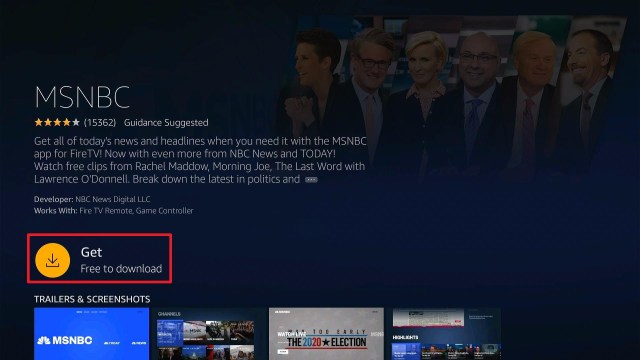
5. Click the Get or Download button

MSNBC 4


6. Wait for the app to be installed

MSNBC 5


7. Launch the app by clicking the Open button

MSNBC 6


YOUR INTERNET ACTIVITY IS BEING WATCHED

ReviewVPN cannot attest to the legality, security and privacy of the applications discussed on this site. It is highly recommended that you use a VPN service while streaming or using Kodi.

Currently, your IP 216.73.216.211 is visible to everyone and your Browser is being tracked by Advertisers & ISP Provider.

Save 65% Now

Limited Time Offer

Here are the main reasons why you must use a VPN:

  • Your activities are hidden from your ISP, the government, and from the apps you are using.
  • You can access additional movies and TV streams.
  • ISP attempts to throttle are thrwarted thus reducing buffering issues.
  • Geographically restricted content like Netflix and Hulu can be unblocked.

A VPN works be replacing your ISP-assigned IP address and creating an encrypted tunnel. We recommend the no log service offered by IPVanish. It works well on a Firestick and offers the fastest possible speeds.

Special Limited Time Offer - Get IPVanish


Legal Disclaimer: ReviewVPN.com does not encourage or endorse any illegal activity involved in the usage of services and applications referenced on this site. We do not verify the licensing agreements of services. The end-user is wholly responsible for ensuring that any media accessed through these services does not violate copyright and/or licensing laws. ReviewVPN does not promote, link to, or receive compensation from any Apps and IPTV services.


Install SurfShark on Firestick

Best SurfShark Deal


MSNBC App Features

  • Supports TV provider linkage of account with other devices
  • Good quality interface
  • Updated content


Interface

  • Divided into four categories: Watch, Shows, Search, and Settings
  • Easy to navigate
  • Search engine available


Watch Section Includes:

  • MSNBC
  • TODAY
  • NBC News


Shows Section Includes:

  • Latest Episodes
  • MSNBC Shows
  • Today Shows
  • NBC News Shows


Settings Section Includes

  • TV Provider
  • Privacy
  • Terms
  • Do Not Sell My Info
  • CA Notice
  • Feedback


Content

  • High definition content
  • Updated shows
  • Clips and videos only


MSNBC Shows

  • Morning Joe
  • The Rachel Maddow Show
  • deadline: White House
  • MTP Daily
  • The Beat
  • All In
  • The Reidout
  • Am Joy
  • The Last Word
  • Am Joy
  • The 11th Hour
  • American Swamp


Today Shows

  • 3rd Hour of Today
  • Today
  • Weekend Today
  • Today with Hoda and Jenna
  • Sunday Today
  • Today Originals


NBC News Shows

  • Nightly News
  • Meet the Press
  • Dateline
  • Today
  • NBC News Now


MSNBC App Pros and Cons

Pros

  • Can use the app without signing in
  • Good quality of videos
  • Updated content


Cons

  • Bad cutting of clips
  • Buffer time during the transitions
  • Some shows are locked when you are not registered


Stream MSNBC Safely with a VPN

Surfshark vpn

When you are streaming, your Internet Service Provider (ISP) is throttling your bandwidth. That is why you are experiencing buffering and logging.

To stop this from happening, you need to have a VPN.

Be careful in choosing a good quality VPN because many free VPNs are harmful to your privacy, data, and devices.

That’s why we recommend our tested and proven VPN. None other than SurfShark.

SurfSharkis the VPN you can ever have on your devices and accounts. It promotes safety and satisfaction while streaming.

Take a look at some of the benefits that you can have when you use SurfShark:

  • Gives you an additional wall of protection especially from your ISP while surfing and streaming.
  • Serves as a bridge that connects you to other servers and destroys geo-blocks that hinder you from accessing different contents.
  • Protects your online identity from hackers, especially when you are using public wi-fi
  • Keeps your data and files from harmful malware
  • Your connections and data will be kept encrypted and anonymous
  • Makes your internet speed faster
  • Gives easy access and downloads from different torrent sites without being caught.
  • Prevents Firestick Buffering and Kodi Buffering


Grab your subscription now!

Click here to get the lowest price on SurfShark through our exclusive limited-time offer.


How to Install Surfshark on Firestick with Screenshots

If your Firestick still has the older interface, read this article to learn how to update it: Update Firestick Interface.

You can download Surfshark directly from the Amazon App store. It will be easy for you to find Surfshark with your Firestick’s Find feature. Refer to our screenshots below.

Follow our screenshots below to install the SurfShark VPN app on your Fire TV stick.

1. Go to the Home screen of your Firestick.

step 1 Install Surfshark VPN on Firestick


2. Navigate towards the Find tab. Press the Search button from the resulting dropdown.

step 2 Install Surfshark VPN on Firestick


3. Type in the keyword of SurfShark and select from the suggestions that will appear.

step 3 Install Surfshark VPN on Firestick


4. Click the official SurfShark icon from your search results.

step 4 Install Surfshark VPN on Firestick


5. Press the Download (You own it) button.

step 5 Install Surfshark VPN on Firestick


6. The SurfShark VPN installer will download on your device.

step 6 Install Surfshark VPN on Firestick


7. SurfShark VPN’s app will automatically install itself on your Fire TV stick.

step 7 Install Surfshark VPN on Firestick


8. Press the Open button after completing SurfShark VPN’s installation process.

step 8 Install Surfshark VPN on Firestick


9. Please wait for the SurfShark VPN to load its user interface.

step 9 Install Surfshark VPN on Firestick


10. You can now log in with your SurfShark VPN account credentials.

step 10 Install Surfshark VPN on Firestick

Learn more about Surfshark and Grab the Best Surfshark Deal Now!


Install Surfshark on Firestick

Best Surfshark Deal

Other VPNs to Consider

NordVPN (Best for Streaming)

Best Features

  • 5000+ Server in 50+ Countries 
  • Military-Grade Encryption
  • Fast Connection Speed
  • Suitable to a lot of devices
  • No-Log Policy

Prices
  • Complete $5.89 per month (64% Discount)
  • Plus $4.59 per month (56% Discount)
  • Standard $3.69 per month (55% Discount)

Best Features

  • 750+ High-speed VPN Servers in 43 Locations
  • Military-Grade Encryption
  • Fastest HD Streaming and Gaming
  • 30-Day Money-Back Guarantee
  • Unlimited Data & Devices
  • No-Log Policy

Prices
  • 3 Years $1.99 per month (82% Discount)
  • 1 Years $3.29 per month (70% Discount)
  • 1 Month $10.99 per month

IPVanish VPN (Most Secure)

Best Features

  • 1200+ Servers in 60+ Countries around the world
  • Unlimited Connections
  • No-Log Policy
  • Top Notch Military-Grade VPN Protocols and Encryptions
  • 100% Safe and Secured
  • Most Trusted VPN
  • Best VPN for Firestick
  • 30-Day Money-Back Guarantee

Prices
  • Yearly $3.99 per month (63% Discount) – 30 days risk free + Ransomware & Malware Protection
  • Quarterly $5.32 per month (51% Discount)
  • Monthly $10.99 per month

For more VPN discounts, go to ReviewVPN Deals and purchase the best VPN for you.


Alternative Applications for MSNBC

MSNBC focuses on News and a few Lifestyle channels for live TV. There are some other apps that you can rely on when it comes to live news and lifestyle

Check out this list of live TV apps that offers news and lifestyle :


Other Live TV Apps with unique content:


For more live tv apps that you can install on your firestick, see these two other articles: Best Free Live  TV Apps for Firestick and Best IPTV Apps for Firestick and Android.


FAQ

History

This app was launched last May 2019


Is this app free?

This app is 100% free for download. You can stream some content for free.


Are there any advertisements?

There are zero to minimal advertisements that are not bothersome


Is this app legal?

This application is 100% legal and available on the Amazon App Store


Is this app available for Android?

This app is available for android. It is also available on the Google Play Store.


Is there an official website for this app?

You can visit www.msnbc.com


Opinion

MSNBC has a very good interface which adds up to the enjoyment while streaming. Not to mention that the content is all up to date.

One thing that bothers us when we review this app is the cutting of the clips. But nonetheless, it is a very good app and is worth checking out.

So if you want to have an on-the-go news app with you, MSNBC is a good option.


Final Thoughts

We hope that this article helped you install MSNBC on your Firestick device


Note: ReviewVPN.com does not own or operate any app nor does it endorse any. The main purpose of this article is strictly for educational purposes only.


See also:

Best Firestick Apps

50 Best Free Movie Streaming Sites

40 Best TV Show Websites

Top Unlinked Codes

Best Adult Apps for Firestick

The Best Live TV Apps for Amazon Fire TV

Best Kissanime.RU Alternatives 

Install Swift Streamz on Firestick

The Best Adult Apps for Android

Install Live Lounge APK for Free Live TV, Sports, Adult Section, and Movies

Best Live TV (IPTV) Apps on Firestick and Android


What Is Your Favorite Streaming App? Cast Your Vote Below.

How to Install Stremium on Firestick – 2023

Stremium Overview

This article will tackle how to install Stremium on firestick devices.


Stremium app, formerly known as Fitzy TV, has the ability to make your Firestick into a live TV and internet TV DVR. You can watch shows from different famous channels with or without a subscription and provider.

On the first time that you launch the app, you will be given a code. You have to register and link this code to the Official Website of the Stremium App. Once you linked your account on the website and the app on your firestick, you will then be given a choice to choose a TV Provider. This app is available outside the USA. You can install it directly from the Amazon App Store. You don’t have to Jailbreak Your Firestick and Install the Downloader App.


ANONYMOUSLY

Install Stremium on Firestick Guide

  1. Go to Search
  2. Search for Stremium
  3. Tap the icon of the application when it appears
  4. Select the Get or Download button
  5. Wait for the app to be installed
  6. Click Open to launch the app


How to Install Stremium on Firestick with Screenshots

1.   Click FIND.

Step 6 jailbreak firestick


2. Click Search.

Step 7 jailbreak firestick


3. Search for the stremium app

Stremium 3


4. Select the icon of Stremium

Stremium 4


5. Click the “Get” or “Download” button

Stremium 5


6. Wait for the app to be installed

Stremium 6


7. Launch the app by clicking the “Open” button

Stremium 7


8. Take note of the code given and go to www.stremium.com/link, WQJFHV is just an example

Stremium 8


9. On your browser, register or login to your stremium account

Stremium 9


10. Type in the code given by the app, WQJFHV is just an example.

Stremium 10


11. Select “Link TV”

Stremium 11


12. Choose your preferred subscription

Stremium 12


YOUR INTERNET ACTIVITY IS BEING WATCHED

ReviewVPN cannot attest to the legality, security and privacy of the applications discussed on this site. It is highly recommended that you use a VPN service while streaming or using Kodi.

Currently, your IP 216.73.216.211 is visible to everyone and your Browser is being tracked by Advertisers & ISP Provider.

Save 65% Now

Limited Time Offer

Here are the main reasons why you must use a VPN:

  • Your activities are hidden from your ISP, the government, and from the apps you are using.
  • You can access additional movies and TV streams.
  • ISP attempts to throttle are thrwarted thus reducing buffering issues.
  • Geographically restricted content like Netflix and Hulu can be unblocked.

A VPN works be replacing your ISP-assigned IP address and creating an encrypted tunnel. We recommend the no log service offered by IPVanish. It works well on a Firestick and offers the fastest possible speeds.

Special Limited Time Offer - Get IPVanish


Legal Disclaimer: ReviewVPN.com does not encourage or endorse any illegal activity involved in the usage of services and applications referenced on this site. We do not verify the licensing agreements of services. The end-user is wholly responsible for ensuring that any media accessed through these services does not violate copyright and/or licensing laws. ReviewVPN does not promote, link to, or receive compensation from any Apps and IPTV services.


Install Surfshark on Firestick

Best Surfshark Deal


Stremium App Features

  • Support channel provider and subscriptions
  • Make your streaming device into a DVR (not for free subscriptions)
  • Offers live TV, series, and schedule recording
  • Has free and premium subscriptions
  • Link account on the website and other devices

Interface

  • Time frame schedule of different channels to choose from
  • Easily navigate from one channel to another
  • Lots of channels even with free subscription and no provider


Content

  • 54 live channels (without subscription and provider)
  • Scheduled shows to stream
  • International channels available


TV Provider Available on Stremium

  • I don’t have a provider
  • Locast.org
  • Philo
  • Spectrum
  • CBS All Access
  • Frndly TV
  • Sling TV
  • Vidgo


Channels Available (Free Subscription and No TV Provider)

  • ABC News Live
  • CBS News
  • Free Speech TV
  • NBC News Now
  • Newsmax TV
  • ET Live
  • Biz TV
  • Bloomberg
  • Cheddar Business
  • Aljazeera
  • France 24
  • British TV
  • Buzzr
  • Charge!
  • CombatGo
  • Comet
  • Court TV
  • Dust
  • Dove Channel
  • Fail Army
  • Game Show Central
  • Pop
  • People TV
  • TBD.
  • The Bob Ross Channel
  • Youtoo America
  • CONtv
  • TasteMade
  • C-SPAN
  • C-SPAN 2
  • PBS Kids
  • Dabl
  • Peacock LX
  • Outside tv
  • AMG tv
  • Doc Urama
  • The Film Detective
  • CMC
  • Folk TV
  • EWTN
  • JLTV
  • POSI tv
  • Catholic TV
  • TBN
  • NASA
  • HSN
  • QVC HD
  • SHOP HQ
  • CBS Sports HQ
  • EDGE
  • Fubo Sports Network
  • Stadium


Plan or Subscriptions Available

  • Free – $0 (Max of 1 provider, No cloud DVR Storage, No favorite Channels, No Custom Channels)
  • Premier 50 Annual – $100/year (Unlimited Provider, Save 20%, 50 hours of cloud DVR, Organised channel for favorites, Custom channels.)
  • Premier 50 Monthly – $10/month (Unlimited Provider, 50 hours of cloud DVR, Organised channel for favorites, Custom channels.)


Pros and Cons of Stremium

Pros

  • Lots of famous channels
  • Shows schedule of shows to tune in
  • Can access even without a subscription and tv provider
  • Zero to minimal ads


Cons

  • Buffering during transitions of shows


Stream Stremium Safely with a VPN

surfshark logo

Streaming videos from different channels using your internet is a red flag to your Internet Service Provider (ISP). With this, they will control your use of internet data which results in buffering.

To stop this, you need to have a VPN. It will protect you from bandwidth throttling and make your internet faster.

Here at reviewvpn.com, we always recommend Surfshark as the best VPN to use. It is 100% safe and working.

Here are some of the many benefits that we can get from subscribing to Surfshark:

  • Gives you an additional wall of protection especially from your ISP while surfing and streaming.
  • Serves as a bridge that connects you to other servers and destroys geo-blocks that hinder you from accessing different contents.
  • Protects your online identity from hackers, especially when you are using public wi-fi
  • Keeps your data and files from harmful malware
  • Your connections and data will be kept encrypted and anonymous
  • Makes your internet speed faster
  • Gives easy access and downloads from different torrent sites without being caught.
  • Prevents Firestick Buffering and Kodi Buffering

Note: For more information about Surfshark, please read our Surfshark Review.


Grab your subscription now!


How to Install Surfshark VPN on Firestick

If your Firestick still has the older interface, read this article to learn how to update it: Update Firestick Interface.

Follow our screenshots below to install the SurfShark VPN app on your Fire TV stick.

1. Go to the Home screen of your Firestick.

step 1 Install Surfshark VPN on Firestick


2. Navigate towards the Find tab. Press the Search button from the resulting dropdown.

step 2 Install Surfshark VPN on Firestick


3. Type in the keyword of SurfShark and select from the suggestions that will appear.

step 3 Install Surfshark VPN on Firestick


4. Click the official SurfShark icon from your search results.

step 4 Install Surfshark VPN on Firestick


5. Press the Download (You own it) button.

step 5 Install Surfshark VPN on Firestick


6. The SurfShark VPN installer will download on your device.

step 6 Install Surfshark VPN on Firestick


7. SurfShark VPN’s app will automatically install itself on your Fire TV stick.

step 7 Install Surfshark VPN on Firestick


8. Press the Open button after completing SurfShark VPN’s installation process.

step 8 Install Surfshark VPN on Firestick


9. Please wait for the SurfShark VPN to load its user interface.

step 9 Install Surfshark VPN on Firestick


10. You can now log in with your SurfShark VPN account credentials.

step 10 Install Surfshark VPN on Firestick

Learn more about Surfshark and Grab the Best Surfshark Deal Now!


Install Surfshark on Firestick

Best Surfshark Deal


Other VPNs to Consider

NordVPN (Best for Streaming)

Best Features

  • 5000+ Server in 50+ Countries 
  • Military-Grade Encryption
  • Fast Connection Speed
  • Suitable to a lot of devices
  • No-Log Policy

Prices
  • Complete $5.89 per month (64% Discount)
  • Plus $4.59 per month (56% Discount)
  • Standard $3.69 per month (55% Discount)

Best Features

  • 750+ High-speed VPN Servers in 43 Locations
  • Military-Grade Encryption
  • Fastest HD Streaming and Gaming
  • 30-Day Money-Back Guarantee
  • Unlimited Data & Devices
  • No-Log Policy

Prices
  • 3 Years $1.99 per month (82% Discount)
  • 1 Years $3.29 per month (70% Discount)
  • 1 Month $10.99 per month

IPVanish VPN (Most Secure)

Best Features

  • 1200+ Servers in 60+ Countries around the world
  • Unlimited Connections
  • No-Log Policy
  • Top Notch Military-Grade VPN Protocols and Encryptions
  • 100% Safe and Secured
  • Most Trusted VPN
  • Best VPN for Firestick
  • 30-Day Money-Back Guarantee

Prices
  • Yearly $3.99 per month (63% Discount) – 30 days risk free + Ransomware & Malware Protection
  • Quarterly $5.32 per month (51% Discount)
  • Monthly $10.99 per month


For more VPN discounts, go to ReviewVPN Deals and purchase the best VPN for you.


Alternative Applications for Stremium

Stremium offers great live tv from many different channels. Aside from this app, there are also other apps that offer good quality live TV for your firestick.

Check out this list of best free live tv apps that you can install on your firestick device:

For more live tv apps that you can install on your firestick, see these two other articles: Best Free Live  TV Apps for Firestick and Best IPTV Apps for Firestick and Android.


FAQ

History

Stremium was formerly known as Fitzy TV. It was then launched as Stremium last February 2020.


Is this app free?

This app is 100% free for download. You can subscribe to a free or premium version.


Are there any advertisements?

There are zero to minimal advertisements that are not bothersome


Is this app legal?

This application is 100% legal and available on the Amazon App Store


Is this app available for Android?

This app is available for android. It is also available on the Google Play Store.


Is there an official website for this app?

You can visit www.stremium.com


Opinion

We very much appreciate stremium for its features and famous channels to stream. Although it is much better to subscribe to a premium subscription, you can still enjoy the use of the free one.

Not all the time do the videos on this app are in high definition but we not saying that they are of bad quality.

You can even stream Sports from famous Sports channels, and the scheduling of shows is well shown on this app.

We can say that it is worth the try to check out this app.

We hope that this article helped you install Stremium on your Firestick device


Note: ReviewVPN.com does not own or operate any app nor does it endorse any. The main purpose of this article is strictly for educational purposes only.


See also:

Best Firestick Apps

50 Best Free Movie Streaming Sites

40 Best TV Show Websites

Top Filelinked Codes

Best Adult Apps for Firestick

The Best Live TV Apps for Amazon Fire TV

Best Kissanime.RU Alternatives 

Install Swift Streamz on Firestick

The Best Adult Apps for Android

Install Live Lounge APK for Free Live TV, Sports, Adult Section, and Movies

Best Live TV (IPTV) Apps on Firestick and Android


What Is Your Favorite Streaming App? Cast Your Vote Below.

How to Install Task Killer on Firestick and Android – 2023

Task Killer Overview

This article will help you install Task Killer on your firestick and android devices.


If you are experiencing some memory full problems on your devices and find it hard to easily clean cache and data for each app or to quickly force stop them, then you might want to consider Task Killer.

Task Killer is one of the best app killers that you can use on your firestick. This app can easily close and stop unwanted apps to save some RAM memory on your devices.

The best part is, it works so fast and stops your unwanted apps in just a snap. You just have to choose from the list of running apps provided by the app itself.

You cannot install Task Kill directly on your firestick device. It has to be sideloaded using the Downloader App.

First, you need to Jailbreak your Firestick and then Install Downloader App.


ANONYMOUSLY

Is Task Killer Safe and Virus-free?

We tested this app using VirusTotal and found no threats or any malicious files and malware.

Despite having good results, we still need to be vigilant in protecting our privacy while streaming.

A Virtual Private Network or VPN will definitely help us maintain our security and anonymity while using Task Killer.

Here’s how you can Install The Best VPN For Firestick and All Devices.


Task Killer APK Download for Android Devices


Task Killer


Note: ReviewVPN.com does not host this APK file. It is hosted by Archive.org


Install Task Killer on Firestick Guide

  1. Go to Settings
  2. Choose Device or My Fire TV
  3. Hover to Developers Options
  4. Turn on the ADB debugging and the Apps from Unknown Sources
  5. Go back to Home
  6. Navigate to Search
  7. Type in Downloader
  8. Click the suggestion word
  9. Select the Downloader icon
  10. Click the Get or Download button
  11. The app is installing
  12. Tap the Open button
  13. Choose Allow
  14. Click Ok
  15. Type https://reviewvpn.com/kill on the search engine
  16. Click on Go
  17. APK is downloading
  18. Click Install
  19. The app is currently installing
  20. Select Done
  21. Click on Delete for 2 times
  22. Go to your Home screen and launch the Task Kill app


If your Firestick still has the older interface, read this article to learn how to update it: Update Firestick Interface.

How to Install Task Killer on Firestick with Screenshots

1. Install the Downloader app and jailbreak your firestick by enabling unknown sources. To learn more about the procedure, you may read How to Install the Downloader App and Enable Unknown Sources.


2. Open Downloader. Type https://reviwvpn.com/kill and click Go.

task kill 1


3. Let the apk be downloaded

task kill 3


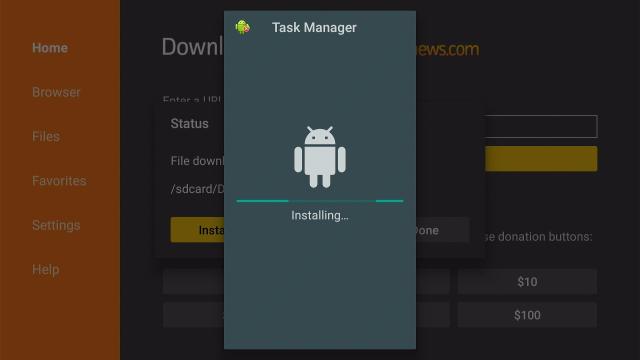
4. Choose Install

task kill 4


5. Wait for the app to be installed

task kill 5


6. Click on Done

task kill 6


7. Select Delete to clear some  memory space

task kill 8


8. Then select Delete one more time

task kill 9


9. Go to Home and launch the app

task kill 7


YOUR INTERNET ACTIVITY IS BEING WATCHED

ReviewVPN cannot attest to the legality, security and privacy of the applications discussed on this site. It is highly recommended that you use a VPN service while streaming or using Kodi.

Currently, your IP 216.73.216.211 is visible to everyone and your Browser is being tracked by Advertisers & ISP Provider.

Save 65% Now

Limited Time Offer

Here are the main reasons why you must use a VPN:

  • Your activities are hidden from your ISP, the government, and from the apps you are using.
  • You can access additional movies and TV streams.
  • ISP attempts to throttle are thrwarted thus reducing buffering issues.
  • Geographically restricted content like Netflix and Hulu can be unblocked.

A VPN works be replacing your ISP-assigned IP address and creating an encrypted tunnel. We recommend the no log service offered by IPVanish. It works well on a Firestick and offers the fastest possible speeds.

Special Limited Time Offer - Get IPVanish


Legal Disclaimer: ReviewVPN.com does not encourage or endorse any illegal activity involved in the usage of services and applications referenced on this site. We do not verify the licensing agreements of services. The end-user is wholly responsible for ensuring that any media accessed through these services does not violate copyright and/or licensing laws. ReviewVPN does not promote, link to, or receive compensation from any Apps and IPTV services.


Install Surfshark on Firestick

Best Surfshark Deal


Task Killer App Features

  • Simple easy to use interface
  • Tells the available memory on your device
  • Advertisements are present at the bottom portion of the app
  • Provides a list of running app
  • An easy click to stop any applications
  • Support the use of firestick remote
  • No need to use Mouse Toggle to navigate and select


Pros and Cons

Pros

  • 100% free
  • Tested useful and applicable on firestick devices
  • Easy to use
  • Fast working


Cons

  • Not available on Amazon App Store, need to sideload
  • Ads present but not bothersome


Should I Use a VPN for Task Killer App?

surfshark logo

Buffering is sometimes caused by too many apps running on the background of your device. Sometimes it is due to the bandwidth throttling done by your Internet Service Provider or ISP.

To stop your ISP, you need to have a VPN. VPN is one of the best solutions to stop buffering on your firestick.

It is important to choose the right VPN for you. There are a lot of free VPNs but not completely safe. Most of the free VPNs contain malware that may harm your devices.

Here at reviewvpn.com, we assure you that Surfshark is the best and safest VPN to use.

Not only does it stop buffering experiences on your firestick but also provides the following benefits:

  • Gives you an additional wall of protection especially from your ISP while surfing and streaming.
  • Serves as a bridge that connects you to other servers and destroys geo-blocks that hinder you from accessing different contents.
  • Protects your online identity from hackers, especially when you are using public wi-fi
  • Keeps your data and files from harmful malware
  • Your connections and data will be kept encrypted and anonymous
  • Makes your internet speed faster
  • Gives easy access and downloads from different torrent sites without being caught.
  • Prevents Firestick Buffering and Kodi Buffering

Note: For more information about Surfshark, please read our Surfshark Review.


Grab your subscription now!

Click here to get the lowest price on Surfshark through our exclusive limited-time offer.


How to Install Surfshark VPN on Firestick

If your Firestick still has the older interface, read this article to learn how to update it: Update Firestick Interface.

Follow our screenshots below to install the SurfShark VPN app on your Fire TV stick.

1. Go to the Home screen of your Firestick.

step 1 Install Surfshark VPN on Firestick


2. Navigate towards the Find tab. Press the Search button from the resulting dropdown.

step 2 Install Surfshark VPN on Firestick


3. Type in the keyword of SurfShark and select from the suggestions that will appear.

step 3 Install Surfshark VPN on Firestick


4. Click the official SurfShark icon from your search results.

step 4 Install Surfshark VPN on Firestick


5. Press the Download (You own it) button.

step 5 Install Surfshark VPN on Firestick


6. The SurfShark VPN installer will download on your device.

step 6 Install Surfshark VPN on Firestick


7. SurfShark VPN’s app will automatically install itself on your Fire TV stick.

step 7 Install Surfshark VPN on Firestick


8. Press the Open button after completing SurfShark VPN’s installation process.

step 8 Install Surfshark VPN on Firestick


9. Please wait for the SurfShark VPN to load its user interface.

step 9 Install Surfshark VPN on Firestick


10. You can now log in with your SurfShark VPN account credentials.

step 10 Install Surfshark VPN on Firestick

Learn more about Surfshark and Grab the Best Surfshark Deal Now!


Install Surfshark on Firestick

Best Surfshark Deal


Other VPNs to Consider

NordVPN (Best for Streaming)

Best Features

  • 5000+ Server in 50+ Countries 
  • Military-Grade Encryption
  • Fast Connection Speed
  • Suitable to a lot of devices
  • No-Log Policy

Prices
  • Complete $5.89 per month (64% Discount)
  • Plus $4.59 per month (56% Discount)
  • Standard $3.69 per month (55% Discount)

Best Features

  • 750+ High-speed VPN Servers in 43 Locations
  • Military-Grade Encryption
  • Fastest HD Streaming and Gaming
  • 30-Day Money-Back Guarantee
  • Unlimited Data & Devices
  • No-Log Policy

Prices
  • 3 Years $1.99 per month (82% Discount)
  • 1 Years $3.29 per month (70% Discount)
  • 1 Month $10.99 per month

IPVanish VPN (Most Secure)

Best Features

  • 1200+ Servers in 60+ Countries around the world
  • Unlimited Connections
  • No-Log Policy
  • Top Notch Military-Grade VPN Protocols and Encryptions
  • 100% Safe and Secured
  • Most Trusted VPN
  • Best VPN for Firestick
  • 30-Day Money-Back Guarantee

Prices
  • Yearly $3.99 per month (63% Discount) – 30 days risk free + Ransomware & Malware Protection
  • Quarterly $5.32 per month (51% Discount)
  • Monthly $10.99 per month


For more VPN discounts, go to ReviewVPN Deals and purchase the best VPN for you.


Alternatives for Task Killer App

There are some other apps or processes that can kill the running apps on your firestick. Most of them take a long time and some are as fast as the Task Killer App.

Take a look at these possible alternatives to stop application running on the background of your device:

 Normal Process on your Firestick:

1. Go to Settings

task killer


2. Click Applications


3. Select Manage Installed Applications

kill 3


4. Choose the specific application that you want to kill

kill 4


5. You can choose Force stop, Clear data, or Clear cache to kill the running application

kill 5


Background App and Process List on Firestick

This is a utility app that can easily access the setting function of any applications installed on your device. Through this, you can also force close, uninstall, clear the data and cache of any running apps on your firestick.

It comes in handy because with the help of this app you don’t need to open close any apps or do the normal long process.

To know more about this app, go to Background App and Process List on Firestick.


FAQ

History

This app was introduced last March 2014.


Is this app free?

This app is 100% free


Are there any advertisements?

There are advertisements located at the bottom of the app


Is this app safe?

Yes. This app is 100% safe


Is this app available for Android?

This app is available for android. It is also available on the Google Play Store.


Opinion

Task Killer is a fast way to kill any running applications. Actually, you can do these activities on your own using the normal way. But Task Killer will save you a lot of time.

There might be advertisements present but those are not bothersome. The only problem is you need to sideload it on your firestick using the Task Killer APK provided above.

The bottom line is this application is 100% fast and effective and a definite must-have.


Final Thoughts

We hope that this article helped you install the Task Killer App on your Firestick and android devices.


Note: ReviewVPN.com does not own or operate any app nor does it endorse any. The main purpose of this article is strictly for educational purposes only.


Must Read:

Best Firestick Apps

50 Best Free Movie Streaming Sites

40 Best TV Show Websites

Top Unlinked Codes

Best Adult Apps for Firestick

The Best Live TV Apps for Amazon Fire TV

Best Kissanime.RU Alternatives 

Install Swift Streamz on Firestick

The Best Adult Apps for Android

Install Live Lounge APK for Free Live TV, Sports, Adult Section, and Movies

Best Live TV (IPTV) Apps on Firestick and Android

Install Red Bull TV on Firestick

Red Bull TV Overview

This article will help you install the Red Bull TV on Amazon firestick.


Red Bull TV is an amazon firestick app that features above ordinary content. It has live TV, music, shows about extreme sports, and adventures around the world.

It has an easy-to-use interface where you can easily choose and browse films, clips, shows, and events about traveling, biking, motorsports, skateboarding, gaming, and music.

You can sign in to your very own Red Bull TV account by registering to the official Red Bull TV website by entering the code given by the app. With this, you will have access to other features like save videos to your favorites and watch them later.

The best part is you can have Red Bull TV for free, with super minimal advertisements.

You can easily download the Red Bull TV App on your firestick device, there is no need to Jailbreak your Firestick and Install the Downloader App.


Install Red Bull TV on Firestick Guide

  1. Go to Search
  2. Search for Redbull TV
  3. Tap the icon of the application when it appears
  4. Select the Get or Download button
  5. Wait for the app to be installed
  6. Click Open to launch the app


ANONYMOUSLY


How to Install Red Bull TV on Firestick with Screenshots

1.   Click FIND.

Step 6 jailbreak firestick

2. Click Search.

Step 7 jailbreak firestick


3. Type Redbull TV and click on the suggestion

Red Bull TV


4. Tap the icon of the Red Bull TV app when it appears

Red Bull TV


5. Click the Get or Download button to install the app

Red Bull TV


6. Wait for the app to be installed

Red Bull TV


7. Select Open to launch the app

Red Bull TV


YOUR INTERNET ACTIVITY IS BEING WATCHED

ReviewVPN cannot attest to the legality, security and privacy of the applications discussed on this site. It is highly recommended that you use a VPN service while streaming or using Kodi.

Currently, your IP 216.73.216.211 is visible to everyone and your Browser is being tracked by Advertisers & ISP Provider.

Save 65% Now

Limited Time Offer

Here are the main reasons why you must use a VPN:

  • Your activities are hidden from your ISP, the government, and from the apps you are using.
  • You can access additional movies and TV streams.
  • ISP attempts to throttle are thrwarted thus reducing buffering issues.
  • Geographically restricted content like Netflix and Hulu can be unblocked.

A VPN works be replacing your ISP-assigned IP address and creating an encrypted tunnel. We recommend the no log service offered by IPVanish. It works well on a Firestick and offers the fastest possible speeds.

Special Limited Time Offer - Get IPVanish


Legal Disclaimer: ReviewVPN.com does not encourage or endorse any illegal activity involved in the usage of services and applications referenced on this site. We do not verify the licensing agreements of services. The end-user is wholly responsible for ensuring that any media accessed through these services does not violate copyright and/or licensing laws. ReviewVPN does not promote, link to, or receive compensation from any Apps and IPTV services.


Install Surfshark on Firestick

Best Surfshark Deal


Red Bull TV App Features

Interface

  • Categorization of content available
  • Easy to navigate and choose a certain show
  • Auto-play of featured/live show
  • Tabs for Home, Browse, Events, Account, and Search
  • Customization available using App Settings


Red Bull TV Home Page Interface Includes:

  • Red Bull Live TV Channels
  • Featured
  • Recommended
  • Adventures – Love the Mountains
  • Skate – Off the rails
  • Music – Watch them work
  • Surf – Dive in deep
  • Bike – Best Mountain Bike Movies
  • Get Excites – Events we can’t wait for
  • Natural Selection – Get ready
  • Revved up: rewatch your favorite motorsports
  • Red Bull TV Shows
  • Films and Documentaries
  • Clips
  • Upcoming Live Events
  • Replays


Red Bull TV Browse Page Interface Includes:

  • Formats: Events, Shows, Films, Clips
  • All Channels: Bike, Adventure, Motor, Surfing, Skateboarding, Winter, Dance, Gaming, Music


Red Bull TV Events Page Interface Includes:

  • Featured Events
  • Upcoming Live Events
  • Past Live Events
  • Canceled Live Events


Red Bull TV Account Page Interface Includes:

  • Sign in
  • App Settings


Content

  • High definition videos
  • Extreme sports context
  • Music topic available
  • Live events and channels like Red Bull TV Dakar 2021 and Telenet
  • Movies and clips about adventures of real people around the world
  • Red Bull Sports Channel about surfing, biking, skateboarding, and motorsports


Pros and Cons for Red Bull TV

Pros

  • Enjoy the app for free
  • Best applications for extreme sports enthusiast
  • Zero to minimal advertisements
  • Video and audio quality is great


Cons

  • Tabs and Videos take some time to load


Stream Red Bull TV Safely with a VPN

surfshark logo

When you are streaming content on the internet or even on your firestick, you may experience buffering. It’s as if the Red Bull TV App is not working, but the truth is your Internet Service Provider or ISP is throttling your bandwidth.

To stop this from happening, you need to have a VPN.

You have to be careful in choosing a VPN. Other VPNs are free but they are not safe. Some contain malware that harms your devices and contaminates your files and data.

It is still best to have Surfshark as your VPN provider. Surfshark is the top VPB to give you safety and protection while streaming:

Here are some of the best benefits given by Surfshark:

  • Gives you an additional wall of protection especially from your ISP while surfing and streaming.
  • Serves as a bridge that connects you to other servers and destroys geo-blocks that hinder you from accessing different contents.
  • Protects your online identity from hackers, especially when you are using public wi-fi
  • Keeps your data and files from harmful malware
  • Your connections and data will be kept encrypted and anonymous
  • Makes your internet speed faster
  • Gives easy access and downloads from different torrent sites without being caught.
  • Prevents Firestick Buffering and Kodi Buffering


Grab your subscription now!

Click here to get the lowest price on Surfshark through our exclusive limited-time offer.


How to Install Surfshark VPN on Firestick

If your Firestick still has the older interface, read this article to learn how to update it: Update Firestick Interface.

Follow our screenshots below to install the SurfShark VPN app on your Fire TV stick.

1. Go to the Home screen of your Firestick.

step 1 Install Surfshark VPN on Firestick


2. Navigate towards the Find tab. Press the Search button from the resulting dropdown.

step 2 Install Surfshark VPN on Firestick


3. Type in the keyword of SurfShark and select from the suggestions that will appear.

step 3 Install Surfshark VPN on Firestick


4. Click the official SurfShark icon from your search results.

step 4 Install Surfshark VPN on Firestick


5. Press the Download (You own it) button.

step 5 Install Surfshark VPN on Firestick


6. The SurfShark VPN installer will download on your device.

step 6 Install Surfshark VPN on Firestick


7. SurfShark VPN’s app will automatically install itself on your Fire TV stick.

step 7 Install Surfshark VPN on Firestick


8. Press the Open button after completing SurfShark VPN’s installation process.

step 8 Install Surfshark VPN on Firestick


9. Please wait for the SurfShark VPN to load its user interface.

step 9 Install Surfshark VPN on Firestick


10. You can now log in with your SurfShark VPN account credentials.

step 10 Install Surfshark VPN on Firestick

Learn more about Surfshark and Grab the Best Surfshark Deal Now!


Install Surfshark on Firestick

Best Surfshark Deal


Other VPNs to Consider

NordVPN (Best for Streaming)

Best Features

  • 5000+ Server in 50+ Countries 
  • Military-Grade Encryption
  • Fast Connection Speed
  • Suitable to a lot of devices
  • No-Log Policy

Prices
  • Complete $5.89 per month (64% Discount)
  • Plus $4.59 per month (56% Discount)
  • Standard $3.69 per month (55% Discount)

Best Features

  • 750+ High-speed VPN Servers in 43 Locations
  • Military-Grade Encryption
  • Fastest HD Streaming and Gaming
  • 30-Day Money-Back Guarantee
  • Unlimited Data & Devices
  • No-Log Policy

Prices
  • 3 Years $1.99 per month (82% Discount)
  • 1 Years $3.29 per month (70% Discount)
  • 1 Month $10.99 per month

IPVanish VPN (Most Secure)

Best Features

  • 1200+ Servers in 60+ Countries around the world
  • Unlimited Connections
  • No-Log Policy
  • Top Notch Military-Grade VPN Protocols and Encryptions
  • 100% Safe and Secured
  • Most Trusted VPN
  • Best VPN for Firestick
  • 30-Day Money-Back Guarantee

Prices
  • Yearly $3.99 per month (63% Discount) – 30 days risk free + Ransomware & Malware Protection
  • Quarterly $5.32 per month (51% Discount)
  • Monthly $10.99 per month


For more VPN discounts, go to ReviewVPN Deals and purchase the best VPN for you.

Click here to get the lowest price on Surfshark through our exclusive limited-time offer.


Alternative Applications for Red Bull TV

Red Bull TV offers live tv and original extreme content. Although the context of the app is somehow unique, like there are no many apps that feature extreme live events the way red bull tv does, there are other apps that offer live tv as well.

Check out this list of best free live tv apps that you can install on your firestick device:

For more live tv apps that you can install on your firestick, see these two other articles: Best Free Live  TV Apps for Firestick and Best IPTV Apps for Firestick and Android.


FAQ

History

This app was introduced last March 2014.


Is Red Bull TV free?

This app is 100% free


Are there any advertisements?

There are zero to minimal advertisements that are not bothersome


Is this app legal?

This application is 100% legal and available on the Amazon App Store


Is this app available for Android?

This app is available for android. It is also available on the Google Play Store.


Is there an official website for this app?

You can visit www.redbull.com


Is Red Bull TV available for PC?

Red Bull TV is now available on Microsoft Store for Windows 10.


Opinion

The Red Bull TV app is the best app for the big boys. You won’t find any dull content on this app. All shows are so extreme and wonderful for extreme sports enthusiasts.

The bass part only is the buffer time that happens while streaming. A VPN would really help but overall this app is great. Plus the fact that there are zero to minimal advertisements that are not bothersome is a major turn on.

The videos and audio quality is great even for extreme sports.

This app is really worth the try.

We hope that this article helped you install the Red Bull TV App on Firestick


Note: ReviewVPN.com does not own or operate any app nor does it endorse any. The main purpose of this article is strictly for educational purposes only.


Must Read:

Best Firestick Apps

50 Best Free Movie Streaming Sites

40 Best TV Show Websites

Top Filelinked Codes

Best Adult Apps for Firestick

The Best Live TV Apps for Amazon Fire TV

Best Kissanime.RU Alternatives 

Install Swift Streamz on Firestick

The Best Adult Apps for Android

Install Live Lounge APK for Free Live TV, Sports, Adult Section, and Movies

Best Live TV (IPTV) Apps on Firestick and Android


What Is Your Favorite Streaming App? Cast Your Vote Below.

How to Install Gaia on Firestick

Gaia Overview

In this article, we will show you how to install Gaia on Firestick.


Gaia app’s main goal is to provide videos for consciousness-expanding. They have over 8000 content for Yoga, Meditation, Personal Transformation, Alternative healing, Ancient history, civilizations, and aliens.

All of the shows are ad-free, original content since it is a member-supported app. And the goal is to develop calmness in one’s mind, truth, and enlightenment.

This app is your best companion on the path toward your mind and body’s well-being, idea openness, and learning about how things are and how they were.

It is an official Amazon application, and you can install it for free but there are paid subscriptions depending on your plan of choice.

In order to install this app, you will be doing the direct process. There is no need for you to Jailbreak your Firestick and Install the Downloader App.


Install Gaia on Firestick Guide

  1. Go to Search
  2. Search for Gaia
  3. Tap the icon of the application when it appears
  4. Select the Get or Download button
  5. Wait for the app to be installed
  6. Click Open to launch the app


ANONYMOUSLY

If your Firestick still has the older interface, read this article to learn how to update it: Update Firestick Interface.


How to Install Gaia on Firestick with Screenshots

1.   Click FIND.

Step 6 jailbreak firestick


2. Click Search.

Step 7 jailbreak firestick


3. Type Gaia and click on the suggestion

Gaia 2


4. Tap the icon of the Gaia app when it appears

Gaia 3


5. Click the Get or Download button to install the app

Gaia 4


6. Wait for the app to be installed

Gaia 5


7. Select Open to launch the app

Gaia 6


YOUR INTERNET ACTIVITY IS BEING WATCHED

ReviewVPN cannot attest to the legality, security and privacy of the applications discussed on this site. It is highly recommended that you use a VPN service while streaming or using Kodi.

Currently, your IP 216.73.216.211 is visible to everyone and your Browser is being tracked by Advertisers & ISP Provider.

Save 65% Now

Limited Time Offer

Here are the main reasons why you must use a VPN:

  • Your activities are hidden from your ISP, the government, and from the apps you are using.
  • You can access additional movies and TV streams.
  • ISP attempts to throttle are thrwarted thus reducing buffering issues.
  • Geographically restricted content like Netflix and Hulu can be unblocked.

A VPN works be replacing your ISP-assigned IP address and creating an encrypted tunnel. We recommend the no log service offered by IPVanish. It works well on a Firestick and offers the fastest possible speeds.

Special Limited Time Offer - Get IPVanish


Legal Disclaimer: ReviewVPN.com does not encourage or endorse any illegal activity involved in the usage of services and applications referenced on this site. We do not verify the licensing agreements of services. The end-user is wholly responsible for ensuring that any media accessed through these services does not violate copyright and/or licensing laws. ReviewVPN does not promote, link to, or receive compensation from any Apps and IPTV services.


Install Surfshark on Firestick

Best Surfshark Deal


App Features

Interface

  • Launching the app will let you sign up for a membership account
  • You can also log in if you already have an account
  • Available explore button to test first the content of the app before signing in
  • Describes the purpose of the app when you click the About button
  • Allow users to customize the app’s appearance from dark mode to the light mode
  • Lets you choose topics that you are most interested in, the videos featured on your home screen depends on the topics that you chose.
  • Available tabs for Home, Playlist, Browse, Search, and Account.
  • Can customize your own playlist under My Playlist
  • Determines the History of shows watched


Playlist Tab Interface Includes:

  • Watch History
  • My Playlist


Browse Tab Interface Includes:

  • Topics
  • Series  (Gaia Originals & All Other Series)
  • New Videos
  • Docs & Films – Documentaries, Films, and Shorts
  • Meditation 
  • Yoga – Yoga Practices, Yoga Teachers, Yoga Lifestyle, Yoga Series, Fitness & Pilates
  • Alternative Healing – Energy Healing, Food & Nutrition, Longevity & Wellness
  • Recipes
  • Transformation – Spiritual Growth, Personal Development, Expanded Consciousness
  • Seeking Truth – Metaphysics, Ancient Origins, Secrets & Coverups, Paranormal & Unexplained


Account Tab Interface Includes:

  • Add Profile
  • Subscribe
  • About
  • Terms of use and privacy
  • Settings
  • Log out

Content

  • High definition content
  • Trailers are available
  • Original Shows and Documentaries available
  • Lots of topics about mindfulness


Topics Available in Gaia App:

  • Afterlife
  • Aging/Longevity
  • Alternative Realities
  • Ancient Civilizations Decoded
  • Aliens
  • Ancient Egypt
  • Angels
  • Ancient Lost Technology
  • Astral Projection
  • Ancient Symbols
  • Ayurveda
  • Be The Change
  • Big Pharma
  • Boosting Spiritual Resources
  • Breathing
  • Cabal
  • Cancer
  • Chakras
  • Channeling
  • Chemtrails
  • Conscious Parenting
  • Contact Experiences
  • Crop Circles
  • Disclosure
  • Divination
  • Divine Feminine
  • Dream World
  • Eastern Spirituality
  • Emotional Healing
  • Energy Healing
  • Esoterics
  • Financial System
  • Finding Happiness
  • Forbidden Science
  • Free Energy
  • George Noory’s Holiday Collection
  • Gratitude & Abundance
  • Gregg Braden’s Holiday Collection
  • Health
  • Heart-Centered Living
  • Hidden History
  • Immunity Support
  • Indigenous Cultures
  • Inspirational People
  • Inspiring Documentaries
  • Intention & Co-creation
  • Magic & Mysteries
  • Manifesting Abundance
  • Meditation
  • Megaliths & Sacred Sites
  • Mind Potential
  • Mindfulness
  • Nature & Animals
  • Nutrition
  • Our Origins
  • Pain Management
  • Pineal Gland
  • Plant Medicine
  • Psychedelics
  • Psychic Abilities
  • Regina Meredith’s Holiday Collection
  • Sacred Geometry
  • Science & Technology
  • Sacred Relationships
  • Secret Space Program
  • Shamans
  • Sound Healing
  • Spiritual Alchemy
  • Stress Relief
  • Spiritual Teachers
  • Sustainability
  • Universal Consciousness
  • Universe as a Hologram
  • World Religions
  • Yoga Off the Mat


Gaia App Subscription Prices

  • Monthly = $11.99 per month – free trial for 1 week, watch anywhere on any device
  • Annual = $8.25 per month (31% off; $99 billed annually) – 1-week free trial, watch anywhere on any device, 12 months for the price of 9, FMTV’s Healthy Habits Guide, Exclusive Alternative Health Magazine
  • Live Access = $24.92 per month ($299 billed annually) – Online immersive workshops with today’s top experts and teachers, live chat participation with actual Q&A, Replays archive events to enjoy at your convenience, Simultaneous Spanish Translation, All benefits of Annual Subscription.


How to Sign Up for Gaia:

1. If you’re a first time user of Gaia, just follow the guide below:

2. Click on Sign Up

3. Fill in the needed account information like Email, Username, and Password

4. Then click on Create Account

5.Choose your preferred plan. There in annual, monthly, and live access options.

6. Then confirm your purchase by entering your Amazon Password.

7. Choose three topics listed below in order of interest then click Done.

  • Spiritual Growth
  • Ancient Origins
  • Yoga
  • Inspiring FIlms & Docs
  • Metaphysics
  • Meditation
  • Paranormal & Unexplained
  • Fitness
  • Alternative Healing
  • Secrets & Coverups

8. You have the option to “Play” or “Skip” their 45-second hello message.


How to Change Background Appearance on Gaia

  1. Go to Account
  2. Select Appearance
  3. Change Selection to “Light Mode”


Pros and Cons

Pros

  • They have a 1-week free trial
  • They have annual, monthly, and live access options for the plan
  • Stream multiple profiles at once
  • Download videos to watch later
  • Series trailers are available
  • Has the option for night mode or light mode depending on your preference
  • There’s a search bar
  • There are two available languages, English & Spanish
  • It is ad-free


Cons

  • Tabs and Videos take some time to load
  • Paid Subscriptions


Stream Safely with a VPN

surfshark logo

Streaming online can be stressful when you experience a lot of buffering. This is mainly because your Internet Service Provider is monitoring your activities and throttling your bandwidth.

To stop this from happening, you need to have a VPN.

A VPN is an advanced technology that can improve your streaming experiences.

You need to be careful when choosing the best VPN for you. Others may be free but they are not safe. Unsafe VPNs contain malware that may harm your devices and files, some sell your data to different advertisers. But with Surfshark you are hundred percent safe. 

Surfshark is the best VPN for all of your devices. Look at these some of the many benefits that Surfshark provides to its clients:

  • Gives you an additional wall of protection especially from your ISP while surfing and streaming.
  • Serves as a bridge that connects you to other servers and destroys geo-blocks that hinder you from accessing different contents.
  • Protects your online identity from hackers, especially when you are using public wi-fi
  • Keeps your data and files from harmful malware
  • Your connections and data will be kept encrypted and anonymous
  • Makes your internet speed faster
  • Gives easy access and downloads from different torrent sites without being caught.
  • Prevents Firestick Buffering and Kodi Buffering

Note: For more information about Surfshark, please read our Surfshark Review.


Grab your subscription now!


How to Install Surfshark VPN on Firestick

If your Firestick still has the older interface, read this article to learn how to update it: Update Firestick Interface.

Follow our screenshots below to install the SurfShark VPN app on your Fire TV stick.

1. Go to the Home screen of your Firestick.

step 1 Install Surfshark VPN on Firestick


2. Navigate towards the Find tab. Press the Search button from the resulting dropdown.

step 2 Install Surfshark VPN on Firestick


3. Type in the keyword of SurfShark and select from the suggestions that will appear.

step 3 Install Surfshark VPN on Firestick


4. Click the official SurfShark icon from your search results.

step 4 Install Surfshark VPN on Firestick


5. Press the Download (You own it) button.

step 5 Install Surfshark VPN on Firestick


6. The SurfShark VPN installer will download on your device.

step 6 Install Surfshark VPN on Firestick


7. SurfShark VPN’s app will automatically install itself on your Fire TV stick.

step 7 Install Surfshark VPN on Firestick


8. Press the Open button after completing SurfShark VPN’s installation process.

step 8 Install Surfshark VPN on Firestick


9. Please wait for the SurfShark VPN to load its user interface.

step 9 Install Surfshark VPN on Firestick


10. You can now log in with your SurfShark VPN account credentials.

step 10 Install Surfshark VPN on Firestick

Learn more about Surfshark and Grab the Best Surfshark Deal Now!


Install Surfshark on Firestick

Best Surfshark Deal


Other VPNs to Consider

NordVPN (Best for Streaming)

Best Features

  • 5000+ Server in 50+ Countries 
  • Military-Grade Encryption
  • Fast Connection Speed
  • Suitable to a lot of devices
  • No-Log Policy

Prices
  • Complete $5.89 per month (64% Discount)
  • Plus $4.59 per month (56% Discount)
  • Standard $3.69 per month (55% Discount)

Best Features

  • 750+ High-speed VPN Servers in 43 Locations
  • Military-Grade Encryption
  • Fastest HD Streaming and Gaming
  • 30-Day Money-Back Guarantee
  • Unlimited Data & Devices
  • No-Log Policy

Prices
  • 3 Years $1.99 per month (82% Discount)
  • 1 Years $3.29 per month (70% Discount)
  • 1 Month $10.99 per month

IPVanish VPN (Most Secure)

Best Features

  • 1200+ Servers in 60+ Countries around the world
  • Unlimited Connections
  • No-Log Policy
  • Top Notch Military-Grade VPN Protocols and Encryptions
  • 100% Safe and Secured
  • Most Trusted VPN
  • Best VPN for Firestick
  • 30-Day Money-Back Guarantee

Prices
  • Yearly $3.99 per month (63% Discount) – 30 days risk free + Ransomware & Malware Protection
  • Quarterly $5.32 per month (51% Discount)
  • Monthly $10.99 per month


For more VPN discounts, go to ReviewVPN Deals and purchase the best VPN for you.

Click here to get the lowest price on Surfshark through our exclusive limited-time offer.


Alternative Applications for Gaia

Gaia app is one of those applications that serve unique content for the viewers. Only a few apps offer mindful videos about ancient histories, meditations, aliens, and yoga. Most apps have their own type of genre for the content that they offer. Refer to this list for the apps that you might like to check out:

Youtube

It is the best app as an alternative for Gaia. As you see, the context and content of Youtube are very wide and massive. You can search almost every topic on this app. So if Gaia is not enough for you, you can rely on Youtube.

Stream massive content on your Firestick using the Youtube app.


Glewed TV

Glewed TV has a lot of content to offer as well. You can stream live tv, movies of different genres, and lifestyle shows. There are also some exercise and motivational topics that you can watch for free. This is the reason why it is somehow like the Gaia app. But when it comes to yoga and calmness, this app is far from being like Gaia.

Watch live tv and movies on your firestick using Glewed TV.


BYUtv Kindle

BYUtv offers enlightenment topics about God, religion, outdoor survival, and original sports program. This app, like Gaia, provides original content about survival outdoor and helping people find the right path in life.

Install BYUtv Kindle on Firestick


Glo – Yoga and Meditation

Glo is another legal amazon app that you can install for free. It provides yoga, meditation, Pilates, and education designed for life betterment. Using this app, you will encounter real yoga teachers and lessons suited for your age, level, and stage in life.


FAQ

History

This app was introduced last January 2017.


Is this app free?

You can download the app for free but you need to have a paid subscription


Are there any advertisements?

No, there are no advertisements.


Is this app legal?

This application is 100% legal and available on the Amazon App Store


Is this app available for Android?

This app is available for android. It is also available on the Google Play Store.


Is there an official website for this app?

You can visit www.gaia.com


Is Gaia available for Kodi?

Yes, there is an equivalent Gaia addon available for Kodi


Opinion

The Gaia app is a very wonderful application to use. It is really helpful for someone’s well-being. It has so much content to choose from, so many topics that you will surely be interested in. We can say that this app is truly full and complete when it comes to its goal and purpose.

The services tho are not free. It is a paid subscription app. That what makes it so sad. If you are not willing to spend some money then you won’t be able to enjoy the complete benefits that this app offers.

Overall this app is good, so if you like to really enhance your mindfulness and pay for it, you can try to subscribe to this app.


Final Thoughts

We hope that this article helped you install the Gaia App on Firestick


Note: ReviewVPN.com does not own or operate any app nor does it endorse any. The main purpose of this article is strictly for educational purposes only.


Must Read:

Best Firestick Apps

Top Unlinked Codes

Free Movie Streaming Websites

Best TV Show Websites

Best Adult Apps for Firestick

Top Live TV Apps

Install Swift Streamz on Firestick

Best Kissanime.RU Alternatives 

Best Adult Apps for Firestick

The Best Adult Apps for Android

Install Live Lounge APK for Free Live TV, Sports, Adult Section and Movies

50 Best Free Movie Streaming Sites


What Is Your Favorite Streaming App? Cast Your Vote Below.

How to Install BYUtv Kindle on Firestick – 2023

BYUtv Kindle Overview

In this article, we will be showing you how to install BYUtv Kindle on Firestick.

BYUtv app recently updated to BYUtv Kindle. If you are experiencing that the BYUtv app on your firestick is not working, then maybe you got the old version of the app. All you need to do is to download the new version which is the BYUtv Kindle.


BYUtv app is a streaming platform for live tv, featured episodes, sports programs, and other video-on-demand shows for your firestick. Most of the shows featured in this app are about God, outdoor survival, and sports.

You can also customize your list of favorite shows by signing in for free and get multiple profiles for just one app. Through this, you can also get access to the app’s exclusive content. The best part is you can easily download BYUtv Kindle on your firestick directly from the Amazon App Store. There is no need to Jailbreak your Firestick and Install the Downloader App.


ANONYMOUSLY


Install BYUtv Kindle on Firestick Guide

  1. Go to Search
  2. Search for BYUtv
  3. Tap the icon of the application when it appears
  4. Select the Get or Download button
  5. Wait for the app to be installed
  6. Click Open to launch the app


If your Firestick still has the older interface, read this article to learn how to update it: Update Firestick Interface.

How to Install BYUtv Kindle on Firestick with Screenshots

1.   Click FIND.

Step 6 jailbreak firestick

2. Click Search.

Step 7 jailbreak firestick


3. Type BYUtv and click on the suggestion

BYUtv 2


4. Tap the icon of the BYUtv Kindle when it appears

BYUtv 3


5. Click the Get or Download button to install the app

BYUtv 4


6. Wait for the app to be installed

BYUtv 5


7. Select Open to launch the app

BYUtv6


Install Surfshark on Firestick

Best Surfshark Deal


Legal Disclaimer: ReviewVPN.com does not encourage or endorse any illegal activity involved in the usage of services and applications referenced on this site. We do not verify the licensing agreements of services. The end-user is wholly responsible for ensuring that any media accessed through these services does not violate copyright and/or licensing laws. ReviewVPN does not promote, link to, or receive compensation from any Apps and IPTV services.


YOUR INTERNET ACTIVITY IS BEING WATCHED

ReviewVPN cannot attest to the legality, security and privacy of the applications discussed on this site. It is highly recommended that you use a VPN service while streaming or using Kodi.

Currently, your IP 216.73.216.211 is visible to everyone and your Browser is being tracked by Advertisers & ISP Provider.

Save 65% Now

Limited Time Offer

Here are the main reasons why you must use a VPN:

  • Your activities are hidden from your ISP, the government, and from the apps you are using.
  • You can access additional movies and TV streams.
  • ISP attempts to throttle are thrwarted thus reducing buffering issues.
  • Geographically restricted content like Netflix and Hulu can be unblocked.

A VPN works be replacing your ISP-assigned IP address and creating an encrypted tunnel. We recommend the no log service offered by IPVanish. It works well on a Firestick and offers the fastest possible speeds.

Special Limited Time Offer - Get IPVanish


App Features

Interface

  • Can sign in  or sign up to an account for free
  • Allows multiple profiles and social shares (upon signing in)
  • Customized list of favorites (upon signing in)
  • Search engine available
  • Gives notifications (upon signing in)
  • Let users send media likes to their favorite shows (upon signing in)
  • Options are not displayed on the home page, you need to click the remote button upward to show the options.


Content

  • Lots of inspirational and devotional content
  • On-air media are set by a schedule for about 30 minutes each
  • Live stream 14/7
  • Featured episodes available (13 titles)
  • Top Shows (20 titles)
  • Sports Programs (20 titles)
  • Good video and audio quality
  • Original content available
  • Immediately available in DVR


Original Titles

  • Studio C
  • American Ride
  • Granite Flats
  • BYU Sports

Pros and Cons

Pros

  • The app is 100% free
  • Inspirational content available
  • Can customize your app when you sign up for free
  • High-resolution videos
  • no advertisements


Cons

  • Selections of shows are not that big to choose from


Stream Safely with a VPN

surfshark logo

When you are streaming movies and shows on the internet or on your firestick, always make sure to use a VPN. It brings a lot of benefits for you and your devices.

But you need to be careful in choosing a VPN service. There are some VPNs that are free but not safe.

Here at reviewvpn.com, we always recommend Surfshark. It is the best VPN for your streaming needs. This VPN is tested and proven. It will give you the services that you need. If you want to know more about this VPN, kindly read our Surfshark Review.

Some of the many benefits given by Surfshark are:

  • Gives you an additional wall of protection especially from your ISP while surfing and streaming.
  • Serves as a bridge that connects you to other servers and destroys geo-blocks that hinder you from accessing different contents.
  • Protects your online identity from hackers, especially when you are using public wi-fi
  • Keeps your data and files from harmful malware
  • Your connections and data will be kept encrypted and anonymous
  • Makes your internet speed faster
  • Gives easy access and downloads from different torrent sites without being caught.
  • Prevents Firestick Buffering and Kodi Buffering


Grab your subscription now!

Click here to get the lowest price on Surfshark through our exclusive limited-time offer.


How to Install Surfshark VPN on Firestick

If your Firestick still has the older interface, read this article to learn how to update it: Update Firestick Interface.

Follow our screenshots below to install the SurfShark VPN app on your Fire TV stick.

1. Go to the Home screen of your Firestick.

step 1 Install Surfshark VPN on Firestick


2. Navigate towards the Find tab. Press the Search button from the resulting dropdown.

step 2 Install Surfshark VPN on Firestick


3. Type in the keyword of SurfShark and select from the suggestions that will appear.

step 3 Install Surfshark VPN on Firestick


4. Click the official SurfShark icon from your search results.

step 4 Install Surfshark VPN on Firestick


5. Press the Download (You own it) button.

step 5 Install Surfshark VPN on Firestick


6. The SurfShark VPN installer will download on your device.

step 6 Install Surfshark VPN on Firestick


7. SurfShark VPN’s app will automatically install itself on your Fire TV stick.

step 7 Install Surfshark VPN on Firestick


8. Press the Open button after completing SurfShark VPN’s installation process.

step 8 Install Surfshark VPN on Firestick


9. Please wait for the SurfShark VPN to load its user interface.

step 9 Install Surfshark VPN on Firestick


10. You can now log in with your SurfShark VPN account credentials.

step 10 Install Surfshark VPN on Firestick

Learn more about Surfshark and Grab the Best Surfshark Deal Now!


Install Surfshark on Firestick

Best Surfshark Deal


Other VPNs to Consider

NordVPN (Best for Streaming)

Best Features

  • 5000+ Server in 50+ Countries 
  • Military-Grade Encryption
  • Fast Connection Speed
  • Suitable to a lot of devices
  • No-Log Policy

Prices
  • Complete $5.89 per month (64% Discount)
  • Plus $4.59 per month (56% Discount)
  • Standard $3.69 per month (55% Discount)

Best Features

  • 750+ High-speed VPN Servers in 43 Locations
  • Military-Grade Encryption
  • Fastest HD Streaming and Gaming
  • 30-Day Money-Back Guarantee
  • Unlimited Data & Devices
  • No-Log Policy

Prices
  • 3 Years $1.99 per month (82% Discount)
  • 1 Years $3.29 per month (70% Discount)
  • 1 Month $10.99 per month

IPVanish VPN (Most Secure)

Best Features

  • 1200+ Servers in 60+ Countries around the world
  • Unlimited Connections
  • No-Log Policy
  • Top Notch Military-Grade VPN Protocols and Encryptions
  • 100% Safe and Secured
  • Most Trusted VPN
  • Best VPN for Firestick
  • 30-Day Money-Back Guarantee

Prices
  • Yearly $3.99 per month (63% Discount) – 30 days risk free + Ransomware & Malware Protection
  • Quarterly $5.32 per month (51% Discount)
  • Monthly $10.99 per month


For more VPN discounts, go to ReviewVPN Deals and purchase the best VPN for you.

Click here to get the lowest price on Surfshark through our exclusive limited-time offer.


Alternative Applications for BYUtv

Aside from BYUtv, there are a lot of live TV applications that you can install on your firestick device. Though some of them may not focus solely on religion, they are still worth the try.

Most of these apps are into sports, news, and live shows of different genres and topics and some also offer movies and series as well.

Here is the list of the best free live TV apps on firestick:

For more information about these apps, you may go to Best Free Live TV Apps for Firestick.


FAQ

History

The first BYUtv app was released last August 2015 and then recently updated to BYUtv Kindle.


Is this app free?

Yes, the app is 100% free


Are there any advertisements?

No, there are no advertisements.


Is this app legal?

This application is 100% legal and available on the Amazon App Store


Is this app available for Android?

This app is available for android. It is also available on the Google Play Store.


Is there an official website for this app?

You can visit www.byutv.org


Opinion

If you are in search of light, inspirational, religious, and outdoorsy content, then you might want to check out this app. It is free and streams original content 24/7.

Plus this app does not have advertisements which is a major turn-on, and the content are also in high definition.

The interface is not that impressive, but overall, it still worth checking out.


Final Thoughts

We hope that you find this article helpful on how to install BYUtv Kindle on your firestick device.


Note: ReviewVPN.com does not own or operate any app nor does it endorse any. The main purpose of this article is strictly for educational purposes only.


Must Read:

Best Firestick Apps

Top Unlinked Codes

Free Movie Streaming Websites

Best TV Show Websites

Best Adult Apps for Firestick

Top Live TV Apps

Install Swift Streamz on Firestick

Best Kissanime.RU Alternatives 

Best Adult Apps for Firestick

The Best Adult Apps for Android

Install Live Lounge APK for Free Live TV, Sports, Adult Section and Movies

Top Unlinked Codes

50 Best Free Movie Streaming Sites


What Is Your Favorite Streaming App? Cast Your Vote Below.

How to Install ABC Action News on Firestick

Application Overview

This article will help you install ABC Action News on Firestick.


ABC Action News gives the latest and hottest local news, traffic, weather, and sports around Tampa Bay, Florida. Most of the news is up to date, but you can still watch the recent headlines from the previous days.

This app still provides news and updates about trending national, and international topics like elections and global pandemics. Other shows also include videos from different areas in the USA. You can install this app directly from the Amazon App Store for free. Although you should take note that this app is ad-supported. There is no need to Jailbreak Your Firestick and Install the Downloader App to install ABC Action News on your device.


ANONYMOUSLY

Install ABC Action News on Firestick Guide

  1. Go to Search
  2. Type in ABC Action News
  3. Click on the suggestion for ABC Action News
  4. Tap the icon of the application
  5. Select the Get or Download button
  6. Wait for the app to be installed
  7. Click Open to launch the app


If your Firestick still has the older interface, read this article to learn how to update it: Update Firestick Interface.


How to Install ABC Action News on Firestick with Screenshots

1.   Click FIND.

Step 6 jailbreak firestick


2. Click Search.

Step 7 jailbreak firestick


3. Type ABC Action News and click on the suggestion

abc 2


4. Tap the icon of the ABC Action News when it appears

abc 3


5. Click the Get or Download button to install the app

abc 4


6. Wait for the app to be installed

abc 5


7. Select Open to launch the app

abc 6


YOUR INTERNET ACTIVITY IS BEING WATCHED

ReviewVPN cannot attest to the legality, security and privacy of the applications discussed on this site. It is highly recommended that you use a VPN service while streaming or using Kodi.

Currently, your IP 216.73.216.211 is visible to everyone and your Browser is being tracked by Advertisers & ISP Provider.

Save 65% Now

Limited Time Offer

Here are the main reasons why you must use a VPN:

  • Your activities are hidden from your ISP, the government, and from the apps you are using.
  • You can access additional movies and TV streams.
  • ISP attempts to throttle are thrwarted thus reducing buffering issues.
  • Geographically restricted content like Netflix and Hulu can be unblocked.

A VPN works be replacing your ISP-assigned IP address and creating an encrypted tunnel. We recommend the no log service offered by IPVanish. It works well on a Firestick and offers the fastest possible speeds.

Special Limited Time Offer - Get IPVanish


Legal Disclaimer: ReviewVPN.com does not encourage or endorse any illegal activity involved in the usage of services and applications referenced on this site. We do not verify the licensing agreements of services. The end-user is wholly responsible for ensuring that any media accessed through these services does not violate copyright and/or licensing laws. ReviewVPN does not promote, link to, or receive compensation from any Apps and IPTV services.


Install Surfshark on Firestick

Best Surfshark Deal


App Features

Interface

  • Easy navigation for users to choose a certain topic
  • Allows searches on different topics and news
  • Automatic full-screen feature
  • Auto-play from one news to another
  • Provides 17 categories to choose


Content

  • Super Bowl sports
  • Local News on Tampa Bay, Florida
  • Updated news for the day


Categories

  • Top Stories
  • Tampa Bay Big News
  • I-Team
  • Rebound
  • Streaming Originals
  • Rebound Tampa Bay Podcast
  • Driving Tampa Bay Forward
  • Full Circle
  • Up in Flames
  • The Race
  • Taste and See Tampa Bay
  • Giant Adventures / Sponsored by Your Auto Giant
  • Walking Club
  • Greg’s Geek Fix
  • The Morning Blend
  • Behind the Scenes


Pros and Cons

Pros

  • 100% free
  • Updated news


Cons

  • Has advertisements
  • Lots of buffering time when changing news topics
  • Bad cuts at the end of certain videos
  • Focuses only on the Tampa Bay area


Stream Safely with a VPN

surfshark logo

Streaming requires you a lot of internet data. If you use more than your normal internet bandwidth, it notifies your Internet Service Provider (ISP). Your ISP will then throttle your speed and cause you some buffer time.

To stop your ISP from doing so, you need to have a VPN.

A VPN is an advanced technology that provides a lot of benefits to its users.

The best VPN to use is Surfshark. Here are some of the many benefits that Surfshark gives to its customers:

  • Gives you an additional wall of protection especially from your ISP while surfing and streaming.
  • Serves as a bridge that connects you to other servers and destroys geo-blocks that hinder you from accessing different contents.
  • Protects your online identity from hackers, especially when you are using public wi-fi
  • Keeps your data and files from harmful malware
  • Your connections and data will be kept encrypted and anonymous
  • Makes your internet speed faster
  • Gives easy access and downloads from different torrent sites without being caught.
  • Prevents Firestick Buffering and Kodi Buffering

Note: For more information about Surfshark, please read our Surfshark Review.


Grab your subscription now!


How to Install Surfshark VPN on Firestick

If your Firestick still has the older interface, read this article to learn how to update it: Update Firestick Interface.

Follow our screenshots below to install the SurfShark VPN app on your Fire TV stick.

1. Go to the Home screen of your Firestick.

step 1 Install Surfshark VPN on Firestick


2. Navigate towards the Find tab. Press the Search button from the resulting dropdown.

step 2 Install Surfshark VPN on Firestick


3. Type in the keyword of SurfShark and select from the suggestions that will appear.

step 3 Install Surfshark VPN on Firestick


4. Click the official SurfShark icon from your search results.

step 4 Install Surfshark VPN on Firestick


5. Press the Download (You own it) button.

step 5 Install Surfshark VPN on Firestick


6. The SurfShark VPN installer will download on your device.

step 6 Install Surfshark VPN on Firestick


7. SurfShark VPN’s app will automatically install itself on your Fire TV stick.

step 7 Install Surfshark VPN on Firestick


8. Press the Open button after completing SurfShark VPN’s installation process.

step 8 Install Surfshark VPN on Firestick


9. Please wait for the SurfShark VPN to load its user interface.

step 9 Install Surfshark VPN on Firestick


10. You can now log in with your SurfShark VPN account credentials.

step 10 Install Surfshark VPN on Firestick

Learn more about Surfshark and Grab the Best Surfshark Deal Now!


Install Surfshark on Firestick

Best Surfshark Deal


Other VPNs to Consider

NordVPN (Best for Streaming)

Best Features

  • 5000+ Server in 50+ Countries 
  • Military-Grade Encryption
  • Fast Connection Speed
  • Suitable to a lot of devices
  • No-Log Policy

Prices
  • Complete $5.89 per month (64% Discount)
  • Plus $4.59 per month (56% Discount)
  • Standard $3.69 per month (55% Discount)

Best Features

  • 750+ High-speed VPN Servers in 43 Locations
  • Military-Grade Encryption
  • Fastest HD Streaming and Gaming
  • 30-Day Money-Back Guarantee
  • Unlimited Data & Devices
  • No-Log Policy

Prices
  • 3 Years $1.99 per month (82% Discount)
  • 1 Years $3.29 per month (70% Discount)
  • 1 Month $10.99 per month

IPVanish VPN (Most Secure)

Best Features

  • 1200+ Servers in 60+ Countries around the world
  • Unlimited Connections
  • No-Log Policy
  • Top Notch Military-Grade VPN Protocols and Encryptions
  • 100% Safe and Secured
  • Most Trusted VPN
  • Best VPN for Firestick
  • 30-Day Money-Back Guarantee

Prices
  • Yearly $3.99 per month (63% Discount) – 30 days risk free + Ransomware & Malware Protection
  • Quarterly $5.32 per month (51% Discount)
  • Monthly $10.99 per month


For more VPN discounts, go to ReviewVPN Deals and purchase the best VPN for you.

Click here to get the lowest price on Surfshark through our exclusive limited-time offer.


Alternative Applications for ABC Action News App

ABC Action News covers mostly the Tampa Bay area in Florida. Although this app focuses on local news, there are still other apps that provide not only local but also national and international news.

Here is the list of firestick apps that you would also like to check out:

For more live TV apps available on firestick, check out the list of Best Free Live TV Apps for Firestick.


FAQ

History

ABC Action News was released last December 2017.


Is this app free?

Yes, the app is 100% free


Are there any advertisements?

Yes, there are advertisements present in the app


Is this app legal?

This application is 100% legal and available on the Amazon App Store


Is this app available for Android?

This app is available for android. It is also available on the Google Play Store.


Is there an official website for this app?

You can visit www.abcactionnews.com


Opinion

If you are a resident of Tampa Bay, Florida, it is best to be updated about the latest news around the area. ABC Action News is the best for you.

On the other hand, if you are looking somewhere outside Florida for instance, then you might check out other applications for the latest news.

Overall, this application is still great because it is free and the contents are updated. So if you are interested in the happenings in the bay area, you might like to check this out.


Final Thoughts

We hope that you find this article helpful on how to install ABC Action News on your firestick device.


Note: ReviewVPN.com does not own or operate any app nor does it endorse any. The main purpose of this article is strictly for educational purposes only.


See Also:

Best Firestick Apps

Top Filelinked Codes

Free Movie Streaming Websites

Best TV Show Websites

Best Adult Apps for Firestick

Top Live TV Apps

Install Swift Streamz on Firestick

Best Kissanime.RU Alternatives 

Best Adult Apps for Firestick

The Best Adult Apps for Android

Install Live Lounge APK for Free Live TV, Sports, Adult Section and Movies

Best Filelinked Codes 2020

50 Best Free Movie Streaming Sites

Install Amazing Classics on Firestick – 2023

Amazing Classics Overview

This article will help you install the Amazing Classics app on your firestick device.


Amazing Classics brings a big selection of classic movies and TV series to the audience.

It provides 11 different categories of films and series dated from the 1930s up to the 1980s.

The best part about this app is that you can install it for free, plus the fact that it has an easy-to-use interface.

The quality of the films may vary depending on the era from where it was taken, but based on our last checking, the films’ video definition is not bad for a classic.

Amazing Classics is an official Amazon Apps, no need to Jailbreak Your Firestick and Install the Downloader App.


ANONYMOUSLY

Is Amazing Classics App Safe and Virus-free?

We tested this application using VirusTotal and found that there is/are malicious file/files. You can see the above result for your reference.

Because of this, we highly recommend using a VPN that can protect your privacy against any threat from the Amazing Classics App.

Here’s how you can Install The Best VPN For Firestick and All Devices.


Install Amazing Classics on Firestick Guide

  1. Go to Search
  2. Type in Amazing Classics
  3. Click on the suggestion for Amazing Classics
  4. Tap the icon of the application
  5. Select the Get or Download button
  6. Wait for the app to be installed
  7. Click Open to launch the app


If your Firestick still has the older interface, read this article to learn how to update it: Update Firestick Interface. 


How to Install Amazing Classics on Firestick with Screenshots

1.   Click FIND.

Step 6 jailbreak firestick


2. Click Search.

Step 7 jailbreak firestick


3. Type Amazing Classics and click on the suggestion

Amazing 2


4. Tap the icon of the Amazing Classics when it appears

Amazing 3


5. Click the Get or Download button to install the app

Amazing 4


6. Wait for the app to be installed

Amazing 5


7. Select Open to launch the app

Amazing 6


YOUR INTERNET ACTIVITY IS BEING WATCHED

ReviewVPN cannot attest to the legality, security and privacy of the applications discussed on this site. It is highly recommended that you use a VPN service while streaming or using Kodi.

Currently, your IP 216.73.216.211 is visible to everyone and your Browser is being tracked by Advertisers & ISP Provider.

Save 65% Now

Limited Time Offer

Here are the main reasons why you must use a VPN:

  • Your activities are hidden from your ISP, the government, and from the apps you are using.
  • You can access additional movies and TV streams.
  • ISP attempts to throttle are thrwarted thus reducing buffering issues.
  • Geographically restricted content like Netflix and Hulu can be unblocked.

A VPN works be replacing your ISP-assigned IP address and creating an encrypted tunnel. We recommend the no log service offered by IPVanish. It works well on a Firestick and offers the fastest possible speeds.

Special Limited Time Offer - Get IPVanish


Legal Disclaimer: ReviewVPN.com does not encourage or endorse any illegal activity involved in the usage of services and applications referenced on this site. We do not verify the licensing agreements of services. The end-user is wholly responsible for ensuring that any media accessed through these services does not violate copyright and/or licensing laws. ReviewVPN does not promote, link to, or receive compensation from any Apps and IPTV services.


Install Surfshark on Firestick

Best Surfshark Deal


App Features

Interface

  • easy-to-use interface
  • provides a brief definition for every title
  • tells the year from where the films or shows were taken
  • provides duration for each title
  • Has resume button to continue unfinished shows


Content

  • Good video and audio quality for the shows
  • 11 categories to choose from


Categories Films Available in Amazing Classics

  • Editor’s Choice (10 titles)
  • What’s New (11 titles)
  • Action and Adventure (37 titles)
  • Comedy (32 titles)
  • Documentary (29 titles)
  • Drama (37 titles)
  • Film Noir (38 titles)
  • Horror (22 titles)
  • Thriller (31 titles)
  • Science Fiction (17 titles)
  • TV Series (12 titles)


Amazing Classics Subscriptions to Remove Advertisements:

  • monthly – $1.99
  • annually – $17.99


Pros and Cons

Pros

  • 100% free
  • Complete details for each title
  • Has a resume button to continue watching


Cons

  • Has advertisements
  • No search engine available


Stream Safely with a VPN

surfshark logo

All of your internet activities are being monitored by your Internet Service Provider (ISP). When you stream movies or TV shows, your ISP controls your internet bandwidth and speed. This will result in major buffering which can be so annoying.

When you use a VPN, you will have an extra layer of protection from your ISP and even from other malicious hackers and malware. It is indeed safe to stream safely with a VPN.

Be careful in choosing a VPN for your devices. Some VPNs offer free services not knowing that they are selling your private data to different advertisers and adding malware to your devices. It is still best to find the best VPN such as Surfshark.

We suggest using Surfshark because not only does it give you a layer of protection from your ISP but also gives you the following benefits:

  • Serves as a bridge that connects you to other servers and destroys geo-blocks that hinder you from accessing different contents.
  • Protects your online identity from hackers, especially when you are using public wi-fi
  • Keeps your data and files from harmful malware
  • Your connections and data will be kept encrypted and anonymous
  • Makes your internet speed faster
  • Gives easy access and downloads from different torrent sites without being caught.
  • Prevents Firestick Buffering and Kodi Buffering

Note: For more information about Surfshark, please read our Surfshark Review.


Grab your subscription now!


How to Install Surfshark VPN on Firestick

If your Firestick still has the older interface, read this article to learn how to update it: Update Firestick Interface.

Follow our screenshots below to install the SurfShark VPN app on your Fire TV stick.

1. Go to the Home screen of your Firestick.

step 1 Install Surfshark VPN on Firestick


2. Navigate towards the Find tab. Press the Search button from the resulting dropdown.

step 2 Install Surfshark VPN on Firestick


3. Type in the keyword of SurfShark and select from the suggestions that will appear.

step 3 Install Surfshark VPN on Firestick


4. Click the official SurfShark icon from your search results.

step 4 Install Surfshark VPN on Firestick


5. Press the Download (You own it) button.

step 5 Install Surfshark VPN on Firestick


6. The SurfShark VPN installer will download on your device.

step 6 Install Surfshark VPN on Firestick


7. SurfShark VPN’s app will automatically install itself on your Fire TV stick.

step 7 Install Surfshark VPN on Firestick


8. Press the Open button after completing SurfShark VPN’s installation process.

step 8 Install Surfshark VPN on Firestick


9. Please wait for the SurfShark VPN to load its user interface.

step 9 Install Surfshark VPN on Firestick


10. You can now log in with your SurfShark VPN account credentials.

step 10 Install Surfshark VPN on Firestick

Learn more about Surfshark and Grab the Best Surfshark Deal Now!


Install Surfshark on Firestick

Best Surfshark Deal


Other VPNs to Consider

NordVPN (Best for Streaming)

Best Features

  • 5000+ Server in 50+ Countries 
  • Military-Grade Encryption
  • Fast Connection Speed
  • Suitable to a lot of devices
  • No-Log Policy

Prices
  • Complete $5.89 per month (64% Discount)
  • Plus $4.59 per month (56% Discount)
  • Standard $3.69 per month (55% Discount)

Best Features

  • 750+ High-speed VPN Servers in 43 Locations
  • Military-Grade Encryption
  • Fastest HD Streaming and Gaming
  • 30-Day Money-Back Guarantee
  • Unlimited Data & Devices
  • No-Log Policy

Prices
  • 3 Years $1.99 per month (82% Discount)
  • 1 Years $3.29 per month (70% Discount)
  • 1 Month $10.99 per month

IPVanish VPN (Most Secure)

Best Features

  • 1200+ Servers in 60+ Countries around the world
  • Unlimited Connections
  • No-Log Policy
  • Top Notch Military-Grade VPN Protocols and Encryptions
  • 100% Safe and Secured
  • Most Trusted VPN
  • Best VPN for Firestick
  • 30-Day Money-Back Guarantee

Prices
  • Yearly $3.99 per month (63% Discount) – 30 days risk free + Ransomware & Malware Protection
  • Quarterly $5.32 per month (51% Discount)
  • Monthly $10.99 per month


For more VPN discounts, go to ReviewVPN Deals and purchase the best VPN for you.

Click here to get the lowest price on Surfshark through our exclusive limited-time offer.


Alternative Applications for the Amazing Classics App

There are still other applications that feature classic movies and series on your firestick device. Take a look at this list of other amazing applications aside from the Amazing Classics App:

Classic Movies and TV Shows

Another app that provides a massive amount of titles dated from the 1910s to the 1970s. There are also a lot of categories to choose from in this app.

Stream classic films using Classic Movies and TV Shows App on your Firestick device.


Movie Nite

If you are into classic horror films about cults and the like then you might want to check out this app. The only thing that makes this app more similar to Amazing Classics is the fact that their shows are classics.

Install Movie Nite on Firestick


Trashy Movies Channel

This is another app the features classic, black and white horror films. Although you might consider the Amazing Classics as a better app than this one, it is still worth the try.

Download Trashy Movies Channel on Firestick


Other  Apps for Movies and Series on Firestick

Although these apps do not feature the real classics, we suggest trying them. Here are the best apps for movies and TV series on your firestick device:


FAQ

History

The Amazing Classics App was released last January 2019.


Is this app free?

Yes, the app is 100% free.


Are there any advertisements?

Yes, this app is ad-supported but they are not annoying while streaming a certain film or show.


Is this app legal?

This application is 100% legal and available on the Amazon App Store.


Opinion

Amazing Classics is one of the best apps for classic movies. It is free and the resolution of the films is great. Plus the fact that there minimal to zero advertisements when we tried it. This is so worth your while.

So for those black and white movie enthusiast whose been asking how to watch old tv shows on firestick, Amazing Classics is the answer to your question.


Final Thoughts

We hope that this article helped you install the Amazing Classics app on your firestick device.


Must Read:

Best Firestick Apps

Top Filelinked Codes

Free Movie Streaming Websites

Best TV Show Websites

Best Adult Apps for Firestick

Top Live TV Apps

Install Swift Streamz on Firestick

Best Kissanime.RU Alternatives 

Best Adult Apps for Firestick

The Best Adult Apps for Android

Install Live Lounge APK for Free Live TV, Sports, Adult Section and Movies

Best Filelinked Codes 2020

50 Best Free Movie Streaming Sites


What Is Your Favorite Streaming App? Cast Your Vote Below.

How to Install Classic Movies and TV Shows App on Firestick

Application Overview

This article will help you install the Classic Movies and TV Shows App on your firestick device.

Classic Movies and TV Shows is an application available for download directly from the Amazon App Store.

From the title itself, it features real classics dated from the 1910s to the 1970s.

You can watch movies for free but they are ad-supported.

On the other hand, you can subscribe to the premium version if you don’t want to see some advertisements.

Since these films are classics, the quality of the video and audio is not that good.

But if you are a real enthusiast for some black and white, then you might like to check out this app.


Install Classic Movies and TV Shows on Firestick Guide

  1. Go to Search
  2. Type in Classic Movies and TV Shows
  3. Click on the suggestion for Classic Movies and TV Shows
  4. Tap the icon of the application
  5. Select the Get or Download button
  6. Wait for the app to be installed
  7. Click Open to launch the app


ANONYMOUSLY


If your Firestick still has the older interface, read this article to learn how to update it: Update Firestick Interface.


How to Install Classic Movies and TV Shows on Firestick with Screenshots

1.   Click FIND.

Step 6 jailbreak firestick

2. Click Search.

Step 7 jailbreak firestick


3. Type Classic Movies and TV Shows and click on the suggestion

Classic 2


4. Tap the icon of the Classic Movies and TV Shows when it appears

Classic 3


5. Click the Get or Download button to install the app

Classic 4


6. Wait for the app to be installed

Classic 5


7. Select Open to launch the app

Classic 6


8. Choose between the following subscriptions

Classic 7


Install Surfshark on Firestick

Best Surfshark Deal


Legal Disclaimer: ReviewVPN.com does not encourage or endorse any illegal activity involved in the usage of services and applications referenced on this site. We do not verify the licensing agreements of services. The end-user is wholly responsible for ensuring that any media accessed through these services does not violate copyright and/or licensing laws. ReviewVPN does not promote, link to, or receive compensation from any Apps and IPTV services.


YOUR INTERNET ACTIVITY IS BEING WATCHED

ReviewVPN cannot attest to the legality, security and privacy of the applications discussed on this site. It is highly recommended that you use a VPN service while streaming or using Kodi.

Currently, your IP 216.73.216.211 is visible to everyone and your Browser is being tracked by Advertisers & ISP Provider.

Save 65% Now

Limited Time Offer

Here are the main reasons why you must use a VPN:

  • Your activities are hidden from your ISP, the government, and from the apps you are using.
  • You can access additional movies and TV streams.
  • ISP attempts to throttle are thrwarted thus reducing buffering issues.
  • Geographically restricted content like Netflix and Hulu can be unblocked.

A VPN works be replacing your ISP-assigned IP address and creating an encrypted tunnel. We recommend the no log service offered by IPVanish. It works well on a Firestick and offers the fastest possible speeds.

Special Limited Time Offer - Get IPVanish


App Features

Interface

  • “Please Stand By” Background on the home page of the app
  • Categorizes the shows into seven options
  • Provides shows’ durations
  • Determine the year of certain films and series
  • Easy to navigate interface


Content

  • Films and series have a low definition of videos and audio
  • Ad-supported free films
  • Old films and series
  • Shows are in black and white


Categories

  • Free Films/Shows (Ad-Supported)
  • Recently Added Films
  • Coming Soon
  • Premium Films
  • Films by Decade
  • Series
  • Films by Region


Pros and Cons

Pros

  • provides real classics
  • the app is free for download
  • shows the year and duration of every film
  • easy-to-use interface


Cons

  • Ad-supported
  • Low quality of films


Stream Safely with a VPN

surfshark logo

Streaming requires a lot of data from your internet service. When you are streaming, your Internet Service Provider (ISP) notices you activities and control your use of data. To stop such a thing, you need to have a VPN.

A VPN is very useful in protecting your identity from your ISP. It connects you to a different server and masks your real IP.

Choosing a VPN service may be hard. Some are free but not safe. You need to be careful in choosing the right VPN for your devices.

We suggest using Surfshark. It is the best VPN to use on your firestick. Most people use VPN for protection and safety. When it comes to Surfshark, you will give you not only protection but a lot more.

Here is the list of a few of the many benefits that Surfshark provides to its users:

  • Gives you an additional wall of protection especially from your ISP while surfing and streaming.
  • Serves as a bridge that connects you to other servers and destroys geo-blocks that hinder you from accessing different contents.
  • Protects your online identity from hackers, especially when you are using public wi-fi
  • Keeps your data and files from harmful malware
  • Your connections and data will be kept encrypted and anonymous
  • Makes your internet speed faster
  • Gives easy access and downloads from different torrent sites without being caught.
  • Prevents Firestick Buffering and Kodi Buffering

Note: For more information about Surfshark, please read our Surfshark Review.


Grab your subscription now!

Click here to get the lowest price on Surfshark through our exclusive limited-time offer.


How to Install Surfshark VPN on Firestick

If your Firestick still has the older interface, read this article to learn how to update it: Update Firestick Interface.

Follow our screenshots below to install the SurfShark VPN app on your Fire TV stick.

1. Go to the Home screen of your Firestick.

step 1 Install Surfshark VPN on Firestick


2. Navigate towards the Find tab. Press the Search button from the resulting dropdown.

step 2 Install Surfshark VPN on Firestick


3. Type in the keyword of SurfShark and select from the suggestions that will appear.

step 3 Install Surfshark VPN on Firestick


4. Click the official SurfShark icon from your search results.

step 4 Install Surfshark VPN on Firestick


5. Press the Download (You own it) button.

step 5 Install Surfshark VPN on Firestick


6. The SurfShark VPN installer will download on your device.

step 6 Install Surfshark VPN on Firestick


7. SurfShark VPN’s app will automatically install itself on your Fire TV stick.

step 7 Install Surfshark VPN on Firestick


8. Press the Open button after completing SurfShark VPN’s installation process.

step 8 Install Surfshark VPN on Firestick


9. Please wait for the SurfShark VPN to load its user interface.

step 9 Install Surfshark VPN on Firestick


10. You can now log in with your SurfShark VPN account credentials.

step 10 Install Surfshark VPN on Firestick

Learn more about Surfshark and Grab the Best Surfshark Deal Now!


Install Surfshark on Firestick

Best Surfshark Deal


Other VPNs to Consider

NordVPN (Best for Streaming)

Best Features

  • 5000+ Server in 50+ Countries 
  • Military-Grade Encryption
  • Fast Connection Speed
  • Suitable to a lot of devices
  • No-Log Policy

Prices
  • Complete $5.89 per month (64% Discount)
  • Plus $4.59 per month (56% Discount)
  • Standard $3.69 per month (55% Discount)

Best Features

  • 750+ High-speed VPN Servers in 43 Locations
  • Military-Grade Encryption
  • Fastest HD Streaming and Gaming
  • 30-Day Money-Back Guarantee
  • Unlimited Data & Devices
  • No-Log Policy

Prices
  • 3 Years $1.99 per month (82% Discount)
  • 1 Years $3.29 per month (70% Discount)
  • 1 Month $10.99 per month

IPVanish VPN (Most Secure)

Best Features

  • 1200+ Servers in 60+ Countries around the world
  • Unlimited Connections
  • No-Log Policy
  • Top Notch Military-Grade VPN Protocols and Encryptions
  • 100% Safe and Secured
  • Most Trusted VPN
  • Best VPN for Firestick
  • 30-Day Money-Back Guarantee

Prices
  • Yearly $3.99 per month (63% Discount) – 30 days risk free + Ransomware & Malware Protection
  • Quarterly $5.32 per month (51% Discount)
  • Monthly $10.99 per month


For more VPN discounts, go to ReviewVPN Deals and purchase the best VPN for you.


Alternative Applications for Classic Movies and TV Shows App

If you are still looking for some oldie but goodie movies to stream on your firestick aside from Classic Movies and TV Shows, you might want to check out these applications:

Movie Nite

This app provides classic movies about cults, horror, dramas, and documentaries. Although this app mostly focuses on horror films, it is still the best way to spend your Saturday movie nights.

Install Movie Nite on Firestick


Trashy Movies Channel

This is another app the features classic, black and white horror films.

Download Trashy Movies Channel on Firestick


Other Apps About Classic Movies and Series:


Best Apps for Movies and Series on Firestick

If you want other options for your firestick aside from old, black and white movies and series, you can check out these apps for movies and series:


FAQ

Is this app free?

Yes, the app is 100% free.


Are there any advertisements?

Yes, there are advertisements present in the app.


Is this app legal?

This application is 100% legal and available on the Amazon App Store


Opinion

Classic Movies and TV Shows App is one of the best ways on how to get old movies on firestick. Although some may say that it is the best app for old movies on firestick, it is still worth the try.

You can have this app for free but there are annoying advertisements along the way. But what can we expect from free apps? right?

So if you are a real black and white film enthusiast, you might want to add this app as your provider.


Final Thoughts

We hope that you find this article helpful in knowing how to install the Classic Movies and TV Shows app on your firestick device.


Note: ReviewVPN.com does not own or operate any app nor does it endorse any. The main purpose of this article is strictly for educational purposes only.


See Also:

Best Firestick Apps

Top Unlinked Codes

Free Movie Streaming Websites

Best TV Show Websites

Best Adult Apps for Firestick

Top Live TV Apps

Install Swift Streamz on Firestick

Best Kissanime.RU Alternatives 

Best Adult Apps for Firestick

The Best Adult Apps for Android

Install Live Lounge APK for Free Live TV, Sports, Adult Section and Movies

Best Filelinked Codes 2020

50 Best Free Movie Streaming Sites


What Is Your Favorite Streaming App? Cast Your Vote Below.

Install Haystack TV on Firestick and Android – 2023

Overview

This article will help you install Haystack TV on your Firestick and Android devices.


Haystack TV, also known as Haystack News, is an Amazon app that lets users watch local and world news for free.

It provides around 300 TV channels where you can be able to choose from different topics, and sources available depending on your location.

You will be updated about the latest news regarding the weather, current events, sci-tech, politics, international, entertainment, business, and many more.

This app also lets the users search for a certain topic that is trending worldwide.

The best part is that you can install this app directly from the Amazon App Store. No need to jailbreak your firestick or use a downloader to do it so.


Install Haystack News on Firestick Guide

  1. Go to Search
  2. Type in Haystack TV
  3. Click on the suggestion for Haystack TV
  4. Tap the icon of the application
  5. Select the Get or Download button
  6. Wait for the app to be installed
  7. Click Open to launch the app


ANONYMOUSLY


If your Firestick still has the older interface, read this article to learn how to update it: Update Firestick Interface.


How to Install Haystack News on Firestick (Video)


How to Install Haystack News on Firestick with Screenshots

1.   Click FIND.

Step 6 jailbreak firestick

2. Click Search.

Step 7 jailbreak firestick


3. Type Haystack News and click on the suggestion

Haystack 3


4. Tap the icon of the Haystack News when it appears

Haystack 4


5. Click the Get or Download button to install the app

Haystack 5


6. Wait for the app to be installed

Haystack 6


7. Select Open to launch the app

Haystack 7


8. Choose if you would like to Get Started immediately or Sign In for free

Haystack 8


Install Haystack News on Android Guide

  1. Open Google Play Store
  2. Go to the Search engine
  3. Type in Haystack News
  4. Click the Install button
  5. Select Open to launch the app


Install Surfshark on Firestick

Best Surfshark Deal


Legal Disclaimer: ReviewVPN.com does not encourage or endorse any illegal activity involved in the usage of services and applications referenced on this site. We do not verify the licensing agreements of services. The end-user is wholly responsible for ensuring that any media accessed through these services does not violate copyright and/or licensing laws. ReviewVPN does not promote, link to, or receive compensation from any Apps and IPTV services.


YOUR INTERNET ACTIVITY IS BEING WATCHED

ReviewVPN cannot attest to the legality, security and privacy of the applications discussed on this site. It is highly recommended that you use a VPN service while streaming or using Kodi.

Currently, your IP 216.73.216.211 is visible to everyone and your Browser is being tracked by Advertisers & ISP Provider.

Save 65% Now

Limited Time Offer

Here are the main reasons why you must use a VPN:

  • Your activities are hidden from your ISP, the government, and from the apps you are using.
  • You can access additional movies and TV streams.
  • ISP attempts to throttle are thrwarted thus reducing buffering issues.
  • Geographically restricted content like Netflix and Hulu can be unblocked.

A VPN works be replacing your ISP-assigned IP address and creating an encrypted tunnel. We recommend the no log service offered by IPVanish. It works well on a Firestick and offers the fastest possible speeds.

Special Limited Time Offer - Get IPVanish


App Features

Interface

  • Easy navigation from one topic or channel to another
  • On the second time that you launch the app, the interface change into live tv. Not the same as the first time when you launch upon installing
  • Automatic full screen after a few minutes
  • Ability to configure Headlines
  • Can mute topics and sources
  • AutoPlay on Start enabled
  • Tells temperature
  • Lets users send feedback
  • Search engine available
  • Watch History available


Content

  • List of Headlines
  • Local (Depending on location)
  • Live TV Channels
  • Sci-Tech
  • Current Events
  • Politics
  • International News
  • Editor Picks
  • Popular
  • Weather
  • Liked Videos depending on the viewer
  • Entertainment
  • Business
  • Late Night Shows


Pros and Cons

Pros

  • 100% free
  • Popular channels included
  • Up-to-date headlines
  • Works great with the location stated on your VPN


Cons

  • Minimal advertisements are present in between news and shows
  • Little buffering time when auto-changing from one news channel to another


Stream Safely with a VPN

https://get.surfshark.net/aff_c?offer_id=865&aff_id=12312

Haystack News is one of the many apps that supports the use of a VPN. Especially in streaming local news, this app locates channels in the location stated on your VPN.

All you need to do is to choose the safest and the most worthy VPN in the market. Most of the VPNs are free but not safe so you need to be extra cautious.

We suggest using Surfshark. It is the best VPN to use on your firestick. Most people use VPNs for protection and safety. When it comes to Surfshark, you will give you not only protection but a lot more.

Here is the list of a few of the many benefits that Surfshark provides to its users:

  • Gives you an additional wall of protection especially from your ISP while surfing and streaming.
  • Serves as a bridge that connects you to other servers and destroys geo-blocks that hinder you from accessing different contents.
  • Protects your online identity from hackers, especially when you are using public wi-fi
  • Keeps your data and files from harmful malware
  • Your connections and data will be kept encrypted and anonymous
  • Makes your internet speed faster
  • Gives easy access and downloads from different torrent sites without being caught.
  • Prevents Firestick Buffering and Kodi Buffering


 If you want to know more about this VPN, kindly read our Surfshark Review.


Grab your subscription now!

Click here to get the lowest price on Surfshark through our exclusive limited-time offer.


How to Install Surfshark VPN on Firestick

If your Firestick still has the older interface, read this article to learn how to update it: Update Firestick Interface.

You can download Surfshark directly from the Amazon App store. It will be easy for you to find Surfshark with your Firestick’s Find feature. Refer to our screenshots below.

1. Go to the Home screen of your Firestick.

step 1 Install Surfshark VPN on Firestick


2. Navigate towards the Find tab. Press the Search button from the resulting dropdown.

step 2 Install Surfshark VPN on Firestick


3. Type in the keyword of SurfShark and select from the suggestions that will appear.

step 3 Install Surfshark VPN on Firestick


4. Click the official SurfShark icon from your search results.

step 4 Install Surfshark VPN on Firestick


5. Press the Download (You own it) button.

step 5 Install Surfshark VPN on Firestick


6. The SurfShark VPN installer will download on your device.

step 6 Install Surfshark VPN on Firestick


7. SurfShark VPN’s app will automatically install itself on your Fire TV stick.

step 7 Install Surfshark VPN on Firestick


8. Press the Open button after completing SurfShark VPN’s installation process.

step 8 Install Surfshark VPN on Firestick


9. Please wait for the SurfShark VPN to load its user interface.

step 9 Install Surfshark VPN on Firestick


10. You can now log in with your SurfShark VPN account credentials.

step 10 Install Surfshark VPN on Firestick

Learn more about Surfshark and Grab the Best Surfshark Deal Now!


Other VPNs to Consider

NordVPN (Best for Streaming)

Best Features

  • 5000+ Server in 50+ Countries 
  • Military-Grade Encryption
  • Fast Connection Speed
  • Suitable to a lot of devices
  • No-Log Policy

Prices
  • Complete $5.89 per month (64% Discount)
  • Plus $4.59 per month (56% Discount)
  • Standard $3.69 per month (55% Discount)

Best Features

  • 750+ High-speed VPN Servers in 43 Locations
  • Military-Grade Encryption
  • Fastest HD Streaming and Gaming
  • 30-Day Money-Back Guarantee
  • Unlimited Data & Devices
  • No-Log Policy

Prices
  • 3 Years $1.99 per month (82% Discount)
  • 1 Years $3.29 per month (70% Discount)
  • 1 Month $10.99 per month

IPVanish VPN (Most Secure)

Best Features

  • 1200+ Servers in 60+ Countries around the world
  • Unlimited Connections
  • No-Log Policy
  • Top Notch Military-Grade VPN Protocols and Encryptions
  • 100% Safe and Secured
  • Most Trusted VPN
  • Best VPN for Firestick
  • 30-Day Money-Back Guarantee

Prices
  • Yearly $3.99 per month (63% Discount) – 30 days risk free + Ransomware & Malware Protection
  • Quarterly $5.32 per month (51% Discount)
  • Monthly $10.99 per month


For more VPN discounts, go to ReviewVPN Deals and purchase the best VPN for you.


Alternative Applications for Haystack News

Haystack News is not the only live TV app that provides news to your firestick device. Although Haystack focuses most of its content on news, there are other live TV apps that provide not only news but also live TV, and sports, with a small portion of movies and series.

Here is the list of firestick apps that you would also like to check out:

For more live TV apps available on firestick, check out the list of Best Free Live TV Apps for Firestick.


FAQ

History

Haystack TV was firstly available on Amazon App Store last March 2016.


Is this app free?

Yes, the app is 100% free


Are there any advertisements?

Yes, there are minimal advertisements present in the app


Is this app legal?

This application is 100% legal and available on the Amazon App Store


Is this app available for Android?

This app is available for android. It is also available on the Google Play Store.


Opinion

The only thing that’s bad about this app is the presence of advertisements. But we think that it is a given for all free apps. So overall, this app is amazing. It fills your day with all the news that you need to know all over the world.

One good thing is it supports the use of a VPN for your local news. So if you place your location in New York on your VPN, this app will provide local New York news for you.

As we always say, as long as it’s free, it is worth the try. So we recommend using the app for legit local to international news.


Final Thoughts

We hope that this article helped you install Haystack News on your firestick and android devices.


Note: ReviewVPN.com does not own or operate any app nor does it endorse any. The main purpose of this article is strictly for educational purposes only.


See Also:

Best Firestick Apps

Top Unlinked Codes

Free Movie Streaming Websites

Best TV Show Websites

Best Adult Apps for Firestick

Top Live TV Apps

Install Swift Streamz on Firestick

Best Kissanime.RU Alternatives 

Best Adult Apps for Firestick

The Best Adult Apps for Android

Install Live Lounge APK for Free Live TV, Sports, Adult Section and Movies

50 Best Free Movie Streaming Sites


What Is Your Favorite Streaming App? Cast Your Vote Below.