In this article, we will show you how to install the HappyMod APK on your Fire TV stick.
As many new Android and PC systems continue to evolve, they allow us to play quality games with our devices. During our first gameplay, we might notice some things we want to change with a game.
Fortunately, the makers of some games encourage people who can make modifications. The only problem is setting up a site where other players can access these mods. Are you searching for an app that will give you the latest mods?
Then cast your worries aside! This is the purpose of the HappyMod app. The HappyMod app has an APK installer file compatible with your Android smartphone and Fire TV stick. We will show you how to install the app and share some of its features.
Download HappyMod for Android Devices
Note: ReviewVPN.com does not host this APK file. It is hosted by Archive.org
How to Install the HappyMod APK on your Fire TV Stick
Open your Firestick Settings Tab. (Gear Wheel Icon).
Scroll down and to the right until you get to My Fire TV. Click on it.
Select Developer options.
Turn on ADB debugging and Apps from Unknown Sources.
Press the Turn On when the pop-up appears.
Click Home and press on FIND.
Press the Search button from the dropdown.
You can either say Downloader to your Alexa voice-enabled remote or start typing it. If you typed it, click on the suggestion when it appears.
Click on the Downloader Icon.
Tap on Download.
Click on Open.
Press on the Allow button.
You can now use the Downloader app.
Type in: reviewvpn.com/happ and tap the Go button.
The HappyMod app will download on your device.
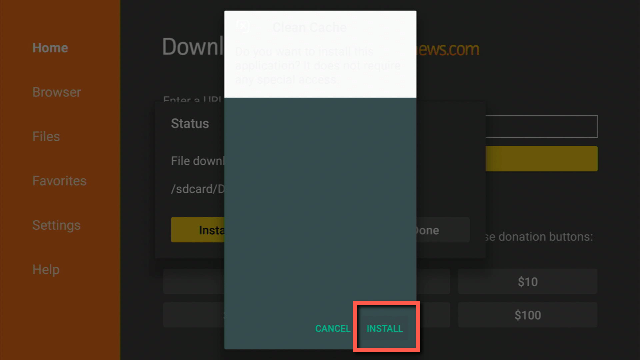
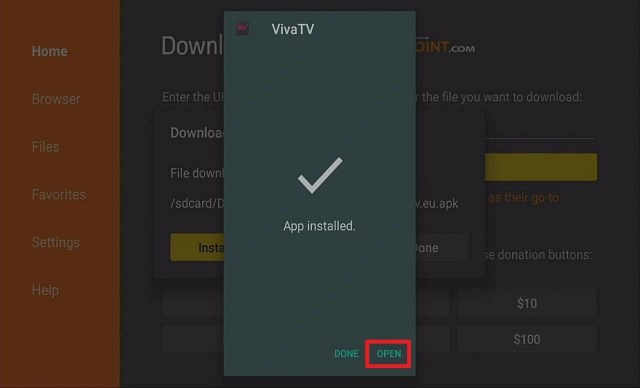
Press the Install button.
The HappyMod app will install on your device.
Press the Open button to launch the HappyMod app.
Wait for the HappyMod app to load.
Select the Allow option to let the HappyMod app access your Photos and media files.
When the first HappyMod page appears, use the hand cursor and click the Install button.
Press OK when a pop-up message warning you about Fake Apps appears.
You can now navigate the HappyMod app and search for mods you might like.
How to Install the HappyMod APK on Fire TV Stick with Screenshots
Below are screenshots you can follow to successfully install the HappyMod APK on your Fire TV stick. We suggest installing the Downloader app before doing these steps.
1. Open your Firestick Settings Tab. (Gear Wheel Icon).
2. Scroll down and to the right until you get to My Fire TV. Click on it.
3. Select Developer options.
4. Turn on ADB debugging and Apps from Unknown Sources.
5. Press the Turn On when the pop-up appears.
6. Click Home and press on FIND.
7. Press the Search button from the dropdown.
8. You can either say Downloader to your Alexa voice-enabled remote or start typing it. If you typed it, click on the suggestion when it appears.
9. Click on the Downloader Icon.
10. Tap on Download.
11. Click on Open.
12. Press on the Allow button.
13. You can now use the Downloader app.
14. Type in: reviewvpn.com/happ and tap the Go button.
15. The HappyMod app will download on your device.
16. Press the Install button.
17. The HappyMod app will install on your device.
18. Press the Open button to launch the HappyMod app.
19. Wait for the HappyMod app to load.
20. Select the Allow option to let the HappyMod app access your Photos and media files.
21. When the first HappyMod page appears, use the hand cursor and click the Install button.
22. Press OK when a pop-up message warning you about Fake Apps appears.
23. You can now navigate the HappyMod app and search for mods you might like.
Features of the HappyMod App
Group-based Mod Network
Several prominent apps
Quality Mods tested by clients
Provides a high-download speed
Files are safe to download
Does not contain infections
Technical Specifications of the HappyMod App
Let us now show you the technical specifications of the HappyMod app. Here you will learn about its latest version, file size, and installation requirements. It will help you determine if your device is compatible with the HappyMod app.
YOUR INTERNET ACTIVITY IS BEING WATCHED
ReviewVPN cannot attest to the legality, security and privacy of the applications discussed on this site. It is highly recommended that you use a VPN service while streaming or using Kodi.
Currently, your IP 92.222.108.126 is visible to everyone and your Browser is being tracked by Advertisers & ISP Provider.
Your activities are hidden from your ISP, the government, and from the apps you are using.
You can access additional movies and TV streams.
ISP attempts to throttle are thrwarted thus reducing buffering issues.
Geographically restricted content like Netflix and Hulu can be unblocked.
A VPN works be replacing your ISP-assigned IP address and creating an encrypted tunnel. We recommend the no log service offered by IPVanish. It works well on a Firestick and offers the fastest possible speeds.
This section will provide you with some websites with apps that can work as alternatives to the HappyMod app. These websites and their official apps also give us gaming mods and other media files.
For more apps that provide us mods and other content, visit our Best Sites for Modded Apps article.
FAQs
Is the HappyMod app free?
Yes. The HappyMod app is free and will not require any payment from you.
Is it safe to use the HappyMod app?
Yes. When you first open the HappyMod app, there is a page informing that the app does not contain any Malware, adware, or virus.
Conclusion
The HappyMod app works as a repository for mods. It collects all products from a community of gamers dedicated to giving us the best mods for games we enjoy playing. We suggest downloading mods from the HappyMod app in case you need them immediately.
We hope this article helps you install the HappyMod app on your Fire TV stick.
In this article, we will help you install Lumosity APK on Firestick.
With an aging population anxious about the reduction in one or more cognitive abilities, brain training applications have increased in popularity. Moreover, brain training websites & apps promise to make people smarter and keep them mentally agile.
Furthermore, many rain training websites & apps suggest they could help deflect dementia, Alzheimer’s disease, and memory loss. Just like going to the gym, a mental workout produces physical changes. Nonetheless, you’ll have to set aside a couple of minutes every day to do memory games, word quizzes, and puzzles.
Yet, by using the Lumosity brain training application, people can improve their concentration skills and acquire a stronger memory. Furthermore, people may even help their minds stay sharp as they age. Nevertheless, brain training apps will improve people’s skills that can even carry over to how their brain performs tasks.
Lumosity APK Installation on FireStick
Turn on the FireStick device, go to the top menu bar and choose > Settings
Click My Fire TV > Developer Options
Enable Apps from Unknown Sources
Go back to FireStick’s home screen and go to the menu bar
4. When the Lumosity file download is complete – click Install
5. Now, you have successfully installed the Lumosity brain training app on FireStick
YOUR INTERNET ACTIVITY IS BEING WATCHED
ReviewVPN cannot attest to the legality, security and privacy of the applications discussed on this site. It is highly recommended that you use a VPN service while streaming or using Kodi.
Currently, your IP 92.222.108.126 is visible to everyone and your Browser is being tracked by Advertisers & ISP Provider.
Your activities are hidden from your ISP, the government, and from the apps you are using.
You can access additional movies and TV streams.
ISP attempts to throttle are thrwarted thus reducing buffering issues.
Geographically restricted content like Netflix and Hulu can be unblocked.
A VPN works be replacing your ISP-assigned IP address and creating an encrypted tunnel. We recommend the no log service offered by IPVanish. It works well on a Firestick and offers the fastest possible speeds.
Legal Disclaimer: ReviewVPN.com does not encourage or endorse any illegal activity involved in the usage of services and applications referenced on this site. We do not verify the licensing agreements of services. The end-user is wholly responsible for ensuring that any media accessed through these services does not violate copyright and/or licensing laws. ReviewVPN does not promote, link to, or receive compensation from any Apps and IPTV services.
Go back to FireStick’s Home Screen (you may click the Home Button on the Fire Stick remote)
Go to Your Apps & Games/Channels
Scroll once to the left
Click See All
However, all the newly installed apps are located at the bottom – you can move the Lumosity brain training app by clicking the Options button (at the right side of the Home Button)
What Is Lumosity App?
Lumosity is a brain training app that is a fun way to train people’s brain and learn about how their mind works. This brain training app is used by more than 100 million individuals around the world. Nonetheless, Lumosity consists of science-based games ideal to exercise people’s attention, memory, flexibility, problems, and speed.
Moreover, one of the best features of Lumosity is that each individual obtains a training plan sketched for their needs. This brain training app is famous among some individuals with Attention-deficit/hyperactivity disorder (ADHD). Furthermore, Lumosity lets people play training games and keep their minds sharp. It provides more than 40 puzzles & games that will train and test people’s logic, memory, math skills, and many more.
App Features
It has more than 40 activities
This brain training app challenges people’s speed, memory, problem-solving, logic, language, and lots more
Lumosity carefully selected, organized, & presented sets of games
Customized challenges on people’s training habits as well as preferences
Info about people’s game strengths & weaknesses as they progress through their training
However, analysis of people’s gameplay to let them understand their cognitive patterns
How Does Lumosity App Work?
Using the Lumosity training app lets people have an active behavior, rather than a passive one. Nonetheless, this brain training app keeps people’s minds thinking actively. This is by having them juggle numerous tasks, complete arithmetic problems, recall where things are, make ideal decisions quickly, and think creatively.
Compatibility
The Lumosity brain training app will train people’s brain and learn about how their mind works on their Firestick. Nonetheless, this brain training app works well on many Android-based devices, such as Roku, Google Chromecast, smartphones, and many more.
Always Use a VPN To Stay Safe, Secure Online
The ideal Virtual Private Network for your Firestick boosts the quality of your internet connection. Moreover, a VPN improves people’s safety & security while using the web. It conceals an IP address and makes sure that your personal or sensitive data streams via the web remain anonymous. What’s more, what you do on the internet is nearly undetectable & unnoticeable to anyone.
Nonetheless, Surfshark is one of the best VPN services to keep you safe and secure online. After installing the Surfshark application, there is nothing stopping you from streaming, surfing, or browsing the internet. Furthermore, the network will be very fast and will not provide problems even when using any brain training apps.
Surfshark Features:
It works on all unlimited simultaneous devices
Strict NO log policy
30-day money-back guarantee
Amazing customer service
Robust encryption
Unblocks Disney+, Hulu, Netflix, and many more
Great download speed
Note: For more information about SurfShark, please read our SURFSHARK REVIEW.
If your Firestick still has the older interface, read this article to learn how to update it: Update Firestick Interface.
You can download Surfshark directly from the Amazon App store. It will be easy for you to find Surfshark with your Firestick’s Find feature. Refer to our screenshots below.
1. Go to the Home screen of your Firestick.
2. Navigate towards the Find tab. Press the Search button from the resulting dropdown.
3. Type in the keyword of SurfShark and select from the suggestions that will appear.
4. Click the official SurfShark icon from your search results.
5. Press the Download (You own it) button.
6. The SurfShark VPN installer will download on your device.
7. SurfShark VPN’s app will automatically install itself on your Fire TV stick.
8. Press the Open button after completing SurfShark VPN’s installation process.
9. Please wait for the SurfShark VPN to load its user interface.
10. You can now log in with your SurfShark VPN account credentials.
Fit Brains Trainer – It has 10 sets of games that function on various areas of the brain and enhance memory & concentration. Nonetheless, this brain training app is Free.
CogniFit Brain Fitness – this brain training app enhances people’s cognitive abilities, including concentration & memory. You can also play challenging games with your friends. Nonetheless, CogniFit Brain Fitness adjusts the difficulty level to fit a person’s profile. Moreover, it offers suggestions depending on the results. However, the first 4 games are free, then you’ll pay $13 a month.
Brain Fitness Pro – This brain training app can enhance the IQ of a person. Evidently, it boosts memory & intelligence. And in addition, it is a user-friendly app, and half an hour a day can provide results in a couple of weeks. Nonetheless, the Brain Fitness Pro app costs $3.99.
FAQs
Is the Lumosity brain training app free?
Yes, you can download, install, & use the Lumosity brain training app for free
Is Lumosity brain training app safe?
Yes, it is safe to use. Although, we always recommend the use of a VPN to prevent data breaches when using any app on your device.
Does the Lumosity brain training app come with issues?
The Lumosity brain training app has no disruption to its service
Is Lumosity brain training app legal?
The Lumosity brain training app is good & Legal
Wrapping Up
In this article, we have provided information on how to install the Lumosity brain training APK on Firestick. Furthermore, the information above should really help people to improve their concentration skills and acquire a stronger memory.
Nonetheless, always remember to turn on your VPN service every time you use the internet. Finally, if you have any thoughts, or suggestions about this article – How To Install Lumosity APK On Firestick, don’t hesitate to let us know in the comments section.
The article will help you on how to install Likuoo Kodi Addon.
WARNING:You must be at least 18 years of age before you can continue reading this article and guide. This article is about an adult addon that brings you mature content for mature readers only.
Likuoo is a popular porn site and a third-party add-on that allows you to watch it on Kodi. It is an adult add-on that provides you with a large collection of adult content that is only suitable for mature viewers. This add-on brings you lots of the hottest videos from different popular porn sites.
You can also choose from its wide selection of categories such as Amateur, Anal, Asian, Babes, BBW, BDSM, Big Boobs, Big Butts, Blowjobs, Blondes, and more. The good thing is it also has a Porn stars category where you can choose from your favorite porn stars and watch their videos for free.
This add-on has over 50+ categories to choose from and thousands of videos to watch. You can install this addon on Kodi as it is located on the popular Fusion Tv addons. However, since it is a third-party adult add-on that provides you with different videos from the official Likuoo site, we suggest using a VPN such as the Surfshark before you stream on it.
How to Install Likuoo Kodi Addon with a Screenshot
Follow these simple steps:
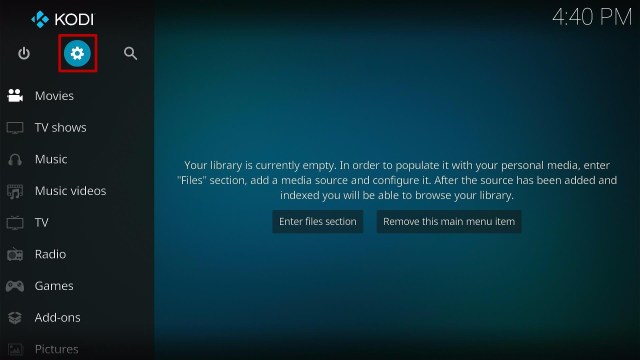
1. On your Firestick, open Kodi and go to Settings.
2. Select on System.
3. Click on the Add-ons menu and Turn ON the Unknown Sources.
4. Select Yes when the box appears.
5. Go back one step and click on File Manager.
6. Select the Add Source.
7. A box will pop up, so click on the ‘None’ option.
8. Now type in this URL http://fusion.tvaddons.co. and click OK.
9. Name this URL as fusion and tap OK.
10. After that, go back to the system menu and select Add-ons.
11. Click Install from Zip File
12. When the box pop-up, select fusion or any name you have given.
13. Now, click on the Kodi-repos
14. Select the xxx-adult
15. Click the repository.kodiadult-1.0.0.zip
16. Wait a few minutes for the addon to be installed. After that, an icon will appear at the top menu.
17. Tap the Install from Repository
18. Then select TV ADDONS Adult 18+ Add-on Repository from the list
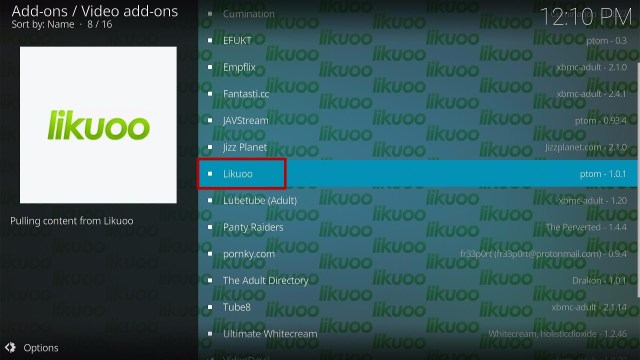
19. Click on Video Add-ons
20. Select the Likuoo
21. Click the Install button
22. Tap the OK button
23. Wait for the Likuoo Add-on installed message to appear.
24. Go back to the Kodi home screen and scroll down to Addon.
25. From the Video Add-on, select the Likuoo Add-on icon
26. That’s it! Choose from the categories and enjoy.
YOUR INTERNET ACTIVITY IS BEING WATCHED
ReviewVPN cannot attest to the legality, security and privacy of the applications discussed on this site. It is highly recommended that you use a VPN service while streaming or using Kodi.
Currently, your IP 92.222.108.126 is visible to everyone and your Browser is being tracked by Advertisers & ISP Provider.
Your activities are hidden from your ISP, the government, and from the apps you are using.
You can access additional movies and TV streams.
ISP attempts to throttle are thrwarted thus reducing buffering issues.
Geographically restricted content like Netflix and Hulu can be unblocked.
A VPN works be replacing your ISP-assigned IP address and creating an encrypted tunnel. We recommend the no log service offered by IPVanish. It works well on a Firestick and offers the fastest possible speeds.
Legal Disclaimer: ReviewVPN.com does not encourage or endorse any illegal activity involved in the usage of services and applications referenced on this site. We do not verify the licensing agreements of services. The end-user is wholly responsible for ensuring that any media accessed through these services does not violate copyright and/or licensing laws. ReviewVPN does not promote, link to, or receive compensation from any Apps and IPTV services.
It has an easy navigation interface even without using a mouse toggle.
Categories and Contents
It brings you all of the Latest adult videos uploaded every day.
Watch over 60 minutes of hottest videos for free.
You can choose from over 52+ categories such as Amateur, Anal, BBW, Blondes, Brazilian, British, Cream Pie, Cuckold, Cum Swallow, Cumshots, Group Sex, Gangbang, Hairy, Handjobs, and more.
It also has Lesbian, Gays, Sex Toys, Matures, Masturbation, Lingerie, Italian, and more.
You can also choose from the Porn Stars category.
It has 20+ porn stars to choose from, including Nicole Aniston, Abigail Mac, Bridgette B, Jessa Rhodes, Syren De Mer, Natasha Starr, Luna Star, Abella Danger, and more.
Settings
Integrate your Real debrid account to provide you high quality streaming links.
Watch a maximum of 1080p quality videos.
It has a one-click full stop, pause/play, next up, and fast forward button.
Available Search function to easily find your favorite content.
You can create and clear the bookmark.
Allows background playing.
Pros and Cons
Pros
An easy-to-use and user-friendly interface.
You can watch their large collection of hottest and adult videos.
It brings you different videos from popular porn sites and allows you to watch their content for free.
Great lineup of adult and matured content worth watching.
Maximum video streaming quality is up to 1080p.
Cons
Too much buffering before you play the content and if you pause.
Protect your privacy with a VPN
Streaming online is not safe and private, especially when you are connected to a public network. It is because your ISP knows everything that you do and keeps track of your activities and web traffic. That is why streaming using a public network is not PRIVATE at all. So, if you want to protect your privacy while streaming any content of your choice, we recommend using a Virtual Private Network to give you a secure connection and protect your web traffic.
One of the safest and trusted VPNs in the market is Surfshark. This VPN will ensure that you are safe from any harm online using a military standard of encryption that will safeguard everything about you. Surfshark also keeps your activity secure and private, so you don’t need to worry about your privacy.
Other features of Surfshark:
Surfshark’s protocols are perfect for use with Kodi.
This VPN will definitely hide all of your online activities.
It has a military-grade level of encryption that will ensure your safety.
With this VPN you can access more content and even unblock Netflix and other platforms.
It also supports P2p file-sharing activities which makes it applicable to torrenting
Strictly follows No-Log Policy.
It provides 3,200 servers in 65 locations worldwide.
DNS Leak Protection is active by default.
Note: For more information about Surfshark, please read our Surfshark Review.
You can visit them on https://www.likuoo.video/pornstars/ and watch their videos online.
Is the Likuoo Kodi Addon safe?
Yes, this add-on is safe to use, but since it is an adult add-on, we still suggest using a VPN such as Surfshark to keep you safe.
Is the Likuoo Kodi Addon free?
Yes, this add-on is free and allows you to watch their content for free.
Is the Likuoo Kodi Addon legal?
Yes, this addon is not illegal to install and use.
Conclusion
Likuoo is an amazing adult add-on that brings you a great collection of hottest and mature videos suited for mature viewers only. This add-on allows you to watch their content for free and it will offer you the hottest videos from the official Likuoo site. Since it is an adult addon you must be at your legal age before you watch their content, and we suggest using a Surfshark to keep you safe while streaming. We hope this article helps you install the Likuoo Kodi Addon.
The article will help you on how to install FAZE Kodi Build.
FAZE is a third-party build from the SG Wizard 19 and is compatible with the latest Kodi version. This build has a massive collection of content to offer in a wide variety of categories. You can watch a great lineup of popular and latest content such as Live TV, Movies, Tv shows, Documentaries, Family, and more.
This build has over 90+ Live Tv channels that you try and watch on their programs. This build uses lots of popular Kodi addons to provide you with a collection of contents and some of these addons are LiveNet, Asgard, TvTap, Nightwing, Chains, and more.
The good thing is, it allows you to watch their contents for free without any registration required. However, it is still a third-party build which is why we suggest using a VPN such as Surfshark to ensure your safety.
How to Install FAZE Kodi Build with Screenshot
Installing a Kodi build has a lot of processes to take. That is why we will guide you step by step on how to install it on Kodi.
Follow the following steps below.
1. On your Firestick, open Kodi and go to Settings.
2. Select on System.
3. Click on the Add-ons menu and Turn ON the Unknown Sources.
4. Select Yes when the box appears.
5. Go back one step and click on File Manager.
6. Select the Add Source.
7. A box will pop up, so click on the ‘None’ option.
8. Type in http://ezzer-mac.com/repo and click OK.
9. Name the URL- ezzer or any other name you want to. Then select OK.
10. Go back and Select Add-ons
11. Click Install from zip file
12. Click the Yes button.
13. Choose ezzer or any other name you put
14. Click repository.EzzerMacsWizard.zip
15. Wait for the EzzerMacs Wizard Repository installed text to appear.
16. After that, click the Install from repository.
17. Select the EzzerMacs Wizard Repository
18. Go to Programs add-ons.
19. Choose the SG Wizard 19
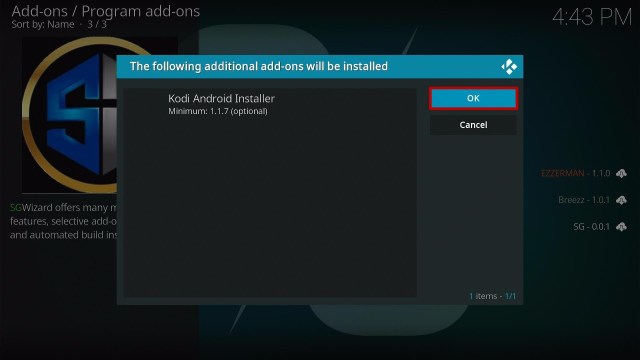
20. Click the Install button.
21. Tap the OK button.
22. When a box pop up, click Continue
23. Click Ignore
24. Go back to the main menu and select Add-ons.
25. On the program add-ons, click the SG Wizard 19 icon.
26. Select the Builds.
27. Find the FAZE and click on it.
28. Click the Install
29. When a box pops up, select the Yes, Install
30. Wait for the build to finish its download.
31. When a box pop up, click the Fresh Install
32. Wait for a few minutes.
33. Tap Ok
34. Relaunch your Kodi.
35. That’s it! You have successfully installed the FAZE Kodi Build.
Features of FAZE Kodi Build
The main categories are Live Tv, Movies, TV Shows, Music, Family, Sports, Add-ons, and Power/Settings.
Live TV: You can watch on over 90+ Tv channels such as 5 Star, 5USA, E4, More4, CBS Reality, Drama, and more.
It has different categories on Live Tv, including Documentary, Entertainment, Freeview, HD Channels, Kids, Movies, Music, News, Radio, Sports and US/Can/Int.
In the Movie categories, you can choose from Genres, Years, Decades, Languages, Certificates, Movies Most, People Watching, Most Popular, Most Voted, Featured, Highly Rated, OscarWinners, Box Office, In Theaters, Recently Released, IMDb Keyword searches and more.
From the TV shows section: You can choose from Genres, Networks, Languages, Certifications, TV Shows Most, People Watching, Most Popular, Highly Rated, Most Voted, Airing Today, Returning TV Shows, New TV shows, New Episodes, TV Calendar, My TV Shows, People search and more.
Collections of contents from 1901 to 2022.
Music: It also brings you an updated list of Songs from different popular artists.
Family: Watch on Family movies such as Encanto 2021, Sing 2, Hotel Transylvania, and more.
It also brings you Live sports coverage, including Cup of Nations, Premiership, Bundesliga, and more.
Watch your favorite sports teams such as Fan Zone, Fight Zone, MLB Zone, NBA, NCAA, NFL, NHL, Score, Soap, and Test Zone.
Preloaded Addons/Repos
These are the preloaded addons and repos in this build: LiveNet, Swift, TVTap, Cabal, Asgard, Nightwing, Chains, Bugatsinho Repo, THE CREW SOUNDS, Loop repo, ApeX Sports, Evil Ten, Loop TV1,2,3, Mad Titan Sports, Pluto TV, SportHD, STIRR, The Oath, TMDB TV Shows, tvOne, and more.
Legal Disclaimer: ReviewVPN.com does not encourage or endorse any illegal activity involved in the usage of services and applications referenced on this site. We do not verify the licensing agreements of services. The end-user is wholly responsible for ensuring that any media accessed through these services does not violate copyright and/or licensing laws. ReviewVPN does not promote, link to, or receive compensation from any Apps and IPTV services.
YOUR INTERNET ACTIVITY IS BEING WATCHED
ReviewVPN cannot attest to the legality, security and privacy of the applications discussed on this site. It is highly recommended that you use a VPN service while streaming or using Kodi.
Currently, your IP 92.222.108.126 is visible to everyone and your Browser is being tracked by Advertisers & ISP Provider.
Your activities are hidden from your ISP, the government, and from the apps you are using.
You can access additional movies and TV streams.
ISP attempts to throttle are thrwarted thus reducing buffering issues.
Geographically restricted content like Netflix and Hulu can be unblocked.
A VPN works be replacing your ISP-assigned IP address and creating an encrypted tunnel. We recommend the no log service offered by IPVanish. It works well on a Firestick and offers the fastest possible speeds.
It has a user-friendly interface that works well on Kodi 19.5 Matrix.
You can choose from their wide selection and collection of contents.
This build brings you a high-quality of streaming links.
It has well-organized categories and subcategories.
Cons
Some streaming links provided are not working at all.
Do I need a VPN?
Yes, in everything that you do online, it is much better if you are using a security tool/software to keep you safe from any harm online. Streaming online while being connected to any VPN software is very recommendable. One of the best VPNs that we always suggest and record to our users is Surfshark, this VPN has a good record of maintaining users’ security and privacy. Surfshark is also known as the most reliable and fastest VPN that will serve you a quality of service with an impressive list of features. For more information about Surfshark, please read ourSurfshark Review.
Here are the reasons why it is our VPN of choice:
24/7 customer support.
It follows a strict No-Logs Policy
No Bandwidth limits – you can enjoy a full-speed VPN connection without any throttling.
Bypass restrictions and geo-blocks to access lots of content.
Has a total of 3200+ servers in 65 countries to choose from
Military-grade AES-256 encryption follows FIPS (Federal Information Processing Standards) that oversees the handling of sensitive data.
For more VPN discounts, go to ReviewVPN Deals and purchase the best VPN for you.
Click here to get the lowest price on Surfshark through our exclusive limited-time offer.
Alternatives for FAZE Kodi Build
We list down some Kodi builds that you can try on your Kodi. If you want to know more about these builds, kindly read their corresponding articles. For more addon/build compatible with Kodi 19.5, visit this link What’s working on Kodi 19.5.
Yes, we always suggest using a VPN such as Surfshark when you are using a third-party streaming service such as builds or addons, to keep you safe and protected.
Can I watch FAZE Kodi Build for free?
Yes, this build is free and allows you to access their content for free.
Is the FAZE Kodi Build legal to use?
Yes, this build is legal as long as it only offers non-copyright content.
Is the FAZE Kodi Build safe to use?
Yes, this build is safe to use, but if you want to ensure your security, we suggest using a VPN such as Surfshark.
Conclusion
FAZE Kodi Build is an amazing build with lots of worth-to-watch content and a massive collection of movies to watch for free. This build also has a simple but easy-to-use interface that works well on Kodi. The good thing with this build is it uses different popular and provides you with a great lineup of content to watch. We hope this article helps you install the FAZE Kodi Build.
Learning foreign languages has been one of the most essential things that open-minded individuals frequently need to expand their communication ability. Nonetheless, this article will talk about Duolingo. It is an app widely known for the quality of lessons in every certain language. Fortunately, this language-learning app comes with tons of bite-sized lessons ideal for learning.
However, you only need 5 minutes to finish a lesson and you can start putting the lesson into practice. Duolingo is a great app to learn many languages or any language you are interested in. You can learn French, Spanish, Portuguese, and lots more.
Additionally, the language-learning app has a spectacular visual style and it is completely free. As users complete lessons, they earn experience points. If they make mistakes, the app will take hearts away. Nonetheless, the Duolingo app makes it seem like your learning process is just like a fun video game.
Duolingo APK Installation on FireStick
Turn on the FireStick device, go to the top menu bar and choose > Settings
Click My Fire TV > Developer Options
Enable Apps from Unknown Sources
Go back to FireStick’s home screen and go to the menu bar
Go to the Search option
Search & install the Downloader app on FireStick
After installing the Downloader app, launch it
Enter the Duolingo app download URL/APK – https://reviewvpn.com/duol
Click GO
When the Duolingo file download is complete – click Install
Now, you have successfully installed the Duolingo app on FireStick
Go back to FireStick’s Home Screen (you may click the Home Button on the Fire Stick remote)
Go to Your Apps & Games/Channels
Scroll once to the left
Click See All
All the newly installed apps are located at the bottom – you can move the Duolingo app by clicking the Options button (at the right side of the Home Button)
What Is Duolingo App?
Duolingo is an app to help people learn foreign languages comfortably, quickly, & easily. The language-learning app lets you learn new languages that don’t seem like you are studying but have fun with games on the Android device. Nonetheless, the app allows users to learn numerous languages, such as English, Spanish, Italian, Portuguese, French, and many more. Users will have to simply choose the language that they want to learn the first time they use the app.
Nonetheless, one of Duolingo’s advantages, unlike other language-learning apps, is that it utilizes gamification’s concept. It provides the lessons in a manner that it seems like you are playing video games.
YOUR INTERNET ACTIVITY IS BEING WATCHED
ReviewVPN cannot attest to the legality, security and privacy of the applications discussed on this site. It is highly recommended that you use a VPN service while streaming or using Kodi.
Currently, your IP 92.222.108.126 is visible to everyone and your Browser is being tracked by Advertisers & ISP Provider.
Your activities are hidden from your ISP, the government, and from the apps you are using.
You can access additional movies and TV streams.
ISP attempts to throttle are thrwarted thus reducing buffering issues.
Geographically restricted content like Netflix and Hulu can be unblocked.
A VPN works be replacing your ISP-assigned IP address and creating an encrypted tunnel. We recommend the no log service offered by IPVanish. It works well on a Firestick and offers the fastest possible speeds.
The Duolingo app is fun and effective. It has game-like lessons and fun characters that help users build robust reading, speaking, writing, & listening skills.
Duolingo is designed by language experts and comes with a science-based teaching methodology
Track progress – Users can work toward their language learning goals with achievements & rewards when they practice it as a daily habit
The Duolingo app has more than 300 million learners around the world
However, all the language courses are free. You can learn French, Spanish, Italian, Russian, German, Turkish, Portuguese, Irish, Dutch, Swedish, Danish, Esperanto, Ukrainian, Greek, Polish, and many more
Compatibility
Duolingo is a great language-learning app that helps people learn foreign languages comfortably, quickly, & easily. However, this app works well on many Android devices, such as Amazon Firestick, tablets, smartphones, and lots more.
Pros & Cons
Pros
It is completely free
Offers repetition & audio
Cons
limited vocabulary
It has no strict mode
Always Use a VPN To Stay Safe, Secure Online
Taking into consideration that most people’s activities are linked to the web in some way, the major concerns should be security and privacy online. One of the cheapest & uncomplicated ways to protect people from online threats, hackers, or cybercriminals is with a VPN or virtual private network. The best VPN platforms are quite user-friendly too. Thus, even if you are not tech-savvy, using a VPN is extremely easy.
Using a VPN service has become more mainstream. The best VPN service is able to provide people and their devices with better security as well as online anonymity. VPNs offer the ability to gain access to geo-restricted content regardless of where you are in the world. However, SurfShark is among the best VPN platforms to keep people secure & safe online.
Click here to get the lowest price on SurfShark through our exclusive limited-time offer.
How to Install Surfshark on Firestick with Screenshots
If your Firestick still has the older interface, read this article to learn how to update it: Update Firestick Interface.
You can download Surfshark directly from the Amazon App store. It will be easy for you to find Surfshark with your Firestick’s Find feature. Refer to our screenshots below.
Follow our screenshots below to install the SurfShark VPN app on your Fire TV stick.
1. Go to the Home screen of your Firestick.
2. Navigate towards the Find tab. Press the Search button from the resulting dropdown.
3. Type in the keyword of SurfShark and select from the suggestions that will appear.
4. Click the official SurfShark icon from your search results.
5. Press the Download (You own it) button.
6. The SurfShark VPN installer will download on your device.
7. SurfShark VPN’s app will automatically install itself on your Fire TV stick.
8. Press the Open button after completing SurfShark VPN’s installation process.
9. Please wait for the SurfShark VPN to load its user interface.
10. You can now log in with your SurfShark VPN account credentials.
For more VPN discounts, go to ReviewVPN Deals and purchase the best VPN for you.
Alternative Apps for Duolingo
Below are the leading applications to learn foreign languages comfortably, quickly, & easily. Nonetheless, with these apps, you can learn numerous languages, such as English, Spanish, Italian, Portuguese, French, and many more.
Rype
Busuu
Memrise
Babbel
FAQs
Is the Duolingo app free?
Yes, you can download, install, and use the Duolingo app for free
Is the Duolingo app safe and legal?
The Duolingo app is safe. Nonetheless, if you utilize it to learn foreign languages, then it is totally fine.
Conclusion
In this article, we have provided information on How To Install Duolingo APK On Firestick. The information above should really help you learn foreign languages comfortably, quickly, & easily.
Nonetheless, always remember to turn your VPN service on every time you utilize the internet. If you have any thoughts, suggestions about this article – How To Install Duolingo APK On Firestick, don’t hesitate to let us know in the comments section.
The movie industry is one of the most remarkable movements that individuals are always following and exploring. The diversity of the film entertainment industry always provides individuals mixed feelings relying on the genre of the film.
Thus, people always need an app that helps them know and save all the popular films in the world and conveniently watch the content anytime, anywhere. However, one of those apps is CineTrak. CineTrak comes with a user-friendly design and numerous management features. Also, it always provides people with lots of engaging entertainment videos to enjoy.
Cinetrak is a great movie and tv show tracker app that is equipped with data about movies, directors, & actors. The app helps users keep track of the movies that they plan on watching. Nonetheless, the Cinetrak app provides a complete database that delivers all kinds of great information about the films users are looking for.
CineTrak APK Installation on FireStick
Turn on the FireStick device, go to the top menu bar and choose > Settings
Click My Fire TV > Developer Options
Enable Apps from Unknown Sources
Go back to FireStick’s home screen and go to the menu bar
Go back to FireStick’s Home Screen (you may click the Home Button on the Fire Stick remote)
Go to Your Apps & Games/Channels
Scroll once to the left
Click See All
All the newly installed apps are located at the bottom – you can move the CineTrak app by clicking the Options button (at the right side of the Home Button)
What Is CineTrak App?
CineTrak is an awesome movie & TV show tracker app that allows you to find the best Movies & TV Shows. This app lets users build their watchlists. Users can check reviews & ratings from numerous sources such as IMDB, Trakt, Rotten Tomatoes, as well as Metacritic. This movie and TV show tracker app is created on Google Material Design. Nonetheless, it provides a gamified environment that makes streaming movies more enjoyable and entertaining.
One of the impressive things about the CineTrak app is its ability to greatly please users and offer movies and TV shows suitable for everyone. Furthermore, CineTrak allows users to recommend films according to needs, such as genres, actors, styles, and many more.
YOUR INTERNET ACTIVITY IS BEING WATCHED
ReviewVPN cannot attest to the legality, security and privacy of the applications discussed on this site. It is highly recommended that you use a VPN service while streaming or using Kodi.
Currently, your IP 92.222.108.126 is visible to everyone and your Browser is being tracked by Advertisers & ISP Provider.
Your activities are hidden from your ISP, the government, and from the apps you are using.
You can access additional movies and TV streams.
ISP attempts to throttle are thrwarted thus reducing buffering issues.
Geographically restricted content like Netflix and Hulu can be unblocked.
A VPN works be replacing your ISP-assigned IP address and creating an encrypted tunnel. We recommend the no log service offered by IPVanish. It works well on a Firestick and offers the fastest possible speeds.
Discover & track tons of awesome Movies & TV shows
You may add Movies & TV series to the watchlist
Ratings & trailers from popular movie sources like Trakt.tv
It shows the latest upcoming films, seasons, show premieres, & episodes
Set Reminders for movie releases
Generate Custom Lists and Collections of DVDs, Blu-Rays, as well as Online streaming content
Access data on any Android device
Synchronize data with Trakt
Manage Content Easily
CineTrak is not an app that helps people stream movies, instead, the app helps discover and be in charge of all their content. The application is like an ad magazine, where you find amazing entertainment content across the globe. When you tap on anything you do, CineTrak shows the complete description and trailers. Of course, it will have an easy access folder for you to easily manage all the videos you have watched in the past.
Compatibility
The CineTrak is a great movie & TV show tracker app that allows you to find the best Movies & TV Shows. However, this app functions well on numerous Android devices like Google Chromecast, tablets, smartphones, and lots more.
Always Use a VPN To Stay Safe, Secure Online
While Virtual Private Networks are utilized for a vast range of purposes, streaming is one of the most famous use cases. Because of the geographic restrictions of the best streaming services, it is common for people to embrace VPN services. They use it to make sure accessibility to geo-restricted movies & TV shows. A Virtual Private Network encrypts the source’s data, generating a tunnel between an exit node and the connection.
Nonetheless, Surfshark is among the best VPN platforms to keep people secure & safe online. It has strong encryption methods, split tunneling, & amazing download speeds that really help people out when they are using the internet.
Click here to get the lowest price on Surfshark through our exclusive limited-time offer.
How to Install Surfshark VPN on Firestick
If your Firestick still has the older interface, read this article to learn how to update it: Update Firestick Interface.
You can download Surfshark directly from the Amazon App store. It will be easy for you to find Surfshark with your Firestick’s Find feature. Refer to our screenshots below.
1. Go to the Home screen of your Firestick.
2. Navigate towards the Find tab. Press the Search button from the resulting dropdown.
3. Type in the keyword of SurfShark and select from the suggestions that will appear.
4. Click the official SurfShark icon from your search results.
5. Press the Download (You own it) button.
6. The SurfShark VPN installer will download on your device.
7. SurfShark VPN’s app will automatically install itself on your Fire TV stick.
8. Press the Open button after completing SurfShark VPN’s installation process.
9. Please wait for the SurfShark VPN to load its user interface.
10. You can now log in with your SurfShark VPN account credentials.
For more VPN discounts, go to ReviewVPN Deals and purchase the best VPN for you.
Click here to get the lowest price on Surfshark through our exclusive limited-time offer.
Alternative Apps for CineTrak App
Below are the leading applications to get all the information about movies, TV series, documentaries, and more. With these apps, you can browse through the catalog like Marvel, Universal, or DC.
Yes, you can download, install, and use the CineTrak app for free
Is the CineTrak App Safe and Legal?
The CineTrak app is safe. However, whether the movie & TV show tracker app is legal or not relies on your purpose. If you utilize it to get all the information about movies & TV series, then it is totally fine.
Conclusion
In this article, we have provided information on How To Install CineTrak APK On Firestick. The information above should really help you to easily get all the information about movies, TV series, documentaries, and more.
Nonetheless, always remember to turn your VPN service on every time you utilize the internet. If you have any thoughts, or suggestions about this article – How To Install CineTrak APK On Firestick, don’t hesitate to let us know in the comments section.
Note: ReviewVPN.com does not host any of the aforementioned apps. The APK files are hosted at Archive.org.
Why Do We Need Alternatives?
As we have stated earlier, third-party streaming applications are unpredictable. We need alternatives so that our viewing experience does not get interrupted. Choosing the best alternative will be entirely up to you because the app that we are going to list down are very much alike. This article will help you with choosing the best CyberFlix alternatives.
If your Firestick still has the older interface, read this article to learn how to update it: Update Firestick Interface.
Before Installing The CyberFlix Alternatives
You need to jailbreak your firestick and install the downloader app to install these alternative applications. Take a look at the instructions below:
Jailbreak Your Firestick
1. Click Home on your remote and scroll once to your Right. Click Setting (Gear Wheel Icon)
2. Scroll down and to the right until you get to My Fire TV. Click on it.
3. Select Developer options.
4. Turn on ADB debugging and Apps from Unknown Sources.
5. Click Turn On when the pop-up appears.
Innstall the Downloader App
1. From the Home page, click FIND.
2. Click Search.
3. You can either say Downloader to your Alexa voice-enabled remote or start typing it. If you typed it, click on the suggestion when it appears.
The Best CyberFlix Alternative Apps With Installation Guides
CyberFlix is considered one of the best Terrarium clones and has gained a huge following since its launch.
Having said that, it is also bound to experience issues and setbacks that will make anyone dismayed. We have tested other apps and compiled what we believe are the top CyberFlix Alternatives.
The list that we are featuring operates similarly to CyberFlix. The ranking of the best CyberFlix alternatives is not in any particular order because of their similarity.
Cinema APK
Cinema APK is one of the best online streaming applications. It has a wide range of movies available for streaming with HD quality. And as of this writing, Cinema APK update v1.4.2 got topmost attention from movie streamers around the globe. Like Cyberflix, it is working best as a Terrarium TV Clone.
Features:
Cinema APK a lot of available links for streaming.
Movies are available for download.
Fast-loading movies.
High Definition Movies and TV Shows.
There’s a favorite section and you can also log in to Trakt TV.
How to Install Cinema APK on Firestick with Screenshots
1. Launch the Downloader App
2. Tap on the search bar and type https://reviewvpn.com/cin and click Go.
2. Click on INSTALL.
3. Click on OPEN.
4. Click on Allow.
5. Click on ACCEPT.
6. Cinema APK is Installed. Enjoy Watching.
How to Install Cinema APK on Android
Note: ReviewVPN.com does not host this APK file. It is hosted on Archive.org.
To learn more about Cinema APK, please click here.
Nova TV was launched back in 2019 and has gained a lot of popularity ever since. It is a third-party application that allows you to watch HD Movies and TV Shows. Nova TV also has a huge library of content that will be the stuff of dreams for many avid watchers. The content is mainly focused on Movies and TV Shows that you can see with a popular paid streaming application.
Features:
Subtitle Support.
High Definition Movies and TV Shows.
Fast Loading and Playing Time.
Very easy to use.
Downloadable content for Android users.
You can tag videos as favorites.
High-Quality Video links due to having Premium Link Generators like Real-Debrid, All Debrid, and Premiumize.
You can keep track of your favorite TV Shows because of their Trakt TV support.
Easy Navigation because Mouse Toggle is not required.
How to Install Nova TV on Firestick with Screenshots
1. Launch the Downloader App
2. Tap on the search bar and type https://reviewvpn.com/nova and click Go.
3. Click INSTALL.
4. Click OPEN.
5. Click Allow.
6. Choose an Internal player.
7. Choose Language.
8. Enjoy Nova TV.
How to Install Nova TV on Android
Note: ReviewVPN.com does not host this APK file. It is hosted on Archive.org.
Viva TV is one of the many popular free third-party streaming applications that are compatible with the Amazon Firestick. It provides users with high-quality video streaming links. As of writing this article, we have tested Viva TV again and saw that it is performing very well in terms of speed and loading time. It has greatly improved over the months since it was released for public use.
Features:
Closed Captioning and Subtitle Support.
High Definition/Quality Movies and TV Shows.
A large amount of content.
Extremely fast Loading and Playing Time.
Real Debrid, All Debrid, and Premiumize Integrations give users the best links available on the web.
Simple UI and does not need Mouse Toggle to function.
Watchlist works similarly to Favorites.
You can keep track of your favorite shows because of Trakt TV Support.
How to Install Viva TV on Firestick with Screenshot
1. Launch the Downloader App
2. Tap on the search bar type https://reviewvpn.com/viva and click Go.
3. Click on INSTALL.
4. Click OPEN.
5. Enjoy Watching Viva TV.
How to Install Viva TV on Android
Note: ReviewVPN.com does not host this APK file. It is hosted on Archive.org.
Note: If you want to see what Viva TV is all about, please read ourViva TV Review.
BeeTV is an app that allows you to watch movies and TV shows for free. It has a huge library of content that lets users enjoy streaming movies and TV shows through their devices. The app also has a good user interface and navigation so you wouldn’t have a hard time browsing the app.
Features:
Real-Debrid integrated app.
Has history tab wherein you can check on your streaming activities.
On the Editor’s choice tab, you’ll see the best shows and movies on other streaming apps.
It has ads but can be blocked via Ad-block.
Fast-loading movies and TV shows.
Has the option to play with subtitles.
HD quality movies and TV shows.
There are a lot of available links for streaming.
BeeTV offers anime TV shows and movies.
How to install BeeTV on Firestick with Screenshots
1. Launch the Downloader App
2. Tap on the search bar and type https://reviewvpn.com/bee and click Go.
3. Click INSTALL.
4. Click OPEN.
5. Click Allow.
6. Enjoy BeeTV!
How to Install BeeTV on Android
Note: ReviewVPN.com does not host this APK file. It is hosted on Archive.org.
OneBox HD has been a popular Android movie streaming app since back in 2017. It is a one-click movie and TV show app that makes it easy for users to stream through their Android devices. It also allows you to download content for free so you could be able to watch it offline.
Features:
One-click play app.
HD quality movies and TV shows.
You’ll be streaming the movie with an external player like MX Player.
Movies can be downloaded through the app.
You can add movies to your favorites list.
Has a tab for history if you want to monitor your streaming activities.
How to Install OneBox HD on Firestick with Screenshots
1. Launch the Downloader App
2. Tap on the search bar and type https://reviewvpn.com/box and click Go.
3. Click on INSTALL.
4. Click on OPEN.
5. OneBox HD is Installed. Enjoy Watching.
How to Install OneBox HD on Android
Note: ReviewVPN.com does not host this APK file. It is hosted on Archive.org.
FilmPlus APK is a streaming application that gives you access to a wide collection of TV shows and movies on the internet. It contains a lot of links for normal and real-debrid movies and TV shows depending on your preferred movie experience. It is also ad-free so you would not encounter any hassle on your streaming activities.
Features:
The app has a huge content library available for streaming.
It has a tab for best shows on different streaming platforms.
It has a favorite section.
Filmplus has an option to play with subtitles.
Movies are available for download.
Real-debrid integrated.
You can log in to Premiumize and Trakt.
How to Install FilmPlus on Firestick with Screenshots
1. Launch the Downloader App
2. Tap on the search bar and type https://reviewvpn.com/film and click Go.
3. Click INSTALL.
4. Click OPEN.
5. Select Allow.
6. Click on UPDATE.
7. Wait for the Update to Finish.
8. Select INSTALL.
9. Head back to the Home screen and look for the FilmPlus icon. Launch it afterward.
10. Enjoy streaming with FilmPlus APK.
How to Install FilmPlus on Android
Note: ReviewVPN.com does not host this APK file. It is hosted on Archive.org.
Titanium TV is an online streaming device that lets you access the latest movies and TV shows for free. It is also an online media file search engine and browser that provides its viewers with streaming links that are available on the internet.
Features:
HD quality movies and TV shows.
Real-debrid option for streaming of movies and TV shows.
You can download watched histories from Trakt.
No ads.
It has a lot of links available streaming.
How to Install Titanium TV on Firestick with Screenshots
1. Launch the Downloader App
2. Tap on the search bar and type https://reviewvpn.com/tit and click Go.
3. Click INSTALL.
4. Click OPEN.
5. Enjoy Titanium TV!
How to Install Titanium TV on Android
Note: ReviewVPN.com does not host this APK file. It is hosted on Archive.org.
To learn more about Titanium TV, please click here.
Media Lounge is one of the fast loading applications available online. It offers a wide range of genres available for streaming like Action, Adventure, Animation, Comedy, Crime, Documentary, etc. Aside from that, it is also one of the few streaming applications that have adult content applications for streaming. You just have to set up a password so you could access the adult content.
Features:
Fast-loading movies and TV shows.
High-definition quality.
Real-debrid integrated.
Movies and videos can be downloaded.
Offers Movies, TV Shows, Live TV, Sports TV, and Adult content.
Has an option for paid Ad-free streaming.
How to Install Media Lounge on Firestick with Screenshots
1. Launch the Downloader App
2. Tap on the search bar and type https://reviewvpn.com/med and click Go.
3. Click INSTALL.
4. Click OPEN.
5. Click Allow.
6. Create a Parental Pin. Click OK.
7. Type your pin. Click Next.
8. Click OK.
9. Media Lounge is installed. Enjoy watching.
How to Install Media Lounge on Android
Note: ReviewVPN.com does not host this APK file. It is hosted on Archive.org.
To learn more about Media Lounge, please click here.
1234Movies is a High-definition Movie and TV show application that lets you stream and download through your device. It offers a wide range of category lists that you can choose from like Law & Med, Sci-Fi & Fantasy, Mystery, Crime, Drama, Comedy, etc.
Features:
There are a lot of streaming links available in the app.
Movies and TV shows can be downloaded.
Navigation is easy because you don’t need a Mouse Toggle to use the app.
It has an option if you want to be notified whenever there are new episodes.
You can also enable notifications for new movie releases.
How to Install 1234Movies on Firestick with Screenshots
1. Launch the Downloader App
2. Tap on the search bar and type https://reviewvpn.com/1234 and click Go.
3. Click INSTALL.
4. Click OPEN.
5. Click Allow.
6. Choose default video player (Exo Player)
7. 1234Movies is Installed. Enjoy Watching.
How to Install 1234 Movies on Android
Note: ReviewVPN.com does not host this APK file. It is hosted on Archive.org.
To learn more about 1234 Movies, please click here.
Terrarium TV is back and is one of the best Cyberflix alternatives. It is one of the original apks to host free movies and TV series. When it was shut down a lot of Terrarium clones emerged and provides the best services. Some of which are also listed above.
Genres can be found on the upper-right side when you click on the three lines
Search bar available
How to Install Terrarium TV on Firestick with Screenshots
1. Launch the Downloader App
2. Type https://reviewvpn.com/ter and click Go
3. Wait for the APK to be downloaded.
4. Select the Install button.
5. Wait for the app to be installed.
6. Launch the app by clicking Open.
7. Select Allow
8. When the Change Logs pops up, just click OK
9. You can now select any titles you want to stream.
YOUR INTERNET ACTIVITY IS BEING WATCHED
ReviewVPN cannot attest to the legality, security and privacy of the applications discussed on this site. It is highly recommended that you use a VPN service while streaming or using Kodi.
Currently, your IP 92.222.108.126 is visible to everyone and your Browser is being tracked by Advertisers & ISP Provider.
Your activities are hidden from your ISP, the government, and from the apps you are using.
You can access additional movies and TV streams.
ISP attempts to throttle are thrwarted thus reducing buffering issues.
Geographically restricted content like Netflix and Hulu can be unblocked.
A VPN works be replacing your ISP-assigned IP address and creating an encrypted tunnel. We recommend the no log service offered by IPVanish. It works well on a Firestick and offers the fastest possible speeds.
Legal Disclaimer: ReviewVPN.com does not encourage or endorse any illegal activity involved in the usage of services and applications referenced on this site. We do not verify the licensing agreements of services. The end-user is wholly responsible for ensuring that any media accessed through these services does not violate copyright and/or licensing laws. ReviewVPN does not promote, link to, or receive compensation from any Apps and IPTV services.
Tea TV can be considered as one of the oldest working streaming apps that still exists. It was launched back in 2017 and continued to persist due to its popularity among users. You can expect the same content much like what we regularly see with CyberFlix. Having a good reputation does work out in the end because Tea TV has proven time and again that providing quality content and an easy user interface will assure you of continued patronage and support.
Features:
It has subtitle support
HD Content
Fast playing speed and loading time
Easy to use
Compatible with Ad Guard to block out Ads.
Downloadable Content
Favorites Function that is useful to bookmark all the videos you like.
Premium links due to Real-Debrid and Premiumize support.
Trakt TV support to pick up where you left off in terms of the last video you were watching.
How to Install Tea TV on Firestick Guide
Open the Downloader app.
Type in https://reviewvpn.com/tea and select Go
Wait for it to finish and then select Tea TV
Select Done
This will automatically take you back to Downloader. Select Delete
Choose Delete one more time
Head back to the home screen and under the Your Apps & Channels select Choose All
Scroll down and select Tea TV and select the Options.
Then select Move to Front
Tea TV will be moved forward to Your Apps and Channels
After this, you will see Tea TV and click it to launch.
How to Install Tea TV on Android
To download and install Tea TV on your Android device, click here.
Note: Kindly read ourTea TV Review to know more about the app.
TV Zion (Dead App)
TV Zion is a terrarium clone that has a free and paid version. What it does is scrape the web for working links and places them under one folder that is readily available to users. It allows any user to configure its system to automatically play when a certain number of working links have been gathered. TV Zion also provides both recently released Movies and old ones. The TV Shows that it offers are very much the same as popular paid streaming apps. You have the option of integrating Real-Debrid to ensure that the links you will be getting are of the highest quality.
Features:
Easy navigation asMouse Toggle is not needed to run the app.
High Definition Videos for Movies and TV Shows.
Loading Time and Playback is fast.
One-Click Play
Pick up where you left off with Trakt TV Support.
Real-Debrid, All Debrid, Premiumize Support
Subtitles
Compatible with Ad Guard Pro to prevent ads from popping up.
How to Install TV Zion on Firestick Guide
Open the Downloader app.
Type in https://reviewvpn.com/zion and select Go
Wait for it to finish and then select TV Zion
Select Done
This will automatically take you back to Downloader. Select Delete
Choose Delete one more time
Head back to the home screen and under the Your Apps & Channels select Choose All
Scroll down and select TV Zion and select the Options.
Then select Move to Front
TV Zion will be moved forward to Your Apps and Channels
After this, you will see TV Zion and click it to launch.
How to Install TV Zion on Android
To download and install TV Zion on your Android device, click here.
Note: To know more about TV Zion, pleaseclick here
The Best CyberFlix Alternatives: Free Movie Websites
You can also watch free movies and TV Shows by using your web browser. We have screened and tested websites and found out that the following are the most usable in terms of the presence of ads.
The Movie Bay (https://vww.themoviebay.net/)
–This is site is ad-free so you can enjoy watching without any interruption.
Streaming is a type of online activity that is constantly monitored by your ISP. It consumes a lot of data which is why it is flagged and in return, your speed will be throttled down. To prevent this from happening, you must use a premium VPN service like Surfshark. It will prevent the efforts of your ISP to throttle down your connection by masking your activity and making it seem like regular browsing. The amount of data is seen but not what it is intended for.
Note: For more information about Surfshark, please read our Surfshark Review.
CyberFlix is a great app, with the recent updates and changes, it proved to be troublesome to use the app. It currently does not operate the same way it did before. We came up with an alternative list so that you can still enjoy streaming without relying too much on your favorite streaming app. The key is always to a good backup. Remember that. This is our way of showing you what are The Best CyberFlix Alternatives.
We hope that this article helps you choose the Best CyberFlix Alternatives that are working and compatible with the Amazon Firestick. Thank you for reading!
Note: ReviewVPN.com does not own or operate any app nor does it endorse any. The main purpose of this article is strictly for educational purposes only.
The article will help you on how to install Metamorphis Kodi Build.
Metamorphosis is a great Kodi build with a different interface design and a well-organized list of content categories. This build is from the popular SG Wizard 19 along with the other Kodi builds compatible with Kodi 19.5 Matrix.
You can choose from its wide variety of categories as it presents you with a massive collection of content such as TV shows, Movies, Kids’ content, Music, and more. This build also allows you to watch on Live Tv featuring popular TV networks such as Eurosport, Sky Movies, ESPN, Sky News, CNN, and more.
It is probably one of the best builds that present you with a large collection of worthy-to-watch content. This build also uses different Kodi add-ons to give you a great lineup of content, and some of the popular add-ons it supports are Asgard, LievNet, tvOne11, PlutoTV, Rising tides, and more.
How to Install Metamorphis Kodi Build with Screenshot guide.
Installing a Kodi build has a lot of processes to take. That is why we will guide you step by step on how to install it on Kodi.
1. On your Firestick, open Kodi and go to Settings.
2. Select on System.
3. Click on the Add-ons menu and Turn ON the Unknown Sources.
4. Select Yes when the box appears.
5. Go back one step and click on File Manager.
6. Select the Add Source.
7. A box will pop up, so click on the ‘None’ option.
8. Type in http://ezzer-mac.com/repo and click OK.
9. Name the URL- ezzer or any other name you want to. Then select OK.
10. Go back and Select Add-ons
11. Click Install from zip file
12. Click the Yes button.
13. Choose ezzer or any other name you put
14. Click repository.EzzerMacsWizard.zip
15. Wait for the EzzerMacs Wizard Repository installed text to appear.
16. After that, click the Install from repository.
17. Select the EzzerMacs Wizard Repository
18. Go to Programs add-ons.
19. Choose the SG Wizard 19
20. Click the Install button.
21. Tap the OK button.
22. When a box pop up, click Continue
23. Click Ignore
24. Go back to the main menu and select Add-ons.
25. On the program add-ons, click the SG Wizard 19 icon.
26. Select the Builds.
27. Find the Metamorphis and click on it.
28. Click the Install
29. When a box pops up, select the Yes, Install
30. Wait for the build to finish its download.
31. When a box pop up, click the Fresh Install
32. Wait for a few minutes.
33. Tap Ok
34. Relaunch your Kodi.
35. That’s it! You have successfully installed the Metamorphis Kodi Build.
Legal Disclaimer: ReviewVPN.com does not encourage or endorse any illegal activity involved in the usage of services and applications referenced on this site. We do not verify the licensing agreements of services. The end-user is wholly responsible for ensuring that any media accessed through these services does not violate copyright and/or licensing laws. ReviewVPN does not promote, link to, or receive compensation from any Apps and IPTV services.
YOUR INTERNET ACTIVITY IS BEING WATCHED
ReviewVPN cannot attest to the legality, security and privacy of the applications discussed on this site. It is highly recommended that you use a VPN service while streaming or using Kodi.
Currently, your IP 92.222.108.126 is visible to everyone and your Browser is being tracked by Advertisers & ISP Provider.
Your activities are hidden from your ISP, the government, and from the apps you are using.
You can access additional movies and TV streams.
ISP attempts to throttle are thrwarted thus reducing buffering issues.
Geographically restricted content like Netflix and Hulu can be unblocked.
A VPN works be replacing your ISP-assigned IP address and creating an encrypted tunnel. We recommend the no log service offered by IPVanish. It works well on a Firestick and offers the fastest possible speeds.
It allows you to watch on Live TV from different popular networks such as BBC One, BBC Two, BBC Four, ITV 1, 2, 3, 4, ITVBe, CBS, CNN, Eurosport, Sky, BT Sports, A&E, and more.
Provide you with different categories such as Documentary, Entertainment, Kids, Movies, TV shows, Music, Radio, and Sports.
Movies/TV Shows
Watch movies and choose from these categories — Genres, Year, Decade, Languages, Certificates, Movies Most, People Watching, Most Popular, Most Voted, Featured, Highly Rated, OscarWinners, Box Office, In Theaters, and more.
It brings you the most playlist per week, month, year, and all-time such as Most Played, Most Collected, and Most Watched.
You can also check on People watching to know the trending Movies and Tv shows.
Choose TV shows from Genres, Networks, Languages, Certifications, TV Shows Most, Highly Rated, Most Voted, Top Rated, Airing Today, On The Air, Upcoming, Anticipated, In Progress TV Shows, In Progress Episodes, Oscar Winners, and more.
Genres: Action Adventures, Animation, Comedy, Crime, Documentary, Drama, Family, Kids, Mystery News, Reality, SciFi&Fantasy, Soap, Talk, War Politics, and Western.
It also has a TV calendar to keep on track with your favorite Tv series and know the latest uploaded episodes.
Sports
Watch on Live SPorts games that bring you Direct links to different sports such as NBA, MLB, NFL, NHL, NCAAF, NCAAB, Wrestling Events, Soccer, Darts, PPV, Tennis and Cricket, and other sports.
You can also watch on different sports Networks, replay Zone, Sports Highlights, and Sports settings.
Preloaded Addons/Repos
These are the preloaded addons and repos: LiveNet, Swift, TvTap, Aliunde Repo, Matrix Force Refresh, Cabal, Asgard, Rising Tides, Nightwing, Chains, LooNatics Asylum Repo, Bugatsinho, Octopus Repo, THE CREW SOUNDS, Loop Repo, ApeX Sports, and more.
Pros and Cons
Pros
It has a user-friendly interface that works well on Kodi 19.5 Matrix.
Provide you with a massive collection of the regularly updated list of contents.
You can watch in this build without any ads to interrupt your viewing.
Supported with Real Debrid and Trakt account.
This build uses lots of popular Kodi addons to give you a great collection of content.
Cons
Some of the providers it uses are not safe and not working at all.
Stay Private with a VPN
If you want to protect your privacy while you stream online on any streaming services, we recommend using a Virtual Private Network on your devices. One of the leading VPNs that you can rely on to keep you private and secured online is Surfshark. This VPN uses a high standard of encryption to safeguard everything about you, such as identity, web traffic, and more. It also prevents snooping ISP from interfering with your connection. Surfshark also comes with a lot of impressive features that help you in many ways 24/7.
Here are some of the services and impressive features that this VPN offers:
This VPN uses a high standard of AES-256 encryption and uncrackable security to safeguard your data and activities.
Has a total of 3200+ servers in 65 countries to choose from
Surfshark also prevents ISPs from interfering with your connection to avoid lags and buffering. It also stops snooping ISP and keeps you protected while being connected on a public network.
Keep your identity anonymous by hiding your real IP address and identity to protect you from hackers.
Note: For more information about Surfshark, please read our Surfshark Review.
Grab your subscription now!
Clickhere to get the lowest price on Surfshark through our exclusive limited-time offer.
How to Install Surfshark VPN on Firestick
If your Firestick still has the older interface, read this article to learn how to update it: Update Firestick Interface.
Follow our screenshots below to install the SurfShark VPN app on your Fire TV stick.
1. Go to the Home screen of your Firestick.
2. Navigate towards the Find tab. Press the Search button from the resulting dropdown.
3. Type in the keyword of SurfShark and select from the suggestions that will appear.
4. Click the official SurfShark icon from your search results.
5. Press the Download (You own it) button.
6. The SurfShark VPN installer will download on your device.
7. SurfShark VPN’s app will automatically install itself on your Fire TV stick.
8. Press the Open button after completing SurfShark VPN’s installation process.
9. Please wait for the SurfShark VPN to load its user interface.
10. You can now log in with your SurfShark VPN account credentials.
We list down some Kodi builds that you can try on your Kodi. If you want to know more about these builds, kindly read their corresponding articles. For more addon/build compatible with Kodi 19.5, visit this link What’s working on Kodi 19.5.
Can I get the Metamorphis Kodi Build on the Kodi 18.9 version?
No, this build is only compatible with Kodi 19.5 Matrix.
Do I need to use a VPN for this?
Yes, we always suggest using a VPN such as Surfshark when you are using a third-party streaming service such as builds or addons, to keep you safe and protected.
Is the Metamorphis Kodi Build legal?
Yes, this addon is not illegal to install and use.
Is the Metamorphis Kodi Build safe to use?
Yes, this build is safe to use, but we suggest using a VPN such as Surfshark to ensure your safety.
Is the Metamorphis Kodi Build free?
Yes, this build is free and allows you to access their content for free.
Conclusion
Metamorphis is another great build that brings you a massive collection of content to watch for free. This build presents you with all of the latest and all-time favorite content that you will surely love to watch. The good thing about this build is it brings you a Live Tv where you can watch on hundreds of popular Tv networks. It is one of the good builds that provides you with a great lineup of content. We hope this article helps you install the Metamorphis Kodi Build.
The article will help you on how to install METALIQUE Kodi Build.
METALIQUE is one of the few builds from the SG Wizard 19 that works well on Kodi 19.5 Matrix. This build has a wide variety of content categories that you can choose from. The main categories in this build are Movies, TV shows, Homezone, Sports, Live Tv, and more.
Whereas, each category has such categories with a great lineup of content to watch on. Same with the other Kodi build, it also uses different Kodi addons to provide you a large collection of content to watch and some of these addons are The Boys, Q Continuum, Asgard, Butcher, Fetch Shows, and more.
This build comes to switch to a simple and easy-to-use interface that works well on Kodi. It also allows you to access their content for free without any registration required. However, since it is still a third-party build, we suggest using a VPN such as the Surfshark before and while using this build.
How to Install METALIQUE Kodi Build with Screenshot guide.
Installing a Kodi build has a lot of processes to take. That is why we will guide you step by step on how to install it on Kodi.
Follow the following steps below.
1. On your Firestick, open Kodi and go to Settings.
2. Select on System.
3. Click on the Add-ons menu and Turn ON the Unknown Sources.
4. Select Yes when the box appears.
5. Go back one step and click on File Manager.
6. Select the Add Source.
7. A box will pop up, so click on the ‘None’ option.
8. Type in http://ezzer-mac.com/repo and click OK.
9. Name the URL- ezzer or any other name you want to. Then select OK.
10. Go back and Select Add-ons
11. Click Install from zip file
12. Click the Yes button.
13. Choose ezzer or any other name you put
14. Click repository.EzzerMacsWizard.zip
15. Wait for the EzzerMacs Wizard Repository installed text to appear.
16. After that, click the Install from repository.
17. Select the EzzerMacs Wizard Repository
18. Go to Programs add-ons.
19. Choose the SG Wizard 19
20. Click the Install button.
21. Tap the OK button.
22. When a box pop up, click Continue
23. Click Ignore
24. Go back to the main menu and select Add-ons.
25. On the program add-ons, click the SG Wizard 19 icon.
26. Select the Builds.
27. Find the METALIQUE and click on it.
28. Click the Install
29. When a box pops up, select the Yes, Install
30. Wait for the build to finish its download.
31. When a box pop up, click the Fresh Install
32. Wait for a few minutes.
33. Tap Ok
34. Relaunch your Kodi.
35. That’s it! You have successfully installed the METALIQUE Kodi Build.
Legal Disclaimer: ReviewVPN.com does not encourage or endorse any illegal activity involved in the usage of services and applications referenced on this site. We do not verify the licensing agreements of services. The end-user is wholly responsible for ensuring that any media accessed through these services does not violate copyright and/or licensing laws. ReviewVPN does not promote, link to, or receive compensation from any Apps and IPTV services.
YOUR INTERNET ACTIVITY IS BEING WATCHED
ReviewVPN cannot attest to the legality, security and privacy of the applications discussed on this site. It is highly recommended that you use a VPN service while streaming or using Kodi.
Currently, your IP 92.222.108.126 is visible to everyone and your Browser is being tracked by Advertisers & ISP Provider.
Your activities are hidden from your ISP, the government, and from the apps you are using.
You can access additional movies and TV streams.
ISP attempts to throttle are thrwarted thus reducing buffering issues.
Geographically restricted content like Netflix and Hulu can be unblocked.
A VPN works be replacing your ISP-assigned IP address and creating an encrypted tunnel. We recommend the no log service offered by IPVanish. It works well on a Firestick and offers the fastest possible speeds.
The main categories are Live Tv, Movies, TV Shows, Homezone, Sports, Documentaries, Music, and systems.
It has a Live Tv with lots of different and popular channels to tune in to.
Movie categories are Genres, Years, Decades, Languages, Certificates, Movies Most, People Watching, Most Popular, Most Voted, Featured, Highly Rated, OscarWinners, Box Office, In Theaters, and more.
From the TV shows section: You can choose from Genres, Networks, Languages, Certifications, TV Shows Most, People Watching, Most Popular, Highly Rated, Most Voted, Airing Today, Returning TV Shows, New TV shows, New Episodes, TV Calendar, My TV Shows, People search and more.
You can watch TV shows from different networks such as A&E, ABC, Acorn TV, Amazon, AMC, Animal Planet, AT-X, BBC One, Two and Three, and more.
In the Homezone, you can watch the latest and popular movies and Tv shows such as Harry Potter, Encanto, Sing 2, and more.
Watch on Sports Live, Replays and Highlight on Super Cars, Super Bikes, Live Races, US Open Tennis, UFC Replays, Wrestling, and Boxing.
Listen and ENjoy music on MTV Music, Slam TV, MTV Classic, in different countries like the UK and US.
Documentaries content such as Interesting, 4K Wildlife, Music, Sports, WWE Documentaries, Netflix Abstract, Shark Week, and more.
Preloaded Addons/Repos
These are the preloaded addons and repos in this build: Octopus Repo, Deja Vu Repo, Asgard, THE CREW, Cloud 9, Bugatsinho Repo, THE CREW REPO, Loop Repo, ApeX Sports, Black, Loop TV 1, 2, 3, Q Continuum, SG, Sirius TV, Sport HD, Sportowa, STIRR, The Boys, The Loop, The Movie Database, TheOath, tvOne and more.
Pros and Cons
Pros
It has a user-friendly interface that works well on Kodi 19.5 Matrix.
You can choose from their wide selection and collection of contents.
This build brings you a high-quality streaming links.
It has well-organized categories and subcategories.
Cons
Some streaming links provided are not working at all.
Stream Safely with Surfshark
Privacy and security are some of the concerns of Kodi users because some third-party builds and addons are not that safe to use. Whereas, some of these third-party builds/addons use unknown servers and providers to give you free streaming links. That is why, we always suggest using a Virtual Private Network or VPN, to ensure your privacy and security. Having a VPN is like having an online guard that will monitor and keep you protected 24/7.
One of the most reliable VPNs that you can rely on for these kinds of concerns is Surfshark. This VPN uses a military standard of AES. 250-bit encryption that safeguards everything that matters to you. It is a proven and tested VPN that you can use to have a great expert in streaming online and have a high speed of the connection. There are also lots of impressive features that this VPN offers and if you want to know them, kindly read this Surfshark Review.
Grab your subscription now!
Clickhere to get the lowest price on Surfshark through our exclusive limited-time offer.
How to Install Surfshark VPN on Firestick
If your Firestick still has the older interface, read this article to learn how to update it: Update Firestick Interface.
Follow our screenshots below to install the SurfShark VPN app on your Fire TV stick.
1. Go to the Home screen of your Firestick.
2. Navigate towards the Find tab. Press the Search button from the resulting dropdown.
3. Type in the keyword of SurfShark and select from the suggestions that will appear.
4. Click the official SurfShark icon from your search results.
5. Press the Download (You own it) button.
6. The SurfShark VPN installer will download on your device.
7. SurfShark VPN’s app will automatically install itself on your Fire TV stick.
8. Press the Open button after completing SurfShark VPN’s installation process.
9. Please wait for the SurfShark VPN to load its user interface.
10. You can now log in with your SurfShark VPN account credentials.
We list down some Kodi builds that you can try on your Kodi. If you want to know more about these builds, kindly read their corresponding articles. For more addon/builds compatible with Kodi 19.5, visit this link What’s working on Kodi 19.5.
Yes, we always suggest using a VPN such as Surfshark when you are using a third-party streaming service such as builds or addons, to keep you safe and protected.
Can I watch METALIQUE Kodi Build for free?
Yes, this build is free and allows you to access their content for free.
Is the METALIQUE Kodi Build legal to use?
Yes, this build is legal as long as it only offers non-copyright content.
Is the METALIQUE Kodi Build safe to use?
Yes, this build is safe to use, but if you want to ensure your security, we suggest using a VPN such as Surfshark.
Conclusion
METALIQUE is another third-party streaming build that is compatible with Kodi 19.5. This build brings you a large collection of worthy watch content. However, since it is a third-party build, we suggest using a VPN such as Surfsharkto ensure your safety while streaming. We hope this article helps you install the METALIQUE Kodi Build.
In this article, we will show you the best TrueCrypt alternatives.
TrueCrypt was a free, open-source encryption tool for several years. Nonetheless, after being no longer available a couple of years back, tons of users want alternatives. This article provides the best TrueCrypt alternatives, pulling from the best encryption software available out there.
From TrueCrypt’s forks to proprietary structures, this guide compiled file encryption software tools that will keep people safe. Even though some of the alternatives below have premium plans, there are also free options available. Nonetheless, all the TrueCrypt alternatives will secure your file or files with the most recent and state-of-the-art encryption algorithms.
However, the most direct TrueCrypt alternative is VeraCrypt, which is the original software’s fork. VeraCrypt is a file encryption software that was left of TrueCrypt, offering an extremely similar user experience and at the same time updating the security to safeguard you against cybercrime.
What Is TrueCrypt?
TrueCrypt is a publicly accessible encryption software tool that allows you to work on encryption. This encryption software works by generating a virtual encrypted disk inside a file folder. It functions as folder encryption software and full disk protection software.
However, TrueCrypt was shut down about a couple of years ago. Even though people can still download the encryption software tool, the website that handles the installer gives admonishing advice that TrueCrypt is no longer secure. It has a multitude of security problems that have not been resolved. Nonetheless, it does no anymore support Windows 10, so there might be problems getting the encryption software working on modern systems.
Best TrueCrypt Alternatives
VeraCrypt
VeraCrypt is an open-source file encryption software tool that’s the best TrueCrypt replacement. That’s because VeraCrypt is TrueCrypt’s fork. It is a fork of the original software, providing similar features as well as a similar user interface. However, this TrueCrypt alternative comes with modern security adjustments. Additionally, while VeraCrypt is full-disk encryption, it can also encrypt your files before Windows launches.
VeraCrypt has excellent security. This file encryption software tool uses a distinct password for every encrypted partition. It stores the master password along with the tool in a pseudo-random sequence. Users never have to link to any servers to prove to be genuine, which means people can utilize VeraCrypt and decrypt their files even without an internet connection.
Bitlocker
Bitlocker is a great encryption software tool from Microsoft. Nonetheless, this encryption software is not open-source and functions only on Windows Ultimate, Windows Pro, or Windows Enterprise. Similar to VeraCrypt, this encryption software also supports state-of-the-art encryption standards. For the most part, VeraCrypt supports whole-disk encryption to safeguard your entire PC and not just your files. However, this encryption software functions for encrypting a digital drive or other volumes that users can view or access like other drives on their PC.
One of Bitlocker’s drawbacks is that not everybody has Windows Pro or Enterprise version, which renders this encryption software unpromising for many. However, if you have Windows Home versions, you will have to discontinue the thought of utilizing Bitlocker.
NordLocker
NordLocker is among the TrueCrypt alternatives out there. This encryption software is worth mentioning in this article. It is developed by the team behind the amazing VPN service – NordVPN. You may see in a lot of NordVPN reviews, it is one of the best Virtual Private Networks. Nonetheless, the encryption software offers cloud-aware encryption for people’s files as well as folders.
NordLocker is among the expensive encryption software tools available today. It mirrors the password manager of Nord – NordPass. Fortunately, it has a free plan available, though its free plan only allows users to encrypt 5 GigaByte of data.
Nonetheless, NordLocker is worthy to be on this list because it has an extremely easy-to-use interface and provides sharing capabilities. Even though TrueCrypt has a better local encryption method, NordLocker is superior for dispensing encrypted files. Moreover, the streamlined workflow of NordLocker allows users to easily transmit and acquire secure files with collaborators.
YOUR INTERNET ACTIVITY IS BEING WATCHED
ReviewVPN cannot attest to the legality, security and privacy of the applications discussed on this site. It is highly recommended that you use a VPN service while streaming or using Kodi.
Currently, your IP 92.222.108.126 is visible to everyone and your Browser is being tracked by Advertisers & ISP Provider.
Your activities are hidden from your ISP, the government, and from the apps you are using.
You can access additional movies and TV streams.
ISP attempts to throttle are thrwarted thus reducing buffering issues.
Geographically restricted content like Netflix and Hulu can be unblocked.
A VPN works be replacing your ISP-assigned IP address and creating an encrypted tunnel. We recommend the no log service offered by IPVanish. It works well on a Firestick and offers the fastest possible speeds.
AxCrypt may manage encryption differently compared to other encryption software tools, but its security always comes along. It is a premium encryption tool but it offers a free plan. Even though you can utilize the free plan worry-free, it comes with AES-128 rather than AES-256, so it is recommended to use the premium variant.
Nonetheless, AxCrypt is in the know about cloud storage folders users already have on their devices. Upon installing the encryption software tool, it will discover folders and will create shortcuts in the platform The encryption software tool support is excellent as well. It is available on macOS, Windows, App Store, & Google Play, making it a great TrueCrypt alternative.
On Windows, AxCrypt serves as an awesome encryption software tool. Even though users can utilize the Windows app for handling their encrypted files & folders, it is easier to just utilize Windows Explorer. However, it incorporates directly, letting users right-click a file, files, or folders to kick off the encryption process.
Boxcryptor
Boxcryptor is one of TrueCrypt’s alternatives. It is a great encryption software program. Instead of being publicly accessible and a bit clunky, Boxcryptor is a retail program for usability.
Nonetheless, it is a premium encryption tool but offers a free plan. The free plan provides limitless encryption without file size restrictions. But, users can only opt for one location for their encrypted machines. Furthermore, the free plan of Boxcryptor has community support restrictions and you can only install it on 2 devices.
You may see in many Boxcryptor reviews that an upgrade to the premium plan is worth it. Adding up to the filename encryption, the premium version comes with unlimited cloud storage integration, unlimited installs, as well as email support. Moreover, its cloud storage automatically detects locations for SugarSync, Egnyte, Box, and many more.
Cryptomator
Cryptomator is an open-source encryption software tool, just like VeraCrypt. This encryption software tool is extremely easy to use, letting users quickly generate virtual drives and keep files or folders within them. Moreover, it is free, it only asks for donations when people download its installer.
Unlike other encryption software programs, which keep users’ protected files in a sole file format, Cryptomator comes with transparent encryption. Users can view the hierarchy of how their files or folders are encrypted, which includes the main key file.
As for how Cryptomator protects or secures users, it utilizes AES-256, scrypt protection for robust force attempts. With Cryptomator, users will never have any worry of losing access to their encrypted files. Nonetheless, this encryption software doesn’t require you to register and the source code has been duplicated countless times. Even if the Cryptomator’s development team abruptly cuts off contact, users can still decrypt their files. Moreover, Cryptomator could be the best encryption software tool with regard to usability.
DiskCryptor
Just like BitLocker, the DiskCryptor encryption software is also perfect for Windows. DiskCryptor is a disk encryption program with limited security audit has been carried out, even though the tool is open-source. You must be thinking about why the program is considered an effective TrueCrypt alternative.
Nonetheless, just like TrueCrypt, DiskCryptor is much faster and needs fewer computing gears for encryption. It is an extremely easy-to-use encryption software tool. DiskCryptor uses Serpent, Twofish, 256-bit AES, or a mix of all these features for encryption. However, Serpent is said to be the fastest among these services. With the help of DiskCryptor, you can encrypt external devices such as hard disks, USB drives, DVDs & CDs. Moreover, the encryption software tool supports different OS – operating systems.
Nonetheless, it will not be an ideal choice if you are thinking of hiding your data from the National Security Agency (NSA). Even though people could use it for restricting infuriating, annoying children from accessing their files, or if their device or gadget has been stolen.
Jetico BestCrypt
BestCrypt offers encryption for files as well as folders on your computers & removable devices. Also, it provides encryption for the disk’s full volume. You may use this encryption software tool on Mac, Linux, or Windows machines. Nonetheless, the latest version of BestCrypt comes with an updated graphical user interface (GUI) to ease use. It comes with robust security with hashing, salting, as well as key files. Since BestCrypt is licensed software, you will have to pay to utilize it.
Symantec Drive Encryption
Symantec offers its encryption software on a license basis for Mac, Linux, & Windows machines. Users can manage their complete enterprise security strategy via a centralized dashboard. This encryption software comes with multiple recovery modes to keep people’s data safe. Windows users can obtain their information via a single sign-in. Nonetheless, extra add-on support provides users access to assist engineers.
However, upgrading an encryption software tool to one of the best TrueCrypt alternatives can help protect, and secure the data of your business. A great encryption software tool can protect you against possible vulnerabilities. Although it is not an immediate need, upgrading to an open-source or premium tool is a smart thing to do.
Encrypto
Encrypto allows users to encrypt files or folders before transmitting or sharing them with colleagues or friends. Just drop a file, files, or folders into the encryption software, establish a password, and send it however you usually would. The data would then have added security. However, Encrypto is free for both Windows & Mac. It takes any file and provides AES-256 encryption to it. With the Encrypto encryption software tool, your file is extremely secure and only the right individuals are allowed to access it. You can send encrypted files through email, AirDrop, Messages, or Dropbox – rest assured your files are safe.
Stay Safe, Secure with VPN
Using a Virtual Private Network or VPN encrypts data in transit. Thus, the data becomes indecipherable for hackers or cybercriminals. Hackers usually utilize a number of network sniffers to look for usernames as well as passwords. Wherein, your data is in danger of theft. Nonetheless, by using a reliable, robust VPN service, you guarantee your sensitive data’s security.
A VPN functions by redirecting the system’s web connection via a chosen VPN server instead of allowing it to pass through your Internet Service Provider (ISP). Therefore, it seems that the data is being sent from the Virtual Private Network instead of the system. For instance, you can be in the U.S. and use an IP address in the UK. Basically, you hide in plain sight.
Nonetheless, always remember that not all Virtual Private Networks are equal. Various VPN platforms provide different speeds, vulnerabilities, or capabilities. We recommend you use the Surfshark VPN service.
Surfshark Features:
Unlimited simultaneous devices
Great customer service
Robust encryption
Unblocks Netflix, Disney+, and many more
30-day money-back guarantee
Great download speed
Zero log policy
Compatible with Windows, Android, iOS, Linux, and other routers
Note: For more information about SurfShark, please read our SURFSHARK REVIEW.
If your Firestick still has the older interface, read this article to learn how to update it: Update Firestick Interface.
You can download Surfshark directly from the Amazon App store. It will be easy for you to find Surfshark with your Firestick’s Find feature. Refer to our screenshots below.
1. Go to the Home screen of your Firestick.
2. Navigate towards the Find tab. Press the Search button from the resulting dropdown.
3. Type in the keyword of SurfShark and select from the suggestions that will appear.
4. Click the official SurfShark icon from your search results.
5. Press the Download (You own it) button.
6. The SurfShark VPN installer will download on your device.
7. SurfShark VPN’s app will automatically install itself on your Fire TV stick.
8. Press the Open button after completing SurfShark VPN’s installation process.
9. Please wait for the SurfShark VPN to load its user interface.
10. You can now log in with your SurfShark VPN account credentials.
Yes, these TrueCrypt Alternatives are completely legal to download, install, & use.
Are TrueCrypt Alternatives safe?
Yes, these TrueCrypt Alternatives are safe to use and have no viruses & malware.
What devices can I install the TrueCrypt Alternatives on?
These TrueCrypt Alternatives are compatible and function with devices running the Android OS (operating system). However, these alternatives run on Mac, Linux, & Windows machines.
Conclusion
Above are the best TrueCrypt Alternatives 2022. This article should help you find the perfect encryption software tool. However, TrueCrypt may be down and unavailable, but there are tons of alternatives to keep your file, files, or folders safe. VeraCrypt could be the most direct TrueCrypt alternative as it is developed out of the TrueCrypt code’s remnants.
Nonetheless, always remember to turn on a VPN every time you use the internet. Feel free to let us know what you think of our Best TrueCrypt Alternatives 2022 in the comments section below.
Special offer
Get 80% Off for 29-Month Subscription + 5 Months Free on Surfshark VPN!