15+ Best APKs For Android and Firestick (2023)

The Best APKs

APK files are the official file format of apps for Android devices. Amazon Firestick has the same file requirement if you want to install third-party applications to it. For this article, we will show you the best apks that you can install on your Android and Firestick devices.

The best apks are commonly the ones that we can use for streaming movies, TV shows, and live TV. They are also the best maintenance tools to keep our devices working the best way possible. By knowing the features of different best apks, you’ll be able to make the most out of your device.

In order to install the best apks on Firestick, you need to jailbreak your device first. This will allow files from unknown sources applicable to install on the device. Read this article, How to Jailbreak Firestick, to learn more.

Once you jailbreak your Firestick, you will then need to use the Downloader app. It will help you easily install any apk files on your Firestick device.

When using the best apks on your Android and Firestick, make sure that you are safe from any malicious domains, and trackers. Stream privately with the help of a trusted VPN. Continue reading this article to learn more.


ANONYMOUSLY


How to Jailbreak Firestick and Install The Downloader App

Before we get into the best apks, you need to know first how to jailbreak your device. Here is the easiest way to jailbreak your firestick and install the downloader app.

1.  Click Home on your remote and scroll once to your Right. Click Setting (Gear Wheel Icon)

Jailbreak Firestick and Install Downloader App


2. Scroll down and to the right until you get to My Fire TV. Click on it.

Jailbreak Firestick and Install Downloader App


3. Select Developer options.

Jailbreak Firestick and Install Downloader App


4. Turn on ADB debugging and Apps from Unknown Sources.

Jailbreak Firestick and Install Downloader App


5. Click Turn On when the pop-up appears.

Jailbreak Firestick and Install Downloader App


6. Go back to your Home Page and click Find

Jailbreak Firestick and Install Downloader App


7. Click Search.

Jailbreak Firestick and Install Downloader App


8. You can either say Downloader to your Alexa voice-enabled remote or start typing it. If you typed it, click on the suggestion when it appears.

Jailbreak Firestick and Install Downloader App


9. Click on the Downloader icon

Jailbreak Firestick and Install Downloader App


10. Click Download

Jailbreak Firestick and Install Downloader App


11. Click on Open.

Jailbreak Firestick and Install Downloader App


12. Click on Allow.

Jailbreak Firestick and Install Downloader App


Best APKs For Movies and TV Shows

We have so many best apks for movies and TV series. These are third-party applications that are available on Firestick and Android.


Cinema HD

cinema hd logo

Cinema HD is the best apk when it comes to streaming free movies and TV series on your device. It works by proving streaming links from different sources on the internet. You can integrate your Trakt TV and Real Debrid accounts to have the best streaming links. Cinema HD has an easy-to-use interface for both Android and Firestick devices.

best apks

best apks


Kodi

Kodi logo

Kodi is one of the most popular streaming applications today. It has hundreds if not thousands of available addons and builds that let you stream different movies, TV series, live TV, and more. Kodi developers continue to improve the app every time.

best apks

best apks


Stremio

stremio-purple-small

Stremio has the best movies and the newest TV Shows to offer. Similar to Kodi, it works with different add-ons as well. It is also similar to other free movie streaming platforms as it shares its content by accessing the servers of reliable torrent search engines online. The Stremio app also gives us adult content by installing some add-ons.

best apks

best apks


FilmPlus

filmplus logo

FilmPlus is one of the best apks to stream movies and TV shows. It is a Terrarium TV clone that also works similarly to Cinema HD and more. FilmPlus has a great interface and provides an almost perfect and buffer-free experience.

best apks

best apks


Terrarium TV

TerrariumTV-Logo

Terrarium TV once became unavailable but came back to life recently. It works perfectly just like before as one of the first best apks to let viewers stream free movies and TV shows on their device.

best apks

best apks


Nova TV

nova-tv-logo : Free Download, Borrow, and Streaming : Internet Archive


Nova TV also streams the latest titles for movies and TV series. It works similarly to Cinema HD by providing the best streaming links from scrappers and different sources. You can also integrate this app with your Real-Debrid account to have premium links for streaming. All of the videos from the Nova TV app can either be 720p or 1080p.

best apks

best apks


Titanium TV

Titanium Logo

Titanium TV is the ultimate Terrarium TV clone. It has the same function and features as Terrarium TV and any other Terrarium clones. Searching for movies and TV shows is easy with the Titanium TV app. You can also sort and filter all the titles you want to find.

best apks

best apks


OceanStreamz

OceanStreamz is a newer app that works pretty similarly to other movie streaming apps. It offers an excellent lineup of titles to stream for free.

best apks

best apks


YOUR INTERNET ACTIVITY IS BEING WATCHED

ReviewVPN cannot attest to the legality, security and privacy of the applications discussed on this site. It is highly recommended that you use a VPN service while streaming or using Kodi.

Currently, your IP 216.73.216.141 is visible to everyone and your Browser is being tracked by Advertisers & ISP Provider.

Save 65% Now

Limited Time Offer

Here are the main reasons why you must use a VPN:

  • Your activities are hidden from your ISP, the government, and from the apps you are using.
  • You can access additional movies and TV streams.
  • ISP attempts to throttle are thrwarted thus reducing buffering issues.
  • Geographically restricted content like Netflix and Hulu can be unblocked.

A VPN works be replacing your ISP-assigned IP address and creating an encrypted tunnel. We recommend the no log service offered by IPVanish. It works well on a Firestick and offers the fastest possible speeds.

Special Limited Time Offer - Get IPVanish


Legal Disclaimer: ReviewVPN.com does not encourage or endorse any illegal activity involved in the usage of services and applications referenced on this site. We do not verify the licensing agreements of services. The end-user is wholly responsible for ensuring that any media accessed through these services does not violate copyright and/or licensing laws. ReviewVPN does not promote, link to, or receive compensation from any Apps and IPTV services.


Install Surfshark on Firestick

Get the Best Surfshark Deal


Best APKs For Live TV

When we say live TV, we pertain to entertainment, TV channels, news, sports, and the like. You can watch free live TV with some of the best apks out there.


TV Tap Pro

tv tap live tv app

One of the most popular live TV streaming apps today is TV Tap Pro. You can consider this app as your go-to live TV streaming apk. It offers tons of great channels and has an easy-to-use interface. 

best apks

best apks


Live Net TV

LiveNet TV

When it comes to live TV, the first apk that comes to mind is Live Net TV. It offers over 800 great channels even for sports. Live Net TV has a solid team of developers that continue to improve the app.

best apks

best apks


Swift Streamz

Swift Streamz

Swift Streamz is one of the best apks for live TV streaming with various Live TV channels from worldwide sources. It offers fast streaming speeds playing videos in HD. This app is very similar to Kraken TV, another great app when it comes to live TV streaming.

best apks

best apks


Kraken TV

Kraken TV Logo

Another one of the best apks for live TV so far, Kraken TV offers great content. The only problem is it is not that easy to use. You’ll need to use another apk which is part of our best apks for maintenance and tools, Mouse Toggle. Other than that, Kraken TV is one of the must-try apps when it comes to live TV streaming.

best apks

best apks


Best APKs for Device Maintenance and Tools

Aside from streaming applications, there are also the best apks that work as tools for maintenance. Here are the best apk tools that you must install on your device.


Virus Total

Virus Total Logo

If you want to check if the app you are using is safe and does not contain any malicious files or domains, then you must install Virus Total. It will show you all of the risks that a certain apk has. This will help you to know if an apk is worthy of use or not.

best apks

best apks


Mouse Toggle

Mouse toggle logo

Some of the best apks that are included in this list might require the use of a mouse toggle. When it is hard to navigate a certain app on Firestick, mostly a third-party application, the mouse toggle helps a lot. It can give a function to your Firestick remote to have a cursor so that you can click on different functions, buttons, or titles on your screen.

best apks

best apks


Wolf Launcher

You can customize your home screen, and easily navigate through different apps using this Wolf Launcher.

best apks

best apks


Task Killer

Task Killer logo

Another one of the best apks for both Firestick and Android devices is this task killer. It can close all of the running applications in the background of your screen. This will help your device work faster, eliminating buffering and logging because of the many open apps in the background.

best apks

best apks


Stream The Best APKs With The Help of a VPN

Surfshark vpn

The best apks are commonly third-party applications. When you are using these types of apps on your devices, you must always make sure that you are protected. Trackers from different apps through malicious domains can easily profile you. This is dangerous since most of the important things nowadays can be done online. Your Internet Service Provider (ISP) can also track your every move. They can throttle your connection which can cause buffering whenever you are streaming on the best apks. You need to make your streaming private and the best way to do that is through the use of a Virtual Private Network or VPN.

A VPN can mask your real IP address which gets rid of all trackers. It will connect you to a different server from another country which can help you bypass geo-restrictions as well.

The best VPN to use when streaming on the best apks is Surfshark. It can protect your privacy with its top-notch VPN protocols and it can help you unblock most streaming apps. Read our SurfShark review to know more about this amazing VPN.

Other SurfShark Features

  • 30-day money-back guarantee
  • Cloud Storage
  • P2P friendly VPN
  • SOCKS5 Proxy
  • Allows Torrenting
  • Kill Switch
  • Split Tunneling
  • DNS Leak Protection
  • Prevents Firestick Buffering and Kodi Buffering

For more details about this VPN, read our SurfShark review.


Grab your subscription now!

Best Surfshark Deal


How to Install Surfshark on Firestick with Screenshots

If your Firestick still has the older interface, read this article to learn how to update it: Update Firestick Interface.

You can download Surfshark directly from the Amazon App store. It will be easy for you to find Surfshark with your Firestick’s Find feature. Refer to our screenshots below.

Follow our screenshots below to install the SurfShark VPN app on your Fire TV stick.

1. Go to the Home screen of your Firestick.

step 1 Install Surfshark VPN on Firestick


2. Navigate toward the Find tab. Press the Search button from the resulting dropdown.

step 2 Install Surfshark VPN on Firestick


3. Type in the keyword of SurfShark and select from the suggestions that will appear.

step 3 Install Surfshark VPN on Firestick


4. Click the official SurfShark icon from your search results.

step 4 Install Surfshark VPN on Firestick


5. Press the Download (You own it) button.

step 5 Install Surfshark VPN on Firestick


6. The SurfShark VPN installer will download on your device.

step 6 Install Surfshark VPN on Firestick


7. SurfShark VPN’s app will automatically install itself on your Fire TV stick.

step 7 Install Surfshark VPN on Firestick


8. Press the Open button after completing SurfShark VPN’s installation process.

step 8 Install Surfshark VPN on Firestick


9. Please wait for the SurfShark VPN to load its user interface.

step 9 Install Surfshark VPN on Firestick


10. You can now log in with your SurfShark VPN account credentials.

step 10 Install Surfshark VPN on Firestick

Learn more about Surfshark and Grab the Best Surfshark Deal Now!


Install Surfshark on Firestick

Best Surfshark Deal


Other VPNs to Consider

NordVPN (Best for Streaming)

Best Features

  • 5000+ Server in 50+ Countries 
  • Military-Grade Encryption
  • Fast Connection Speed
  • Suitable to a lot of devices
  • No-Log Policy

Prices
  • Complete $5.89 per month (64% Discount)
  • Plus $4.59 per month (56% Discount)
  • Standard $3.69 per month (55% Discount)

Best Features

  • 750+ High-speed VPN Servers in 43 Locations
  • Military-Grade Encryption
  • Fastest HD Streaming and Gaming
  • 30-Day Money-Back Guarantee
  • Unlimited Data & Devices
  • No-Log Policy

Prices
  • 3 Years $1.99 per month (82% Discount)
  • 1 Years $3.29 per month (70% Discount)
  • 1 Month $10.99 per month

IPVanish VPN (Most Secure)

Best Features

  • 1200+ Servers in 60+ Countries around the world
  • Unlimited Connections
  • No-Log Policy
  • Top Notch Military-Grade VPN Protocols and Encryptions
  • 100% Safe and Secured
  • Most Trusted VPN
  • Best VPN for Firestick
  • 30-Day Money-Back Guarantee

Prices
  • Yearly $3.99 per month (63% Discount) – 30 days risk free + Ransomware & Malware Protection
  • Quarterly $5.32 per month (51% Discount)
  • Monthly $10.99 per month


For more VPN discounts, go to ReviewVPN Deals and purchase the best VPN for you.

Click here to get the lowest price on Surfshark through our exclusive limited-time offer.


Conclusion

The best apks for Android and Firestick are those that can provide great functions and features in streaming movies, TV shows, and more. They are also the ones that can help you with the maintenance of your devices. You can definitely enjoy streaming on Android and Firestick with the help of these best apks.

How to Watch College Basketball Online Live For Free

College Basketball

In this article, we will show you how you can watch college basketball for free.

College Basketball is a much-awaited NCAA tournament played by different basketball teams from universities and colleges across the USA.

You can check out the standing and schedule of the upcoming games in the official NCAA men’s college basketball list.

If you like to stream college basketball online for free, then you will definitely love this article. We list down all of the platforms that stream the games live. Some of the websites here are already included in our list of the Best Sports Streaming Websites.

Most of our readers use Amazon Firestick. If you want to stream college basketball on your Amazon Firestick, you can do it by using the Amazon Silk Browser. You can also use other browsers like Firefox, and more.

We put the URLs for each streaming platform. Just type them down on your browser and stream college basketball for free.


ANONYMOUSLY


How to Install The Amazon Silk Browser

In order to stream College Basketball online, you must have a browser on your Firestick device. Follow this guide to know how you can install the best browser for your Firestick.


1.  Click Home on your remote and click “Find”.


2. Click “Search”


3. Type in Silk Browser and choose the item that appears on the results.


4. Click on the Silk Browser Icon.


5. Choose Download


6. Select Open to launch the browser.


7. You can now start browsing using Amazon Silk Browser.


YOUR INTERNET ACTIVITY IS BEING WATCHED

ReviewVPN cannot attest to the legality, security and privacy of the applications discussed on this site. It is highly recommended that you use a VPN service while streaming or using Kodi.

Currently, your IP 216.73.216.141 is visible to everyone and your Browser is being tracked by Advertisers & ISP Provider.

Save 65% Now

Limited Time Offer

Here are the main reasons why you must use a VPN:

  • Your activities are hidden from your ISP, the government, and from the apps you are using.
  • You can access additional movies and TV streams.
  • ISP attempts to throttle are thrwarted thus reducing buffering issues.
  • Geographically restricted content like Netflix and Hulu can be unblocked.

A VPN works be replacing your ISP-assigned IP address and creating an encrypted tunnel. We recommend the no log service offered by IPVanish. It works well on a Firestick and offers the fastest possible speeds.

Special Limited Time Offer - Get IPVanish


Legal Disclaimer: ReviewVPN.com does not encourage or endorse any illegal activity involved in the usage of services and applications referenced on this site. We do not verify the licensing agreements of services. The end-user is wholly responsible for ensuring that any media accessed through these services does not violate copyright and/or licensing laws. ReviewVPN does not promote, link to, or receive compensation from any Apps and IPTV services.


Install Surfshark on Firestick

Get the Best Surfshark Deal


How to Watch College Basketball Online For Free

Type the URLs of these websites on the Amazon Silk Browser or any browser on your device to watch College Basketball.


Fubo TV

Hesgoal Alternatives 1

Website URL: https://www.fubo.tv/

Fubo TV is one of the best websites to stream sports even without cable. You can watch a lot of different sports on this app or website. It has 100+ channels and a cloud DVR.

Fubo TV offers a 7-day free trial for first-time users, but you can have a paid service for $64.99 a month.


Sportsurge

Buffstream Alternative

website URL: https://sportsurge.net/#/groups/0

Sportsurge is one of the best sports websites to watch college basketball. You can also watch a lot of great sports content like College football, MMA, hockey, football, basketball, and many more.

There are some ads present while watching even the live events, but there are not that many.

For more details about Sportsurge, refer to the articles below:

How to Stream Sportsurge on Different Devices

Websites like Sportsurge


Stream2Watch

Buffstream Alternative

website URL: https://www.stream2watch.one/

You can also watch college basketball on Stream2watch. It allows you to search for certain categories on the main page of the website, or you can even search for specific matches or channels. Stream2Watch provides a search bar that says “Search Channel” for easy streaming.


VIPRow Sports

Buffstream Alternative

website URL: https://www.viprow.me/

VIPRow Sports has a massive collection of sports streaming categories. One of these is college basketball. You can also watch Football, UFC, WWE, Boxing, Tennis, Golf, American Football, Basketball, Baseball, and so many more.


VIPLeague

Buffstream Alternative

website URL: https://www.vipleague.st/

VIPLeague is very similar to VIPRow. The two of them are also similar to a sports website called VIPBox.

You can watch college basketball on this website and other live extreme sports like Fighting and Boxing.

VIPLeague is one of the oldest websites for Sports because it has been present for quite some time now.


Crackstreams

Buffstream Alternative

website URL: https://live11.crackstreams.me/

Crackstreams is a popular sports streaming website. Almost every day that Crackstreams update its content. You will definitely watch the latest events, highlights, and news about college basketball.

You can also watch Football, MMA, Boxing, Basketball, etc on Crackstreams.

Read this article to know more: Best Crackstreams Alternatives


Paid Streaming Services Where You Can Watch College Basketball

Hulu

Hulu Logo Watch Live TV on Firestick

Hulu is a popular competitor to Netflix. It offers live TV and sports to stream.

Hulu subscription costs $9.99 per month with 200 additional hours of cloud DVR.

You can use some add-ons and enhance your streaming experience with some additional payments.

How to Install Hulu on Firestick

Watch Hulu Abroad

How to Unblock Hulu Anywhere


YouTube TV

Youtube TV logo

You can also stream college basketball on YouTube TV. Pay $49.99 per month to stream on 70+ live TV channels. Some channels will require an additional $15 per month.

You can add 6 family members per account on YouTube TV, but you can only use 3 devices simultaneously.

How to Install YouTuve TV on Firestick


Sling TV

Sling TV Logo

You can also watch college basketball on Sling TV. It is by far the most affordable option to watch sports on your device. Sling TV costs $30 monthly.

This platform also gives you 10 plus house DVR recordings and 3 simultaneous devices.

How to Install Sling TV on Firestick


Stream Safely with a VPN

Surfshark vpn

Streaming sports is fun especially when there are no annoying trackers who observe your every move. Most of the time, it is your Internet Service Provider or ISP who throttles your connection. This is why you may experience buffering while streaming. Sometimes, malicious domains can also track you while you are streaming. Because of this, you need to protect your privacy. You can watch college basketball privately when you use a virtual private network or VPN.

A VPN is an online tool that hides your IP address, and online identity while providing you with a new and secured one. Through this, your ISP and other trackers won’t know your exact location and special information. You will also access geo-restricted content without getting on a plane and traveling to another country. This is how powerful a VPN could be. You just have to use the best one out there.

Ssurfshark VPN is the best VPN for streaming. Aside from the security and anonymity that it provides, Surfshark can also unblock most streaming platforms.  Read our  Surfshark VPN review to know more about this amazing VPN.

Best SurfShark Features

  • 3,200+ available servers from 100+ locations around the world
  • Military-grade encryptions and VPN protocols
  • Unblocks all popular streaming platforms
  • Unlimited devices simultaneously
  • Zero-log policy
  • 30-day money-back guarantee
  • Cloud Storage
  • P2P friendly VPN
  • SOCKS5 Proxy
  • Allows Torrenting
  • Kill Switch
  • Split Tunneling
  • DNS Leak Protection
  • Prevents Firestick Buffering and Kodi Buffering


Grab your subscription now!

Best Surfshark Deal


How to Install Surfshark on Firestick with Screenshots

If your Firestick still has the older interface, read this article to learn how to update it: Update Firestick Interface.

You can download Surfshark directly from the Amazon App store. It will be easy for you to find Surfshark with your Firestick’s Find feature. Refer to our screenshots below.

Follow our screenshots below to install the SurfShark VPN app on your Fire TV stick.

1. Go to the Home screen of your Firestick.

step 1 Install Surfshark VPN on Firestick


2. Navigate toward the Find tab. Press the Search button from the resulting dropdown.

step 2 Install Surfshark VPN on Firestick


3. Type in the keyword of SurfShark and select from the suggestions that will appear.

step 3 Install Surfshark VPN on Firestick


4. Click the official SurfShark icon from your search results.

step 4 Install Surfshark VPN on Firestick


5. Press the Download (You own it) button.

step 5 Install Surfshark VPN on Firestick


6. The SurfShark VPN installer will download on your device.

step 6 Install Surfshark VPN on Firestick


7. SurfShark VPN’s app will automatically install itself on your Fire TV stick.

step 7 Install Surfshark VPN on Firestick


8. Press the Open button after completing SurfShark VPN’s installation process.

step 8 Install Surfshark VPN on Firestick


9. Please wait for the SurfShark VPN to load its user interface.

step 9 Install Surfshark VPN on Firestick


10. You can now log in with your SurfShark VPN account credentials.

step 10 Install Surfshark VPN on Firestick

Learn more about Surfshark and Grab the Best Surfshark Deal Now!


Install Surfshark on Firestick

Best Surfshark Deal


Other VPNs to Consider

NordVPN (Best for Streaming)

Best Features

  • 5000+ Server in 50+ Countries 
  • Military-Grade Encryption
  • Fast Connection Speed
  • Suitable to a lot of devices
  • No-Log Policy

Prices
  • Complete $5.89 per month (64% Discount)
  • Plus $4.59 per month (56% Discount)
  • Standard $3.69 per month (55% Discount)

Best Features

  • 750+ High-speed VPN Servers in 43 Locations
  • Military-Grade Encryption
  • Fastest HD Streaming and Gaming
  • 30-Day Money-Back Guarantee
  • Unlimited Data & Devices
  • No-Log Policy

Prices
  • 3 Years $1.99 per month (82% Discount)
  • 1 Years $3.29 per month (70% Discount)
  • 1 Month $10.99 per month

IPVanish VPN (Most Secure)

Best Features

  • 1200+ Servers in 60+ Countries around the world
  • Unlimited Connections
  • No-Log Policy
  • Top Notch Military-Grade VPN Protocols and Encryptions
  • 100% Safe and Secured
  • Most Trusted VPN
  • Best VPN for Firestick
  • 30-Day Money-Back Guarantee

Prices
  • Yearly $3.99 per month (63% Discount) – 30 days risk free + Ransomware & Malware Protection
  • Quarterly $5.32 per month (51% Discount)
  • Monthly $10.99 per month


For more VPN discounts, go to ReviewVPN Deals and purchase the best VPN for you.

Click here to get the lowest price on Surfshark through our exclusive limited-time offer.


FAQs

How long is a College Basketball Game?

A college basketball game has a total of 40 minutes of playing time. This is split into 2 halves of 20 minutes each. Due to time-out, video reviews, replays, fouls, and over time, most basketball games last about 2 hours.


When Does College Basketball Start?

Check out the official schedule to know when college basketball start.


How many quarters are in college basketball?

There are no quarters in college basketball. The game only has two halves, each of which has 20 minutes of game time separated by halftime.


What College Basketball Games are On Today?

To know what college basketball games are on today check out the official schedule of the NCAA College Basketball.


Conclusion

College basketball is one of the much-awaited college sports tournaments in all of America. Good thing that you can stream it on your device using different sports streaming websites and platforms.

Which of these sports websites is the best one for you? Let us know in the comment section below. If you have other great suggestions for where we can watch college basketball, don’t hesitate to share them as well.

We hope that we are able to help you learn how you can watch college basketball online for free.

How to Install TotalAV App on Windows

TotalAV App

In this article, we will show you how to install the TotalAV app on Windows.


TotalAV is one of the best antivirus software today. It has almost perfect features that protect your devices against malware, ransomware, and any type of online threats. Aside from that, it also has a lot of added cybersecurity features that will elevate your privacy to the next level.

The TotalAV app is available on different types of devices. For this article, we will focus on how you can install it on your Windows PC.

We mostly use Windows for personal and professional use. It is no secret that our devices are prone to a lot of virus attacks from the links that we click, the files that we download, the sites that we visit, and many more. That is why it is important that we have an antivirus like the TotalAV app to protect us from those threats.

If you want to know more about the TotalAV app, we made a comprehensive review of this software.

TotalAV Antivirus Review

You can get an 80% discount if you purchase TotalAV on this link.


ANONYMOUSLY


How to Install TotalAV App on Windows

1. Open your browser and go to https://www.totalav.com/free-antivirus-software-2

TotalAV App


2. Then Tap on Free Download.

TotalAV App


3. You will see then on the bottom side that it is downloading and just wait for it to finish.

TotalAV App


4. Just follow the indicated numbers on the arrows

TotalAV App


5. Click Install.

TotalAV App

TotalAV App


7. Wait for it until it’s done.

TotalAV App


8. Restart required click Yes.

TotalAV App


9. Click on Login.

TotalAV App


10. You can now Log In with your Credentials.

TotalAV App


Get The Best TotalAV App Deals


TOTALAV ANTIVIRUS


TotalAV App Features

TotalAV has the best Antivirus features. It also has some added functions that you will also find helpful for your privacy. Here are the best TotalAV App Features.

  • Real-time malware detection, protection, and blocking
  • Ransomware Protection
  • Virtual Private Network
  • Protection against phishing
  • WebShield Protection
  • Monitors the user’s data breaches
  • System Tune-Up
  • Virtual Private Network or VPN
  • Smart Scanning
  • Password Manager
  • Firewall Protection
  • Identify Theft Monitoring (US only
  • Ad-blocker
  • Virus Scanning (Quick Scan, System Scan, Smart Scan, Custom Scan)
  • Easy to use
  • 24/7 Customer Support


TotalAV App Virus Scanning

There are four types of virus scanning that TotalAV can do to your device. Here are they, and their differences from each other.


Quick Scan

As the name suggests, this type of virus scanning is quick and fast to check devices on files where most viruses may be found.


System Scan

This runs a full scan of your system to identify malware in any possible area.


Smart Scan

The smart scan is the set scheduled scan to prevent malware, cookies, and junk files. You will set the time for TotalAV to automatically scan your device.


Custom Scan

This custom scan lets you pick a specific file or data that you want TotalAV Antivirus to scan.


Pros and Cons

Pros

  • Protects you from all kinds of cyber threats
  • Easy-to-use applications for any type of devices
  • Offers a free version with limited features
  • Impressive customer service
  • Helps your device to function more effectively and efficiently
  • Real-time protections
  • Lots of great and impressive security features


Cons

  • The maximum number of devices that it can protect is limited to six only
  • The free version only has a few features


TotalAV App Alternatives

Aside from TotalAV App, here are some of the best alternatives.


FAQs

What is TotalAV?

TotalAV is an antivirus software that can protect your devices against all types of online threats. This antivirus software offers real-time protection against malware, ransomware, viruses, and more. It has tons of security features that work on different devices like Windows, macOS, Android, iOS, etc. TotalAV can protect a total of 3 devices per account.


Is TotalAV Legit?

After trying TotalAV personally, we can say that this antivirus software is legit and protects your devices against all types of online threats.


Is TotalAV Safe?

TotalAV is 100% safe. You can install it on any device. Aside from being safe, it can also maintain the safety and protection of your device against malware, ransomware, viruses, and the like.


Is TotalAV Free?

You can try the TotalAV app for free but with limited features. It is still better to subscribe to a premium account to enjoy the full potential of TotalAV against online threats.


Conclusion

The TotalAV App is really one of the best Antivirus software that you use on your Windows device. It offers tons of great security features that you will definitely love. It is very easy to use and you can choose what type of antivirus scanning you like every time you are using the service.

TotalAV App is 100% safe and effective. It is one of the best Antivirus software, and we will definitely recommend this to anyone.

UnLinked Not Working – What Are The Best Alternatives

UnLinked Not Working

In this article, we will talk about UnLinked Not Working and the best alternatives that you can use.

From the moment FileLinked became unavailable, UnLinked is one of the three FileLinked clones that became available. Amongst the three, UnLinked is the best version that you can rely on.

UnLinked provides different libraries of apps that you can install on your Android, and Firestick devices. Many users who Jailbreak their Firestick loved UnLinked so much.

Right now, UnLinked is working fine. There were times when it stopped working for no clear reason. If this will happen again, you can check the best alternatives that we provided on this article.

What do you think about this recent shutdown of UnLinked now that it is back again? Let us know in the comment section below.


ReviewVPN App Page

Aside from different apps that will help you install third-party applications on your Android and Firestick devices, we also have the best apks available on our App Page. Follow the links below.


UnLinked Not Working – Best UnLinked Alternatives

Here are the best options that work very similarly with UnLinked.


FileSynced

One of the FileLinked clones that work like UnLinked is FileSynced. You can also install various types of apps on your Android and Firestick devices with the help of FileSynced. It is now one of the best UnLinked alternatives.

As a FileLinked clone, it has a simple and easy-to-use interface that lets you use codes for different libraries of apps to install.

Follow the links below to learn more about this app.

How to Install FileSynced on Firestick

Best FileSynced Codes


YOUR INTERNET ACTIVITY IS BEING WATCHED

ReviewVPN cannot attest to the legality, security and privacy of the applications discussed on this site. It is highly recommended that you use a VPN service while streaming or using Kodi.

Currently, your IP 216.73.216.141 is visible to everyone and your Browser is being tracked by Advertisers & ISP Provider.

Save 65% Now

Limited Time Offer

Here are the main reasons why you must use a VPN:

  • Your activities are hidden from your ISP, the government, and from the apps you are using.
  • You can access additional movies and TV streams.
  • ISP attempts to throttle are thrwarted thus reducing buffering issues.
  • Geographically restricted content like Netflix and Hulu can be unblocked.

A VPN works be replacing your ISP-assigned IP address and creating an encrypted tunnel. We recommend the no log service offered by IPVanish. It works well on a Firestick and offers the fastest possible speeds.

Special Limited Time Offer - Get IPVanish


Legal Disclaimer: ReviewVPN.com does not encourage or endorse any illegal activity involved in the usage of services and applications referenced on this site. We do not verify the licensing agreements of services. The end-user is wholly responsible for ensuring that any media accessed through these services does not violate copyright and/or licensing laws. ReviewVPN does not promote, link to, or receive compensation from any Apps and IPTV services.


Install Surfshark on Firestick

Get the Best Surfshark Deal


Downloader App

The Downloader App is the next one on our list of the best UnLinked alternatives. It is one of the best Firestick apps where you can install third-party applications to your device.

By installing this and using our best Firestick app codes, you will be able to install different applications to watch movies, TV shows, sports, live TV, news, and more. You can also use this to install tools to help you maximize your device.

The Downloader app is an official Amazon app. You can install it directly on your Firestick from the Amazon App Store.

Follow the links below to learn more about this amazing Application.

How to Install the Downloader App on Firestick

Best Hidden Downloader Codes


AppLinked

The last one on our list of the best UnLinked alternatives is AppLinked. It is also a FileLinked clone that works exactly like UnLinked. The developers of Media Lounge and the Strix app is the also the ones who develop AppLinked.

AppLinked allows users to choose from Saved Stores, Public Stores, and Mixed Content.

Read the articles below to know more about AppLinked.

How to Install AppLinked on Firestick

Best AppLinked Codes


Stream Safely With a VPN

Surfshark vpn

Whenever you are using different apps for streaming, make sure that your network is private. Your Internet Service Provider can see your every move and throttle your connection. This is why you may experience buffering while watching your favorite shows. It is a big red flag because your privacy is at stake.

Good thing that we know how you can stop this tracking from your ISP and other malicious domains. By using a VPN service, you can keep your streaming private. It will be safe for you and you can easily bypass geo-restrictions. If you want to watch movies or stream on apps that are only available in the US or in the UK, you can definitely do that wherever you are, with the help of a VPN.

Surfshark is the best VPN you can use for streaming. It has all of the features you need to keep your privacy safe and protected. Read our Surfshark VPN review to know more.

Features of Surfshark VPN

  • 3,200+ servers from 100+ locations worldwide
  • Military-grade VPN protocols and encryption
  • Unblocks all popular streaming platforms like Netflix, Hulu, YouTube, and more
  • Connects unlimited devices simultaneously
  • Follows the Zero-log policy
  • Offers a 30-day money-back guarantee
  • Provides an extra Cloud Storage
  • P2P-friendly VPN for Torrenting
  • SOCKS5 Proxy features
  • Has a Kill Switch function
  • Provides Split Tunneling
  • Guaranteed DNS Leak Protection
  • Prevents Firestick Buffering and Kodi Buffering


Grab your subscription now!

Best Surfshark Deal


How to Install Surfshark on Firestick with Screenshots

If your Firestick still has the older interface, read this article to learn how to update it: Update Firestick Interface.

You can download Surfshark directly from the Amazon App store. It will be easy for you to find Surfshark with your Firestick’s Find feature. Refer to our screenshots below.

Follow our screenshots below to install the Surfshark VPN app on your Fire TV stick.

1. Go to the Home screen of your Firestick.

step 1 Install Surfshark VPN on Firestick


2. Navigate toward the Find tab. Press the Search button from the resulting dropdown.

step 2 Install Surfshark VPN on Firestick


3. Type in the keyword of Surfshark and select from the suggestions that will appear.

step 3 Install Surfshark VPN on Firestick


4. Click the official Surfshark icon from your search results.

step 4 Install Surfshark VPN on Firestick


5. Press the Download (You own it) button.

step 5 Install Surfshark VPN on Firestick


6. The Surfshark VPN installer will download on your device.

step 6 Install Surfshark VPN on Firestick


7. Surfshark VPN’s app will automatically install itself on your Fire TV stick.

step 7 Install Surfshark VPN on Firestick


8. Press the Open button after completing Surfshark VPN’s installation process.

step 8 Install Surfshark VPN on Firestick


9. Please wait for the Surfshark VPN to load its user interface.

step 9 Install Surfshark VPN on Firestick


10. You can now log in with your Surfshark VPN account credentials.

step 10 Install Surfshark VPN on Firestick

Learn more about Surfshark and Grab the Best Surfshark Deal Now!


Install Surfshark on Firestick

Best Surfshark Deal


Other VPNs to Consider

NordVPN (Best for Streaming)

Best Features

  • 5000+ Server in 50+ Countries 
  • Military-Grade Encryption
  • Fast Connection Speed
  • Suitable to a lot of devices
  • No-Log Policy

Prices
  • Complete $5.89 per month (64% Discount)
  • Plus $4.59 per month (56% Discount)
  • Standard $3.69 per month (55% Discount)

Best Features

  • 750+ High-speed VPN Servers in 43 Locations
  • Military-Grade Encryption
  • Fastest HD Streaming and Gaming
  • 30-Day Money-Back Guarantee
  • Unlimited Data & Devices
  • No-Log Policy

Prices
  • 3 Years $1.99 per month (82% Discount)
  • 1 Years $3.29 per month (70% Discount)
  • 1 Month $10.99 per month

IPVanish VPN (Most Secure)

Best Features

  • 1200+ Servers in 60+ Countries around the world
  • Unlimited Connections
  • No-Log Policy
  • Top Notch Military-Grade VPN Protocols and Encryptions
  • 100% Safe and Secured
  • Most Trusted VPN
  • Best VPN for Firestick
  • 30-Day Money-Back Guarantee

Prices
  • Yearly $3.99 per month (63% Discount) – 30 days risk free + Ransomware & Malware Protection
  • Quarterly $5.32 per month (51% Discount)
  • Monthly $10.99 per month


For more VPN discounts, go to ReviewVPN Deals and purchase the best VPN for you.

Click here to get the lowest price on Surfshark through our exclusive limited-time offer.


UnLinked Not Working – Conclusion

UnLinked is not working anymore and you can rely on other apps like FileSynced, Downloader, and AppLinked as its best alternatives. You can also install apps on your Firestick using these three applications.

Which do you think is the best alternative for UnLinked? If you have other suggestions, feel free to write them down in the comment section below.

How to Stream The F1 World Championship 2023 (Grand Prix)- Everything You Need to Know

F1 World Championship

In this article, we will show you how you can watch the F1 World Championship on your device. We will cover everything you need to know, from the best streaming platforms (paid and free) to the Grand Prix schedule and more.

It is officially F1 season once more. The Grand Prix is set to dominate the whole world with a lineup of schedules in different locations. You can watch them on certain channels and apps based on your country or location. There are free and paid options where you can watch the F1 World Championship.

For Free streaming, channels like ABC is the best option for USA audiences; Channel 4 is for the UK; Servus TV and ORF are for Austria and many more. We will discuss all of them later in this article.

If you want to stream F1 with no annoying advertisements, it will be better to use paid subscriptions. F1 TV is available in almost 80 countries. Hulu+live TV and Sling TV are the best options if you are in the USA. We will also discuss all of the best-paid platforms that stream F1 from different parts of the world.

Stay tuned for the complete list of schedules for this year’s F1 World Championship – Grand Prix.


Watch the 2023 F1 World Championship with a VPN

If you are experiencing some throttling when watching F1, it is because your Internet Service Provider or ISP is controlling your bandwidth. You can stream F1 season 74 under VPN privacy with unlimited bandwidth. This is so amazing because you can watch on your favorite streaming platform privately.

Surfshark VPN is the best VPN to use when watching the 2023 F1 World Championship. It has many great features and benefits like bypassing geo-restrictions. Wherever you are located, you can unblock streaming platforms like Hulu, Netflix, etc. to watch F1 World Championship and other shows.

Surfshark VPN is available on different devices like Android, Firestick, Windows, MacOS, iOS, Smart TV, and more. Follow the links below to learn how you can install Surfshark VPN on your device.


Best Surfshark VPN Features

  • Offers 3,200+ servers from 100+ locations worldwide
  • Military-grade VPN protocols and encryption
  • Unblocks all popular streaming platforms like Netflix, Hulu, YouTube, and more
  • Connects unlimited devices simultaneously
  • Follows the Zero-log policy
  • Offers a 30-day money-back guarantee
  • Provides an extra Cloud Storage
  • P2P-friendly VPN for Torrenting
  • SOCKS5 Proxy features
  • Kill Switch function
  • Provides Split Tunneling
  • Guaranteed DNS Leak Protection
  • Prevents Firestick Buffering and Kodi Buffering

To learn more, read our Surfshark VPN review.

Grab your subscription now!

Best Surfshark Deal


How to Stream F1 2023 Races With a VPN for F1

Follow this simple guide to stream F1 races with the best VPN.

  1. Get Surfshark VPN. We provided above the installation guides depending on your device.
  2. Subscribe to Surfshark VPN. Follow this link to get the best VPN deal.
  3. Connect your VPN service.
  4. Enjoy Private Streaming


Best Streaming For F1 2023 World Championship (Video)


Free Streaming For F1 2023 World Championship

You can stream the Grand Prix – F1 2023 World Championship on these free streaming channels depending on your country. You can unblock geo-restrictions anytime with the help of Surfshark VPN.

ABC

ABC Icon 1

The ABC channel is the best free streaming platform in the US to watch the F1 2023 world championship. It offers Formula 1, football (American), basketball, hockey, baseball, and other extreme sports.


Channel 4

Channel 4 logo

If you are living in the UK, you can watch the Formula 1 Grand Prix on Channel 4. This channel also offers Formula 1, football (soccer), rugby, cricket, horse racing, and winter sports.


Servus TV

Servus TV logo

There are two channels that stream F1 World Championship in Austria, and one of them is Servus TV. It offers different kinds of sports content like Formula 1, handball, rally, football (soccer), winter sports, and tennis.


ORF

Orf logo

The ORF channel is the other one that offers free streaming of the F1 Grand Prix in Austria. like Servus TV, you can watch tons of sports shows in ORF such as Formula 1, football (soccer), basketball, tennis, golf, ice hockey, and cycling.


RTS

RTS logo

RTS is the channel that offers free streaming of the F1 World Championship in Switzerland. You can also watch Formula 1, motorbike, hokey, tennis, athletics, football (soccer), cycling, basketball, and more on this channel.


RTL Zwee

RTL Zwee logo

If you are in Luxembourg, you can watch the F1 World Championship for free on the RTL Zwee channel. It also offers football (soccer), basketball, handball, tennis, volleyball, cycling, and e-sports.


RTBF Auvio

RTBF Auvio logo

You can watch the Grand Prix on RTBF Auvio for free if you are in Belgium. This channel offers Formula 1, Moto GP, football (soccer), basketball, judo, e-sports, hockey, rugby, cycling, and more.


Paid Services to Watch The F1 World Championship (High Quality and No Ads)

The thing when watching on free platforms is the presence of annoying advertisements. If you want to watch the F1 Grand Prix with high-quality definition and no annoying ads, here are the paid subscription platforms that you can try. If you are not in any of the countries where these platforms are available, use Surfshark VPN to bypass geo-restriction.


F1 TV

F1 TV is the official streaming platform of Formula 1. It streams nothing but the best Formula 1 shows. The price varies from 20$ to 60$ per year. F1 TV is available in almost 80 countries.


Hulu+Live TV

Hulu logo

Hulu + Live TV is one of the best platforms to watch movies, TV shows, Live TV, and sports. If you are in the US, you can stream on Hulu for the price of  7$ to 76$ per month, depending on the deal you choose. The sports shows available on Hulu are Formula 1, baseball, basketball, cycling, football (American and soccer), golf, hockey, tennis, and wrestling.


Sling TV

Sling TV Logo

Sling TV is another paid subscription to watch Formula 1 and everything that is available on ESPN, ESPN 3, NFL RedZone, and NFL Network. You can have their service for 35$ to 50$ per month.


ESPN +

espn logo

ESPN also offers live streaming of the Formula 1 Grand Prix. The service also offers football (American and soccer), boxing, tennis, cricket, and basketball. It is available in the USA, and costs 7$ per month.


Fox

Fox Channel

The Fox channel is another app available in the US that streams Formula 1 and other sports events like football (American and soccer), wrestling, baseball, and NASCAR. You can stream on the Fox channel through FuboTV, Hulu, Sling TV, and YouTube TV.


DAZN

DAZN is one of the many platforms that are available not only in the US but also in some parts of the world. You can stream DAZN if you are in the USA, Puerto Rico US, the Virgin Islands, Italy, Spain, Canada, Germany, Austria, Switzerland, Brazil, and Japan. The subscription payment for DAZN is 24.99$ per month. It offers Formula 1, MMA, motorsport, basketball, boxing, cycling,
multi-sport, esports, winter sports, triathlon, football (American and soccer), tennis, darts, snooker, extreme sports, and sailing.


FuboTV

Fubo tv

Fubo TV also streams the F1 World Championship and other sports like football (American and soccer), basketball, baseball, hockey, tennis, and much more. You can watch it on this channel if you are in the US, Canada, and Spain. Pay as much as 70$ to 100$ per month.


TSN

TSN logo

TSN is exclusively available in Canada only. It offers sports content such as Formula 1, football (American and soccer), basketball, baseball, hockey, tennis, and much more. TSN requires payment as low as 8$ to 17$ per month.


Sky Sports

sky sports logo

The Sky Sports Channel allows viewers to stream Formula 1, football (soccer), golf, rugby, cricket, tennis, boxing, and more. It is a paid subscription that requires a 32$ per month payment. You can use this channel if you are in the UK and Ireland.


Kayo Sports

Kayo sports logo

Kayo Sports is the best choice if you are living in Australia. You can stream a lot of great sports like Formula 1, football (American and soccer), cricket, cycling, golf, basketball, horse racing, esports, volleyball, tennis, surfing, MMA, and darts. The payment for Kayo Sports is 25$ to 35$ per month.


Viaplay

viaplay logo

Viaplay is a popular sports streaming platform in Europe and Norway. You can watch Formula 1, Bundesliga, PDC Darts, football (American and soccer), Damallsvenskan (Sweden), Matchroom snooker and pool, KSW MMA, and Premier League in Viaplay. Pay 16.99€ per month to enjoy the service.


F1 Grand Prix Race 2023 Schedule and Location

This is the complete list of schedules and locations for the F1 Grand Prix 2023.

SCHEDULE

GAME

LOCATION

  February 23 - 25

Testing

Sakhir

  March 03 - 05

Round 1

Bahrain

  March 17 - 19

Round 2

Saudi Arabia

  March 31 - April 2

Round 3

Australia

  April 28 - 30

Round 4

Azerbaijan

  May 05 - 07

Round 5

United States

  May 19 - 21

Round 6

Italy

  May 26 - 28

Round 7

Monaco

  June 02 - 04

Round 8

Spain

  June 16 - 18

Round 9

Canada

  June 30 - July 02

Round 10

Austria

  July 07 - 09

Round 11

Great Britain

  July 21 - 23

Round 12

Hungary

  July 28 - 30

Round 13

Belgium

  August 25 - 27

Round 14

Netherlands

  September 01 - 03

Round 15

Italy

  September 15 - 17

Round 16

Singapore

  September 22 - 24

Round 17

Japan

  October 06 - 08

Round 18

Qatar

  October 20 - 22

Round 19

United States

  October 27 - 29

Round 20

Mexico

  November 03 - 05

Round 21

Brazil

  November 16 - 18

Round 22

United States

  November 24 - 26

Round 23

Abu Dhabi


FAQs

Can I Stream F1 With a Free VPN?

You can use a free VPN but we cannot assure your safety 100%. Free VPNs often have too many users and will provide slow connections because of limited servers. It is still better to use a premium VPN like Surfshark when streaming F1.


Can I Stream F1 for Free With a VPN?

Absolutely! You can safely watch a free broadcast of the F1 Grand Prix with the help of the best VPN services such as Surfshark.


Can I watch F1 online live?

Yes, you can. Use any device you have and stream on the platforms stated above. Make sure to use a VPN to stream F1 safely without ISP throttling.


Can I watch F1 Grand Prix Even Without Cable?

Using the paid and free apps above, you can stream the Formula 1 Grand Prix even without a cable subscription.


Conclusion

It is definitely Formula 1 season once more after a high stop due to the pandemic. A lot of fans have been waiting for this for quite some time. You can watch your favorite race drivers wherever you are located. Make sure to use a VPN such as Surfskar to have fast, safe, and private streaming.

How to Install Surfshark Antivirus on Windows

Surfshark Antivirus

In this article, we will show you how you can install Surfshark Antivirus on your Windows device.

When we are surfing the internet, our devices are prone to a lot of threats like malware, ransomware, etc. Since we are using Windows most of the time for work, personal use, and more, it is the one most at risk among our devices when it comes to viruses. This is why we need to use very reliable antivirus software.

Surfshark Antivirus is quite amazing because of its added features. Not only does it provide protection but also a VPN, a safe search engine, and an alert on your device when you are being attacked by malware and viruses. This is pretty amazing, and they call it Surfshark One. You will get all of those features in one software.

Surfshark Antivirus is applicable to almost all devices but for this article, we will focus more on Windows PC.


ANONYMOUSLY

How to Install Surfshark Antivirus on Windows

1. Type in: https://surfshark.com/antivirus

Surfshark Antivirus


2. Scroll down and choose For Windows

Surfshark Antivirus


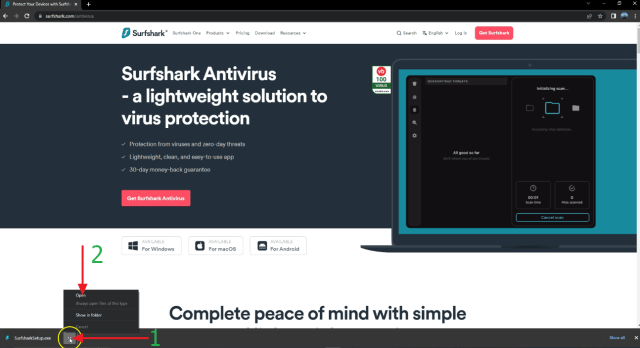
3. You will see on the bottom side that it is downloading and just wait for it to finish.

Surfshark Antivirus


4. Just follow the indicated numbers on the arrows.

Surfshark Antivirus


5. Now, click Install.

Surfshark Antivirus


6. This may take several minutes to setup, once it’s done click the Finish button to exit.

Surfshark Antivirus


7. Go to the Surfshark App and open then Create an account, Sign Up, or Log In with your Credentials. Then click on Log in.

Surfshark Antivirus


8. Click Let’s Go

Surfshark Antivirus


9. Turn On Auto Connect if you have your WIFI then click the ‘x’ button at the upper right to exit.

Surfshark Antivirus


10. On the Left upper side Click the Antivirus.

Surfshark Antivirus


11. Then click Install Antivirus.

Surfshark Antivirus


12. Set back and relax while the Antivirus Setup is complete. Once it’s done click Open Antivirus on the lower bottom right.

Surfshark Antivirus


13. That’s it! You can now scan your windows with Surfshark Antivirus.

Surfshark Antivirus

Surfshark Antivirus


YOUR INTERNET ACTIVITY IS BEING WATCHED

ReviewVPN cannot attest to the legality, security and privacy of the applications discussed on this site. It is highly recommended that you use a VPN service while streaming or using Kodi.

Currently, your IP 216.73.216.141 is visible to everyone and your Browser is being tracked by Advertisers & ISP Provider.

Save 65% Now

Limited Time Offer

Here are the main reasons why you must use a VPN:

  • Your activities are hidden from your ISP, the government, and from the apps you are using.
  • You can access additional movies and TV streams.
  • ISP attempts to throttle are thrwarted thus reducing buffering issues.
  • Geographically restricted content like Netflix and Hulu can be unblocked.

A VPN works be replacing your ISP-assigned IP address and creating an encrypted tunnel. We recommend the no log service offered by IPVanish. It works well on a Firestick and offers the fastest possible speeds.

Special Limited Time Offer - Get IPVanish


Legal Disclaimer: ReviewVPN.com does not encourage or endorse any illegal activity involved in the usage of services and applications referenced on this site. We do not verify the licensing agreements of services. The end-user is wholly responsible for ensuring that any media accessed through these services does not violate copyright and/or licensing laws. ReviewVPN does not promote, link to, or receive compensation from any Apps and IPTV services.


Install Surfshark on Firestick

Get the Best Antivirus Deal


Surfshark Antivirus Features on Windows

  • Affordable Price
  • Applicable to Windows, Android, Mac, iOS, and many more
  • Tested and Certified by AV-Test
  • Impressive Malware Detection Function
  • Real-Time Protection
  • Different Types of Device Scanning (Full Scan, Quick Scan, and Custom Scan)
  • Surfshark One (VPN, Search Engine, Alert)
  • Easy to Use
  • 27/7 Customer Support


Surfshark One

When you purchase Surfshark Antivirus, you will get three extra features known as the Surfshark One. These features are Surfshark VPN, Surfshark Searh, and Surfshark Alert.


Surfshark VPN

Surfshark Antivirus has a built-in VPN service. It is one of the best VPNs in the market today.

Surfshark VPN follows the no-log policy. This means the program will never collect the user’s data and information nor will it record your exact location, online activities, etc.

Surfshark VPN uses military-grade AES-256 encryption. It also has features that not all VPNs provide like Kill Switch, DNS Leak Protection, and many more. The main goal is to provide multiple layers of protection with the use of different VPN protocols it uses.

A VPN can also connect you to a different server from other countries which will help you bypass geo-restrictions.


Surfshark Search

Search engines such as Google are not 100%  safe. Most of them collect your data and build your algorithm depending on your searches. This is the reason why you see ads first on the first page when you search for a topic. Surfshark values your privacy, this Search feature will make you browse the web in incognito mode. You will definitely have the ability to explore the web without being tracked. Nothing beats this private search engine from Surfshark One.


Surfshark Alert

The Surfshark Alert feature is a data breach monitoring function. It works by searching the web and seeing that none of your data is leaked. Just in case your data is leaked, Surfshark will send you a warning to alert you. This is very useful on your financial accounts like bank transactions, email monitoring, and ID scanning.


Pros and Cons

Pros

  • Part of the Microsoft Virus Initiative (MVI)
  • Has Lightweight solutions
  • Scans 5 devices in one account
  • Lots of features in one software
  • Does not collect your personal data
  • Real-time monitoring
  • 30-day money-back guarantee
  • Includes VPN with the best VPN features
  • Customized scans
  • Clean Web Features
  • Private search engine
  • WireGuard protocol
  • Data breach monitoring
  • Great customer support


Cons

  • No firewall
  • ID check is not available in all countries


SurfShark VPN

Surfshark vpn

Surfshark does not only offer Antivirus but a lot of great software like Incogni and VPN. The Surfshark VPN is a top-notch service that values the users’ privacy and security. If you are using Firestick, here is how you can install it on your device.


How to Install Surfshark on Firestick with Screenshots

You can download Surfshark directly from the Amazon App store. It will be easy for you to find Surfshark with your Firestick’s Find feature. Refer to our screenshots below.

Follow our screenshots below to install the Surfshark VPN app on your Fire TV stick.

1. Go to the Home screen of your Firestick.

step 1 Install Surfshark VPN on Firestick


2. Navigate toward the Find tab. Press the Search button from the resulting dropdown.

step 2 Install Surfshark VPN on Firestick


3. Type in the keyword of Surfshark and select from the suggestions that will appear.

step 3 Install Surfshark VPN on Firestick


4. Click the official Surfshark icon from your search results.

step 4 Install Surfshark VPN on Firestick


5. Press the Download (You own it) button.

step 5 Install Surfshark VPN on Firestick


6. The Surfshark VPN installer will download on your device.

step 6 Install Surfshark VPN on Firestick


7. Surfshark VPN’s app will automatically install itself on your Fire TV stick.

step 7 Install Surfshark VPN on Firestick


8. Press the Open button after completing Surfshark VPN’s installation process.

step 8 Install Surfshark VPN on Firestick


9. Please wait for the Surfshark VPN to load its user interface.

step 9 Install Surfshark VPN on Firestick


10. You can now log in with your Surfshark VPN account credentials.

step 10 Install Surfshark VPN on Firestick

Learn more about Surfshark and Grab the Best Surfshark Deal Now!


Install Surfshark on Firestick

Best Surfshark Deal


Other VPNs to Consider

NordVPN (Best for Streaming)

Best Features

  • 5000+ Server in 50+ Countries 
  • Military-Grade Encryption
  • Fast Connection Speed
  • Suitable to a lot of devices
  • No-Log Policy

Prices
  • Complete $5.89 per month (64% Discount)
  • Plus $4.59 per month (56% Discount)
  • Standard $3.69 per month (55% Discount)

Best Features

  • 750+ High-speed VPN Servers in 43 Locations
  • Military-Grade Encryption
  • Fastest HD Streaming and Gaming
  • 30-Day Money-Back Guarantee
  • Unlimited Data & Devices
  • No-Log Policy

Prices
  • 3 Years $1.99 per month (82% Discount)
  • 1 Years $3.29 per month (70% Discount)
  • 1 Month $10.99 per month

IPVanish VPN (Most Secure)

Best Features

  • 1200+ Servers in 60+ Countries around the world
  • Unlimited Connections
  • No-Log Policy
  • Top Notch Military-Grade VPN Protocols and Encryptions
  • 100% Safe and Secured
  • Most Trusted VPN
  • Best VPN for Firestick
  • 30-Day Money-Back Guarantee

Prices
  • Yearly $3.99 per month (63% Discount) – 30 days risk free + Ransomware & Malware Protection
  • Quarterly $5.32 per month (51% Discount)
  • Monthly $10.99 per month


For more VPN discounts, go to ReviewVPN Deals and purchase the best VPN for you.

Click here to get the lowest price on Surfshark through our exclusive limited-time offer.


Conclusion

You can use Surfshark on whatever type of device you are using. Since Windows is the most prone to viruses, malware, etc., it is better that you use an Antivirus for it. Upon reviewing and testing Surfshark Antivirus, we can say that this is a great software to consider.

How to Install Surfshark VPN on Android

Surfshark VPN

In this article, we will help you install Surfshark VPN on your Android device. Whether you are using your Android phone or tablet, this article is for you.

Surfshark VPN is one of the best VPNs in the market today that is compatible with almost all types of devices including Android. It has a military-grade VPN protocol and encryption suitable for almost all devices. One of the best features of Surfshark VPN is how it values the privacy and anonymity of the users.

Surfshark VPN is available in the Google App Store. You can easily search for it if you like to install it on your device.


Why is It Important to Use a VPN?

You need a VPN if your value your privacy. Trackers are everywhere. Most domains, search engines, advertisers, and even your internet service provider always track your every move and profile you. They can locate you based on your IP address. There is where the function of a VPN works. A reliable VPN can change your IP address, and connect you to a different country. This will stop all trackers from knowing your online activities. A VPN can also bypass geo-restrictions and

The best VPN for Windows is Surfshark because of its many features that can help your device. One of these features is Antivirus. It also has military-grade encryption and VPN protocols that will surely value your online safety.


ANONYMOUSLY


How To Install Surfshark VPN on Your Android Devices

1. Go to your Play Store App.

Surfshark VPN on Your Android


2. Go to the search bar and type Surfshark VPN App then click Install.

Surfshark VPN on Your Android


3. After installation click Open.

Surfshark VPN on Your Android


4. Click on login then Log In with your Credentials.

Surfshark VPN on Your Android


5. Now type in your email and password then click on Log In.

Surfshark VPN on Your Android


6. Surfshark installed. You can now connect to the server you want.

Surfshark VPN on Your Android


YOUR INTERNET ACTIVITY IS BEING WATCHED

ReviewVPN cannot attest to the legality, security and privacy of the applications discussed on this site. It is highly recommended that you use a VPN service while streaming or using Kodi.

Currently, your IP 216.73.216.141 is visible to everyone and your Browser is being tracked by Advertisers & ISP Provider.

Save 65% Now

Limited Time Offer

Here are the main reasons why you must use a VPN:

  • Your activities are hidden from your ISP, the government, and from the apps you are using.
  • You can access additional movies and TV streams.
  • ISP attempts to throttle are thrwarted thus reducing buffering issues.
  • Geographically restricted content like Netflix and Hulu can be unblocked.

A VPN works be replacing your ISP-assigned IP address and creating an encrypted tunnel. We recommend the no log service offered by IPVanish. It works well on a Firestick and offers the fastest possible speeds.

Special Limited Time Offer - Get IPVanish


Legal Disclaimer: ReviewVPN.com does not encourage or endorse any illegal activity involved in the usage of services and applications referenced on this site. We do not verify the licensing agreements of services. The end-user is wholly responsible for ensuring that any media accessed through these services does not violate copyright and/or licensing laws. ReviewVPN does not promote, link to, or receive compensation from any Apps and IPTV services.


Install Surfshark on Firestick

Get the Best Surfshark Deal


Surfshark VPN on Android – Features

Surfshark VPN has a lot of great VPN features plus additional features that are not present in other VPN services. Here are some of the best features of Surfshark VPN on Android.

  • Has 3,200 available servers worldwide in 100+ locations
  • You can choose a server, specific city, and country that you like to connect
  • Provides top-notch military-grade VPN protocols and encryptions
  • Bypass geo-restrictions and unblock all popular streaming platforms like Netflix, Hulu, YouTube, and more
  • Connects unlimited devices simultaneously
  • Follows the No-log policy
  • Offers a 30-day money-back guarantee
  • Provides an extra Cloud Storage
  • P2P-friendly VPN for Torrenting
  • SOCKS5 Proxy features
  • Has a Kill Switch function
  • Provides Split Tunneling
  • Guaranteed DNS Leak Protection
  • Shadowshock Features

For more detailed features, read our Surfshark VPN review.


Pros and Cons

Pros

  • Additional features
  • Also offers Antivirus service
  • Connects Unlimited devices
  • Zero log policy
  • Has a CleanWeb Feature
  • Provides Wireguard VPN Protocol
  • Bypass geo-restrictions of almost all streaming platforms


Cons

  • There is no Split tunneling on Apple devices
  • You won’t find add-ons for dedicated IP address


Surfshark VPN on Android Alternatives

Aside from Surfshark, there are tons of other VPNs that you can use for Android devices. Here are some of the best alternatives you can use aside from Surfshark VPN

Other VPNs to Consider

NordVPN (Best for Streaming)

Best Features

  • 5000+ Server in 50+ Countries 
  • Military-Grade Encryption
  • Fast Connection Speed
  • Suitable to a lot of devices
  • No-Log Policy

Prices
  • Complete $5.89 per month (64% Discount)
  • Plus $4.59 per month (56% Discount)
  • Standard $3.69 per month (55% Discount)

Best Features

  • 750+ High-speed VPN Servers in 43 Locations
  • Military-Grade Encryption
  • Fastest HD Streaming and Gaming
  • 30-Day Money-Back Guarantee
  • Unlimited Data & Devices
  • No-Log Policy

Prices
  • 3 Years $1.99 per month (82% Discount)
  • 1 Years $3.29 per month (70% Discount)
  • 1 Month $10.99 per month

IPVanish VPN (Most Secure)

Best Features

  • 1200+ Servers in 60+ Countries around the world
  • Unlimited Connections
  • No-Log Policy
  • Top Notch Military-Grade VPN Protocols and Encryptions
  • 100% Safe and Secured
  • Most Trusted VPN
  • Best VPN for Firestick
  • 30-Day Money-Back Guarantee

Prices
  • Yearly $3.99 per month (63% Discount) – 30 days risk free + Ransomware & Malware Protection
  • Quarterly $5.32 per month (51% Discount)
  • Monthly $10.99 per month


For more VPN discounts, go to ReviewVPN Deals and purchase the best VPN for you.

Click here to get the lowest price on Surfshark through our exclusive limited-time offer.


FAQs

What is Surfshark?

Surfshark is one of the leading VPN services worldwide. Its best features are bypassing geo-restrictions, thousands of available servers, unlimited devices, VPN encryptions, Shadowshock, Antivirus, and many more. Surfshark VPN is the best VPN you can use for Android devices.


Does Surfshark VPN work on Android devices?

Surfshark VPN is compatible with a lot of devices including Android devices.


Is Surfshark a Good VPN?

Yes. Surfshark VPN works very well on all types of devices including Android. It provides privacy and anonymity to the user with an unlimited number of devices. One account can protect your whole family.


Is Surfshark Free?

You can install Surfshark VPN for free but you need to pay for an account on a monthly or yearly basis. Click here to get the best Surfshark VPN deal.


Is Surfshark Safe?

Yes. Surfshark is 100% safe. It is a VPN that really values safety and privacy for its users.


Conclusion

Surfshark VPN is the best VPN to use for Android. It has all of the features needed to have safe, and private streaming on your device. It is available in the Google Play Store. You can easily install it on your device.

There are also other VPNs that can work well with Android including NordVPN, Atlas VPN, and IPvanish.

We hope that we are able to help you install Surfshark VPN on your Android devices. If you have other concerns, just let us know in the comment section below.

How to Install Surfshark VPN on Windows

Surfshark VPN on Windows

In this article, we will show you how you can install Surfhark VPN on Windows

Surfshark is one of the leading brands when it comes to VPN service. It has thousands of available servers where you can connect to access geo-restricted content, and protect your privacy.

Surfshark VPN is also available to so many devices including Windows. It is very easy to download Surfshark to your Windows device. This platform also comes with an Antivirus program that is very much needed when surfing the internet. Since our PCs are prone to a lot of malware, ransomware, etc., it is important that we use Surfshark with it.


Why is It Important to Use a VPN?

A virtual private network or VPN is important for people who value their privacy. There are so many trackers online. Different domains, search engines, advertisers, and even your internet service provider track your every move for their own good. They can locate you based on your IP address. A VPN can change your IP address, and connect you to a different country. This will block all trackers from knowing your online activities, plus help you bypass geo-restrictions when streaming online.

The best VPN for Windows is Surfshark because of its many features that can help your device. One of these features is Antivirus. It also has military-grade encryption and VPN protocols that will surely value your online safety.


ANONYMOUSLY


How To Install Surfshark VPN on Windows

1. Go to https://surfshark.com

Surfshark VPN


2. Select Download.

Surfshark VPN


3. Scroll down then choose Windows

Surfshark VPN


4. Click on Download the Windows App

Surfshark VPN


5. You will see then on the bottom side that it is downloading and just wait for it to finish.

Surfshark VPN


6. Just follow the indicated numbers on the arrows

Surfshark VPN


7. Click Install.

Surfshark VPN


8. After installation click on Finish.

Surfshark VPN


9. Go to the Surfshark App and open then Create an account, Sign Up, or Log In with your Credentials. Then click on Log in.

Surfshark VPN

Surfshark VPN


10. Surfshark installed. You can now connect to the server you want.

Surfshark VPN


YOUR INTERNET ACTIVITY IS BEING WATCHED

ReviewVPN cannot attest to the legality, security and privacy of the applications discussed on this site. It is highly recommended that you use a VPN service while streaming or using Kodi.

Currently, your IP 216.73.216.141 is visible to everyone and your Browser is being tracked by Advertisers & ISP Provider.

Save 65% Now

Limited Time Offer

Here are the main reasons why you must use a VPN:

  • Your activities are hidden from your ISP, the government, and from the apps you are using.
  • You can access additional movies and TV streams.
  • ISP attempts to throttle are thrwarted thus reducing buffering issues.
  • Geographically restricted content like Netflix and Hulu can be unblocked.

A VPN works be replacing your ISP-assigned IP address and creating an encrypted tunnel. We recommend the no log service offered by IPVanish. It works well on a Firestick and offers the fastest possible speeds.

Special Limited Time Offer - Get IPVanish


Legal Disclaimer: ReviewVPN.com does not encourage or endorse any illegal activity involved in the usage of services and applications referenced on this site. We do not verify the licensing agreements of services. The end-user is wholly responsible for ensuring that any media accessed through these services does not violate copyright and/or licensing laws. ReviewVPN does not promote, link to, or receive compensation from any Apps and IPTV services.


Install Surfshark on Firestick

Get the Best Surfshark Deal


Surfshark VPN on Windows – Features

Surfshark VPN offers a wide variety of features that are all centered on privacy. Here are some of the many Surfshark VPN features for Windows PC.

  • Offers 3,200+ servers from 100+ locations all over the world
  • Military-grade VPN protocols and encryption
  • Unblocks all popular streaming platforms like Netflix, Hulu, YouTube, and more
  • Connects unlimited devices simultaneously
  • Follows the Zero-log policy
  • Offers a 30-day money-back guarantee
  • Provides an extra Cloud Storage
  • P2P-friendly VPN for Torrenting
  • SOCKS5 Proxy features
  • Has a Kill Switch function
  • Provides Split Tunneling
  • Guaranteed DNS Leak Protection
  • Shadowshock Features

For more detailed features, read our Surfshark VPN review.


Pros and Cons

Pros

  • Connects Unlimited devices
  • No log policy
  • CleanWeb Feature
  • Wireguard VPN Protocol
  • Amazing VPN features
  • Additional features
  • Antivirus service
  • Unblocks almost all popular streaming platforms


Cons

  • Split tunneling is not available on Apple devices
  • There are no available add-ons for dedicated IP address


Surfshark VPN on Windows Alternatives

Aside from Surfshark, there are tons of other VPNs that you can use for Windows. Here are some of the best choices:

Other VPNs to Consider

NordVPN (Best for Streaming)

Best Features

  • 5000+ Server in 50+ Countries 
  • Military-Grade Encryption
  • Fast Connection Speed
  • Suitable to a lot of devices
  • No-Log Policy

Prices
  • Complete $5.89 per month (64% Discount)
  • Plus $4.59 per month (56% Discount)
  • Standard $3.69 per month (55% Discount)

Best Features

  • 750+ High-speed VPN Servers in 43 Locations
  • Military-Grade Encryption
  • Fastest HD Streaming and Gaming
  • 30-Day Money-Back Guarantee
  • Unlimited Data & Devices
  • No-Log Policy

Prices
  • 3 Years $1.99 per month (82% Discount)
  • 1 Years $3.29 per month (70% Discount)
  • 1 Month $10.99 per month

IPVanish VPN (Most Secure)

Best Features

  • 1200+ Servers in 60+ Countries around the world
  • Unlimited Connections
  • No-Log Policy
  • Top Notch Military-Grade VPN Protocols and Encryptions
  • 100% Safe and Secured
  • Most Trusted VPN
  • Best VPN for Firestick
  • 30-Day Money-Back Guarantee

Prices
  • Yearly $3.99 per month (63% Discount) – 30 days risk free + Ransomware & Malware Protection
  • Quarterly $5.32 per month (51% Discount)
  • Monthly $10.99 per month


For more VPN discounts, go to ReviewVPN Deals and purchase the best VPN for you.

Click here to get the lowest price on Surfshark through our exclusive limited-time offer.


FAQs

Is Surfshark a Good VPN?

Surfshark is definitely a good VPN. In fact, it is one of the best VPNs in the market today because of its advanced and added features.


What is Surfshark?

Surfshark is a platform that offers the best Virtual Private Network (VPN) service to its users. It also has antivirus software. Surfshark focuses on privacy and safety for your device.


Is Surfshark Free?

Surfshark is free to install but you need to pay on a monthly basis in order to enjoy its service.


Is Surfshark Safe?

Yes. Surfshark is 100% safe. It is a VPN that really values safety and privacy for its users.


Conclusion

Surfshark VPN is a great platform that is available to a lot of devices including Windows. It has a lot of great features that focus on privacy and safety. It is easy to install Surfshark on your Windows device. You only have to get the best deals in order to enjoy this VPN service.

We hope that we are able to help you install Surfshark VPN on Windows. If you have any questions, let us know in the comment section below. Thank you for your time.

How to Watch Super Bowl 2023 Even Without Cable (FREE)

Super Bowl 2023

In this article, we will tackle the different ways how to watch the NFL Super Bowl 2023.

Get ready to know all the details from the exact date, to live streams, channels, and even this year’s halftime show.

The NFL Super Bowl has been the most sought-after sports event not only in the USA but also in other parts of the world. Millions of football fans will gather to watch the final competition for this season. The Philadelphia Eagles are the first to secure a spot after defeating the San Francisco 49ers in the NFC Championship Game. On the other hand, they will face the Kansas City Chiefs after defeating the Cincinnati Bengals in the AFC Championship Game.

For this year, the FOX channel will host the streaming. You can watch the full game on FOX, FOX Sports, and FOX Deportes. If you are going to watch using your Amazon Firestick, you can use Fox Sports. But there are also other ways how you can stream the super bowl LVII on your device even without cable. Learn all of those as you continue reading this article


ANONYMOUSLY


Super Bowl 2023 Details

Date: February 12, 2023, Sunday

Time: 6:30 PM (ET)

Location: State Farm Stadium in Glendale, Arizona

Channel/Streaming: FOX (English broadcast), FOX Deportes (Spanish broadcast)

Teams:  Philadelphia Eagles vs Kansas City Chiefs

Halftime Show Performer/s: Rihanna


How to Watch Super Bowl 2023 (Video)


Watch Super Bowl 2023 on FOX Sports App

FOX Sports App is the official sports application of the FOX channel. Since FOX will host the show for this year’s Super Bowl LVII, you can install the FOX Sports app on your device to watch it.

If you are in the USA, you can easily install the FOX Sports app directly from the Amazon App Store. Otherwise, you need to Unblock FOX outside the US.

If your Firestick still has the older interface, read this article to learn how to update it: Update Firestick Interface.

How to Install FOX Sports on Firestick with Screenshots

1.   Click FIND.

Step 6 jailbreak firestick


2. Click Search.

Step 7 jailbreak firestick


3. Type FOX Sports and click on the suggestion

Super Bowl


4. Tap the icon of the app when it appears

Super Bowl


5. Click the Get or Download button to install the app

Super Bowl


6. Select Open to launch the app

Super Bowl


7. Wait for the app to launch

Super Bowl


8. You can sign in to your Fox Sports account if you have any. If you don’t have an account yet, you can choose between signing up or “maybe later” to advance.

Super Bowl


9. You can sign in with your TV/cable provider or Skip if you don’t have any.

Super Bowl


10. You can now start streaming on Fox Sports.

Super Bowl


YOUR INTERNET ACTIVITY IS BEING WATCHED

ReviewVPN cannot attest to the legality, security and privacy of the applications discussed on this site. It is highly recommended that you use a VPN service while streaming or using Kodi.

Currently, your IP 216.73.216.141 is visible to everyone and your Browser is being tracked by Advertisers & ISP Provider.

Save 65% Now

Limited Time Offer

Here are the main reasons why you must use a VPN:

  • Your activities are hidden from your ISP, the government, and from the apps you are using.
  • You can access additional movies and TV streams.
  • ISP attempts to throttle are thrwarted thus reducing buffering issues.
  • Geographically restricted content like Netflix and Hulu can be unblocked.

A VPN works be replacing your ISP-assigned IP address and creating an encrypted tunnel. We recommend the no log service offered by IPVanish. It works well on a Firestick and offers the fastest possible speeds.

Special Limited Time Offer - Get IPVanish


Legal Disclaimer: ReviewVPN.com does not encourage or endorse any illegal activity involved in the usage of services and applications referenced on this site. We do not verify the licensing agreements of services. The end-user is wholly responsible for ensuring that any media accessed through these services does not violate copyright and/or licensing laws. ReviewVPN does not promote, link to, or receive compensation from any Apps and IPTV services.


Install Surfshark on Firestick

Get the Best Surfshark Deal


Watch the NFL Super Bowl using Paid Subscription Apps

If you don’t mind paying to be updated on current events and standings regarding the NFL Super Bowl, here are the best choices of streaming apps for you.


NFL App

NFL App provides updates about the current standing, live events, and highlights for the National Football League.

This application can be downloaded for free but you need to pay for a subscription. It is your very own ticket to watch the games.

The subscription price is $99 for one whole season.

If you are outside the USA, you can still download the NFL Game Pass International. Using this app, you can watch all the NFL live games.


How to Install the NFL Game Pass International on Firestick with Screenshots

1.   Click FIND.

Step 6 jailbreak firestick


2. Click Search.

Step 7 jailbreak firestick


3. Type NFL App and click on the suggestion

NFL 1


4. Tap the icon of the app when it appears

NFL 2


5. Click the Get or Download button to install the app

NFL 3


6. Wait for the app to be installed

NFL 4


7. Select Open to launch the app

NFl 5


Plex

The Plex app has both free and paid subscriptions. Of course, the paid subscription has a better offer than the free one.

And the good news to all Plex users is the football season the NFL is available on the app. You can go to the Official Plex website to register and stream this year’s game of the season.

Plex has many features to offer to its users. To know more about this app, go to Plex App review for firestick.

This app is available to all countries, although the content may vary depending on your location.


Install Plex on Firestick with Screenshots

1.   Click FIND.

Step 6 jailbreak firestick


2. Click Search.

Step 7 jailbreak firestick


3. Type in Plex on your search engine and select the suggestion

Plex 3


4. Tap on the Plex icon

Plex 4


5. Select the “Get” or “Download” button

Plex 5


6. Wait for the app to be installed

Plex 6


7. Click the “Open” button to launch the app

Plex 7


Fubo TV

Fubo TV  is a live TV focused on sports content. It stores the best leagues, teams, and shows like the NFL.

It has a lot of channels to offer. Some of these are ESPN, NBC, NBA, MLB, and many more.

You can choose from three different plans to stream the app. Although you can also try using the free trial first.

Family = $64.99 per month

Elite = $79.99 per month

Fubo Latino = 29.99 per month

The Fubo TV app is not available in some other countries. If you are located in the USA, and other non-geo-blocked countries, then you can install the app directly from the Amazon App Store.

To register and stream Fubo TV, you can go to the Official Fubo TV Website.


How to Install Fubo TV on Firestick with screenshots

1.   Click FIND.

Step 6 jailbreak firestick


2. Click Search.

Step 7 jailbreak firestick


3. Type Fubo TV and click on the suggestion

FUBO 1


4. Tap the icon of the app when it appears

FUBO 2


5. Click the Get or Download button to install the app

FUBO 3


6. Wait for the app to be installed

FUBO 4


7. Select Open to launch the app

FUBO 5


AT&T TV

AT&TV is a cable subscription. Using this, you can stream videos and live TV from famous channels like HBO, CNN, CW, Fox, NBC, CBS, and many more.

You can also install this directly on your firestick device. Although the installation process is free, there will be monthly subscription payments.

An amount of $69.99  per month. Taxes are included in this payment.


Install AT&T TV on Firestick Guide

  1. On your Firestick Home Screen, click once to the left and hit the center button to access the search function.
  2. Type in AT&T TV
  3. Choose the AT&T TV App Icon
  4. Click on Get
  5. Select Open


Youtube TV

This app is known for having the best content that you wish to stream on your fire tv. If you are into sports, news, and entertainment, Youtube TV offers a wide selection of channels for these genres and more.

You can subscribe to this app for the amount of  $64.99 per month.


Install Youtube TV on Firestick Guide

  1. On your Firestick Home Screen, click once to the left and hit the center button to access the search function.
  2. Type in Youtube TV
  3. Choose the Youtube TV App Icon
  4. Click on Get
  5. Select Open


Hulu + Live TV

Hulu + Live TV is a paid streaming service that treats its subscribers to more than 50 channels for Live TV. This includes Sports, Food, Travel, Business, and many more.

This is the cheapest deal compared to other ones on this list. You can stream shows with a subscription of Price: $54.99 per month.


Install Hulu on Firestick Guide

  1. On your Firestick Home Screen, click once to the left and hit the center button to access the search function.
  2. Type in Hulu
  3. Choose the Hulu App Icon
  4. Click on Get
  5. Select Open


Amazon Prime Video

Amazon Prime Video is Amazon’s very own video streaming service. You can watch movies, TV Shows, and Live TV channels using this app. This includes live games like the NFL, MLB, and NBA.

Amazon Prime Video service is already pre-installed on the Firestick so there will be no need to install it manually.

It is not a free service though, The price starts with a 3-day free trial, and then it charges $5.99 per month.


How To Watch NFL on Amazon Prime Video

  1. Launch Amazon Prime Video on your Firestick
  2. Use the Search Function
  3. Type in NFL
  4. Scroll to the right and choose NFL
  5. Click on the NFL icon
  6. Navigate through the episodes and click on one.


Sling TV

This app offers about 30 channels to stream. You can either choose between Sling Blue and Sling Orage subscriptions.

Using the app, you can even customize the service that you chose. You can combine both packages or you can have add-ons for Sports and Comedy.

The add-on Sports channels are applicable to the Blue package. But there will be no need to have the additional channels because the Blue package already has Fox Sports. That is good enough to let you watch NFL Live.

Sling TV  Blue amounts to $30 per month.

Tutorial

  1. Register for an account at https://news.sling.com/registration
  2. On your Firestick Home Screen, click once to the left and hit the center button to access the search function.
  3. Type in Sling TV
  4. Choose the Sling TV Icon
  5. Click on Get
  6. Select Open
  7. Login to your credentials.
  8. You can now start watching the NFL.


Stream the Super Bowl 2023 via Live Stream in Canada, Mexico, the UK, Australia, and Germany:

If you are located anywhere in Mexico, the UK, Australia, and Germany, you can tune in on the following websites to stream the 55th NFL Super Bowl. Just click on the links stated below:

Canada – DAZN

Mexico – Azteca 7

The UK – BBC Player

Australia – 7 plus

Germany – ProSieban

You can still stream on these websites even if you are not located in any of the stated countries. All you need to do is connect your VPN to any Mexican, UK, Australian or German server.


Watch NFL Super Bowl 2023 using Free Streaming Websites

You can still watch the much-awaited sports event of the season by streaming it live on these websites:

 Reminder: Make sure to have a VPN running on your device before you access these websites.

  • https://ustvgo.tv/nfl-redzone/
  • https://123tvnow.com

Learn more about streaming on different websites when you read about Firefox and Silk Browser.


Website to Avoid:

https://sports24.club/

This website required personal information and credit card details to stream the content. Always be mindful of these kinds of websites when you stream any content.


Super Bowl 2023 Halftime Show

The stage will definitely shine bright like a diamond for Rihanna as she will perform for this year’s Super Bowl halftime show. There is no definite news yet if there will be some other special guests and performers. It is Rihanna’s first public performance ever since 2018.

This year will be a big change for the Super Bowl halftime show. For ten consecutive years, PEPSI acted as the primary sponsor, but this year the beverage company gave way to focusing on other opportunities with NFL. One of which is the NFL draft.

This will be the first year for Apple Music to act as the Super Bowl halftime show’s main sponsor.


Stream Super Bowl Safely with a VPN

surfshark logo

Streaming activities require many data which is very alarming to your Internet Service Provider  (ISP). Because of this, your ISP throttles your bandwidth.

To stop this from happening, you need to have a VPN.

A VPN will hide your identity and connect you to a different server that will give you access to geo-blocked content. The best example of this is the NFL Super Bowl. a VPN will help you stream the live game even if you are not anywhere near the USA.

The best VPN to use is Surfshark.

Here are some of the best benefits given by Surfshark:

  • Gives you an additional wall of protection especially from your ISP while surfing and streaming.
  • Serves as a bridge that connects you to other servers and destroys geo-blocks that hinder you from accessing different contents.
  • Protects your online identity from hackers, especially when you are using public wi-fi
  • Keeps your data and files from harmful malware
  • Your connections and data will be kept encrypted and anonymous
  • Makes your internet speed faster
  • Gives easy access and downloads from different torrent sites without being caught.
  • Prevents Firestick Buffering and Kodi Buffering


Install Surfshark on Firestick

Best Surfshark Deal


How to Install Surfshark VPN on Firestick

If your Firestick still has the older interface, read this article to learn how to update it: Update Firestick Interface.

Follow our screenshots below to install the SurfShark VPN app on your Fire TV stick.

1. Go to the Home screen of your Firestick.

step 1 Install Surfshark VPN on Firestick


2. Navigate toward the Find tab. Press the Search button from the resulting dropdown.

step 2 Install Surfshark VPN on Firestick


3. Type in the keyword of SurfShark and select from the suggestions that will appear.

step 3 Install Surfshark VPN on Firestick


4. Click the official SurfShark icon from your search results.

step 4 Install Surfshark VPN on Firestick


5. Press the Download (You own it) button.

step 5 Install Surfshark VPN on Firestick


6. The SurfShark VPN installer will download on your device.

step 6 Install Surfshark VPN on Firestick


7. SurfShark VPN’s app will automatically install itself on your Fire TV stick.

step 7 Install Surfshark VPN on Firestick


8. Press the Open button after completing SurfShark VPN’s installation process.

step 8 Install Surfshark VPN on Firestick


9. Please wait for the SurfShark VPN to load its user interface.

step 9 Install Surfshark VPN on Firestick


10. You can now log in with your SurfShark VPN account credentials.

step 10 Install Surfshark VPN on Firestick

Learn more about Surfshark and Grab the Best Surfshark Deal Now!


Install Surfshark on Firestick

Best Surfshark Deal


Other VPNs to Consider

NordVPN (Best for Streaming)

Best Features

  • 5000+ Server in 50+ Countries 
  • Military-Grade Encryption
  • Fast Connection Speed
  • Suitable to a lot of devices
  • No-Log Policy

Prices
  • Complete $5.89 per month (64% Discount)
  • Plus $4.59 per month (56% Discount)
  • Standard $3.69 per month (55% Discount)

Best Features

  • 750+ High-speed VPN Servers in 43 Locations
  • Military-Grade Encryption
  • Fastest HD Streaming and Gaming
  • 30-Day Money-Back Guarantee
  • Unlimited Data & Devices
  • No-Log Policy

Prices
  • 3 Years $1.99 per month (82% Discount)
  • 1 Years $3.29 per month (70% Discount)
  • 1 Month $10.99 per month

IPVanish VPN (Most Secure)

Best Features

  • 1200+ Servers in 60+ Countries around the world
  • Unlimited Connections
  • No-Log Policy
  • Top Notch Military-Grade VPN Protocols and Encryptions
  • 100% Safe and Secured
  • Most Trusted VPN
  • Best VPN for Firestick
  • 30-Day Money-Back Guarantee

Prices
  • Yearly $3.99 per month (63% Discount) – 30 days risk free + Ransomware & Malware Protection
  • Quarterly $5.32 per month (51% Discount)
  • Monthly $10.99 per month


For more VPN discounts, go to ReviewVPN Deals and purchase the best VPN for you.

Click here to get the lowest price on Surfshark through our exclusive limited-time offer.


FAQs for Super Bowl 2023

What Channel Will Host The Super Bowl 2023

For this year, The FOX channel will host the Super Bowl LVII. You can watch the game on Fox Sports, and Fox Deportes.


What are the Channels that feature Live NFL Matches?

The most popular channels that feature NFL are Fox, CBS, ESPN, NBC, and NFL Network on Firestick. You can access these channels on apps featured in our Best Live TV Apps.


Who will perform for this year’s NFL Super Bowl Halftime Show?

Rihanna will perform for the Super Bowl 2023 Halftime show. This is her first public performance since 2018, and the first year for Apple Music to work as the primary sponsor. It was the beverage company, PEPSI who acted as the primary sponsor for 10 consecutive years. Now, the brand gave way to focusing on other opportunities with NFL like the NFL draft.

There isn’t news yet if there will be some other guest performers for the halftime show,


Can I stream Super Bowl 2023 for free?

Yes, you can stream Super Bowl for free by signing up for a free trial on other platforms like Fubo TV. These free trials often come in the first week or month only when you subscribe.


Can I Watch Super Bowl 2023 Even Without Cable?

You can definitely watch the Super Bowl LVII even without cable subscriptions or satellite TV. By using paid subscription platforms that carry the FOX channel like YouTube TV, Fubo TV, Hulu+Live TV, Direct TV Stream, and more.


Who are the other artists that performed during the Super Bowl Halftime Shows?

Many famous artists have graced the stage for the Super Bowl Halftime Show like Beyonce, Katy Perry, Bruno Mars, Lady Gaga, Adam Levigne, Madonna, Jennifer Lopez, Shakira, and many more.


How to Watch Live Sports on Firestick?

You can refer to our article on Best Free Sports Apps to get the top sports apps for Firestick.


Conclusion

NFL Super Bowl is really a much-awaited sports event every year. Although it is very famous across the USA, football fans all over the world find it hard to watch and enjoy the game. That is why we listed all the possible ways to watch it using different streaming apps.

The best and sure way to watch it is by using the app of the hosting channel for this year which is the FOX channel. But you can still use other apps as well.

The best thing to do is to try the free legal apps before going through the free apps or the paid ones. Just make sure to have a VPN working while you are streaming and we assure you that you will enjoy watching the show of the season.


Final Thoughts

We hope that this article helped you learn how to watch the 2023 NFL Super Bowl on your firestick device.


Note: ReviewVPN.com does not own or operate any app nor does it endorse any. The main purpose of this article is strictly for educational purposes only.

You may also like:

Best Firestick Apps

50 Best Free Movie Streaming Sites

40 Best TV Show Websites


What Is Your Favorite Streaming App? Cast Your Vote Below.

How to Install VPN Monitor Dot on Firestick – Best Alternative for VPNSafety Dot

VPN Monitor Dot

In this article, we will help you install the VPN Monitor Dot on your Firestick and Android devices.

It is very important that we protect our privacy when streaming. Most of us are using a VPN to keep our online presence hidden from trackers. How about our VPN? Who or what should track it? VPN Monitor Dot is another alternative to VPNSafety Dot like VPN Privacy Dot. It works by monitoring our VPN services to make sure they are working fine.

When you activate your VPN Monitor Dot, you will find a small dot or light on the side. Green means your VPN is protecting your while red means it is not working.

With the recent update of VPNSafety Dot, it requires payment. It is amazing that free VPN monitoring applications such as VPN Monitor Dot are available.

VPN Monitor Dot is a third-party app, which means you need to Jailbreak your Firestick first and use the Downloader app to install it.


ANONYMOUSLY


VPN Monitor Dot APK for Android Devices


VPN Monitor Dot

Note: ReviewVPN.com does not host this APK file. It is hosted by Archive.org


If your Firestick still has the older interface, read this article to learn how to update it: Update Firestick Interface.


How to Install VPN Monitor Dot on Firestick

1.  From your home screen, go to Settings.

VPN Monitor Dot


2. Scroll down and to the right until you get to My Fire TV. Click on it.

VPN Monitor Dot


3. Select Developer options.

VPN Monitor Dot


4. Turn on ADB debugging and Apps from Unknown Sources.

VPN Monitor Dot


5. Click Turn On when the pop-up appears.

VPN Monitor Dot


6. Click Home, click FIND.

VPN Monitor Dot


7. Click Search.

VPN Monitor Dot


8. You can either say Downloader to your Alexa voice-enabled remote or start typing it. If you typed it, click on the suggestion when it appears.

VPN Monitor Dot


9. Click on the Downloader Icon.

VPN Monitor Dot


10. Click Download.

VPN Monitor Dot


VPN Monitor Dot


11. Click on Open.

VPN Monitor Dot


12. Click on Allow.

VPN Monitor Dot


13. Use the Downloader search tab.

VPN Monitor Dot


14. Type https://reviewvpn.com/vpnmon and click go.

VPN Monitor Dot


15. Wait for the APK to be downloaded.

VPN Monitor Dot

VPN Monitor Dot


16. Click install

VPN Monitor Dot


17. Click open.

VPN Monitor Dot


18. Click OK for the Beta Version message.

VPN Monitor Dot


19. Click the blue button at bottom of the screen to turn on VPN Monitor Dot.

VPN Monitor Dot


20. Click OK after reading the VPN Monitor Dot Service info.

VPN Monitor Dot


21. Click OK after reading the Important message

VPN Monitor Dot


22. Now that VPN Monitor Dot is activated, you will see a red or green icon in the top right corner of the screen.

VPN Monitor Dot


YOUR INTERNET ACTIVITY IS BEING WATCHED

ReviewVPN cannot attest to the legality, security and privacy of the applications discussed on this site. It is highly recommended that you use a VPN service while streaming or using Kodi.

Currently, your IP 216.73.216.141 is visible to everyone and your Browser is being tracked by Advertisers & ISP Provider.

Save 65% Now

Limited Time Offer

Here are the main reasons why you must use a VPN:

  • Your activities are hidden from your ISP, the government, and from the apps you are using.
  • You can access additional movies and TV streams.
  • ISP attempts to throttle are thrwarted thus reducing buffering issues.
  • Geographically restricted content like Netflix and Hulu can be unblocked.

A VPN works be replacing your ISP-assigned IP address and creating an encrypted tunnel. We recommend the no log service offered by IPVanish. It works well on a Firestick and offers the fastest possible speeds.

Special Limited Time Offer - Get IPVanish


Legal Disclaimer: ReviewVPN.com does not encourage or endorse any illegal activity involved in the usage of services and applications referenced on this site. We do not verify the licensing agreements of services. The end-user is wholly responsible for ensuring that any media accessed through these services does not violate copyright and/or licensing laws. ReviewVPN does not promote, link to, or receive compensation from any Apps and IPTV services.


Install Surfshark on Firestick

Get the Best Surfshark Deal


VPN Monitor Dot Features

  • 100% free
  • Works fine with Surfshark VPN
  • Monitors your VPN if it is really working


Why Do You Need a VPN?

surfshark logo

There are a lot of trackers and hackers on the web. When we are streaming, we tend to use links that we don’t exactly know the source and the host domain. This is the way how trackers and hackers were able to penetrate our privacy. Even Google, for example, can manipulate search results depending on our algorithm. So if you are going to ask why you need a VPN, the answer is for your peace of mind. A VPN should really focus on privacy. Aside from its ability to bypass geo-restrictions, a VPN works well by incorporating safety protocols, tools, and software to help keep your device safe from spying eyes.

The best VPN to use is Surfshark VPN. It is one of the best VPNs in the market today. IT can unblock almost all streaming platforms while providing a top-notch, military-grade security protocol.

Here are some of the best Surfshark VPN features:

  • 3200+ servers all over the world
  • Gives you an additional wall of protection from your ISP
  • Connects you to other servers and destroys geo-restrictions that hinder you from accessing different contents.
  • Protects your online privacy
  • Keeps your data and files from harmful malware with its very own Surfshark Antivirus software
  • Your connections and data will be kept encrypted and anonymous
  • No log policy
  • Makes your internet speed faster
  • Gives easy access and downloads from different torrent sites without being caught.
  • Prevents Firestick Buffering and Kodi Buffering

To learn more, read our Surfshark VPN review.


Install Surfshark on Firestick

Best Surfshark Deal


How to Install Surfshark VPN on Firestick

If your Firestick still has the older interface, read this article to learn how to update it: Update Firestick Interface.

Follow our screenshots below to install the SurfShark VPN app on your Fire TV stick.

1. Go to the Home screen of your Firestick.

step 1 Install Surfshark VPN on Firestick


2. Navigate toward the Find tab. Press the Search button from the resulting dropdown.

step 2 Install Surfshark VPN on Firestick


3. Type in the keyword of SurfShark and select from the suggestions that will appear.

step 3 Install Surfshark VPN on Firestick


4. Click the official SurfShark icon from your search results.

step 4 Install Surfshark VPN on Firestick


5. Press the Download (You own it) button.

step 5 Install Surfshark VPN on Firestick


6. The SurfShark VPN installer will download on your device.

step 6 Install Surfshark VPN on Firestick


7. SurfShark VPN’s app will automatically install itself on your Fire TV stick.

step 7 Install Surfshark VPN on Firestick


8. Press the Open button after completing SurfShark VPN’s installation process.

step 8 Install Surfshark VPN on Firestick


9. Please wait for the SurfShark VPN to load its user interface.

step 9 Install Surfshark VPN on Firestick


10. You can now log in with your SurfShark VPN account credentials.

step 10 Install Surfshark VPN on Firestick

Learn more about Surfshark and Grab the Best Surfshark Deal Now!


Install Surfshark on Firestick

Best Surfshark Deal


Other VPNs to Consider

NordVPN (Best for Streaming)

Best Features

  • 5000+ Server in 50+ Countries 
  • Military-Grade Encryption
  • Fast Connection Speed
  • Suitable to a lot of devices
  • No-Log Policy

Prices
  • Complete $5.89 per month (64% Discount)
  • Plus $4.59 per month (56% Discount)
  • Standard $3.69 per month (55% Discount)

Best Features

  • 750+ High-speed VPN Servers in 43 Locations
  • Military-Grade Encryption
  • Fastest HD Streaming and Gaming
  • 30-Day Money-Back Guarantee
  • Unlimited Data & Devices
  • No-Log Policy

Prices
  • 3 Years $1.99 per month (82% Discount)
  • 1 Years $3.29 per month (70% Discount)
  • 1 Month $10.99 per month

IPVanish VPN (Most Secure)

Best Features

  • 1200+ Servers in 60+ Countries around the world
  • Unlimited Connections
  • No-Log Policy
  • Top Notch Military-Grade VPN Protocols and Encryptions
  • 100% Safe and Secured
  • Most Trusted VPN
  • Best VPN for Firestick
  • 30-Day Money-Back Guarantee

Prices
  • Yearly $3.99 per month (63% Discount) – 30 days risk free + Ransomware & Malware Protection
  • Quarterly $5.32 per month (51% Discount)
  • Monthly $10.99 per month


For more VPN discounts, go to ReviewVPN Deals and purchase the best VPN for you.

Click here to get the lowest price on Surfshark through our exclusive limited-time offer.


VPN Monitor Dot Alternatives

There are two other options that work well like VPN Monitor Dot. As mentioned above you can use VPNSafety Dot but it is not free anymore. The other one, which is a very great alternative is VPN Privacy Dot. It works well like VPN Monitor Dot and is 100% free as well.


FAQs

What is VPN Monitor Dot?

VPN Monitor Dot works by checking if our VPN connection is working or not.


Does VPN Monitor Dot Work with Surfshark?

Yes. This app is applicable to Surfshark VPN.


Is VPN Monitor Dot Free?

Yes. The VPN Monitor Dot is 100% free.


Is VPN Monitor Dot Safe?

The VPN Monitor Dot is safe to install and use on your Firestick and Android devices.


Conclusion

It is great that we also monitor our VPN connections. We pay for these tools so they must be working well for us. Good thing, the VPN Monitor Dot is great and helpful too to check our VPNs.

What we really like is that VPN Monitor Dot is 100% free. Unlike its alternative app, VPNSafety Dot requires payment. VPN Monitor App is available for Firestick and Android devices. It also works well with Surfshark VPN.

We hope that we are able to help you install and use the VPN Monitor Dot on your streaming device.