Black Friday Amazon Firestick Deals for 2022

Overview

This article will provide you with the best Black Friday Amazon Firestick Deals this 2022.

Black Friday is coming up quickly, and it’s Alexa’s birthday. Because of this, Alexa has already made it possible for you to find and take advantage of the best Black Friday Deals on Amazon.

The Firestick, Fire TV, and Echo are among the Amazon Fire devices that are available at discounted prices. Furthermore, for years, these have been the lowest prices offered. Isn’t that exciting?

That’s why we’ve compiled a list of the best Black Friday Amazon Firestick deals available. Hurry and load your carts now since we’re sure their supplies won’t last long because of the great prices they’re offering.


ANONYMOUSLY


Best Black Friday Deals for Amazon Firestick

The Fire TV Stick gives you quick access to popular streaming services like Netflix, Prime Video, Hulu, Pluto TV, HBO Max, Sling, Disney+, Peacock, Freevee, Youtube, and more.

As a result, a single stick may be used to choose from among more than 1 million movies and TV shows and stream them. You can also use this device to browse and listen to millions of songs. Furthermore, the Firestick is also lightweight and simple to install on your TV sets.


Fire TV Stick 4k Max ($34.99)

Firestick 4k Max

The Fire TV Stick 4k Max, the most powerful streaming stick offered by Amazon, comes first on our list of Black Friday Amazon Firestick Deals. It is the best Fire TV stick currently on the market because it is 40% more powerful than the Firestick 4k. It supports Wi-Fi 6, the newest version of wifi, which provides faster 4K Ultra HD streaming. Also supported are Dolby Vision, HDR, HDR10+, and Dolby Atmos audio.

Additionally, it enables you to stream media from well-known platforms like Netflix, Prime Video, and Disney+. Likewise, you may access Sling TV and Youtube TV to watch live sports, news, and television.

Furthermore, it has an Alexa Voice Remote that you can use to access your preferred apps using either your voice or pre-programmed buttons. Alternatively, you may ask Alexa to check on things or carry out certain tasks on your smart devices. Plus, it sports a 750Mhz GPU with quick rendering.


Fire TV Stick 4k ($21.99)

Black Friday Amazon Firestick Deals - Firestick 4k

The latest Fire TV Stick 4k model is on sale for $21.99 during this Black Friday sale. It offers its users a 4K cinematic experience with its streaming quality and is compatible with HD TVs and 4K UHD TVs. Additionally, it has Home Theater audio with Dolby Atmos, which is available on a few Disney+ and Prime Video titles.

Furthermore, it comes with an Alexa Voice Remote that enables voice-activated channel searching. Your favorite apps will also be accessible with only one click thanks to its preset buttons. Plus, you may ask Alexa to stream music, check the weather, view live camera feeds, and perform other tasks.


Fire TV Stick Lite ($29.99)

Black Friday Amazon Firestick Deals - Firestick Lite

During the Black Friday Sale, you can also purchase the Fire TV Stick Lite for $29.99. Because it features basic remote control settings and is incredibly simple to use, it is perfect for first-time Firestick users. The Alexa Voice Control Remote is included with the Fire TV Stick Lite, even though several remote control options are missing. On your Firestick device, you may effortlessly search for apps and shows using the voice command capability.

Additionally, it gives you access to thousands of free movies and TV series and quick streaming in full HD. You may rely on this to listen to music, view your preferred live TV stations, and get the news and sports you want. All you need to do is plug in your TV and have a good internet connection, and you’re ready to go.

Firestick 3rd Gen ($39.99)

Black Friday Amazon Firestick Deals - Firestick 3rd Gen

The price of the Firestick 3rd Gen, which is the latest version of the popular Fire TV device, is more than that of earlier Firestick models, coming in at $39.99. However, it is thankfully also offered during the Black Friday Sale. What makes the Firestick 3rd Gen so desirable presently is that it is 50% more powerful than the previous version for fast Full HD streaming.

It’s Alexa Voice Remote is identical to that of the Fire TV Stick 4K and features pre-programmed buttons for quick access to services like Netflix, Disney+, Hulu, and Prime Video. As a result, you can access your preferred apps with only one remote control-click. There will be no more numerous clicks to access your favorite Firestick app. Furthermore, you can also use the voice command to search for and launch applications and shows.

Last but not least, the Fire TV Stick 3rd Gen also includes Dolby Atmos Home Theater Audio. As a result, you’ll enjoy a better streaming experience with titles that have included realistic Dolby Atmos audio.


Fire TV Cube ($119.99)

Black Friday Amazon Firestick Deals - Fire TV Cube


The fastest and most powerful Fire TV streaming box on the market right now is the Fire TV Cube. Fortunately, it will cost $119.99 during the Black Friday Sale. It offers access to 4K Ultra HD video, Dolby Vision compatibility, HDR, and HDR10+. As a result, you may enjoy the best streaming experience while watching thousands of channels from popular streaming apps. These applications include Netflix, Prime Video, Disney+, Hulu, Paramount, ESPN, HBO Max, Peacock, and more. Moreover, it also includes a control-compatible soundbar and A/V receiver.

In addition, it features an Alexa voice command that you can use to play your show, switch on the TV, dims the lights, checks the weather, or do anything else you need a smart device for. Further, it has privacy protection features embedded into its Alexa voice command. So you can be confident that utilizing Alexa’s voice command won’t violate your privacy or cause anything to be recorded that shouldn’t be.


YOUR INTERNET ACTIVITY IS BEING WATCHED

ReviewVPN cannot attest to the legality, security and privacy of the applications discussed on this site. It is highly recommended that you use a VPN service while streaming or using Kodi.

Currently, your IP 216.73.216.144 is visible to everyone and your Browser is being tracked by Advertisers & ISP Provider.

Save 65% Now

Limited Time Offer

Here are the main reasons why you must use a VPN:

  • Your activities are hidden from your ISP, the government, and from the apps you are using.
  • You can access additional movies and TV streams.
  • ISP attempts to throttle are thrwarted thus reducing buffering issues.
  • Geographically restricted content like Netflix and Hulu can be unblocked.

A VPN works be replacing your ISP-assigned IP address and creating an encrypted tunnel. We recommend the no log service offered by IPVanish. It works well on a Firestick and offers the fastest possible speeds.

Special Limited Time Offer - Get IPVanish


Legal Disclaimer: ReviewVPN.com does not encourage or endorse any illegal activity involved in the usage of services and applications referenced on this site. We do not verify the licensing agreements of services. The end-user is wholly responsible for ensuring that any media accessed through these services does not violate copyright and/or licensing laws. ReviewVPN does not promote, link to, or receive compensation from any Apps and IPTV services.


Install Surfshark on Firestick

Best Surfshark Deal


Other Amazon Device On Sale

You may want to have a look at another Amazon product that is now on sale if you already own or have purchased a Fire TV stick.

Echo Dot 3rd Gen ($13.49)

Black Friday Amazon Firestick Deals - Echo Dot 3


The Amazon Echo Dot is available for $13.49 during the Black Friday Sale. It is a small, voice-controlled smart speaker with Alexa that is suited for any room or even small areas. You may use its voice control to stream music, read the news, check the weather, and manage compatible smart home devices. Even the lights, thermostats, doors, and other linked devices may be controlled by Alexa. You’ll be amazed by exactly how many skills Alexa knows, as she currently has tens of thousands of them. You can ask her for help with pretty much anything that needs smart commands.

Additionally, you can call friends and family who also own an Alexa app or an Echo device, allowing for hands-free communication. You wouldn’t need to worry either because the Echo Dot has several layers of privacy control, including a mic-off switch, preventing everything from being registered to it.


Fire HD 8 Plus Tablet ($104.98)

Fire HD 8 Plus tablet

You may use the Fire HD 8 Plus Tablet to access your favorite apps from the Amazon Appstore, such as Netflix, Hulu, Tiktok, Facebook, and others. It turns your tablet into a realistic full-screen Alexa experience, allowing you to ask it to watch camera feeds, make video calls, show news, play your favorite apps, and do various other things.

Additionally, it enables wireless charging, which charges the device in less than 3 hours and gives it an all-day battery life. By placing your device on the charging dock, you can say goodbye to tangled cords and say hello to a simpler way to charge your device. Additionally, it allows for up to 12 hours of web browsing, favorite video watching, music listening, and other activities.


FAQs

When does the Amazon Black Friday sale start?

This year’s Black Friday Sale takes place on November 25. However, because of Alexa’s birthday, it will begin earlier this year. Additionally, you may start finding items on sale right now throughout the Amazon Store. Furthermore, it’s anticipated that the sale would begin one week before November 25.


What time will the Black Friday sale on Amazon begin?

You can anticipate the sale to begin at 12:01 am, but you won’t need to worry about that because the prices of the things have already begun to drop before November 25.


How long do Black Friday sales last?

There is no set time limit on how long the Black Friday Sale will last. But it’s a given that the sale won’t last just one day. You may anticipate it to last for a week or longer, and it also carries over to Cyber Monday, the sale that takes place the Monday following Black Friday.


How to Install Surfshark VPN on Firestick

If your Firestick still has the older interface, read this article to learn how to update it: Update Firestick Interface.

Follow our screenshots below to install the SurfShark VPN app on your Fire TV stick.

1. Go to the Home screen of your Firestick.

step 1 Install Surfshark VPN on Firestick


2. Navigate toward the Find tab. Press the Search button from the resulting dropdown.

step 2 Install Surfshark VPN on Firestick


3. Type in the keyword of SurfShark and select from the suggestions that will appear.

step 3 Install Surfshark VPN on Firestick


4. Click the official SurfShark icon from your search results.

step 4 Install Surfshark VPN on Firestick


5. Press the Download (You own it) button.

step 5 Install Surfshark VPN on Firestick


6. The SurfShark VPN installer will download on your device.

step 6 Install Surfshark VPN on Firestick


7. SurfShark VPN’s app will automatically install itself on your Fire TV stick.

step 7 Install Surfshark VPN on Firestick


8. Press the Open button after completing SurfShark VPN’s installation process.

step 8 Install Surfshark VPN on Firestick


9. Please wait for the SurfShark VPN to load its user interface.

step 9 Install Surfshark VPN on Firestick


10. You can now log in with your SurfShark VPN account credentials.

step 10 Install Surfshark VPN on Firestick

Learn more about Surfshark and Grab the Best Surfshark Deal Now!


Install Surfshark on Firestick

Best Surfshark Deal


Other VPNs to Consider

NordVPN (Best for Streaming)

Best Features

  • 5000+ Server in 50+ Countries 
  • Military-Grade Encryption
  • Fast Connection Speed
  • Suitable to a lot of devices
  • No-Log Policy

Prices
  • Complete $5.89 per month (64% Discount)
  • Plus $4.59 per month (56% Discount)
  • Standard $3.69 per month (55% Discount)

Best Features

  • 750+ High-speed VPN Servers in 43 Locations
  • Military-Grade Encryption
  • Fastest HD Streaming and Gaming
  • 30-Day Money-Back Guarantee
  • Unlimited Data & Devices
  • No-Log Policy

Prices
  • 3 Years $1.99 per month (82% Discount)
  • 1 Years $3.29 per month (70% Discount)
  • 1 Month $10.99 per month

IPVanish VPN (Most Secure)

Best Features

  • 1200+ Servers in 60+ Countries around the world
  • Unlimited Connections
  • No-Log Policy
  • Top Notch Military-Grade VPN Protocols and Encryptions
  • 100% Safe and Secured
  • Most Trusted VPN
  • Best VPN for Firestick
  • 30-Day Money-Back Guarantee

Prices
  • Yearly $3.99 per month (63% Discount) – 30 days risk free + Ransomware & Malware Protection
  • Quarterly $5.32 per month (51% Discount)
  • Monthly $10.99 per month


For more VPN discounts, go to ReviewVPN Deals and purchase the best VPN for you.

Click here to get the lowest price on Surfshark through our exclusive limited-time offer.


Conclusion

Many people look forward to the Amazon Black Friday Sale because that’s when they can get products for a significantly lower price. Thankfully, electronics are also included, and that covers Amazon Fire devices.

The Amazon Firestick comes in a variety of models, so you may pick the one that best meets your requirements and price range. Just be sure to save the products on the list if you intend to buy them, as the majority of them would undoubtedly sell out as soon as the sale began, which we even expect to begin early.

That’s it, and we sincerely hope you take advantage of this Thanksgiving’s best Black Friday Amazon Firestick Deals!

Best Black Friday VPN Deals of 2022

Black Friday VPN Deals

Black Friday is almost upon us. It is the perfect occasion to buy a lot of good stuff at a very discounted price and a VPN is no exception. With it, comes a lot of Black Friday VPN Deals that will surely help you save a lot of money.

A month before the actual occasion, most VPN providers launch their different promotions. These VPN Black Friday Deals will surely provide premium quality VPN services for very affordable prices.

The VPN industry has come a long way since day one. Because of the ability to make your online privacy secure, and anonymous, a lot of users really enjoy and make the most out of a VPN. Premium VPN services are safe, reliable, and fast. Because there are hundreds of VPN services in the market today, it is really hard to choose the best one for you.

We tested out a lot of VPN services and made a list, especially for this upcoming Black Friday.

We will continuously update this page to bring the latest VPN deals, discounts, and offers for this year. It is best if you bookmark this page to keep you posted about the best Black Friday VPN Deals.


ANONYMOUSLY

Black Friday VPN Deals: Quick Links


Updated List of the Best Black Friday VPN Deals – 2022

This list will surely help you know the best Black Friday VPN Deals.

SurfShark

Black Friday VPN Deal: 84% off 2-year plan + 2 months FREE

Time Frame: October 27, 2022 – TBA

Price: $1.99 per month, billed $51.74 good for 26 months

SurfShark is really a remarkable VPN when it comes to security, speed, accessibility, and features. If you are looking for the best Black Friday VPN deal, then this might be the right one for you. It has 3200+ servers in 65+ countries. This VPN can unblock most streaming platforms including Netflix (US, UK, etc.), Hulu, YouTube, BBC iPlayer, DAZN, and many more.

We tested out its speed and it showed amazing results that are applicable for torrenting and other streaming activities. Its P2P-friendly servers and SOCKS5 Proxy feature help in providing great security while torrenting.

SurfShark has advanced VPN features like Split TunnelingDouble VPN, Ad and Malware blockers, Cookie pop-up blockers, and Two-factor authentication.

This VPN is compatible with Windows, macOS, iOS, Android, Linux, and Amazon Fire TV.

You can use this with unlimited devices simultaneously. It has no free trial, but you can try it with a 30-day money-back guarantee.

Pros

  • + Amazing WireGuard protocol performance
  • + Lots of other extra features
  • + Unblocks tons of streaming apps
  • + Unlimited connections simultaneously
  • + Zero Log Policy
  • + CleanWeb Feature
  • + Split Tunneling
  • + Anti-virus tool

Cons

  •  No Split Tunneling for Apple devices
  •  Add-on for a dedicated IP address is not available


NordVPN

Black Friday VPN Deals

Black Friday VPN Deal: 68% off 2-year plan + 3 months FREE

Time Frame: October 18, 2022 – November 30, 2022

Price: $5.29 per month, billed $142.83 for the first 2 years (VAT may apply)

NordVPN has the most impressive and fastest connection speed among all competitors. This is due to its very own NordLynx feature. It has 5,500+ servers in 59+ countries, but it is better to connect to a near one to achieve a split-second fast connection. Alongside this, NordVPN has specialized servers like Double VPN, P2P friendly servers, Onion over VPN, and a dedicated IP address. This VPN also has a SOCKS5 Proxy feature that helps a lot if you like torrents.

NordVPN is also compatible with Windows, macOS, iOS, Android, and Amazon Fire TV. It is only limited to six devices simultaneously.

This VPN does not offer a free trial but only a 30-day money-back guarantee.

Pros

  • + Fastest VPN
  • + Thousands of available servers
  • + No Log Policy
  • + 30-day money-back guarantee
  • + 24/7 live support
  • + Compatible with a lot of devices
  • + Unlimited bandwidth
  • + Unblocks Netflix and other popular platforms
  • + Kill-Switch function

Cons

  •  The discounts are for long-term purchases only
  •  If you purchase using Apple/iTunes, you are not allowed to refund.
  •  No free trial
  •  No app for routers
  •  Double VPN does not support all protocols
  •  Torrenting is only supported on some servers


Atlas VPN

Black Friday VPN Deals - AtlasVPN

Black Friday VPN Deal: 85% off 2-year plan + 6 months FREE

Time Frame: October 24, 2022 – TBA

Price: $1.64 per month, billed $49.19 for the first 2 years

We consider Atlas VPN as one of the best VPNs for mobile phones. Although it serves well too when it comes to other devices.

Atlas VPN is also good at unblocking geo-restrictions for some streaming platforms. This includes Netflix, YouTube, and BBC iPlayer.

What’s amazing is even though this VPN is relatively new in the market, it is showing an impressive service. You can definitely trust this one when it comes to watching your favorite show.

Another remarkable thing about Atlas VPN is the fact that it is so affordable and even offers a free subscription with limited servers. The premium plan offers only 700+ servers in 28 countries. You might think it is less compared with other VPNs but all of these servers are good and working well.

Atlas VPN is compatible with Windows, macOS, iOS, Android, Amazon Firestick, and recently with Linux.

You can connect unlimited devices in just one account simultaneously.

Pros
  • No Log Policy
  • Offers free VPN
  • Unlimited Connections
  • Fast Download Speed
  • + Unblocks a lot of streaming platforms
  • + Affordable VPN
  • + Solid speed
  • + 30-day money-back guarantee
Cons
  •  Problem with its Kill Switch feature
  •  Fewer servers available
  •  Free version does not unblock geo-restrictions
  •  Browser Extension Not Available
  •  Based in the US (A 5 Eye country)
  •  Lacks SOCKS5 Proxy


IPVanish

Black Friday VPN Deals - IPVanish

Black Friday VPN Deal: 63% off a 1-year plan

Time Frame: TBA

Price: $3.99 per month, billed $47.89 for the first year.

IPVanish never gets out of the spotlight when it comes to great VPN services. It has made a name for itself. This VPN can also unblock s few (if not all) streaming platforms like Netflix, and YouTube.

You can also trust this VPN when it comes to torrenting. It has P2P-friendly servers and a SOCKS5 Proxy feature as well. IPVanish also offers split tunneling, auto-connect, and kill switch features.

This VPN also has a traffic obfuscation technique that helps in eliminating deep packet inspections. You can also pay an extra fee to have extra encrypted storage of up to 500 GB.

Pros
  • No Log Policy
  • Premium VPN Speed
  • Unlimited Connections
  • Fastest VPN
  • + Great App Options
Cons
  •  Cheaper VPNs Exist (Still Not Expensive)
  •  Does not work in other countries like China
  •  Speeds Suffer from Far Locations


ExpressVPN

Black Friday VPN Deals - ExpressVPN

Black Friday VPN Deal: 35% off 1-year plan + 3 more FREE

Time Frame: October 31, 2022 – TBA

Price: $8.32 per month

One of the most popular VPN brands in the market today is ExpressVPN. With its 3000+ servers in 94 countries, it can easily unblock a lot of streaming platforms. This includes Netflix (US, UK, etc.), Hulu, BBC iPlayer, and many more. Because of its SmartDNS feature, you can stream different movies and shows in ultra-fast HD.

Another great thing about ExpressVPN is its proprietary protocol Lightway which provides extra speed especially if you are connected in a server near your country.

ExpressVPN is also compatible with Windows, macOS, iOS, Linux, Android, and Amazon Fire TV.

You can use a single ExpressVPN account for an unlimited number of devices.

Pros
  • High-security standards and audited zero-logs policy
  • + Torrenting Allowed
  • Impressive speed
  • + Unblocks Netflix USA, Prime Video, BBC iPlayer, and more
  • Works in China and the UAE
  • User-friendly apps
  • Smart DNS tool & router app
Cons
  •  Slightly more expensive than other competitors
  • – There are no labels for streaming service
  •  Limited Servers
  • – Split Tunneling is not applicable to Apple devices
  •  Only Three Devices Can Be Connected At Any One Time
  •  Collects data about apps and app versions; dates when connected to the VPN, VPN location chosen, and the total amount of data transferred per day.


CyberGhost

Black Friday VPN Deals - CyberGhost

Black Friday VPN Deal: 83% off 2-year plan + 4 months FREE

Time Frame: November 08, 2022 – December 06, 2022

Price: $2.03 per month

CyberGhost is yet another popular VPN streaming service. This is also very affordable with a lot of great streaming features.

You can definitely trust CyberGhost when it comes to torrenting. This VPN provides split tunneling and SOCKS5 Proxy as well. Both of them are helpful to have a dedicated IP address even if you are using CyberGhost with Windows.

CyberGhost can also unblock Netflix, BBC iPlayer, and other streaming platforms. You can use this VPN with different devices like Windows, macOS, iOS, Linux, Android, Android TV, and Firestick.

CyberGhost currently has 6,100+ servers in 89 countries. It does not offer a free version but you can try it with a 45-day money-back guarantee.

Pros
  • + Kill-Switch Feature
  • + Simultaneous Connections On Up to 7 Devices
  • + Uses Military-Grade Encryption
  • Multi-Platform Support
  • Huge Network Layout Across The Globe
  • Ideal Price For Those Seeking Long-Term Plans
Cons
  •  Email / Chat Only for Customer Support
  •  No Free Trial
  • – Could Have More Protocols
  • – Dodgy data jurisdiction and anonymity


VyprVPN

Black Friday VPN Deals - VyprVPN

Black Friday VPN Deal: 50% off for 1-year plan

Time Frame: TBA

Price: $5 per month for 1-year

VyprVPN is a very affordable VPN with awesome quality. You can say that you may get more than what you pay for.

VyprVPN is among the few VPN that can bypass China’s great firewall thanks to its Chameleon protocol. This said protocol can evade government restrictions.

Aside from this, VyprVPN is also great when it comes to security. It also supports WireGuard, has leak protection, fasts forward, and a kill switch.

This VPN is also good at unblocking streaming platforms like Netflix, and BBC iPlayer.

You can use VyprVPN with Windows, macOS, iOS, Android, Android TV, Blackphone, Anonabox, and QNAP.

Pros
  • + Automatic Kill Switch and a NAT Firewall to Block Malware
  • + 30-Day Money Back Guarantee
  • + Proprietary Chameleon Technology
  • Multilingual Support: English, Chinese, French, Spanish, and Dutch
  • Entirely self-owned server network
  • Based in Switzerland with an audited no-logs policy
Cons
  •  Limited servers even with its wide network
  •  Only provides up to 5 simultaneous connections
  •  No Free Trial
  • – No cryptocurrency payment options


Private Internet Access

Black Friday VPN Deals - PIA

Black Friday VPN Deal: 83% off 3-year plan + 3 months FREE

Time Frame: TBA

Price: $2.03 per month ($79 for 3 years)

Private Internet Access has the most numbers of available servers. It currently has 29,000+ servers in 77 countries, which is pretty impressive. Although, we don’t usually see the number of servers as a huge advantage. The most important thing is that all of them are working, even if a certain VPN only has 700+ servers.

Private Internet Access provides great features such as Shadowsocks proxy, split tunneling, supports port forwarding, and fast torrenting speed.

You can use this VPN on Windows, macOS, iOS, Android, and Linux.

Pros
  • Connect up to 10 devices
  • Verified non-logging privacy policy
  • Works with Netflix and the US BBC iPlayer
  • Torrenting is allowed on all servers
  • Offers a 7-day free trial for mobile apps on iOS and Android
Cons
  • – Limited VPN protocols used – only WireGuard and OpenVPN
  • – Not all Netflix regions can be accessed
  • – Doesn’t work in China
  • – Within the Five Eye’s jurisdiction – not privacy-friendly


PureVPN

Black Friday VPN Deals - PureVPN

Black Friday VPN Deal: 82% off 2-year plan + 3 months FREE

Time Frame: TBA

Price: $1.95 per month, billed $46.95 for first 24 + 3 months

PureVPN is one of the great choices you can do if you like to have a VPN for computers and mobile phones. But you have to keep in mind that PureVPN went through some issues in the past when it comes to privacy. Thankfully, the said issue is reported as resolved.

PureVPN is also a reliable VPN when it comes to unblocking streaming apps like Amazon Prime, Hulu, and Netflix.

We can consider this VPN beginner-friendly. Like most other VPNs, PureVPN has a kill switch and DNS leak protection. What’s amazing is that it supports port forwarding because not every VPN has it.

PureVPN is compatible with Windows, macOS, iOs, Android, and Linux.

Pros
  • + No DNS leaks
  • + 31 Days Money back guarantee
  • + Zero surveillance and restrictions
Cons
  •  No Longer Works in China
  •  Blocks Torrents on Most Servers
  •  No Multi-Hop VPN (double VPN)


ProtonVPN

Black Friday VPN Deals - ProtonVPN

Black Friday VPN Deal: 50% off a 2-year plan

Time Frame: TBA

Price: $4.99 per month

ProtonVPN has 1,080+ servers in 54 countries. It also offers a free version with limited servers that users can try, but the premium version is a really good one.

Compared to other VPNs, Proton VPN is quite expensive even though it is on Sale for Black Friday. Nevertheless, its features are good. It is P2P friendly, can bypass geo-restrictions, and allows 10 simultaneous connections.

You can use Proton VPN on Windows, macOS, Android, iOS, Linux, Android TV, and Chromebook.

Pros
  • + Offers free version
  • + Amazing security features
  • + Unblock Netflix
  • + Tor over VPN
Cons
  •  No WireGuard
  •  There are other less expensive
  •  Speed varies a lot of time


PrivateVPN

Black Friday VPN Deals - PrivateVPN

Black Friday VPN Deal: 85% off for 12 months + 24 months EXTRA

Time Frame: TBA

Price: $2.00 per month

PrivateVPN is a good example of not having a huge amount of servers but all are working. It boasts to have exceptional security and does not keep logs that are expected of a VPN.

PrivateVPN has 150+ servers in 62 countries. It has great features such as port forwarding, SOCKS5 Proxy, kill switch, customize encryption, and Open VPN.

You can use this VPN on Windows, macOS, Android, and iOS.

Pros

  • + Good speed
  • + Free trial
  • + No-log policy
  • + Easy to use
  • + Stealth VPN mode to bypass the great wall of China
  • + Military-Grade Encryption
  • + 30-day money-back guarantee
  • + IPv6 Leak Protection

Cons

  •  Limited number of good servers
  • – Does not support SOCKS5 Proxy
  • – No adblocker available
  • – Free trial is not easy to acquire
  • – Only 10 simultaneous devices


Ivacy

Black Friday VPN Deals - Ivacy

Black Friday VPN Deal: 90% off for 5 years (Billed 60 USD)

Time Frame: TBA

Price: $1.00 per month

Among all of the best Black Friday VPN deals, Ivacy has the highest discounted offer. An amazing 90% off for 5 years is such a good catch.

Ivacy VPN is really an affordable VPN. Even though the price is cheap, it still manages to provide good VPN services. Ivacy has great torrenting features, fast connection speed, and enough security features.

You can use this VPN on your Windows, Mac, Android, and iOS.

Pros

  • + Relatively cheaper than others
  • + Automatic Kill Switch
  • + No DNS Logs Policy
  • + Unlimited Server Switching

Cons

  •  Chat Only for Customer Support
  •  Not available on Firestick
  • – Speed Sometimes Quite Slow


Hide.me

Black Friday VPN Deals - Hide.me

Black Friday VPN Deal: 75% off for a 1-year plan + 5 months FREE

Time Frame: TBA

Price: $2.88 per month

Hide.me is very popular for those who are looking for a good quality VPN that is safe and free. Hide.me offers both free and paid services. It has 1,900 servers in 47 countries for its premium service.

What’s amazing about Hide.me is that it can be a good companion for streaming. It can unblock Netflix, YouTube, BBC iPlayer, and DAZN.

Some of the most notable features of Hide.me is its kill switch, DNS Leak Protection, and zero-log policy.

You can connect 10 simultaneous devices in one account. This VPN is compatible with Windows, Mac, Linux, Android, and iOS.

Pros

  • + Split Tunneling
  • + Stealth Guard
  • + Free VPN
  • + No log policy
  • + Lets you choose your own security protocol

Cons

  •  Chat Only for Customer Support
  •  Free Plan can’t  access BBC Iplayer or Netflix
 

FAQs

Why is Black Friday Important for VPN Discounts?

Black Friday is the best occasion when most items and services are on big sale. It happens mostly at end of October until early December each year. You don’t have to miss out on huge Black Friday VPN deals to have an amazing VPN service at a very affordable price.

What are the Best Black Friday VPN Deals?

There are tons of great deals for VPNs during the Black Friday sale. Among all available discounts, SurfShark is the best choice. Imagine having the best VPN features you can get for more than 2 years with an 84% discount.

You can also consider NordVPN, AtlasVPN, IPVanish, and Ivacy.

Conclusion

Black Friday is really the best time to purchase a VPN service. You should not miss them out because it only happens once a year. Imagine having the best VPN service at a very affordable price. That is what Black Friday VPN deals are all about.

There are tons of great offers out there and we will try to bring them all here on this page. We list and elaborate on those that really offer great services. You might encounter other brands with huge discounts but the quality of their VPN service is not that good. Since you will be spending your money, make it a point that you buy the best one for you.

May this list of the best Black Friday VPN deals was able to help you know the right VPN for you.

Best TV Show Torrent Sites

Overview

This article will provide you with the best TV show torrent sites available today.


TV shows have been the best pastime because they supply us with hours of entertainment. We could binge-watch an entire season at a time or watch a few episodes every day and never get weary of viewing our favorite shows.

Of course, due to our hectic schedules and even other commitments, we don’t always get to watch our favorite shows during their scheduled airings. And to make up for that, we turn to torrent websites.

Many people prefer torrenting over other options since it is more convenient and less expensive than other ways of streaming TV shows. You only need a reliable internet connection and enough storage on your device to get started.

Therefore, we’ve created a list of the best TV show torrent sites that are currently accessible. If you’re new to torrenting or looking for new torrent sites to check out, this is meant to assist you and make your life simpler. And now, without further ado, let’s get started with the list.


ANONYMOUSLY


Best TV Show Torrent Sites

The best TV show torrent sites are listed below. We can assure you that you may rely on these torrent sites for your future binge-watching of TV shows because we know these sites are always up and running.


The Pirate Bay

https://thepiratebay.org/

pirate bay

As one of the oldest and most reputable torrent sites currently available, The Pirate Bay will always be included in lists of the best torrent sites for every genre. Its TV Show section has both standard and HD TV Show alternatives, so you may be sure to discover something that meets your tastes. Furthermore, because this torrent site has a vast community of torrent users, thousands of TV shows are downloaded and posted daily.

Additionally, you can filter names to discover shows more quickly or even select the quick filters. There are several different video quality options, including 480p, 720p, 1080p, 2160p, x264, h264, x265, h265, HDR, and HEVC.

You may watch everything from America’s Funniest Home Videos to WWE, Doctors, or even Celebrity Wheel of Fortune by finding TV shows in a range of genres. Finally, The Pirate Bay offers the option of anonymous downloading, which is advantageous when downloading from torrent sites.


Torlock

https://www.torlock.com/

Torlock

Torlock is one of my favorite torrent sites since it always has the most recent and popular torrents accessible. In addition, it has a clean layout with a list of all of its most popular torrents organized by category. When you browse their website, you could also find Fresh Popular Torrents, which serve as a good base for download recommendations for all torrent categories.

Moreover, they offer high-quality movies so you may watch your favorite TV episodes in the best possible quality. You may also view the file’s date added, size, seeds, peers, and health.

Additionally, you have the choice between Safe Download and Fast Download while downloading a torrent in addition to the standard method. Therefore, this is an advantage above the traditional downloading that other torrent sites provide.


TorrentGalaxy

www.torrentgalaxy.to

torrent galaxy

TorrenGalaxy is another well-known torrent site that is listed among our best TV show torrent sites. What I enjoy about TorrentGalaxy is that it includes recommendations on the homepage. On their website, you can find Hot Picks, featured torrents for the week, and other stuff. Additionally, it has quick navigation for TV Packs, TV Sports, and TV Episodes in SD, HD, and 4K UHD.

Moreover, TorrentGalaxy’s verified torrents are something I like about it because it gives the user one less thing to worry about. Also, you can get information about the torrent’s Seeds, Leechers, Completed and Update statistics.

Furthermore, torrent, magnet, and direct download are all options for downloading. Plus, it provides an online stream for its torrents so that you may watch immediately without having to download anything.

Kickasstorrents

https://kickasstorrents.to/

kickasstorrents

Kickasstorrents is yet another reputable torrent website that is available nowadays. I prefer KickassTorrents because of how well-designed its user interface is. You can quickly find the torrent you want to access because its torrents are arranged by categories.

TV Shows Torrents can be found right under Movies Torrents, and there is a list of 15 torrents accessible under the TV shows category. If you want to load more TV Shows Torrents, simply click on it and you’ll be directed to thousands of available TV show Torrents that you can download from Kickasstorrents. The size, uploader, age, seed, and leach are a few of the information you may find regarding their torrents.

Additionally, you may choose to download it anonymously, which is always a plus in my view when it comes to torrent websites. Furthermore, the most recent searches are being shown so you can see what other torrent users are looking for on Kickasstorrents.


RARBG

www.rarbgget.org

RARBG is the next website in our list of the best TV show torrent sites. This torrent site is also well-known, as it receives millions of visitors each month. The good part about RARBG is that it offers category tabs on the homepage that you can simply access. By selecting the TV Shows tab, the torrents under the TV HD Episodes, TV UHD Episodes, and TV Episodes categories will be automatically filtered.

There are many different genres to choose from, including crime, drama, fantasy, sport, comedy, game shows, reality TV, documentaries, news, and much more. Additionally, RARBG provides numerous links to its torrents so you may choose the one that works best for you.

Aside from that, links to TheTVDB, TVMaze, and IMDb are available. You may also view trailers for its television shows. Finally, another feature of RARBG is the ability to rate and comment on its torrents.


TorrentDownloads

www.torrentdownloads.me/

TorrentDownloads

Another of the best TV show torrent sites on our list is TorrentDownloads. As the TV show selections are the first thing you’ll notice when visiting their website, this is convenient if you’re looking for TV show torrents. Aside from the TV show section, other torrents available include movies, music, games, software, Anime, books, and more.

Additionally, you may check the Most Seeded, Most Leeched, and Most Active torrents. You can also view certain torrent information, such as the size, seeds, leech, and health, once you’ve located a torrent file that you wish to download. Furthermore, you may comment on its torrents and rate them to inform other torrent users whether the material is excellent or poor.

Finally, the TorrentDownloads website may link you to YTMP4, RARBG, and LimeTorrents.


1337x

https://www.1337x.tw/

1337x - FS 4

You might want to take 1337x into consideration if you’re looking for a torrent site with a sleek interface. 1337x is a torrent site where you may download TV Shows, Movies, Anime, Applications, Documentaries, Games, Music, XXX, and other things. It shows the most popular torrents from each category, including Popular TV Torrents.

Moreover, 1337x features tabs for Top 100 This Month, Trending Today, Trending This Week, Popular Today, and Popular This Week. In addition, it includes a list of the most popular TV torrents downloaded over the last 24 hours. You may also get information on the uploader, seeders, leechers, size, and time/date added.


Pirateiro

www.pirateiro.com

pirateiro

Pirateiro is the last website on our list of the best TV show torrent sites. Although Pirateiro may not be as well-known as the other torrent sites on our list, it also offers the most latest and well-liked TV series. You can get fast recommendations for TV series by visiting the website, which also displays its top TV show choices. They also provide torrents for other categories like porn, TV shows, music, games, anime, movies, and other media.

Moreover, you have a variety of choices for your torrent files because their download URLs are available in Direct Download, Download Magnet, and Download Torrent. Additionally, related torrents are included at the bottom of the page so you may get torrent recommendations.

Even if you’re new to torrenting, I’m certain you wouldn’t have any trouble navigating and locating torrents on their website because it is pretty much quite simple.


YOUR INTERNET ACTIVITY IS BEING WATCHED

ReviewVPN cannot attest to the legality, security and privacy of the applications discussed on this site. It is highly recommended that you use a VPN service while streaming or using Kodi.

Currently, your IP 216.73.216.144 is visible to everyone and your Browser is being tracked by Advertisers & ISP Provider.

Save 65% Now

Limited Time Offer

Here are the main reasons why you must use a VPN:

  • Your activities are hidden from your ISP, the government, and from the apps you are using.
  • You can access additional movies and TV streams.
  • ISP attempts to throttle are thrwarted thus reducing buffering issues.
  • Geographically restricted content like Netflix and Hulu can be unblocked.

A VPN works be replacing your ISP-assigned IP address and creating an encrypted tunnel. We recommend the no log service offered by IPVanish. It works well on a Firestick and offers the fastest possible speeds.

Special Limited Time Offer - Get IPVanish


Legal Disclaimer: ReviewVPN.com does not encourage or endorse any illegal activity involved in the usage of services and applications referenced on this site. We do not verify the licensing agreements of services. The end-user is wholly responsible for ensuring that any media accessed through these services does not violate copyright and/or licensing laws. ReviewVPN does not promote, link to, or receive compensation from any Apps and IPTV services.


Install Surfshark on Firestick

Best Surfshark Deal


Stream Safely With a VPN

Surfshark vpn

It is widely known that torrent sites are vulnerable to cyberattacks since anybody may access them and use them to upload and download content. Even though some torrent sites provide the opportunity to download anonymously, you can never be sure that you are doing so. There are many risks associated with the online community, and you should never be complacent.

Therefore, using a VPN while browsing and downloading from torrent sites is recommended. After connecting through its servers, a VPN like Surfshark will guarantee complete anonymity when you browse online, not just torrent sites. Then, you may rest assured that no one else will record or steal your data for their gain. In addition, the following are some of its advantages:

  • Enables you to get around censorship and geographic limitations.
  • Uses a 256-bit encryption key to protect your data and internet traffic.
  • It has a cookie consent pop-up blocker that will stop those annoying advertisements.
  • Ads and malware will be automatically blocked by a CleanWeb feature.
  • To increase the privacy of your account, you can enable two-factor authentication.
  • Capable of protecting an unlimited number of devices
  • Ensures there are no logs kept
  • Offers live chat and email customer service around-the-clock.
  • A 30-day money-back guarantee is available.


Note: For more information about Surfshark, please read our Surfshark Review.


How to Install Surfshark VPN on Firestick

If your Firestick still has the older interface, read this article to learn how to update it: Update Firestick Interface.

Follow our screenshots below to install the SurfShark VPN app on your Fire TV stick.

1. Go to the Home screen of your Firestick.

step 1 Install Surfshark VPN on Firestick


2. Navigate toward the Find tab. Press the Search button from the resulting dropdown.

step 2 Install Surfshark VPN on Firestick


3. Type in the keyword of SurfShark and select from the suggestions that will appear.

step 3 Install Surfshark VPN on Firestick


4. Click the official SurfShark icon from your search results.

step 4 Install Surfshark VPN on Firestick


5. Press the Download (You own it) button.

step 5 Install Surfshark VPN on Firestick


6. The SurfShark VPN installer will download on your device.

step 6 Install Surfshark VPN on Firestick


7. SurfShark VPN’s app will automatically install itself on your Fire TV stick.

step 7 Install Surfshark VPN on Firestick


8. Press the Open button after completing SurfShark VPN’s installation process.

step 8 Install Surfshark VPN on Firestick


9. Please wait for the SurfShark VPN to load its user interface.

step 9 Install Surfshark VPN on Firestick


10. You can now log in with your SurfShark VPN account credentials.

step 10 Install Surfshark VPN on Firestick

Learn more about Surfshark and Grab the Best Surfshark Deal Now!


Install Surfshark on Firestick

Best Surfshark Deal


Other VPNs to Consider

NordVPN (Best for Streaming)

Best Features

  • 5000+ Server in 50+ Countries 
  • Military-Grade Encryption
  • Fast Connection Speed
  • Suitable to a lot of devices
  • No-Log Policy

Prices
  • Complete $5.89 per month (64% Discount)
  • Plus $4.59 per month (56% Discount)
  • Standard $3.69 per month (55% Discount)

Best Features

  • 750+ High-speed VPN Servers in 43 Locations
  • Military-Grade Encryption
  • Fastest HD Streaming and Gaming
  • 30-Day Money-Back Guarantee
  • Unlimited Data & Devices
  • No-Log Policy

Prices
  • 3 Years $1.99 per month (82% Discount)
  • 1 Years $3.29 per month (70% Discount)
  • 1 Month $10.99 per month

IPVanish VPN (Most Secure)

Best Features

  • 1200+ Servers in 60+ Countries around the world
  • Unlimited Connections
  • No-Log Policy
  • Top Notch Military-Grade VPN Protocols and Encryptions
  • 100% Safe and Secured
  • Most Trusted VPN
  • Best VPN for Firestick
  • 30-Day Money-Back Guarantee

Prices
  • Yearly $3.99 per month (63% Discount) – 30 days risk free + Ransomware & Malware Protection
  • Quarterly $5.32 per month (51% Discount)
  • Monthly $10.99 per month


For more VPN discounts, go to ReviewVPN Deals and purchase the best VPN for you.

Click here to get the lowest price on Surfshark through our exclusive limited-time offer.


FAQs

Are torrents safe?

Using torrents can be dangerous since you might download files that contain malware or viruses. You might even be downloading stuff that is protected by copyright and under strict surveillance by your ISP or the authorities. Because of this, the majority of torrent websites actively promote using VPN services, as you can see on their websites.


Are torrents legal?

As previously indicated, some torrent sites may contain copyrighted content that is unlawful. However, some torrent sites do provide verified torrents that you can download. All you need to do is take extreme caution when downloading content from torrent sites. Nevertheless, anonymity is still preferable when accessing and obtaining stuff that you are unsure of.


Conclusion

We sincerely hope that we were able to give you a list of the best TV torrent sites currently available. You can be guaranteed that all of these websites are up and running right now and that they were all reviewed before being included. However, we’d like to remind you once more about the dangers of using torrent sites. Therefore, it is highly advised to use a VPN such as Surfshark when accessing and downloading any files from the listed torrent sites for TV shows.

How To Install FenFlix Kodi Build on Firestick

FenFlix Kodi Build

You can learn how to set up the FenFlix Kodi Build on a Firestick by reading this article.


FenFlix is a Kodi Build available from the Diggz Repository. Moreover, as you use the Build, you’ll see that it draws its content from the Fen Kodi Addon. FenFlix currently offers the most recent and popular movies and TV shows available from major streaming platforms. Additionally, you can integrate your Trakt Account to locate Trakt lists or sync your videos.

However, FenFlix will require you to have a debrid account, such as Real-debrid, All debrid, or Premiumize. Therefore, this Build doesn’t offer any free material. Nonetheless, you can set up your debrid account in the Setup/Login Menu.

Furthermore, FenFlix is a third-party Kodi build that is not available in the official Kodi repository. To prevent any privacy concerns or hassles, it is, therefore, preferable to add a VPN like Surfshark to your connection.


ANONYMOUSLY


How To Install FenFlix Kodi Build on Firestick (Video)

How To Install FenFlix Kodi Build on Firestick

You can follow along with this tutorial to install the FenFlix Kodi Addon on your Firestick.

1. Launch the Kodi app on your Firestick. Click on the gear wheel icon (Settings)

Install FenFlix Kodi Build on Firestick step 1


2. Select “System

Install FenFlix Kodi Build on Firestick step 2

3. Scroll down to “Add-ons” Then Go to “Unknown sources” then toggle it on.

Install FenFlix Kodi Build on Firestick step 3


4. Select “Yes”. Then using your Firestick remote, press the return button to go back to the System page

Install FenFlix Kodi Build on Firestick step 4


5. Now choose “File Manager

Install FenFlix Kodi Build on Firestick step 5


6. Scroll down and select “Add source

Install FenFlix Kodi Build on Firestick step 6


7. Click “<None>

Install FenFlix Kodi Build on Firestick step 7


8. Type in “https://diggz1.me/diggz19/” then click “OK

Install FenFlix Kodi Build on Firestick step 8


9. Highlight the box under the source to give the media source a name, and put “diggz19” or any other name that will help you identify it quickly.Then click “OK” again. Return to the System page by pressing the return button on your remote.

Install FenFlix Kodi Build on Firestick step 9


10. Select “Add-ons

Install FenFlix Kodi Build on Firestick step 10


11. Choose “Install from zip file

Install FenFlix Kodi Build on Firestick step 11


12. Click “Yes

Install FenFlix Kodi Build on Firestick step 12


13. Select “diggz19

Install FenFlix Kodi Build on Firestick step 13


14. Then click on the zip file URL – zip

Install FenFlix Kodi Build on Firestick step 14


15. Wait for the notification “Diggz Matrix Repository Add-on installed” to appear on the upper right part of the screen

Install FenFlix Kodi Build on Firestick step 15


16. Then click “Install from repository

Install FenFlix Kodi Build on Firestick step 16


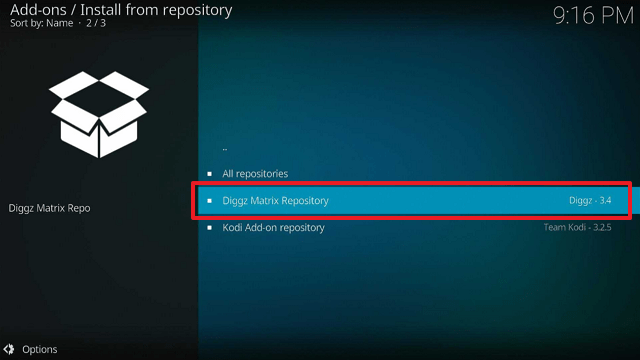
17. Select “Diggz Matrix Repository

Install FenFlix Kodi Build on Firestick step 17


18. Then choose “Program add-ons

Install FenFlix Kodi Build on Firestick step 18


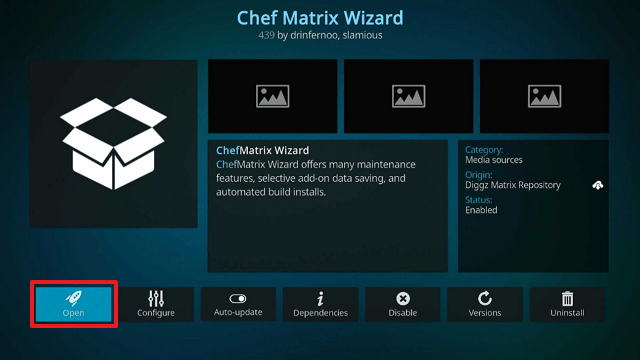
19. Click on “Chef Matrix Wizard

Install FenFlix Kodi Build on Firestick step 19


20. Then click “Install

Install FenFlix Kodi Build on Firestick step 20


21. Click “OK

Install FenFlix Kodi Build on Firestick step 21


22. Simply wait for the “Chef Matrix Wizard Add-on installed” notification.

Install FenFlix Kodi Build on Firestick step 22


23. Select “Chef Matrix Wizard”. Click “Open

Install FenFlix Kodi Build on Firestick step 23


24. Choose “Builds

Install FenFlix Kodi Build on Firestick step 24


25. Select “Diggz FenFlix

Install FenFlix Kodi Build on Firestick step 25


26. Click “Install

Install FenFlix Kodi Build on Firestick step 26


27. Then select “Yes, Install

Install FenFlix Kodi Build on Firestick step 27


28. After the Build finishes downloading, click “OK

Install FenFlix Kodi Build on Firestick step 28


29. Then relaunch Kodi.

Install FenFlix Kodi Build on Firestick step 29


30. That’s it, FenFlix Kodi Build is now successfully installed on your Firestick

Install FenFlix Kodi Build on Firestick step 30


YOUR INTERNET ACTIVITY IS BEING WATCHED

ReviewVPN cannot attest to the legality, security and privacy of the applications discussed on this site. It is highly recommended that you use a VPN service while streaming or using Kodi.

Currently, your IP 216.73.216.144 is visible to everyone and your Browser is being tracked by Advertisers & ISP Provider.

Save 65% Now

Limited Time Offer

Here are the main reasons why you must use a VPN:

  • Your activities are hidden from your ISP, the government, and from the apps you are using.
  • You can access additional movies and TV streams.
  • ISP attempts to throttle are thrwarted thus reducing buffering issues.
  • Geographically restricted content like Netflix and Hulu can be unblocked.

A VPN works be replacing your ISP-assigned IP address and creating an encrypted tunnel. We recommend the no log service offered by IPVanish. It works well on a Firestick and offers the fastest possible speeds.

Special Limited Time Offer - Get IPVanish


Legal Disclaimer: ReviewVPN.com does not encourage or endorse any illegal activity involved in the usage of services and applications referenced on this site. We do not verify the licensing agreements of services. The end-user is wholly responsible for ensuring that any media accessed through these services does not violate copyright and/or licensing laws. ReviewVPN does not promote, link to, or receive compensation from any Apps and IPTV services.


Install Surfshark on Firestick

Best Surfshark Deal


Features

  • The categories Search, Favorites, Trakt TV, Trakt Movies, Movies, TV Shows, Latest, Movies Services, TV Services, Movie Lists, Extras, Setup/Login, and Settings may all be found on the Homescreen.
  • You can search for movies, TV shows, people, movie sets, and IMDb keywords (Movies & TV Shows) using the Search tab (Movies & TV Shows)
  • Your Kodi favorites, FEN favorites: movies, and FEN favorites: TV shows, MyServices, Downloads, and Discover are all listed in the Favorites Section.
  • Allows you to download movies, TV shows, premium files, and images.
  • Provides Trakt, TMDB Real Debrid, Premiumize, and All Debrid Integration.
  • The following tabs are available for videos: Playback, Trailer, Keywords, Images, Extra Info, Genres, Director, and Option.
  • Netflix, Amazon Prime Video, Disney Plus, Apple TV Plus, Apple iTunes, fuboTV, Hulu, HBO Max, Peacock, and more streaming services are available for movies and television.


Pros & Cons

Pros

  • Provides support for all premium link generators
  • Trendy UI
  • There are tons of streaming options to check out


Cons

  • You’ll need a debrid account to watch from this Build
  • I’ve encountered playback errors
  • At first, I had a hard time navigating the Build


Should I Use FenFlix Kodi Build with a VPN?

Surfshark vpn

When using unofficial Builds like Fenflix, we always advise our readers to protect their online privacy with a VPN like Surfshark. This is because these Builds are not developed or maintained by Kodi, thus you never know who may be able to watch what you are streaming. As a result, there can be hazards involved with it that affect your privacy.

You won’t be able to tell if hackers and phishers who prowl around these Builds are targeting your data for nefarious financial gain. Therefore, it is best to maintain your anonymity when using these Builds by using a VPN. To prevent your real IP address from being linked to your streaming, Surfshark will mask your IP address.

By doing this, you may be certain that you are not exposing your IP address to any streaming platform you use. You can be confident that there won’t be any logs or IP address leaks when using its service because Surfshark uses military-grade AES-256-bit encryption, which is guaranteed to be uncrackable. Along with that, the following are some other advantages:

  • Enables two-factor authentication
  • Its CleanWeb feature blocks ads and malware
  • It has a Cookie consent pop-up blocker
  • Offers a 30-day money-back guarantee
  • Helps you bypass geo-restrictions
  • Protects an unlimited number of devices

Note: For more information about Surfshark, please read our Surfshark Review.


How to Install Surfshark VPN on Firestick

If your Firestick still has the older interface, read this article to learn how to update it: Update Firestick Interface.

Follow our screenshots below to install the SurfShark VPN app on your Fire TV stick.

1. Go to the Home screen of your Firestick.

step 1 Install Surfshark VPN on Firestick


2. Navigate toward the Find tab. Press the Search button from the resulting dropdown.

step 2 Install Surfshark VPN on Firestick


3. Type in the keyword of SurfShark and select from the suggestions that will appear.

step 3 Install Surfshark VPN on Firestick


4. Click the official SurfShark icon from your search results.

step 4 Install Surfshark VPN on Firestick


5. Press the Download (You own it) button.

step 5 Install Surfshark VPN on Firestick


6. The SurfShark VPN installer will download on your device.

step 6 Install Surfshark VPN on Firestick


7. SurfShark VPN’s app will automatically install itself on your Fire TV stick.

step 7 Install Surfshark VPN on Firestick


8. Press the Open button after completing SurfShark VPN’s installation process.

step 8 Install Surfshark VPN on Firestick


9. Please wait for the SurfShark VPN to load its user interface.

step 9 Install Surfshark VPN on Firestick


10. You can now log in with your SurfShark VPN account credentials.

step 10 Install Surfshark VPN on Firestick

Learn more about Surfshark and Grab the Best Surfshark Deal Now!


Install Surfshark on Firestick

Best Surfshark Deal


Other VPNs to Consider

NordVPN (Best for Streaming)

Best Features

  • 5000+ Server in 50+ Countries 
  • Military-Grade Encryption
  • Fast Connection Speed
  • Suitable to a lot of devices
  • No-Log Policy

Prices
  • Complete $5.89 per month (64% Discount)
  • Plus $4.59 per month (56% Discount)
  • Standard $3.69 per month (55% Discount)

Best Features

  • 750+ High-speed VPN Servers in 43 Locations
  • Military-Grade Encryption
  • Fastest HD Streaming and Gaming
  • 30-Day Money-Back Guarantee
  • Unlimited Data & Devices
  • No-Log Policy

Prices
  • 3 Years $1.99 per month (82% Discount)
  • 1 Years $3.29 per month (70% Discount)
  • 1 Month $10.99 per month

IPVanish VPN (Most Secure)

Best Features

  • 1200+ Servers in 60+ Countries around the world
  • Unlimited Connections
  • No-Log Policy
  • Top Notch Military-Grade VPN Protocols and Encryptions
  • 100% Safe and Secured
  • Most Trusted VPN
  • Best VPN for Firestick
  • 30-Day Money-Back Guarantee

Prices
  • Yearly $3.99 per month (63% Discount) – 30 days risk free + Ransomware & Malware Protection
  • Quarterly $5.32 per month (51% Discount)
  • Monthly $10.99 per month


For more VPN discounts, go to ReviewVPN Deals and purchase the best VPN for you.

Click here to get the lowest price on Surfshark through our exclusive limited-time offer.


FAQs

What is FenFlix Kodi Build?

Fenflix is a Kodi Build from the Diggz Repository that allows you to watch movies and TV shows on your device.


Is FenFlix Build Safe?

Fenflix Kodi Build is safe to install and use on devices such as Firestick. However, we constantly advise our readers to use Surfshark to boost their protection.


Is FenFlix Kodi Build Legal?

Kodi Builds are legal. But, we are unable to determine whether Fenflix has the required licensing for the movies and TV shows it offers. Therefore, the best option for anonymous streaming is to use Surfshark.


Conclusion

FenFlix has a fantastic user interface that is similar to some of the top streaming services available. It also includes the most recent and popular movies and shows that are currently available. However, if you’re seeking a free streaming service, FenFlix is not the Build for you. It’s because you’ll need a debrid account to watch any of its stuff.

Meanwhile, if you’re looking for an alternative to FenFlix, you may check out our best Kodi Builds.

Best Torrent Sites for Sports

Overview

This article will provide you with a list of the best torrent sites for Sports.


When it comes to streaming, the sports category has never had much. Because of this, it is unquestionably possible to make torrenting more challenging. There aren’t many options for your sports-related torrent demands, especially given the huge range of sporting events that occur, like MMA, basketball, football, and more.

Fortunately, a few torrent sites continue to provide you with exclusive access to sports content. You wouldn’t have to be concerned about missing games or sporting events involving your favorite teams. With these torrent sites, you’ll always have the ability to catch up on or relive earlier matches. In addition, you can save these videos to watch at a later time or whenever.

Furthermore, we’ve created a list of the best Sports torrent sites. By doing this, you’ll be aware of where to find torrents in any sports category. However, if you ever have reservations about torrents, you may also give some of the top IPTV services a try.


ANONYMOUSLY


Best Torrent Sites for Sports

The following are the best Sports torrent sites available today. Although the majority of them need a membership, rest assured that all of the featured torrent sites are active and accessible from anywhere in the world.


Sport-Video

https://www.sport-video.org.ua/

sport-video

First on our list of the best torrent sites for Sports is Sport-Video. There are torrents available for almost every sporting event you can imagine, including American Football, Basketball, Baseball, Football, AFL, and more. You can also find a schedule of current and forthcoming games so you know what torrents are accessible and where to look for them. In addition, I find the Schedule feature useful for helping you get ready for future matchups.

Sport-Video also features tabs for the current month, previous months, and older games, allowing you to browse back and watch previous matches. Moreover, by “donating” $12, you can access NFL All Games and NBA All Games. That being said, all of its other torrents are free, however, you can donate to these free torrents.

You may also find further information about its torrents in the presence of a description, format, video codec, aspect ratio, length, weight, and language.


Xtreme Wrestling Torrents

www.xtremewrestlingtorrents.net

Xtreme Wrestling

The wrestling content is not widely accessible on the internet. Fortunately, you may find wrestling match torrents online thanks to Xtreme Wrestling Torrents. You can be certain to locate nearly any wrestling match you’re looking for because it has the largest library collection in this genre. There are thousands of torrents in 44 categories. Among these are wrestling shows such as WWE, RAW, ROH, MMA, and many others.

Additionally, it has a chat feature where you may ask for wrestling matches if they are not already listed on the website.

However, access to Xtreme Wrestling Torrents is restricted to its registered users, and membership is by invitation only. But, their VIP Membership is accessible to individuals who wish to manually set up an account for which a donation is required. After registering your email address, you must also wait for a confirmation email to receive within six hours.

MMA Torrents

https://www.mma-torrents.com/

MMA Torrents

And meanwhile, you might want to check out MMA Torrents if you’re seeking a torrent site that offers mixed martial arts content. In its extensive collection of torrents, MMA Torrents comprises combat sports like boxing and wrestling. However, it is an invite-only torrent site, just like Xtreme Wrestling Torrents. Thus, the only way to register is by an invitation from an existing member. Alternatively, you can choose to sign up using a VIP account and make a donation to do so.

You have the option of browsing all torrents or popular subcategories like Packs, Instructionals, Events, TV, and Freeleech. There is also a search box so you can quickly and easily discover the right match. Furthermore, in addition to offering torrents, it contains tabs for a forum, FAQs, events, news, and more. Therefore, if you choose to download torrents from this site, you may get anything much about MMA.


CyclingTorrents

https://www.cyclingtorrents.nl/

Cycling torrents

CyclingTorrents is the next site in our list of the best torrent sites for sports. You can download races, documentaries, and interviews with everything from bikes to classic races. Keirin race, match sprint race, elimination race, point race, and more categories are among those available. Moreover, CyclingTorrents’ collection is entirely dedicated to cycling, thus you won’t be able to locate any other sporting events there.

All of its torrents are free to download, but you have to upload at least half of what you download. Nevertheless, CyclingTorrents offers a huge selection of cycling collections in addition to a fantastic download speed.

Since signups are currently restricted, CyclingTorrents is an invite-only torrent site as well. However, it does open sometimes, so you could be lucky enough to find it open when you try to register.


RacingForMe

www.racingfor.me

RacingForMe

RacingForMe, or RFM, is another of our best torrent sites for sports, and one of the best for motorsports. It has over a hundred thousand torrents for Formula 1, MotoGP, Nascar, Go-Karts, Rally, and other events. In addition, all of the torrent files in RFM are in HD and have very fast download speeds. RFM further features a racing calendar that lists forthcoming events, members, uploaders, and other details.

Additionally, it boasts a vibrant community with almost 100,000 monthly visitors.

On the downside, RFM is currently a site that may only be accessed via invitation. Moreover, unlike other invite-only torrent sites, there is no alternative account for a VIP of some kind that just requires a donation.


T3nnis.tv

https://t3nnis.tv/

t3nnis

T3nnis is another of the best torrent sites for sports. Due to its extensive collection of tennis matches, it is also one of the top sports torrent sites for tennis. The advantage of T3nnis is that it provides royalty-free torrents, ensuring that any torrents you download from this site are legitimate.

Additionally, it includes worldwide Tennis competitions with over 26k torrent trackers. These contain the most popular and previous torrent matches as well as Classics, Highlights, Interviews, and Documentaries. Also noteworthy is the HD quality of the torrents that you may download from T3nnis. As a result, you may watch any Tennis event in high definition even while using your mobile phone.

Unfortunately, they no longer accept new members and have permanently closed their registration. But given that they make mention on their website about members who have made donations in the past being unable to log in, I believe you will be able to create one by making a donation.


YOUR INTERNET ACTIVITY IS BEING WATCHED

ReviewVPN cannot attest to the legality, security and privacy of the applications discussed on this site. It is highly recommended that you use a VPN service while streaming or using Kodi.

Currently, your IP 216.73.216.144 is visible to everyone and your Browser is being tracked by Advertisers & ISP Provider.

Save 65% Now

Limited Time Offer

Here are the main reasons why you must use a VPN:

  • Your activities are hidden from your ISP, the government, and from the apps you are using.
  • You can access additional movies and TV streams.
  • ISP attempts to throttle are thrwarted thus reducing buffering issues.
  • Geographically restricted content like Netflix and Hulu can be unblocked.

A VPN works be replacing your ISP-assigned IP address and creating an encrypted tunnel. We recommend the no log service offered by IPVanish. It works well on a Firestick and offers the fastest possible speeds.

Special Limited Time Offer - Get IPVanish


Legal Disclaimer: ReviewVPN.com does not encourage or endorse any illegal activity involved in the usage of services and applications referenced on this site. We do not verify the licensing agreements of services. The end-user is wholly responsible for ensuring that any media accessed through these services does not violate copyright and/or licensing laws. ReviewVPN does not promote, link to, or receive compensation from any Apps and IPTV services.


Install Surfshark on Firestick

Best Surfshark Deal


Stream Safely With a VPN

Surfshark vpn

Hackers and phishers frequently target vulnerable IP addresses on torrent sites to make money or other profits. In addition, your ISP and the government are actively monitoring your internet usage for their own interests.

Because of this, it’s crucial to maintain your anonymity when utilizing and downloading from torrent websites for sports-related purposes. By giving you an anonymous IP address, a VPN like Surfshark can hide your real one. You can browse the web safely in this way without worrying about unauthorized logging and data breaches. To assure unbreakable safety for your data, it additionally uses AES-256-bit encryption.

Here are a few more of its advantages:

  • Allows you to bypass censorships and geo-restrictions
  • 3,200+ servers in 100 locations
  • Unlimited bandwidth for surfing and downloading
  • Ensures zero logs
  • Blocks ads and malware
  • Has a built-in cookie consent popup blocker
  • Allows unlimited simultaneous device connections
  • Comes with a 30day money back guarantee


Note: For more information about Surfshark, please read our Surfshark Review.


How to Install Surfshark VPN on Firestick

If your Firestick still has the older interface, read this article to learn how to update it: Update Firestick Interface.

Follow our screenshots below to install the SurfShark VPN app on your Fire TV stick.

1. Go to the Home screen of your Firestick.

step 1 Install Surfshark VPN on Firestick


2. Navigate towards the Find tab. Press the Search button from the resulting dropdown.

step 2 Install Surfshark VPN on Firestick


3. Type in the keyword of SurfShark and select from the suggestions that will appear.

step 3 Install Surfshark VPN on Firestick


4. Click the official SurfShark icon from your search results.

step 4 Install Surfshark VPN on Firestick


5. Press the Download (You own it) button.

step 5 Install Surfshark VPN on Firestick


6. The SurfShark VPN installer will download on your device.

step 6 Install Surfshark VPN on Firestick


7. SurfShark VPN’s app will automatically install itself on your Fire TV stick.

step 7 Install Surfshark VPN on Firestick


8. Press the Open button after completing SurfShark VPN’s installation process.

step 8 Install Surfshark VPN on Firestick


9. Please wait for the SurfShark VPN to load its user interface.

step 9 Install Surfshark VPN on Firestick


10. You can now log in with your SurfShark VPN account credentials.

step 10 Install Surfshark VPN on Firestick

Learn more about Surfshark and Grab the Best Surfshark Deal Now!


Install Surfshark on Firestick

Best Surfshark Deal


Other VPNs to Consider

NordVPN (Best for Streaming)

Best Features

  • 5000+ Server in 50+ Countries 
  • Military-Grade Encryption
  • Fast Connection Speed
  • Suitable to a lot of devices
  • No-Log Policy

Prices
  • Complete $5.89 per month (64% Discount)
  • Plus $4.59 per month (56% Discount)
  • Standard $3.69 per month (55% Discount)

Best Features

  • 750+ High-speed VPN Servers in 43 Locations
  • Military-Grade Encryption
  • Fastest HD Streaming and Gaming
  • 30-Day Money-Back Guarantee
  • Unlimited Data & Devices
  • No-Log Policy

Prices
  • 3 Years $1.99 per month (82% Discount)
  • 1 Years $3.29 per month (70% Discount)
  • 1 Month $10.99 per month

IPVanish VPN (Most Secure)

Best Features

  • 1200+ Servers in 60+ Countries around the world
  • Unlimited Connections
  • No-Log Policy
  • Top Notch Military-Grade VPN Protocols and Encryptions
  • 100% Safe and Secured
  • Most Trusted VPN
  • Best VPN for Firestick
  • 30-Day Money-Back Guarantee

Prices
  • Yearly $3.99 per month (63% Discount) – 30 days risk free + Ransomware & Malware Protection
  • Quarterly $5.32 per month (51% Discount)
  • Monthly $10.99 per month


For more VPN discounts, go to ReviewVPN Deals and purchase the best VPN for you.

Click here to get the lowest price on Surfshark through our exclusive limited-time offer.


FAQs

What is the best torrent site for sports?

Sport-Video, in my opinion, is the best torrent site for sports. It is because, in contrast to other sports torrent sites, it is open to all users and contains all sporting events. However, you can have a look at the other torrent sites mentioned in this post if you’re looking for a certain sport.


Are torrents safe?

Because it depends on the uploader and the developer of the torrent site you’re trying to access, we can never really guarantee that torrents are safe. Therefore, to maintain security while downloading from torrent sites, use a VPN like Surfshark.


Are torrents legal?

Torrents are legal. However, not everything available on torrent websites is legal. To ensure that you are torrenting lawfully, you must make sure that you are not attempting to download content that is protected by copyright.


Conclusion

The advantage of these torrents is that they are frequently free or only ask for a donation. Obviously, this is more practical than having to pay for PPV events. Therefore despite the difficulty, many individuals continue to look for sports torrent sites. However, when using torrent websites, we want to urge you to secure your connection using a VPN like Surfshark. As you can never be sure who is behind these feeds or if your personal information is already being made available to the public.

Best Ways to Fix Firestick Sound Not Working

Firestick Sound Not Working

This article will show you all the best ways to fix the Firestick sound not working.

If you are experiencing some audio problems on your Firestick and Fire TV device, there is a slight problem. Do not worry too much. The firestick sound not working is a very fixable issue. Here are some of the possible reasons why your Firestick is not making sound.

Firestick really runs into some problems from time to time. Most of them are easy to troubleshoot by only restarting your device. But if restarting your device still doesn’t solve the problem, then it’s time to try other methods.

Do not let this Firestick sound not working problem ruin your best streaming experience.

Always keep in mind that it is also important to keep yourself protected while streaming on your device. Use a very reliable VPN to ensure your privacy.

Without further ado, let’s get into the best ways to fix the Firestick Sound Not Working issue.


ANONYMOUSLY


How to Fix Firestick Sound Not Working


1. Unmute your Fire TV

Most of the time, the only reason why your Firestick sound is not working is that your Fire TV is muted. Check if your TV is not muted ad try to increase the volume.

Some users are using an external sound system, double check if they are working fine as well.


2. Restart your Firestick

Easily restart your device and check if your problem with your Audio is solved.

Follow the simple guide below to restart your device:

  1. Got to Settings
  2. Choose My Fire TV
  3. Select Restart and confirm
  4. Wait for your device to turn on again


3. Reset Your Firestick

You will be amazed how a lot of Firestick issues are solvable by just resetting your device. Turn off your TV, unplug your connections, and wait for a few minutes before plugging them all in again.

Check your device if you still experience Firestick sound not working.


4. Check your Internet Connection

If you are experiencing some glitches while streaming movies and TV shows on your Fire TV, this might be because of a slow internet connection.

Audio delay is commonly the problem when your internet connection is slow. Connect your device to s better and faster internet connection.


5. Choose the Best Available Surround Sound for your Firestick

Different apps prefer different types of surround sound. If you are using a soundbar with Disney+ and Netflix, it is better to use Dolby Digital. The problem is not all soundbar is compatible with Dolby.

When using Firestick, the best option is to choose the best available surround sound. Here’s how:

  1. Go to Settings
  2. Choose Display & Audio
  3. Select Audio
  4. Scroll to Surround Sound
  5. Choose Best Available


6. How to Fix Audio and Video Synchronization

If you are experiencing an audio delay while watching, here is how you can fix it:

  1. Go to Settings
  2. Choose Display and Audio
  3. Select Audio
  4. Click AV Sync Tuning

This will automatically fix your problem. It is a default audio player that will sync your video and audio.


7. Use a Soundbar

A soundbar can enhance your audio experience while streaming on your Fire TV. Manually manage soundbar equipment to your Firestick to recognize it.

  1. Go to Settings
  2. Choose Equipment Control
  3. Scroll Manage Equipment
  4. Select Soundbar


8. Make sure your TV’s HDMI Port is Audio Supported

Although mostly all available televisions right now have HDMI audio-supported ports, there are some out there that might not be.

Make sure to have a compatible, audio-supported HDMI port on your device.


Stream Safely with a VPN

Surfshark vpn

Devices such as Firestick can track the user’s online activities. Also, your Internet Service Provider or ISP can observe your streaming and throttle your connection. These are just some of the reasons why you should protect your privacy. Stream safely using a Virtual Private Network or VPN.

A VPN is a tool that will hide your real IP address and provide a new one that will grant access to geo-restricted content and protect your identity.

We suggest using nothing but the best VPN in the market today which is SurfShark. SurfShark can unblock the most popular streaming platforms and give the best available server from your desired location.

To know more, read our  Surfshark VPN review.

Best SurfShark Features

  • 3,200+ servers from 100+ locations across the globe
  • Military-grade encryptions and VPN protocols
  • Unblocks all popular streaming platforms like Netflix, Hulu, YouTube and more
  • Connect unlimited devices simultaneously
  • Strictly follows the Zero-log policy
  • 30-day money-back guarantee
  • Cloud Storage
  • P2P friendly VPN
  • SOCKS5 Proxy
  • Allows Torrenting
  • Kill Switch
  • Split Tunneling
  • DNS Leak Protection
  • Prevents Firestick Buffering and Kodi Buffering


Grab your subscription now!

Best Surfshark Deal


How to Install Surfshark on Firestick with Screenshots

If your Firestick still has the older interface, read this article to learn how to update it: Update Firestick Interface.

You can download Surfshark directly from the Amazon App store. It will be easy for you to find Surfshark with your Firestick’s Find feature. Refer to our screenshots below.

Follow our screenshots below to install the SurfShark VPN app on your Fire TV stick.

1. Go to the Home screen of your Firestick.

step 1 Install Surfshark VPN on Firestick


2. Navigate toward the Find tab. Press the Search button from the resulting dropdown.

step 2 Install Surfshark VPN on Firestick


3. Type in the keyword of SurfShark and select from the suggestions that will appear.

step 3 Install Surfshark VPN on Firestick


4. Click the official SurfShark icon from your search results.

step 4 Install Surfshark VPN on Firestick


5. Press the Download (You own it) button.

step 5 Install Surfshark VPN on Firestick


6. The SurfShark VPN installer will download on your device.

step 6 Install Surfshark VPN on Firestick


7. SurfShark VPN’s app will automatically install itself on your Fire TV stick.

step 7 Install Surfshark VPN on Firestick


8. Press the Open button after completing SurfShark VPN’s installation process.

step 8 Install Surfshark VPN on Firestick


9. Please wait for the SurfShark VPN to load its user interface.

step 9 Install Surfshark VPN on Firestick


10. You can now log in with your SurfShark VPN account credentials.

step 10 Install Surfshark VPN on Firestick

Learn more about Surfshark and Grab the Best Surfshark Deal Now!


Install Surfshark on Firestick

Best Surfshark Deal


Other VPNs to Consider

NordVPN (Best for Streaming)

Best Features

  • 5000+ Server in 50+ Countries 
  • Military-Grade Encryption
  • Fast Connection Speed
  • Suitable to a lot of devices
  • No-Log Policy

Prices
  • Complete $5.89 per month (64% Discount)
  • Plus $4.59 per month (56% Discount)
  • Standard $3.69 per month (55% Discount)

Best Features

  • 750+ High-speed VPN Servers in 43 Locations
  • Military-Grade Encryption
  • Fastest HD Streaming and Gaming
  • 30-Day Money-Back Guarantee
  • Unlimited Data & Devices
  • No-Log Policy

Prices
  • 3 Years $1.99 per month (82% Discount)
  • 1 Years $3.29 per month (70% Discount)
  • 1 Month $10.99 per month

IPVanish VPN (Most Secure)

Best Features

  • 1200+ Servers in 60+ Countries around the world
  • Unlimited Connections
  • No-Log Policy
  • Top Notch Military-Grade VPN Protocols and Encryptions
  • 100% Safe and Secured
  • Most Trusted VPN
  • Best VPN for Firestick
  • 30-Day Money-Back Guarantee

Prices
  • Yearly $3.99 per month (63% Discount) – 30 days risk free + Ransomware & Malware Protection
  • Quarterly $5.32 per month (51% Discount)
  • Monthly $10.99 per month


For more VPN discounts, go to ReviewVPN Deals and purchase the best VPN for you.

Click here to get the lowest price on Surfshark through our exclusive limited-time offer.


Conclusion

Firestick Sound Not Working is just a common issue that most users may encounter. If you happen to experience this, you don’t have to worry. Just follow and try the simple solutions above and you will eventually solve your problem.

We hope that you find this article helpful in fixing Firestick sound not working problems.

How to Watch AFL on Firestick

AFL

In this article, we will show you how to watch AFL on Firestick

But before we go on the hows, let’s first discuss what is AFL.

AFL stands for Australian Football League. This is very similar to the NFL, which is the official football league of America. AFL is very popular in Australia, making it the most anticipated sports event in the country. It even has the most TV viewership record.

Watching sports events live is really an amazing experience. But not all viewers are catered to watch AFL. Good thing that fans can still watch the matches on their Firestick devices. That is what we are going to discuss further.

There are apps that you can use on your Firestick that streams AFL. Some of them are Fubo TV, YouTube TV, and more. You can watch sports of so many kinds on this app without cable. But they are not 100% free. These apps require a monthly subscription payment. Check which app is best for you.

If you experience geo-restrictions while using these apps, get yourself a trusted VPN service.


ANONYMOUSLY


How to Watch AFL on Firestick

The following apps are your best option to stream AFL sports events on your Firestick and Fire TV devices.


Fubo TV

Fubo tv

Fubo TV is one of the best choices to stream AFL on Firestick. It offers more than 100 channels to stream live TV including sports, and many more. Check out their multiple sports channels like BTN, Football Sports Network, FS1, and FS2.

You can subscribe to Fubo TV for $54.99 per month, but you need to add an international sport plus payment for $5.99 per month for AFL streaming.

How to Install Fubo TV on Firestick

How to Access Fubo TV on Any Device


YouTube TV

Youtube TV logo

You can also stream AFL on YouTube TV. Although it may not be a given in the first place. You can pay $49.99 per month to stream on 70+ live TV channels. Some channels will require an additional $15 per month.

You can add 6 family members per account on YouTube TV, but you can only use 3 devices simultaneously.

How to Install YouTuve TV on Firestick


Hulu

Hulu Logo Watch Live TV on Firestick

Hulu is a major Netflix competitor and you can also stream live TV and sports on the app. With that, AFL is not an exemption.

Among all of the apps your can use for AFL, Hulu is affordable. You only need to pay $9.99 per month with 200 additional hours of cloud DVR.

You can use some add-ons and enhance your streaming experience with some additional payments.

How to Install Hulu on Firestick

Watch Hulu Abroad

How to Unblock Hulu Anywhere


Sling TV

Sling TV Logo

You can stream AFL on Sling TV. It is by far the most affordable option to watch AFL and other sports on Firestick. Sling TV costs $30 monthly.

You can stream Fs1 too plus other channels. It also gives you 10 plus house DVR recordings and 3 simultaneous devices.

How to Install Sling TV on Firestick


Stream Safely with a VPN

Surfshark vpn

The reason why most of us are using a VPN is because of geo-restrictions. There are apps, features, and content that are only available in certain locations. To access them, you need a powerful tool a Virtual Private Network or VPN.

A VPN is helpful in hiding and protecting your IP address. Your IP address is your online fingerprint. It tells where you are located and holds the information about the websites and apps you are using. Your Internet Service Provider and other trackers can profile you and track you using your IP address. This is where a VPN becomes so helpful. By connecting to a different server from the desired location, the VPN will provide a different IP address. This will secure your privacy and allows access to geo-restricted content. That is how powerful a VPN is.

Here at reviewvpn.com, we suggest only the best VPN to use which is SurdShark. SurfShark is a very affordable yet awesome VPN service that unlocks all streaming platforms including Netflix, Hulu, YouTube, and many more. SurfShark also has the best VPN security features that will surely grant you nothing but the best privacy and protection online.

Read our  Surfshark VPN review to know more.

Best SurfShark Features

  • 3,200+ available servers from 100+ locations around the world
  • Military-grade encryptions and VPN protocols
  • Unblocks all popular streaming platforms
  • Unlimited devices simultaneously
  • Zero-log policy
  • 30-day money-back guarantee
  • Cloud Storage
  • P2P friendly VPN
  • SOCKS5 Proxy
  • Allows Torrenting
  • Kill Switch
  • Split Tunneling
  • DNS Leak Protection
  • Prevents Firestick Buffering and Kodi Buffering


Grab your subscription now!

Best Surfshark Deal


How to Install Surfshark on Firestick with Screenshots

If your Firestick still has the older interface, read this article to learn how to update it: Update Firestick Interface.

You can download Surfshark directly from the Amazon App store. It will be easy for you to find Surfshark with your Firestick’s Find feature. Refer to our screenshots below.

Follow our screenshots below to install the SurfShark VPN app on your Fire TV stick.

1. Go to the Home screen of your Firestick.

step 1 Install Surfshark VPN on Firestick


2. Navigate toward the Find tab. Press the Search button from the resulting dropdown.

step 2 Install Surfshark VPN on Firestick


3. Type in the keyword of SurfShark and select from the suggestions that will appear.

step 3 Install Surfshark VPN on Firestick


4. Click the official SurfShark icon from your search results.

step 4 Install Surfshark VPN on Firestick


5. Press the Download (You own it) button.

step 5 Install Surfshark VPN on Firestick


6. The SurfShark VPN installer will download on your device.

step 6 Install Surfshark VPN on Firestick


7. SurfShark VPN’s app will automatically install itself on your Fire TV stick.

step 7 Install Surfshark VPN on Firestick


8. Press the Open button after completing SurfShark VPN’s installation process.

step 8 Install Surfshark VPN on Firestick


9. Please wait for the SurfShark VPN to load its user interface.

step 9 Install Surfshark VPN on Firestick


10. You can now log in with your SurfShark VPN account credentials.

step 10 Install Surfshark VPN on Firestick

Learn more about Surfshark and Grab the Best Surfshark Deal Now!


Install Surfshark on Firestick

Best Surfshark Deal


Other VPNs to Consider

NordVPN (Best for Streaming)

Best Features

  • 5000+ Server in 50+ Countries 
  • Military-Grade Encryption
  • Fast Connection Speed
  • Suitable to a lot of devices
  • No-Log Policy

Prices
  • Complete $5.89 per month (64% Discount)
  • Plus $4.59 per month (56% Discount)
  • Standard $3.69 per month (55% Discount)

Best Features

  • 750+ High-speed VPN Servers in 43 Locations
  • Military-Grade Encryption
  • Fastest HD Streaming and Gaming
  • 30-Day Money-Back Guarantee
  • Unlimited Data & Devices
  • No-Log Policy

Prices
  • 3 Years $1.99 per month (82% Discount)
  • 1 Years $3.29 per month (70% Discount)
  • 1 Month $10.99 per month

IPVanish VPN (Most Secure)

Best Features

  • 1200+ Servers in 60+ Countries around the world
  • Unlimited Connections
  • No-Log Policy
  • Top Notch Military-Grade VPN Protocols and Encryptions
  • 100% Safe and Secured
  • Most Trusted VPN
  • Best VPN for Firestick
  • 30-Day Money-Back Guarantee

Prices
  • Yearly $3.99 per month (63% Discount) – 30 days risk free + Ransomware & Malware Protection
  • Quarterly $5.32 per month (51% Discount)
  • Monthly $10.99 per month


For more VPN discounts, go to ReviewVPN Deals and purchase the best VPN for you.

Click here to get the lowest price on Surfshark through our exclusive limited-time offer.


FAQs

What is AFL

AFL stands for Australian Football League. It is the official and most popular sports event in the country.


Is AFL Free?

Streaming sports is not 100% free. You can stream AFL on paid subscription apps that we mentioned above.


How to Stream AFL on Firestick?

You can use Fubo TV, YouTube TV, Hulu, and Sling TV to stream AFL on your Firestick device.


Is AFL Available in America?

If AFL is not available at your location, you can do 2 things. Number one is to spend an extra payment on your subscription to access AFL, and the next one is to use a trusted VPN such as SurfShark when streaming.


Conclusion

Thanks to those apps stated above, we can stream AFL on Firestick. Although they are not free. They require monthly subscriptions plus extra payment to access AFL.

You can also use a VPN like SurfShark to destroy geo-restriction if AFL is not available in your area.

We hope that we are able to help you stream AFL on your Firestick device.

How to Install and Watch TNT on Firestick Even Without Cable

Watch TNT

In this article, we will show you how to install and watch TNT on Firestick

TNT is an American TV channel that is very popular in the country. Last 2018, it was subscribed to by almost 90 million households in all of the USA. That’s how big TNT is as a platform.

TNT offers original and live shows. Some of the titles it streams are Animal Kingdom, Arrow, Castle, Supernatural, Charmed, and many more. It also streams sports like MLB, La Liga, UEFA, etc.

Watch TNT as an app is available on Firestick. It is not for everyone though. Most people find it hard to install the app on their devices because it is unavailable in some areas, primarily outside of the US.

We will also show you how you can stream TNT content even without cable. You can use apps like Philo TV, Sling TV, and YouTube TV.

Continue reading to learn more.


ANONYMOUSLY


How to Install Watch TNT on Firestick

  1. From your home screen, go to Find
  2. Scroll one time to Search
  3. Search for Watch TNT
  4. Click on the Watch TNT icon
  5. Select the Get or Download button
  6. Wait for the app to be installed
  7. Launch the app by clicking on the Open button


How to Activate the Watch TNT app on Firestick

  1. Launch the Watch TNT app
  2. Look for the Sign in option in the top-right corner
  3. Take note of the given code by the app (it is unique every time)
  4. Go to https://www.tntdrama.com/activate
  5. Select the type of device you are using (Amazon Fire TV)
  6. Click on Continue
  7. Input the given code by the app
  8. Click Submit
  9. Enter your TV provider information
  10. Go back to the Watch TNT app on Firestick and reload


Watch TNT App Features

  • The app’s file is small and won’t take up too much space on your device
  • Available on Firestick
  • Live TNT Channel
  • Offers Original TNT shows
  • User-friendly interface


Pros and Cons

Pros

  • The app is free to install
  • Lots of great features
  • Available on the Amazon App Store


Cons

  • Requires registration and TV provider
  • Not 100% free


YOUR INTERNET ACTIVITY IS BEING WATCHED

ReviewVPN cannot attest to the legality, security and privacy of the applications discussed on this site. It is highly recommended that you use a VPN service while streaming or using Kodi.

Currently, your IP 216.73.216.144 is visible to everyone and your Browser is being tracked by Advertisers & ISP Provider.

Save 65% Now

Limited Time Offer

Here are the main reasons why you must use a VPN:

  • Your activities are hidden from your ISP, the government, and from the apps you are using.
  • You can access additional movies and TV streams.
  • ISP attempts to throttle are thrwarted thus reducing buffering issues.
  • Geographically restricted content like Netflix and Hulu can be unblocked.

A VPN works be replacing your ISP-assigned IP address and creating an encrypted tunnel. We recommend the no log service offered by IPVanish. It works well on a Firestick and offers the fastest possible speeds.

Special Limited Time Offer - Get IPVanish


Legal Disclaimer: ReviewVPN.com does not encourage or endorse any illegal activity involved in the usage of services and applications referenced on this site. We do not verify the licensing agreements of services. The end-user is wholly responsible for ensuring that any media accessed through these services does not violate copyright and/or licensing laws. ReviewVPN does not promote, link to, or receive compensation from any Apps and IPTV services.


Install SURFSHARK on Firestick

Best SURFSHARK Deal


How to Watch TNT on Firestick Even Without Cable

You can still watch TNT shows on your device even without cable. Use these 3 great apps that offer TNT content. You can easily install these apps on your device, but they require monthly subscriptions in order to stream on them.


Sling TV

Sling TV Logo

Sling TV is present in the live TV scene for quite a long time now. It has a good reputation for bringing great content at a very affordable price.

If you run into trouble while using Sling TV, you can check out their support and customer service to help you out.

Sling TV offers two types of subscriptions, Blue and Orange, and both of them have a TNT channel. So you can choose either and enjoy watching TNT shows on your device.


YouTube TV

Youtube TV logo

YouTube TV is such a major game changer when it enters the world of live TV streaming. The only problem we can see is that YouTube TV is that is it costs quite higher than other competitors. You have to pay $64.99 per month to access all the great content, especially in the US.

YouTube TV offers 90+ channels including TNT. You can also choose from different categories like Entertainment, Kids, and many more.

How to Install YouTuve TV on Firestick


Philo TV

Philo Logo

Philo TV is actually one of the best options to watch TNT on Firestick even without cable. It is very affordable, only $20 per month.

Check out Philo TV and see if it is really remarkable on your perspective.


Stream Safely with a VPN

Surfshark vpn

Most VPN users purchase the too to bypass geo-restrictions. There are apps, features, and content that are most of the time only available in the US. If you are living outside the country or planning on going to another one, a VPN is a must.

A VPN is a tool that hides and protects your IP address while connecting you to another server from a chosen country. You will have a different IP address located in your chosen area, that will bypass geo-restrictions, allowing you to stream content that is originally not available in your area. Aside from this, a VPN protects your identity and honors your privacy

There are a lot of VPNs available in the market today, but only a few stand out. When it comes to privacy and accessibility, SurfShark VPN is really the best option for you. It has 3,200+ servers from 100+ locations worldwide. With its amazing VPN encryptions and protocols, you will assure your privacy while streaming online. It also follows a zero log policy, and 1 30-day money-back guarantee.

SurfShark VPN is really a great companion when it comes to streaming because it can unblock all streaming platforms. It also allows unlimited connected devices simultaneously.

Some of the great features of SurfShark Includes

For more details, read our SurfShark VPN review.


Grab your subscription now!

Best Surfshark Deal


How to Install Surfshark on Firestick with Screenshots

If your Firestick still has the older interface, read this article to learn how to update it: Update Firestick Interface.

You can download Surfshark directly from the Amazon App store. It will be easy for you to find Surfshark with your Firestick’s Find feature. Refer to our screenshots below.

Follow our screenshots below to install the SurfShark VPN app on your Fire TV stick.

1. Go to the Home screen of your Firestick.

step 1 Install Surfshark VPN on Firestick


2. Navigate toward the Find tab. Press the Search button from the resulting dropdown.

step 2 Install Surfshark VPN on Firestick


3. Type in the keyword of SurfShark and select from the suggestions that will appear.

step 3 Install Surfshark VPN on Firestick


4. Click the official SurfShark icon from your search results.

step 4 Install Surfshark VPN on Firestick


5. Press the Download (You own it) button.

step 5 Install Surfshark VPN on Firestick


6. The SurfShark VPN installer will download on your device.

step 6 Install Surfshark VPN on Firestick


7. SurfShark VPN’s app will automatically install itself on your Fire TV stick.

step 7 Install Surfshark VPN on Firestick


8. Press the Open button after completing SurfShark VPN’s installation process.

step 8 Install Surfshark VPN on Firestick


9. Please wait for the SurfShark VPN to load its user interface.

step 9 Install Surfshark VPN on Firestick


10. You can now log in with your SurfShark VPN account credentials.

step 10 Install Surfshark VPN on Firestick

Learn more about Surfshark and Grab the Best Surfshark Deal Now!


Install Surfshark on Firestick

Best Surfshark Deal


Other VPNs to Consider

NordVPN (Best for Streaming)

Best Features

  • 5000+ Server in 50+ Countries 
  • Military-Grade Encryption
  • Fast Connection Speed
  • Suitable to a lot of devices
  • No-Log Policy

Prices
  • Complete $5.89 per month (64% Discount)
  • Plus $4.59 per month (56% Discount)
  • Standard $3.69 per month (55% Discount)

Best Features

  • 750+ High-speed VPN Servers in 43 Locations
  • Military-Grade Encryption
  • Fastest HD Streaming and Gaming
  • 30-Day Money-Back Guarantee
  • Unlimited Data & Devices
  • No-Log Policy

Prices
  • 3 Years $1.99 per month (82% Discount)
  • 1 Years $3.29 per month (70% Discount)
  • 1 Month $10.99 per month

IPVanish VPN (Most Secure)

Best Features

  • 1200+ Servers in 60+ Countries around the world
  • Unlimited Connections
  • No-Log Policy
  • Top Notch Military-Grade VPN Protocols and Encryptions
  • 100% Safe and Secured
  • Most Trusted VPN
  • Best VPN for Firestick
  • 30-Day Money-Back Guarantee

Prices
  • Yearly $3.99 per month (63% Discount) – 30 days risk free + Ransomware & Malware Protection
  • Quarterly $5.32 per month (51% Discount)
  • Monthly $10.99 per month


For more VPN discounts, go to ReviewVPN Deals and purchase the best VPN for you.

Click here to get the lowest price on Surfshark through our exclusive limited-time offer.


FAQs

What is TNT?

TNT is a popular American TV channel that streams original and live TV shows.


Is the Watch TNT app legal?

Watch TNT is an official Amazon app. We can say that it is safe to use the app.


Is the Watch TNT app Free?

You can install the app for free but it requires a TV provider to use it on your device.


Are there any ads?

There are no ads present on this app.


Conclusion

Watch TNT is an amazing app on firestick but most users find it hard to install. The app is not 100% free. You need a TV provider to use it on your Firestick device.

Geo-restriction is one of the reasons why it is hard to use and install watch TNT. Use a VPN service like SurfShark to enjoy all of the Watch TNT app has to offer.

You can also stream the TNT channel even without cable through the use of Philo TV, Sling TV, and YouTube TV.

We hope that we are able to help you stream and watch TNT on your Firestick device.

How to Install USGoTv Kodi Addon on Firestick/Android

Install USGoTv Kodi Addon on Firestick/Android

Everything you need to know about the USGoTv Kodi Addon, including how to set it up on a Firestick, is detailed in this post.


If you’re looking for a means to watch live TV channels for free, you should look at USGoTv. It is modeled on the popular USTvGo and most certainly provides the same live TV service. Additionally, USGoTv has 90+ popular live TV channels that you can watch in HD.

Furthermore, USGoTv allows you to watch any US Live Tv Channel from anywhere in the world. So, whether you’re on a trip out of home or live outside the United States, you can find live TV options. Simply install it using the Kodi program, and you’re good to go.

Moreover, you can find USGoTv within The Warehouse Repository, which contains tons of working add-ons. Now, let’s begin with how you can install it on your Android device including the Firestick.


ANONYMOUSLY


How To Install USGoTv Kodi Addon on Firestick (Video)


How To Install USGoTv Kodi Addon on Firestick

You can follow this tutorial to install the USGoTv Kodi Addon on your Firestick.

1. Launch the Kodi app on your Firestick. Click on the gear wheel icon (Settings)

Install USGoTv Kodi Addon on Firestick step 1


2. Select “System

Install USGoTv Kodi Addon on Firestick step 2

3. Scroll down to “Add-ons” Then Go to “Unknown sources” then toggle it on.

Install USGoTv Kodi Addon on Firestick step 3


4. Select “Yes”. Then using your Firestick remote, press the return button to go back to the System page

Install USGoTv Kodi Addon on Firestick step 4


5. Now choose “File Manager

Install USGoTv Kodi Addon on Firestick step 5


6. Scroll down and select “Add source

Install USGoTv Kodi Addon on Firestick step 6


7. Click “<None>

Install USGoTv Kodi Addon on Firestick step 7


8. Type in “http://tinyurl.com/TWHrepo” then click “OK”

Install USGoTv Kodi Addon on Firestick step 8


9. Highlight the box under the source to give the media source a name, and put “TWHrepo” or any other name that will help you identify it quickly. Then click “OK” again. Return to the System page by pressing the return button on your remote.

Install USGoTv Kodi Addon on Firestick step 9


10. Select “Add-ons

Install USGoTv Kodi Addon on Firestick step 10


11. Choose “Install from zip file

Install USGoTv Kodi Addon on Firestick step 11


12. Click “Yes

Install USGoTv Kodi Addon on Firestick step 12


13. Select “TWHrepo

Install USGoTv Kodi Addon on Firestick step 13


14. Then click on the zip file URL – repository.thewarehouse-22.6.8.zip

Install USGoTv Kodi Addon on Firestick step 14


15. Wait for the notification “The WareHouse Repository Add-on installed” to appear on the upper right part of the screen

Install USGoTv Kodi Addon on Firestick step 15


16. Afterward, select “Install from repository

Install USGoTv Kodi Addon on Firestick step 16


17. Then click “The WareHouse Repository

Install USGoTv Kodi Addon on Firestick step 17


18. Select “Video add-ons

Install USGoTv Kodi Addon on Firestick step 18


19. Click on “USGoTv

Install USGoTv Kodi Addon on Firestick step 19


20. Then click “Install

Install USGoTv Kodi Addon on Firestick step 20


21. Then wait for it to install. It’s finished once you see the “USGoTv Add-on Installed” message appears. Select “USGoTv

Install USGoTv Kodi Addon on Firestick step 21


22. Then select “Open

Install USGoTv Kodi Addon on Firestick step 22


23. That’s it, USGoTv Kodi Addon is already installed on your Firestick.

Install USGoTv Kodi Addon on Firestick step 23


YOUR INTERNET ACTIVITY IS BEING WATCHED

ReviewVPN cannot attest to the legality, security and privacy of the applications discussed on this site. It is highly recommended that you use a VPN service while streaming or using Kodi.

Currently, your IP 216.73.216.144 is visible to everyone and your Browser is being tracked by Advertisers & ISP Provider.

Save 65% Now

Limited Time Offer

Here are the main reasons why you must use a VPN:

  • Your activities are hidden from your ISP, the government, and from the apps you are using.
  • You can access additional movies and TV streams.
  • ISP attempts to throttle are thrwarted thus reducing buffering issues.
  • Geographically restricted content like Netflix and Hulu can be unblocked.

A VPN works be replacing your ISP-assigned IP address and creating an encrypted tunnel. We recommend the no log service offered by IPVanish. It works well on a Firestick and offers the fastest possible speeds.

Special Limited Time Offer - Get IPVanish


Legal Disclaimer: ReviewVPN.com does not encourage or endorse any illegal activity involved in the usage of services and applications referenced on this site. We do not verify the licensing agreements of services. The end-user is wholly responsible for ensuring that any media accessed through these services does not violate copyright and/or licensing laws. ReviewVPN does not promote, link to, or receive compensation from any Apps and IPTV services.


Install Surfshark on Firestick

Best Surfshark Deal


Features

  • Contains 90+ American Live TV channels such as CNN, Disney, ESPN, FOX, FoodNetwork, Hallmark Channel, HBO, MLB Network, National Geographic, Showtime, and so much more
  • Channels are listed alphabetically upon launching
  • You can add your favorite channels to bookmark
  • Provides subtitle support
  • One-click play streaming
  • Streams are in HD video quality
  • Customizable Audio, Subtitle, and Video Settings
  • Enables you to set up PVR IPTV Simple
  • You have the option to show channels that require VPN
  • A playlist will be created with your watched channels


Pros & Cons

Pros

  • Straightforward UI
  • Buffer free streaming
  • You can watch live TV for free

Cons

  • Several channels are not working
  • Takes some time to load


Stream Safely With a VPN

Surfshark vpn

Because unofficial Kodi addons link to so many different third-party servers to deliver content to its users, doing so could put users at risk. The likelihood of your data and IP being disclosed to these servers is therefore very high.

To assist you to hide your online identity, it is essential to use a VPN like Surfshark. You may prevent online risks like hackers and phishers from focusing on your IP address in exchange for money or other illegal activities by utilizing Surfshark.

It also helps you conceal your online activity from the authorities and your ISP. You won’t ever have to be concerned about data breaches or unauthorized internet monitoring thanks to this.

Additionally, it provides you with some of these other benefits:

  • ISP throttling is avoided, so you won’t have to worry about internet sluggishness, delays, or buffering.
  • Your connection to the quickest server is established automatically.
  • You’ll get unrestricted bandwidth to view and download any material from your favorite programs and add-ons.
  • It contains a kill switch that will promptly disconnect your internet connection in case your VPN connection fails.
  • Allows for an unlimited number of connections at once, enabling you to simultaneously protect all of your devices.

Note: For more information about Surfshark, please read our Surfshark Review.


How to Install Surfshark VPN on Firestick

If your Firestick still has the older interface, read this article to learn how to update it: Update Firestick Interface.

Follow our screenshots below to install the SurfShark VPN app on your Fire TV stick.

1. Go to the Home screen of your Firestick.

step 1 Install Surfshark VPN on Firestick


2. Navigate toward the Find tab. Press the Search button from the resulting dropdown.

step 2 Install Surfshark VPN on Firestick


3. Type in the keyword of SurfShark and select from the suggestions that will appear.

step 3 Install Surfshark VPN on Firestick


4. Click the official SurfShark icon from your search results.

step 4 Install Surfshark VPN on Firestick


5. Press the Download (You own it) button.

step 5 Install Surfshark VPN on Firestick


6. The SurfShark VPN installer will download on your device.

step 6 Install Surfshark VPN on Firestick


7. SurfShark VPN’s app will automatically install itself on your Fire TV stick.

step 7 Install Surfshark VPN on Firestick


8. Press the Open button after completing SurfShark VPN’s installation process.

step 8 Install Surfshark VPN on Firestick


9. Please wait for the SurfShark VPN to load its user interface.

step 9 Install Surfshark VPN on Firestick


10. You can now log in with your SurfShark VPN account credentials.

step 10 Install Surfshark VPN on Firestick

Learn more about Surfshark and Grab the Best Surfshark Deal Now!


Install Surfshark on Firestick

Best Surfshark Deal


Other VPNs to Consider

NordVPN (Best for Streaming)

Best Features

  • 5000+ Server in 50+ Countries 
  • Military-Grade Encryption
  • Fast Connection Speed
  • Suitable to a lot of devices
  • No-Log Policy

Prices
  • Complete $5.89 per month (64% Discount)
  • Plus $4.59 per month (56% Discount)
  • Standard $3.69 per month (55% Discount)

Best Features

  • 750+ High-speed VPN Servers in 43 Locations
  • Military-Grade Encryption
  • Fastest HD Streaming and Gaming
  • 30-Day Money-Back Guarantee
  • Unlimited Data & Devices
  • No-Log Policy

Prices
  • 3 Years $1.99 per month (82% Discount)
  • 1 Years $3.29 per month (70% Discount)
  • 1 Month $10.99 per month

IPVanish VPN (Most Secure)

Best Features

  • 1200+ Servers in 60+ Countries around the world
  • Unlimited Connections
  • No-Log Policy
  • Top Notch Military-Grade VPN Protocols and Encryptions
  • 100% Safe and Secured
  • Most Trusted VPN
  • Best VPN for Firestick
  • 30-Day Money-Back Guarantee

Prices
  • Yearly $3.99 per month (63% Discount) – 30 days risk free + Ransomware & Malware Protection
  • Quarterly $5.32 per month (51% Discount)
  • Monthly $10.99 per month


For more VPN discounts, go to ReviewVPN Deals and purchase the best VPN for you.

Click here to get the lowest price on Surfshark through our exclusive limited-time offer.


FAQs

What is USGoTv Kodi Addon?

USGoTv is a Kodi Addon that allows you to watch American live TV channels from anywhere in the world. It offers 90+ channels that you can stream from your device such as Firestick.


Is USGoTv Kodi Addon Safe?

Yes, USGoTv Kodi Addon is safe. However, we suggest using Surfshark with it for added protection.


Is USGoTv Kodi Addon Legal?

Addons in general are legal. But we cannot guarantee the legality of the streams it offers so it’s best to remain anonymous while using it to prevent any repercussions.


Should I Use a VPN with USGoTv Kodi Addon?

You should certainly use a VPN with addons like USGoTv since this is an unofficial Kodi Addon. This will serve as protection from unwanted threats over the internet.


Conclusion

USGoTv offers live TV channels which are very accessible to any user. You can immediately find the channels available once you launch the addon. However, some channels are not working and there are times when the navigation takes time to load. Nonetheless, it’s still a good addon to consider for free live TV streaming.


How to Install +21 Porno Sex Movies on Firestick and Android

+21 Porno Sex Movies

In this article, we will show you how to install +21 Porno Sex Movies on your Firestick and Android. Please be advised that this is an adult app. If you are a minor (below 18 years old), we do not encourage you to use this app.

Disclaimer: ReviewVPN.com is not affiliated with the +21 Porno Sex Movies app. We are only here for educational purposes on how you can install the app on your Android and Firestick devices.

+21 Porno Sex Movies is an app that features adult content. It has a very simple interface that shows a page-to-page of videos to play. The app does not provide any genre or even a search bar to look for a specific title.

Most of our readers are using Firestick. In order to install the app on your devices, you need to Jailbreak your Firestick and use the Downloader app. You must also use Mouse Toggle to navigate and play any video.

+21 Porno Sex Movies is also applicable on Android. See the apk link below to install the app on your Android phones and tablets.

We suggest using a VPN when streaming on 3rd-party apps such as +21 Porno Sex Movies. This will protect your identity from any malicious domains and software that comes along with the app.


ANONYMOUSLY

Virus Found

We tested this application using VirusTotal and found that there is/are malicious file/files. You can see the above result for your reference.

Because of this, we highly recommend using a VPN that can protect your privacy against any threat from the +21 Porno Sex Movies APK.

Here’s how you can Install The Best VPN For Firestick and All Devices.


Install +21 Porno Sex Movies APK for Android

+21 Porno Sex Movies

Note: ReviewVPN.com does not host this APK file. It is hosted by Archive.org


If your Firestick still has the older interface, read this article to learn how to update it: Update Firestick Interface.


How to Install +21 Porno Sex Movies on Firestick (Video)


How to Install +21 Porno Sex Movies on Firestick

1.  From your home screen, go to Settings.

+21 Porno Sex Movies


2. Scroll down and to the right until you get to My Fire TV. Click on it.

+21 Porno Sex Movies


3. Select Developer options.

+21 Porno Sex Movies


4. Turn on ADB debugging and Apps from Unknown Sources.

+21 Porno Sex Movies


5. Click Turn On when the pop-up appears.

+21 Porno Sex Movies


6. Click Home, click FIND.

+21 Porno Sex Movies


7. Click Search.

+21 Porno Sex Movies


8. You can either say Downloader to your Alexa voice-enabled remote or start typing it. If you typed it, click on the suggestion when it appears.

+21 Porno Sex Movies


9. Click on the Downloader Icon.

+21 Porno Sex Movies


10. Click Download.

+21 Porno Sex Movies


+21 Porno Sex Movies


11. Click on Open.

+21 Porno Sex Movies


12. Click on Allow.

+21 Porno Sex Movies


13. Use the Downloader search tab.

+21 Porno Sex Movies


14. Type https://reviewvpn.com/psm21 and click go.

+21 Porno Sex Movies


15. Wait for the APK to be downloaded.

+21 Porno Sex Movies


16. Select the Install button and wait for the app to be installed.

+21 Porno Sex Movies


17. Wait until the installation is done.

+21 Porno Sex Movies


18. Launch the app by clicking Open and Enjoy!

+21 Porno Sex Movies


YOUR INTERNET ACTIVITY IS BEING WATCHED

ReviewVPN cannot attest to the legality, security and privacy of the applications discussed on this site. It is highly recommended that you use a VPN service while streaming or using Kodi.

Currently, your IP 216.73.216.144 is visible to everyone and your Browser is being tracked by Advertisers & ISP Provider.

Save 65% Now

Limited Time Offer

Here are the main reasons why you must use a VPN:

  • Your activities are hidden from your ISP, the government, and from the apps you are using.
  • You can access additional movies and TV streams.
  • ISP attempts to throttle are thrwarted thus reducing buffering issues.
  • Geographically restricted content like Netflix and Hulu can be unblocked.

A VPN works be replacing your ISP-assigned IP address and creating an encrypted tunnel. We recommend the no log service offered by IPVanish. It works well on a Firestick and offers the fastest possible speeds.

Special Limited Time Offer - Get IPVanish


Legal Disclaimer: ReviewVPN.com does not encourage or endorse any illegal activity involved in the usage of services and applications referenced on this site. We do not verify the licensing agreements of services. The end-user is wholly responsible for ensuring that any media accessed through these services does not violate copyright and/or licensing laws. ReviewVPN does not promote, link to, or receive compensation from any Apps and IPTV services.


Install SURFSHARK on Firestick

Best SURFSHARK Deal


+21 Porno Sex Movies Features

  • Most contents are from nfbusty.com
  • Requires Mouse Toggle
  • No ads present
  • There are no genres available


Pros and Cons

Pros

  • 100% free
  • Requires no registration
  • No ads


Cons

  • Hard to navigate on Firestick
  • No genres available
  • There is no search bar to search for specific titles


Stream Safely with a VPN

Surfshark vpn

Most third-party apps provide content from different and unknown sources on the internet. Since we don’t know the exact sources, some links might be hosted by malicious domains. This can track and profile you. It is dangerous for your online safety and privacy.

Also, your Internet Service Provider or ISP can know what you’re doing online. When you start streaming, it pings your ISP and they can throttle your internet. That is why you will experience buffering while streaming.

The best way to solve this problem is by using a Virtual Private Network or VPN. A VPN can mask your identity while giving access to geo-restricted content. It will hide your real IP address and provide a new one to secure your privacy while streaming.

We recommend the best VPN which is SurdShark. It is the best companion while streaming. SurfShark can unblock all streaming platforms together with all the best security features it can offer. Read our  Surfshark review to know more.

Best SurfShark Features

  • 3,200+ servers from 100+ location worldwide
  • Military-grade VPN security protocols
  • Unblocks all popular streaming platforms
  • Unlimited devices simultaneously
  • No-log policy
  • 30-day money-back guarantee
  • Cloud Storage
  • P2P friendly VPN
  • SOCKS5 Proxy
  • Allows Torrenting
  • Kill Switch
  • Split Tunneling
  • DNS Leak Protection
  • Prevents Firestick Buffering and Kodi Buffering


Grab your subscription now!

Best Surfshark Deal


How to Install Surfshark on Firestick with Screenshots

If your Firestick still has the older interface, read this article to learn how to update it: Update Firestick Interface.

You can download Surfshark directly from the Amazon App store. It will be easy for you to find Surfshark with your Firestick’s Find feature. Refer to our screenshots below.

Follow our screenshots below to install the SurfShark VPN app on your Fire TV stick.

1. Go to the Home screen of your Firestick.

step 1 Install Surfshark VPN on Firestick


2. Navigate toward the Find tab. Press the Search button from the resulting dropdown.

step 2 Install Surfshark VPN on Firestick


3. Type in the keyword of SurfShark and select from the suggestions that will appear.

step 3 Install Surfshark VPN on Firestick


4. Click the official SurfShark icon from your search results.

step 4 Install Surfshark VPN on Firestick


5. Press the Download (You own it) button.

step 5 Install Surfshark VPN on Firestick


6. The SurfShark VPN installer will download on your device.

step 6 Install Surfshark VPN on Firestick


7. SurfShark VPN’s app will automatically install itself on your Fire TV stick.

step 7 Install Surfshark VPN on Firestick


8. Press the Open button after completing SurfShark VPN’s installation process.

step 8 Install Surfshark VPN on Firestick


9. Please wait for the SurfShark VPN to load its user interface.

step 9 Install Surfshark VPN on Firestick


10. You can now log in with your SurfShark VPN account credentials.

step 10 Install Surfshark VPN on Firestick

Learn more about Surfshark and Grab the Best Surfshark Deal Now!


Install Surfshark on Firestick

Best Surfshark Deal


Other VPNs to Consider

NordVPN (Best for Streaming)

Best Features

  • 5000+ Server in 50+ Countries 
  • Military-Grade Encryption
  • Fast Connection Speed
  • Suitable to a lot of devices
  • No-Log Policy

Prices
  • Complete $5.89 per month (64% Discount)
  • Plus $4.59 per month (56% Discount)
  • Standard $3.69 per month (55% Discount)

Best Features

  • 750+ High-speed VPN Servers in 43 Locations
  • Military-Grade Encryption
  • Fastest HD Streaming and Gaming
  • 30-Day Money-Back Guarantee
  • Unlimited Data & Devices
  • No-Log Policy

Prices
  • 3 Years $1.99 per month (82% Discount)
  • 1 Years $3.29 per month (70% Discount)
  • 1 Month $10.99 per month

IPVanish VPN (Most Secure)

Best Features

  • 1200+ Servers in 60+ Countries around the world
  • Unlimited Connections
  • No-Log Policy
  • Top Notch Military-Grade VPN Protocols and Encryptions
  • 100% Safe and Secured
  • Most Trusted VPN
  • Best VPN for Firestick
  • 30-Day Money-Back Guarantee

Prices
  • Yearly $3.99 per month (63% Discount) – 30 days risk free + Ransomware & Malware Protection
  • Quarterly $5.32 per month (51% Discount)
  • Monthly $10.99 per month


For more VPN discounts, go to ReviewVPN Deals and purchase the best VPN for you.

Click here to get the lowest price on Surfshark through our exclusive limited-time offer.


Best Alternatives for +21 Porno Sex Movies

There are many adult content apps that you can install on your Firestick and Android. Check out these best alternative apps.

Checkout also our list of the Best Adult Apps for Firestick to learn more.


FAQs

What is +21 Porno Sex Movies

+21 Porno Sex Movies is an adult app that you can install on Firestick and Android.


Is +21 Porno Sex Movies legal?

ReviewVPN.com cannot fully determine the legality of any app. To make sure that you are protected against legal issues, use a VPN like SurfSharl that will honor your privacy while streaming.


Is +21 Prono Sex Movies Free?

Yes. The app is 100% free.


Are there any ads?

There are no ads present on this app.


Conclusion

Yet another streaming app for adult content to add to your list, +21 Porno Sex Movies still has so many things to improve. Content-wise, it has what it takes to check out, but navigation and genre coverage really need improvement.

We hope that we are able to help you install and stream on this app on your Firestick and Android devices.