How to Install the Cleaner For Fire Tablets and Fire TV (Cleanza)

App Overview

In this article, we will discuss the Cleaner for Fire Tablets and Fire TV (Cleanza)


Cleaner for Fire Tablets & Fire TV (Cleanza) is an app where you can clean and optimize your Firestick instantly.

It is a very easy-to-use app where in one click you will instantly see how much memory of garbage your device contains.

You can also see the problems and damages of your device as the results of the checking. It may also say of you need urgent actions to fix some problems.

But this app contains in-app purchases. You can install the app for free and check your devices instantly, but you have to buy some features. These features will help you clean and optimize your device.

The Cleaner For Fire Tablets & Fire TV (Cleanza) is an official Amazon app. You can install it directly from the Amazon App Store. There is no need to Jailbreak your Firestick and Install the Downloader App.


ANONYMOUSLY


Install Cleaner For Fire Tablets & Fire TV (Cleanza) on Firestick Guide

  1. Go to Search
  2. Search for Cleaner For Fire Tablets & Fire TV (Cleanza)
  3. Tap the icon of the application when it appears
  4. Select the Get or Download button
  5. Wait for the app to be installed
  6. Click Open to launch the app


If your Firestick still has the older interface, read this article to learn how to update it: Update Firestick Interface.


How to Install Cleaner For Fire Tablets & Fire TV (Cleanza)on Firestick with Screenshots

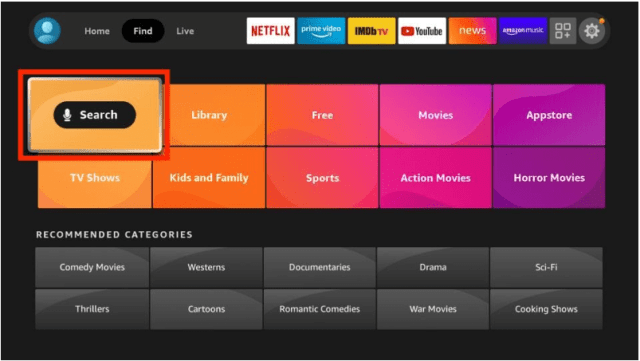
1. Click FIND.

Movie Nite 1

2. Click Search.

Movie Nite2


3. Search for Cleanza.

Cleaner For Fire Tablets & Fire TV (Cleanza) (2)


4. Select the icon of the app when it appears.

Cleaner For Fire Tablets & Fire TV (Cleanza) (3)


5. Click the Get or Download button

Cleaner For Fire Tablets & Fire TV (Cleanza) (4)


6. Wait for the app to be installed

Cleaner For Fire Tablets & Fire TV (Cleanza) (5)


7. Launch the app by clicking the Open button

Cleaner For Fire Tablets & Fire TV (Cleanza) (6)


Legal Disclaimer: ReviewVPN.com does not encourage or endorse any illegal activity involved in the usage of services and applications referenced on this site. We do not verify the licensing agreements of services. The end-user is wholly responsible for ensuring that any media accessed through these services does not violate copyright and/or licensing laws. ReviewVPN does not promote, link to, or receive compensation from any Apps and IPTV services.


Install Surfshark on Firestick

Best Surfshark Deal


App Features

Interface

  • Easy to navigate
  • Simple
  • No ad banners
  • Start Scan Button as home page
  • Shows immediate results
  • In-app purchase offers
  • Clean and Optimize Button


In-app Purchase Prices

  • 7 days = $1.2
  • 1 month = $3.2
  • Half a year = $13.9


Paid Features:

  • Clean & Optimize
  • Speeds up your Device
  • Best for Fore Tablets and TV
  • Customer Support


Pros and Cons

Pros

  • Easy-to-use
  • Free to Install
  • Shows result immediately
  • Don’t need to use a Mouse Toggle


Cons

  • Not all features are free
  • You need to pay for you to optimize your devices


Should I Use a VPN for this App?

surfshark logo

Not just for this app but for all apps, you should use a VPN. It will help you boost your internet speed. And it will also help you with a lot of device problems when you stream or use your Fire Tablet or TV.

Here at reviewvpn.com, we always suggest Surfshark. We trusted the service so much that all of our streaming problems are really solved because of this VPN.

Not only that, but you will also have a lot of benefits from Surfshark. Some of them are:

  • Makes your internet speed even faster
  • Provides a wall of protection on your devices against malware
  • Data connections will always be kept encrypted and anonymous
  • Prevents Firestick Buffering and Kodi Buffering
  • Serves as a tunnel that connects you to other servers all over the world.
  • Destroys detection from your ISP
  • Protect you from hackers when you are using public wi-fi.
  • Demolishes geo-blocks that stop you from accessing some content.
  • Gives easy access and downloads from different torrent sites without being caught.


Install Surfshark on Firestick

Best Surfshark Deal


How to Install Surfshark VPN on Firestick

If your Firestick still has the older interface, read this article to learn how to update it: Update Firestick Interface.

Follow our screenshots below to install the SurfShark VPN app on your Fire TV stick.

1. Go to the Home screen of your Firestick.

step 1 Install Surfshark VPN on Firestick


2. Navigate towards the Find tab. Press the Search button from the resulting dropdown.

step 2 Install Surfshark VPN on Firestick


3. Type in the keyword of SurfShark and select from the suggestions that will appear.

step 3 Install Surfshark VPN on Firestick


4. Click the official SurfShark icon from your search results.

step 4 Install Surfshark VPN on Firestick


5. Press the Download (You own it) button.

step 5 Install Surfshark VPN on Firestick


6. The SurfShark VPN installer will download on your device.

step 6 Install Surfshark VPN on Firestick


7. SurfShark VPN’s app will automatically install itself on your Fire TV stick.

step 7 Install Surfshark VPN on Firestick


8. Press the Open button after completing SurfShark VPN’s installation process.

step 8 Install Surfshark VPN on Firestick


9. Please wait for the SurfShark VPN to load its user interface.

step 9 Install Surfshark VPN on Firestick


10. You can now log in with your SurfShark VPN account credentials.

step 10 Install Surfshark VPN on Firestick

Learn more about Surfshark and Grab the Best Surfshark Deal Now!


Install Surfshark on Firestick

Best Surfshark Deal


Other VPNs to Consider

NordVPN (Best for Streaming)

Best Features

  • 5000+ Server in 50+ Countries 
  • Military-Grade Encryption
  • Fast Connection Speed
  • Suitable to a lot of devices
  • No-Log Policy

Prices
  • Complete $5.89 per month (64% Discount)
  • Plus $4.59 per month (56% Discount)
  • Standard $3.69 per month (55% Discount)

Best Features

  • 750+ High-speed VPN Servers in 43 Locations
  • Military-Grade Encryption
  • Fastest HD Streaming and Gaming
  • 30-Day Money-Back Guarantee
  • Unlimited Data & Devices
  • No-Log Policy

Prices
  • 3 Years $1.99 per month (82% Discount)
  • 1 Years $3.29 per month (70% Discount)
  • 1 Month $10.99 per month

IPVanish VPN (Most Secure)

Best Features

  • 1200+ Servers in 60+ Countries around the world
  • Unlimited Connections
  • No-Log Policy
  • Top Notch Military-Grade VPN Protocols and Encryptions
  • 100% Safe and Secured
  • Most Trusted VPN
  • Best VPN for Firestick
  • 30-Day Money-Back Guarantee

Prices
  • Yearly $3.99 per month (63% Discount) – 30 days risk free + Ransomware & Malware Protection
  • Quarterly $5.32 per month (51% Discount)
  • Monthly $10.99 per month


For more VPN discounts, go to ReviewVPN Deals and purchase the best VPN for you.

Click here to get the lowest price on Surfshark through our exclusive limited-time offer.


Alternatives for Cleaner For Fire Tablets & Fire TV (Cleanza)

There are still other ways or other apps by which you can clean your devices and save up some spaces. You can use the normal way of clearing cache and data from running apps or using other free tools to do it so.

Take a look at these possible alternatives:

 Normal Process on your Firestick:

1. Go to Settings

kill 1


2.Click Applications

kill 2


3. Select Manage Installed Applications

kill 3


4. Choose the specific application that you want to kill

kill 4


5. You can choose Force stop, Clear data, or Clear cache to kill the running application

kill 5


Tool Apps to Clean Your Firestick Devices:


YOUR INTERNET ACTIVITY IS BEING WATCHED

ReviewVPN cannot attest to the legality, security and privacy of the applications discussed on this site. It is highly recommended that you use a VPN service while streaming or using Kodi.

Currently, your IP 216.73.216.211 is visible to everyone and your Browser is being tracked by Advertisers & ISP Provider.

Save 65% Now

Limited Time Offer

Here are the main reasons why you must use a VPN:

  • Your activities are hidden from your ISP, the government, and from the apps you are using.
  • You can access additional movies and TV streams.
  • ISP attempts to throttle are thrwarted thus reducing buffering issues.
  • Geographically restricted content like Netflix and Hulu can be unblocked.

A VPN works be replacing your ISP-assigned IP address and creating an encrypted tunnel. We recommend the no log service offered by IPVanish. It works well on a Firestick and offers the fastest possible speeds.

Special Limited Time Offer - Get IPVanish


FAQs

History

Cleaner For Fire Tablets & Fire TV (Cleanza) has been in the business since December 2018.


Is Cleaner For Fire Tablets & Fire TV (Cleanza) Safe?

Yes. The app is 100% safe.


Is the app free?

The app is free to install but most features are not. You need to buy the features to fully clean and optimize your device.


Is the app legal?

It is an official Amazon app so we can assure you that it is a legal app.


Are there any advertisements?

There are no advertisements present on the app.


Opinion

Another great app to clean and optimize your devices. But the features are not free. This is a very disappointing factor of the app. We thought that we can fully utilize the app but there is a big hindrance to that.

It might always say that your device has urgent problems that need to be fixed immediately for you to buy the paid features.


Final Thoughts

We hope that this article helped you install the Task Killer App on your Firestick and android devices.


Note: ReviewVPN.com does not own or operate any app nor does it endorse any. The main purpose of this article is strictly for educational purposes only.


You might also want to read:

How to Clear cache on Kodi

Free some Space on Firestick

How to Install Facebook Watch on Firestick

Overview About Facebook Watch

In this article, we will discuss how to install Facebook Watch on Firestick.


Every one of us is familiar with Facebook. It is one of the most used applications worldwide. We post, we share, and we comment on almost everything that is going on in our lives. Well, that is how social media works nowadays.

As the app upgrades and evolves throughout the year, new features have been added. Now, a new app emerged from Facebook called the Facebook Watch.

You can definitely sign in to your Facebook account with this app, but you can also use it without doing it so.

Using Facebook Watch, you can stream videos, music, live gaming, live shows, and even upload your own videos to share.

The best thing is, this app is 100% free and available on Firestick. But it uses cookies even so it is better to always be protective of your online privacy with a VPN.

This is an official Amazon app, so you don’t have to Jailbreak your Firestick or Use the Downloader App in order to install the app.


ANONYMOUSLY


Install Facebook Watch on Firestick Guide

  1. Go to Search
  2. Search for Facebook Watch
  3. Tap the icon of the application when it appears
  4. Select the Get or Download button
  5. Wait for the app to be installed
  6. Click Open to launch the app


If your Firestick still has the older interface, read this article to learn how to update it: Update Firestick Interface.


How to Install Facebook Watch on Firestick with Screenshots

1. Click FIND.

Movie Nite 1

2. Click Search.

Movie Nite2


3. Search for Facebook Watch.

Facebook Watch (2)


4. Select the icon of Facebook Watch when it appears.

Facebook Watch (3)


5. Click the Get or Download button

Facebook Watch (4)


6. Wait for the app to be installed

Facebook Watch (5)


7. Launch the app by clicking the Open button

Facebook Watch (6)


Legal Disclaimer: ReviewVPN.com does not encourage or endorse any illegal activity involved in the usage of services and applications referenced on this site. We do not verify the licensing agreements of services. The end-user is wholly responsible for ensuring that any media accessed through these services does not violate copyright and/or licensing laws. ReviewVPN does not promote, link to, or receive compensation from any Apps and IPTV services.


Install Surfshark on Firestick

Best Surfshark Deal


App Features

Interface

  • The interface of the Facebook Watch is nothing like the Facebook app.
  • It is still easy to navigate through the app.
  • When you are at the home screen of the app, it seems a lot like Youtube
  • The search engine is available
  • Tabs for Search, Home, Gaming, Live, You Videos, Settings, and Facebook login


Content

  • Original contents are available
  • You can upload your own videos but you need to log in first.
  • Videos auto-play when you launch the app
  • Not all videos are high definition
  • Game streams are available
  • Live shows
  • Music Videos
  • A lot of various videos are present


YOUR INTERNET ACTIVITY IS BEING WATCHED

ReviewVPN cannot attest to the legality, security and privacy of the applications discussed on this site. It is highly recommended that you use a VPN service while streaming or using Kodi.

Currently, your IP 216.73.216.211 is visible to everyone and your Browser is being tracked by Advertisers & ISP Provider.

Save 65% Now

Limited Time Offer

Here are the main reasons why you must use a VPN:

  • Your activities are hidden from your ISP, the government, and from the apps you are using.
  • You can access additional movies and TV streams.
  • ISP attempts to throttle are thrwarted thus reducing buffering issues.
  • Geographically restricted content like Netflix and Hulu can be unblocked.

A VPN works be replacing your ISP-assigned IP address and creating an encrypted tunnel. We recommend the no log service offered by IPVanish. It works well on a Firestick and offers the fastest possible speeds.

Special Limited Time Offer - Get IPVanish


Pros and Cons

Pros

  • 100% Free
  • Can use it even without logging in to your Facebook account
  • Lots of various videos are present
  • Zero to minimal advertisements


Cons

  • App uses cookies
  • Some videos are not in high definition
  • Lots of buffering time


FAQs

What is Facebook Watch?

Facebook Watch is an app from Facebook where you can watch live and on-demand content.


How to Watch Facebook Live?

Using Facebook Watch you can be able to watch Facebook live. You can also use it on the official Facebook app as an added feature but you can also install the app on Firestick.


What is a watch party on Facebook?

A Facebook watch party is live streaming where you can watch public videos with your friends or other people.


How to watch Facebook Live on TV?

Using Facebook Watch app you can be able to watch Facebook live on our TV.


How to Watch Live Stream on Facebook?

As an added feature and as an individual app, it lets you watch live streams on Facebook.


Stream Safely with a VPN

https://get.surfshark.net/aff_c?offer_id=865&aff_id=12312

This app uses cookies. Although it might not be harmful, it is still better to protect your online privacy when you stream to different apps.

In order to protect your IP from hackers or even from your very own Internet Service Provider (ISP), you need to use a VPN. You just have to use the best premium VPN to do it so.

Here at reviewvpn.com, we recommend Surfshark. Personally speaking, we tested it and prove that it is the best one in the market. It is applicable to all types of devices and it surely provides great benefits to its users.

Some of  these benefits are:

  • Provide an additional wall of protection from your ISP while streaming and from hackers when you are using public wi-fi.
  • Acts as a tunnel that connects you to other servers all over the world.
  • Demolishes geo-blocks that stop you from accessing some content.
  • Gives easy access and downloads from different torrent sites without being caught.
  • Your connections and data will be kept encrypted and anonymous
  • Protect your data and files from harmful malware
  • Can make your internet speed even faster
  • Prevents Firestick Buffering and Kodi Buffering


Grab your subscription now!

Click here to get the lowest price on Surfshark through our exclusive limited-time offer.


How to Install Surfshark VPN on Firestick

If your Firestick still has the older interface, read this article to learn how to update it: Update Firestick Interface.

You can download Surfshark directly from the Amazon App store. It will be easy for you to find Surfshark with your Firestick’s Find feature. Refer to our screenshots below.

1. Go to the Home screen of your Firestick.

step 1 Install Surfshark VPN on Firestick


2. Navigate towards the Find tab. Press the Search button from the resulting dropdown.

step 2 Install Surfshark VPN on Firestick


3. Type in the keyword of SurfShark and select from the suggestions that will appear.

step 3 Install Surfshark VPN on Firestick


4. Click the official SurfShark icon from your search results.

step 4 Install Surfshark VPN on Firestick


5. Press the Download (You own it) button.

step 5 Install Surfshark VPN on Firestick


6. The SurfShark VPN installer will download on your device.

step 6 Install Surfshark VPN on Firestick


7. SurfShark VPN’s app will automatically install itself on your Fire TV stick.

step 7 Install Surfshark VPN on Firestick


8. Press the Open button after completing SurfShark VPN’s installation process.

step 8 Install Surfshark VPN on Firestick


9. Please wait for the SurfShark VPN to load its user interface.

step 9 Install Surfshark VPN on Firestick


10. You can now log in with your SurfShark VPN account credentials.

step 10 Install Surfshark VPN on Firestick

Learn more about Surfshark and Grab the Best Surfshark Deal Now!


Other VPNs to Consider

NordVPN (Best for Streaming)

Best Features

  • 5000+ Server in 50+ Countries 
  • Military-Grade Encryption
  • Fast Connection Speed
  • Suitable to a lot of devices
  • No-Log Policy

Prices
  • Complete $5.89 per month (64% Discount)
  • Plus $4.59 per month (56% Discount)
  • Standard $3.69 per month (55% Discount)

Best Features

  • 750+ High-speed VPN Servers in 43 Locations
  • Military-Grade Encryption
  • Fastest HD Streaming and Gaming
  • 30-Day Money-Back Guarantee
  • Unlimited Data & Devices
  • No-Log Policy

Prices
  • 3 Years $1.99 per month (82% Discount)
  • 1 Years $3.29 per month (70% Discount)
  • 1 Month $10.99 per month

IPVanish VPN (Most Secure)

Best Features

  • 1200+ Servers in 60+ Countries around the world
  • Unlimited Connections
  • No-Log Policy
  • Top Notch Military-Grade VPN Protocols and Encryptions
  • 100% Safe and Secured
  • Most Trusted VPN
  • Best VPN for Firestick
  • 30-Day Money-Back Guarantee

Prices
  • Yearly $3.99 per month (63% Discount) – 30 days risk free + Ransomware & Malware Protection
  • Quarterly $5.32 per month (51% Discount)
  • Monthly $10.99 per month


For more VPN discounts, go to ReviewVPN Deals and purchase the best VPN for you.


Alternative Applications for Facebook Watch

This app lets you watch various content all over the internet. Although it is new and has a lot, you can still consider other apps like Facebook Watch.

Here are some of the best alternatives for this app:


Opinion

Facebook Watch is a great deal. All of the wonderful content that you like to stream on Facebook is also available on this app.

We cannot emphasize enough how you can easily stream through the app even without login into your Facebook account. There are also zero advertisements present which makes it even better.

The bad side though is the usage of cookies by the app. Just always use a VPN to protect your identity whenever you are streaming on this app.

We hope that this article is a great help for you to learn about Facebook Watch, and how to install it on Firestick.


What Is Your Favorite Streaming App? Cast Your Vote Below.

How to Install the Today App on Your Firestick

Overview about the Today App

This article will help you install the Today app on your firestick device.


Today is a streaming channel produced by NBC News. It offers content on live shows such as news, inspiring stories, and entertainment all for the whole day.

Now, Today also makes its way to the Amazon Firestick as a separate application. You can now also install the app and watch your favorite shows from the channel.

The good thing is it is 100% free with no registration requirement. But there are some advertisements present on the app.

Using the app, you can also watch from MSNBC, NBC News, and other live TV channels such as Today All Day, Today’s Highlight, and more.

You can install this app directly from the Amazon App Store. There is no need for you to Jailbreak your Firestick and Install the Downloader App.


ANONYMOUSLY


Install Today App on Firestick Guide

  1. Go to Search
  2. Search for Today
  3. Tap the icon of the application when it appears
  4. Select the Get or Download button
  5. Wait for the app to be installed
  6. Click Open to launch the app


If your Firestick still has the older interface, read this article to learn how to update it: Update Firestick Interface.


How to Install the Today App on Firestick with Screenshots

1. Click FIND.

Movie Nite 1

2. Click Search.

Movie Nite2


3. Search for the Today App.

Today App (1)


4. Select the icon of the Today App.

Today App (2)


5. Click the Get or Download button

Today App (3)


6. Wait for the app to be installed

Today App (4)


7. Launch the app by clicking the Open button

Today App (5)


Install Surfshark on Firestick

Best Surfshark Deal


Legal Disclaimer: ReviewVPN.com does not encourage or endorse any illegal activity involved in the usage of services and applications referenced on this site. We do not verify the licensing agreements of services. The end-user is wholly responsible for ensuring that any media accessed through these services does not violate copyright and/or licensing laws. ReviewVPN does not promote, link to, or receive compensation from any Apps and IPTV services.


YOUR INTERNET ACTIVITY IS BEING WATCHED

ReviewVPN cannot attest to the legality, security and privacy of the applications discussed on this site. It is highly recommended that you use a VPN service while streaming or using Kodi.

Currently, your IP 216.73.216.211 is visible to everyone and your Browser is being tracked by Advertisers & ISP Provider.

Save 65% Now

Limited Time Offer

Here are the main reasons why you must use a VPN:

  • Your activities are hidden from your ISP, the government, and from the apps you are using.
  • You can access additional movies and TV streams.
  • ISP attempts to throttle are thrwarted thus reducing buffering issues.
  • Geographically restricted content like Netflix and Hulu can be unblocked.

A VPN works be replacing your ISP-assigned IP address and creating an encrypted tunnel. We recommend the no log service offered by IPVanish. It works well on a Firestick and offers the fastest possible speeds.

Special Limited Time Offer - Get IPVanish


Today App Features

Interface

  • Automatic Live Shows of Today All Day
  • Features other channels
  • You can choose between 3 channels when you launch the app


Content

  • Original live shows
  • 3 major channels to choose from
  • High-definition content
  • Updated shows
  • Advertisements are present
  • Lots of topics, and genres to choose


3 Major Channels

  • Today
  • NBC News
  • MSNBC


Today Channels Includes:

  • Today All Day (Live)
  • Celebrity Interviews
  • Today’s Highlights
  • Healthy Living
  • Recipes
  • Black Voices
  • Quoted By With Hoda
  • Six-Minute Marathon
  • Royals
  • Through Mom’s Eyes
  • Rokerthon
  • Stephanie Ruhle
  • Walking in my Shoes
  • Crazy Kitchen
  • Survivors
  • Cold Cuts
  • Why I Love My
  • The Upside
  • Pink Power Today


Today Shows Includes:

  • 3rd Hour of Today
  • Today
  • Weekend Today
  • Today with Hoda and Jenna
  • Sunday Today
  • Today Originals


NBC News Channels Includes:

  • Top Stories
  • Live: NBC News Nows
  • The Future of Travel
  • MSNBC Highlights
  • Politics
  • Caught on Camera
  • Boulder Shooting
  • Race in America
  • Trending
  • Nightly Films
  • Features
  • Biz, Tech, and Media
  • U.S. News
  • World News
  • News You Can Use
  • Think
  • Take our Survey
  • Identities
  • Culture Matters
  • Good News


NBC News Shows Includes:

  • Nightly News
  • Meet the Press
  • Dateline
  • Today
  • NBC News Now


MSNBC Channels Includes:

  • Watch Live
  • MSNBC Highlights
  • MSNBC Dayside
  • Politics
  • Race in America
  • MSNBC Weekend
  • Major Interviews
  • Climate in Crisis
  • Immigration
  • Think


MSNBC Shows Includes:

  • The Sunday Show
  • Morning Joe
  • The Rachel Maddow Shows
  • Deadline: White House
  • The Week
  • MTP Daily
  • The Beat
  • ALL IN
  • The Reidout
  • Velshi
  • The Last Word
  • Politicsnation
  • The 11th Hour
  • American Voices
  • The Cross Connection
  • Meidi Hasan Show


Pros and Cons

Pros

  • 100% free
  • 3 channels in 1 app
  • No registration
  • Great content


Cons

  • With advertisements


Stream Safely with a VPN

surfshark logo

Have you ever experience having no access to some content that you wish to view?

You are experiencing this thing simply because the content is geo-restricted. Meaning to say, it is not available in your region or the country where you live.

To access these contents, you have to use a VPN.

It is a great technology that will connect you to a different server. Thru this, you can now access any content you’d like.

We suggest using Surfshark. It is the best VPN out there. Surfshark provides both safety and satisfaction to its users.

Some of the many benefits from Surfshark are:


  • Gives you an additional wall of protection especially from your ISP while surfing and streaming.
  • Serves as a bridge that connects you to other servers and destroys geo-blocks that hinder you from accessing different contents.
  • Gives easy access and downloads from different torrent sites without being caught.
  • Protects your online identity from hackers, especially when you are using public wi-fi
  • Your connections and data will be kept encrypted and anonymous
  • Keeps your data and files from harmful malware
  • Makes your internet speed faster
  • Prevents Firestick Buffering and Kodi Buffering


Grab your subscription now!

Click here to get the lowest price on Surfshark through our exclusive limited-time offer.


How to Install Surfshark VPN on Firestick

If your Firestick still has the older interface, read this article to learn how to update it: Update Firestick Interface.

Follow our screenshots below to install the SurfShark VPN app on your Fire TV stick.

1. Go to the Home screen of your Firestick.

step 1 Install Surfshark VPN on Firestick


2. Navigate towards the Find tab. Press the Search button from the resulting dropdown.

step 2 Install Surfshark VPN on Firestick


3. Type in the keyword of SurfShark and select from the suggestions that will appear.

step 3 Install Surfshark VPN on Firestick


4. Click the official SurfShark icon from your search results.

step 4 Install Surfshark VPN on Firestick


5. Press the Download (You own it) button.

step 5 Install Surfshark VPN on Firestick


6. The SurfShark VPN installer will download on your device.

step 6 Install Surfshark VPN on Firestick


7. SurfShark VPN’s app will automatically install itself on your Fire TV stick.

step 7 Install Surfshark VPN on Firestick


8. Press the Open button after completing SurfShark VPN’s installation process.

step 8 Install Surfshark VPN on Firestick


9. Please wait for the SurfShark VPN to load its user interface.

step 9 Install Surfshark VPN on Firestick


10. You can now log in with your SurfShark VPN account credentials.

step 10 Install Surfshark VPN on Firestick

Learn more about Surfshark and Grab the Best Surfshark Deal Now!


Install Surfshark on Firestick

Best Surfshark Deal


Other VPNs to Consider

NordVPN (Best for Streaming)

Best Features

  • 5000+ Server in 50+ Countries 
  • Military-Grade Encryption
  • Fast Connection Speed
  • Suitable to a lot of devices
  • No-Log Policy

Prices
  • Complete $5.89 per month (64% Discount)
  • Plus $4.59 per month (56% Discount)
  • Standard $3.69 per month (55% Discount)

Best Features

  • 750+ High-speed VPN Servers in 43 Locations
  • Military-Grade Encryption
  • Fastest HD Streaming and Gaming
  • 30-Day Money-Back Guarantee
  • Unlimited Data & Devices
  • No-Log Policy

Prices
  • 3 Years $1.99 per month (82% Discount)
  • 1 Years $3.29 per month (70% Discount)
  • 1 Month $10.99 per month

IPVanish VPN (Most Secure)

Best Features

  • 1200+ Servers in 60+ Countries around the world
  • Unlimited Connections
  • No-Log Policy
  • Top Notch Military-Grade VPN Protocols and Encryptions
  • 100% Safe and Secured
  • Most Trusted VPN
  • Best VPN for Firestick
  • 30-Day Money-Back Guarantee

Prices
  • Yearly $3.99 per month (63% Discount) – 30 days risk free + Ransomware & Malware Protection
  • Quarterly $5.32 per month (51% Discount)
  • Monthly $10.99 per month


For more VPN discounts, go to ReviewVPN Deals and purchase the best VPN for you.

Click here to get the lowest price on Surfshark through our exclusive limited-time offer.


Alternative Applications for the Today App

There are so many other apps that provide news and lifestyle content to your firestick device. If you are tired of the Today App, you can also check out the following apps:


FAQs

History

The app became available on Amazon Firestick last July 2013.


Is the Today App Safe?

Yes. The app is safe to use.


Is The Today App Legal?

It is an official Amazon App, therefore it is legal


Is the Today App Free?

Yes. the Today App is 100% free.


Are there any registrations?

There is no need to register to watch on this app


Is there any advertisement?

Yes. You will experience some advertisements when you stream the app.


Is there an official website for the app?

Yes. You can stream on today.com


Opinion

The Today App is a 3 in 1 app because when you install it you will also experience watching MSNBC and NBC News.

This is such a great deal to ditch your cable subscription and turn on this channel. Since it is 100% free, we can really say that it is amazing.

The only thing that makes it worse is the presence of the advertisements. But overall, the app is great.


Final Thoughts

We hope that this article helped you install the Today App on your firestick device.


Note: ReviewVPN.com does not own or operate any app nor does it endorse any. The main purpose of this article is strictly for educational purposes only.


See Also:

Best Firestick Apps

Top Unlinked Codes

Free Movie Streaming Websites

Best TV Show Websites

Best Adult Apps for Firestick

Top Live TV Apps

Install Swift Streamz on Firestick

Best Kissanime.RU Alternatives 

Best Adult Apps for Firestick

The Best Adult Apps for Android

Install Live Lounge APK for Free Live TV, Sports, Adult Section, and Movies

Best Filelinked Codes 2020

50 Best Free Movie Streaming Sites


What Is Your Favorite Streaming App? Cast Your Vote Below.

Install TMS Anime on Firestick – Review and Installation Guide

TMS Anime Overview

In this article, we will discuss how to install TMS Anime on Firestick.


Are you familiar with TMS Entertainment? The home of the legendary adventures of different TMS Animes. Most of the titles might be familiar to you, like Lupin the III, Dr.Stone, and Cat’s Eye.

Now, their official amazon app, TMS Anime, offers the classic titles produced by the company. You can stream them for free.

The app does not also require any registration. There are also no advertisements present while you watch any title.

TMS Anime could be a good addition to your collection of anime series to stream.

It is an official app, so you can easily search for it on your firestick device. There is no need for you to Jailbreak your Firestick and Install the Downloader App.


ANONYMOUSLY


Install TMS Anime on Firestick Guide

  1. Go to Search
  2. Search for TMS Anime
  3. Tap the icon of the application when it appears
  4. Select the Get or Download button
  5. Wait for the app to be installed
  6. Click Open to launch the app


If your Firestick still has the older interface, read this article to learn how to update it: Update Firestick Interface.


How to Install the TMS Anime on Firestick with Screenshots

1. Click FIND.

Movie Nite 1

2. Click Search.

Movie Nite2


3. Search for the TMS Anime App.

TMS Anime (2)


4. Select the icon of the TMS Anime App.

TMS Anime (3)


5. Click the Get or Download button

TMS Anime (4)


6. Wait for the app to be installed

TMS Anime (5)


7. Launch the app by clicking the Open button

TMS Anime (6)


Legal Disclaimer: ReviewVPN.com does not encourage or endorse any illegal activity involved in the usage of services and applications referenced on this site. We do not verify the licensing agreements of services. The end-user is wholly responsible for ensuring that any media accessed through these services does not violate copyright and/or licensing laws. ReviewVPN does not promote, link to, or receive compensation from any Apps and IPTV services.


Install Surfshark on Firestick

Best Surfshark Deal


App Features

Interface

  • Easy to navigate
  • No need to use Mouse Toggle
  • Search menu available
  • Title descriptions with other information about each show are present
  • Software information on About Menu
  • Recently Watched Menu is Available


Content

  • Classic anime
  • Dated around the 1980s
  • Limited titles to choose from
  • Supports subtitles
  • No skip for the intro


TMS Anime shows:

  • Cat’s Eye
  • God Mars
  • Pilots Love Songs
  • ZX Ignition
  • Lupin The 3rd Part 1
  • Bananya
  • Saint Seiya The Lost Canvas
  • Itakiss
  • Actually, I am
  • Devil Lady
  • Brave 10


YOUR INTERNET ACTIVITY IS BEING WATCHED

ReviewVPN cannot attest to the legality, security and privacy of the applications discussed on this site. It is highly recommended that you use a VPN service while streaming or using Kodi.

Currently, your IP 216.73.216.211 is visible to everyone and your Browser is being tracked by Advertisers & ISP Provider.

Save 65% Now

Limited Time Offer

Here are the main reasons why you must use a VPN:

  • Your activities are hidden from your ISP, the government, and from the apps you are using.
  • You can access additional movies and TV streams.
  • ISP attempts to throttle are thrwarted thus reducing buffering issues.
  • Geographically restricted content like Netflix and Hulu can be unblocked.

A VPN works be replacing your ISP-assigned IP address and creating an encrypted tunnel. We recommend the no log service offered by IPVanish. It works well on a Firestick and offers the fastest possible speeds.

Special Limited Time Offer - Get IPVanish


Pros and Cons

Pros

  • 100% free
  • No registration
  • No advertisements


Cons

  • A limited selection of shows
  • Out-dated anime series


FAQs

History

TMS Anime has been available on Amazon App Store last May 2020


Is TMS Anime Safe?

We tested the app using Virus Total and found no threats of using it.


Is TMS Anime Legal?

This app is an official Amazon app, therefore it is 100% legal.


Are there any advertisements?

There are no advertisements on the app.


Is there an official website for TMS Anime Entertainment?

You can visit tmsanime.com


Stream Safely with a VPN

surfshark logo

Streaming requires a lot of internet data. If you happen to use all of your speed per second, it will alarm your Internet Service Provider or ISP. Your ISP will then throttle your bandwidth and you will experience some buffering. This is major stress while watching your favorite shows.

To stop this from happening, you can use a VPN. A VPN is a great technology that puts your IP address into another server. Through this, you will be hidden from your ISP and other malicious hackers. You can also access content that is not available in your region.

You just have to be careful in choosing the best VPN. There are some VPNs that is free but not safe. That’s why it is still best to use the premium ones. You can be sure that they are legit and safe.

Here at reviewvpn.com, we always recommend Surfshark.

It is the best VPN service out there. You will receive a lot of features from this software. Some of them are:

  • Serves as a bridge that connects you to other servers and destroys geo-blocks that hinder you from accessing different contents.
  • Gives easy access and downloads from different torrent sites without being caught.
  • Protects your online identity from hackers, especially when you are using public wi-fi
  • Your connections and data will be kept encrypted and anonymous
  • Gives you an additional wall of protection especially from your ISP while surfing and streaming.
  • Keeps your data and files from harmful malware
  • Makes your internet speed faster
  • Prevents Firestick Buffering and Kodi Buffering


Grab your subscription now!

Click here to get the lowest price on Surfshark through our exclusive limited-time offer.


How to Install Surfshark VPN on Firestick

If your Firestick still has the older interface, read this article to learn how to update it: Update Firestick Interface.

Follow our screenshots below to install the SurfShark VPN app on your Fire TV stick.

1. Go to the Home screen of your Firestick.

step 1 Install Surfshark VPN on Firestick


2. Navigate towards the Find tab. Press the Search button from the resulting dropdown.

step 2 Install Surfshark VPN on Firestick


3. Type in the keyword of SurfShark and select from the suggestions that will appear.

step 3 Install Surfshark VPN on Firestick


4. Click the official SurfShark icon from your search results.

step 4 Install Surfshark VPN on Firestick


5. Press the Download (You own it) button.

step 5 Install Surfshark VPN on Firestick


6. The SurfShark VPN installer will download on your device.

step 6 Install Surfshark VPN on Firestick


7. SurfShark VPN’s app will automatically install itself on your Fire TV stick.

step 7 Install Surfshark VPN on Firestick


8. Press the Open button after completing SurfShark VPN’s installation process.

step 8 Install Surfshark VPN on Firestick


9. Please wait for the SurfShark VPN to load its user interface.

step 9 Install Surfshark VPN on Firestick


10. You can now log in with your SurfShark VPN account credentials.

step 10 Install Surfshark VPN on Firestick

Learn more about Surfshark and Grab the Best Surfshark Deal Now!


Install Surfshark on Firestick

Best Surfshark Deal


Other VPNs to Consider

NordVPN (Best for Streaming)

Best Features

  • 5000+ Server in 50+ Countries 
  • Military-Grade Encryption
  • Fast Connection Speed
  • Suitable to a lot of devices
  • No-Log Policy

Prices
  • Complete $5.89 per month (64% Discount)
  • Plus $4.59 per month (56% Discount)
  • Standard $3.69 per month (55% Discount)

Best Features

  • 750+ High-speed VPN Servers in 43 Locations
  • Military-Grade Encryption
  • Fastest HD Streaming and Gaming
  • 30-Day Money-Back Guarantee
  • Unlimited Data & Devices
  • No-Log Policy

Prices
  • 3 Years $1.99 per month (82% Discount)
  • 1 Years $3.29 per month (70% Discount)
  • 1 Month $10.99 per month

IPVanish VPN (Most Secure)

Best Features

  • 1200+ Servers in 60+ Countries around the world
  • Unlimited Connections
  • No-Log Policy
  • Top Notch Military-Grade VPN Protocols and Encryptions
  • 100% Safe and Secured
  • Most Trusted VPN
  • Best VPN for Firestick
  • 30-Day Money-Back Guarantee

Prices
  • Yearly $3.99 per month (63% Discount) – 30 days risk free + Ransomware & Malware Protection
  • Quarterly $5.32 per month (51% Discount)
  • Monthly $10.99 per month


For more VPN discounts, go to ReviewVPN Deals and purchase the best VPN for you.

Click here to get the lowest price on Surfshark through our exclusive limited-time offer.


Alternative Applications for TMS Anime

Since Anime is becoming more popular in the whole world, a lot of applications also features great content when it comes to Anime.

Here, we listed the best anime apps that you can also install on your firestick device.


Opinion

It is great news to have a new addition to where we can watch anime series for free. We can say that it is really worth the try since it is free.

There are just a few cons that we have to consider. First, the app has a really limited number of titles to stream. Only 11 as of this moment. We hope that this will be more as time goes by.

Second, the content is so out-dated. Most of them are from 1980. Well, if you really like classic anime series, then why not right.

But as we always say, as long as it is free, there is no harm in trying it. So overall, we can say that TMS Anime is still great and worth checking out.

We hope that this article helped you install the TMS Anime on your firestick device.


Note: ReviewVPN.com does not own or operate any app nor does it endorse any. The main purpose of this article is strictly for educational purposes only.


See Also:

Best Firestick Apps

Top Unlinked Codes

Free Movie Streaming Websites

Best TV Show Websites

Best Adult Apps for Firestick

Top Live TV Apps

Install Swift Streamz on Firestick

Best Kissanime.RU Alternatives 

Best Adult Apps for Firestick

The Best Adult Apps for Android

Install Live Lounge APK for Free Live TV, Sports, Adult Section, and Movies

50 Best Free Movie Streaming Sites


What Is Your Favorite Streaming App? Cast Your Vote Below.

Install CBN News on Firestick – 2023

CBN News Overview

This article will help you install the CBN News App on your firestick device.


The CBN News Channel or the Christian Broadcasting Network is an American conservative Christian TV.

Now it is also available on firestick for free. With this app, you can stream live news in America and other topics.

The app provides a variety of shows to stream that is timely and relevant. Whether you are into politics, Health, other parts of the world, this app got you covered.

Another great characteristic is there are no registrations. You won’t be worried about giving your personal info just to watch decent and great content from the app.

CBN News Channel is a legal app, meaning to say, it is available on the Amazon App Store. You can install it directly without Jailbreak your Firestick and Use the Downloader App.


ANONYMOUSLY

Install CBN News on Firestick Guide

  1. Go to Search
  2. Search for CBN News
  3. Tap the icon of the application when it appears
  4. Select the Get or Download button
  5. Wait for the app to be installed
  6. Click Open to launch the app


If your Firestick still has the older interface, read this article to learn how to update it: Update Firestick Interface.


How to Install the CBN News Channel on Firestick with Screenshots

1. Click FIND.

Movie Nite 1


2. Click Search.

Movie Nite2


2. Search for the CBN News App.

CBN News


3. Select the icon of the CBN News App.

CBN News


4. Click the Get or Download button

CBN News


5. Wait for the app to be installed

CBN News


6. Launch the app by clicking the Open button

CBN News


YOUR INTERNET ACTIVITY IS BEING WATCHED

ReviewVPN cannot attest to the legality, security and privacy of the applications discussed on this site. It is highly recommended that you use a VPN service while streaming or using Kodi.

Currently, your IP 216.73.216.211 is visible to everyone and your Browser is being tracked by Advertisers & ISP Provider.

Save 65% Now

Limited Time Offer

Here are the main reasons why you must use a VPN:

  • Your activities are hidden from your ISP, the government, and from the apps you are using.
  • You can access additional movies and TV streams.
  • ISP attempts to throttle are thrwarted thus reducing buffering issues.
  • Geographically restricted content like Netflix and Hulu can be unblocked.

A VPN works be replacing your ISP-assigned IP address and creating an encrypted tunnel. We recommend the no log service offered by IPVanish. It works well on a Firestick and offers the fastest possible speeds.

Special Limited Time Offer - Get IPVanish


Legal Disclaimer: ReviewVPN.com does not encourage or endorse any illegal activity involved in the usage of services and applications referenced on this site. We do not verify the licensing agreements of services. The end-user is wholly responsible for ensuring that any media accessed through these services does not violate copyright and/or licensing laws. ReviewVPN does not promote, link to, or receive compensation from any Apps and IPTV services.


Install Surfshark on Firestick

Best Surfshark Deal


App Features

Interface

  • Easy to navigate interface
  • Simple and features a lot of titles to stream on the home page
  • Search menu available
  • Tab for Settings


Content

  • High definition videos
  • Wide variety of content to stream
  • Advertisements are present
  • Live news from the network 24/7


Other Genres Available on CBN News Channel:

  • News on the 700 Club
  • Faith Nation
  • United States
  • Word
  • The year today (2021)
  • Top Stories
  • Politics
  • Isreal
  • Studio 5
  • Heath
  • Entertainment
  • Cwn


Pros and Cons

Pros

  • 100% free
  • No registration needed
  • Tons of content to stream


Cons

  • Advertisements are present


FAQs

History

CBN News was launched last November 2015.


Is CBN News Safe?

CBN News is 100% safe


Is CBN News Channel Legal?

CBN News is an official Amazon App, it is 100% legal.


Is CBN News App Free?

Yes, The app is 100% free.


Are there any registrations?

There is no need to register to stream the content of the app


Is there any advertisement?

Yes. There are advertisements present on the app.


Stream Safely with a VPN

Surfshark vpn

Have you experienced streaming on content and it is not available? Well, there a lot of those geo-restricted content on the internet. Meaning to say you cannot access them if you are in a different region or country. This is monitored by your Internet Service Provider or ISP. They are the ones who will throttle your bandwidth and cause you a lot of buffering.

To stop all of these things from happening, you can use a VPN. You just have to have chosen the best and safest VPN out there such as Surfshark.

Surfshark is a trusted, tested, and proven VPN that provides great features for streaming. We always recommend using their services.

Using Surfshark, you will have tons of great features. Some of them are:

  • Serves as a bridge that connects you to other servers and destroys geo-blocks that hinder you from accessing different contents.
  • Gives easy access and downloads from different torrent sites without being caught.
  • Protects your online identity from hackers, especially when you are using public wi-fi
  • Your connections and data will be kept encrypted and anonymous
  • Gives you an additional wall of protection especially from your ISP while surfing and streaming.
  • Keeps your data and files from harmful malware
  • Makes your internet speed faster
  • Prevents Firestick Buffering and Kodi Buffering

Note: For more information about Surfshark, please read our Surfshark Review.


Install Surfshark on Firestick

Best Surfshark Deal


How to Install Surfshark VPN on Firestick

If your Firestick still has the older interface, read this article to learn how to update it: Update Firestick Interface.

Follow our screenshots below to install the SurfShark VPN app on your Fire TV stick.

1. Go to the Home screen of your Firestick.

step 1 Install Surfshark VPN on Firestick


2. Navigate towards the Find tab. Press the Search button from the resulting dropdown.

step 2 Install Surfshark VPN on Firestick


3. Type in the keyword of SurfShark and select from the suggestions that will appear.

step 3 Install Surfshark VPN on Firestick


4. Click the official SurfShark icon from your search results.

step 4 Install Surfshark VPN on Firestick


5. Press the Download (You own it) button.

step 5 Install Surfshark VPN on Firestick


6. The SurfShark VPN installer will download on your device.

step 6 Install Surfshark VPN on Firestick


7. SurfShark VPN’s app will automatically install itself on your Fire TV stick.

step 7 Install Surfshark VPN on Firestick


8. Press the Open button after completing SurfShark VPN’s installation process.

step 8 Install Surfshark VPN on Firestick


9. Please wait for the SurfShark VPN to load its user interface.

step 9 Install Surfshark VPN on Firestick


10. You can now log in with your SurfShark VPN account credentials.

step 10 Install Surfshark VPN on Firestick

Learn more about Surfshark and Grab the Best Surfshark Deal Now!


Install Surfshark on Firestick

Best Surfshark Deal


Other VPNs to Consider

NordVPN (Best for Streaming)

Best Features

  • 5000+ Server in 50+ Countries 
  • Military-Grade Encryption
  • Fast Connection Speed
  • Suitable to a lot of devices
  • No-Log Policy

Prices
  • Complete $5.89 per month (64% Discount)
  • Plus $4.59 per month (56% Discount)
  • Standard $3.69 per month (55% Discount)

Best Features

  • 750+ High-speed VPN Servers in 43 Locations
  • Military-Grade Encryption
  • Fastest HD Streaming and Gaming
  • 30-Day Money-Back Guarantee
  • Unlimited Data & Devices
  • No-Log Policy

Prices
  • 3 Years $1.99 per month (82% Discount)
  • 1 Years $3.29 per month (70% Discount)
  • 1 Month $10.99 per month

IPVanish VPN (Most Secure)

Best Features

  • 1200+ Servers in 60+ Countries around the world
  • Unlimited Connections
  • No-Log Policy
  • Top Notch Military-Grade VPN Protocols and Encryptions
  • 100% Safe and Secured
  • Most Trusted VPN
  • Best VPN for Firestick
  • 30-Day Money-Back Guarantee

Prices
  • Yearly $3.99 per month (63% Discount) – 30 days risk free + Ransomware & Malware Protection
  • Quarterly $5.32 per month (51% Discount)
  • Monthly $10.99 per month


For more VPN discounts, go to ReviewVPN Deals and purchase the best VPN for you.


Alternative Applications for CBN News Channel

Many live channels embrace the fact that firestick is really in and created their apps so that people all over the world can stream their content. One of these is the CBN News Channel, but there are so many others that you can also check out for timely and relevant news.

Here is a list of the possible alternatives for CBN News:


Opinion

CBN News Channel really offers great content to stream. To know for a fact that it is a Christian channel, we can really say that the news is not biassed or anything.

Plus the fact that it is free and you can stream it with no registration is such a great deal. The only cons we see is the presence of the advertisements.

Overall we can say that is app is really great and will definitely recommend using it.


Final Thoughts

We hope that this article helped you install the CBN News Channel on your firestick device.


Note: ReviewVPN.com does not own or operate any app nor does it endorse any. The main purpose of this article is strictly for educational purposes only.


See Also:

Best Firestick Apps

Best Unlinked Codes

Free Movie Streaming Websites

Best TV Show Websites

Best Adult Apps for Firestick

Top Live TV Apps

Install Swift Streamz on Firestick

Best Kissanime.RU Alternatives 

Best Adult Apps for Firestick

The Best Adult Apps for Android

Install Live Lounge APK for Free Live TV, Sports, Adult Section, and Movies

50 Best Free Movie Streaming Sites


What Is Your Favorite Streaming App? Cast Your Vote Below.

How to Install the NASA App on Amazon Firestick

NASA Overview

In this article, we will discuss how to install the NASA app on your firestick device.


You might be familiar with NASA. It stands for National Aeronautics and Space Administration, an independent agency under the US Federal Government.

We can say that NASA is as old as our grandfathers because it started in 1958. And since then, many space enthusiasts are really admiring the works and explorations of the agency.

Now, NASA also hosts an app available on Amazon firestick. It also features space photos and videos of other scientific experiments and space explorations.

The part is, this app is 100% free. There is also no need for registration, so you can start streaming on the app in no time.

NASA is an official Amazon app, so you can download it directly on your firestick. There is no need to Jailbreak your Firestick and Use the Downloader App.


ANONYMOUSLY


Install the NASA App on Firestick Guide

  1. Go to Search
  2. Search for NASA
  3. Tap the icon of the application when it appears
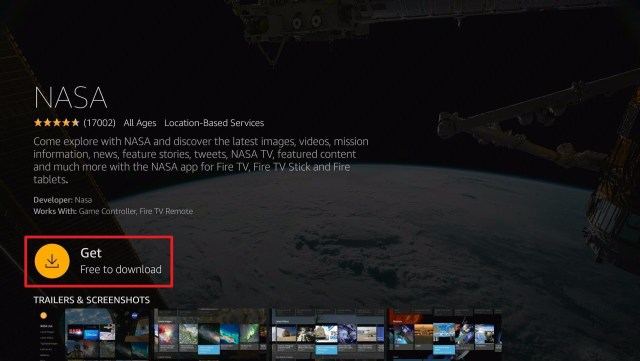
  4. Select the Get or Download button
  5. Wait for the app to be installed
  6. Click Open to launch the app


How to Install the NASA App on Firestick with Screenshots

1. Click FIND.

Movie Nite 1

2. Click Search.

Movie Nite2


2. Search for the NASA App.

NASA (2)


3. Select the icon of the NASA App.

NASA (3)


4. Click the Get or Download button

NASA (4)


5. Wait for the app to be installed

NASA (5)


6. Launch the app by clicking the Open button

NASA (6)


Legal Disclaimer: ReviewVPN.com does not encourage or endorse any illegal activity involved in the usage of services and applications referenced on this site. We do not verify the licensing agreements of services. The end-user is wholly responsible for ensuring that any media accessed through these services does not violate copyright and/or licensing laws. ReviewVPN does not promote, link to, or receive compensation from any Apps and IPTV services.


Install Surfshark on Firestick

Best Surfshark Deal


App Features

Interface

  • Easy to navigate
  • Search menu included
  • Tabs for NASA Live, Latest Images, Latest Videos, Top Rated Images, Earth as Art, Missions, and more.
  • Simple and user-friendly


Content

  • Lots of great images from space
  • Earth images from a distance
  • Space explorations and missions
  • Up-to-date content
  • Live shows available
  • Good quality videos


Pros and Cons

Pros

  • 100% free
  • No registration needed
  • Ad-free application
  • Updated content


Cons

  • Limited features


YOUR INTERNET ACTIVITY IS BEING WATCHED

ReviewVPN cannot attest to the legality, security and privacy of the applications discussed on this site. It is highly recommended that you use a VPN service while streaming or using Kodi.

Currently, your IP 216.73.216.211 is visible to everyone and your Browser is being tracked by Advertisers & ISP Provider.

Save 65% Now

Limited Time Offer

Here are the main reasons why you must use a VPN:

  • Your activities are hidden from your ISP, the government, and from the apps you are using.
  • You can access additional movies and TV streams.
  • ISP attempts to throttle are thrwarted thus reducing buffering issues.
  • Geographically restricted content like Netflix and Hulu can be unblocked.

A VPN works be replacing your ISP-assigned IP address and creating an encrypted tunnel. We recommend the no log service offered by IPVanish. It works well on a Firestick and offers the fastest possible speeds.

Special Limited Time Offer - Get IPVanish


FAQs

History

NASA has been around since 1958. But the app was officially launched last June 2015.


Is NASA safe?

Yes. Absolutely! The NASA App is 100% safe

Is NASA Legal?

Yes, the app is 100% legal.


Is NASA App Free?

Yes, The app is 100% free.


Are there any registrations?

No there are no registrations needed for this app


Is there any advertisement?

No. This app has zero advertisements.


Stream Safely with a VPN

surfshark logo

Streaming different content might raise some red flags to your Internet Service Providers or ISP. When you are streaming, you might need to access videos that are too high in definition and your data cannot handle. When this happens, your ISP will throttle your bandwidth. On your end, you will experience some buffering.

That is why you really need to use a VPN. It has a lot of benefits when you are streaming. But you have to be careful. There are some free VPNs but are not safe. Some will sell your identities to third-party advertisers to gain data. Others have advertisements, and a few have malware that may damage your devices.

Here at reviewvpn.com, we always recommend our tested and proven VPN which is Surfshark. It works perfectly with all types of devices.

Using Surfshark, you will have tons of great deals. Some of these are:

  • Gives you an additional wall of protection especially from your ISP while surfing and streaming.
  • Serves as a bridge that connects you to other servers and destroys geo-blocks that hinder you from accessing different contents.
  • Protects your online identity from hackers, especially when you are using public wi-fi
  • Keeps your data and files from harmful malware
  • Your connections and data will be kept encrypted and anonymous
  • Makes your internet speed faster
  • Gives easy access and downloads from different torrent sites without being caught.
  • Prevents Firestick Buffering and Kodi Buffering


Grab your subscription now!

Click here to get the lowest price on Surfshark through our exclusive limited-time offer.


How to Install Surfshark VPN on Firestick

If your Firestick still has the older interface, read this article to learn how to update it: Update Firestick Interface.

Follow our screenshots below to install the SurfShark VPN app on your Fire TV stick.

1. Go to the Home screen of your Firestick.

step 1 Install Surfshark VPN on Firestick


2. Navigate towards the Find tab. Press the Search button from the resulting dropdown.

step 2 Install Surfshark VPN on Firestick


3. Type in the keyword of SurfShark and select from the suggestions that will appear.

step 3 Install Surfshark VPN on Firestick


4. Click the official SurfShark icon from your search results.

step 4 Install Surfshark VPN on Firestick


5. Press the Download (You own it) button.

step 5 Install Surfshark VPN on Firestick


6. The SurfShark VPN installer will download on your device.

step 6 Install Surfshark VPN on Firestick


7. SurfShark VPN’s app will automatically install itself on your Fire TV stick.

step 7 Install Surfshark VPN on Firestick


8. Press the Open button after completing SurfShark VPN’s installation process.

step 8 Install Surfshark VPN on Firestick


9. Please wait for the SurfShark VPN to load its user interface.

step 9 Install Surfshark VPN on Firestick


10. You can now log in with your SurfShark VPN account credentials.

step 10 Install Surfshark VPN on Firestick

Learn more about Surfshark and Grab the Best Surfshark Deal Now!


Install Surfshark on Firestick

Best Surfshark Deal


Other VPNs to Consider

NordVPN (Best for Streaming)

Best Features

  • 5000+ Server in 50+ Countries 
  • Military-Grade Encryption
  • Fast Connection Speed
  • Suitable to a lot of devices
  • No-Log Policy

Prices
  • Complete $5.89 per month (64% Discount)
  • Plus $4.59 per month (56% Discount)
  • Standard $3.69 per month (55% Discount)

Best Features

  • 750+ High-speed VPN Servers in 43 Locations
  • Military-Grade Encryption
  • Fastest HD Streaming and Gaming
  • 30-Day Money-Back Guarantee
  • Unlimited Data & Devices
  • No-Log Policy

Prices
  • 3 Years $1.99 per month (82% Discount)
  • 1 Years $3.29 per month (70% Discount)
  • 1 Month $10.99 per month

IPVanish VPN (Most Secure)

Best Features

  • 1200+ Servers in 60+ Countries around the world
  • Unlimited Connections
  • No-Log Policy
  • Top Notch Military-Grade VPN Protocols and Encryptions
  • 100% Safe and Secured
  • Most Trusted VPN
  • Best VPN for Firestick
  • 30-Day Money-Back Guarantee

Prices
  • Yearly $3.99 per month (63% Discount) – 30 days risk free + Ransomware & Malware Protection
  • Quarterly $5.32 per month (51% Discount)
  • Monthly $10.99 per month


For more VPN discounts, go to ReviewVPN Deals and purchase the best VPN for you.

Click here to get the lowest price on Surfshark through our exclusive limited-time offer.


Alternative Applications for the NASA App:

There are also other apps where you can stream content like NASA features. Here are some of the possible alternatives for NASA that you might like to check out as well:

  • Practical Space
  • Earth ++
  • Galactic Space Journey HD

These apps are all legal and available on the Amazon app store. You can easily check them out and download them for free.


Opinion

If you are truly a fan of the space and all of the explorations, you can really be updated and stream all of your favorite content using this app. The best part is, this is 100% free. And as we always say, as long as it’s free there is no harm in trying and checking this app out.

The only boring characteristic of the app is that it has limited content. If only there are more to what it has now, this app would be amazing somehow.

Overall, we can still say that this is an amazing app.


Final Thoughts

We hope that this article helped you install the NASA app on your firestick device.


Note: ReviewVPN.com does not own or operate any app nor does it endorse any. The main purpose of this article is strictly for educational purposes only.


Must Read:

Best Firestick Apps

Top Unlinked Codes

Free Movie Streaming Websites

Best TV Show Websites

Best Adult Apps for Firestick

Top Live TV Apps

Install Swift Streamz on Firestick

Best Kissanime.RU Alternatives 

Best Adult Apps for Firestick

The Best Adult Apps for Android

Install Live Lounge APK for Free Live TV, Sports, Adult Section, and Movies

Best Unlinked Codes

50 Best Free Movie Streaming Sites

How to Install FITE App on Amazon Firestick

App Overview

In this article, we will discuss how to install and watch shows on FITE App on your firestick device.


If you are a big fan of wrestling, boxing, knuckle mania, MMA, and other mixed martial arts, then you might like using the FITE App.

With this app, you will be able to stream Live Events and On-demand shows of your favorite fight sports. But not all of them are free. This app contains in-app purchases, that is why some shows and episodes are paid for.

Although you will have a 50% discount on the first 72 hours upon installing this app for the first time. You just have to register your email, or Facebook account to start using the app.

It also features scheduled and replays of games and fights for you to catch up.

You can install FITE for free. It is an official Amazon app, so you can download it directly on your firestick. There is no need to Jailbreak your Firestick and Use the Downloader App.


ANONYMOUSLY


Install FITE App on Firestick Guide

  1. Go to Search
  2. Search for FITE
  3. Tap the icon of the application when it appears
  4. Select the Get or Download button
  5. Wait for the app to be installed
  6. Click Open to launch the app


If your Firestick still has the older interface, read this article to learn how to update it: Update Firestick Interface.


How to Install the FITE App on Firestick with Screenshots

1. Click FIND.

Movie Nite 1

2. Click Search.

Movie Nite2


3. Search for the FITE App.

FITE (2)


4. Select the icon of the FITE App.

FITE (3)


5. Click the Get or Download button

FITE (4)


6. Wait for the app to be installed

FITE (5)


7. Launch the app by clicking the Open button

FITE (6)


How to Use the FITE App on Firestick with Screenshots

1. Upon launching the app, you will see all the login options. Choose anything that is best for you. On this one, we use Continue with FITE.

FITE (7)


2. Take note of the code that the app provided for you. XPQY8K is just an example.

FITE (8)


3. On a separate browser, go to fite.tv/connect.

FITE 9


4. Enter the given code by the app. XPQY8K is just an example.

FITE 10


5. Then click Connect

FITE 11


6. Choose any way that is possible for you. Log in to your account.

FITE 12


7. Check any type of shows that you prefer.

FITE 13


8. Click Save Preferences.

FITE 14


9. You can now use the FITE App on your Firestick device.

FITE 15


Legal Disclaimer: ReviewVPN.com does not encourage or endorse any illegal activity involved in the usage of services and applications referenced on this site. We do not verify the licensing agreements of services. The end-user is wholly responsible for ensuring that any media accessed through these services does not violate copyright and/or licensing laws. ReviewVPN does not promote, link to, or receive compensation from any Apps and IPTV services.


Install Surfshark on Firestick

Best Surfshark Deal


YOUR INTERNET ACTIVITY IS BEING WATCHED

ReviewVPN cannot attest to the legality, security and privacy of the applications discussed on this site. It is highly recommended that you use a VPN service while streaming or using Kodi.

Currently, your IP 216.73.216.211 is visible to everyone and your Browser is being tracked by Advertisers & ISP Provider.

Save 65% Now

Limited Time Offer

Here are the main reasons why you must use a VPN:

  • Your activities are hidden from your ISP, the government, and from the apps you are using.
  • You can access additional movies and TV streams.
  • ISP attempts to throttle are thrwarted thus reducing buffering issues.
  • Geographically restricted content like Netflix and Hulu can be unblocked.

A VPN works be replacing your ISP-assigned IP address and creating an encrypted tunnel. We recommend the no log service offered by IPVanish. It works well on a Firestick and offers the fastest possible speeds.

Special Limited Time Offer - Get IPVanish


App Features

FITE Interface

  • Discover Page
  • Live Events
  • On-Demand
  • Settings
  • Search Engine
  • Easy to navigate
  • Features shows
  • Do not need a Mouse Toggle


FITE Discover Page Includes:

  • Featured Events
  • Top Replays
  • Now Popular
  • Join FITE +
  • Honor Club
  • Join NWA Powerrr


FITE LIVE EVENTS Page Includes:

  • Featured
  • My Sports
  • Now Discounted
  • All Sports
  • Free
  • Recent Replays


FITE On-Demand Page Includes:

  • Top Replays
  • Weekly Shows
  • User’s Uploads


Content

  • Advertisements are present
  • Good quality videos
  • Full-length fights
  • Videos are over at least 6 hours
  • Not all are free


Shows on FITE:

  • Brave Super Fights
  • NWA Powerrr
  • ROH Wrestling
  • The World Slapfight Championship
  • BKFC16
  • IMPACT PLUS
  • MFC 14
  • T10
  • JAM in the Van
  • PPW
  • FSW High Distance
  • Impact Wrestling
  • PCW Ultra Mutiny
  • Bang Muay Thai
  • The Fight Guys
  • MMA Rewind
  • Jon Fitch Knows Nothing Podcast
  • Personal Uploads by other Users
  • FIGHT CLUB
  • Bare Knuckle Boxing
  • Unity One Night
  • Celebrity Championship Boxing
  • 8-Man Grand Prix Event
  • UFC
  • We love MMA
  • FIGHT News and Interviews
  • Kunlun Combat
  • UFC in Focus
  • Weigh-Ins
  • Road to Destiny
  • APEX Sports Fest
  • Bobcast on three
  • VAMAA Fight Night
  • Deccan Conquest III
  • and many many more


Pros and Cons

Pros

  • Official amazon app
  • Lots of shows to watch
  • HD Videos
  • Full length shows


Cons

  • Some videos are not free
  • There are advertisements
  • You need to register to use the app


Stream Safely with a VPN

surfshark logo

When you are streaming, you are using a lot of internet data. If you play videos that are too high in definition, and your internet speed cannot handle them, your ISP will control your bandwidth. Because of this you will experience buffering on your end. You won’t be able to enjoy your streaming.

To eliminate this stress, you have to use a VPN. It will mask your identity from your ISP and it will also give you a much better internet service to access more high definition videos,

You just have to be careful in choosing the best VPN for you. There are some out there that are free but not safe. That is why we suggest using a premium VPN like IPVansih.

Surfshark will guarantee you safety and satisfaction especially when streaming.

Here are some of the many benefits that we can have from Surfshark:

  • Gives you an additional wall of protection especially from your ISP while surfing and streaming.
  • Serves as a bridge that connects you to other servers and destroys geo-blocks that hinder you from accessing different contents.
  • Protects your online identity from hackers, especially when you are using public wi-fi
  • Keeps your data and files from harmful malware
  • Your connections and data will be kept encrypted and anonymous
  • Makes your internet speed faster
  • Gives easy access and downloads from different torrent sites without being caught.
  • Prevents Firestick Buffering and Kodi Buffering


Grab your subscription now!

Click here to get the lowest price on Surfshark through our exclusive limited-time offer.


How to Install Surfshark VPN on Firestick

If your Firestick still has the older interface, read this article to learn how to update it: Update Firestick Interface.

Follow our screenshots below to install the SurfShark VPN app on your Fire TV stick.

1. Go to the Home screen of your Firestick.

step 1 Install Surfshark VPN on Firestick


2. Navigate towards the Find tab. Press the Search button from the resulting dropdown.

step 2 Install Surfshark VPN on Firestick


3. Type in the keyword of SurfShark and select from the suggestions that will appear.

step 3 Install Surfshark VPN on Firestick


4. Click the official SurfShark icon from your search results.

step 4 Install Surfshark VPN on Firestick


5. Press the Download (You own it) button.

step 5 Install Surfshark VPN on Firestick


6. The SurfShark VPN installer will download on your device.

step 6 Install Surfshark VPN on Firestick


7. SurfShark VPN’s app will automatically install itself on your Fire TV stick.

step 7 Install Surfshark VPN on Firestick


8. Press the Open button after completing SurfShark VPN’s installation process.

step 8 Install Surfshark VPN on Firestick


9. Please wait for the SurfShark VPN to load its user interface.

step 9 Install Surfshark VPN on Firestick


10. You can now log in with your SurfShark VPN account credentials.

step 10 Install Surfshark VPN on Firestick

Learn more about Surfshark and Grab the Best Surfshark Deal Now!


Install Surfshark on Firestick

Best Surfshark Deal


Other VPNs to Consider

NordVPN (Best for Streaming)

Best Features

  • 5000+ Server in 50+ Countries 
  • Military-Grade Encryption
  • Fast Connection Speed
  • Suitable to a lot of devices
  • No-Log Policy

Prices
  • Complete $5.89 per month (64% Discount)
  • Plus $4.59 per month (56% Discount)
  • Standard $3.69 per month (55% Discount)

Best Features

  • 750+ High-speed VPN Servers in 43 Locations
  • Military-Grade Encryption
  • Fastest HD Streaming and Gaming
  • 30-Day Money-Back Guarantee
  • Unlimited Data & Devices
  • No-Log Policy

Prices
  • 3 Years $1.99 per month (82% Discount)
  • 1 Years $3.29 per month (70% Discount)
  • 1 Month $10.99 per month

IPVanish VPN (Most Secure)

Best Features

  • 1200+ Servers in 60+ Countries around the world
  • Unlimited Connections
  • No-Log Policy
  • Top Notch Military-Grade VPN Protocols and Encryptions
  • 100% Safe and Secured
  • Most Trusted VPN
  • Best VPN for Firestick
  • 30-Day Money-Back Guarantee

Prices
  • Yearly $3.99 per month (63% Discount) – 30 days risk free + Ransomware & Malware Protection
  • Quarterly $5.32 per month (51% Discount)
  • Monthly $10.99 per month


For more VPN discounts, go to ReviewVPN Deals and purchase the best VPN for you.

Click here to get the lowest price on Surfshark through our exclusive limited-time offer.


Alternative Applications for FITE App

Other apps feature mixed martial arts and the likes of it aside from FITE. Here, we list down some apps that you might also want to check out.


FAQs

History

FITE app was launched last December 2018


Is FITE App Safe?

Yes. Fite App is safe to use.


Is FITE App Legal?

Yes. This app is an official amazon app, therefore it is 100% legal.


Is FITE App Free?

You can download the app directly without any payment. Some videos are free, but there is also pay-per-view content available.


Are there any ads?

Yes. There are advertisements present when you watch any shows.


Is there an official website for FITE?

Yes. You can check out fite.tv on any browser.


What other devices can I watch FITE?

You can also install this app on Roku, Apple TV, Xbox One, PS4, Google Chromecast, and Android TV.


Opinion

Well, honestly, the FITE app is jam-packed with content that will surely enjoy by the big boys. The only problem is, not all of the contents are free. But there are also a lot without payment so you can still enjoy this app without spending any money.

You just have to be careful on streaming, because maybe you are not willing to pay and you play the pay-per-view content.

Overall, we still think that this app is worth checking out.


Final Thoughts

We hope that this article helped you install the FITE app on your firestick device.


Note: ReviewVPN.com does not own or operate any app nor does it endorse any. The main purpose of this article is strictly for educational purposes only.


Must Read:

Best Firestick Apps

Top Unlinked Codes

Free Movie Streaming Websites

Best TV Show Websites

Best Adult Apps for Firestick

Top Live TV Apps

Install Swift Streamz on Firestick

Best Kissanime.RU Alternatives 

Best Adult Apps for Firestick

The Best Adult Apps for Android

Install Live Lounge APK for Free Live TV, Sports, Adult Section, and Movies

Best Filelinked Codes 2020

50 Best Free Movie Streaming Sites


What Is Your Favorite Streaming App? Cast Your Vote Below.

Websites Like SportSurge – List of Best Alternatives

Overview

In this article, we will discuss the top alternatives for the SportSurge website.


As we all know, SportSurge is one of the leading sites where we can watch and stream live sports tv for free.

The types of sports included on this website are football, basketball, motorsports, hockey, MMA, boxing, and baseball.

All you need to do is go to https://sportsurge.net using any browser and watch your favorite game.

You can actually use any device to stream on this website. To learn more, you can also read How to Stream SportSurge Website on Firestick, Android, and iOS article.

Even though SportSurge is one of the popular websites, it has a lot of downtimes. As of the moment, it is not working properly.

Many would say that this might be the end of the website. That is why we list down all of the possible alternatives for you to still watch live sports for free.


ANONYMOUSLY


Alternatives for SportSurge

Finding the best way to watch any sports online is like diving into the ocean of many possibilities. Now that SportSurge net is on the verge of shutting down, here are some of the best alternative websites.

It is best to use a VPN before you stream any website for security purposes.


Live TV

sportsurge alternatives 1


Using Live TV, you can also watch live sports and even daily archives for free. This makes it a good candidate to be a SportSurge alternative.

This site also features game standing and scores for each match. A very impressive feature especially when you like to keep posted about your favorite teams.


sportsurge alternatives 1


VIPLeague

sportsurge alternatives 2


All types of sports are present here on VIPLeague. Whatever you are into, you can easily stream them.

There are also live chat to help you learn and be updated about the games and other sports stuff.

Since this is a completely live tv website, you cannot watch if there are no live games to stream. Although you can really have a lot of sports to choose from.


sportsurge alternatives 2


Stream2Watch

sportsurge alternatives 3


This website covers premium coverage of national and international live sports events. You can choose from any of the popular sports like Basketball, Football, Boxing, Combat Sports, Soccer, Baseball, and many more.

Just like others, Stream2Watch provides links for every sports event’s videos that would air on cable to TV.

It also provides an updated schedule of all the sports events to be aired within the day.

With all of the possible sports genres and features, Stream2Watch is a very good alternative for SportSurge.


sportsurge alternatives 3


Live Soccer TV

sportsurge alternatives 4


You might find it confusing because of the website’s name. If you will read it for the first time, it seems like it only features soccer games. But it is a big no for Live Soccer TV. It is one of the alternatives for SportSurge for a good reason.

This website also provides schedule listings for NBA, NHL, MLB, and of course NFL.

It also provides scheduled matches for Europe and other parts of the world.


sportsurge alternatives 4


VIPRow

sportsurge alternatives 5


The goal of VIPRow is to provide a massive selection of live sports show available to stream on any device. So this would be a great deal for tablet or smartphone users.

Another nice thing that we can see from VIPRow is the presence of tabs not only for sports but also for TV channels, and TV shows.

But overall, there are really a lot of sports genres to choose from.


sportsurge alternatives 5


NBA Bite

sportsurge alternatives 6


This website is the concrete replacement for Reddit NBA Streams after it was shut down. But this one not only features NBA sports but also others like Soccer, NFL, NHL, MLB, Cricket, MMA, Boxing, and WWE.

It has a very simple and easy-to-use interface to stream live sports.

The home page of the website clearly shows the upcoming events, teams who will play, and the schedule details.


sportsurge alternatives 6


World Cup Football

sportsurge alternatives 7


Another confusing name for a website. We will agree that on the first time this site would be on our way, we will think of it as for football streaming site only. But that is completely incorrect.

World Cup Football website also streams other types of popular sports in the USA such as NBA, MLB, NHL, and of course NFL.

But there is one thing that you have to pay attention to this website. The first time that you will stream from it, it will require you to log in or have an account. Well, this decision is up to you, but you have to be careful about giving away your personal data to any website that you are not familiar with.

Although we tested this website using Virus Total and we found no trace of bad and malicious data from it.


sportsurge alternatives 7


720pStreams

sportsurge alternatives 8


As we can see from the name of the website, we can expect the quality of the videos to be at least 720p HD. Well, that might be the goal of the website.

It works by collecting and providing good quality live sports streams from the internet. It offers shows for NBA, MLB, NFL, NHL, UFC, MMA, NCAAF, and NCAAM.

On the home page of the website, you can easily see the schedules for the upcoming shows and sports events.


sportsurge alternatives 8


FootyBite

sportsurge aternatives 9


FootyBite is another website to watch NBA and NFL streams. You can easily see the schedule streams right when you go to the web page.

There are also other features provided by the app. Some of the tabs include DMCA, News, and Live TV.

Be mindful there are also some pop-ups when you click on the website. We really encourage using a VPN when you stream on this website.


sportsurge alternatives 9


VIPBoxTV

sportsurge alternatives 10


This website is very much the same as VIPRow. It also has a wide selection of sports genres to streams. But unlike VIPRow, VIPBoxTV doesn’t have tabs for live channels and live shows.

Both websites are still good alternatives for SportSurge. Although, there are also some pop-ups when you navigate through VIPBoxTV.


sportsurge alternatives 10


Stream Safely with a VPN

Surfshark vpn

When you stream on different websites, the domain of the website learns about your IP address giving away your location. If the website you are visiting is not safe or legal, then you are at risk.

You need to secure your identity from malicious domains, from your Internet Service Provider, and also from hackers.

To do all of those things, you need to have a VPN. We recommend using SurfShark since it provides safety and satisfaction to its users.

Here are some features of using SurfShark:

  • Conceals your entire internet traffic.
  • Hide all the things you do online.
  • Bypass geo-restrictions letting you access exclusive content.
  • Assigns you an anonymous IP address.
  • Connects you to secure servers worldwide.
  • Protects your data and files from harmful cyber threats.
  • Makes your internet speed faster.
  • Prevents Firestick Buffering and Kodi Buffering


Note: For more information about SurfShark, please read our SurfShark REVIEW.


Grab your subscription now!

How to Install Surfshark on Firestick with Screenshots

If your Firestick still has the older interface, read this article to learn how to update it: Update Firestick Interface.

You can download Surfshark directly from the Amazon App store. It will be easy for you to find Surfshark with your Firestick’s Find feature. Refer to our screenshots below.

Follow our screenshots below to install the SurfShark VPN app on your Fire TV stick.

1. Go to the Home screen of your Firestick.

step 1 Install Surfshark VPN on Firestick


2. Navigate towards the Find tab. Press the Search button from the resulting dropdown.

step 2 Install Surfshark VPN on Firestick


3. Type in the keyword of SurfShark and select from the suggestions that will appear.

step 3 Install Surfshark VPN on Firestick


4. Click the official SurfShark icon from your search results.

step 4 Install Surfshark VPN on Firestick


5. Press the Download (You own it) button.

step 5 Install Surfshark VPN on Firestick


6. The SurfShark VPN installer will download on your device.

step 6 Install Surfshark VPN on Firestick


7. SurfShark VPN’s app will automatically install itself on your Fire TV stick.

step 7 Install Surfshark VPN on Firestick


8. Press the Open button after completing SurfShark VPN’s installation process.

step 8 Install Surfshark VPN on Firestick


9. Please wait for the SurfShark VPN to load its user interface.

step 9 Install Surfshark VPN on Firestick


10. You can now log in with your SurfShark VPN account credentials.

step 10 Install Surfshark VPN on Firestick

Learn more about Surfshark and Grab the Best Surfshark Deal Now!


Install Surfshark on Firestick

Best Surfshark Deal

Other VPNs to Consider

NordVPN (Best for Streaming)

Best Features

  • 5000+ Server in 50+ Countries 
  • Military-Grade Encryption
  • Fast Connection Speed
  • Suitable to a lot of devices
  • No-Log Policy

Prices
  • Complete $5.89 per month (64% Discount)
  • Plus $4.59 per month (56% Discount)
  • Standard $3.69 per month (55% Discount)

Best Features

  • 750+ High-speed VPN Servers in 43 Locations
  • Military-Grade Encryption
  • Fastest HD Streaming and Gaming
  • 30-Day Money-Back Guarantee
  • Unlimited Data & Devices
  • No-Log Policy

Prices
  • 3 Years $1.99 per month (82% Discount)
  • 1 Years $3.29 per month (70% Discount)
  • 1 Month $10.99 per month

IPVanish VPN (Most Secure)

Best Features

  • 1200+ Servers in 60+ Countries around the world
  • Unlimited Connections
  • No-Log Policy
  • Top Notch Military-Grade VPN Protocols and Encryptions
  • 100% Safe and Secured
  • Most Trusted VPN
  • Best VPN for Firestick
  • 30-Day Money-Back Guarantee

Prices
  • Yearly $3.99 per month (63% Discount) – 30 days risk free + Ransomware & Malware Protection
  • Quarterly $5.32 per month (51% Discount)
  • Monthly $10.99 per month

For more VPN discounts, go to ReviewVPN Deals and purchase the best VPN for you.


FAQs

Did sportsurge.net die?

It is not totally dead yet. Although it is not functioning the way it was at this very moment, still you can still go to the website.


Do I have to create a sportsurge.com account?

No, you don’t need to create an account for sportsurge.com


Does SportSurge do college basketball?

It did. But at this moment, you can’t watch anything from the website.


Does SportSurge have baseball?

Yes. One of the many sports events that you can watch from SportSurge is baseball.


Is SportSurge safe to use?

We tested the website using Virus Total and found no malicious threats from it. Aside from antivirus apps, we suggest using SurfShark for a better streaming experience.


Is SportSurge Free to use?

Yes, SportSurge is free to use.


Are there Ads?

Yes, there are ads when accessing SportSurge on your device. You can use AdGuard to help you block any ads.


Is it available on Android?

Yes, SportSurge is available on your Android device through your preferred web browser.


Is it available on IOS?

Yes, SportSurge is also available on IOS. Just search for the site using your Safari web browser.


Is it available on Firestick?

Yes, it is available on Firestick through the Silk browser.


YOUR INTERNET ACTIVITY IS BEING WATCHED

ReviewVPN cannot attest to the legality, security and privacy of the applications discussed on this site. It is highly recommended that you use a VPN service while streaming or using Kodi.

Currently, your IP 216.73.216.211 is visible to everyone and your Browser is being tracked by Advertisers & ISP Provider.

Save 65% Now

Limited Time Offer

Here are the main reasons why you must use a VPN:

  • Your activities are hidden from your ISP, the government, and from the apps you are using.
  • You can access additional movies and TV streams.
  • ISP attempts to throttle are thrwarted thus reducing buffering issues.
  • Geographically restricted content like Netflix and Hulu can be unblocked.

A VPN works be replacing your ISP-assigned IP address and creating an encrypted tunnel. We recommend the no log service offered by IPVanish. It works well on a Firestick and offers the fastest possible speeds.

Special Limited Time Offer - Get IPVanish


Opinion

As one of the leading websites, it is bad for SportSurge not to function well. It will disappoint many streamers worldwide. We hope that even SportSurge is not on the verge of shutting down.

Fortunately for sports enthusiasts, there are many possible alternatives present. We can really use most of them to watch our favorite sports for free. Just be careful while streaming. Always use a powerful VPN like SurfShark for encrypting your entire internet traffic.


Final Thoughts

We hope that this article helped you know the possible alternatives for SportSurge.


Note: ReviewVPN.com does not own or operate any app nor does it endorse any. The main purpose of this article is strictly for educational purposes only.


Must Read:

Best Firestick Apps

Top Filelinked Codes

Free Movie Streaming Websites

Best TV Show Websites

Best Adult Apps for Firestick

Top Live TV Apps

Install Swift Streamz on Firestick

Best Kissanime.RU Alternatives 

Best Adult Apps for Firestick

The Best Adult Apps for Android

Install Live Lounge APK for Free Live TV, Sports, Adult Section, and Movies

Best Filelinked Codes 2020

50 Best Free Movie Streaming Sites

Free Live TV Streaming Websites – Best Alternatives for USTVGO

A Brief Overview for USTVGO

In this article, we will tackle a little bit about ustvgo and more alternative websites with free live tv streaming functions.


Ustvgo is very popular for those who like to watch live tv on their devices. As many would say, this is a good alternative for cord-cutters out there.

The domain has a lot of variation all over the internet and it is sometimes down. Although it is not permanently shut down at the moment.

We include this site as part of the Best Free Streaming Websites available.

If you like to know more about ustvgo, you can read How to Stream USTVGO on Firestick and Other Devices.

But as we mentioned earlier, there are other websites with the same function as ustvgo. And most of them are free. But we need to be careful while streaming, that is why we suggest using a VPN while doing so.

If you would prefer to stream these websites on your firestick, you need to use a good web browser like Amazon Silk Browser or Firefox.


ANONYMOUSLY

Alternatives for USTVGO

As we said above, the website is not shut down, but we would like to present some streaming websites like ustvgo.


123TVNow

ustvgo alternatives 1


123TVNow provides live tv for sports, news, documentary, kids’ shows, and entertainment. But there are a lot of pop-ups before you can finally watch any show. We can say that it is somehow bothersome for a lot of viewers out there.

We listed this website as the best alternative for ustvgo because they offer almost the same channels to stream for free. Top stream channels include FOX News, ESPN, ABC, CBS, HBO HD, NBC, and FOX Sports.

There is no registration needed to watch any channel on this website. And we tested its URL using Virus Total, and there were no threats on the result for this site. But to be safer, we can always use a VPN like Surfshark while streaming.


ustvgo alternatives


TV247

ustvgo alternatives 2


TV247 is another website like ustvgo. It offers popular US channels to stream for free.

One noticeable characteristic of this website is the presence of numerous ad banners, although there are fewer pop-ups. When we tried watching through some channels, most of them are broken streams. This is a bad quality for the website.

It seems like there is also too much buffering before watching any channel.

This website features channels such as FOX News, BBC America, Discovery Channel, National Geographic Channel, Animal Planet, Fox Sports 1, HBO, NFL Network, ESPN, Disney XD, ABC, and CBS


Time 4 TV

ustvgo alternatives 3


This website covers a lot of popular tv channels not only in the USA but also in the UK. This info alone makes it a better fit to be an alternative for ustvgo.

It offers categories mostly for news, and sports. From the home page of the website, you will see tabs for Schedule, All Channels, Sports Channels, UK Channels, USA Channels, and News Channels.

There aren’t any advertisements present which is great.

Top channels are Sky Sports, BBC One, Racing UK, ESPN, Bein, and many many more.


ustvgo alternatives


The Roku Channel

ustvgo alternatives 4


We all know that Roku is a very popular streaming provider in the US. But there is a free streaming channel available on the internet.

No registration needed, No payment, all you need to do is to pick a title and play it.

There are a lot of shows as well. The website also offers movies and tv shows. Although some features require a premium subscription.


ustvgo alternatives


US Streams

ustvgo alternatives 5


US Streams offers 148 live tv channels to stream for free. It is a great alternative for ustvgo since it only offers around 80 tv channels.

Although, the advertisements before you can really watch live tv on this website are really bothersome. You can surely ask the help of a good ad blocker software or apps to destroy the ads.

A few of the many channels present are ESPN, Eurosports, Disney Jr., Sky Sports, BT Sports, Fox News, Fox Sports, and many more.


ustvgo alternatives


OK Live TV

ustvgo alternatives 6


The OK Live TV provides channels from different countries and genres. You will find categories like Music TV Channels, UK TV Channels, USA TV Channels, Germany TV Channels, Italy TV Channels, and other random ones.

But you have to take note that in order to play some channels you need to have a VLC Media Player installed on your device.


ustvgo alternatives


TV Player

ustvgo alternatives 7


TV Player is not 100%. It has a monthly subscription of $9 per month. But there is a free trial available for this website.

It offers about 80 live tv channels to stream. Mostly this website is available in the UK, but if you use a VPN connected to a server from which it is not restricted, you can be able to stream it.


ustvgo alternatives


Hulu

ustvgo alternatives 8


As we all are familiar that Hulu is a paid subscription to watch great content. We listed it down as an alternative for USTVGO because it has a free trial that you can try.

But if you like to subscribe to it, the price is $5.99 per month.

Aside from live TV, Hulu also offers movies and tv series.

There are also popular channels to stream on Hulu. Some of which are HBO Max, SHOWTIME, CINEMAX, and STARZ, but these serve as add-ons with extra payment.

Also, be aware that there are advertisements present while streaming.


ustvgo alternatives


YOUR INTERNET ACTIVITY IS BEING WATCHED

ReviewVPN cannot attest to the legality, security and privacy of the applications discussed on this site. It is highly recommended that you use a VPN service while streaming or using Kodi.

Currently, your IP 216.73.216.211 is visible to everyone and your Browser is being tracked by Advertisers & ISP Provider.

Save 65% Now

Limited Time Offer

Here are the main reasons why you must use a VPN:

  • Your activities are hidden from your ISP, the government, and from the apps you are using.
  • You can access additional movies and TV streams.
  • ISP attempts to throttle are thrwarted thus reducing buffering issues.
  • Geographically restricted content like Netflix and Hulu can be unblocked.

A VPN works be replacing your ISP-assigned IP address and creating an encrypted tunnel. We recommend the no log service offered by IPVanish. It works well on a Firestick and offers the fastest possible speeds.

Special Limited Time Offer - Get IPVanish


Install Surfshark on Firestick

Best Surfshark Deal


FAQs

What is USTVGO?

USTVGO is a free streaming website where you can watch 93 different live tv channels.


Is USTVGO TV free?

Yes. USTVGO is a free streaming website. No need to register or pay any amount.


Is USTVGO TV Safe to Use?

We are not very sure if USTVGO is 100% safe. To make sure, you need to use a VPN such as Surfshark to be safe while streaming.


Is USTVGO TV legal?

We are unable to confirm if USTVGo has acquired the proper licensing to feature live tv channels. Just to be on the safer side of things, always use a VPN when streaming on USTVGo.


Is there a USTVGO app?

There are USTVGo Apps available on the google play store but they do not seem to be connected to the website in any way.


What are the channels available in USTVGO?

There are 93 channels available on USTVGO at the moment. We listed all of them in this article. You may refer to the Channels Available Section.


What are the devices I can use to stream USTVGO?

You can use Firestick, PC, Laptop, Android devices, iOS, and even Roku. Although the website is most applicable on pc, tablets, and phones.


Is there an official website for USTVGO TV?

You can go to ustvgo.tv


Why do I experience buffering while watching on some channels?

You need to make sure that your VPN is connected, and reload the website until you don’t experience buffering anymore.


What is the best alternative for USTVGO?

Since we listed different free and surely working websites, it is really hard to choose which one is the best. Maybe you can try 123 TV Now or Time 4 TV.


Stream Safely with a VPN

While you are streaming, there are a lot of things that you need to keep in mind. If you are using a lot of different websites, then you have to be careful if there is no malicious domain hosting the website.

Also, you need to know if your internet data can handle the video quality that you wish to stream. If not, you will experience a lot of buffering. This is because your internet service provider (ISP) is throttling your bandwidth.

With all of these and other reasons, you need to consider having a good VPN service.

But you have to be careful in choosing a VPN. There are a few out there that offers free service but they are not safe. To gain profit, they will sell your data to third-party advertisers. Especially those that have advertisements on them. And the worse scenario is there are others who have malware. This will damage your devices.

That is why we always recommend, here on reviewvpn.com, using the best VPN out there which is Surfshark.

Surfshark is a tested and proven VPN that suits your streaming needs. It offers both safety and satisfaction.

Take a look at some of the many benefits given by Surfshark:

  • Gives you an additional wall of protection especially from your ISP while surfing and streaming.
  • Protects your online identity from hackers, especially when you are using public wi-fi
  • Gives easy access and downloads from different torrent sites without being caught.
  • Destroys geo-blocks that hinder you from accessing different contents.
  • Your connections and data will be kept encrypted and anonymous
  • Serves as a bridge that connects you to other servers
  • Keeps your data and files from harmful malware
  • Prevents Firestick Buffering and Kodi Buffering
  • Makes your internet speed faster


Grab your subscription now!

Click here to get the lowest price on Surfshark through our exclusive limited-time offer.


How to Install Surfshark VPN on Firestick

If your Firestick still has the older interface, read this article to learn how to update it: Update Firestick Interface.

1. Go to the Home screen of your Firestick.

step 1 Install Surfshark VPN on Firestick


2. Navigate towards the Find tab. Press the Search button from the resulting dropdown.

step 2 Install Surfshark VPN on Firestick


3. Type in the keyword of Surfshark and select from the suggestions that will appear.

step 3 Install Surfshark VPN on Firestick


4. Click the official Surfshark icon from your search results.

step 4 Install Surfshark VPN on Firestick


5. Press the Download (You own it) button.

step 5 Install Surfshark VPN on Firestick


6. The Surfshark VPN installer will download on your device.

step 6 Install Surfshark VPN on Firestick


7. Surfshark VPN’s app will automatically install itself on your Fire TV stick.

step 7 Install Surfshark VPN on Firestick


8. Press the Open button after completing Surfshark VPN’s installation process.

step 8 Install Surfshark VPN on Firestick


9. Please wait for the Surfshark VPN to load its user interface.

step 9 Install Surfshark VPN on Firestick


10. You can now log in with your Surfshark VPN account credentials.

step 10 Install Surfshark VPN on Firestick

Learn more about Surfshark and Grab the Best Surfshark Deal Now!


Other VPNs to Consider

NordVPN (Best for Streaming)

Best Features

  • 5000+ Server in 50+ Countries 
  • Military-Grade Encryption
  • Fast Connection Speed
  • Suitable to a lot of devices
  • No-Log Policy

Prices
  • Complete $5.89 per month (64% Discount)
  • Plus $4.59 per month (56% Discount)
  • Standard $3.69 per month (55% Discount)

Best Features

  • 750+ High-speed VPN Servers in 43 Locations
  • Military-Grade Encryption
  • Fastest HD Streaming and Gaming
  • 30-Day Money-Back Guarantee
  • Unlimited Data & Devices
  • No-Log Policy

Prices
  • 3 Years $1.99 per month (82% Discount)
  • 1 Years $3.29 per month (70% Discount)
  • 1 Month $10.99 per month

IPVanish VPN (Most Secure)

Best Features

  • 1200+ Servers in 60+ Countries around the world
  • Unlimited Connections
  • No-Log Policy
  • Top Notch Military-Grade VPN Protocols and Encryptions
  • 100% Safe and Secured
  • Most Trusted VPN
  • Best VPN for Firestick
  • 30-Day Money-Back Guarantee

Prices
  • Yearly $3.99 per month (63% Discount) – 30 days risk free + Ransomware & Malware Protection
  • Quarterly $5.32 per month (51% Discount)
  • Monthly $10.99 per month


For more VPN discounts, go to ReviewVPN Deals and purchase the best VPN for you.


Grab the Best Surfshark Deal Now!


Opinion

We think that even if ustvgo is not yet over, there is a go signal to have a list of great alternatives. This would be very helpful at some point if the website undergoes some downtime.

If we are going to choose, out of these tested and proven websites, 123 TV Now and Time 4 Tv are the two best options.

We hope that this article helped you know the possible alternatives for ustvgo.


Note: ReviewVPN.com does not own or operate any app nor does it endorse any. The main purpose of this article is strictly for educational purposes only.


Must Read:

Best Firestick Apps

Top Unlinked Codes

Free Movie Streaming Websites

Best TV Show Websites

Best Adult Apps for Firestick

Top Live TV Apps

Install Swift Streamz on Firestick

Best Kissanime.RU Alternatives 

Best Adult Apps for Firestick

The Best Adult Apps for Android

Install Live Lounge APK for Free Live TV, Sports, Adult Section, and Movies

50 Best Free Movie Streaming Sites

Install NBC App on Firestick and Android

Application Overview

This article will help you install the NBC App on your Firestick and Android devices.


NBC also stands for National Broadcasting Company.  It is one of the most famous and oldest television networks in the US alongside CBS and ABC.

The NBC App is the cheapest subscription you can have in your TV provider to access the on-demand and live-stream content.

Since other brands are getting their way to the online streaming trend, NBC did not hesitate to make its move in order to provide the viewers with the content they want and need.

This app is only available for download inside the USA, although you can install it for free.


How to Download the NBC App on Android

If you are outside of the US, you can still install NBC by clicking on the button below. Take note that this version is only available for android devices such as smartphones and tablets only.

Upon checking, it is not applicable for Amazon Firestick.


NBC APK Download Here:

NBC

Note: ReviewVPN.com does not host this APK file. It is hosted on Archive.org.


ANONYMOUSLY

Install NBC on Firestick Guide

Reminder: You need to have an NBCUniversal account to activate this app on your device. (Please provide details on how to register for an account. Our readers mostly come from the US and they want specific instructions. That’s why we provide all of the details.)

1. From your Home screen, go to Find.

NBC SNL


2. Go to Search

NBC SNL


3. Seach for NBC

NBC SNL


4. Click on the NBC app

NBC SNL


5. Select Get or Download

NBC SNL


6. Wait for the app to be installed

NBC SNL


7. Launch the app

NBC SNL


8. Go to More

NBC SNL


9. Scroll down to My Profile

NBC SNL


10. Register or Log in to your account

NBC SNL


App Features

The app will let you stream thousands of NBC content with additional other movies, drama series, comedies, reality shows, late-night shows, and many more.  It also provides News and other live NBC channels to your streaming device.

User Interface:

  • Can sign in one NBC Universal account to multiple devices to sync all favorites and unfinished shows.
  • Has category filters, video thumbnails, and dedicated brand pages.


Contents:

  • Watch up-to-date episodes of current shows from the NBC family.
  • Provide a live stream of national and local news.
  • Binge-watch some classic hits from the NBC family, all for free.
  • HD quality varies from 720p to 1080p full HD depending on the show.


YOUR INTERNET ACTIVITY IS BEING WATCHED

ReviewVPN cannot attest to the legality, security and privacy of the applications discussed on this site. It is highly recommended that you use a VPN service while streaming or using Kodi.

Currently, your IP 216.73.216.211 is visible to everyone and your Browser is being tracked by Advertisers & ISP Provider.

Save 65% Now

Limited Time Offer

Here are the main reasons why you must use a VPN:

  • Your activities are hidden from your ISP, the government, and from the apps you are using.
  • You can access additional movies and TV streams.
  • ISP attempts to throttle are thrwarted thus reducing buffering issues.
  • Geographically restricted content like Netflix and Hulu can be unblocked.

A VPN works be replacing your ISP-assigned IP address and creating an encrypted tunnel. We recommend the no log service offered by IPVanish. It works well on a Firestick and offers the fastest possible speeds.

Special Limited Time Offer - Get IPVanish


Legal Disclaimer: ReviewVPN.com does not encourage or endorse any illegal activity involved in the usage of services and applications referenced on this site. We do not verify the licensing agreements of services. The end-user is wholly responsible for ensuring that any media accessed through these services does not violate copyright and/or licensing laws. ReviewVPN does not promote, link to, or receive compensation from any Apps and IPTV services.


Install SurfShark on Firestick

Best SurfShark Deal


NBC Live Channels provided by the App:

  • Bravo
  • E!
  • Oxygen
  • SYFY
  • CNBC HD
  • MSNBC
  • Telemundo
  • NBC News
  • NBC Universo
  • The NBC Sports HD
  • NBC Sports


NBC Original and Popular Shows available in the App:

  • America’s Got Talent
  • Brooklyn Nine-Nine 
  • Law and Order
  • Victims Unit
  • The Tonight’s Show Starring Jimmy Fallon


Classis Series you can stream for free:

  • Will and Grace
  • Saved by the Bell
  • House
  • Heroes


Pros and Cons

Pros

  • It will let you stream your favorite shows for free
  • Current and old NBC shows available
  • On-demand movies available
  • Good picture quality
  • A wide selection of shows to binge-watch

Cons

  • Lots of bad reviews
  • Subjected to many technical problems
  • Hard to re-authenticate sometimes after signing out
  • New episodes and shows are not always free, it will require the user to have a cable subscription
  • There are no indications on which shows or episodes are available without a cable subscription
  • Need a cable subscription to install the app


FAQs

Is the NBC app on firestick free?

The app is free for download. A few of the content is free, but some, like brand new episodes, require the app to have a cable subscription.


Are there Ads?

Yes. The free version of the app has advertisements.


What other devices does NBC app work on?

You can install the app on your Android phones, tablet, Android TV, Apple TVs, Echo Show, Amazon Fire Tablets, iPhones, iPad, Roku devices, Samsung TVs, Vizio TVs, Xbox 360, and Xbox One.


Does the NBC App require a certain Internet speed?

For smooth streaming, have at least 10 Mbps internet speed.


Do I need a cable subscription to use the app?

Yes. You need to have a cable subscription first for you to be able to use the app. But you can NBC on your Fire TV through different streaming services like Hulu, Sling TV, AT&T TV, and Youtube TV.


NBC App Not Working on Firestick

Sometimes you are experiencing streaming issues, application crashes, and unable to load content using the NBC app in your firestick, you will need these tips on how to troubleshoot such problems:


Log out and Re-authenticate Using Your TV Provider

This is the first thing that you must try to do to solve most of your problems with the NBC app on firestick

Sign out of your TV provider in the Settings of the app

Sign in again to your provider with the primary address on the provider account in the Settings of the app.

(follow the link to get the primary address )


Restart your Firestick Device

Home > Settings > My Fire TV / Device > Restart

(the alternative procedure is to unplug and re-plug your device)


Clean up the NBC App

Home > Settings > Applications > Manage Installed Applications > NBC App > Clear cache / clear data


Force stop the NBC App

Home > Settings > Applications > Manage Installed Applications > NBC App > Force Stop

(Try to re-open the app after forcing it to close)


Stream Safely with a VPN

Surfshark vpn

Streaming requires a lot of internet data. Because of this, our Internet Service Provider (ISP) is throttling our internet speed. This will result in buffering.

Protect your identity from your ISP with the use of a VPN.

We recommend SurfShark as the best VPN especially while streaming. It provides these benefits and more:

  • Provides protection against hackers when you are using public wi-fi
  • Adds an additional layer of protection especially from your ISP while using the internet.
  • Your connections and data will be kept encrypted and anonymous
  • Keeps your data and files from harmful malware
  • Gives easy access and downloads from different torrent sites without being caught.
  • Makes your internet speed faster
  • Prevents Firestick Buffering and Kodi Buffering


Install SurfShark on Firestick

Best SurfShak Deal


How to Install Surfshark on Firestick with Screenshots

If your Firestick still has the older interface, read this article to learn how to update it: Update Firestick Interface.

You can download Surfshark directly from the Amazon App store. It will be easy for you to find Surfshark with your Firestick’s Find feature. Refer to our screenshots below.

Follow our screenshots below to install the SurfShark VPN app on your Fire TV stick.

1. Go to the Home screen of your Firestick.

step 1 Install Surfshark VPN on Firestick


2. Navigate towards the Find tab. Press the Search button from the resulting dropdown.

step 2 Install Surfshark VPN on Firestick


3. Type in the keyword of SurfShark and select from the suggestions that will appear.

step 3 Install Surfshark VPN on Firestick


4. Click the official SurfShark icon from your search results.

step 4 Install Surfshark VPN on Firestick


5. Press the Download (You own it) button.

step 5 Install Surfshark VPN on Firestick


6. The SurfShark VPN installer will download on your device.

step 6 Install Surfshark VPN on Firestick


7. SurfShark VPN’s app will automatically install itself on your Fire TV stick.

step 7 Install Surfshark VPN on Firestick


8. Press the Open button after completing SurfShark VPN’s installation process.

step 8 Install Surfshark VPN on Firestick


9. Please wait for the SurfShark VPN to load its user interface.

step 9 Install Surfshark VPN on Firestick


10. You can now log in with your SurfShark VPN account credentials.

step 10 Install Surfshark VPN on Firestick

Learn more about Surfshark and Grab the Best Surfshark Deal Now!


Install Surfshark on Firestick

Best Surfshark Deal

Other VPNs to Consider

NordVPN (Best for Streaming)

Best Features

  • 5000+ Server in 50+ Countries 
  • Military-Grade Encryption
  • Fast Connection Speed
  • Suitable to a lot of devices
  • No-Log Policy

Prices
  • Complete $5.89 per month (64% Discount)
  • Plus $4.59 per month (56% Discount)
  • Standard $3.69 per month (55% Discount)

Best Features

  • 750+ High-speed VPN Servers in 43 Locations
  • Military-Grade Encryption
  • Fastest HD Streaming and Gaming
  • 30-Day Money-Back Guarantee
  • Unlimited Data & Devices
  • No-Log Policy

Prices
  • 3 Years $1.99 per month (82% Discount)
  • 1 Years $3.29 per month (70% Discount)
  • 1 Month $10.99 per month

IPVanish VPN (Most Secure)

Best Features

  • 1200+ Servers in 60+ Countries around the world
  • Unlimited Connections
  • No-Log Policy
  • Top Notch Military-Grade VPN Protocols and Encryptions
  • 100% Safe and Secured
  • Most Trusted VPN
  • Best VPN for Firestick
  • 30-Day Money-Back Guarantee

Prices
  • Yearly $3.99 per month (63% Discount) – 30 days risk free + Ransomware & Malware Protection
  • Quarterly $5.32 per month (51% Discount)
  • Monthly $10.99 per month

For more VPN discounts, go to ReviewVPN Deals and purchase the best VPN for you.


Best Alternatives for the NBC App on Firestick:

Here is the list of other applications that you might like to check out:

Hulu

You can use Hulu to watch movies and series with a multi-platform video-on-demand service that offers feature films, series, original shows, and more.


Amazon Prime Video

You can watch over 90,000 movies and TV shows on Amazon Prime Video. It has a feature called the Amazon Instant Video that streams movies and TV shows on different devices such as PC, Mac, Smart TVs, and Blu-ray players.


Youtube TV

Known as a video-sharing website that allows users to upload, view and share videos, and other media content.


Netflix

It is the world’s leading subscription service for watching original shows, TV series, and movies on your phone and other devices.


Our Opinion:

Since there are a lot of wonderful shows that NBC offers, it is so great to have the NBC App on your device. It is free and worth the try. There are just a lot of commercials and advertisements during the shows.

The problem is most people find it hard to use the app. The way on how to set up the app on the device to activating and authenticating is way too difficult for some users. 


Final Thoughts

We hope that this article helps you to know how to install the NBC App on your firestick device.


See Also:

Best Firestick Apps

Top Unlinked Codes

Free Movie Streaming Websites

Best TV Show Websites

List of Best Adult Apps for Firestick

Top Live TV Apps

Install Swift Streamz on Firestick

Best Kissanime.RU Alternatives