How to Change IP Address – Best and Easy Guide For You

How to Change IP Address Overview

In this article, we will show you how to change your IP address to another country.


This might sound too technical but how to change an IP address is not that hard. Doing this also provides a lot of great deals in terms of access and security. You can really say that it could be a necessity because there are so many cybercriminals present nowadays.

Many advertisers online also become a threat to your security. They gather information, based on your algorithm, or the way you use the internet from your IP address. Even the emails you send and the money you transact can be tracked through your IP address. That is why it is sometimes important also to block even your Internet Service Provider.

Changing your IP address can stop all of that. We will show you how to change your IP address, and what are the importance and benefits of doing it so.


ANONYMOUSLY

How to Change IP Address (Simplified Guide)

  1. Download a reliable and good working premium VPN. We suggest using Surfshark.
  2. Register an account to your VPN.
  3. Turn on your VPN and choose a server from another country.
  4. Notice that Your IP address will change.


YOUR INTERNET ACTIVITY IS BEING WATCHED

ReviewVPN cannot attest to the legality, security and privacy of the applications discussed on this site. It is highly recommended that you use a VPN service while streaming or using Kodi.

Currently, your IP 216.73.216.211 is visible to everyone and your Browser is being tracked by Advertisers & ISP Provider.

Save 65% Now

Limited Time Offer

Here are the main reasons why you must use a VPN:

  • Your activities are hidden from your ISP, the government, and from the apps you are using.
  • You can access additional movies and TV streams.
  • ISP attempts to throttle are thrwarted thus reducing buffering issues.
  • Geographically restricted content like Netflix and Hulu can be unblocked.

A VPN works be replacing your ISP-assigned IP address and creating an encrypted tunnel. We recommend the no log service offered by IPVanish. It works well on a Firestick and offers the fastest possible speeds.

Special Limited Time Offer - Get IPVanish


Install Surfshark on Firestick

Best Surfshark Deal


4 Ways on How to Change Your IP Address

There are actually 4 ways to change your IP address. You can use a VPN, Tor Browser, DNS, and Proxy Sites. Although all of these processes are proven effective, not all of them are 100% safe. We can say that the best one among these is by using a VPN. You will understand later why we think that this is the best option.


1. Use a VPN

To change your IP address, using a VPN is at the top of your options. This is known as a Virtual Private Network. Using this you will have your own private network that will totally hide your real IP and replace it with another one. You will gain access to other content and features that are originally not available in your country.

Most people also use a VPN when traveling so they can still have access to their original area or region.

Other VPNs can also unblock the content of streaming apps like Netflix. But you have to take note that unblocking Netflix is not applicable to all VPNs. Only a few ones can do that.

A VPN is a really good technology. The only bad side of using this is that almost all great ones are paid. There are some free ones but we cannot assure our safety with them. Of course, the free ones have to earn for them to continue their service. Others have advertisements and the worst part is they can even sell your data (which the premium ones will never do).

Here at reviewvpn.com, we always recommend Surfshark. It is one of the best VPNs in the market today. Surfshark is a premium VPN that really works with all types of devices.


Surfshark Benefits:
  • Thousands of servers from all over the world.
  • Liberty to choose which country, city, and server you like to connect.
  • Protects you from hackers, spies, or even from your Internet Service Provider (ISP).
  • The VPN protocol for all types of devices.
  • Advanced features like split tunneling and kill switch.
  • Works with a double VPN setup.
  • Gives access to geo-restricted content.
  • Data Encryption
  • No log policy.
  • Can be used for Torrenting
  • Prevents Firestick Buffering and Kodi Buffering

Note: For more information about Surfshark, please read our Surfshark Review.


Grab your subscription now!


How to Install Surfshark VPN on Firestick

If your Firestick still has the older interface, read this article to learn how to update it: Update Firestick Interface.

Follow our screenshots below to install the SurfShark VPN app on your Fire TV stick.

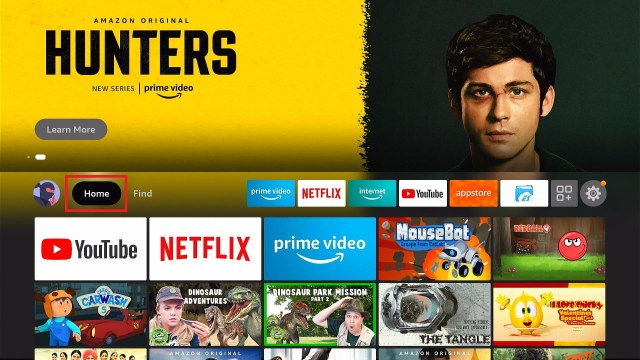
1. Go to the Home screen of your Firestick.

step 1 Install Surfshark VPN on Firestick


2. Navigate towards the Find tab. Press the Search button from the resulting dropdown.

step 2 Install Surfshark VPN on Firestick


3. Type in the keyword of SurfShark and select from the suggestions that will appear.

step 3 Install Surfshark VPN on Firestick


4. Click the official SurfShark icon from your search results.

step 4 Install Surfshark VPN on Firestick


5. Press the Download (You own it) button.

step 5 Install Surfshark VPN on Firestick


6. The SurfShark VPN installer will download on your device.

step 6 Install Surfshark VPN on Firestick


7. SurfShark VPN’s app will automatically install itself on your Fire TV stick.

step 7 Install Surfshark VPN on Firestick


8. Press the Open button after completing SurfShark VPN’s installation process.

step 8 Install Surfshark VPN on Firestick


9. Please wait for the SurfShark VPN to load its user interface.

step 9 Install Surfshark VPN on Firestick


10. You can now log in with your SurfShark VPN account credentials.

step 10 Install Surfshark VPN on Firestick

Learn more about Surfshark and Grab the Best Surfshark Deal Now!


Install Surfshark on Firestick

Best Surfshark Deal


Other VPNs to Consider

NordVPN (Best for Streaming)

Best Features

  • 5000+ Server in 50+ Countries 
  • Military-Grade Encryption
  • Fast Connection Speed
  • Suitable to a lot of devices
  • No-Log Policy

Prices
  • Complete $5.89 per month (64% Discount)
  • Plus $4.59 per month (56% Discount)
  • Standard $3.69 per month (55% Discount)

Best Features

  • 750+ High-speed VPN Servers in 43 Locations
  • Military-Grade Encryption
  • Fastest HD Streaming and Gaming
  • 30-Day Money-Back Guarantee
  • Unlimited Data & Devices
  • No-Log Policy

Prices
  • 3 Years $1.99 per month (82% Discount)
  • 1 Years $3.29 per month (70% Discount)
  • 1 Month $10.99 per month

IPVanish VPN (Most Secure)

Best Features

  • 1200+ Servers in 60+ Countries around the world
  • Unlimited Connections
  • No-Log Policy
  • Top Notch Military-Grade VPN Protocols and Encryptions
  • 100% Safe and Secured
  • Most Trusted VPN
  • Best VPN for Firestick
  • 30-Day Money-Back Guarantee

Prices
  • Yearly $3.99 per month (63% Discount) – 30 days risk free + Ransomware & Malware Protection
  • Quarterly $5.32 per month (51% Discount)
  • Monthly $10.99 per month


For more VPN discounts, go to ReviewVPN Deals and purchase the best VPN for you.

Click here to get the lowest price on Surfshark through our exclusive limited-time offer.


2. Use Tor Browser

Another way how to change IP address is by using The Onion Router (Tor) Browser.

This is a technology that is very similar to a VPN. It was originally created by the makers of Mozilla Firefox for military purposes of the United States of America.

Tor Browser works through a series of various computer servers that you can visualize as onion, hence the onion router was formed.

We can say that it is like sharing IP. You can use a different one and other users can use yours as well. The problem with this is that if you let them use your IP, and they do some cybercriminals stuff, all records will be reflected in your IP address which is bad.

Overall, Tor Browser encrypts your data and lets you use the internet anonymously like a VPN. But since TOR is a series of severs, you may notice a slight change in your internet speed which is oftentimes slow.

Tor Browser is available in almost all types of devices even on Amazon Firestick. But you need to Jailbreak Your Firestick first in able to download this app.


How to Install Tor Browser on Firestick With Screenshots

In this process, we are going to use the Downloader app. Make sure you can jailbreak your firestick first. This is to allow you to install from sources unknown to Amazon. Here’s how:

1. Scroll to the right-most portion of your home screen and click the wheel gear button (Settings).

Step 1 jailbreak firestick


2. Scroll down and to the right until you get to My Fire TV. Click on it.

Step 2 jailbreak firestick


3. Select Developer options.

Step 3 jailbreak firestick


4. Turn on ADB debugging and Apps from Unknown Sources.

Step 4 jailbreak firestick


5. Click Turn On when the pop-up appears.

Step 5 jailbreak firestick


Then, after jailbreaking your Firestick, you’ll need to install the Downloader app to sideload Tor Browser. This app, which is easily available on the Amazon App Store, allows you to download APK files.


6. Click Home, click FIND.

Step 6 Install FitOn Pro App on Firestick


7. Click Search.

Step 7 Install FitOn Pro App on Firestick


8. You can either say Downloader to your Alexa voice-enabled remote or start typing it. If you typed it, click on the suggestion when it appears.

Step 8 Install FitOn Pro App on Firestick


9. Click on the Downloader Icon.

Step 9 Install FitOn Pro App on Firestick


10. Click Download.

Step 10 Install FitOn Pro App on Firestick


step 10 Install FitOn Pro App on Firestick


11. Click on Open.

Step 11 Install FitOn Pro App on Firestick


12. Click on Allow.

Step 12 Install FitOn Pro App on Firestick


13. Use the Downloader search tab.

Install the UPlayer App on Firestick Step 13


14. Type https://reviewvpn.com/torb and click Go

Tor Browser (1)


15. Wait for the APK to be downloaded.

Tor Browser (2)


16. Select the Install button.

Tor Browser (3)


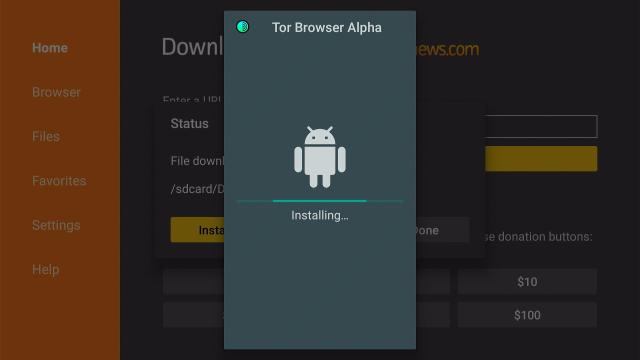
17. Wait for the app to be installed.

Tor Browser (4)


18. Launch the app by clicking Open.

Tor Browser (5)


19. Select Connect, you might have to use mouse toggle.

Tor Browser (6)


20. Set your security level.

Tor Browser (7) How to change IP address


21. Click on the search engine at the bottom part.

Tor Browser (8) How to change IP address


22. You can now type in the website you want to visit

Tor Browser (9) How to change IP address


3. Use Proxy Sites

The third way on how to change your IP address is by using proxy sites. This is by far the cheapest way if you don’t want to spend those dollars on VPNs. But of course, proxy sites are nothing compared with the services that VPNs provide.

Proxy sites mask your IP address so that you can surf the internet anonymously. Although, they will never encrypt your data. So you are not 100% secured. If others will try to track you and check your unencrypted data, they could still see your recent activities.

Not all proxy sites are proven efficient, only a few ones can really be considered the best.

Here is the list of the best Proxy Sites to checkout.


4. Use DNS

Like a VPN, Smart DNS services can also hide your true IP address and connect you to other countries. Unlike VPN, Smart DNS is similar to Proxy Sites because they both don’t encrypt your data while browsing.

Domain Name System, DNS, acts as an internet ad-hoc phone book. It can also make your upload and download speed faster. So if your only concern is how to change your IP address with less security, you can rely on Smart DNS.

DNS changes the official URL into easy numbers or codes. To know more about Ho Smart DNS works, you can read Everything You Need to Know about Smart DNS.

Best Free DNS Providers


Benefits Of Changing Your IP Address

The IP address is not just about your location but also a lot more about you. Here are some of the reasons why it is important to change your IP address.

  • Makes you browse the internet anonymously
  • Block search engines and ISP on tracking your activities
  • Gives access to geo-restricted content
  • Protects you from hackers and other spying eyes
  • No need to worry about using private WiFi
  • Freedom, Security, and Protection
  • Prevent even the government from checking on your activities
  • Unblock other content and features of some streaming apps


FAQs

How to change the IP address on Windows 10

You can always install a VPN like Surfshark on your Windows 10.


How to Change the IP address on iPhone?

Go to your apple app store and search for a good VPN. Surfshark is available in the Apple AppStore and you can install it anytime on your iOS device.


Conclusion

Changing your IP address is really not that hard, and it is actually helpful. You can choose amongst the 4 ways we provided above. For our suggestion, using a VPN might be more expensive than the others but it is the best way though. Especially when you utilize the full capacity and capabilities of your VPN. We recommend Surfshark as one of the great ones to checkout.

We hope that this article was able to help you learn how to change your IP address.


Note: ReviewVPN.com does not own or operate any app nor does it endorse any. The main purpose of this article is strictly for educational purposes only.

Best FMovies Websites and Alternatives – 2023 Update

Best FMovies Websites and Alternatives

In this article, we will discuss the best FMovies websites and alternatives.


We are very familiar with FMovies. It is one of the best streaming websites where you can watch movies and TV shows for free. You can visit this website with the use of any device.

Like any other website, FMovies can easily go down at any point in time. Good thing that there are FMovies mirror sites or even other alternative domains to choose from. Read along as we show all of them in this article.

If you are using Firestick, you can also stream FMovies or any other website through the use of Amazon Silk Browser. It is the best browser to use on Firestick, but you can also use others like Firefox.

Installing the Amazon Silk Browser to stream any FMovies websites and alternatives does not necessarily require you to Jailbreak your Firestick.


ANONYMOUSLY

Best FMovies Mirror Websites

If the FMovies website isn’t active right now, you don’t have to worry because there are some mirror sites that you can rely on. Take a look at these FMovies Mirror Sites:


  • https://fmovies.to/
  • https://ww2.fmovies.cab/
  • https://fmovies.cc/
  • https://ww1.fmoviefree.net/
  • https://fmovie.fm/
  • https://fmovies.mom/


Easy Guide to Install Amazon Silk Browser on Firestick (With Screenshots)

1.  Click Home on your remote and click “Find”.

Step 1 Install IPVanish


2. Click “Search”

Step 2 Install IPVanish


3. Type in Silk Browser and choose this item that appears on the results.


4. Click on the Silk Browser Icon.


5. Choose Download


6. Select Open to launch the browser.


7. You can now start browsing using Amazon Silk Browser.


YOUR INTERNET ACTIVITY IS BEING WATCHED

ReviewVPN cannot attest to the legality, security and privacy of the applications discussed on this site. It is highly recommended that you use a VPN service while streaming or using Kodi.

Currently, your IP 216.73.216.211 is visible to everyone and your Browser is being tracked by Advertisers & ISP Provider.

Save 65% Now

Limited Time Offer

Here are the main reasons why you must use a VPN:

  • Your activities are hidden from your ISP, the government, and from the apps you are using.
  • You can access additional movies and TV streams.
  • ISP attempts to throttle are thrwarted thus reducing buffering issues.
  • Geographically restricted content like Netflix and Hulu can be unblocked.

A VPN works be replacing your ISP-assigned IP address and creating an encrypted tunnel. We recommend the no log service offered by IPVanish. It works well on a Firestick and offers the fastest possible speeds.

Special Limited Time Offer - Get IPVanish


Legal Disclaimer: ReviewVPN.com does not encourage or endorse any illegal activity involved in the usage of services and applications referenced on this site. We do not verify the licensing agreements of services. The end-user is wholly responsible for ensuring that any media accessed through these services does not violate copyright and/or licensing laws. ReviewVPN does not promote, link to, or receive compensation from any Apps and IPTV services.


Install Surfshark on Firestick

Best Surfshark Deal


Best FMovies Alternative Websites

If any of the FMovies websites mentioned above is not working and you are looking for the best alternative, then we’ve got you covered. Here is the list of the best FMovies alternative websites.


Yes!Movies

FMovies Websites and Alternatives

URL: https://yesmovies.ag/

The first on our list of the best FMovies alternative websites is Yes!Movies. It has tons of viewers every month. Mainly because of the great variety of shows and genres it offers.

You can choose from Movies, TV Series, Top IMDb, and country. It also provides tons of genres like drama, sci-fi, romance, action, thriller, sitcom, adventures, comedy, and many more.


Tubi

FMovies Websites and Alternatives

URL: https://tubitv.com/

Tubi is one of the most popular best FMovies alternative websites. It provides a premium and quality streaming experience for the users. The website has an appealing and easy-to-use interface. Its features are great like easy navigation and playback.

Tubi also offers a wide variety of content to stream, but there are some advertisements present while streaming. You can also register for an account here on Tubi.

Watch Tubi Abroad


VHMovies

FMovies Websites and Alternatives

URL: https://vhmovies.com/

VHMovies is formerly known as SolarMovies. It is also a great FMovie alternative website. This provides top cinemas, movies, and TV series. You can look for the most recent addition and the most viewed titles.

There are some pop-ups that may be annoying, so we suggest using an ad blocker app to stop this.


YifyMovies

FMovies Websites and Alternatives

URL: https://yify.plus/

The YifyMovies website, also known as Yify TV, is a great addition to the list of the best FMovies alternative websites. Although there are some banner ads, and pop-ups when you stream this website, you can still have great titles to watch.

Yify offers almost all of the trending movies and TV series with high quality. It also has a simple, easy-to-use interface. We still suggest using a good VPN like Surfshark when streaming on websites like Yify.


LookMovie

FMovies Websites and Alternatives

URL: https://lookmovie.io/

One of the new but great FMovies alternatives is the LookMovie website. It has a massive selection of genres, years, ratings, and the latest ones. You can easily filter what type of shows you are looking for on the home page of the LookMovie website.

We noticed that this website also allows users to donate through bitcoins. Make sure to be safe while doing such a thing. We suggest using a VPN like IPanish when streaming and even when transacting bitcoins.


MovieWatcher

FMovies Websites and Alternatives

URL: https://moviewatcher.is/

You can have a lot of the latest titles through MovieWatcher. That is why we consider this as one of the best FMovies website alternatives. On the home page of the website, you can easily spot the movies that are currently available in cinemas, the most viewed, and the recently added movies and TV series.

There are some advertisements and pop-ups available on this website. Again, you can always use an ad blocker app to prevent these.


GoStream

FMovies Websites and Alternatives

URL: https://gostream.site/

To finish off our list of the best FMovies alternatives is GoStream. It provides the latest movie titles and TV shows. You can also check different genres, most viewed, and top IMDb.

The only problem is that it is not hard to search titles per year, but you won’t need an account to go stream any shows you like. We cannot promise that GoStream provides the best video quality but you can still check it out.


Stream Safely With a VPN

https://get.surfshark.net/aff_c?offer_id=865&aff_id=12312

When you are streaming, especially these best FMovies websites and alternatives, you will encounter a lot of links, pop-ups, and advertisements. Besides these pop-ups being annoying, they can also bring harm to your privacy. You should always take good care of your online security. Don’t just click on unknown links or http websites.

The best way to protect your privacy is by using a Virtual Private Network or VPN. This software will connect you to a different server in any country of your choice. It will change your IP address and mask your online presence, giving your a good layer of protection. You can definitely stream any websites you like with a VPN.

There are some free VPNs, but it is better to invest in premium ones. Because free VPNs find their way to earn money, sometimes through ads. There are also instances when free VPNs sell user information to third-party advertisers. We suggest using the premium ones for assurance.

We always recommend a very trusted VPN, Surfshark. It has great features and it will definitely protect your online visibility.

Note: For more information about SurfShark, please read our SURFSHARK REVIEW.


Grab your subscription now!


How to Install Surfshark VPN on Firestick

If your Firestick still has the older interface, read this article to learn how to update it: Update Firestick Interface.

You can download Surfshark directly from the Amazon App store. It will be easy for you to find Surfshark with your Firestick’s Find feature. Refer to our screenshots below.

1. Go to the Home screen of your Firestick.

step 1 Install Surfshark VPN on Firestick


2. Navigate towards the Find tab. Press the Search button from the resulting dropdown.

step 2 Install Surfshark VPN on Firestick


3. Type in the keyword of SurfShark and select from the suggestions that will appear.

step 3 Install Surfshark VPN on Firestick


4. Click the official SurfShark icon from your search results.

step 4 Install Surfshark VPN on Firestick


5. Press the Download (You own it) button.

step 5 Install Surfshark VPN on Firestick


6. The SurfShark VPN installer will download on your device.

step 6 Install Surfshark VPN on Firestick


7. SurfShark VPN’s app will automatically install itself on your Fire TV stick.

step 7 Install Surfshark VPN on Firestick


8. Press the Open button after completing SurfShark VPN’s installation process.

step 8 Install Surfshark VPN on Firestick


9. Please wait for the SurfShark VPN to load its user interface.

step 9 Install Surfshark VPN on Firestick


10. You can now log in with your SurfShark VPN account credentials.

step 10 Install Surfshark VPN on Firestick

Learn more about Surfshark and Grab the Best Surfshark Deal Now!


Other VPNs to Consider

NordVPN (Best for Streaming)

Best Features

  • 5000+ Server in 50+ Countries 
  • Military-Grade Encryption
  • Fast Connection Speed
  • Suitable to a lot of devices
  • No-Log Policy

Prices
  • Complete $5.89 per month (64% Discount)
  • Plus $4.59 per month (56% Discount)
  • Standard $3.69 per month (55% Discount)

Best Features

  • 750+ High-speed VPN Servers in 43 Locations
  • Military-Grade Encryption
  • Fastest HD Streaming and Gaming
  • 30-Day Money-Back Guarantee
  • Unlimited Data & Devices
  • No-Log Policy

Prices
  • 3 Years $1.99 per month (82% Discount)
  • 1 Years $3.29 per month (70% Discount)
  • 1 Month $10.99 per month

IPVanish VPN (Most Secure)

Best Features

  • 1200+ Servers in 60+ Countries around the world
  • Unlimited Connections
  • No-Log Policy
  • Top Notch Military-Grade VPN Protocols and Encryptions
  • 100% Safe and Secured
  • Most Trusted VPN
  • Best VPN for Firestick
  • 30-Day Money-Back Guarantee

Prices
  • Yearly $3.99 per month (63% Discount) – 30 days risk free + Ransomware & Malware Protection
  • Quarterly $5.32 per month (51% Discount)
  • Monthly $10.99 per month


For more VPN discounts, go to ReviewVPN Deals and purchase the best VPN for you.


Grab the Best Surfshark Deal Now!


FAQs

What Happened to FMovies Website?

There are times when you visit FMovies and it is currently down. This thing happens to any other website with similar functions. You can check the above list for the best FMovies mirror websites and alternatives.


Is FMovies a Legal Movie streaming website?

ReviewVPN does not have the capability to determine the legality of any streaming website nor does it encourage any illegal or copyright works they commit.


Should I Use A VPN for FMovies Websites?

Yes, you should always use a VPN when streaming or using the internet. This will make you stay anonymous online.


What is the best FMovies alternative?

We have a lot of websites to mention for this query. You can check the list above, but Tubi, YesMovies, and VHMovies are just three of the best ones to consider.


Conclusion

We can say that FMovies is a very wonderful website where you can watch movies and TV series. Often, this website is down so we list down the best mirror sites you can rely on. Hopefully, this will help you a lot when you struggle to access the official FMovies website. We also provide some suggestions for the best FMovies Alternative websites.  But make sure to always use a VPN when streaming on different websites. You can always choose IPVansh. For us, it is the best VPN for streaming.


Note: ReviewVPN.com does not own or operate any app nor does it endorse any. The main purpose of this article is strictly for educational purposes only.

How to Block ISP Tracking Your Online Activities

Overview

This article will teach you how to block ISP tracking your online activities.


Don’t you know that your Internet Service Provider or ISP can monitor your every move online? Yes, that is right. Your ISP is capable of doing such a thing.

Using incognito can only hide your recent activities from your parents, siblings, or friends, but never from your ISP. There are no laws that hinder your ISP to cross the boundary or limit themselves from tracking you. What’s worse is that they can even log your data and do everything they want with them.

This is actually a serious threat to your online privacy. There are a lot of things that ISP can track and monitor. Later, we will show them to you.

Continue reading this article, and you will learn how to block your ISP from tracking your online activities.


ANONYMOUSLY

How to Block ISP Tracking?

There are certain ways on how to block ISP tracking all your activities. You can actually alter the situation and stop this once and for all. Just to give you a heads-up, some of these ways are not that easy or even free. But we can assure you that you can regain your privacy back once you follow any of these tips.

1. Use a Virtual Private Network (VPN)

This, so far, is the best way on how to block ISP tracking. A virtual private network or VPN is an advanced software or technology that can change your IP address. There are a lot of great things you can do when you acquire a different IP address. One of them is masking your identity from your ISP.

A VPN will let you choose a location or country. You can also select the best server from a specific city. This can also give you access to a lot of geo-restricted content and features for certain apps.

An ISP usually tracks users’ online activities through IP addresses. If you use a VPN and change your IP, your ISP won’t be able to track you.

If you are going to use a VPN, we suggest using a premium version. Some other free VPNs are not safe to use. In order to have an income, some free VPNs, sell your information to third-party advertisers. Choose a VPN that has a no-log policy. One of these is Surfshark.

2. Use Proxy sites

Proxies and VPNs are often mistaken for having the same features. That is why we write, Proxy VS VPN.

Using proxy sites is another way on how to block ISP tracking. This can also change your IP address, so our ISP won’t be able to throttle your connection. But compared with a VPN, Proxy sites have fewer features like lack of encryption.  A VPN creates encryption when connecting you to a different server while proxy sites don’t do such a thing. It can only make your IP seems online but if your ISP monitors it, they can still have a chance to review the data.

Other than this, not all proxy sites are safe. Try to check Everything You Need to Know about Proxy Sites to learn more.


3. Use Tor Browser

The third way on how to block ISP tracking is by using The Onion Router (Tor) Browser. This is a very popular process, although there are small chances that are not safe for you.

Tor Browser creates a layer of routing path by connecting you to a series of servers. This is very suitable if you really want to hide your online visibility from your ISP.

Using Tor, you will have a different IP address as well. But the truth is, it is actually sharing IP addresses. You can use other’s but others can use yours as well. It’s like layers of IP addresses like peeling an onion. The problem with this is that if the end-user who currently has your IP does some cybercrime and all the data will be recorded to you. So you have to also be careful while using Tor.

Install Tor Browser to Firestick


4. Only Vist HTTPS links

Although this is not an exact or accurate way on how to block ISP tracking, HTTPS should always be considered. HTTPS is a safety protocol that encrypts your data to be transferred to the website you are visiting. This is not the best way to hide from your ISP but it is a great habit for safe online browsing.

Make sure to avoid HTTP websites.


YOUR INTERNET ACTIVITY IS BEING WATCHED

ReviewVPN cannot attest to the legality, security and privacy of the applications discussed on this site. It is highly recommended that you use a VPN service while streaming or using Kodi.

Currently, your IP 216.73.216.211 is visible to everyone and your Browser is being tracked by Advertisers & ISP Provider.

Save 65% Now

Limited Time Offer

Here are the main reasons why you must use a VPN:

  • Your activities are hidden from your ISP, the government, and from the apps you are using.
  • You can access additional movies and TV streams.
  • ISP attempts to throttle are thrwarted thus reducing buffering issues.
  • Geographically restricted content like Netflix and Hulu can be unblocked.

A VPN works be replacing your ISP-assigned IP address and creating an encrypted tunnel. We recommend the no log service offered by IPVanish. It works well on a Firestick and offers the fastest possible speeds.

Special Limited Time Offer - Get IPVanish


Legal Disclaimer: ReviewVPN.com does not encourage or endorse any illegal activity involved in the usage of services and applications referenced on this site. We do not verify the licensing agreements of services. The end-user is wholly responsible for ensuring that any media accessed through these services does not violate copyright and/or licensing laws. ReviewVPN does not promote, link to, or receive compensation from any Apps and IPTV services.


Install Surfshark on Firestick

Best Surfshark Deal


What Can My ISP Track?

You might wonder about the importance of this article. Your ISP can see and monitor most of your online activities. Here, we list down the things that your ISP can track.

  • ISP logs your browsing and online shopping habits
  • They can know the exact websites you visit
  • All your activities even the time duration
  • They can have access to your browsing history
  • ISP can also unencrypt your emails
  • Accounts, transactions, and payments most especially when you only use http
  • They can pin your exact location
  • ISP can know all the files you download
  • They can know your source and desition IP addresses
  • All your P2P Files shares are also known
  • They can detect any of your cryptocurrency transactions
  • All messages, files shared through your social media
  • ISP can have access to all of your information


Why Should I Block ISP Tracking?

When worse comes to worst, your ISP can do such extreme lengths that can damage your privacy. There are so many things they can do with your information.


1. Sell Your Information

Third-party advertisers, often known as data gatherers, pay for information. Those that know your information can sell them for money. Although the Federal Communications Commission (FCC) already came up with the law to let users direct their ISP to not share information especially sensitive data to advertisers. These include location, personal info, and browsing history.


2. Apply Censorship and Geo-Restriction

Your ISP is the one who hinders you from accessing some features and content. Well, when you are streaming there are really some other apps, shows, etc. that are only available in certain countries. So changing your IP address will give you access to them.


3. Controls Your Internet Speed

ISPs throttle your bandwidth. They often do this to promote or make you acquire a more expensive deal from them. But the fact that they can really control this is not a piece of good news.

This mostly happens when playing online games or accessing a high-definition video on the internet. It will result in buffering on your end.


4. They can Track Torrenting

If you are torrenting, you should really consider using any of the ways provided above. Most especially, VPNs. Your ISP can monitor or track your torrenting activities.

Torrenting can be illegal that may result in a jail time of 1 or more years. So this is one of the best reasons why you should block ISP tracking.


5. The Law Make Them

If you are under investigation, your online activities can be used against you. For those cybercriminals, this is the best way to do it, but for innocent people, having your IP address used the wrong way is a bad thing.

The government asks the ISPs to track online activities. As mentioned above, ISPs have the liberty to track you.


YOUR INTERNET ACTIVITY IS BEING WATCHED

ReviewVPN cannot attest to the legality, security and privacy of the applications discussed on this site. It is highly recommended that you use a VPN service while streaming or using Kodi.

Currently, your IP 216.73.216.211 is visible to everyone and your Browser is being tracked by Advertisers & ISP Provider.

Save 65% Now

Limited Time Offer

Here are the main reasons why you must use a VPN:

  • Your activities are hidden from your ISP, the government, and from the apps you are using.
  • You can access additional movies and TV streams.
  • ISP attempts to throttle are thrwarted thus reducing buffering issues.
  • Geographically restricted content like Netflix and Hulu can be unblocked.

A VPN works be replacing your ISP-assigned IP address and creating an encrypted tunnel. We recommend the no log service offered by IPVanish. It works well on a Firestick and offers the fastest possible speeds.

Special Limited Time Offer - Get IPVanish


Legal Disclaimer: ReviewVPN.com does not encourage or endorse any illegal activity involved in the usage of services and applications referenced on this site. We do not verify the licensing agreements of services. The end-user is wholly responsible for ensuring that any media accessed through these services does not violate copyright and/or licensing laws. ReviewVPN does not promote, link to, or receive compensation from any Apps and IPTV services.


Install Surfshark on Firestick

Best Surfshark Deal


Conclusion

Your ISP has the liberty to track you as mandated by the law. You can stop this in four different ways. Among those ways, the best one is using a VPN.

Here at ReviewVPN, we always suggest using Surfshark. It is the best VPN for us. We personally use their service and find it very amusing and satisfying. Surfshark can really protect your online privacy.


Note: ReviewVPN.com does not own or operate any app nor does it endorse any. The main purpose of this article is strictly for educational purposes only.


Best Private Search Engines for Firestick and Windows PC

Best Private Search Engines Overview

This article will help you learn the best private search engines to use for Firestick, Windows, and PC.


Most of us might not be aware of our privacy when we surf the internet. Using incognito when surfing through Google will not guarantee your privacy. Google, the top search engine worldwide along with Yahoo, and Bing monetize their users’ collected data for marketing. We often see advertisements that surprisingly fit our interests right? This is mainly because the engines we’re using track our searches and hold a record of how we use the internet.

There are also instances that instead of giving the best results or articles to your searches, Google provides advertisements. This is just one of the main reasons why you should stop using Google and give chance to other alternatives.

Even on Firestick, there are browsers that help you maintain your privacy while using them. Some of them might require you to Jailbreak your Firestick first.


What is a Private Search Engine?

Private search engines work the same as a normal search engine like Google, Yahoo, and Bing in terms of providing answers to other people’s queries, but they do not track the users’ information. This means that your personal and professional information, political and religious beliefs, and medical status are safe from data collectors.

For every search, a private search engine returns the best result with an added safety precaution.


ANONYMOUSLY

Best Private Search Engines for Firestick

Duck Duck Go

One of the best private search engines for Firestick is Duck Duck Go. It provides 100% security for all your online browsing. You don’t have to worry about getting caught while surfing online.


Install Duck Duck Go Browser on a Firestick with Screenshots

1. Install the Downloader app and jailbreak your firestick by enabling unknown sources. To learn more about the procedure, you may read How to Install the Downloader App and Enable Unknown Sources.

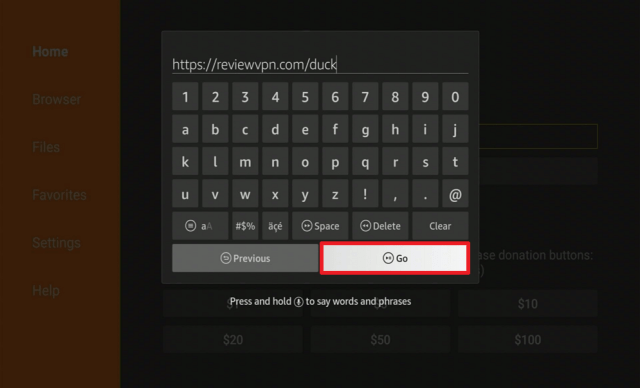
2.Open Downloader App. Type https://reviewvpn.com/duck and click Go.

Install Duck Duck Go Browser


3. Select INSTALL.

Step 13 Install Duck Duck on a firestick


4. Select OPEN.

Step 14 Install Duck Duck on a firestick


5. Click on the “Let’s Do It!” button.

Step 15 Install Duck Duck on a firestick


6. Choose Maybe Later.

Step 16 Install Duck Duck on a firestick


7. There you go, Duck Duck Browser is now installed on your device.

Step 17 Install Duck Duck on a firestick


Other Best Search Engines for Firestick

Aside from Duck Duck Go, there are also other apps or browsers that you can check out. Take a look at these:


YOUR INTERNET ACTIVITY IS BEING WATCHED

ReviewVPN cannot attest to the legality, security and privacy of the applications discussed on this site. It is highly recommended that you use a VPN service while streaming or using Kodi.

Currently, your IP 216.73.216.211 is visible to everyone and your Browser is being tracked by Advertisers & ISP Provider.

Save 65% Now

Limited Time Offer

Here are the main reasons why you must use a VPN:

  • Your activities are hidden from your ISP, the government, and from the apps you are using.
  • You can access additional movies and TV streams.
  • ISP attempts to throttle are thrwarted thus reducing buffering issues.
  • Geographically restricted content like Netflix and Hulu can be unblocked.

A VPN works be replacing your ISP-assigned IP address and creating an encrypted tunnel. We recommend the no log service offered by IPVanish. It works well on a Firestick and offers the fastest possible speeds.

Special Limited Time Offer - Get IPVanish


Legal Disclaimer: ReviewVPN.com does not encourage or endorse any illegal activity involved in the usage of services and applications referenced on this site. We do not verify the licensing agreements of services. The end-user is wholly responsible for ensuring that any media accessed through these services does not violate copyright and/or licensing laws. ReviewVPN does not promote, link to, or receive compensation from any Apps and IPTV services.


Install Surfshark on Firestick

Best Surfshark Deal


Best Private Search Engines for Windows and PC

Aside from Google, you can also choose from these best private search engines.


DuckDuckGo

best private search engines 1

URL: https://duckduckgo.com/

The number 1 and 100% safest and most private search engine is DuckDuckGo, also known as DDG. It is a user-friendly search engine that does not log any information of the user.

Features
  • Results include symbols and favicons
  • You easily recognize your favorite web spaces
  • Works almost the same as other common search engines
  • No image filtering is available


Google VS DuckDuckGo


Swisscows

best private search engines 2

URL: https://swisscows.com/

Formerly known as Hulbee, Swisscows is one of the best private search engines for Windows. It has great functions and features for data encryption and hinders information leaks.

Features
  • No tracking
  • Family-friendly
  • Search with your own index


StartPage

best private search engines 3

URL: https://startpage.com/

StartPage claims that it is the world’s most private search engine. Along with other competitors, it is surely one to checkout. It use proxy servers to protect users and prevent tracking of IP address.

Features
  • Based from the Netherlands
  • Protects Your Personal Data
  • Aims for quality results on user’s querries
  • Block price trackers
  • Avoid advertisements
  • Prevents online profiling
  • Received unprofiled news


Gibiru

best private search engines 3

URL: https://gibiru.com/

Gibiru is the top 4 in our list of the best private search engines for Windows. It encrypts users’ data which hinders third-party data collectors to gather them.

Features
  • Eliminates tracking methods
  • Zero retargeting
  • Provides honest earnings
  • Do not store and sell users’ privacy


WolframAlpha

best private search engines 3

URL: https://wolframalpha.com/

WolframAlpha is one of the best private search engines that provide detailed breakthrough algorithm. You can see on its home page searches for different topics and subjects like Mathematics, Science and Technology, Society & Culture, and Everyday Life.

Features
  • A search engine that is like an encyclopedia
  • Enhance knowledge for users
  • Provides sets of results through dynamic calculations and integrated algorithms


Lukol

best private search engines 3

URL: https://lukol.com/

Lukol is a simple search engine that also protects your privacy. Although you will see that this search engine is powered by Google.

Features
  • very minimal user interface
  • hinders misleading advertising and inappropriate websites
  • protects your personal information


Peekier

best private search engines 3

URL: https://peekier.com/

Last but definitely not the list in our list of the best private search engines is Peekier. It claims to be the new way to search the web. Like all of the other private search engines, it is also privacy-oriented.

Features
  • User-friendly
  • Provides relevant pages
  • Clicking a result will help you preview and scroll the page first


Ensure Your Safety With A VPN

surfshark logo

Whichever browser or search engine you are using from this list of the best private search engines, it is still best if you use a Virtual Private Network or VPN. A VPN will surely change your IP address not just protect it.

A VPN is a trusted software that helps you access geo-restricted content. There are other malicious VPNs out there as well, most of them are free. That is why it is still better to use a premium but great VPN like Surfshark.

Here are some of the great benefits of Surfshark:
  • Thousands of available servers to choose from
  • Destroys geo-restrictions and allows access to certain contents
  • Flexible VPN protocols depend on the need of your device.
  • Split tunneling
  • Kill switch
  • Allows Double VPN setup.
  • Provides Data Encryption.
  • No log policy.
  • Speed up your internet connection.
  • Best VPN for torrenting.
  • Prevents Firestick Buffering and Kodi Buffering

Note: For more information about Surfshark, please read our Surfshark Review.


Grab your subscription now!


How to Install Surfshark VPN on Firestick

If your Firestick still has the older interface, read this article to learn how to update it: Update Firestick Interface.

Follow our screenshots below to install the SurfShark VPN app on your Fire TV stick.

1. Go to the Home screen of your Firestick.

step 1 Install Surfshark VPN on Firestick


2. Navigate towards the Find tab. Press the Search button from the resulting dropdown.

step 2 Install Surfshark VPN on Firestick


3. Type in the keyword of SurfShark and select from the suggestions that will appear.

step 3 Install Surfshark VPN on Firestick


4. Click the official SurfShark icon from your search results.

step 4 Install Surfshark VPN on Firestick


5. Press the Download (You own it) button.

step 5 Install Surfshark VPN on Firestick


6. The SurfShark VPN installer will download on your device.

step 6 Install Surfshark VPN on Firestick


7. SurfShark VPN’s app will automatically install itself on your Fire TV stick.

step 7 Install Surfshark VPN on Firestick


8. Press the Open button after completing SurfShark VPN’s installation process.

step 8 Install Surfshark VPN on Firestick


9. Please wait for the SurfShark VPN to load its user interface.

step 9 Install Surfshark VPN on Firestick


10. You can now log in with your SurfShark VPN account credentials.

step 10 Install Surfshark VPN on Firestick

Learn more about Surfshark and Grab the Best Surfshark Deal Now!


Install Surfshark on Firestick

Best Surfshark Deal


Other VPNs to Consider

NordVPN (Best for Streaming)

Best Features

  • 5000+ Server in 50+ Countries 
  • Military-Grade Encryption
  • Fast Connection Speed
  • Suitable to a lot of devices
  • No-Log Policy

Prices
  • Complete $5.89 per month (64% Discount)
  • Plus $4.59 per month (56% Discount)
  • Standard $3.69 per month (55% Discount)

Best Features

  • 750+ High-speed VPN Servers in 43 Locations
  • Military-Grade Encryption
  • Fastest HD Streaming and Gaming
  • 30-Day Money-Back Guarantee
  • Unlimited Data & Devices
  • No-Log Policy

Prices
  • 3 Years $1.99 per month (82% Discount)
  • 1 Years $3.29 per month (70% Discount)
  • 1 Month $10.99 per month

IPVanish VPN (Most Secure)

Best Features

  • 1200+ Servers in 60+ Countries around the world
  • Unlimited Connections
  • No-Log Policy
  • Top Notch Military-Grade VPN Protocols and Encryptions
  • 100% Safe and Secured
  • Most Trusted VPN
  • Best VPN for Firestick
  • 30-Day Money-Back Guarantee

Prices
  • Yearly $3.99 per month (63% Discount) – 30 days risk free + Ransomware & Malware Protection
  • Quarterly $5.32 per month (51% Discount)
  • Monthly $10.99 per month


For more VPN discounts, go to ReviewVPN Deals and purchase the best VPN for you.

Click here to get the lowest price on Surfshark through our exclusive limited-time offer.


FAQs

Do I have to stop using Google?

If you really want to continue using Google’s search engine, there’s no problem with that. The best suggestion we can give you is to use a VPN service like Surfshark to secure your privacy.


How to change the default search engine on my browser?

To change the default search engine, you can choose from any of the best private search engines, follow the provided URL and spot the button that says make as default browser/search engine.


Should I delete my Google History?

This is a better option for you. Follow these steps to do so:

How to delete/clear my search history:
  1. Open Chrome or Google
  2. Find the three dots placed vertically located at the top right of your screen
  3. Choose History
  4. Click Clear browsing data
  5. You can choose which ones you want to delete or just simply select All
  6. Once the boxes of the data you want to delete are checked, click Clear Data


Conclusion

Privacy is such a big deal as technology evolves nowadays. Good thing that there are ways to protect your privacy. By using the best private search engines, you can assure that every activity you will do online will not be tracked.

Another useful way is to use a Virtual Private Network. Whatever search engine you are using, a VPN will change your IP address and protect you from tracking and hacking. For us, the best VPN is Surfshark.

We hope that you find this article helpful in learning the best private search engines for Firestick and Windows.


Note: ReviewVPN.com does not own or operate any app nor does it endorse any. The main purpose of this article is strictly for educational purposes only.

Why Is My Firestick So Slow? How to Fix This Problem

Why is My Firestick So Slow?

Are you currently experiencing and asking why is my firestick so slow? With this article, we are hoping that we can be able to help you solve your problem.

Along with this, we might also give you all the possible reasons why you are experiencing this.


Firestick is the official streaming device of Amazon. It has a total of 1GB of RAM for all the data, and apps that you want to install. Sometimes this is not enough for all the things that we want to do with our device. This might result to slow user-device interactions.

Even us here at reviewvpn.com experience such problems. Sometimes, we already click on the remote and it took 2 or more seconds before the device follows. There are also times when we experience Firestick buffering, lags, and glitches. No wonder why so many people also ask the same question we ask ourselves, why is my firestick so slow?


ANONYMOUSLY


Why is My Firestick So Slow? Possible Reasons and Solutions

Firesticks become slow not just because of a specific reason. There are so many factors that might contribute to this. Here we discuss every possible reason that might answer your question, why is my firestick so slow.


1. Apps Running in the Background

The most common answer to the question, why is my firestick so slow, is because of the number of running apps in the background of your device. When you open an app and just close it, it still runs in the background.

Any application that runs in the background consumes RAM storage. The more apps running the more reason why you have a slow firestick.

One of the ways to kill a running application on your firestick is by using different applications like:

You can also force stop, clear data, and cache to all of your installed applications directly through your firestick setting. Follow these steps:

1. Go to Settings

why is my firestick so slow

2. Click Applications

why is my firestick so slow


3. Select Manage Installed Applications

why is my firestick so slow


4. Choose the specific application that you want to kill

why is my firestick so slow


5. You can choose Force stop, Clear data, or Clear cache to kill the running application

why is my firestick so slow


2. By Having an Overheated Device

The next reason why you have a slow firestick is that your device might be overheated. If your device is turned on for a long time with even just one running app, it might overheat.

When a device is overheated, the processor works slower than normal.

Here are the ways to stop Firestick overheating:


3. Too much bloatware installed in your device

When you install an app even through direct installation or using Downloader, it requires a lot of space in your device. The more apps you install, the slower your device may go.

When you are not using an app for a very long time, or you think you are done with it, you can easily uninstall it from Firestick. Follow these simple steps to do so.

1. Go to the Home menu. Scroll to the right and click settings.

why is my firestick so slow


2. Select Applications.

why is my firestick so slow


3. Click Manage Installed Applications.

why is my firestick so slow


4. Select the application you want to delete. 

why is my firestick so slow


5. Click Uninstall.

why is my firestick so slow


6. Click Uninstall.

why is my firestick so slow


YOUR INTERNET ACTIVITY IS BEING WATCHED

ReviewVPN cannot attest to the legality, security and privacy of the applications discussed on this site. It is highly recommended that you use a VPN service while streaming or using Kodi.

Currently, your IP 216.73.216.211 is visible to everyone and your Browser is being tracked by Advertisers & ISP Provider.

Save 65% Now

Limited Time Offer

Here are the main reasons why you must use a VPN:

  • Your activities are hidden from your ISP, the government, and from the apps you are using.
  • You can access additional movies and TV streams.
  • ISP attempts to throttle are thrwarted thus reducing buffering issues.
  • Geographically restricted content like Netflix and Hulu can be unblocked.

A VPN works be replacing your ISP-assigned IP address and creating an encrypted tunnel. We recommend the no log service offered by IPVanish. It works well on a Firestick and offers the fastest possible speeds.

Special Limited Time Offer - Get IPVanish


Legal Disclaimer: ReviewVPN.com does not encourage or endorse any illegal activity involved in the usage of services and applications referenced on this site. We do not verify the licensing agreements of services. The end-user is wholly responsible for ensuring that any media accessed through these services does not violate copyright and/or licensing laws. ReviewVPN does not promote, link to, or receive compensation from any Apps and IPTV services.


Install Surfshark on Firestick

Best Surfshark Deal


Other Ways to Improve The Performace of Your Amazon Firestick Device

There are also other ways you can follow to help improve your Firestick’s performance. You won’t be able to say “Why is my firestick so slow?”.


1. Check Your Wifi Connection

By using a better ethernet wire or adapter may be a good way to boost your internet speed. This might also stop slowing your Firestick. Most Firestick buffering is due to poor WiFi connection. So if you would connect your2.  TV directly to your internet modem through an adapter, there is a big chance that you won’t have a poor connection.


2. Use the Original Power Adapter/USB

When you buy the Amazon Firestick, it is better to use all the original USB or adapters found inside the box, instead of using other brands. This might not make sense at first but if you are not that technical and o you don’t like to experience having a slow device, we suggest you follow all instructions.


3. Learn about the Firestick Settings

Some settings are set by default, and you need to change them to boost your streaming experience.

Best Amazon Firestick Settings That You Should Know


Stream Safely With a VPN

Firestick buffering is such an annoying problem to deal with. Aside from following all the steps and tips provided above, we suggest using a Virtual Private Network as well. A VPN will boost your internet speed and stop buffering while streaming.

We always suggest using Surfshark as the best VPN for Firestick. We have tested this service and there is no doubt that is 100% useful. It can connect you to a different server from other countries you like. With this, you’ll have access to their content but all of your data and information is stay hidden and safe.


Install Surfshark on Firestick

Best Surfshark Deal


How to Install Surfshark VPN on Firestick

If your Firestick still has the older interface, read this article to learn how to update it: Update Firestick Interface.

Follow our screenshots below to install the SurfShark VPN app on your Fire TV stick.

1. Go to the Home screen of your Firestick.

step 1 Install Surfshark VPN on Firestick


2. Navigate towards the Find tab. Press the Search button from the resulting dropdown.

step 2 Install Surfshark VPN on Firestick


3. Type in the keyword of SurfShark and select from the suggestions that will appear.

step 3 Install Surfshark VPN on Firestick


4. Click the official SurfShark icon from your search results.

step 4 Install Surfshark VPN on Firestick


5. Press the Download (You own it) button.

step 5 Install Surfshark VPN on Firestick


6. The SurfShark VPN installer will download on your device.

step 6 Install Surfshark VPN on Firestick


7. SurfShark VPN’s app will automatically install itself on your Fire TV stick.

step 7 Install Surfshark VPN on Firestick


8. Press the Open button after completing SurfShark VPN’s installation process.

step 8 Install Surfshark VPN on Firestick


9. Please wait for the SurfShark VPN to load its user interface.

step 9 Install Surfshark VPN on Firestick


10. You can now log in with your SurfShark VPN account credentials.

step 10 Install Surfshark VPN on Firestick

Learn more about Surfshark and Grab the Best Surfshark Deal Now!


Install Surfshark on Firestick

Best Surfshark Deal


Other VPNs to Consider

NordVPN (Best for Streaming)

Best Features

  • 5000+ Server in 50+ Countries 
  • Military-Grade Encryption
  • Fast Connection Speed
  • Suitable to a lot of devices
  • No-Log Policy

Prices
  • Complete $5.89 per month (64% Discount)
  • Plus $4.59 per month (56% Discount)
  • Standard $3.69 per month (55% Discount)

Best Features

  • 750+ High-speed VPN Servers in 43 Locations
  • Military-Grade Encryption
  • Fastest HD Streaming and Gaming
  • 30-Day Money-Back Guarantee
  • Unlimited Data & Devices
  • No-Log Policy

Prices
  • 3 Years $1.99 per month (82% Discount)
  • 1 Years $3.29 per month (70% Discount)
  • 1 Month $10.99 per month

IPVanish VPN (Most Secure)

Best Features

  • 1200+ Servers in 60+ Countries around the world
  • Unlimited Connections
  • No-Log Policy
  • Top Notch Military-Grade VPN Protocols and Encryptions
  • 100% Safe and Secured
  • Most Trusted VPN
  • Best VPN for Firestick
  • 30-Day Money-Back Guarantee

Prices
  • Yearly $3.99 per month (63% Discount) – 30 days risk free + Ransomware & Malware Protection
  • Quarterly $5.32 per month (51% Discount)
  • Monthly $10.99 per month


For more VPN discounts, go to ReviewVPN Deals and purchase the best VPN for you.

Click here to get the lowest price on Surfshark through our exclusive limited-time offer.


Why is my firestick so slow: Executive Summary

To sum up, all of the possible answers to why my firestick is so slow are these reasons, apps running in the background, overheated devices, and too much bloatware.

Follow all the great tips above on how to improve the speed of your device and we hope that you find this article helpful for your query.


Note: ReviewVPN.com does not own or operate any app nor does it endorse any. The main purpose of this article is strictly for educational purposes only.

Everything You Need To Know About Fake Email Generator

What is a Fake Email Generator?

In this article, we will help you learn everything about fake email generators.


A fake email generator is a temporary mailbox that lets you send and receive emails. Most people use this platform to help boost their privacy when registering for any online activity. With this, all your private and personal information won’t leak to any malicious domain.

The main purpose of any fake email generator is to lessen the amount of marketing emails, tracking, spam, and the like to your real email.

One of the best things about fake email generators is that they do not require any registration. They also do not display any confidential information and work with any service.

As you continue reading this article, we will show you our top picks for the best fake email generators online.


ANONYMOUSLY

Best Fake Email Generators

Here are our top picks for the best fake email generators today.

Abine Blur

fake email generator 1

URL: https://abine.com/

The first fake email generator on our list is Abine Blur. It has many functions and purposes that will help you generate the best fake email account.

Features:
  • Payment thru masked credit cards
  • Cellphone number anonymous
  • Password management


Temp Mail

fake email generator

URL: https://temp-mail.org/en/

Our second fake email generator is Temp Mail. It is one of the most famous services out there. It boasts a total of more than 500,00o users worldwide.

Features:
  • Popular
  • Easy to use
  • Will remove your account after a certain period of time


Guerillamail

fake email generator

URL: https://www.guerrillamail.com/

From the name itself, it sounds like you are really in secret or in disguise. Guerillamail earned its spot as the third best fake email generator.

Features:
  • Disposable email addresses
  • Scamble email addresses
  • Generate random email address
  • Keeps your inbox safe and clean


Burnermail

fake email generator

URL: https://burnermail.io/

Burnermail is another name to check out when you look for a good fake email generator. It has tons of great features suitable for inbox safety and privacy.

Features:
  • Generates fake email addresses for registering to any website
  • Allows multiple recipients to your account
  • Android app is available


Email on Deck

fake email generator

URL: https://www.emailondeck.com/

Our top 5 spot for the best fake email generator is Email on Deck. It has amazing and unique features compared with others.

Features:
  • Avoid spam
  • Assure privacy
  • Free
  • Removes spam
  • Bitcoin-friendly


YOUR INTERNET ACTIVITY IS BEING WATCHED

ReviewVPN cannot attest to the legality, security and privacy of the applications discussed on this site. It is highly recommended that you use a VPN service while streaming or using Kodi.

Currently, your IP 216.73.216.211 is visible to everyone and your Browser is being tracked by Advertisers & ISP Provider.

Save 65% Now

Limited Time Offer

Here are the main reasons why you must use a VPN:

  • Your activities are hidden from your ISP, the government, and from the apps you are using.
  • You can access additional movies and TV streams.
  • ISP attempts to throttle are thrwarted thus reducing buffering issues.
  • Geographically restricted content like Netflix and Hulu can be unblocked.

A VPN works be replacing your ISP-assigned IP address and creating an encrypted tunnel. We recommend the no log service offered by IPVanish. It works well on a Firestick and offers the fastest possible speeds.

Special Limited Time Offer - Get IPVanish


Install Surfshark on Firestick

Best Surfshark Deal


Other Best Fake Email Generator to Checkout:

We list down our top five picks for the best fake email generators. If you still find them not worthy, you can still check out these other great platforms:

  • Throwawaymail (https://www.throwawaymail.com/en)
  • Trashmail (https://trashmail.com/)
  • Getnada ( https://getnada.com/)
  • 10 Minute Mail (https://10minutemail.com/)
  • Emailfake (https://emailfake.com/)
  • Owlymail (https://owlymail.com/blog/)


Stay Protected with a VPN

https://get.surfshark.net/aff_c?offer_id=865&aff_id=12312

Protect all of your activities online with a VPN. Whether you are streaming, data encrypting, or even email marketing with these fake email generators, install a Virtual Private Network on your device.

A VPN has a lot of benefits. We always recommend using Surfshark. This is mainly because we personally use this service and it never fails to amaze us.

Surfshark is the best VPN out there.

Here are some of the great benefits of Surfshark:
  • Destroy Geo-restriction
  • Assured Data Encryption.
  • No log policy.
  • VPN protocols are based on your device’s needs.
  • Split tunneling
  • kill switch
  • Works with Double VPN setup.
  • Makes your internet speed faster.
  • Best VPN for torrenting.
  • Prevents Firestick Buffering and Kodi Buffering

Note: For more information about Surfshark, please read our Surfshark Review.


Install Surfshark on Firestick

Best Surfshark Deal


How to Install Surfshark VPN on Firestick

If your Firestick still has the older interface, read this article to learn how to update it: Update Firestick Interface.

You can download Surfshark directly from the Amazon App store. It will be easy for you to find Surfshark with your Firestick’s Find feature. Refer to our screenshots below.

1. Go to the Home screen of your Firestick.

step 1 Install Surfshark VPN on Firestick


2. Navigate towards the Find tab. Press the Search button from the resulting dropdown.

step 2 Install Surfshark VPN on Firestick


3. Type in the keyword of SurfShark and select from the suggestions that will appear.

step 3 Install Surfshark VPN on Firestick


4. Click the official SurfShark icon from your search results.

step 4 Install Surfshark VPN on Firestick


5. Press the Download (You own it) button.

step 5 Install Surfshark VPN on Firestick


6. The SurfShark VPN installer will download on your device.

step 6 Install Surfshark VPN on Firestick


7. SurfShark VPN’s app will automatically install itself on your Fire TV stick.

step 7 Install Surfshark VPN on Firestick


8. Press the Open button after completing SurfShark VPN’s installation process.

step 8 Install Surfshark VPN on Firestick


9. Please wait for the SurfShark VPN to load its user interface.

step 9 Install Surfshark VPN on Firestick


10. You can now log in with your SurfShark VPN account credentials.

step 10 Install Surfshark VPN on Firestick

Learn more about Surfshark and Grab the Best Surfshark Deal Now!


Install Surfshark on Firestick

Best Surfshark Deal


Other VPNs to Consider

NordVPN (Best for Streaming)

Best Features

  • 5000+ Server in 50+ Countries 
  • Military-Grade Encryption
  • Fast Connection Speed
  • Suitable to a lot of devices
  • No-Log Policy

Prices
  • Complete $5.89 per month (64% Discount)
  • Plus $4.59 per month (56% Discount)
  • Standard $3.69 per month (55% Discount)

Best Features

  • 750+ High-speed VPN Servers in 43 Locations
  • Military-Grade Encryption
  • Fastest HD Streaming and Gaming
  • 30-Day Money-Back Guarantee
  • Unlimited Data & Devices
  • No-Log Policy

Prices
  • 3 Years $1.99 per month (82% Discount)
  • 1 Years $3.29 per month (70% Discount)
  • 1 Month $10.99 per month

IPVanish VPN (Most Secure)

Best Features

  • 1200+ Servers in 60+ Countries around the world
  • Unlimited Connections
  • No-Log Policy
  • Top Notch Military-Grade VPN Protocols and Encryptions
  • 100% Safe and Secured
  • Most Trusted VPN
  • Best VPN for Firestick
  • 30-Day Money-Back Guarantee

Prices
  • Yearly $3.99 per month (63% Discount) – 30 days risk free + Ransomware & Malware Protection
  • Quarterly $5.32 per month (51% Discount)
  • Monthly $10.99 per month


For more VPN discounts, go to ReviewVPN Deals and purchase the best VPN for you.

Click here to get the lowest price on Surfshark through our exclusive limited-time offer.


FAQs

How to Use Fake Email Generators?

Register or create an account to any of the features services above and you can use any fake email generator.


How to generate fake emails?

By using a good fake email generator, you generate any fake email.


Conclusion

Fake email generators are really great addition to boosting your online privacy. They help you protect your confidential information and we can surely recommend using them.

How to Stream MMA Online – Best Sites To Watch the Match!!!

Stream MMA Online

In this article, we will help you stream MMA online.


You might be familiar with the apps where you can watch MMA on Firestick. We can say that these apps are amazing but some of them require payment and others are geo-restricted. Good thing that are websites where you can stream MMA online for free.

Since these are websites, you can stream them using different devices like Android, MAC, iOS, Roku, Amazon Firestick, etc. Just make sure that if you are using Firestick, use a great browser like Amazon Silk Browser.

The websites featured in this article do not only stream MMA online but also some other shows, and live TV episodes. Most websites use the same live-stream locations just like other IPTV Services, and Best Firestick Apps.

Reminder for Cord Cutters: Installing Amazon Silk Browser does not require Jailbreaking your Firestick, but most cord-cutters Jailbreak their Firestick when streaming.


ANONYMOUSLY

Install Amazon Silk Browser on Firestick

When you are going to stream MMA online using your Firestick. Here is the app that you need to use:

1. Go to the Home screen of your Firestick.


2. Click on Find.

Best Firestick Games


3. Tap on the Search tab.


4.Type in Silk Browser and choose this item that appears on the results.


5. Click on the Silk Browser Icon.


6. Choose Download.


7. Silk Browser is Downloading into your Firestick.


8. The Silk Browser app will Install on Firestick.


9. Select Open to launch the browser.


10. You can now start browsing using Amazon Silk Browser. 


YOUR INTERNET ACTIVITY IS BEING WATCHED

ReviewVPN cannot attest to the legality, security and privacy of the applications discussed on this site. It is highly recommended that you use a VPN service while streaming or using Kodi.

Currently, your IP 216.73.216.211 is visible to everyone and your Browser is being tracked by Advertisers & ISP Provider.

Save 65% Now

Limited Time Offer

Here are the main reasons why you must use a VPN:

  • Your activities are hidden from your ISP, the government, and from the apps you are using.
  • You can access additional movies and TV streams.
  • ISP attempts to throttle are thrwarted thus reducing buffering issues.
  • Geographically restricted content like Netflix and Hulu can be unblocked.

A VPN works be replacing your ISP-assigned IP address and creating an encrypted tunnel. We recommend the no log service offered by IPVanish. It works well on a Firestick and offers the fastest possible speeds.

Special Limited Time Offer - Get IPVanish


Legal Disclaimer: ReviewVPN.com does not encourage or endorse any illegal activity involved in the usage of services and applications referenced on this site. We do not verify the licensing agreements of services. The end-user is wholly responsible for ensuring that any media accessed through these services does not violate copyright and/or licensing laws. ReviewVPN does not promote, link to, or receive compensation from any Apps and IPTV services.


Install Surfshark on Firestick

Best Surfshark Deal


Best Websites to Stream MMA Online

Stream2Watch

Stream MMA Online 1

URL:https://iptv.stream2watch.sx/

Advertisement: Yes

Works With VPN: Yes

The top website on our list to stream MMA online is Stream2Watch. This website covers tons of live sports like Basketball, Football, Tennis, Baseball, and many more.

Stream2Watch earns its popularity by having more than eight hundred monthly visitors. The only problem is that this website often has its drawback and URL changes.

Upon testing, this website works well with Surfshark.


SportSurge

Stream MMA Online 1

URL:https://sportsurge.club/

Advertisement: Yes

Works With VPN: Yes

The next website to stream MMA online is SportSurge. This is another website to stream various sports matches on your device including College Football, Hockey, Boxing, Football, Motor Sports, and more.

SportsSurge has a clean and easy-to-use interface. You won’t see any advertisements until your play the videos.


Showtime

Stream MMA Online

URL: https://www.sho.com/bellator-mma

Advertisement: No (If paid subscription)

Works With VPN: No, Please consider using Split Tunneling 

Showtime found its way to be included in our list of websites on how to stream MMA online. It is not 100% free, but it offers a free trial to enjoy the services it offers.

This website also offers movies, TV shows, and more. The app version of this website is available in almost all app stores for various devices.


Install Surfshark on Firestick

Best Surfshark Deal


CrackStream

Stream MMA Online

URL: https://crackstreams.me/

Advertisement: Yes

Works With VPN: Yes

Another website to stream MMA online is Crackstream. It is a very popular website for most sports streamers all over the world. Like the previous websites featured above, Crackstreams also offers live TV for other sports like Basketball, Baseball, Football, and more.


BuffStream

Stream MMA Online

URL: http://buffstream.io/

Advertisement: Yes

Works With VPN: Yes

A simple yet very useful website to stream MMA online is BuffStream. If you see that Crackstream is not working properly, you can immediately go Buffstream instead.


VIPBox Sports

Stream MMA Online

URL: https://vipbox1.com/

Advertisement: Yes

Works With VPN: Yes

If you are familiar with VIPRow Sports, the updated version of this site is VIPBox Sports. You can also stream MMA online using this website. Just like any other sports streaming website, you can also stream other types of sports.


StreamEast

Stream MMA Online

URL: https://www.streameast.io/dd/

Advertisement: Yes

Works With VPN: Yes

The next website to stream MMA online is StreamEast.

This is a new website where you can stream live TV for sports most especially Boxing. But other great categories like Basketball, Football, and MMA of course are surely present on this site.


Install Surfshark on Firestick

Best Surfshark Deal


Live TV

Stream MMA Online

URL: https://liveru.sx/

Advertisement: Yes

Works With VPN: Yes

The last to win a spot on our list to stream MMA online is Live TV.

This is a great website that is available to all countries. You can also spot a live chat where you can read sports opinions and news from different people who love to watch the games.

It also offers tons of great shows for various sports categories.


Other Websites to Stream MMA Online (Paid)

There are other services or sites where you can watch MMA online but the access is not for free. Here are some of them:

  • ESPN+ (https://plus.espn.com/)
  • Vidgo
  • Pluto TV


Stream Safely With a VPN

surfshark logo

Streaming different websites might cause you a lot of trouble. Hackers usually use links to hack devices. It is still best if you put added protection to your streaming.

The best way to do this is by having a Virtual Private Network or VPN. By having a VPN, you will have a lot of benefits to be protected and access lots of content from other regions or countries.

We always recommend using Surfshark. If you use Surfshark, you will get all the stuff for streaming. You will enjoy all the content you are paying for and receive extra content. It also has a lot of new and improved features.

Here are some of the great benefits of Surfshark:
  • Connects you to other countries
  • Gives access to geo-restricted content
  • VPN protocols are based on your device’s needs.
  • Split tunneling
  • kill switch
  • Works with Double VPN setup.
  • Assured Data Encryption.
  • Zero log policy.
  • Allow you to use one account for multiple devices at the same time.
  • Makes your bandwidth faster.
  • Best VPN for torrenting.
  • Prevents Firestick Buffering and Kodi Buffering

Note: For more information about Surfshark, please read our Surfshark Review.


Grab your subscription now!


How to Install Surfshark VPN on Firestick

If your Firestick still has the older interface, read this article to learn how to update it: Update Firestick Interface.

Follow our screenshots below to install the SurfShark VPN app on your Fire TV stick.

1. Go to the Home screen of your Firestick.

step 1 Install Surfshark VPN on Firestick


2. Navigate towards the Find tab. Press the Search button from the resulting dropdown.

step 2 Install Surfshark VPN on Firestick


3. Type in the keyword of SurfShark and select from the suggestions that will appear.

step 3 Install Surfshark VPN on Firestick


4. Click the official SurfShark icon from your search results.

step 4 Install Surfshark VPN on Firestick


5. Press the Download (You own it) button.

step 5 Install Surfshark VPN on Firestick


6. The SurfShark VPN installer will download on your device.

step 6 Install Surfshark VPN on Firestick


7. SurfShark VPN’s app will automatically install itself on your Fire TV stick.

step 7 Install Surfshark VPN on Firestick


8. Press the Open button after completing SurfShark VPN’s installation process.

step 8 Install Surfshark VPN on Firestick


9. Please wait for the SurfShark VPN to load its user interface.

step 9 Install Surfshark VPN on Firestick


10. You can now log in with your SurfShark VPN account credentials.

step 10 Install Surfshark VPN on Firestick

Learn more about Surfshark and Grab the Best Surfshark Deal Now!


Install Surfshark on Firestick

Best Surfshark Deal


Other VPNs to Consider

NordVPN (Best for Streaming)

Best Features

  • 5000+ Server in 50+ Countries 
  • Military-Grade Encryption
  • Fast Connection Speed
  • Suitable to a lot of devices
  • No-Log Policy

Prices
  • Complete $5.89 per month (64% Discount)
  • Plus $4.59 per month (56% Discount)
  • Standard $3.69 per month (55% Discount)

Best Features

  • 750+ High-speed VPN Servers in 43 Locations
  • Military-Grade Encryption
  • Fastest HD Streaming and Gaming
  • 30-Day Money-Back Guarantee
  • Unlimited Data & Devices
  • No-Log Policy

Prices
  • 3 Years $1.99 per month (82% Discount)
  • 1 Years $3.29 per month (70% Discount)
  • 1 Month $10.99 per month

IPVanish VPN (Most Secure)

Best Features

  • 1200+ Servers in 60+ Countries around the world
  • Unlimited Connections
  • No-Log Policy
  • Top Notch Military-Grade VPN Protocols and Encryptions
  • 100% Safe and Secured
  • Most Trusted VPN
  • Best VPN for Firestick
  • 30-Day Money-Back Guarantee

Prices
  • Yearly $3.99 per month (63% Discount) – 30 days risk free + Ransomware & Malware Protection
  • Quarterly $5.32 per month (51% Discount)
  • Monthly $10.99 per month


For more VPN discounts, go to ReviewVPN Deals and purchase the best VPN for you.

Click here to get the lowest price on Surfshark through our exclusive limited-time offer.


FAQs

What is MMA?

MMA is the short version for Mixed Martial Arts. It is a famous sport up until now where 2 fighters engage in a full-body contact usually inside a cage. They can use all parts of their body to win the match.


What are the best websites to stream MMA online?

You can stream MMA online with the help of various sports streaming websites like Stream2Watch, SportSurge, BuffStream, and many more. Read the article above to learn the best ones.


Are the websites to stream MMA online legal?

Reviewvpn.com holds no rights to determine the legality of any websites featured in this article. The main purpose of this write-up is for educational purposes only.


Do I Need a VPN to Stream MMA Online?

It is best to use a VPN like Surfshark when streaming anything online. This will help you acquire privacy and protection while streaming. It even provides added features and benefits to enjoy watching some shows.


What will happen if I get caught using these websites?

Any illegal acts with the use of any website may face legal issues. You as an end-user are solely responsible for all the activities you do on your end.


Conclusion

Severe as it may look, but MMA is a very famous sport. Many people really love to stream this online. Most apps and websites stream this app with payment and subscription.

We list down the best websites to stream MMA online. You can choose what is the best option for you.


Note: ReviewVPN.com does not own or operate any app nor does it endorse any. The main purpose of this article is strictly for educational purposes only.

How to Install and Stream Very Local App on Firestick

Very Local App Overview

In this article, we are going to show how to install the Very Local App on Firestick.


Very Local App is a direct application that streams live news, weather forecasts, and more. Most contents are from different local channels all over the United States.

We can say that Very Local is the best alternative or replica after Locast shuts down. Like Locast, this is a geo-restricted application that is currently available within 26 locations in the USA. But wherever you are in the country, you are entitled to use this app for free.

This app is available on different devices like iOS, Android, Roku, Apple TV, Chromecast, and of course Amazon Firestick.

You can install the app directly. There is no need to Jailbreak your Firestick and use the Downloader app to do so.


ANONYMOUSLY

How to Install Very Local App on Firestick

  1. Go to Find
  2. Click on Search
  3. Type in and search for Very Local
  4. Click the app
  5. Select Get or Download
  6. Wait until the app is installed
  7. Choose Open to launch the app


Install Very Local App on Firestick with screenshots

1. From your home screen go to Find

Very Local App


2. Select Search

Very Local App


3. Search for Very Local

Very Local App


4. Click the Very Local App icon

Very Local App 2


5. Select the Download or Get button

Very Local App 3


6. After installing, click the Open button to launch the app

Very Local App 4


7. You can now stream the Very Local app on your Firestick.

Very Local App 5


YOUR INTERNET ACTIVITY IS BEING WATCHED

ReviewVPN cannot attest to the legality, security and privacy of the applications discussed on this site. It is highly recommended that you use a VPN service while streaming or using Kodi.

Currently, your IP 216.73.216.211 is visible to everyone and your Browser is being tracked by Advertisers & ISP Provider.

Save 65% Now

Limited Time Offer

Here are the main reasons why you must use a VPN:

  • Your activities are hidden from your ISP, the government, and from the apps you are using.
  • You can access additional movies and TV streams.
  • ISP attempts to throttle are thrwarted thus reducing buffering issues.
  • Geographically restricted content like Netflix and Hulu can be unblocked.

A VPN works be replacing your ISP-assigned IP address and creating an encrypted tunnel. We recommend the no log service offered by IPVanish. It works well on a Firestick and offers the fastest possible speeds.

Special Limited Time Offer - Get IPVanish


Legal Disclaimer: ReviewVPN.com does not encourage or endorse any illegal activity involved in the usage of services and applications referenced on this site. We do not verify the licensing agreements of services. The end-user is wholly responsible for ensuring that any media accessed through these services does not violate copyright and/or licensing laws. ReviewVPN does not promote, link to, or receive compensation from any Apps and IPTV services.


Install Surfshark on Firestick

Best Surfshark Deal


Very Local App Features

  • Easy to use
  • Lots of content
  • Direct installation
  • Applicable to almost all types of devices
  • Available in the US only


 Very Local App Streaming Locations

  • Albuquerque
  • Baltimore
  • Birmingham
  • Boston
  • Burlington
  • Cincinnati
  • Des Moines
  • Ft. Smith
  • Greensboro
  • Jackson
  • Kansas City
  • Lancaster
  • Louisville
  • Manchester
  • Milwaukee
  • Monterey
  • New Orleans
  • Oklahoma City
  • Omaha
  • Orlando
  • Pittsburgh
  • Portland
  • Sacramento
  • Savannah
  • Tampa
  • West Palm Beach


Pros and Cons

Pros

  • 100% free
  • Great content
  • Easy to use


Cons

  • Geo-restricted


Stream Safely With a VPN

surfshark logo

Geo-restriction is one of the most common problems when it comes to streaming. When you are using a certain application that is only available in your area like Very Local, you won’t be able to access it when you travel outside of the US. The only option you have is to use a VPN and connect it to a US server to access the app again.

Wherever you are, you will feel connected and will never be left behind when you use a great VPN service.

Surfshark is one of the best VPNs to use especially for steaming. It has tons of great features like:

  • Thousands of available servers to choose from
  • Destroys geo-blocks.
  • Flexible VPN protocols
  • Split tunneling
  • kill switch.
  • Data Encryption.
  • No log policy.
  • Multi-device usage.
  • Faster internet speed.
  • Supports torrenting.
  • Prevents Firestick Buffering and Kodi Buffering

Note: For more information about Surfshark, please read our Surfshark Review.


Grab your subscription now!


How to Install Surfshark VPN on Firestick

If your Firestick still has the older interface, read this article to learn how to update it: Update Firestick Interface.

Follow our screenshots below to install the SurfShark VPN app on your Fire TV stick.

1. Go to the Home screen of your Firestick.

step 1 Install Surfshark VPN on Firestick


2. Navigate towards the Find tab. Press the Search button from the resulting dropdown.

step 2 Install Surfshark VPN on Firestick


3. Type in the keyword of SurfShark and select from the suggestions that will appear.

step 3 Install Surfshark VPN on Firestick


4. Click the official SurfShark icon from your search results.

step 4 Install Surfshark VPN on Firestick


5. Press the Download (You own it) button.

step 5 Install Surfshark VPN on Firestick


6. The SurfShark VPN installer will download on your device.

step 6 Install Surfshark VPN on Firestick


7. SurfShark VPN’s app will automatically install itself on your Fire TV stick.

step 7 Install Surfshark VPN on Firestick


8. Press the Open button after completing SurfShark VPN’s installation process.

step 8 Install Surfshark VPN on Firestick


9. Please wait for the SurfShark VPN to load its user interface.

step 9 Install Surfshark VPN on Firestick


10. You can now log in with your SurfShark VPN account credentials.

step 10 Install Surfshark VPN on Firestick

Learn more about Surfshark and Grab the Best Surfshark Deal Now!


Install Surfshark on Firestick

Best Surfshark Deal


Other VPNs to Consider

NordVPN (Best for Streaming)

Best Features

  • 5000+ Server in 50+ Countries 
  • Military-Grade Encryption
  • Fast Connection Speed
  • Suitable to a lot of devices
  • No-Log Policy

Prices
  • Complete $5.89 per month (64% Discount)
  • Plus $4.59 per month (56% Discount)
  • Standard $3.69 per month (55% Discount)

Best Features

  • 750+ High-speed VPN Servers in 43 Locations
  • Military-Grade Encryption
  • Fastest HD Streaming and Gaming
  • 30-Day Money-Back Guarantee
  • Unlimited Data & Devices
  • No-Log Policy

Prices
  • 3 Years $1.99 per month (82% Discount)
  • 1 Years $3.29 per month (70% Discount)
  • 1 Month $10.99 per month

IPVanish VPN (Most Secure)

Best Features

  • 1200+ Servers in 60+ Countries around the world
  • Unlimited Connections
  • No-Log Policy
  • Top Notch Military-Grade VPN Protocols and Encryptions
  • 100% Safe and Secured
  • Most Trusted VPN
  • Best VPN for Firestick
  • 30-Day Money-Back Guarantee

Prices
  • Yearly $3.99 per month (63% Discount) – 30 days risk free + Ransomware & Malware Protection
  • Quarterly $5.32 per month (51% Discount)
  • Monthly $10.99 per month


For more VPN discounts, go to ReviewVPN Deals and purchase the best VPN for you.

Click here to get the lowest price on Surfshark through our exclusive limited-time offer.


Alternative Applications for Very Local

As we know that this app is new to the streaming world. There might be some other qualities that you are looking for in a live TV app. We listed down the best alternative applications for Very Local.

List of the Best Live TV apps for Firestik


FAQs

What is the Very Local App?

Very Local is a live TV application that streams different US local channels for news, weather, and more.


Is Very Local Free?

The app is 100% free and only be used if you are in the United States.


Is Very Local Safe?

We tested the app using Virus Total and see no threats. With this, we can say that the Very Local App is safe to use?


What device does Very Local applicable?

Very Local is applicable to almost all types of devices including Android, iOS, Apple TV, Roku, Chromecast, and Amazon Firestick.


What are the available channels in Very Local?

A lot of popular channels like ABC, Fox, CBN, and many more are available on Very Local.


How many locations can stream Very Local?

You can only stream the app if you are in the United States. It streams 26 different US locations. All of these are listed above.


Conclusion

We can really say that Very Local fills in the void that Locast put in our hearts when it suspended its service. Although, there are some other great apps to check out rather than Very Local like Airy TV, and Vidgo.

One similar characteristic it has with Locast is being geo-restricted. But overall, this app is wonderful. As we always say, as long as the app is free there is no harm in trying.

If you have other suggestions, let us know in the comments below.


Note: ReviewVPN.com does not own or operate any app nor does it endorse any. The main purpose of this article is strictly for educational purposes only.

Double VPN (Open VPN): Everything You Need to Know

What is a Double VPN?

In this article, we will discuss a simple explanation of Double VPN.


What is a double VPN and when should you use it? This is a very technical question. Answers commonly come too technical as well. People who know a little about this stuff might not fully understand this. So to simplify, double VPN is basically two VPNs chained and working together at the same time.

Double VPN is also known as Multi-hop, or VPN chaining, nesting, and cascading. Using two different locations from two different VPNs to encrypt your online communications is the work of Double VPN. With this, your IP address is also from two different servers. So what we are saying is, that it gives double protection to your online privacy.


ANONYMOUSLY

How Does Double VPN Work?

Double VPN works in six different processes from the client to your destination website. Here is how it goes:

  1. VPN client encrypts the data twice on the device.
  2. Encrypted data will then go to the first VPN server.
  3. The first VPN server will remove one encryption and then change your IP location.
  4. The data with only one encryption will then go to the 2nd VPN server.
  5. All encryption will be removed by the 2nd VPN server as it changes the IP location again.
  6. Your decrypted data will now go to the destination site, app, or any end online destination.


How to Use Double VPN

Some VPNs have features that justify double VPN. But if you are using a service with no specific feature, you can still pair it with another.

Just make sure that your IP address changes twice.

To make sure that pairing two different VPNs work, you can conduct a leak test after turning on your 1st VPN and before turning on the second one.

Please take note that pairing two different VPNs might not work always, but some prove that it is working.


How to Create a Your Own Double VPN?

You can make your own Double VPN by using one VPN over another. Here’s how:

  1. Install a Virtual Machine on your PC, Desktop, or any device that is applicable.
  2. Install a VPN on your device and on the virtual machine.
  3. Using your device/pc, connect your VPN to a different country.
  4. Using your virtual machine, connect your VPN to another country.
  5. Now that you have your device’s VPN and virtual machine’s VPN connected to two different locations, you can now enjoy the benefits of having a Double VPN.


YOUR INTERNET ACTIVITY IS BEING WATCHED

ReviewVPN cannot attest to the legality, security and privacy of the applications discussed on this site. It is highly recommended that you use a VPN service while streaming or using Kodi.

Currently, your IP 216.73.216.211 is visible to everyone and your Browser is being tracked by Advertisers & ISP Provider.

Save 65% Now

Limited Time Offer

Here are the main reasons why you must use a VPN:

  • Your activities are hidden from your ISP, the government, and from the apps you are using.
  • You can access additional movies and TV streams.
  • ISP attempts to throttle are thrwarted thus reducing buffering issues.
  • Geographically restricted content like Netflix and Hulu can be unblocked.

A VPN works be replacing your ISP-assigned IP address and creating an encrypted tunnel. We recommend the no log service offered by IPVanish. It works well on a Firestick and offers the fastest possible speeds.

Special Limited Time Offer - Get IPVanish


Legal Disclaimer: ReviewVPN.com does not encourage or endorse any illegal activity involved in the usage of services and applications referenced on this site. We do not verify the licensing agreements of services. The end-user is wholly responsible for ensuring that any media accessed through these services does not violate copyright and/or licensing laws. ReviewVPN does not promote, link to, or receive compensation from any Apps and IPTV services.


Install Surfshark on Firestick

Best Surfshark Deal


Advantages and Disadvantages of Double VPN

Advantages

1. Dual Protection

Having one VPN gives a great deal of security. So imagine doubling up your wall of protection when you use a double VPN.


2. Twice the Encryption

Everything you have when using a VPN will be doubled. The double encryption will also double up the hardness of decoding your web traffic and prevents any leaks of your private data.


3. Two Locations

You can now access geo-restricted content of not just one country but two.


Disadvantages

1. Not Internet Speed Friendly

Using a VPN supposedly gives you faster internet speed. But this is actually based on the server you chose. Since setting up a Double VPN gives twice the travel time from server to destination.


2. Servers are Limited

It is hard to mix and match two different servers when using a Double VPN. This only gives you fewer server options to choose from.


3. Consume a Lot of Battery Power

Using a Double VPN also doubles up the consumption of power for phones, PC, and any device’s batteries.


Best VPN for Streaming

https://get.surfshark.net/aff_c?offer_id=865&aff_id=12312

You can use Surfshark to create your own VPN chaining. This also offers split tunneling which can use for this kind of activity.

Other Features of Surfshark are:

  • No Log Policy
  • Can use on multiple devices with one account.
  • Makes your internet speed faster.
  • Best VPN for torrenting.
  • Prevents Firestick Buffering and Kodi Buffering

Note: For more information about Surfshark, please read our Surfshark Review.


Grab your subscription now!


How to Install Surfshark VPN on Firestick

If your Firestick still has the older interface, read this article to learn how to update it: Update Firestick Interface.

You can download Surfshark directly from the Amazon App store. It will be easy for you to find Surfshark with your Firestick’s Find feature. Refer to our screenshots below.

1. Go to the Home screen of your Firestick.

step 1 Install Surfshark VPN on Firestick


2. Navigate towards the Find tab. Press the Search button from the resulting dropdown.

step 2 Install Surfshark VPN on Firestick


3. Type in the keyword of SurfShark and select from the suggestions that will appear.

step 3 Install Surfshark VPN on Firestick


4. Click the official SurfShark icon from your search results.

step 4 Install Surfshark VPN on Firestick


5. Press the Download (You own it) button.

step 5 Install Surfshark VPN on Firestick


6. The SurfShark VPN installer will download on your device.

step 6 Install Surfshark VPN on Firestick


7. SurfShark VPN’s app will automatically install itself on your Fire TV stick.

step 7 Install Surfshark VPN on Firestick


8. Press the Open button after completing SurfShark VPN’s installation process.

step 8 Install Surfshark VPN on Firestick


9. Please wait for the SurfShark VPN to load its user interface.

step 9 Install Surfshark VPN on Firestick


10. You can now log in with your SurfShark VPN account credentials.

step 10 Install Surfshark VPN on Firestick

Learn more about Surfshark and Grab the Best Surfshark Deal Now!


Install Surfshark on Firestick

Best Surfshark Deal


Other VPNs to Consider

NordVPN (Best for Streaming)

Best Features

  • 5000+ Server in 50+ Countries 
  • Military-Grade Encryption
  • Fast Connection Speed
  • Suitable to a lot of devices
  • No-Log Policy

Prices
  • Complete $5.89 per month (64% Discount)
  • Plus $4.59 per month (56% Discount)
  • Standard $3.69 per month (55% Discount)

Best Features

  • 750+ High-speed VPN Servers in 43 Locations
  • Military-Grade Encryption
  • Fastest HD Streaming and Gaming
  • 30-Day Money-Back Guarantee
  • Unlimited Data & Devices
  • No-Log Policy

Prices
  • 3 Years $1.99 per month (82% Discount)
  • 1 Years $3.29 per month (70% Discount)
  • 1 Month $10.99 per month

IPVanish VPN (Most Secure)

Best Features

  • 1200+ Servers in 60+ Countries around the world
  • Unlimited Connections
  • No-Log Policy
  • Top Notch Military-Grade VPN Protocols and Encryptions
  • 100% Safe and Secured
  • Most Trusted VPN
  • Best VPN for Firestick
  • 30-Day Money-Back Guarantee

Prices
  • Yearly $3.99 per month (63% Discount) – 30 days risk free + Ransomware & Malware Protection
  • Quarterly $5.32 per month (51% Discount)
  • Monthly $10.99 per month


For more VPN discounts, go to ReviewVPN Deals and purchase the best VPN for you.

Click here to get the lowest price on Surfshark through our exclusive limited-time offer.


Conclusion

Double VPN is a great way to increase your privacy. As we all know, as technology evolves day by day, the means of cybercriminals to hack your data also increases.

There are just a few disadvantages that you need to consider nonetheless, this is a good option for you.


Note: ReviewVPN.com does not own or operate any app nor does it endorse any. The main purpose of this article is strictly for educational purposes only.

How to Install TikTok on Firestick and Fire TV

Tiktok on Firestick

In this article, we will help you install Tiktok on Firestick and Fire TV.


Tiktok is an application that defines today’s generation. Its popularity emerges in the year when covid 19 risk is at high and people has to stay home for months.

Using this app, you can watch tons of short clips and videos about anything. From people covering songs to lipsync, dance trends, shows, podcasts, ASMR, cleaning, food, and many many more, you can all find them on Tiktok.

Now, Tiktok is also available on Firestick. You can install the app for free. The only problem with this is it is not yet available to all parts of the world. Some countries won’t be able to search this app on their Amazon App Store.

For those counties where Tiktok is applicable on Firestick, you don’t have to jailbreak your device and install the downloader app to have it.


ANONYMOUSLY

How to Install Tiktok on Firestick

  1. Go to Find
  2. Click on Search
  3. Type in and search for Tiktok
  4. Look for the Tiktok for TV app
  5. Select Get or Download
  6. Wait until the app is installed
  7. Choose Open to launch the app


Install Tiktok on Firestick with screenshots

1. From your home screen go to Find

Tiktok on Firestick (1)


2. Select Search

Tiktok on Firestick (2)


3. Search for Tiktok

Tiktok on Firestick 3


4. Click the Tiktok for TV app

Tiktok on Firestick 4


5. Select the Download or Get button

Tiktok on Firestick 5


6. Wait for the app to be installed

Tiktok on Firestick 6


7. Click the Open button to launch the app

Tiktok on Firestick 7


8. You can now enjoy Tiktok on your Firestick or Fire TV.

Tiktok on Firestick 8


YOUR INTERNET ACTIVITY IS BEING WATCHED

ReviewVPN cannot attest to the legality, security and privacy of the applications discussed on this site. It is highly recommended that you use a VPN service while streaming or using Kodi.

Currently, your IP 216.73.216.211 is visible to everyone and your Browser is being tracked by Advertisers & ISP Provider.

Save 65% Now

Limited Time Offer

Here are the main reasons why you must use a VPN:

  • Your activities are hidden from your ISP, the government, and from the apps you are using.
  • You can access additional movies and TV streams.
  • ISP attempts to throttle are thrwarted thus reducing buffering issues.
  • Geographically restricted content like Netflix and Hulu can be unblocked.

A VPN works be replacing your ISP-assigned IP address and creating an encrypted tunnel. We recommend the no log service offered by IPVanish. It works well on a Firestick and offers the fastest possible speeds.

Special Limited Time Offer - Get IPVanish


Legal Disclaimer: ReviewVPN.com does not encourage or endorse any illegal activity involved in the usage of services and applications referenced on this site. We do not verify the licensing agreements of services. The end-user is wholly responsible for ensuring that any media accessed through these services does not violate copyright and/or licensing laws. ReviewVPN does not promote, link to, or receive compensation from any Apps and IPTV services.


Install Surfshark on Firestick

Best Surfshark Deal


App Features

  • Similar to the mobile features
  • You can scroll videos and watch them
  • Requires your account to log in


Pros and Cons

Pros

  • 100% free
  • user friendly


Cons

  • Not yet available to all countries
  • There are some advertisements


Use Tiktok on Firestick with A VPN

https://get.surfshark.net/aff_c?offer_id=865&aff_id=12312

This app is not available to all countries if you are using it on Firestick. If you are in a region where this app is not available, it is better to have a VPN to access and enjoy the content of the app.

Here at reviewvpn.com, we always recommend using Surfshark. It is one of the best VPNs for Firestick. We have tested this app for quite a while and it never fails to amaze us.

Here are some of the many benefits of Surfshark:
  • You will have access to thousands of servers from different cities all over the world.
  • Helps you destroy geo-blocks that hinder you from accessing the features and content of some apps.
  • Adjusts its VPN protocols depending on the need of your device.
  • Offers more advanced VPN features split tunneling and a kill switch.
  • Encrypts all of your data.
  • Follows the no-log policy.
  • Allows you to use one account for multiple devices.
  • Makes your internet speed faster.
  • Best VPN for torrenting.
  • Prevents Firestick Buffering and Kodi Buffering

Note: For more information about SurfShark, please read our SURFSHARK REVIEW.


Grab your subscription now!

Click here to get the lowest price on Surfshark through our exclusive limited-time offer.


How to Install Surfshark VPN on Firestick

If your Firestick still has the older interface, read this article to learn how to update it: Update Firestick Interface.

You can download Surfshark directly from the Amazon App store. It will be easy for you to find Surfshark with your Firestick’s Find feature. Refer to our screenshots below.

1. Go to the Home screen of your Firestick.

step 1 Install Surfshark VPN on Firestick


2. Navigate towards the Find tab. Press the Search button from the resulting dropdown.

step 2 Install Surfshark VPN on Firestick


3. Type in the keyword of SurfShark and select from the suggestions that will appear.

step 3 Install Surfshark VPN on Firestick


4. Click the official SurfShark icon from your search results.

step 4 Install Surfshark VPN on Firestick


5. Press the Download (You own it) button.

step 5 Install Surfshark VPN on Firestick


6. The SurfShark VPN installer will download on your device.

step 6 Install Surfshark VPN on Firestick


7. SurfShark VPN’s app will automatically install itself on your Fire TV stick.

step 7 Install Surfshark VPN on Firestick


8. Press the Open button after completing SurfShark VPN’s installation process.

step 8 Install Surfshark VPN on Firestick


9. Please wait for the SurfShark VPN to load its user interface.

step 9 Install Surfshark VPN on Firestick


10. You can now log in with your SurfShark VPN account credentials.

step 10 Install Surfshark VPN on Firestick

Learn more about Surfshark and Grab the Best Surfshark Deal Now!


Install Surfshark on Firestick

Best Surfshark Deal


Other VPNs to Consider

NordVPN (Best for Streaming)

Best Features

  • 5000+ Server in 50+ Countries 
  • Military-Grade Encryption
  • Fast Connection Speed
  • Suitable to a lot of devices
  • No-Log Policy

Prices
  • Complete $5.89 per month (64% Discount)
  • Plus $4.59 per month (56% Discount)
  • Standard $3.69 per month (55% Discount)

Best Features

  • 750+ High-speed VPN Servers in 43 Locations
  • Military-Grade Encryption
  • Fastest HD Streaming and Gaming
  • 30-Day Money-Back Guarantee
  • Unlimited Data & Devices
  • No-Log Policy

Prices
  • 3 Years $1.99 per month (82% Discount)
  • 1 Years $3.29 per month (70% Discount)
  • 1 Month $10.99 per month

IPVanish VPN (Most Secure)

Best Features

  • 1200+ Servers in 60+ Countries around the world
  • Unlimited Connections
  • No-Log Policy
  • Top Notch Military-Grade VPN Protocols and Encryptions
  • 100% Safe and Secured
  • Most Trusted VPN
  • Best VPN for Firestick
  • 30-Day Money-Back Guarantee

Prices
  • Yearly $3.99 per month (63% Discount) – 30 days risk free + Ransomware & Malware Protection
  • Quarterly $5.32 per month (51% Discount)
  • Monthly $10.99 per month


For more VPN discounts, go to ReviewVPN Deals and purchase the best VPN for you.

Click here to get the lowest price on Surfshark through our exclusive limited-time offer.


Best Alternatives for Tiktok on Firestick

Aside from this app, there are also other apps you can use to watch various videos on your Firestick device. Here are some of them:


FAQs

Can I get Tiktok on my Firestick?

Yes. You can install this app on your Firestick but that depends on your location. This app is not yet available on Firestick in some other countries.


How to Get Tiktok on Firestick?

In order to do this, your location must be one of the countries that allow TikTok available on Firestick. Follow the guide above to learn how to install Tiktok on Firestick.


Is Tiktok on Firestick Free?

If this app is available in you are for Firestick then you can install the app for free.


Can I stream Tiktok on my TV?

Absolutely. You can stream this app on your Firestick and Fire TV. Follow the guide above to learn how.


Can I sign up or log in to my Tiktok account using Firestick?

Yes indeed. When you launch the app you’ll have the option if would like to sign in or log in to your account.


Conclusion

For an app that defines what is it like to be Gen Z or to be a millennial may be, it is very great that Tiktok is now available on Firestick as well. The only sad part is it is not yet available in some other countries. But all and all, it is really great to have this app where you can watch various clips and videos about certain interests and topics.

By the way, reviewVPN has its own Tiktok account. You may follow and watch videos about Firestick streaming and apps installation, just search for @streamdoctor21. Click here.

We hope that this article was able to help you install Tiktok on Firestick and Fire TV.


Note: ReviewVPN.com does not own or operate any app nor does it endorse any. The main purpose of this article is strictly for educational purposes only.