The article will help you on how to install Japanese Animated Film Classics Kodi Addon.
Japanese Animated Film Classics is an amazing Kodi add-on that brings you all of the older cartoons made in Japan. A project was initiated by the Film Center at Tokyos’ National Museum of Modern Art, to share with you all of the amazing artworks and classic works of the great artists in Japan.
This add-on brings you all of the animated works from Japan, such as Legends, Tales, Fable, Sports, Musical, and more classic works worth sharing. Some of the animated films you can see in this addon are A story of Tobacco, Burglars of “Baghdad ” Castle, The donkey, The Golden Flower, and more.
It also has a simple yet attractive interface design that you will surely love. If you are not familiar with Japan’s great authors then this add-on will show you all of them along with their great works. You can watch their great lineup and collection of cartoons that are done using the cutout animation technique. The Good thing is, this is an official Kodi addon, that brings you only legal content from legitimate sources.
How to Install Japanese Animated Film Classics Kodi Addon
Here is a step-by-step guide on how you can install Japanese Animated Film Classics on Kodi.
Launch Kodi and click the Settings icon.
Select Addons.
Click Install from repository.
Scroll down and select Video add-ons.
Select Japanese Animated Film Classics.
Click Install.
Tap the OK button.
Wait for the Japanese Animated Film Classics Add-on installed message to appear.
Go back to the Kodi home screen and click Addon.
From the Video addon select the Japanese Animated Film Classics Kodi Addon
That’s it! You can now watch any content that you want.
How to Install Japanese Animated Film Classics Kodi Addon with Screenshot
Follow the steps below:
1. Launch Kodi and click the Settings icon.
2. Select Addons.
3. Click Install from the repository.
4. Scroll down and select Video add-ons.
5. Select Japanese Animated Film Classics.
6. Click Install.
7. Tap the Ok button.
8. Wait for the Japanese Animated Film Classics Add-on installed message to appear.
9. Go back to the Kodi home screen and scroll down to Addon.
10. From the Video add-ons, select the Japanese Animated Film Classics Kodi Addon.
11. That’s it! You can now watch any content that you want.
Legal Disclaimer: ReviewVPN.com does not encourage or endorse any illegal activity involved in the usage of services and applications referenced on this site. We do not verify the licensing agreements of services. The end-user is wholly responsible for ensuring that any media accessed through these services does not violate copyright and/or licensing laws. ReviewVPN does not promote, link to, or receive compensation from any Apps and IPTV services.
YOUR INTERNET ACTIVITY IS BEING WATCHED
ReviewVPN cannot attest to the legality, security and privacy of the applications discussed on this site. It is highly recommended that you use a VPN service while streaming or using Kodi.
Currently, your IP 216.73.216.84 is visible to everyone and your Browser is being tracked by Advertisers & ISP Provider.
Your activities are hidden from your ISP, the government, and from the apps you are using.
You can access additional movies and TV streams.
ISP attempts to throttle are thrwarted thus reducing buffering issues.
Geographically restricted content like Netflix and Hulu can be unblocked.
A VPN works be replacing your ISP-assigned IP address and creating an encrypted tunnel. We recommend the no log service offered by IPVanish. It works well on a Firestick and offers the fastest possible speeds.
Features of Japanese Animated Film Classics Kodi Addon
Access
No registration and subscription are required.
Interface
Colorful and user-friendly interface.
Easy to navigate interface even without using a mouse toggle.
Excellent search functions
Categories
The main categories are Genres, Characters, Authors, Experts Choice, Techniques, Search, Recently Viewed, and Settings.
You can choose from different genres such as Legend, Tale, Fable, Sports, Musical, Jidaigeki-period drama, Moral Story, and more.
Watch the popular Tales, Fables, and legends of Japan.
They also have sports content such as the Animal Olympics, Animated Revue “Spring” and more.
You can also choose your favorite characters such as Dog & Wolf, Cat, Monkey, Rabbit, Raccoon dog, Bear, Fox, and more.
Get to know all of the popular authors of Jpans such as Hakuzan Kimura, Ikuo Oishi, and others.
Choose from different techniques: Cutout, Cutout (Chiyogami), Cutout (Silhouette), Cel, and Stop Motion.
You can select from different video streaming qualities from 480p and 1080p.
It has a full stop, pause, play, and backward button.
An information button that shows a short content description.
You can create and clear the bookmark.
Pros and Cons
Pros
It is a legal Kodi add-on that you can get on Kodi’s official Repository.
Easy to navigate and user-friendly interface
Different genres and categories to choose from.
High-quality videos to watch for free.
Good quality of animated motion pictures.
Cons
Some content is not playable.
Too much buffering when you forward and pause the video.
Do I need a VPN?
Kodi users are strongly required to have a Virtual Private Network on their devices to ensure they are safe and protected while streaming online. Having a VPN is a good help on your device, as it establishes a secure connection and shields your identity using high-standard encryption to keep you away from any harm and danger online.
Surfshark is one of the best VPNs that we can recommend for Kodi users. Whereas, this VPN has an impressive security feature that will keep you protected and safe 24/7 using a US star AES 256-bit encryption. Surfshark is also a proven and tested VPN committed to giving its users the best quality of service they deserve.
Here are some of the services Surfshark offers:
Destroys geo-block and gains access to different content globally.
Bypass censorship and restrictions.
A high standard of AES 256-bit encryptions will safeguard all of your data.
Surfshark has 3200+ servers in 65 countries to choose from.
Keep your file protected from harmful malware.
Prevent ISPs from interfering with your connection and speed up your internet.
It gives you unlimited bandwidth and makes your internet speed faster.
Keep your identity anonymous to protect you from hackers, especially when you are using public wi-fi.
Is it safe to stream in the Japanese Animated Film ClassicsKodi addon?
Yes, streaming in this addon is safe, but to ensure your safety, we suggest using a VPN such as Surfshark.
Is the Japanese Animated Film Classics Kodi addon legal?
Yes, this add-on is 100% legal and only offers content from legitimate sources.
Is the Japanese Animated Film Classics Kodi add-on free?
Yes, this addon is free to use and install.
Conclusion
Japanese Animated Film Classics is for those anime and Japanese cartoon lovers who want to stay updated with their favorite authors’ stories. The good thing is this is an official Kodi addon, which is why you can make sure that they will give you only legal content to watch. You can watch their great lineup of Japanese cartoons and animated film classics. We hope this article helps you install the Japanese Animated Film Classics Kodi addon.
The article will help you on how to install Dramacool Kodi Addon.
If you are a person who loves watching Asian dramas and movies, then this add-on is a good option for you. The DramaCool is another great Kodi add-on that brings you a great lineup of Asian movies and TV shows to watch for free.
You can watch different Asian dramas, including Korean, Japanese, Chinese, Hong Kong, Thailand, and other regions. They also have a large collection of Asian dramas that will surely satisfy your Asian hearts.
The good thing is, all of their content is based on the DramaCool website, which is also one of the famous websites to watch thousands of Asian dramas. It has a simple and easy-to-use interface that works well on Kodi. However, this add-on works better on Kodi 19 matrix than Kodi 18.9.
How to Install Dramacool Kodi Addon with a Screenshot
Follow these simple steps:
1. On your Firestick, open Kodi and go to Settings.
2. Select on System.
3. Click on the Add-ons menu and Turn ON the Unknown Sources.
4. Select Yes when the box appears.
5. Go back one step and click on File Manager.
6. Select the Add Source.
7. A box will pop up, so click on the ‘None’ option.
8. Now type in this URL https://cywteow.github.io/repo and click OK.
9. Name this URL as cywteow and tap OK.
10. After that, go back to the system menu and select Add-on.
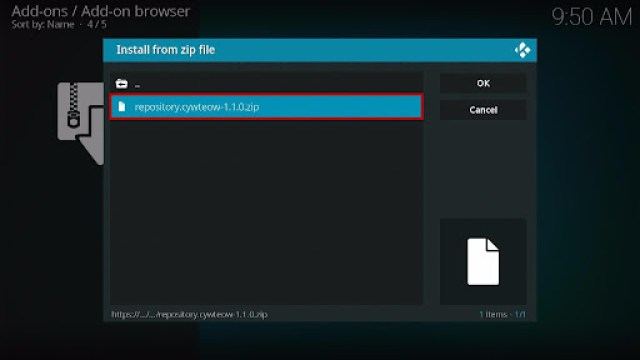
11. Click Install from Zip File.
12. Tap the Yes button.
13. When the box pop-up, select cywteow or any name you have given.
14. Choose repository.cywteow-1.1.0.zip
15. Wait a few minutes for the addon to be installed. After that, an icon will appear at the top menu.
16. Tap the Install from Repository.
17. Then select cywteow Add-ons from the list.
18. Click on Video Add-ons.
19. Select the DramaCool.
20. Click the Install button.
21. When a box Pops up, click OK.
22. Wait for the DramaCool Add-on installed message to appear.
23. Go back to the Kodi home screen and scroll down to Addon.
24. From the Video Add-on, select the DramaCool Add-on icon.
25. That’s it! Choose from the categories and enjoy.
Features of DramaCool Kodi Addon
Interface
No registration and subscription needed
It has an easy navigation interface even without using mouse toggle
Excellent search function: This allows you to search by Drama names and Star.
Contents
It is regularly updating its list of contents.
Choose from Recently Added Drama, Movies, and KShow.
All of their contents are from trusted sources.
You can choose from different servers such as Standard Servers, AsianLoad, StreamSB, Xstreamcdn, Streamtape, and Mixdrop.
You can choose from Korean Drama, Japanese Drama, Taiwanese Drama, Hong Kong Drama, Chinese Drama, Thailand Drama, and Other Asia Drama.
They also have different movies from lots of Asian countries,
Excellent searching functions such as Choose from alphabetical letters, Year, Gender Type, and Status.
Choose from different genres such as Action, Adventure, Comedy, Crime, Drama, Family, Fantasy, Horror, Mystery, Romance, Science Fiction, and Thriller.
They have Ongoing and Completed TV dramas.
You can also check out the best Asian artists and stars and watch their dramas.
Video Quality
One-click pause, forward/backward, play, and full stop button
360p, 480p, 720p, and 1080p video streaming quality.
Create and Clear bookmark.
Information button for brief details about the contents.
Excellent and clear sound quality.
Available Raw and Sub (English Sub) contents
Allows background playing and it has a stop button in the background.
Legal Disclaimer: ReviewVPN.com does not encourage or endorse any illegal activity involved in the usage of services and applications referenced on this site. We do not verify the licensing agreements of services. The end-user is wholly responsible for ensuring that any media accessed through these services does not violate copyright and/or licensing laws. ReviewVPN does not promote, link to, or receive compensation from any Apps and IPTV services.
YOUR INTERNET ACTIVITY IS BEING WATCHED
ReviewVPN cannot attest to the legality, security and privacy of the applications discussed on this site. It is highly recommended that you use a VPN service while streaming or using Kodi.
Currently, your IP 216.73.216.84 is visible to everyone and your Browser is being tracked by Advertisers & ISP Provider.
Your activities are hidden from your ISP, the government, and from the apps you are using.
You can access additional movies and TV streams.
ISP attempts to throttle are thrwarted thus reducing buffering issues.
Geographically restricted content like Netflix and Hulu can be unblocked.
A VPN works be replacing your ISP-assigned IP address and creating an encrypted tunnel. We recommend the no log service offered by IPVanish. It works well on a Firestick and offers the fastest possible speeds.
Choose from different Asian countries and watch their TV shows and Movies.
Cons
Some servers are not working.
Fast and Safe Streaming with VPN
Kodi users are advised to have a Virtual Private Network on their device, to ensure they are safe and protected while streaming online. A VPN is a reliable tool that you can use to speed up your connection and gives you the security you need to be safe from harm online.
We highly recommend MordVPN as your best choice, as it has the best and high standard security features that will keep you safe 24/7 online. The good thing with this VPN is it also allows you to connect to their anonymous servers and keep you anonymous online by shielding your real IP address. This VPN is also award-winning when it comes to security and connection speed. If you want to know more about this VPN, kindly read ourSurfshark Review.
Here are some of the services and impressive features that this VPN offers:
This VPN uses a high standard of AES-256 encryption and uncrackable security to safeguard your data and activities.
It destroys Geo-blocks and bypasses any censorship and restriction by letting you connect to 3,200 VPN servers in 65 locations to choose from.
Surfshark also prevents ISPs from interfering with your connection to avoid lags and buffering. It also stops snooping on ISP and keeps you protected while being connected to a public network.
Keep your identity anonymous by hiding your real IP address and identity to protect you from hackers.
Click here to get the lowest price on Surfshark through our exclusive limited-time offer.
How to Install Surfshark VPN on Firestick
If your Firestick still has the older interface, read this article to learn how to update it: Update Firestick Interface.
You can download Surfshark directly from the Amazon App store. It will be easy for you to find Surfshark with your Firestick’s Find feature. Refer to our screenshots below.
1. Go to the Home screen of your Firestick.
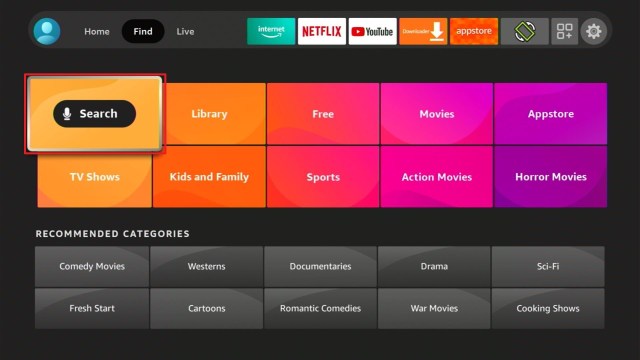
2. Navigate towards the Find tab. Press the Search button from the resulting dropdown.
3. Type in the keyword of SurfShark and select from the suggestions that will appear.
4. Click the official SurfShark icon from your search results.
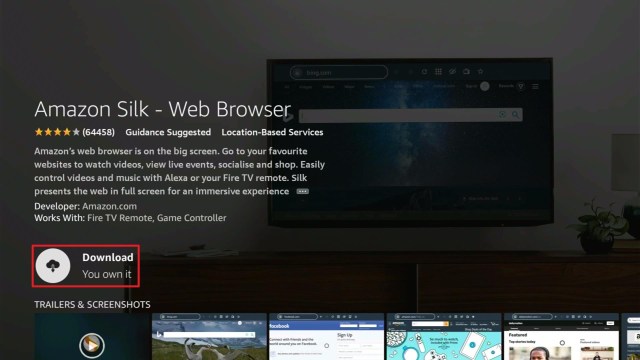
5. Press the Download (You own it) button.
6. The SurfShark VPN installer will download on your device.
7. SurfShark VPN’s app will automatically install itself on your Fire TV stick.
8. Press the Open button after completing SurfShark VPN’s installation process.
9. Please wait for the SurfShark VPN to load its user interface.
10. You can now log in with your SurfShark VPN account credentials.
We list down some of the Kodi addons as an alternative for DramaCool Kodi Addon. Kindly read their corresponding articles to know more about these add-ons.
There is no official DramaCool application, but you can visit their official website on Firestick using a Silk browser.
Is the DramaCool Kodi addon legal?
Yes, this Kodi addon is not illegal to download.
Is the DramaCool Kodi Addon safe?
Yes, this addon is safe to use and download.
Is the DramaCoolKodi Addon free?
Yes, this Add-on is free and allows you to watch their content for free and even without creating an account.
Conclusion
DramaCool is as cool as the name suggests because you can watch thousands of their content from Asian countries. You can watch different dramas and get to know the talented stars. This add-on is a good option for those who are fond of Asian plots and dramas. Asian drama is popular nowadays which is why this add-on is great for those who want to watch in a less buffering experience.
We hope this article helps you install the DramaCool Kodi Addon.
This article will provide you with a comprehensive list of all FilmRise apps on Firestick.
For some years, Future Today Inc. has been developing apps for the Amazon Firestick. FilmRise, on the other hand, is the most popular of these apps, and you can use it to watch free movies and TV shows on your Firestick.
It is one of the most popular web apps for streaming free movies and TV shows over the internet. It has evolved into a hub for a variety of popular Hollywood titles, with mainstream films from thousands of studios available.
These FilmRise apps on Firestick offer a variety of television shows and films. There are over 20 different video genres to choose from, including Comedy, Horror, Romance, Family, Thriller, Crime, and much more.
Therefore, if you own an exceptional Firestick device and want to view free premium movies, television shows, documentaries, and a variety of other content, you can download FilmRise apps to your Firestick. Furthermore, it allows you to watch full-length hours of entertainment for free without having to register or subscribe.
List of FilmRise Apps on Firestick
FilmRise – Free Movies and TV Shows
The FilmRise Free Movies and TV Shows app is your one-stop-shop for all things. All of the most popular movies and TV shows, as well as the most recent movie releases, top romantic comedy and dramas, and much more, can be found here.
It includes Animated Series, Movies Based on Books, Food, Travel, Nature and Outdoor Life, Sitcoms, and more, giving you a wide range of choices. Apart from that, FilmRise Free Movies and TV Shows is the most popular and commonly used app available on the Amazon Appstore or through sideloading using apps such as the Downloader app.
Top categories:
Featured Movies
Featured TV
Classic TV Shows
Popular Categories
True Crime TV
New Movie Arrivals
Discover
Top Thrillers
Great British Crime
Top Rom-Coms and Dramas
Black Cinema
Food & Cooking TV
Westerns and more.
How to Install FilmRise – Free Movies and TV Shows on Firestick
On the Home Screen, go to “Find”.
Then click “Search”.
You may use the Alexa Voice Command on your remote or simply type in “FilmRise Free Movies and TV Shows”.
Click on the suggestion when it appears.
Then click on the “FilmRise – Free Movies and TV Shows” icon.
Click “Get”.
Wait for the file to download.
Then click “Open”.
That’s it, FilmRise – Free Movies and TV Shows is now installed on your Firestick.
FilmRise Kids
Kid’s movies and television shows are also available for free. If you’re looking for a fun app for your kids, FilmRise Kids is the place to go. There are family movies, sitcoms, animated shows, and other popular films for children.
You’ll never have to worry about your children seeing unnecessary or inappropriate content with FilmRise Kids because it only offers the best streaming options for kids.
Categories:
Featured Family Flix
TV
Classic Animated Series
Popular Movies
Favorites
Comedy
Animated Movies
Animals
Exciting TV Shows
En Espanol
How to Install FilmRise Kids on Firestick
On the Home Screen, go to “Find”.
Then click “Search”.
You may use the Alexa Voice Command on your remote or simply type in “FilmRise Kids”.
Click on the suggestion when it appears.
Then click on the “FilmRise Kids” icon.
Click “Get”.
Wait for the file to download.
Then click “Open”.
That’s it, FilmRise Kids is now installed on your Firestick.
FilmRise History
If you’re interested in history, FilmRise provides a dedicated History app that you can download and watch for free. It features documentaries and exclusive videos from historical events such as wars, military, crimes, and other historical films based on True stories.
Apart from that, given the lack of free History apps on Firestick that allow you to stream without paying a subscription, FilmRise History could be a good option for you to discover new films on the genre.
Categories:
TV
Military and War
Popular Categories
Classic TV
Acclaimed History
Westerns
Period Drama
Historical Miniseries and more.
How to Install FilmRise History on Firestick
On the Home Screen, go to “Find”.
Then click “Search”.
You may use the Alexa Voice Command on your remote or simply type in “FilmRise History”.
Click on the suggestion when it appears.
Then click on the “FilmRise History” icon.
Click “Get”.
Wait for the file to download.
Then click “Open”.
That’s it, FilmRise History is now installed on your Firestick.
FilmRise Classic TV
FilmRise Classic TV is another great FilmRise app if you enjoy binge-watching classic movies and TV shows. If you’re tired of the mainstream movies and TV shows that can be found on practically all applications and websites, this can be a viable option.
In addition, FilmRise Classic offers the largest and greatest selection of classic television shows from the 1940s to the 2000s, all of which are available to stream for free on your Firestick. Aside from that, classic albums and classic concerts by Elton John, Elvis Presley, Machine Head, Diana Krall, and others can be found.
Click here to get the lowest price on Surfshark through our exclusive limited-time offer.
How to Install FilmRise Classic TV on Firestick
On the Home Screen, go to “Find”.
Then click “Search”.
You may use the Alexa Voice Command on your remote or simply type in “FilmRise Classic TV”.
Click on the suggestion when it appears.
Then click on the “FilmRise Classic TV” icon.
Click “Get”.
Wait for the file to download.
Then click “Open”.
That’s it, FilmRise Classic TV is now installed on your Firestick.
FilmRise Documentary
Several individuals are constantly on the lookout for free documentary apps. If you’re one among them, the FilmRise Documentary app might be worth considering. Documentaries about military history, true crime, nature, music, and a variety of other content can be found in a variety of films and television shows.
Apart from that, if you like food and cooking TV, it contains Hells Kitchen and plenty of other Gordon Ramsay programs.
Categories:
TV
Featured
Reality & Documentary
Military History TV
Trending Documentaries
Food & Cooking TV
Prison TV
True Crime Documentaries
Nature and Outdoor Life
Nature TV
Staff Picks
Popular
Crime and more.
How to Install FilmRise Documentary on Firestick
On the Home Screen, go to “Find”.
Then click “Search”.
You may use the Alexa Voice Command on your remote or simply type in “FilmRise Documentary”.
Click on the suggestion when it appears.
Then click on the “FilmRise Documentary” icon.
Click “Get”.
Wait for the file to download.
Then click “Open”.
That’s it, FilmRise Documentary is now installed on your Firestick.
FilmRise Sci-Fi
Fortunately, FilmRise also has Sci-Fi films and television episodes for sci-fi enthusiasts. You’ll find films including Zombies, Aliens, and other Horror genres. Aside from that, this app has a collection of classic sci-fi flicks. Even if FilmRise Sci-Fi doesn’t have the most recent Sci-Fi content, there is still some interesting content to be found.
Categories:
Featured Movies
TV
Acclaimed Titles
Science Fiction Miniseries
Favorites
Thriller
Horror
Action
Larger Than Life Monsters
Popular Alien Movies
Popular Apocalyptic Movies
All Sci-Fi
How to Install FilmRise Sci-Fi on Firestick
On the Home Screen, go to “Find”.
Then click “Search”.
You may use the Alexa Voice Command on your remote or simply type in “FilmRise SciFi”.
Click on the suggestion when it appears.
Then click on the “FilmRise Sci-Fi” icon.
Click “Get”.
Wait for the file to download.
Then click “Open”.
That’s it, FilmRise Sci-Fi is now installed on your Firestick.
YOUR INTERNET ACTIVITY IS BEING WATCHED
ReviewVPN cannot attest to the legality, security and privacy of the applications discussed on this site. It is highly recommended that you use a VPN service while streaming or using Kodi.
Currently, your IP 216.73.216.84 is visible to everyone and your Browser is being tracked by Advertisers & ISP Provider.
Your activities are hidden from your ISP, the government, and from the apps you are using.
You can access additional movies and TV streams.
ISP attempts to throttle are thrwarted thus reducing buffering issues.
Geographically restricted content like Netflix and Hulu can be unblocked.
A VPN works be replacing your ISP-assigned IP address and creating an encrypted tunnel. We recommend the no log service offered by IPVanish. It works well on a Firestick and offers the fastest possible speeds.
Click here to get the lowest price on Surfshark through our exclusive limited-time offer.
Other Available FilmRise Apps on Firestick
You might also want to check out the following FilmRise Apps on Firestick, as it has a lot more apps in other genres:
FilmRise British TV
This British TV app is home to some of the best UK crime dramas, reality television and documentaries, comedy, medical dramas, action and fantasy, slice-of-life, British classics, film dramas, and much more. It’s an excellent app for finding and watching UK programs, as most UK applications demand the use of a VPN just to access their content. Furthermore, who doesn’t like free movies?
FilmRise Horror
The app offers a diverse selection of horror films in a variety of genres. This app contains comedy horror, detective horror, haunted horror, monster horror, psychological horror, science fiction horror, slasher horror, survival horror, vampire horror, zombie horror, and werewolf horror, among others.
Aside from that, there are even free Horror TV series to watch on your Firestick device. Furthermore, having a large selection of content to choose from will ensure that you had hours of binge-worthy Horror flicks to keep you entertained throughout the day.
FilmRise Mysteries
The app also offers a selection of mystery films and television episodes. There are numerous types of mystery films, including Romantic Mysteries, Thrilling Miniseries, Political Thrillers, Exciting Mysteries, Heist, Detective Movies, Supernatural Horror, and Documentaries.
FilmRise True Crime
If you enjoy crime films and television shows, FilmRise True Crime may be for you. It includes True Crime Television, Featured Crime Films, Crime Thrillers, Films Based on True Events, Famous Cases, Murder Mystery Films, Paranormal Investigations, Detective Films, and Police Drama, among others. You can explore and discover interesting films to watch in the many categories, like Famous Cases.
FilmRise Thriller
Even if FilmRise Thriller has films in other genres, it’s worth noting that it has some thrillers in a few categories that include action-packed crime thrillers, suspenseful murder mysteries, and intriguing supernaturals. This category includes the following: Trending Thrillers, Thriller Theater, and Thrilling Miniseries. Moreover, this app features action, crime, science fiction, supernatural, and horror films.
Click here to get the lowest price on Surfshark through our exclusive limited-time offer.
FilmRise Western
It is one of the few Firestick apps that offer Western movies. You can watch Action-Packed Westerns, Wild West Romps, Acclaimed Westerns, and Beyond the West on this app. And e Even if this app has limited content, you may still use it if you enjoy Western movies because it is completely free, so you won’t be hurting your wallet by trying it out.
FilmRise Action
Some of the films in FilmRise Actions are also available in other apps, such as FilmRise Thriller and FilmRise Western. However, it does have some exclusive content, such as films in the Martial Arts and Sports Action genres. It also has a section called Women-Led Action Hits, which includes 15 films with female action leads.
FilmRise Paranormal
From horror to mysteries, FilmRise Paranormal provides both movies and TV series. Aside from that, the app has Drama, Thriller, and Sci-Fi movies. Even though it doesn’t have as much content as other applications, you can still find movies that aren’t available elsewhere.
FilmRise Comedy
It also provides FilmRise Comedy, if you’re seeking a comedy app. You may find your favorite comedy films and FilmRise TV shows in a variety of subgenres here. This app contains Classic Television Comedy, British Television Comedy, Adventure Comedy, Animation, Romantic Comedy, Comedy Horror, Coming of Age, Crime Comedy, Dark Comedy, Science Fiction Comedy, and Sports Comedy, among others.
FilmRise Drama
We know how much Drama is enjoyed by many streamers, and FilmRise has not failed to develop an app for Drama fans. It features Crime Drama, Television Drama, Classics, Leading Women, Coming of Age, True Events, Ensemble Drama, Sports Drama, Independent, and Biopic films. While it highlights films by Great Directors, it also includes films by the following:
British Cinema
French Cinema
Latin American Cinema
African Cinema
Eastern European Cinema
Chinese Cinema
Italian Cinema
Asian Cinema
German Cinema
Irish Cinema
FilmRise Family
FilmRise Family is an app that provides family-friendly movies that you may watch with your entire family. It includes family-friendly animated classics, fantasy and adventure, family dramas, family comedies, animal movies, and other family-friendly television series.
FilmRise Pride
Of course, with its FilmRise Pride app, it also provides free movies and TV series to the LGBT community. It now has over 100 films in its new arrivals category, which includes comedy and campy flicks, Asian cinema, documentaries, and international cinema.
FilmRise Cinematheque
This app provides free access to acclaimed films and television shows that you may watch on your Firestick. It features films from all around the world, including Drama, Classics, Arthouse, Indie, Great British Binges, Comedy, Great British Crime, Crime, Documentary, Thrilling Drama, Es Espanilo, Romance, and other genres.
Click here to get the lowest price on Surfshark through our exclusive limited-time offer.
FilmRise Indie
If you’re a streamer who prefers independent films, the FilmRise Indie app is designed specifically for you. Here you’ll find films with LGBT content, as well as action, drama, horror, comedy, thriller, biography, coming of age, mystery, family life drama, and romance starring new and rising actors.
FilmRise En Espanol
Meanwhile, if you’re looking for a Spanish-language film or television show, FilmRise En Espanol is the app for you. It enables you to stream free movies and television shows directly to your Firestick. It includes content for Accion Popular, Dramas Criminales, Cine Romantico, Estrellas de Accion, Comedias Populares, True Crime Doblada, and a variety of other genres.
Stream Safely With a VPN
With FilmRise’s numerous free Firestick applications covering a variety of genres, you’ll never run out of streaming possibilities. However, keep in mind that when streaming online content, you should never put your security at risk. It’s because you never know when cyber threats like hackers and phishers are lurking on the app or website to which you’re gaining access. And safeguarding your data is simple, as all you need is a reliable VPN provider like Surfshark.
Surfshark will encrypt your connection and provide you with an anonymous IP address, allowing you to protect your data from prying eyes. As a result, you can be confident that you are not jeopardizing your safety in exchange for free access to streaming apps and websites. Here are some of Surfshark features and benefits to provide you with additional information:
Has a total of 3200+ servers in 65 countries
It uses unbreakable AES 256-bit military-grade encryption, ensuring that no logs or IP addresses are leaked.
Allows you to get beyond censorship and geo-restrictions and access any content you want from anywhere on the globe.
You’ll get unlimited bandwidth to stream and download all of the movies and TV shows you want from apps such as FilmRise.
With Surfshark’s unlimited number of simultaneous connections, you can protect all of your devices at the same time.
It contains a kill switch that will automatically disconnect your device from the internet in the event of an unintentional disconnection from the VPN.
Because Surfshark owns its whole network, you’ll never have to fear your data being sold to third-party servers or advertising firms.
Their customer service is available 24/7 via live chat, email, and phone, so you can contact them at any time.
For more VPN discounts, go to ReviewVPN Deals and purchase the best VPN for you.
Click here to get the lowest price on Surfshark through our exclusive limited-time offer.
FAQs
What is FilmRise?
FilmRise is a media company that provides a never-ending supply of free movies and TV shows to stream. It now has 21 apps in the Amazon Appstore for the Firestick, which makes it simple to find what you’re looking for regardless of your mood or occasion.
Is FilmRise a good app?
It is a great and decent app, even if it does not offer the most recent and up-to-date movies and TV shows. It automatically starts playing when you attempt to watch a video, and it is, of course, free. Aside from that, it also has a ton of applications in various genres, so if you’re looking for something specific, you can go straight to an app and watch your favorite movies and TV shows.
Is FilmRise available on Firestick?
Yes, It is available on Firestick. It is, in fact, a verified app on the Amazon App Store, allowing you to install it quickly and directly on your Firestick.
Where can I watch FilmRise?
Fortunately, these apps are accessible on a variety of platforms, including Amazon Fire TV, Roku, and Android.
Are FilmRise Apps on Firestick safe?
Yes, they’re all completely safe to install and use on your Firestick. When watching online, however, we always advise our readers to add an extra layer of security by using a VPN.
Is FilmRise a free app?
Yes, it is a free app. And when we say free, we mean that you can install it for free and then access and watch its content on your device for free.
Is there an official website?
Yes, they have, and their website is https://filmrise.com/.
Conclusion
If you want to watch a variety of videos from various genres, the FilmRise apps on Firestick are for you. It offers a diverse selection of films, including horror, comedy, action, sci-fi, and drama. Furthermore, there are already 21 FilmRise apps available on the Amazon Appstore.
It also offers the most recent Hollywood films to its viewers. Apart from that, FilmRise’s content is likewise completely free. All you need to do is get a Firestick and download a couple of apps from the Amazon Appstore and you are good to go.
Finally, we’d like to thank you for taking the time to read our article about the FilmRise apps on Firestick. We hope we were able to provide you with a comprehensive list of FilmRise apps for Firestick, as well as a clear description of what each app offers. Have fun streaming!
ES File Manager is a direct app that you can easily install from the Amazon App Store. It has amazing features of managing almost all of your files, from music to photos to videos. But the only problem is, it is not 100%. It offers a 1-week free trial and then asks for $9.99 monthly after the trial. So even though, there is a chance for you to download movies on your Firestick, you still need to pay for the ES File Explorer Manager.
2. Open Downloader App. Type https://reviewvpn.com/cin and click Go.
3. Click on INSTALL
4. Click on OPEN
5. Click on Allow
6. Click on ACCEPT
7. Cinema HD is Installed. Enjoy Watching.
Legal Disclaimer: ReviewVPN.com does not encourage or endorse any illegal activity involved in the usage of services and applications referenced on this site. We do not verify the licensing agreements of services. The end-user is wholly responsible for ensuring that any media accessed through these services does not violate copyright and/or licensing laws. ReviewVPN does not promote, link to, or receive compensation from any Apps and IPTV services.
2. Click the magnifying glass icon if you will search for the title of the movie that you like to download.
3. Type the title of the movie and click Next.
4. Select the movie you want to stream.
5. Choose a link that is suitable for your streaming needs. To learn about Streaming links, click here.
6. Click Open with
7. Select ES Downloader.
8. Let the movie be downloaded.
9. Once done, launch the ES File Explorer Manager.
10. Tap on Library.
11. Choose Movies.
12. Select the movie you downloaded.
13. All possible players will appear.
14. Choose your preferred video player. You can use MX Media Player.
15. Now you can stream your downloaded movie.
Reminder: If Cinema HD is not working, here as some alternatives.
Stream Safely With a VPN
Whichever apps you are using to download movies on your firestick, you need to be extra careful. We are not sure of the exact source from which Cinema HD or other related apps get their streaming links. You have to mask your identity so that any questionable activities done by the app will not trace back to you.
The best way to hide your identity is to change your IP address. Because your IP serves as your online fingerprint. To change it, you need to have a VPN.
Surfshark changes your IP address by connecting you to a different server of your choice. With this, you can access a lot of other content and even cover your activities from your internet service provider or ISP.
This VPN works well with Firestick and provides more features and benefits such as:
3200+ servers in 65 countries
Lets you choose a city or country to connect your IP with.
Allows you to access geo-restricted content and features that are not available in your region.
Proven working with popular apps like Hulu and Netflix.
Has the best VPN protocols for each type of device.
Continues to develop great and wonderful features like split tunneling and kill switch.
Does not log any of your online activity while using the app.
Your ISP won’t be able to monitor you when you are using Surfshark.
Block any spying eyes and hackers when you are using public wifi.
Encrypts all of your data with the best VPN protocols.
For more VPN discounts, go to ReviewVPN Deals and purchase the best VPN for you.
Click here to get the lowest price on Surfshark through our exclusive limited-time offer.
FAQs
How to download movie HD on Firestick?
Movies of any definition can be downloaded to your firestick if you follow the procedure above.
How to Download Movie Apps on my Firestick?
Apps can be downloaded directly from the Amazon app store, while some other apps can be downloaded using the Downloader app upon jailbreaking your Firestick.
Can I download movies on Firestick?
The answer is Yes. But it is not 100% free. The procedure shown above uses ES File Explorer Manager. Today, this app requires payment of $9.99 a month.
Conclusion
The possibility of downloading movies on your Firestick is feasible. You need to have an ES File Explorer Manager app to do it. The bad thing is, the service is not for free. You can download it for free but you need to pay an amount of $9.99 to use its feature. As of now, it is the easiest and proven way to download movies on your Firestick.
You can use any apps that allow the use of ES File Downloader like Cinema HD, Nova TV, and more.
Even though it is not 100% free, we hope that this article helped you on How to Download Movies on your Firestick.
Note: ReviewVPN.com does not own or operate any app nor does it endorse any. The main purpose of this article is strictly for educational purposes only.
This article will discuss the differences between uTorrent vs BitTorrent.
If you’re into torrenting, you’re familiar with BitTorrent and uTorrent, as they’re the most popular software for doing so. However, you might also be someone who has been wanting to explore torrenting, and has heard about these two and is curious about the differences and which one to use.
Moreover, the difference between the two is an often asked question, as many people also wonder which torrent to use. The uTorrent vs BitTorrent debate has been raging for quite some time, as many people have been curious about the two. Is it the same thing? Which is the safer option, and which is the most convenient to use? Or is there anything else you should know before deciding which one to use?
So, without further ado, read on to learn more about the differences between uTorrent vs BitTorrent. And so you can determine which is suitable for you.
What is uTorrent?
BitTorrent, Inc. bought uTorrent in 2004 as a proprietary peer-to-peer computer program. It is a freeware application for downloading files through the BitTorrent protocol which is now available for Microsoft Windows, Mac OS X, Linux, and Android. It is easy to use, even for beginners, due to its simple interface and focus on performance. uTorrent includes many of the same features as other BitTorrent clients, including the ability to create torrents, play or extract audio or video from torrents, and manipulate files with a built-in file manager.
On the Downloader app, type in “https://reviewvpn.com/utor” then select “Go”.
Then wait for the APK to download.
Choose “Install”.
Click “Open”.
If you want to delete the APK file, click “Done” and “Delete”.
That’s it, uTorrent is now available on your Firestick device.
uTorrent Download for Android
Note: ReviewVPN.com does not host this APK file. It is hosted by Archive.org
What is BitTorrent?
BitTorrent, the parent company of uTorrent, is an adware that enables P2P file sharing. It takes a broader approach because it owns about 25 torrenting companies. Apart from that, the software was created as a way to anonymously transfer large files over the internet. Moreover, it allows users to communicate files at rapid speeds while also providing them with a secure network.
Legal Disclaimer: ReviewVPN.com does not encourage or endorse any illegal activity involved in the usage of services and applications referenced on this site. We do not verify the licensing agreements of services. The end-user is wholly responsible for ensuring that any media accessed through these services does not violate copyright and/or licensing laws. ReviewVPN does not promote, link to, or receive compensation from any Apps and IPTV services.
YOUR INTERNET ACTIVITY IS BEING WATCHED
ReviewVPN cannot attest to the legality, security and privacy of the applications discussed on this site. It is highly recommended that you use a VPN service while streaming or using Kodi.
Currently, your IP 216.73.216.84 is visible to everyone and your Browser is being tracked by Advertisers & ISP Provider.
Your activities are hidden from your ISP, the government, and from the apps you are using.
You can access additional movies and TV streams.
ISP attempts to throttle are thrwarted thus reducing buffering issues.
Geographically restricted content like Netflix and Hulu can be unblocked.
A VPN works be replacing your ISP-assigned IP address and creating an encrypted tunnel. We recommend the no log service offered by IPVanish. It works well on a Firestick and offers the fastest possible speeds.
Here, we’ll look at the key differences between uTorrent and BitTorrent in terms of the following factors:
Popularity
uTorrent: Has a market share of 68.6%.
BitTorrent: Has a market share of 6.6 percent.
Conclusion: uTorrent is more popular than BitTorrent since it has a larger market coverage of more than 60%.
Size of the Software
uTorrent: 1MB
BitTorrent: 3MB
Conclusion: uTorrent takes less space than BitTorrent by 2MB. It simply means that uTorrent takes up lower CPU storage.
Availability in Major Platforms
uTorrent: Available on Windows, Mac OS X, and Android. The web version, on the other hand, includes the Linux operating system.
BitTorrent: Only Windows, macOS, and Android devices are supported
Conclusion: uTorrent is more accessible than BitTorrent because it’s also available on Linux OS
Security
uTorrent: Has more advertisements and malware risks.
BitTorrent: Ads are managed and more secure adware is provided by BitTorrent.
Conclusion: Using BitTorrent rather than uTorrent is a lot safer.
Language Availability
uTorrent: Available in 67 languages
BitTorrent: Available in 17 languages
Conclusion: Because uTorrent is more user-friendly than BitTorrent in terms of language availability, it is the most widely used torrenting program.
Speed Up Your Torrenting With The Best VPN Service
When torrenting, you should never forget to use a VPN to protect your connection from malware and other viruses. And the most recognized to be the best VPN for torrenting is Surfshark. Surfsharkencrypts your connection with military-grade AES-256 encryption, which is the same level of encryption that the US government uses, ensuring that all of your data remains private and secure.
It uses a variety of protocols such as Wireguard and OpenVPN, which are widely known as the best protocols for P2P (torrenting) downloading. Moreover, it also uses the L2TP, IPSec, and IKEv2 protocols to make streaming more efficient. Apart from that, it allows you to benefit from some of its features, such as:
Connect to over 3200+ servers in 65 countries.
Bypass censorship and geographic restrictions to access content from any location in the world.
You’ll have unlimited bandwidth to stream and download any torrent you want from the internet.
Get an unlimited number of simultaneous connections to ensure that all of your devices are protected to the same level with Surfshark.
Automatically connects you to the fastest available connection in your area to ensure you get the highest internet speed possible.
If you disconnect from the VPN by accident, Surfsharkfeatures a kill switch function that will automatically disconnect your device from the internet.
For more VPN discounts, go to ReviewVPN Deals and purchase the best VPN for you.
Click here to get the lowest price on Surfshark through our exclusive limited-time offer.
FAQs
Which is better uTorrent or BitTorrent?
Depending on how you want to use it, one is better than the other. BitTorrent is superior for sharing large-scale transmissions and provides more secure torrenting than uTorrent. However, we must give credit to uTorrent in terms of popularity and accessibility, as it dominates the market and is available in 67 languages.
Is BitTorrent safer than uTorrent?
BitTorrent is safer than uTorrent in that it prevents malware infections as it handles its advertisements better than uTorrent.
Is uTorrent owned by BitTorrent?
Yes, BitTorrent, Inc. owns uTorrent, which is why it also uses the BitTorrent protocol.
Conclusion
BitTorrent and uTorrent are two of the most popular torrent downloaders, and BitTorrent, Inc. owns both of them. They appear to be extremely similar, as they are both P2P file-sharing or torrenting clients with the same UI but with a distinct color scheme. Even though the same firm created both apps, their functionality differs owing to their unique purposes.
Finally, we’d like to thank you for taking the time to read our article on uTorrent vs BitTorrent. We hope we were able to provide the key distinctions between the two.
The article will help you on how to install Rocket Beans TV Kodi Addon.
Rocket Beans TV is one of the most popular german Live TV channels and official Kodi addons. It is a 24/7 entertainment channel that gives you a wide range of content to choose from, especially gaming and digital pop culture content. This add-on broadcasts content from popular streaming services such as YouTube, Twitch, Zattoo, and Waipu.tv.
It has a simple and easy-to-use interface that works well on Kodi. The good thing is you can get this add-on on Kodi’s official repository. Rocket Bean Tv and Kodi are great combinations, as it gives you a worth to watch content in a less buffering experience. This add-on is also one of the best live TV streaming services that offer you entertainment content and also latest news.
Here is a step-by-step guide on how you can install Rocket Beans TV on Kodi.
Launch Kodi and click the Settings icon.
Select Addons.
Click Install from repository.
Scroll down and select Video add-ons.
Select Rocket Beans TV.
Click Install.
Tap the OK button.
Wait for the Rocket Beans TV Add-on installed message to appear.
Go back to the Kodi home screen and click Addon. After that,
Select the Rocket Beans TV Kodi Addon.
That’s it! You can now watch any content that you want.
How to Install Rocket Beans TV Kodi Addon with Screenshot
Follow the steps below:
1. Launch Kodi and click the Settings icon.
2. Select Addons.
3. Click Install from repository.
4. Scroll down and select Video add-ons.
5. Select Rocket Beans TV.
6. Click Install.
7. Tap the OK button.
8. Wait for the Rocket Beans TV Add-on installed message to appear.
9. Go back to the Kodi home screen and scroll down to Addon.
10. From the Video add-ons, select the Rocket Beans TV Kodi Addon.
11. That’s it! You can now watch any content that you want.
Features of Rocket Beans TV Kodi Addon
Access
You don’t need to register or subscribe to watch their content.
Interface
It has a simple and easy-to-use interface.
Easy to navigate even without using a mouse toggle.
Categories
Choose from the different categories such as Live, Library, Gaming Library, Kino Plus, Game-Two Library, Rocket Beans TV hangi, Library on Twitch, and Program plan.
Watch different German Players play their online games such as Monopoly.
In each category, you can choose from their different Playlists and Live streaming.
Library Twitch: Choose different contents from twitch.
It has a complete series of game footage.
Watch different players play their games such as Monopoly, Call of Duty, Minecraft, Valorant, and more.
This add-on also brings you the alerts news to watch.
Video
Choose from different video streaming quality from 144p, Audio Only, 360Pp, 480p, 720p, 720p60 and 1080p60.
Available one-click stop, pause, play, playback, and forward button.
Information button for content description
Create and Clear bookmark button.
Allows background playing
YOUR INTERNET ACTIVITY IS BEING WATCHED
ReviewVPN cannot attest to the legality, security and privacy of the applications discussed on this site. It is highly recommended that you use a VPN service while streaming or using Kodi.
Currently, your IP 216.73.216.84 is visible to everyone and your Browser is being tracked by Advertisers & ISP Provider.
Your activities are hidden from your ISP, the government, and from the apps you are using.
You can access additional movies and TV streams.
ISP attempts to throttle are thrwarted thus reducing buffering issues.
Geographically restricted content like Netflix and Hulu can be unblocked.
A VPN works be replacing your ISP-assigned IP address and creating an encrypted tunnel. We recommend the no log service offered by IPVanish. It works well on a Firestick and offers the fastest possible speeds.
Legal Disclaimer: ReviewVPN.com does not encourage or endorse any illegal activity involved in the usage of services and applications referenced on this site. We do not verify the licensing agreements of services. The end-user is wholly responsible for ensuring that any media accessed through these services does not violate copyright and/or licensing laws. ReviewVPN does not promote, link to, or receive compensation from any Apps and IPTV services.
It is a legal Kodi add-on that you can get on Kodi’s official Repository.
Easy to navigate and user-friendly interface
Great selection of content to watch in the High quality of the video.
Up to 1080p video streaming quality.
Cons
It requires YouTube access to configure.
Lots of content is not able to be played.
Do I need a VPN?
We recommend using a Virtual Private Network on your device to give you a safe environment while being connected to a public network. A VPN keeps you protected from any harm online by encrypting your internet traffic and your identity to keep you unknown.
One of the best VPNs that you can rely on to ensure your security and privacy online, is Surfshark. This VPN has impressive security features that will keep you protected 24/7 while being connected to a public network. IPVnaihs also ensure you are protected online by keeping you anonymous. It is also an award-winning VPN that gives its users equality of service worth paying for. Read our Surfshark Review, if you want to learn more about this VPN.
Here’s are the reasons why it is our VPN of choice:
Bypass restrictions and geo-blocks to access lots of content.
This VPN service has more than 3200+ servers in 65 countries.
Military-grade AES-256 encryption follows FIPS (Federal Information Processing Standards) that oversees the handling of sensitive data.
It follows a strict No-Logs Policy
No Bandwidth limits – you can enjoy a full-speed VPN connection without any throttling.
It works on all devices and can secure an unlimited number of devices.
Rocket Beans TV is a division program based in Hamburg and owned by Rocket Beans Entertainment GmbH.
What is the Rocket Beans TV community?
The TBTV has a community that has over 3,000 members who join together to share the same idea. These groups offer you the opportunity to find like-minded people and exchange ideas.
Is the Rocket Beans TV Kodi addon legal?
Yes, this add-on is 100% legal and only offers content from legitimate sources.
Is the Rocket Beans TV Kodi addon free?
Yes, this addon is free to use and install.
Is it safe to stream in the Rocket Beans TV Kodi addon?
Yes, streaming in this addon is safe, but to ensure your safety, we suggest using a VPN such as Surfshark.
Conclusion
Rocket Beans TV is an entertainment platform that gives you game-related, entertainment, news, and more content to watch. It is an official Kodi addon that will surely give you content from legitimate sources. However, we still suggest using a VPN such as Surfshark before using this addon. We hope this article helps you install the Rocket Beans TV Kodi addon.
uTorrent is one of the most well-known torrent clients. This app is miles ahead among all the torrent clients when considering user base size, speed, usability, features, as well as premium variants.
Unlike other torrent apps, the focus of uTorrent is on performance. The size of the installer app is just more than 4MB which is smaller than other torrent clients. Also, the uTorrent free download is not a memory hog that slows devices down by utilizing numerous resources.
uTorrent is a Micro-Torrent or a file that helps web users download things like images, documents, videos, e-books, and more. It web is very handy as it is responsible for storing metadata (a collection of information). You can use uTorrent to download enormous amounts of data.
This is one of the best torrent downloaders on Google’s Play Store with more than 100 million downloads. It helps you obtain magnet links or torrent files from an Android-powered device. You can enjoy a simplified download experience without size or speed limits.
Download torrent file & magnet links
Fast, light & powerful
Opt for a file download location
Once you download & install uTorrent Web on your computer or Android-based device, you’ll be able to automatically launch all the torrent files & magnet links in the internet browser’s window. With the uTorrent, you can search for content on various torrent websites. Also, you can make use of uTorrent’s search box facility.
Features of uTorrent
uTorrent is certainly a fully-featured torrent client. There are tons of really handy functions that you can get across all variants of the uTorrent client. It lets you schedule speed caps for a number of times of the day. For instance, if you want it to use the topmost bandwidth for easy downloads at night, you can do it from the uTorrent settings.
You can possibly set a cap on the highest bandwidth that can be utilized by the uTorrent for downloads. Therefore, uTorrent ensures that other more essential tasks will keep all their bandwidth.
Like other torrent clients, uTorrent lets you manage downloads. It has a dedicated Android app that lets users start or stop downloads on their home PC/computer while they’re away.
Another neat touch of uTorrent is its ability to add RSS feeds. Although that’s not a distinctive feature, it is very handy for automatically starting downloads whenever there is additional content to the feed.
How does it work?
The uTorrent program is a peer-to-peer (P2P) file-sharing network. It lets you access and plays a part in this P2P network. When you run the uTorrent program on an Android device or mac, you’ll become a peer in the network. If you want to download a file or files, you then have to get the torrent file that contains all of the tracking information for the file. Wherein, torrent files can be obtained from numerous peers over the network.
It contains a vigorously laid out user interface that you can use easily. The menu bar is located at the top. Some of its quick access settings are positioned on the left. uTorrent’s central panel displays the completed or in-progress downloads. Generally, this torrent client has an uncluttered user interface with most settings congregating under just a number of drop-down menus, which makes it easy to navigate.
However, unlike other torrent programs, uTorrent doesn’t have external plugin support. Since uTorrent is not an open-source program, creating third-party plugins is not possible.
User experience
This user experience really sets it apart from other torrent programs. Its entire UI is very easy to use. Even beginners or novices to the torrenting universe will be able to utilize uTorrent and start off downloading files without any help.
YOUR INTERNET ACTIVITY IS BEING WATCHED
ReviewVPN cannot attest to the legality, security and privacy of the applications discussed on this site. It is highly recommended that you use a VPN service while streaming or using Kodi.
Currently, your IP 216.73.216.84 is visible to everyone and your Browser is being tracked by Advertisers & ISP Provider.
Your activities are hidden from your ISP, the government, and from the apps you are using.
You can access additional movies and TV streams.
ISP attempts to throttle are thrwarted thus reducing buffering issues.
Geographically restricted content like Netflix and Hulu can be unblocked.
A VPN works be replacing your ISP-assigned IP address and creating an encrypted tunnel. We recommend the no log service offered by IPVanish. It works well on a Firestick and offers the fastest possible speeds.
Using Virtual Private Network or VPN service can be very useful. Thanks to a VPN service, web users can access platforms, services, or websites that are unavailable in their country or bypass restrictions that numerous platforms sometimes impose. When you utilize uTorrent, an encrypted Virtual Private Network service provider is highly recommended to conceal your activities on the internet, identity, as well as location. Tons of internet users choose Surfshark for privacy, price, and speed.
Offering superfast servers and astounding live chat support, the Surfshark service is also an easy-to-use app. Ensure to turn the Surfshark on when you’re streaming on the internet.
Surfshark Features:
Unlimited simultaneous devices
Unblocks Disney+, Hulu, Netflix, and many more
Strict NO log policy
30-day money-back guarantee
Great customer service
Robust encryption
Great download speed
Compatible with Android, Windows, Linux, iOS, and other routers
Click here to get the lowest price on Surfshark through our exclusive limited-time offer.
How to Install Surfshark VPN on Firestick
If your Firestick still has the older interface, read this article to learn how to update it: Update Firestick Interface.
You can download Surfshark directly from the Amazon App store. It will be easy for you to find Surfshark with your Firestick’s Find feature. Refer to our screenshots below.
1. Go to the Home screen of your Firestick.
2. Navigate towards the Find tab. Press the Search button from the resulting dropdown.
3. Type in the keyword of SurfShark and select from the suggestions that will appear.
4. Click the official SurfShark icon from your search results.
5. Press the Download (You own it) button.
6. The SurfShark VPN installer will download on your device.
7. SurfShark VPN’s app will automatically install itself on your Fire TV stick.
8. Press the Open button after completing SurfShark VPN’s installation process.
9. Please wait for the SurfShark VPN to load its user interface.
10. You can now log in with your SurfShark VPN account credentials.
For more VPN discounts, go to ReviewVPN Deals and purchase the best VPN for you.
FAQs
Is uTorrent legal?
Yes, uTorrent is completely legal to download, install, & use.
Is uTorrent Safe?
Yes, uTorrent is safe to use and contains no viruses & malware.
What devices can uTorrent be installed on?
For most individuals, torrenting means utilizing a PC/computer or laptop to download torrent files. Nonetheless, you do not need to utilize a PC/computer to download torrent files. You can also use portable Android devices, such as mobile phones or tablets.
Pricing
Basic/Classic: It is the most basic uTorrent version and you can download it for free. But, it is laden with ads in the user interface.
Ad-Free: uTorrent’s ad-free version is available for $4.95 a year, thus it’s inexpensive.
Pro: uTorrent’s Pro version aims at serious web users who want a secure torrenting experience. uTorrent’s Pro version is available at $19.95 a year.
Pro + VPN (Virtual Private Network): This variant of the uTorrent adds a premium Virtual Private Network or VPN service. This will keep users anonymous online while downloading content. uTorrent Pro+VPN retails at $69.95 a year.
Apart from these various variants, uTorrent also provides other products such as an Android application with free & pro variants.
Wrapping Up
In this article, we have given you information on uTorrent. The information above should really help you boost your download experience. Hope you’ve learned a lot about the uTorrent client.
However, always remember to use A VPN every time you use uTorrent. Please let us know what you think about this article in the comments section.
In this article, we will teach you how to use the Fire TV stick without an Amazon account.
There are many Fire TV stick users who wonder if they can use the device without an Amazon account. Upon using the famous search engines for answers, one will discover that many people also attempt to do this. Several Fire TV stick users post this query to Google, Yahoo, etc.
Do you want to use the Amazon Fire TV stick without an Amazon account? If you want to, then we got a possible solution for you. Here at ReviewVPN, we cover the best apps for streaming. Aside from streaming apps, we also review and test them if they will work on your Fire TV stick. Now, we began researching any method in case you want to use the Amazon Fire TV stick without an Amazon account.
Upon learning that many people attempt to use the Fire TV stick without registration, we’ve come across many answers from the internet. Furthermore, we have a solution in the shape of an app. If you want to learn to use Fire TV stick without an Amazon account, continue reading this article if it is even possible.
Is it possible to use the Amazon Fire TV stick without an Account?
The Fire TV stick is one of the best devices from the Amazon company. It means that after its purchase, the Fire TV stick requires any user to create an official Amazon account. The next step would be to add the Fire TV stick as one of the devices included on your Amazon account.
When you register your Fire TV stick or link it to your Amazon account, accessing its features becomes easy. Aside from that, the device would instantly recognize your payment details. All your credentials are necessary when downloading various applications from the Amazon app store. You can do this by installing official Amazon apps directly on your Fire TV stick.
Let us now go back to the question: Is it possible to use the Amazon Fire TV stick without an account? Simply put, the direct answer is YES. It is possible to still use the Fire TV stick device without registering for an account with Amazon. However, we need to remind you that the process is complex. You have to learn some technical terms to proceed.
To use the Fire TV stick without an Amazon account
To use the Fire TV stick without an Amazon account, you have to enable the installation of apps from unknown sources. Then you have to learn how to Jailbreak your Fire TV stick or sideload an app for its installation.
You need to learn the complex method above step by step to be able to use the Fire TV stick without an Amazon account. It is because the device requires the installation of a third-party app from an unofficial app developer. It is the reason why you have to learn these terms. Don’t worry, we will guide you through each step.
How to use the Fire TV stick without Registering for an Amazon Account:
After learning about the basics of Jailbreaking your Fire TV stick, or installing apps from unknown sources, we will now teach you about an app for using the Fire TV stick.
As we all know, the Fire TV stick is an official Amazon device. When using the Fire TV stick, there are annoying pop-up ads on the background of its home screen. This is the reason why an app developer from XDA labs began working on an app for launching software. It is known as Appstarter and installable on your Fire TV stick.
How to Install the Appstarter Program on your Fire TV stick
We will now teach you how to install Appstarter on your Fire TV stick:
1. Open your Firestick Settings Tab.
2. Choose the My Fire TV icon.
3. Go inside the Developer options.
4. Turn On ADB Debugging and Apps from Unknown Sources.
14. The Appstarter’s APK file will download on your Fire TV stick.
15. Click on Install.
16. Complete its installation process.
17. The Appstarter’s APK file will install on your Fire TV stick.
18. Open the Appstarter program to access some programs without registering for an Amazon Prime account.
YOUR INTERNET ACTIVITY IS BEING WATCHED
ReviewVPN cannot attest to the legality, security and privacy of the applications discussed on this site. It is highly recommended that you use a VPN service while streaming or using Kodi.
Currently, your IP 216.73.216.84 is visible to everyone and your Browser is being tracked by Advertisers & ISP Provider.
Your activities are hidden from your ISP, the government, and from the apps you are using.
You can access additional movies and TV streams.
ISP attempts to throttle are thrwarted thus reducing buffering issues.
Geographically restricted content like Netflix and Hulu can be unblocked.
A VPN works be replacing your ISP-assigned IP address and creating an encrypted tunnel. We recommend the no log service offered by IPVanish. It works well on a Firestick and offers the fastest possible speeds.
How to Deregister your Amazon Account from the Fire TV stick
1. Go to your Fire TV stick’s home screen.
2. Tap on the Gear icon or the Setting’s button.
3. Click on ‘Account & Profile Settings’ from the dropdown.
4. Select your ‘Amazon Account’ from the list.
5. Press on the ‘Deregister’ button.
6. Choose the ‘Deregister’ option from the pop-up window.
Use Firestick with a VPN
The Amazon Fire TV stick is an amazing device that allows you to stream many videos from the internet. You can even connect the device to your TV set or large screen monitor. Select from many streaming apps available on the Amazon app store.
Sometimes, we can experience buffering and lagging while using our Fire TV sticks. It is because of ISP throttling methods. Our ISPs decrease our internet connection speeds to stop their servers from overloading.
To solve this problem, we recommend Surfshark for your device. Here are the advantages that Surfshark can deliver:
Speeds up our connection while streaming.
Protects our devices from cyber threats.
Conceals your data from hackers.
Adds extra layers of security.
Buffering and stuttering will not happen while streaming with our Fire TV sticks.
For more VPN discounts, go to ReviewVPN Deals and purchase the best VPN for you.
Click here to get the lowest price on Surfshark through our exclusive limited-time offer.
FAQs
Can I use the Fire TV stick without a credit card?
No, your Amazon account needs to have your credentials. It is required for the payment of apps that you choose to download from the Amazon app store.
Does an Amazon Account require a monthly fee?
No, creating an Amazon account is free and does not charge you per month. However, it might ask for your payment methods.
Conclusion
The Amazon Fire TV stick is a wonderful device for modern streaming. However, many users often attempt to use the Fire TV stick without registering for an Amazon account. They do this to avoid the annoying pop-up ads appearing on their home screen.
We hope this article teaches you how to use the Fire TV stick without registering for an Amazon account.
Torrentz2 is a simple, powerful, and fast metasearch engine that integrates the result from tons of search engines. It is actually a great torrent platform. Torrentz2 searches more than 90 torrent platforms.
It replaced the old Torrentz. Nevertheless, this torrent site is very simple to use. Just type in the content you are looking for and it will search torrent platforms to provide you with the best torrent file.
However, there is not much to say about the Torrentz2 torrenting site’s user interface. You’ll be greeted with a search box that allows you to search for the torrent file you want. Then, a list of results will emerge, displaying the torrent title, category, file size, as well as how old the torrent file is.
How to Launch Torrentz2 on Amazon FireStick with Silk Browser
1. Click Home on your remote & Select Find.
2. Click Search.
3. Type in Silk Browser and select this item that appears on the results.
4. Click on the Silk Browser Icon.
5. Choose Download.
6. Select Open to launch the browser.
7. Click on the URL section of the app.
8. Type 2torrentz2eu.in, then, click Go
9. There you go, you now have the Torrentz2 on Firestick
YOUR INTERNET ACTIVITY IS BEING WATCHED
ReviewVPN cannot attest to the legality, security and privacy of the applications discussed on this site. It is highly recommended that you use a VPN service while streaming or using Kodi.
Currently, your IP 216.73.216.84 is visible to everyone and your Browser is being tracked by Advertisers & ISP Provider.
Your activities are hidden from your ISP, the government, and from the apps you are using.
You can access additional movies and TV streams.
ISP attempts to throttle are thrwarted thus reducing buffering issues.
Geographically restricted content like Netflix and Hulu can be unblocked.
A VPN works be replacing your ISP-assigned IP address and creating an encrypted tunnel. We recommend the no log service offered by IPVanish. It works well on a Firestick and offers the fastest possible speeds.
Launch Torrentz2 on a browser and look for the file you want
After you find the content you like, you may download it. Typically, you may click the download button or use the download link of the torrent file. This depends on the torrent platform you are on.
Once you click the download button or link, a dialog box pops up and asks you to launch Torrentz2
Just click Open, then the download starts
History of Torrentz2
Torrentz2 is Torrentz.eu’s successor which was obliterated in 2017. After Torrentz.eu’s successful years, it was brought down because of extreme pressure from authorities. But, the name was not going to disappear completely. Just a couple of months after it shut down, the capable replacement, Torrentz2, was up & running. Not only did Torrentz2 replace the original torrenting platform but it exceeded all the expectations & records set by Torrentz.eu. Thus, Torrentz2 is an amazing search engine where people will find torrent files available on top torrent platforms, such as KAT, The Pirate Bay, YTS, & Limetorrents to name a few.
Torrentz2 User Interface & Design
Torrentz2 is very honest with its users. The site never claimed itself as Torrentz’s official revival. It copied Torrentz’s overall look as well as functionalities. Nonetheless, Torrentz has its own metasearch engine. Also, it brags about indexing additional torrent files and websites compared to its predecessor.
Torrentz2 arguably provides the simplest design and UI among all torrenting websites. You’ll be greeted by a user menu and a search panel. You don’t need to register with the torrent search engine before searching for a particular file. Nonetheless, to search a torrent file, you just have to type in a set of descriptive words inside the site’s search bar. The search will begin by pressing the keyboard’s enter key or clicking the search button.
How to Access Torrentz2 Site
Utilizing Torrentz2 proxy & mirror sites is the fastest way to obtain access to the obstructed torrent search engine. These proxy servers are independent web pages that are an intermediary between the user and the web. Proxy servers let you enter particular sites as they conceal your IP address to bypass restrictions. On the other hand, mirror sites are just clones of an original platform containing a different domain name as well as a server. Apart from proxy servers & mirror sites, there are other ways to access the Torrentz2 torrenting site
A Virtual Private Network or VPN masks your identity and true location by changing your real IP address. The VPN’s encrypted tunneling contains a lot of security measures that prevent government inspections as well as malware attacks.
Surfshark is a reputed VPN service provider. It has secure encryption. This VPN service provider redirects internet traffic via encrypted servers. Thus, it protects your privacy rights on the internet. In addition, the Surfshark service doesn’t affect your network speed.
Surfshark Features:
Unlimited simultaneous devices
Strict NO log policy
Unblocks Disney+, Hulu, Netflix, and many more
Great customer service
30-day money-back guarantee
Great download speed
Robust encryption
Compatible with Android, Windows, Linux, iOS, and other routers
Click here to get the lowest price on Surfshark through our exclusive limited-time offer.
How to Install Surfshark VPN on Firestick
If your Firestick still has the older interface, read this article to learn how to update it: Update Firestick Interface.
You can download Surfshark directly from the Amazon App store. It will be easy for you to find Surfshark with your Firestick’s Find feature. Refer to our screenshots below.
1. Go to the Home screen of your Firestick.
2. Navigate towards the Find tab. Press the Search button from the resulting dropdown.
3. Type in the keyword of SurfShark and select from the suggestions that will appear.
4. Click the official SurfShark icon from your search results.
5. Press the Download (You own it) button.
6. The SurfShark VPN installer will download on your device.
7. SurfShark VPN’s app will automatically install itself on your Fire TV stick.
8. Press the Open button after completing SurfShark VPN’s installation process.
9. Please wait for the SurfShark VPN to load its user interface.
10. You can now log in with your SurfShark VPN account credentials.
For more VPN discounts, go to ReviewVPN Deals and purchase the best VPN for you.
Click here to get the lowest price on Surfshark through our exclusive limited-time offer.
What To Expect From Torrentz2?
The best thing about Torrentz2 is that it is a famous torrenting website that offers data from different torrents on the internet. Nonetheless, this torrent search engine doesn’t host files and you must rely on third parties. Also, it has no community, such as Discord, Telegram, or Facebook, that you can be a part of. Torrentz2 simply functions like Google. You can search for content, go to third-party websites, and download/stream from there.
Torrentz2 users each month
Torrentz2 is a huge torrenting platform. It draws about 7 million users every month. It is amazing how this torrenting website manages to attract millions of torrent lovers. Each session on this torrent search engine lasts for about 5 minutes. Users get to watch and download their favorite movies and TV shows in full High Definition quality from reputable websites without any hassle for free.
Yes, the Torrentz2 site is 100% legal. Nonetheless, you are only allowed to download and browse legal content in the public domain.
Is the Torrentz2 search engine safe?
Yes, the Torrentz2 torrent site is very safe to use and has no viruses or malware.
Conclusion
In this article, we have provided information on the Torrentz2 torrenting site. The information above should really help you boost your torrenting experience.
Nonetheless, always remember to use A VPN every time you use the internet. If you have any thoughts about the Torrentz2 torrenting site, don’t hesitate to let us know in the comments section.
In this article, we will teach you how to open the YTS website on various devices.
Torrent websites host thousands of files from many users. They allow us to get media files in different formats. Some websites host only one kind of media file. They can be websites that dedicate themselves to host either movies, music, games, apps, or other material.
Are you looking for a website that only provides downloadable movies? If yes, then you’ve come across the right article. Here at ReviewVPN, we perform reviews about apps for streaming. Aside from that, we also search the internet for websites where you can download different media content.
We also ensure that visiting these websites is possible with your Fire TV stick. So without further ado, let us now acquaint you with the YTS website.
The YTS website works as an online library of movies and videos. It hosts over thirty-three thousand movies available for download. You can find different movie genres, classics, and even documentaries.
When using the Fire TV stick, you may only visit the YTS website by installing a web browser. We recommend you download and install the Amazon Silk browser on your Fire TV stick.
How to Install the Amazon Silk Browser on your Fire TV stick
Let us now teach you how to install the Amazon Silk Browser on your Fire TV stick. Afterward, we will teach you how to use it in accessing the YTS torrenting website.
1. Open your Fire TV stick’s home screen.
2. Navigate to the Find tab.
3. Click on the Search button from the drop-down.
4. Type in: Silk Browser Fire tv stick.
5. Select the official Amazon Silk Browser app icon.
6. Press on the ‘Get/ Download (You Own It)’ button that appears.
7. The Amazon Silk Browser app will download its installation files.
8. Its installation will begin shortly after download.
9. You can then use the Amazon Silk Browser app for visiting websites with the Fire TV stick.
YOUR INTERNET ACTIVITY IS BEING WATCHED
ReviewVPN cannot attest to the legality, security and privacy of the applications discussed on this site. It is highly recommended that you use a VPN service while streaming or using Kodi.
Currently, your IP 216.73.216.84 is visible to everyone and your Browser is being tracked by Advertisers & ISP Provider.
Your activities are hidden from your ISP, the government, and from the apps you are using.
You can access additional movies and TV streams.
ISP attempts to throttle are thrwarted thus reducing buffering issues.
Geographically restricted content like Netflix and Hulu can be unblocked.
A VPN works be replacing your ISP-assigned IP address and creating an encrypted tunnel. We recommend the no log service offered by IPVanish. It works well on a Firestick and offers the fastest possible speeds.
Movie enthusiasts may also visit the YTS website by using their Windows PC.
1. Open any Windows Browser you have, for this example we will be using Google Chrome.
2. Tap on the URL Address bar on the top of your web browser.
3. Type in: www.YTS.mx
4. You will now see the YTS main webpage.
5. Press on the Trending tab to check the latest movies.
6. Select the ‘Browse Movies’ button to find any film title you want to download.
YTS Website Features
100% Free
Contains over thirty-three thousand movie titles
Download any films you want
All movies are in HD quality resolutions
Choose between 720p and 1080p resolutions
Provides the latest movie releases
Built-in search engine
Works as an online library for all available movies
Presents the cast and director of each movie
Shows the genre of each YTS original movie title
Includes a brief description of each movie
Displays important details about each film
Shows the duration of each movie
Users of the website may post comments and feedback
Watch trailers before downloading any movie
Learn about the file size of each movie
Movie enthusiasts can also find and subtitles corresponding to each movie
YTS Website Interface
Simple interface
Responsive buttons
Default dark theme with Lime green fonts
Built-in search bar
Home tab
4K tab
Trending tab
Browse Movies tab
Login Button
Register Button
Pros and Cons
Pros
100% Free availability of all its movies
Online repository of free movies
People can register for free
Contains over thirty-thousand movie titles
Presents important details about the movie
Includes a trailer for each film
Movies of different genres are inside the website
Users may upload high-quality movies
All movies are in HD Resolutions
Includes subtitles for each movie feature
Presents the latest movie releases3
Direct download of any movie available on the website
Cons
May require a torrent client for magnet download (Allows for a smoother download process)
Direct downloads may stop if the internet connection is not consistent
Download Movies for Free with a VPN
If you want many movies you can download for offline viewing, then the YTS website is for you. The website acts as an online repository of downloadable movies and films. You can even watch each trailer, read the synopsis, or check out the cast.
Downloading content can sometimes be a difficult process. Our ISPs may decrease the speeds of our internet connection while streaming.
We advise the installation of an effective VPN like Surfshark. Here are some of the benefits that Surfshark can give us:
Consistent streaming rates while watching online videos.
Protects your device from any forms of malware.
Enhances the speed of our internet connection.
Lets us access media content with geo-restrictions.
Click here to get the lowest price on Surfshark through our exclusive limited-time offer.
How to Install Surfshark VPN on Firestick
If your Firestick still has the older interface, read this article to learn how to update it: Update Firestick Interface.
You can download Surfshark directly from the Amazon App store. It will be easy for you to find Surfshark with your Firestick’s Find feature. Refer to our screenshots below.
1. Go to the Home screen of your Firestick.
2. Navigate towards the Find tab. Press the Search button from the resulting dropdown.
3. Type in the keyword of SurfShark and select from the suggestions that will appear.
4. Click the official SurfShark icon from your search results.
5. Press the Download (You own it) button.
6. The SurfShark VPN installer will download on your device.
7. SurfShark VPN’s app will automatically install itself on your Fire TV stick.
8. Press the Open button after completing SurfShark VPN’s installation process.
9. Please wait for the SurfShark VPN to load its user interface.
10. You can now log in with your SurfShark VPN account credentials.
Alternative Websites for the YTS Torrenting Website
The YTS website allows us to check out the latest movies and video releases. However, the website only contains movies and straight-to-tv videos. People looking for other torrents may look for other websites. If this is the case, we have a list of websites that can serve as alternatives for the YTS torrenting website:
The Pirate Bay
RARBG
KickAss Torrents
LimeTorrents
1337x
To learn about each website above, visit our article about the best YTS Alternatives for your torrenting needs.
FAQs
What does YTS mean?
YTS is the popular acronym for YIFY Torrents. The YIFY Torrents website became famous for hosting thousands of movies for free download.
Are the movies from YTS free for download?
Yes, you don’t have to pay for anything. Just click on the movie title and the download button. You can either opt for a direct or magnet download.
Conclusion
Torrenting has given us a way to share or get any type of files we need from the internet. There are many types of torrenting sites on the web. The YTS website dedicates itself to providing the latest movie releases. It also acts as the only repository of both old and modern movies. The website also lets us get these movies for free via direct or magnet downloads.
We hope this article helps you open the YTS website on your Fire TV stick or Windows PC.
Special offer
Get 80% Off for 29-Month Subscription + 5 Months Free on Surfshark VPN!