Install Destiny of Deathstar Kodi Addon for Firestick, Android, Windows – 2023

Destiny of Deathstar Kodi Addon


Let’s take a look at one of the most exciting add ons on Kodi at the moment. We’re going to cover Destiny of Deathstar Kodi Addon. Looking at its basic features, how to install it, and also answering all the most common questions you’d want to be answered.

This brings together two of the most popular add ons of 2018, the still functional Destiny, and Deathstar which lately has become unstable and is fading into obscurity.


What is Kodi?

Kodi Logo

Kodi is a 100% legal and free-to-use open-source media player. First invented in 2002, the software is still going strong and is now run by the XMBC Foundation, allowing Kodi to be paid for by trusted partners and allowing the software to be regularly updated.

Kodi is now on its 18th version and updates come out regularly, it has an almost unrivaled codec library which means it can be used to play almost any form of media known to man.

In addition, Kodi has a 10-foot user interface, meaning you can turn your TV into a home entertainment center with ease. When used in conjunction with an Android TV box, you can use the application direct to TV. Of course, who could forget their unofficial library of thousands of add on giving you access the live sports, movies, tv shows and so much more?

What is an Add On?

An add-on delivers additional features to Kodi. By itself, Kodi is really just a media center. So, by installing add ons you can deliver added functionality and links to external sources.

Add ons like Destiny of Deathstar use web scrapers to accumulate links to content across the internet, allowing you to watch tv shows, movies, and other content. Without the add-on, Kodi could do not do this by itself.


ANONYMOUSLY


What is Destiny of Deathstar Kodi Addon?

Destiny of Deathstar Kodi addon is actually a combination of some of the add ons from two of the hottest providers around. Combining the favorite add ons from Destiny and Deathstar together in one giant add on package

Features

  • Easy to use with a really simple User Interface
  • Large library of TV shows and films
  • Specially devoted Kids TV section
  • Access Ace streams and M3U8 playlists
  • Keep track of the latest episodes of your favorite TV shows using their TV show tracker. Negating the need to have a Trakt account
  • M3U8 integration means that you can access Live TV
  • Watch other shows while searching links for something else
  • Access torrent links without a Real Debrid or Premiumize account
  • Import scrapers from other add ons


YOUR INTERNET ACTIVITY IS BEING WATCHED

ReviewVPN cannot attest to the legality, security and privacy of the applications discussed on this site. It is highly recommended that you use a VPN service while streaming or using Kodi.

Currently, your IP 216.73.216.208 is visible to everyone and your Browser is being tracked by Advertisers & ISP Provider.

Save 65% Now

Limited Time Offer

Here are the main reasons why you must use a VPN:

  • Your activities are hidden from your ISP, the government, and from the apps you are using.
  • You can access additional movies and TV streams.
  • ISP attempts to throttle are thrwarted thus reducing buffering issues.
  • Geographically restricted content like Netflix and Hulu can be unblocked.

A VPN works be replacing your ISP-assigned IP address and creating an encrypted tunnel. We recommend the no log service offered by IPVanish. It works well on a Firestick and offers the fastest possible speeds.

Special Limited Time Offer - Get IPVanish


How to install Destiny of Deathstar Kodi Addon

Destiny of Deathstar Kodi addon can be up and running in a matter of minutes using our installation guide below

  1. Open up Kodi 
  2. Navigate to settings from the home screen and then click Sources
  3. Turn on Unknown sources
  4. Go back to the previous screen and click File Manager
  5. Click add source and then “Add None”
  6. In the “Enter the paths or browse for the media locations” URL pop up bar that comes up type in: http://ezzer-mac.com/repo (This link should work, but in the rare occasion it doesn’t you can use Google to look for a working mirror site)
  7. Name the source DoD and then click ok to add it to your file manager
  8. Click Add ons and then install from .zip file
  9. Select your Destiny of Deathstar file which will now unzip, making it ready for installation
  10. Now click install file from repository
  11. Click Destiny of Deathstar Repo
  12. Click Video Add ons and then install, also click install for additional add ons which it asks to install
  13. Destiny of Deathstar should be accessible from your Kodi home screen

How to Install Destiny of Deathstar on Kodi with Screenshots

  1. From the home screen, select the cogwheel at the upper left.
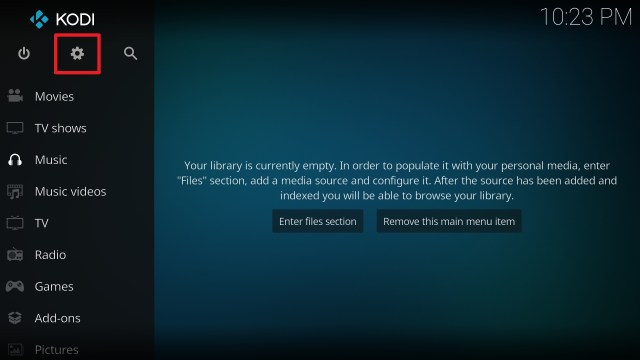
Destiny of Deathstar install step 1

2. Select System in the bottom right corner.

Destiny of Deathstar install step 2


3. Select Add-ons on the left side of the screen.

Destiny of Deathstar install step 3


4. Select Unknown sources.

Destiny of Deathstar install step 4


5. Click Yes to allow unknown sources.

Destiny of Deathstar install step 5


6. Select File manager.

Destiny of Deathstar install step 6


7. Click Add source.

Destiny of Deathstar install step 7


8. Click on <None>.

Destiny of Deathstar install step 8


9. Type exactly: http://ezzer-mac.com/repo

Destiny of Deathstar install step 9


10. Click on OK.

Destiny of Deathstar install step 10


11. Select enter a name for this media source.

Destiny of Deathstar install step 11


12. Name is Destiny of Deathstar (this part isn’t critical as long as you remember the name).

Destiny of Deathstar install step 12


13. Click on OK.

Destiny of Deathstar install step 13


14. Click on OK.

Destiny of Deathstar install step 14


15. Take one step back and click on Add-ons.

Destiny of Deathstar install step 15


16. Select install from zip file.

Destiny of Deathstar install step 16


17. Click on Destiny of Deathstar (or whatever you named the source).

Destiny of Deathstar install step 17


18. Click on repository.EzzerMacsWizard.zip.

Destiny of Deathstar install step 18


19. Select on Install from repository.

Destiny of Deathstar install step 19


20. Click on EzzerMacs Wizard Repo.

Destiny of Deathstar install step 20


21. Pick Video add-ons.

Destiny of Deathstar install step 21


22. Select Deathstar again.

Destiny of Deathstar install step 22


23. Click on Install.

Destiny of Deathstar install step 23


24. Select OK after reviewing the add-ons that will be installed.

Destiny of Deathstar install step 24


25. You should see a popup in the upper right corner saying Deathstar has installed. There will actually be multiple popups for the various components.

Destiny of Deathstar install step 25


26. Click on Open to start the Deathstar add-on.

Destiny of Deathstar install step 26


Install Surfshark on Firestick

Best Surfshark Deal


FAQ

Is it Safe to Use?

This is an exciting new add on, an amalgamation of two very popular add ons, it’s completely safe to use when downloaded from the official repository.


Is it Legal or Grey?

The add on like most operates in a grey area as they do not store the content themselves but allow users to access links from across the web. However, in the eyes of the law, this isn’t legal.

To safeguard your identity and also allow you to access the service we recommend you use a VPN whenever you use Kodi.


Should I Use This App With a VPN?

https://get.surfshark.net/aff_c?offer_id=865&aff_id=12312

Absolutely. A VPN works by encrypting the connection from your computer to your VPN’s DNS Server. Your Internet Service Provider is then unable to see anything which is being sent or transmitted.

Many websites are blocked by your ISP, but they are unable to block access if they don’t know what sites you are looking at.

Many VPN’s encryptions are unbreakable and you can use different servers to mask your IP and your identity. Allowing you to maintain your privacy online.


How to Install Surfshark VPN on Firestick

If your Firestick still has the older interface, read this article to learn how to update it: Update Firestick Interface.

You can download Surfshark directly from the Amazon App store. It will be easy for you to find Surfshark with your Firestick’s Find feature. Refer to our screenshots below.

1. Go to the Home screen of your Firestick.

step 1 Install Surfshark VPN on Firestick


2. Navigate towards the Find tab. Press the Search button from the resulting dropdown.

step 2 Install Surfshark VPN on Firestick


3. Type in the keyword of SurfShark and select from the suggestions that will appear.

step 3 Install Surfshark VPN on Firestick


4. Click the official SurfShark icon from your search results.

step 4 Install Surfshark VPN on Firestick


5. Press the Download (You own it) button.

step 5 Install Surfshark VPN on Firestick


6. The SurfShark VPN installer will download on your device.

step 6 Install Surfshark VPN on Firestick


7. SurfShark VPN’s app will automatically install itself on your Fire TV stick.

step 7 Install Surfshark VPN on Firestick


8. Press the Open button after completing SurfShark VPN’s installation process.

step 8 Install Surfshark VPN on Firestick


9. Please wait for the SurfShark VPN to load its user interface.

step 9 Install Surfshark VPN on Firestick


10. You can now log in with your SurfShark VPN account credentials.

step 10 Install Surfshark VPN on Firestick

Learn more about Surfshark and Grab the Best Surfshark Deal Now!


Install Surfshark on Firestick

Best Surfshark Deal


Other VPNs to Consider

NordVPN (Best for Streaming)

Best Features

  • 5000+ Server in 50+ Countries 
  • Military-Grade Encryption
  • Fast Connection Speed
  • Suitable to a lot of devices
  • No-Log Policy

Prices
  • Complete $5.89 per month (64% Discount)
  • Plus $4.59 per month (56% Discount)
  • Standard $3.69 per month (55% Discount)

Best Features

  • 750+ High-speed VPN Servers in 43 Locations
  • Military-Grade Encryption
  • Fastest HD Streaming and Gaming
  • 30-Day Money-Back Guarantee
  • Unlimited Data & Devices
  • No-Log Policy

Prices
  • 3 Years $1.99 per month (82% Discount)
  • 1 Years $3.29 per month (70% Discount)
  • 1 Month $10.99 per month

IPVanish VPN (Most Secure)

Best Features

  • 1200+ Servers in 60+ Countries around the world
  • Unlimited Connections
  • No-Log Policy
  • Top Notch Military-Grade VPN Protocols and Encryptions
  • 100% Safe and Secured
  • Most Trusted VPN
  • Best VPN for Firestick
  • 30-Day Money-Back Guarantee

Prices
  • Yearly $3.99 per month (63% Discount) – 30 days risk free + Ransomware & Malware Protection
  • Quarterly $5.32 per month (51% Discount)
  • Monthly $10.99 per month


For more VPN discounts, go to ReviewVPN Deals and purchase the best VPN for you.

Click here to get the lowest price on Surfshark through our exclusive limited-time offer.


Is it Free?

Yes


History

When Was It Released?

Destiny of Deathstar is pretty new and is getting updated regularly, but only came out early this year


Best Alternatives

We always recommend that you have multiple add ons installed. Due to the nature of the content that they distribute they are liable to go down at any time. So, having 10 or more installed just means that you can always access content when you want to.

Here are a few of our favorite things:

  • Exodus Redux
  • The Magic Dragon
  • Zion TV
  • Cyberflix
  • Gaia
  • Medusa
  • Yoda
  • Maverick TV
  • Mobdro

Or use Google to check for the best Kodi Add ons which many reviewers and websites update weekly. Read our article on Top Kodi Addon.


Our Opinion

Destiny of Deathstar is a really exciting addon that adds features we haven’t seen in other add ons before, as well as bringing together the best features from two well-respected providers.

Momentum is with the addon at the moment, and it also is one of the first add ons which can be used well without Trakt, Real Debrid, or Premiumuze and still give the same functionality.


Install Exousia on Firestick & Learn the Best Alternatives in 2023

Exousia (Not Recommended At This Time!)

Unfortunately, Exousia currently shows no content after opening. It has a track record of working great and then going dead. This is a similar situation to Ola TV and Mr. Zip. As of adding this note on February 19th, 2020, Ola TV is working great. It has the most channels. If you are looking for stable apps that usually work, please check out our articles on Mobdro, Live NetTV, and Red Box.

In this article, we will help you install Blue Hats Aeon Terror Kodi Build on Firestick.


Is it Any Good?

Exousia is a good alternative if for any reason you are having problems with Red Box or Mobdro. They provide a wide library of movies and tv shows as well as a number of live tv channels and sports.

The app is a personal hobby project from a developer and reviews in recent months show that it has been a bit hit and miss.

Android tv applications can come and go almost overnight so it always pays to have a few backup apps in case your first choices stop working.

It’s ok but there are better and more stable apps out there


ANONYMOUSLY

What Does it Do?

Exousia uses scrapers to aggregate links from across the internet and put them into the application. Each live stream, film, and tv show has a variety of links that can be cycled through until you find one that works.

What Platforms Does it Work On?

Exousia works on all Android devices

Features

  • Movies
  • TV Shows
  • IPTV
  • Sports
  • Wide selection of content

How to Install Exousia

install image

You used to be able to download the application directly from their website: https://exousia.app/. Lately, this website has caused security warnings in browsers, so it is best to stick to links from Arhcive.org. Also note, many of the sites that look like they are from the developers are not. They are from clever marketers that realize they can rank well for terms with decent traffic by picking a domain that looks like the official site.

Note: ReviewVPN.com does not host this APK file. It is hosted on Archive.org. 


Download Exousia


If you are using Downloader on your Firestick, you can also type reviewvpn.com/exo. This will automatically start the download from Archive.org.


YOUR INTERNET ACTIVITY IS BEING WATCHED

ReviewVPN cannot attest to the legality, security and privacy of the applications discussed on this site. It is highly recommended that you use a VPN service while streaming or using Kodi.

Currently, your IP 216.73.216.208 is visible to everyone and your Browser is being tracked by Advertisers & ISP Provider.

Save 65% Now

Limited Time Offer

Here are the main reasons why you must use a VPN:

  • Your activities are hidden from your ISP, the government, and from the apps you are using.
  • You can access additional movies and TV streams.
  • ISP attempts to throttle are thrwarted thus reducing buffering issues.
  • Geographically restricted content like Netflix and Hulu can be unblocked.

A VPN works be replacing your ISP-assigned IP address and creating an encrypted tunnel. We recommend the no log service offered by IPVanish. It works well on a Firestick and offers the fastest possible speeds.

Special Limited Time Offer - Get IPVanish


Legal Disclaimer: ReviewVPN.com does not encourage or endorse any illegal activity involved in the usage of services and applications referenced on this site. We do not verify the licensing agreements of services. The end-user is wholly responsible for ensuring that any media accessed through these services does not violate copyright and/or licensing laws. ReviewVPN does not promote, link to, or receive compensation from any Apps and IPTV services.


Install Surfshark on Firestick

Best Surfshark Deal


Pros and Cons

Pros

  • Access to a wide range of Live Tv channels
  • Big content library
  • High-quality content is available
  • 100’s of Live TV Channels to watch
  • Scrapers work well to deliver the latest content


Cons

  • The layout seems pretty basic
  • Reported that a number of the Live TV links don’t work
  • No access to US Live TV Channels
  • No Real Debrid, Trak.TV or Preimmunize integration is available
  • No Favoriting
  • No Auto Play or Auto Next Function
  • Limited functionality compared to better applications out there


FAQ

Is it Safe to Use?

It is safe if downloaded directly from the official website. There was a scandal a few years ago when a YouTube Reviewer alleged that the creator had inserted Malware into the app until it was revealed this was down to people downloading the app from official sources.

We always recommend care when downloading apk from unofficial sources and if unsure use Malwarebytes to scan the file before opening it.


Is it Legal or Grey?

Let’s face it, Exousia is just as grey as the rest of the streaming applications out there. You can get access to a wide range of premium channels as well as a host of other pay-per-view services across a wide range of countries. This puts it squarely in the grey area, even if they only act as a search engine for content rather than hosting it on its servers.


Should I Use This App With a VPN?

We recommend that you use a VPN whenever you are online, you can keep your data secure and your online identity safe with a VPN.

A Virtual Private Network allows you to encrypt your data being served through your Internet Service Provider’s network, the encryption goes up to 256-bit AES which makes it unbreakable. What this means for you as a user is that no one can see what you are doing online or what websites you are visiting.

You can also obscure your home IP address by using your VPN servers instead. 

Note: For more information about SurfShark, please read our SURFSHARK REVIEW.


Grab your subscription now!


How to Install Surfshark VPN on Firestick

If your Firestick still has the older interface, read this article to learn how to update it: Update Firestick Interface.

You can download Surfshark directly from the Amazon App store. It will be easy for you to find Surfshark with your Firestick’s Find feature. Refer to our screenshots below.

1. Go to the Home screen of your Firestick.

step 1 Install Surfshark VPN on Firestick


2. Navigate towards the Find tab. Press the Search button from the resulting dropdown.

step 2 Install Surfshark VPN on Firestick


3. Type in the keyword of SurfShark and select from the suggestions that will appear.

step 3 Install Surfshark VPN on Firestick


4. Click the official SurfShark icon from your search results.

step 4 Install Surfshark VPN on Firestick


5. Press the Download (You own it) button.

step 5 Install Surfshark VPN on Firestick


6. The SurfShark VPN installer will download on your device.

step 6 Install Surfshark VPN on Firestick


7. SurfShark VPN’s app will automatically install itself on your Fire TV stick.

step 7 Install Surfshark VPN on Firestick


8. Press the Open button after completing SurfShark VPN’s installation process.

step 8 Install Surfshark VPN on Firestick


9. Please wait for the SurfShark VPN to load its user interface.

step 9 Install Surfshark VPN on Firestick


10. You can now log in with your SurfShark VPN account credentials.

step 10 Install Surfshark VPN on Firestick

Learn more about Surfshark and Grab the Best Surfshark Deal Now!


Install Surfshark on Firestick

Best Surfshark Deal


Other VPNs to Consider

NordVPN (Best for Streaming)

Best Features

  • 5000+ Server in 50+ Countries 
  • Military-Grade Encryption
  • Fast Connection Speed
  • Suitable to a lot of devices
  • No-Log Policy

Prices
  • Complete $5.89 per month (64% Discount)
  • Plus $4.59 per month (56% Discount)
  • Standard $3.69 per month (55% Discount)

Best Features

  • 750+ High-speed VPN Servers in 43 Locations
  • Military-Grade Encryption
  • Fastest HD Streaming and Gaming
  • 30-Day Money-Back Guarantee
  • Unlimited Data & Devices
  • No-Log Policy

Prices
  • 3 Years $1.99 per month (82% Discount)
  • 1 Years $3.29 per month (70% Discount)
  • 1 Month $10.99 per month

IPVanish VPN (Most Secure)

Best Features

  • 1200+ Servers in 60+ Countries around the world
  • Unlimited Connections
  • No-Log Policy
  • Top Notch Military-Grade VPN Protocols and Encryptions
  • 100% Safe and Secured
  • Most Trusted VPN
  • Best VPN for Firestick
  • 30-Day Money-Back Guarantee

Prices
  • Yearly $3.99 per month (63% Discount) – 30 days risk free + Ransomware & Malware Protection
  • Quarterly $5.32 per month (51% Discount)
  • Monthly $10.99 per month


For more VPN discounts, go to ReviewVPN Deals and purchase the best VPN for you.

Click here to get the lowest price on Surfshark through our exclusive limited-time offer.


Is it Free?

Yes, Exousia is 100% free


Are There Ads? (If it has ads is there a modded version)

Yes, ads are served within the application, but they are not that annoying


Is There a Premium Version?

No


Is There an Official Website?

They had a pretty basic website at https://exousia.app/. It currently sets off warnings in the browser, which is why we have unlinked it for now. 


What Other Devices Does it Work On?

Exousia only works on apps that use Android. If you don’t have an Android device, you can either install a dual boot operating system or use an emulator for iOS or Windows.


How Does the App Work?

You can download the application directly from the website and install it on your device


What is The Minimum Version of Android I Need?

Android 4.0


History

How Long Has it Been Around?

Exousia is pretty new and has been around since the start of 2019


What is the Development Team Like?

There isn’t much information about them, but the app comes from the Inside4android team which also designed Live Lounge as well as a number of other applications available on the Google Play Store


Best Alternatives

There are two much better alternatives in the form of Red Box and Mobdro, a full feature list can be found below. You can see just how much further both of these are compared to Exousia.


Red Box Features

  • Lovely layout which is easy to navigate
  • Reduced buffering time for live TV
  • Lightweight application
  • In separate categories for countries, you can choose from 17 different countries including the US, UK, Australia, Germany, France, Nepal, Sri Lanka, Iran, Portugal, Philippines, Turkey, Indonesia, Bangladesh, Saudi Arabia, Pakistan, and Malaysia
  • Separate categories by types of television including a Kids section
  • Favorites tab to save your favorite channels and shows
  • Ability to flag dead links and request new channels
  • Compatible with a wide range of media players
  • Password protection function
  • You also have a section for Movies and TV Shows


Mobdro Features

  • Thousands of channels and live streams
  • Option to turn off adverts
  • Stream offline with their premium version ($2.99 per year)
  • Chromecast support
  • Sleep timer (Premium)
  • Sleek and easy-to-use UI
  • Download movies and TV shows to watch later
  • Kodi compatible
  • Live Event TV calendar
  • HD streams available
  • High-quality streaming 


Our Opinion

Exousia is basic at best and potentially dangerous at worst. It has by far one of the most basic layouts that we have seen of any Android TV application, it does however have a big library of content and seems to work most of the time.

There is a much better alternative out there in the form of Red Box and Mobdro, we would download Exousia as an alternative particularly when it comes to finding live streams.

The reports of Malware being inserted into the application are enough to put us off once and for all. Stick with safer alternatives.

Install FreeFlix HQ on Firestick & Find the Best Alternatives in 2023

FreeFlix HQ

In this article, we will be divulging important details on how to install FreeFlix HQ on Firestick and other devices that run on the android platform.


Is it Any Good?

We are sure FreeFlix HQ was good once upon a time and it’s been going for about 2 years, but a cursory glance over the FreeFlix subreddit page: https://www.reddit.com/r/freeflix will tell you all you need to know. Namely that there hasn’t been a comment for 9 months, the servers are slow or not working and it looks like the application development team has either abandoned the project or are just not updating it anymore.

There are multiple comments of the cast function not working, and content being littered with dead links which tell us their scrapers need updating and links are not being vetted.

A common problem for many of the lower quality android tv applications is though it appears that they have tons of content you can spend hours repeatedly clicking on dead links or on media art which doesn’t even have any links at all.

You’re better off using Zion TV, Cyberflix, Cinema HD, Bee TV, or Tea TV.


ANONYMOUSLY

What Does it Do?

Freeflix HQ works in a similar way to a lot of other Android TV apps, using their proprietary scrapers they search online looking for new content added from 3rd parties. 

The links are then added with media art to give what should be a daily updated library of working links to new content.


What Platforms Does it Work On?

FreeFlix HQ has an Android and an iOS application, as well as a Windows desktop application

Features

  • Works across a platform with multiple applications
  • Access to HD streams
  • Supports Chromecast
  • You can download content to watch offline
  • Supposedly has a large library of anime content, though most of it doesn’t work
  • Terrarium style TV calendar and notifications for when your favorite shows have had a new episode added
  • Support Real Debrian and Trakt.Tv
  • Clean and easy to use interface
  • Optimized for TV casting
  • You can customize the look with skins
  • Watch trailers of media
  • Access to Live TV channels and some pay per view including music and wrestling


How to Install FreeFlix HQ

install image

You can download the application directly from their website: https://freeflixhq.com/

Note: ReviewVPN.com does not host this APK file. It is hosted on Archive.org.  


Download FreeFlix HQ


YOUR INTERNET ACTIVITY IS BEING WATCHED

ReviewVPN cannot attest to the legality, security and privacy of the applications discussed on this site. It is highly recommended that you use a VPN service while streaming or using Kodi.

Currently, your IP 216.73.216.208 is visible to everyone and your Browser is being tracked by Advertisers & ISP Provider.

Save 65% Now

Limited Time Offer

Here are the main reasons why you must use a VPN:

  • Your activities are hidden from your ISP, the government, and from the apps you are using.
  • You can access additional movies and TV streams.
  • ISP attempts to throttle are thrwarted thus reducing buffering issues.
  • Geographically restricted content like Netflix and Hulu can be unblocked.

A VPN works be replacing your ISP-assigned IP address and creating an encrypted tunnel. We recommend the no log service offered by IPVanish. It works well on a Firestick and offers the fastest possible speeds.

Special Limited Time Offer - Get IPVanish


Legal Disclaimer: ReviewVPN.com does not encourage or endorse any illegal activity involved in the usage of services and applications referenced on this site. We do not verify the licensing agreements of services. The end-user is wholly responsible for ensuring that any media accessed through these services does not violate copyright and/or licensing laws. ReviewVPN does not promote, link to, or receive compensation from any Apps and IPTV services.


Install Surfshark on Firestick

Best Surfshark Deal


Pros and Cons

Pros

  • Clean and easy-to-use user interface
  • If they worked FreeFlix has an enormous library of content and TV channels
  • Real Debrian and Trak.tv compatible, allowing you to download at high speeds and resume watching shows where you left off
  • Chromecast support
  • TV calendar
  • Customizable skins are a nice touch and quite Kodi’esque
  • Optimized for TV

Cons

  • According to their Facebook page comments: https://www.facebook.com/free.flix.hq/, Freeflix HQ hasn’t been working for some time. Problems reported included a lack of updates, the application not starting and none of the IPTV channels are working
  • Slow and lacks stability
  • Lacks updates
  • A lot of the functions no longer seems to work
  • Users reporting paying premium subscriptions and still not having issues resolved
  • WWE on Demand and Anime sections mostly don’t work


FAQ

Is it Safe to Use?

Yes, download it from the Amazon store or their official website


Is it Legal or Grey?

FreeFlix HQ offers in a grey area they have a DMCA request email on their website for taking down copyrighted content, but just like all other Android TV applications, they know they are going to be displaying mainly illegal content from across the web.


Should I Use This App With a VPN?

Always use a VPN with FreeFlix HQ or any other android tv application. Without it, the chances are you won’t be able to use the service at all and the IP will be blocked. Meaning you can’t even access the website to download the apk.

Also, by not using a VPN your Internet Service Provider can see everything that you are doing. They will log your browsing records and may throttle your internet usage meaning that even when not streaming your internet could be slow, as well as running the risk of a cease and desist letter, fines, or even imprisonment.

Note: For more information about Surfshark, please read our Surfshark Review.


Grab your subscription now!


How to Install Surfshark VPN on Firestick

If your Firestick still has the older interface, read this article to learn how to update it: Update Firestick Interface.

Follow our screenshots below to install the SurfShark VPN app on your Fire TV stick.

1. Go to the Home screen of your Firestick.

step 1 Install Surfshark VPN on Firestick


2. Navigate towards the Find tab. Press the Search button from the resulting dropdown.

step 2 Install Surfshark VPN on Firestick


3. Type in the keyword of SurfShark and select from the suggestions that will appear.

step 3 Install Surfshark VPN on Firestick


4. Click the official SurfShark icon from your search results.

step 4 Install Surfshark VPN on Firestick


5. Press the Download (You own it) button.

step 5 Install Surfshark VPN on Firestick


6. The SurfShark VPN installer will download on your device.

step 6 Install Surfshark VPN on Firestick


7. SurfShark VPN’s app will automatically install itself on your Fire TV stick.

step 7 Install Surfshark VPN on Firestick


8. Press the Open button after completing SurfShark VPN’s installation process.

step 8 Install Surfshark VPN on Firestick


9. Please wait for the SurfShark VPN to load its user interface.

step 9 Install Surfshark VPN on Firestick


10. You can now log in with your SurfShark VPN account credentials.

step 10 Install Surfshark VPN on Firestick

Learn more about Surfshark and Grab the Best Surfshark Deal Now!


Install Surfshark on Firestick

Best Surfshark Deal


Other VPNs to Consider

NordVPN (Best for Streaming)

Best Features

  • 5000+ Server in 50+ Countries 
  • Military-Grade Encryption
  • Fast Connection Speed
  • Suitable to a lot of devices
  • No-Log Policy

Prices
  • Complete $5.89 per month (64% Discount)
  • Plus $4.59 per month (56% Discount)
  • Standard $3.69 per month (55% Discount)

Best Features

  • 750+ High-speed VPN Servers in 43 Locations
  • Military-Grade Encryption
  • Fastest HD Streaming and Gaming
  • 30-Day Money-Back Guarantee
  • Unlimited Data & Devices
  • No-Log Policy

Prices
  • 3 Years $1.99 per month (82% Discount)
  • 1 Years $3.29 per month (70% Discount)
  • 1 Month $10.99 per month

IPVanish VPN (Most Secure)

Best Features

  • 1200+ Servers in 60+ Countries around the world
  • Unlimited Connections
  • No-Log Policy
  • Top Notch Military-Grade VPN Protocols and Encryptions
  • 100% Safe and Secured
  • Most Trusted VPN
  • Best VPN for Firestick
  • 30-Day Money-Back Guarantee

Prices
  • Yearly $3.99 per month (63% Discount) – 30 days risk free + Ransomware & Malware Protection
  • Quarterly $5.32 per month (51% Discount)
  • Monthly $10.99 per month


For more VPN discounts, go to ReviewVPN Deals and purchase the best VPN for you.

Click here to get the lowest price on Surfshark through our exclusive limited-time offer.


Is it Free?

Yes, but we see many users talking about subscriptions but there is no clear explanation on the website. Honestly, another reason to avoid them.


Are There Ads? (If it has ads is there a modded version)

Not sure


Is there a Premium Version?

Yes, it seems there is a paid version, which has received multiple complaints for not working.


Is There an Official Website?

Yes, FreeFlix HQ has a really flashy website, which if all the functions worked would be one hell of an application and was in 2018 but seems to have gone well downhill in 2019.

You can find the official apk here: https://freeflixhq.com/


What Other Devices Does it Work On?

FreeFlix HQ works on all devices apart from Linux


How Does the App Work?

Just download, install and go!


What is the Minimum Version of Android I Need?

Android 4.0


History

How Long Has it Been Around?

We estimate FreeFlix HQ has been around since early 2017


Is it a Terrarium Clone?

Yes


What is the Development Team Like?

From what we can see the development team does still post updates on the Facebook page, and fixes that have happened but these are usually greeted with angry responses.

We suspect the team or individual is now working on another project.


Best Alternatives

There are heaps of better alternatives out there. If you are going to pay a premium subscription then get Zion TV which has lots of added features and a ton of working premium TV channels for you to choose from.

If you are looking for a better ad-free or 100% free with ads version then choose Cyberflix or UnlockMyTV (a Cinema HD clone).


Our Opinion

One to avoid.

It’s clear to us that FreeFlix HQ was once an awesome application and really had something going for it, but for whatever reason, the developer is no longer paying attention to the app and it’s now falling into a black hole filled with android tv applications that worked for a while and now are full of dead links.

How To Install Jor-El Kodi Addon on Firestick & Fire TV

Jor-El Kodi Addon Overview

In this article, we will help you install Jor-El Kodi Addon on Firestick.


Jor-El image

Jor-El takes its name from Superman’s real father. Part of the Kodi Help repo it offers a wide range of movies and TV shows and is another fork of the Covenant and Exodus addon.


What is Kodi?

Kodi Logo

Kodi is 100% free and legal open-source software. The media player has been downloaded millions of times since it’s first release in 2002. The simple piece of homebrew software that was put together by Xbox enthusiasts who wanted to store media on their original Xbox has grown into a global phenomenon.

Kodi is now on its 18th major version and has continued to evolve and develop offering a wide range of features. Its popularity stems from the wide number of media files that can be played on the same player. Kodi accepts almost all media formats, unlike branded media players which are custom built to accept file extensions relating to their type of file.

In addition, it has a finely tuned ten-foot user interface that allows android applications from devices to be scaled onto a TV and controlled easily by a remote. Of course, what makes Kodi most popular for some are the thousands of unofficial add ons like Jor-El which allow you to watch the latest tv shows and movies.


ANONYMOUSLY


What is an Add On?

kodi add on image

An add on, simply adds to the functionality of Kodi. By giving additional services, altering the look of Kodi or a combination of the two.


What is Jor-El

Jor-El is pretty much a rebranded fork of Covenant with some minor changes mainly in appearance and scrapers. So, you are getting all the functionality of Covenant with a few added extras. Though information on updates and related information on this add on is sparse


Features

  • Access to 50+ media sources which are scraped and reviewed each day
  • Supports Trakt.tv meaning you can return to the exact point where you left off watching your content 
  • Integration with Real Debrid, Premiumize, and URL Resolver means that you can access premium services that help you to find the best high-quality links and save yourself the time clicking on dead, spammy, and low-quality links
  • Clean and easy-to-use UI
  • Wide range of non-English media
  • Sort by category and rating as well as easy-to-navigate menus


YOUR INTERNET ACTIVITY IS BEING WATCHED

ReviewVPN cannot attest to the legality, security and privacy of the applications discussed on this site. It is highly recommended that you use a VPN service while streaming or using Kodi.

Currently, your IP 216.73.216.208 is visible to everyone and your Browser is being tracked by Advertisers & ISP Provider.

Save 65% Now

Limited Time Offer

Here are the main reasons why you must use a VPN:

  • Your activities are hidden from your ISP, the government, and from the apps you are using.
  • You can access additional movies and TV streams.
  • ISP attempts to throttle are thrwarted thus reducing buffering issues.
  • Geographically restricted content like Netflix and Hulu can be unblocked.

A VPN works be replacing your ISP-assigned IP address and creating an encrypted tunnel. We recommend the no log service offered by IPVanish. It works well on a Firestick and offers the fastest possible speeds.

Special Limited Time Offer - Get IPVanish


Legal Disclaimer: ReviewVPN.com does not encourage or endorse any illegal activity involved in the usage of services and applications referenced on this site. We do not verify the licensing agreements of services. The end-user is wholly responsible for ensuring that any media accessed through these services does not violate copyright and/or licensing laws. ReviewVPN does not promote, link to, or receive compensation from any Apps and IPTV services.


Install Surfshark on Firestick

Best Surfshark Deal


How to Install Jor-El

install image

Get up and running with Jor-El in a matter of minutes following our simple step by step instructions:

  1. Start on the Kodi Home Screen
  2. Click Settings then System
  3. Turn on Unknown sources, so that Kodi will recognize you add on
  4. Go back to the previous screen and click File Manager
  5. Click add source
  6. Click “Add None”
  7. A URL bar will pop up saying “Enter the paths or browse for the media locations” type this URL into the bar: http://kodihelp.net/repo (If this URL does not work search for a mirror URL of the Kodi Help Repo)
  8. Name the source JorEL
  9. Click OK, JorEL will now be added to your Kodi file manager
  10. Click Add ons and then install from .zip file
  11. Select your Jor-El file, it will not unzip
  12. Now click install file from repository
  13. Click Jor-El Repo
  14. Click Video Add ons and then install, also click install for additional add ons
  15. Jor-EL has now been installed and can be accessed from your home screen


How to Install Jor-El on Kodi with Screenshots

  1. From the home screen, select the cogwheel at the upper left.

Step 1 Installing Jor-El on Kodi


2. Select System in the bottom right corner.

Step 2 Installing Jor-El on Kodi


3. Select Add-ons on the left side of the screen.

Step 3 Installing Jor-El on Kodi


4. Select Unknown sources.

Step 4 Installing Jor-El on Kodi


5. Click Yes to allow unknown sources.

Step 5 Installing Jor-El on Kodi


6. Select File manager.

Step 6 Installing Jor-El on Kodi


7. Click Add source.

Step 7 Installing Jor-El on Kodi


8. Click on <None>.

Step 8 Installing Jor-El on Kodi


9. Type exactly: http://kodihelp.net/repo

Step 9 Installing Jor-El on Kodi


10. Click on OK.

Step 10 Installing Jor-El on Kodi


11. Select enter a name for this media source.

Step 11 Installing Jor-El on Kodi


12. Name is Jor-El (this part isn’t critical as long as you remember the name).

Step 12 Installing Jor-El on Kodi


13. Click on OK.

Step 13 Installing Jor-El on Kodi


14. Click on OK.

Step 14 Installing Jor-El on Kodi


15. Take one step back and click on Add-ons.

Step 15 Installing Jor-El on Kodi


16. Select install from zip file.

Step 16 Installing Jor-El on Kodi


17. Click on Jor-El (or whatever you named the source).

Step 17 Installing Jor-El on Kodi


18. Click on repository.kodiyhelp.zip

Step 18 Installing Jor-El on Kodi


19. Select on Install from repository.

Step 19 Installing Jor-El on Kodi


20. Click on KoDIY Help Repo.

Step 20 Installing Jor-El on Kodi


21. Pick Video add-ons.

Step 21 Installing Jor-El on Kodi


22. Select Jor-El again.

Step 22 Installing Jor-El on Kodi


23. Click on Install.

Step 23 Installing Jor-El on Kodi


24. Select OK after reviewing the add-ons that will be installed.

Step 24 Installing Jor-El on Kodi


25. You should see a popup in the upper right corner saying Jor-El has installed. There will actually be multiple popups for the various components.

Step 25 Installing Jor-El on Kodi


26. Click on Open to start the Jor-El add-on.

Step 26 Installing Jor-El on Kodi


FAQ

Is it Safe to Use?

Jor-EL is safe to use, as the Kodi Help Repo is well known. Just make sure that you download and install the add on from their official URL, and not a copycat site that may be serving corrupted files.


Is it Legal or Grey?

Jor-El like many addons operates in a grey area. The content that you watch through the add on is mainly illegal. The content is being distributed without the copywriter’s permission. Needless to say, if you want to avoid your usage being tracked to your IP you are better off using a VPN.


Should I Use This App With a VPN?

https://get.surfshark.net/aff_c?offer_id=865&aff_id=12312

We always recommend you use a VPN if you are doing anything where you want to maintain your anonymity and privacy.

Your Internet Service Provider logs everything that you do on the internet, including using Kodi and any addons that come with it. They may also block access to IP addresses that are serving copyrighted content illegally.

In order to circumvent this, you can use a VPN, which works by encrypting your communication between your computer and their DNS server. This means your data cannot be snooped or decoded by your ISP.

You can prevent your data from being tracked by third parties, or snooped by your ISP using Surfshark.

Using a VPN will mean you should be able to freely access all of Kodi’s services.


Note: For more information about Surfshark, please read our Surfshark Review.


Grab your subscription now!


How to Install Surfshark VPN on Firestick

If your Firestick still has the older interface, read this article to learn how to update it: Update Firestick Interface.

1. Go to the Home screen of your Firestick.

step 1 Install Surfshark VPN on Firestick


2. Navigate towards the Find tab. Press the Search button from the resulting dropdown.

step 2 Install Surfshark VPN on Firestick


3. Type in the keyword of SurfShark and select from the suggestions that will appear.

step 3 Install Surfshark VPN on Firestick


4. Click the official SurfShark icon from your search results.

step 4 Install Surfshark VPN on Firestick


5. Press the Download (You own it) button.

step 5 Install Surfshark VPN on Firestick


6. The SurfShark VPN installer will download on your device.

step 6 Install Surfshark VPN on Firestick


7. SurfShark VPN’s app will automatically install itself on your Fire TV stick.

step 7 Install Surfshark VPN on Firestick


8. Press the Open button after completing SurfShark VPN’s installation process.

step 8 Install Surfshark VPN on Firestick


9. Please wait for the SurfShark VPN to load its user interface.

step 9 Install Surfshark VPN on Firestick


10. You can now log in with your SurfShark VPN account credentials.

step 10 Install Surfshark VPN on Firestick

Learn more about Surfshark and Grab the Best Surfshark Deal Now!


Install Surfshark on Firestick

Best Surfshark Deal


Other VPNs to Consider

NordVPN (Best for Streaming)

Best Features

  • 5000+ Server in 50+ Countries 
  • Military-Grade Encryption
  • Fast Connection Speed
  • Suitable to a lot of devices
  • No-Log Policy

Prices
  • Complete $5.89 per month (64% Discount)
  • Plus $4.59 per month (56% Discount)
  • Standard $3.69 per month (55% Discount)

Best Features

  • 750+ High-speed VPN Servers in 43 Locations
  • Military-Grade Encryption
  • Fastest HD Streaming and Gaming
  • 30-Day Money-Back Guarantee
  • Unlimited Data & Devices
  • No-Log Policy

Prices
  • 3 Years $1.99 per month (82% Discount)
  • 1 Years $3.29 per month (70% Discount)
  • 1 Month $10.99 per month

IPVanish VPN (Most Secure)

Best Features

  • 1200+ Servers in 60+ Countries around the world
  • Unlimited Connections
  • No-Log Policy
  • Top Notch Military-Grade VPN Protocols and Encryptions
  • 100% Safe and Secured
  • Most Trusted VPN
  • Best VPN for Firestick
  • 30-Day Money-Back Guarantee

Prices
  • Yearly $3.99 per month (63% Discount) – 30 days risk free + Ransomware & Malware Protection
  • Quarterly $5.32 per month (51% Discount)
  • Monthly $10.99 per month


For more VPN discounts, go to ReviewVPN Deals and purchase the best VPN for you.

Click here to get the lowest price on Surfshark through our exclusive limited-time offer.


Is it Free?

Yes


History

When Was It Released?

Jor-El was released in 2018It and is maintained as part of the Kodi Help repository.


Best Alternatives

There are a number of great addons that offer better functionality. We recommend:

  • Exodus Redux
  • Seren
  • Gaia
  • Yoda

Also, make sure you have a few addons in your library, builds can also be a good idea which allows you to install some of the best addons available with 1 installation. Use Google to find this month’s best working addons. 


Our Opinion

Jor-El has a real lack of information as well as reviews, which tells us it isn’t being widely used and will probably decline over the coming months.

The skin looks nice enough, but we would only recommend using Jor-El as a backup rather than your go-to add on.

Install Leonflix on Windows, Mac, Linux & Raspberry Pi

Leonflix Overview


Is it Any Good?

Leonflix made waves when it first came out. It is one of the few cross-platform apps to watch movies on Windows, Mac, Raspberry Pi, and Linux.

Recently it was starting to lose favor until the developer returned to the project a few months ago after a 1-year break.

Leonflix is probably the best and only live streaming application for Mac and Linux. The recent update 3 months ago hopefully means that Leonflix is back, alive and kicking.


What Does it Do?

Leonflix describes itself as a modular search tool. The modules can be downloaded and added on, each module acts as a scraper to find certain types of files. Leonflix then hosts a player that allows you to play these links from the scraper.

Every show that you watch will automatically try to find the best link before auto-playing meaning that all the content on the platform should be watchable.


ANONYMOUSLY

What Platforms Does it Work On?

Leonflix has a workable application on Windows, Android, and Linux (yay!) We cannot stress how happy we are to see a working Linux application; it also shows us that this was designed by a developer who launched the application to scratch his own itch.


Features

  • Intelligent and well-designed user interface
  • Paste magnet links and stream directly from torrents
  • Access to a wide range of TV shows and films
  • A wide range of content from community-designed modules even Open Courseware and Edx Courses
  • Autocomplete search suggestions
  • Real Debrid supported
  • In-app Torrent download manager
  • Peer to Peer watch parties
  • Automatic updates
  • Button to find new sources if the stream you are watching isn’t suitable
  • Works with a range of cross-platform video players
  • In the application video player
  • Choose what type of source you would like to pick
  • Trakt.TV compatible
  • Set your own custom theme color
  • Personalized recommendations


YOUR INTERNET ACTIVITY IS BEING WATCHED

ReviewVPN cannot attest to the legality, security and privacy of the applications discussed on this site. It is highly recommended that you use a VPN service while streaming or using Kodi.

Currently, your IP 216.73.216.208 is visible to everyone and your Browser is being tracked by Advertisers & ISP Provider.

Save 65% Now

Limited Time Offer

Here are the main reasons why you must use a VPN:

  • Your activities are hidden from your ISP, the government, and from the apps you are using.
  • You can access additional movies and TV streams.
  • ISP attempts to throttle are thrwarted thus reducing buffering issues.
  • Geographically restricted content like Netflix and Hulu can be unblocked.

A VPN works be replacing your ISP-assigned IP address and creating an encrypted tunnel. We recommend the no log service offered by IPVanish. It works well on a Firestick and offers the fastest possible speeds.

Special Limited Time Offer - Get IPVanish


Pros and Cons

Pros

  • In Torrent download manager allows you to watch torrents directly from links and download them straight to your computer for later offline watching
  • In application, video players mean that you can watch on multiple platforms
  • Wide range of updated content
  • Module addons encourage community involvement and adding content from a wide variety of sources
  • An active developer back from a break
  • An active Reddit community with over 3K members
  • Real Debrian and Trakt.tv compatible
  • Customized recommendations and search engine
  • Support for all operating systems
  • Has bookmarks and a number of user’s customizable functions


Cons

  • Some concerns about a developer who has been working on other projects and returned after a year, the player had stopped working due to a broken OL extractor. There is no doubt that they are gifted but one hopes they will stay to continue to develop the project
  • Not compatible with Premiumize


FAQ

Is it Safe to Use?

Yes, safe to download from the official website. As with other popular Android TV applications always download from the developer’s site or a trusted source.

The internet is rife with fake downloads containing malware so if in doubt scan with Malwarebytes before opening.


Is it Legal or Grey?

Leonflix is just as grey as the rest of the streaming applications out there. You can get access to a wide range of premium channels as well as a host of other pay-per-view services across a wide range of countries. 

This puts it squarely in the grey area, even if they only act as a search engine for content rather than hosting it on its servers.

Leonflix makes a clear statement they will comply with DMCA and takedown restricted content, but it will just get added later with a new run of the scrapers.


Should I Use This App With a VPN?

Always use a VPN with Leonflix. By using a VPN, you ensure that you keep your data secure and remain anonymous online. Internet Service Providers will actively block websites, applications, and even Leonflix modules if they can see that you are trying to access copyrighted content. You can circumvent this by using a VPN that can change your IP and also encrypt any data being sent and received from your home network.

Also, by not using a VPN your Internet Service Provider can see everything that you are doing. They will log your browsing records and may throttle your internet usage meaning that even when not streaming your internet could be slow, as well as running the risk of a cease and desist letter, fines, or even imprisonment.


Grab your subscription now!

Click here to get the lowest price on Surfshark through our exclusive limited-time offer.


How to Install Surfshark VPN on Firestick

If your Firestick still has the older interface, read this article to learn how to update it: Update Firestick Interface.

You can download Surfshark directly from the Amazon App store. It will be easy for you to find Surfshark with your Firestick’s Find feature. Refer to our screenshots below.

1. Go to the Home screen of your Firestick.

step 1 Install Surfshark VPN on Firestick


2. Navigate towards the Find tab. Press the Search button from the resulting dropdown.

step 2 Install Surfshark VPN on Firestick


3. Type in the keyword of SurfShark and select from the suggestions that will appear.

step 3 Install Surfshark VPN on Firestick


4. Click the official SurfShark icon from your search results.

step 4 Install Surfshark VPN on Firestick


5. Press the Download (You own it) button.

step 5 Install Surfshark VPN on Firestick


6. The SurfShark VPN installer will download on your device.

step 6 Install Surfshark VPN on Firestick


7. SurfShark VPN’s app will automatically install itself on your Fire TV stick.

step 7 Install Surfshark VPN on Firestick


8. Press the Open button after completing SurfShark VPN’s installation process.

step 8 Install Surfshark VPN on Firestick


9. Please wait for the SurfShark VPN to load its user interface.

step 9 Install Surfshark VPN on Firestick


10. You can now log in with your SurfShark VPN account credentials.

step 10 Install Surfshark VPN on Firestick

Learn more about Surfshark and Grab the Best Surfshark Deal Now!


Install Surfshark on Firestick

Best Surfshark Deal


Other VPNs to Consider

NordVPN (Best for Streaming)

Best Features

  • 5000+ Server in 50+ Countries 
  • Military-Grade Encryption
  • Fast Connection Speed
  • Suitable to a lot of devices
  • No-Log Policy

Prices
  • Complete $5.89 per month (64% Discount)
  • Plus $4.59 per month (56% Discount)
  • Standard $3.69 per month (55% Discount)

Best Features

  • 750+ High-speed VPN Servers in 43 Locations
  • Military-Grade Encryption
  • Fastest HD Streaming and Gaming
  • 30-Day Money-Back Guarantee
  • Unlimited Data & Devices
  • No-Log Policy

Prices
  • 3 Years $1.99 per month (82% Discount)
  • 1 Years $3.29 per month (70% Discount)
  • 1 Month $10.99 per month

IPVanish VPN (Most Secure)

Best Features

  • 1200+ Servers in 60+ Countries around the world
  • Unlimited Connections
  • No-Log Policy
  • Top Notch Military-Grade VPN Protocols and Encryptions
  • 100% Safe and Secured
  • Most Trusted VPN
  • Best VPN for Firestick
  • 30-Day Money-Back Guarantee

Prices
  • Yearly $3.99 per month (63% Discount) – 30 days risk free + Ransomware & Malware Protection
  • Quarterly $5.32 per month (51% Discount)
  • Monthly $10.99 per month


For more VPN discounts, go to ReviewVPN Deals and purchase the best VPN for you.

Click here to get the lowest price on Surfshark through our exclusive limited-time offer.


Is it Free?

Yes, Leonflix is 100% free


Are There Ads? (If it has ads is there a modded version)

There are no ads


Is There a Premium Version?

The free version is the premium version


Is There an Official Website?

Leonflix Website

Yes, they have a great-looking website at https://leonflix.net/


What Other Devices Does it Work On?

Leonflix works mainly on Desktops, either on Linux, Mac, or Windows


How Does The App Work?

You can download the application directly from the website and install it on your device


What is the Minimum Version of Android I Need?

Android 4.0


History

How Long Has it Been Around?

Leonflix has been around a while, since the start of 2018


Is it a Terrarium Clone?

No


What is the Development Team Like?

The developer is pretty active recently on the Reddit sub-thread: https://www.reddit.com/r/leonflix/, as well as Reddit in general. They also seem really responsive to messages and put in new features and improvements which is encouraging.


Best Alternatives

There is some great alternative out there. For Live TV, pick Mobdro and Red Box. Or alternatively, for film and TV shows we would go with Cyberflix, Bee TV, or Tea TV. These are all for Android though.

Stremio is a solid Windows alternative. Just note that Stremio will rely upon torrents, so you should definitely use a VPN.


Our Opinion

Leonflix is a great-looking application and pretty unique on an internet full of samey-looking Terrarium clones.

The fact that it works on Windows, Mac, and Linux has garnered a lot of fans in the Reddit community, we just hope that the developer continues to work on the application, and maybe looks to monetize it in some way that it can provide an income and continue to fuel their passion.

If Leonflix continues to be supported it is definitely on our watch list.

Install MegaBox HD Lite on Firestick & Fire TV for Free Movies – 2023

MegaBox HD Lite Overview

In this article, we will be divulging important details on how to install MegaBox HD Lite on Firestick and other devices that run on the android platform.


Is it Any Good?

MegaBox HD Lite has been around since 2016 and has outlasted Terrarium which officially closed in 2018.

The app is still good, but it has fewer updates than most of the newer applications released from 2018 onwards. Still, like Media Box HD a lot of people still favor MegaBox because it only shows the content that has been released.

MegaBox HD Lite will work with the help of a media player. We tested a lot of great apps to know which is the best fit for MegaBox HD Lite. We suggest using and installing MV Castplayer on your Firestick if you are using the MegaBox HD Lite. It is the most compatible media player for this app.


What Does it Do?

MegaBox is pretty similar to a lot of other Android TV apps, they use scrapers and metadata searches to find the latest content online and then populate your library with the newest titles. Fortunately, it only displays content, which is currently working, saving you the time and frustration you see in many apps that either display content that isn’t there or gives you a whole host of broken links. This to us is a massive plus, as most other apps make you manually trawl through links.


ANONYMOUSLY

Is MegaBox HD Lite Safe and Virus-free?

We tested this app using VirusTotal and found no threats or any malicious files and malware.

Despite having good results, we still need to be vigilant in protecting our privacy while streaming.

A Virtual Private Network or VPN will definitely help us maintain our security and anonymity while using MegaBox HD Lite.

Here’s how you can Install The Best VPN For Firestick and All Devices.


How to Install Megabox HD Lite on a Firestick

install image

You can download the application directly from their website: https://megaboxhdappdownload.com/


Download Megabox HD Lite

Note: ReviewVPN.com does not host this APK file. It is hosted on Archive.org.  


How to Install Megabox HD Lite on a Firestick
  1. Starting at the home screen of the Firestick, scroll right to Settings
  2. Click on Settings and scroll down and to the right until you reach My Fire TV
  3. Click on My Fire TV and scroll down once, then click Developer Options
  4. Turn on ADB Debugging and Apps from Uknown Source
  5. Click the home button on your remote and scroll once to the left to search the Amazon App Store
  6. Type Downloader and install the app
  7. Type reviewvpn.com/mega in the address bar
  8. You should be all set!


How to Install Megabox HD Lite on a Firestick With Screenshots

1.  Click Home on your remote and scroll once to your Right. Click Setting (Gear Wheel Icon).

Step 1 Install Megabox HD Lite on a Firestick


2. Scroll down and to the right until you get to My Fire TV. Click on it.

Step 2 Install Megabox HD Lite on a Firestick


3. Select Developer options.

Step 3 Install Megabox HD Lite on a Firestick


4. Turn on ADB debugging and Apps from Unknown Sources.

Step 4 Install Megabox HD Lite on a Firestick


5. Click Turn On when the pop-up appears.

Step 5 Install Megabox HD Lite on a Firestick


6. Click Home, click FIND.

Step 6 Install Megabox HD Lite on a Firestick


7. Click Search.

Step 7 Install Megabox HD Lite on a Firestick


8. You can either say Downloader to your Alexa voice-enabled remote or start typing it. If you typed it, click on the suggestion when it appears.

Step 8 Install Megabox HD Lite on a Firestick


9. Click on the Downloader Icon.

Step 9 Install Megabox HD Lite on a Firestick


10. Click Download.

Step 10 Install Megabox HD Lite on a Firestick


step 10 Install Megabox HD Lite on a Firestick


11. Click on Open.

Step 11 Install Megabox HD Lite on a Firestick


12. Click on Allow.

Step 12 Install Megabox HD Lite on a Firestick


13. Use the Downloader search tab.

Step 13 Install Megabox HD Lite on a Firestick


14. On the search engine, type reviewvpn.com/mega & Select Go.

Step 14 Install Megabox HD Lite on a Firestick


15. The MegaBox HD Lite APK will start its download.

Step 15 Install Megabox HD Lite on a Firestick


16. Click Install.

Step 16 Install Megabox HD Lite on a Firestick


17. Wait until the installation is complete.

Step 17 Install Megabox HD Lite on a Firestick


18. Click Open.

Step 18 Install Megabox HD Lite on a Firestick


19. That’s it! Enjoy watching.

Step 19 Install Megabox HD Lite on a Firestick


YOUR INTERNET ACTIVITY IS BEING WATCHED

ReviewVPN cannot attest to the legality, security and privacy of the applications discussed on this site. It is highly recommended that you use a VPN service while streaming or using Kodi.

Currently, your IP 216.73.216.208 is visible to everyone and your Browser is being tracked by Advertisers & ISP Provider.

Save 65% Now

Limited Time Offer

Here are the main reasons why you must use a VPN:

  • Your activities are hidden from your ISP, the government, and from the apps you are using.
  • You can access additional movies and TV streams.
  • ISP attempts to throttle are thrwarted thus reducing buffering issues.
  • Geographically restricted content like Netflix and Hulu can be unblocked.

A VPN works be replacing your ISP-assigned IP address and creating an encrypted tunnel. We recommend the no log service offered by IPVanish. It works well on a Firestick and offers the fastest possible speeds.

Special Limited Time Offer - Get IPVanish


Legal Disclaimer: ReviewVPN.com does not encourage or endorse any illegal activity involved in the usage of services and applications referenced on this site. We do not verify the licensing agreements of services. The end-user is wholly responsible for ensuring that any media accessed through these services does not violate copyright and/or licensing laws. ReviewVPN does not promote, link to, or receive compensation from any Apps and IPTV services.


InstallSurfShark on Firestick

Best SurfShark Deal


What Platforms Does it Work On?

MegaBox HD Lite works on all Android-based devices, and also offers an iOS app as well as a Windows Desktop Application

Features

  • Large media library
  • Decent back catalog
  • Search function
  • Easy to navigate user interface
  • Compatible with multiple operating systems
  • All content will work
  • Will not show content that cannot be verified/broken links
  • Download content directly to your device
  • HD streams are available for some content
  • Subtitle compatible
  • Available in multiple languages


MegaBox HD Pros and Cons

Pros

  • Simple user interface
  • Only displays content that is currently working
  • Adequate search function
  • Simple categories
  • Easy to navigate
  • Download content for offline viewing
  • History means that the application is stable and is almost unheard of in terms of working for multiple years


Cons

  • The user interface looks dated
  • It has fewer updates than many other applications
  • There seems to be very little information about MegaBox HD Lite, not to be confused with MegaBox
  • Not compatible with Trakt.tv and Real Debrid. Meaning that you won’t be able to pick up shows where you left off or download at high speeds. As well as not being able to access Real Debrian’s many updated content lists
  • Not compatible with Premiumize


MegaBox HD FAQs

Is it Safe to Use?

Yes, the application is available to download from the Amazon Store. Always make sure you download from a trusted site, the Amazon store of MegaBox HD Lite’s official website. There are a lot of copycat websites, which can be spotted by looking at the footer. A lot of these sites will say they have no affiliation with the developer or say that they are for educational purposes only.


Is it Legal or Grey?

Grey, you are going to use MegaBox to view and download content that has been copyrighted. There’s no other way of looking at it. Though the site may claim that the application is for educational purposes only, if you try to use it without a VPN it will likely be blocked.


Should I Use This App With a VPN?

Surfshark vpn

A VPN will allow you to establish a safe and secure connection that can be used to access MegaBox. Most ISP’s work actively to ban streaming from illegal websites as part of a concerted government effort against piracy.

If you try to access MegaBox without a VPN, you will either find that the content is blocked or at the very least your IP will be logged and you may receive a warning or worse from your ISP, to ask you to cease and desist.

Using a VPN, you can establish a secure connection using military-grade encryption between your VPN client and their server. This means that your IP will be changed to a country of your choice and all your data cannot be snooped on by any other third party.

Note: For more information about SurfShark, please read our SurfShark REVIEW.


Grab your subscription now!


How to Install Surfshark on Firestick with Screenshots

If your Firestick still has the older interface, read this article to learn how to update it: Update Firestick Interface.

You can download Surfshark directly from the Amazon App store. It will be easy for you to find Surfshark with your Firestick’s Find feature. Refer to our screenshots below.

Follow our screenshots below to install the SurfShark VPN app on your Fire TV stick.

1. Go to the Home screen of your Firestick.

step 1 Install Surfshark VPN on Firestick


2. Navigate towards the Find tab. Press the Search button from the resulting dropdown.

step 2 Install Surfshark VPN on Firestick


3. Type in the keyword of SurfShark and select from the suggestions that will appear.

step 3 Install Surfshark VPN on Firestick


4. Click the official SurfShark icon from your search results.

step 4 Install Surfshark VPN on Firestick


5. Press the Download (You own it) button.

step 5 Install Surfshark VPN on Firestick


6. The SurfShark VPN installer will download on your device.

step 6 Install Surfshark VPN on Firestick


7. SurfShark VPN’s app will automatically install itself on your Fire TV stick.

step 7 Install Surfshark VPN on Firestick


8. Press the Open button after completing SurfShark VPN’s installation process.

step 8 Install Surfshark VPN on Firestick


9. Please wait for the SurfShark VPN to load its user interface.

step 9 Install Surfshark VPN on Firestick


10. You can now log in with your SurfShark VPN account credentials.

step 10 Install Surfshark VPN on Firestick

Learn more about Surfshark and Grab the Best Surfshark Deal Now!


Install Surfshark on Firestick

Best Surfshark Deal

Other VPNs to Consider

NordVPN (Best for Streaming)

Best Features

  • 5000+ Server in 50+ Countries 
  • Military-Grade Encryption
  • Fast Connection Speed
  • Suitable to a lot of devices
  • No-Log Policy

Prices
  • Complete $5.89 per month (64% Discount)
  • Plus $4.59 per month (56% Discount)
  • Standard $3.69 per month (55% Discount)

Best Features

  • 750+ High-speed VPN Servers in 43 Locations
  • Military-Grade Encryption
  • Fastest HD Streaming and Gaming
  • 30-Day Money-Back Guarantee
  • Unlimited Data & Devices
  • No-Log Policy

Prices
  • 3 Years $1.99 per month (82% Discount)
  • 1 Years $3.29 per month (70% Discount)
  • 1 Month $10.99 per month

IPVanish VPN (Most Secure)

Best Features

  • 1200+ Servers in 60+ Countries around the world
  • Unlimited Connections
  • No-Log Policy
  • Top Notch Military-Grade VPN Protocols and Encryptions
  • 100% Safe and Secured
  • Most Trusted VPN
  • Best VPN for Firestick
  • 30-Day Money-Back Guarantee

Prices
  • Yearly $3.99 per month (63% Discount) – 30 days risk free + Ransomware & Malware Protection
  • Quarterly $5.32 per month (51% Discount)
  • Monthly $10.99 per month

For more VPN discounts, go to ReviewVPN Deals and purchase the best VPN for you.


Is it Free?

Yes, MegaBox HD Lite uses adverts to generate revenue.


Are There Ads? (If it has ads is there a modded version)

Yes, MegaBox HD Lite serves adverts within the application.


Is There a Premium Version?

No, there is only a free version. If you want to find an app without an advert search Reddit for a modded version.


What Other Devices Does it Work On?

MegaBox HD works on all devices including those with Android, iOS, and Windows, the only OS it won’t work on is Linux. 


How Does The App Work?

You can download the application on the Amazon store, or directly download the APK file from the MegaBox HD Lite website. Make sure you always download from a trusted source.


What is the Minimum Version of Android I Need?

Android 4.0


History

How Long Has it Been Around?

Based on the activity and posting dates from their websites, MegaBox HD Lite has been around since early 2016.


Is it a Terrarium Clone?

Yes.


What is the Development Team Like?

No idea, we tried to dig through a lot of different  Reddit threads trying to find information and couldn’t find a linked Facebook Group. We think there is only 1 developer and the lack of updates means the developer is happy to let the application run and earn money, and will probably only make changes if the app crashes


Megabox HD Best Alternatives

There are plenty of better alternatives. If you want the same functionality in terms of only showing content that works then we suggest using Media Box HD. Honestly, there are a lot of better apps out there that have a fresher interface, more updates, and a more engaged community.

                 APPS

               REVIEW

           DOWNLOAD

                 Nova TV

           Nova TV Review

                  Viva TV

            Viva TV Review

                   Bee TV

             Bee TV Review

                  FilmPlus

            FilmPlus Review

                 Cyberflix

           Cyberflix Review


ReviewVPN.com does not host any of these files. They are hosted on Archive.org.


Our Opinion

MegaBox HD Lite is pretty much just in maintenance mode. There are few updates and it’s obvious from the interface that no major updates have happened for some time.

The fact that you cannot integrate it with Real Debrid, Trakt.tv, or Premiumize means you are missing out on a lot of functionality that newer applications have.

A good backup, but certainly wouldn’t make our Top 5.

Install Mobdro for Free Live TV on Firestick & Android – 2023

How to Install Mobdro on a Firestick

Installing Mobdro on a Firestick is a quick process that should take less than five minutes.


Mobdro is an app that lets you watch the most recent movies and TV series on your Firestick or other device. It also offers live TV, sports, and a variety of other services. The best part about this app is that it is free, with the ability to turn off advertisements. As a result, Mobdro has made a name for itself among cord cutters looking for free streaming options.

Furthermore, the easiest method to install Mobdro on a Firestick is to get an application called Downloader from the official Amazon App store. Subsequently, you can use it in a web browser to download it from the official Mobdro website (http://mobdro.bz).

The reason you need Downloader is that none of the browsers, like Silk and Firefox, in the Amazon App Store allow for downloads.

However, the process is even easier if you are on an Android device because you can use a browser to download the app directly onto your device.


ANONYMOUSLY

Video on How to Install Mobdro on a Firestick

Click the pop-out button in the upper right corner to see it larger.


If your Firestick still has the older interface, read this article to learn how to update it: Update Firestick Interface


Screenshots with Step by Step Instruction to Install Mobdro on a Firestick

1. Install the Downloader app and jailbreak your firestick by enabling unknown sources. To learn more about the procedure, you may read How to Install the Downloader App and Enable Unknown Sources.

install step 1


2. Open Downloader. Type http://mobdro.bz  (official website of this app) and click Go.

step 12 to install mobdro on a firestick


3. Click on Download The App.

step 13 to install mobdro on a firestick


4. Click on Install and you should be all set. Remember to delete the APK file after installation to save space.

step 14 to install mobdro on a firestick


YOUR INTERNET ACTIVITY IS BEING WATCHED

ReviewVPN cannot attest to the legality, security and privacy of the applications discussed on this site. It is highly recommended that you use a VPN service while streaming or using Kodi.

Currently, your IP 216.73.216.208 is visible to everyone and your Browser is being tracked by Advertisers & ISP Provider.

Save 65% Now

Limited Time Offer

Here are the main reasons why you must use a VPN:

  • Your activities are hidden from your ISP, the government, and from the apps you are using.
  • You can access additional movies and TV streams.
  • ISP attempts to throttle are thrwarted thus reducing buffering issues.
  • Geographically restricted content like Netflix and Hulu can be unblocked.

A VPN works be replacing your ISP-assigned IP address and creating an encrypted tunnel. We recommend the no log service offered by IPVanish. It works well on a Firestick and offers the fastest possible speeds.

Special Limited Time Offer - Get IPVanish


Legal Disclaimer: ReviewVPN.com does not encourage or endorse any illegal activity involved in the usage of services and applications referenced on this site. We do not verify the licensing agreements of services. The end-user is wholly responsible for ensuring that any media accessed through these services does not violate copyright and/or licensing laws. ReviewVPN does not promote, link to, or receive compensation from any Apps and IPTV services.


Install Surfshark on Firestick

Best Surfshark Deal


Is Mobdro Any Good?

Mobdro is what people think of when they think of Live TV. They’ve been around a long time and have established a name for themselves as being stable and reliable. They are also one of the few providers that give you an option to turn off ads if you allow your computer to contribute idle resources to their servers.

Mobdro gets a good hit rate of working channels, with many of the most popular like HBO and Sky Sports working 90% of the time, which for an android tv application is pretty impressive


What Does it Do?

Like Red Box, Mobdro uses sophisticated web scrapers to harvest links to tv channels from across the web and then present them in a clean and easy to use User Interface. You can then cycle through links until you find a working link for your chosen channel.

So basically, it works like a Google search index for tv channels.


What Platforms Does it Work On?

Mobdro works on all Android devices as well as is an addon you can download on Kodi. They have no current working iOS apps or a Windows desktop version, but you can install it using an Android emulator


Features

  • Thousands of channels and live streams
  • Option to turn off adverts
  • Stream offline with their premium version ($2.99 per year)
  • Chromecast support
  • Sleep timer (Premium)
  • Sleek and easy to use UI
  • Download movies and TV shows to watch later
  • Kodi compatible
  • Live Event TV calendar
  • HD streams available
  • High-quality streaming


How to Install Mobdro

install image

You can download the application directly from their website: https://www.mobdro.bz/


Pros and Cons

Pros

  • Clean and easy to use user interface
  • Access to the largest range of live TV channels available in any application
  • Option to go ad-free
  • Premium version gives additional features
  • Offline streaming is unheard of with other applications
  • Download and watch content offline
  • Established name with a thriving Reddit community
  • Chromecast support means you can watch it on TV
  • Live Event calendar is a cool feature to find streams for upcoming pay per view events
  • Option to turn off adverts is unique
  • The active development team who are releasing frequent updates and seeking feedback from the community


Cons

  • The option to turn off adverts and have your idle resources used for unknown reasons does raise concerns. Though Mobdro says it won’t be used for cryptocurrency mining there is still a question mark as to whether your proxy can then sell to a third party like HolaVPN do with Luminati
  • In application, ads can be a bit annoying but necessary


FAQs

Is it Safe to Use?

Yes, the application is available to download from the Amazon Store. However, always make sure you download it from an official website. For instance, there are A LOT of copycat websites out there which may mean you download malware-infected files. So check out the official websites and if in doubt, scan your download with Malwarebytes.


Is it Legal or Grey?

It’s a grey area, but we’d say Mobdro leans towards the less legal side of things. You are essentially getting access to a number of live channels that you would need to pay for. Even though Mobdro acts like a third party we certainly wouldn’t say that they are legal, and anyone using them would know that too.


Grab your subscription now!

Click here to get the lowest price on Surfshark through our exclusive limited-time offer.


Should I Use This App With a VPN?

surfshark logo

We always recommend you use Mobdro and any streaming application with a VPN. Without it, many of the services may not work and many of the IP addresses for links will appear broken. This is because your Internet Service provider will be actively blocking these links.

To maintain privacy and anonymity online look into investing in a reputable VPN that costs less than $10 a month.


How to Install Surfshark VPN on Firestick

If your Firestick still has the older interface, read this article to learn how to update it: Update Firestick Interface.

Follow our screenshots below to install the SurfShark VPN app on your Fire TV stick.

1. Go to the Home screen of your Firestick.

step 1 Install Surfshark VPN on Firestick


2. Navigate towards the Find tab. Press the Search button from the resulting dropdown.

step 2 Install Surfshark VPN on Firestick


3. Type in the keyword of SurfShark and select from the suggestions that will appear.

step 3 Install Surfshark VPN on Firestick


4. Click the official SurfShark icon from your search results.

step 4 Install Surfshark VPN on Firestick


5. Press the Download (You own it) button.

step 5 Install Surfshark VPN on Firestick


6. The SurfShark VPN installer will download on your device.

step 6 Install Surfshark VPN on Firestick


7. SurfShark VPN’s app will automatically install itself on your Fire TV stick.

step 7 Install Surfshark VPN on Firestick


8. Press the Open button after completing SurfShark VPN’s installation process.

step 8 Install Surfshark VPN on Firestick


9. Please wait for the SurfShark VPN to load its user interface.

step 9 Install Surfshark VPN on Firestick


10. You can now log in with your SurfShark VPN account credentials.

step 10 Install Surfshark VPN on Firestick

Learn more about Surfshark and Grab the Best Surfshark Deal Now!


Install Surfshark on Firestick

Best Surfshark Deal


Other VPNs to Consider

NordVPN (Best for Streaming)

Best Features

  • 5000+ Server in 50+ Countries 
  • Military-Grade Encryption
  • Fast Connection Speed
  • Suitable to a lot of devices
  • No-Log Policy

Prices
  • Complete $5.89 per month (64% Discount)
  • Plus $4.59 per month (56% Discount)
  • Standard $3.69 per month (55% Discount)

Best Features

  • 750+ High-speed VPN Servers in 43 Locations
  • Military-Grade Encryption
  • Fastest HD Streaming and Gaming
  • 30-Day Money-Back Guarantee
  • Unlimited Data & Devices
  • No-Log Policy

Prices
  • 3 Years $1.99 per month (82% Discount)
  • 1 Years $3.29 per month (70% Discount)
  • 1 Month $10.99 per month

IPVanish VPN (Most Secure)

Best Features

  • 1200+ Servers in 60+ Countries around the world
  • Unlimited Connections
  • No-Log Policy
  • Top Notch Military-Grade VPN Protocols and Encryptions
  • 100% Safe and Secured
  • Most Trusted VPN
  • Best VPN for Firestick
  • 30-Day Money-Back Guarantee

Prices
  • Yearly $3.99 per month (63% Discount) – 30 days risk free + Ransomware & Malware Protection
  • Quarterly $5.32 per month (51% Discount)
  • Monthly $10.99 per month


For more VPN discounts, go to ReviewVPN Deals and purchase the best VPN for you.


Is it Free?

Yes, Mobdro is free.


Are There Ads?

Yes, Mobdro serves ads within the applications. But, there is quite a few modded version available that has the ads stripped out.


Is There a Premium Version?

You can pay $2.99 a year for Premium and get offline streaming, a sleep timer, as well as a couple of other useful functions. You also have the option to turn off the ads and allow Mobdro to use idle resources on your computer


Is There an Official Website?

Yes, they’ve got a really helpful website here: https://www.mobdro.bz/

In addition, always make sure you download the apk from the official website only.


What Other Devices Does it Work  On?

Mobdro works on any device using Android. On the other hand, Roku users can use a screencast app to cast Mobdro from their Android tablet or phone to their Roku. Moreover, computer users can use an Android emulator like Bluestacks or Nox to emulate Android on their computer and to run Mobdro.


How Does The App Work?

Firstly, download the app on an app store that’s not Google Play like Aptoide, from the website, or through the add-ons on Kodi. However, just make sure you turn on unknown sources on Kodi before trying to download from the given URL or it won’t work.

Finally, setup takes a few minutes at most.


What is the Minimum Version of Android I Need?

Android 5.0


How Long Has it Been Around?

Mobdro has been around a while since early 2017.


What is the Development Team Like?

The development team is active on Reddit and looking for feedback as well as answering comments on their official subreddit: https://www.reddit.com/r/Mobdro

Seems like they are pretty responsive and actively releasing updates, also the community is active with a number of posts in the past week.


Best Alternatives

Good alternatives would be Red Box TV, Live Net, Pluto TV, and USA TV & Radio.


Our Opinion

Firstly, Mobdro is a great all-rounder offering an unparalleled number of live TV channels and streams. It also one-ups Red Box in terms of functionality with the option to pay a little bit of money and get functions like offline streaming that you just can’t find anywhere else.

There is still a lingering question mark for us about allowing Mobdro to use your idle resources as they really aren’t very specific. Bear in mind this allows you to be used as an endpoint for God knows what, so we’d advise you not to do that and maybe look for a modded version or just go Premium.


Read Also:

Install Live Lounge APK for Free Live TV, Sports, Adult Section and Movies

Install UnlockMyTTV APK on Firestick & Android – 5 Minutes

Best Filelinked Codes 2020

50 Best Free Movie Streaming Sites

Best Adult Apps for Firestick

The Best Adult Apps for Android

How To Install Numb3r5 Kodi Addon on Firestick, Android, Mac, & PC

Numb3r5

Numb3r5, mainly known online as Numbers, is a fork of the popular Covenant addon with additional features added for better usability. Covenant was one of the biggest addons on Kodi. So, let’s see how Numb3r5 has improved on an already winning formula.


What is Kodi?

Kodi Logo

Kodi is an open-source media player. Since 2002 it has grown to become one of the most widely used media players around the world due to the wide range of media files it can play and also the features that allow it to be easily integrated with watching media on your TV.

The software is legal and now on its 18th major version. It has been downloaded millions of times, due to its 10-foot user interface allowing applications to be scaled for TV and controlled by a remote. As well as an enormous library of unofficial add ons which means users can access almost any media they can think of, for free.


ANONYMOUSLY


What is an Add On?

Addons can be downloaded from the official Kodi library or from third-party sources. Addons can act like apps and deliver live TV or sports. They can also serve as directories where users can access movies, TV shows, music, and more.

An addon can also change the skin of Kodi and alter its appearance.

What is Numb3r5

Numb3r5 is a popular video addon. The Covenant codebase has been widely used for this fork. Covenant was originally based on Genesis. Genesis was the basis of the wildly popular Exodux Redux addon. This is all to say Numb3r5 comes from a good code base pedigree.

Features

  • Over 50 media sources and torrent websites are searched and scraped daily
  • Trak.tv is supported
  • Integration with Real Debrid, Premiumize, and URL Resolver means that you can access premium services that help you to find the best high-quality links instead of trawling through endless dead or low-quality links
  • Wide range of non-English media
  • Sort by category and rating as well as easy-to-navigate menus
  • Clean and easy-to-use UI
  • News and Updates function to see the latest changes to Numb3r5
  • New scrapers are constantly being added
  • Regular updates


YOUR INTERNET ACTIVITY IS BEING WATCHED

ReviewVPN cannot attest to the legality, security and privacy of the applications discussed on this site. It is highly recommended that you use a VPN service while streaming or using Kodi.

Currently, your IP 216.73.216.208 is visible to everyone and your Browser is being tracked by Advertisers & ISP Provider.

Save 65% Now

Limited Time Offer

Here are the main reasons why you must use a VPN:

  • Your activities are hidden from your ISP, the government, and from the apps you are using.
  • You can access additional movies and TV streams.
  • ISP attempts to throttle are thrwarted thus reducing buffering issues.
  • Geographically restricted content like Netflix and Hulu can be unblocked.

A VPN works be replacing your ISP-assigned IP address and creating an encrypted tunnel. We recommend the no log service offered by IPVanish. It works well on a Firestick and offers the fastest possible speeds.

Special Limited Time Offer - Get IPVanish


How to Install Numb3r5

Numbers should be installed while a VPN is active, otherwise, it may not work. Follow these simple steps to get up and running in less than 5 minutes:

  1. Open Kodi
  2. Click on settings (the gear icon in the top left-hand corner)
  3. Then System
  4. Make sure that Unknown sources are turned on
  5. Go back to the previous screen using the back button and find and click File Manager
  6. Click add source
  7. Then  “Add None”
  8. In the “Enter the paths or browse for the media locations” URL bar that comes up type in the following exactly: http://cellardoortv.com/repo (In the unlikely case that the URL does not work, type the URL and + mirror into Google to find a working link)
  9. Name the source Numbers 
  10. Click Add ons 
  11. Then install from .zip file
  12. Select your Numbers file
  13. Once you select the zip file it will take a few seconds to unzip
  14. Now click install file from repository
  15. Click the Numbers Repo
  16. Click Video Add ons and then install, also click install for additional add ons
  17. When you return to the home screen Numbers will not be installed and ready to go

How to Install Numb3r5 on Kodi with Screenshots

  1. From the home screen, select the cogwheel at the upper left.

Step 1 Installing Numb3r5 on Kodi

2. Select System in the bottom right corner.

Step 2 Installing Numb3r5 on Kodi


3. Select Add-ons on the left side of the screen.

Step 3 Installing Numb3r5 on Kodi


4. Select Unknown sources.

Step 4 Installing Numb3r5 on Kodi


5. Click Yes to allow unknown sources.

Step 5 Installing Numb3r5 on Kodi


6. Select File manager.

Step 6 Installing Numb3r5 on Kodi


7. Click Add source.

Step 7 Installing Numb3r5 on Kodi


8. Click on <None>.

Step 8 Installing Numb3r5 on Kodi


9. Type exactly: http://cellardoortv.com/repo

Step 9 Installing Numb3r5 on Kodi


10. Click on OK.

Step 10 Installing Numb3r5 on Kodi


11. Select enter a name for this media source.

Step 11 Installing Numb3r5 on Kodi


12. Name is Numb3r5 (this part isn’t critical as long as you remember the name).

Step 12 Installing Numb3r5 on Kodi


13. Click on OK.

Step 13 Installing Numb3r5 on Kodi


14. Click on OK.

Step 14 Installing Numb3r5 on Kodi


15. Take one step back and click on Add-ons.

Step 15 Installing Numb3r5 on Kodi


16. Select install from zip file.

Step 16 Installing Numb3r5 on Kodi


17. Click on Numb3r5 (or whatever you named the source).

Step 1 Installing Numb3r5 on Kodi


18. Click on repository.cdrepo-8.8.zip.

Step 18 Installing Numb3r5 on Kodi


19. Select on Install from repository.

Step 19 Installing Numb3r5 on Kodi


20. Click on CellarDoorTV Wizard Repo.

Step 20 Installing Numb3r5 on Kodi


21. Pick Video add-ons.

Step 21 Installing Numb3r5 on Kodi


22. Select Numb3r5 again.

Step 22 Installing Numb3r5 on Kodi


23. Click on Install.

Step 23 Installing Numb3r5 on Kodi


24. Select OK after reviewing the add-ons that will be installed.

Step 24 Installing Numb3r5 on Kodi


25. You should see a popup in the upper right corner saying Numb3r5 has installed. There will actually be multiple popups for the various components.

Step 25 Installing Numb3r5 on Kodi


26. Click on Open to start the Numb3r5 add-on.

Step 26 Installing Numb3r5 on Kodi


Install Surfshark on Firestick

Best Surfshark Deal


FAQ

Is it Safe to Use?

Numb3r5 makes the top 20 list for best Kodi add ons and is widely used, as well as regularly updated. Making it safe and also easy to use.


Is it Legal or Grey?

Numbers operate in grey. Though it does not store and host the content itself, it allows access through its web scrapers to torrent sites that host illegal content. 

So, you are treading a fine line. We don’t recommend you use Kodi or Numbers without an encrypted connection.


Should I Use This App with a VPN?

https://get.surfshark.net/aff_c?offer_id=865&aff_id=12312

Always use Numbers and Kodi with a VPN because:

  • A VPN will stop your Internet Service Provider from seeing your traffic destination and browsing patterns by encrypting your connection through their cables
  • You can maintain anonymity as a VPN will change your IP address making it difficult for anyone to know where your traffic originates from
  • You can prevent your traffic from being logged by your IP, and also any other third parties from harvesting your data without your permission
  • A VPN also gives you access to hundreds if not thousands of servers all around the world, allowing you to change the location and also use a service to access restricted content almost anywhere in the world.
  • The encryption provided by VPNs is to all public knowledge unbreakable. Using a 256-bit AES key 


How to Install Surfshark VPN on Firestick

If your Firestick still has the older interface, read this article to learn how to update it: Update Firestick Interface.

1. Go to the Home screen of your Firestick.

step 1 Install Surfshark VPN on Firestick


2. Navigate towards the Find tab. Press the Search button from the resulting dropdown.

step 2 Install Surfshark VPN on Firestick


3. Type in the keyword of SurfShark and select from the suggestions that will appear.

step 3 Install Surfshark VPN on Firestick


4. Click the official SurfShark icon from your search results.

step 4 Install Surfshark VPN on Firestick


5. Press the Download (You own it) button.

step 5 Install Surfshark VPN on Firestick


6. The SurfShark VPN installer will download on your device.

step 6 Install Surfshark VPN on Firestick


7. SurfShark VPN’s app will automatically install itself on your Fire TV stick.

step 7 Install Surfshark VPN on Firestick


8. Press the Open button after completing SurfShark VPN’s installation process.

step 8 Install Surfshark VPN on Firestick


9. Please wait for the SurfShark VPN to load its user interface.

step 9 Install Surfshark VPN on Firestick


10. You can now log in with your SurfShark VPN account credentials.

step 10 Install Surfshark VPN on Firestick

Learn more about Surfshark and Grab the Best Surfshark Deal Now!


Install Surfshark on Firestick

Best Surfshark Deal


Other VPNs to Consider

NordVPN (Best for Streaming)

Best Features

  • 5000+ Server in 50+ Countries 
  • Military-Grade Encryption
  • Fast Connection Speed
  • Suitable to a lot of devices
  • No-Log Policy

Prices
  • Complete $5.89 per month (64% Discount)
  • Plus $4.59 per month (56% Discount)
  • Standard $3.69 per month (55% Discount)

Best Features

  • 750+ High-speed VPN Servers in 43 Locations
  • Military-Grade Encryption
  • Fastest HD Streaming and Gaming
  • 30-Day Money-Back Guarantee
  • Unlimited Data & Devices
  • No-Log Policy

Prices
  • 3 Years $1.99 per month (82% Discount)
  • 1 Years $3.29 per month (70% Discount)
  • 1 Month $10.99 per month

IPVanish VPN (Most Secure)

Best Features

  • 1200+ Servers in 60+ Countries around the world
  • Unlimited Connections
  • No-Log Policy
  • Top Notch Military-Grade VPN Protocols and Encryptions
  • 100% Safe and Secured
  • Most Trusted VPN
  • Best VPN for Firestick
  • 30-Day Money-Back Guarantee

Prices
  • Yearly $3.99 per month (63% Discount) – 30 days risk free + Ransomware & Malware Protection
  • Quarterly $5.32 per month (51% Discount)
  • Monthly $10.99 per month


For more VPN discounts, go to ReviewVPN Deals and purchase the best VPN for you.

Click here to get the lowest price on Surfshark through our exclusive limited-time offer.


Is it Free?

Yes


History

When Was It Released?

Numb3r5 was released in early 2018 and has been going from strength to strength with updates released each month, including better scrapers and increased functionality.


Best Alternatives

Always have a couple of add ons at hand, as they are always vulnerable to going down at a moment’s notice. So even if you feel you have the greatest add on having a few on the back burner, we’d recommend the following:

  • Gaia
  • Mobdro
  • Exodus Redux
  • The Magic Dragon
  • Show Box
  • Seren

Or check Google for the best Kodi Add ons which are updated sometimes daily.


Our Opinion

Numb3r5 has built upon an already impressive code base and is a must-have add on. Consistently ranked as one of the top 5 add ons, it can also be found in almost every Build.

What makes it great is not just the wide range of features but also that it has been stable and present for a long time and seems to be going from strength to strength.

How to Install OneBox HD APK on Firestick & Android – 2023

OneBox HD


Is it Any Good?

OneBox HD dates back to 2017 and was once a very popular Android tv streaming application. Surprisingly, this app is still great if you are looking for a simple, one-click movie and TV show app. This is a great alternative to Cinema HD, Terrarium TV, Showbox, and Cyberflix because the app is built on a different architecture, so when those apps have problems, there is a good chance this one is still working fine.


What Does it Do?

OneBox HD has a script of inbuilt scrapers which check for new titles online through a set series of websites and torrent sites. The scrapers then return these results within the application and match it to cover art. In large part, the success of an application depends on the quality of its scraper. OneBox provides more limited results than many of the other apps, but the nice part is most of the content plays well. 

OneBox HD also allows you to download content and watch offline.


What Platforms Does it Work On?

OneBox HD works on all Android-based devices


ANONYMOUSLY

Is OneBox HD Safe and Virus-free?

We tested this app using VirusTotal and found no threats or any malicious files and malware.

Despite having good results, we still need to be vigilant in protecting our privacy while streaming.

A Virtual Private Network or VPN will definitely help us maintain our security and anonymity while using OneBox HD.

Here’s how you can Install The Best VPN For Firestick and All Devices.


If your Firestick still has the older interface, read this article to learn how to update it: Update Firestick Interface.


Install OneBox HD on Firesticks with Screenshots

1. Install the Downloader app and jailbreak your firestick by enabling unknown sources. To learn more about the procedure, you may read How to Install the Downloader App and Enable Unknown Sources.


2.Open Downloader App. Type https://reviewvpn.com/box and click Go.

Step 12 Install One Box HD on Firestick


3. Click on INSTALL

Step 13 Install One Box HD on Firestick


4. Click on OPEN

Step 14 Install One Box HD on Firestick


5. One Box HD is Installed. Enjoy Watching.

Step 15 Install One Box HD on Firestick


YOUR INTERNET ACTIVITY IS BEING WATCHED

ReviewVPN cannot attest to the legality, security and privacy of the applications discussed on this site. It is highly recommended that you use a VPN service while streaming or using Kodi.

Currently, your IP 216.73.216.208 is visible to everyone and your Browser is being tracked by Advertisers & ISP Provider.

Save 65% Now

Limited Time Offer

Here are the main reasons why you must use a VPN:

  • Your activities are hidden from your ISP, the government, and from the apps you are using.
  • You can access additional movies and TV streams.
  • ISP attempts to throttle are thrwarted thus reducing buffering issues.
  • Geographically restricted content like Netflix and Hulu can be unblocked.

A VPN works be replacing your ISP-assigned IP address and creating an encrypted tunnel. We recommend the no log service offered by IPVanish. It works well on a Firestick and offers the fastest possible speeds.

Special Limited Time Offer - Get IPVanish


Legal Disclaimer: ReviewVPN.com does not encourage or endorse any illegal activity involved in the usage of services and applications referenced on this site. We do not verify the licensing agreements of services. The end-user is wholly responsible for ensuring that any media accessed through these services does not violate copyright and/or licensing laws. ReviewVPN does not promote, link to, or receive compensation from any Apps and IPTV services. 


Install Surfshark on Firestick

Best Surfshark Deal


Features

  • Wide range of movies and tv shows
  • Download content to watch offline later
  • Intelligent search function
  • Compatible with a wide number of external media players
  • Easy to navigate UI
  • Content separated by categories
  • Request movies and TV shows


Pros and Cons

Pros

  • Being able to download and watch content offline is useful and often missing from newer apps
  • Old but large back library of content
  • Content is updated daily

Cons

  • The app is outdated and hasn’t had any function or features updates since 2018
  • No integration with Real Debrid, Trak.TV or Premiumize
  • Unreliable and lacks users
  • Developers have not been seen since late 2018
  • Scrapers are out of date and likely returning poor if not no results for new titles that are being released


FAQs

Is it Safe to Use?

OneBox HD has been around for some time and is quite safe to use. Always make sure you download it from their official website or alternatively the Amazon store.


Is it Legal or Grey?

It’s a grey area but not by much. Android streaming apps keep the heat away by making sure they never host or serve the content themselves, which is why they get taken down much less than torrent sites. However, the content that they are allowing users to watch to all intents and purposes is not legal. So, you should use it with caution, or better still just get a VPN and stay hidden.


Should I Use This App With a VPN?

We always recommend using a VPN whether you are using One Box or just browsing the internet for a number of reasons:

  • Firstly, a VPN will keep your data safe and encrypted while you are online. Many parties including your Internet Service Provider would love to get their hands on your data. ISP’s actually stored records of your browsing data for up to a year. Through encryption, your ISP and any other third party will be unable to discover what you are doing online
  • You can keep yourself anonymous through a VPN which will prevent your Ip from being leaked and anybody tracing you back to your physical location
  • A VPN allows you to access region-restricted content wherever you are in the world. Giving you access to hundreds if not thousands over servers across multiple countries globally

Note: For more information about Surfshark, please read our Surfshark Review.


Grab your subscription now!

Click here to get the lowest price on Surfshark through our exclusive limited-time offer.


How to Install Surfshark VPN on Firestick

If your Firestick still has the older interface, read this article to learn how to update it: Update Firestick Interface.

Follow our screenshots below to install the SurfShark VPN app on your Fire TV stick.

1. Go to the Home screen of your Firestick.

step 1 Install Surfshark VPN on Firestick


2. Navigate towards the Find tab. Press the Search button from the resulting dropdown.

step 2 Install Surfshark VPN on Firestick


3. Type in the keyword of SurfShark and select from the suggestions that will appear.

step 3 Install Surfshark VPN on Firestick


4. Click the official SurfShark icon from your search results.

step 4 Install Surfshark VPN on Firestick


5. Press the Download (You own it) button.

step 5 Install Surfshark VPN on Firestick


6. The SurfShark VPN installer will download on your device.

step 6 Install Surfshark VPN on Firestick


7. SurfShark VPN’s app will automatically install itself on your Fire TV stick.

step 7 Install Surfshark VPN on Firestick


8. Press the Open button after completing SurfShark VPN’s installation process.

step 8 Install Surfshark VPN on Firestick


9. Please wait for the SurfShark VPN to load its user interface.

step 9 Install Surfshark VPN on Firestick


10. You can now log in with your SurfShark VPN account credentials.

step 10 Install Surfshark VPN on Firestick

Learn more about Surfshark and Grab the Best Surfshark Deal Now!


Install Surfshark on Firestick

Best Surfshark Deal


Other VPNs to Consider

NordVPN (Best for Streaming)

Best Features

  • 5000+ Server in 50+ Countries 
  • Military-Grade Encryption
  • Fast Connection Speed
  • Suitable to a lot of devices
  • No-Log Policy

Prices
  • Complete $5.89 per month (64% Discount)
  • Plus $4.59 per month (56% Discount)
  • Standard $3.69 per month (55% Discount)

Best Features

  • 750+ High-speed VPN Servers in 43 Locations
  • Military-Grade Encryption
  • Fastest HD Streaming and Gaming
  • 30-Day Money-Back Guarantee
  • Unlimited Data & Devices
  • No-Log Policy

Prices
  • 3 Years $1.99 per month (82% Discount)
  • 1 Years $3.29 per month (70% Discount)
  • 1 Month $10.99 per month

IPVanish VPN (Most Secure)

Best Features

  • 1200+ Servers in 60+ Countries around the world
  • Unlimited Connections
  • No-Log Policy
  • Top Notch Military-Grade VPN Protocols and Encryptions
  • 100% Safe and Secured
  • Most Trusted VPN
  • Best VPN for Firestick
  • 30-Day Money-Back Guarantee

Prices
  • Yearly $3.99 per month (63% Discount) – 30 days risk free + Ransomware & Malware Protection
  • Quarterly $5.32 per month (51% Discount)
  • Monthly $10.99 per month


For more VPN discounts, go to ReviewVPN Deals and purchase the best VPN for you.

Click here to get the lowest price on Surfshark through our exclusive limited-time offer.


Is it Free?

Yes, One Box is free.


Are There Ads? (If it has ads is there a modded version)

Yes, there are ads but they are not intrusive.


Is There a Premium Version?

No

What Other Devices Does it Work On?

One Box works on all devices which run an Android operating system, you can use it on a Mac or a Windows computer if you use an emulator.


How Does the App Work?

OneBox HD is simple to use, just download, install, and go.


What is the Minimum Version of Android I Need?

Android 4.1


History

How Long Has it Been Around?

OneBox HD dates back to mid-2017.


Is it a Terrarium Clone?

Yes.


What is the Development Team Like?

We could find no information about the developer and their Facebook page hasn’t been updated since September 2018.


Best Alternatives

There are alternatives when it comes to android streaming apps for movies and tv shows, here is an in-depth explanation for two of our favorites:

                 APPS

               REVIEW

           DOWNLOAD

                 Nova TV

           Nova TV Review

                  Viva TV

            Viva TV Review

                   Bee TV

             Bee TV Review

                  FilmPlus

            FilmPlus Review

                 Cyberflix

           Cyberflix Review


ReviewVPN.com does not host any of these files. They are hosted on Archive.org.

CyberFlix: Cyberflix in terms of support and the community around is probably the biggest Android TV streaming application and close to the heart of purists looking for a free experience. It has a great UI and is 100% free without any adverts whatsoever, there is a massive selection of tv shows and films, you can download content and watch offline, find HD links easily, as well as access a great smart search capability as well as an inbuilt TV calendar similar to what Terrarium users would be used to, so you can see when the next episode of your favorite TV show is coming out.


Our Opinion

OneBox HD is an old app at this point, but it still excels where it matters. It remains one of the best apps available for free movies and TV shows. It is simple to install and use on your Firestick or Android device. It is a testament to its developers that this app has continued to work well with no updates for almost two years. Very few apps can make a similar claim. 

If you are looking for a new free movie and TV show app, you should definitely check it out. This is especially true if the Terrarium Tv clones like Cyberflix, Cat Mouse, and Typhoon Tv are acting up.

Install One Nation Kodi Build in 5 Minutes [2023]

One Nation Kodi Build

In this article, we will help you install One Nation Kodi Build on Firestick.


One Nation Kodi build is behind some of the most popular builds available on Kodi. They offer an all-in-one solution. With various themes including Star Wars and Mario. One Nation has remained popular because it’s relatively small in size for a build and keeps updated with add ons which work, so reduces the bloat many builds have with an excessive number of addons.


What is Kodi?

Kodi Logo

Kodi started as a piece of homebrew software for Xbox gamers to store and play media on their Xbox in 2002. Since then it has grown to become an enormous piece of feature-rich software with millions of downloads.

Run and maintained by the XMBC Foundation, Kodi is now in its 18th major version and continue to grow and improve. Its main draw is the extensive library of add ons, both official and from unknown sources. These add ons give unlimited additional functionality from allowing you to watch Live TV in Romania to the latest Holly wood blockbuster.

Kodi has been the media player of choice for Android TV users because it has a 10-foot user interface that scales Android applications to be seen on a TV and can be used, using a TV remote.


ANONYMOUSLY

What is a Build?

A build is a preconfigured Kodi file that contains add ons, skins and customized settings.

They are a great place to start if you are new to Kodi, as it means you can fresh install an all in one package which has everything you could need. Rather than having to find and install each add on one by one.


What is One Nation Kodi Build?

One Nation was previously known as Pyramid originally. The original developer decided to move and handed over the codebase to a new developer. For a brief time, it was then known as The Dogs Bollocks before becoming One Nation


Features

  • Massive range of add ons
  • Low size suitable for low Ram devices like the Amazon Firestick
  • Updated and from a trusted source
  • High-speed link fetching
  • Up to 10 sources used for scrapers
  • Easy to navigate UI
  • Fully integrated with Trakt, RealDebrian, Premiumize
  • Live Sports and IPTV section


How to Install One Nation Kodi Build

install image

Get up and running with One Nation using these steps

  1. Start from the Kodi Home Screen
  2. Click on Settings then System
  3. Turn on Unknown sources, so that Kodi can recognize files, not from the official Kodi Add-On library
  4. Go back to the previous screen and click File Manager
  5. Click add source
  6. “Add None”
  7. In the “Enter the paths or browse for the media locations” pop up that comes up, type the following into the URL bar: http://www.onenation.info/Portal/  (Sometimes URL’s can go down or stop working if that happens Google a Mirror URL for the above)
  8. Name the source 1Nation
  9. Go back to the Add ons menu
  10. Click the box icon above the video add ons selection on the menu
  11. Install from Zip file
  12. Click the file named 1 Nation then install from repository
  13. Go to Build Menu once the installation completes
  14. Choose the build which you prefer
  15. Choose Force close once the build has installed and restart Kodi
  16. Your One Nation Build will be installed and you will have a brand-new layout and a host of new add ons to play with


YOUR INTERNET ACTIVITY IS BEING WATCHED

ReviewVPN cannot attest to the legality, security and privacy of the applications discussed on this site. It is highly recommended that you use a VPN service while streaming or using Kodi.

Currently, your IP 216.73.216.208 is visible to everyone and your Browser is being tracked by Advertisers & ISP Provider.

Save 65% Now

Limited Time Offer

Here are the main reasons why you must use a VPN:

  • Your activities are hidden from your ISP, the government, and from the apps you are using.
  • You can access additional movies and TV streams.
  • ISP attempts to throttle are thrwarted thus reducing buffering issues.
  • Geographically restricted content like Netflix and Hulu can be unblocked.

A VPN works be replacing your ISP-assigned IP address and creating an encrypted tunnel. We recommend the no log service offered by IPVanish. It works well on a Firestick and offers the fastest possible speeds.

Special Limited Time Offer - Get IPVanish


Legal Disclaimer: ReviewVPN.com does not encourage or endorse any illegal activity involved in the usage of services and applications referenced on this site. We do not verify the licensing agreements of services. The end-user is wholly responsible for ensuring that any media accessed through these services does not violate copyright and/or licensing laws. ReviewVPN does not promote, link to, or receive compensation from any Apps and IPTV services.


Install SurfShark on Firestick

Best SurfShark Deal


FAQS

Is it Safe to Use?

One Nation is one of the oldest and most respected repositories on Kodi, with a long history of releasing quality files.

Your biggest danger will come from corrupted files downloaded from non-official websites and URLs.


Is it Legal or Grey?

One Nation is a grey area but not by much. The build can hardly claim to be legal as it acts as a media library between illegal torrenting websites that host copyrighted content illegally and users.

Its saving grace is that One Nation does not store and host the content itself. Having said that we don’t recommend you use Kodi with an unencrypted connection as you will find over time some and then all of the add ons will stop working as their IP addresses are denied access by your Internet Service provider.


Should I Use This App With a VPN?

Surfshark vpn

Yes, always use a VPN, and by that we mean a VPN you pay for and has trusted reviews.

Without a VPN some of your Kodi addons may not work, your ISP will log your browsing history, and third parties can track back your home location and IP address.

We recommend installing an active VPN on your device before downloading and installing One Nation. This is to keep your connection encrypted and anonymous. We recommend Best SurfShark Deal.

Note: For more information about SurfShark, please read our SurfShark REVIEW.


Grab your subscription now!


How to Install Surfshark on Firestick with Screenshots

If your Firestick still has the older interface, read this article to learn how to update it: Update Firestick Interface.

You can download Surfshark directly from the Amazon App store. It will be easy for you to find Surfshark with your Firestick’s Find feature. Refer to our screenshots below.

Follow our screenshots below to install the SurfShark VPN app on your Fire TV stick.

1. Go to the Home screen of your Firestick.

step 1 Install Surfshark VPN on Firestick


2. Navigate towards the Find tab. Press the Search button from the resulting dropdown.

step 2 Install Surfshark VPN on Firestick


3. Type in the keyword of SurfShark and select from the suggestions that will appear.

step 3 Install Surfshark VPN on Firestick


4. Click the official SurfShark icon from your search results.

step 4 Install Surfshark VPN on Firestick


5. Press the Download (You own it) button.

step 5 Install Surfshark VPN on Firestick


6. The SurfShark VPN installer will download on your device.

step 6 Install Surfshark VPN on Firestick


7. SurfShark VPN’s app will automatically install itself on your Fire TV stick.

step 7 Install Surfshark VPN on Firestick


8. Press the Open button after completing SurfShark VPN’s installation process.

step 8 Install Surfshark VPN on Firestick


9. Please wait for the SurfShark VPN to load its user interface.

step 9 Install Surfshark VPN on Firestick


10. You can now log in with your SurfShark VPN account credentials.

step 10 Install Surfshark VPN on Firestick

Learn more about Surfshark and Grab the Best Surfshark Deal Now!


Install Surfshark on Firestick

Best Surfshark Deal

Other VPNs to Consider

NordVPN (Best for Streaming)

Best Features

  • 5000+ Server in 50+ Countries 
  • Military-Grade Encryption
  • Fast Connection Speed
  • Suitable to a lot of devices
  • No-Log Policy

Prices
  • Complete $5.89 per month (64% Discount)
  • Plus $4.59 per month (56% Discount)
  • Standard $3.69 per month (55% Discount)

Best Features

  • 750+ High-speed VPN Servers in 43 Locations
  • Military-Grade Encryption
  • Fastest HD Streaming and Gaming
  • 30-Day Money-Back Guarantee
  • Unlimited Data & Devices
  • No-Log Policy

Prices
  • 3 Years $1.99 per month (82% Discount)
  • 1 Years $3.29 per month (70% Discount)
  • 1 Month $10.99 per month

IPVanish VPN (Most Secure)

Best Features

  • 1200+ Servers in 60+ Countries around the world
  • Unlimited Connections
  • No-Log Policy
  • Top Notch Military-Grade VPN Protocols and Encryptions
  • 100% Safe and Secured
  • Most Trusted VPN
  • Best VPN for Firestick
  • 30-Day Money-Back Guarantee

Prices
  • Yearly $3.99 per month (63% Discount) – 30 days risk free + Ransomware & Malware Protection
  • Quarterly $5.32 per month (51% Discount)
  • Monthly $10.99 per month

For more VPN discounts, go to ReviewVPN Deals and purchase the best VPN for you.


Is it Free?

Yes


History

When Was It Released?

One Nation dates back to 2017 and offers a massive array of builds in cool and funky skins from a variety of themes from Star Trek to Nintendo


Best Alternatives

Tough to know why you would need another build, as you could just pick another one of the many available under One Nation. But here are a few of our favorites:

  • Stealth
  • Lobo
  • Turbo
  • Titanium
  • No Limits Magic

If all else fails, just use Google to find the best working builds for that month or check our list of Best Kodi Builds.

Our Opinion

One Nation Kodi Build is one of the best and most trusted build providers out there.

Importantly for us, they keep the size down. Coming in at around 300MB when some builds can reach over half a GB. Size is important to keep down if you are using a low RAM device like a basic Amazon Firestick.

Bloated builds can cause your Kodi application to freeze repeatedly or even crash altogether.

Don’t worry too much about getting the wrong build, if you change your mind you can always just install a fresh version of Kodi or revert it back to factory settings.

Also, with One Nation Kodi build you get over 40 different builds to choose from. Each one custom-made and of varying sizes. Simply put, there is something for everyone and it’s difficult to think why you would need another repository.