How to Install Supreme TV on Firestick and Android Devices

Supreme TV

In this article, we will show you how you can install Supreme TV on Firestick and Android.

Supreme TV is a third-party IPTV program that provides more than 15,000 channels, and more than 25,000 titles. The usage of this app is not for free. The subscription costs $18 per month which is technically the standard package.

This app offers high-definition ad ultra-HD videos to watch. It is compatible with so many different devices like Firestick, Android, and many more.

Supreme TV is not available in the Amazon app store. Although, you can still install it on your Firestick and Fire TV device via sideload. Before you can do that, you need to jailbreak your Firestick first and use the Downloader app.

When using IPTV services, it is best to use a reliable VPN service. This is to protect your identity and privacy while using the app. Continue reading to find out more.


ANONYMOUSLY


Supreme TV APK Download for Android Devices


supreme tv

Note: ReviewVPN.com does not host this APK file. It is hosted by Archive.org


How to Install SupremeTV on Firestick

1.  From your home screen, go to Settings.

Install SupremeTV on Firestick


2. Scroll down and to the right until you get to My Fire TV. Click on it.

Install SupremeTV on Firestick


3. Select Developer options.

Install SupremeTV on Firestick


4. Turn on ADB debugging and Apps from Unknown Sources.

Install SupremeTV on Firestick


5. Click Turn On when the pop-up appears.

Install SupremeTV on Firestick


6. Click Home, click FIND.

Install SupremeTV on Firestick


7. Click Search.

Install SupremeTV on Firestick


8. You can either say Downloader to your Alexa voice-enabled remote or start typing it. If you typed it, click on the suggestion when it appears.

Install SupremeTV on Firestick


9. Click on the Downloader Icon.

Install SupremeTV on Firestick


10. Click Download.

Install SupremeTV on Firestick


Install SupremeTV on Firestick


11. Click on Open.

Install SupremeTV on Firestick


12. Click on Allow.

Install SupremeTV on Firestick


13. Use the Downloader search tab.

Install SupremeTV on Firestick


14. Type https://reviewvpn.com/sutv and click go.

Install SupremeTV on Firestick


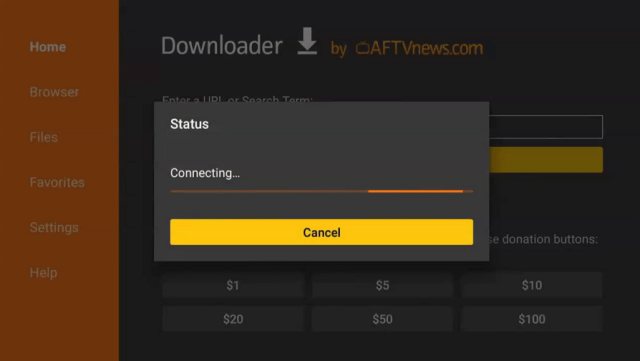
15. Wait for the APK to be downloaded.
Install SupremeTV on Firestick

Install SupremeTV on Firestick


16. Click install

Install SupremeTV on Firestick


17. Click open.

Install SupremeTV on Firestick


18. SupremeTV is already installed. Enjoy!

Install SupremeTV on Firestick


YOUR INTERNET ACTIVITY IS BEING WATCHED

ReviewVPN cannot attest to the legality, security and privacy of the applications discussed on this site. It is highly recommended that you use a VPN service while streaming or using Kodi.

Currently, your IP 54.37.118.71 is visible to everyone and your Browser is being tracked by Advertisers & ISP Provider.

Save 65% Now

Limited Time Offer

Here are the main reasons why you must use a VPN:

  • Your activities are hidden from your ISP, the government, and from the apps you are using.
  • You can access additional movies and TV streams.
  • ISP attempts to throttle are thrwarted thus reducing buffering issues.
  • Geographically restricted content like Netflix and Hulu can be unblocked.

A VPN works be replacing your ISP-assigned IP address and creating an encrypted tunnel. We recommend the no log service offered by IPVanish. It works well on a Firestick and offers the fastest possible speeds.

Special Limited Time Offer - Get IPVanish


Legal Disclaimer: ReviewVPN.com does not encourage or endorse any illegal activity involved in the usage of services and applications referenced on this site. We do not verify the licensing agreements of services. The end-user is wholly responsible for ensuring that any media accessed through these services does not violate copyright and/or licensing laws. ReviewVPN does not promote, link to, or receive compensation from any Apps and IPTV services.


Install Surfshark on Firestick

Get the Best Surfshark Deal


Supreme TV IPTV Features

  • Paid services for $18 a month
  • 15,000 live channels
  • 25,000 video-on-demand titles
  • High-definition and Ultra HD content
  • Applicable on different devices


Pros and Cons

Pros

  • Tons of great content
  • Competitive when it comes to providing over-the-top movies and TV shows
  • Lots of content to stream


Cons

  • Not for free


Stream Safely With A VPN

Surfshark vpn

Using IPTV services may require you to put your information and some of them are not trustworthy. These issues regarding some IPTV services in the past that sell user information to third-party advertisers. This is alarming since many users trust these apps with their personal information and even bank account numbers for payments.

When using IPTV services like Supreme TV, make sure to use a Virtual Private Network for privacy and security. A VPN can mask your real identity and provide a safe IP address for you to hide from a lot of trackers online.

Surfshark is also the best when it comes to security and privacy. As a great VPN, Surfshark offers top-notch, military-grade VPN protocols that can secure the user’s information from any online threats and trackers. Read our  SurfShark review to know more about this amazing VPN.

Other SurfShark Features

  • 3200 servers available in 100+ countries
  • Best VPN for torrenting
  • Destroys geo-restriction
  • Dedicated IP
  • 30-day money-back guarantee
  • Cloud Storage
  • P2P friendly VPN
  • SOCKS5 Proxy
  • Allows Torrenting
  • Kill Switch
  • Split Tunneling
  • DNS Leak Protection
  • Prevents Firestick Buffering and Kodi Buffering

For more details about this VPN, read our SurfShark review.


Grab your subscription now!

Best Surfshark Deal


How to Install Surfshark on Firestick with Screenshots

If your Firestick still has the older interface, read this article to learn how to update it: Update Firestick Interface.

You can download Surfshark directly from the Amazon App Store. It will be easy for you to find Surfshark with your Firestick’s Find feature. Refer to our screenshots below.

Follow our screenshots below to install the SurfShark VPN app on your Fire TV stick.

1. Go to the Home screen of your Firestick.

step 1 Install Surfshark VPN on Firestick


2. Navigate toward the Find tab. Press the Search button from the resulting dropdown.

step 2 Install Surfshark VPN on Firestick


3. Type in the keyword of SurfShark and select from the suggestions that will appear.

step 3 Install Surfshark VPN on Firestick


4. Click the official SurfShark icon from your search results.

step 4 Install Surfshark VPN on Firestick


5. Press the Download (You Own it) button.

step 5 Install Surfshark VPN on Firestick


6. The SurfShark VPN installer will download on your device.

step 6 Install Surfshark VPN on Firestick


7. SurfShark VPN’s app will automatically install itself on your Fire TV stick.

step 7 Install Surfshark VPN on Firestick


8. Press the Open button after completing SurfShark VPN’s installation process.

step 8 Install Surfshark VPN on Firestick


9. Please wait for the SurfShark VPN to load its user interface.

step 9 Install Surfshark VPN on Firestick


10. You can now log in with your SurfShark VPN account credentials.

step 10 Install Surfshark VPN on Firestick

Learn more about Surfshark and Grab the Best Surfshark Deal Now!


Install Surfshark on Firestick

Best Surfshark Deal


Other VPNs to Consider

NordVPN (Best for Streaming)

Best Features

  • 5000+ Server in 50+ Countries 
  • Military-Grade Encryption
  • Fast Connection Speed
  • Suitable to a lot of devices
  • No-Log Policy

Prices
  • Complete $5.89 per month (64% Discount)
  • Plus $4.59 per month (56% Discount)
  • Standard $3.69 per month (55% Discount)

Best Features

  • 750+ High-speed VPN Servers in 43 Locations
  • Military-Grade Encryption
  • Fastest HD Streaming and Gaming
  • 30-Day Money-Back Guarantee
  • Unlimited Data & Devices
  • No-Log Policy

Prices
  • 3 Years $1.99 per month (82% Discount)
  • 1 Years $3.29 per month (70% Discount)
  • 1 Month $10.99 per month

IPVanish VPN (Most Secure)

Best Features

  • 1200+ Servers in 60+ Countries around the world
  • Unlimited Connections
  • No-Log Policy
  • Top Notch Military-Grade VPN Protocols and Encryptions
  • 100% Safe and Secured
  • Most Trusted VPN
  • Best VPN for Firestick
  • 30-Day Money-Back Guarantee

Prices
  • Yearly $3.99 per month (63% Discount) – 30 days risk free + Ransomware & Malware Protection
  • Quarterly $5.32 per month (51% Discount)
  • Monthly $10.99 per month


For more VPN discounts, go to ReviewVPN Deals and purchase the best VPN for you.

Click here for the lowest price on Surfshark through our exclusive limited-time offer.


Best Alternatives to Supreme TV

There are a lot of great IPTV services available aside from Supreme TV. Here are the best alternatives that you check out.


FAQs

What is Supreme TV?

Supreme TV is an IPTV service that offers 15,000 live channels, and 25,000 VOD content.


Is Supreme TV legal?

ReviewVPN.com cannot determine the legality of any app or website. This article is for educational purposes only. To make sure that you are safe from any legal matters regarding the apps and websites you are using, use a VPN service like Surfshark.


Is the Supreme TV safe?

It is safe to install and use the Supreme TV app on your device. To better ensure your safety while streaming. Use a VPN like Surfshark.


Is Supreme TV Free?

Supreme TV IPTV is not for free. You need to pay a monthly subscription of $18.


Are there any ads?

There are no ads present on Supreme TV IPTV.


Conclusion

Supreme TV is such a massive app with tens of thousands of channels and titles to watch. It is wonderful since it is applicable on different devices but it is not for free. The standard subscription is $18 per month. To ensure your safety while using Supreme TV or any other IPTV services, use a VPN like Surfshark.

RARBG Shuts Down – What are the Best Alternatives

RARBG Shuts Down

In this article, we will discuss the RARBG Shutdown and what are the best alternatives.

RARBG is one of the most popular torrent sites in the world. It ran for 15 years before it officially shut down. RARBG boasts of having millions of users monthly. Many torrent users use this website to download movies, tv shows, games, and more. RARBG was included in our list of the best torrent sites.

There are many reasons why the RARBG website shuts down when you go to the official website of RARBG, which is the rarbg.to, you will see their official statement. The reasons are due to covid, war, power price increases in data centers in Europe, and inflation. You can see the actual words below:

RARBG

Since many people are using RARBG, we decided to provide a list of the best alternatives for you to check out.

The best RARBG alternatives are The Pirate Bay, 1337X, YTS, EZTV, and KickAss Torrent. We will discuss all of them here in this article. Continue reading to find out which one is the best for your torrenting needs.

It is best to use a trusted VPN service when using any of the following torrent sites.


ANONYMOUSLY


Best RARBG Alternatives

The Pirate Bay

RARBG alternative

website URL: https://thepiratebay.org/index.html

When it comes to popularity in the torrenting world, the pirate bay is second to none. That is why it is the best alternative to RARBG now that it shuts down. The Pirate Bay offers a great user experience to all who visit the website. You can stream movies, TV shows, Games, Music, and many more.

When you visit the pirate bay website, you will only see a search bar that will help you look for any titles you like. The Pirate Bay also provides a lot of links when you search for a title.

There are some ads present when torrenting on the pirate bay website.

How to Use Pirate Bay From Anywhere


YTS

RARBG alternative

website URL: https://yts.mx/

YTS is the new name of the YIFY Movies torrent site. The YIFY Movies shut down years ago and started a rebranded website known as YTS.

YTS is such a great RARBG alternative. From the moment it started up until now, it serves as a great and reliable torrent website for all your streaming needs. YTS provides options for users to register or log in to an account.

When you go to the official website of YTS, you will see the warning that you should be connected to a VPN service when using the website. This is to protect your information and data while torrenting. Good thing because YTS is compatible with Surfshark VPN.

How to Stream on YTS Torrent Website


1337X

RARBG alternative

website URL: http://1337x.to/

Next on our list of the best RARBG alternatives is 1337X. 1337X is a well-known torrent site that continuously updates its content from time to time. What’s impressive about 1337X is its download speed and accuracy.

1337X has a very simple and easy-to-use user interface. You can stream Movies, TV Shows, Games, Music, Apps, and many more using 1337X.

How to stream on 1337X Torret Website


YOUR INTERNET ACTIVITY IS BEING WATCHED

ReviewVPN cannot attest to the legality, security and privacy of the applications discussed on this site. It is highly recommended that you use a VPN service while streaming or using Kodi.

Currently, your IP 54.37.118.71 is visible to everyone and your Browser is being tracked by Advertisers & ISP Provider.

Save 65% Now

Limited Time Offer

Here are the main reasons why you must use a VPN:

  • Your activities are hidden from your ISP, the government, and from the apps you are using.
  • You can access additional movies and TV streams.
  • ISP attempts to throttle are thrwarted thus reducing buffering issues.
  • Geographically restricted content like Netflix and Hulu can be unblocked.

A VPN works be replacing your ISP-assigned IP address and creating an encrypted tunnel. We recommend the no log service offered by IPVanish. It works well on a Firestick and offers the fastest possible speeds.

Special Limited Time Offer - Get IPVanish


Legal Disclaimer: ReviewVPN.com does not encourage or endorse any illegal activity involved in the usage of services and applications referenced on this site. We do not verify the licensing agreements of services. The end-user is wholly responsible for ensuring that any media accessed through these services does not violate copyright and/or licensing laws. ReviewVPN does not promote, link to, or receive compensation from any Apps and IPTV services.


Install Surfshark on Firestick

Get the Best Surfshark Deal


KickAss Torrent

RARBG alternative

website URL: https://katcr.to/

When it comes to simplicity, KissAss Torrent does not disappoint. Among all the best RARBG alternatives, this torrent site is most easy to use. It has been in the torrenting spotlight for quite some time already. KissAss Torrent was launched last 2008. Until now, it is still a reliable torrent website where you can download movies, TV shows, Music, Apps, Anime, and many more.

It is 100% free to use KissAss Torrent, although it is available to register for an account when using this website. Registering for an account provides some added features and benefits.


EZTV

RARBG alternative

website URL: https://eztvstatus.com/

The last but definitely not the least alternative to RARBG is EZTV. Like the other torrent websites above, EXTV is also one of the most popular torrent sites today. You can also download media files, movies, TV shows, etc in high definition using EZTV. Enjoy 1080p and 4k videos with a fast-speed downloading ability.

One remarkable feature of EXTV is its provided calendar for all new releases. You can easily see the newly available titles for streaming.

How to Use EZTV Torrent Website


Best VPN For Torrenting

Surfshark vpn

Torrenting allows you to install and download media files from different sources all over the internet. It is such an incredible way to watch movies and TV shows, but it is also sometimes dangerous for your personal information. While torrenting, there are a lot of trackers who might want to collect your information, profile you and even locate you. That is why it is important to use VPN while torrenting.

A VPN or Virtual Private Network is a top-notch software that can hide your real IP address. Your IP address serves as a fingerprint that trackers use to gather your information. By using a VPN, you will have a safe and different IP address that will make trackers get blocked.

Surfshark is also the best VPN for torrenting. It has more than 3200 available servers from different locations worldwide. You are surely secured and safe through the help of its military-grade VPN protocols. Whatever device you are using, Surfshark VPN is the best for you. You can even use one Surfshark account for an unlimited number of devices. Read our  SurfShark review to know more about this amazing VPN.

Other SurfShark Features

  • 3200 servers available in 100+ countries
  • Best VPN for torrenting
  • Destroys geo-restriction
  • Dedicated IP
  • 30-day money-back guarantee
  • Cloud Storage
  • P2P friendly VPN
  • SOCKS5 Proxy
  • Allows Torrenting
  • Kill Switch
  • Split Tunneling
  • DNS Leak Protection
  • Prevents Firestick Buffering and Kodi Buffering

For more details about this VPN, read our SurfShark review.


Grab your subscription now!

Best Surfshark Deal


How to Install Surfshark on Firestick with Screenshots

If your Firestick still has the older interface, read this article to learn how to update it: Update Firestick Interface.

You can download Surfshark directly from the Amazon App Store. It will be easy for you to find Surfshark with your Firestick’s Find feature. Refer to our screenshots below.

Follow our screenshots below to install the SurfShark VPN app on your Fire TV stick.

1. Go to the Home screen of your Firestick.

step 1 Install Surfshark VPN on Firestick


2. Navigate toward the Find tab. Press the Search button from the resulting dropdown.

step 2 Install Surfshark VPN on Firestick


3. Type in the keyword of SurfShark and select from the suggestions that will appear.

step 3 Install Surfshark VPN on Firestick


4. Click the official SurfShark icon from your search results.

step 4 Install Surfshark VPN on Firestick


5. Press the Download (You Own it) button.

step 5 Install Surfshark VPN on Firestick


6. The SurfShark VPN installer will download on your device.

step 6 Install Surfshark VPN on Firestick


7. SurfShark VPN’s app will automatically install itself on your Fire TV stick.

step 7 Install Surfshark VPN on Firestick


8. Press the Open button after completing SurfShark VPN’s installation process.

step 8 Install Surfshark VPN on Firestick


9. Please wait for the SurfShark VPN to load its user interface.

step 9 Install Surfshark VPN on Firestick


10. You can now log in with your SurfShark VPN account credentials.

step 10 Install Surfshark VPN on Firestick

Learn more about Surfshark and Grab the Best Surfshark Deal Now!


Install Surfshark on Firestick

Best Surfshark Deal


Other VPNs to Consider

NordVPN (Best for Streaming)

Best Features

  • 5000+ Server in 50+ Countries 
  • Military-Grade Encryption
  • Fast Connection Speed
  • Suitable to a lot of devices
  • No-Log Policy

Prices
  • Complete $5.89 per month (64% Discount)
  • Plus $4.59 per month (56% Discount)
  • Standard $3.69 per month (55% Discount)

Best Features

  • 750+ High-speed VPN Servers in 43 Locations
  • Military-Grade Encryption
  • Fastest HD Streaming and Gaming
  • 30-Day Money-Back Guarantee
  • Unlimited Data & Devices
  • No-Log Policy

Prices
  • 3 Years $1.99 per month (82% Discount)
  • 1 Years $3.29 per month (70% Discount)
  • 1 Month $10.99 per month

IPVanish VPN (Most Secure)

Best Features

  • 1200+ Servers in 60+ Countries around the world
  • Unlimited Connections
  • No-Log Policy
  • Top Notch Military-Grade VPN Protocols and Encryptions
  • 100% Safe and Secured
  • Most Trusted VPN
  • Best VPN for Firestick
  • 30-Day Money-Back Guarantee

Prices
  • Yearly $3.99 per month (63% Discount) – 30 days risk free + Ransomware & Malware Protection
  • Quarterly $5.32 per month (51% Discount)
  • Monthly $10.99 per month


For more VPN discounts, go to ReviewVPN Deals and purchase the best VPN for you.

Click here for the lowest price on Surfshark through our exclusive limited-time offer.


FAQs

Why Does RARBG Shut Down?

RARBG shuts down due to different factors such as covid, war, power price increases in data centers in Europe, and inflation.


What Are The Best RARBG Alternatives?

The best RARBG alternatives are The Pirate Bay, 1337X, YTS, EZTV, and KickAss Torrent.


Conclusion

RARBG was such a fantastic torrent website. It is so sad that due to different factors, developers have decided to close it for good. Good thing that there are other reliable torrent sites to consider. Just make sure that you always use a VPN like Surfshark whenever you are using any of these torrent websites to protect your personal information.

How to Install The TD Ameritrade Network on Firestick

TD Ameritrade Network

In this article, we will show you how you can install the TD Ameritrade Network on your Firestick device.

The TD Ameritrade Network is an American broadcasting channel that streams financial news and educational content. It was launched last October 24, 2017, and has its headquarters in Chicago. The main website of TD Ameritrade Network focuses on tech, business, markets, investing, shows, etc. If you are in the trades business, especially in the USA, then the TD Ameritrade Network is the best app for you.

There are two ways to stream on the TD Ameritrade Network on your Firestick. The first one is by using the official app of the network. The TD Ameritrade Network is an official Amazon app. This means you can easily see this in the Amazon App Store. There is no need for you to jailbreak your Firestick and use the Downloader app to install it. The second option is by using a browser like the Amazon Silk Browser and streaming on the official website of TD Ameritrade Network.

The TD Ameritrade Network is only available in the USA. If you are traveling to a different country make sure that you use a trusted VPN service so that you can still use the app from anywhere.


ANONYMOUSLY


How to Install the TD Ameritrade Network on Firestick

1. From your home screen, go to Find.

Watch RetroCrush on Firestick/Android TV


2. Scroll down to Search

Watch RetroCrush on Firestick/Android TV


3. Search for the TD Ameritrade app

td ameritrade


4. Click for the TD Ameritrade icon

td ameritrade


5. Select the Get or Download button

td ameritrade


6. Wait for the app to be installed and then click Open

td ameritrade


How to Stream the TD Ameritrade Network Website on Firestick

1. Go to the Home screen of your Firestick.

TD Ameritrade Amazon


2. Click on Find.

TD Ameritrade Amazon


3. Tap on the Search tab.

TD Ameritrade Amazon


4. Type in Silk Browser and choose the item that appears on the results.

TD Ameritrade Amazon


5. Click on the Silk Browser Icon.

TD Ameritrade Amazon


6. Choose Download.

TD Ameritrade Amazon


7. Silk Browser is Downloading into your Firestick.

TD Ameritrade Amazon


8. The Silk Browser app will Install on Firestick.

TD Ameritrade Amazon


9. Select Open to launch the browser.

TD Ameritrade Amazon


10. You can now start using Amazon Silk Browser.

TD Ameritrade Amazon


11. Type in: “TD Ameritrade Amazon” then click GO.

TD Ameritrade Amazon


12. Tap on Cancel.

TD Ameritrade Amazon


13. Scroll down among the search results, and select the one with “TD Ameritrade Network on Amazon.”

TD Ameritrade Amazon


YOUR INTERNET ACTIVITY IS BEING WATCHED

ReviewVPN cannot attest to the legality, security and privacy of the applications discussed on this site. It is highly recommended that you use a VPN service while streaming or using Kodi.

Currently, your IP 54.37.118.71 is visible to everyone and your Browser is being tracked by Advertisers & ISP Provider.

Save 65% Now

Limited Time Offer

Here are the main reasons why you must use a VPN:

  • Your activities are hidden from your ISP, the government, and from the apps you are using.
  • You can access additional movies and TV streams.
  • ISP attempts to throttle are thrwarted thus reducing buffering issues.
  • Geographically restricted content like Netflix and Hulu can be unblocked.

A VPN works be replacing your ISP-assigned IP address and creating an encrypted tunnel. We recommend the no log service offered by IPVanish. It works well on a Firestick and offers the fastest possible speeds.

Special Limited Time Offer - Get IPVanish


Legal Disclaimer: ReviewVPN.com does not encourage or endorse any illegal activity involved in the usage of services and applications referenced on this site. We do not verify the licensing agreements of services. The end-user is wholly responsible for ensuring that any media accessed through these services does not violate copyright and/or licensing laws. ReviewVPN does not promote, link to, or receive compensation from any Apps and IPTV services.


Install Surfshark on Firestick

Get the Best Surfshark Deal


TD Ameritrade Network Features

  • There are different ways to stream content on TD Ameritrade: On the Go, In-platform, and Online
  • Provides trading business live
  • Market News and Programming
  • Trading and Business shows like Morning Trade Live, Market On Close, Trading 360, Fast Market, and many more.


Pros and Cons

Pros

  • Provides updated and live trade and investment
  • Offers a lot of shows to stream about finance
  • Available on Firestick
  • Many ways to streaming


Cons

  • The app is geo-restricted


Destroy Geo-restrictions Using a VPN

Surfshark vpn

The TD Ameritrade Network is only available in the US. If you are traveling to another country and would like still be updated on the current trading business in the country through this channel then you should use a VPN.

A VPN or Virtual Private Network is software that you can use to destroy geo-restriction. By masking your real IP address and providing you with a new one from a different server from any place you like, you look like you never left the country.

Surfshark VPN is the best when destroying geo-restriction. It allows users to select their country of preference. This VPN is also working fine with any platform such as the TD Ameritrade Network. It is also the best VPN that can unblock all streaming platforms like Netflix, Hulu, and YouTube.  Read our  SurfShark review to know more about this amazing VPN.

Other SurfShark Features

  • 3200 servers available in 100+ countries
  • Best VPN for torrenting
  • Destroys geo-restriction
  • Dedicated IP
  • 30-day money-back guarantee
  • Cloud Storage
  • P2P friendly VPN
  • SOCKS5 Proxy
  • Allows Torrenting
  • Kill Switch
  • Split Tunneling
  • DNS Leak Protection
  • Prevents Firestick Buffering and Kodi Buffering

For more details about this VPN, read our SurfShark review.


Grab your subscription now!

Best Surfshark Deal


How to Install Surfshark on Firestick with Screenshots

If your Firestick still has the older interface, read this article to learn how to update it: Update Firestick Interface.

You can download Surfshark directly from the Amazon App Store. It will be easy for you to find Surfshark with your Firestick’s Find feature. Refer to our screenshots below.

Follow our screenshots below to install the SurfShark VPN app on your Fire TV stick.

1. Go to the Home screen of your Firestick.

step 1 Install Surfshark VPN on Firestick


2. Navigate toward the Find tab. Press the Search button from the resulting dropdown.

step 2 Install Surfshark VPN on Firestick


3. Type in the keyword of SurfShark and select from the suggestions that will appear.

step 3 Install Surfshark VPN on Firestick


4. Click the official SurfShark icon from your search results.

step 4 Install Surfshark VPN on Firestick


5. Press the Download (You Own it) button.

step 5 Install Surfshark VPN on Firestick


6. The SurfShark VPN installer will download on your device.

step 6 Install Surfshark VPN on Firestick


7. SurfShark VPN’s app will automatically install itself on your Fire TV stick.

step 7 Install Surfshark VPN on Firestick


8. Press the Open button after completing SurfShark VPN’s installation process.

step 8 Install Surfshark VPN on Firestick


9. Please wait for the SurfShark VPN to load its user interface.

step 9 Install Surfshark VPN on Firestick


10. You can now log in with your SurfShark VPN account credentials.

step 10 Install Surfshark VPN on Firestick

Learn more about Surfshark and Grab the Best Surfshark Deal Now!


Install Surfshark on Firestick

Best Surfshark Deal


Other VPNs to Consider

NordVPN (Best for Streaming)

Best Features

  • 5000+ Server in 50+ Countries 
  • Military-Grade Encryption
  • Fast Connection Speed
  • Suitable to a lot of devices
  • No-Log Policy

Prices
  • Complete $5.89 per month (64% Discount)
  • Plus $4.59 per month (56% Discount)
  • Standard $3.69 per month (55% Discount)

Best Features

  • 750+ High-speed VPN Servers in 43 Locations
  • Military-Grade Encryption
  • Fastest HD Streaming and Gaming
  • 30-Day Money-Back Guarantee
  • Unlimited Data & Devices
  • No-Log Policy

Prices
  • 3 Years $1.99 per month (82% Discount)
  • 1 Years $3.29 per month (70% Discount)
  • 1 Month $10.99 per month

IPVanish VPN (Most Secure)

Best Features

  • 1200+ Servers in 60+ Countries around the world
  • Unlimited Connections
  • No-Log Policy
  • Top Notch Military-Grade VPN Protocols and Encryptions
  • 100% Safe and Secured
  • Most Trusted VPN
  • Best VPN for Firestick
  • 30-Day Money-Back Guarantee

Prices
  • Yearly $3.99 per month (63% Discount) – 30 days risk free + Ransomware & Malware Protection
  • Quarterly $5.32 per month (51% Discount)
  • Monthly $10.99 per month


For more VPN discounts, go to ReviewVPN Deals and purchase the best VPN for you.

Click here for the lowest price on Surfshark through our exclusive limited-time offer.


FAQs

What is TD Ameritrade?

TD Ameritrade is a platform that streams news and shows about finance and education.


Is TD Ameritrade legal?

ReviewVPN.com cannot determine the legality of any app or website. This article is for educational purposes only. To make sure that you are safe from any legal matters regarding the apps and websites you are using, use a VPN service like Surfshark. In the case of TD Ameritrade, since it is an official Amazon app, it is legal.


Is TD Ameritrade safe?

It is safe to install and use the TD Ameritrade Network on your device. The app is geo-restricted, so if you are not in the US, you will need to use a VPN like Surfshark to use it.


Is TD Ameritrade Free?

It is free to stream any content and shows on TD Ameritrade Network.


Are there any ads?

There are no ads present on TD Ameritrade Network.


Conclusion

If you are in the trading business here in the US, then you must install and use the TD Ameritrade Network. It can provide you with the best information on anything about trading, and finance. The only problem is it is not available outside of the country, so it you are going abroad, make sure to use a trusted VPN service like Surfshark.

Working KissAnime Website – KissAnime.nz (How to Stream on Firestick)

Working KissAnime Website

In this article, we will help you learn the working KissAnime website and how you can stream on it on Firestick.

You might be familiar that the previous KissAnime website, kissanime.ru shut down due to copyright issues. Ever since that domain shut down, it never comes back to life, but many anime lovers stick to the term kissanime. Good thing that there is now a working KissAnime website available, the kissanime.nz.

The KissAnime website is a haven for many anime enthusiasts. It has a lot of great anime movies and series to offer. KissAnime is very similar to KissCartoon, and KissAsian.

You can stream the KissAnime website on any device even on your Amazon Firestick. Most cord-cutters are using the Amazon Firestick, and it is also a great device for streaming on different websites like KissAnime. All you need to do is to install the best browser available for Firestick which is the Amazon Silk Browser.

The Amazon Silk Browser is an official Amazon app. There is no need for you to jailbreak your Firestick and use the Downloader app to install it. Just make sure to use a trusted VPN service whenever you are streaming on any KissAnime website.


ANONYMOUSLY


How to Watch Anime on Kissanime Website Using Amazon Firestick

1. Go to the Home screen of your Firestick.

Watch Kissanime on Firestick/Android TV


2. Click on Find.

Watch Kissanime on Firestick/Android TV


3. Tap on the Search tab.

Watch Kissanime on Firestick/Android TV


4. Type in Silk Browser and choose this item that appears on the results.

Watch Kissanime on Firestick/Android TV


5. Click on the Silk Browser Icon.

Watch Kissanime on Firestick/Android TV


6. Choose Download.

Watch Kissanime on Firestick/Android TV


7. Silk Browser is Downloading into your Firestick.

Watch Kissanime on Firestick/Android TV


8. The Silk Browser app will Install on Firestick.

Watch Kissanime on Firestick/Android TV


9. Select Open to launch the browser.

Watch Kissanime on Firestick/Android TV


10. You can now start using Amazon Silk Browser.

Watch Kissanime on Firestick/Android TV


11. Type in: http://ww25.kissanime.nz/

Watch Kissanime on Firestick/Android TV


12. Tap on Cancel.

Watch Kissanime on Firestick/Android TV


13. Click on Okay.

Watch Kissanime on Firestick/Android TV


13.  That’s it! Enjoy!

Watch Kissanime on Firestick/Android TV


YOUR INTERNET ACTIVITY IS BEING WATCHED

ReviewVPN cannot attest to the legality, security and privacy of the applications discussed on this site. It is highly recommended that you use a VPN service while streaming or using Kodi.

Currently, your IP 54.37.118.71 is visible to everyone and your Browser is being tracked by Advertisers & ISP Provider.

Save 65% Now

Limited Time Offer

Here are the main reasons why you must use a VPN:

  • Your activities are hidden from your ISP, the government, and from the apps you are using.
  • You can access additional movies and TV streams.
  • ISP attempts to throttle are thrwarted thus reducing buffering issues.
  • Geographically restricted content like Netflix and Hulu can be unblocked.

A VPN works be replacing your ISP-assigned IP address and creating an encrypted tunnel. We recommend the no log service offered by IPVanish. It works well on a Firestick and offers the fastest possible speeds.

Special Limited Time Offer - Get IPVanish


Legal Disclaimer: ReviewVPN.com does not encourage or endorse any illegal activity involved in the usage of services and applications referenced on this site. We do not verify the licensing agreements of services. The end-user is wholly responsible for ensuring that any media accessed through these services does not violate copyright and/or licensing laws. ReviewVPN does not promote, link to, or receive compensation from any Apps and IPTV services.


Install Surfshark on Firestick

Get the Best Surfshark Deal


KissAnime Website Features

  • 100% free
  • No advertisements
  • Provides episodes for popular anime
  • Offers anime movies and series


Pros and Cons

Pros

  • 100% free
  • Does not require registration
  • Tons of genres and titles are available


Cons

  • Hard to play content


Stream Safely With A VPN

Surfshark vpn

The first and the most popular KissAnime website, KissAnime.ru shut down due to copy right issues. We are not sure if this is going to happen to any other KissAnime websites as well. But it is best to make sure that you are secured and protecte when streaming on any anime websites like KissAnime.

The best way to be secured when streaming on differenent websites like KissAnime is by using a trusted VPN service. A VPN can mask your IP address which serves as your online identification. Trackers are using your real IP address to profile and locate you. Whenever an app or website may face any legal issues, it is best that your connection is safe and secured too so that you can watch your favorite shows care free.

Surfshark VPN is the best when it comes to streaming securely. It is an awesome VPN that has top-notch VPN protocols. This VPN also  allows users to select their country of preference. It is also the best VPN that can unblock all streaming platforms like Netflix, Hulu, and YouTube.  Read our  SurfShark review to know more about this amazing VPN.

Other SurfShark Features

  • 3200 servers available in 100+ countries
  • Best VPN for torrenting
  • Destroys geo-restriction
  • Dedicated IP
  • 30-day money-back guarantee
  • Cloud Storage
  • P2P friendly VPN
  • SOCKS5 Proxy
  • Allows Torrenting
  • Kill Switch
  • Split Tunneling
  • DNS Leak Protection
  • Prevents Firestick Buffering and Kodi Buffering

For more details about this VPN, read our SurfShark review.


Grab your subscription now!

Best Surfshark Deal


How to Install Surfshark on Firestick with Screenshots

If your Firestick still has the older interface, read this article to learn how to update it: Update Firestick Interface.

You can download Surfshark directly from the Amazon App Store. It will be easy for you to find Surfshark with your Firestick’s Find feature. Refer to our screenshots below.

Follow our screenshots below to install the SurfShark VPN app on your Fire TV stick.

1. Go to the Home screen of your Firestick.

step 1 Install Surfshark VPN on Firestick


2. Navigate toward the Find tab. Press the Search button from the resulting dropdown.

step 2 Install Surfshark VPN on Firestick


3. Type in the keyword of SurfShark and select from the suggestions that will appear.

step 3 Install Surfshark VPN on Firestick


4. Click the official SurfShark icon from your search results.

step 4 Install Surfshark VPN on Firestick


5. Press the Download (You Own it) button.

step 5 Install Surfshark VPN on Firestick


6. The SurfShark VPN installer will download on your device.

step 6 Install Surfshark VPN on Firestick


7. SurfShark VPN’s app will automatically install itself on your Fire TV stick.

step 7 Install Surfshark VPN on Firestick


8. Press the Open button after completing SurfShark VPN’s installation process.

step 8 Install Surfshark VPN on Firestick


9. Please wait for the SurfShark VPN to load its user interface.

step 9 Install Surfshark VPN on Firestick


10. You can now log in with your SurfShark VPN account credentials.

step 10 Install Surfshark VPN on Firestick

Learn more about Surfshark and Grab the Best Surfshark Deal Now!


Install Surfshark on Firestick

Best Surfshark Deal


Other VPNs to Consider

NordVPN (Best for Streaming)

Best Features

  • 5000+ Server in 50+ Countries 
  • Military-Grade Encryption
  • Fast Connection Speed
  • Suitable to a lot of devices
  • No-Log Policy

Prices
  • Complete $5.89 per month (64% Discount)
  • Plus $4.59 per month (56% Discount)
  • Standard $3.69 per month (55% Discount)

Best Features

  • 750+ High-speed VPN Servers in 43 Locations
  • Military-Grade Encryption
  • Fastest HD Streaming and Gaming
  • 30-Day Money-Back Guarantee
  • Unlimited Data & Devices
  • No-Log Policy

Prices
  • 3 Years $1.99 per month (82% Discount)
  • 1 Years $3.29 per month (70% Discount)
  • 1 Month $10.99 per month

IPVanish VPN (Most Secure)

Best Features

  • 1200+ Servers in 60+ Countries around the world
  • Unlimited Connections
  • No-Log Policy
  • Top Notch Military-Grade VPN Protocols and Encryptions
  • 100% Safe and Secured
  • Most Trusted VPN
  • Best VPN for Firestick
  • 30-Day Money-Back Guarantee

Prices
  • Yearly $3.99 per month (63% Discount) – 30 days risk free + Ransomware & Malware Protection
  • Quarterly $5.32 per month (51% Discount)
  • Monthly $10.99 per month


For more VPN discounts, go to ReviewVPN Deals and purchase the best VPN for you.

Click here for the lowest price on Surfshark through our exclusive limited-time offer.


Best Alternatives to KissAnime Website

There are tons of great anime sites out there. If you think KissAnime website is not the best one for you then you might check out any of these best alternatives:

For more free anime movie and episode websites, read the 25 Best Anime Websites.


FAQs

What is KissAnime Website?

The KissAnime website is a free anime streaming website that offers the most popular titles.


Is the KissAnime Website Working?

The KissAnime website that is working is ww25.kissanime.zn


Is the KissAnime Website legal?

ReviewVPN.com cannot determine the legality of any app or website. This article is for educational purposes only. To make sure that you are safe from any legal matters regarding the apps and websites you are using, use a VPN service like Surfshark.


Is the KissAnime Website safe?

We tested the KissAnime website using Virus Total and found no trace of any malicious and suspicious domains. The website is 100% clean.


Is the KissAnime Website Free?

The KissAnime website is 100% free.


Are there any ads?

There are no ads present on RetroCrush.


Conclusion

The KissAnime website has undergone come changes due to the fact that its formar url, KissAnime.ru faced some major legal challenge due to copyright issues. Although the KissAnime website seem to be safe, it is best that you protect yourself whenever you are using it. Make sure to use a VPN like Surfshark to ensure your safety and security while streaming.

How to Watch Anime on RetroCrush on Amazon Firestick

RetroCrush

In this article, we will show you how to watch anime on RetroCrush using your Amazon Firestick device.

RetroCrush is one of the best anime websites nowadays. It has thousands of titles available to stream. Most users use RetroCrush to watch cult classics anime such as Lupin III, Voltes V, Appleseed, Bubblegrum Crisis, Great Teacher Onizuka, and many more.

There are a lot of genres available on RetrosCrush for movies and anime series. It is very easy to use on any device, and the best thing is there are no advertisements present. Viewers are not required to create an account before streaming on RetroCrush but you can still register if you like.

Most of our readers are using the Amazon Firestick. In order to watch any website like RetroCrush on Firestick, you need to use a browser. The Amazon Silk Browser is the official browser of the Amazon Firestick device. You can easily install this on your device. There is no need to jailbreak your Firestick and use the Downloader app.

It is best to use a trusted VPN service when streaming on different websites such as RetroCrush. Continue reading to learn more.


ANONYMOUSLY


How to Watch Anime on RetroCrush Using Amazon Firestick (Video)


How to Watch Anime on RetroCrush Using Amazon Firestick

1. Go to the Home screen of your Firestick.

Watch RetroCrush on Firestick/Android TV


2. Click on Find.

Watch RetroCrush on Firestick/Android TV


3. Tap on the Search tab.

Watch RetroCrush on Firestick/Android TV


4. Type in Silk Browser and choose the item that appears on the results.

Watch RetroCrush on Firestick/Android TV


5. Click on the Silk Browser Icon.

Watch RetroCrush on Firestick/Android TV


6. Choose Download.

Watch RetroCrush on Firestick/Android TV


7. Silk Browser is Downloading into your Firestick.

Watch RetroCrush on Firestick/Android TV


8. The Silk Browser app will Install on Firestick.

Watch RetroCrush on Firestick/Android TV


9. Select Open to launch the browser.

Watch RetroCrush on Firestick/Android TV


10. You can now start using Amazon Silk Browser.

Watch RetroCrush on Firestick/Android TV


11. Type in: https://www.retrocrush.tv/

Watch RetroCrush on Firestick/Android TV


12. Tap on Cancel.

Watch RetroCrush on Firestick/Android TV


13. Click on Okay.

Watch RetroCrush on Firestick/Android TV


13.  That’s it! Enjoy!

Watch RetroCrush on Firestick/Android TV


YOUR INTERNET ACTIVITY IS BEING WATCHED

ReviewVPN cannot attest to the legality, security and privacy of the applications discussed on this site. It is highly recommended that you use a VPN service while streaming or using Kodi.

Currently, your IP 54.37.118.71 is visible to everyone and your Browser is being tracked by Advertisers & ISP Provider.

Save 65% Now

Limited Time Offer

Here are the main reasons why you must use a VPN:

  • Your activities are hidden from your ISP, the government, and from the apps you are using.
  • You can access additional movies and TV streams.
  • ISP attempts to throttle are thrwarted thus reducing buffering issues.
  • Geographically restricted content like Netflix and Hulu can be unblocked.

A VPN works be replacing your ISP-assigned IP address and creating an encrypted tunnel. We recommend the no log service offered by IPVanish. It works well on a Firestick and offers the fastest possible speeds.

Special Limited Time Offer - Get IPVanish


Legal Disclaimer: ReviewVPN.com does not encourage or endorse any illegal activity involved in the usage of services and applications referenced on this site. We do not verify the licensing agreements of services. The end-user is wholly responsible for ensuring that any media accessed through these services does not violate copyright and/or licensing laws. ReviewVPN does not promote, link to, or receive compensation from any Apps and IPTV services.


Install Surfshark on Firestick

Get the Best Surfshark Deal


RetroCrush Features

  • 100% free
  • No advertisements
  • Available to register
  • Has a lot of cult classic anime titles
  • Tons of genres
  • Offers anime movies and series
  • Very easy to use
  • Some titles are geo-restricted
  • Provides complete details for each anime title


Genres Available on RetroCrush

  • Comedy
  • Crime
  • Drama
  • Horror
  • Romance
  • Sci-Fi and Fantasy
  • Sports
  • Thriller
  • Action and Adventure


Pros and Cons

Pros

  • 100% free
  • Easy to use
  • Does not require registration
  • Tons of genres and titles are available


Cons

  • No new anime, mostly classics
  • Some titles are geo-restricted


Destroy Geo-restriction With A VPN

Surfshark vpn

Some of the titles available on RetroCrush are geo-restricted which means that some of them may not be available in your area. This is one of the few downsides of using RetroCrush. When you try to point your mouse at a specific anime, a banner might pop up that says this title is not available in your area. Good thing that there is a great way to destroy geo-restriction using a VPN.

A VPN or Virtual Private Network is an advanced software tool that can hide your real IP address and connect you to a different server from a different country. Through this, you can access geo-restricted content with the security needed to do so.

Surfshark VPN is the best when destroying geo-restriction. It allows users to select their country of preference. It is also the best VPN that can unblock all streaming platforms like Netflix, Hulu, and YouTube.  Read our  SurfShark review to know more about this amazing VPN.

Other SurfShark Features

  • 3200 servers available in 100+ countries
  • Best VPN for torrenting
  • Destroys geo-restriction
  • Dedicated IP
  • 30-day money-back guarantee
  • Cloud Storage
  • P2P friendly VPN
  • SOCKS5 Proxy
  • Allows Torrenting
  • Kill Switch
  • Split Tunneling
  • DNS Leak Protection
  • Prevents Firestick Buffering and Kodi Buffering

For more details about this VPN, read our SurfShark review.


Grab your subscription now!

Best Surfshark Deal


How to Install Surfshark on Firestick with Screenshots

If your Firestick still has the older interface, read this article to learn how to update it: Update Firestick Interface.

You can download Surfshark directly from the Amazon App Store. It will be easy for you to find Surfshark with your Firestick’s Find feature. Refer to our screenshots below.

Follow our screenshots below to install the SurfShark VPN app on your Fire TV stick.

1. Go to the Home screen of your Firestick.

step 1 Install Surfshark VPN on Firestick


2. Navigate toward the Find tab. Press the Search button from the resulting dropdown.

step 2 Install Surfshark VPN on Firestick


3. Type in the keyword of SurfShark and select from the suggestions that will appear.

step 3 Install Surfshark VPN on Firestick


4. Click the official SurfShark icon from your search results.

step 4 Install Surfshark VPN on Firestick


5. Press the Download (You Own it) button.

step 5 Install Surfshark VPN on Firestick


6. The SurfShark VPN installer will download on your device.

step 6 Install Surfshark VPN on Firestick


7. SurfShark VPN’s app will automatically install itself on your Fire TV stick.

step 7 Install Surfshark VPN on Firestick


8. Press the Open button after completing SurfShark VPN’s installation process.

step 8 Install Surfshark VPN on Firestick


9. Please wait for the SurfShark VPN to load its user interface.

step 9 Install Surfshark VPN on Firestick


10. You can now log in with your SurfShark VPN account credentials.

step 10 Install Surfshark VPN on Firestick

Learn more about Surfshark and Grab the Best Surfshark Deal Now!


Install Surfshark on Firestick

Best Surfshark Deal


Other VPNs to Consider

NordVPN (Best for Streaming)

Best Features

  • 5000+ Server in 50+ Countries 
  • Military-Grade Encryption
  • Fast Connection Speed
  • Suitable to a lot of devices
  • No-Log Policy

Prices
  • Complete $5.89 per month (64% Discount)
  • Plus $4.59 per month (56% Discount)
  • Standard $3.69 per month (55% Discount)

Best Features

  • 750+ High-speed VPN Servers in 43 Locations
  • Military-Grade Encryption
  • Fastest HD Streaming and Gaming
  • 30-Day Money-Back Guarantee
  • Unlimited Data & Devices
  • No-Log Policy

Prices
  • 3 Years $1.99 per month (82% Discount)
  • 1 Years $3.29 per month (70% Discount)
  • 1 Month $10.99 per month

IPVanish VPN (Most Secure)

Best Features

  • 1200+ Servers in 60+ Countries around the world
  • Unlimited Connections
  • No-Log Policy
  • Top Notch Military-Grade VPN Protocols and Encryptions
  • 100% Safe and Secured
  • Most Trusted VPN
  • Best VPN for Firestick
  • 30-Day Money-Back Guarantee

Prices
  • Yearly $3.99 per month (63% Discount) – 30 days risk free + Ransomware & Malware Protection
  • Quarterly $5.32 per month (51% Discount)
  • Monthly $10.99 per month


For more VPN discounts, go to ReviewVPN Deals and purchase the best VPN for you.

Click here for the lowest price on Surfshark through our exclusive limited-time offer.


Best Alternatives to RetroCrush

Aside from RetroCrush, there are so many anime streaming websites. The problem with those is that most of them are shutting down. But here are the best RetroCrush alternatives that you can check out.

For more free anime movie and episode websites, read the 25 Best Anime Websites.


FAQs

What is RetroCrush?

RetroCrush is an amazing anime website that offers classic cult anime movies and episodes.


Is RetroCrush legal?

ReviewVPN.com cannot determine the legality of any app or website. This article is for educational purposes only. To make sure that you are safe from any legal matters regarding the apps and websites you are using, use a VPN service like Surfshark.


Is RetroCrush safe?

We tested the RetroCrush website using Virus Total and found no trace of any malicious and suspicious domains. The website is 100% clean.


Is RetroCrush Free?

The RetroCrush website is 100% free.


Are there any ads?

There are no ads present on RetroCrush.


Conclusion

RetroCrush is such an amazing website especially when you like watching classic cult animes. This website is 100% free with no advertisements present. The only problem with using this website is that there are some titles that are geo-restricted in some areas. Better to use VPN like Surfshark when streaming on RetroCrush.

Best VPN Summer Deals 2023

Best VPN Summer Deals

If you are looking for the best VPN summer deals, we got you covered. We list down all of the best choices for you to check out. Continue reading this article to learn more exciting discounts.

Most VPNs provide great security features to your device. Believe it or not but there are hundreds of them in the market today. It is best to use the premium ones because you can assure that they will never use your information for revenue. A premium VPN service is dedicated so that there won’t be any information breaches.

In choosing the best VPN, you can consider some factors. First of all, is the price. Of course, it is much better to use a cheaper VPN but you must also need to know the quality of service that you are getting. That is why our list of the best VPN summer deals will help you get top-notch VPN services at a discounted price.


ANONYMOUSLY

What is a VPN?

Before we continue with the list of the best VPN deals, let us first discuss what is a VPN.

VPN stands for Virtual Private Network. It is software that can hide your real IP address and provides a new one so that you are protected from any trackers online.

The work of a VPN is to create a secure connection between your device and your network using a communication medium such as the Internet.

Different VPNs have different features to offer in terms of the user interface, locations available, and many advanced features.


Best VPN Summer Deals

Surfshark

Surfshark vpn

Surfshark VPN Deal: 82% off for 2 years + 2 months FREE ($2.30/month)

When it comes to the top VPN providers, Surfshark is our number one choice. Aside from its best VPN deals, it has remarkable features. Surfhark’s performance when it comes to security, speed, and accessibility passed our standards.

This VPN offers 3200+ servers in 100+ countries. You can connect to a server in a preferred location. Through this, Surfshark can help you unblock almost all streaming platforms like Netflix (US, UK, etc.), Hulu, YouTube, BBC iPlayer, DAZN, and many more.

Surfshark’s VPN protocols are amazing for security. It also offers P2P-friendly servers and the SOCKS5 Proxy feature to help in providing great security while torrenting. Aside from these, Surfshark has a lot of advanced features like Split TunnelingDouble VPN,  Dedicated IP, Ad and Malware blockers, Cookie pop-up blockers, and Two-factor authentication.

Surfshark is applicable on different devices like Windows, macOS, iOS, Android, Linux, and Amazon Fire TV. You can use unlimited devices in just one Surfshark account.

There are no free trials for Surfshark but you can use it with a 30-day money-back guarantee.

Pros

  • + Amazing WireGuard protocol performance
  • + Lots of other extra features
  • + Unblocks tons of streaming apps
  • + Unlimited connections simultaneously
  • + Zero Log Policy
  • + CleanWeb Feature
  • + Split Tunneling
  • + Anti-virus tool

Cons

  • – No Split Tunneling for Apple devices
  • – Add-on for a dedicated IP address is not available


NordVPN

nordvpn logo

NordVPN Deal: 63% off for 2 years + 3 months FREE ($4.46/month)

One of the best VPNs in the market today is NordVPN with a 63% discount for 2 years plus 3 more months. NordVPN is very impressive due to its very own NordLynx feature. This VPN offers 5,500+ servers in 59+ countries. Based on personal experience, it is better to connect to a near country (server) to achieve a split-second fast connection.

NordVPN also specializes in features like Double VPN, P2P friendly servers, Onion over VPN, and a dedicated IP address. This VPN also has a SOCKS5 Proxy feature that helps a lot if you like torrents.

NordVPN is also compatible with Windows, macOS, iOS, Android, and Amazon Fire TV. Unlike other VPNs, NordVPN is only limited to six devices simultaneously.

This VPN does not offer a free trial but only a 30-day money-back guarantee.

Pros

  • + Fastest VPN
  • + Thousands of available servers
  • + No Log Policy
  • + 30-day money-back guarantee
  • + 24/7 live support
  • + Compatible with a lot of devices
  • + Unlimited bandwidth
  • + Unblocks Netflix and other popular platforms
  • + Kill-Switch function

Cons

  • – The discounts are for long-term purchases only
  • – If you purchase using Apple/iTunes, you are not allowed to refund.
  • – No free trial
  • – No app for routers
  • – Double VPN does not support all protocols
  • – Torrenting is only supported on some servers


AtlasVPN

atlas vpn

AtlasVPN Deal: 85% off for 2 years + 3 months FREE ($1.82/month)

The AtlasVPN is also an impressive VPN when it comes to unblocking geo-restricted platforms like Netflix, YouTube, and BBC iPlayer. It is also one of the best VPN summer deals that you can check out. With 85% off for 2 years plus 3 more months, you will only pay $1.82 a month.

Atlas VPN is compatible with Windows, macOS, iOS, Android, Amazon Firestick, and recently with Linux. Although based on personal checking, AtlasVPN is best for Android devices. You can connect unlimited devices in just one account simultaneously.

This VPN actually offers a free subscription with limited features. The premium plan offers only 700+ servers in 28 countries. You might think it is less compared with other VPNs but all of these servers are good and working well.

Pros
  • + No Log Policy
  • + Offers free VPN
  • + Unlimited Connections
  • + Fast Download Speed
  • + Unblocks a lot of streaming platforms
  • + Affordable VPN
  • + Solid speed
  • + 30-day money-back guarantee
Cons
  • – Problem with its Kill Switch feature
  • – Fewer servers available
  • – Free version does not unblock geo-restrictions
  • – Browser Extension Not Available
  • – Based in the US (A 5 Eye country)
  • – Lacks SOCKS5 Proxy


IPVanish

IPVanish logo

IPVanish Deal: 72% off for 2 years ($3.33/month)

Next on our list of the best VPN summer deals is IPVanish with a 72% discount good for 2 years. You will only pay $3.33 a month.

IPVanish is a very popular VPN. It has made a name for itself. This VPN can also unblock s few (if not all) streaming platforms like Netflix, and YouTube.

IPVansish is also one of the best VPNs when it comes to torrenting. It has P2P-friendly servers and a SOCKS5 Proxy feature as well. This VPN also offers a lot of great features split tunneling, auto-connect, and kill switch features.

IPVanish also has a traffic obfuscation technique that helps in eliminating deep packet inspections. You can also pay an extra fee to have extra encrypted storage of up to 500 GB.

Pros
  • + No Log Policy
  • + Premium VPN Speed
  • + Unlimited Connections
  • + Fastest VPN
  • + Great App Options
Cons
  • – Cheaper VPNs Exist (Still Not Expensive)
  • – Does not work in other countries like China
  • – Speeds Suffer from Far Locations

ExpressVPN

ExpressVPN

ExpressVPN Deal: 35% off for 1 year ($3.33/month)

One of the most popular VPN brands in the market today is ExpressVPN. It is applicable on different devices like Windows, macOS, iOS, Linux, Android, and Amazon Fire TV. You can use a single ExpressVPN account for an unlimited number of devices.

ExpressVPN offers 3000+ servers in 94 countries. This VPN is amazing at unblocking a lot of streaming platforms such as Netflix (US, UK, etc.), Hulu, BBC iPlayer, and many more.

ExpressVPN has a SmartDNS feature that you can use when streaming different movies and shows at ultra-fast speed in HD.

Another great thing about ExpressVPN is its proprietary protocol Lightway which provides extra speed especially if you are connected to a server near your country.

Pros
  • + High-security standards and audited zero-logs policy
  • + Torrenting Allowed
  • + Impressive speed
  • + Unblocks Netflix USA, Prime Video, BBC iPlayer, and more
  • + Works in China and the UAE
  • + User-friendly apps
  • + Smart DNS tool & router app
Cons
  • – Slightly more expensive than other competitors
  • – There are no labels for streaming service
  • – Limited Servers
  • – Split Tunneling is not applicable to Apple devices
  • – Only Three Devices Can Be Connected At Any One Time
  • – Collects data about apps and app versions; dates when connected to the VPN, VPN location chosen, and the total amount of data transferred per day.


CyberGhost

CyberGhost VPN Deal: 84% off for 2 years + 3 months ($2.11/month)

Another service on our list of the best VPN summer deals is CyberGhost. CyberGhost is another popular and affordable VPN that offers an 84% discount good for 2 years plus 3 more months.

This VPN is also a reliable one when it comes to streaming. You can trust CyberGhost when it comes to torrenting. This VPN provides split tunneling and SOCKS5 Proxy as well. Both of them are helpful to have a dedicated IP address even if you are using CyberGhost with Windows.

CyberGhost can also unblock Netflix, BBC iPlayer, and other streaming platforms. You can use this VPN with different devices like Windows, macOS, iOS, Linux, Android, Android TV, and Firestick.

CyberGhost currently has 6,100+ servers in 89 countries. It does not offer a free version but you can try it with a 45-day money-back guarantee.

Pros
  • + Kill-Switch Feature
  • + Simultaneous Connections On Up to 7 Devices
  • + Uses Military-Grade Encryption
  • + Multi-Platform Support
  • + Huge Network Layout Across The Globe
  • + Ideal Price For Those Seeking Long-Term Plans
Cons
  • – Email / Chat Only for Customer Support
  • – No Free Trial
  • – Could Have More Protocols
  • – Dodgy data jurisdiction and anonymity


PureVPN

PureVPN

PureVPN Deal: 79% off for 2 years + 4 months ($4.16/month)

Next on our list of the best VPN summer deals is PureVPN. PureVPN is one of the great choices you can do if you like to have a VPN for computers and mobile phones. But you have to keep in mind that PureVPN went through some issues in the past when it comes to privacy. Thankfully, the said issue is reported as resolved.

Despite having some issues, there is no doubt that PureVPN is also a reliable VPN when it comes to unblocking streaming apps like Amazon Prime, Hulu, and Netflix.

This VPN is considered to be beginner-friendly. Like most other VPNs, PureVPN also has some great features like a kill switch and DNS leak protection. It also supports port forwarding because not every VPN has it.

PureVPN is compatible with Windows, macOS, iOs, Android, and Linux.

Pros
  • + No DNS leaks
  • + 31 Days Money back guarantee
  • + Zero surveillance and restrictions
Cons
  • – No Longer Works in China
  • – Blocks Torrents on Most Servers
  • – No Multi-Hop VPN (double VPN)


Private Internet Access

Private Internet Access

Private Internet Access VPN Deal: 83% off for 3 years + 3 months ($2.03/month)

PIA, also known as the Private Internet Access VPN amazingly has the most numbers of available servers among other competitors. You will be shocked by its current number of servers. Enjoy 29,000+ servers in 77 countries that Private Internet Access has to offer.

In our personal opinion, we don’t usually see the number of servers as a huge advantage, but it is considerable. The most important thing is that all of them are working, even if a certain VPN only has 700+ servers.

Private Internet Access provides great features such as Shadowsocks proxy, split tunneling, supports port forwarding, and fast torrenting speed.

You can use this VPN on Windows, macOS, iOS, Android, and Linux.

Pros
  • + Connect up to 10 devices
  • + Verified non-logging privacy policy
  • + Works with Netflix and the US BBC iPlayer
  • + Torrenting is allowed on all servers
  • + Offers a 7-day free trial for mobile apps on iOS and Android
Cons
  • – Limited VPN protocols used – only WireGuard and OpenVPN
  • – Not all Netflix regions can be accessed
  • – Doesn’t work in China
  • – Within the Five Eye’s jurisdiction – not privacy-friendly


Hide.Me

Hide Me Logo

Hide.Me VPN Deal: 25% off for 3 years + 3 months ($2.43/month)

If you are looking for a good VPN that is safe and offers a free service, then Hide.Me is one of the best choices. Today, Hide.Me is offering a 25% discount on its premium plan. This discount is good for 3 years and 3 months. You will only need to pay $2.43 per month.

Hide.Me offers 1,900 servers in 47 countries for its premium service.

This VPN is one of the best VPNs for streaming. It can unblock popular streaming platforms like Netflix, YouTube, BBC iPlayer, and DAZN.

Some of the most notable features of Hide.me are its kill switch, DNS Leak Protection, and zero-log policy.

You can connect 10 simultaneous devices in one account. This VPN is compatible with Windows, Mac, Linux, Android, and iOS.

Pros

  • + Split Tunneling
  • + Stealth Guard
  • + Free VPN
  • + No log policy
  • + Lets you choose your own security protocol

Cons

  • – Chat Only for Customer Support
  • – Free Plan can’t  access BBC Iplayer or Netflix


ProtonVPN

Protonvpn logo

ProtonVPN Deal: 50% off for 2 years ($5.33/month)

The last VPN on our list of the best VPN summer deals is ProtonVPN. This VPN is based in Switzerland. It offers 1,080+ servers in 54 countries. It also offers a free version with limited servers that users can try, but of course, the premium version is always the better option.

Compared to other VPNs, Proton VPN is quite expensive and when you check it out on the website, it is actually in euro So if you are in Europe, it is best to use this VPN service.

The features of ProtonVPN are good. It is P2P friendly, it can bypass geo-restrictions and it also allows 10 simultaneous connections with one account.

You can use Proton VPN on Windows, macOS, Android, iOS, Linux, Android TV, and Chromebook.

Pros
  • + Offers free version
  • + Amazing security features
  • + Unblock Netflix
  • + Tor over VPN
Cons
  • – No WireGuard
  • – There are other less expensive
  • – Speed varies a lot of time


FAQs

What are the best VPN summer deals?

The best VPN deals are Surfshark, NordVPN, AtlasVPN, and IPVanish. Although you can still consider some VPN services like ExpressVPN, CyberGhost, PureVPN, Private Internet Access, Hide.Me, and ProtonVPN.

Why is it important to know the best VPN summer deals?

It is important that you know the best options before purchasing anything. These best VPN deals may vary in price, but you need to analyze the features that they can offer. Think of things that you will get and then check if it is worth the price. As you can see all of these best VPN deals are great, and you will definitely get more than you pay for.

Conclusion

In this article, we list the top 10 best VPN summer deals. These VPN services are Surfshark, NordVPN, AtlasVPN, and IPVanish, ExpressVPN, CyberGhost, PureVPN, Private Internet Access, Hide.Me, and ProtonVPN.

Among all of these great VPNs, Surfshark VPN is the one that stands out. It has so many great features to offer plus the price is not that high. If you are to ask me which one is the best, I can narrow it down to this amazing VPN service.

The 10 Best Tips on How To Use A Firestick The Smart Way

How To Use A Firestick

Do you have an Amazon Firestick and wonder how to use it in the best way possible? Well, then you are on the right page. This article will provide you with the best tips on how to use a Firestick the smart way.

The Amazon Firestick is a great streaming device that lets you watch your favorite shows using different apps. Most cord-cutters may claim it to be the best device for streaming, and maybe some others will disagree. Based on personal experience, the Amazon Firestick is really great because it allows third-party applications that provide free streaming of different channels, movies, and TV series.

Aside from the fact that Amazon Firestick has something to offer, there are some hacks, or tips and tricks that you can use to use the device the smart way. If you can be able to make some adjustments, install some apps, etc. you can be able to use the device properly.


ANONYMOUSLY


Tips on How To Use A Firestick The Smart Way


1. Jailbreak a Firestick

As I said earlier, Firestick has the ability to let users install third-party applications. Third-party apps are those that are not present in the Amazon App Store. They are from unknown sources on the internet. Jailbreaking your Firestick does not mean anything illegal. It means that you are allowing your device to install apps from unknown sources.

Most cord-cutters like jailbreaking their Firestick. It is easy and you can finish it in less than five minutes. No need to wait for anything. All you need to do is follow the steps below:

  1. From your Home screen, go to Settings
  2. Scroll down to My Fire TV
  3. Select Developers Option
  4. Turn off Apps From Unknown Sources

Now that you are done jailbreaking your Firestick, you can now install these best Amazon Firestick Apps.


2. Install the Downloader App

To install third-party apps on your Firestick, you need the Downloader app. The Downloader app is a browser that lets you install files to your device. By knowing the best Downloader codes, you will be able to install the best apps on your Firestick.

The Downloader app is an official Amazon app, which means it is available in the Amazon App Store. It will be easy for you to install this on your device, just follow the steps below:

  1. From your home screen go to Find
  2. Hover to Search
  3. Search for Downloader
  4. Click the icon of the Downloader app
  5. Select Get or Download
  6. Wait for the app to be installed
  7. Choose Open to launch the app


3. Install the Mouse Toggle

If you really want to know how to use a Firestick the smart way, then you need to install Mouse Toggle. It is a very useful app that provides a mouse or cursor whenever you are having a hard time navigating through the app.

The thing is when you are using Firestick, you might want to use or may encounter apps that are not that compatible. It means they may be hard to move or navigate or even click on a certain button. Using a Mouse Toggle is the best option to do. Here is how you can install it on your device.

  1. Install the Downloader App
  2. Type in https://reviewvpn.com/mouse
  3. Click Go
  4. Wait for the App to be installed
  5. Select Open

For more information about this app, read How to Install Mouse Toggle on Firestick.


4. Install The Amazon Silk Browser

It is not only apps that you can use on Firestick. Believe it or not, you can also stream on different websites using your Amazon Fire TV device. There are a lot of streaming websites out there, and the best way to visit them using your Firestick is with the help of teh Amazon Silk Browser.

The Amazon Silk Browser is the official browser for Firestick. It is easy to install. You can find it in the Amazon App Store. Here is how you can easily install it on your device.

  1. From your Home Screen go to the magnifying glass icon (Find)
  2.  Scroll over to Search
  3. Search for the Amazon Silk Browser
  4. Click the icon of the Amazon Silk Browser
  5. Choose the Get or Download button
  6. Wait for the app to be installed
  7. Click the Open button to launch the app

To know more, read How to Install the Amazon Silk Browser on Firestick.


5. Stop Amazon Firestick From Tracking You

This might be the best tip on how to use a Firestick in the smartest way possible. As you may know, there are so many trackers online. Aside from apps, and websites which we will tackle later, your device can also track you. One of the features of teh Amazon Firestick is to know your every move. The device has it in its settings which is on by default which allows it to record every activity the user does with it.

This is very alarming especially if you are very conscious of your privacy.

There are so many features that you need to turn off on your device. Here is how you can stop your Amazon Firestick from tracking everything you do.

  1. Go to Settings
  2. Scroll Down to Preferences
  3. Go to Privacy Settings
  4. Turn Off all of the options under Privacy Settings
    • Device Usage Data – OFF
    • Collect App Usage Data – OFF
    • Interest-based Ads – OFF

Once you’ve turned off all of these, you are now putting an end to your device tracking your online activities and presenting unwanted ads based on your activities.


YOUR INTERNET ACTIVITY IS BEING WATCHED

ReviewVPN cannot attest to the legality, security and privacy of the applications discussed on this site. It is highly recommended that you use a VPN service while streaming or using Kodi.

Currently, your IP 54.37.118.71 is visible to everyone and your Browser is being tracked by Advertisers & ISP Provider.

Save 65% Now

Limited Time Offer

Here are the main reasons why you must use a VPN:

  • Your activities are hidden from your ISP, the government, and from the apps you are using.
  • You can access additional movies and TV streams.
  • ISP attempts to throttle are thrwarted thus reducing buffering issues.
  • Geographically restricted content like Netflix and Hulu can be unblocked.

A VPN works be replacing your ISP-assigned IP address and creating an encrypted tunnel. We recommend the no log service offered by IPVanish. It works well on a Firestick and offers the fastest possible speeds.

Special Limited Time Offer - Get IPVanish


Legal Disclaimer: ReviewVPN.com does not encourage or endorse any illegal activity involved in the usage of services and applications referenced on this site. We do not verify the licensing agreements of services. The end-user is wholly responsible for ensuring that any media accessed through these services does not violate copyright and/or licensing laws. ReviewVPN does not promote, link to, or receive compensation from any Apps and IPTV services.


Install Surfshark on Firestick

Get the Best Surfshark Deal


6. Check If Your Remote Batteries Are Dying

Your Firestick remote play a major role in using your device. It is important to make sure that your remote’s batteries are not dying. Good thing that there is a way to check the current strength of your remote batteries. Follow the steps below to learn how:

  1. From your home screen, go to Settings.
  2. Scroll down to Controllers and Bluetooth Devices
  3. Select the option that says Amazon Fire TV Remote
  4. Look at the right side to see the current strength of your Amazon Fire TV remote batteries.


7. Close Apps That Are Running In The Background of Your Device

As you use your Firestick, you will use different apps. When you exit an app and move to the other, the recent application is still running in the background of your device. This is the reason why you may experience your Firestick not being fast enough. In order to remove buffering while using Firestick, all you need to do is to clear the cache, clear data, or force-stop the application.

It is very easy to force close an application that is running in the background. Follow the steps below to know how.

  1. From your home screen, go to Settings.
  2. Go to Applications
  3. Scroll down to Manage Installed Applications
  4. Choose the app that you want to force close
  5. Once you click on the application, you will see these options: Permissions, Launch Application, Force Stop, Uninstall, Clear data, and Clear cache.
  6. Choose the best option for you, but in order to close the app, choose Force Close.


8. Check System Updates

The Amazon Firestick commonly has updates. In order for you to learn how to use a Firestick the best way, you need to always check if there is an available system update.

Actually, you can make it automatic for your device to update on its own when there is a huge system update available. But you can also check your settings for any available updates. Follow the steps below:

  1. From your home screen, go to Settings.
  2. Go to My Fire TV
  3. Choose the About option
  4. Click Check For Updates
  5. With this, you will learn both the current version and the latest version available
  6. If your Firestick is up to date then there is no need for you to update your device.


9. Check Firestick Storage

Another way how to use a Firestick the best way is to check if your Firestick still has enough storage. This problem is very common to all devices. When we install so many apps on our devices, we lessen the storage space.

It is best if you are aware of the storage space you still have on your device. Follow the steps below to learn how.

  1. From your home screen, go to Settings.
  2. Scroll down to My Fires TV
  3. Select teh About button
  4. Go to Storage
  5. On the right side, you will see how much internal storage you already use and how much you still have.


10. Use A Virtual Private Network For Safe Streaming

The last tip that you need on how to use a Firestick the best way is to use a Virtual Private Network or VPN. A VPN can hide your IP address, and provide a new one that can help you bypass geo-restriction.

Another great thing about using a VPN is making sure that you are safe from so many trackers online like your Internet Service Provider (ISP), malicious domains, websites, apps, devices, and even from the government. By having a different IP address, you are hidden from any spying eyes.

A VPN is applicable to so many devices including Firestick. Learn the best VPN that you can use on your Amazon Fire TV device.


Best VPN For Firestick

Surfshark vpn

Surfshark VPN is the best VPN for Firestick. It has all of the best qualities that you are looking for. The VPN protocols on Surfshark are top-notch military-grade secured. Wherever you are using the service, you are ensured that your identity is protected.

Surfshark is also the best VPN that can unblock almost all streaming platforms even Netflix, Hulu, YouTube, and many more. Its unblocking ability is beyond compare, making it one of the best VPNs in the market today.

We wrote down a massive review on this VPN, you can read it here: Surfshark VPN Review – Is It The Best VPN?

Other SurfShark Features

  • 3200 servers available in 100+ countries
  • Best VPN for torrenting
  • Destroys geo-restriction
  • Dedicated IP
  • 30-day money-back guarantee
  • Cloud Storage
  • P2P friendly VPN
  • SOCKS5 Proxy
  • Allows Torrenting
  • Kill Switch
  • Split Tunneling
  • DNS Leak Protection
  • Prevents Firestick Buffering and Kodi Buffering

For more details about this VPN, read our SurfShark review.


Grab your subscription now!

Best Surfshark Deal


How to Install Surfshark on Firestick with Screenshots

If your Firestick still has the older interface, read this article to learn how to update it: Update Firestick Interface.

You can download Surfshark directly from the Amazon App Store. It will be easy for you to find Surfshark with your Firestick’s Find feature. Refer to our screenshots below.

Follow our screenshots below to install the SurfShark VPN app on your Fire TV stick.

1. Go to the Home screen of your Firestick.

step 1 Install Surfshark VPN on Firestick


2. Navigate toward the Find tab. Press the Search button from the resulting dropdown.

step 2 Install Surfshark VPN on Firestick


3. Type in the keyword of SurfShark and select from the suggestions that will appear.

step 3 Install Surfshark VPN on Firestick


4. Click the official SurfShark icon from your search results.

step 4 Install Surfshark VPN on Firestick


5. Press the Download (You Own it) button.

step 5 Install Surfshark VPN on Firestick


6. The SurfShark VPN installer will download on your device.

step 6 Install Surfshark VPN on Firestick


7. SurfShark VPN’s app will automatically install itself on your Fire TV stick.

step 7 Install Surfshark VPN on Firestick


8. Press the Open button after completing SurfShark VPN’s installation process.

step 8 Install Surfshark VPN on Firestick


9. Please wait for the SurfShark VPN to load its user interface.

step 9 Install Surfshark VPN on Firestick


10. You can now log in with your SurfShark VPN account credentials.

step 10 Install Surfshark VPN on Firestick

Learn more about Surfshark and Grab the Best Surfshark Deal Now!


Install Surfshark on Firestick

Best Surfshark Deal


Other VPNs to Consider

NordVPN (Best for Streaming)

Best Features

  • 5000+ Server in 50+ Countries 
  • Military-Grade Encryption
  • Fast Connection Speed
  • Suitable to a lot of devices
  • No-Log Policy

Prices
  • Complete $5.89 per month (64% Discount)
  • Plus $4.59 per month (56% Discount)
  • Standard $3.69 per month (55% Discount)

Best Features

  • 750+ High-speed VPN Servers in 43 Locations
  • Military-Grade Encryption
  • Fastest HD Streaming and Gaming
  • 30-Day Money-Back Guarantee
  • Unlimited Data & Devices
  • No-Log Policy

Prices
  • 3 Years $1.99 per month (82% Discount)
  • 1 Years $3.29 per month (70% Discount)
  • 1 Month $10.99 per month

IPVanish VPN (Most Secure)

Best Features

  • 1200+ Servers in 60+ Countries around the world
  • Unlimited Connections
  • No-Log Policy
  • Top Notch Military-Grade VPN Protocols and Encryptions
  • 100% Safe and Secured
  • Most Trusted VPN
  • Best VPN for Firestick
  • 30-Day Money-Back Guarantee

Prices
  • Yearly $3.99 per month (63% Discount) – 30 days risk free + Ransomware & Malware Protection
  • Quarterly $5.32 per month (51% Discount)
  • Monthly $10.99 per month


For more VPN discounts, go to ReviewVPN Deals and purchase the best VPN for you.

Click here for the lowest price on Surfshark through our exclusive limited-time offer.


Conclusion

Learning how to use a Firestick is not that hard. These tips and tricks can show you the full potential of using this device. It may be best for streaming, but knowing these may boost its ability to show you more apps, and content to stream.

We hope that we are able to help you learn how to use a Firestick the smart way.

Turn off Firestick Without Turning Off TV

Turn Off Firestick Without Turning Off the TV

This article will help you turn off Firestick without Turning Off your TV. It is applicable on different Firestick devices like Amazon Firestick 4K, and Amazon Fire TV Cube.

Your Firestick remote is a powerful tool for your Firestick. Make sure to not misplace it. It plays a key role in this process to turn off Firestick without turning off your TV. The Firestick remote has some power buttons that can make your Firestick device sleep. This means that it may still be connected to your TV but it is not active.

When we say turn off Firestick without turning off the TV, it means that putting your Firestick to sleep. Actually, your device will automatically disable itself when idle for about 20 minutes. But if you like to manually turn it off, there is a way.

Take note that Firestick does not shut down but only goes to sleep. Continue reading this article to learn how you can do this easily.


ANONYMOUSLY


How to Turn Off Firestick Without Turning Off TV

1. Go to the home screen of FireStick. Now, select Settings in the menu bar.

1


2. When you are here, select and click the option My Fire TV

2


3. Scroll and choose the option Sleep

3


YOUR INTERNET ACTIVITY IS BEING WATCHED

ReviewVPN cannot attest to the legality, security and privacy of the applications discussed on this site. It is highly recommended that you use a VPN service while streaming or using Kodi.

Currently, your IP 54.37.118.71 is visible to everyone and your Browser is being tracked by Advertisers & ISP Provider.

Save 65% Now

Limited Time Offer

Here are the main reasons why you must use a VPN:

  • Your activities are hidden from your ISP, the government, and from the apps you are using.
  • You can access additional movies and TV streams.
  • ISP attempts to throttle are thrwarted thus reducing buffering issues.
  • Geographically restricted content like Netflix and Hulu can be unblocked.

A VPN works be replacing your ISP-assigned IP address and creating an encrypted tunnel. We recommend the no log service offered by IPVanish. It works well on a Firestick and offers the fastest possible speeds.

Special Limited Time Offer - Get IPVanish


Legal Disclaimer: ReviewVPN.com does not encourage or endorse any illegal activity involved in the usage of services and applications referenced on this site. We do not verify the licensing agreements of services. The end-user is wholly responsible for ensuring that any media accessed through these services does not violate copyright and/or licensing laws. ReviewVPN does not promote, link to, or receive compensation from any Apps and IPTV services.


Install Surfshark on Firestick

Get the Best Surfshark Deal


Other Ways to Turn Off Firestick

Aside from turning your Firestick to sleep, there are still other ways to turn off Firestick.

Instead of going your way to settings, then my fire tv, there is a shortcut where you can easily find the sleep button. Follow these simple steps:

  1. Hold press the home button of your Firestick remote until the pop-up shortcuts appear.
  2. You will see options like Profile, Apps, Sleep, Mirroring, and Settings.
  3. Move to the right until you reach Sleep
  4. Click on the Sleep option to turn off your device.


Take note of how your can wake up your Firestick device. To wake up your Firestick, simply press any button on your remote. 


Another way how you can easily turn off your Firestick without turning off your TV is by unplugging your device from the source of power. You see, even though you make your Firestick go to sleep, the device is still running in the background of your TV. It still gets electricity, cache, data, and information. To permanently turn off Firestick without turning off the TV, you need to unplug it.


Best VPN For Firestick

Surfshark vpn

You might wonder what is the importance of having a Virtual Private Network. Safety and Privacy should be the two main goals of any VPN service. A VPN should make the user’s information safe from all trackers.

There are so many trackers online and you probably have no idea about some of them. First off is your Internet Service Provider or ISP. Your ISP can see what you are doing, it pings them when you stream on different shows using any device. You might wonder why you experience buffering, it is because your ISP is throttling your connection. The next are the apps and websites you use for streaming. They collect your information. You may see cookies when visiting a website. This is the website’s way of letting you know and accepting them tracking you. The 3rd one is the device you are using. Firestick has a setting by default that can track users. Be mindful of all probable trackers on the internet.

Surfshark VPN is the best VPN for protection. It can hide your real IP and provide a new one by connecting you to a server from a different country. This can also help you bypass geo-restriction, and access geo-restricted content while making sure that you are safe and private. It has the best qualities that you can ask for when streaming. You can read them all here in our SurfShark review to know more about this amazing VPN.

Other SurfShark Features

  • 3200 servers available in 100+ countries
  • Best VPN for torrenting
  • Destroys geo-restriction
  • Dedicated IP
  • 30-day money-back guarantee
  • Cloud Storage
  • P2P friendly VPN
  • SOCKS5 Proxy
  • Allows Torrenting
  • Kill Switch
  • Split Tunneling
  • DNS Leak Protection
  • Prevents Firestick Buffering and Kodi Buffering

For more details about this VPN, read our SurfShark review.


Grab your subscription now!

Best Surfshark Deal


How to Install Surfshark on Firestick with Screenshots

If your Firestick still has the older interface, read this article to learn how to update it: Update Firestick Interface.

You can download Surfshark directly from the Amazon App Store. It will be easy for you to find Surfshark with your Firestick’s Find feature. Refer to our screenshots below.

Follow our screenshots below to install the SurfShark VPN app on your Fire TV stick.

1. Go to the Home screen of your Firestick.

step 1 Install Surfshark VPN on Firestick


2. Navigate toward the Find tab. Press the Search button from the resulting dropdown.

step 2 Install Surfshark VPN on Firestick


3. Type in the keyword of SurfShark and select from the suggestions that will appear.

step 3 Install Surfshark VPN on Firestick


4. Click the official SurfShark icon from your search results.

step 4 Install Surfshark VPN on Firestick


5. Press the Download (You Own it) button.

step 5 Install Surfshark VPN on Firestick


6. The SurfShark VPN installer will download on your device.

step 6 Install Surfshark VPN on Firestick


7. SurfShark VPN’s app will automatically install itself on your Fire TV stick.

step 7 Install Surfshark VPN on Firestick


8. Press the Open button after completing SurfShark VPN’s installation process.

step 8 Install Surfshark VPN on Firestick


9. Please wait for the SurfShark VPN to load its user interface.

step 9 Install Surfshark VPN on Firestick


10. You can now log in with your SurfShark VPN account credentials.

step 10 Install Surfshark VPN on Firestick

Learn more about Surfshark and Grab the Best Surfshark Deal Now!


Install Surfshark on Firestick

Best Surfshark Deal


Other VPNs to Consider

NordVPN (Best for Streaming)

Best Features

  • 5000+ Server in 50+ Countries 
  • Military-Grade Encryption
  • Fast Connection Speed
  • Suitable to a lot of devices
  • No-Log Policy

Prices
  • Complete $5.89 per month (64% Discount)
  • Plus $4.59 per month (56% Discount)
  • Standard $3.69 per month (55% Discount)

Best Features

  • 750+ High-speed VPN Servers in 43 Locations
  • Military-Grade Encryption
  • Fastest HD Streaming and Gaming
  • 30-Day Money-Back Guarantee
  • Unlimited Data & Devices
  • No-Log Policy

Prices
  • 3 Years $1.99 per month (82% Discount)
  • 1 Years $3.29 per month (70% Discount)
  • 1 Month $10.99 per month

IPVanish VPN (Most Secure)

Best Features

  • 1200+ Servers in 60+ Countries around the world
  • Unlimited Connections
  • No-Log Policy
  • Top Notch Military-Grade VPN Protocols and Encryptions
  • 100% Safe and Secured
  • Most Trusted VPN
  • Best VPN for Firestick
  • 30-Day Money-Back Guarantee

Prices
  • Yearly $3.99 per month (63% Discount) – 30 days risk free + Ransomware & Malware Protection
  • Quarterly $5.32 per month (51% Discount)
  • Monthly $10.99 per month


For more VPN discounts, go to ReviewVPN Deals and purchase the best VPN for you.

Click here for the lowest price on Surfshark through our exclusive limited-time offer.


Conclusion

You can turn off Firestick without turning off your TV. Easily out your device to sleep using your Firestick remote. We provided the easy-to-follow steps above.

Putting your Firestick to sleep does not necessarily mean that it is already turned off. The device is still running in the background of your TV. Unplug your Firestick to permanently turn it off.

We hope that this article helped you to turn off your Firestick without Turning off your TV.

How to Install Blu Movies on Firestick and Android – Free Adult App

Blu Movies

Are you looking for an app where you can watch adult content for free? Let us introduce you to Blu Movies. In this article, we will show you how you can install this app on your Firestick and Android devices.

Please take note that this app is for adults only. If you are less than 18 years old, this article is not for you.

Blu Movies is a free adult app that offers tons of videos to stream. It is more applicable on Android devices like mobile phones and tablets rather than on Firestick. This is because when you install Blu Movies on Firestick, it has an expanded user interface.

Blu Movies is a third-party application. This means that you won’t find this app in the Amazon App Store. In order to install this on your Amazon Firestick, you need to jailbreak your device and use the Downloader app.

It is best if you use a trusted VPN service whenever you are using an app like Blu Movies. Continue reading for more.


Blu Movies APK Download for Android Devices


blu movies

Note: ReviewVPN.com does not host this APK file. It is hosted by Archive.org


ANONYMOUSLY


How to Install Blu Movies on Firestick (VIDEO)


How to Install Blu Movies on Firestick

1.  From your home screen, go to Settings.

Install Blu Movies on Firestick


2. Scroll down and to the right until you get to My Fire TV. Click on it.

Install Blu Movies on Firestick


3. Select Developer options.

Install Blu Movies on Firestick


4. Turn on ADB debugging and Apps from Unknown Sources.

Install Blu Movies on Firestick


5. Click Turn On when the pop-up appears.

Install Blu Movies on Firestick


6. Click Home, click FIND.

Install Blu Movies on Firestick


7. Click Search.

Install Blu Movies on Firestick


8. You can either say Downloader to your Alexa voice-enabled remote or start typing it. If you typed it, click on the suggestion when it appears.

Install Blu Movies on Firestick


9. Click on the Downloader Icon.

Install Blu Movies on Firestick


10. Click Download.

Install Blu Movies on Firestick


Install Blu Movies on Firestick


11. Click on Open.

Install Blu Movies on Firestick


12. Click on Allow.

Install Blu Movies on Firestick


13. Use the Downloader search tab.

Install Blu Movies on Firestick


14. Type https://reviewvpn.com/blmv and click go.

Install Blu Movies on Firestick


15. Wait for the APK to be downloaded.

Install Blu Movies on Firestick

Install Blu Movies on Firestick


16. Click install

Install Blu Movies on Firestick


17. Click open.

Install Blu Movies on Firestick


18. Blu Movies is already installed. And if you encounter this just follow the indicated numbers on the firestick remote. Then Enjoy!

Install Blu Movies on Firestick


YOUR INTERNET ACTIVITY IS BEING WATCHED

ReviewVPN cannot attest to the legality, security and privacy of the applications discussed on this site. It is highly recommended that you use a VPN service while streaming or using Kodi.

Currently, your IP 54.37.118.71 is visible to everyone and your Browser is being tracked by Advertisers & ISP Provider.

Save 65% Now

Limited Time Offer

Here are the main reasons why you must use a VPN:

  • Your activities are hidden from your ISP, the government, and from the apps you are using.
  • You can access additional movies and TV streams.
  • ISP attempts to throttle are thrwarted thus reducing buffering issues.
  • Geographically restricted content like Netflix and Hulu can be unblocked.

A VPN works be replacing your ISP-assigned IP address and creating an encrypted tunnel. We recommend the no log service offered by IPVanish. It works well on a Firestick and offers the fastest possible speeds.

Special Limited Time Offer - Get IPVanish


Legal Disclaimer: ReviewVPN.com does not encourage or endorse any illegal activity involved in the usage of services and applications referenced on this site. We do not verify the licensing agreements of services. The end-user is wholly responsible for ensuring that any media accessed through these services does not violate copyright and/or licensing laws. ReviewVPN does not promote, link to, or receive compensation from any Apps and IPTV services.


Install Surfshark on Firestick

Get the Best Surfshark Deal


Blu Movies Features

  • 100% free
  • No registration required
  • Need to use Mouse Toggle on Firestick
  • More applicable on Android devices like mobile phones and tablets


Pros and Cons

Pros

  • 100% free
  • No registration required


Cons

  • Expanded user interface on Firestick


Stream Safely With a VPN

Surfshark vpn

When streaming on third-party apps like Blu Movies, you need to keep your privacy safe. There are apps that provide links from unknown sources all over the internet. We are not 100% sure if all of the links that Blu Movies provides are safe and do not host any suspicious domains.

The best way to keep yourself safe from any malicious files and domains is by using a Virtual Private Network or VPN. A VPN is a tool that can hide your IP address, protects it from any trackers, and provides a new one that you can use. This way you can secure your connection while streaming everything you like on different websites and apps like Blu Movies.

Surfshark VPN is the best VPN for protection. It can hide your real IP and provide a new one by connecting you to a server from a different country. This can also help you bypass geo-restriction, and access geo-restricted content while making sure that you are safe and private. It has the best qualities that you can ask for when streaming. You can read them all here in our SurfShark review to know more about this amazing VPN.

Other SurfShark Features

  • 3200 servers available in 100+ countries
  • Best VPN for torrenting
  • Destroys geo-restriction
  • Dedicated IP
  • 30-day money-back guarantee
  • Cloud Storage
  • P2P friendly VPN
  • SOCKS5 Proxy
  • Allows Torrenting
  • Kill Switch
  • Split Tunneling
  • DNS Leak Protection
  • Prevents Firestick Buffering and Kodi Buffering

For more details about this VPN, read our SurfShark review.


Grab your subscription now!

Best Surfshark Deal


How to Install Surfshark on Firestick with Screenshots

If your Firestick still has the older interface, read this article to learn how to update it: Update Firestick Interface.

You can download Surfshark directly from the Amazon App Store. It will be easy for you to find Surfshark with your Firestick’s Find feature. Refer to our screenshots below.

Follow our screenshots below to install the SurfShark VPN app on your Fire TV stick.

1. Go to the Home screen of your Firestick.

step 1 Install Surfshark VPN on Firestick


2. Navigate toward the Find tab. Press the Search button from the resulting dropdown.

step 2 Install Surfshark VPN on Firestick


3. Type in the keyword of SurfShark and select from the suggestions that will appear.

step 3 Install Surfshark VPN on Firestick


4. Click the official SurfShark icon from your search results.

step 4 Install Surfshark VPN on Firestick


5. Press the Download (You Own it) button.

step 5 Install Surfshark VPN on Firestick


6. The SurfShark VPN installer will download on your device.

step 6 Install Surfshark VPN on Firestick


7. SurfShark VPN’s app will automatically install itself on your Fire TV stick.

step 7 Install Surfshark VPN on Firestick


8. Press the Open button after completing SurfShark VPN’s installation process.

step 8 Install Surfshark VPN on Firestick


9. Please wait for the SurfShark VPN to load its user interface.

step 9 Install Surfshark VPN on Firestick


10. You can now log in with your SurfShark VPN account credentials.

step 10 Install Surfshark VPN on Firestick

Learn more about Surfshark and Grab the Best Surfshark Deal Now!


Install Surfshark on Firestick

Best Surfshark Deal


Other VPNs to Consider

NordVPN (Best for Streaming)

Best Features

  • 5000+ Server in 50+ Countries 
  • Military-Grade Encryption
  • Fast Connection Speed
  • Suitable to a lot of devices
  • No-Log Policy

Prices
  • Complete $5.89 per month (64% Discount)
  • Plus $4.59 per month (56% Discount)
  • Standard $3.69 per month (55% Discount)

Best Features

  • 750+ High-speed VPN Servers in 43 Locations
  • Military-Grade Encryption
  • Fastest HD Streaming and Gaming
  • 30-Day Money-Back Guarantee
  • Unlimited Data & Devices
  • No-Log Policy

Prices
  • 3 Years $1.99 per month (82% Discount)
  • 1 Years $3.29 per month (70% Discount)
  • 1 Month $10.99 per month

IPVanish VPN (Most Secure)

Best Features

  • 1200+ Servers in 60+ Countries around the world
  • Unlimited Connections
  • No-Log Policy
  • Top Notch Military-Grade VPN Protocols and Encryptions
  • 100% Safe and Secured
  • Most Trusted VPN
  • Best VPN for Firestick
  • 30-Day Money-Back Guarantee

Prices
  • Yearly $3.99 per month (63% Discount) – 30 days risk free + Ransomware & Malware Protection
  • Quarterly $5.32 per month (51% Discount)
  • Monthly $10.99 per month


For more VPN discounts, go to ReviewVPN Deals and purchase the best VPN for you.

Click here for the lowest price on Surfshark through our exclusive limited-time offer.


Best Alternatives to Blu Movies

Aside from Blu Movies, you can still stream adult content on your Firestick and Android devices using these best alternatives.

For more adult apps, read the 10+ Best Adult Porn Apps For Firestick.


FAQs

What is Blu Movies?

Blu Movies is an adult porn streaming app that offers lots of porn videos to stream.


Is Blu Movies App legal?

ReviewVPN.com cannot determine the legality of any app or website. This article is for educational purposes only. To make sure that you are safe from any legal matters regarding the apps and websites you are using, use a VPN service like Surfshark.


Is Blu Movies App safe?

To ensure your safety while streaming on adult porn apps like Blu Movies, make sure to protect yourself using a trusted VPN like Surfshark.


Is the Blu Movies App Free?

The Blu Movies app is 100% free.


Are there any ads?

There are no ads when you stream on Blu Movies.


Conclusion

Blu Movies is a third-party application that offers porn videos. It is working on Firestick but it has an expanded user interface, which is why it is more applicable on Android phones and tablets.

Streaming on app like Blu Movies could be dangerous to your privacy that is why it is best to use a VPN like Surfshark.

Best HiMovies Alternatives

HiMovies Alternatives

In this article, we will show you the best HiMovies alternatives that you can use.

You might wonder why most of the time certain websites like HiMovies change their domain or URL. This is due to the fact that most of them are facing some issues regarding the safety and legality of the website. We are not saying that it is illegal or not safe to use HiMovies. The reason why we are writing this is that there might come a time when the present domain of HiMovies is not working again. That is the time when you need to know the best alternatives for HiMovies.

When you look at the current home page of HiMovies, you will see a lot of frequently asked questions or FAQs. One of which is about the legality of the website. On the previous HiMovies website, you will see a feature where you can download any title you like. But because of some issues regarding the legality of these downloaded movies and TV shows, HiMovies decided to remove the download feature.

Another FAQ on the home page of HiMovies is about the safety of using the website. Although HiMovies claims to be clean and safe, we tested this on Virus Total and found a malicious file present. You can check this link to learn more. This is one of the reasons why it is important to know all of the best HiMovies alternatives.

These best HiMovies alternatives are great free movie websites where you can watch the most popular titles you like. Since most of our readers are using the Amazon Firestick, you can still stream these HiMovies alternatives using the Amazon Silk browser or any applicable browser on your device. Just type in the URL and watch your favorite shows.


ANONYMOUSLY


How to Install The Amazon Silk Browser on Firestick

1. Go to the Home screen of your Firestick.

Access Streamfare on Firestick/Android TV


2. Click on Find.

Access Streamfare on Firestick/Android TV


3. Tap on the Search tab.

Access Streamfare on Firestick/Android TV


4. Type in Silk Browser and choose the item that appears on the results.

Access Streamfare on Firestick/Android TV


5. Click on the Silk Browser Icon.

Access Streamfare on Firestick/Android TV


6. Choose Download.

Access Streamfare on Firestick/Android TV


7. Silk Browser is Downloading into your Firestick.

Access Streamfare on Firestick/Android TV


8. The Silk Browser app will Install on Firestick.

Access Streamfare on Firestick/Android TV


9. Select Open to launch the browser.

Access Streamfare on Firestick/Android TV


10. You can now start using Amazon Silk Browser.

Access Streamfare on Firestick/Android TV


The Best HiMovies Alternatives

StreamM4U

STREAM4U

URL: http://streamm4u.com/

When we talk about the best HiMovies alternatives, our top pick is none other than the StreamM4U website. StreamM4U is a great movie streaming website that offers a massive collection of titles to stream. It is easy to use and provides the top picks for the day, week, and month.

StreamM4U also has different tabs to offer like New Movies, New Episodes, TV List, Year, and Genre. This way, you can easily filter the titles and look for the best.

What’s amazing about this website is that you won’t see any ads while streaming. There are also some push notifications present but it has an impressive loading time and playback feature.


Popcornflix

POPCORNMIX

URL: https://www.popcornflix.com/

Next on our list of the best HiMovies alternatives is Popcornflix. It is also another great website that offers movies and Tv series of any genre. Be mindful that there are some ads present while streaming on this website. There is no need to create an account to watch any title on Popcornflix.

There are some problems when streaming on this website. The first one is that it has some ads and the other one is that it is geo-restricted. Good thing that it is applicable to one of our trusted VPN services which is Surfshark VPN.

Popcornflix is a great option to use since it has a massive library of content to stream.


MusicHQ

MUSIC HQ

URL: https://www1.musichq.net/

The next website on our list of the best HiMovies alternatives is MusicHQ. Despite being called MusicHQ, the website offers movies and TV shows to users. It has tabs for Genre, Country, Movie, TV Shows, Top IMDB, and Android App.

MusicHQ has no pop-ups present but there are some banner ads on the website. It also has some search functionality which is excellent for locating your favorite title. Another interesting feature is that you can make this website into night mode when streaming.


YOUR INTERNET ACTIVITY IS BEING WATCHED

ReviewVPN cannot attest to the legality, security and privacy of the applications discussed on this site. It is highly recommended that you use a VPN service while streaming or using Kodi.

Currently, your IP 54.37.118.71 is visible to everyone and your Browser is being tracked by Advertisers & ISP Provider.

Save 65% Now

Limited Time Offer

Here are the main reasons why you must use a VPN:

  • Your activities are hidden from your ISP, the government, and from the apps you are using.
  • You can access additional movies and TV streams.
  • ISP attempts to throttle are thrwarted thus reducing buffering issues.
  • Geographically restricted content like Netflix and Hulu can be unblocked.

A VPN works be replacing your ISP-assigned IP address and creating an encrypted tunnel. We recommend the no log service offered by IPVanish. It works well on a Firestick and offers the fastest possible speeds.

Special Limited Time Offer - Get IPVanish


Legal Disclaimer: ReviewVPN.com does not encourage or endorse any illegal activity involved in the usage of services and applications referenced on this site. We do not verify the licensing agreements of services. The end-user is wholly responsible for ensuring that any media accessed through these services does not violate copyright and/or licensing laws. ReviewVPN does not promote, link to, or receive compensation from any Apps and IPTV services.


Install Surfshark on Firestick

Get the Best Surfshark Deal


Cineb

CINEBNET

URL: https://cineb.net

Cineb provides top-rating IMDb shows and movies plus other great content. This is why it is one of the best HiMovies alternatives. Plus the fact that there are no advertisements present on this website, is really something worth checking out.

Cineb is a free streaming website that offers high-definition and up-to-date content. Although it is not required, but you can create an account on this website. It has a good loading and playback feature.


VexMovies

VEX MOVIES

URL: http://vexmovies.org/

VexMovies provides an option to watch movies in HD or download them in HD as well. Although reviewvpn.com has no ability to determine the legality of this feature, we can comment on the fact that this website offers great and up-to-date content. This is mainly the reason why VexMovies is a great part of our list of the best HiMovies alternatives.

VexMovies has no pop-ups or ad banners present.  It has an advanced search box to enter the tag, title name, and other things linked to the videos. It is good for recommending trending movies section, films of various high-quality, new titles, daily updates, and a lot more.

One of the great features of VexMovies is its fast loading time. It also provides trailers before playing any title. Some information is also available on this website like the complete casts of the movies.

Vexmovies is really an amazing one-stop-shop website for all of your streaming needs.


Flixtor

FLIXTOR

URL: https://flixtor.stream/

Last but definitely not the least in our list of the best HiMovies alternatives is Flxitor. Flixtor is an amazing website that offers the latest titles you wish to play. It is so massive that it has more or less 2 million links, shows, and episodes available.

You may not see many ads when streaming on Flixtor but there are some pop-ups whenever you are playing a title.

Among many great features, Flixtor has a fast loading time and playback. It is one of the best features that most of us are looking for when streaming on the best HiMovies alternatives.


Stream Safely With a VPN

Surfshark vpn

There are so many websites that offer what HiMovies has to offer. Most cord-cutters look for streaming services where they can watch their favorite shows and movies for free. Even though these best HiMovies alternatives have been popular for quite some time and probably boast to have thousands of viewers monthly, it does not mean that they are all safe to use.

Most streaming websites if not all, have some malicious files or domains present. This could be alarming cause some of them might be used to track the users. Whenever you stream or visit these best HiMovies alternatives, they may profile you, and maybe sell those information to third-party advertisers. This is bad for your privacy.

You need to protect your privacy when streaming online, and the best way to do that is to use a trusted Virtua Private Network or VPN. A VPN is a tool that hides and protects your real IP address, which trackers of all sorts will use to locate and profile you.

Surfshark VPN is the best VPN for protection. It can hide your real IP and provide a new one by connecting you to a server from a different country. This can also help you bypass geo-restriction, and access geo-restricted content while making sure that you are safe and private. It has the best qualities that you can ask for when streaming. You can read them all here in our SurfShark review to know more about this amazing VPN.

Other SurfShark Features

  • 3200 servers available in 100+ countries
  • Best VPN for torrenting
  • Destroys geo-restriction
  • Dedicated IP
  • 30-day money-back guarantee
  • Cloud Storage
  • P2P friendly VPN
  • SOCKS5 Proxy
  • Allows Torrenting
  • Kill Switch
  • Split Tunneling
  • DNS Leak Protection
  • Prevents Firestick Buffering and Kodi Buffering

For more details about this VPN, read our SurfShark review.


Grab your subscription now!

Best Surfshark Deal


How to Install Surfshark on Firestick with Screenshots

If your Firestick still has the older interface, read this article to learn how to update it: Update Firestick Interface.

You can download Surfshark directly from the Amazon App Store. It will be easy for you to find Surfshark with your Firestick’s Find feature. Refer to our screenshots below.

Follow our screenshots below to install the SurfShark VPN app on your Fire TV stick.

1. Go to the Home screen of your Firestick.

step 1 Install Surfshark VPN on Firestick


2. Navigate toward the Find tab. Press the Search button from the resulting dropdown.

step 2 Install Surfshark VPN on Firestick


3. Type in the keyword of SurfShark and select from the suggestions that will appear.

step 3 Install Surfshark VPN on Firestick


4. Click the official SurfShark icon from your search results.

step 4 Install Surfshark VPN on Firestick


5. Press the Download (You Own it) button.

step 5 Install Surfshark VPN on Firestick


6. The SurfShark VPN installer will download on your device.

step 6 Install Surfshark VPN on Firestick


7. SurfShark VPN’s app will automatically install itself on your Fire TV stick.

step 7 Install Surfshark VPN on Firestick


8. Press the Open button after completing SurfShark VPN’s installation process.

step 8 Install Surfshark VPN on Firestick


9. Please wait for the SurfShark VPN to load its user interface.

step 9 Install Surfshark VPN on Firestick


10. You can now log in with your SurfShark VPN account credentials.

step 10 Install Surfshark VPN on Firestick

Learn more about Surfshark and Grab the Best Surfshark Deal Now!


Install Surfshark on Firestick

Best Surfshark Deal


Other VPNs to Consider

NordVPN (Best for Streaming)

Best Features

  • 5000+ Server in 50+ Countries 
  • Military-Grade Encryption
  • Fast Connection Speed
  • Suitable to a lot of devices
  • No-Log Policy

Prices
  • Complete $5.89 per month (64% Discount)
  • Plus $4.59 per month (56% Discount)
  • Standard $3.69 per month (55% Discount)

Best Features

  • 750+ High-speed VPN Servers in 43 Locations
  • Military-Grade Encryption
  • Fastest HD Streaming and Gaming
  • 30-Day Money-Back Guarantee
  • Unlimited Data & Devices
  • No-Log Policy

Prices
  • 3 Years $1.99 per month (82% Discount)
  • 1 Years $3.29 per month (70% Discount)
  • 1 Month $10.99 per month

IPVanish VPN (Most Secure)

Best Features

  • 1200+ Servers in 60+ Countries around the world
  • Unlimited Connections
  • No-Log Policy
  • Top Notch Military-Grade VPN Protocols and Encryptions
  • 100% Safe and Secured
  • Most Trusted VPN
  • Best VPN for Firestick
  • 30-Day Money-Back Guarantee

Prices
  • Yearly $3.99 per month (63% Discount) – 30 days risk free + Ransomware & Malware Protection
  • Quarterly $5.32 per month (51% Discount)
  • Monthly $10.99 per month


For more VPN discounts, go to ReviewVPN Deals and purchase the best VPN for you.

Click here for the lowest price on Surfshark through our exclusive limited-time offer.


FAQs

What are the Best HiMovies Alternatives?

The best HiMovies alternatives are StreamM4u, Popcornflix, MusicHQ, Cineb, VexMovies, and Flixtor. There are also other great free movie streaming apps present, and you can check them all out here in our article, 50+ Best Free Movies Streaming Websites.


Is Streaming on the Best HiMovies Alternatives Legal?

ReviewVPN.com cannot determine the legality of any app or website. This article is for educational purposes only. To make sure that you are safe from any legal matters regarding the apps and websites you are using, use a VPN service like Surfshark.


Is Streaming on the Best HiMovies Alternatives safe?

You can use Virus Total to check any app or website before using them. It will provide you with all of the files and domains present on a certain app or website and determine if they are safe and clean.

Streaming on the best HiMovies Alternatives would be a lot safer for you and your information if you use a Virtual Private Network like Surfshark.


Are the Best HiMovies Alternatives Free?

All of the best HiMvovies alternatives that we mentioned in this article are free to use. You can choose one that you think is safer and perfect for your streaming needs.


Are there any ads on the Best HiMovies Alternatives?

Some of the websites we claim to be the best HiMovies alternatives have advertisements and some have not. There are some with pop-ups and banners. Choose the best one for you with less annoying advertisements.


Conclusion

HiMovies is a free movie and TV shows streaming website. You can definitely enjoy streaming on it.

You need to be more careful when streaming on HiMivies. When we tested this website using Virus Total, we found some malicious files in it. This is the reason why it is best to learn all of the best HiMovies alternatives.

The best HiMovies alternatives are StreamM4u, Popcornflix, MusicHQ, Cineb, VexMovies, and Flixtor. There are also other great free movie streaming websites in this article, 50+ Best Free Movies Streaming Websites.

Make sure to use a VPN like Surfshark when streaming on the best HiMovies alternatives. This will provide you with the best privacy when watching movies online.