Fire Porn on Firestick – Installation Guide

Fire Porn on Firestick

In this article, we will be divulging important details on how to install Fire Porn on Firestick and other devices that run on the android platform.


When you read the words Fire and Porn, what comes to your mind? Something steamy and hot? You got that right! This new app that we are going to introduce does just that.  Fire Porn is an adult streaming app that provides a decent amount of content. You can surely enjoy watching a lot of videos using this app. In this article, we will be aiding you on how to install Fire Porn on Firestick and android devices.


How to Install Fire Porn on Android

To download and install Fire Porn on your Android device, just click on this link.


ANONYMOUSLY

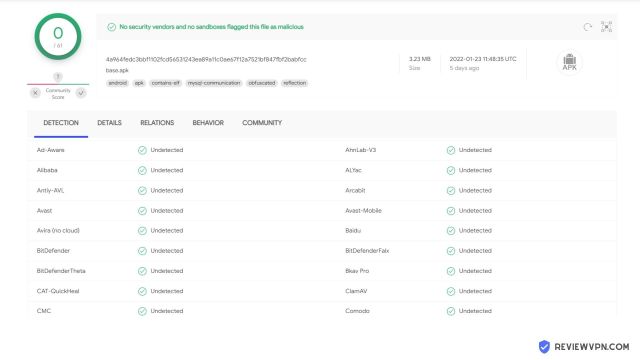
Is Fire Porn Safe and Virus-free?

We tested this app using VirusTotal and found no threats or any malicious files and malware.

Despite having good results, we still need to be vigilant in protecting our privacy while streaming.

A Virtual Private Network or VPN will definitely help us maintain our security and anonymity while using Fire Porn.

Here’s how you can Install The Best VPN For Firestick and All Devices.


Install Fire Porn on Firesticks with Screenshots

If your Firestick still has the older interface, read this article to learn how to update it: Update Firestick Interface.

1.  Install the Downloader app and jailbreak your firestick by enabling unknown sources. To learn more about the procedure, you may read How to Install the Downloader App and Enable Unknown Sources.


2.  Open Downloader.  Type in https://reviewvpn.com/fire and select Go.

fire porn1


3. Select INSTALL.

Step 13 Install Fire Porn on Firestick


4. Select OPEN. There you go, Fire Porn is installed!

Step 14 Install Fire Porn on Firestick


YOUR INTERNET ACTIVITY IS BEING WATCHED

ReviewVPN cannot attest to the legality, security and privacy of the applications discussed on this site. It is highly recommended that you use a VPN service while streaming or using Kodi.

Currently, your IP 216.73.216.208 is visible to everyone and your Browser is being tracked by Advertisers & ISP Provider.

Save 65% Now

Limited Time Offer

Here are the main reasons why you must use a VPN:

  • Your activities are hidden from your ISP, the government, and from the apps you are using.
  • You can access additional movies and TV streams.
  • ISP attempts to throttle are thrwarted thus reducing buffering issues.
  • Geographically restricted content like Netflix and Hulu can be unblocked.

A VPN works be replacing your ISP-assigned IP address and creating an encrypted tunnel. We recommend the no log service offered by IPVanish. It works well on a Firestick and offers the fastest possible speeds.

Special Limited Time Offer - Get IPVanish


Legal Disclaimer: ReviewVPN.com does not encourage or endorse any illegal activity involved in the usage of services and applications referenced on this site. We do not verify the licensing agreements of services. The end-user is wholly responsible for ensuring that any media accessed through these services does not violate copyright and/or licensing laws. ReviewVPN does not promote, link to, or receive compensation from any Apps and IPTV services.


Install Surfshark on Firestick

Best Surfshark Deal


Is It Any Good?

Fire Porn is a third-party adult streaming app that provides more than 2000 videos on its main page alone. You can also search for specific content that you have a penchant for. You do not have to worry about running out of things to watch because there are plenty. This article will provide you with all the information you need regarding the app and most especially how to install Fireporn on Firestick and android devices.


Fire Porn Features

Interface

        You can adjust the video orientation to portrait or landscape.

        You can choose the video size.

        When you look at the upper left corner of the screen you will see the hamburger menu. While upper right corner contains the refresh button, exit button, and search button.


Content

You can search for specific video categories like lesbian, gay, hentai, and many more. It could have been better if it featured categories but nonetheless, it still works.


Hamburger Menu

  • Report an issue

        You can use this function to report any type of error you encounter during the run of the app.

  • Donate

        A lot of free adult streaming apps generate income by featuring ads and this is quite annoying. Donating any amount will help the developers improve the app.

  • Telegram Channel

        This area will help you stay updated with the latest news regarding Fire Porn.

  • Privacy Policy
  • Request for Content Removal

        You can use this feature if you are a video owner and your video is illegally posted on the site.

  • Share with Friends
  • App Version


Pros and Cons  

Pros

  •     High video quality 720p and 1080p
  •     Fast loading time and playback


Cons

  •     No categories and subcategories

        This makes the app look like it does not have anything more than it shows even though it has more to offer.

  •     No Download Feature

        You cannot watch videos offline.

  •     No Favorites Feature

        You cannot tag or bookmark videos that you really like.


Should I use a VPN?

https://get.surfshark.net/aff_c?offer_id=865&aff_id=12312

Watching porn without a premium VPN service like Surfshark will prove to be troublesome. Not only your online activity will be exposed but you are also susceptible to throttling which is not good for your overall viewing experience. You can avoid all of these by subscribing to a VPN service.

Note: For more information about Surfshark, please read our Surfshark Review.


Grab your subscription now!


How to Install Surfshark VPN on Firestick

You can download Surfshark directly from the Amazon App store. It will be easy for you to find Surfshark with your Firestick’s Find feature. Refer to our screenshots below.

1. Go to the Home screen of your Firestick.

step 1 Install Surfshark VPN on Firestick


2. Navigate towards the Find tab. Press the Search button from the resulting dropdown.

step 2 Install Surfshark VPN on Firestick


3. Type in the keyword of SurfShark and select from the suggestions that will appear.

step 3 Install Surfshark VPN on Firestick


4. Click the official SurfShark icon from your search results.

step 4 Install Surfshark VPN on Firestick


5. Press the Download (You own it) button.

step 5 Install Surfshark VPN on Firestick


6. The SurfShark VPN installer will download on your device.

step 6 Install Surfshark VPN on Firestick


7. SurfShark VPN’s app will automatically install itself on your Fire TV stick.

step 7 Install Surfshark VPN on Firestick


8. Press the Open button after completing SurfShark VPN’s installation process.

step 8 Install Surfshark VPN on Firestick


9. Please wait for the SurfShark VPN to load its user interface.

step 9 Install Surfshark VPN on Firestick


10. You can now log in with your SurfShark VPN account credentials.

step 10 Install Surfshark VPN on Firestick

Learn more about Surfshark and Grab the Best Surfshark Deal Now!


Install Surfshark on Firestick

Best Surfshark Deal


Other VPNs to Consider

NordVPN (Best for Streaming)

Best Features

  • 5000+ Server in 50+ Countries 
  • Military-Grade Encryption
  • Fast Connection Speed
  • Suitable to a lot of devices
  • No-Log Policy

Prices
  • Complete $5.89 per month (64% Discount)
  • Plus $4.59 per month (56% Discount)
  • Standard $3.69 per month (55% Discount)

Best Features

  • 750+ High-speed VPN Servers in 43 Locations
  • Military-Grade Encryption
  • Fastest HD Streaming and Gaming
  • 30-Day Money-Back Guarantee
  • Unlimited Data & Devices
  • No-Log Policy

Prices
  • 3 Years $1.99 per month (82% Discount)
  • 1 Years $3.29 per month (70% Discount)
  • 1 Month $10.99 per month

IPVanish VPN (Most Secure)

Best Features

  • 1200+ Servers in 60+ Countries around the world
  • Unlimited Connections
  • No-Log Policy
  • Top Notch Military-Grade VPN Protocols and Encryptions
  • 100% Safe and Secured
  • Most Trusted VPN
  • Best VPN for Firestick
  • 30-Day Money-Back Guarantee

Prices
  • Yearly $3.99 per month (63% Discount) – 30 days risk free + Ransomware & Malware Protection
  • Quarterly $5.32 per month (51% Discount)
  • Monthly $10.99 per month


For more VPN discounts, go to ReviewVPN Deals and purchase the best VPN for you.

Click here to get the lowest price on Surfshark through our exclusive limited-time offer.


FAQ 

Is it safe to download?

You can rest assured that Fire Porn is safe to install on Firestick and Android devices. 


Is it legal or grey?

It is 100% safe to download and use. 


Is it free?

Yes, Fire Porn is free with no hidden charges whatsoever. 


Are there ADS?

You will be pleased to know that you will not need Ad Guard when using Fire Porn because it has no ads. 


Is there a premium version?

Fire Porn has no premium version. Everything you will watch is absolutely free of charge. 


Is it a Terrarium Clone?

Fire Porn is not a terrarium clone. 


Is there an official website?

There is no official website.


What other devices does it work on?

Fire Porn will work smoothly on devices that run on Android OS and other similar platforms. 


How does the app work?

Follow the steps by the letter and you will see how quick and easy it is to use Fire Porn. 


Minimum Version Required

Version 5.0 and above is required. 


How long has it been around?

This is purely speculation, we believe it has been around for one to two years now.


Alternatives

You can try out these other adult streaming apps in case Fire Porn has issues.

        Porn Hub APK

        Jizztagram

        Booblex

        XVideos

       Streamio

Note: Please read our How to Watch Porn using a Firestick to get the latest updates on adult streaming apps.


Our Opinion

Fire Porn is not without flaws. Having no specific category list makes the app look like it does not contain a lot of content but, it does. You can watch specific content like Gay Porn, Lesbian Porn, Hentai Porn, and many more. You can use the search button for that. The lack of downloadable content also seems like a minor setback. If you don’t mind these, you can follow our guide on how to install Fire Porn on Firestick and Android devices, and see what the app is all about.


Final Thoughts

We hope this write-up helps you in installing Fire Porn on Firestick and android devices. Thanks! Be Safe!

Note: ReviewVPN.com does not own or operate any app nor does it endorse any. The main purpose of this article is strictly for educational purposes only.

How to Install Porn.Com on Firestick

Porn.Com on Firestick

In this article, we will be divulging important details on how to install Porn.Com app on Firestick and other devices that run on the android platform.


Over the years, adult content has diversified into many subcategories. This is due to the ever-changing tastes of people and the insatiable desire to watch something exciting that can be applied in the bedroom. In this article, we will be assisting you on how to install Porn.Com on Firestick and android devices.


How to Install Porn.Com on Android

To download and install Porn.Com APK on your Android device, just click on this link.


ANONYMOUSLY

Is Porn.Com App Safe and Virus-free?

We tested this app using VirusTotal and found no threats or any malicious files and malware.

Despite having good results, we still need to be vigilant in protecting our privacy while streaming.

A Virtual Private Network or VPN will definitely help us maintain our security and anonymity while using Porn.Com App.

Here’s how you can Install The Best VPN For Firestick and All Devices.


Installation Guide on A Firestick

  1. Go to Settings and select Device
  2. Choose Developer Options
  3. Turn on the ADB Debugging and Apps From Unknown Sources
  4. After turning these options on, launch the Amazon App Store on your device
  5. Search and Download Downloader
  6. Install Downloader and launch it after installing it
  7. Choose Allow and Select Ok
  8. Type in https://reviewvpn.com/por and select Go
  9. Wait for it to finish and then select Porn.Com
  10. Select Done
  11. This will automatically take you back to Downloader. Select Delete
  12. Choose Delete one more time
  13. Head back to the home screen and under the Your Apps & Channels select Choose All
  14. Scroll down and select Porn.Com and select the Options.
  15. Then select Move to Front
  16. Porn.Com will be moved forward to Your Apps and Channels
  17. After this, you will see Porn.Com and click it to launch. 


If your Firestick still has the older interface, read this article to learn how to update it: Update Firestick Interface.

Install Porn.Com on Firesticks with Screenshots

1.   Install the Downloader app and jailbreak your firestick by enabling unknown sources. To learn more about the procedure, you may read How to Install the Downloader App and Enable Unknown Sources.


2. Open Downloader. Type in https://reviewvpn.com/por and select Go.

Porn.Com 1


3. Select INSTALL.

Step 13 Install Porn.Com on Firestick


4. Select OPEN. There you go, the Porn.com is installed!

Step 14 Install Porn.Com on Firestick


YOUR INTERNET ACTIVITY IS BEING WATCHED

ReviewVPN cannot attest to the legality, security and privacy of the applications discussed on this site. It is highly recommended that you use a VPN service while streaming or using Kodi.

Currently, your IP 216.73.216.208 is visible to everyone and your Browser is being tracked by Advertisers & ISP Provider.

Save 65% Now

Limited Time Offer

Here are the main reasons why you must use a VPN:

  • Your activities are hidden from your ISP, the government, and from the apps you are using.
  • You can access additional movies and TV streams.
  • ISP attempts to throttle are thrwarted thus reducing buffering issues.
  • Geographically restricted content like Netflix and Hulu can be unblocked.

A VPN works be replacing your ISP-assigned IP address and creating an encrypted tunnel. We recommend the no log service offered by IPVanish. It works well on a Firestick and offers the fastest possible speeds.

Special Limited Time Offer - Get IPVanish


Legal Disclaimer: ReviewVPN.com does not encourage or endorse any illegal activity involved in the usage of services and applications referenced on this site. We do not verify the licensing agreements of services. The end-user is wholly responsible for ensuring that any media accessed through these services does not violate copyright and/or licensing laws. ReviewVPN does not promote, link to, or receive compensation from any Apps and IPTV services.


Install Surfshark on Firestick

Best Surfshark Deal


Is It Any Good?

Porn.Com, like any other third-party adult app, delivers a huge array of content to choose from. At first, it will look like it is geared more towards straight men and women but upon further inspection, we have proven that it is also friendly to the rainbow flag. This makes it more interesting because anyone can use the app to watch porn.


Porn.Com Features

Main Menu Interface

  1. Hamburger Menu
  2. Featured Videos
  3. Search Button
  4. Three Horizontal Lines – You can filter the content into Featured, Newest, Popular, Most Viewed, and Longest


Hamburger Menu

  1. Home
  2. Categories – shows you the full category list with thumbnails.
  3. Channels – a huge collection of channels featured within the app.
  4. Favorites – this allows you to bookmark videos you like.
  5. Downloads – allows you to save videos you like by downloading them to your device.
  6. Settings – In this part, you can set a pin code so that it will be inaccessible to others. Choose a default category so that the video that will appear are according to your liking. You can set the autoplay button and change the name of the app so that it will appear discreet to others.
  7. Share this App
  8. About
  9. Log Out


Featured Channels

  •   Teen Thais, Lethal Pass, Mountain Fuck Fest, Jaw Dropping Asses, Rap Video Auditions, Sapphic Secrets, Harmony Vision, Brazzers, Devil’s Film, Teeny Black, Chick Pass Network, Nubile Films, Barefoot and Pregnant, Racy Angel, Teens Love Anal, TUSHY, Mature NL, Exploited Teens Asia, NF Busty, First Class POV, Sodomie a Repetition, Tough Love X,  PORNBCN, Mixed X, JAV Hub, Interracial Lust, Only3X Network, Slim4k, Crygasm, Candid Pornstar, Amateur Canada, Want Wow, Team Skeet, Cum Louder, La Francea Poll, Lethal Interracial, Lethal Cougars, Fuck My Mommy and Me, Huge Cock Gloryholes. Gloryhole Admissions, Cougars Crave Kittens, Couples Bang The babysitter, Service Whores, Pornstar Tryouts, Lesbo trick, MILFs Exposed, Whale Tail’n, I am Eighteen, Tight Holes Big Poles, Real Teens Kissing, Sexy Cougars, Big Tits like Big Dicks, Bang A Midget, Bang My Stepmom, Schoolgirl Internal, Not SO Innocent Teens, Exploited 18, Next Door Mommies, Vintage Smut, Czech Casting, Jav HD, PORN.COM Live, DA GFs, Real Black Exposed, and many more.


Notable Categories

  •   60 Fps, Amateur, Anal Beads, Anal Creampie, Anal Fisting, Anal Gape, Anal Masturbation, Anal Sex, Anal Toys, Anime, Arab, Asian, Ass Fingering, Ass Licking, Ass Spreading, Ass To Mouth, BBW, Babysitter, Ball Licking, Beach, Bisexual, Big Ass, Big Cock, Big Tits, Black, Black Male, Blindfold, Blonde, Blowjob, Bondage, Boob Licking, Brazilian, British, Brunette, Bukkake, Butt Plug, CFNM, Camel Toe, Celebrity, Chubby, College, Compilation, Cougar, Couples, Cowgirl, Creampie, Cum In Mouth, Cum On Face, Cum Swap, Cum On Pussy, Cum On Tits, Cumshot, Dildo, Doggy Style, Double Blowjob, Double Ended Dildo, Double Penetration, Eating Pussy, FFM, Face Sitting, Family Roleplay, Feet Licking, Fishnet Stockings, Food, Footjob, French, Gag, Gangbang, Gay, German, Gloryhole, Granny, Group Sex, HD, Hairy Pussy, Handcuffs, Handjob, Hardcore, Homemade, Indian, Interracial, Italian, Japanese, Kissing, Korean, Lactating, Latex, Latin, Lesbian, Lesbian Scissoring, Licking, MILF, Massage, Masturbation, Mature, Midget, Missionary, Nurse, Oil/Lotion, POV, Party, Pilediver, Police, Pregnant, Publich Flashing, Pussy Fingering, Pussy Fisting, Redhead, Reverse Cowgirl, Russian, School Uniform, Sex Machine, Sex Toys, Shaved Pussy, Shaving, Sixty-Nine, Small Dick, Small Tits, Smoking, Solo, Spanking, Spread Pussy, Spreadeagle, Squirting, Strap On, Swedish, Teen, Thai, Threesomes, Throat Fuck, Titty Fuck, Transgender, Turkish, Upskirt, VR, Vintage, Voyeur, Webcam, White Panties


Pros and Cons  

Pros

  1.     High Frame Rate – Porn.Com features videos with excellent quality because of its 60 fps category. When you select this category, you are assured of high-definition videos where you can see every inch if you know what we mean.
  2.     4k Videos – If you have an Ultra HD TV Set, this feature will stand out. The viewing experience is taken to the next level.
  3.     Downloadable Content – this has been the trend for the best adult apps. Downloadable content means you can watch porn offline.
  4.     Security Protocol – You can set a pin to restrict access to the app. Only you can open the app and no one else.
  5.     Covert App Name – You can set another name for the app which will make it appear decent. You have the option of setting the name to PDot. Coupled with a pin, this feature will assure you that no one else will meddle with your private business. 

Cons

  1.     The 60 fps videos take longer to load.
  2.     Some of the HD video links are either broken or not working.
  3.     There seems to be a mix up when choosing a specific category. Videos are inserted that do not fit the category.


Should I Use a VPN?

Porn.Com is one of the few adult streaming apps that offer 4k content. Whenever you access this feature, a lot of data is consumed. Your ISP will notice this and will act. It will surely throttle your connection thus resulting in buffering and lags. To prevent this, you will need the perks of having a premium VPN service like Surfshark. It will block the attempts of your ISP to slow down your connection. What it does is hide your online activity, meaning, it (the ISP) will not realize what the data is being used for. It will only see the amount of data being used and nothing further.

Note: For more information about Surfshark, please read our Surfshark Review.


Grab your subscription now!

Click here to get the lowest price on Surfshark through our exclusive limited-time offer.


How to Install Surfshark VPN on Firestick

If your Firestick still has the older interface, read this article to learn how to update it: Update Firestick Interface.

Follow our screenshots below to install the SurfShark VPN app on your Fire TV stick.

1. Go to the Home screen of your Firestick.

step 1 Install Surfshark VPN on Firestick


2. Navigate towards the Find tab. Press the Search button from the resulting dropdown.

step 2 Install Surfshark VPN on Firestick


3. Type in the keyword of SurfShark and select from the suggestions that will appear.

step 3 Install Surfshark VPN on Firestick


4. Click the official SurfShark icon from your search results.

step 4 Install Surfshark VPN on Firestick


5. Press the Download (You own it) button.

step 5 Install Surfshark VPN on Firestick


6. The SurfShark VPN installer will download on your device.

step 6 Install Surfshark VPN on Firestick


7. SurfShark VPN’s app will automatically install itself on your Fire TV stick.

step 7 Install Surfshark VPN on Firestick


8. Press the Open button after completing SurfShark VPN’s installation process.

step 8 Install Surfshark VPN on Firestick


9. Please wait for the SurfShark VPN to load its user interface.

step 9 Install Surfshark VPN on Firestick


10. You can now log in with your SurfShark VPN account credentials.

step 10 Install Surfshark VPN on Firestick

Learn more about Surfshark and Grab the Best Surfshark Deal Now!


Install Surfshark on Firestick

Best Surfshark Deal


Other VPNs to Consider

NordVPN (Best for Streaming)

Best Features

  • 5000+ Server in 50+ Countries 
  • Military-Grade Encryption
  • Fast Connection Speed
  • Suitable to a lot of devices
  • No-Log Policy

Prices
  • Complete $5.89 per month (64% Discount)
  • Plus $4.59 per month (56% Discount)
  • Standard $3.69 per month (55% Discount)

Best Features

  • 750+ High-speed VPN Servers in 43 Locations
  • Military-Grade Encryption
  • Fastest HD Streaming and Gaming
  • 30-Day Money-Back Guarantee
  • Unlimited Data & Devices
  • No-Log Policy

Prices
  • 3 Years $1.99 per month (82% Discount)
  • 1 Years $3.29 per month (70% Discount)
  • 1 Month $10.99 per month

IPVanish VPN (Most Secure)

Best Features

  • 1200+ Servers in 60+ Countries around the world
  • Unlimited Connections
  • No-Log Policy
  • Top Notch Military-Grade VPN Protocols and Encryptions
  • 100% Safe and Secured
  • Most Trusted VPN
  • Best VPN for Firestick
  • 30-Day Money-Back Guarantee

Prices
  • Yearly $3.99 per month (63% Discount) – 30 days risk free + Ransomware & Malware Protection
  • Quarterly $5.32 per month (51% Discount)
  • Monthly $10.99 per month


For more VPN discounts, go to ReviewVPN Deals and purchase the best VPN for you.

Click here to get the lowest price on Surfshark through our exclusive limited-time offer.


FAQ 

Is it safe to download?

We assure you that Porn.Com is safe to download and install on Firestick and Android devices. 


Is it legal or grey?

It is 100% safe to download and use. 


Is it free?

Porn.Com is absolutely free of charge. You do not have to worry about paying for anything to access high-quality adult content. 


Are there ADS?

Ad Blockers like Ad Guard are not needed when using this app. 


Is there a premium version?

With Porn.Com, you can enjoy high-quality content without the need to pay a hefty premium. 


Is it a Terrarium Clone?

Porn.Com is not a terrarium clone.


Is there an official website?

Yes, there is an official website. Open your browser and type in “Porn.Com Apk” and the first result will lead you to the official website.


What other devices does it work on?

Other than the Firestick, Porn.Com will perfectly run on Android-powered devices.


How does the app work?

For Android users, just click on this link. For Firestick users, follow the installation guide we have provided above on how to install Porn.Com on Firestick. Following these will let you know how Porn.com works. It is straightforward and does not require any other steps, unlike other adult streaming apps.


Minimum Version Required

Version 5.0 and above is required.


How long has it been around?

This Porn.Com mobile version has been around since 2019. It is relatively new, but do not, for a second, let that fool you. It is as formidable as the top-ranking adult apps we have today.


Alternatives

As far as 4k content I concerned, we have tested and ran the following apps:

        Porn Hub APK

        Jizztagram

        Booblex

        XVideos 

Note: If you wish to learn more about How to Watch Porn using a Firestick click on the blue-colored text.


Our Opinion

Some porn apps will attract you by claiming it offers 4k/60 fps content. Well, those claims are either fake or baseless. We have tested and ran Porn.Com and saw its incredible potential in giving life to your Ultra HD TV. Just follow the guide we have provided above on how to install Porn.Com on Firestick and Android devices and witness for yourself what we are talking about.


Final Thoughts

Please give us some feedback if this article has helped you with how to install Porn.Com on Firestick and Android devices. Your input matters and would be highly appreciated. Thank you for reading and please, stay safe.

Note: ReviewVPN.com does not own or operate any app nor does it endorse any. The main purpose of this article is strictly for educational purposes only.

How to Install Jizz Planet on Firestick

Overview

In this article, we will show you how to install the JizzPlanet app on your Fire TV stick.

As many portable devices appear on the market, we can now watch adult content anytime. Some of the apps are even for free! Do you want an app that provides adult content anywhere you are? The porn industry continues to make a variety of adult content that will make you Jizz!


Kidding aside, there are indeed a lot of adult streaming apps. We understand that sometimes, it is confusing which app to choose. In case you are in a cloud of confusion, we are here to help you clear the air. You need not worry since we will now suggest an app that has quality adult content.

Plus, the app now has a new version. Here at ReviewVPN, we always ensure to give you honest reviews and the best apps for any purpose. Now, we like to introduce you to the JizzPlanet app. Let us now teach you how to install JizzPlanet on Firestick.


ANONYMOUSLY


Download JizzPlanet for Android Devices


JizzPlanet

Note: ReviewVPN.com does not host this APK file. It is hosted by Archive.org


How to Install the JizzPlanet app on your Fire TV Stick

The JizzPlanet app is your one-stop app for getting adult content. To install the JizzPlanet app, you first have to Jailbreak your Fire TV stick and sideload the app

  1. Open your Firestick Settings Tab. (Gear Wheel Icon).
  2. Scroll down and to the right until you get to My Fire TV. Click on it.
  3. Select Developer options.
  4. Turn on ADB debugging and Apps from Unknown Sources.
  5. Press the Turn On when the pop-up appears.
  6. Click Home and press on FIND.
  7. Press the Search button from the dropdown.
  8. You can either say Downloader to your Alexa voice-enabled remote or start typing it. If you typed it, click on the suggestion when it appears.
  9. Click on the Downloader Icon.
  10. Tap on Download.
  11. Click on Open.
  12. Press on the Allow button.
  13. You can now use the Downloader app.
  14. Type in: reviewvpn.com/jizzp and tap the Go button.
  15. The JizzPlanet app will download on your device.
  16. Press the Install button.
  17. The JizzPlanet app will install on your device.
  18. Press the Open button to launch the JizzPlanet app.
  19. Wait for the JizzPlanet app to load its user interface.
  20. You can now use JizzPlanet’s app search bar for typing in adult content keywords.


How to Install the JizzPlanet App on Fire TV Stick with Screenshots

Below are screenshots you can follow to successfully install the JizzPlanet app on your Fire TV stick. We suggest installing the Downloader app before doing these steps.

1. Open your Firestick Settings Tab. (Gear Wheel Icon).

Install the JizzPlanet App on Fire TV Stick Step 1


2. Scroll down and to the right until you get to My Fire TV. Click on it.

Install the JizzPlanet App on Fire TV Stick Step 2


3. Select Developer options.

Install the JizzPlanet App on Fire TV Stick Step 3


4. Turn on ADB debugging and Apps from Unknown Sources.

Install the JizzPlanet App on Fire TV Stick Step 4


5. Press the Turn On when the pop-up appears.

Install the JizzPlanet App on Fire TV Stick Step 5


6. Click Home and press on FIND.

Install the JizzPlanet App on Fire TV Stick Step 6


7. Press the Search button from the dropdown.

Install the JizzPlanet App on Fire TV Stick Step 7


8. You can either say Downloader to your Alexa voice-enabled remote or start typing it. If you typed it, click on the suggestion when it appears.

Install the JizzPlanet App on Fire TV Stick Step 8


9. Click on the Downloader Icon.

Install the JizzPlanet App on Fire TV Stick Step 9


10. Tap on Download.

Install the JizzPlanet App on Fire TV Stick Step 10


Install the JizzPlanet App on Fire TV Stick Step 10


11. Click on Open.

Install the JizzPlanet App on Fire TV Stick Step 11


12. Press on the Allow button.

Install the JizzPlanet App on Fire TV Stick Step 12


13. You can now use the Downloader app.

Install the JizzPlanet App on Fire TV Stick Step 13


14. Type in: reviewvpn.com/jizzp and tap the Go button.

Install the JizzPlanet App on Fire TV Stick Step 14


15. The JizzPlanet app will download on your device.

Install the JizzPlanet App on Fire TV Stick Step 15


16. Press the Install button.

Install the JizzPlanet App on Fire TV Stick Step 16


17. The JizzPlanet app will install on your device.

Install the JizzPlanet App on Fire TV Stick Step 17


18. Press the Open button to launch the JizzPlanet app.

Install the JizzPlanet App on Fire TV Stick Step 18


19. Wait for the JizzPlanet app to load its user interface.

Install the JizzPlanet App on Fire TV Stick Step 19


20. You can now use JizzPlanet’s app search bar for typing in adult content keywords.

Install the JizzPlanet App on Fire TV Stick Step 19


Grab your subscription now!

Click here to get the lowest price on Surfshark through our exclusive limited-time offer.


Features of the JizzPlanet App

  • 100% Free
  • Diverse Adult Video Content Categories
  • Plays adult videos in different resolutions
  • Built-in search engine
  • Provides a link for downloading videos
  • Displays all available videos as clickable tiles


Technical Specifications of the JizzPlanet App

Let us now share with you the technical specifications of the JizzPlanet app. It will help you determine if the app is compatible with your present Android smartphone version.

JizzPlanet


YOUR INTERNET ACTIVITY IS BEING WATCHED

ReviewVPN cannot attest to the legality, security and privacy of the applications discussed on this site. It is highly recommended that you use a VPN service while streaming or using Kodi.

Currently, your IP 216.73.216.208 is visible to everyone and your Browser is being tracked by Advertisers & ISP Provider.

Save 65% Now

Limited Time Offer

Here are the main reasons why you must use a VPN:

  • Your activities are hidden from your ISP, the government, and from the apps you are using.
  • You can access additional movies and TV streams.
  • ISP attempts to throttle are thrwarted thus reducing buffering issues.
  • Geographically restricted content like Netflix and Hulu can be unblocked.

A VPN works be replacing your ISP-assigned IP address and creating an encrypted tunnel. We recommend the no log service offered by IPVanish. It works well on a Firestick and offers the fastest possible speeds.

Special Limited Time Offer - Get IPVanish


The Interface of the JizzPlanet App

  • Home Page Menu
  • Search Engine style interface similar to the Google web browser
  • Easily find adult content categories by typing in keywords
  • Simple User Interface
  • Dark Gray background which is perfect for Night viewing


Adult Content Categories of the JizzPlanet App

  • 4k Porn
  •  Amateur
  • Anal
  • Big Tits
  • Blonde
  • Fetish
  •  Fist
  • Gaping
  • HD
  • Japanese
  • Lesbian
  • Redhead
  • Sex Dolls
  • Squirt
  • Teens
  • Webcams


Porn Website Categories

  • 3Movs
  • Adult Clip
  • 4Tube
  • Analdin
  • Anysex
  • alotporn
  • Befuck
  • Boobs and Tits
  • Bravo Tube
  • Cum Louder
  • Dr. Tuber
  • Daftporn
  • Empflix
  • Eporner
  • Free Ones
  • GFs Videos
  • Huge 6
  • Hell Porno
  • Yuvutu
  • Lets Jerk
  • Trending


Pros and Cons

Pros

  • 100% Free
  • The JizzPlanet app works like a repository of adult content
  • A wide library of porn videos
  • Select from its vast collection of porn categories
  • Provides you links to its affiliated porn sites
  • High video quality 720p and 1080p
  • Fast loading time and playback
  • Downloadable Content


Cons

  • The website’s app downloader is malfunctioning.
  • Thousands of video tags should be included in the video categories.
  • It has a lot of ads. (Ad Guard helps in blocking the ads. Once you block these ads, it would mess up the appearance of the background. It is distracting and will probably be a huge turn-off for others.)


Install Surfshark on Firestick

Best Surfshark Deal


Should I Use a VPN while Streaming Adult Content?

It is best to use a premium VPN service like Surfshark when watching adult content.

You see, your ISP is like a hawk searching and monitoring your every move. Streaming porn requires a huge amount of data especially if you are viewing high-quality videos.

This is a cause for alarm and will be quickly marked by your ISP. This will result in what we call throttling. Your speed will slow down thus creating buffers and lags. You can prevent this from happening by having a subscription to a VPN service. It will thwart the attempts of your ISP to scramble your connection.

Note: Our Surfshark Review will give you a deeper insight into why a VPN service is needed not only when accessing porn but also watching free content online.


How to Install Surfshark VPN on Firestick

If your Firestick still has the older interface, read this article to learn how to update it: Update Firestick Interface.

1. Go to the Home screen of your Firestick.

step 1 Install Surfshark VPN on Firestick


2. Navigate towards the Find tab. Press the Search button from the resulting dropdown.

step 2 Install Surfshark VPN on Firestick


3. Type in the keyword of Surfshark and select from the suggestions that will appear.

step 3 Install Surfshark VPN on Firestick


4. Click the official Surfshark icon from your search results.

step 4 Install Surfshark VPN on Firestick


5. Press the Download (You own it) button.

step 5 Install Surfshark VPN on Firestick


6. The Surfshark VPN installer will download on your device.

step 6 Install Surfshark VPN on Firestick


7. Surfshark VPN’s app will automatically install itself on your Fire TV stick.

step 7 Install Surfshark VPN on Firestick


8. Press the Open button after completing Surfshark VPN’s installation process.

step 8 Install Surfshark VPN on Firestick


9. Please wait for the Surfshark VPN to load its user interface.

step 9 Install Surfshark VPN on Firestick


10. You can now log in with your Surfshark VPN account credentials.

step 10 Install Surfshark VPN on Firestick

Learn more about Surfshark and Grab the Best Surfshark Deal Now!


Install Surfshark on Firestick

Best Surfshark Deal


Other VPNs to Consider

NordVPN (Best for Streaming)

Best Features

  • 5000+ Server in 50+ Countries 
  • Military-Grade Encryption
  • Fast Connection Speed
  • Suitable to a lot of devices
  • No-Log Policy

Prices
  • Complete $5.89 per month (64% Discount)
  • Plus $4.59 per month (56% Discount)
  • Standard $3.69 per month (55% Discount)

Best Features

  • 750+ High-speed VPN Servers in 43 Locations
  • Military-Grade Encryption
  • Fastest HD Streaming and Gaming
  • 30-Day Money-Back Guarantee
  • Unlimited Data & Devices
  • No-Log Policy

Prices
  • 3 Years $1.99 per month (82% Discount)
  • 1 Years $3.29 per month (70% Discount)
  • 1 Month $10.99 per month

IPVanish VPN (Most Secure)

Best Features

  • 1200+ Servers in 60+ Countries around the world
  • Unlimited Connections
  • No-Log Policy
  • Top Notch Military-Grade VPN Protocols and Encryptions
  • 100% Safe and Secured
  • Most Trusted VPN
  • Best VPN for Firestick
  • 30-Day Money-Back Guarantee

Prices
  • Yearly $3.99 per month (63% Discount) – 30 days risk free + Ransomware & Malware Protection
  • Quarterly $5.32 per month (51% Discount)
  • Monthly $10.99 per month


For more VPN discounts, go to ReviewVPN Deals and purchase the best VPN for you.

Click here to get the lowest price on Surfshark through our exclusive limited-time offer.


Alternative Apps for JizzPlanet

The following apps are good backups when Jizz Planet malfunctions. We can attest to their usefulness and capability. Here they are:

Note: How to Watch Porn using a Firestick is our ultimate guide on streaming adult content using a Firestick. Give it a quick peek and learn more.


FAQs

 Is it safe to download?

Jizz Planet is safe to download and install on Firestick and Android devices.


Is it legal or grey?

It is 100% safe to download and use.


Is it free?

Yes, Jizz Planet is free with no extra charges whatsoever.


Are there ADS?

AdGuard can be used to block all the ads surrounding the app. These ads are quite annoying because they are everywhere. There are banners and pop-ups ads embedded in the background. You just must bear with its appearance once you use Ad Guard. But if you are not particular about that, you are all good. 


How long has it been around?

Jizz Planet has been around since 2017.


Is there a premium version?

The JizzPlanet app has no premium version. You can access large amounts of adult content without paying for anything.


Is there an official website?

Yes. JizzPlanet also has a website for viewing on your web browser.


What other devices does it work on?

Any device that runs on Android and other supported platforms.


Conclusion

We have tested some of the biggest porn apps around. The JizzPlanet app also contains adult content you might enjoy. Noticing some issues, we’ve included them in this article’s cons section. We hope that the creators of the app will immediately resolve these issues.

We do not have complaints about the content, just the way the app is designed. If its design doesn’t bother you, follow our guide on how to install the JizzPlanet app on Firestick.

We hope this article helps you install the JizzPlanet app on your Fire TV stick.

How To Have a Faster Firestick – Clean Master Review

Clean Master on Firestick Overview

A lot of people tend to forget that our devices also need routine check-ups and maintenance. We do this in order to keep the performance of our devices smoothly. You can put it this way, think of your device like it is an automobile.


A car needs to be checked after a certain mileage, and it usually needs to change the oil. The same goes for your device because over time, it accumulates temporary files/data and cache and if you fill up your device’s capacity to its limit, the result will be detrimental to your device.

We would like to introduce to you an app that not only cleans your device but also protects it from threats and affords you privacy and that app is no other than Clean Master. In this article, we will feature the main selling points of this app and how it is going to help you in maintaining your device.


ANONYMOUSLY

Is Clean Master Safe and Virus-free?

We tested this app using VirusTotal and found no threats or any malicious files and malware.

Despite having good results, we still need to be vigilant in protecting our privacy while streaming.

A Virtual Private Network or VPN will definitely help us maintain our security and anonymity while using Clean Master.

Here’s how you can Install The Best VPN For Firestick and All Devices.


Download Clean Master Virus Cleaner on Firestick


clean master button


Note: ReviewVPN.com does not host this APK file. It is hosted on Archive.org.


Is Clean Master Any Good?

Clean Master is an all-in-one app that cleans your device, protects you from malware and viruses, and gives you privacy and protection from peeping eyes that will attempt to view your device without your consent.


Installation Guide on a Firestick

  1.  On the home screen, go to “Settings”.
  2.  Select My Fire TV.
  3.  Select Developer Options.
  4.  Open Apps from Unknown Sources.
  5.  Click Turn On.
  6.  Head back to the home screen and select “Search”.
  7.  Search Downloader and click “Downloader”. It will appear under the keyboard.
  8.  Choose the “Downloader app”.
  9.  Download it.
  10.  Choose Open.
  11.  Select Allow.
  12.  Choose OK.
  13.  Type in https://reviewvpn.com/cm and select Go.
  14.  Wait for it to finish.
  15.  Install Clean Master.
  16.  Select Done.
  17.  This will automatically take you back to Downloader. Select Delete.
  18.  Choose Delete Again.
  19.  Head back to the home screen and under the “Your Apps & Channels” choose See All.
  20.  Scroll down and choose Clean Master and select the “Options”. Then select “Move to front”.
  21.  Clean Master will be moved forward to “Your Apps and Channels”.
  22.  Open Clean Master.
  23.  There, you can now run the app.


If your Firestick still has the older interface, read this article to learn how to update it: Update Firestick Interface.


Install Clean Master on Firesticks with Screenshots

1. Install the Downloader app and jailbreak your firestick by enabling unknown sources. To learn more about the procedure, you may read How to Install the Downloader App and Enable Unknown Sources.


2. Open Downloader App. Type https://reviewvpn.com/cm and click Go.

Install Clean Master


3. Select INSTALL.

Step 13 Install Clean Master on a Firestick


4. Select OPEN.

Step 14 Install Clean Master on a Firestick


5. There you go, the Clean Master is installed!

Step 15 Install Clean Master on a Firestick


Install SurfShark on Firestick

Best SurfShark Deal


Legal Disclaimer: ReviewVPN.com does not encourage or endorse any illegal activity involved in the usage of services and applications referenced on this site. We do not verify the licensing agreements of services. The end-user is wholly responsible for ensuring that any media accessed through these services does not violate copyright and/or licensing laws. ReviewVPN does not promote, link to, or receive compensation from any Apps and IPTV services.


YOUR INTERNET ACTIVITY IS BEING WATCHED

ReviewVPN cannot attest to the legality, security and privacy of the applications discussed on this site. It is highly recommended that you use a VPN service while streaming or using Kodi.

Currently, your IP 216.73.216.208 is visible to everyone and your Browser is being tracked by Advertisers & ISP Provider.

Save 65% Now

Limited Time Offer

Here are the main reasons why you must use a VPN:

  • Your activities are hidden from your ISP, the government, and from the apps you are using.
  • You can access additional movies and TV streams.
  • ISP attempts to throttle are thrwarted thus reducing buffering issues.
  • Geographically restricted content like Netflix and Hulu can be unblocked.

A VPN works be replacing your ISP-assigned IP address and creating an encrypted tunnel. We recommend the no log service offered by IPVanish. It works well on a Firestick and offers the fastest possible speeds.

Special Limited Time Offer - Get IPVanish


What Does It Do?

Clean Master works by cleaning your device thoroughly by deleting files and data that are not necessary. It also gives you security against Viruses, Malware, and other things that may prove threatening to your device. Aside from cleaning and protecting, it also helps you to save your battery and allows you to browse safely. It is a utility app that can almost do anything to optimize the way your device works.

Compatible Platforms

Clean Master is compatible with Windows, Mac OS, Android, Fire Stick, and IOS.


Features

  • Phone Boost – This feature determines which apps are active and will aid you in optimizing your CPU operation by closing them.
  • CPU Cooler – Battery Saver- Shows which apps to sleep and which one to keep running.
  • Notification Cleaner- Removes unnecessary notifications from apps you rarely use.
  • Message Security- Hides the content of your notification so that no one else can see it.
  • Advanced Cleaning- Lets you clean your device even further to free more space.
  • Safe Browsing- It allows you to browse the internet leaving no traces behind. 
  • Security Tools- allows you to perform Deep Scan and App Lock


Pros and Cons 

Pros

  • It has a free trial meaning you can try it out first. This is good because if you don’t like it, you don’t have to continue signing up and if you do, you can go ahead and sign-up for a premium version.
  • If you are new to the app, there is a tutorial that will guide you in navigating through it.

Cons

  • The only negative thing that we see is the need for a premium version in order to unlock other useful features of the app.


FAQs

Is It Safe To Use?

Clean Master is easy and safe to use.

Should I Use A VPN?

Surfshark vpn

There is no need to use a VPN when you run this application. But there is also no harm if you have a VPN installed on your device. This app and a VPN will have a complementary relationship because they both look out for the interest of its user.  If you are not yet familiar with how a VPN works, We have an article that will help you fully understand it. Just click on this link.

Note: For more information about SurfShark, please read our SurfShark Review.


Grab your subscription now!

Click here to get the lowest price on SurfShark through our exclusive limited-time offer.


How to Install Surfshark on Firestick with Screenshots

If your Firestick still has the older interface, read this article to learn how to update it: Update Firestick Interface.

You can download Surfshark directly from the Amazon App store. It will be easy for you to find Surfshark with your Firestick’s Find feature. Refer to our screenshots below.

Follow our screenshots below to install the SurfShark VPN app on your Fire TV stick.

1. Go to the Home screen of your Firestick.

step 1 Install Surfshark VPN on Firestick


2. Navigate towards the Find tab. Press the Search button from the resulting dropdown.

step 2 Install Surfshark VPN on Firestick


3. Type in the keyword of SurfShark and select from the suggestions that will appear.

step 3 Install Surfshark VPN on Firestick


4. Click the official SurfShark icon from your search results.

step 4 Install Surfshark VPN on Firestick


5. Press the Download (You own it) button.

step 5 Install Surfshark VPN on Firestick


6. The SurfShark VPN installer will download on your device.

step 6 Install Surfshark VPN on Firestick


7. SurfShark VPN’s app will automatically install itself on your Fire TV stick.

step 7 Install Surfshark VPN on Firestick


8. Press the Open button after completing SurfShark VPN’s installation process.

step 8 Install Surfshark VPN on Firestick


9. Please wait for the SurfShark VPN to load its user interface.

step 9 Install Surfshark VPN on Firestick


10. You can now log in with your SurfShark VPN account credentials.

step 10 Install Surfshark VPN on Firestick

Learn more about Surfshark and Grab the Best Surfshark Deal Now!


Install Surfshark on Firestick

Best Surfshark Deal

Other VPNs to Consider

NordVPN (Best for Streaming)

Best Features

  • 5000+ Server in 50+ Countries 
  • Military-Grade Encryption
  • Fast Connection Speed
  • Suitable to a lot of devices
  • No-Log Policy

Prices
  • Complete $5.89 per month (64% Discount)
  • Plus $4.59 per month (56% Discount)
  • Standard $3.69 per month (55% Discount)

Best Features

  • 750+ High-speed VPN Servers in 43 Locations
  • Military-Grade Encryption
  • Fastest HD Streaming and Gaming
  • 30-Day Money-Back Guarantee
  • Unlimited Data & Devices
  • No-Log Policy

Prices
  • 3 Years $1.99 per month (82% Discount)
  • 1 Years $3.29 per month (70% Discount)
  • 1 Month $10.99 per month

IPVanish VPN (Most Secure)

Best Features

  • 1200+ Servers in 60+ Countries around the world
  • Unlimited Connections
  • No-Log Policy
  • Top Notch Military-Grade VPN Protocols and Encryptions
  • 100% Safe and Secured
  • Most Trusted VPN
  • Best VPN for Firestick
  • 30-Day Money-Back Guarantee

Prices
  • Yearly $3.99 per month (63% Discount) – 30 days risk free + Ransomware & Malware Protection
  • Quarterly $5.32 per month (51% Discount)
  • Monthly $10.99 per month

For more VPN discounts, go to ReviewVPN Deals and purchase the best VPN for you.


Is It Free?

Yes. 

Are There ADS?

Yes, there will be ads here and there but it does not really affect the totality of Clean Master’s performance

Is There A Premium Version?

Yes, there is a premium version

Is There An Official Website?

The official website is www.cmcm.com.  You can visit it for more information regarding the app.

What Other Devices Does It Work On?

It will work on any device that runs on Android OS, Fire TV, and other similar devices.

How Does The App Work?

You can go to https://www.cmcm.com/en-us/clean-master/ to download the APK file

Minimum Version Required

Any Android device that has version 4.1 and above


History

How Long Has It Been Around?

Clean Master has been up and running since 2012. 

What Is The Development Team Like?

For technical support, you can send an email at This email address support@cmcm.com


Alternatives


Conclusion

Clean Master is an all-around utility app that does a lot of things. It cleans your device, protects you from viruses, secures your privacy, and allows you secure browsing. We believe that it has everything you will need to take care of your device. Given these reasons, we are highly recommending this app for you to try out. The free trial will allow you to see other features that are highly esteemed. If you don’t find it useful, you can always try the other recommendations we gave as alternatives. 

Please feel free to beep us up by commenting down below and through our other social media platforms. Thank you for reading and stay safe!

Note: ReviewVPN.com does not own or operate any app nor does it endorse any. The main purpose of this article is strictly for educational purposes only.

How to Fix Firestick Task Manager Review

Fix A Slow Firestick With Task Manager

Have you ever experienced your Firestick acting up? It seems slow and doesn’t follow the command you are giving it? This is happening because the Firestick is already overloaded with so many unnecessary files and data. To put it in perspective, a standard third-generation Firestick has a 1.3GHZ processor and 8GB storage. Compared to the Firestick 4k, these specs are relatively low. That is why whenever you install an app it is required to delete the APK immediately. In this article, we will be showing a solution on how to fix a slow Firestick by downloading Task Manager.


How To Fix Slow Firestick with Task Manager?

Task Manager is a third-party utility application that allows its users to monitor, purge tasks, and optimize the speed of your device. It has a widget feature that provides information regarding your device’s memory usage and gives the power to kill tasks or launch the app itself for more functions. You can definitely use Task Manager to fix a slow Firestick.


ANONYMOUSLY


Legal Disclaimer: ReviewVPN.com does not encourage or endorse any illegal activity involved in the usage of services and applications referenced on this site. We do not verify the licensing agreements of services. The end-user is wholly responsible for ensuring that any media accessed through these services does not violate copyright and/or licensing laws. ReviewVPN does not promote, link to, or receive compensation from any Apps and IPTV services.


How to Download Task manager APK on Android


Task Manager Button

Note: ReviewVPN.com does not host this APK file. It is hosted on Archive.org.


Installation Guide On A Firestick

  1. On the home screen, go to Settings.
  2. Select My Fire TV.
  3. Select Developer Options.
  4. Open Apps from Unknown Sources.
  5. Click Turn On.
  6. Head back to the home screen and select Search.
  7. Search on Downloader and click on Downloader. It will appear under the keyboard.
  8. Choose the Downloader app.
  9. Download it.
  10. Choose Open.
  11. Select Allow.
  12. Choose OK.
  13. Type https://reviewvpn.com/task and click on Go.
  14. Click on INSTALL
  15. Click on OPEN
  16. Task Manager is Installed!


Install Task Manager on Firesticks with Screenshots

1.  Install the Downloader app and jailbreak your firestick by enabling unknown sources. To learn more about the procedure, you may read How to Install the Downloader App and Enable Unknown Sources.

2.  Open Downloader Type in https://reviewvpn.com/task and click on Go.

Step 2 Install task manager


3. Click on “Click here” to make sure that the download will start.

Step 13 Install Task Manager on Firesticks


4. Select INSTALL.

Step 14 Install Task Manager on Firesticks


5. Select OPEN.

Step 15 Install Task Manager on Firesticks


6. There you go, Task Manager is installed!

Step 16 Install Task Manager on Firesticks


Install SurfShark on Firestick

Best SurfShark Deal


What Does It Do?

Task Manager analyzes your device and suggests which applications overload your device and gives you the authority to delete these apps along with the components that come with them. It will drastically improve your device’s performance once you run the scans.


YOUR INTERNET ACTIVITY IS BEING WATCHED

ReviewVPN cannot attest to the legality, security and privacy of the applications discussed on this site. It is highly recommended that you use a VPN service while streaming or using Kodi.

Currently, your IP 216.73.216.208 is visible to everyone and your Browser is being tracked by Advertisers & ISP Provider.

Save 65% Now

Limited Time Offer

Here are the main reasons why you must use a VPN:

  • Your activities are hidden from your ISP, the government, and from the apps you are using.
  • You can access additional movies and TV streams.
  • ISP attempts to throttle are thrwarted thus reducing buffering issues.
  • Geographically restricted content like Netflix and Hulu can be unblocked.

A VPN works be replacing your ISP-assigned IP address and creating an encrypted tunnel. We recommend the no log service offered by IPVanish. It works well on a Firestick and offers the fastest possible speeds.

Special Limited Time Offer - Get IPVanish


App Features

Ignore Select
This feature allows you to choose which applications you want to be excluded from the Kill List. 

Auto-Kill List
Auto-Kill List will let you select the applications you want to be included in the Kill List.

Kill Task
The primary purpose of this feature is to free up some space on your device. You have the option of closing single or multiple applications. If the is rooted, it grants access to more actions like Force Stop which prohibits an application from running. This action releases more memory and closed applications will not be able to restart. You can include important applications to the ignore list if they are vital to the operation of your device.

Ignore Task
This feature will allow you to exempt applications from being forcefully closed. The applications that should be exempted are the ones you always use and are required to run on the background for your device’s smooth operations. Task Manager itself and the Alarm Clock will be automatically excluded from the ignore list because of their vital nature. You can include them in the Kill List if you do not think they are important.

Auto-Kill Task
This feature will automatically commence once your screen turns off or when it becomes idle.  Applications included in the Kill List will be closed when the screen turns off. Auto-Kill Task also frees up a substantial amount of memory and optimizes the speed of your device without the need to manually do the closing.


Context Menu

  1.   Kill – Kill current tasks
  2.   Switch to – switch to the current task or start a new one.
  3.   Ignore – add applications you want to ignore during the purge
  4.   Enable/Disable Auto-kill – This will let you choose if you want the Auto-Kill function active or not.
  5.   Uninstall – Helps you uninstall applications you no rarely use. This is applicable to downloaded applications, not system applications.
  6.   Force Stop – this will allow you to prevent applications that always boot whenever you restart or open your device.
  7.   Search in Google Play – you can use this to gather information about Task Manager


Preference Page

Manipulate the default behavior of Task Manager whenever you select an application. Behaviors are Kill Task, Pop-up menu, Select/Unselect, and Switch to. A fast click will summon kill the task and a long press will summon a pop-up menu. 

 
What Platforms does it Work On?
You can run Task Manager on devices like the Amazon Firestick, NVIDIA Shield, Android TV Boxes, Smart TV’s, and other devices that utilize the Android OS.


FAQ

Is It Safe To Download?
Task Manager is safe to download

 
Is It Legal Or Grey?
It is 100% safe to download and use.

Should I Use A VPN?

Surfshark vpn

Task manager is used to clean up and optimize the speed of your Firestick and Android devices. Using a VPN service like SurfSahrk with it will not really interfere with its operations. But it is very ideal to use it with third-party streaming applications like PatoPlayer 2, Cinemax HD, Live Lounge, Cinema HD, and Nova TV to always keep you protected from being monitored by your ISP.

Note: You can learn more about SurfShark by reading our SurfShark Review.


How to Install Surfshark on Firestick with Screenshots

If your Firestick still has the older interface, read this article to learn how to update it: Update Firestick Interface.

You can download Surfshark directly from the Amazon App store. It will be easy for you to find Surfshark with your Firestick’s Find feature. Refer to our screenshots below.

Follow our screenshots below to install the SurfShark VPN app on your Fire TV stick.

1. Go to the Home screen of your Firestick.

step 1 Install Surfshark VPN on Firestick


2. Navigate towards the Find tab. Press the Search button from the resulting dropdown.

step 2 Install Surfshark VPN on Firestick


3. Type in the keyword of SurfShark and select from the suggestions that will appear.

step 3 Install Surfshark VPN on Firestick


4. Click the official SurfShark icon from your search results.

step 4 Install Surfshark VPN on Firestick


5. Press the Download (You own it) button.

step 5 Install Surfshark VPN on Firestick


6. The SurfShark VPN installer will download on your device.

step 6 Install Surfshark VPN on Firestick


7. SurfShark VPN’s app will automatically install itself on your Fire TV stick.

step 7 Install Surfshark VPN on Firestick


8. Press the Open button after completing SurfShark VPN’s installation process.

step 8 Install Surfshark VPN on Firestick


9. Please wait for the SurfShark VPN to load its user interface.

step 9 Install Surfshark VPN on Firestick


10. You can now log in with your SurfShark VPN account credentials.

step 10 Install Surfshark VPN on Firestick

Learn more about Surfshark and Grab the Best Surfshark Deal Now!


Install Surfshark on Firestick

Best Surfshark Deal

Other VPNs to Consider

NordVPN (Best for Streaming)

Best Features

  • 5000+ Server in 50+ Countries 
  • Military-Grade Encryption
  • Fast Connection Speed
  • Suitable to a lot of devices
  • No-Log Policy

Prices
  • Complete $5.89 per month (64% Discount)
  • Plus $4.59 per month (56% Discount)
  • Standard $3.69 per month (55% Discount)

Best Features

  • 750+ High-speed VPN Servers in 43 Locations
  • Military-Grade Encryption
  • Fastest HD Streaming and Gaming
  • 30-Day Money-Back Guarantee
  • Unlimited Data & Devices
  • No-Log Policy

Prices
  • 3 Years $1.99 per month (82% Discount)
  • 1 Years $3.29 per month (70% Discount)
  • 1 Month $10.99 per month

IPVanish VPN (Most Secure)

Best Features

  • 1200+ Servers in 60+ Countries around the world
  • Unlimited Connections
  • No-Log Policy
  • Top Notch Military-Grade VPN Protocols and Encryptions
  • 100% Safe and Secured
  • Most Trusted VPN
  • Best VPN for Firestick
  • 30-Day Money-Back Guarantee

Prices
  • Yearly $3.99 per month (63% Discount) – 30 days risk free + Ransomware & Malware Protection
  • Quarterly $5.32 per month (51% Discount)
  • Monthly $10.99 per month

For more VPN discounts, go to ReviewVPN Deals and purchase the best VPN for you.


Is It Free?
Task Manager is free to download on your Firestick and android device.

 
Are There ADS?
It has ads for monetary purposes. The ads are non-intrusive though. They appear in the form of banners and not pop-ups. You can remove this by purchasing the ad-free version.

 
Is There A Premium Version?
Yes, Task Manager has a premium version. Purchasing the premium version will also result in the removal of ads.

 
Is There An Official Website?
No, there is no official website for Task Manager.

 
What Other Devices Does It Work On?
You can run Task Manager on Windows via an android emulator and other devices that run on the Android operating system.

 
How Does The App Work?
You follow the installation guide above and perform the functions with just one click.

 
Minimum Version Required
Task Manager requires android version 5.0 and above.

 
How Long Has It Been Around?
Task Manager was released in 2015. We do not know the exact date of release though.


Alternatives

We always recommend having a backup because we will never know when an application goes down or experiences issues. Having said that, we have tested other applications that perform the same functions like Task Manager. They are as follows:

Note: If you are using Kodi and experiencing the same issues, please take the time to read our ultimate guide to fix Kodi Buffering.


Our Opinion

Task Manager has an impressive resume. Having been in the industry for five years is actually notable and worthy of mention. This is a testament to its effectiveness that’s why a lot of users prefer it over other apps. Task Manager is also free to download so there is no harm if you try it out.


Final Thoughts

Our hope is that this article helps you in installing Task Manager to fix a slow Firestick. Please leave a comment down below for any questions and suggestions. Thank you for reading and stay safe!

Note: ReviewVPN.com does not own or operate any app nor does it endorse any. The main purpose of this article is strictly for educational purposes only.

How to Install Xvideos on Firestick and Android

Download and Install XVideos on a Firestick

This article will show you the Firestick installation guide and features of XVideos.


XVideos is one of the biggest names when it comes to porn websites. The website itself has been around for more than a decade now and has been continuing to do a decent job in maintaining it. Having said that, the developers of the website created an app version that can be used on any mobile device and especially the Amazon Firestick. In this article, we will be highlighting its features and show you how to download and install Xvideos on a firestick.


ANONYMOUSLY

Is XVideos Safe and Virus-free?

We tested this application using VirusTotal and found that there is/are malicious file/files. You can see the above result for your reference.

Because of this, we highly recommend using a VPN that can protect your privacy against any threat from XVideos.

Here’s how you can Install The Best VPN For Firestick and All Devices.


How to Download XVideos APK on Android


xvideos download button


Note: ReviewVPN.com does not host this APK file. It is hosted on Archive.org.


How to Install XVideos on A Firestick

  1.  Go to Settings and select My Fire TV.
  2.  Choose Developer Options
  3.  Turn on the ADB Debugging and Apps From Unknown Sources
  4.  After turning these options on, launch the Amazon App Store on your device
  5.  Search and Download Downloader
  6.  Install Downloader and launch it after installing it.
  7.  Choose Allow and Select Ok
  8.  Type in https://reviewvpn.com/xvi and select Go
  9.  Wait for it to finish and then select Install XVideos APK
  10.  Select Done
  11.  This will automatically take you back to Downloader. Select Delete
  12.  Choose Delete one more time
  13.  Head back to the home screen and under the Your Apps & Channels select Choose All
  14.  Scroll down and select XVideos and select the Options.
  15.  Then select Move to Front
  16.  XVideos will be moved forward to Your Apps and Channels
  17.  After this, you will see XVideos and click it to launch. 


If your Firestick still has the older interface, read this article to learn how to update it: Update Firestick Interface.

Install Xvideos on Firesticks with Screenshots

1. Install the Downloader app and jailbreak your firestick by enabling unknown sources. To learn more about the procedure, you may read How to Install the Downloader App and Enable Unknown Sources.


2.  Open Downloader. Type in https://reviewvpn.com/xvi and click on Go.

XVideos


3. Select INSTALL.

Step 12 Install Xvideos on Firestick


4. Select OPEN. There you go, the Xvideo is installed!

Step 13 Install Xvideos on Firestick


YOUR INTERNET ACTIVITY IS BEING WATCHED

ReviewVPN cannot attest to the legality, security and privacy of the applications discussed on this site. It is highly recommended that you use a VPN service while streaming or using Kodi.

Currently, your IP 216.73.216.208 is visible to everyone and your Browser is being tracked by Advertisers & ISP Provider.

Save 65% Now

Limited Time Offer

Here are the main reasons why you must use a VPN:

  • Your activities are hidden from your ISP, the government, and from the apps you are using.
  • You can access additional movies and TV streams.
  • ISP attempts to throttle are thrwarted thus reducing buffering issues.
  • Geographically restricted content like Netflix and Hulu can be unblocked.

A VPN works be replacing your ISP-assigned IP address and creating an encrypted tunnel. We recommend the no log service offered by IPVanish. It works well on a Firestick and offers the fastest possible speeds.

Special Limited Time Offer - Get IPVanish


Legal Disclaimer: ReviewVPN.com does not encourage or endorse any illegal activity involved in the usage of services and applications referenced on this site. We do not verify the licensing agreements of services. The end-user is wholly responsible for ensuring that any media accessed through these services does not violate copyright and/or licensing laws. ReviewVPN does not promote, link to, or receive compensation from any Apps and IPTV services.


Install Surfshark on Firestick

Best Surfshark Deal


Is It Any Good?

XVideos has the same format as the website version. All the content you see on the web version can be seen with the app version. It has a huge list of content and a variety of categories to choose from.


XVideos Features

  1. Options to choose from Straight, Gay, or Tranny Porn.
  2. Multiple Language Support
  3. Location-based Search and Interface
  4. Hamburger Menu
  • Contains Categories, Trends, Red Videos, History, Best Videos (Best Videos for the Month), Pornstars, Channels, 100% Verified, Profiles, Games, All Tags, Downloads, and Clear Cache.
  1. Versions
  • It supports more than 200 countries that have their own unique content based on the location you are going to click. There are similar things that you will see but there is added content that is specific for each country.
  1. Categories (US Version)
  • 3D
  • Amateur
  • Anal
  • Arab
  •  Asian
  • AMSR
  • Ass
  • Aunt
  • BBW
  • Bi
  • Big Ass
  • Big Tits
  • Black
  • Blackmail
  • Big Cock
  • Blonde
  • Blowjobs
  • Brunette
  • Cam Porn
  • Casting
  • Caught, Cheating
  • Chubby
  • Compilation
  • Creampies
  • Cumshot
  • Drunk
  • Fisting
  • Fucked Up Family
  • Gang Bang
  • Gapes
  • Gay
  • Hardcore
  • Indian
  • Interracial
  • Latina
  • Lesbian
  • Lingerie
  • Maid
  • Mature
  • MILF
  • Oiled
  • POV
  • Real
  • Red Head
  • Rough
  • Shemale
  • Sleeping
  • Solo
  • Squirting
  • Stockings
  • Stuck
  • Taboo
  • Teacher
  • Teen
  • Thot
  • Wife


Interface

You can do a lot of things when you are inside a video or about to play one. You can download the content, see related videos, enter full-screen, choose the video quality, select the external player, loop the video, and even see category tags under the video screen.

The Thumbnails has three dots at the upper right corner that will allow you to disable and enable suggestions, enable and disable viewed videos, subscribe to the video uploader, and like/dislike the video.


XVideos Pros and Cons 

Pros

  1. Downloadable Content – you can download videos you like to your own storage.
  2. Versatile Content – Aside from the huge list of categories to choose from, XVideos also cater to all gender and shows no discrimination. They have delegated a section for Gay and Tranny Porn.
  3. Fast Loading and Playing Speed
  4. Unique Content for each version (Country)
  5. Works well with the Amazon Firestick with no glitches or lags.

Cons

  1. Some videos do not have working audio.


FAQ

 
Is It Safe To Download?
XVideos can be safely downloaded and installed on Firestick and Android devices.

 
Is It Legal Or Grey?
It is 100% safe to download and use.

 
Should I Use A VPN?

Watching Adult content (porn) using the Amazon Firestick has risks that you need to address. This type of content consumes a lot of data which then be flagged by your ISP and results to speed throttling. Having a premium VPN service like Surfshark will block the efforts of your ISP is slowing down your connection. It will also hide all of your activities and will only show the amount of data being used but not what it was meant for. You can also access location-based content by allowing you to change your IP Address to the location of what you are trying to watch.

Note:  Please read our Surfshark Review to learn more about the benefits of having a VPN service.


How to Install Surfshark VPN on Firestick

If your Firestick still has the older interface, read this article to learn how to update it: Update Firestick Interface.

1. Go to the Home screen of your Firestick.

step 1 Install Surfshark VPN on Firestick


2. Navigate towards the Find tab. Press the Search button from the resulting dropdown.

step 2 Install Surfshark VPN on Firestick


3. Type in the keyword of Surfshark and select from the suggestions that will appear.

step 3 Install Surfshark VPN on Firestick


4. Click the official SurfShark icon from your search results.

step 4 Install Surfshark VPN on Firestick


5. Press the Download (You own it) button.

step 5 Install Surfshark VPN on Firestick


6. The Surfshark VPN installer will download on your device.

step 6 Install Surfshark VPN on Firestick


7. SurfShark VPN’s app will automatically install itself on your Fire TV stick.

step 7 Install Surfshark VPN on Firestick


8. Press the Open button after completing Surfshark VPN’s installation process.

step 8 Install Surfshark VPN on Firestick


9. Please wait for the SurfShark VPN to load its user interface.

step 9 Install Surfshark VPN on Firestick


10. You can now log in with your Surfshark VPN account credentials.

step 10 Install Surfshark VPN on Firestick

Learn more about Surfshark and Grab the Best Surfshark Deal Now!


Install Surfshark on Firestick

Best Surfshark Deal


Other VPNs to Consider

NordVPN (Best for Streaming)

Best Features

  • 5000+ Server in 50+ Countries 
  • Military-Grade Encryption
  • Fast Connection Speed
  • Suitable to a lot of devices
  • No-Log Policy

Prices
  • Complete $5.89 per month (64% Discount)
  • Plus $4.59 per month (56% Discount)
  • Standard $3.69 per month (55% Discount)

Best Features

  • 750+ High-speed VPN Servers in 43 Locations
  • Military-Grade Encryption
  • Fastest HD Streaming and Gaming
  • 30-Day Money-Back Guarantee
  • Unlimited Data & Devices
  • No-Log Policy

Prices
  • 3 Years $1.99 per month (82% Discount)
  • 1 Years $3.29 per month (70% Discount)
  • 1 Month $10.99 per month

IPVanish VPN (Most Secure)

Best Features

  • 1200+ Servers in 60+ Countries around the world
  • Unlimited Connections
  • No-Log Policy
  • Top Notch Military-Grade VPN Protocols and Encryptions
  • 100% Safe and Secured
  • Most Trusted VPN
  • Best VPN for Firestick
  • 30-Day Money-Back Guarantee

Prices
  • Yearly $3.99 per month (63% Discount) – 30 days risk free + Ransomware & Malware Protection
  • Quarterly $5.32 per month (51% Discount)
  • Monthly $10.99 per month


For more VPN discounts, go to ReviewVPN Deals and purchase the best VPN for you.

Click here to get the lowest price on Surfshark through our exclusive limited-time offer.


Is It Free?
XVideos is totally free and has no hidden charges you have to worry about.

 
Are There ADS?
The version that we have featured in this article is ad-free. You won’t have to use an Ad Blocker app like Ad Guard.

 
Does XVideos has A Premium Version?
XVideos has no premium service.

 
Is It A Terrarium Clone?
XVideos cannot be considered a terrarium clone because its content is focused on porn.

 
What Other Devices Does It Work On?
Anything that runs on android and other similar devices.


Is There An Official Website?
Yes, it has an official website.

 
How Does The App Work?
Please read our Android and Firestick installation guide above and you will see how XVideos works.

 
Minimum Version Required
Version 5.0 and above is required.

 
How Long Has It Been Around?
The main website has been around for a decade already. We can safely assume that the XVideos APK has been more or less, established for five years.


XVideos Alternatives

Legit and working adult apps are hard to come by. We have tested other porn apps that are working and can be used as a substitute whenever XVideos has issues. These apps are as follows:

                 APPS

               REVIEW

           DOWNLOAD

                 Stremio

           Stremio Review

             Media Lounge

       Media Lounge Review

             AIO Streamer

       AIO Streamer Review

                Jizztagram

         Jizztagram Review

               Pron4Droid

         Pron4Droid Review

ReviewVPN.com does not host any of these files. They are hosted on Archive.org.


Note: For more information regarding How to Watch Porn using a Firestick. Just click on the blue link.


Our Opinion

XVideos already has an established name when it comes to porn. The app version delivers the same content and interfaces the main website does. If you don’t really like opening a browser to watch adult content, you can try downloading and installing XVideos on a firestick and android device by following the steps we have provided above.


Final Thoughts

It is our sincerest hope that this article helps you with how to download and install XVideos on a Firestick and Android device. Thank you for reading and stay safe!

Note: ReviewVPN.com does not own or operate any app nor does it endorse any. The main purpose of this article is strictly for educational purposes only.

Background Apps and Process List on a Firestick

App Overview

The Amazon Firestick is a device that you can use to download and install streaming applications. The beauty of the Firestick is its ability to turn any normal LED TV into a Smart TV. You can watch movies and TV shows by using streaming apps like Live Lounge, PatoPlayer 2, Cinemax HD, Nova TV, and 1234 Movies.


The only cause of worry for the Firestick is its small storage capacity. The third generation only has 1.3GHZ and 8GB storage. By default, the Firestick does not close an app after exiting. This will cause the device to lag and slow down. In this article, we will be showing you how to install Background Apps and Process List on your Firestick.

Due to the limited storage capacity of the Firestick, we have to be mindful of what we download and install. Stick to what works and do not download unnecessary apps that contribute to slowing down your Firestick.


ANONYMOUSLY


Legal Disclaimer: ReviewVPN.com does not encourage or endorse any illegal activity involved in the usage of services and applications referenced on this site. We do not verify the licensing agreements of services. The end-user is wholly responsible for ensuring that any media accessed through these services does not violate copyright and/or licensing laws. ReviewVPN does not promote, link to, or receive compensation from any Apps and IPTV services.


What Is It?

Background Apps and Process List is a utility app that serves as a shortcut to the application settings of your device. You can use it to uninstall, force close, and clear the cache of applications that are installed on your Firestick. It aids users in closing applications that run in the background causing lag and sometimes, even buffering. The app also helps you to clear the cache of applications without removing essential data. Overall, it is a simple application with pretty straightforward functions.


How to Download on Android

  1.   Open Google Play Store
  2.   Search for Background Apps and Process List
  3.   Click Download
  4.   There you go, the app is now installed and ready to use.


How to Download on Firestick

  1. Launch the Amazon App Store.
  2. Type in Background Apps and Process List on the search box.
  3. It doesn’t usually take more than two seconds for an automatic search result to appear.
  4. Click on Background Apps and Process List.
  5. Select Get.
  6. This will automatically download and install the app.
  7. There you go, Background Apps and Process List are now installed and ready to use on your Firestick.


YOUR INTERNET ACTIVITY IS BEING WATCHED

ReviewVPN cannot attest to the legality, security and privacy of the applications discussed on this site. It is highly recommended that you use a VPN service while streaming or using Kodi.

Currently, your IP 216.73.216.208 is visible to everyone and your Browser is being tracked by Advertisers & ISP Provider.

Save 65% Now

Limited Time Offer

Here are the main reasons why you must use a VPN:

  • Your activities are hidden from your ISP, the government, and from the apps you are using.
  • You can access additional movies and TV streams.
  • ISP attempts to throttle are thrwarted thus reducing buffering issues.
  • Geographically restricted content like Netflix and Hulu can be unblocked.

A VPN works be replacing your ISP-assigned IP address and creating an encrypted tunnel. We recommend the no log service offered by IPVanish. It works well on a Firestick and offers the fastest possible speeds.

Special Limited Time Offer - Get IPVanish


If your Firestick still has the older interface, read this article to learn how to update it: Update Firestick Interface.

Step by Step Instruction to Install Background Apps and Process List

1.   Click FIND.

Step 6 jailbreak firestick

2. Click Search.

Step 7 jailbreak firestick


3. You can either say Background Apps and Process List to your Alexa’s voice-enabled remote or start typing it. If you typed it, click on the suggestion when it appears.

Step 2 Install Background Apps and Process List on a Firestick


4. Click on the Background Apps and Process List icon.

Step 3 Install Background Apps and Process List on a Firestick


5. Click on Download

Step 4 Install Background Apps and Process List on a Firestick


6. Click Open.

Step 5 Install Background Apps and Process List on a Firestick


7. Click Got it.

Step 6 Install Background Apps and Process List on a Firestick


8.  Background Apps and Process List is now installed and ready to use on your Firestick.

Step 7 Install Background Apps and Process List on a Firestick


Install Surfshark on Firestick

Best Surfshark Deal


What Does It Do?

Background Apps and Process List will scan your system for unnecessary files, clear cache, force stop apps, test download/upload speed, and provide useful and accurate information about your network.


App Features

Interface

When you click on an app icon, it will redirect you to your device’s system settings. You can force stop, and uninstall. And clear the cache of the particular app you have clicked. It acts as a shortcut to your system settings. It does not do anything beyond that.


Close All Apps

Once you click this button, it will automatically select all of the installed applications. You will then have the option to force stop, uninstall, and clear the cache of each app individually.


Up/Down Arrow Button

This is the quick shortcut that gives you access to the ff:

  1. Preferences

          You can use this to change the start-up and open settings of Background Apps and Process List.

  1. Switch Layout

          This feature will let you choose between two views: Grid view with app names and Grid View without app names.

  1. All Apps

          This feature will allow you to sort your apps according to name, size, and permissions. It will also let you manage the apps (Force Stop, Uninstall, Clear Data, and Clear Cache)

Note: The first time you will click on this button will redirect you to download a sister app called App Info Manager. Upon download, you will have access to the functions stated above.

  1. Test Net Speed

          Under this feature, you can perform tasks like Test Download Speed, Test Upload Speed, Ping Test, and WIFI/Lan Scanner. These tests will yield accurate information regarding the video quality your internet connection can afford you.

Note: This is also a redirect to download a complimentary app called Test.NetSpeed

  1. Network Scanner

          It allows you to scan your network for connected devices.

Note: This redirects to an app called Network Scanner which was created by the same developer as Background Apps and Process List.

  1. IP Address, Location, and VPN Status

          This feature will show you your MAC Address, Local IP Address, Browsing Location, and ISP. You can also perform a quick download speed test and scan your WIFI/Lan.

Note: This is also a redirect to an app called My IP created by the same developer.

  1. Take Notes
  2. Calculator

Note: Both Take Notes and Calculator are redirects to apps called Take Notes and Valutare Calculator created by the same developer as Background Apps and Process List.


Refresh Button

This allows you to refresh the app.


System/User

This shows you all the hidden systems and user applications installed that are necessary to run your system.


Select Multiple

This allows you to select multiple applications all at once and close them.


What Platforms Does It Work On?

Background Apps and Process List is tailor-made for the Amazon Firestick but it will also work well with other Android devices.


Pros and Cons

Pros

          Simple and easy user interface

          One-click kill buttons


Cons

          The additional functions are not built-in. They require separate downloads which you can access once you click on the features(All Apps, Test Net Speed, Network Scanner, IP Address, Location, and VPN Status)

          It claims to show your VPN status but upon connecting to Surfshark Review and accessing this feature, there is no sign indicating that we are connected to a VPN service.


FAQ 

Is It Safe To Download?

Yes, it is safe to download on your device.


Is It Legal or Grey?

It is 100% safe to download and use.


Should I use a VPN?

Background Apps and Process list is not a streaming application so there is no urgent need to use a VPN. But you can use it in conjunction with a VPN service like Surfshark because of its speed test. In this way, you will know the actual download/upload potential of your internet.

Note: Get Surfshark at discounted rate. Click here to get the lowest price on Surfshark through our exclusive limited-time offer.


Grab your subscription now!

Click here to get the lowest price on Surfshark through our exclusive limited-time offer.


How to Install Surfshark VPN on Firestick

If your Firestick still has the older interface, read this article to learn how to update it: Update Firestick Interface.

1. Go to the Home screen of your Firestick.

step 1 Install Surfshark VPN on Firestick


2. Navigate towards the Find tab. Press the Search button from the resulting dropdown.

step 2 Install Surfshark VPN on Firestick


3. Type in the keyword of SurfShark and select from the suggestions that will appear.

step 3 Install Surfshark VPN on Firestick


4. Click the official SurfShark icon from your search results.

step 4 Install Surfshark VPN on Firestick


5. Press the Download (You own it) button.

step 5 Install Surfshark VPN on Firestick


6. The SurfShark VPN installer will download on your device.

step 6 Install Surfshark VPN on Firestick


7. SurfShark VPN’s app will automatically install itself on your Fire TV stick.

step 7 Install Surfshark VPN on Firestick


8. Press the Open button after completing SurfShark VPN’s installation process.

step 8 Install Surfshark VPN on Firestick


9. Please wait for the SurfShark VPN to load its user interface.

step 9 Install Surfshark VPN on Firestick


10. You can now log in with your SurfShark VPN account credentials.

step 10 Install Surfshark VPN on Firestick

Learn more about Surfshark and Grab the Best Surfshark Deal Now!


Install Surfshark on Firestick

Best Surfshark Deal


Other VPNs to Consider

NordVPN (Best for Streaming)

Best Features

  • 5000+ Server in 50+ Countries 
  • Military-Grade Encryption
  • Fast Connection Speed
  • Suitable to a lot of devices
  • No-Log Policy

Prices
  • Complete $5.89 per month (64% Discount)
  • Plus $4.59 per month (56% Discount)
  • Standard $3.69 per month (55% Discount)

Best Features

  • 750+ High-speed VPN Servers in 43 Locations
  • Military-Grade Encryption
  • Fastest HD Streaming and Gaming
  • 30-Day Money-Back Guarantee
  • Unlimited Data & Devices
  • No-Log Policy

Prices
  • 3 Years $1.99 per month (82% Discount)
  • 1 Years $3.29 per month (70% Discount)
  • 1 Month $10.99 per month

IPVanish VPN (Most Secure)

Best Features

  • 1200+ Servers in 60+ Countries around the world
  • Unlimited Connections
  • No-Log Policy
  • Top Notch Military-Grade VPN Protocols and Encryptions
  • 100% Safe and Secured
  • Most Trusted VPN
  • Best VPN for Firestick
  • 30-Day Money-Back Guarantee

Prices
  • Yearly $3.99 per month (63% Discount) – 30 days risk free + Ransomware & Malware Protection
  • Quarterly $5.32 per month (51% Discount)
  • Monthly $10.99 per month


For more VPN discounts, go to ReviewVPN Deals and purchase the best VPN for you.

Click here to get the lowest price on Surfshark through our exclusive limited-time offer.


Is It Free?

Background Apps and Process List is free with no hidden charges and ad scams.


Are There ADS?

Yes, there are banner ads that are not intrusive. There will also be pop-up ads but the frequency of them appearing is relatively small.


Is There a Premium Version?

Background Apps and Process List has no premium version


Is There an Official Website?

Background Apps and Process List has no official website but the developer can be contacted at an email address provided inside the application Help tab.


What Other Devices Does It Work On?

You can run Background Apps and Process List with a Laptop/PC via an android emulator. It will also work with Android TV Boxes, Fire TV, and Smart TVs.


Minimum Version Required

At least version 5.0 and above is required.


How Long Has It Been Around?

We do not have the exact date but we can say that it was released sometime in 2019.


Alternatives

Background Apps and Process List is an all-in-one utility app but that doesn’t mean it is invincible. If ever you have issues when running it on your system, you can check out these other utility apps. We can assure you that we have tried and tested all of them and can vouch for their competence.

         DBTV Assistant

          SD Maid

          Task Manager

Note: If you are using Kodi, you can also check out our article on Kodi Buffering.


Our Opinion

There is a saying “Do not judge a book by its cover.” This particularly applies to Background Apps and Process List. It may look plain and simple but there are tons of functions you can use to fix lag problems on your Firestick. Not only that, but you can also verify if you are getting your money’s worth by performing speed tests. You don’t have to open another application for that. The only minor setback is having to download other essential applications to gain access to other useful features. But beyond that, the Background Apps and Process list is a solid Utility app. You can download it at any of the aforementioned app stores. And oh, have we mentioned it is free?


Final Thoughts

We hope that this article helps you in fixing lags on your Firestick. Thank you for reading and stay safe!

Note: For a more detailed guide on how to fix lags on your Firestick, please read our Ultimate Guide for Fixing Lags on Your Firestick (Insert Big article for app killers here.)


Note: ReviewVPN.com does not own or operate any app nor does it endorse any. The main purpose of this article is strictly for educational purposes only.

Watch Porn Using XNXX Browser on Firestick and Android Devices

XNXX Browser App Overview

This article will help you install the XNXX Browser app on your Firestick.


XNXX Browser is one of the popular names when it comes to porn. You can definitely watch a lot of adult content under different genres when you use this app.

Although, XNXX Browser is not 100% compatible with Firestick. We suggest using Mouse Toggle to easily navigate through this app. Otherwise, you can also check out the Best Adult Apps for Firestick or the Best Adult Apps for Android for better options.

If you’re new to this and want to learn more, this link will help you with How to Watch Porn on Firestick.


Is It Any Good?

XNXX Browser is the mobile app version of the website. It operates the same way the website does. The advantage of having this application is no longer having the need to launch your internet browser and type in the URL in order to gain access to porn. You can expect the same content coming from the website. If you are a regular of the website, you might want to check this one out to lessen the time you spend in launching a browser and typing in the URL address just to watch porn and get off.


ANONYMOUSLY

Is XNXX Browser App Safe and Virus-free?

We tested this app using VirusTotal and found no threats or any malicious files and malware.

Despite having good results, we still need to be vigilant in protecting our privacy while streaming.

A Virtual Private Network or VPN will definitely help us maintain our security and anonymity while using XNXX Browser App.

Here’s how you can Install The Best VPN For Firestick and All Devices.


XNXX Browser APK Download for Android Devices


Download XNXX Browser

Note: ReviewVPN.com does not host this APK file. It is hosted by Archive.org


Installation Guide on a Firestick

  1.  Go to Settings and select My Fire TV.
  2.  Choose Developer Options.
  3.  Turn on the ADB Debugging and Apps From Unknown Sources.
  4.  After turning these options on, launch the Amazon App Store on your device.
  5.  Search and Download Downloader.
  6.  Install Downloader and launch it after installing it.
  7.  Choose Allow and Select Ok.
  8. Type in https://reviewvpn.com/xnxx and select GO.
  9.  Wait for it to finish and then select Install XNXX Browser.
  10.  Select Done.
  11.  This will automatically take you back to Downloader. Select Delete.
  12.  Choose to Delete one more time.
  13.  Head back to the home screen and under the Your Apps & Channels select Choose All.
  14.  Scroll down and select XNXX Browser and select Options.
  15.  Then select Move to Front.
  16.  XNXX Browser will be moved forward to Your Apps and Channels
  17.  After this, you will see XNXX Browser and click it to launch. 


If your Firestick still has the older interface, read this article to learn how to update it: Update Firestick Interface.


Video on How to Install XNXX Browser on Firestick

Install XNXX on Firesticks with Screenshots

1. Install the Downloader app and jailbreak your firestick by enabling unknown sources. To learn more about the procedure, you may read How to Install the Downloader App and Enable Unknown Sources.


2.  Open Downloader. Type in https://reviewvpn.com/xnxx and select GO.

xnxx1


3. Select INSTALL.

Step 13 Install XNXX on Firestick


4. Select OPEN to launch. XNXX is installed. Enjoy watching!

Step 14 Install XNXX on Firestick


5. You can now use the XNXX app on your Firestick.

XNXX Browser


YOUR INTERNET ACTIVITY IS BEING WATCHED

ReviewVPN cannot attest to the legality, security and privacy of the applications discussed on this site. It is highly recommended that you use a VPN service while streaming or using Kodi.

Currently, your IP 216.73.216.208 is visible to everyone and your Browser is being tracked by Advertisers & ISP Provider.

Save 65% Now

Limited Time Offer

Here are the main reasons why you must use a VPN:

  • Your activities are hidden from your ISP, the government, and from the apps you are using.
  • You can access additional movies and TV streams.
  • ISP attempts to throttle are thrwarted thus reducing buffering issues.
  • Geographically restricted content like Netflix and Hulu can be unblocked.

A VPN works be replacing your ISP-assigned IP address and creating an encrypted tunnel. We recommend the no log service offered by IPVanish. It works well on a Firestick and offers the fastest possible speeds.

Special Limited Time Offer - Get IPVanish


Legal Disclaimer: ReviewVPN.com does not encourage or endorse any illegal activity involved in the usage of services and applications referenced on this site. We do not verify the licensing agreements of services. The end-user is wholly responsible for ensuring that any media accessed through these services does not violate copyright and/or licensing laws. ReviewVPN does not promote, link to, or receive compensation from any Apps and IPTV services.


Install Surfshark on Firestick

Best Surfshark Deal


What Does It Do?

XNXX Browser acts just like the website version. It offers a large amount of porn with numerous categories to pick from. The app is well maintained and updated on a regular basis.

Compatible Platforms

XNXX Browser works pretty well with the Amazon Firestick, Fire TV, Windows, Linux, and Android.


Features

  1. History – shows your browsing history.
  2. Popular – a list of recently most viewed videos.
  3. Best Of – top videos for every genre.
  4.  Hits – The cream of the crop.
  5.  Pictures – Still shot from porn stars and snaps from popular videos.
  6. Sex Stories – erotic stories that will surely trigger your libido.
  7. Forum – an online community where you can engage other users.
  8. Porn Stars -features all the stars from every category.
  9. Games – post-paid online games that will surely keep you hooked.

Pros and Cons

 Pros

  • An extensive list of categories to choose from.
  • Videos of the highest quality
  • Lag-free
  • Compatible with a VPN service like Surfshark.


Cons

  • High Definition videos take a longer time to load.
  • Although this is an ad-free version, some ads still manage to appear. You can totally block ads by using Ad Guard.


FAQ

Is It Safe To Use?

XNXX Browser is totally safe to use on your Firestick


Is It Legal Or Grey?

It is 100% legal. All of its contents are from the main website.

Should I Use A VPN?

Using a VPN service is of utmost priority when watching adult content. It will conceal your online activity and identity from your ISP most especially if your country has strict censure laws pertaining to adult content. It will give you access to geo-restricted content so that you can watch anything from anywhere. Lastly, it will make sure that your internet connection doesn’t get interrupted whatsoever because it will hinder the efforts of your ISP to throttle your internet speed.

Note: For more information about Surfshark, please read our Surfshark Review.


Grab your subscription now!


How to Install Surfshark VPN on Firestick

If your Firestick still has the older interface, read this article to learn how to update it: Update Firestick Interface.

Follow our screenshots below to install the Surfshark VPN app on your Fire TV stick.

1. Go to the Home screen of your Firestick.

step 1 Install Surfshark VPN on Firestick


2. Navigate towards the Find tab. Press the Search button from the resulting dropdown.

step 2 Install Surfshark VPN on Firestick


3. Type in the keyword of Surfshark and select from the suggestions that will appear.

step 3 Install Surfshark VPN on Firestick


4. Click the official SurfShark icon from your search results.

step 4 Install Surfshark VPN on Firestick


5. Press the Download (You own it) button.

step 5 Install Surfshark VPN on Firestick


6. The Surfshark VPN installer will download on your device.

step 6 Install Surfshark VPN on Firestick


7. SurfShark VPN’s app will automatically install itself on your Fire TV stick.

step 7 Install Surfshark VPN on Firestick


8. Press the Open button after completing Surfshark VPN’s installation process.

step 8 Install Surfshark VPN on Firestick


9. Please wait for the SurfShark VPN to load its user interface.

step 9 Install Surfshark VPN on Firestick


10. You can now log in with your Surfshark VPN account credentials.

step 10 Install Surfshark VPN on Firestick

Learn more about Surfshark and Grab the Best Surfshark Deal Now!


Install Surfshark on Firestick

Best Surfshark Deal


Other VPNs to Consider

NordVPN (Best for Streaming)

Best Features

  • 5000+ Server in 50+ Countries 
  • Military-Grade Encryption
  • Fast Connection Speed
  • Suitable to a lot of devices
  • No-Log Policy

Prices
  • Complete $5.89 per month (64% Discount)
  • Plus $4.59 per month (56% Discount)
  • Standard $3.69 per month (55% Discount)

Best Features

  • 750+ High-speed VPN Servers in 43 Locations
  • Military-Grade Encryption
  • Fastest HD Streaming and Gaming
  • 30-Day Money-Back Guarantee
  • Unlimited Data & Devices
  • No-Log Policy

Prices
  • 3 Years $1.99 per month (82% Discount)
  • 1 Years $3.29 per month (70% Discount)
  • 1 Month $10.99 per month

IPVanish VPN (Most Secure)

Best Features

  • 1200+ Servers in 60+ Countries around the world
  • Unlimited Connections
  • No-Log Policy
  • Top Notch Military-Grade VPN Protocols and Encryptions
  • 100% Safe and Secured
  • Most Trusted VPN
  • Best VPN for Firestick
  • 30-Day Money-Back Guarantee

Prices
  • Yearly $3.99 per month (63% Discount) – 30 days risk free + Ransomware & Malware Protection
  • Quarterly $5.32 per month (51% Discount)
  • Monthly $10.99 per month


For more VPN discounts, go to ReviewVPN Deals and purchase the best VPN for you.


Is It Free?

Yes, it is free to download and install on your device.


Are There ADS?

There is a 10% chance of ads appearing. If you find these annoying, block them using Ad Guard.


Is There A Premium Version?

No, there is no premium version for XNXX Browser.


Is There An Official Website?

Yes, there is an official website. You can go to https://www.xnxx.com and check out the web version. 


What Other Devices Does It Work On?

XNXX Browser will run with any device as long as it has an Android operating system.


How Does The App Work?

Follow the installation guide and quickly gain access to a lot of adult content by running XNXX Browser.

Minimum Version Required

Any Android device that has version 4.1 and above 


History

How Long Has It Been Around?

The official website was supposedly launched back in 2002. We are uncertain if this is true but we can safely assume that XNXX Browser has been around for five years. 

 What Is The Development Team Like?

Pushing regular updates just shows that the team behind the app and website are dedicated to their jobs. This aspect alone speaks a lot of volumes.


Alternatives

One of our cardinal rules here at ReviewVPN.com is always having a good backup. You will never know what might happen so it is desirable to always have an alternative. Should XNXX Browser experience technical issues, these adult streaming apps are ideal alternatives. They are as follows:

                 APPS

               REVIEW

           DOWNLOAD

                 Stremio

            Stremio Review

            Media Lounge

                Jizztagram

         Jizztagram Review

                  Porn4k

            Porn4k Review

                 XVideos

            XVideos Review

ReviewVPN.com does not host any of these files. They are hosted on Archive.org.


Our Opinion

XNXX Browser offers tons of content just like the main website. There are several categories to choose and you are guaranteed to have a lag-free browsing experience. All of these combined make the XNXX browser an ideal-third party adult streaming application. Just be sure to carefully install the app by following our guide and you are good to blow off some steam.


Final Thoughts

It is our hope that this article helps you with how to install XNXX Browser on your Firestick and android device. Should you further assistance, feel free to message us down below and we will happily oblige. Thank you for reading and stay safe!

Note: ReviewVPN.com does not own or operate any app nor does it endorse any. The main purpose of this article is strictly for educational purposes only.

Pron4droid Porn App for Firestick and Android

Overview

What apps do you usually use when you watch porn? Some people use streaming apps like PatoPlayer 2 (TV Pato 2) and Live Lounge because of their adult section. But these apps aren’t really specializing in adult content.


A lot of adult streaming apps have come up but not all of them guarantee good quality. You may be susceptible to scams and threats without your knowledge and that is not really ideal for anyone. In this article, we will be showing you how to download and install Pron4Droid on Firestick and android devices.


Legal Disclaimer: ReviewVPN.com does not encourage or endorse any illegal activity involved in the usage of services and applications referenced on this site. We do not verify the licensing agreements of services. The end-user is wholly responsible for ensuring that any media accessed through these services does not violate copyright and/or licensing laws. ReviewVPN does not promote, link to, or receive compensation from any Apps and IPTV services.


ANONYMOUSLY


What Does Pron4Droid Do?

Pron4Droid is a third-party adult streaming app that scrapes the web for working video links. These links are gathered from popular websites that offer high-quality videos and a massive library of categories.


Note: ReviewVPN.com does not host this APK file. It is hosted on Archive.org.


Pron4droid download


Installation Guide On A Firestick

  1.  Go to Settings and select My Fire TV.
  2.  Choose Developer Options.
  3.  Turn on the ADB Debugging and Apps From Unknown Sources.
  4.  After turning these options on, launch the Amazon App Store on your device.
  5.  Search and Download Downloader.
  6.  Install Downloader and launch it after installing it.
  7.  Choose Allow and Select Ok.
  8. Type in https://reviewvpn.com/pron and select GO.
  9.  Wait for it to finish and then select Install Pron4Droid.
  10.  Select Done.
  11.  This will automatically take you back to Downloader. Select Delete.
  12.  Choose to Delete one more time.
  13.  Head back to the home screen and under the Your Apps & Channels select Choose All.
  14.  Scroll down and select Pron4Droid and select the Options.
  15.  Then select Move to Front.
  16.  Pron4Droid will be moved forward to Your Apps and Channels.
  17.  After this, you will see Pron4Droid and click it to launch.


If your Firestick still has the older interface, read this article to learn how to update it: Update Firestick Interface.


Install Pron4droid Porn App on Firesticks with Screenshots

1.  Install the Downloader app and jailbreak your firestick by enabling unknown sources. To learn more about the procedure, you may read How to Install the Downloader App and Enable Unknown Sources.

2.  Open Downloader. Type in https://reviewvpn.com/pron and select GO.

Pron4Droid1


3. Select INSTALL.

Step 13 Install Pron4droid Porn App on Firestick


4. Select OPEN to launch. Pron4droid  is installed. Enjoy watching!

Step 14 Install Pron4droid Porn App on Firestick


Install Surfshark on Firestick

Best Surfshark Deal


Pron4Droid Features

Hamburger Menu

This section will you all the available categories within the app’s system. The featured categories are quite massive and they are as follows for your reference:

  • Amateur
  • Anal
  • Asian
  • BBW
  • BDSM
  • Big Boobs
  • Celebs
  • Creampie
  • Cumshots
  • Ebony
  • Femdom
  • Gays
  • Grannies
  • Group
  • Hairy
  • Hand Jobs
  • HD Videos
  • Hidden
  • Interracial
  • Japanese
  • Latin
  • Lesbians
  • Massage
  • Masturbation
  • Matures
  • MILF
  • Public
  • Shemales
  • Squirting
  • Stockings
  • Swingers
  • Teens
  • Upskirts
  • Vintage
  • Voyeur
  • Webcams


Home Page Buttons

You can see buttons at the upper right part of the home screens which are Search, Favorite, Refresh, and Settings.

  • Search – use this feature to search for any type of content you like.
  • Favorite – it allows you to bookmark any video you particularly loved.
  • Refresh – By clicking on this, the main screen will be reloaded and you will see if there are any new additional videos.
  • Settings (Three-Dotted Button) – In this area, you can customize animations, transitions, choose an external player, mute sounds, hide the app from recent lists, protect the app with a password, and set up a password.


YOUR INTERNET ACTIVITY IS BEING WATCHED

ReviewVPN cannot attest to the legality, security and privacy of the applications discussed on this site. It is highly recommended that you use a VPN service while streaming or using Kodi.

Currently, your IP 216.73.216.208 is visible to everyone and your Browser is being tracked by Advertisers & ISP Provider.

Save 65% Now

Limited Time Offer

Here are the main reasons why you must use a VPN:

  • Your activities are hidden from your ISP, the government, and from the apps you are using.
  • You can access additional movies and TV streams.
  • ISP attempts to throttle are thrwarted thus reducing buffering issues.
  • Geographically restricted content like Netflix and Hulu can be unblocked.

A VPN works be replacing your ISP-assigned IP address and creating an encrypted tunnel. We recommend the no log service offered by IPVanish. It works well on a Firestick and offers the fastest possible speeds.

Special Limited Time Offer - Get IPVanish


Featured Websites

  • MotherLess
  • PornBurst
  • PornHub
  • Porn Mak
  • Red Tub
  • Slutload
  • xHamster
  • XNXX
  • XVideos
  • You Porn
  • VPorn
  • Porn Host
  • Spank Bang


How does Pron4Droid Work?

Pron4Droid works by collecting working links from the websites it features. You will see a tag for every thumbnail that signifies what website that video is from.


Compatible Platforms

Pron4Droid perfectly runs with the Amazon Firestick and all devices that run on Android.


Grab your subscription now!

Click here to get the lowest price on Surfshark through our exclusive limited-time offer.


Pros and Cons

Pros

  • Huge Library of Adult content
  • Organized categories
  • Fast Loading Time
  • Auto Full Screen when watching a video


Cons

  • Playing the videos using the internal player results in buffers and lags.

Note: We prefer using MX Player because it plays all the videos seamlessly.


FAQs

Is It Safe To Download?

Pron4Droid is safe to download on your chosen device.


Is It Legal Or Grey?

It is 100% safe to download and use.


Should I Use A VPN?

The rule of thumb when streaming adult content is to always use it in conjunction with a reliable premium VPN service Surfshark. This will cloak all of your online activities which are being constantly monitored by your ISP. Having a lag-free viewing experience is also one of the reasons why you should use a VPN service because it will hinder the efforts of your ISP to throttle your connection.


Note: Please read our Surfshark Review for more details.


How to Install Surfshark VPN on Firestick

If your Firestick still has the older interface, read this article to learn how to update it: Update Firestick Interface.

Follow our screenshots below to install the SurfShark VPN app on your Fire TV stick.

1. Go to the Home screen of your Firestick.

step 1 Install Surfshark VPN on Firestick


2. Navigate towards the Find tab. Press the Search button from the resulting dropdown.

step 2 Install Surfshark VPN on Firestick


3. Type in the keyword of SurfShark and select from the suggestions that will appear.

step 3 Install Surfshark VPN on Firestick


4. Click the official SurfShark icon from your search results.

step 4 Install Surfshark VPN on Firestick


5. Press the Download (You own it) button.

step 5 Install Surfshark VPN on Firestick


6. The SurfShark VPN installer will download on your device.

step 6 Install Surfshark VPN on Firestick


7. SurfShark VPN’s app will automatically install itself on your Fire TV stick.

step 7 Install Surfshark VPN on Firestick


8. Press the Open button after completing SurfShark VPN’s installation process.

step 8 Install Surfshark VPN on Firestick


9. Please wait for the SurfShark VPN to load its user interface.

step 9 Install Surfshark VPN on Firestick


10. You can now log in with your SurfShark VPN account credentials.

step 10 Install Surfshark VPN on Firestick

Learn more about Surfshark and Grab the Best Surfshark Deal Now!


Install Surfshark on Firestick

Best Surfshark Deal


Other VPNs to Consider

NordVPN (Best for Streaming)

Best Features

  • 5000+ Server in 50+ Countries 
  • Military-Grade Encryption
  • Fast Connection Speed
  • Suitable to a lot of devices
  • No-Log Policy

Prices
  • Complete $5.89 per month (64% Discount)
  • Plus $4.59 per month (56% Discount)
  • Standard $3.69 per month (55% Discount)

Best Features

  • 750+ High-speed VPN Servers in 43 Locations
  • Military-Grade Encryption
  • Fastest HD Streaming and Gaming
  • 30-Day Money-Back Guarantee
  • Unlimited Data & Devices
  • No-Log Policy

Prices
  • 3 Years $1.99 per month (82% Discount)
  • 1 Years $3.29 per month (70% Discount)
  • 1 Month $10.99 per month

IPVanish VPN (Most Secure)

Best Features

  • 1200+ Servers in 60+ Countries around the world
  • Unlimited Connections
  • No-Log Policy
  • Top Notch Military-Grade VPN Protocols and Encryptions
  • 100% Safe and Secured
  • Most Trusted VPN
  • Best VPN for Firestick
  • 30-Day Money-Back Guarantee

Prices
  • Yearly $3.99 per month (63% Discount) – 30 days risk free + Ransomware & Malware Protection
  • Quarterly $5.32 per month (51% Discount)
  • Monthly $10.99 per month


For more VPN discounts, go to ReviewVPN Deals and purchase the best VPN for you.


Is It Free?

Yes, Pron4Droid is free.


Are There ADS?

Ads will appear every now and then. Although they are not as intrusive compared to other adult streaming apps. If you find this annoying, you can install an Ad Blocker like Ad Guard.


Is There A Premium Version?

No premium version.


Is It A Terrarium Clone?

No, it is not.


Is There An Official Website?

Pron4Droid has an official website. Just type in Pron4Droid on your browser and it will immediately come up.


What Other Devices Does It Work On?

Any device that runs on Android OS is compatible with Pron4Droid.


How Does The App Work?

This app serves as the mobile version of the website. Everything that you will see on the website will also be seen here.


Minimum Version Required

Version 5.0 and above is required.


How Long Has It Been Around?

The official website was launched back in 2014. We are speculating that the mobile version was released sometime in 2015 up to 2016.


Alternatives

We always say that it is important to have a backup ready if and when things go south. The same goes for Pron4Droid, should it experience issues, the following are ideal alternatives:

                 APPS

               REVIEW

           DOWNLOAD

                 Stremio

            Stremio Review

            Media Lounge

                Jizztagram

         Jizztagram Review

                  Porn4k

            Porn4k Review

                 XVideos

            XVideos Review

ReviewVPN.com does not host any of these files. They are hosted on Archive.org.


Our Opinion

Whatever category of porn you are into, Pron4Droid covers them all. With a fast loading time and high-quality videos, you are assured that your viewing experience will be uninterrupted and buffer-free.

We hope this article helps with how to install Pron4Droid on a Firestick and Android device. Thank you for reading and stay safe!

Note: ReviewVPN.com does not own or operate any app nor does it endorse any. The main purpose of this article is strictly for educational purposes only.

Porn4k Porn App for Firestick and Android

Porn4k Overview

In this article, we will be divulging important details on how to install Porn4k on Firestick and other devices that run on the android platform.


Imagine this, there you are all comfy with your 72-inch screen, all set to watch the latest updates on your favorite porn app.

But then, the quality of the video that comes up is so grainy that you thought you were watching a video tutorial on Roblox.

Does that sound appealing? Do you think you get your money’s worth by investing in an Ultra-High definition TV and get subpar video quality from your go-to porn app?

We highly doubt that. In this article, we will be guiding you on how to download and install Porn4k on Firestick and android devices.


ANONYMOUSLY

Is Porn4k Safe and Virus-free?

We tested this app using VirusTotal and found no threats or any malicious files and malware.

Despite having good results, we still need to be vigilant in protecting our privacy while streaming.

A Virtual Private Network or VPN will definitely help us maintain our security and anonymity while using Porn4k.

Here’s how you can Install The Best VPN For Firestick and All Devices.


What Does Porn4k Do?

Porn4k is a third-party adult streaming app that offers content with 4k video quality. It has a diverse library of categories that allow you to choose what you like in porn. Boasting an impressive line-up of Full HD videos, you will see every inch (if you know what we mean) and angle from all points. No more pixelated frames. All you will ever see are the good stuff. Prepare some tissue folks, you will need it once you have downloaded and installed Porn4k on your Firestick and android device.


Note: ReviewVPN.com does not host this APK file. It is hosted on Archive.org.


Download Porn4k


If your Firestick still has the older interface, read this article to learn how to update it: Update Firestick Interface.


Installation Guide On A Firestick

  1.   Go to Settings and select Device.
  2.  Choose Developer Options
  3.  Turn on the ADB Debugging and Apps From Unknown Sources
  4.  After turning these options on, launch the Amazon App Store on your device
  5. Search and Download Downloader
  6.  Install Downloader and launch it after installing it.
  7.  Choose Allow and Select Ok
  8. Type in https://reviewvpn.com/p4k and select Go
  9.  Wait for it to finish and then select Install 
  10.  Select Done
  11.  This will automatically take you back to Downloader. Select Delete
  12.  Choose Delete one more time
  13.  Head back to the home screen and under the Your Apps & Channels select Choose All
  14.  Scroll down and select Porn4k and select the Options.
  15.  Then select Move to Front
  16.  Pron4Droid will be moved forward to Your Apps and Channels
  17.  After this, you will see Porn4k and click it to launch.

Video on How to Install Porn4k on Firestick


Install Porn4k a Firestick with Screenshots

1.  Install the Downloader app and jailbreak your firestick by enabling unknown sources. To learn more about the procedure, you may read How to Install the Downloader App and Enable Unknown Sources.


2. Open Downloader App. Type https://reviewvpn.com/p4k  and click Go.

Porn4k


3. Select INSTALL. After this, you will see Open, and click on it to launch. Enjoy watching!

Step 13 Install Porn4k on Firestick


YOUR INTERNET ACTIVITY IS BEING WATCHED

ReviewVPN cannot attest to the legality, security and privacy of the applications discussed on this site. It is highly recommended that you use a VPN service while streaming or using Kodi.

Currently, your IP 216.73.216.208 is visible to everyone and your Browser is being tracked by Advertisers & ISP Provider.

Save 65% Now

Limited Time Offer

Here are the main reasons why you must use a VPN:

  • Your activities are hidden from your ISP, the government, and from the apps you are using.
  • You can access additional movies and TV streams.
  • ISP attempts to throttle are thrwarted thus reducing buffering issues.
  • Geographically restricted content like Netflix and Hulu can be unblocked.

A VPN works be replacing your ISP-assigned IP address and creating an encrypted tunnel. We recommend the no log service offered by IPVanish. It works well on a Firestick and offers the fastest possible speeds.

Special Limited Time Offer - Get IPVanish


Legal Disclaimer: ReviewVPN.com does not encourage or endorse any illegal activity involved in the usage of services and applications referenced on this site. We do not verify the licensing agreements of services. The end-user is wholly responsible for ensuring that any media accessed through these services does not violate copyright and/or licensing laws. ReviewVPN does not promote, link to, or receive compensation from any Apps and IPTV services.


Install Surfshark on Firestick

Best Surfshark Deal


Porn4k Features

Logging in allows gives you access to favorites and comments sections

Hamburger Menu

  1. New Porn Videos – the latest videos from all the featured porn channels.
  2. Top Categories
  3. Categories
  • Full HD (748)
  • Anal (367)
  • Asian (84)
  • BDSM (22)
  • Black (167)
  • Blowjob (546)
  • Big Cock (11)
  • Big Tits (162)
  • Bisexual (117)
  • Casting (8)
  • Chubby (33)
  • Cum (48)
  • Cumshot (22)
  • Drunk (13)
  • Fetish (91)
  • Fisting (17)
  • Gay (11)
  • Group (351)
  • Homemade (49)
  • Lesbian (95)
  • Masturbation (114)
  • Mature (336)
  • Outdoor (96)
  • Party (7)
  • Pornstar (359)
  • Russian (80)
  • Shemale (22)
  • Teen (644)
  • Voyeur (11)
  1. Porn stars – A full list of the hottest and most popular porn stars today.
  2. Channels
  • Naturals (3)
  • 21 Sextury Network (34)
  • com (26)
  • BaDoink (1)
  • Blacked (36)
  • Brazzers (141)
  • Burning Angel (6)
  • Cum Louder (10)
  • Daring Sex (2)
  • DDF Network (63)
  • Devil’s Film (1)
  • Digital DP Playground (79)
  • Dog Fart (7)
  • Dorcel Club HD (10)
  • HD.com (6)
  • Elegant Angel (8)
  • Evil Angel (65)
  • Fantasy HD (4)
  • Femdom Empire (3)
  • HDV Pass (9)
  • Jules Jordan Videos (97)
  • Killergram (1)
  • KDevil (1)
  • Mofos (16)


Interface

The interface is similar to website versions of popular porn apps. You can access the full screen with just one click, adjust the volume, download the video, like or dislike, thumbnail shots, tag as favorite, and share. You can also adjust the quality of the video from High Definition, High-Quality, Standard Quality, and Low Quality. You can do other stuff like zoom in and zoom out as well when you are on the main menu.


How does Porn4k Work?

Porn4k works by gathering several video links from popular websites and placing them on its platform. Porn4k does not host any of these videos but acts as a liaison in distributing said videos.


Compatible Platforms

Porn4k is specially designed to work with devices that have 4k capabilities like Firestick, Android TVs, high-end tablets, high-resolution mobile devices, and even Windows via an emulator.


YOUR INTERNET ACTIVITY IS BEING WATCHED

ReviewVPN cannot attest to the legality, security and privacy of the applications discussed on this site. It is highly recommended that you use a VPN service while streaming or using Kodi.

Currently, your IP 216.73.216.208 is visible to everyone and your Browser is being tracked by Advertisers & ISP Provider.

Save 65% Now

Limited Time Offer

Here are the main reasons why you must use a VPN:

  • Your activities are hidden from your ISP, the government, and from the apps you are using.
  • You can access additional movies and TV streams.
  • ISP attempts to throttle are thrwarted thus reducing buffering issues.
  • Geographically restricted content like Netflix and Hulu can be unblocked.

A VPN works be replacing your ISP-assigned IP address and creating an encrypted tunnel. We recommend the no log service offered by IPVanish. It works well on a Firestick and offers the fastest possible speeds.

Special Limited Time Offer - Get IPVanish


Pros and Cons

Pros

  • Massive Content
  • Downloadable Content
  • Lag-free viewing
  • Ultra-High Definition Videos

Cons

  • Some 4k videos are either broken or won’t be able to play. Try refreshing your device and see if this solves the problem.
  • No Parental Control
  • Difficulty in exiting and going to another video (Windows version)


FAQs

Is it safe to download?

You might say that Porn4k only offers 4k videos so your device won’t be able to handle it. That is not true, aside from 4k content, it also has standard quality and low-quality videos that can be played by older versions of the Firestick. So, whatever generation of Firestick you are using, Porn4k is safe to use on your device.


Is it legal or grey?

It is 100% safe to download and use.


Should I use a VPN?

As we have established earlier, Porn4k has a multitude of 4k videos. 4k videos require a lot of data and bandwidth when being played. This kind of data consumption is marked and monitored by your ISP. If they see that you are streaming adult content and consuming a lot of data, they will definitely throttle down your speed. In order to prevent this, you will need a premium VPN service like Surfshark.  One of the perks of having such is hiding your online activity. The IPS may notice the amount of data you are using but they will not see what the data is being used for. In this way, throttling will no longer be an issue on your end.

Note: For more information about Surfshark, please read our Surfshark Review.


Grab your subscription now!


How to Install Surfshark VPN on Firestick

If your Firestick still has the older interface, read this article to learn how to update it: Update Firestick Interface.

Follow our screenshots below to install the Surfshark VPN app on your Fire TV stick.

1. Go to the Home screen of your Firestick.

step 1 Install Surfshark VPN on Firestick


2. Navigate towards the Find tab. Press the Search button from the resulting dropdown.

step 2 Install Surfshark VPN on Firestick


3. Type in the keyword of Surfshark and select from the suggestions that will appear.

step 3 Install Surfshark VPN on Firestick


4. Click the official SurfShark icon from your search results.

step 4 Install Surfshark VPN on Firestick


5. Press the Download (You own it) button.

step 5 Install Surfshark VPN on Firestick


6. The Surfshark VPN installer will download on your device.

step 6 Install Surfshark VPN on Firestick


7. SurfShark VPN’s app will automatically install itself on your Fire TV stick.

step 7 Install Surfshark VPN on Firestick


8. Press the Open button after completing Surfshark VPN’s installation process.

step 8 Install Surfshark VPN on Firestick


9. Please wait for the SurfShark VPN to load its user interface.

step 9 Install Surfshark VPN on Firestick


10. You can now log in with your Surfshark VPN account credentials.

step 10 Install Surfshark VPN on Firestick

Learn more about Surfshark and Grab the Best Surfshark Deal Now!


Install Surfshark on Firestick

Best Surfshark Deal


Other VPNs to Consider

NordVPN (Best for Streaming)

Best Features

  • 5000+ Server in 50+ Countries 
  • Military-Grade Encryption
  • Fast Connection Speed
  • Suitable to a lot of devices
  • No-Log Policy

Prices
  • Complete $5.89 per month (64% Discount)
  • Plus $4.59 per month (56% Discount)
  • Standard $3.69 per month (55% Discount)

Best Features

  • 750+ High-speed VPN Servers in 43 Locations
  • Military-Grade Encryption
  • Fastest HD Streaming and Gaming
  • 30-Day Money-Back Guarantee
  • Unlimited Data & Devices
  • No-Log Policy

Prices
  • 3 Years $1.99 per month (82% Discount)
  • 1 Years $3.29 per month (70% Discount)
  • 1 Month $10.99 per month

IPVanish VPN (Most Secure)

Best Features

  • 1200+ Servers in 60+ Countries around the world
  • Unlimited Connections
  • No-Log Policy
  • Top Notch Military-Grade VPN Protocols and Encryptions
  • 100% Safe and Secured
  • Most Trusted VPN
  • Best VPN for Firestick
  • 30-Day Money-Back Guarantee

Prices
  • Yearly $3.99 per month (63% Discount) – 30 days risk free + Ransomware & Malware Protection
  • Quarterly $5.32 per month (51% Discount)
  • Monthly $10.99 per month


For more VPN discounts, go to ReviewVPN Deals and purchase the best VPN for you.


Is it free?

Yes, Porn4k is free.


Are there ADS?

The good news about this version is that it is totally free of ads. You no longer need the assistance of an ad blocker like Ad Guard.


Is there a premium version?

Porn4k does not have a premium version but the quality of its service will feel like you are subscribed to a premium version.


Is it a Terrarium Clone?

No, it is not.


Is there an official website?

Porn4k does not have an official website.


What other devices does it work on?

Porn4k is the perfect fit for big tv screens and most especially with the Amazon Firestick 4k and other android devices.


How does the app work?

Carefully execute the steps we have highlighted above and you will gain access to Porn4k’s content in no time.


Minimum Version Required

Porn4k requires a minimum of version 5.0 and above to run and install on your firestick or android device.


How long has it been around?

Porn4k is a baby compared to Pron4Droid. It was released last year, 2019.


Alternatives

Not a lot of adult streaming apps can match Porn4k’s ultimate weapon (4k stuff) but that doesn’t mean it won’t experience any issue. We have been in this industry for quite a while and saw a lot of applications with their rise and fall. So, if Porn4k does experience issues, the following apps can substitute it temporarily.

                 APPS

               REVIEW

           DOWNLOAD

                 Stremio

           Stremio Review

             Media Lounge

       Media Lounge Review

             AIO Streamer

       AIO Streamer Review

                Jizztagram

         Jizztagram Review

               Pron4Droid

         Pron4Droid Review

ReviewVPN.com does not host any of these files. They are hosted on Archive.org.


Note: If you want to have a deeper understanding of how to watch porn on a Firestick, read our Ultimate Porn Article.


Our Opinion

Porn4k not only provides a huge list of 4k content but also caters to a lot of categories. There are only a few apps that can do this that’s why we consider Porn4k as one of our go-to adult streaming apps. Maximize the potential of your big screen and download and install Porn4k on your firestick and android device now.

Our sincere wish is that this article helps with how to download and install Porn4k on your Firestick and android device. If you have questions, please feel free to comment down below. We would also appreciate it if you gave us suggestions on how to improve our services. Thank you for reading and always stay safe!

Note: ReviewVPN.com does not own or operate any app nor does it endorse any. The main purpose of this article is strictly for educational purposes only.