Install Windscribe VPN on Firesticks with Screenshots
Click Home on your remote and scroll once to your left. It will be the search icon.
2. You can either say Windscribe to your Alexa’s voice-enabled remote or start typing it. If you typed it, click on the suggestion when it appears.
3. Click on the Windscribe icon.
4. Click Download
5. Click Open.
6. Input your username and password to log in.
7. Your Windscribe is installed now.
Hide.me
Install Hide.me VPN on Firesticks with Screenshots
Click Home on your remote and scroll once to your left. It will be the search icon.
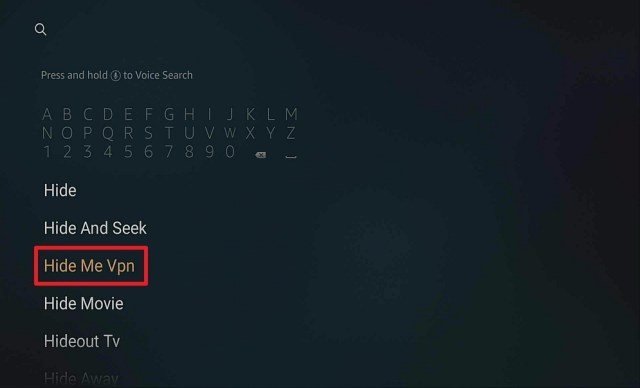
2. You can either say Hide Me to your Alexa’s voice-enabled remote or start typing it. If you typed it, click on the suggestion when it appears.
.
3. Click on the Hide Me icon.
4. Click Download
5. Click Open
6. Click Login.
7. Input your username and password to log in.
8. Click Enable VPN.
9. Click OK.
10. Your Hide Me VPN is installed and connected.
Proton
Install Proton VPN on Firesticks with Screenshots
Step 1. Click Settings from the home screen of your Firestick
2. Scroll down and to the right until you reach My Fire TV
3. Scroll down one and click on Developer Options
4. Turn on ADB Debugging and Apps from Unknown Sources
5. Turning on Apps from Unknown Sources will trigger a confirmation popup. Click Turn On to Confirm
6. Click the home button on your remote and scroll once to the left to click on the magnifying glass icon
7. Search for Downloader either by saying it to your voice-enabled remote or typing. If typing, scroll to the suggested word “Downloader” and click on it
8. Click on the bright orange Downloader icon
9. Click on Download (it might say get on your device. Same difference)
10. Click on Allow
11. Click on OK
12. Type https://reviewvpn.com/pro and click go.
13. Click Install.
14. Click Open.
15. To be able to click NEXT, we need to install Mouse Toggle.
16. To install Mouse Toggle, go to DOWNLOADER, type http://reviewvpn.com/mouse, and click GO.
17. Click Install
18. Click Open.
19. Check the BOX, and click OK
20. Enable the mouse service, and wait until the Status is STARTED.
21. Press the Home button, and click the Proton Icon.
In this article, we will discuss the best anime torrent sites for free Anime and Manga.
If you are one of the world’s anime lovers, you will realize that it’s sometimes difficult to find anime movies and content online. As a result of ISP and government restrictions, many of the torrent sites offering anime content are often shut down due to one reason or the other.
Be that as it may, in this write-up, you will find the list of the best torrent sites for your favorite anime content. Not only are anime torrenting sites sometimes shut down by governments, but anime fans also face other major challenges such as location restriction, online censorship, government surveillance, and ISP monitoring.
However, to bypass these restrictions and enjoy your favorite anime, we recommend installing a strong and reliable VPN for torrenting. VPN helps you to bypass location restrictions and access anime content with privacy and security.
What is Anime?
Anime is originally hand-drawn stories called Manga then became animated. It originated in Japan and became very famous all over the world.
Best Anime Torrent Sites
Nyaa.si
This torrenting site is well known by anime fans as the best anime site. NYAA.SI houses thousands of software, songs, games torrents, music torrents, and above all, anime. This site has a very user-friendly interface.
It utilizes meta-descriptions, which enable you to find pieces of information about what you are looking for. One good side of the NYAA.SI torrenting site is that it offers over one million anime movies. It also has a feature that allows you to see the size and space available on your device so you will know when to delete or not.
Bakabt.me
This site is famous for housing tons of anime. It has a special feature that allows you to search for your favorite anime in the search bar. This torrenting site has subbed and dubbed torrents with a super user-friendly interface.
This site has protection that prohibits the public submission of torrent files. This is to help rid their site of fake and useless torrent files. They have a community where users are allowed to give feedback on each torrent file on their database.
Horriblesubs.info
This torrent site ranks among the top anime torrent sites of 2020 and has a database of over a million game torrents, ebook torrents, tv-series, software, and lots more. This torrent site has a release and genre selection feature which enables you to see the information of any torrent file.
Also, they added to their site, the new release and most popular anime feature which helps you to easily find your favorite anime. One good side of this torrenting site is that they offer anime videos with different video qualities such as medium, low, and HD video qualities.
Animetorrents.me
Animetorrent.me is a well-known anime torrenting site. They specialize in offering only anime content to its users. This site ranks among the top 10 anime torrenting sites of all time. They offer the best anime videos and they also have seeders for a wide variety of anime content. On this site, you will find dubbed and subbed torrenting files.
This torrenting site is a BitTorrent site meaning that you must sign up on the website before uploading or downloading any torrent file.
AniRena.com
This anime torrent site houses thousands of pieces of content in the anime genre. If you are a lover of anime videos, then rush to this site as they have got you covered with a ton of anime videos. You will also find links for manga on this site and you don’t need to sign up before downloading or uploading videos. AniRena.com also offers other torrenting files such as ebooks, music torrents, software, adult torrents, and lots more.
YOUR INTERNET ACTIVITY IS BEING WATCHED
ReviewVPN cannot attest to the legality, security and privacy of the applications discussed on this site. It is highly recommended that you use a VPN service while streaming or using Kodi.
Currently, your IP 216.73.216.109 is visible to everyone and your Browser is being tracked by Advertisers & ISP Provider.
Your activities are hidden from your ISP, the government, and from the apps you are using.
You can access additional movies and TV streams.
ISP attempts to throttle are thrwarted thus reducing buffering issues.
Geographically restricted content like Netflix and Hulu can be unblocked.
A VPN works be replacing your ISP-assigned IP address and creating an encrypted tunnel. We recommend the no log service offered by IPVanish. It works well on a Firestick and offers the fastest possible speeds.
Legal Disclaimer: ReviewVPN.com does not encourage or endorse any illegal activity involved in the usage of services and applications referenced on this site. We do not verify the licensing agreements of services. The end-user is wholly responsible for ensuring that any media accessed through these services does not violate copyright and/or licensing laws. ReviewVPN does not promote, link to, or receive compensation from any Apps and IPTV services.
When we talk about a list of best anime torrent sites, LimeTorrents.cc is included. This is because on this site you will find over one million anime videos. Not only that, but they also house other torrent files such as game torrents, tv shows, software torrents and so much more.
Here you can easily scroll through lists of files. Please note that the official LimeTorrents website is limetorrents.info
The Pirate Bay
This is one of the best-known torrent sites. Since its establishment, The Pirate Bay has been doing well and has tons of anime videos. As of writing this article, this torrent site is the largest torrenting site of all time, housing over 4 million torrent files such as music torrents, game torrents, software torrents, and, of course, anime torrents.
For anime lovers, this torrenting site is your rescue. It has a search bar feature for searching any torrent file on its database. One good thing about this site is that it offers different languages and has a great user-friendly interface.
Animetosho.org
Animetosho.org offers over one million torrent files and has an easy-to-use interface. This torrent site made it to the top 10 torrent sites in 2019 and has tons of torrent files in its online library. Also, you will find other torrent files such as game torrents, software torrents, movie torrents, and lots more on this site.
Shana Project
This torrent site only offers animes and movie torrents. It has a special feature that allows you to view anime torrents more conveniently and easily.
Shana Project has a search bar where you can enter the name of the anime torrents or any other torrent files for easier searching.
Also on the website of the Shana Project, you will find the list of new and popular released anime torrents. These anime torrents can easily be downloaded with just a single click.
Anime Layer
On this torrent site, you will find tons of anime, dramas, and manga torrents that can be downloaded with just a click. One good side of this torrent site is that it has a huge database of anime and other downloadable torrent files without requiring you to register.
Not only that, but the Anime Layer site also has a very friendly user interface and search bar.
Stream Safely With a VPN
Streaming to any torrent sites could be dangerous to your online identity. That is why we always suggest using a VPN service while surfing and streaming online.
Here at reviewvpn.com, we always recommend Surfshark. It is the best VPN for torrenting. It works well with any device, and it can guarantee your safety online.
Here are some of the best features of Surfshark
You have the freedom to choose the country you want to connect
Does not log your online activities
Masks your identity online
30-day money-back guarantee
Has military-grade VPN inscriptions and protocols for sure safety.
You can use one account on multiple devices at once.
If your Firestick still has the older interface, read this article to learn how to update it: Update Firestick Interface.
You can download Surfshark directly from the Amazon App store. It will be easy for you to find Surfshark with your Firestick’s Find feature. Refer to our screenshots below.
1. Go to the Home screen of your Firestick.
2. Navigate towards the Find tab. Press the Search button from the resulting dropdown.
3. Type in the keyword of SurfShark and select from the suggestions that will appear.
4. Click the official SurfShark icon from your search results.
5. Press the Download (You own it) button.
6. The SurfShark VPN installer will download on your device.
7. SurfShark VPN’s app will automatically install itself on your Fire TV stick.
8. Press the Open button after completing SurfShark VPN’s installation process.
9. Please wait for the SurfShark VPN to load its user interface.
10. You can now log in with your SurfShark VPN account credentials.
For more VPN discounts, go to ReviewVPN Deals and purchase the best VPN for you.
Click here to get the lowest price on Surfshark through our exclusive limited-time offer.
FAQs
What Are the Best Anime Torrent Sites?
We list down the top 10 best anime torrent sites. They are Nyaa, BakaBT, HorribleSubs, AnieTorrents, AniRena, Lime Torrent, The Pirate Bay, AnimeTosho, Shana Project, and Anime Layer.
Are the best Anime Torrent Sites Legal?
These anime torrent sites are legal and safe to use for watching anime and manga for free.
Do You Need a VPN to Use the Best Anime Torrent Sites?
It is always better and safer to use a VPN when streaming on any torrent site. Use a trusted VPN like Surfshark.
Final Words
The list above highlights the top torrent sites for anime-specific torrents. Each site has many anime torrent files. Also, these torrent sites often offer other torrent files such as game torrents, music torrents, and software torrents, so you can fill your other torrenting needs in one spot!
A lot of people tend to forget that our devices also need routine check-ups and maintenance. We do this in order to keep the performance of our devices smoothly. You can put it this way, think of your device like it is an automobile.
A car needs to be checked after a certain mileage, and it usually needs to change the oil. The same goes for your device because over time, it accumulates temporary files/data and cache and if you fill up your device’s capacity to its limit, the result will be detrimental to your device.
We would like to introduce to you an app that not only cleans your device but also protects it from threats and affords you privacy and that app is no other than Clean Master. In this article, we will feature the main selling points of this app and how it is going to help you in maintaining your device.
Is Clean Master Safe and Virus-free?
We tested this app using VirusTotal and found no threats or any malicious files and malware.
Despite having good results, we still need to be vigilant in protecting our privacy while streaming.
A Virtual Private Network or VPN will definitely help us maintain our security and anonymity while using Clean Master.
Note: ReviewVPN.com does not host this APK file. It is hosted on Archive.org.
Is Clean Master Any Good?
Clean Master is an all-in-one app that cleans your device, protects you from malware and viruses, and gives you privacy and protection from peeping eyes that will attempt to view your device without your consent.
Installation Guide on a Firestick
On the home screen, go to “Settings”.
Select My Fire TV.
Select Developer Options.
Open Apps from Unknown Sources.
Click Turn On.
Head back to the home screen and select “Search”.
Search Downloader and click “Downloader”. It will appear under the keyboard.
Choose the “Downloader app”.
Download it.
Choose Open.
Select Allow.
Choose OK.
Type in https://reviewvpn.com/cm and select Go.
Wait for it to finish.
Install Clean Master.
Select Done.
This will automatically take you back to Downloader. Select Delete.
Choose Delete Again.
Head back to the home screen and under the “Your Apps & Channels” choose See All.
Scroll down and choose Clean Master and select the “Options”. Then select “Move to front”.
Clean Master will be moved forward to “Your Apps and Channels”.
Open Clean Master.
There, you can now run the app.
If your Firestick still has the older interface, read this article to learn how to update it: Update Firestick Interface.
Install Clean Master on Firesticks with Screenshots
Legal Disclaimer: ReviewVPN.com does not encourage or endorse any illegal activity involved in the usage of services and applications referenced on this site. We do not verify the licensing agreements of services. The end-user is wholly responsible for ensuring that any media accessed through these services does not violate copyright and/or licensing laws. ReviewVPN does not promote, link to, or receive compensation from any Apps and IPTV services.
YOUR INTERNET ACTIVITY IS BEING WATCHED
ReviewVPN cannot attest to the legality, security and privacy of the applications discussed on this site. It is highly recommended that you use a VPN service while streaming or using Kodi.
Currently, your IP 216.73.216.109 is visible to everyone and your Browser is being tracked by Advertisers & ISP Provider.
Your activities are hidden from your ISP, the government, and from the apps you are using.
You can access additional movies and TV streams.
ISP attempts to throttle are thrwarted thus reducing buffering issues.
Geographically restricted content like Netflix and Hulu can be unblocked.
A VPN works be replacing your ISP-assigned IP address and creating an encrypted tunnel. We recommend the no log service offered by IPVanish. It works well on a Firestick and offers the fastest possible speeds.
Clean Master works by cleaning your device thoroughly by deleting files and data that are not necessary. It also gives you security against Viruses, Malware, and other things that may prove threatening to your device. Aside from cleaning and protecting, it also helps you to save your battery and allows you to browse safely. It is a utility app that can almost do anything to optimize the way your device works.
Compatible Platforms
Clean Master is compatible with Windows, Mac OS, Android, Fire Stick, and IOS.
Features
Phone Boost – This feature determines which apps are active and will aid you in optimizing your CPU operation by closing them.
CPU Cooler – Battery Saver- Shows which apps to sleep and which one to keep running.
Notification Cleaner- Removes unnecessary notifications from apps you rarely use.
Message Security- Hides the content of your notification so that no one else can see it.
Advanced Cleaning- Lets you clean your device even further to free more space.
Safe Browsing- It allows you to browse the internet leaving no traces behind.
Security Tools- allows you to perform Deep Scan and App Lock
Pros and Cons
Pros
It has a free trial meaning you can try it out first. This is good because if you don’t like it, you don’t have to continue signing up and if you do, you can go ahead and sign-up for a premium version.
If you are new to the app, there is a tutorial that will guide you in navigating through it.
Cons
The only negative thing that we see is the need for a premium version in order to unlock other useful features of the app.
FAQs
Is It Safe To Use?
Clean Master is easy and safe to use.
Should I Use A VPN?
There is no need to use a VPN when you run this application. But there is also no harm if you have a VPN installed on your device. This app and a VPN will have a complementary relationship because they both look out for the interest of its user. If you are not yet familiar with how a VPN works, We have an article that will help you fully understand it. Just click on thislink.
Note: For more information about SurfShark, please read our SurfShark Review.
How to Install Surfshark on Firestick with Screenshots
If your Firestick still has the older interface, read this article to learn how to update it: Update Firestick Interface.
You can download Surfshark directly from the Amazon App store. It will be easy for you to find Surfshark with your Firestick’s Find feature. Refer to our screenshots below.
Follow our screenshots below to install the SurfShark VPN app on your Fire TV stick.
1. Go to the Home screen of your Firestick.
2. Navigate towards the Find tab. Press the Search button from the resulting dropdown.
3. Type in the keyword of SurfShark and select from the suggestions that will appear.
4. Click the official SurfShark icon from your search results.
5. Press the Download (You own it) button.
6. The SurfShark VPN installer will download on your device.
7. SurfShark VPN’s app will automatically install itself on your Fire TV stick.
8. Press the Open button after completing SurfShark VPN’s installation process.
9. Please wait for the SurfShark VPN to load its user interface.
10. You can now log in with your SurfShark VPN account credentials.
Clean Master is an all-around utility app that does a lot of things. It cleans your device, protects you from viruses, secures your privacy, and allows you secure browsing. We believe that it has everything you will need to take care of your device. Given these reasons, we are highly recommending this app for you to try out. The free trial will allow you to see other features that are highly esteemed. If you don’t find it useful, you can always try the other recommendations we gave as alternatives.
Please feel free to beep us up by commenting down below and through our other social media platforms. Thank you for reading and stay safe!
Note: ReviewVPN.com does not own or operate any app nor does it endorse any. The main purpose of this article is strictly for educational purposes only.
Have you ever experienced your Firestick acting up? It seems slow and doesn’t follow the command you are giving it? This is happening because the Firestick is already overloaded with so many unnecessary files and data. To put it in perspective, a standard third-generation Firestick has a 1.3GHZ processor and 8GB storage. Compared to the Firestick 4k, these specs are relatively low. That is why whenever you install an app it is required to delete the APK immediately. In this article, we will be showing a solution on how to fix a slow Firestick by downloading Task Manager.
Task Manager is a third-party utility application that allows its users to monitor, purge tasks, and optimize the speed of your device. It has a widget feature that provides information regarding your device’s memory usage and gives the power to kill tasks or launch the app itself for more functions. You can definitely use Task Manager to fix a slow Firestick.
Legal Disclaimer: ReviewVPN.com does not encourage or endorse any illegal activity involved in the usage of services and applications referenced on this site. We do not verify the licensing agreements of services. The end-user is wholly responsible for ensuring that any media accessed through these services does not violate copyright and/or licensing laws. ReviewVPN does not promote, link to, or receive compensation from any Apps and IPTV services.
How to Download Task manager APK on Android
Note: ReviewVPN.com does not host this APK file. It is hosted on Archive.org.
Installation Guide On A Firestick
On the home screen, go to Settings.
Select My Fire TV.
Select Developer Options.
Open Apps from Unknown Sources.
Click Turn On.
Head back to the home screen and select Search.
Search on Downloader and click on Downloader. It will appear under the keyboard.
Choose the Downloader app.
Download it.
Choose Open.
Select Allow.
Choose OK.
Type https://reviewvpn.com/task and click on Go.
Click on INSTALL
Click on OPEN
Task Manager is Installed!
Install Task Manager on Firesticks with Screenshots
Task Manager analyzes your device and suggests which applications overload your device and gives you the authority to delete these apps along with the components that come with them. It will drastically improve your device’s performance once you run the scans.
YOUR INTERNET ACTIVITY IS BEING WATCHED
ReviewVPN cannot attest to the legality, security and privacy of the applications discussed on this site. It is highly recommended that you use a VPN service while streaming or using Kodi.
Currently, your IP 216.73.216.109 is visible to everyone and your Browser is being tracked by Advertisers & ISP Provider.
Your activities are hidden from your ISP, the government, and from the apps you are using.
You can access additional movies and TV streams.
ISP attempts to throttle are thrwarted thus reducing buffering issues.
Geographically restricted content like Netflix and Hulu can be unblocked.
A VPN works be replacing your ISP-assigned IP address and creating an encrypted tunnel. We recommend the no log service offered by IPVanish. It works well on a Firestick and offers the fastest possible speeds.
Ignore Select This feature allows you to choose which applications you want to be excluded from the Kill List.
Auto-Kill List Auto-Kill List will let you select the applications you want to be included in the Kill List.
Kill Task The primary purpose of this feature is to free up some space on your device. You have the option of closing single or multiple applications. If the is rooted, it grants access to more actions like Force Stop which prohibits an application from running. This action releases more memory and closed applications will not be able to restart. You can include important applications to the ignore list if they are vital to the operation of your device.
Ignore Task This feature will allow you to exempt applications from being forcefully closed. The applications that should be exempted are the ones you always use and are required to run on the background for your device’s smooth operations. Task Manager itself and the Alarm Clock will be automatically excluded from the ignore list because of their vital nature. You can include them in the Kill List if you do not think they are important.
Auto-Kill Task This feature will automatically commence once your screen turns off or when it becomes idle. Applications included in the Kill List will be closed when the screen turns off. Auto-Kill Task also frees up a substantial amount of memory and optimizes the speed of your device without the need to manually do the closing.
Context Menu
Kill – Kill current tasks
Switch to – switch to the current task or start a new one.
Ignore – add applications you want to ignore during the purge
Enable/Disable Auto-kill – This will let you choose if you want the Auto-Kill function active or not.
Uninstall – Helps you uninstall applications you no rarely use. This is applicable to downloaded applications, not system applications.
Force Stop – this will allow you to prevent applications that always boot whenever you restart or open your device.
Search in Google Play – you can use this to gather information about Task Manager
Preference Page
Manipulate the default behavior of Task Manager whenever you select an application. Behaviors are Kill Task, Pop-up menu, Select/Unselect, and Switch to. A fast click will summon kill the task and a long press will summon a pop-up menu.
What Platforms does it Work On? You can run Task Manager on devices like the Amazon Firestick, NVIDIA Shield, Android TV Boxes, Smart TV’s, and other devices that utilize the Android OS.
FAQ
Is It Safe To Download? Task Manager is safe to download
Is It Legal Or Grey? It is 100% safe to download and use.
Should I Use A VPN?
Task manager is used to clean up and optimize the speed of your Firestick and Android devices. Using a VPN service likeSurfSahrkwith it will not really interfere with its operations. But it is very ideal to use it with third-party streaming applications like PatoPlayer 2, Cinemax HD, Live Lounge, Cinema HD, and Nova TV to always keep you protected from being monitored by your ISP.
Note: You can learn more about SurfShark by reading ourSurfShark Review.
How to Install Surfshark on Firestick with Screenshots
If your Firestick still has the older interface, read this article to learn how to update it: Update Firestick Interface.
You can download Surfshark directly from the Amazon App store. It will be easy for you to find Surfshark with your Firestick’s Find feature. Refer to our screenshots below.
Follow our screenshots below to install the SurfShark VPN app on your Fire TV stick.
1. Go to the Home screen of your Firestick.
2. Navigate towards the Find tab. Press the Search button from the resulting dropdown.
3. Type in the keyword of SurfShark and select from the suggestions that will appear.
4. Click the official SurfShark icon from your search results.
5. Press the Download (You own it) button.
6. The SurfShark VPN installer will download on your device.
7. SurfShark VPN’s app will automatically install itself on your Fire TV stick.
8. Press the Open button after completing SurfShark VPN’s installation process.
9. Please wait for the SurfShark VPN to load its user interface.
10. You can now log in with your SurfShark VPN account credentials.
For more VPN discounts, go to ReviewVPN Deals and purchase the best VPN for you.
Is It Free? Task Manager is free to download on your Firestick and android device.
Are There ADS? It has ads for monetary purposes. The ads are non-intrusive though. They appear in the form of banners and not pop-ups. You can remove this by purchasing the ad-free version.
Is There A Premium Version? Yes, Task Manager has a premium version. Purchasing the premium version will also result in the removal of ads.
Is There An Official Website? No, there is no official website for Task Manager.
What Other Devices Does It Work On? You can run Task Manager on Windows via an android emulator and other devices that run on the Android operating system.
How Does The App Work? You follow the installation guide above and perform the functions with just one click.
Minimum Version Required Task Manager requires android version 5.0 and above.
How Long Has It Been Around? Task Manager was released in 2015. We do not know the exact date of release though.
Alternatives
We always recommend having a backup because we will never know when an application goes down or experiences issues. Having said that, we have tested other applications that perform the same functions like Task Manager. They are as follows:
Note: If you are using Kodi and experiencing the same issues, please take the time to read our ultimate guide to fix Kodi Buffering.
Our Opinion
Task Manager has an impressive resume. Having been in the industry for five years is actually notable and worthy of mention. This is a testament to its effectiveness that’s why a lot of users prefer it over other apps. Task Manager is also free to download so there is no harm if you try it out.
Final Thoughts
Our hope is that this article helps you in installing Task Manager to fix a slow Firestick. Please leave a comment down below for any questions and suggestions. Thank you for reading and stay safe!
Note: ReviewVPN.com does not own or operate any app nor does it endorse any. The main purpose of this article is strictly for educational purposes only.
This article will show you the Firestick installation guide and features of XVideos.
XVideos is one of the biggest names when it comes to porn websites. The website itself has been around for more than a decade now and has been continuing to do a decent job in maintaining it. Having said that, the developers of the website created an app version that can be used on any mobile device and especially the Amazon Firestick. In this article, we will be highlighting its features and show you how to download and install Xvideos on a firestick.
Is XVideos Safe and Virus-free?
We tested this application using VirusTotal and found that there is/are malicious file/files. You can see the above result for your reference.
Because of this, we highly recommend using a VPN that can protect your privacy against any threat from XVideos.
2. Open Downloader. Type in https://reviewvpn.com/xvi and click on Go.
3. Select INSTALL.
4. Select OPEN. There you go, the Xvideo is installed!
YOUR INTERNET ACTIVITY IS BEING WATCHED
ReviewVPN cannot attest to the legality, security and privacy of the applications discussed on this site. It is highly recommended that you use a VPN service while streaming or using Kodi.
Currently, your IP 216.73.216.109 is visible to everyone and your Browser is being tracked by Advertisers & ISP Provider.
Your activities are hidden from your ISP, the government, and from the apps you are using.
You can access additional movies and TV streams.
ISP attempts to throttle are thrwarted thus reducing buffering issues.
Geographically restricted content like Netflix and Hulu can be unblocked.
A VPN works be replacing your ISP-assigned IP address and creating an encrypted tunnel. We recommend the no log service offered by IPVanish. It works well on a Firestick and offers the fastest possible speeds.
Legal Disclaimer: ReviewVPN.com does not encourage or endorse any illegal activity involved in the usage of services and applications referenced on this site. We do not verify the licensing agreements of services. The end-user is wholly responsible for ensuring that any media accessed through these services does not violate copyright and/or licensing laws. ReviewVPN does not promote, link to, or receive compensation from any Apps and IPTV services.
XVideos has the same format as the website version. All the content you see on the web version can be seen with the app version. It has a huge list of content and a variety of categories to choose from.
XVideos Features
Options to choose from Straight, Gay, or Tranny Porn.
Multiple Language Support
Location-based Search and Interface
Hamburger Menu
Contains Categories, Trends, Red Videos, History, Best Videos (Best Videos for the Month), Pornstars, Channels, 100% Verified, Profiles, Games, All Tags, Downloads, and Clear Cache.
Versions
It supports more than 200 countries that have their own unique content based on the location you are going to click. There are similar things that you will see but there is added content that is specific for each country.
Categories (US Version)
3D
Amateur
Anal
Arab
Asian
AMSR
Ass
Aunt
BBW
Bi
Big Ass
Big Tits
Black
Blackmail
Big Cock
Blonde
Blowjobs
Brunette
Cam Porn
Casting
Caught, Cheating
Chubby
Compilation
Creampies
Cumshot
Drunk
Fisting
Fucked Up Family
Gang Bang
Gapes
Gay
Hardcore
Indian
Interracial
Latina
Lesbian
Lingerie
Maid
Mature
MILF
Oiled
POV
Real
Red Head
Rough
Shemale
Sleeping
Solo
Squirting
Stockings
Stuck
Taboo
Teacher
Teen
Thot
Wife
Interface
You can do a lot of things when you are inside a video or about to play one. You can download the content, see related videos, enter full-screen, choose the video quality, select the external player, loop the video, and even see category tags under the video screen.
The Thumbnails has three dots at the upper right corner that will allow you to disable and enable suggestions, enable and disable viewed videos, subscribe to the video uploader, and like/dislike the video.
Downloadable Content – you can download videos you like to your own storage.
Versatile Content – Aside from the huge list of categories to choose from, XVideos also cater to all gender and shows no discrimination. They have delegated a section for Gay and Tranny Porn.
Fast Loading and Playing Speed
Unique Content for each version (Country)
Works well with the Amazon Firestick with no glitches or lags.
Cons
Some videos do not have working audio.
FAQ
Is It Safe To Download? XVideos can be safely downloaded and installed on Firestick and Android devices.
Is It Legal Or Grey? It is 100% safe to download and use.
Should I Use A VPN?
Watching Adult content (porn) using the Amazon Firestick has risks that you need to address. This type of content consumes a lot of data which then be flagged by your ISP and results to speed throttling. Having a premium VPN service likeSurfsharkwill block the efforts of your ISP is slowing down your connection. It will also hide all of your activities and will only show the amount of data being used but not what it was meant for. You can also access location-based content by allowing you to change your IP Address to the location of what you are trying to watch.
Note: Please read ourSurfshark Review to learn more about the benefits of having a VPN service.
Is It Free? XVideos is totally free and has no hidden charges you have to worry about.
Are There ADS? The version that we have featured in this article is ad-free. You won’t have to use an Ad Blocker app likeAd Guard.
Does XVideos has A Premium Version? XVideos has no premium service.
Is It A Terrarium Clone? XVideos cannot be considered a terrarium clone because its content is focused on porn.
What Other Devices Does It Work On? Anything that runs on android and other similar devices.
Is There An Official Website? Yes, it has an official website.
How Does The App Work? Please read our Android and Firestick installation guide above and you will see how XVideos works.
Minimum Version Required Version 5.0 and above is required.
How Long Has It Been Around? The main website has been around for a decade already. We can safely assume that the XVideos APK has been more or less, established for five years.
Legit and working adult apps are hard to come by. We have tested other porn apps that are working and can be used as a substitute whenever XVideos has issues. These apps are as follows:
XVideos already has an established name when it comes to porn. The app version delivers the same content and interfaces the main website does. If you don’t really like opening a browser to watch adult content, you can try downloading and installing XVideos on a firestick and android device by following the steps we have provided above.
Final Thoughts
It is our sincerest hope that this article helps you with how to download and install XVideos on a Firestick and Android device. Thank you for reading and stay safe!
Note: ReviewVPN.com does not own or operate any app nor does it endorse any. The main purpose of this article is strictly for educational purposes only.
Amazon devices such as firestick and fire tv are just like any other streaming device which you can use to stream movies, music, and lots more.
Be that as it may, the choice of using different methods or modes of entertainment which might include but not be limited to music, tv-series and shows, and movies, and as well as comedies are often hinder by their readiness on Amazon devices.
However, music freaks will find this a major challenge soo far.
For your convenience, we have listed the top best music app for firestick. Finding a music app may not be a big challenge as you will be able to download music from different applications.
However, you don’t need to worry about paying for this service, as these apps are free to use and some of them are premium music applications.
The below list you will see are the top best music applications that are available on the Amazon device firestick; which allows you to download and stream any music of your choice free of charge.
SPOTIFY
Firestick and fire tv which are Amazon devices that come with Spotify music options. This Spotify music option is not available if you are using the free version. However, to access the Spotify music on a firestick device, you will have to purchase a subscription on your Amazon account prime or amazon music.
Spotify is a leading music platform globally. Spotify has both free and premium packages, however, listening to music on Spotify is under the free category; which allows you to stream any stream type of music free of charge. Joining Spotify allows you to stream music from your smart devices such as android and iOS powered devices. One good side of Spotify is that its mobile app allows seamless switching of television and your smartphone.
YOUTUBE
This is one of the most popular music streaming services out there. One good side of using Youtube to stream music is that it offers you the ability to choose which type of format you want to enjoy: this means that Youtube has both audio and video format of every music on their database.
Youtube mobile app allows you to stream videos; you can stream another type of video which might not only be music as well. To use Youtube on your amazon firestick or fire tv devices; it is under the server version; this is because its app cant is found everywhere as a result of agreement issues between Google and Amazon. Be that as it may, Youtube offers you free streaming of any music of your choice and also allows you to stream other video content.
TWITCH
This service has almost the same features as Youtube. Just like Youtube, Twitch allows you to stream all music audios as well as music videos. One advantage of this service is that you can also contribute your content; meaning you can stream your favorite music and also have the access to upload your music or music videos as well.
Twitch allows you to create your video uploading site and connect any of your favorite music streaming apps as well. Twitch service is free to use. However, Twitch also pays you for using their service. For music lovers and upcoming music artists, Twitch is your best option.
GAANA
If you are searching for great apps to stream music on your Amazon firestick and fire tv devices, then GAANA has got your back. This music streaming app is one of the best music streaming for Amazon devices out there. This app also has radio features, however, this feature might not be that smooth in service but GAANA has a great collection of all kinds of music for your perfect satisfaction. Using this app is completely free of charge and offers an uninterrupted streaming service once you start streaming.
TuneIn
This app is the reincarnation of RadioTime which was started as a local radio station and has grown into a global radio station covering news, sports documentaries, and music as well.
This music app is completely free to use and their service is smooth and reliable. On this app, you will find trending, most popular, and newest music releases as well.
PANDORA
If you are a fan of music streaming, then you must be familiar with the Pandora music streaming app. As of the moment, this music streaming app tops as the most used music streaming platform globally. This music streaming app is compatible with every streaming device. it allows users to search and choose their favorite music and often suggests and recommends some music as well. Using the Pandora app is free. Nevertheless, Pandora has a rating feature where any user of the platform can be rated.
LIVEXLIVE
This app is the reincarnation of Slacker Radio. On this app, you will be able to stream your favorite music free of charge. Not only that but you will also be given access to stream radio stations globally completely free.
You can search for your favorite genre of music and have it presented to you. They have a monthly update where the latest and newest radio stations are being added. This app has also a premium package. This premium package comes with a special feature as well. But one good side of this app is that it functions perfectly on Amazon Fire TV and Firestick devices. All you needed to enjoy this App is just a stable internet connection.
SHAZAM
This app allows you to stream music free of charge. Not only does this app allow you to stream music completely free, but it also allows you to identify any type of music. It houses a huge database of music library where music meta description such as artist name, the genre of music, and lots more information about each music is saved.
It works well on Amazon devices such as Fire tv and Firestick. Be that as it may, even though it is free to use, they also offer paid versions. In this paid version, you will be able to search for a song and pay for it as well.
IHEARTRADIO
This app is compatible with all streaming devices especially Amazon Fire TV and Firestick devices. This app comes as a radio but allows you to stream kinds of music as well. Its package on this app comes in paid and free versions.
However, both package allows you to stream music smoothly and simultaneously. One good thing about this app is that it offers no ads or commercials even in the free version. This app has varieties of music genres such as hip-hop, RnB, Jazz, roc, and lots more.
8TRACKS
This app is one of the most popular music streaming apps out there. It is compatible with all media streaming apps and also Amazon devices such as Firestick and Fire TV.
This app allows you not only to stream from your favorite music artists but also allows you to upload music as well. This app is completely free to use although it has a premium version which has some extra feature not found in the free version.
GOOGLE PLAY MUSIC
This app is owned by Google. It allows you to store 50,000+ songs completely free. It also allows you to stream radio stations; you will be given different options when it comes to streaming radio stations. You can be able to upload music to the music cloud or move music from one device to the other freely.
However, even though it is completely free to use this service, it also has a paid version. In the paid version, you will be given access to over 40, 000 million songs. Not only that, but you have also been able to stream tones of music videos as well. The downside of this site is that it has location restrictions.
MUSICOLET MUSIC PLAYER
If you are searching for a great music app for your Amazon devices, then this app is for you. It is completely free to use. This app works well with other streaming devices as well. It has a great user interface and easy-to-navigate menus. You will have a variety of music genres to choose from.
POWERARMP
This app is compatible with almost all the streaming apps in the market. It has different formats of music files such as mp4, mp3, acc, alac, Ogg, FLAC, wav. Wv, WMA, mpc, tea, and lots more. It has a great user interface with easy-to-scroll menus.
This app allows you to choose the language of your choice. You can find different languages on this app such as German, Russian, Spanish, Japanese, English, and lots more.
FILDO MUSIC
This app supports the following formats; MIDI, ACC, FLAC, and mp3. It allows you to create your playlist, album, or modify a song list. It is completely free to use this app.
MUSVID
This app has the latest release of songs from music artists. It is completely free to use this service and it’s compatible with Amazon devices such as firestick and Fire TV. It has a feature where you can search for a song, artist’s name, or album as well.
TINYTUNES
With this app, you will be able to stream thousands of music online free of charge. It has a search bar where you can search for your favorite music or artists songs as well. It allows you not only to stream online but can also to download songs and build your playlist.
TIDAL MUSIC
This app is compatible with Amazon devices. To use this service is completely free and it has great music streaming quality as well. This app database houses 60 million songs from different artists globally. However, even though it is free to use this app, the validity is only thirty days after which you will need to purchase a subscription plan or paid plan.
YOUR INTERNET ACTIVITY IS BEING WATCHED
ReviewVPN cannot attest to the legality, security and privacy of the applications discussed on this site. It is highly recommended that you use a VPN service while streaming or using Kodi.
Currently, your IP 216.73.216.109 is visible to everyone and your Browser is being tracked by Advertisers & ISP Provider.
Your activities are hidden from your ISP, the government, and from the apps you are using.
You can access additional movies and TV streams.
ISP attempts to throttle are thrwarted thus reducing buffering issues.
Geographically restricted content like Netflix and Hulu can be unblocked.
A VPN works be replacing your ISP-assigned IP address and creating an encrypted tunnel. We recommend the no log service offered by IPVanish. It works well on a Firestick and offers the fastest possible speeds.
What music app is recommended for my firestick device?
The answer to the above question all boils down to you. It depends on the type of music you love to listen to. From the list of music apps, you can find which one suits your purpose.
There are apps for streaming but do not allow downloading or creating a playlist. Some apps allow streaming, downloading, and creating the playlist as well. So it is up to you what you want to use your app for.
Is downloading the music app on a firestick free?
Yes, downloading the music app on a firestick stick is free of charge and costs nothing. However, some apps are free to use while some offer a free trial with a subsequent monthly subscription plan.
Downloading songs using a music app on a firestick, is it legal?
The answer to the above question is two-sided. This is because it all depends on the app you are downloading with. There might be a few apps that have copyright infringement issues.
Some of these apps that have copyright issues are being clamped down by Google and Apple or even the Amazon AppStore marketplace. We often recommend using apps that support music artists.
Not really. However, in case you can’t install the music app on your Amazon device, the following might be the cause:
Connectivity issues: cross-check your internet connectivity. Check the wifi or your internet speed.
System issues; your systems might be having a compatibility issue with the app.
Location restriction
Legal Disclaimer: ReviewVPN.com does not encourage or endorse any illegal activity involved in the usage of services and applications referenced on this site. We do not verify the licensing agreements of services. The end-user is wholly responsible for ensuring that any media accessed through these services does not violate copyright and/or licensing laws. ReviewVPN does not promote, link to, or receive compensation from any Apps and IPTV services.
If your Firestick still has the older interface, read this article to learn how to update it: Update Firestick Interface.
You can download Surfshark directly from the Amazon App store. It will be easy for you to find Surfshark with your Firestick’s Find feature. Refer to our screenshots below.
1. Go to the Home screen of your Firestick.
2. Navigate towards the Find tab. Press the Search button from the resulting dropdown.
3. Type in the keyword of SurfShark and select from the suggestions that will appear.
4. Click the official SurfShark icon from your search results.
5. Press the Download (You own it) button.
6. The SurfShark VPN installer will download on your device.
7. SurfShark VPN’s app will automatically install itself on your Fire TV stick.
8. Press the Open button after completing SurfShark VPN’s installation process.
9. Please wait for the SurfShark VPN to load its user interface.
10. You can now log in with your SurfShark VPN account credentials.
For more VPN discounts, go to ReviewVPN Deals and purchase the best VPN for you.
Click here to get the lowest price on Surfshark through our exclusive limited-time offer.
Wrapping Up
The above list of apps is a music app you can easily install on your Amazon firestick device. Most of the apps are free to use and premium as well. If you are searching for the perfect music app for your firestick device, then the list above will surely do justice to it.
Mammoth is one build to try on your Kodi. Not only does it allow you to stream tons of movies seamlessly, but you will also be able to stream music, tv-series, and lots more. Before we start our step-by-step guide on how to install the Mammoth Kodi build, first of all, we need to understand what the Mammoth build is.
The Mammoth build is a Kodi build that has a huge collection of addons and streamable content. The Mammoth is famous among Kodi fans and it is compatible with almost all streaming devices including Amazon Fire TV and Firestick devices.
Though it offers an awesome experience, the Mammoth Kodi build, like many, has a few addons that don’t work properly, so if you encounter an issue with one of the addons most interesting to you, check out our guides to other Kodi builds.
It is advisable to reset your Kodi settings to default before you run any installation of Kodi builds. The resetting is very easy and fast and can be done on any streaming device you have installed Kodi on.
One good thing about the Mammoth build is that it is compatible with the latest version of Kodi 18 Leia. The mammoth build has got tons of tools, wizards, and plenty of addons and other amazing features geared towards making your streaming experience memorable and awesome.
Legal Disclaimer: ReviewVPN.com does not encourage or endorse any illegal activity involved in the usage of services and applications referenced on this site. We do not verify the licensing agreements of services. The end-user is wholly responsible for ensuring that any media accessed through these services does not violate copyright and/or licensing laws. ReviewVPN does not promote, link to, or receive compensation from any Apps and IPTV services
Don’t use Kodi without a VPN:
We advise using a VPN any time you stream online, especially with Kodi. This is because your internet service provider is monitoring and tracking your online activities. In this case, we recommend Surfshark. Surfsharkoffers you the needed online security and privacy.
How to Install Surfshark VPN on Firestick
If your Firestick still has the older interface, read this article to learn how to update it: Update Firestick Interface.
Follow our screenshots below to install the SurfShark VPN app on your Fire TV stick.
1. Go to the Home screen of your Firestick.
2. Navigate towards the Find tab. Press the Search button from the resulting dropdown.
3. Type in the keyword of SurfShark and select from the suggestions that will appear.
4. Click the official SurfShark icon from your search results.
5. Press the Download (You own it) button.
6. The SurfShark VPN installer will download on your device.
7. SurfShark VPN’s app will automatically install itself on your Fire TV stick.
8. Press the Open button after completing SurfShark VPN’s installation process.
9. Please wait for the SurfShark VPN to load its user interface.
10. You can now log in with your SurfShark VPN account credentials.
For more VPN discounts, go to ReviewVPN Deals and purchase the best VPN for you.
Click here to get the lowest price on Surfshark through our exclusive limited-time offer.
YOUR INTERNET ACTIVITY IS BEING WATCHED
ReviewVPN cannot attest to the legality, security and privacy of the applications discussed on this site. It is highly recommended that you use a VPN service while streaming or using Kodi.
Currently, your IP 216.73.216.109 is visible to everyone and your Browser is being tracked by Advertisers & ISP Provider.
Your activities are hidden from your ISP, the government, and from the apps you are using.
You can access additional movies and TV streams.
ISP attempts to throttle are thrwarted thus reducing buffering issues.
Geographically restricted content like Netflix and Hulu can be unblocked.
A VPN works be replacing your ISP-assigned IP address and creating an encrypted tunnel. We recommend the no log service offered by IPVanish. It works well on a Firestick and offers the fastest possible speeds.
The below steps will guide you on how to install mammoth Kodi Build.
The very first step is to turn on the unknown source “ON”. To do so, you will have to launch your Kodi app and allow it to run properly. When the Kodi app is already running, navigate on your Kodi app screen and click on the settings icon. This will bring a new window. From there you will choose the option of the system.
When you click on systems, it will open a new window; on the new window, scroll through to ADD-ONS and click on unknown sources. From here, you can turn on the unknown source. Once you click ON, it will bring out a warning message; click YES and the warning message will disappear.
Once this is done, then navigate back to the systems page. From the systems page, scroll through to “add source”. Then it will bring out a new window. You will see “Add file source”. Navigate to where you will find <none>.
Click on it. It will open a new window where you will prompt to enter the media path URL: http://www.lostkodi.appboxes.co/. After entering the URL, click “OK”. A new window will appear, where you will be prompted to enter a name for the media source.
You may choose any name you want, but often we suggest you use “Lost Build wizard”.
After entering the name, click “Ok. Once done, return to the system page and click on the ADD ON option.
When you click on the addon, it will open a window where you will see the list of instructions. Navigate to “install from zip file”.
It will bring out the “install from zip file” option. Carefully scroll to the name you used to save the file earlier (here we used Lost build wizard).
Once you find the name you used to save it earlier, click on it.
You will see a new window with an option like this: plugin.program.lostbuildswizard.zip and click on it. It will install the mammoth build for the first time.
Once the installation is done, a message will pop up notifying you.
You will find on your screen, another notification message; from here, you can choose what to activate on your mammoth build. Once you are done highlighting, click continue.
When you click continue, a new window will pop up with “thank you for choosing lost builds wizard” click on “build menu”.
At this point, different versions of the Kodi builds will come out in a new window. Navigate to find the mammoth build with this name “mammoth v2.3.
Once you click on this, it will take you to a different window where you will see options like; FRESH INSTALL or STANDARD INSTALL. These two options are different we recommend you to choose fresh install (this option erases and then install the mammoth build while standard build only installs new build).
Once you clicked on it, scroll through to continue and click on it.
At this juncture, the installation should begin. The installation may take a few minutes, depending on your internet speed.
Wait while the installation is completing. Once the installation is completed, a pop-up message will appear prompting you to force close or reload your profile. Choose force close.
Once you click on force close, your Kodi app will exit automatically.
Go back and launch your Kodi app. Once you launched your Kodi app, your new mammoth build is ready.
Navigate on your new build. You can search for movies, tv shows music and lots more on your new build.
Video on How to Install the Mammoth Kodi Build on All Devices
Install Mammoth Build on Kodi for Firestick, Android, PC, Mac – 2020
1. Select the cogwheel in the upper left corner.
2. Select System on the bottom left.
3. Hover over or select Add-ons on the left. Select Unknown sources to enable.
4. Click Yes to enable third-party addons.
5. Click on File manager.
6. Click on Add source.
7. Click on None to add the URL path source.
8. Type in http://www.lostkodi.appboxes.co (remember you can also get this from the Xanax and One Nation repositories)
9. Click on OK.
10. Name the source lostkodi (the name can actually be anything you want. You just need to remember what you named it.)
11. Click on OK.
12. Take one step back to the System screen. Click on Add-ons.
13. Click on Install from zip file.
14. Click on lostkodi.
15. Click on plugin.program.lostbuildswizard.zip
16. Wait until you see a pop-up in the upper right saying Lost Builds Wizard Add-on installed. It might take up to a couple of minutes.
17. Click on Continue.
18. Select Build Menu
19. Choose Mammoth v2.5
20. Select FRESH INSTALL (Erase, then Install New Build).
21. Select Continue.
22. Wait for the download to finish.
23. Click on Force Close.
24. There you go, Mammoth Kodi Build is installed. Enjoy Watching!
We checked out a few movies on the mammoth build. You will find categories of movies such as horror, adventure, sci-fi. When we played the Parasite and Wretched movies; they played smoothly, indicating that Mammoth build offers seamless streaming. You will also find music and TV shows on the Mammoth build.
As a note: We tried streaming over 10 adult movies through the Mammoth build and all showed error messages. If you’d like a Kodi build for adult content, check out one of the others reviewed on our site.
Final Thoughts
Installing the Mammoth build is very easy and fast when you follow the above-stated guides. The Mammoth build is not our favorite Kodi build out there, but it offers you great features that will enable you to enjoy smooth streaming.
Aptoide, one of the popular marketplace software for installing mobile applications, has suffered a security breach of over 20 million user data, as reported by ZDNet.
The marketplace app made an official statement regarding the security breach on April 19. Aptoide made it known that all logins, sign-ups, comments, and reviews are suspended until the company completes the comprehensive forensic analysis.
The Aptoide security breach caused multiple reactions in the hacker community since many IT professionals are the Aptoide app’s active users. Aptoide made it known that 97 percent of the Android app store users have never signed up for an Aptoide account. And that people can download apps through Aptoide without any sign-up at all.
However, the Android app store claims it has over 150 million users across the globe. Wherein, 3 percent of Aptoide users who signed up for an account are still a few million people.
What is Aptoide?
Android’s open nature allows users to download applications from various marketplaces. Aptoide is a Portugal-based marketplace software linking different application repositories.
The Android app store offers access to over 1 million Android applications for tablets, mobile phones, Virtual Reality (VR) devices, and smart TVs, and accommodates over 150 million users. Aptoide Android app store is very famous in Asia (for the most part in China), where people can purchase Android gadgets without Google’s pre-installed applications pack.
Legal Disclaimer: ReviewVPN.com does not encourage or endorse any illegal activity involved in the usage of services and applications referenced on this site. We do not verify the licensing agreements of services. The end-user is wholly responsible for ensuring that any media accessed through these services does not violate copyright and/or licensing laws. ReviewVPN does not promote, link to, or receive compensation from any Apps and IPTV services
Has Aptoide Made Any Public Statements
The Aptoide security breach was first disclosed on April 17 via the Twitter account of the data breach monitoring and prevention service – Under the Breach. 39 million Aptoide accounts were copied, with 20 million of those accounts surfacing on a public forum.
Documentations that were copied include Secure Hash Algorithm 1 (SHA-1) hashed passwords, email addresses, account status, birthdays, names, Internet Protocol addresses (IP address), and user agents from the previous logins.
Aptoide later pitched in new information with different numbers, which showed up to 49 million Aptoide accounts could have been breached. Nonetheless, roughly 32 million accounts are held by OAuth logins utilizing Facebook and Google accounts, thus, there are no passwords connected with those accounts. Passwords for the remaining Aptoide accounts were hashed with Secure Hash Algorithm 1, which no longer weighed up a tight hashing algorithm.
The Android app store responded to the cyber attack through its blog. The post mentioned that the company is investigating the hack notification which means up to this point it is not confirmed from the Android app store side. The company noted that “Meanwhile, we would like to rest assured that all user passwords were encrypted. Besides your email address used for login and encrypted password, no Aptoide user’s data is in the database. Aptoide users were never requested for physical addresses, credit card information, telephone numbers, or other personal data.”
How Did The Aptoide Security Breach Occur
The notification of the Aptoide cyberattack was first spotted by Under the Breach. The leaked data divulged that the data breach contains Aptoide users’ information. It also contains information on sign-up tokens, account status, and developer tokens.
ZDNet reported that the PostgreSQL database file that surfaced on the hacking forum is still accessible for download. The business technology news website already reached out to the Android app store to alert them.
What Are The Best Privacy Measure When Using An Unknown Third-Party App
Your mobile phones or other mobile gadgets’ apps can be convenient tools for you to get directions, access the news, play games, or pick up rideshare. Nonetheless, these tools can also endanger your privacy. When people download an application, the app may ask for permission to access their personal information. This includes calendar inputs, email contacts, location data, and call logs, from their devices. Applications may collect this information for legitimate purposes.
One way to cut down risk from third-party app outlets is to keep away from them. However, even if people do, there is also a possibility to download an application from one of the official app stores and have their devices susceptible to malware.
So how to keep devices and people’s data safe and secure? It is part of sensibleness and protection. For example, it is ideal to ponder before downloading an email attachment from an unknown person to purchase an application. However, people can use cybersecurity products (such as Surfshark VPN) to help them keep their data safe from cybercriminals.
Secure Your Connection with a VPN
Nowadays, security breaches are a common issue in the digital age. The privacy of its users is in danger since hackers and phishers can simply target apps or websites that are known to be susceptible and from which they can obtain a wealth of information.
While Aptoide is only one of many apps that this can happen to, the best approach to secure your data is to do it as soon as possible. And using a VPN is the best and simplest way to do this.
A VPN, such as Surfshark, will mask your IP address, allowing you to watch or browse the web anonymously. By doing this, the risk of data breaches is reduced because your personal information won’t be accessible on servers operated by unaffiliated parties. In addition, here are some other Surfshark features:
There are 3,200+ quick servers accessible in 100 locations to disguise your IP.
Allows for an unlimited number of simultaneous protected connections.
Comes with an ad-blocker feature called CleanWeb that blocks malicious ads and adware.
Also features a cookie consent pop-up blocker that blocks annoying popups while browsing.
Two-factor authentication will provide additional protection for your account.
Note: For more information about Surfshark, please read our Surfshark Review.
ReviewVPN cannot attest to the legality, security and privacy of the applications discussed on this site. It is highly recommended that you use a VPN service while streaming or using Kodi.
Currently, your IP 216.73.216.109 is visible to everyone and your Browser is being tracked by Advertisers & ISP Provider.
Your activities are hidden from your ISP, the government, and from the apps you are using.
You can access additional movies and TV streams.
ISP attempts to throttle are thrwarted thus reducing buffering issues.
Geographically restricted content like Netflix and Hulu can be unblocked.
A VPN works be replacing your ISP-assigned IP address and creating an encrypted tunnel. We recommend the no log service offered by IPVanish. It works well on a Firestick and offers the fastest possible speeds.
For more VPN discounts, go to ReviewVPN Deals and purchase the best VPN for you.
Click here to get the lowest price on Surfshark through our exclusive limited-time offer.
Best Alternatives To Aptoide
If you are worn out of the American digital distribution service – Google Play Store, remember that you can try other Android app stores in the vast world of the web. Huge respect for the Google Play Store offerings, such as numerous games, apps, e-books, and a lot more. These have made people’s lives more enjoyable and productive. Nevertheless, individuals always want something new. This is where the Aptoide application comes in. An Android app store where people can find software for their Android devices.
While some Android-powered devices are not compatible with the Aptoide marketplace software, the best solution is to search for alternatives rather than solving compatibility issues. Here are the best Aptoide alternatives:
Mobo Market– focuses on the top free Android Games and Applications
Amazon App Store– the most competent app store aside from the Google Play Store
AppBrain– formerly Android Market, a unique pay-per-install app promotion service
Aurora Store – users can update existing applications, download apps, get details about in-app trackers, search for apps, spoof location, and a lot more.
Uptodown – offers enriched editorial content on apps
Conclusion
Word of advice, turning on unknown settings means that the applications installed don’t have the seal of approval of Google. Also, apps downloaded through these third-party Android app stores may not have the in-house security of the American multinational technology company.
The Amazon Firestick is a device that you can use to download and install streaming applications. The beauty of the Firestick is its ability to turn any normal LED TV into a Smart TV. You can watch movies and TV shows by using streaming apps like Live Lounge, PatoPlayer 2, Cinemax HD, Nova TV, and 1234 Movies.
The only cause of worry for the Firestick is its small storage capacity. The third generation only has 1.3GHZ and 8GB storage. By default, the Firestick does not close an app after exiting. This will cause the device to lag and slow down. In this article, we will be showing you how to install Background Apps and Process List on your Firestick.
Due to the limited storage capacity of the Firestick, we have to be mindful of what we download and install. Stick to what works and do not download unnecessary apps that contribute to slowing down your Firestick.
Legal Disclaimer: ReviewVPN.com does not encourage or endorse any illegal activity involved in the usage of services and applications referenced on this site. We do not verify the licensing agreements of services. The end-user is wholly responsible for ensuring that any media accessed through these services does not violate copyright and/or licensing laws. ReviewVPN does not promote, link to, or receive compensation from any Apps and IPTV services.
What Is It?
Background Apps and Process List is a utility app that serves as a shortcut to the application settings of your device. You can use it to uninstall, force close, and clear the cache of applications that are installed on your Firestick. It aids users in closing applications that run in the background causing lag and sometimes, even buffering. The app also helps you to clear the cache of applications without removing essential data. Overall, it is a simple application with pretty straightforward functions.
How to Download on Android
Open Google Play Store
Search for Background Apps and Process List
Click Download
There you go, the app is now installed and ready to use.
How to Download on Firestick
Launch the Amazon App Store.
Type in Background Apps and Process List on the search box.
It doesn’t usually take more than two seconds for an automatic search result to appear.
Click on Background Apps and Process List.
Select Get.
This will automatically download and install the app.
There you go, Background Apps and Process List are now installed and ready to use on your Firestick.
YOUR INTERNET ACTIVITY IS BEING WATCHED
ReviewVPN cannot attest to the legality, security and privacy of the applications discussed on this site. It is highly recommended that you use a VPN service while streaming or using Kodi.
Currently, your IP 216.73.216.109 is visible to everyone and your Browser is being tracked by Advertisers & ISP Provider.
Your activities are hidden from your ISP, the government, and from the apps you are using.
You can access additional movies and TV streams.
ISP attempts to throttle are thrwarted thus reducing buffering issues.
Geographically restricted content like Netflix and Hulu can be unblocked.
A VPN works be replacing your ISP-assigned IP address and creating an encrypted tunnel. We recommend the no log service offered by IPVanish. It works well on a Firestick and offers the fastest possible speeds.
If your Firestick still has the older interface, read this article to learn how to update it: Update Firestick Interface.
Step by Step Instruction to Install Background Apps and Process List
1. Click FIND.
2. Click Search.
3. You can either say Background Apps and Process List to your Alexa’s voice-enabled remote or start typing it. If you typed it, click on the suggestion when it appears.
4. Click on the Background Apps and Process List icon.
5. Click on Download
6. Click Open.
7. Click Got it.
8. Background Apps and Process List is now installed and ready to use on your Firestick.
Background Apps and Process List will scan your system for unnecessary files, clear cache, force stop apps, test download/upload speed, and provide useful and accurate information about your network.
App Features
Interface
When you click on an app icon, it will redirect you to your device’s system settings. You can force stop, and uninstall. And clear the cache of the particular app you have clicked. It acts as a shortcut to your system settings. It does not do anything beyond that.
Close All Apps
Once you click this button, it will automatically select all of the installed applications. You will then have the option to force stop, uninstall, and clear the cache of each app individually.
Up/Down Arrow Button
This is the quick shortcut that gives you access to the ff:
Preferences
–You can use this to change the start-up and open settings of Background Apps and Process List.
Switch Layout
–This feature will let you choose between two views: Grid view with app names and Grid View without app names.
All Apps
–This feature will allow you to sort your apps according to name, size, and permissions. It will also let you manage the apps (Force Stop, Uninstall, Clear Data, and Clear Cache)
Note: The first time you will click on this button will redirect you to download a sister app called App Info Manager. Upon download, you will have access to the functions stated above.
Test Net Speed
–Under this feature, you can perform tasks like Test Download Speed, Test Upload Speed, Ping Test, and WIFI/Lan Scanner. These tests will yield accurate information regarding the video quality your internet connection can afford you.
Note: This is also a redirect to download a complimentary app called Test.NetSpeed
Network Scanner
–It allows you to scan your network for connected devices.
Note: This redirects to an app called Network Scanner which was created by the same developer as Background Apps and Process List.
IP Address, Location, and VPN Status
–This feature will show you your MAC Address, Local IP Address, Browsing Location, and ISP. You can also perform a quick download speed test and scan your WIFI/Lan.
Note: This is also a redirect to an app called My IP created by the same developer.
Take Notes
Calculator
Note: Both Take Notes and Calculator are redirects to apps called Take Notes and Valutare Calculator created by the same developer as Background Apps and Process List.
Refresh Button
This allows you to refresh the app.
System/User
This shows you all the hidden systems and user applications installed that are necessary to run your system.
Select Multiple
This allows you to select multiple applications all at once and close them.
What Platforms Does It Work On?
Background Apps and Process List is tailor-made for the Amazon Firestick but it will also work well with other Android devices.
Pros and Cons
Pros
–Simple and easy user interface
–One-click kill buttons
Cons
–The additional functions are not built-in. They require separate downloads which you can access once you click on the features(All Apps, Test Net Speed, Network Scanner, IP Address, Location, and VPN Status)
–It claims to show your VPN status but upon connecting to Surfshark Reviewand accessing this feature, there is no sign indicating that we are connected to a VPN service.
FAQ
Is It Safe To Download?
Yes, it is safe to download on your device.
Is It Legal or Grey?
It is 100% safe to download and use.
Should I use a VPN?
Background Apps and Process list is not a streaming application so there is no urgent need to use a VPN. But you can use it in conjunction with a VPN service like Surfshark because of its speed test. In this way, you will know the actual download/upload potential of your internet.
Note: Get Surfshark at discounted rate. Click here to get the lowest price on Surfshark through our exclusive limited-time offer.
For more VPN discounts, go to ReviewVPN Deals and purchase the best VPN for you.
Click here to get the lowest price on Surfshark through our exclusive limited-time offer.
Is It Free?
Background Apps and Process List is free with no hidden charges and ad scams.
Are There ADS?
Yes, there are banner ads that are not intrusive. There will also be pop-up ads but the frequency of them appearing is relatively small.
Is There a Premium Version?
Background Apps and Process List has no premium version
Is There an Official Website?
Background Apps and Process List has no official website but the developer can be contacted at an email address provided inside the application Help tab.
What Other Devices Does It Work On?
You can run Background Apps and Process List with a Laptop/PC via an android emulator. It will also work with Android TV Boxes, Fire TV, and Smart TVs.
Minimum Version Required
At least version 5.0 and above is required.
How Long Has It Been Around?
We do not have the exact date but we can say that it was released sometime in 2019.
Alternatives
Background Apps and Process List is an all-in-one utility app but that doesn’t mean it is invincible. If ever you have issues when running it on your system, you can check out these other utility apps. We can assure you that we have tried and tested all of them and can vouch for their competence.
Note: If you are using Kodi, you can also check out our article on Kodi Buffering.
Our Opinion
There is a saying “Do not judge a book by its cover.” This particularly applies to Background Apps and Process List. It may look plain and simple but there are tons of functions you can use to fix lag problems on your Firestick. Not only that, but you can also verify if you are getting your money’s worth by performing speed tests. You don’t have to open another application for that. The only minor setback is having to download other essential applications to gain access to other useful features. But beyond that, the Background Apps and Process list is a solid Utility app. You can download it at any of the aforementioned app stores. And oh, have we mentioned it is free?
Final Thoughts
We hope that this article helps you in fixing lags on your Firestick. Thank you for reading and stay safe!
Note: For a more detailed guide on how to fix lags on your Firestick, please read our Ultimate Guide for Fixing Lags on Your Firestick (Insert Big article for app killers here.)
Note: ReviewVPN.com does not own or operate any app nor does it endorse any. The main purpose of this article is strictly for educational purposes only.
This article will help you install the XNXX Browser app on your Firestick.
XNXX Browser is one of the popular names when it comes to porn. You can definitely watch a lot of adult content under different genres when you use this app.
XNXX Browser is the mobile app version of the website. It operates the same way the website does. The advantage of having this application is no longer having the need to launch your internet browser and type in the URL in order to gain access to porn. You can expect the same content coming from the website. If you are a regular of the website, you might want to check this one out to lessen the time you spend in launching a browser and typing in the URL address just to watch porn and get off.
Is XNXX Browser App Safe and Virus-free?
We tested this app using VirusTotal and found no threats or any malicious files and malware.
Despite having good results, we still need to be vigilant in protecting our privacy while streaming.
A Virtual Private Network or VPN will definitely help us maintain our security and anonymity while using XNXX Browser App.
2. Open Downloader. Type in https://reviewvpn.com/xnxx and select GO.
3. Select INSTALL.
4. Select OPEN to launch. XNXX is installed. Enjoy watching!
5. You can now use the XNXX app on your Firestick.
YOUR INTERNET ACTIVITY IS BEING WATCHED
ReviewVPN cannot attest to the legality, security and privacy of the applications discussed on this site. It is highly recommended that you use a VPN service while streaming or using Kodi.
Currently, your IP 216.73.216.109 is visible to everyone and your Browser is being tracked by Advertisers & ISP Provider.
Your activities are hidden from your ISP, the government, and from the apps you are using.
You can access additional movies and TV streams.
ISP attempts to throttle are thrwarted thus reducing buffering issues.
Geographically restricted content like Netflix and Hulu can be unblocked.
A VPN works be replacing your ISP-assigned IP address and creating an encrypted tunnel. We recommend the no log service offered by IPVanish. It works well on a Firestick and offers the fastest possible speeds.
Legal Disclaimer: ReviewVPN.com does not encourage or endorse any illegal activity involved in the usage of services and applications referenced on this site. We do not verify the licensing agreements of services. The end-user is wholly responsible for ensuring that any media accessed through these services does not violate copyright and/or licensing laws. ReviewVPN does not promote, link to, or receive compensation from any Apps and IPTV services.
XNXX Browser acts just like the website version. It offers a large amount of porn with numerous categories to pick from. The app is well maintained and updated on a regular basis.
Compatible Platforms
XNXX Browser works pretty well with the Amazon Firestick, Fire TV, Windows, Linux, and Android.
Features
History – shows your browsing history.
Popular – a list of recently most viewed videos.
BestOf – top videos for every genre.
Hits – The cream of the crop.
Pictures – Still shot from porn stars and snaps from popular videos.
SexStories – erotic stories that will surely trigger your libido.
Forum – an online community where you can engage other users.
PornStars -features all the stars from every category.
Games – post-paid online games that will surely keep you hooked.
Pros and Cons
Pros
An extensive list of categories to choose from.
Videos of the highest quality
Lag-free
Compatible with a VPN service like Surfshark.
Cons
High Definition videos take a longer time to load.
Although this is an ad-free version, some ads still manage to appear. You can totally block ads by using Ad Guard.
FAQ
Is It Safe To Use?
XNXX Browser is totally safe to use on your Firestick
Is It Legal Or Grey?
It is 100% legal. All of its contents are from the main website.
Should I Use A VPN?
Using a VPN service is of utmost priority when watching adult content. It will conceal your online activity and identity from your ISP most especially if your country has strict censure laws pertaining to adult content. It will give you access to geo-restricted content so that you can watch anything from anywhere. Lastly, it will make sure that your internet connection doesn’t get interrupted whatsoever because it will hinder the efforts of your ISP to throttle your internet speed.
Note: For more information about Surfshark, please read our Surfshark Review.
Yes, it is free to download and install on your device.
Are There ADS?
There is a 10% chance of ads appearing. If you find these annoying, block them using Ad Guard.
Is There A Premium Version?
No, there is no premium version for XNXX Browser.
Is There An Official Website?
Yes, there is an official website. You can go tohttps://www.xnxx.com and check out the web version.
What Other Devices Does It Work On?
XNXX Browser will run with any device as long as it has an Android operating system.
How Does The App Work?
Follow the installation guide and quickly gain access to a lot of adult content by running XNXX Browser.
Minimum Version Required
Any Android device that has version 4.1 and above
History
How Long Has It Been Around?
The official website was supposedly launched back in 2002. We are uncertain if this is true but we can safely assume that XNXX Browser has been around for five years.
What Is The Development Team Like?
Pushing regular updates just shows that the team behind the app and website are dedicated to their jobs. This aspect alone speaks a lot of volumes.
Alternatives
One of our cardinal rules here at ReviewVPN.com is always having a good backup. You will never know what might happen so it is desirable to always have an alternative. Should XNXX Browser experience technical issues, these adult streaming apps are ideal alternatives. They are as follows:
ReviewVPN.com does not host any of these files. They are hosted on Archive.org.
Our Opinion
XNXX Browser offers tons of content just like the main website. There are several categories to choose and you are guaranteed to have a lag-free browsing experience. All of these combined make the XNXX browser an ideal-third party adult streaming application. Just be sure to carefully install the app by following our guide and you are good to blow off some steam.
Final Thoughts
It is our hope that this article helps you with how to install XNXX Browser on your Firestick and android device. Should you further assistance, feel free to message us down below and we will happily oblige. Thank you for reading and stay safe!
Note: ReviewVPN.com does not own or operate any app nor does it endorse any. The main purpose of this article is strictly for educational purposes only.
Special offer
Get 80% Off for 29-Month Subscription + 5 Months Free on Surfshark VPN!