Install Rocket IPTV On Firestick

Rocket IPTV On Firestick

Rocket IPTV is a premium Internet Protocol television service – 1 month costs $24, 3 months for $55. Rocket IPTV offers a 3-day free trial without a credit card needed.


This Internet Protocol television service is equipped with channels for the United States, Canada, United Kingdom, Germany, Latin, Mexico, Argentina, Peru, Colombia, Chile, Spanish, and Bolivia channels.

The Rocket IPTV provides VOD (video on demand) movies & TV shows, and the Adult section. The IPTV service features 60 television channels with seven-day catch-up TV. The Rocket IPTV offers a 3-day Free trial without the need for a credit card. You can try the Rocket IPTV service and check out the amount of media content it provides.

Once your Rocket IPTV free trial expires, you can visit the Rocket IPTV official website and buy the plan you want. Once the time ends, you can repeat the process. The Rocket IPTV service will ONLY charge credit cards with authorization.


ANONYMOUSLY


Rocket IPTV Installation on FireStick

  • Turn on the FireStick device, go to the top menu bar and choose > Settings
  • Click My Fire TV > Developer Options
  • Enable Apps from Unknown Sources 
  • Go back to FireStick’s home screen and go to the menu bar
  • Go to the Search option
  • Search & install the Downloader app on FireStick
  • After installing the Downloader application, launch it
  • Enter the Rocket IPTV download URL/APK – 
  • Click GO
  • When the Rocket IPTV file download is complete – click Install
  • Head back to the Downloader app 
  • delete the APK file > click Delete again
  • Now, you have successfully installed the Rocket IPTV app on FireStick

Moving the newly installed app to the front

  • Go back to Fire Stick Home Screen (you may click the Home Button on the Fire Stick remote)
  • Go to Your Apps & Games/Channels
  • Scroll once to the left
  • Click See All
  • All the newly installed apps are located at the bottom – you can move the Rocket IPTV app by clicking the Options button (at the right side of the Home Button)
  • Click Move > move to front > and pick any spot you want to put the app


Features

  • More than 1000 TV Channels
  • Tons of Movies with weekly updates
  • 17000 TV Show Episodes with daily updates)
  • Seven-Day Catch Up Service
  • Local Networks & News
  • Include All PPV Content 
  • International Channels – Latin America, Poland, Germany, Russian

YOUR INTERNET ACTIVITY IS BEING WATCHED

ReviewVPN cannot attest to the legality, security and privacy of the applications discussed on this site. It is highly recommended that you use a VPN service while streaming or using Kodi.

Currently, your IP 216.73.216.156 is visible to everyone and your Browser is being tracked by Advertisers & ISP Provider.

Save 65% Now

Limited Time Offer

Here are the main reasons why you must use a VPN:

  • Your activities are hidden from your ISP, the government, and from the apps you are using.
  • You can access additional movies and TV streams.
  • ISP attempts to throttle are thrwarted thus reducing buffering issues.
  • Geographically restricted content like Netflix and Hulu can be unblocked.

A VPN works be replacing your ISP-assigned IP address and creating an encrypted tunnel. We recommend the no log service offered by IPVanish. It works well on a Firestick and offers the fastest possible speeds.

Special Limited Time Offer - Get IPVanish


Rocket IPTV Subscription Plans

24 Hour Access/Free Trial

  • More than 800 Channels – News, Sports, Locals, & Premium
  • Vod Movies and TV Series – Includes The Latest Movies & TV Shows
  • Stream On Five Devices
  • International Channels – Polish, German, Spanish, Russian


3 Month Access – $55 Hottest Offer

  • More than 800 Channels – News, Sports, Locals, & Premium
  • Vod Movies and TV Series – Includes The Latest Movies & TV Shows
  • Stream On Five Devices
  • International Channels – Polish, German, Spanish, Russian


1 Month Access – $24

  • More than 800 Channels – News, Sports, Locals, & Premium
  • Vod Movies and TV Series – Includes The Latest Movies & TV Shows
  • Stream On Five Devices
  • International Channels – Polish, German, Spanish, Russian


Grab your subscription now!

Click here to get the lowest price on Surfshark through our exclusive limited-time offer.


FAQs

Q: What payment methods do Rocket IPTV accept?

A: It may vary every now and then but Rocket IPTV usually accepts Mastercard, Visa.


Q: How to renew?

A: Follow the same procedures the first time you ordered. The Rocket IPTV app will notify you when your subscription will come to an end. Purchase another package and it will add up to your account.

The Rocket IPTV will also send you an email & SMS reminder just before your subscription will end – with a link if you want to renew the package.


Q: What devices does Rocket IPTV work on?

A: You can watch content on Rocket IPTV on all Android-powered phones, boxes, tablets, pc, & Windows. The app also runs well on iPhone, Mac, or iPad.


Q: How many devices can be used?

A: The Rocket IPTV allows you to watch up to 5 devices simultaneously. If you need to get rid of one device, you are required to request it be removed from your account, just send the Rocket IPTV an email.


Best VPN Providers for Streaming

Only a few Virtual Private Network or VPN services can unblock video streaming platforms like Hulu, Netflix, HBO, Amazon Prime, YouTube, BBC, and others. These streaming platforms block most VPN providers, but this article will show you the best Virtual Private Network providers for streaming that are still functional up to date. 

A VPN service will let you browse the internet securely and anonymously. It will not allow your online activities to be traced. A VPN service allows you to download torrents safely, avoid censorship, use public/unsecured WiFi networks risk-free, and unblock Netflix. A VPN service does this by concealing the IP address and encrypting the web connection. Thus, by utilizing a VPN service, you’ll always be safe on the internet.

What is the best Virtual Private Network to protect numerous devices? Surfshark service is the best option. The Surfshark service is fast, fairly priced, secure, and has millions of users. Surfshark allows you to protect an unlimited number of devices at the same time. If you want great antivirus software and a Virtual Private Network in one, Surfshark is your best option.

Choosing The Best VPN Services for Streaming

If you’re looking for a VPN service for streaming, it’s essential to know the elements that come along with an excellent service. A Virtual Private Network that’s intended for something, such as business, may not bear all the streaming results you want.

Opting for the best VPN provider for streaming needs evaluating the pieces that are most vital for streaming – location & speed.


The Best VPN Service

Surfshark

surfshark logo

  • User-friendly applications for all devices
  • 2,000 servers in 70+ worldwide locations
  •  256-bit AES encryption
  •  Unthrottled speed
  •  SOCKS5 web proxy
  •  No traffic logs
  •  24/7 customer support
  •  IKEv2, OpenVPN, & L2TP or IPsec VPN protocols
  •  Access to censored apps and websites
  •  Unmetered connections
  •  250GB SugarSync encrypted storage and backup
  •  30-day money-back guarantee


Install Surfshark on Firestick

Best Surfshark Deal


How to Install Surfshark VPN on Firestick

If your Firestick still has the older interface, read this article to learn how to update it: Update Firestick Interface.

Follow our screenshots below to install the SurfShark VPN app on your Fire TV stick.

1. Go to the Home screen of your Firestick.

step 1 Install Surfshark VPN on Firestick


2. Navigate towards the Find tab. Press the Search button from the resulting dropdown.

step 2 Install Surfshark VPN on Firestick


3. Type in the keyword of SurfShark and select from the suggestions that will appear.

step 3 Install Surfshark VPN on Firestick


4. Click the official SurfShark icon from your search results.

step 4 Install Surfshark VPN on Firestick


5. Press the Download (You own it) button.

step 5 Install Surfshark VPN on Firestick


6. The SurfShark VPN installer will download on your device.

step 6 Install Surfshark VPN on Firestick


7. SurfShark VPN’s app will automatically install itself on your Fire TV stick.

step 7 Install Surfshark VPN on Firestick


8. Press the Open button after completing SurfShark VPN’s installation process.

step 8 Install Surfshark VPN on Firestick


9. Please wait for the SurfShark VPN to load its user interface.

step 9 Install Surfshark VPN on Firestick


10. You can now log in with your SurfShark VPN account credentials.

step 10 Install Surfshark VPN on Firestick

Learn more about Surfshark and Grab the Best Surfshark Deal Now!


Install Surfshark on Firestick

Best Surfshark Deal


Other VPNs to Consider

NordVPN (Best for Streaming)

Best Features

  • 5000+ Server in 50+ Countries 
  • Military-Grade Encryption
  • Fast Connection Speed
  • Suitable to a lot of devices
  • No-Log Policy

Prices
  • Complete $5.89 per month (64% Discount)
  • Plus $4.59 per month (56% Discount)
  • Standard $3.69 per month (55% Discount)

Best Features

  • 750+ High-speed VPN Servers in 43 Locations
  • Military-Grade Encryption
  • Fastest HD Streaming and Gaming
  • 30-Day Money-Back Guarantee
  • Unlimited Data & Devices
  • No-Log Policy

Prices
  • 3 Years $1.99 per month (82% Discount)
  • 1 Years $3.29 per month (70% Discount)
  • 1 Month $10.99 per month

IPVanish VPN (Most Secure)

Best Features

  • 1200+ Servers in 60+ Countries around the world
  • Unlimited Connections
  • No-Log Policy
  • Top Notch Military-Grade VPN Protocols and Encryptions
  • 100% Safe and Secured
  • Most Trusted VPN
  • Best VPN for Firestick
  • 30-Day Money-Back Guarantee

Prices
  • Yearly $3.99 per month (63% Discount) – 30 days risk free + Ransomware & Malware Protection
  • Quarterly $5.32 per month (51% Discount)
  • Monthly $10.99 per month


For more VPN discounts, go to ReviewVPN Deals and purchase the best VPN for you.

Click here to get the lowest price on Surfshark through our exclusive limited-time offer.


How to Install RawSaveTV IPTV

RawSave TV IPTV Overview


RawSaveTV IPTV is an internet protocol service provider offering Live HD channels from over 50 countries. This IPTV app comes with many amazing features to improve the streaming experience.

RawSaveTV IPTV offers premium IPTV quality regular app Updates with new channels and features. Channels come from the USA, Canada, and others (both local and international channels).


ANONYMOUSLY


How to Sign Up for RawSaveTV IPTV
  1. Log in to RawSaveTV IPTV
  2. On the home page, scroll down and click on any of the plans you can afford
  3. Click on Buy Now
  4. Choose any of the payment methods convenient to you: Paypal, Visa, Master card and check out.
How to Install RawSaveTV IPTV on Firestick and Fire TV device
    1. Open your firestick device
    2. On the home screen, scroll up and select the setting icon
    3. Click on My Fire Tv option
    4. Select developer option
    5. Select Apps from unknown sources
  • Select Turn ON.
    1. Go back to home screen and click on the search bar
    2. Type downloader app
    3. Once the downloader app icon appears, click on it and wait for the downloading to complete.
    4. Open the downloader and on the left corner of your screen, click on Javascript, and enable it.
    5. Next, click on the home screen and on the textbox, type the RawsaveTV IPTV link
    6. Select GO and then click on install
    7. When the installation is completed, select Done.
  • Erase the raw file by clicking on the Delete option twice
  1. Go back to the home screen and select Apps and Games channels and the list of installed apps will appear.


Install RawSaveTV IPTV on Android Devices
  1. Click on the setting of your android device
  2. Select security and Click on Unknown source and turn it ON.
  3. Download RawSaveTV IPTV APk  file
  4. Open and install


Install RawSaveTV IPTV On windows
  1. Download Bluestacks or Nox android emulator
  2. Install the emulator
  3. Next, download RawSaveTV IPTV APk file
  4. Open the Android emulator, then drag and drop the APk file onto the emulator. The installation will start automatically. 


Features of RawSaveTV IPTV

  • Over 16,000 Live channels in HD quality (in over 50 countries).
  • Premium quality with regular update
  • Has Pay Per View events.
  • Has 4K ultra HD video quality.
  • Requires No contracts, No Credit Check, and no Rigorous installation process.
  • Fast customer support.
  • SD and HD video quality
  • Ultra-fast server.
  • Allows up to 5 device connections simultaneously.
  • Comes with Catch UP TV.
  • Compatible on Android devices, iOS devices, smartphones, computers, tablets, and many more.


Channels

RawSaveTV IPTV offers you over 16,000 channels to choose from. Channels are both local and international channels from the United States of America, Canada, ETC.


Lists of Channels on RawSaveTV IPTV

USA Latin

US: Univision (Dallas)

US: Univision (Fort Lauderdale)

US UnivisionNow: Univision_KAKW (62-Austin)

US UnivisionNow: Univision_NewYork

USA Discovery Español

USA Latin RTP Internacional

USA Telemundo KUTU Tulsa

USA Wapa America

US Latin TUDN

US UnivisionNow: Galavision_East

US UnivisionNow: Galavision_West

US UnivisionNow: Horoscopes

US UnivisionNow: Uforia_Debut

USA CNN en Español

USA CNN Espanol LHD

USA Latin RTPI

USA Latin Supercanal Caribe

US UnivisionNow: Univision_Noticias

US UnivisionNow: Univision_SanFrancisco

USA Latin Tele Deporte

USA Latin Telefe

USA Latin TELEFE

US UnivisionNow: Univision_KFTV (21-Fresno)

US UnivisionNow: Univision_KMEX (34-Los Angeles)

US UnivisionNow: Univision_KUVN (23-Dallas)

US UnivisionNow: Univision_KXLN (45-Houston)

USA Latin Telehit

USA LATIN Teleritmo

USA Latin TUDN X1

Colombia

US UnivisionNow: Unimas_NewYork


Flix Premium

Netflix Action +

Netflix Action

Netflix Action 1

Netflix Action 2

Netflix Action 3

Netflix Action Top

Netflix Horror 1

Netflix Horror 2

Netflix Horror 3

Netflix Horror 4

Netflix Action 4

Netflix Action 5

Netflix Action 6

Netflix Horror


USA News

USA ABC News

USA CNN

USA CNBC World LHD

USA BBC World News

USA New England Cable News LHD

USA News 12 Brooklyn

USA Cheddar Business

USA Cheddar News

USA Fox News Channel UHD

USA FOX News Ch

USA CNBC World

USA BBC World News LHD

USA BBC World News UHD

USA Bloomberg UHDannel SD

USA HLN HD

USA MSNBC UHD

USA Cheddar News LHD

USA CNBC

USA CNBC LHD

USA CNBC UHD

USA News 12 Connecticut

USA News 12 Long Island


USA 24/7 Shows

24/7 3 Percent

24/7 3Below: Tales of Arcadia

24/7 3rd Rock from the Sun

24/7 60 Days In

24/7 68 Whiskey

24/7 7 Days Out

24/7 8 Out of 10 Cats Does Countdown

24/7 9-1-1

24/7 90 Day Fiancé

24/7 90 Day Fiancé: Before the 90 Days

24/7 A Million Little Things

24/7 A Series of Unfortunate Events

24/7 A.P. Bio

24/7 Agatha Raisin

24/7 All or Nothing Philadelphia Eagles

24/7 All Rise

24/7 Almost Paradise

24/7 Alone

24/7 Alone The Beast

24/7 Altered Carbon

24/7 Always a Witch

24/7 Amazing Stories

24/7 Ambulance

24/7 America’s Got Talent

24/7 America’s Got Talent: The Champions

24/7 Aaahh!!! Real Monsters

24/7 Abby’s

24/7 100 Humans

24/7 13 Reasons Why

24/7 Absentia

24/7 After Life


USA PPV Backup

US: Cinema 03 PPV

US: Cinema 04 PPV

US: Cinema 05 PPV

US: Cinema 06 PPV

US: Cinema 07 PPV

USA PPV01 :

USA PPV02 :

USA PPV03 :

USA PPV04 :

USA PPV05 :

USA PPV06 :

USA PPV07 :

USA PPV08 :

USA PPV09 :

USA PPV10 :

USA PPV11 :

US: Cinema 11 PPV

US: Cinema 12 PPV

US: Cinema 13 PPV

USA PPV13: Bare Knuckles Fight

US: Cinema 01 PPV

US: Cinema 02 PPV

USA PPV12 :

US: Cinema 08 PPV

US: Cinema 09 PPV

US: Cinema 10 PPV


USA MLB

USA MLB 727 : DirecTV MLB EXTRA INNINGS

USA MLB 728 : DirecTV MLB EXTRA INNINGS

USA MLB 729 : DirecTV MLB EXTRA INNINGS

USA MLB 730 : DirecTV MLB EXTRA INNINGS

USA MLB 731 : DirecTV MLB EXTRA INNINGS

USA MLB 732 : DirecTV MLB EXTRA INNINGS

USA MLB 733 : DirecTV MLB EXTRA INNINGS

USA MLB 734 : DirecTV MLB EXTRA INNINGS

USA MLB 735 : DirecTV MLB EXTRA INNINGS

USA MLB 736 : DirecTV MLB EXTRA INNINGS

USA MLB 737 : DirecTV MLB EXTRA INNINGS

USA MLB 738 : DirecTV MLB EXTRA INNINGS

USA MLB 739 : DirecTV MLB EXTRA INNINGS

USA MLB 740 : DirecTV MLB EXTRA INNINGS

USA MLB 741 : DirecTV MLB EXTRA INNINGS

USA MLB 742 : DirecTV MLB EXTRA INNINGS

USA MLB 743 : DirecTV MLB EXTRA INNINGS

USA MLB 744 : DirecTV MLB EXTRA INNINGS

USA MLB 745 : DirecTV MLB EXTRA INNINGS


UK Sport

UK BT Sports 1 FHD

UK BT Sports 1 HD

UK BT Sports 2 FHD

UK BT Sports 2 HD

UK BT Sports 3 FHD

UK BT Sports 3 HD

UK BT Sports ESPN HD

UK BT Sports Extra 1 (live match only)

UK BT Sports Extra 2 (live match only)

UK BT Sports Extra 3 (live match only)

UK BT Sports Extra 4 (live match only)

UK BT Sports Extra 4 (live match only)

UK Eir Sport 1

UK Eir Sport 1 HD

UK Eir Sport 2

UK EuroSport 1 FHD

UK EuroSport 2 FHD

UK Fight Pass

UK Free Sports

UK Sky Sports Action

UK Sky Sports Action HD

UK Sky Sports Arena HD


iFollow EFL

iFollow | EFL 1:

iFollow | EFL 2:

iFollow | EFL 3:

iFollow | EFL 4:

iFollow | EFL 5:

iFollow | EFL 6:

iFollow | EFL 7:

iFollow | EFL 8:

iFollow | EFL 9:

iFollow | EFL 10:

iFollow | EFL 11:

iFollow | EFL 12:

iFollow | EFL 13:

iFollow | EFL 14:

iFollow | EFL 15:

iFollow | EFL 16:


YOUR INTERNET ACTIVITY IS BEING WATCHED

ReviewVPN cannot attest to the legality, security and privacy of the applications discussed on this site. It is highly recommended that you use a VPN service while streaming or using Kodi.

Currently, your IP 216.73.216.156 is visible to everyone and your Browser is being tracked by Advertisers & ISP Provider.

Save 65% Now

Limited Time Offer

Here are the main reasons why you must use a VPN:

  • Your activities are hidden from your ISP, the government, and from the apps you are using.
  • You can access additional movies and TV streams.
  • ISP attempts to throttle are thrwarted thus reducing buffering issues.
  • Geographically restricted content like Netflix and Hulu can be unblocked.

A VPN works be replacing your ISP-assigned IP address and creating an encrypted tunnel. We recommend the no log service offered by IPVanish. It works well on a Firestick and offers the fastest possible speeds.

Special Limited Time Offer - Get IPVanish


Grab your subscription now!

Click here to get the lowest price on Surfshark through our exclusive limited-time offer.


EPL Games

EPL 1: Watford vs Leicester City (06.20-7:30 AM ET)

EPL 2: Brighton and Hove Albion vs Arsenal (06.20-10 AM ET)

EPL 3: West Ham United vs Wolverhampton Wanderers (06.20-12:30 PM ET)

EPL 4: Bournemouth vs Crystal Palace (06.20-2:45 PM ET)

EPL 5:

EPL 6:

EPL 7:


UK Sky Sport VIP

UK: Sky Sports Main Event | HD

UK: Sky Sports Premier League | HD

UK: Sky Sports Football | HD

UK: Sky Sports Cricket | HD

UK: Sky Sports Golf | HD

UK: Sky Sports F1 | HD

UK: Sky Sports Action | HD

UK: Sky Sports Arena | HD

UK: Sky Sports News | HD

UK: Sky Sports Mix | HD

UK: Sky Sports Premier League | SD

UK: Sky Sports News | UHD


TURKEY

TR: beIN sports haber

TR: beIN sport haber HD

TR: beIN sports 1 HD

TR: beIN sports 1 FHD

TR: beIN sport 2 HD

TR: beIN sports 2 HD

TR: beIN sports 2 FHD

TR: beIN sport 3 HD

TR: beIN sports 3 HD

TR: beIN sports 3 FHD

TR: beIN sports 4 HD

TR: beIN sports 4 FHD

TR: beIN sport max 1 HD

TR: beIN sports max 1 HD

TR: beIN sports max 1 FHD

TR: beIN sport max-2 HDi

TR: beIN sports max 2 HD

TR: beIN sports max 2 FHD

TR: s-sport HDi

TR: s-sport 1 FHD

TR: tivibu spor 1 HD

TR: tivibuspor 1 FHD

TR: tivibuspor-2 HDi

TR: tivibuspor 2 FHD

TR: tivibuspor-3 HDi


SPAIN

[ES] TELECINCO HD

[ES] TCM HD

[ES] TCM

[ES] SYFY HD

[ES] SYFY

[ES] RTV Ceuta

[ES] Real Madrid Tv

[ES] PARAMOUNT

[ES] PANDA

[ES] NOVA

[ES] NON STOP PEOPLE


ITALY

IT: 20 Mediaset FHD

IT: 51 Radio TV

IT: AURORAARTE

IT: AUTO MOTO TV

IT: Bike HD

IT: Blaze FHD

IT: Boing HD

IT: Boomerang HD

IT: Caccia HD

IT: Canale 5 HD


SPORTS – MATCH CENTER

Match Centre #1

Match Centre #2

Match Centre #3

Match Centre #4

Match Centre #5

Match Centre #6

Match Centre #7

Match Centre #8

Match Centre #9


CANADA EN

CA (PA) Prime Asia TV

CA (TA) Tamil Vision TV

CA (ZH) CNTV

CA A&E

CA ABC 5 (WCVB) Boston

CA ABC 7 (WXYZ) Detroit

CA ABC Buffalo

CA ABC_Spark

CA Aboriginal Peoples Television Network

CA Addik TV (FR)


AUSTRALIA

AU 10 Bold Brisbane

AU 10 Bold Melbourne

AU 10 Bold Perth

AU 10 Bold Sydney

AU 10 Peach Brisbane

AU 10 Peach Perth

AU 10 Peach Sydney

AU 10_Bold Adelaide (D)

AU 10_Bold Brisbane (D)

AU 10_Bold Canberra (D)

AU 10_Bold Darwin (D)


ADULTS

Adult Barely 18

Adult Beyond Porn 18+ Girls

Adult Beyond Porn Amateur Girls

Adult Beyond Porn Anal Addicts

Adult Beyond Porn BBW Girls Do Porn

Adult Brazzers TV 1

Adult Classic Sex Channel 1

Adult Dorcel TV

Adult Evil Angel 1

Adult Evil Angel 2

Adult HotClub

Adult HotClub 7


Frequently Asked Questions

Can I use RawSaveTV on the computer?

Yes, you can use RawSaveTV on your computer by installing a Nox or Bluestack Android emulator.


Protect Yourself with a VPN

We recommend installing Surfshark on your streaming device. This is for security and privacy purposes. Surfshark encrypts and masks your IP address to appear as an anonymous user on the internet service provider network.


Install Surfshark on Firestick

Best Surfshark Deal


How to Install Surfshark VPN on Firestick

If your Firestick still has the older interface, read this article to learn how to update it: Update Firestick Interface.

Follow our screenshots below to install the SurfShark VPN app on your Fire TV stick.

1. Go to the Home screen of your Firestick.

step 1 Install Surfshark VPN on Firestick


2. Navigate towards the Find tab. Press the Search button from the resulting dropdown.

step 2 Install Surfshark VPN on Firestick


3. Type in the keyword of SurfShark and select from the suggestions that will appear.

step 3 Install Surfshark VPN on Firestick


4. Click the official SurfShark icon from your search results.

step 4 Install Surfshark VPN on Firestick


5. Press the Download (You own it) button.

step 5 Install Surfshark VPN on Firestick


6. The SurfShark VPN installer will download on your device.

step 6 Install Surfshark VPN on Firestick


7. SurfShark VPN’s app will automatically install itself on your Fire TV stick.

step 7 Install Surfshark VPN on Firestick


8. Press the Open button after completing SurfShark VPN’s installation process.

step 8 Install Surfshark VPN on Firestick


9. Please wait for the SurfShark VPN to load its user interface.

step 9 Install Surfshark VPN on Firestick


10. You can now log in with your SurfShark VPN account credentials.

step 10 Install Surfshark VPN on Firestick

Learn more about Surfshark and Grab the Best Surfshark Deal Now!


Install Surfshark on Firestick

Best Surfshark Deal


Other VPNs to Consider

NordVPN (Best for Streaming)

Best Features

  • 5000+ Server in 50+ Countries 
  • Military-Grade Encryption
  • Fast Connection Speed
  • Suitable to a lot of devices
  • No-Log Policy

Prices
  • Complete $5.89 per month (64% Discount)
  • Plus $4.59 per month (56% Discount)
  • Standard $3.69 per month (55% Discount)

Best Features

  • 750+ High-speed VPN Servers in 43 Locations
  • Military-Grade Encryption
  • Fastest HD Streaming and Gaming
  • 30-Day Money-Back Guarantee
  • Unlimited Data & Devices
  • No-Log Policy

Prices
  • 3 Years $1.99 per month (82% Discount)
  • 1 Years $3.29 per month (70% Discount)
  • 1 Month $10.99 per month

IPVanish VPN (Most Secure)

Best Features

  • 1200+ Servers in 60+ Countries around the world
  • Unlimited Connections
  • No-Log Policy
  • Top Notch Military-Grade VPN Protocols and Encryptions
  • 100% Safe and Secured
  • Most Trusted VPN
  • Best VPN for Firestick
  • 30-Day Money-Back Guarantee

Prices
  • Yearly $3.99 per month (63% Discount) – 30 days risk free + Ransomware & Malware Protection
  • Quarterly $5.32 per month (51% Discount)
  • Monthly $10.99 per month


For more VPN discounts, go to ReviewVPN Deals and purchase the best VPN for you.


Verdict

Install RawSaveTV IPTV for unlimited streaming of movies, news, documentaries, adults, and more. This IPTV service provider offers you over 16,000 Live HD channels with amazing features to improve streaming quality.

Best Kodi Build For Android

Best Kodi Build For Android

A build for Kodi is a nice way of getting everything functioning within the open-source media player software app. The build will come along with everything you need to use your Kodi media player with one click, which includes settings, add-ons, electronic program guides (EPGs), skins, and much more. Typically, after installing Kodi, you can customize the media player the way you want. You may choose the skins, settings, and add-ons that fit your intended use.


Nonetheless, builds provide Kodi users with a one-click option to acquire all the skins and add-ons with tons of content. By going the way of the Kodi Builds, users will save a lot of time that they might have otherwise utilized in looking for and selecting certain add-ons. Using a build is a straightforward method to download and stream entertainment content sufficiently & swiftly.


The builds for Kodi are a one-click installation setup. Builds are equipped with all the needed themes, skins, and add-ons. After installing a build for Kodi, users will feel like they’re in a new world of media players. A single Kodi build may consist of tons of pre-installed add-ons. Just download the Kodi build and set it up on your device. After the single installation, users will get a brand new list of addons with amazing interfaces and skins. There are tons of Kodi builds that you can get on the web. These builds are developed by numerous Kodi fanatics around the world. This article will provide you with a list of some of the best builds for Kodi that really work.


ANONYMOUSLY


Below are the best builds that perfectly work with Android and Firestick. Kodi is an enormous entertainment platform and that’s why there are tons of high-quality builds and add-ons so users can have a different level of the streaming experience. It is recommended to set up Real Debrid (unrestricted downloading service) on Kodi, it aids to obtain more streams and will keep Kodi users away from the buffering issue.


  • Titanium Build

Titanium Build comes along with next-level entertainment which makes it stand out among the best builds for Kodi. Titanium Build gives you access to Live TV, Live Sports, YouTube, Movies, Sports Replays & Highlights, Kids Zone, and Live TV for the major United Kingdom and the United States cable television channels.

In order for you to get such a vast field of entertainment, Titanium build features tons of add-ons like SportsDevil, Yoda, DeathStar, Gaia, and much more. It has a minimalist and clean user interface (UI) for a greater user experience.

Also, the Titanium Build has been obtaining regular updates to make sure that it stays adequate with the present world of internet media streaming. If you’re Spanish and want the best Kodi Build, then the Titanium Build will be ideal for you. This does not mean that the Titanium Build can’t serve other Kodi users as it was created to cater to English users.

  • No Limits Magic Build

A lot of Kodi enthusiasts have commended the No Limits Magic Build due to its multiple capabilities as regards watching media content on the internet. The No Limits Magic Build is one of the most extensive Kodi builds. As a matter of fact, this build comes along with the Aeon Nox 5 Silvo Skin that provides a futuristic appearance. Kodi users will never understand how skins influence their streaming experience until they get their hands on the No Limits Magic Build.

However, in order to stream geo-restricted movies and TV shows, you’ll need to have a good Virtual Private Network or VPN. The No Limits Magic Build will enhance your entertainment streaming experience as it obtains consistent updates where the aged add-ons will be replaced with brand new ones.

Among the popular add-ons in No Limits Magic Build include cCloud TV, The Magic Dragon, Pulse Fitness, SportsDevil, Yoda, and much more. With these add-ons, you will get unlimited music from both the United Kingdom and the United States. Also, you can stream movies, TV Shows, sports, and Live UK & US television channels in the comfort of your home.


YOUR INTERNET ACTIVITY IS BEING WATCHED

ReviewVPN cannot attest to the legality, security and privacy of the applications discussed on this site. It is highly recommended that you use a VPN service while streaming or using Kodi.

Currently, your IP 216.73.216.156 is visible to everyone and your Browser is being tracked by Advertisers & ISP Provider.

Save 65% Now

Limited Time Offer

Here are the main reasons why you must use a VPN:

  • Your activities are hidden from your ISP, the government, and from the apps you are using.
  • You can access additional movies and TV streams.
  • ISP attempts to throttle are thrwarted thus reducing buffering issues.
  • Geographically restricted content like Netflix and Hulu can be unblocked.

A VPN works be replacing your ISP-assigned IP address and creating an encrypted tunnel. We recommend the no log service offered by IPVanish. It works well on a Firestick and offers the fastest possible speeds.

Special Limited Time Offer - Get IPVanish


  • Streamline

Streamline is a quality build that functions flawlessly on Kodi. The Streamline build provides a decent library of video add-ons for all types of video streaming needs. With this build, Kodi users can watch their favorite sports, live TV, movies, TV shows, and much more via popular add-ons such as The Magic, Exodus Redux, and a lot more.


  • Misfit Mods Lite

You may want to install Kodi on your devices so you can watch your favorite movies, TV shows,  sports, and live sports. Fortunately, you’ll get all this entertainment from the Misfit Mods Lite. This Kodi build comes along with a wide array of video streams with multiple sub-categories.

This build is equipped with amazing add-ons like Deathstar, SportsDevil, and The Magic Dragon. This Kodi build allows you to enjoy thousands of free entertainment content from across the globe.


  • Xanax Build

Xanax is a Kodi build from the same developers who created the Durex Kodi build. Although the Durex build is no longer functional but it was an awesome build and tons of Kodi users still want its alternative.

With Xanax build’s robust library of the best Kodi addons such as Exodus Redux, Yoda, The Magic Dragon, this build makes its way to this list.


Protect Yourself With A Virtual Private Network or VPN

A VPN will offer web users an anonymous internet connection. Wherein, app or addon developers, Internet Service Providers (ISP), third parties, and government agencies will be prevented from logging what you are accessing on the internet.

The most popular VPN provider among internet users is Surfshark because of its no-log policy and blazing fast speeds. It is essential to use a VPN service that is fast since you are streaming huge High Definition (HD) files.  It is also important to use a VPN service that keeps zero logs of what you’re accessing while on the web.


Surfshark Features

  • Allows torrenting
  • 3,200 VPN servers in 65 worldwide locations
  • Zero-Logs policy
  • P2P and BitTorrent allowed
  • Native app for iPhone & Android
  • Supports all platforms
  • High-speed connection
  • Convenient VPN server choice
  • Affordable pricing
  • 30-Day Money-Back Guarantee


Install Surfshark on Firestick

Best Surfshark Deal


How to Install Surfshark VPN on Firestick

If your Firestick still has the older interface, read this article to learn how to update it: Update Firestick Interface.

You can download Surfshark directly from the Amazon App store. It will be easy for you to find Surfshark with your Firestick’s Find feature. Refer to our screenshots below.

1. Go to the Home screen of your Firestick.

step 1 Install Surfshark VPN on Firestick


2. Navigate towards the Find tab. Press the Search button from the resulting dropdown.

step 2 Install Surfshark VPN on Firestick


3. Type in the keyword of SurfShark and select from the suggestions that will appear.

step 3 Install Surfshark VPN on Firestick


4. Click the official SurfShark icon from your search results.

step 4 Install Surfshark VPN on Firestick


5. Press the Download (You own it) button.

step 5 Install Surfshark VPN on Firestick


6. The SurfShark VPN installer will download on your device.

step 6 Install Surfshark VPN on Firestick


7. SurfShark VPN’s app will automatically install itself on your Fire TV stick.

step 7 Install Surfshark VPN on Firestick


8. Press the Open button after completing SurfShark VPN’s installation process.

step 8 Install Surfshark VPN on Firestick


9. Please wait for the SurfShark VPN to load its user interface.

step 9 Install Surfshark VPN on Firestick


10. You can now log in with your SurfShark VPN account credentials.

step 10 Install Surfshark VPN on Firestick

Learn more about Surfshark and Grab the Best Surfshark Deal Now!


Other VPNs to Consider

NordVPN (Best for Streaming)

Best Features

  • 5000+ Server in 50+ Countries 
  • Military-Grade Encryption
  • Fast Connection Speed
  • Suitable to a lot of devices
  • No-Log Policy

Prices
  • Complete $5.89 per month (64% Discount)
  • Plus $4.59 per month (56% Discount)
  • Standard $3.69 per month (55% Discount)

Best Features

  • 750+ High-speed VPN Servers in 43 Locations
  • Military-Grade Encryption
  • Fastest HD Streaming and Gaming
  • 30-Day Money-Back Guarantee
  • Unlimited Data & Devices
  • No-Log Policy

Prices
  • 3 Years $1.99 per month (82% Discount)
  • 1 Years $3.29 per month (70% Discount)
  • 1 Month $10.99 per month

IPVanish VPN (Most Secure)

Best Features

  • 1200+ Servers in 60+ Countries around the world
  • Unlimited Connections
  • No-Log Policy
  • Top Notch Military-Grade VPN Protocols and Encryptions
  • 100% Safe and Secured
  • Most Trusted VPN
  • Best VPN for Firestick
  • 30-Day Money-Back Guarantee

Prices
  • Yearly $3.99 per month (63% Discount) – 30 days risk free + Ransomware & Malware Protection
  • Quarterly $5.32 per month (51% Discount)
  • Monthly $10.99 per month


For more VPN discounts, go to ReviewVPN Deals and purchase the best VPN for you.


Grab the Best Surfshark Deal Now!

Install Morpheus TV on Firestick – It’s Back and Better!

App Overview

In this article, we will be showing you the easiest way how to install Morpheus TV on Firestick and other android-run devices such as smartphones and tablets.


The king is back! Morpheus TV has been gone for a long time but now it is back and better more than ever.

As a lot of you may know, Morpheus TV is a free streaming app that allows users to watch movies and TV Shows.

Morpheus TV has an excellent interface and a substantial amount of selections to choose from. This is why it easily became one of the favorite streaming apps by a lot of cord-cutters.

Today, we will be showing what new features it offers. So, without much ado, let us dive into it!


But before that, you need to jailbreak your Firestick first, and here is how you do that:

Jailbreak Amazon Firestick.

You will also need the Downloader App to sideload Morpheus TV on your Firestick. Kindly refer to this tutorial:

Install Downloader App on Firestick.


ANONYMOUSLY

Morpheus TV APK Download on Android

Install Morpheus TV on Firestick Download Button

Note: ReviewVPN.com does not host this APK file. It is hosted on Archive.org.


Is Morpheus TV Safe and Virus-free?

We tested this application using VirusTotal and found that there is/are malicious file/files. You can see the above result for your reference.

Because of this, we highly recommend using a VPN that can protect your privacy against any threat from Morpheus TV.

Here’s how you can Install The Best VPN For Firestick and All Devices.


How to Install Morpheus TV on Firestick Guide

  1. Go to Settings and select Device.
  2. Choose Developer Options
  3. Turn on the ADB Debugging and Apps From Unknown Sources
  4. After turning these options on, launch the Amazon App Store on your device
  5. Search and Download Downloader
  6. Install Downloader and launch it after installing it.
  7. Choose Allow and Select Ok
  8. Type in https://reviewvpn.com/morps and select Go
  9. Select Morpheus TV after the installation
  10. Select Done
  11. This will automatically take you back to Downloader. Select Delete
  12. Choose Delete one more time
  13. Head back to the home screen and under the Your Apps & Channels select Choose All
  14. Scroll down and select Morpheus TV and select the Options.
  15. Select Move to Front
  16. Morpheus TV is going to your Apps and channels
  17. After this, you will see Morpheus TV and click it to launch.

If your Firestick still has the older interface, read this article to learn how to update it: Update Firestick Interface.

Install Morpheus TV on Firestick Sideloading Guide with Screenshots

1. Install the Downloader app and jailbreak your firestick by enabling unknown sources. To learn more about the procedure, you may read How to Install the Downloader App and Enable Unknown Sources.


2. Open Downloader.  Type https://reviewvpn.com/morps and click GO.

Install Morpheus TV on Firestick Step 12


3. Click Install.

Install Morpheus TV on Firestick Step 13


4. Click Open.

Install Morpheus TV on Firestick Step 14


5. Select Allow.

Install Morpheus TV on Firestick Step 15


6. There you have it. You can now use Morpheus TV on your Firestick.

Install Morpheus TV on Firestick Step 16


YOUR INTERNET ACTIVITY IS BEING WATCHED

ReviewVPN cannot attest to the legality, security and privacy of the applications discussed on this site. It is highly recommended that you use a VPN service while streaming or using Kodi.

Currently, your IP 216.73.216.156 is visible to everyone and your Browser is being tracked by Advertisers & ISP Provider.

Save 65% Now

Limited Time Offer

Here are the main reasons why you must use a VPN:

  • Your activities are hidden from your ISP, the government, and from the apps you are using.
  • You can access additional movies and TV streams.
  • ISP attempts to throttle are thrwarted thus reducing buffering issues.
  • Geographically restricted content like Netflix and Hulu can be unblocked.

A VPN works be replacing your ISP-assigned IP address and creating an encrypted tunnel. We recommend the no log service offered by IPVanish. It works well on a Firestick and offers the fastest possible speeds.

Special Limited Time Offer - Get IPVanish


Legal Disclaimer: ReviewVPN.com does not encourage or endorse any illegal activity involved in the usage of services and applications referenced on this site. We do not verify the licensing agreements of services. The end-user is wholly responsible for ensuring that any media accessed through these services does not violate copyright and/or licensing laws. ReviewVPN does not promote, link to, or receive compensation from any Apps and IPTV services.


Install Surfshark on Firestick

Best Surfshark Deal


Is It Any Good?

Morpheus TV is the grandfather of Morph TV and Moprhix TV. That goes without saying that it is a really good streaming app.

It has a good line-up of movies and TV Shows that can go toe-to-toe with the most popular streaming apps like Cyberflix, CinemaHD, and FilmPlus.

It was neglected for a long time but now that it is back complete with exciting features, we believe that it is here to stay for the long haul.


Morpheus TV Features

Interface

Morpheus TV has a fantastic interface that you can easily navigate through. There is no particular need to use Mouse Toggle. you can easily browse through the app without it.


Video Quality

This aspect is very typical amongst free movie apps, you can expect to be provided with links that SD (360p) and HD links (720p and 1080p) as well.

There will be times that you might feel like the streaming link you have chosen does not correspond to the video quality. They may be due to your nearness to your TV or utilizing a wrongful link.

What we can suggest is to integrate Real-Debrid so that you get nothing but premium streaming links. We will be showing you how to connect Real-Debrid on Morpheus TV in a few.


Movies Section

This area is separated into two major categories:

  • Trending
  • Popular

It also has search functionality that you can use to find any movie that you would like to watch. Alongside this, you can also access My Collection and My Watchlist. These two functions will give you access to movies that you have tagged as your favorites and for future viewing.


TV Shows Section

This section has three categories:

  • My TV SHows
  • Trending Shows
  • Popular Shows

This is already self-explanatory. You can also employ the search tab if there is a particular TV Show that you would like to stream.


Trakt TV

Trakt TV is well-known to keep your TV Shows organized. It will give let you know once a TV Shows that you are following is airing today. Also, it will allow you to get back where you left off inside a movie or TV Show. It is a great service that will add more value to your streaming experience.

To learn how to activate Trakt on Morpheus TV, please follow this guide:

1. Launch Morpheus TV on your Firestick.

Install Morpheus TV on Firestick Step 16


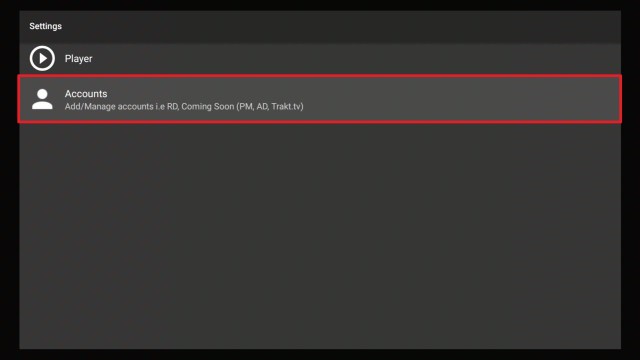
2. Click on Settings.

Install Morpheus TV on Firestick Trakt 2


3. Select Accounts.

Install Morpheus TV on Firestick Trakt 3


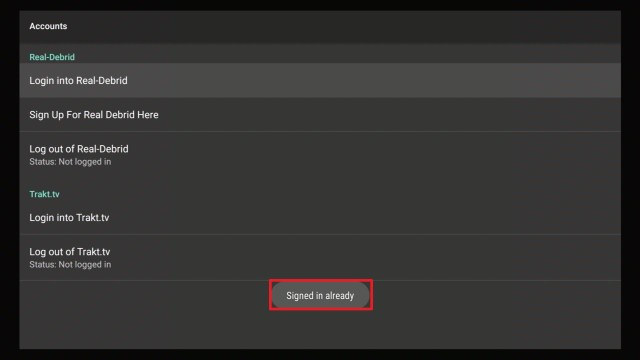
4. Choose Login into Trakt.tv.

Install Morpheus TV on Firestick Trakt 4


5. Take note of the given code.


6. Open a web browser on your smartphone or laptop and go to https://trakt.tv/activate.


7. Type in the code given earlier and choose Continue.


8. That’s it! Trakt TV is now activated.


Real Debrid Integration

If you want the best working streaming links to be featured on Morpheus TV, you have to integrate Real-Debrid into it. Just follow this guide to do so:

1. Launch Morpheus TV on your Firestick.

Install Morpheus TV on Firestick Step 16


2. Go to  Settings.

Install Morpheus TV on Firestick Trakt 2


3. Choose Accounts.

Install Morpheus TV on Firestick Trakt 3


4. Select Login into Real Debrid.

Install Morpheus TV on Firestick RD 5


5. Remember this code.

Install Morpheus TV on Firestick RD 6


7. On a separate web browser, go to https://real-debrid.com/device


6. Input the code.

Install Morpheus TV on Firestick RD 7


7. Select Continue.

Install Morpheus TV on Firestick RD 8


8. There you have it. Real Debrid is now activated on Morpheus TV.


Morpheus Pros and Cons

Pros

  • Downloadable content is great for handheld devices such as smartphones and tablets. These devices have larger memory storage compared to the Firestick.
  • Morpheus TV’s internal player works well.
  • Automatic Subtitles and Closed Captioning Support.


Cons

  • Voice Command is not functioning.
  • If you are trying to play Real Debrid links with MX Player Pro, it will end up in failure.
  • Some TV Shows do not have streaming links.
  • The streaming is sometimes disrupted. We suspect that this has something to do with the Internet connection.
  • The app crashed after prolonged use.


Stream Safely with a VPN

https://get.surfshark.net/aff_c?offer_id=865&aff_id=12312

Many cord-cutters are unaware that all of their online activities, most especially streaming, is being under strict monitoring by their ISP.

Most often than not, when they get caught, the ultimate result would be lags and buffering.

To prevent this from happening, you will need a reliable and powerful VPN service like Surfshark.

There are also additional perks to subscribing to such service and here they are:

  • Access to Location-based content. You can use Surfshark to change your IP Address to the country in which you are trying to access the content.
  • Cloak your online presence so that your online activities can never be traced back to you.
  • Protection against invisible online entities that will use your personal information and sell it for their gain. This is most especially true when you are accessing public wifi internet connections.
  • Surfshark is the ultimate fix for Firestick Buffering and Kodi Buffering issues alike.

Note: For more information about SurfShark, please read our SURFSHARK REVIEW.


Grab your subscription now!


How to Install Surfshark VPN on Firestick

You can download Surfshark directly from the Amazon App store. It will be easy for you to find Surfshark with your Firestick’s Find feature. Refer to our screenshots below.

1. Go to the Home screen of your Firestick.

step 1 Install Surfshark VPN on Firestick


2. Navigate towards the Find tab. Press the Search button from the resulting dropdown.

step 2 Install Surfshark VPN on Firestick


3. Type in the keyword of SurfShark and select from the suggestions that will appear.

step 3 Install Surfshark VPN on Firestick


4. Click the official SurfShark icon from your search results.

step 4 Install Surfshark VPN on Firestick


5. Press the Download (You own it) button.

step 5 Install Surfshark VPN on Firestick


6. The SurfShark VPN installer will download on your device.

step 6 Install Surfshark VPN on Firestick


7. SurfShark VPN’s app will automatically install itself on your Fire TV stick.

step 7 Install Surfshark VPN on Firestick


8. Press the Open button after completing SurfShark VPN’s installation process.

step 8 Install Surfshark VPN on Firestick


9. Please wait for the SurfShark VPN to load its user interface.

step 9 Install Surfshark VPN on Firestick


10. You can now log in with your SurfShark VPN account credentials.

step 10 Install Surfshark VPN on Firestick

Learn more about Surfshark and Grab the Best Surfshark Deal Now!


Install Surfshark on Firestick

Best Surfshark Deal


Other VPNs to Consider

NordVPN (Best for Streaming)

Best Features

  • 5000+ Server in 50+ Countries 
  • Military-Grade Encryption
  • Fast Connection Speed
  • Suitable to a lot of devices
  • No-Log Policy

Prices
  • Complete $5.89 per month (64% Discount)
  • Plus $4.59 per month (56% Discount)
  • Standard $3.69 per month (55% Discount)

Best Features

  • 750+ High-speed VPN Servers in 43 Locations
  • Military-Grade Encryption
  • Fastest HD Streaming and Gaming
  • 30-Day Money-Back Guarantee
  • Unlimited Data & Devices
  • No-Log Policy

Prices
  • 3 Years $1.99 per month (82% Discount)
  • 1 Years $3.29 per month (70% Discount)
  • 1 Month $10.99 per month

IPVanish VPN (Most Secure)

Best Features

  • 1200+ Servers in 60+ Countries around the world
  • Unlimited Connections
  • No-Log Policy
  • Top Notch Military-Grade VPN Protocols and Encryptions
  • 100% Safe and Secured
  • Most Trusted VPN
  • Best VPN for Firestick
  • 30-Day Money-Back Guarantee

Prices
  • Yearly $3.99 per month (63% Discount) – 30 days risk free + Ransomware & Malware Protection
  • Quarterly $5.32 per month (51% Discount)
  • Monthly $10.99 per month


For more VPN discounts, go to ReviewVPN Deals and purchase the best VPN for you.

Click here to get the lowest price on Surfshark through our exclusive limited-time offer.


FAQs

Is Morpheus TV safe to download?

Yes. It is safe to download and Install Morpheus TV on Firestick and other android streaming devices.


Is Morpheus TV legal?

Yes. It is legal to install Morpheus TV on Firestick. Just be sure to use it in conjunction with a premium VPN service like Surfshark.


Is Morpheus TV free?

Yes, it is free.


Are there ADS?

Morpheus TV is ad-free.


Is there a premium version?

No premium version.


Is there an official website?

We are unsure if this is the official website but you can check out https://www.morpheustvbox.com/.


What other devices does it work on?

Morpheus TV can also be installed on touchscreen devices like smartphones, tablets, and other Android TV Boxes.


How does the app work?

Morpheus TV is a scraper app. It works by searching for streaming links that are available online. It does not host any content but only links to them.


Minimum Version Required

Morpheus TV will run on version 5.0 and above.


Morpheus TV Alternatives

If you ever find that Morpheus TV is not working on Firestick, you can follow these other great streaming apps which are a part of our collection for Best Firestick Apps. Just follow the guides below:


Our Opinion

The major thing that we would like to point out is that Morpheus TV is not yet 100%. We believe that the setbacks we encountered are caused by glitches. Moreover, we think that this is normal with any streaming app that is trying to get back in the game. Hopefully, the developers immediately resolve the issues.

Overall, we are just glad that Morpheus TV is back online. It will take hard work but we believe that it can surely do wonders as it did before.


Final Thoughts

We hope that this article was able to help with how to install Morpheus TV on Firestick and other devices. Thank you for reading!


Note: ReviewVPN.com does not own or operate any app nor does it endorse any. The main purpose of this article is strictly for educational purposes only.


Top Resources For Free Streaming

Best Firestick Apps

Top Unlinked Codes

Free Movie Streaming Websites

Best TV Show Websites

Best Adult Apps for Firestick

Top Live TV Apps

Install Swift Streamz on Firestick

Best Kissanime.RU Alternatives 


What Is Your Favorite Streaming App? Cast Your Vote Below.

Install Vigilante Solutions IPTV

Vigilante Solutions IPTV Overview


In this article, we are going to teach you how to install Vigilante Solutions IPTV. This IPTV service offers you over 10,000 Live HD channels in various categories and subcategories. 

Vigilante Solutions IPTV works well on different streaming devices such as Android Box TV, Mac, Apple TV, tablet, computer (laptop and desktop), NVIDIA SHIELD, and lots more. 


ANONYMOUSLY

How to sign up for Vigilante Solutions IPTV

If you want to sign up for Vigilante Solutions IPTV, follow the below step by step guide. Note that you need a working email for registration and purchasing a subscription package.

  1. Visit Vigilante Solutions IPTV web page and on the home page, click on the Client area
  2. If you already signed up, enter your login details. For new users, you will need to click on Register and enter your details (name, and email address)
  3. Check your email inbox for confirmation messages. 
  4. Return to the home page, scroll down and select any of the packages suitable for you.
  5. Next, click Order.
  6. On the new window, click on Continue. Enter your details and check out.

How to install Vigilante Solutions IPTV on Android devices

To install Vigilante Solutions IPTV on Android-powered devices, you will need to download the APK file.

  1. Visit the home page and scroll down to download
  2. On the download menu, choose the APK file you wish to install
  3. After the installation, set up your account (if you are new, create an account on the home page)


YOUR INTERNET ACTIVITY IS BEING WATCHED

ReviewVPN cannot attest to the legality, security and privacy of the applications discussed on this site. It is highly recommended that you use a VPN service while streaming or using Kodi.

Currently, your IP 216.73.216.156 is visible to everyone and your Browser is being tracked by Advertisers & ISP Provider.

Save 65% Now

Limited Time Offer

Here are the main reasons why you must use a VPN:

  • Your activities are hidden from your ISP, the government, and from the apps you are using.
  • You can access additional movies and TV streams.
  • ISP attempts to throttle are thrwarted thus reducing buffering issues.
  • Geographically restricted content like Netflix and Hulu can be unblocked.

A VPN works be replacing your ISP-assigned IP address and creating an encrypted tunnel. We recommend the no log service offered by IPVanish. It works well on a Firestick and offers the fastest possible speeds.

Special Limited Time Offer - Get IPVanish


Legal Disclaimer: ReviewVPN.com does not encourage or endorse any illegal activity involved in the usage of services and applications referenced on this site. We do not verify the licensing agreements of services. The end-user is wholly responsible for ensuring that any media accessed through these services does not violate copyright and/or licensing laws. ReviewVPN does not promote, link to, or receive compensation from any Apps and IPTV services.


Install Surfshark on Firestick

Best Surfshark Deal


What is Vigilante Solutions IPTV?

Vigilante Solutions is an internet protocol television service provider offering you over 10,000 Live HD channels.

This IPTV service provider also integrates on its database, a VPN (a virtual private network). This TV app works on computers (both laptop and desktop), Amazon Firestick and Fire TV, Roku, Chromecast, Apple TV, Hulu, smartphones, tablets, and many more. 

Vigilante Solutions IPTV can be installed on any operating system such as Windows, Android, iOS, Linux, and lots more. This IPTV service provider offers 24 hours paid trial which starts at $1.50 and allows you to access over 6000 Live HD channels, 24/7 customer support service, web player, one device simultaneous connection, custom Android apps and so much more.

One month package goes for $13 and has over 10,000 Live HD channels and more. You will find three months, six months, 12 months, and each of these connections allows up to 4 device simultaneous connections.


Features of Vigilante Solutions IPTV

  • Offers you over 10000 Live HD channels.
  • Integrated with an inbuilt VPN
  • Works on streaming devices such as Roku, Nvidia shield, Chromecast, Amazon Firestick, Fire TV, computer (laptop and desktop), smartphones, Apple TV, and many more.
  • Has smart load balancing
  • Custom Android apps (APK)
  • 24/7 customer support
  • Web player 
  • Allows you to access and stream music channels, movie channels, sports channels, adult channels with parental control.
  • Has video-on-demand movies, TV series and shows, and many more.
  • Allows you to connect up to 4 devices simultaneously.


Channels

Vigilante Solutions IPTV offers you the following Live HD channels;

24/7 news, 24/7 movies, 24/7 sports, 24/7 documentaries, music, religious and language channels such as South Indian, Bangla, Thai, Australian, French, Afghan, Filipino, Portuguese, Indonesian, English, and lots more.


Subscription packages

The monthly package starts at $13 and allows you to connect only one device at a go. For 2 device connection (one month package) goes for $16 and 4 device connection costs $20. 

Three months package starts at $26 with one device connectivity. Two device connectivity starts at $33 (three months package) and for 4 device connections, you will pay $43.

Six months package goes for $60 with only one device connected. Two device simultaneous connection starts at $70 and four connection goes for $80. Twelve months packages go for $80 with one device connectivity.

Two device connection goes for $96 while four device connection is $115.

All of the above subscription packages offer video on demand and 24/7 customer support service.

Vigilante Solution IPTV also has VPN packages on its site which cost $9.95 and $19.95 for 3 months. Six months start at $34.95 and $59.99 respectively.


Can I use Vigilante Solutions IPTV on my computer?

Yes, you can install this app on your computer using an android emulator. Recommended Android emulators are Nox and Bluestack Android emulators

That said, you can as well use the web player version directly on your Windows or Mac devices.


Why do you need to protect yourself while streaming?

A virtual private network is a software that uses a process known as encryption to mask your IP address to appear as a private and secure user on the internet service provider network. When this happens, no one will be able to track or record any activities you are doing online.

The importance of using virtual private network (VPN) software on your streaming device can not be overemphasized. It protects, secures, and makes your connection private.


Bypass monitoring

Do you know that your internet service provider and other third parties often spy on your online activities? Yes, when you access the Internet or stream without a VPN installed on your device, you are vulnerable to third parties. That is why we recommend protecting and making your online activities secure and private with a VPN.


Security and privacy

A VPN encrypts and masks your IP address to appear secure and private. This is because when you are on a public internet connection, everyone on that network can see your log data. This means that if you are accessing sensitive information sites like your bank website, a hack who is using the same public Internet connection might get hold of your information and hack into your bank account.


Location restrictions

Yes, many streaming websites and apps use this method to protect their content from unintended audiences. Apps like Netflix and Hulu use this method a lot and this can be very challenging. Imagine wanting to stream your favorite American TV show only to be denied access due to location. That can be frustrating, however, with a VPN, you can switch to a new server and change your location. When this happens, you will be able to stream from anywhere around the world.


Protect yourself with a VPN

We recommend installing a VPN. A VPN masks and encrypts your IP address to appear on the internet service provider as a secure user.

For maximum online security and privacy, install Surfshark.

Note: For more information about Surfshark, please read our Surfshark Review.


Install Surfshark on Firestick

Best Surfshark Deal


How to Install Surfshark VPN on Firestick

If your Firestick still has the older interface, read this article to learn how to update it: Update Firestick Interface.

Follow our screenshots below to install the SurfShark VPN app on your Fire TV stick.

1. Go to the Home screen of your Firestick.

step 1 Install Surfshark VPN on Firestick


2. Navigate towards the Find tab. Press the Search button from the resulting dropdown.

step 2 Install Surfshark VPN on Firestick


3. Type in the keyword of SurfShark and select from the suggestions that will appear.

step 3 Install Surfshark VPN on Firestick


4. Click the official SurfShark icon from your search results.

step 4 Install Surfshark VPN on Firestick


5. Press the Download (You own it) button.

step 5 Install Surfshark VPN on Firestick


6. The SurfShark VPN installer will download on your device.

step 6 Install Surfshark VPN on Firestick


7. SurfShark VPN’s app will automatically install itself on your Fire TV stick.

step 7 Install Surfshark VPN on Firestick


8. Press the Open button after completing SurfShark VPN’s installation process.

step 8 Install Surfshark VPN on Firestick


9. Please wait for the SurfShark VPN to load its user interface.

step 9 Install Surfshark VPN on Firestick


10. You can now log in with your SurfShark VPN account credentials.

step 10 Install Surfshark VPN on Firestick

Learn more about Surfshark and Grab the Best Surfshark Deal Now!


Install Surfshark on Firestick

Best Surfshark Deal


Other VPNs to Consider

NordVPN (Best for Streaming)

Best Features

  • 5000+ Server in 50+ Countries 
  • Military-Grade Encryption
  • Fast Connection Speed
  • Suitable to a lot of devices
  • No-Log Policy

Prices
  • Complete $5.89 per month (64% Discount)
  • Plus $4.59 per month (56% Discount)
  • Standard $3.69 per month (55% Discount)

Best Features

  • 750+ High-speed VPN Servers in 43 Locations
  • Military-Grade Encryption
  • Fastest HD Streaming and Gaming
  • 30-Day Money-Back Guarantee
  • Unlimited Data & Devices
  • No-Log Policy

Prices
  • 3 Years $1.99 per month (82% Discount)
  • 1 Years $3.29 per month (70% Discount)
  • 1 Month $10.99 per month

IPVanish VPN (Most Secure)

Best Features

  • 1200+ Servers in 60+ Countries around the world
  • Unlimited Connections
  • No-Log Policy
  • Top Notch Military-Grade VPN Protocols and Encryptions
  • 100% Safe and Secured
  • Most Trusted VPN
  • Best VPN for Firestick
  • 30-Day Money-Back Guarantee

Prices
  • Yearly $3.99 per month (63% Discount) – 30 days risk free + Ransomware & Malware Protection
  • Quarterly $5.32 per month (51% Discount)
  • Monthly $10.99 per month


For more VPN discounts, go to ReviewVPN Deals and purchase the best VPN for you.


Verdict

Install Vigilante Solutions IPTV for unlimited streaming of over 10,000 channels. This IPTV service comes with amazing features to improve the streaming experience. You can enjoy Vigilante Solutions IPTV inbuilt VPN for enhanced security and privacy.

How to Install Vicom IPTV – 2023 Guide

Vicom IPTV Overview

Today, you are going to learn how to install Vicom IPTV on Amazon Firestick, Fire TV, Android Box TV, Apple devices, and lots more.


Vicom TV IPTV offers you over 800 live HD channels to choose from.

Channels on this TV app include video-on-demand movies, TV series, sports, news, documentaries, and many more. There are also premium movie channels and more.

This app is compatible with most streaming devices that you have such as a computer, tablet, smart TV, smartphones, and many more.


ANONYMOUSLY


How to sign up for Vicom IPTV service

To sign up for Vicom IPTV services, you need a working email address. 

  1. Login to Vicom IPTV website and then click on my option (located at the top right side of the home screen).
  2. On the new window that will appear, you will see two options: login and register. If you are a new user, click on Register and fill up the details. If you already signed up, just log in to your details (password and username).
  3. Check your email for a confirmation message.
  4. Return to the home page and click on my account.
  5. Enter your password and username.
  6. Click on pricing and the list of subscription packages, choose any of the packages you can afford.
  7. Next, on the new window that will appear, click add to cart and check out.

How to install Vicom on Amazon Firestick and Fire TV

First, make sure you enabled the Unknown sources of your Amazon Firestick and Fire TV. 

  1. On the home screen of your firestick TV, navigate and click on settings.
  2. Next, scroll rightward and click on Device
  3. Now, navigate down and then click on Developer options and enable ADB Debugging
  4. Click on Apps From Unknown Sources and turn the option ON
  5. Return to the home screen of your Amazon firestick or Fire TV device.
  6. Click on the search bar (located at the top right corner of your screen)
  7. Type ‘downloader’ using the onscreen keyboard with your remote.
  8. When the downloader app appears, click on it to install
  9. Click it open once the installation is completed.
  10.  Next is to download the LenoX app.
  11. On the downloader, type this URL: lenoxmp.com/app.apk and click on the GO option. (Wait while the download is completed.
  12.  Next, scroll down and click on Install.
  13.  Once the installation is done, click open.
  14. Enter Service ID and username/password and enjoy your Vicom on Firestick and Fire TV.


How to install Vicom IPTV on Apple iOS devices

  1. Open your Apple store 
  2. Click on the search icon and enter LenoX media player
  3. Download and install
  4. Log in to your details and enjoy it.


How to install Vicom IPTV on Apple TV devices

  1. Launch your Apple TV device. Scroll to the search icon and type LenoX media player
  2. Download and Install
  3. Launch the lenoX player and then enter your details.


How to install Vicom IPTV APK file

  1. Visit the Vicom IPTV home page and click on the download option.
  2. Scroll down and click on Android APK. Download and install the APK file.


YOUR INTERNET ACTIVITY IS BEING WATCHED

ReviewVPN cannot attest to the legality, security and privacy of the applications discussed on this site. It is highly recommended that you use a VPN service while streaming or using Kodi.

Currently, your IP 216.73.216.156 is visible to everyone and your Browser is being tracked by Advertisers & ISP Provider.

Save 65% Now

Limited Time Offer

Here are the main reasons why you must use a VPN:

  • Your activities are hidden from your ISP, the government, and from the apps you are using.
  • You can access additional movies and TV streams.
  • ISP attempts to throttle are thrwarted thus reducing buffering issues.
  • Geographically restricted content like Netflix and Hulu can be unblocked.

A VPN works be replacing your ISP-assigned IP address and creating an encrypted tunnel. We recommend the no log service offered by IPVanish. It works well on a Firestick and offers the fastest possible speeds.

Special Limited Time Offer - Get IPVanish


Legal Disclaimer: ReviewVPN.com does not encourage or endorse any illegal activity involved in the usage of services and applications referenced on this site. We do not verify the licensing agreements of services. The end-user is wholly responsible for ensuring that any media accessed through these services does not violate copyright and/or licensing laws. ReviewVPN does not promote, link to, or receive compensation from any Apps and IPTV services.


Install Surfshark on Firestick

Best Surfshark Deal


What is Vicom IPTV?

Vicom TV is an internet protocol television service provider offering you over 800 live HD channels.

This App TV offers you three days free trial with no contracts, no credit cards, no credit check and you can cancel your subscription anytime you want.

You will enjoy premium movie channels, news channels, sports channels, video on demand (movies, TV series, documentaries, and lots more). You will also find adult channels on this app. Pricing starts at $24 per month and allows you to connect up to 5 devices at a time.


Features of Vicom IPTV TV

  • Offers you over 800 Live HD channels
  • Over 6000 Video-on-demand TV series and movies
  • Over 120 local channels
  • Has more international channels: Canadian, German, French, Spanish, Latin, Polish, and lots more
  • Has Electronic Program Guide
  • Offers you 3 days free trial with no contract, no credit card, no credit check, no commitment and you can cancel anytime.
  • Compatible on major streaming devices such as Roku, Andriod device( TV, phones, tablets), computer (both desktop and laptop) iOS devices, and many more.
  • Pay Per View events included
  • Offers up to 7 days catch up services (over 60 top channels to choose from)
  • Daily update with 17,000 TV shows
  • Has web player version


Channels

Vicom IPTV service offers you the following channels:

Starzencore, Starz, Showtime, HBO, Cinemax, Viceland, The weather channels, USA, TCM, TRUTV, TRAVEL, TNT, TLC, HBS, SYFY, QYC, POP, OXYGEN, OWN, OUTSIDETV, REDZONE, NETWORK, NBC, NAT GEO WILD, NAT GEOGRAPHIC, MSNBC, IFC, HLN, HISTORY, HALLMARK CHANNEL, HGTV, GOLF, FXX, FXM, FOX, FREEFORM, FOX NEWS, FOX SPORTS, FOX BUSINESS, FOOD NETWORK, ESPN, ESPN, ESPN 2, E!, DISCOVERY, XB, DISNEY JUNIOR, DISNEY CHANNEL, CNN, CNBC, CN, BRAVO, ANIMAL PLANET, A&E, NBC, FOX, CBS, ABC and many more.


Pricing

Vicom IPTV offers you three days of a free trial. With no credit card or commitment required.

  • The free trial starts at $0.00 for three days
  • One monthly package starts at $24.
  • Three months start at $59
  • Six months start at $110
  • Twelve-month starts at 200.

All of the above packages allow you to connect up to 5 devices simultaneously.


Why do you need to protect yourself while streaming?

A VPN (a virtual private network) is software that uses a process called encryption to protect your IP address on the Internet service provider network(ISP). Accessing and streaming online nowadays has become increasingly risky especially if you are fond of using a public wifi or internet connection. 

Installing a VPN will mask your IP address to be secure, private, and be able to bypass tracking and monitoring.


Security and privacy

The only way to protect your online activities from the spies of third parties is to install a VPN. It will mask your VPN and it will become hidden on the network.


Geolocation

Many streaming apps and websites use location restrictions to protect their content from unintended audiences. However, you can bypass location restrictions with a VPN and stream from anywhere around the world.

We reviewed several IPTV services and Surfshark offers the best service.


Protect yourself with a VPN

We recommend installing a VPN. A VPN masks and encrypts your IP address to appear on the internet service provider as a secure user.

For maximum online security and privacy, Install Surfshark on Firestick

Features of Surfshark

  • Has a total of 3,200 VPN servers in 65 locations to choose from
  • It works on all unlimited simultaneous devices
  • Military-grade encryption
  • 30 days no et back guarantee
  • Unlimited bandwidth
  • No logs and leak protection policy


If you wish to know more about Surfshark and if you want to try it on your Firestick device, please refer to our Surfshark Review.

Click here to get the lowest price on Surfshark through our exclusive limited-time offer.


Grab your subscription now!

Click here to get the lowest price on Surfshark through our exclusive limited-time offer.


How to Install Surfshark VPN on Firestick

If your Firestick still has the older interface, read this article to learn how to update it: Update Firestick Interface.

1. Go to the Home screen of your Firestick.

step 1 Install Surfshark VPN on Firestick


2. Navigate towards the Find tab. Press the Search button from the resulting dropdown.

step 2 Install Surfshark VPN on Firestick


3. Type in the keyword of SurfShark and select from the suggestions that will appear.

step 3 Install Surfshark VPN on Firestick


4. Click the official SurfShark icon from your search results.

step 4 Install Surfshark VPN on Firestick


5. Press the Download (You own it) button.

step 5 Install Surfshark VPN on Firestick


6. The SurfShark VPN installer will download on your device.

step 6 Install Surfshark VPN on Firestick


7. SurfShark VPN’s app will automatically install itself on your Fire TV stick.

step 7 Install Surfshark VPN on Firestick


8. Press the Open button after completing SurfShark VPN’s installation process.

step 8 Install Surfshark VPN on Firestick


9. Please wait for the SurfShark VPN to load its user interface.

step 9 Install Surfshark VPN on Firestick


10. You can now log in with your SurfShark VPN account credentials.

step 10 Install Surfshark VPN on Firestick

Learn more about Surfshark and Grab the Best Surfshark Deal Now!


Install Surfshark on Firestick

Best Surfshark Deal


Other VPNs to Consider

NordVPN (Best for Streaming)

Best Features

  • 5000+ Server in 50+ Countries 
  • Military-Grade Encryption
  • Fast Connection Speed
  • Suitable to a lot of devices
  • No-Log Policy

Prices
  • Complete $5.89 per month (64% Discount)
  • Plus $4.59 per month (56% Discount)
  • Standard $3.69 per month (55% Discount)

Best Features

  • 750+ High-speed VPN Servers in 43 Locations
  • Military-Grade Encryption
  • Fastest HD Streaming and Gaming
  • 30-Day Money-Back Guarantee
  • Unlimited Data & Devices
  • No-Log Policy

Prices
  • 3 Years $1.99 per month (82% Discount)
  • 1 Years $3.29 per month (70% Discount)
  • 1 Month $10.99 per month

IPVanish VPN (Most Secure)

Best Features

  • 1200+ Servers in 60+ Countries around the world
  • Unlimited Connections
  • No-Log Policy
  • Top Notch Military-Grade VPN Protocols and Encryptions
  • 100% Safe and Secured
  • Most Trusted VPN
  • Best VPN for Firestick
  • 30-Day Money-Back Guarantee

Prices
  • Yearly $3.99 per month (63% Discount) – 30 days risk free + Ransomware & Malware Protection
  • Quarterly $5.32 per month (51% Discount)
  • Monthly $10.99 per month


For more VPN discounts, go to ReviewVPN Deals and purchase the best VPN for you.

Click here to get the lowest price on Surfshark through our exclusive limited-time offer.


Troubleshooting

If you encounter any problem while using Vicom IPTV, you can contact the customer support team via the Contact Us form on their website.


Frequently Asked Questions

How can I use Vicom IPTV on my computer?

You can install and use this service on your windows computer. Download and install an Android emulator. Then download the APK file and install it on your computer.


On what devices can I use Vicom IPTV?

Vicom IPTV is compatible with smartphones, Amazon Firestick, Fire TV, Nvidia shield, tablets, computer (both laptop and desktop), and lots more.


What payment methods are available?

As of the moment, Vicom IPTV accepts Mastercard and Visa cards. However, the payment method might change over time.


How can you renew your package?

To renew your package, you will need to follow the same steps above (sign up for Vicom IPTV) and order another package suitable for you. You will receive an email reminder once your package is near expiration.


How many devices can you use?

Vicom IPTV allows you to connect up to 5 devices simultaneously. That said, if you wish to remove or change a device, you are required to send an email.


Final thought

Vicom IPTV offers you over 800 Live HD TV channels in different categories. You can access both local and international channels from Poland, Canada, the United States of America, and lots more. You will enjoy video-on-demand movies, TV series, and TV shows as well. 

Vicom has a three days free trial that allows you to connect up to 5 devices simultaneously. A package starts at $24 per month and lots more. If you are looking for an IPTV service provider with amazing channels and features, then Vicom is for you to try out.

How to Install WeWatchTV IPTV – 2023 Guide

WeWatchTV IPTV Overview

WeWatchTV is a premium internet protocol television provider offering you over 4500 Live HD channels from around the world.


This IPTV service provider has a free trial for up to 12 hours and allows you to enjoy all the features on the paid plan. This Internet Protocol television service works on computers (laptop and desktop), Amazon Firestick, tablets, smartphones, Android Box TV, Roku, Chromecast, and lots more

WeWatchTV IPTV allows you to stream over 4500 channels in different categories such as News, 24/7 movies, TV shows, 24/7 sports, worldwide Entertainment, Pay Per View events, and lots more.


ANONYMOUSLY


How to sign up for WeWatchTV IPTV service

Follow the steps below to sign up for the WeWatchTV service

  1. Visit the home page of WeWatchTV and click on the online store.
  2. On the new window, scroll down and click on sign in.
  3. Enter your email for a “Get sign-in link”. You can as well create an account if you don’t have yet.

Note: you may click on any of the plans suitable for you and then check out. On the checkout page, enter your email address: this will be used to track your order.

How to install WeWatchTV IPTV on Android Box TV

Follow these steps to install WeWatchTV on your Android Box TV.

  1. Scroll and click on the setting icon.
  2. Next, select security.
  3. Click on unknown sources
  4. Click on OK on the warning message
  5. Next, click on Trust.
  6. Download and install the watch TV app. Next, enter your password and username (which you must have received from wewatchTV.net) and then log in.


How to install WeWatchTV IPTV on Smartphones and Tablets (Android version)

Follow the steps to download WewatchTV on your phones and tablets

  1. Download the app 
  2. Next, enable the unknown sources by going to setting and then click on security<then unknown sources< click OK and then select Trust.
  3. Install the app after download it.
  4. Load the wewatchTV.net app and then enter your login details (password and username) from wewatchtv.net.
  5. Click login.


How to setup WeWatchTV IPTV on Windows devices

Note: WewatchTV.net uses a ” VLC” media player. That said, you will not need to set up any codec as this is already in VLC.

  1. Install VLC media player on your Windows device
  2. Launch the app
  3. Click on the menu and then select Medium>Network streams.
  4. In the new window,  type your M3U Url (you will receive this via your activation email) into “Networks” 
  5. Next, click on Show and then Playlist to preview a list of available channels
  6. Select any list you like to watch.


How to install WeWatchTV on Amazon Firestick and Fire TV devices

Make sure you enable Apps from unknown sources and ADB debugging: 

Settings<device<developer options.

  1. On the home screen of your firestick, scroll and click on the search box.
  2. Type the downloader on the search bar and install it.
  3. Open the downloader app.
  4. On the home screen, scroll right and click on the URL field.
  5. Download and install Filelinked app
  6. Launch filelinked app, and enter this code: 87676462
  7. Wait for downloading and installation to complete.
  8. You will get App installed notification when WewatchTV completes the installation.
  9. Click on Done.
  10. Launch the app and enter your details.


YOUR INTERNET ACTIVITY IS BEING WATCHED

ReviewVPN cannot attest to the legality, security and privacy of the applications discussed on this site. It is highly recommended that you use a VPN service while streaming or using Kodi.

Currently, your IP 216.73.216.156 is visible to everyone and your Browser is being tracked by Advertisers & ISP Provider.

Save 65% Now

Limited Time Offer

Here are the main reasons why you must use a VPN:

  • Your activities are hidden from your ISP, the government, and from the apps you are using.
  • You can access additional movies and TV streams.
  • ISP attempts to throttle are thrwarted thus reducing buffering issues.
  • Geographically restricted content like Netflix and Hulu can be unblocked.

A VPN works be replacing your ISP-assigned IP address and creating an encrypted tunnel. We recommend the no log service offered by IPVanish. It works well on a Firestick and offers the fastest possible speeds.

Special Limited Time Offer - Get IPVanish


Legal Disclaimer: ReviewVPN.com does not encourage or endorse any illegal activity involved in the usage of services and applications referenced on this site. We do not verify the licensing agreements of services. The end-user is wholly responsible for ensuring that any media accessed through these services does not violate copyright and/or licensing laws. ReviewVPN does not promote, link to, or receive compensation from any Apps and IPTV services.


Grab your subscription now!

Click here to get the lowest price on Surfshark through our exclusive limited-time offer.


Features Of WeWatchTV IPTV

  • Has Multiscreen and recording
  • Builtin DVR: allows you to record and schedule contents at your convenience.
  • Has Visa, Master Card, Discover, Amex, and PayPal as the method of payment.
  • XGEN media player.
  • FHD, HD, 4K video quality.
  • Offers you over 4500 Live HD channels
  • You can stream TV shows, sports, local and international channels, 24/7 news, movies, kids’ shows, and lots more.
  • Pay-per-view content: movies, TV shows, and many more.
  • User-friendly interface.
  • Works on major operating systems such as iOS, Android, Windows, Linux, and many more.


Packages

WeWatchTV IPTV has got you covered with amazing packages to suit your budget.

One monthly package goes for $30 and allows you to connect only one device.

Two device connections cost $33 with an adult channel. Four device connections will cost you $43 with an adult channel while four connections without an adult go for $40.


Troubleshooting Android Box TV

If you are having any problem with using the WewatchTV app on your Android box TV, follow the steps below to fix it.

  1. Restart your App
  2. Unplug and replug your Android Box from power.
  3. Unplug your wifi router from power


Note: if the above does not fix the problem, uninstall and reinstall the app.


How to fix WeWatchTV IPTV app not working on smartphones and Tablet (Android version)

  1. Restart your wifi router
  2. Restart your app
  3. Unplug and plug back the power of your wifi router
  4. Restart your device.


How to fix channels not working on windows

  1. Restart the app
  2. Unplug wifi from power and plug back.


How to fix WeWatchTV channels not working on Firestick

  1. Restart your WewatchTV app
  2. Unplug and replug your Wifi router from power
  3. Restart your Firestick device.
  4. Uninstall and reinstall the app.


Protect yourself with a VPN

Nowadays, streaming or accessing the internet has become challenging. You can no longer have privacy and security while only: if it’s not your internet service provider spying on you, it will be third-party monitoring and keeping track of your online activities. All these things can be frustrating. That said all of the above-mentioned challenges have become a thing of the past with the entry of a virtual private network.

A virtual private network is software that encrypts and masks your online activities to appear as a private and anonymous user on the internet service provider network. Installing a VPN will ensure your online privacy, security, and anonymity. For 24/7 online security, we recommend Surfshark. They offer the best VPN service.

We recommend installing a VPN. A VPN masks and encrypts your IP address to appear on the internet service provider as a secure user.

For maximum online security and privacy, install Surfshark.


Features of Surfshark

Surfshark features over 3200+ servers in 65 countries’ locations. This VPN comes with a zero log policy and lots more.

Get Surfshark here.

If you wish to know more about Surfshark and you want to try it on your Firestick device, please refer to our Surfshark Review.


Install Surfshark on Firestick

Best Surfshark Deal


How to Install Surfshark VPN on Firestick

If your Firestick still has the older interface, read this article to learn how to update it: Update Firestick Interface.

Follow our screenshots below to install the SurfShark VPN app on your Fire TV stick.

1. Go to the Home screen of your Firestick.

step 1 Install Surfshark VPN on Firestick


2. Navigate towards the Find tab. Press the Search button from the resulting dropdown.

step 2 Install Surfshark VPN on Firestick


3. Type in the keyword of SurfShark and select from the suggestions that will appear.

step 3 Install Surfshark VPN on Firestick


4. Click the official SurfShark icon from your search results.

step 4 Install Surfshark VPN on Firestick


5. Press the Download (You own it) button.

step 5 Install Surfshark VPN on Firestick


6. The SurfShark VPN installer will download on your device.

step 6 Install Surfshark VPN on Firestick


7. SurfShark VPN’s app will automatically install itself on your Fire TV stick.

step 7 Install Surfshark VPN on Firestick


8. Press the Open button after completing SurfShark VPN’s installation process.

step 8 Install Surfshark VPN on Firestick


9. Please wait for the SurfShark VPN to load its user interface.

step 9 Install Surfshark VPN on Firestick


10. You can now log in with your SurfShark VPN account credentials.

step 10 Install Surfshark VPN on Firestick

Learn more about Surfshark and Grab the Best Surfshark Deal Now!


Install Surfshark on Firestick

Best Surfshark Deal


Other VPNs to Consider

NordVPN (Best for Streaming)

Best Features

  • 5000+ Server in 50+ Countries 
  • Military-Grade Encryption
  • Fast Connection Speed
  • Suitable to a lot of devices
  • No-Log Policy

Prices
  • Complete $5.89 per month (64% Discount)
  • Plus $4.59 per month (56% Discount)
  • Standard $3.69 per month (55% Discount)

Best Features

  • 750+ High-speed VPN Servers in 43 Locations
  • Military-Grade Encryption
  • Fastest HD Streaming and Gaming
  • 30-Day Money-Back Guarantee
  • Unlimited Data & Devices
  • No-Log Policy

Prices
  • 3 Years $1.99 per month (82% Discount)
  • 1 Years $3.29 per month (70% Discount)
  • 1 Month $10.99 per month

IPVanish VPN (Most Secure)

Best Features

  • 1200+ Servers in 60+ Countries around the world
  • Unlimited Connections
  • No-Log Policy
  • Top Notch Military-Grade VPN Protocols and Encryptions
  • 100% Safe and Secured
  • Most Trusted VPN
  • Best VPN for Firestick
  • 30-Day Money-Back Guarantee

Prices
  • Yearly $3.99 per month (63% Discount) – 30 days risk free + Ransomware & Malware Protection
  • Quarterly $5.32 per month (51% Discount)
  • Monthly $10.99 per month


For more VPN discounts, go to ReviewVPN Deals and purchase the best VPN for you.

Click here to get the lowest price on Surfshark through our exclusive limited-time offer.


Final thought

Install WeWatchTV IPTV service if you are a movie freak. The packages may seem pricy but the services they offer are equivalent. You will enjoy over 4500 Live HD channels both local and international.

Studio Key TV IPTV Review – 2023 Update

Studio Key TV IPTV Review


Have you ever been tired of paying a huge amount of money for a subscription plan and never get satisfaction for your money?

Are you tired of watching the same old channels with the same television programs or movie episodes? If your answer is yes, then worry no more as Studio Key TV IPTV has got you cover.

This blog post will review Studio Key TV IPTV. To give a clear understanding of Studio Key TV IPTV, an introduction to IPTV will be of great help. 

To aid you in understanding IPTV and how it works and IPTV service providers especially Studio Key TV IPTV, you need to have a glimpse of how Non-IPTV functions and its connection procedures.


ANONYMOUSLY


IPTV Defined

The traditional cable television you might have seen is a type of Non-IPTV.

What this means is that you don’t need an internet connection for you to watch any channel.

Non-IPTV uses coaxial cable to share video signals. This cable becomes the means of transmitting video content. From the satellite dish which receives the signal to the decoder down to the television; all the connections are done using coaxial cable.

While in IPTV, no cable connection is needed.  Simply sign up for the service on any IPTV provider like Studio Key TV IPTV and purchase any subscription package and there you go.

Accessing IPTV service requires you to have a strong internet connection.  This is because an IPTV service provider like Studio Key TV IPTV uses large bandwidth. Your internet connection may be wired (DSL or Ethernet) or wireless (Wi-Fi), whichever one it is, the internet connection ought to be reliable and stable.

So having given you the above explanation of IPTV, it is worthwhile you know the types of IPTV services out there in the market.

IPTV Features

Video On Demand

Request for your favorite TV series or movie episode and you will have it sent to your device.

You can scroll through the list of VOD content and choose any you want.

Videos on VOD can still be accessed without any time frame.


Time-Shifted Media

Watch past videos as far as it is still available on the server. This functions as Catch Up TV.

Studio Key TV IPTV offers this under the Catch-Up TV section where you can still watch television programs or shows while it’s still on the IPTV provider server.


Live TV

Studio Key TV IPTV has this service on its platform. You can watch live programs such as sports, documentaries, beauty pageants, talent shows, and lots more.

You can subscribe to any of the IPTV services and request any live program you want. 


Compatible Devices

IPTV may be access using a personal computer via a browser such as chrome or firefox, on smartphones as apps, or firestick TV, etc.


Grab your subscription now!

Click here to get the lowest price on SufShark through our exclusive limited-time offer.


Legal Disclaimer: ReviewVPN.com does not encourage or endorse any illegal activity involved in the usage of services and applications referenced on this site. We do not verify the licensing agreements of services. The end-user is wholly responsible for ensuring that any media accessed through these services does not violate copyright and/or licensing laws. ReviewVPN does not promote, link to, or receive compensation from any Apps and IPTV services.

YOUR INTERNET ACTIVITY IS BEING WATCHED

ReviewVPN cannot attest to the legality, security and privacy of the applications discussed on this site. It is highly recommended that you use a VPN service while streaming or using Kodi.

Currently, your IP 216.73.216.156 is visible to everyone and your Browser is being tracked by Advertisers & ISP Provider.

Save 65% Now

Limited Time Offer

Here are the main reasons why you must use a VPN:

  • Your activities are hidden from your ISP, the government, and from the apps you are using.
  • You can access additional movies and TV streams.
  • ISP attempts to throttle are thrwarted thus reducing buffering issues.
  • Geographically restricted content like Netflix and Hulu can be unblocked.

A VPN works be replacing your ISP-assigned IP address and creating an encrypted tunnel. We recommend the no log service offered by IPVanish. It works well on a Firestick and offers the fastest possible speeds.

Special Limited Time Offer - Get IPVanish


 Is A VPN Needed?

We advise installing a good VPN on your device. This will help you to access IPTV services anonymously without your IP address being tracked.

Also, having a VPN will enable you to change your device location.

If your device location is change using VPN, your IP address will also be change and this will give you access to watch channels with location restrictions.

The majority of the channels on IPTV are from the United States of America, Canada, the United Kingdom, and Latino (Latin America).

The only way someone outside of these countries can be able to access the above channels is by using a VPN.


Is Studio Key TV IPTV Any Good?

Studio Key TV IPTV is an excellent IPTV service provider. They provide over 4,500 channels from the United States of America, Canada, and the United Kingdom.

This IPTV also offers Latino channels.

Channels on Studio Key TV IPTV are in these categories: MLB, NBA, NBL, comedy, romance, documentaries, entertainment, kids shows, and lots more.

International channels are also available from these countries: Europe, Asia, and Africa.

It also offers pay-per-view events and adult channels as well (adult channels come with a password pin for child control measures).


Studio Key TV IPTV Features

It does not offer a trial period. However, the subscription package on Studio Key TV IPTV for one month starts at $10 and this allows you to connect only one device (no automatic renewal, no credit check, no cancellation fees).

For up to three device connections, the same one-month subscription plan goes for $21 (no credit check, no automatic renewal, and no cancellation fees).

Six months subscription plan on Studio Key TV IPTV goes for $106 and allows up to three device connectivity with no automatic renewal, no credit check, and no cancellation fees whatsoever. 


Note: You will have to sign up on the Studio Key TV IPTV webpage and create an account. After that check your inbox for an email with your password and username. Log in to Studio Key TV IPTV and purchase any subscription plan depending on your budget. We recommend purchasing monthly subscription plans on Studio Key TV IPTV or any other IPTV provider. This is to save you from losing money when the IPTV provider goes out of operation.


Device Compatibility

Studio Key TV IPTV can be accessed via any streaming device like Amazon TV, NVIDIA SHIELD, Android Box TV, Android phone, Apple TV, Smart TV (Samsung and LG), tablets, Firestick TV, Fires TV, iPad, iPhone, MAC, Windows, Linux Machine, PS4 and lots more. You can also integrate MX or VLC players on Studio Key TV IPTV. 


Customer Support Service

Studio Key TV IPTV support representative can be reached any time via 859.439.4912 or fill out the support form using https://studiokeytv.com/#contact. Customers may also join the Facebook fan page of Studio Key TV IPTV and submit any issues.


Protect Yourself with a VPN

Surfshark vpn

We recommend installing a VPN. A VPN masks and encrypts your IP address to appear on the internet service provider as a secure user.

For maximum online security and privacy, install SurfShark. SurfShark has over 3200+ servers in 65 countries to choose from. This VPN comes with a zero log policy and lots more. Read our SurfShark review for more details


Install SurfShark on Firestick

Best SurfShark Deal


How to Install Surfshark on Firestick with Screenshots

If your Firestick still has the older interface, read this article to learn how to update it: Update Firestick Interface.

You can download Surfshark directly from the Amazon App store. It will be easy for you to find Surfshark with your Firestick’s Find feature. Refer to our screenshots below.

Follow our screenshots below to install the SurfShark VPN app on your Fire TV stick.

1. Go to the Home screen of your Firestick.

step 1 Install Surfshark VPN on Firestick


2. Navigate towards the Find tab. Press the Search button from the resulting dropdown.

step 2 Install Surfshark VPN on Firestick


3. Type in the keyword of SurfShark and select from the suggestions that will appear.

step 3 Install Surfshark VPN on Firestick


4. Click the official SurfShark icon from your search results.

step 4 Install Surfshark VPN on Firestick


5. Press the Download (You own it) button.

step 5 Install Surfshark VPN on Firestick


6. The SurfShark VPN installer will download on your device.

step 6 Install Surfshark VPN on Firestick


7. SurfShark VPN’s app will automatically install itself on your Fire TV stick.

step 7 Install Surfshark VPN on Firestick


8. Press the Open button after completing SurfShark VPN’s installation process.

step 8 Install Surfshark VPN on Firestick


9. Please wait for the SurfShark VPN to load its user interface.

step 9 Install Surfshark VPN on Firestick


10. You can now log in with your SurfShark VPN account credentials.

step 10 Install Surfshark VPN on Firestick

Learn more about Surfshark and Grab the Best Surfshark Deal Now!


Install Surfshark on Firestick

Best Surfshark Deal

Other VPNs to Consider

NordVPN (Best for Streaming)

Best Features

  • 5000+ Server in 50+ Countries 
  • Military-Grade Encryption
  • Fast Connection Speed
  • Suitable to a lot of devices
  • No-Log Policy

Prices
  • Complete $5.89 per month (64% Discount)
  • Plus $4.59 per month (56% Discount)
  • Standard $3.69 per month (55% Discount)

Best Features

  • 750+ High-speed VPN Servers in 43 Locations
  • Military-Grade Encryption
  • Fastest HD Streaming and Gaming
  • 30-Day Money-Back Guarantee
  • Unlimited Data & Devices
  • No-Log Policy

Prices
  • 3 Years $1.99 per month (82% Discount)
  • 1 Years $3.29 per month (70% Discount)
  • 1 Month $10.99 per month

IPVanish VPN (Most Secure)

Best Features

  • 1200+ Servers in 60+ Countries around the world
  • Unlimited Connections
  • No-Log Policy
  • Top Notch Military-Grade VPN Protocols and Encryptions
  • 100% Safe and Secured
  • Most Trusted VPN
  • Best VPN for Firestick
  • 30-Day Money-Back Guarantee

Prices
  • Yearly $3.99 per month (63% Discount) – 30 days risk free + Ransomware & Malware Protection
  • Quarterly $5.32 per month (51% Discount)
  • Monthly $10.99 per month

For more VPN discounts, go to ReviewVPN Deals and purchase the best VPN for you.


Final Verdict

Studio Key TV IPTV is a great choice for IPTV fans. You can access amazing channels from both local and international channels with just a $10 subscription plan. Their video content comes in SD and full HD quality. They are worth giving a try and I am sure it will satisfy you with their service.

Bomba TV IPTV Review – 2023 Update

Bomba TV IPTV Overview


Ever wonder about the future of television entertainment? Or wanted something more entertaining than traditional cable television? We have got an answer for you.  IPTV is the future of television entertainment and will offer you great entertainment like never before.

This article will review Bomba TV IPTV on the subscription plan, compatible devices, channels, and customer support service. Nevertheless, having a firm knowledge of IPTV will enable you to flow well as we review Bomba TV IPTV.


ANONYMOUSLY


What Is IPTV And How Does It Work?

To answer the above question, we will introduce a Non-IPTV type of television. Non-IPTV (non-internet protocol television) is a television platform that uses cable as a medium to transmit the video signal. To understand better, recall the television at your home or office, that’s a typical Non-IPTV television. Non-IPTV or cable television transmits its video signal via the coaxial cable.

If you remember vividly the connection of your cable television at home; from the television to the decoder and down to the satellite dish, all are linked up using a coaxial cable. On the satellite decoder, the coaxial cable is plugged into the port labeled “lnb” and “Sat in”. The connection port is then linked to the television to a port labeled HDMI.

In IPTV, it is a different game as there is no connection whatsoever. However, you need to have good internet data because IPTV uses a large bandwidth. The internet connection may be DSL or Ethernet or Wi-Fi. Here the internet protocol (IP) is the medium used to transmit signals from the IPTV server down to the streaming device.

IPTV Features

Live TV

You can view live television programs while at home or on the go. For instance, Bomba TV IPTV which is an IPTV provider offers this service. Television programs you can use this service to watch include sports events, talent shows, beauty pageant shows, live news, and lots more. This service works like traditional cable television.


Video On Demand

If you have missed any episode of your television series or movie episode, you can still request it and have it delivered to you. Here, there’s no time frame as to when the videos can be accessed or not.


Time-Shifted Media

Popular news channels like the BBC and others offer this service. The time-shifted media allows you to access video content that has passed. It functions as Catch-Up TV ( in cable television, you will find this as “highlight”). The difference between video on demand and time-shifted media is that VOD videos have no limited time frame while Time-shifted media has.


Let’s now head on to review Bomba TV IPTV.


YOUR INTERNET ACTIVITY IS BEING WATCHED

ReviewVPN cannot attest to the legality, security and privacy of the applications discussed on this site. It is highly recommended that you use a VPN service while streaming or using Kodi.

Currently, your IP 216.73.216.156 is visible to everyone and your Browser is being tracked by Advertisers & ISP Provider.

Save 65% Now

Limited Time Offer

Here are the main reasons why you must use a VPN:

  • Your activities are hidden from your ISP, the government, and from the apps you are using.
  • You can access additional movies and TV streams.
  • ISP attempts to throttle are thrwarted thus reducing buffering issues.
  • Geographically restricted content like Netflix and Hulu can be unblocked.

A VPN works be replacing your ISP-assigned IP address and creating an encrypted tunnel. We recommend the no log service offered by IPVanish. It works well on a Firestick and offers the fastest possible speeds.

Special Limited Time Offer - Get IPVanish


Legal Disclaimer: ReviewVPN.com does not encourage or endorse any illegal activity involved in the usage of services and applications referenced on this site. We do not verify the licensing agreements of services. The end-user is wholly responsible for ensuring that any media accessed through these services does not violate copyright and/or licensing laws. ReviewVPN does not promote, link to, or receive compensation from any Apps and IPTV services.


Install Surfshark on Firestick

Best Surfshark Deal


IS A VPN Required?

You need to have on your device, active VPN software. The reason is that it will help you access IPTV securely. Accessing IPTV services makes your data public on the internet service provider network. This is risky as hackers might get your information. VPN keeps you anonymous while on IPTV. Second, many channels on IPTV can many channels are meant for a particular region; which means any can’t access those channels if you live outside of it. Then how can you access those channels if you live miles away? It is by using a VPN to change your device location. This will change your IP address consequently.


Bomba TV IPTV

It is a well-known IPTV service company. This provides over 1000 live channels. These channels are Canada, the United Kingdom, and the United States of America channels. Also, Bomba TV IPTV Offers international channels from a few countries like Brazil, the United Arab Emirates, and Latino (Latin American channels). The categories of these channels include entertainment such as beauty pageants, talent shows, music video, sports events, kids shows, movies; action, drama, romance, sci-fi, adventure, epic, horror, comedy, tragic-comedy, thriller, suspense, documentaries, news, NBA, NBL, MLB. They also offer subchannels Such as ESPN, bein sports, S-ports, etc.

All channels come with a built-in guide; meaning that you have nothing to worry about concerning setting up these channels.


Bomba TV IPTV Features

Price

Bomba TV IPTV offers a 24hour free trial. So you can enjoy this service completely free of charge for a good 24 hours after which you will decide to purchase the service or not. To use this service, you need to sign up on their portal. You will receive your login details via email. Check your inbox for your login details, (if you don’t see your password and username, check your spam folder on your email).

Return to the Bomba TV IPTV portal and input your login details to purchase the subscription package of your choice. A one-month subscription package costs $15 and with this, you can connect up to five different streaming devices at the same time. Three months subscription on goes for $40 which also allows you to connect up to 5 streaming devices. Lastly, their 6 months subscription costs $70. Each subscription package allows you to renew manually (meaning you can choose to renew or not).

We always advise IPTV enthusiasts to go for a monthly subscription plan rather than a three or six months subscription plan. This will save you the headache of being scammed.


Compatible Devices

Bomba TV IPTV is all device compatible. For those using a personal computer; you can this access it on browsers such as Chrome or Firefox. Smartphone users may download the application via the Google play store or on the webpage of Bomba TV IPTV. Other compatible devices are NVIDIA SHIELD, Apple TV, Smart TV, iPhone, iPad, tablet, PS4, Firestick TV, Amazon TV Android Box TV Fire TV, and lots more.


Customer Service

Subscribers on Bomba TV IPTV can call their toll-free line at 803-575-9783 to get 24/7 customer support. It also offers after-sales service for its customers. Customers may also fill out the support form on Bomba TV IPTV portal.


Protect yourself with a VPN

We recommend installing a VPN. A VPN masks and encrypts your IP address to appear on the internet service provider as a secure user.

For maximum online security and privacy, install Surfshark.


Features of Surfshark

Surfshark features 3,200 VPN servers in 65 locations to choose from. This VPN comes with a zero log policy and lots more.

Get Surfshark VPN here.

If you wish to know more about Surfshark and if you want to try it on your Firestick device, please refer to our Surfshark Review.


How to Install Surfshark VPN on Firestick

If your Firestick still has the older interface, read this article to learn how to update it: Update Firestick Interface.

1. Go to the Home screen of your Firestick.

step 1 Install Surfshark VPN on Firestick


2. Navigate towards the Find tab. Press the Search button from the resulting dropdown.

step 2 Install Surfshark VPN on Firestick


3. Type in the keyword of SurfShark and select from the suggestions that will appear.

step 3 Install Surfshark VPN on Firestick


4. Click the official SurfShark icon from your search results.

step 4 Install Surfshark VPN on Firestick


5. Press the Download (You own it) button.

step 5 Install Surfshark VPN on Firestick


6. The SurfShark VPN installer will download on your device.

step 6 Install Surfshark VPN on Firestick


7. SurfShark VPN’s app will automatically install itself on your Fire TV stick.

step 7 Install Surfshark VPN on Firestick


8. Press the Open button after completing SurfShark VPN’s installation process.

step 8 Install Surfshark VPN on Firestick


9. Please wait for the SurfShark VPN to load its user interface.

step 9 Install Surfshark VPN on Firestick


10. You can now log in with your SurfShark VPN account credentials.

step 10 Install Surfshark VPN on Firestick

Learn more about Surfshark and Grab the Best Surfshark Deal Now!


Other VPNs to Consider

NordVPN (Best for Streaming)

Best Features

  • 5000+ Server in 50+ Countries 
  • Military-Grade Encryption
  • Fast Connection Speed
  • Suitable to a lot of devices
  • No-Log Policy

Prices
  • Complete $5.89 per month (64% Discount)
  • Plus $4.59 per month (56% Discount)
  • Standard $3.69 per month (55% Discount)

Best Features

  • 750+ High-speed VPN Servers in 43 Locations
  • Military-Grade Encryption
  • Fastest HD Streaming and Gaming
  • 30-Day Money-Back Guarantee
  • Unlimited Data & Devices
  • No-Log Policy

Prices
  • 3 Years $1.99 per month (82% Discount)
  • 1 Years $3.29 per month (70% Discount)
  • 1 Month $10.99 per month

IPVanish VPN (Most Secure)

Best Features

  • 1200+ Servers in 60+ Countries around the world
  • Unlimited Connections
  • No-Log Policy
  • Top Notch Military-Grade VPN Protocols and Encryptions
  • 100% Safe and Secured
  • Most Trusted VPN
  • Best VPN for Firestick
  • 30-Day Money-Back Guarantee

Prices
  • Yearly $3.99 per month (63% Discount) – 30 days risk free + Ransomware & Malware Protection
  • Quarterly $5.32 per month (51% Discount)
  • Monthly $10.99 per month


For more VPN discounts, go to ReviewVPN Deals and purchase the best VPN for you.


Grab your subscription now!

Click here to get the lowest price on Surfshark through our exclusive limited-time offer.


Final Words

Bomba TV IPTV is best if you are planning on switching to IPTV. With pocket-friendly subscription packages, you can connect up to five different streaming devices. You might consider giving them a try.

IPTV HOT SPOT – IPTV Review

IPTV HOT SPOT Overview


In this article, we will give a review of IPTV HOT SPOT on Firestick and Android devices.

Recently, a lot of people are switching over to IPTV simply because they are getting tired of being billed with a huge amount of subscription plans on cable television. You can avail of over 10, 000 amazing channels on IPTV with just a $5 subscription plan.

Not only that, but you will also be able to stream that favorite television series or movies, documentaries, sports, shows, a music video from the comfort of your home, or even while commuting. This article reviews IPTV HOT SPOT IPTV. The review covers; the compatible device, subscription plan, channels, and the last but not least, customer care.


ANONYMOUSLY


What is IPTV?

IPTV simply means internet protocol television. It is a type of television platform that uses the internet to transmit or deliver video content to users. Just as cable television requires a subscription, for you to use IPTV service, you need to sign up for the service and purchase any subscription plans available on the provider’s webpage. 

The difference between IPTV and cabled television is that; in cable television (normal television at home or in the office), the coaxial cable is used to link all the component (satellite dish, satellite decoder, and the screen which is the television) but in IPTV, there is no visible connection whatsoever. The internet protocol becomes the means or the medium via which the video signal is transmitted from the IPTV server down to the television screen.

IPTV Services

Live internet television

You will find this service on IPTV HOT SPOT IPTV. It allows you to stream live shows from your streaming device. To avail of this service on any IPTV service provider let’s say, IPTV HOT SPOT IPTV, you need to sign up and then purchase any subscription plan and then select the LIVE TV.


Video on demand

IPTV HOT SPOT IPTV offers this service as well. This gives you access to past news, shows, TV series, movie episodes, sports highlights and so much more. You can just request what you want to watch and your IPTV provider will send it to you. One good side of video on demand is that videos on here do not have any time frame. 


Time-shifted media

The majority of IPTV providers have this service as Catch Up TV. You will also find this service on IPTV HOT SPOT IPTV as Catch IPTV. It gives you the chance to still view or watch past videos such as news or television series or documentaries while it is still available on the server. Note that video on time-shifted media has a limited time frame before being scrapped from the server. 


YOUR INTERNET ACTIVITY IS BEING WATCHED

ReviewVPN cannot attest to the legality, security and privacy of the applications discussed on this site. It is highly recommended that you use a VPN service while streaming or using Kodi.

Currently, your IP 216.73.216.156 is visible to everyone and your Browser is being tracked by Advertisers & ISP Provider.

Save 65% Now

Limited Time Offer

Here are the main reasons why you must use a VPN:

  • Your activities are hidden from your ISP, the government, and from the apps you are using.
  • You can access additional movies and TV streams.
  • ISP attempts to throttle are thrwarted thus reducing buffering issues.
  • Geographically restricted content like Netflix and Hulu can be unblocked.

A VPN works be replacing your ISP-assigned IP address and creating an encrypted tunnel. We recommend the no log service offered by IPVanish. It works well on a Firestick and offers the fastest possible speeds.

Special Limited Time Offer - Get IPVanish


Legal Disclaimer: ReviewVPN.com does not encourage or endorse any illegal activity involved in the usage of services and applications referenced on this site. We do not verify the licensing agreements of services. The end-user is wholly responsible for ensuring that any media accessed through these services does not violate copyright and/or licensing laws. ReviewVPN does not promote, link to, or receive compensation from any Apps and IPTV services.


IPTV HOT SPOT IPTV

IPTV HOT SPOT TV is an internet protocol TV service provider with over 800 channels for your entertainment purposes. Channels on IPTV HOT SPOT IPTV come from Canada, the united states of America, and the united kingdom.

The 800 channels are in this categories: entertainment, sports: NBA, NBL, MLB, 24/7 US sports, ESPN, ESPN 2, ESPN 3, ESPN 4, ESPN 5, ESPN 6, ESPN 7, ESPN 8, ESPN 9, NCAAB, CA sports, UK sports, movies: action, romance, horror, thriller, tragic-comedy, tragic, television series, CBS, CNN, NCB, FOX channel: FOX NEWS, FOX SPORTS, FOX MOVIES, FOX DOCUMENTARIES, FOX COMEDY, FOX HORROR MOVIES, Disney, HGTV, OLYMPIC Channel, food channel, FS 1, FS 2, FS 3, FS 4, FS 5, FS 6, FS 7, FS 8, FS 9, FS, TRAVEL channel, CW, Disney junior, BTN, MSNBC, POP, FYI, TELEMUNDO, OXYGEN, GOLF, NATIONAL GEOGRAPHIC, FX and lots more. You may find the complete list of channels on IPTV HOT SPOT IPTV by visiting their channel list.


Install Surfshark on Firestick

Best Surfshark Deal


Subscription Plans

To use this service, you are required to sign up on the webpage. You will receive an email with your password and username (check your spam inbox if not found in your inbox). Return to the webpage and log in with your password and username.

Note: When using intending to switch to IPTV, the first thing you need to know is to install an active VPN on your streaming device. This gives you access to change your location. When your location is changed using a VPN, automatically, your IP address will be changed. Done with that, you can access any channel outside your location or region; this is because most channels on IPTV are geo-located (having location restrictions). 

Secondly, VPN enables you to access IPTV service with privacy; without having your data being public on the internet service provider network. The recommended VPN here is Surfshark. Download it from here.

Subscription plans on IPTV HOT SPOT IPTV start at $24 for 30 days and give you access to connect up to five different streaming devices at an ago. For three months plan on IPTV HOT SPOT IPTV, it goes for $59 and you can connect up to five different devices. 

IPTV HOT SPOT IPTV offers three days free trial for the customer. This gives you the avenue to pretest the service before making any purchase. 


Compatible Device

IPTV HOT SPOT IPTV is compatible with NVIDIA SHIELD, Android devices such as Android phones, Android Box TVs, Android-powered tablets, iPhones, iPad, PS4, smart TV, Apple TV, and lots more.

Note: Android users (phones and tablets) may download from the Google play store using this URL: https://play.google.com/store/apps/details?id=com.telergyhd.android.lenoxmp.

You can also use IPTV HOT SPOT IPTV on WebTV platforms such as windows and MAC (Chrome or Firefox) by clicking on this URL: http://app.iptvhotspot.com/.


Support Service

IPTV HOT SPOT IPTV customers may get in touch with the support representative by dialing this number: 802-227-2436. You may also follow them on other social media platforms such as Facebook, Instagram, and Twitter.


Protect Yourself with a VPN

We recommend installing a VPN. A VPN masks and encrypts your IP address to appear on the internet service provider as a secure user.

For maximum online security and privacy, install Surfshark.


Features of Surfshark

Surfshark features 3,200 VPN servers in 65 countries to choose from. This VPN comes with a zero log policy and lots more.

Get Surfshark here.

If you wish to know more about Surfshark and if you want to try it on your Firestick device, please refer to our Surfshark Review.


Grab your subscription now!

Click here to get the lowest price on Surfshark through our exclusive limited-time offer.


How to Install Surfshark VPN on Firestick

If your Firestick still has the older interface, read this article to learn how to update it: Update Firestick Interface.

1. Go to the Home screen of your Firestick.

step 1 Install Surfshark VPN on Firestick


2. Navigate towards the Find tab. Press the Search button from the resulting dropdown.

step 2 Install Surfshark VPN on Firestick


3. Type in the keyword of SurfShark and select from the suggestions that will appear.

step 3 Install Surfshark VPN on Firestick


4. Click the official SurfShark icon from your search results.

step 4 Install Surfshark VPN on Firestick


5. Press the Download (You own it) button.

step 5 Install Surfshark VPN on Firestick


6. The SurfShark VPN installer will download on your device.

step 6 Install Surfshark VPN on Firestick


7. SurfShark VPN’s app will automatically install itself on your Fire TV stick.

step 7 Install Surfshark VPN on Firestick


8. Press the Open button after completing SurfShark VPN’s installation process.

step 8 Install Surfshark VPN on Firestick


9. Please wait for the SurfShark VPN to load its user interface.

step 9 Install Surfshark VPN on Firestick


10. You can now log in with your SurfShark VPN account credentials.

step 10 Install Surfshark VPN on Firestick

Learn more about Surfshark and Grab the Best Surfshark Deal Now!


Other VPNs to Consider

NordVPN (Best for Streaming)

Best Features

  • 5000+ Server in 50+ Countries 
  • Military-Grade Encryption
  • Fast Connection Speed
  • Suitable to a lot of devices
  • No-Log Policy

Prices
  • Complete $5.89 per month (64% Discount)
  • Plus $4.59 per month (56% Discount)
  • Standard $3.69 per month (55% Discount)

Best Features

  • 750+ High-speed VPN Servers in 43 Locations
  • Military-Grade Encryption
  • Fastest HD Streaming and Gaming
  • 30-Day Money-Back Guarantee
  • Unlimited Data & Devices
  • No-Log Policy

Prices
  • 3 Years $1.99 per month (82% Discount)
  • 1 Years $3.29 per month (70% Discount)
  • 1 Month $10.99 per month

IPVanish VPN (Most Secure)

Best Features

  • 1200+ Servers in 60+ Countries around the world
  • Unlimited Connections
  • No-Log Policy
  • Top Notch Military-Grade VPN Protocols and Encryptions
  • 100% Safe and Secured
  • Most Trusted VPN
  • Best VPN for Firestick
  • 30-Day Money-Back Guarantee

Prices
  • Yearly $3.99 per month (63% Discount) – 30 days risk free + Ransomware & Malware Protection
  • Quarterly $5.32 per month (51% Discount)
  • Monthly $10.99 per month


For more VPN discounts, go to ReviewVPN Deals and purchase the best VPN for you.


Conclusion

IPTV HOT SPOT IPTV offers great entertainment with over 800 channels for you to choose from. The subscription plan may seem pricey but you will be happy with the service they will offer you.