Install Theater Plus APK on a Firestick & Android in 5 Minutes

Is It Any Good

Note: Theater Plus is currently not working. As an alternative please do check the links below:

Best Free Movie Apps for 2020 – Android, iOS, & Firestick
50+ Best Free Movie Streaming Websites – 2020

 

Theater Plus is an app that can be used with your Firestick and it provides high-def movies and TV Shows. Theater Plus seems to be a clone for the now-defunct app Silent Ghost. Don’t let the simple user interface fool you because it packs a punch. You can also consider it as an alternative for Netflix because a lot of the TV Shows that its features are exclusive for Netflix. It is as good as any of the more popular APKs out there and in this article, you will find out why.


Installation Guide on a Firestick

install image

1.  On the home screen, go to “Settings

2.  Select My Fire TV

3.  Select Developer Options

4.  Open Apps from Unknown Sources

5.  Click Turn On

6.  Head back to the Home Screen and select “Search

7.  Search Downloader and click “Downloader”. It will appear under the keyboard

8.  Choose the “Downloader app

9.  Download it

10.  Choose Open

11.  Select Allow

12.  Choose OK

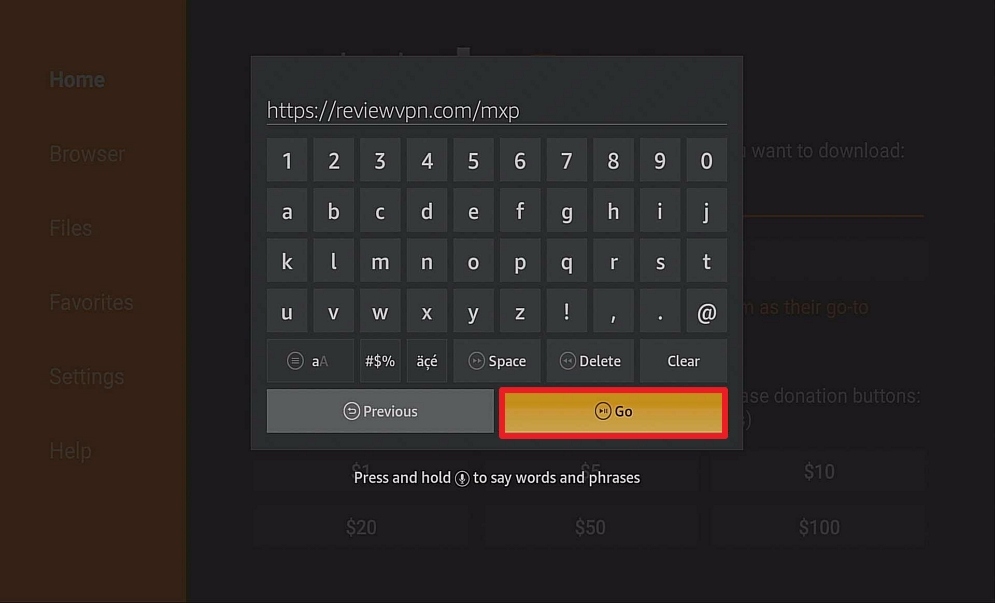
13.  Type https://reviewvpn.com/tp and select Go

14. Click Firestick Download

15.  Wait for it to finish

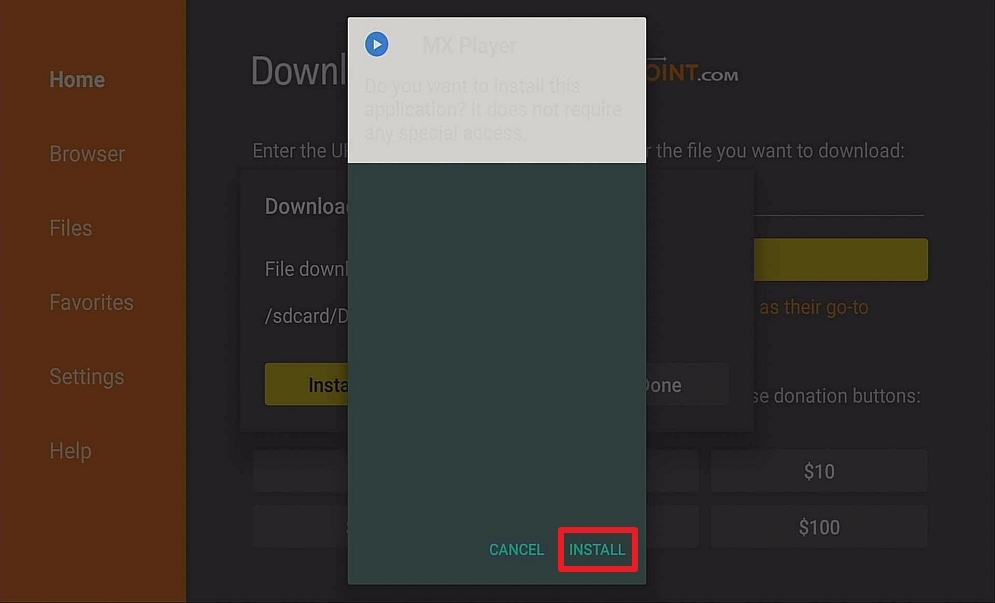
16.  Install Theater Plus

17.  Select Done

18.  This will automatically take you back to Downloader. Select Delete

19  Choose Delete Again

20..  Head back to the home screen and under the “Your Apps & Channels” Choose See All.

21.  Scroll down and choose Theater Plus and select the “Options”. Then select “Move to front”

22.  Theater Plus will be moved forward to “Your Apps and Channels”

23.  There you go, you can now open Theater Plus

Note: ReviewVPN.com does not host this APK file. It is hosted on Archive.org.


ANONYMOUSLY

What Does It Do?

Just like the majority of other APKs, Theater Plus scours the internet for working links that you can watch, save, and download for watching offline.

Compatible Platforms

Theater Plus is compatible with the Amazon Firestick and other devices that run on Android OS.

Features

        TV Shows (Standard Quality)

        Movies

        High-Quality Videos (720p, 1080p, and even 4k sometimes)

        Brief Description per title

        Variety of content to choose from


Theater Plus APK button


If your Firestick still has the older interface, read this article to learn how to update it: Update Firestick Interface.


Install Theater Plus APK on a Firestick with Screenshots

1. Install the Downloader app and jailbreak your firestick by enabling unknown sources. To learn more about the procedure, you may read How to Install the Downloader App and Enable Unknown Sources.


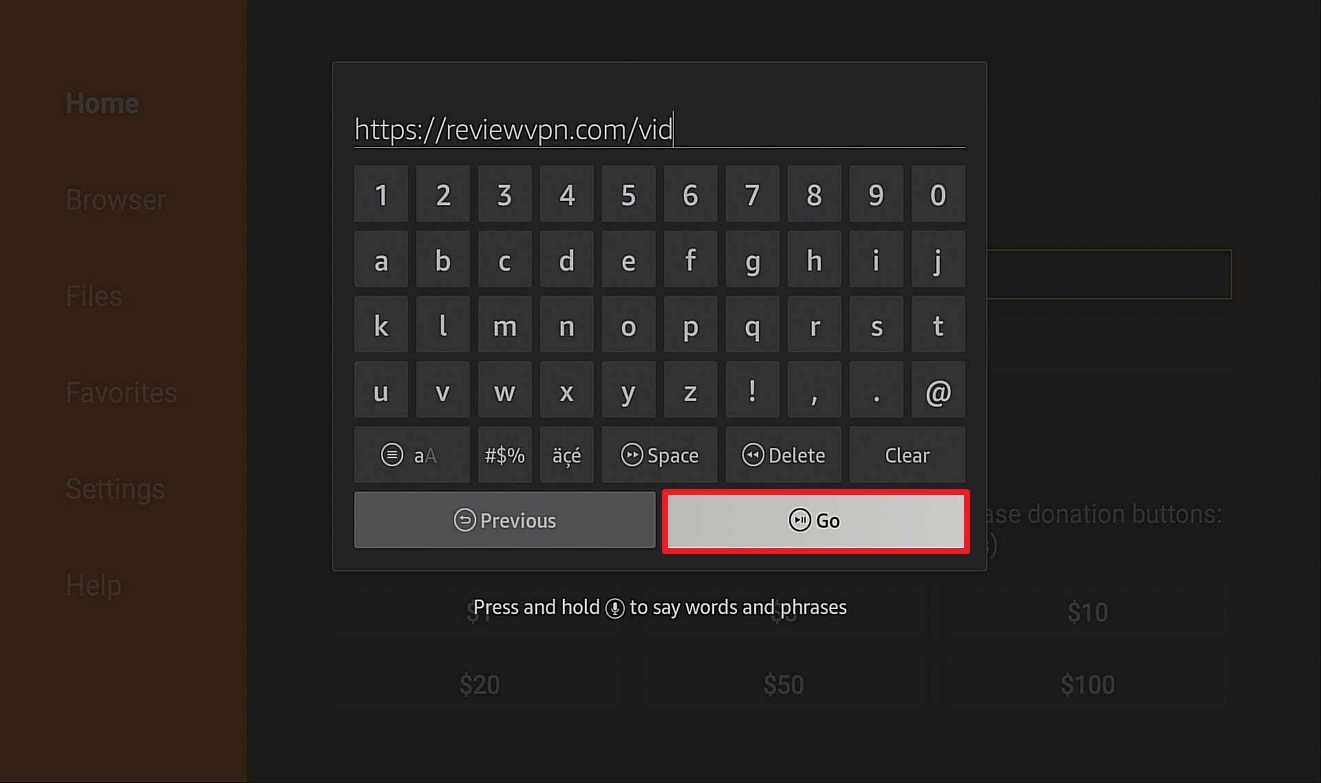
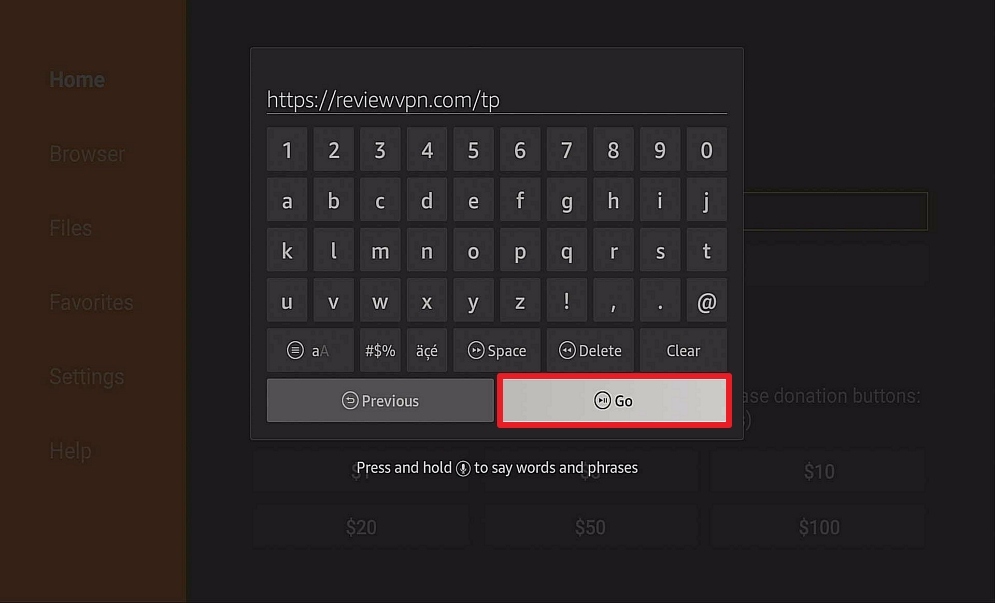
2. Open Downloader App. Type https://reviewvpn.com/tp and click Go.
Theater Plus 2


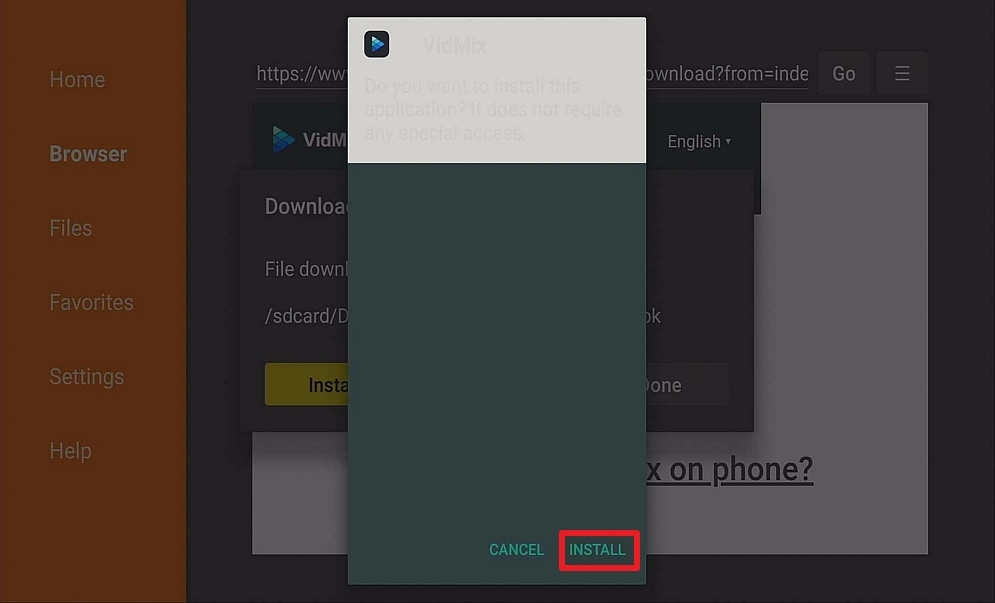
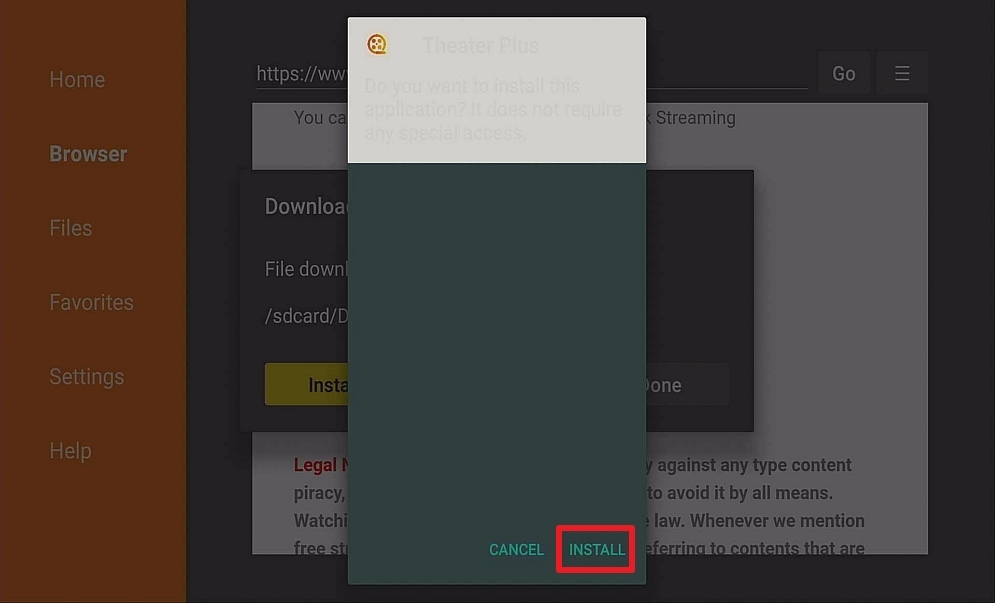
3. Click on Install and you should be all set. Remember to delete the APK file after installation to save space.
Step 14 Install Theater Plus APK on Firestick


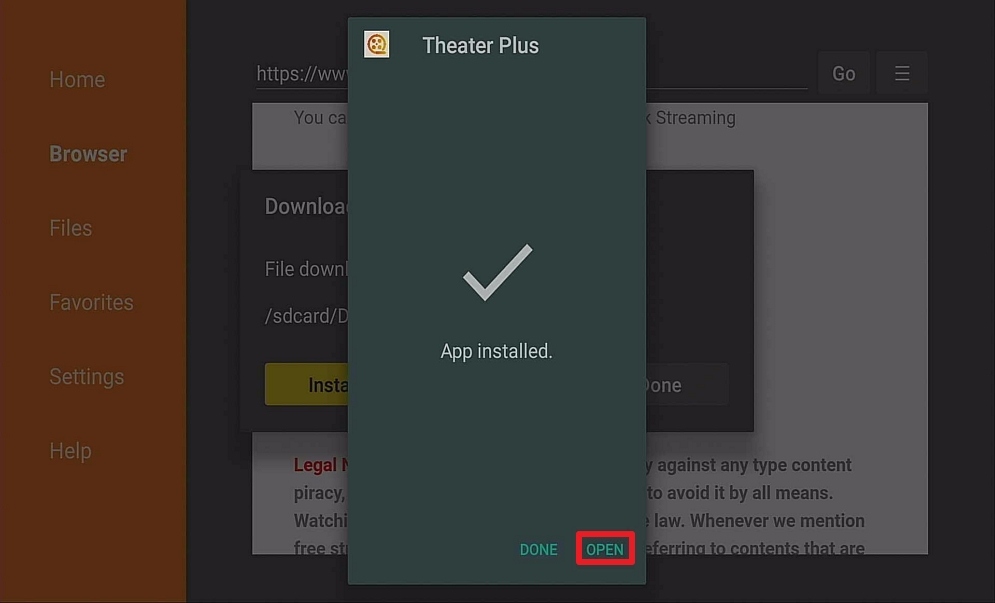
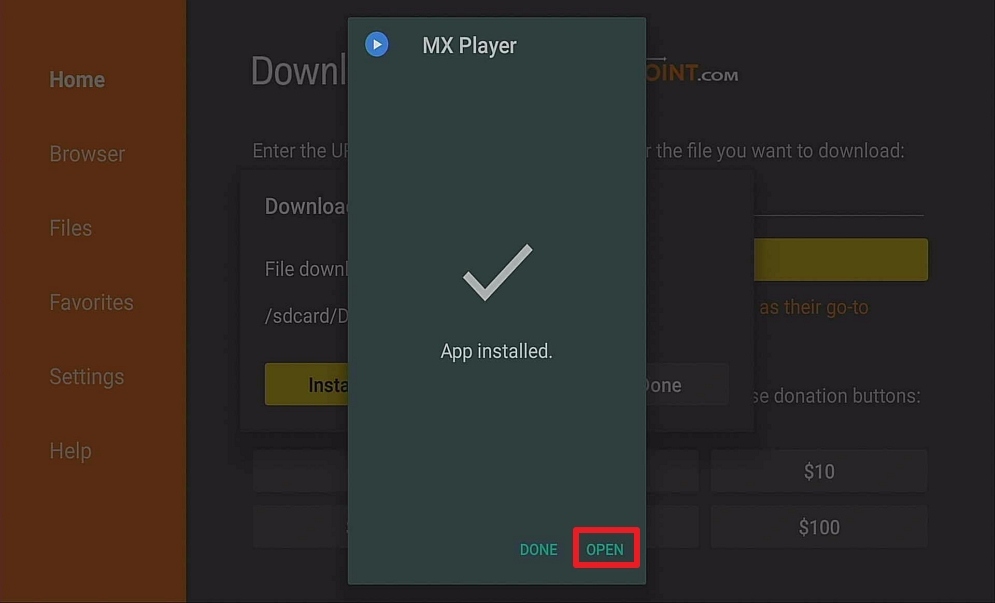
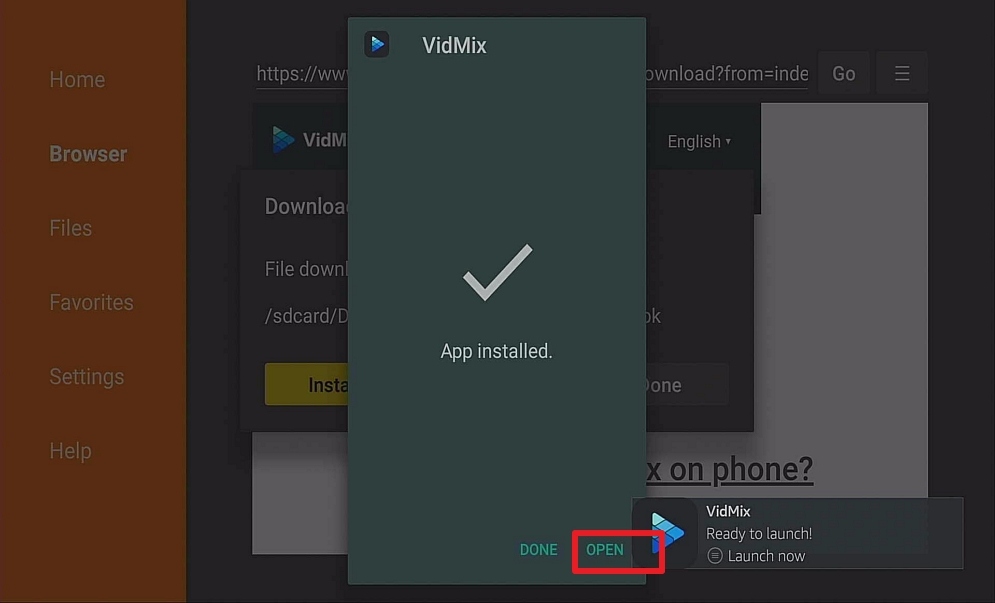
4. Click Open

Step 15 Install Theater Plus APK on Firestick


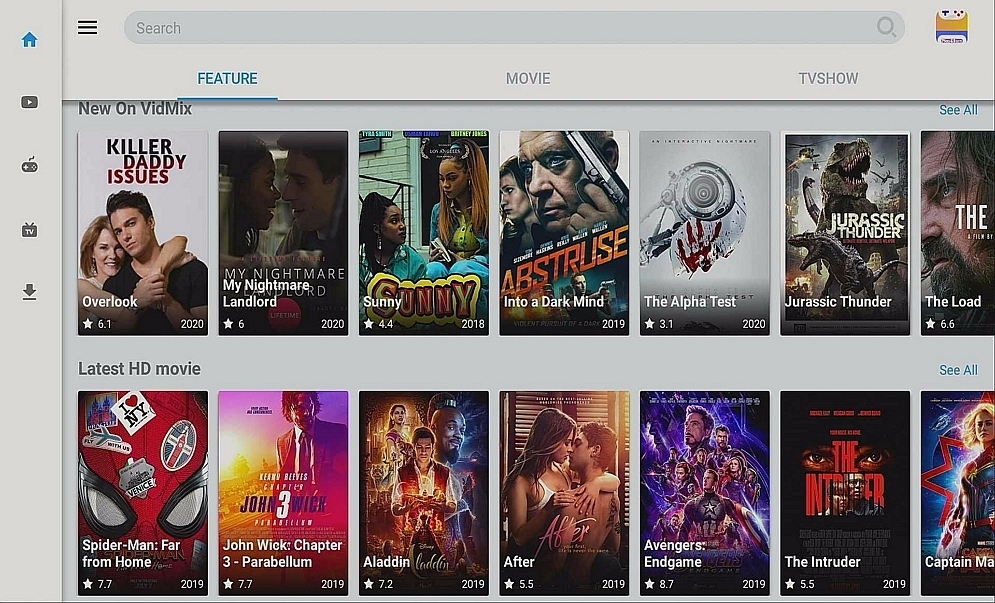
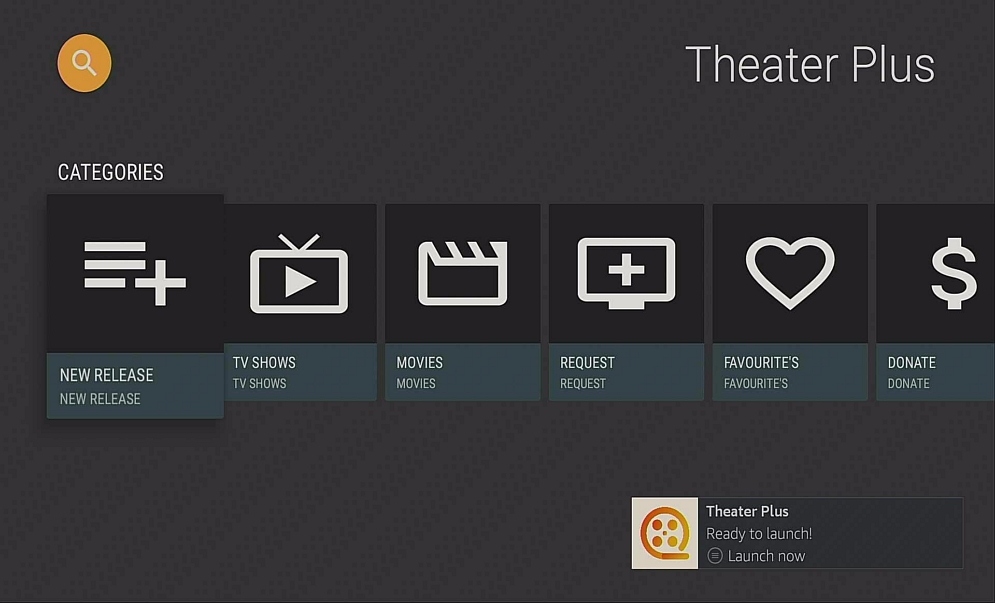
5. Enjoy your Theater Plus APK on a Firestick.
Step 16 Install Theater Plus APK on Firestick


YOUR INTERNET ACTIVITY IS BEING WATCHED

ReviewVPN cannot attest to the legality, security and privacy of the applications discussed on this site. It is highly recommended that you use a VPN service while streaming or using Kodi.

Currently, your IP 216.73.217.150 is visible to everyone and your Browser is being tracked by Advertisers & ISP Provider.

Save 65% Now

Limited Time Offer

Here are the main reasons why you must use a VPN:

  • Your activities are hidden from your ISP, the government, and from the apps you are using.
  • You can access additional movies and TV streams.
  • ISP attempts to throttle are thrwarted thus reducing buffering issues.
  • Geographically restricted content like Netflix and Hulu can be unblocked.

A VPN works be replacing your ISP-assigned IP address and creating an encrypted tunnel. We recommend the no log service offered by IPVanish. It works well on a Firestick and offers the fastest possible speeds.

Special Limited Time Offer - Get IPVanish


Legal Disclaimer: ReviewVPN.com does not encourage or endorse any illegal activity involved in the usage of services and applications referenced on this site. We do not verify the licensing agreements of services. The end-user is wholly responsible for ensuring that any media accessed through these services does not violate copyright and/or licensing laws. ReviewVPN does not promote, link to, or receive compensation from any Apps and IPTV services.


Install SurfShark on Firestick
Best SurfShark Deal


Pros and Cons

Pros

  • Links for TV Shows are working properly
  • One-Click Play
  • Subtitle Support
  • Downloadable content that can be watched offline
  • Has no ads
  • Chromecast ability
  • Movie Links working properly

Cons

  • Some of the movie links take time to load
  • No Live TV Shows/Channels


FAQ

Is It Safe To Use?

Theater Plus is very safe to use with your device. 


Is It White or Grey?

While Theater Plus is readily available in the Google Play Store, we would tend to put in the grey zone.


Should I Use VPN?

Surfshark vpn

It is always desirable to use a trusted VPN. A VPN protects you from exposing your identity online. Depending on your location and laws regarding copyright, it is optimal to have a VPN to circumvent this problem. Also, A VPN provides you protection from being monitored by your ISP. Your ISP keeps track of your online activity and submits reports to the government to track if you are doing any illegal activities. It also gives you access to Geo-Restricted content by allowing you to change your location.  A good VPN also makes your internet connection more stable and faster by removing the ability of your ISP to throttle your connection. This way, you will get an uninterrupted viewing experience. We only trust SurfShark as our number 1 VPN.

Note: For more information about SurfShark, please read our SURFSHARK REVIEW.


Grab your subscription now!


How to Install Surfshark on Firestick with Screenshots

If your Firestick still has the older interface, read this article to learn how to update it: Update Firestick Interface.

You can download Surfshark directly from the Amazon App store. It will be easy for you to find Surfshark with your Firestick’s Find feature. Refer to our screenshots below.

Follow our screenshots below to install the SurfShark VPN app on your Fire TV stick.

1. Go to the Home screen of your Firestick.
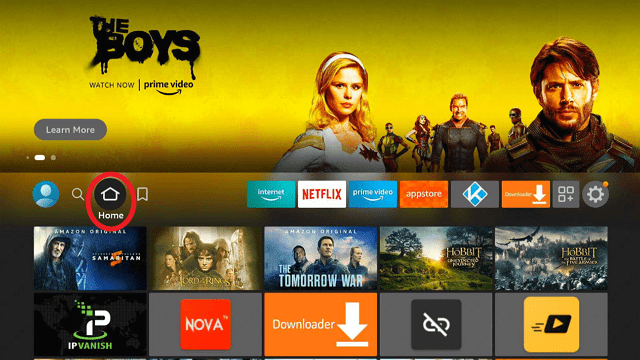
step 1 Install Surfshark VPN on Firestick


2. Navigate towards the Find tab. Press the Search button from the resulting dropdown.
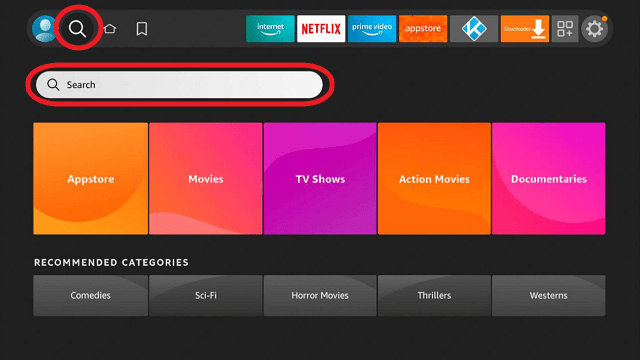
step 2 Install Surfshark VPN on Firestick


3. Type in the keyword of SurfShark and select from the suggestions that will appear.
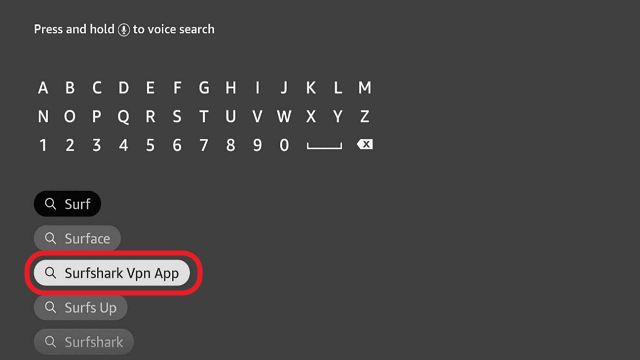
step 3 Install Surfshark VPN on Firestick


4. Click the official SurfShark icon from your search results.
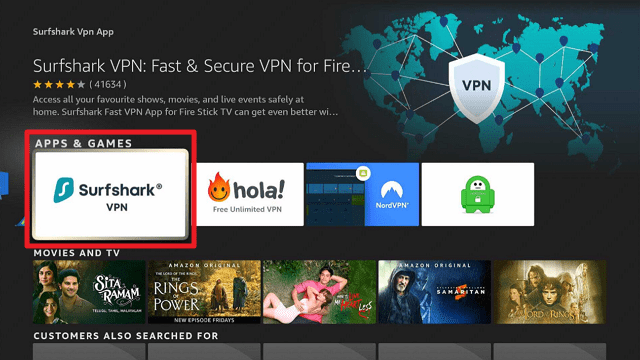
step 4 Install Surfshark VPN on Firestick


5. Press the Download (You own it) button.
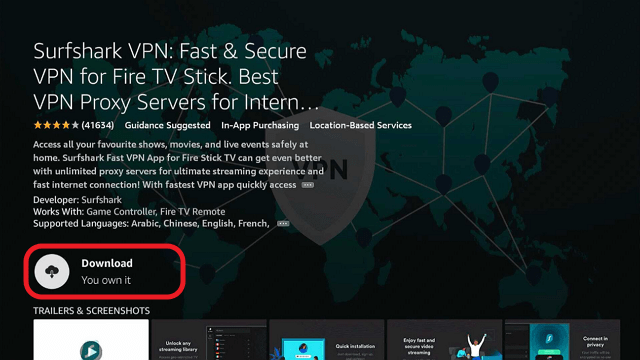
step 5 Install Surfshark VPN on Firestick


6. The SurfShark VPN installer will download on your device.
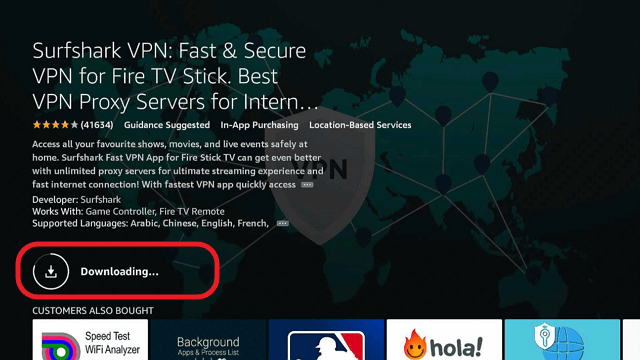
step 6 Install Surfshark VPN on Firestick


7. SurfShark VPN’s app will automatically install itself on your Fire TV stick.
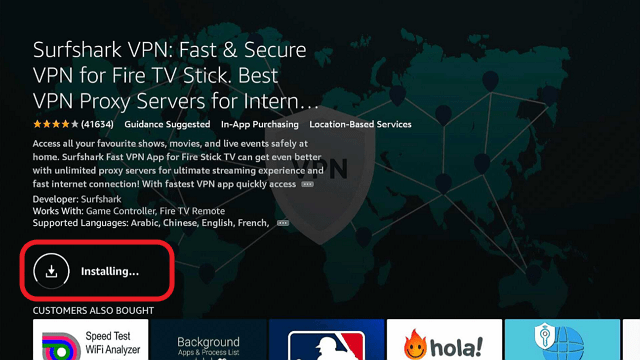
step 7 Install Surfshark VPN on Firestick


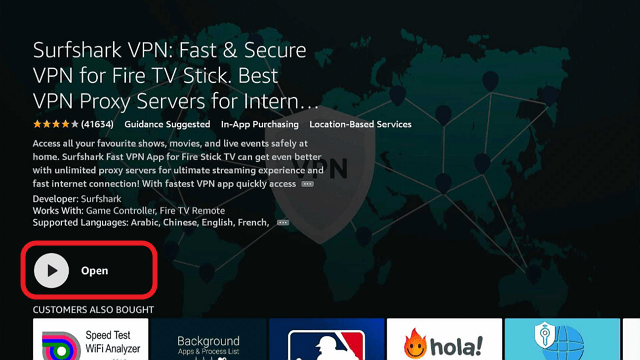
8. Press the Open button after completing SurfShark VPN’s installation process.
step 8 Install Surfshark VPN on Firestick


9. Please wait for the SurfShark VPN to load its user interface.
step 9 Install Surfshark VPN on Firestick


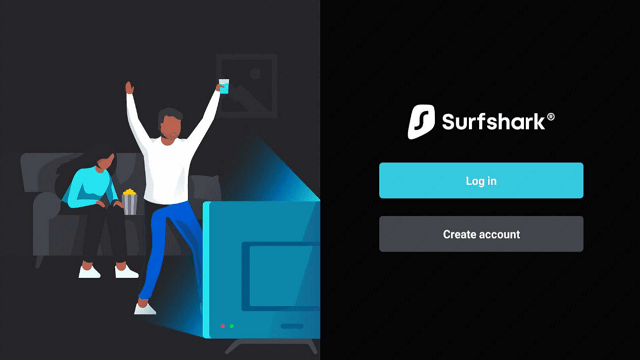
10. You can now log in with your SurfShark VPN account credentials.
step 10 Install Surfshark VPN on Firestick

Learn more about Surfshark and Grab the Best Surfshark Deal Now!


Install Surfshark on Firestick
Best Surfshark Deal

Other VPNs to Consider

NordVPN (Best for Streaming)

Best Features

  • 5000+ Server in 50+ Countries 
  • Military-Grade Encryption
  • Fast Connection Speed
  • Suitable to a lot of devices
  • No-Log Policy

Prices
  • Complete $5.89 per month (64% Discount)
  • Plus $4.59 per month (56% Discount)
  • Standard $3.69 per month (55% Discount)

Best Features

  • 750+ High-speed VPN Servers in 43 Locations
  • Military-Grade Encryption
  • Fastest HD Streaming and Gaming
  • 30-Day Money-Back Guarantee
  • Unlimited Data & Devices
  • No-Log Policy

Prices
  • 3 Years $1.99 per month (82% Discount)
  • 1 Years $3.29 per month (70% Discount)
  • 1 Month $10.99 per month

IPVanish VPN (Most Secure)

Best Features

  • 1200+ Servers in 60+ Countries around the world
  • Unlimited Connections
  • No-Log Policy
  • Top Notch Military-Grade VPN Protocols and Encryptions
  • 100% Safe and Secured
  • Most Trusted VPN
  • Best VPN for Firestick
  • 30-Day Money-Back Guarantee

Prices
  • Yearly $3.99 per month (63% Discount) – 30 days risk free + Ransomware & Malware Protection
  • Quarterly $5.32 per month (51% Discount)
  • Monthly $10.99 per month

For more VPN discounts, go to ReviewVPN Deals and purchase the best VPN for you.


Is It Free?

Theater Plus is free to download and install on your device.


Are There ADS?

Unlike other apps that will pester you with ads, Theater Plus does not have ads so you can watch content continuously.


Is There A Premium Version?

No premium version whatsoever.


Is There An Official Website?

The official website for Theater Plus is https://theaterplus.co/


What Other Devices Does It Work On?

Aside from the Firestick, it is also compatible with other Android Devices, NVIDIA Shield, and Windows via an emulator.


How Does The App Work?

Theater Plus works in a fashion similar to many of the Terrarium TV clones. It scrapes for links that are hosted on file lockers. By file lockers, we mean sites like Rapid Gator and Mega. Many of these apps have been in decline since Openload was taken down. Fortunately, Theater Plus breaks this trend.


Minimum Version Required

Any Android device that has version 4.1 and above


History

How Long Has It Been Around?

Theater Plus is a very new app on the scene. It has only been around since 2019. The lack of history makes it hard to forecast its future. All we can say for now is it is working great for the time being. 


Is It A Terrarium Clone?

No, but it is a very close replica of another app which is Silent Ghost. From the interface and categories, we believe that it is a clone of Silent Killer.


What Is The Development Team Like?

We would like to point out that they have a website and that the developers can be contacted through contactmeweb@protonmail.com


Alternatives

        Cyberflix

        Cinema HD

        Typhoon TV

The following apps can be considered substitutes for Theater Plus because they have similar content and categories. So whenever Theater Plus is having issues, you may use the apps listed above. Also, please always remember that it is important that you these apps with a VPN because a lot of these apps are considered to be in a grey area. To avoid the problems that may come along with it, a VPN is a must. We do recommend one of the best VPNs in the market now which is SurfShark.


Our Opinion

Theater Plus is one of the best video apps we have ever encountered. All of the links that it provides are working. Although, some of the Movie links tend to load slower compared to TV Show links, nonetheless, every link works. You can also see how fast it runs because when you skip certain parts of the video, it will only take a second or two for it to play again. This shows how efficient the app is. The absence of ads is also an interesting point because you get to watch your content continuously without having to close unwanted ads. You can also download your favorites and watch them when you are offline. So what do you think? We here are more than satisfied with this app. Hurry up and try it for yourself and see how awesome it is.

If you have questions regarding Theater Plus, please feel free to drop a comment below and message us on any of our other social media platforms. Thank you for reading!


Virus Total Antivirus Review

Virus Total Antivirus Review


One of the essentials in the online world is having an antivirus. It is mandatory to have one installed on your computer to protect you from malware, viruses, phishing, and more. The problem is, a lot of them don’t come for free. They may provide trial versions but when they expire, you are left vulnerable and prone to cyber-attacks. Also, trial versions are not equipped to give you added protection from threats like those. So we spend money on these to stay protected. What if we were to tell you that you can afford such security for free? Would you believe us? Well, you can start now because in this article, we will be talking about a free antivirus that does all the job and it is called Virus Total.


Is It Any Good?

antivirus
antivirus

Virus Total combines the abilities of many antivirus programs to deliver powerful scanning and protection to your computer. It acts as a middleman and communicates with different antivirus servers to deliver URLs, documents, and real-time scanning to your device. All you need to do is paste the URL or upload your document via a website and voila, you will receive premium protection from whatever online threat there is.


ANONYMOUSLY

Installing Virus Total to Your Amazon Firestick

install image

  1. On the home screen, go to “Settings”
  1. Select My Fire TV
  1. Select Developer Options
  1. Open Apps from Unknown Sources
  1. Click Turn On
  1. Head back to the home screen and select “Search”
  1. Search Downloader and click “Downloader”. It will appear under the keyboard
  1. Choose the “Downloader app”
  1. Download it
  1. Choose Open
  1. Select Allow
  1. Choose OK
  1. Type https://reviewvpn.com/vir and select Go
  1. Wait for it to finish
  1. Install Virus Total
  1. Select Done
  1. This will automatically take you back to Downloader. Select Delete
  1. Choose Delete Again
  1. Head back to the home screen and under the “Your Apps & Channels” choose See All.
  1. Scroll down and click on the select button while hanging around to relocate the app
  2. Open the app and start scanning your device

Note: ReviewVPN.com does not host this APK file.


Virus Total button


What Does It Do?

Virus Total scans your files and URLs for malware. The desktop version also does that but the web version yields powerful results.


Compatible Platforms

Virus Total is compatible with your Amazon Firestick, Android TV Box, Windows, MAC, and Linux

Features

  •       Antivirus Products from over 70 antivirus programs
  •       Website and Domain Scanning Engines and Data Sets Behaviour Analysis
  •       Sandbox Products
  •       File Characterization Tools and Data sets


If your Firestick still has the older interface, read this article to learn how to update it: Update Firestick Interface.


Screenshots with Step by Step Instruction to Install Virus Total Antivirus on a Firestick

1. Install the Downloader app and jailbreak your firestick by enabling unknown sources. To learn more about the procedure, you may read How to Install the Downloader App and Enable Unknown Sources.


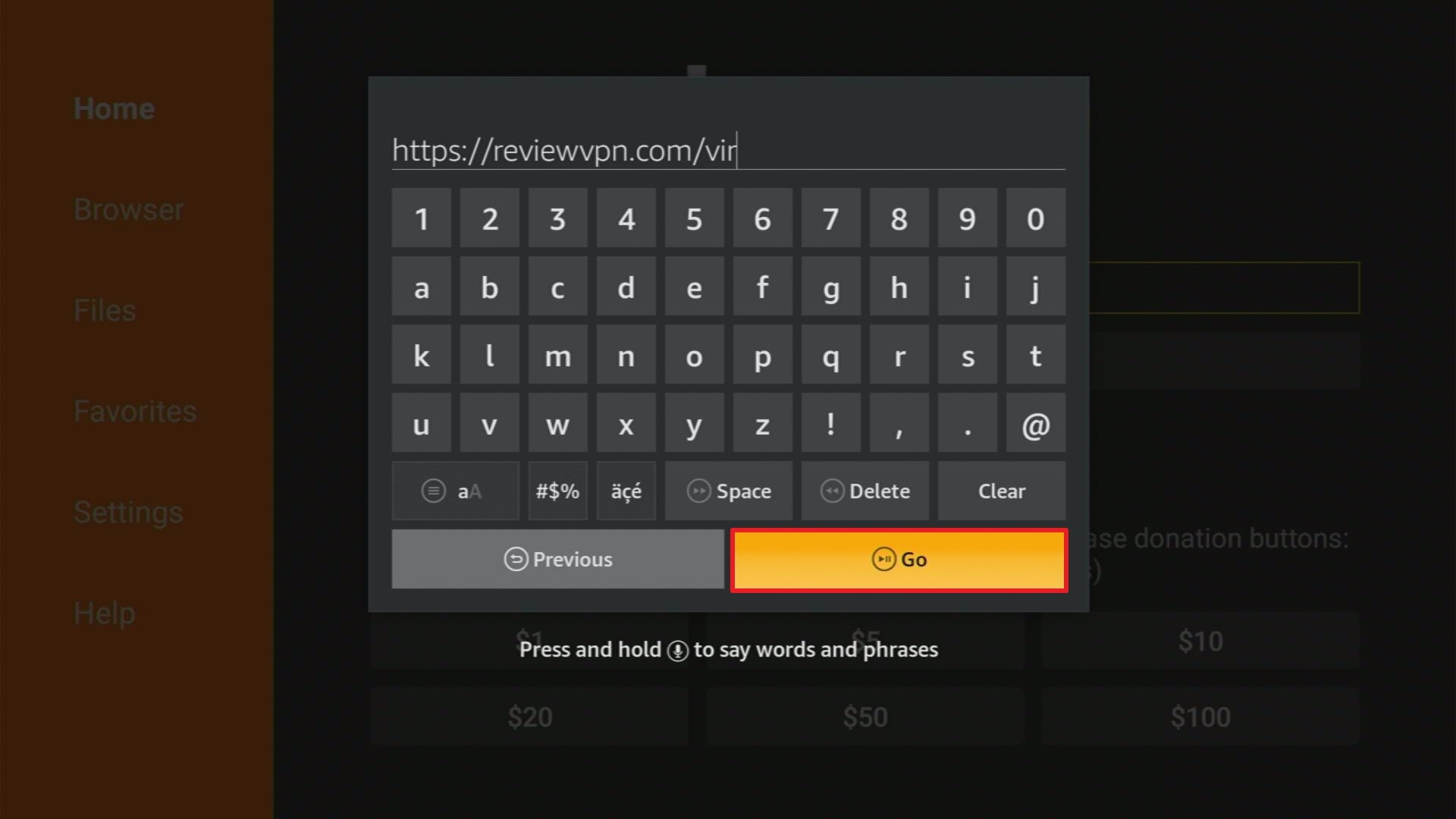
2. Open Downloader App. Type https://reviewvpn.com/vir  and click Go.


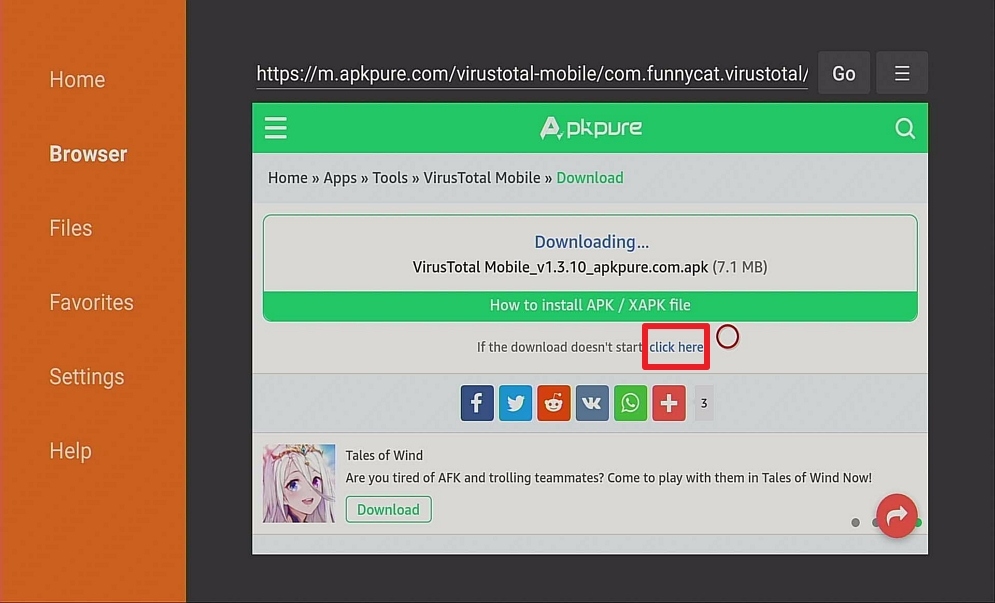
3. Click on “Click here” to start download quickly

Step 13 Install Virus Total Antivirus on Firestick


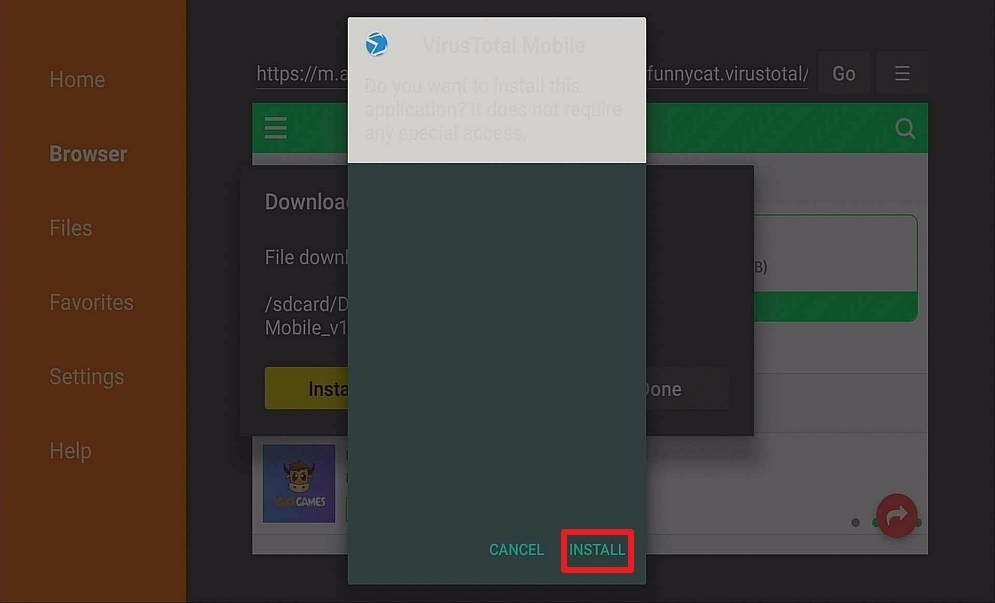
4. Click Install.

Step 14 Install Virus Total Antivirus on Firestick


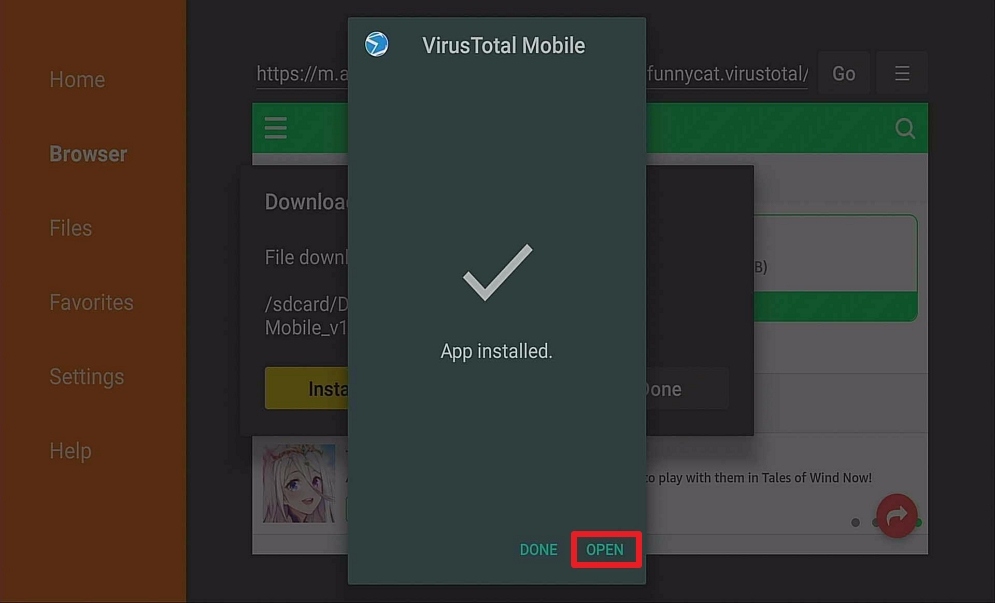
5. Click Open.

Step 15 Install Virus Total Antivirus on Firestick


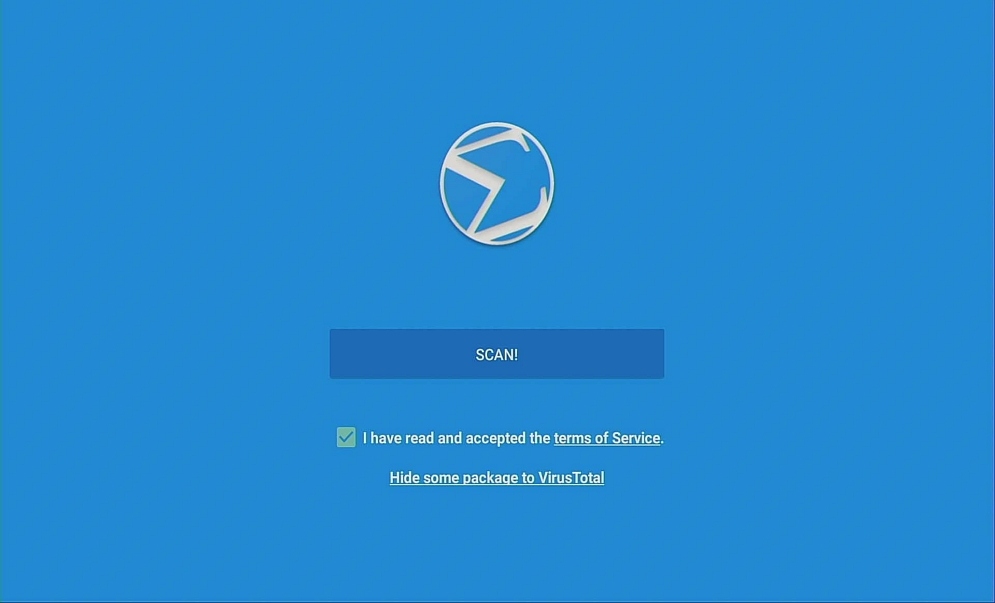
6. Enjoy your Virus Total Antivirus,

Step 16 Install Virus Total Antivirus on Firestick


YOUR INTERNET ACTIVITY IS BEING WATCHED

ReviewVPN cannot attest to the legality, security and privacy of the applications discussed on this site. It is highly recommended that you use a VPN service while streaming or using Kodi.

Currently, your IP 216.73.217.150 is visible to everyone and your Browser is being tracked by Advertisers & ISP Provider.

Save 65% Now

Limited Time Offer

Here are the main reasons why you must use a VPN:

  • Your activities are hidden from your ISP, the government, and from the apps you are using.
  • You can access additional movies and TV streams.
  • ISP attempts to throttle are thrwarted thus reducing buffering issues.
  • Geographically restricted content like Netflix and Hulu can be unblocked.

A VPN works be replacing your ISP-assigned IP address and creating an encrypted tunnel. We recommend the no log service offered by IPVanish. It works well on a Firestick and offers the fastest possible speeds.

Special Limited Time Offer - Get IPVanish


Install Surfshark on Firestick

Best Surfshark Deal


Pros and Con

Pros

–        Can scan any file up to 256 MB in size

–        Can scan webpages

–        Scans IPs

–        Can scan multiple entries using the desktop version

–        Provides a link for results that can be shared publicly

–        It acts as an extension on browsers so there is no need to open it separately

–        It scans emails

–        Compatible with Android Devices

–        History of scans can be viewed with the file’s hash

Cons

–        Single entry scanning for a web version

–        For personal use only

–        Low priority for email attachments

–        Limited size for files that will be sent via email


FAQ

Is It Safe To Use?

Yes, Virus Total is totally safe to use.

Is It Legal or Grey?

It is legal to use.

Should I Use VPN?

There is no immediate need to use it in conjunction with a VPN. But it is desirable to have a reliable VPN for faster results.


How to Install Surfshark VPN on Firestick

If your Firestick still has the older interface, read this article to learn how to update it: Update Firestick Interface.

You can download Surfshark directly from the Amazon App store. It will be easy for you to find Surfshark with your Firestick’s Find feature. Refer to our screenshots below.

1. Go to the Home screen of your Firestick.

step 1 Install Surfshark VPN on Firestick


2. Navigate towards the Find tab. Press the Search button from the resulting dropdown.

step 2 Install Surfshark VPN on Firestick


3. Type in the keyword of SurfShark and select from the suggestions that will appear.

step 3 Install Surfshark VPN on Firestick


4. Click the official SurfShark icon from your search results.

step 4 Install Surfshark VPN on Firestick


5. Press the Download (You own it) button.

step 5 Install Surfshark VPN on Firestick


6. The SurfShark VPN installer will download on your device.

step 6 Install Surfshark VPN on Firestick


7. SurfShark VPN’s app will automatically install itself on your Fire TV stick.

step 7 Install Surfshark VPN on Firestick


8. Press the Open button after completing SurfShark VPN’s installation process.

step 8 Install Surfshark VPN on Firestick


9. Please wait for the SurfShark VPN to load its user interface.

step 9 Install Surfshark VPN on Firestick


10. You can now log in with your SurfShark VPN account credentials.

step 10 Install Surfshark VPN on Firestick

Learn more about Surfshark and Grab the Best Surfshark Deal Now!


Install Surfshark on Firestick
Best Surfshark Deal


Other VPNs to Consider

NordVPN (Best for Streaming)

Best Features

  • 5000+ Server in 50+ Countries 
  • Military-Grade Encryption
  • Fast Connection Speed
  • Suitable to a lot of devices
  • No-Log Policy

Prices
  • Complete $5.89 per month (64% Discount)
  • Plus $4.59 per month (56% Discount)
  • Standard $3.69 per month (55% Discount)

Best Features

  • 750+ High-speed VPN Servers in 43 Locations
  • Military-Grade Encryption
  • Fastest HD Streaming and Gaming
  • 30-Day Money-Back Guarantee
  • Unlimited Data & Devices
  • No-Log Policy

Prices
  • 3 Years $1.99 per month (82% Discount)
  • 1 Years $3.29 per month (70% Discount)
  • 1 Month $10.99 per month

IPVanish VPN (Most Secure)

Best Features

  • 1200+ Servers in 60+ Countries around the world
  • Unlimited Connections
  • No-Log Policy
  • Top Notch Military-Grade VPN Protocols and Encryptions
  • 100% Safe and Secured
  • Most Trusted VPN
  • Best VPN for Firestick
  • 30-Day Money-Back Guarantee

Prices
  • Yearly $3.99 per month (63% Discount) – 30 days risk free + Ransomware & Malware Protection
  • Quarterly $5.32 per month (51% Discount)
  • Monthly $10.99 per month


For more VPN discounts, go to ReviewVPN Deals and purchase the best VPN for you.

Click here to get the lowest price on Surfshark through our exclusive limited-time offer.


Is It Free?

Yes, Virus Total is free to download and does not have hidden costs

Are There ADS?

No, there are no ads.

Is There A Premium Version?

Yes, there is a premium version. But totally not necessary because the free version is enough to protect you from cyber threats.

Is There An Official Website?

You may visit their website https://www.virustotal.com/gui/home/upload

What Other Devices Does It Work On?

It will work on most platforms. It also supports Windows, MAC, and Linux, so it is very flexible

How Does The App Work?

You can download the desktop version at https://www.virustotal.com/static/bin/vtuploader2.2.exe

Minimum Version Required

For Android users, version 5.0 and above is needed to run the application

History

How Long Has It Been Around?

It is by far one of the longest-running antivirus programs in the market. It was officially registered on 09/18/2002 and has been running ever since.

What Is The Development Team Like?

The development team is very hands-on in dealing with users. The website is actually updated n a regular basis and has all the necessary information you may be needing. You can reach them through https://www.virustotal.com/gui/contact-us.

Alternatives

        Avira

        Norton

        McAfee

Although the following does not have a web version, you can access them through their desktop and mobile app versions. They also do an impressive job of protecting you from cyber threats. Only use them if there are issues with Virus Total

Our Opinion

We believe that Virus Total has the necessary criteria for a good antivirus program. One of its selling points is that it has a web version, meaning, you don’t have to install it directly on your computer. Also, the feature wherein you can share your results publicly does a favor to the community. It helps the developers know if the program is working and continue to improve its services. Honestly, this program has been running for so long adding testament to its credibility. It is reliable, stable, and the most important part, it is free. One good thing also is that it can be integrated into your browser removing the need to open it separately which in turn maximizes your time and productivity.

We were very elated in introducing this program to you and we hope that we became instrumental in helping you decide if it is a good idea to use the program or not. But trust us, it is worth it and you will never be disappointed. If you have questions regarding the article, please feel free to contact us here on our website or on any of our other social media platforms. Thank You for reading!

Install MrZip TV IPTV on Firestick & Android in 5 Minutes

MrZip TV IPTV Overview

In this article, we will be divulging important details on how to install MrZip TV IPTV on Firestick and other devices that run on the android platform.


IPTV

MrZIP TV is a free cable IPTV application that is very similar to the Live Lounge app, and TV Pato 2. It offers Live TV and movies that are updated on a regular basis. Popular channels include channels from the US that feature trending TV Shows and Documentaries. It is compatible with most of the platforms we have today.


ANONYMOUSLY

What Does It Do?

MrZip TV IPTV scours the internet for links that show Live TV, Movies, and TV Shows. It does so by collecting links and arranging them so that users have the option on what link to pick.


Compatible Platforms

It runs on almost all types of platforms namely: Android Tv Boxes, NVIDIA Shield, Fire Stick, Fire TV and many more


Features

  • Live TV Channels
  • Ola TV 9, WWE HD, Viceland, VH1 FHD, USA Network, Travel Channel, TNT HD, TLC HD, The Weather Channel, Tennis Channel HD
  • More than 50000 channels that cover worldwide
  • Adult Content
  • Constantly updated
  • Sports Channels


Installation Guide on a Firestick

install image

  1. On the Home Screen, open Settings
  2. Choose My Fire TV
  3. Select Developer Options
  4. Select Apps from Unknown Sources option.
  5. Select the Turn On button.
  6. Head back to the Home Screen and select the search icon.
  7. Key in “Downloader”
  8. Choose the Downloader app and install it.
  9. Select Open 
  10. Choose Allow 
  11. Click OK 
  12. Go back to Settings in the Downloader app
  13. Select ok Enable JavaScript.
  14. Go back to the homepage
  15.  Type in https://reviewvpn.com/zip (Note: ReviewVPN.com does not host this APK file. It is hosted on Archive.org. )
  16. Wait for the download to finish
  17. Choose Next 
  18. Choose Install 
  19. Wait for the installation to be done
  20. Choose Done 
  21. Click on Delete 
  22. Click the Delete again button.
  23. Press the Home button on your remote
  24. MrZip TV will be located at the bottom.
  25. Choose MrZip TV and long press the menu button on your firestick, a notification “Move to front” will appear
  26. Select Ok
  27. There you go, the app is already installed.

Note: ReviewVPN.com does not host this APK file. It is hosted on Archive.org.


MrZip TV button


Install MrZip TV IPTV on Firestick with Screenshots

If your Firestick still has the older interface, read this article to learn how to update it: Update Firestick Interface.

1.  Install the Downloader app and jailbreak your firestick by enabling unknown sources. To learn more about the procedure, you may read How to Install the Downloader App and Enable Unknown Sources.


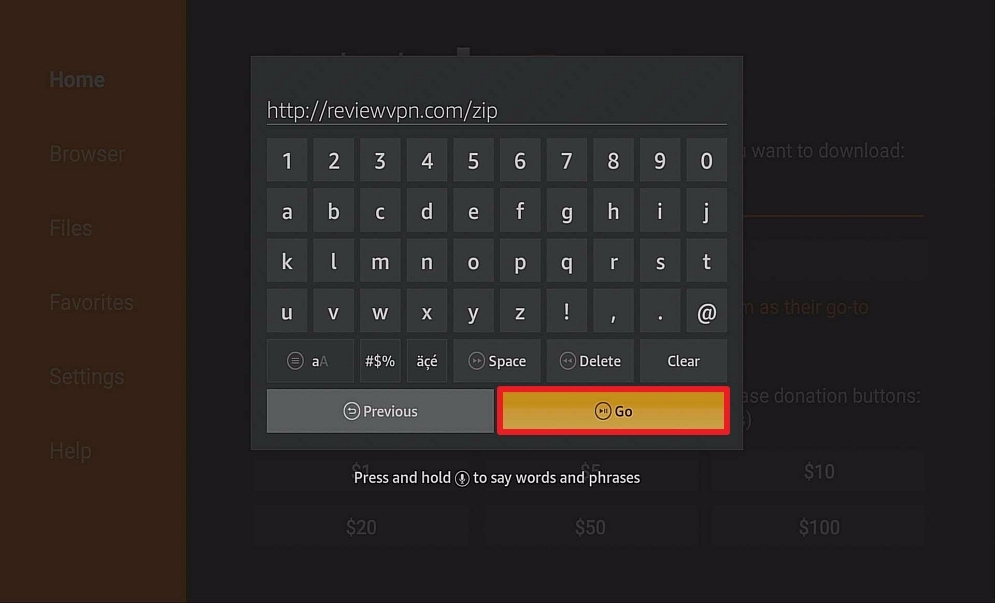
2. Open Downloader. Type https://reviewvpn.com/zip (Note: ReviewVPN.com does not host this APK file. It is hosted on Archive.org. ) and click Go.

Step 12 Install MrZip TV IPTV on Firestick


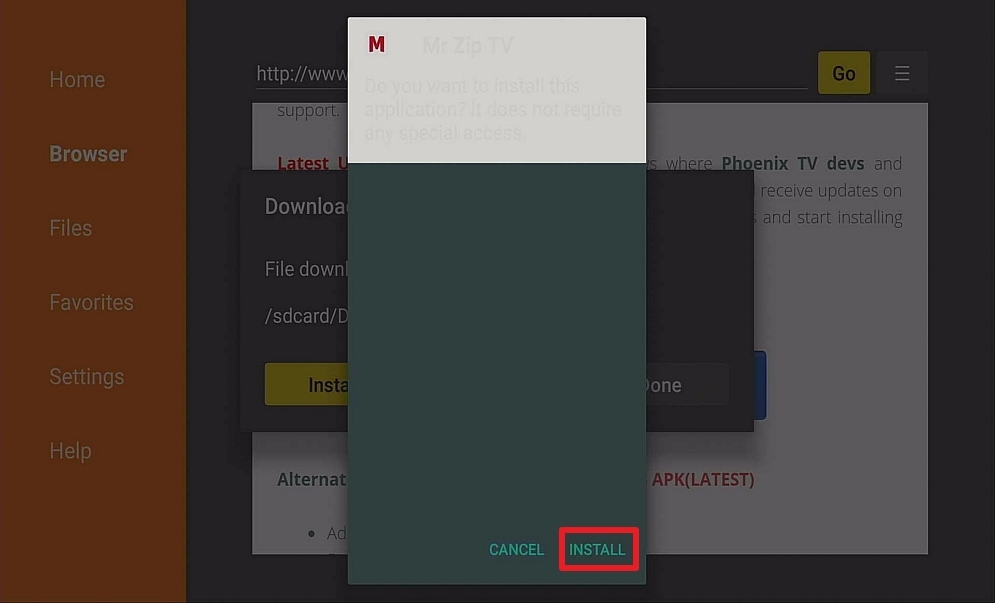
3. Click on Install and you should be all set. Remember to delete the APK file after installation to save space.

Step 13 Install MrZip TV IPTV on Firestick


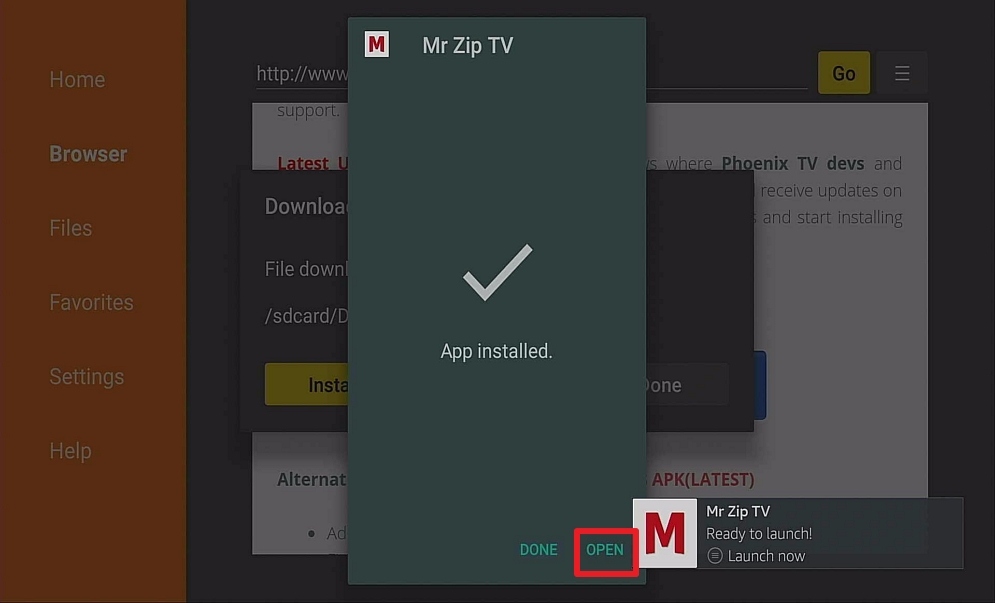
4. Click Open

Step 14 Install MrZip TV IPTV on Firestick


Pros and Cons

Pros

  • Channels are High-Definition
  • Channels from other countries
  • Easy and effortless user interface
  • Sports Channel Categories
  • Adult content is Pincode secured
  • Minimum Ads

Cons

  • It only allows Ludio Player to play its content unlike other IPTV apps
  • As of writing this article, the app has been known to be down a lot.


YOUR INTERNET ACTIVITY IS BEING WATCHED

ReviewVPN cannot attest to the legality, security and privacy of the applications discussed on this site. It is highly recommended that you use a VPN service while streaming or using Kodi.

Currently, your IP 216.73.217.150 is visible to everyone and your Browser is being tracked by Advertisers & ISP Provider.

Save 65% Now

Limited Time Offer

Here are the main reasons why you must use a VPN:

  • Your activities are hidden from your ISP, the government, and from the apps you are using.
  • You can access additional movies and TV streams.
  • ISP attempts to throttle are thrwarted thus reducing buffering issues.
  • Geographically restricted content like Netflix and Hulu can be unblocked.

A VPN works be replacing your ISP-assigned IP address and creating an encrypted tunnel. We recommend the no log service offered by IPVanish. It works well on a Firestick and offers the fastest possible speeds.

Special Limited Time Offer - Get IPVanish


FAQ

Is It Safe To Use?

MrZip TV is safe to use but it is very unreliable nowadays.


Is It Legal or Grey?

It is a grey area because we have no way of knowing how it obtains its streams. Either it gets them legally, or illegally. That’s why it’s a grey area.


Should I Use VPN?

https://get.surfshark.net/aff_c?offer_id=865&aff_id=12312

Always use a reliable VPN in order to hide your online identity. Your ISP tracks all of your online activities so if ever you are engaging in some illegal activity, you will be reported and may face some penalties. It is also advisable to install a VPN because it will allow you access to geo-restricted content and also allows you to enjoy better connection speed as it blocks internet throttling. With a good VPN, you are going to get your money’s worth because of these awesome perks.


Note: For more information about SurfShark, please read our SURFSHARK REVIEW.


Grab your subscription now!


How to Install Surfshark VPN on Firestick

If your Firestick still has the older interface, read this article to learn how to update it: Update Firestick Interface.

You can download Surfshark directly from the Amazon App store. It will be easy for you to find Surfshark with your Firestick’s Find feature. Refer to our screenshots below.

1. Go to the Home screen of your Firestick.

step 1 Install Surfshark VPN on Firestick


2. Navigate towards the Find tab. Press the Search button from the resulting dropdown.

step 2 Install Surfshark VPN on Firestick


3. Type in the keyword of SurfShark and select from the suggestions that will appear.

step 3 Install Surfshark VPN on Firestick


4. Click the official SurfShark icon from your search results.

step 4 Install Surfshark VPN on Firestick


5. Press the Download (You own it) button.

step 5 Install Surfshark VPN on Firestick


6. The SurfShark VPN installer will download on your device.

step 6 Install Surfshark VPN on Firestick


7. SurfShark VPN’s app will automatically install itself on your Fire TV stick.

step 7 Install Surfshark VPN on Firestick


8. Press the Open button after completing SurfShark VPN’s installation process.

step 8 Install Surfshark VPN on Firestick


9. Please wait for the SurfShark VPN to load its user interface.

step 9 Install Surfshark VPN on Firestick


10. You can now log in with your SurfShark VPN account credentials.

step 10 Install Surfshark VPN on Firestick

Learn more about Surfshark and Grab the Best Surfshark Deal Now!


Install Surfshark on Firestick

Best Surfshark Deal


Other VPNs to Consider

NordVPN (Best for Streaming)

Best Features

  • 5000+ Server in 50+ Countries 
  • Military-Grade Encryption
  • Fast Connection Speed
  • Suitable to a lot of devices
  • No-Log Policy

Prices
  • Complete $5.89 per month (64% Discount)
  • Plus $4.59 per month (56% Discount)
  • Standard $3.69 per month (55% Discount)

Best Features

  • 750+ High-speed VPN Servers in 43 Locations
  • Military-Grade Encryption
  • Fastest HD Streaming and Gaming
  • 30-Day Money-Back Guarantee
  • Unlimited Data & Devices
  • No-Log Policy

Prices
  • 3 Years $1.99 per month (82% Discount)
  • 1 Years $3.29 per month (70% Discount)
  • 1 Month $10.99 per month

IPVanish VPN (Most Secure)

Best Features

  • 1200+ Servers in 60+ Countries around the world
  • Unlimited Connections
  • No-Log Policy
  • Top Notch Military-Grade VPN Protocols and Encryptions
  • 100% Safe and Secured
  • Most Trusted VPN
  • Best VPN for Firestick
  • 30-Day Money-Back Guarantee

Prices
  • Yearly $3.99 per month (63% Discount) – 30 days risk free + Ransomware & Malware Protection
  • Quarterly $5.32 per month (51% Discount)
  • Monthly $10.99 per month


For more VPN discounts, go to ReviewVPN Deals and purchase the best VPN for you.

Click here to get the lowest price on Surfshark through our exclusive limited-time offer.


Is It Free?

Yes, MrZip TV is free to download


Are There ADS?

Yes, it has ads to generate income in order to maintain the run of the app.


Is There A Premium Version?

None.


Is There An Official Website?

The official posted in-app is https://fb.me/MRZIPTV


What Other Devices Does It Work On?

It also runs on Kodi, Android Box, Fire Cube, and Smart TVs that run on android


How Does The App Work?

You can download the APK at this unofficial website https://www.husham.com/mtziptvapk


Minimum Version Required

For Android users, version 5.0 and above is needed to run the application


History

How Long Has It Been Around?

As far as its Facebook page is concerned, the oldest post can be traced back to October 2019. There is no official website whatsoever that can give the date of its establishment.


Is It A Terrarium Clone?

In a way it is. It offers Live TV, Movies, Sports Channels, Adult Content, etc. but that is there is to it, unlike terrarium tv that covers a broader range.


What Is The Development Team Like?

They are pretty active on the Facebook page until recently. The app has been down for a while now and they seem to be promoting Ola TV 9 more than Mrzip TV.


Alternatives

        Swift Streamz

        HD Streamz

        Morph TV

        Nova TV

Although there are some interesting features in MrZip TV, we find that the apps listed above do a better job of providing quality content.


Our Opinion

At first, MrZip TV IPTV had an amazing run, but now, it has been down for a while unable to provide what it promised. Also, it was very promising to see that its Facebook page was active in updating users but now that seems all for naught. The problem with apps like this is sometimes it works and sometimes it doesn’t. Compared to the BIGGER apps that can sustain stability, this app has lagged behind by a thousand miles. It is disappointing, to say the least. We would like to reiterate that you only obtain content from trusted, reliable, and credible sources so as not to waste any of your time in figuring out why this app lost its sparkle. Also, please check out our other reviews because our aim is to provide you guys honest and no-holds-barred reviews we believe that it is our responsibility to help you in choosing the best apps for your firestick. If you wish to ask us questions, please do so by leaving a comment below and messaging us on any of our other social media platforms. We will gladly indulge you guys as a way of paying back for all the support that we have received. Thank you for reading and have a great day ahead!

Install Morph TV IPTV on Firestick & Android in 5 minutes

Morph TV IPTV

In this article, we will be divulging important details on how to install Morph TV IPTV on Firestick and other devices that run on the android platform.


Have you missed Terrarium TV and Morpheus TV due to their demise? Worry no more, there is a clone that does the same job and many more. Morph TV IPTV is a clone of the former apps that gives you the same content and does it better where the former ones failed.

IPTV

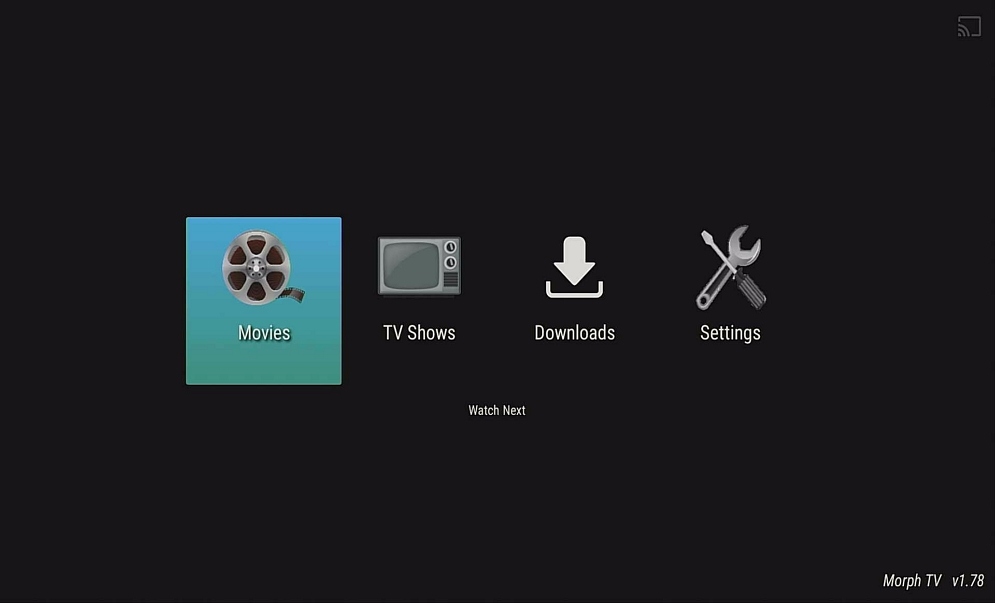
Morph TV is an application that features your favorite movies and TV Shows. It can be run on almost any type of operating system. You can either download content or bookmark via “favorites” to watch them later. Morph TV is a replica of the famous Morpheus TV and it provides links that will give you whatever you are searching for.


What Does It Do?

Morph TV scrapes the internet for links that offer high-quality videos. It offers movies and TV shows that are popular and trending.

Compatible Platforms

Morph TV is compatible with the Amazon Firestick and Fire TV, Android TV Box, NVIDIA Shield and many more

Features

  •       Movies – Trending, Popular, Search, Favourites, Watchlist
  •       TV Show – Favorite, Trending Shows, Popular, Search
  •       Cached Torrent
  •       Trakt Integration


ANONYMOUSLY

Is Morph TV Safe and Virus-free?

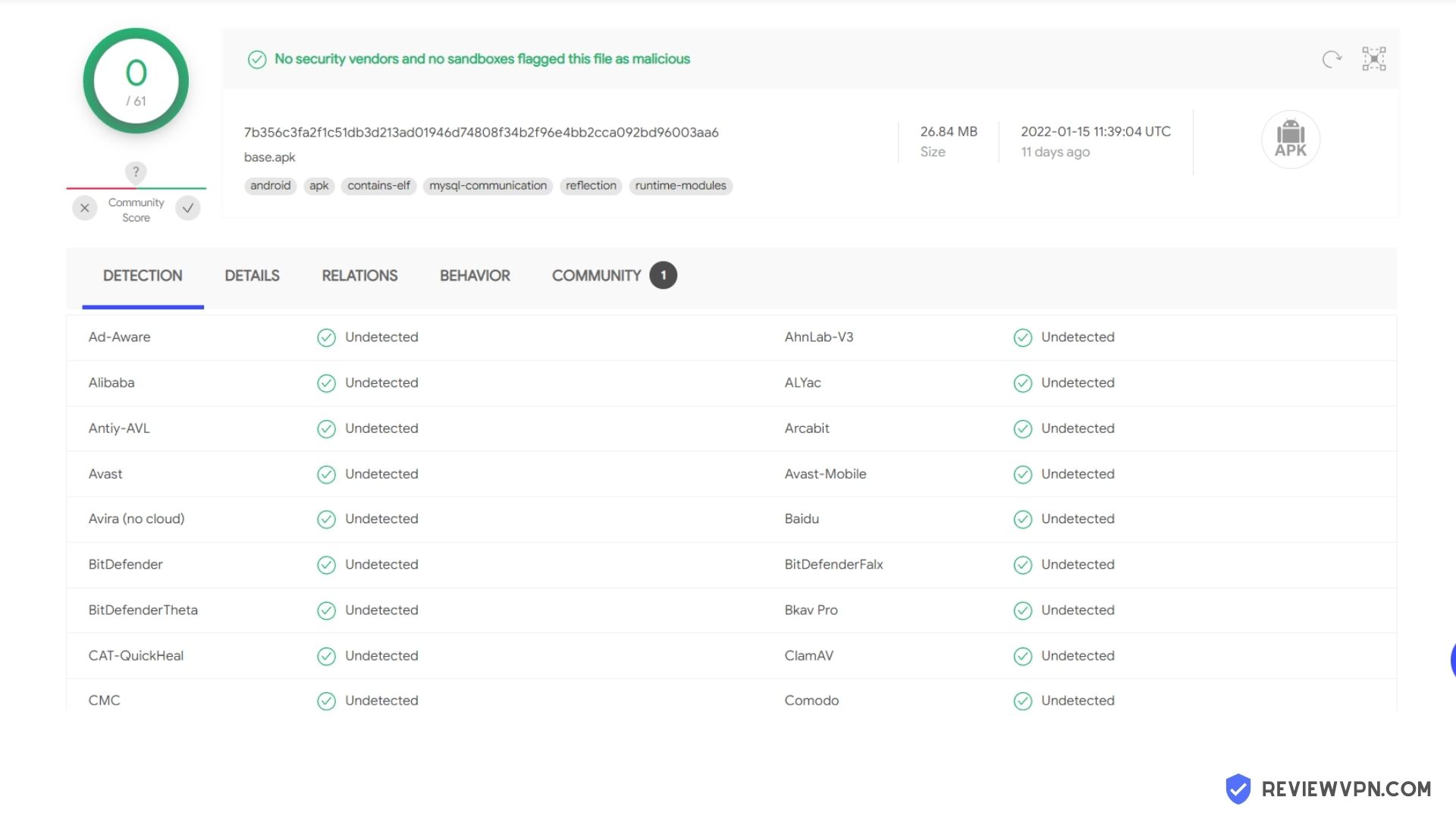
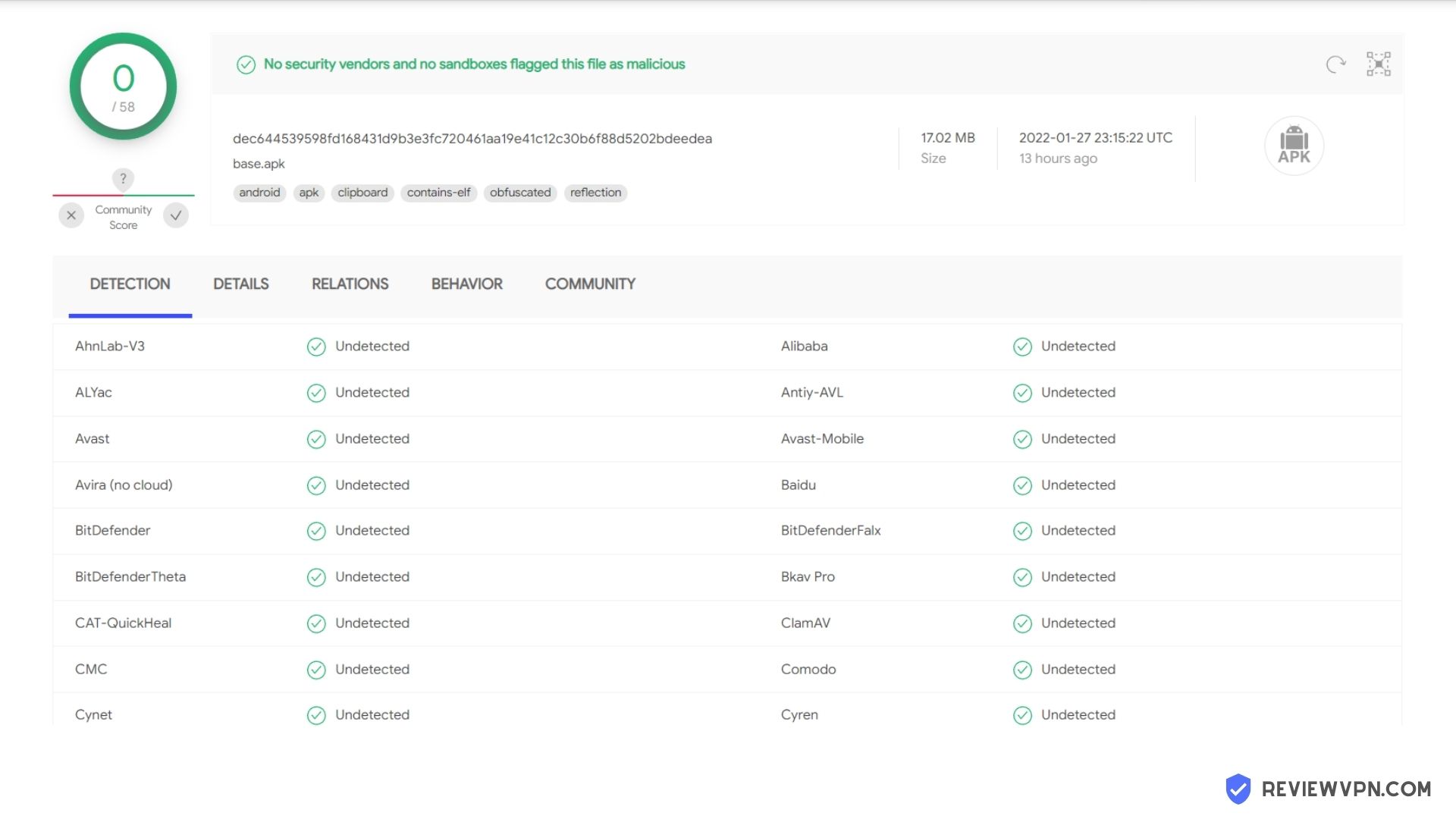
We tested this app using VirusTotal and found no threats or any malicious files and malware.

Despite having good results, we still need to be vigilant in protecting our privacy while streaming.

A Virtual Private Network or VPN will definitely help us maintain our security and anonymity while using Morph TV.

Here’s how you can Install The Best VPN For Firestick and All Devices.


How to Install Morph TV on Firestick

Morph TV button


Installation Guide on a Firestick

install image

  1. On the home screen, go to “Settings”
  2. Select My Fire TV
  3. Select Developer Options
  4. Open Apps from Unknown Sources
  5. Click Turn On
  6. Head back to the home screen and select “Search”
  7. Search Downloader and click “Downloader”. It will appear under the keyboard
  8. Choose the “Downloader app”
  9. Download it
  10. Choose Open
  11. Select Allow
  12. Choose OK
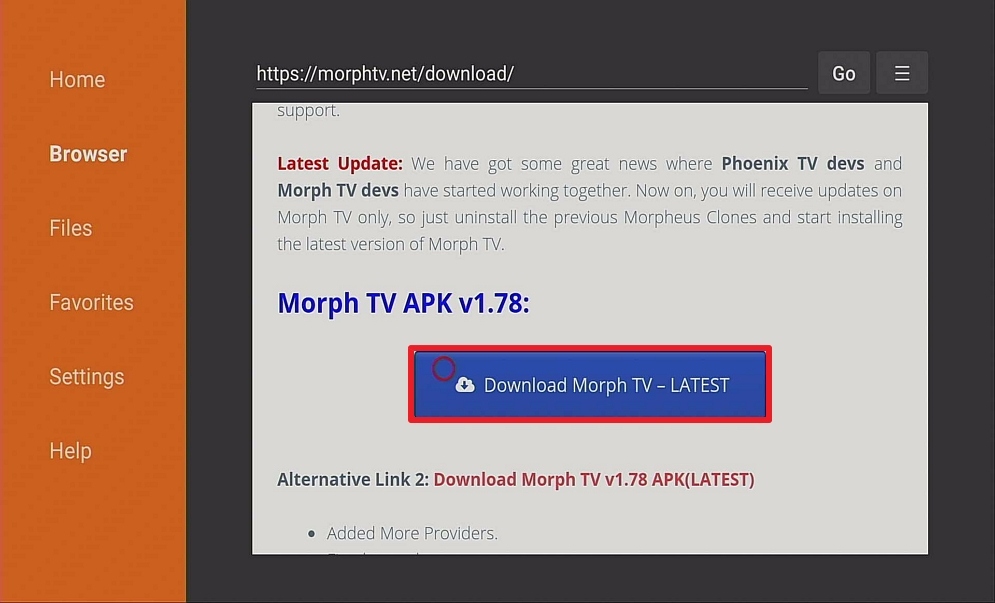
  13. Type https://morphtv.net/download/ and select Go
  14. Wait for it to finish
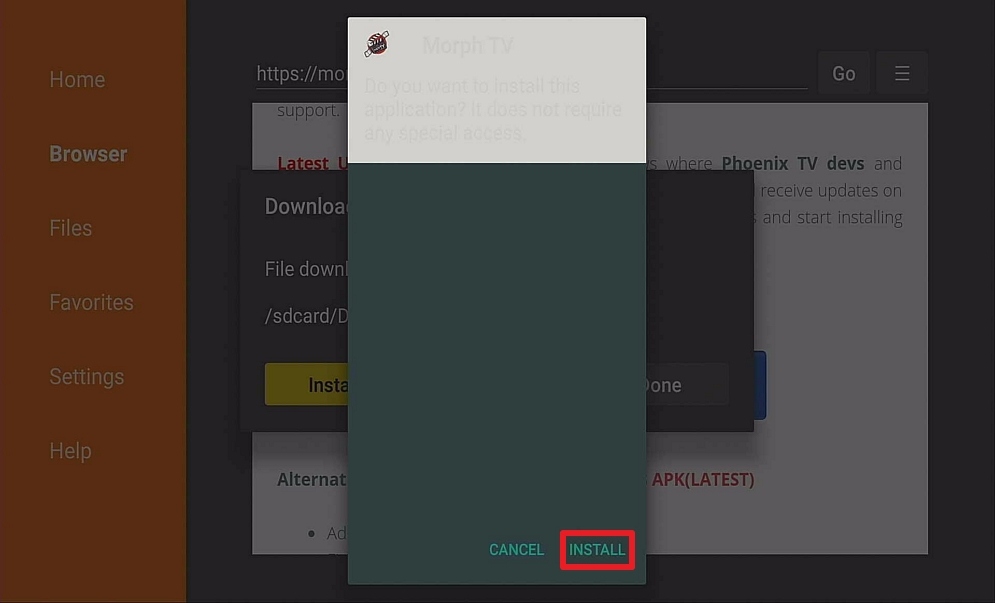
  15. Install Morph TV
  16. Select Done
  17. This will automatically take you back to Downloader. Select Delete
  18. Choose Delete Again
  19. Head back to the home screen and under the “Your Apps & Channels” choose See All.
  20. Scroll down and click on the select button while hanging around to relocate the app
  21. Open the app and start watching

Note: ReviewVPN.com does not host this APK file. It is hosted on Archive.org. 


If your Firestick still has the older interface, read this article to learn how to update it: Update Firestick Interface.


Install Morph TV IPTV on Firestick with Screenshots

1. Install the Downloader app and jailbreak your firestick by enabling unknown sources. To learn more about the procedure, you may read How to Install the Downloader App and Enable Unknown Sources.


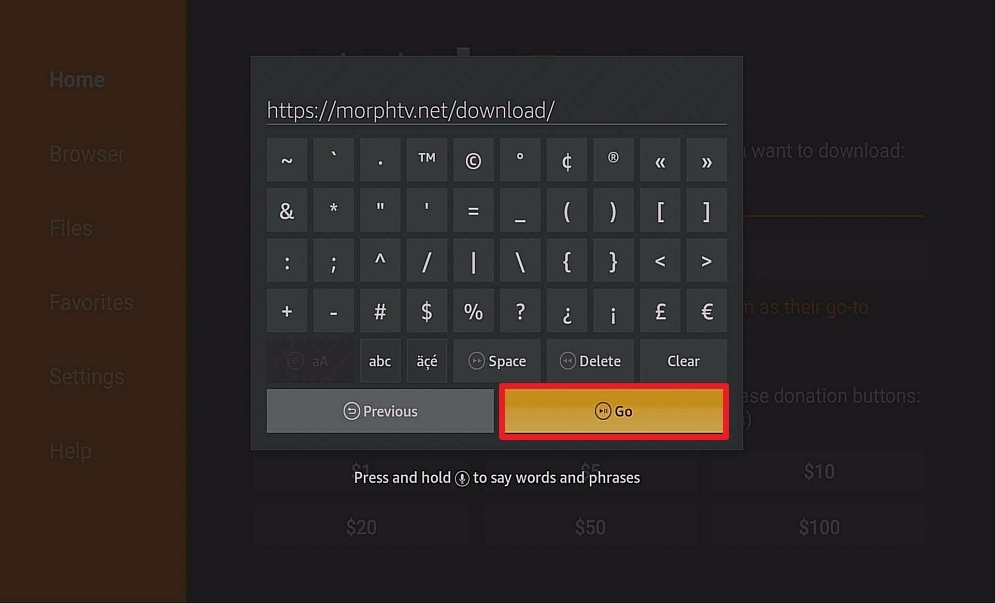
2. Open Downloader App. Type https://morphtv.net/download/  and click Go.

Step 12 Install Morph TV IPTV on Firestick


3. Click on Download.

Step 13 Install Morph TV IPTV on Firestick


4. Install and you should be all set. Remember to delete the APK file after installation to save space.

Step 14 Install Morph TV IPTV on Firestick


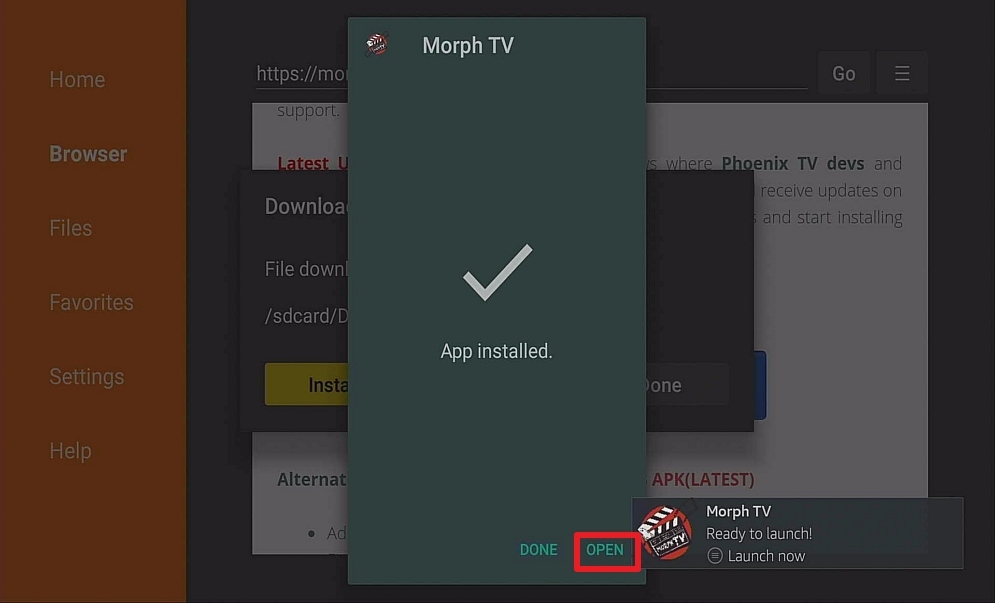
5. Click Open.

Step 15 Install Morph TV IPTV on Firestick


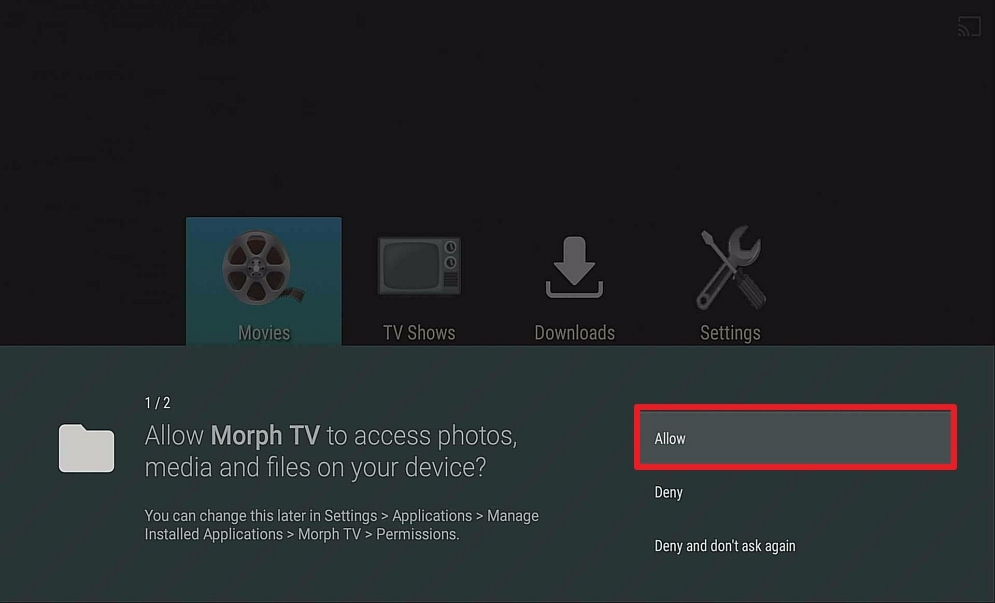
6. Click Allow.

Step 16 Install Morph TV IPTV on Firestick


7. Start watching.

Step 17 Install Morph TV IPTV on Firestick


YOUR INTERNET ACTIVITY IS BEING WATCHED

ReviewVPN cannot attest to the legality, security and privacy of the applications discussed on this site. It is highly recommended that you use a VPN service while streaming or using Kodi.

Currently, your IP 216.73.217.150 is visible to everyone and your Browser is being tracked by Advertisers & ISP Provider.

Save 65% Now

Limited Time Offer

Here are the main reasons why you must use a VPN:

  • Your activities are hidden from your ISP, the government, and from the apps you are using.
  • You can access additional movies and TV streams.
  • ISP attempts to throttle are thrwarted thus reducing buffering issues.
  • Geographically restricted content like Netflix and Hulu can be unblocked.

A VPN works be replacing your ISP-assigned IP address and creating an encrypted tunnel. We recommend the no log service offered by IPVanish. It works well on a Firestick and offers the fastest possible speeds.

Special Limited Time Offer - Get IPVanish


Legal Disclaimer: ReviewVPN.com does not encourage or endorse any illegal activity involved in the usage of services and applications referenced on this site. We do not verify the licensing agreements of services. The end-user is wholly responsible for ensuring that any media accessed through these services does not violate copyright and/or licensing laws. ReviewVPN does not promote, link to, or receive compensation from any Apps and IPTV services.


Install Surfshark on Firestick

Best Surfshark Deal


Pros and Cons

Pros

  • It provides torrent links as an alternative and lets you view the health of each link for you to find out which ones are the best to play
  • No Ads
  • Simple and clean user interface
  • A brief summary of the videos gives you an idea of what the movie/tv show is all about
  • Excellent subtitle support system
  • Chromecast Ability

Cons

  • There have been reports that users are experiencing issues when loading links
  • Real-Debrid Integration is not applicable


FAQ

Is It Safe To Use?

Morph TV is safe and legal to use.


Is It Legal Or Grey?

It leans toward legal streaming. Just make sure to watch using the public domain so as not to be suspected of having illegal activity.


Should I Use a VPN?

https://get.surfshark.net/aff_c?offer_id=865&aff_id=12312

Installing applications obtained out of app stores always entails risk. We can mitigate those risks by having a VPN installed on our devices. Your ISP is on a 24/7 duty tracking your online activity and this exposes you to a number of threats. Having a VPN installed cloaks your online activity from your ISP and hides what it is that you are doing. It also gives you access to a lot of content that is usually blocked by location rules and censorship. It also dramatically improves your speed by blocking the throttling efforts of your ISP. So yes, using VPN does not only protect but also improves the performance of an app like Morph TV.

Note: For more information about SurfShark, please read our SURFSHARK REVIEW.


Grab your subscription now!

Click here to get the lowest price on Surfshark through our exclusive limited-time offer.


How to Install Surfshark VPN on Firestick

If your Firestick still has the older interface, read this article to learn how to update it: Update Firestick Interface.

You can download Surfshark directly from the Amazon App store. It will be easy for you to find Surfshark with your Firestick’s Find feature. Refer to our screenshots below.

1. Go to the Home screen of your Firestick.

step 1 Install Surfshark VPN on Firestick


2. Navigate towards the Find tab. Press the Search button from the resulting dropdown.

step 2 Install Surfshark VPN on Firestick


3. Type in the keyword of SurfShark and select from the suggestions that will appear.

step 3 Install Surfshark VPN on Firestick


4. Click the official SurfShark icon from your search results.

step 4 Install Surfshark VPN on Firestick


5. Press the Download (You own it) button.

step 5 Install Surfshark VPN on Firestick


6. The SurfShark VPN installer will download on your device.

step 6 Install Surfshark VPN on Firestick


7. SurfShark VPN’s app will automatically install itself on your Fire TV stick.

step 7 Install Surfshark VPN on Firestick


8. Press the Open button after completing SurfShark VPN’s installation process.

step 8 Install Surfshark VPN on Firestick


9. Please wait for the SurfShark VPN to load its user interface.

step 9 Install Surfshark VPN on Firestick


10. You can now log in with your SurfShark VPN account credentials.

step 10 Install Surfshark VPN on Firestick

Learn more about Surfshark and Grab the Best Surfshark Deal Now!


Install Surfshark on Firestick

Best Surfshark Deal


Other VPNs to Consider

NordVPN (Best for Streaming)

Best Features

  • 5000+ Server in 50+ Countries 
  • Military-Grade Encryption
  • Fast Connection Speed
  • Suitable to a lot of devices
  • No-Log Policy

Prices
  • Complete $5.89 per month (64% Discount)
  • Plus $4.59 per month (56% Discount)
  • Standard $3.69 per month (55% Discount)

Best Features

  • 750+ High-speed VPN Servers in 43 Locations
  • Military-Grade Encryption
  • Fastest HD Streaming and Gaming
  • 30-Day Money-Back Guarantee
  • Unlimited Data & Devices
  • No-Log Policy

Prices
  • 3 Years $1.99 per month (82% Discount)
  • 1 Years $3.29 per month (70% Discount)
  • 1 Month $10.99 per month

IPVanish VPN (Most Secure)

Best Features

  • 1200+ Servers in 60+ Countries around the world
  • Unlimited Connections
  • No-Log Policy
  • Top Notch Military-Grade VPN Protocols and Encryptions
  • 100% Safe and Secured
  • Most Trusted VPN
  • Best VPN for Firestick
  • 30-Day Money-Back Guarantee

Prices
  • Yearly $3.99 per month (63% Discount) – 30 days risk free + Ransomware & Malware Protection
  • Quarterly $5.32 per month (51% Discount)
  • Monthly $10.99 per month


For more VPN discounts, go to ReviewVPN Deals and purchase the best VPN for you.

Click here to get the lowest price on Surfshark through our exclusive limited-time offer.


Is It Free?

Yes, Morph TV is free to download and does not have hidden costs


Are There ADS?

Morph TV does not have ads.


Is There A Premium Version?

No, there isn’t one.


Is There An Official Website?

You may visit their website https://morphtv.net/


What Other Devices Does It Work On?

Morph TV is a very versatile application. It runs on almost any type of platform. It runs well with other android devices and also has an IOS feature. Just be sure that your IOS is jailbroken so that it can work properly.


How Does The App Work?

You can download the APK at their website which is https://morphtv.net/


Minimum Version Required

For Android users, version 4.0 and above is needed to run the application


History

How Long Has It Been Around?

Morph TV has been around for quite some time already. It was officially registered on 2018-11-12


Is It A Terrarium Clone?

Yes. With the demise of the Terrarium TV and Morpheus TV, Morph Tv is a breath of fresh air who are accustomed to the interface of the two applications.


What Is The Development Team Like?

One of the major assets of Morph TV is its online support from the developers. They have devoted 24/7 support services whenever you experience issues. They have a “Contact Us” tab which you can use to address your concerns and they also feature social media links that you can use to follow and be updated on the latest news regarding the app.


Alternatives

ReviewVPN.com does not host any of these files. They are hosted on Archive.org.

Morph TV is already doing a great job by itself. It provides content that you can choose from its very detailed categories, but should there be issues you come across when running the app, the apps listed above are also good ones that you can use to substitute Morph TV.


Our Opinion

Morph TV is one of the most promising applications we have encountered. It only provides high-quality content and does not need to be pretentious about it. What attracted us to this app is that it has downloadable content. You can watch your favorite videos offline easily and get updates on a regular basis. The development team is also one to commend, they are very active in answering questions and have delegated agents to cater to its 24/7 support feature. Unlike other apps that you have to rely on google for tech support, Morph TV has improved its services by being readily available should issues arise when running their application. This just shows how devoted and compassionate they are in providing nothing but the best entertainment experience for their users.

We do hope that this guide has been instrumental in your wonderful experience. Should you have questions, comments, or suggestions, please feel free to contact us here on our website and on any of our other social media platforms. Thank you for reading!

Evolution Unloaded IPTV on Firestick & Android – 2023 Edition

Evolution Unloaded IPTV

In this article, we will give you a review and installation guide for Evolution Unloaded IPTV on Firestick and Android.


If you are a fan of 24/7 entertainment such as movies, music videos, TV episodes, sports, documentaries, 24/7 news, etc then IPTV has got you covered. The recent invention of internet protocol television has changed the television game and imparted the television industry. Nonetheless, you can just request a movie or past TV show and have it delivered to you.

This type of television network utilizes the internet. What this means is that you have to use a strong internet connection to be able to use this service.

And you might be wondering what IPTV is, how it works and what type of device can be compatible with it; this post highlights all of these questions. Read on as we also review Evolution Unloaded IPTV.


ANONYMOUSLY

What Is An IPTV?

IPTV (for short) stands for internet protocol television. This is a process whereby a television program is shared or transferred to the end-user via the internet. IP (internet protocol) is the same as the internet protocol address or VoIP (voice over internet protocol). To be able to grasp what IPTV is, first you need to understand the basic concept of traditional cabled television. 

IPTV

In the functionality of cable television; the medium of sharing or transferring television signals is through the cable. Here the TV signal is transferred from the source (satellite) to the television, all through a wired cable connection. 

But in IPTV, it is a different way around. IPTV uses internet connection as a medium of sharing or transferring video content. Here no cable connection or any form of connection is required. However, you need to have a strong and reliable internet connection.

Be that as it may, we will now talk about how IPTV works and the compatible devices. Internet protocol television functions in these three ways; live internet protocol television, time-shifted media, video on demand.

Time-shifted media allows you to watch past television programs when you have the chance to. Let’s say, on a busy day you couldn’t watch your favorite television show, with time-shifted media, you can be able to do so within the stipulated time frame.

Video on demand gives you access to request for an already past movie or television shows or news. However, not all IPTV service provider has this service.

Video content has no validity period

One advantage of video on demand over time-shifted media is that video content here has no validity period. Live internet protocol television enables you to watch live television programs even on the go.

Sports fans will find this feature very interesting because it gives access to watch live soccer, basketball, and volleyball games.

Internet protocol television is compatible with almost all streaming devices in the market. Nonetheless, you can use it on your, all Android devices, iPhone, Firestick TV, Android Box TV, compatible gaming machine, and lots more.

However, we often recommend downloading and installing a strong virtual private network ( VPN) on your device to prevent your online data from being hacked. Not only that, but having an active VPN on your device will give you access to channels that are geo-located; what this means is that those channels that are meant for a particular region or area, with VPN, you can change your location and have access to it. 

Having said that, an active VPN also helps you remain anonymous while accessing any IPTV portal; some of the IPTV service providers lack a legit license to the channels they provide, so using a VPN helps prevent you from landing into trouble. We strongly recommend Surfshark. You may read our article on how to Install Surfshark on Firestick and how you can get the Best Surfshark Deal today.


YOUR INTERNET ACTIVITY IS BEING WATCHED

ReviewVPN cannot attest to the legality, security and privacy of the applications discussed on this site. It is highly recommended that you use a VPN service while streaming or using Kodi.

Currently, your IP 216.73.217.150 is visible to everyone and your Browser is being tracked by Advertisers & ISP Provider.

Save 65% Now

Limited Time Offer

Here are the main reasons why you must use a VPN:

  • Your activities are hidden from your ISP, the government, and from the apps you are using.
  • You can access additional movies and TV streams.
  • ISP attempts to throttle are thrwarted thus reducing buffering issues.
  • Geographically restricted content like Netflix and Hulu can be unblocked.

A VPN works be replacing your ISP-assigned IP address and creating an encrypted tunnel. We recommend the no log service offered by IPVanish. It works well on a Firestick and offers the fastest possible speeds.

Special Limited Time Offer - Get IPVanish


Legal Disclaimer: ReviewVPN.com does not encourage or endorse any illegal activity involved in the usage of services and applications referenced on this site. We do not verify the licensing agreements of services. The end-user is wholly responsible for ensuring that any media accessed through these services does not violate copyright and/or licensing laws. ReviewVPN does not promote, link to, or receive compensation from any IPTV services.


Install Surfshark on Firestick

Best Surfshark Deal


Evolution Unloaded IPTV FAQ

This is an internet protocol television service reseller. What this means is that they provide IPTV service to end-user.

They offer over 1000 channels for you to choose from. All of these channels are live and in full SD and HD quality. Evolution unloaded IPTV has both local and international channels. Their local channels come from these countries: the United States of America, Canada, and the United Kingdom. International channels are also from these countries; India, the Philippines, Brazil, Indonesia, and Europe: Germany and Spain.

The categories of channels available on Evolution Unloaded IPTV include 24/7 sports, United States news, HBO, MBL, NBL, NFL, United States sports, United kingdom 24/7 news, United kingdom sports, Canada 24/7 news, Canada 24/7 sports, documentaries, drama, kids shows, comedy, religion and so much more.

They also offer adult channels; ranging from Soft-core to hard-core. One good side of evolution unloaded IPTV is that the adult channels have a parental control feature; meaning parents can password such channels to avoid access to kids.

Nonetheless, their subscription plan starts at $8 per month. This allows you to connect one streaming device. At this point, we can’t ascertain if evolution unloaded TV offers pretesting (Trial) or not as no such information is available on their portal.


Reliability

When compared with other IPTV providers, Evolution Unloaded TV seems to hold its ground. So far, their service has recorded lesser buffering issues. The video quality is superb with a clear picture and sound. 


Device Compatibility

Evolution unloaded IPTV can be installed on any streaming device. You can also use evolution unloaded TV as an add-on on Kodi.

Compatible devices are Android phones, Apple TV, NVIDIA SHIELD, Amazon TV, android box TV, personal computer: windows, LINUX machine, smart TV (Samsung, LG), PS4, Firestick TV, fire TV, and lots more.

Evolution unloaded TV is also compatible with external players like MX Player and VLC.

As of writing this post, evolution unloaded TV only gives out its installation guide to its subscribers: meaning that before you access the guide, you will have to sign up and purchase the one-month subscription plan and then you will receive the installation guide via email.

Nevertheless, you can still use evolution unloaded TV via the computer by just using your computer browser. It is pretty easy to do so.


Customer Support

Customer Service

Evolution unloaded TV has 24/7 customer service support. The technical support team is always available via their discord channels.


Stream Safely with VPN – Use Surfshark Service

While Virtual Private Networks or VPNs are utilized for numerous reasons, streaming videos online is among the most well-known use cases. Because of the top streaming services’ geographical restrictions, it is common for people outside the United States, in particular, to use a Virtual Private Network service to ensure they can access their favorite movies and TV shows.

A Virtual Private Network or VPN service, such as Surfshark, encrypts your data or online activities. It effectively creates a tunnel between a person’s web connection and an outside network positioned elsewhere in the world. Wherein, your data is transmitted with the VPN you are utilizing and not through your personal network. A VPN service hides your personal IP address. Instead, you are using the VPN’s IP address.

Below are the major reasons for using a VPN service:

  • Unblocking streaming services or websites
  • Staying safe online
  • Bypassing censorship
  • Security on unsecured Public Wi-Fi
  • Streaming geo-restricted content
  • Data privacy from the Internet Service Provider (ISP), apps & services you use


Grab your subscription now!


How to Install Surfshark VPN on Firestick

If your Firestick still has the older interface, read this article to learn how to update it: Update Firestick Interface.

Follow our screenshots below to install the SurfShark VPN app on your Fire TV stick.

1. Go to the Home screen of your Firestick.

step 1 Install Surfshark VPN on Firestick


2. Navigate towards the Find tab. Press the Search button from the resulting dropdown.

step 2 Install Surfshark VPN on Firestick


3. Type in the keyword of SurfShark and select from the suggestions that will appear.

step 3 Install Surfshark VPN on Firestick


4. Click the official SurfShark icon from your search results.

step 4 Install Surfshark VPN on Firestick


5. Press the Download (You own it) button.

step 5 Install Surfshark VPN on Firestick


6. The SurfShark VPN installer will download on your device.

step 6 Install Surfshark VPN on Firestick


7. SurfShark VPN’s app will automatically install itself on your Fire TV stick.

step 7 Install Surfshark VPN on Firestick


8. Press the Open button after completing SurfShark VPN’s installation process.

step 8 Install Surfshark VPN on Firestick


9. Please wait for the SurfShark VPN to load its user interface.

step 9 Install Surfshark VPN on Firestick


10. You can now log in with your SurfShark VPN account credentials.

step 10 Install Surfshark VPN on Firestick

Learn more about Surfshark and Grab the Best Surfshark Deal Now!


Install Surfshark on Firestick

Best Surfshark Deal


Other VPNs to Consider

NordVPN (Best for Streaming)

Best Features

  • 5000+ Server in 50+ Countries 
  • Military-Grade Encryption
  • Fast Connection Speed
  • Suitable to a lot of devices
  • No-Log Policy

Prices
  • Complete $5.89 per month (64% Discount)
  • Plus $4.59 per month (56% Discount)
  • Standard $3.69 per month (55% Discount)

Best Features

  • 750+ High-speed VPN Servers in 43 Locations
  • Military-Grade Encryption
  • Fastest HD Streaming and Gaming
  • 30-Day Money-Back Guarantee
  • Unlimited Data & Devices
  • No-Log Policy

Prices
  • 3 Years $1.99 per month (82% Discount)
  • 1 Years $3.29 per month (70% Discount)
  • 1 Month $10.99 per month

IPVanish VPN (Most Secure)

Best Features

  • 1200+ Servers in 60+ Countries around the world
  • Unlimited Connections
  • No-Log Policy
  • Top Notch Military-Grade VPN Protocols and Encryptions
  • 100% Safe and Secured
  • Most Trusted VPN
  • Best VPN for Firestick
  • 30-Day Money-Back Guarantee

Prices
  • Yearly $3.99 per month (63% Discount) – 30 days risk free + Ransomware & Malware Protection
  • Quarterly $5.32 per month (51% Discount)
  • Monthly $10.99 per month


For more VPN discounts, go to ReviewVPN Deals and purchase the best VPN for you.


Conclusion

Evolution Unloaded TV has been in the game for a while now and so far, users record minimal glitches. However, we are not disputing the fact that this service might not have other issues. You might want to check it out if you are looking for an alternative to cable tv.

Please let us know if you have questions we didn’t address or have other comments. We want to hear it all – good, bad, and ugly. Thank you for reading!


Note: ReviewVPN.com is not affiliated with any IPTV service nor does it endorse any. This article is meant for educational purposes only.

Blerd Vision TV IPTV on Firestick & Android

Blerd Vision  TV IPTV Review


Blerd TV IPTV is a big name when it comes to internet protocol television. They provide a variety of IPTV services to their esteemed customers and offer different subscription plans that will fit the budget of the client.


Internet protocol television

Internet protocol television (IPTV in short) uses the internet as a medium to deliver video content to its users. If you are familiar with traditional cabled TV which uses the cable connection from the source (satellite) to the screen (television). Here, images are transported via the cable to the television, while in IPTV, the video content is transported via the internet protocol using data connection only.

IPTV


ANONYMOUSLY

IPTV avails users the chance to watch a live television show or documentary even while on the go. A recent survey about internet protocol television reveals that there are over 50, 000 channels on the IPTV platform. This means that IPTV offers lots of entertainment when in comparison with traditional cabled TV. 

One aspect of IPTV is that it allows multiple device connectivity; this means that a single subscription will allow you to connect different streaming devices at the same time.


IPTV delivers its service in three ways; Video on demand, Live IPTV, and Time shifted Media.

Live IPTV; this stands for live internet protocol television. Here you can stream live your favorite sports or documentaries from the comfort of your SmartPhones. This feature comes as pay-per-view (PPV) which allows you to view live programs.

Video on demand; this is used to stream an already passed TV show or documentary. It is similar to the Catch-Up TV feature on some IPTV sections. This feature allows you to access any missed television shows, movie episodes, news, documentary, and lots more. One merit of the video-on-demand feature is that it has no validity; meaning video content on VOD can be last as long as the server is actively running.

Time-shifted media; this has the almost same feature as video on demand. Here you can as well access missed television shows, movie episodes, and news but within a limited time. Video contents on time-shifted media have validity; meaning that after the stipulated time, its access will be locked up.

Be that as it may, IPTV can be used on any streaming device such as Amazon TV, Android Box TV, Android phone, iPad, iPhone, PS4, XBOX ONE, Firestick TV, Fires TV, NVIDIA SHIELD, and lots more.

Most IPTV service providers offer free trials while some have paid trials. You can choose any of the subscription plans according to your budget. However, we recommend purchasing only a one-month subscription plan on any IPTV platform.


YOUR INTERNET ACTIVITY IS BEING WATCHED

ReviewVPN cannot attest to the legality, security and privacy of the applications discussed on this site. It is highly recommended that you use a VPN service while streaming or using Kodi.

Currently, your IP 216.73.217.150 is visible to everyone and your Browser is being tracked by Advertisers & ISP Provider.

Save 65% Now

Limited Time Offer

Here are the main reasons why you must use a VPN:

  • Your activities are hidden from your ISP, the government, and from the apps you are using.
  • You can access additional movies and TV streams.
  • ISP attempts to throttle are thrwarted thus reducing buffering issues.
  • Geographically restricted content like Netflix and Hulu can be unblocked.

A VPN works be replacing your ISP-assigned IP address and creating an encrypted tunnel. We recommend the no log service offered by IPVanish. It works well on a Firestick and offers the fastest possible speeds.

Special Limited Time Offer - Get IPVanish


Legal Disclaimer: ReviewVPN.com does not encourage or endorse any illegal activity involved in the usage of services and applications referenced on this site. We do not verify the licensing agreements of services. The end-user is wholly responsible for ensuring that any media accessed through these services does not violate copyright and/or licensing laws. ReviewVPN does not promote, link to, or receive compensation from any IPTV services.


Install Surfshark on Firestick

Best Surfshark Deal


Blerd Vission IPTV

Blerd Vission IPTV is an internet service provider. They offer over 4,500 channels for your entertainment. These channels come in different categories such as news, kids’ shows, documentaries, entertainment, sports, drama, comedy, and lots more. 

It provides channels from the following countries; Canada (over 400 regional and national channels), the united states (over 800 regional and national channels), and the united kingdom (over 500 national and regional channels). They also have international channels from the United Arab Emirates, Latin America, Spain Germany (over 200 channels), and India.

Blerd Vission IPTV also provide live channels such as;

Channel in MM

  • United kingdom 24/7 news
  • UK 24/7 sports
  • United States of America 24/7 news
  • United States of America sports 
  • Live documentaries and lots more.


Blerd Vision IPTV is all streaming device compatible. You can install this service on the following device: NVIDIA SHIELD, Amazon TV, personal computer; windows, MAC, LINUX, chrome browser, android phone, iPad, iPhone, Apple TV, Smart TV (LG, Samsung, etc), PS4, XBOX ONE, Kodi player, external players: MX player and VLC and lots more.

It is always advisable to set up an active Virtual private network software on your streaming device. This saves you from falling victim to accessing illegal IPTV service: this is because most IPTV service resellers or service provider does not have a valid license to some of the channels they are offering. 


As of the moment, Blerd Vision IPTV offers a free trial; this is for you to test the service and see if you are satisfied with it or not. Blerd Vision TV one month subscription plan goes for $5 and this allows for only one device connection. 

For up to three device connections, it goes for $10 within the one-month plan. For now, we cant ascertain if Blerd Vision IPTV offers a three, six, or twelve-month plan as it was not found on their webpage

Customers who have a complaint can submit a support ticket. Blerd Vision IPTV offers 24/7 customer support service for its subscribers. They also have after-sales support. To contact Blerd Vision IPTV, you will have to log in and fill out the support form.

Note: To be able to access any channel on Blerd Vision IPTV, you need to log in and create an account. You will receive your login details: password and username via email. Use the password and username you received to log in and purchase any of the subscription plans. 

As of writing this post, Blerd Vission TV only gives out an installation guide to subscribers. However, we have got how you can integrate the MX player on Blerd Vission IPTV.


Steps on How to Integrate MX Player on Blerd Vision TV

The first step is to download and install the MX player.

After that, launch your Firs TV

  • Choose “setting”
  • Select player (this will bring a different window with a list of external players)
  • Select MX player or any other player of your choice that is listed.
  • Confirm your selection. This will integrate MX player 
  • Wait for a while for a confirmation message.


Installing a VPN

Installing a VPN will help keep your online identity and information anonymous. We strongly recommend Surfshark.

Note: For more information about Surfshark, please read our Surfshark Review.


Grab your subscription now!

Click here to get the lowest price on Surfshark through our exclusive limited-time offer.


How to Install Surfshark VPN on Firestick

If your Firestick still has the older interface, read this article to learn how to update it: Update Firestick Interface.

Follow our screenshots below to install the SurfShark VPN app on your Fire TV stick.

1. Go to the Home screen of your Firestick.

step 1 Install Surfshark VPN on Firestick


2. Navigate towards the Find tab. Press the Search button from the resulting dropdown.

step 2 Install Surfshark VPN on Firestick


3. Type in the keyword of SurfShark and select from the suggestions that will appear.

step 3 Install Surfshark VPN on Firestick


4. Click the official SurfShark icon from your search results.

step 4 Install Surfshark VPN on Firestick


5. Press the Download (You own it) button.

step 5 Install Surfshark VPN on Firestick


6. The SurfShark VPN installer will download on your device.

step 6 Install Surfshark VPN on Firestick


7. SurfShark VPN’s app will automatically install itself on your Fire TV stick.

step 7 Install Surfshark VPN on Firestick


8. Press the Open button after completing SurfShark VPN’s installation process.

step 8 Install Surfshark VPN on Firestick


9. Please wait for the SurfShark VPN to load its user interface.

step 9 Install Surfshark VPN on Firestick


10. You can now log in with your SurfShark VPN account credentials.

step 10 Install Surfshark VPN on Firestick

Learn more about Surfshark and Grab the Best Surfshark Deal Now!


Install Surfshark on Firestick

Best Surfshark Deal


Other VPNs to Consider

NordVPN (Best for Streaming)

Best Features

  • 5000+ Server in 50+ Countries 
  • Military-Grade Encryption
  • Fast Connection Speed
  • Suitable to a lot of devices
  • No-Log Policy

Prices
  • Complete $5.89 per month (64% Discount)
  • Plus $4.59 per month (56% Discount)
  • Standard $3.69 per month (55% Discount)

Best Features

  • 750+ High-speed VPN Servers in 43 Locations
  • Military-Grade Encryption
  • Fastest HD Streaming and Gaming
  • 30-Day Money-Back Guarantee
  • Unlimited Data & Devices
  • No-Log Policy

Prices
  • 3 Years $1.99 per month (82% Discount)
  • 1 Years $3.29 per month (70% Discount)
  • 1 Month $10.99 per month

IPVanish VPN (Most Secure)

Best Features

  • 1200+ Servers in 60+ Countries around the world
  • Unlimited Connections
  • No-Log Policy
  • Top Notch Military-Grade VPN Protocols and Encryptions
  • 100% Safe and Secured
  • Most Trusted VPN
  • Best VPN for Firestick
  • 30-Day Money-Back Guarantee

Prices
  • Yearly $3.99 per month (63% Discount) – 30 days risk free + Ransomware & Malware Protection
  • Quarterly $5.32 per month (51% Discount)
  • Monthly $10.99 per month


For more VPN discounts, go to ReviewVPN Deals and purchase the best VPN for you.

Click here to get the lowest price on Surfshark through our exclusive limited-time offer.


In Conclusion

Blerd Vision allows for multiple device connectivity. You can enjoy a free trial to see if you are satisfied with their service before making any purchase. 

Note: ReviewVPn.com does not own or operate any IPTV Service nor do we endorse or are affiliated with any service.

Twisted IPTV on Firestick and Android

Twisted TV IPTV Review

Being one of the major internet protocol service resellers, Twisted TV offers High-Definition channels to choose from with a pocket-friendly subscription plan. In this article, discuss Twisted IPTV and how to avail of the 1-day free trial.


Legal Disclaimer: ReviewVPN.com does not encourage or endorse any illegal activity involved in the usage of services and applications referenced on this site. We do not verify the licensing agreements of services. The end-user is wholly responsible for ensuring that any media accessed through these services does not violate copyright and/or licensing laws. ReviewVPN does not promote, link to, or receive compensation from any IPTV services.


IPTV stands for internet protocol television. This service allows you to watch television shows, movies, documentaries, drama, comedy and lots more via the internet. You might be wondering how IPTV work, IPTV delivers its video content to its users via the internet; this is done using the internet data as a medium. Unlike the traditional cabled television, IPTV has different channels for you to choose from. 

IPTV


ANONYMOUSLY


There are three major ways IPTV delivers its video content; video on demand, live IPTV, and time-shifted media. Note that for you to be able to access IPTV service, you need very high-speed internet connectivity. 

Time-shifted Media; This is a feature that enables you to view any missed television shows or movies. This looks like the Catch-Up TV feature on IPTV as well. So if you have missed any of your favorite TV shows or movies, go to the Time-shifted media section of your internet protocol television provider and scroll through to find it. Note that video content on time-shifted media has validity depending on the IPTV service provider.

Video on demand; just as the name, this feature allows you to search any past movies or TV shows. You might be busy and as such miss your favorite show or movie episode; all you have to do is go to the VOD section and type the name of your favorite show or movie episode. One good side of the video-on-demand feature is that videos on this section do not have validity; it does not have stipulated time.

Live IPTV; just as it called, the live IPTV feature allows you to view pay-per-view TV shows or events,s and movies. Live TV events such as sports; live football, basket, and volley matches can be viewed with this feature. You can also view live documentaries or news. With the live IPTV, you access live TV programs as it is aired.

Internet protocol TV is all streaming device compatible; meaning you can use it on Android TV, Firestick TV, android phones, iPhones, iPad, tables Xbox one, and lots more. To be able to use any IPTV service, requires purchasing any of the subscription packages from any IPTV service provider out there. The package starts from $4 per month to $200 per year depending on your budget. 


YOUR INTERNET ACTIVITY IS BEING WATCHED

ReviewVPN cannot attest to the legality, security and privacy of the applications discussed on this site. It is highly recommended that you use a VPN service while streaming or using Kodi.

Currently, your IP 216.73.217.150 is visible to everyone and your Browser is being tracked by Advertisers & ISP Provider.

Save 65% Now

Limited Time Offer

Here are the main reasons why you must use a VPN:

  • Your activities are hidden from your ISP, the government, and from the apps you are using.
  • You can access additional movies and TV streams.
  • ISP attempts to throttle are thrwarted thus reducing buffering issues.
  • Geographically restricted content like Netflix and Hulu can be unblocked.

A VPN works be replacing your ISP-assigned IP address and creating an encrypted tunnel. We recommend the no log service offered by IPVanish. It works well on a Firestick and offers the fastest possible speeds.

Special Limited Time Offer - Get IPVanish


Twisted TV IPTV

Twisted TV IPTV is a major internet protocol TV service provider that has been in the industry for years. They offer their subscribers over 1000 channels with affordable subscription plans. 

The different categories of channels include; news, entertainment, drama, sports, documentary, kids shows and lots more. Some of these channels are local channels from the united states of America, the united kingdom, Canada, and the United Arab emirates.

Twisted TV IPTV is compatible with streaming devices such as Android phones, iPad, iPhones, Android Box TVs, Amazon TVs, Smart TVs, Firestick TVs, Fires TV, WINDOWS, MAC, LINUX, Xbox One, PS4, and lots more. 

Twisted TV IPTV has a different subscription package which is often pocket-friendly. These packages are often one, six, or twelve months valid and allow multiple device connections.

For a month package on Twisted TV, IPTV costs $10 and allows for only one device connectivity. For the same package with 2 device connectivity, it goes for $15. 3 to 4 device connections on the same package costs $20 and $25 respectively.

For a six-month subscription plan on Twisted TV, IPTV starts at $50 allowing you to connect only one streaming device. For 2 device connectivity within the six months, the package goes for $60. To be able to connect 3 up to 4 devices on the six months subscription package, it will cost $70 and $80 respectively.

The twelve-month subscription package goes for $100 with only one device connectivity. For 2 device connections, you have to pay an additional $20 which will amount to $120. Connecting 3 up to 4 devices at the same time costs $140 and $160 respectively. 

Twisted TV IPTV does not allow trial with their service; meaning you must purchase any of their plan to be able to use this service.

We recommend downloading and installing an active VPN on any of your devices used in accessing IPTV. This is because the majority of the IPTV resellers do not have complete licenses to the channels they offer and as such, makes it illegal. So accessing their service without a strong VPN might pose a risk to you as an end-user. Read our article on how Install Surfshark on Firestick.

How to Install Surfshark VPN on Firestick

If your Firestick still has the older interface, read this article to learn how to update it: Update Firestick Interface.

Follow our screenshots below to install the SurfShark VPN app on your Fire TV stick.

1. Go to the Home screen of your Firestick.

step 1 Install Surfshark VPN on Firestick


2. Navigate towards the Find tab. Press the Search button from the resulting dropdown.

step 2 Install Surfshark VPN on Firestick


3. Type in the keyword of SurfShark and select from the suggestions that will appear.

step 3 Install Surfshark VPN on Firestick


4. Click the official SurfShark icon from your search results.

step 4 Install Surfshark VPN on Firestick


5. Press the Download (You own it) button.

step 5 Install Surfshark VPN on Firestick


6. The SurfShark VPN installer will download on your device.

step 6 Install Surfshark VPN on Firestick


7. SurfShark VPN’s app will automatically install itself on your Fire TV stick.

step 7 Install Surfshark VPN on Firestick


8. Press the Open button after completing SurfShark VPN’s installation process.

step 8 Install Surfshark VPN on Firestick


9. Please wait for the SurfShark VPN to load its user interface.

step 9 Install Surfshark VPN on Firestick


10. You can now log in with your SurfShark VPN account credentials.

step 10 Install Surfshark VPN on Firestick

Learn more about Surfshark and Grab the Best Surfshark Deal Now!


Install Surfshark on Firestick

Best Surfshark Deal


Other VPNs to Consider

NordVPN (Best for Streaming)

Best Features

  • 5000+ Server in 50+ Countries 
  • Military-Grade Encryption
  • Fast Connection Speed
  • Suitable to a lot of devices
  • No-Log Policy

Prices
  • Complete $5.89 per month (64% Discount)
  • Plus $4.59 per month (56% Discount)
  • Standard $3.69 per month (55% Discount)

Best Features

  • 750+ High-speed VPN Servers in 43 Locations
  • Military-Grade Encryption
  • Fastest HD Streaming and Gaming
  • 30-Day Money-Back Guarantee
  • Unlimited Data & Devices
  • No-Log Policy

Prices
  • 3 Years $1.99 per month (82% Discount)
  • 1 Years $3.29 per month (70% Discount)
  • 1 Month $10.99 per month

IPVanish VPN (Most Secure)

Best Features

  • 1200+ Servers in 60+ Countries around the world
  • Unlimited Connections
  • No-Log Policy
  • Top Notch Military-Grade VPN Protocols and Encryptions
  • 100% Safe and Secured
  • Most Trusted VPN
  • Best VPN for Firestick
  • 30-Day Money-Back Guarantee

Prices
  • Yearly $3.99 per month (63% Discount) – 30 days risk free + Ransomware & Malware Protection
  • Quarterly $5.32 per month (51% Discount)
  • Monthly $10.99 per month


For more VPN discounts, go to ReviewVPN Deals and purchase the best VPN for you.

Click here to get the lowest price on Surfshark through our exclusive limited-time offer.


Customer Service

Customer Service

Twisted TV IPTV offers 24/7 customer care service to its subscribers. Purchasing any of the packages gives you the opportunity to 24/7 live support from any of the team. You can also avail of their after-sale support via live support chat. Customers can get in touch with the support team via Facebook and other social media channels.

As Twisted TV IPTV does not allow a free trial, it is ideal signing up and purchase any of the packages listed earlier. You can do this by login into the Twisted webpage and create an account. You will receive an email with your password and username. 

Use the password and username you received to log in to the Twisted TV IPTV portal and purchase any of the subscription plans. Choose any of the packages according to your budget and choice.


Final Words

Twisted TV IPTV offers over 1,000  and multiple device connectivity, you may consider these aspects if ever you want an alternative for cable tv.  You can try out this IPTV service to find out what we are talking about.

Note: ReviewVPN.com does not endorse any IPTV Service not does it own any. We are not affiliated with any specific service and this article is meant for educational purposes only.

Hydrogen TV IPTV on Firestick & Android

Hydrogen TV IPTV Review

This article will give you a guide on streaming Hydrogen TV IPTV.


Hydrogen TV is a major IPTV service provider. Subscribers of this service enjoy over 2,300 full High Definition TV channels. In this article, Hydrogen TV IPTV will be reviewed and its features and setting up procedures will be discussed.


What Is An IPTV

WHAT IS AN IPTV_ IMAGE for Hydrogen TV


The recent increase in demand for an alternative to cable TV has led to the invention of internet protocol TV. IPTV means internet protocol television. If you are dissatisfied with Cable TV and looking for an alternative, then Internet protocol Television is best for you.

In the IPTV industry, over 50,000 channels are available for you to choose from. These channels often come in SD and full High Definition quality.

One good side of IPTV is that it allows you to be able to watch past TV shows, Movies, documentaries, and lots more. With Internet protocol, you can be able to stream any live TV show even when you are on the go.


ANONYMOUSLY

IPTV Works In This Way

Pixelated IPTV for Hydrogen TV

With video-on-demand features, you can navigate across a movie, documentary, or sports event and save it via the VOD section. There are many Internet protocol providers out there offering video-on-demand services. One merit of video on demand is that it allows you to view any video content irrespective of its validity.

In time-shifted Media, you can be able to access a TV show, movie, news, or music you have missed. This works like Catch UP TV and video-on-demand feature, however, time-shifted media allows access to the video content within a specific period; meaning that after this period, the video contents under time-shifted media will not be available.

Live IPTV; live IPTV simply means live internet protocol television. Here you are allowed to access your favorite movie, news or TV shows like sports events live as it is being aired. If you are a sports fan, you can stream your favorite sports such as live football, basketball, cricket, volley matches, and lots more.

You can also watch live news and documentaries as well with Live IPTV. Having said that, we believe you already have a glimpse of what IPTV is and how it works.


Hydrogen TV IPTV

Hydrogen TV is an IPTV service provider offering its end users over 2,500 channels to choose from. They have been in the Internet protocol industry for years and so far, which is a testament to their staying power. They offer pocket-friendly subscription plans. These channels come in different categories such as comedy, news, entertainment, sports, pay-per-view, drama, action, NPL MLH, religion, kids shows, and lots more.

Hydrogen TV IPTV offers local channels from the united kingdom, the united states of America, and Canada. Its international channels are from countries like UAE, Germany (over 150 national and regional channels) Latin America, and Spain.


YOUR INTERNET ACTIVITY IS BEING WATCHED

ReviewVPN cannot attest to the legality, security and privacy of the applications discussed on this site. It is highly recommended that you use a VPN service while streaming or using Kodi.

Currently, your IP 216.73.217.150 is visible to everyone and your Browser is being tracked by Advertisers & ISP Provider.

Save 65% Now

Limited Time Offer

Here are the main reasons why you must use a VPN:

  • Your activities are hidden from your ISP, the government, and from the apps you are using.
  • You can access additional movies and TV streams.
  • ISP attempts to throttle are thrwarted thus reducing buffering issues.
  • Geographically restricted content like Netflix and Hulu can be unblocked.

A VPN works be replacing your ISP-assigned IP address and creating an encrypted tunnel. We recommend the no log service offered by IPVanish. It works well on a Firestick and offers the fastest possible speeds.

Special Limited Time Offer - Get IPVanish


Legal Disclaimer: ReviewVPN.com does not encourage or endorse any illegal activity involved in the usage of services and applications referenced on this site. We do not verify the licensing agreements of services. The end-user is wholly responsible for ensuring that any media accessed through these services does not violate copyright and/or licensing laws. ReviewVPN does not promote, link to, or receive compensation from any IPTV services.


Install Surfshark on Firestick

Best Surfshark Deal


Hydrogen TV Subscription Plans

Hydrogen TV Subscription

Hydrogen TV IPTV has a variety of subscription plans for you to choose from. The lowest plan starts at $10 which has 30 days validity and allows only one device connectivity. For multiple device connections (up to 4 devices) within the 30 days plan, it goes for $16 and 5 device connectivity goes for $19 for the same 30 days time.

Three months subscription plan on Hydrogen TV IPTV goes for $20 and this allows only one device connection. For a three-month subscription plan with 4 device connectivity on Hydrogen, TV IPTV goes for $41 and 5 device connection on three months plan starts at $46.

Six months plan on Hydrogen TV IPTV; Costs $40 with only one device connection and connecting up to 4 devices on the six months plan goes for $70 and 5 device connections go for $80.

For a year plan, with one device connection on Hydrogen TV IPTV is $80 and for 4 devices goes for $115. 5 device connection goes for $125. 2 years subscription plan, with one device, goes for $160 and 4 device connectivity goes $180.

As of writing this review, Hydrogen TV IPTV allows its users to have a 24-hour paid trial with their service which goes for $2. They also offer adult channels.

Note – We recommend installing an active VPN on your device before using any IPTV service. This is to keep your information private as many of the IPTV providers don’t have a legal license for some of the channels they offer. We recommend using a VPN.


Hydrogen TV Customer Care

Hydrogen TV Customer Service

Hydrogen TV IPTV has 24/7 customer service for its esteemed subscribers. This allows its customers to access support from their team. Customers can also access their 24/7 after-sales service. Customers may reach Hydrogen TV IPTV on Telegram.


Hydrogen TV Device Compatibility

Hydrogen TV IPTV is compatible with most streaming devices. The compatible device includes STB Emulator, DOL2, Formuler/Dreamlink, personal computer: MAC, LINUX, WINDOWS, Prog TV, PERFECT PLAYER, PlayTV, Android phones, iPad, Tablet, Xbox One, Android Box TV, GSE IPTV App (iOS and Android), Firestick TV, Kodi, and lots more.

To use Hydrogen TV IPTV, the first thing to do is download and install a virtual private network on your device. The VPN keeps your information anonymous as most IPTV providers don’t have a valid license. You can download a VPN from here.

Log in to the Hydrogen portal and create an account. This will give you a password and a username. Log in to your Hydrogen account and purchase any of the subscription plans.

As of writing this post, Hydrogen TV IPTV only discloses the installation details to their subscribers. However, we have provided an alternative way to use Hydrogen TV IPTV on external players.


Here is How To Integrate MX Player On Hydrogen TV IPTV

  • From the screen of your Hydrogen TV, click on the arrow pointing left on the remote. This will bring the setting window.
  • Click on the player and hover on the player menu to bring the external player option
  • A dialog box with a list of external players will come up
  • Choose the MX player and click on integration.
  • Wait while the integration takes place.


Stream Online with a VPN


Internet Service Providers (ISP) can monitor your private online activities. The information they collect can be used for insidious methods. Accessing exclusive media content can disrupt your internet connection. Your IP requests subsequent loads from the main server. It may result in stuttering and buffering.

A slow connection may hinder your research assignments. It can also affect your internet speed. It is why we recommend a magnificent VPN like Surfshark. Many VPNs are available on the web. Surfshark is designed for the safe streaming of quality movies. It is the best companion while streaming multiple media files.


Grab your subscription now!

Click here to get the lowest price on Surfshark through our exclusive limited-time offer.


How to Install Surfshark on Firestick with Screenshots

If your Firestick still has the older interface, read this article to learn how to update it: Update Firestick Interface.

You can download Surfshark directly from the Amazon App store. It will be easy for you to find Surfshark with your Firestick’s Find feature. Refer to our screenshots below.

Follow our screenshots below to install the Surfshark VPN app on your Fire TV stick.

1. Go to the Home screen of your Firestick.

step 1 Install Surfshark VPN on Firestick


2. Navigate towards the Find tab. Press the Search button from the resulting dropdown.

step 2 Install Surfshark VPN on Firestick


3. Type in the keyword of Surfshark and select from the suggestions that will appear.

step 3 Install Surfshark VPN on Firestick


4. Click the official Surfshark icon from your search results.

step 4 Install Surfshark VPN on Firestick


5. Press the Download (You own it) button.

step 5 Install Surfshark VPN on Firestick


6. The Surfshark VPN installer will download on your device.

step 6 Install Surfshark VPN on Firestick


7. Surfshark VPN’s app will automatically install itself on your Fire TV stick.

step 7 Install Surfshark VPN on Firestick


8. Press the Open button after completing Surfshark VPN’s installation process.

step 8 Install Surfshark VPN on Firestick


9. Please wait for the Surfshark VPN to load its user interface.

step 9 Install Surfshark VPN on Firestick


10. You can now log in with your Surfshark VPN account credentials.

step 10 Install Surfshark VPN on Firestick

Learn more about Surfshark and Grab the Best Surfshark Deal Now!


Install Surfshark on Firestick

Best Surfshark Deal

Other VPNs to Consider

NordVPN (Best for Streaming)

Best Features

  • 5000+ Server in 50+ Countries 
  • Military-Grade Encryption
  • Fast Connection Speed
  • Suitable to a lot of devices
  • No-Log Policy

Prices
  • Complete $5.89 per month (64% Discount)
  • Plus $4.59 per month (56% Discount)
  • Standard $3.69 per month (55% Discount)

Best Features

  • 750+ High-speed VPN Servers in 43 Locations
  • Military-Grade Encryption
  • Fastest HD Streaming and Gaming
  • 30-Day Money-Back Guarantee
  • Unlimited Data & Devices
  • No-Log Policy

Prices
  • 3 Years $1.99 per month (82% Discount)
  • 1 Years $3.29 per month (70% Discount)
  • 1 Month $10.99 per month

IPVanish VPN (Most Secure)

Best Features

  • 1200+ Servers in 60+ Countries around the world
  • Unlimited Connections
  • No-Log Policy
  • Top Notch Military-Grade VPN Protocols and Encryptions
  • 100% Safe and Secured
  • Most Trusted VPN
  • Best VPN for Firestick
  • 30-Day Money-Back Guarantee

Prices
  • Yearly $3.99 per month (63% Discount) – 30 days risk free + Ransomware & Malware Protection
  • Quarterly $5.32 per month (51% Discount)
  • Monthly $10.99 per month

For more VPN discounts, go to ReviewVPN Deals and purchase the best VPN for you.


Conclusion

With a variety of plans to choose from and a huge channel list, Hydrogen TV IPTV can be an option for someone who wants to switch to IPTV.

Note: ReviewVPN.com does not own any IPTV service nor does it endorse one. We are not affiliated with any service.

Install MX Player on Firestick, Fire TV & Android – 2023

MX Player Overview

In this article, we will be divulging important details on how to install MX Player on Firestick and other devices that run on the android platform.


What Is It?

MX Player has fast become the Android TV streaming application standard when it comes to video players. 

Because of its versatility of functionality with reading an enormous range of codecs with multiple add-ons meaning that you watch almost any movie format.

With over 500 million downloads and 7.5  million downloads and 7.5 million ratings on Google Play Store, it is one of the most downloaded video players of all time.

Outside of India MX Player is used as an OTT Player, however, in India, it is one of the most popular video players for content with an enormous library of country-specific content and over 350 million users. 


Where Is It Available?

MX Player is cross-platform and can be downloaded from the Google Play Store and iOS Store. The free version offers the same functionality as the paid version with unobtrusive ads running.

Google Play Free Version: https://play.google.com/store/apps/details?id=com.mxtech.videoplayer.ad&hl=en_GB

Google Play Paid Version: https://play.google.com/store/apps/details?id=com.mxtech.videoplayer.pro&hl=en_GB

You can choose the free version or pay for added functionality and ad-free viewing ($5.99), the paid version has well over 1 million installs.

You can also download it from APK Time, Apptoide, and apkpure.

There are a lot of copycat sites, so always make sure you download from an official source outlined above or use Malwarebytes to scan the file before opening it.


Is MX Player Safe and Virus-free?

We tested this app using VirusTotal and found no threats or any malicious files and malware.

Despite having good results, we still need to be vigilant in protecting our privacy while streaming.

A Virtual Private Network or VPN will definitely help us maintain our security and anonymity while using MX Player.

Here’s how you can Install The Best VPN For Firestick and All Devices.


ANONYMOUSLY

If your Firestick still has the older interface, read this article to learn how to update it: Update Firestick Interface.


Screenshots with Step by Step Instruction to Install MX Player on a Firestick

1. Install the Downloader app and jailbreak your firestick by enabling unknown sources. To learn more about the procedure, you may read How to Install the Downloader App and Enable Unknown Sources.


2. Open Downloader App. Type https://reviewvpn.com/mxp and click Go. (Note: ReviewVPN.com does not host this APK file.)

Step 12 Install MX Player on Firestick


3. Click Install.

Step 13 Install MX Player on Firestick


4. Click Open

Step 14 Install MX Player on Firestick


5. Click Allow.

Step 15 Install MX Player on Firestick


YOUR INTERNET ACTIVITY IS BEING WATCHED

ReviewVPN cannot attest to the legality, security and privacy of the applications discussed on this site. It is highly recommended that you use a VPN service while streaming or using Kodi.

Currently, your IP 216.73.217.150 is visible to everyone and your Browser is being tracked by Advertisers & ISP Provider.

Save 65% Now

Limited Time Offer

Here are the main reasons why you must use a VPN:

  • Your activities are hidden from your ISP, the government, and from the apps you are using.
  • You can access additional movies and TV streams.
  • ISP attempts to throttle are thrwarted thus reducing buffering issues.
  • Geographically restricted content like Netflix and Hulu can be unblocked.

A VPN works be replacing your ISP-assigned IP address and creating an encrypted tunnel. We recommend the no log service offered by IPVanish. It works well on a Firestick and offers the fastest possible speeds.

Special Limited Time Offer - Get IPVanish


Legal Disclaimer: ReviewVPN.com does not encourage or endorse any illegal activity involved in the usage of services and applications referenced on this site. We do not verify the licensing agreements of services. The end-user is wholly responsible for ensuring that any media accessed through these services does not violate copyright and/or licensing laws. ReviewVPN does not promote, link to, or receive compensation from any Apps and IPTV services.


Install Surfshark on Firestick

Best Surfshark Deal


Features

MX Players offers:

  • Hardware acceleration for viewing HD and 4K videos seamlessly
  • Multi-Core Decoding to improve streaming speed, MX Player reports a 70% performance improvement as opposed to single-core decoding
  • Recognized most Codecs and if unsupported you can find a codec pack to download
  • Corrects rotation and sizing issues on Android devices
  • Pinch and Zoom as well as Zoom and Pan
  • Kids Lock, allows you to lock the player with a passcode or lock particular categories or content
  • Subtitle gestures to move through subtitles using a remote or a finger action. Subtitle text can also be altered and colored
  • Supports the following subtitle formats (mkv subtitle track, .srt, .sub, .ass, .mpl, .psb)
  • Supports the following video file formats ( avi, mpeg, mp4, wmv, divx, xvid, mov, flv, wob and 3gp)


How Do You Use It?

When using an Android TV application, you simply set MX Player as your default player of choice when streaming content. In Windows, you would associate file types with MX Player to always use it.

MX Player uses a simple set up meaning you can just plug and play setting MX Player as your default media player in an application or on your device as a whole.


When Was It Developed?

MX Player was developed in 2011 by the South Korean Firm J2 Active.


What Tools Does It Compliment The Most?

Most of the most popular Android streaming applications will now use MX Player as a default method, and in fact, it is seen as an internal benchmark of quality if an app is MX Player compatible.

The biggest names like Zion TV, Cyberflix, Tea TV, Bee TV, and Cinema HD all either use MX Player as default or have the option to use it.


Common Problems

History / Is it In Active Development?

MX Player was developed in 2011 and used primarily for streaming Indian content. The application is supported by a significant development team who have an active forum on XDA Developers: https://forum.xda-developers.com/apps/mx-player

MX Player is owned by India’s biggest Media Conglomerate, The Times Group. So, they have the resources and the active user base in India to continue updating and releasing new Codecs for new devices across Platforms.

MX Player has an active bug reporting system, and a pipeline of coming updates as well as developers who are active across the forum addressing user and other developer problems.


What Devices Does It Work on?

MX Player works across all platforms apart from Linux. You can find suitable apps for Android, Windows, iOS, Mac, and the Amazon Fire Series


What Alternatives Exist?

The most common alternatives are VLC which pretty much plays any video format and has an impressive codec database. VLC also offers the picture in picture mode which you can’t currently get with MX Player.

Kodi offers a great solution as an all-in-one media center with its own add ons, skins, and builds to access a wide range of free tv shows, movies, and IPTV. Unlike MX Player though Kodi does not support gesture controls if you plan on using it on a touch screen device and swiping around.

A few lesser-known players that exist include KM Player which has all of MX features as well as picture in picture. Archos Video Player and BS Player also offer great solutions.


What Apps Does it Compliment/are Required to Use it?

Most of the most popular streaming apps will use MX Player as a default if they haven’t developed their own in-app media player.


Why You Should Use It With a VPN?

https://get.surfshark.net/aff_c?offer_id=865&aff_id=12312

Remember that a video player and the app you are using it with are only as good as your VPN player. Using MX Player with an application like Cyberflix or Zion TV will offer great video quality and buffering but you may find that many of your sources are blocked or worse still the application may not start at all.

Internet Service Providers (ISP) work closely with media producers to ensure that the distribution of pirated copyrighted material is stopped and monitored where possible. Your ISP monitors all your traffic and if you are found to be accessing a site that supports the distribution of questionable material you could have your access blocked, your internet slowed down or even a cease and desist letter sent to you.

In extreme cases, copyright lawyers will pursue people for financial settlements or jail time

If for example, you wanted to watch MX Player online outside of India, you’d need to use a VPN and log into an Indian-based server as the content is locked by region. A VPN can also help to keep your data encrypted and change your IP meaning you can browse in peace without the watchful eye of your ISP.

Note: For more information about Surfshark, please read our Surfshark Review.


Grab your subscription now!


How to Install Surfshark VPN on Firestick

If your Firestick still has the older interface, read this article to learn how to update it: Update Firestick Interface.

You can download Surfshark directly from the Amazon App store. It will be easy for you to find Surfshark with your Firestick’s Find feature. Refer to our screenshots below.

1. Go to the Home screen of your Firestick.

step 1 Install Surfshark VPN on Firestick


2. Navigate towards the Find tab. Press the Search button from the resulting dropdown.

step 2 Install Surfshark VPN on Firestick


3. Type in the keyword of SurfShark and select from the suggestions that will appear.

step 3 Install Surfshark VPN on Firestick


4. Click the official SurfShark icon from your search results.

step 4 Install Surfshark VPN on Firestick


5. Press the Download (You own it) button.

step 5 Install Surfshark VPN on Firestick


6. The SurfShark VPN installer will download on your device.

step 6 Install Surfshark VPN on Firestick


7. SurfShark VPN’s app will automatically install itself on your Fire TV stick.

step 7 Install Surfshark VPN on Firestick


8. Press the Open button after completing SurfShark VPN’s installation process.

step 8 Install Surfshark VPN on Firestick


9. Please wait for the SurfShark VPN to load its user interface.

step 9 Install Surfshark VPN on Firestick


10. You can now log in with your SurfShark VPN account credentials.

step 10 Install Surfshark VPN on Firestick

Learn more about Surfshark and Grab the Best Surfshark Deal Now!


Install Surfshark on Firestick

Best Surfshark Deal


Other VPNs to Consider

NordVPN (Best for Streaming)

Best Features

  • 5000+ Server in 50+ Countries 
  • Military-Grade Encryption
  • Fast Connection Speed
  • Suitable to a lot of devices
  • No-Log Policy

Prices
  • Complete $5.89 per month (64% Discount)
  • Plus $4.59 per month (56% Discount)
  • Standard $3.69 per month (55% Discount)

Best Features

  • 750+ High-speed VPN Servers in 43 Locations
  • Military-Grade Encryption
  • Fastest HD Streaming and Gaming
  • 30-Day Money-Back Guarantee
  • Unlimited Data & Devices
  • No-Log Policy

Prices
  • 3 Years $1.99 per month (82% Discount)
  • 1 Years $3.29 per month (70% Discount)
  • 1 Month $10.99 per month

IPVanish VPN (Most Secure)

Best Features

  • 1200+ Servers in 60+ Countries around the world
  • Unlimited Connections
  • No-Log Policy
  • Top Notch Military-Grade VPN Protocols and Encryptions
  • 100% Safe and Secured
  • Most Trusted VPN
  • Best VPN for Firestick
  • 30-Day Money-Back Guarantee

Prices
  • Yearly $3.99 per month (63% Discount) – 30 days risk free + Ransomware & Malware Protection
  • Quarterly $5.32 per month (51% Discount)
  • Monthly $10.99 per month


For more VPN discounts, go to ReviewVPN Deals and purchase the best VPN for you.

Click here to get the lowest price on Surfshark through our exclusive limited-time offer.


Install VidMix on a Firestick & Android in 5 Minutes

VidMix on a Firestick

In this article, we will be assisting you on how to install VidMix APK on Firestick and android devices.


VidMix makes watching thousands of ad-free movies on your Firestick or Android TV incredibly easy. This is a technological evolution that actually makes life more convenient. Sure, we already have apps that deliver food and affordably provide transportation. In some respects, you could say VidMix is even better because it doesn’t cost anything to use.


Is It Any Good

VidMix is a video downloader that traces its roots back to the beautiful country of India. It boasts a lot of downloadable content that can range from popular movies to your favorite TV Shows. It has Live TV features a lot of channels from different countries across the globe, you name it, they have it. 


ANONYMOUSLY

install image

Installation Guide on a Firestick

  1. On the Home Screen, open Settings
  2. Choose My Fire TV
  3. Select Developer Options
  4. Select Apps from Unknown Sources option.
  5. Select the Turn On button.
  6. Head back to the Home Screen and select the search icon.
  7. Key in “Downloader”
  8. Choose the Downloader app and install it.
  9. Select Open 
  10. Choose Allow 
  11. Click OK 
  12. Go back to Settings in the Downloader app
  13. Select ok Enable JavaScript.
  14. Go back to the homepage
  15.  Type in https://reviewvpn.com/vid
  16. Wait for the download to finish
  17. Choose Next 
  18. Choose Install 
  19. Wait for the installation to be done
  20. Choose Done 
  21. Click on Delete 
  22. Click Delete again button.
  23. Press the Home button on your remote
  24.  Vid Mix will be located at the bottom.
  25. Choose Vid Mix and long press on the menu button on your firestick, a notification “Move to front” will appear
  26. Select Ok
  27. There you go, the app is already installed.


Vid Mix button


What Does It Do?

VidMix can download videos from sites like Youtube. It can also convert videos into mp3 so that you can listen to music without the use of video platforms. What it does is collect working links and gather them in a server ready to be downloaded.

Compatible Platforms

It works with Android Devices and best used with the Amazon Firestick or Fire TV.

Features

  •       Live TV Channels

  USA, India, Spain, Chile, Russia, Italy, Ukraine, Germany, Mexico, Argentina, UK, Brazil, Romania, Poland, Greece, Turkey, Peru, France, Canada, Netherlands, Indonesia

    •       Downloadable video
    •       High-Def Videos up to 8k
    •       Video to mp3 converter


YOUR INTERNET ACTIVITY IS BEING WATCHED

ReviewVPN cannot attest to the legality, security and privacy of the applications discussed on this site. It is highly recommended that you use a VPN service while streaming or using Kodi.

Currently, your IP 216.73.217.150 is visible to everyone and your Browser is being tracked by Advertisers & ISP Provider.

Save 65% Now

Limited Time Offer

Here are the main reasons why you must use a VPN:

  • Your activities are hidden from your ISP, the government, and from the apps you are using.
  • You can access additional movies and TV streams.
  • ISP attempts to throttle are thrwarted thus reducing buffering issues.
  • Geographically restricted content like Netflix and Hulu can be unblocked.

A VPN works be replacing your ISP-assigned IP address and creating an encrypted tunnel. We recommend the no log service offered by IPVanish. It works well on a Firestick and offers the fastest possible speeds.

Special Limited Time Offer - Get IPVanish


Legal Disclaimer: ReviewVPN.com does not encourage or endorse any illegal activity involved in the usage of services and applications referenced on this site. We do not verify the licensing agreements of services. The end-user is wholly responsible for ensuring that any media accessed through these services does not violate copyright and/or licensing laws. ReviewVPN does not promote, link to, or receive compensation from any Apps and IPTV services.


Install Surfshark on Firestick

Best Surfshark Deal


Install VidMix on Firestick with Screenshots

If your Firestick still has the older interface, read this article to learn how to update it: Update Firestick Interface.

1.  Install the Downloader app and jailbreak your firestick by enabling unknown sources. To learn more about the procedure, you may read How to Install the Downloader App and Enable Unknown Sources.


2. Open Downloader. Type https://reviewvpn.com/vid and click Go.

Step 2 Install vidmix


3. Click “Click To Start”

Step 13 Install Vid Mix on Firestick


4. Click Install

Step 14 Install Vid Mix on Firestick


5. Click Open.

Step 15 Install Vid Mix on Firestick


6. Enjoy your Vid Mix on a Firestick.

Step 16 Install Vid Mix on Firestick

Pros and Cons

Pros

  • Channels are High-Definition
  • Channels from other countries
  • Fast downloads
  • Free music downloader
  • Smart link detection tool
  • Current TV Series
  • Provides Guides, Recommendations, and reviews on their website.
  • Possibility to earn money (India only)
  • Boxset Collections for Marathons

Cons

    • Some of the links for the TV Shows are not working properly

FAQ’s

Is It Safe To Use?

VidMix is a video downloader that is very safe to use.

Is It Legal or Grey?

It is a grey area but tends to lean more on the legal side of things. We are not entirely sure of the legality of their sources but so far, what we can assure you is that the majority of them are obtained in a legal manner.


Should I Use VPN?

Surfshark vpn

The thing about third-party apps is that it is not entirely risk-free. What we do about it is to have a VPN that protects us from ISP Monitoring, Geographical blocking, and internet speed throttling. We always recommend Surfshark because it does the job perfectly.

Note: For more information about Surfshark, please read our Surfshark Review.


Install Surfshark on Firestick

Best Surfshark Deal


How to Install Surfshark VPN on Firestick

If your Firestick still has the older interface, read this article to learn how to update it: Update Firestick Interface.

Follow our screenshots below to install the SurfShark VPN app on your Fire TV stick.

1. Go to the Home screen of your Firestick.

step 1 Install Surfshark VPN on Firestick


2. Navigate towards the Find tab. Press the Search button from the resulting dropdown.

step 2 Install Surfshark VPN on Firestick


3. Type in the keyword of SurfShark and select from the suggestions that will appear.

step 3 Install Surfshark VPN on Firestick


4. Click the official SurfShark icon from your search results.

step 4 Install Surfshark VPN on Firestick


5. Press the Download (You own it) button.

step 5 Install Surfshark VPN on Firestick


6. The SurfShark VPN installer will download on your device.

step 6 Install Surfshark VPN on Firestick


7. SurfShark VPN’s app will automatically install itself on your Fire TV stick.

step 7 Install Surfshark VPN on Firestick


8. Press the Open button after completing SurfShark VPN’s installation process.

step 8 Install Surfshark VPN on Firestick


9. Please wait for the SurfShark VPN to load its user interface.

step 9 Install Surfshark VPN on Firestick


10. You can now log in with your SurfShark VPN account credentials.

step 10 Install Surfshark VPN on Firestick

Learn more about Surfshark and Grab the Best Surfshark Deal Now!


Install Surfshark on Firestick

Best Surfshark Deal


Other VPNs to Consider

NordVPN (Best for Streaming)

Best Features

  • 5000+ Server in 50+ Countries 
  • Military-Grade Encryption
  • Fast Connection Speed
  • Suitable to a lot of devices
  • No-Log Policy

Prices
  • Complete $5.89 per month (64% Discount)
  • Plus $4.59 per month (56% Discount)
  • Standard $3.69 per month (55% Discount)

Best Features

  • 750+ High-speed VPN Servers in 43 Locations
  • Military-Grade Encryption
  • Fastest HD Streaming and Gaming
  • 30-Day Money-Back Guarantee
  • Unlimited Data & Devices
  • No-Log Policy

Prices
  • 3 Years $1.99 per month (82% Discount)
  • 1 Years $3.29 per month (70% Discount)
  • 1 Month $10.99 per month

IPVanish VPN (Most Secure)

Best Features

  • 1200+ Servers in 60+ Countries around the world
  • Unlimited Connections
  • No-Log Policy
  • Top Notch Military-Grade VPN Protocols and Encryptions
  • 100% Safe and Secured
  • Most Trusted VPN
  • Best VPN for Firestick
  • 30-Day Money-Back Guarantee

Prices
  • Yearly $3.99 per month (63% Discount) – 30 days risk free + Ransomware & Malware Protection
  • Quarterly $5.32 per month (51% Discount)
  • Monthly $10.99 per month


For more VPN discounts, go to ReviewVPN Deals and purchase the best VPN for you.


Is It Free?

Yes, VidMix is free to download. Just follow the installation guide provided above.

Are There ADS?

Yes, it has ads to generate income in order to maintain the run of the app.

Is There A Premium Version?

None.

Is There An Official Website?

The official website is https://www.vidmixapp.com/

What Other Devices Does It Work On?

It is supported on all Android and Amazon Devices. It can also run on a PC or Laptop as long as it has an Android Emulator and meets the necessary system requirements.

How Does The App Work?

You can download the APK at this unofficial website https://www.vidmixapp.com/

Minimum Version Required

For Android users, version 5.0 and above is needed to run the application

History

How Long Has It Been Around?

As per the website, we were able to confirm that the oldest update was done last September 23, 2018. So we can say that VidMix has been running for quite some time now and has been very successful.

Is It A Terrarium Clone?

In terms of content, we can say that it is indeed a clone. But when it comes to other features it is on a league of its own.

 What Is The Development Team Like?

The technical support of VidMix has been very active via its website. You can forward your concerns by going to support@vidmixapp.com

Alternatives

We cannot entirely say that it is better than the apps listed above but we cannot also say that they are better than VidMix. What we can tell you is that together with VidMix, they are all great apps that do the job. In case VidMix experiences issues, which is very rare, you can substitute VidMix with the apps listed above.


Our Opinion

We believe that VidMix is an all-around app that lets you watch online or offline. It is great in providing content that has a high-quality and very broad category to choose from. The music downloader also is an interesting feature because you can download music or convert videos into mp3. Aside from the only issue we have spotted, it is negligible and does not really affect VidMix’s reputation.

We were very excited about this article and hopefully so do you, our readers. If you have any questions and suggestions, please feel free to contact us by dropping a comment below or messaging us on any of our other social media platforms. Thank You for reading and God Speed!

2