Jailbreak an iPhone

How to Jailbreak an iPhone?

In this article, we will help you learn how to jailbreak an iPhone.

 

iPhones are great until you want to install a third-party application which either isn’t in the Apple App Store, or their certificate is not supported by Apple.

Then you either need to find an alternative or if you want to say put in a trusted Android TV streaming app, or simply an app that chooses not to use the App store then it’s time to investigate jailbreaking your phone.

Jailbreaking these days is easy and straightforward. Follow our simple step by step guide to install the two best jailbreaking programs around now for the latest version of iOS.


What is Jailbreaking?
What is Jailbreaking Image

iPhone’s usage is heavily restricted by Apple’s operating system iOS. It gives you great functionality but also controls what can and cannot be used on your iPhone. Unlike Linux which is open-ended and highly compatible with third-party applications, Apple wants to use its software only.

Jailbreaking modifies your phone by allowing to run unsigned code and access the root file system. Essentially giving your super administrator privileges. Also, any apps which Apple’s developer certificate doesn’t have aren’t featured in the App store.

This means that you can download and run any applications, of course, it also increases the risk of your phone being infected with malware if you are not careful.

Once you jailbreak your iPhone you can gain access to unofficial App stores the biggest of which is known as Cydia.

Cydia is an accumulation of free tweaks, apps, themes and much more. Created in 2008 by Jay Freeman it has become the unofficial store of choice for app developers who want to make their programs available. It’s worth noting many of these apps are unauthenticated and you should always make sure you download from a trusted source that you have verified or run a Malware scanner on any downloads.


ANONYMOUSLY

Different Types of Jailbreaking

There are four types of jailbreak:

  • Tethered: The least desirable of all the type, it requires you to connect your phone to a PC every time you restart so that the jailbreak program can be rerun. Without it your phone won’t work. Tethered jailbreaking is worth avoiding because if your phone restarts while your out and about it just becomes an expensive brick
  • Semi- Tethered: Your phone can reboot, but there will some functions which may not work until you connect it to a PC and rerun the jailbreak program. The lack of functionality varies depending on the program. Again, worth avoiding as your phone may have reduced functionality and not be usable if you get caught short away from a computer
  • Semi-Untethered: The good news is, you don’t need access to a PC when you reboot your phone, but you will need to rerun the jailbreak app on your phone to get everything working again. Most jailbreaks fall into this category
  • Untethered: The Holy Grail of jailbreaks and increasingly rare these days. Your phone can be rebooted at will and never has to be reconfigured with the jailbreak program. The reason it has become rare since iOS 9.3.4 is the increasing number of security features built into iOS which reinitialize upon reboot


The Difference Between Jailbreaking and Unlocking
Difference Between Jailbreaking and Unlocking Image

Jailbreaking is often confused with unlocking. Unlocking an iPhone simply means that it is no longer bound to a carrier. For example, a Spring iPhone will only accept a Spring sim card, but an unlocked iPhone can be bound to any carrier.

You can install an app through Cydia when you jailbreak your phone to then unlock it. So, if you want to unlock your phone you can save yourself the money of taking it to a shop and just do it yourself.


Why Would I Want to Jailbreak my iPhone?

The simplest reason is you want to do something that iOS in its current format won’t let you. From changing the user interface of your phone to running an application that doesn’t have an Apple Developer certificate.

Though of course app stores like Cydia will have several pirated and illegal or dangerous apps. There are also plenty of apps that just aren’t allowed on the Apple App Store because of their terms of use. One popular reason is wanting to install an Android or iOS TV streaming app that isn’t mainstream.

Jailbreaking gives you more options, while still allowing you to use the Apple App store as normal.

Just bear in mind that when you update your iOS you will need to download a new jailbreak; plus, modern jailbreak apps will need to be re-run every time you reboot your iPhone.


YOUR INTERNET ACTIVITY IS BEING WATCHED

ReviewVPN cannot attest to the legality, security and privacy of the applications discussed on this site. It is highly recommended that you use a VPN service while streaming or using Kodi.

Currently, your IP 216.73.217.150 is visible to everyone and your Browser is being tracked by Advertisers & ISP Provider.

Save 65% Now

Limited Time Offer

Here are the main reasons why you must use a VPN:

  • Your activities are hidden from your ISP, the government, and from the apps you are using.
  • You can access additional movies and TV streams.
  • ISP attempts to throttle are thrwarted thus reducing buffering issues.
  • Geographically restricted content like Netflix and Hulu can be unblocked.

A VPN works be replacing your ISP-assigned IP address and creating an encrypted tunnel. We recommend the no log service offered by IPVanish. It works well on a Firestick and offers the fastest possible speeds.

Special Limited Time Offer - Get IPVanish


Legal Disclaimer: ReviewVPN.com does not encourage or endorse any illegal activity involved in the usage of services and applications referenced on this site. We do not verify the licensing agreements of services. The end-user is wholly responsible for ensuring that any media accessed through these services does not violate copyright and/or licensing laws. ReviewVPN does not promote, link to, or receive compensation from any Apps and IPTV services.


Install Surfshark on Firestick
Best Surfshark Deal


Is Jailbreaking Legal?

Yes! There has been a lot of misinformation over the years about jailbreaking, but truthfully most governments simply state that jailbreaking is only illegal if used to pirate copyrighted materials.

Quite like Kodi in many ways. The application itself is legal, what you do with the application may not be.


Does Jailbreaking Void my iPhone’s Warranty?

No! Again, this is another common piece of misinformation. 

Don’t get us wrong, if you try to use the Apple App Store to communicate with Apple Customer Support or ask for a warranty while your phone is showed to be jailbroken your request would be refused.

Apple is clear than any hacking or changing of the iOS software invalidates the end-user agreement and your warranty.

But a simple solution is prior to asking for help or taking your phone to an Apple store, just restore the phone to its factory settings.


Could Jailbreaking Make My Phone Unusable?

Highly unlikely but possible. We list several great programs for jailbreaking which have been tried and tested.

Just a computer, a badly written app does have the potential to render your iPhone unusable. In extreme cases.

But like any kind of major system alteration that’s why you should always verify the source and read extensively on the program before using it.

Don’t believe the scare stories of people complaining that their phones have been turned into unusable bricks when they tried to jailbreak it. Chances are pretty good they downloaded crappy software, or they just weren’t smart enough to do a little research and follow many of the easy guides around for jailbreaking iPhones.


Does One Programme Work for All iPhones?

No. There is no one “best” program to jailbreak iPhones. Every time their iOS update there is a scramble from companies to create a jailbreak that can work with the new iOS and its operating system protection.

Another important point to remember is that jailbreaks are generally free. If you find an app that promises to unlock any phone for $X that you should think “scam”

Developers may ask for donations but remember to check our best-jailbreaking programs first.

But if we had to pick one that is most up to date and being updated consistently including working with the latest iOS we would pick unc0ver by pwn20wndstuff, whose Git Hub repository can be found here: https://github.com/pwn20wndstuff/Undecimus/releases

Also, Chimera is pretty cutting edge. These are the only 2 contenders who have successful and stable jailbreaks for the latest version of iOS.


Best Jailbreaking Programme by iOS

iOS 12.2-12.3

uncOver: Now working for the most recent releases of iOS, exploiting the tfp0 exploit. Being consistently updated as recently as this week. The jailbreak works in less than 2 seconds

Chimera: Awesome app and development team with skin in the game. Currently in Beta for 12.3, but has a stable version for 12.2


iOS 12.0-12.1.2

unc0ver: Works on all devices including the A12 and A12X chip and is recommended for iPhone X. Stable version available.

Chimera: Stable version working on all devices including A12 and A12X chip. Recommended for all iPhone X devices and latest iPad Pro


Other Applications and Older iOS Versions

There are tonnes of other apps out there, but none as good as unc0ver and Chimera for the best, quickest and most stable jailbreaks. All are semi-untethered so require you to rerun the application once you.

Other recommended applications for older iOS versions include:


iOS 11.0-11.4.1

unc0ver, Electra1141


iOS 10.0-10.3.3

TotallyNotSpyware, doubleh3lix, Meridian, h3lix

If you have an iOS version earlier than 10.0 chances are lots of stuff isn’t working, so just upgrade to the latest version of iOS. It’s worth noting that iOS 13 is in Beta and there are no known jailbreaks for it. iOS 12.3 is the sweet spot.


How to Jailbreak your iPhone

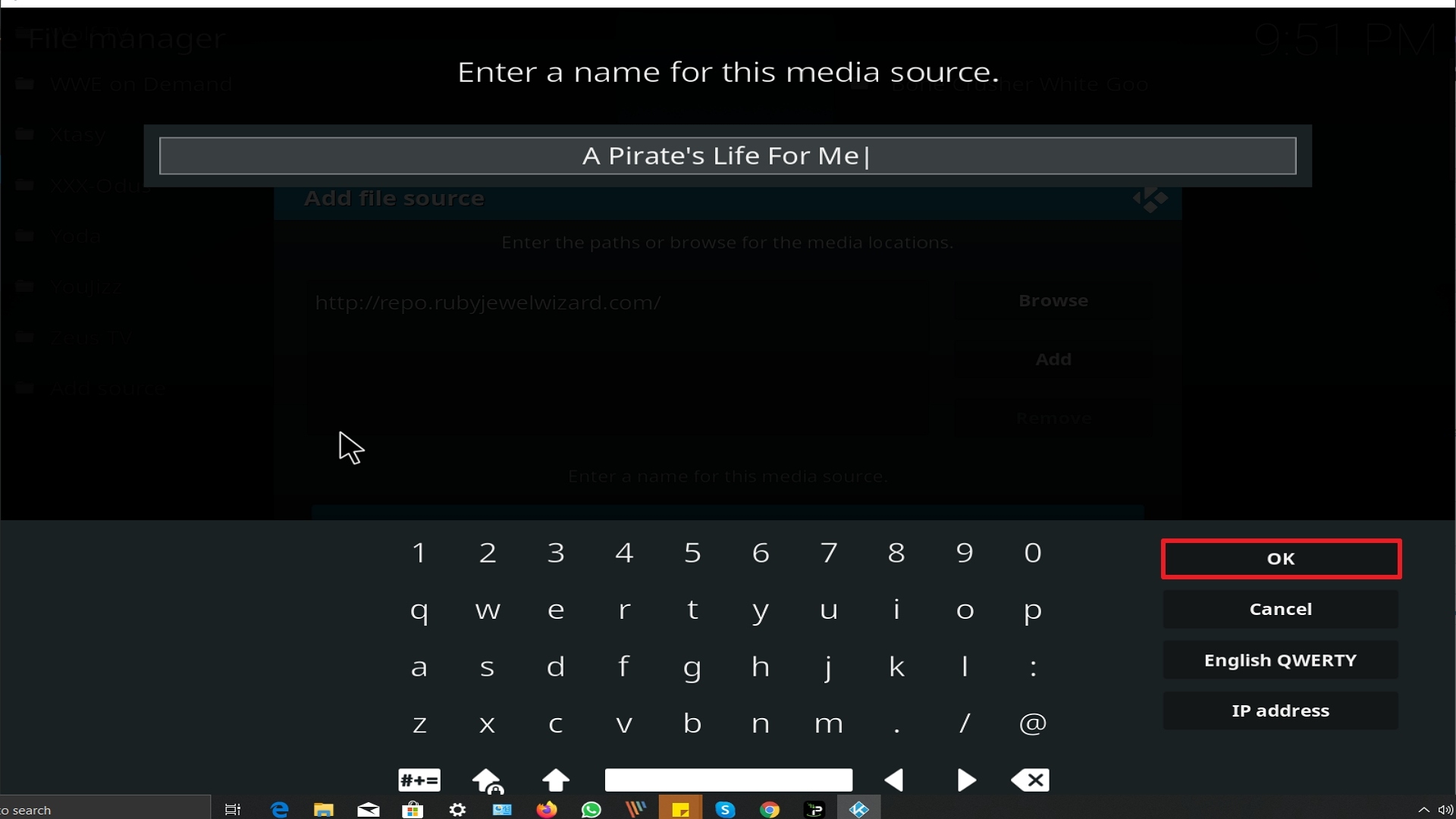
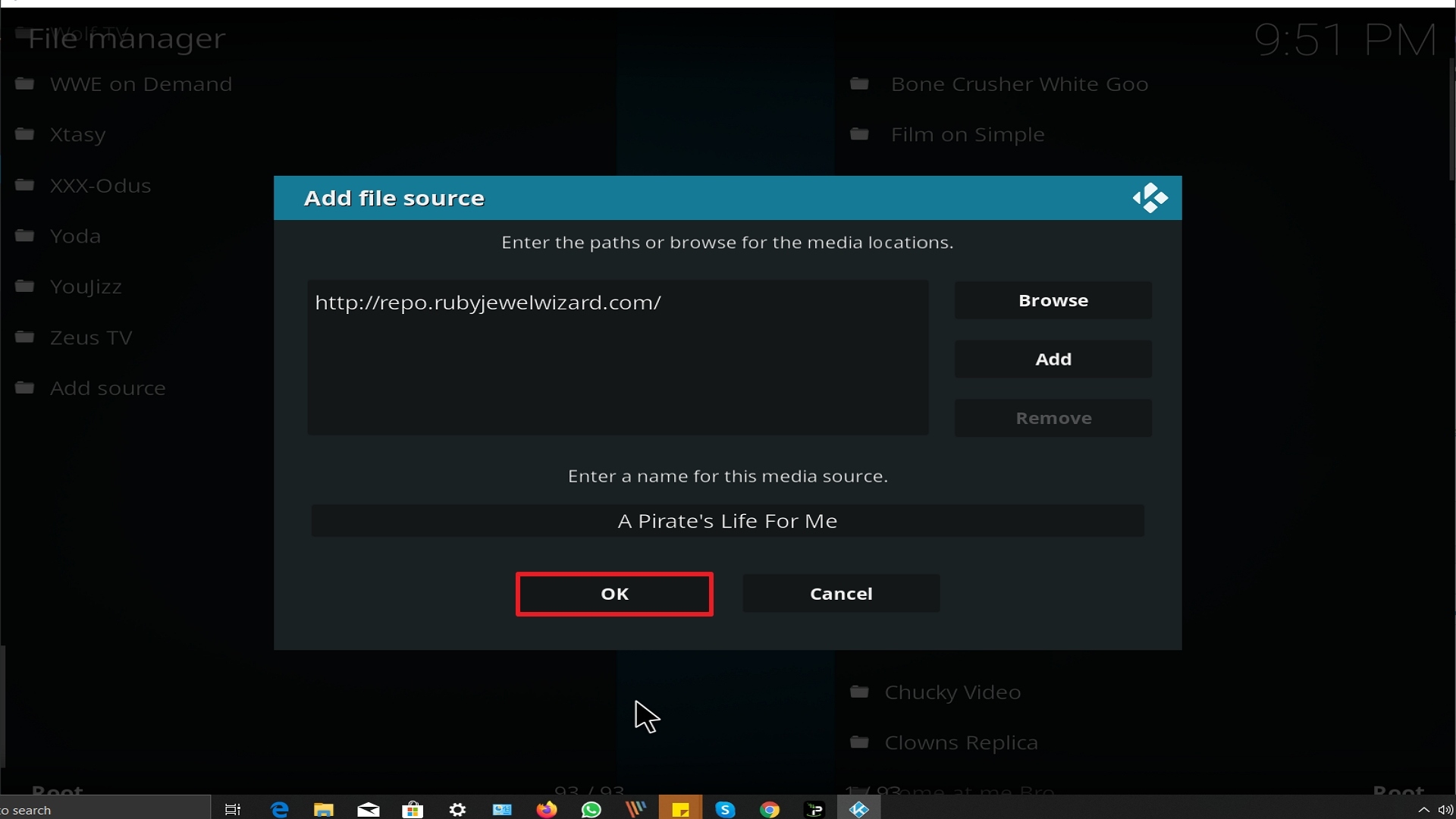
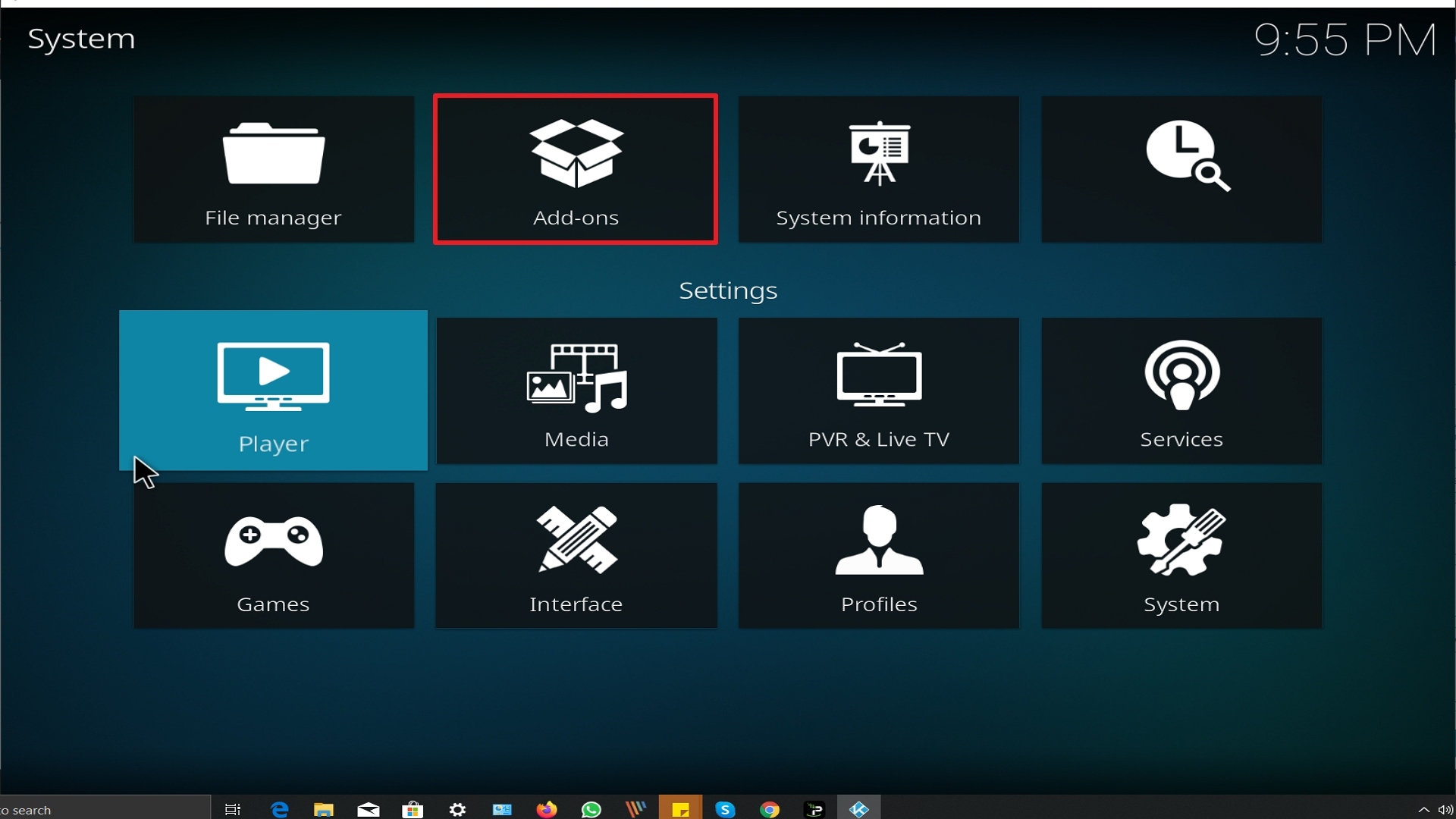
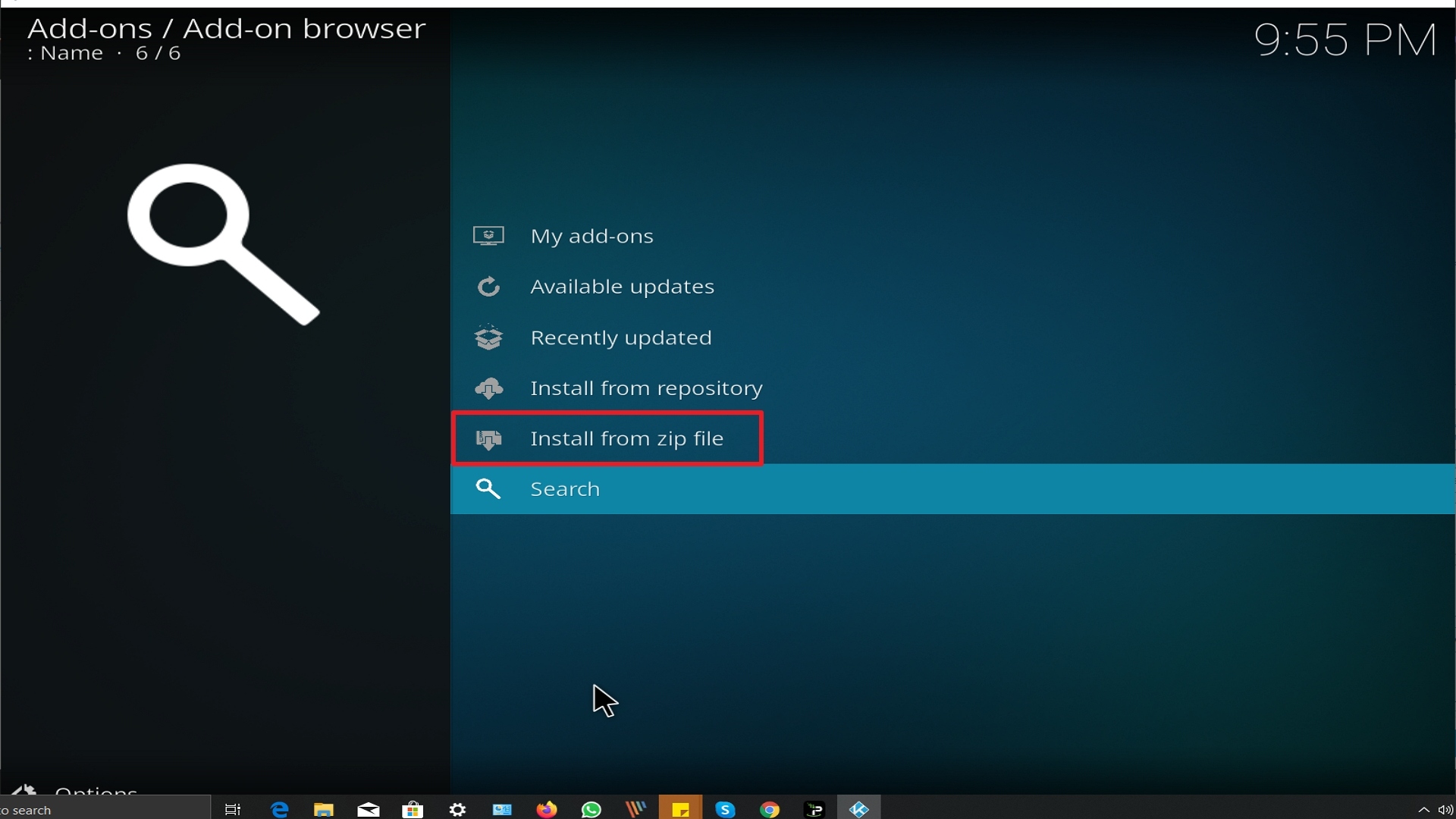
Let’s go through the steps to jailbreak your iPhone using one of these two apps. A word of caution if you are not technology savvy. We would not recommend you jailbreak the phone you use every day. It may pay to try to jailbreak an older iPhone first, as it can affect the functionality of other applications on your phone.


Unc0ver

You’re going to need an internet-connected computer and an iPhone USB Cable

  1. On your computer download the latest stable version of unc0ver from: https://github.com/pwn20wndstuff/Undecimus/releases . It should be a .ipa file
  2. Install the latest version of Cydia Impactor: http://www.cydiaimpactor.com/
  3. Before connecting your iPhone turn off Find my iPhone as well as the need to enter a passcode
  4. Launch Cydia Impactor on your computer
  5. Using the USB cable connect your phone to your computer
  6. Cydia impactor should recognize that your device is connected if it cannot be found you may need to check your settings to allow your computer to “Trust” the new device
  7. Drag the downloaded .ipa file into Cydia Impactor
  8. Enter your Apple ID when prompted and then sign in using your Apple ID password
  9. Cydia Impactor will then begin sideloading unc0ver onto your phone
  10. On your iPhone to Settings > General > Device Management and make the unc0ver app profile trusted
  11. Launch the unc0ver app from your iPhone home screen and wait for it to be completed. The first time jailbreaking an iPhone can take a few minutes
  12. You’ll know that the jailbreak has worked when you see the Cydia app on your home screen. Keep rerunning the jailbreak until it appears
  13. As unc0ver is semi-untethered you will need to re-run the jailbreak every time you reboot the phone, but it should take less than 2 seconds


Chimera

Chimera uses Sileo instead of Cydia, another unofficial app store and package manager

  1. On your computer download the latest stable version of Chimera from: https://chimera.sh/ . It should be a .ipa file
  2. Install the latest version of Cydia Impactor: http://www.cydiaimpactor.com/
  3. Before connecting your iPhone turn off Find my iPhone as well as the need to enter a passcode
  4. Launch Cydia Impactor on your computer
  5. Using the USB cable connect your phone to your computer
  6. Cydia impactor should recognize that your device is connected if it cannot be found you may need to check your settings to allow your computer to “Trust” the new device
  7. Drag the downloaded .ipa file into Cydia Impactor
  8. Enter your Apple ID when prompted and then sign in using your Apple ID password
  9. Cydia Impactor will then begin sideloading unc0ver onto your phone
  10. On your iPhone to Settings > General > Device Management and make the Chimera app profile trusted
  11. Launch the Chimera app from your iPhone home screen and wait for it to be completed. The first time jailbreaking an iPhone can take a few minutes
  12. You’ll know that the jailbreak has worked when you see the Sileo app on your home screen. Keep rerunning the jailbreak until it appears
  13. As Chimera is semi-untethered you will need to re-run the jailbreak every time you reboot the phone, but it should take less than 2 seconds


A word of Warning

Whether you go on to use Sileo or Chimera App Store bear in mind that there are thousands of malicious applications available. Always proceed with caution and read extensive reviews on Reddit or online before installing these apps.

As they have not been Apple Developer signed you become increasingly vulnerable to malicious software being installed.

We recommend using Malwarebytes to scan any downloads which you do not trust.

Watch Hulu Abroad

How to Watch Hulu Abroad


Taking a trip outside of the States is great. But what happens when you must leave the comforts of home behind? Hulu may not work abroad if you just try and start the application without having a VPN.

In this guide, we look at what Hulu is and why you can only watch it in the US. We explain how you can use a VPN to watch Hulu abroad, Rounding off with our top picks for the best VPN providers


ANONYMOUSLY

What is Hulu?

Hulu is a completely subscription-based US service for on-demand television first hitting the US in 2007. You can watch a wide range of TV Shows and Films offered by Disney and Comcast. As well as their recent offering of 50+ live TV channels which started in 2017.

Subscriptions start from $5.99 a month and Hulu has over 28 million subscribers in the US alone.

Hulu offers a tremendous range of channels including ABC, CBS, ESPN, Disney, Fox, and NBC. Get HBO for an extra $14.99 a month and Cinemax for another $9.99 a month.

Probably their most famous original TV show is the “Handmaid’s Tale” which won critical acclaim and a worldwide audience.


Why Can I only Watch Hulu in the US?

Hulu only has distribution rights for the US. So will be locked for any IP addresses outside the States.

When your device tries to access Hulu, their servers will first check you have a subscription to watch. Then match your account to the IP address on your device.

If that IP address cannot be located within the United States, then Hulu’s servers will block access.

Hulu has plans to expand internationally and has been much slower than Netflix. But the content would certainly be altered by country in the same way as Netflix. Many countries with Netflix only display at most 35% of the content which is streamed in the US version.


YOUR INTERNET ACTIVITY IS BEING WATCHED

ReviewVPN cannot attest to the legality, security and privacy of the applications discussed on this site. It is highly recommended that you use a VPN service while streaming or using Kodi.

Currently, your IP 216.73.217.150 is visible to everyone and your Browser is being tracked by Advertisers & ISP Provider.

Save 65% Now

Limited Time Offer

Here are the main reasons why you must use a VPN:

  • Your activities are hidden from your ISP, the government, and from the apps you are using.
  • You can access additional movies and TV streams.
  • ISP attempts to throttle are thrwarted thus reducing buffering issues.
  • Geographically restricted content like Netflix and Hulu can be unblocked.

A VPN works be replacing your ISP-assigned IP address and creating an encrypted tunnel. We recommend the no log service offered by IPVanish. It works well on a Firestick and offers the fastest possible speeds.

Special Limited Time Offer - Get IPVanish


Legal Disclaimer: ReviewVPN.com does not encourage or endorse any illegal activity involved in the usage of services and applications referenced on this site. We do not verify the licensing agreements of services. The end-user is wholly responsible for ensuring that any media accessed through these services does not violate copyright and/or licensing laws. ReviewVPN does not promote, link to, or receive compensation from any Apps and IPTV services.


Install Surfshark on Firestick

Best Surfshark Deal


What is a VPN?

A VPN is a Virtual Private Network. It works through software you’d download from a reputable company like Surfshark.

Once installed on your device you connect your VPN to their local DNS (Domain Name Server) this connection creates an “encrypted tunnel” for your data.

This means that all the data sent through the tunnel is made safe using 256-bit AES encryption. The exact same technology as used by the US military to maintain top-secret documents.

A VPN also gives you access to thousands of servers across the world including in the US as well as many countries abroad. This means you can change your IP address and appear to be in a different country than your physical location.


How Can I Use a VPN to Watch Hulu Abroad?

Say you go on holiday to France, if you try to access Hulu through your device, Hulu’s servers will recognize that you are trying to log on from a French IP and say Hulu is not available in your country.

If you connect a VPN before logging onto Hulu, then you can connect to a server in the US first. This will give the impression that your IP is based in the US and you can access Hulu.
Be warned not all VPN; s will unblock Hulu. Similarly, to Netflix and BBC iPlayer Hulu has become more sophisticated at blocking people logging in from countries outside the US using a VPN.

In fact, they state explicitly in their user agreement, that people caught may have their subscription canceled and service withdrawn. Though there has never been a public case of this happening.

Many VPNs and free proxy services won’t be able to access Hulu and will be blocked.

This is why we have picked out a few top-rated VPN providers which have been proven to work effectively with Hulu.


Best VPNs for Hulu

We’ve tested all these VPNs to make sure they will work with Hulu wherever you are in the world.


Surf shark

 SurfShark Logo

Surf shark is a new kid on the block and currently has 800 servers in 56 countries but expects this to continue to grow rapidly. What makes them appealing is the 2-year plan which comes in at just under $2 a month, making them one of the cheapest VPNs in the industry.

As a brand-new provider, they also provide a wealth of extra functions including Clean Web for ad and malware blocking. Camouflage Mode to further hide your traffic from your ISP. No Borders Mode to work in China and high censorship areas and Multi-Hop which allows you to connect through 2 VPN servers.

A great company with a bright future. You can also connect an unlimited number of devices on annual plans and get 30 days for a refund if you change your mind.


Visit SurfShark VPN


How to Install Surfshark VPN on Firestick

If your Firestick still has the older interface, read this article to learn how to update it: Update Firestick Interface.

Follow our screenshots below to install the SurfShark VPN app on your Fire TV stick.

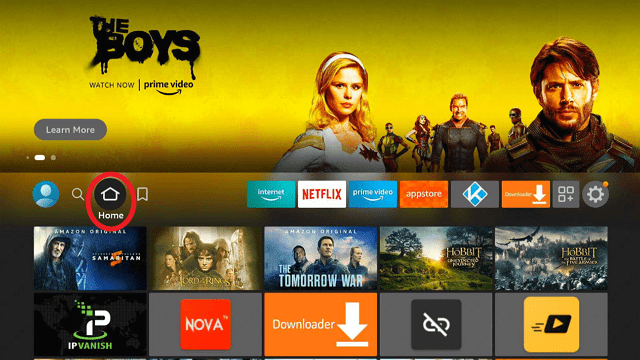
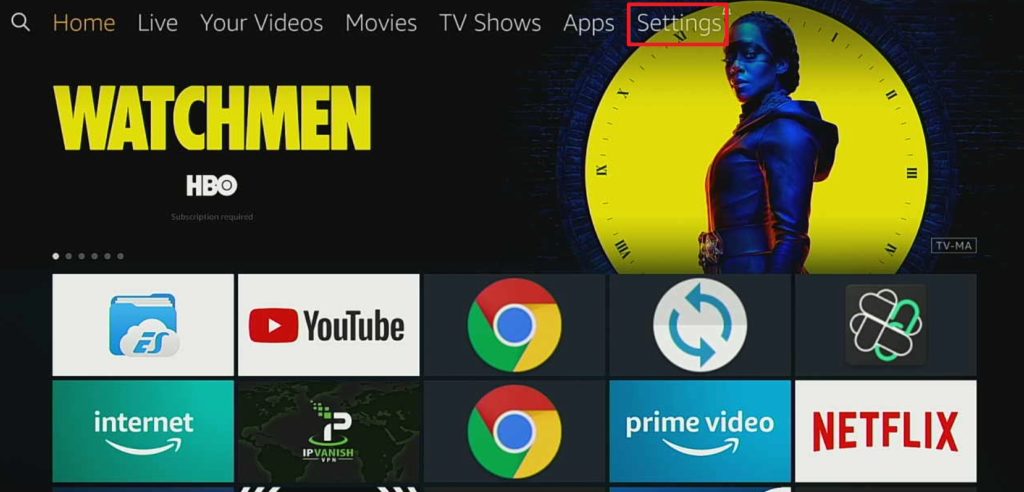
1. Go to the Home screen of your Firestick.

step 1 Install Surfshark VPN on Firestick


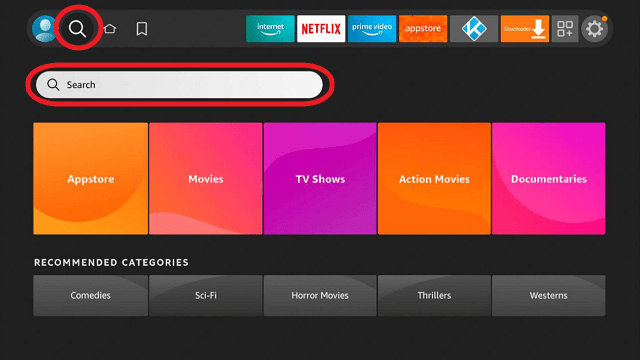
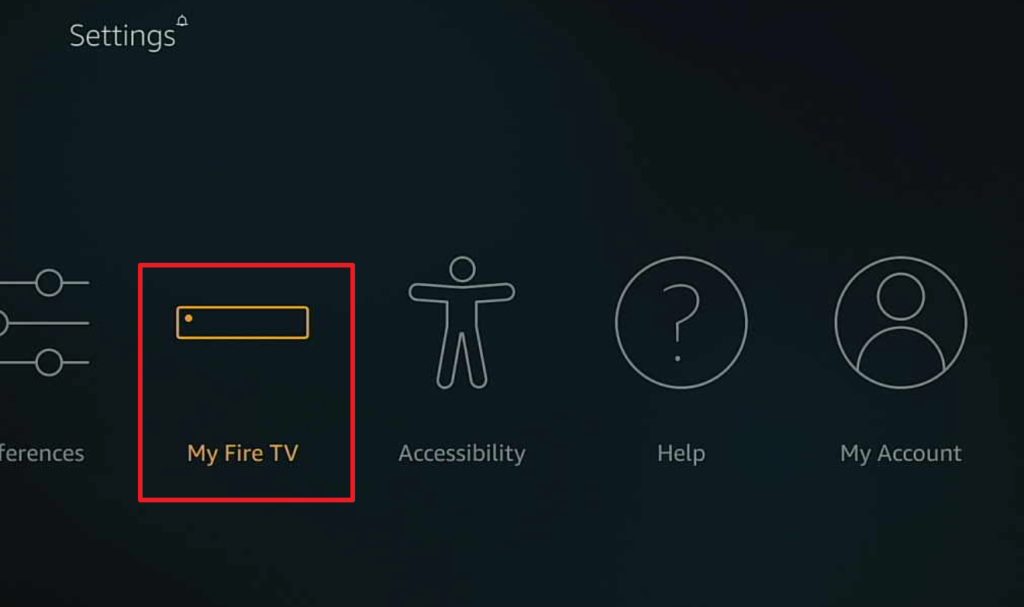
2. Navigate towards the Find tab. Press the Search button from the resulting dropdown.

step 2 Install Surfshark VPN on Firestick


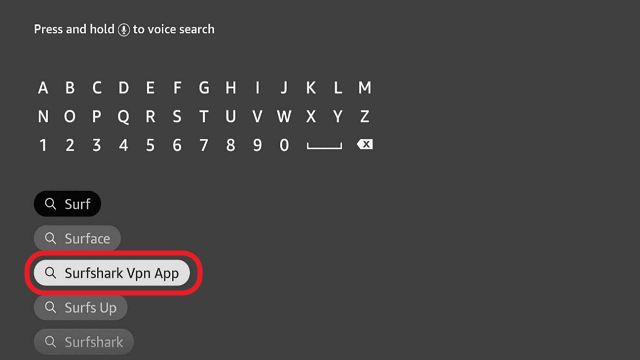
3. Type in the keyword of SurfShark and select from the suggestions that will appear.

step 3 Install Surfshark VPN on Firestick


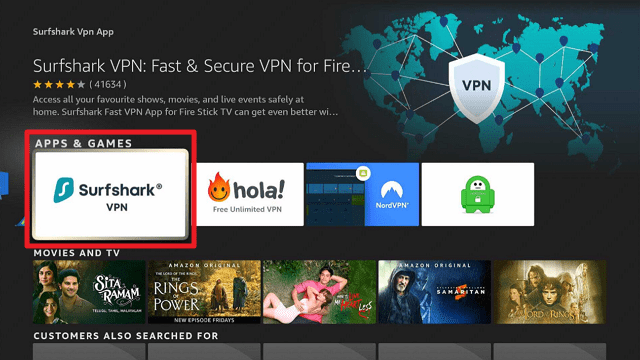
4. Click the official SurfShark icon from your search results.

step 4 Install Surfshark VPN on Firestick


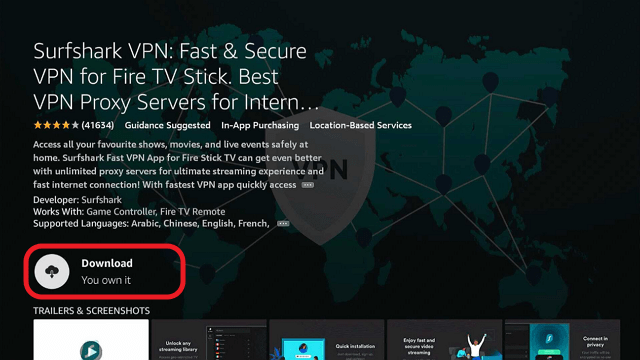
5. Press the Download (You own it) button.

step 5 Install Surfshark VPN on Firestick


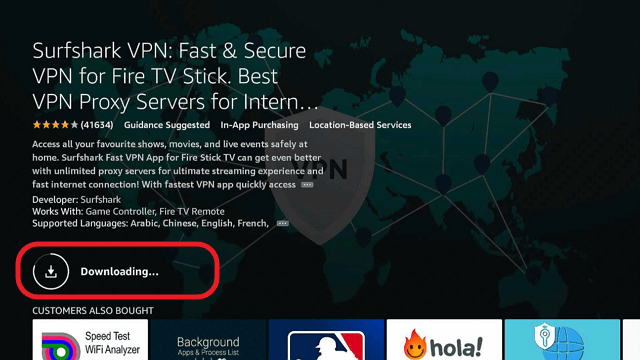
6. The SurfShark VPN installer will download on your device.

step 6 Install Surfshark VPN on Firestick


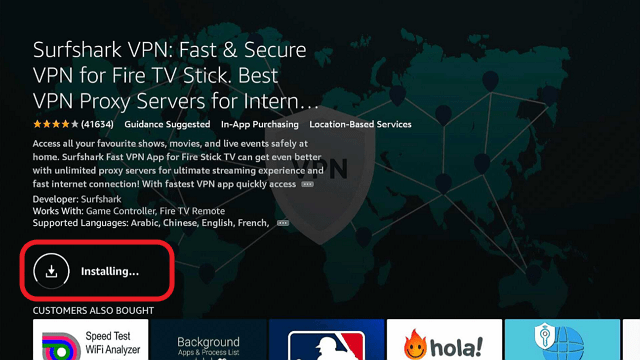
7. SurfShark VPN’s app will automatically install itself on your Fire TV stick.

step 7 Install Surfshark VPN on Firestick


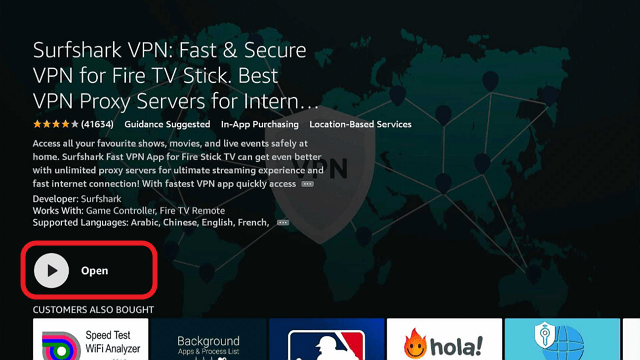
8. Press the Open button after completing SurfShark VPN’s installation process.

step 8 Install Surfshark VPN on Firestick


9. Please wait for the SurfShark VPN to load its user interface.

step 9 Install Surfshark VPN on Firestick


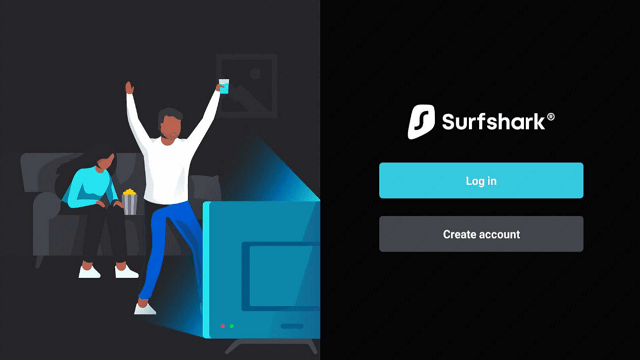
10. You can now log in with your SurfShark VPN account credentials.

step 10 Install Surfshark VPN on Firestick

Learn more about Surfshark and Grab the Best Surfshark Deal Now!


Install Surfshark on Firestick

Best Surfshark Deal


Other VPNs to Consider

NordVPN (Best for Streaming)

Best Features

  • 5000+ Server in 50+ Countries 
  • Military-Grade Encryption
  • Fast Connection Speed
  • Suitable to a lot of devices
  • No-Log Policy

Prices
  • Complete $5.89 per month (64% Discount)
  • Plus $4.59 per month (56% Discount)
  • Standard $3.69 per month (55% Discount)

Best Features

  • 750+ High-speed VPN Servers in 43 Locations
  • Military-Grade Encryption
  • Fastest HD Streaming and Gaming
  • 30-Day Money-Back Guarantee
  • Unlimited Data & Devices
  • No-Log Policy

Prices
  • 3 Years $1.99 per month (82% Discount)
  • 1 Years $3.29 per month (70% Discount)
  • 1 Month $10.99 per month

IPVanish VPN (Most Secure)

Best Features

  • 1200+ Servers in 60+ Countries around the world
  • Unlimited Connections
  • No-Log Policy
  • Top Notch Military-Grade VPN Protocols and Encryptions
  • 100% Safe and Secured
  • Most Trusted VPN
  • Best VPN for Firestick
  • 30-Day Money-Back Guarantee

Prices
  • Yearly $3.99 per month (63% Discount) – 30 days risk free + Ransomware & Malware Protection
  • Quarterly $5.32 per month (51% Discount)
  • Monthly $10.99 per month


For more VPN discounts, go to ReviewVPN Deals and purchase the best VPN for you.

Click here to get the lowest price on Surfshark through our exclusive limited-time offer.


Cyberghost

CyberGhost VPN Logo

Cyberghost is a very public face of the VPN industry, and one of the few companies to put names and faces to their 70 strong staff based in Romania. 

Like IPVanish though offer the same IP pooling service through their 3,000+ servers in over 60 countries. With 1,000 of those servers specially configured for P2P file-sharing giving you blazing fast speeds.

The mobile application is incredibly easy to use, with links directly to Hulu as well as connecting you to the best server based upon your needs. You also get an ad blocker to block ads and Malware which is a lovely bonus.

They are about the same price as NordVPN coming in around $2 a month for a multi-year pass, allowing you to connect 7 devices at the same time and an industry-leading 45 days to get your money back.


Visit CyberGhost VPN


Express VPN

Express VPN Logo

ExpressVPN is often ranked as the best VPN provider in the world and has been a market leader for years. Downloaded and used by millions of users worldwide, in China where government censorship has rendered many top VPNs useless, ExpressVPN continues to thrive.

They offer 3,700+ server from 90+ countries in the world and probably has the widest geographic country for any VPN in the world. This means that you are never far from a super-fast server. The further a server is from your location and the longer it’s going to take for data to go back and forth. Many smaller VPNs don’t offer anywhere this type of coverage so have much slower connections.

ExpressVPN also has a solid zero logs policy based in Panama, which means they will never disclose details of what you do on their service to anyone, not even the government. As has been tested twice in 2 international criminal cases.

They rank as Tier 1 Provider as they own all their own DNS which means you never have to worry about your data being compromised or passed onto a third party. You can also decide the level of encryption you want, choosing LPTP or PPTP if you need a faster but less secure connection.

Express VPN is also extremely fast. Most VPNs will slow down your connection speed by 30%, with Express VPN this drops to 5% or less.
Packages start from $6.67 per month for 12 months, with a 30-day money-back period, and you can connect to 5 devices at the same time.


Visit Express VPN


NordVPN

NordVPN Logo

If you are looking for sheer size and number of servers, then look no further than Nord VPN, with over 5000 servers in 60 countries, they have the biggest server park in the world and are another Tier 1 provider.

They also offer an impressive range of features, including Cybersec which lets you block adverts online, malware, and other malicious websites. You can use their Double VPN feature to send your connection through 2 VPN servers making it impossible for anyone to track your connection. Or for the most security-conscious use Tor over Onion to access The Onion Router via VPN, but not advised for streaming!

They offer several Peer 2 Peer servers which have been specially modified for fast data sharing, making them ideal for streaming, and have a solid zero logs policy is based in Panama.

With size comes great prices and you can get a multi-year subscription for around $2 a month, connect 6 devices, and a 30-day money-back guarantee.


Visit NordVPN

IP Vanish

IPVanish VPN Promo

IP Vanish is based in the US, and is another Tier 1 provider, owning all their own servers. They are well known for having fantastic customer service, high approval ratings from their customers and good retention. Once you start using IPVanish you won’t want to go back!

They have some of the fastest servers in the industry and have 2,000+ servers in 75+ locations. Along with 40,000 IP addresses for you to choose from. They also use an innovative technology called IP Pooling which means that one IP can be used by multiple users. Making it impossible to attribute traffic from that IP to any one user.

More advanced and security-conscious users can access the Socks5 Proxy. You can also choose the level of encryption depending on the speed of the connection you want. The rule of thumb is that the more secure the connection is, the slower it is.
What really sets them apart though is their attention to detail and having customer service agents available on a toll-free US Number 24/7. Whereas most other companies only provide a live chat or ticket system.

Annual packages start from $6.67 a month, with a 30-day money-back period and you get to connect to 10 devices at the same time.


Visit IPVanish VPN


Watch Tubi TV Abroad – 2023 Update

How to Watch Tubi TV Abroad


Tubi TV is a relatively young but increasingly popular free TV site that drives revenue from ads using a real-time bidding system.

However, if you try to access Tubi outside of the US and in the EU, you’ll get this message:

“Tubi is the largest free movie and TV streaming service in the US. We are not available in Europe due to changes in EU laws.”

In this guide, we’ll look at what Tubi is, why we can only get it in the US and how we can use a VPN to watch it when out of the states. In rounding off we will finish up by going through a selection of our favorite VPNs which will allow you to watch Tubi anywhere. GDPR or no GDPR.


ANONYMOUSLY

What is Tubi TV?

Tubi like Crackle is completely free. No signup or credit card is needed. All of its revenue is driven by ads that are innocuous and it has become a favorite with people who don’t necessarily want to pay for Netflix, or don’t watch it enough to justify paying for it.

The number of ads depends on the popularity of the show. Some films may have one 30-second ad, while others may have adverts play every 15 minutes. Ad companies get too big on the spaces real-time based upon analytics showing who is online, doing what and from where.

Tubi comes from San Francisco and started in 2014 and has gathered over 20 million regular users. This year they pledged to spend over $100 million on content. Not in the sense of making their own but bidding for bigger and more expensive titles that will drive users and hopefully more ad revenue.

Tubi has over 50,000 titles in its library and has amassed an extensive collection of media for all tastes. Unlike Crackle it has some recent titles in its arsenal. Plus, they signed a deal with NBC this year to get the rights to over 400 titles.

The future looks bright for Tubi.

Why Can I Only Watch Tubi TV in the US

Tubi is locked in Europe and currently only serves the US, because many of the titles it owns the rights to have only been allowed for use in the US.

Tubi’s servers will check the originating address for your IP and if you are not in the states then you won’t be able to access the platform.


What is a VPN?

A Virtual Private Network works by creating an encrypted tunnel between the client on your device and VPN’s DNS server.

This creates a wall to your Internet Service Provider and other third parties who seek to understand what you are browsing online, or where your traffic originates from.

This makes it incredibly useful for accessing content that may be restricted in your country. A VPN gives you the ability to change your IP address and appear to be in another country altogether. By logging into one of the many servers offered by your VPN. The receiving website cannot tell the difference granting you access and allowing you to watch your restricted content.

A VPN has the bonus of keeping your identity online safe and anonymous, as well as securing data on your device and keeping you safe when logged onto insecure public Wi-Fi hotspots.


YOUR INTERNET ACTIVITY IS BEING WATCHED

ReviewVPN cannot attest to the legality, security and privacy of the applications discussed on this site. It is highly recommended that you use a VPN service while streaming or using Kodi.

Currently, your IP 216.73.217.150 is visible to everyone and your Browser is being tracked by Advertisers & ISP Provider.

Save 65% Now

Limited Time Offer

Here are the main reasons why you must use a VPN:

  • Your activities are hidden from your ISP, the government, and from the apps you are using.
  • You can access additional movies and TV streams.
  • ISP attempts to throttle are thrwarted thus reducing buffering issues.
  • Geographically restricted content like Netflix and Hulu can be unblocked.

A VPN works be replacing your ISP-assigned IP address and creating an encrypted tunnel. We recommend the no log service offered by IPVanish. It works well on a Firestick and offers the fastest possible speeds.

Special Limited Time Offer - Get IPVanish


Legal Disclaimer: ReviewVPN.com does not encourage or endorse any illegal activity involved in the usage of services and applications referenced on this site. We do not verify the licensing agreements of services. The end-user is wholly responsible for ensuring that any media accessed through these services does not violate copyright and/or licensing laws. ReviewVPN does not promote, link to, or receive compensation from any Apps and IPTV services.


Install Surfshark on Firestick

Best Surfshark Deal


How to Use a VPN to Watch Tubi TV Abroad

To watch Tubi TV using your VPN, simply log onto your VPN and choose a US-based server. Now when you visit Tubi you will be granted full access.


Best VPNs for Tubi TV

This is our pick of the best VPNs to use for Tubi TV. Bearing in mind, not all VPNs will work as many big streaming platforms actively block VPNs and smart proxies. A feat they do is by reading the metadata of the request and seeing the signature of a VPN.

These providers have all been proven to deal with the toughest region-restricted content. Namely Netflix and BBC iPlayer.


Surfshark

surfshark logo

Surfshark is an industry leader due to its fantastic speeds and great customer service. The American company has 3200+ servers in 65 countries. They offer a unique IP sharing service. Many users can use the same IP pool, which makes it impossible to attribute an action to one user.

They have a great zero logs policy with 256-bit AES encryption the same as the US government, making your connection unbreakable. You can access more advanced security settings like SOCKS5 Proxy for those who are particularly security conscious.

Surfshark differentiates itself within the industry not only by its great product but also with fantastic 24/7 customer support, from their live chat, ticket system, and toll-free US phone number, which is unheard of by anybody else.

Subscriptions start from $6.50 per month for an annual subscription, connect massive unlimited devices at the same time and get 30 days to ask for your money back if you’re not completely happy.

Note: For more information about Surfshark, please read our Surfshark Review.


Grab your subscription now!

Click here to get the lowest price on Surfshark through our exclusive limited-time offer.


Visit Surfshark

How to Install Surfshark VPN on Firestick

If your Firestick still has the older interface, read this article to learn how to update it: Update Firestick Interface.

Follow our screenshots below to install the SurfShark VPN app on your Fire TV stick.

1. Go to the Home screen of your Firestick.

step 1 Install Surfshark VPN on Firestick


2. Navigate towards the Find tab. Press the Search button from the resulting dropdown.

step 2 Install Surfshark VPN on Firestick


3. Type in the keyword of SurfShark and select from the suggestions that will appear.

step 3 Install Surfshark VPN on Firestick


4. Click the official SurfShark icon from your search results.

step 4 Install Surfshark VPN on Firestick


5. Press the Download (You own it) button.

step 5 Install Surfshark VPN on Firestick


6. The SurfShark VPN installer will download on your device.

step 6 Install Surfshark VPN on Firestick


7. SurfShark VPN’s app will automatically install itself on your Fire TV stick.

step 7 Install Surfshark VPN on Firestick


8. Press the Open button after completing SurfShark VPN’s installation process.

step 8 Install Surfshark VPN on Firestick


9. Please wait for the SurfShark VPN to load its user interface.

step 9 Install Surfshark VPN on Firestick


10. You can now log in with your SurfShark VPN account credentials.

step 10 Install Surfshark VPN on Firestick

Learn more about Surfshark and Grab the Best Surfshark Deal Now!


Install Surfshark on Firestick

Best Surfshark Deal


Other VPNs to Consider

NordVPN (Best for Streaming)

Best Features

  • 5000+ Server in 50+ Countries 
  • Military-Grade Encryption
  • Fast Connection Speed
  • Suitable to a lot of devices
  • No-Log Policy

Prices
  • Complete $5.89 per month (64% Discount)
  • Plus $4.59 per month (56% Discount)
  • Standard $3.69 per month (55% Discount)

Best Features

  • 750+ High-speed VPN Servers in 43 Locations
  • Military-Grade Encryption
  • Fastest HD Streaming and Gaming
  • 30-Day Money-Back Guarantee
  • Unlimited Data & Devices
  • No-Log Policy

Prices
  • 3 Years $1.99 per month (82% Discount)
  • 1 Years $3.29 per month (70% Discount)
  • 1 Month $10.99 per month

IPVanish VPN (Most Secure)

Best Features

  • 1200+ Servers in 60+ Countries around the world
  • Unlimited Connections
  • No-Log Policy
  • Top Notch Military-Grade VPN Protocols and Encryptions
  • 100% Safe and Secured
  • Most Trusted VPN
  • Best VPN for Firestick
  • 30-Day Money-Back Guarantee

Prices
  • Yearly $3.99 per month (63% Discount) – 30 days risk free + Ransomware & Malware Protection
  • Quarterly $5.32 per month (51% Discount)
  • Monthly $10.99 per month


For more VPN discounts, go to ReviewVPN Deals and purchase the best VPN for you.

Click here to get the lowest price on Surfshark through our exclusive limited-time offer.


Nord VPN

NordVPN Logo

Nord VPN has the most servers of any provider globally, they offer 5,500+ servers across 60+ Countries. More servers mean a better choice for you, faster speeds and fewer server loads during periods of high use.

They also have several added features which are a nice bonus. Cybersec lets you block ads, malware and stops you from visiting malicious websites. Double VPN allows you to connect to the internet using 2 VPN servers making your original IP untraceable. Or you can choose Onion over VPN and use the Onion to have your traffic routed through three random nodes and then Nord VPN’s servers. Again, making your traffic untraceable.

With such many servers, some have been specially configured for high-speed connections needed for media streaming, and you are sure to never be far away from a high-speed server wherever you are in the world.

Their prices are amazing, with a 3-year subscription coming in as low as $2.15 per month, allowing you to connect to 6 devices at once and get a 30-day money-back guarantee.


Visit NordVPN


Express VPN

Express VPN Logo

ExpressVPN is great because they just work. They have zero logs and privacy policy which has been tested in an international assassination and been found to be true. Namely that Express VPN does not keep logs of what their users do.

Many use ExpressVPN because it is so stable, even in high censorship countries like China. They have 3,700+ servers in 90+ countries.

Their application is extremely simple to use. You can speed test local servers any time to find the fastest connection and easily connect to any server around the world at the click of a button. You can also use Express VPN’s DNS servers for added data scrambling which has proven effective in China.

What impresses people the most about Express VPN is its speed. Many VPN providers will slow down your internet connection by as much as 30%, plus they offer very slow servers in Asia and South America. Not so with Express VPN, the slow down can be as little as 5% and they consistently offer high speeds all around the world. It seems all their servers are configured to run at high speed.

Get an annual subscription from $6.67 per month, connect 5 devices, and a 30-day money-back guarantee.


Visit Express VPN


IP Vanish

IPVanish VPN Promo

IP Vanish leads the market when it comes to fantastic service and customer support. Based in the US IPVanish is another Tier 1 provider that owns all its own DNS servers. This enables it to deliver great service without potentially compromising your security of data to third parties.

They are the only company on our list that on top of a live chat system and email tickets, also offers a 24/7 toll-free number to an English-speaking US agent.

They offer 2,000+ servers and 40,000 IP addresses across 75+ locations spread around the world. Gives you the ability to access a quick connection wherever you are on holiday. Their IP Sharing service means that multiple users can use the same IP. Meaning that no traffic or action can be attributed to any individual user.

They offer great speeds and unlimited connections starting from as little as $6.50 a month with a 30-day cooling-off period.

Note: For more information about IPVanish, please read our IPVanish REVIEW.


Grab your subscription now!

Click here to get the lowest price onIPVanish through our exclusive limited-time offer.


Visit IPVanish VPN

Cyberghost

CyberGhost VPN Logo

Cyberghost is backed by a 70 strong team of engineers from Romania, offering over 4,000 servers in 60 countries with a thousand of those servers specially configured for P2P file sharing and high-speed streaming. Meaning you don’t have to worry about buffering or lag.

Like Express VPN they have a beautifully designed application and web client, with easy-to-follow instructions and customized buttons to ensure you connect to the right server depending on what you’re doing.

They also use IP Sharing like Express VPN, to allow many users to use the same IP and remain undetected.

Cyberghost offers a blazing fast service, and some of the best speeds of any VPN while maintaining a zero logs policy which is supported by the Romanian government.

Due to their size and the number of servers being second only to Nord VPN you can also enjoy extremely low prices. With their 3-year subscription costing as little as $2.10 per month. Connect 7 devices at once and get your money back up to 45 days after your purchase.


Visit CyberGhost VPN


Watch Pluto TV Abroad

How to Watch Pluto TV Abroad

Pluto TV is currently available across 14 platforms and in both the US, Germany, Austria, and the UK through Sky’s Now TV. But what happens when you go abroad and can’t gain access to the wide range of content and live TV channels only available through Pluto TV?


What is Pluto TV?

Pluto TV was started in the US in 2013 and has grown to over 15 million active users. Just like Tubi TV they are completely free and earn all their revenue from advertising. They use a real-time analytics system to automate advertising bidding so that marketers can target specific niche markets by watching each of their specialized channels.

In 2018, they were bought for $340 million by Viacom.

Pluto TV is a highly niche and quirky TV. They have over 100 channels and 70 content providers serving many niche markets with its channels.

Covering subjects as diverse as murder mystery, golf, kickboxing, and poker.

Having been bought by Viacom they also started to include several of their channels including Comedy Central and Nickelodeon.

But Pluto TV remains a real hodge-podge of weird and wonderful TV. They satisfy a need for niche TV that is missed by many mainstream providers and complements Viacom’s extensive media presence.

The big-name owner will give Pluto TV the funds that it needs to expand its operations as well as its content, it recently added 6 new channels and is sure to add many more.


ANONYMOUSLY

Why Can I Only Watch Pluto TV in Certain Countries?

Currently, Pluto TV is only available in 4 countries with a plan to expand into more. For free TV providers, it’s tricky because they can spend a lot of money for gaining the rights to stream content in a new country and must be sure that they will cover their costs with advertising revenue.

Their servers will automatically detect the originating country from your IP address. Unfortunately, if you don’t match the 4 countries, they serve then the service will deny you access.


What is a VPN?

A Virtual Private Network allows you to access the internet in an anonymous way.

The client which is downloaded onto your device creates a connection with the VPN’s DNS Server. This connection is known as an encrypted tunnel. The encryption tends to be a 256-bit AES encryption, which is unbreakable.

Your Internet Service Provider (ISP) logs all your traffic, and even they cannot tell what you are doing or where your connection is coming from, as all traffic comes out of and originates to the VPN’s DNS Server.

This means that you can change your IP, country of origin, and access region-restricted content.

On top of that you also get to keep your identity and your data safe and only share it with people and parties who you want to, rather than being a free data feast for advertisers and other potentially malicious third parties.


YOUR INTERNET ACTIVITY IS BEING WATCHED

ReviewVPN cannot attest to the legality, security and privacy of the applications discussed on this site. It is highly recommended that you use a VPN service while streaming or using Kodi.

Currently, your IP 216.73.217.150 is visible to everyone and your Browser is being tracked by Advertisers & ISP Provider.

Save 65% Now

Limited Time Offer

Here are the main reasons why you must use a VPN:

  • Your activities are hidden from your ISP, the government, and from the apps you are using.
  • You can access additional movies and TV streams.
  • ISP attempts to throttle are thrwarted thus reducing buffering issues.
  • Geographically restricted content like Netflix and Hulu can be unblocked.

A VPN works be replacing your ISP-assigned IP address and creating an encrypted tunnel. We recommend the no log service offered by IPVanish. It works well on a Firestick and offers the fastest possible speeds.

Special Limited Time Offer - Get IPVanish


Legal Disclaimer: ReviewVPN.com does not encourage or endorse any illegal activity involved in the usage of services and applications referenced on this site. We do not verify the licensing agreements of services. The end-user is wholly responsible for ensuring that any media accessed through these services does not violate copyright and/or licensing laws. ReviewVPN does not promote, link to, or receive compensation from any Apps and IPTV services.


Install Surfshark on Firestick

Best Surfshark Deal


How to Use a VPN to Watch Pluto TV Abroad

Using a VPN couldn’t be easier. You simply start the device, change the server to a country that currently works with Pluto TV, and then go to their website. This will work from any country in the world provided you connect through a trusted VPN provider.

We say trusted because many large media sites don’t like VPNs as they allow people from outside certain countries to access their content. Therefore, they are always actively working to track and block VPNs.

The same goes for free smart proxy service. Using a trusted VPN provider means you will always be able to access region-restricted content.

Our chosen VPNs have been chosen because they work with the toughest content providers for VPNs. Netflix and BBC iPlayer.


Best VPNs for Pluto TV

Here are our top 5 VPNs to get Pluto TV wherever you are in the world.


Surfshark

 SurfShark Logo

Surfshark is a relatively new VPN having only come around in 2018. They have hundreds of thousands of users compared to the millions of other providers but that is changing. This year alone they have doubled the number of servers from just under 3200+ servers in 65 countries. 

Being a newer company Surfshark has also had a good chance to find what works in other VPN providers and put all those services in one place.

Clean Web gives you access to a rigorous ad and Malware blocker. Multi-Hop allows you to rout your connection through servers in 2 different countries, sacrificing some speed to additional security.

Their No Border Mode and Camouflage are highly sophisticated allowing you to obscure metadata. Use to avoid detection in countries that may have additional levels of censorship like China and Iran.

But where they have really made waves is their price. You can get a 2-year subscription for $1.99 a month. An industry low, and you can connect as many devices as you want, there is no limitation. All this comes with a 30-day money-back guarantee.

Prices and offers like these have left competitors grumbling but show why Surfshark is probably the fastest-growing large VPN in the world right now.


Visit SurfShark VPN


How to Install Surfshark VPN on Firestick

If your Firestick still has the older interface, read this article to learn how to update it: Update Firestick Interface.

Follow our screenshots below to install the SurfShark VPN app on your Fire TV stick.

1. Go to the Home screen of your Firestick.

step 1 Install Surfshark VPN on Firestick


2. Navigate towards the Find tab. Press the Search button from the resulting dropdown.

step 2 Install Surfshark VPN on Firestick


3. Type in the keyword of SurfShark and select from the suggestions that will appear.

step 3 Install Surfshark VPN on Firestick


4. Click the official SurfShark icon from your search results.

step 4 Install Surfshark VPN on Firestick


5. Press the Download (You own it) button.

step 5 Install Surfshark VPN on Firestick


6. The SurfShark VPN installer will download on your device.

step 6 Install Surfshark VPN on Firestick


7. SurfShark VPN’s app will automatically install itself on your Fire TV stick.

step 7 Install Surfshark VPN on Firestick


8. Press the Open button after completing SurfShark VPN’s installation process.

step 8 Install Surfshark VPN on Firestick


9. Please wait for the SurfShark VPN to load its user interface.

step 9 Install Surfshark VPN on Firestick


10. You can now log in with your SurfShark VPN account credentials.

step 10 Install Surfshark VPN on Firestick

Learn more about Surfshark and Grab the Best Surfshark Deal Now!


Install Surfshark on Firestick

Best Surfshark Deal


Other VPNs to Consider

NordVPN (Best for Streaming)

Best Features

  • 5000+ Server in 50+ Countries 
  • Military-Grade Encryption
  • Fast Connection Speed
  • Suitable to a lot of devices
  • No-Log Policy

Prices
  • Complete $5.89 per month (64% Discount)
  • Plus $4.59 per month (56% Discount)
  • Standard $3.69 per month (55% Discount)

Best Features

  • 750+ High-speed VPN Servers in 43 Locations
  • Military-Grade Encryption
  • Fastest HD Streaming and Gaming
  • 30-Day Money-Back Guarantee
  • Unlimited Data & Devices
  • No-Log Policy

Prices
  • 3 Years $1.99 per month (82% Discount)
  • 1 Years $3.29 per month (70% Discount)
  • 1 Month $10.99 per month

IPVanish VPN (Most Secure)

Best Features

  • 1200+ Servers in 60+ Countries around the world
  • Unlimited Connections
  • No-Log Policy
  • Top Notch Military-Grade VPN Protocols and Encryptions
  • 100% Safe and Secured
  • Most Trusted VPN
  • Best VPN for Firestick
  • 30-Day Money-Back Guarantee

Prices
  • Yearly $3.99 per month (63% Discount) – 30 days risk free + Ransomware & Malware Protection
  • Quarterly $5.32 per month (51% Discount)
  • Monthly $10.99 per month


For more VPN discounts, go to ReviewVPN Deals and purchase the best VPN for you.

Click here to get the lowest price on Surfshark through our exclusive limited-time offer.


Nord VPN

NordVPN Logo

Nord VPN is probably the biggest VPN provider in terms of server number, and certainly the only we know with over 5,000 servers, apart from Cyberghost which is rapidly approaching that number.

With servers in over 60 countries, they offer unparalleled coverage, which means faster speeds, less noticeable downtime on servers and better distribution of traffic across their users.

You also get several additional services which make for a nice bonus. Cybersec acts like an ad and malware blocker as well as keeping you away from potentially malicious websites. Double VPN sends your traffic through 2 VPN servers making your originating traffic untraceable. Or for those extremely security conscious you can access The Onion Router through the Nord VPN app, but we wouldn’t recommend it for streaming!

Well over a thousand of their servers have been specially configured to work at high speed making it ideal for streaming. Multi-year plans can be bought for as little as $2.15 a month. You can connect 6 devices with a 30-day money-back guarantee.


Visit NordVPN


Cyberghost

CyberGhost VPN Logo

Cyberghost is fast catching up with Nord VPN as the biggest VPN provider in the world. In the past year alone, they have added over a thousand servers, and now have just under 5,000 servers in 60+ countries around the world.

The team is 70 strong and based in Romania, and the provider has become synonymous with speed and quality. Consistently offering very fast connection speeds, with 1,000 of their servers working on a P2P network.

Cyberghost has a lovely looking application which makes it extremely easy to use for beginners. With pictographic icons directing you to common uses and popular streaming websites.

The company has a solid zero logs policy, as Romania does not have any data retention laws when it comes to online users and companies based within that country.

They rival Nord VPN when it comes to prices and their 3-year subscription starts as low as $2.15 per month, giving you 7 simultaneous connections and an industry-best guarantee time of 45 days.


Visit CyberGhost VPN


IPVanish

IPVanish VPN Promo

IPVanish offers consistent excellent performance, great customer service, and high speeds. With 2,000+ servers all of which are configured for high-speed use. They are a Tier 1 VPN provider and own all their own architecture and offers over 40,000 IP addresses across 75+ locations. 

IPVanish uses an innovative technology called IP Sharing, which means multiple users can share the same IP address, meaning traffic can never be attributed to one user. More security-conscious users can use the SOCKS5 Proxy and you can enjoy the latest VPN protocols for maximum security.

Unlike any other provider, you can not only get to speak to a customer service agent through the live chat function and ticket system but also a toll-free US number that you can call 24/7. A rarity for an online company these days.

Annual subscriptions start from $3.75 a month, letting you connect to unlimited devices with a 30-day money-back guarantee.

Note: For more information about IPVanish, please read our IPVanish REVIEW.


Grab your subscription now!

Click here to get the lowest price on IPVanish through our exclusive limited-time offer.


Visit IPVanish VPN


Express VPN

Express VPN Logo

Express VPN is consistently voted the best or second-best VPN every year for as many years as we can remember. They don’t do anything fancy like ad blockers or multi-hop.

This VPN just remain consistently stable and growing over time. You can always rely on ExpressVPN to work, even in China. Out of our 5 choices, only Nord VPN and Express VPN consistently work in China. Due to their proprietary scrambling technology in their in-house DNS servers.

Access 3,000+ servers in 90+ countries with the broadest geographic range of any VPN country. Plus, the connection is fast, everywhere in the world. Many VPN providers fail to give fast connections in South America and Asia as they choose to save money instead.

Prices start from $6.67 per month, connect 5 devices with a 3-day money-back guarantee.


Visit Express VPN


Watch Sony Crackle Abroad

How to Watch Sony Crackle Abroad

In this article, we will show you how you can watch Sony Crackle abroad.

Sony Crackle is a great collection of TV shows. It offers tons of shows comparable to Netflix and other platforms. 

Sony Crackle is only available in the USA. If you want to watch Sony Crackle abroad, there is always a way to it so. Through this use of a virtual private network or VPN, you can unblock geo-restrictions and watch Sony Crackle from anywhere.

As you continue to read this article, you will learn the best VPNs to help you watch Sony Crackle outside the USA.


ANONYMOUSLY


Best VPNs to Watch Sony Crackle Abroad

We’ve tested all these VPNs to make sure they will work with Sony Crackle wherever you are in the world.


SurfShark

Surfshark vpn

SurfShark is the best VPN to use to watch Sony Crackle abroad. It can unlock numerous streaming platforms like Netflix, Hulu, YouTube, and many more.

SurfShark has the best features. It does not log any of the user’s activity. This VPN also offers top-notch VPN encryptions and protocols to ensure safety while streaming.

You can use your SurfShark account on an unlimited number of devices simultaneously.

Features:

  • Camouflage Mode makes sure that even your ISP won’t be able to detect that you’re using a VPN
  • MultiHop allows you to connect through numerous countries at the same time to ensure ID protection and footprint masking
  • Strict no-logs policy
  • AES 256 encryption will ensure that your data is secured and private
  • Kill Switch will automatically block your internet connection when your VPN connection fails
  • Connect an unlimited number of devices simultaneously
  • 24/7 customer service support
  • CleanWeb protects your device from malware infections and prevents phishers from gaining access to your account

For a more detailed review, read our SurfShark VPN review, and also learn How to Install SurfShark on Firestick.


Grab your subscription now!

Best Surfshark Deal


NordVPN

NordVPN can also help you unblock Sony Crackle. It has great features as well. You can say that is one of the fastest VPNs on the planet today.

NordVPN offers over-the-edge features that will surely make you say wow.

Some of them are as follows:

  • Enjoy a fast and stable connection anywhere with no bandwidth limits
  • The advanced CyberSec technology prevents malware from infecting your device by automatically blocking suspicious Websites
  • 24/7 customer support via live chat and e-mail
  • User-friendly and easy-to-use VPN service
  • Access over 5,400 VPN servers from 59 locations worldwide
  • Ensures to adhere to no logs policy
  • Connect 6 devices in one account simultaneously including your smart TV and router
  • All main platforms are supported, including Windows, macOS, Linux, Android, and iOS

Read our NordVPN review to know more about this VPN

How to Isntall NordVPN on Firestick


Grab your subscription now!

Best NordVPN Deal


YOUR INTERNET ACTIVITY IS BEING WATCHED

ReviewVPN cannot attest to the legality, security and privacy of the applications discussed on this site. It is highly recommended that you use a VPN service while streaming or using Kodi.

Currently, your IP 216.73.217.150 is visible to everyone and your Browser is being tracked by Advertisers & ISP Provider.

Save 65% Now

Limited Time Offer

Here are the main reasons why you must use a VPN:

  • Your activities are hidden from your ISP, the government, and from the apps you are using.
  • You can access additional movies and TV streams.
  • ISP attempts to throttle are thrwarted thus reducing buffering issues.
  • Geographically restricted content like Netflix and Hulu can be unblocked.

A VPN works be replacing your ISP-assigned IP address and creating an encrypted tunnel. We recommend the no log service offered by IPVanish. It works well on a Firestick and offers the fastest possible speeds.

Special Limited Time Offer - Get IPVanish


IPVanish

IPVanish Logo

IPVanish is one of the best VPNs out there. You can trust this VPN 100%. It can also unblock Sony Cracke outside the USA.

With IPVanish, you can ensure your privacy while enjoying your favorite shows and titles to stream.

Features:

  • There is no limit to the number of devices you can use for storage and VPN protection
  • Connect to over 2,000 VPN servers in more than 70+ cities around the world
  • Ensures zero logs and no IP address leaks
  • Individual apps and browsers can use the SOCKS5 proxy to hide their IP addresses without encrypting their data
  • 24/7 customer support is available via live chat, email, and phone
  • 30-day money-back guarantee
  • Encrypted cloud storage provides secure access to your files from any device
  • Advanced encryption standards protect your network connection and the data sent from your device over the internet
  • Secures a Wi-Fi network or public hotspot for risk-free personal data handling
  • Works with the majority of operating systems

Read our IPVanish review to know more.

How to Install IPVanish on Firestick

Grab your subscription now!

Best IPVanish Deal


Atlas VPN

atlas vpn

Atlas VPN also helps users unblock Sony Crackle. It is a simple yet very impressive VPN. In spite of being relatively new to its competitors, Atlas VPN is quite the brand to check out.

Features:

  • Offers the highest possible VPN speed
  • Protects unlimited devices simultaneously
  • Compatible with Windows, macOS, Linux, Android, and iOS
  • 24/7 live Customer Support
  • Free service is available too
  • Connect to 750+ VPN servers worldwide
  • AES 256-bit encryption
  • Automatic kill switch
  • Uses IKEv2, and WireGuard protocols
  • Strictly adheres to no logs policy
  • Enjoy unlimited bandwidth and traffic

To learn more, read our Atlas VPN review.


Grab your subscription now!

Best Atlas VPN Deal


ExpressVPN

ExpressVPN Logo

ExpressVPN unblocks Sony Crackle easily. It is a very wonderful VPN. There are just two things that make it less than the others. The first is that it is quite more expensive and the second is that it is only limited to 5 devices per account.

Nonetheless, ExpressVPN is a considerable VPN to most users.

Features:

  • Uses AES (Advanced Encryption Standard) with 256-bit keys
  • No activity logs nor connection logs
  • Faster DNS queries with no DNS blocking, filtering, or hijacking
  • Connect to 5 devices simultaneously
  • 30-day money-back guarantee
  • 160 VPN locations in 94 countries
  • 24/7 live chat support that can help you with set-up and troubleshooting
  • ExpressVPN Speed Test allows you to check the speed of your high-speed VPN server connections
  • Network Lock kill switch
  • VPN split tunneling

ExpressVPN Review Article

How to Install Express VPN on Firestick


Grab your subscription now!

Best Express VPN Deal


Install SurfShark on Firestick with Screenshots

If your Firestick still has the older interface, read this article to learn how to update it: Update Firestick Interface.

1. Go to the Home screen of your Firestick.

step 1 Install Surfshark VPN on Firestick


2. Navigate towards the Find tab. Press the Search button from the resulting dropdown.

step 2 Install Surfshark VPN on Firestick


3. Type in the keyword of SurfShark and select from the suggestions that will appear.

step 3 Install Surfshark VPN on Firestick


4. Click the official SurfShark icon from your search results.

step 4 Install Surfshark VPN on Firestick


5. Press the Download (You own it) button.

step 5 Install Surfshark VPN on Firestick


6. The SurfShark VPN installer will download on your device.

step 6 Install Surfshark VPN on Firestick


7. SurfShark VPN’s app will automatically install itself on your Fire TV stick.

step 7 Install Surfshark VPN on Firestick


8. Press the Open button after completing SurfShark VPN’s installation process.

step 8 Install Surfshark VPN on Firestick


9. Please wait for the SurfShark VPN to load its user interface.

step 9 Install Surfshark VPN on Firestick


10. You can now log in with your SurfShark VPN account credentials.

step 10 Install Surfshark VPN on Firestick

Learn more about Surfshark and Grab the Best Surfshark Deal Now!


FAQs

What is Sony Crackle?

Sony Crackle has only been known by that name since 2018. It was first known as Grouper when the company first started in 2004. Grouper was then acquired by Sony in 2006 to become their own in-the-house on-demand TV streaming application for their old and new content.

Sony Crackle features notably the following genres:

  • Crime
  • Horror
  • Sci-Fi
  • Action
  • Comedy
  • Anime

Several popular series from the Anime producer FUNimation can be found on the platform. But most of the content looks decidedly dated, with the film of choice being advertised being Alien!


Why Can I Only Watch Sony Crackle in the US?

As a portal for Sony’s content, Crackle is only registered to deliver content in the US. Their servers will automatically try to detect the originating country for your IP address. If it’s found to not reside within the US then you’ll just get a black screen saying “Sony Crackle is not available at your location”

Previously Son Crackle was available in the UK and Australia. But the applications have since been pulled from the App Stores due to lack of demand and increasingly stiff competition from homegrown streaming providers as well as Netflix.


What is a VPN?

A Virtual Private Network (VPN) allows you to anonymize your internet connection by encrypting your access point through a tunnel.

The VPN client is downloaded onto your device, and once activated creates a connection to your chosen country’s server. This connection is encrypted using an OpenVPN connection with 256-bit AES encryption. This encryption means that no one, not even your Internet Service Provider can detect where your traffic is bound to, they can only see it appearing and disappearing into your VPN’s DNS.

Using a VPN enables users not only to anonymize and keep their data private but also to change their IP address and give themselves the appearance of being in a different country from their physical location.

Many VPN providers offer connections across the globe on thousands of servers.


What are the Best VPNs to Unblock Sony Crackle?

The best VPNs to unblock Sony Crackle are SurfShark, NordVPN, IPVanisg, Atlas VPN, and ExpressVPN.


How to Use a VPN to Watch Sony Crackle Abroad?

To watch Sony Crackle using a VPN provider you need only find a VPN that has servers that are based in the US. Believe us, if they don’t have US-based servers get rid of them!

All you need to do is connect to those servers first and then click to access Sony Crackle and your connection will be valid.

Now, you might think it would be a good idea to just use a free proxy or a free VPN, but these methods have a few drawbacks.

First, if the product is free then generally the payment is your data. Free proxies also have no encryption and you have no guarantee as to what is being done to your data at the endpoint that it’s emerging from.

Also, many VPNs and proxies no longer work with large streaming providers who have invested in security and detection software that will block low-grade VPNs from accessing region-restricted content.


Conclusion

To unblock Sony Crackle outside the USA, you need to use a VPN. There are tons of great VPNs out there but only a few make the cut. The best VPN for Sony Crackle is SurfShark, although you can also consider NordVPN, IPVanish, AtlasVPN and ExpressVPN.

Use A VPN To Save Money Online

Use a VPN to Save Money Online

We will help you with how to use a VPN to save money online.


You may think that a VPN is just good for keeping your identity anonymous and your data safe through encryption, but a VPN could save you thousands of dollars a year in online purchases.

A VPN gives you the power to literally be anywhere in the world, at the click of a button you can change your location to the UK, Switzerland, Hong Kong, or Brazil.

You may wonder why that matters, but location is everything when it comes to e-commerce.


ANONYMOUSLY

How Does Online E-Commerce Work?

Prices are always dependent on location. If you live in a richer neighborhood you can expect to pay more.

The same is true online. In fact, it gets much deeper.

E-commerce is driven by recommendation engines, the best-known being Amazon. Where they categorize your previous purchases and make new recommendations based upon what you bought. These can be quite helpful in your hour of need, but it also means that you are letting yourself become a target for marketers and advertisers to push products you don’t really need.

The same also happens with Google. You look up holidays in Mexico and for days and weeks afterward, you are followed by adverts for cheap holidays in … you guessed it, Mexico.

Without a VPN your data is a goldmine for products and services based upon your browsing and buying habits.

E-commerce retailers do this through tracking:

Cookies

Any website you go to will have cookies. Initially, this was to allow websites to be easily cached on your browser with your preferences and settings to make it faster the next time you visit. Nowadays the internet is full of cookies, some super cookies track your activity across all websites. The two worst offenders are Facebook and Google. This allows advertisers to target you on whatever website you go to. So even if you went from looking at watches to pajamas, you are followed by adverts for the latest watch you must have. As well as storing information you enter like your email address, physical address, date of birth, and preferences on each website.


IP Address

Your Internet Protocol (IP) address gives your physical location geographically. So, a UK site can tell you are from the US and serve you US-based ads and dollar value amounts. It also means they could charge you based on the buying preferences of other people from the same region or country.


GPS

Ever see that pop up when your website asks if it can get a fix on your location? Supposedly, it’s to give you the nearest store, but it’s to allow stores to further refine their prices and products based on a precise physical location. You can also be tracked if you use public Wi-Fi with an unsecured connection.


YOUR INTERNET ACTIVITY IS BEING WATCHED

ReviewVPN cannot attest to the legality, security and privacy of the applications discussed on this site. It is highly recommended that you use a VPN service while streaming or using Kodi.

Currently, your IP 216.73.217.150 is visible to everyone and your Browser is being tracked by Advertisers & ISP Provider.

Save 65% Now

Limited Time Offer

Here are the main reasons why you must use a VPN:

  • Your activities are hidden from your ISP, the government, and from the apps you are using.
  • You can access additional movies and TV streams.
  • ISP attempts to throttle are thrwarted thus reducing buffering issues.
  • Geographically restricted content like Netflix and Hulu can be unblocked.

A VPN works be replacing your ISP-assigned IP address and creating an encrypted tunnel. We recommend the no log service offered by IPVanish. It works well on a Firestick and offers the fastest possible speeds.

Special Limited Time Offer - Get IPVanish


Legal Disclaimer: ReviewVPN.com does not encourage or endorse any illegal activity involved in the usage of services and applications referenced on this site. We do not verify the licensing agreements of services. The end-user is wholly responsible for ensuring that any media accessed through these services does not violate copyright and/or licensing laws. ReviewVPN does not promote, link to, or receive compensation from any Apps and IPTV services.


Install Surfshark on Firestick

Best Surfshark Deal


How Can a VPN Save You Money?

A VPN can enable you to change any of the above and give you the advantage as the buyer rather than being at the mercy of the seller and their recommendation engines.

Remember often your price may be based upon what people will and won’t pay in your local area, or even your country. 

Also, it’s personalized to enable e-commerce retailers to get the maximum number of sales, not give you the best price.

Using a VPN, you can change your physical IP location to different countries, encrypt your connection to prevent the transmission of unwanted data, and even get an ad blocker to tune out annoying adverts.

We’re going to show you several examples where having a VPN can save you hundreds of dollars.

Subscriptions

Subscriptions are based on the country. Now previously you couldn’t buy a physical subscription in a country because they would need to send the product. But in the age of digital subscriptions, it doesn’t matter what country you buy it in, you just want to get the cheapest price.

Microsoft Office 365 Annual Subscription

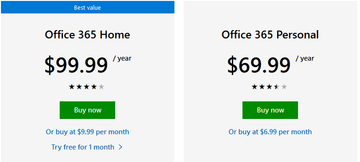
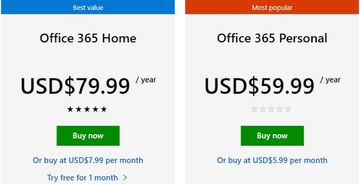
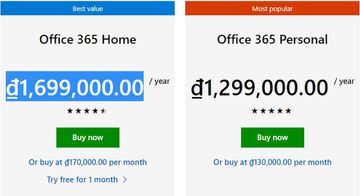
Our first price is an annual subscription for Microsoft Office 365 home, each price given has been converted to dollars and it’s the exact same product.

Sometimes using hooky software just won’t cut it anymore and you resign yourself to buying the real thing. Saving money is important particularly if you are a struggling college student.

US: $99

microsoft office price us

Afghanistan: $79

microsoft office price afganistan

Vietnam: $73

microsoft office price vietnam

If you used a VPN and changed your location to Vietnam, you’d save 26% more than if you bought it in the US. 

Once bought you just download the product, install it on your computer and you’re good to go.

Total Saved: $26

Car Rentals

You’re planning on flying to Paris, France with your sweetheart, and you don’t want to be traveling around on the tube. You fancy renting a nice car and traveling around the City of Love in Paris.

Again, it shouldn’t matter what country you rented the car from, you are still going to physically collect the car at Charles de Gaulle airport.

Airport: Charles de Gaulle

Car: Nissan X-Trail or Similar

Extras: None

Length: 9/1/19 – 9/18/19

UK: £188.69 ($228.77)

enterprise car rental price uk

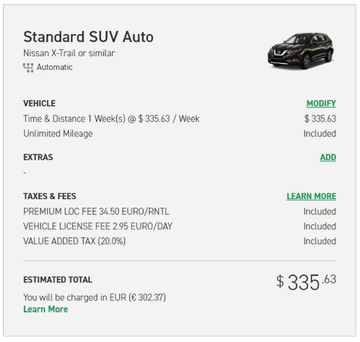
US: $335.63

enterprise car rental price us

So just by booking the same car from the UK instead of in the US, you’ve saved almost a third of your costs.

Again, nothing else is different. You will still have to show your driving license and payment card as proof, but there are no additional taxes to differentiate between the 2 countries, it’s literally a case of different pricing plans between these two countries.

Total Saved: $106.86

Flight tickets

How about a flight from New York to London? Price comparison sites like Kayak will tend to serve different recommendations for “best flights” depending on the country you are from. So, we’ve chosen the exact same airline and flight time to be fair.

Website: www.kayak.com 

Flight: New York to London (Any airport)

Class: Basic Economy

Length: 9/21/19 – 9/28/19

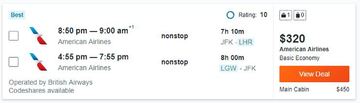
Flight: American Airlines 8:50PM

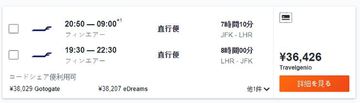
US: $320

price using a flght using a vpn

Japan: ¥36,426 ($342)

price of flight using a vpn in japan

Interestingly Italy and Germany came back with the same price as booking from the US. There were a few things to notice though.

Firstly, the best and cheapest flight recommended varied a lot from $300-400, and the airline serving that flight changed every time. Kayak’s engine will lean first towards the domestic airline of choice, whether that’s American Airlines, Japan Air or any other number.

Secondly, the American Airlines flight where the price was the same would vary in ranking in terms of search massively. In fact, for Italy, it was the cheapest flight but was shown 10 spaces lower than when we tried to book it from New York in the US.

We wanted to highlight this because sometimes you need to use your VPN to do some investigating, it’s not always going to be different in every country you go to. But in our experience, you will see a massive difference in comparing 3-4 countries in terms of ranking and cheapest prices.

The poor folks in Tokyo, Japan where we checked the flight would pay more for the exact same flight

Total Saved: $22

Online Gaming

There was a time when you wanted a game, you had to put your shoes on and go to the nearest shopping mall and browse around for a great deal.

Today, buying games is just like anything else. Websites like Steam put thousands of games in one place meaning you never need to leave your bed.

But online gaming is yet another area where we saw price differences which were significant even for small purchases.

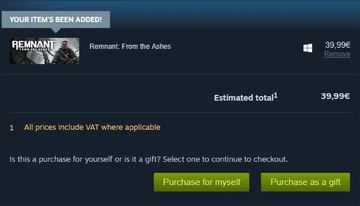
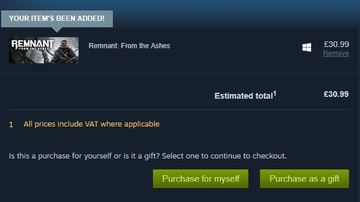
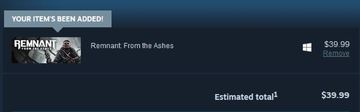
Website: www.steam.com

Game: Remnant from the Ashes

France: €39.99 ($44.32)

steam france

UK: £30.99 ($37.69)

steam uk price

US: $39.99

steam us price with vpn

Again, the same game, no add ons and no restrictions on usage-based on the country of purchase. Yet we can see a difference of almost 20% between the prices in 3 different countries. All with a similar socio-economic makeup. With the French paying the most and yet just over the Channel, the Brits pay the least!

Money Saved: $6.63

Hotels

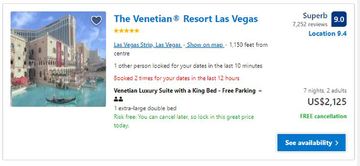
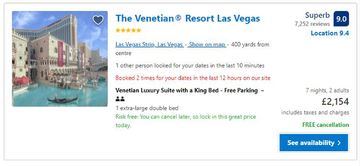
Who fancies a trip to Vegas? Nothing like blowing off a bit of steam and indulging in the city of sin. So, let’s book ourselves a fancy 5-star hotel to enjoy our week of gambling.

Trip: Las Vegas

Dates: 09/09/19 – 9/16/19

Hotel: The Venetian resort Las Vegas

Number of people: 2

US: $2,125

price booking a hotel in the US with a vpn

UK: £2,124 (£2603.80)

price booking a hotel in the uk with a vpn

Italy: € 2,356 ($2,613)


price booking a hotel with a vpn

The savings this time are again well over 20%, hotels do generally tend to be cheaper if you book them from the country that they are in. The recommendation system recognizes you may not be a tourist and adjusts the prices accordingly.

Again, The Venetian was the top pick for the US and Italy but was almost at the bottom of the list for 5-star hotels when it comes to the UK, which reflects the different buying preferences from that country.

This time, the amount of money you saved could be as much as the cost of the flight ticket itself!

Money Saved: $492

Total Money Saved: $653.49

Most tier 1 VPNs like Surfshark, NordVPN, IPVanish, and ExpressVPN are going to cost you at most $10 a month. A yearly subscription will be less than $60.

Investing in a VPN could return hundreds if not thousands of dollars of savings, so the next time you think you can’t afford a VPN think again.

The amount of money you save can vary wildly and some e-commerce stores won’t make any difference. For example, we wouldn’t bother searching around on Amazon from different countries, after all, where are you going to send the parcel to?

But when it comes to goods that do not need to be delivered to a physical location, then we always recommend checking a few countries from different regions, so:

  • The Americas
  • Europe
  • Asia

Using these three as a benchmark you can quickly figure out whether there is money to be saved on your booking or digital product.

Tips for Using a VPN with E-Commerce

We wouldn’t be doing you justice if we didn’t share some additional tips which will go along way to helping your VPN search for the cheapest deal go a lot faster.

Clear Cache

This is crucial. Many big e-commerce websites will cache your location and previous search. So whatever country you change it to, they will keep returning the same price.

It can seem laborious but after each search closes the tab, open the history for your browser and clear all your browsing history.

Only then should you change the VPN server to another country and start your search from Google’s main site.

Don’t Let Google See Your location

Be warned if you keep hopping from country to country, Google will ask for your location. But they won’t use your IP address. They will fix onto your GPS co-ordinates completely defeating the purpose of using a VPN.

Always block Google when it asks for your location when carrying out searches.

Search From Country Specific Google

Sometimes searching through one site may appear to yield the same results. You can easily check if the currency denomination is being given in your home countries currency rather than the country you should be looking from. E.g. Your search shows up in $’s when your searching from a UK server.

You can also use Google-specific sites for a country like the UK is www.google.co.uk and India would be www.google.in 


How to Install Surfshark VPN on Firestick

If your Firestick still has the older interface, read this article to learn how to update it: Update Firestick Interface.

Follow our screenshots below to install the SurfShark VPN app on your Fire TV stick.

1. Go to the Home screen of your Firestick.

step 1 Install Surfshark VPN on Firestick


2. Navigate towards the Find tab. Press the Search button from the resulting dropdown.

step 2 Install Surfshark VPN on Firestick


3. Type in the keyword of SurfShark and select from the suggestions that will appear.

step 3 Install Surfshark VPN on Firestick


4. Click the official SurfShark icon from your search results.

step 4 Install Surfshark VPN on Firestick


5. Press the Download (You own it) button.

step 5 Install Surfshark VPN on Firestick


6. The SurfShark VPN installer will download on your device.

step 6 Install Surfshark VPN on Firestick


7. SurfShark VPN’s app will automatically install itself on your Fire TV stick.

step 7 Install Surfshark VPN on Firestick


8. Press the Open button after completing SurfShark VPN’s installation process.

step 8 Install Surfshark VPN on Firestick


9. Please wait for the SurfShark VPN to load its user interface.

step 9 Install Surfshark VPN on Firestick


10. You can now log in with your SurfShark VPN account credentials.

step 10 Install Surfshark VPN on Firestick

Learn more about Surfshark and Grab the Best Surfshark Deal Now!


Install Surfshark on Firestick

Best Surfshark Deal


Other VPNs to Consider

NordVPN (Best for Streaming)

Best Features

  • 5000+ Server in 50+ Countries 
  • Military-Grade Encryption
  • Fast Connection Speed
  • Suitable to a lot of devices
  • No-Log Policy

Prices
  • Complete $5.89 per month (64% Discount)
  • Plus $4.59 per month (56% Discount)
  • Standard $3.69 per month (55% Discount)

Best Features

  • 750+ High-speed VPN Servers in 43 Locations
  • Military-Grade Encryption
  • Fastest HD Streaming and Gaming
  • 30-Day Money-Back Guarantee
  • Unlimited Data & Devices
  • No-Log Policy

Prices
  • 3 Years $1.99 per month (82% Discount)
  • 1 Years $3.29 per month (70% Discount)
  • 1 Month $10.99 per month

IPVanish VPN (Most Secure)

Best Features

  • 1200+ Servers in 60+ Countries around the world
  • Unlimited Connections
  • No-Log Policy
  • Top Notch Military-Grade VPN Protocols and Encryptions
  • 100% Safe and Secured
  • Most Trusted VPN
  • Best VPN for Firestick
  • 30-Day Money-Back Guarantee

Prices
  • Yearly $3.99 per month (63% Discount) – 30 days risk free + Ransomware & Malware Protection
  • Quarterly $5.32 per month (51% Discount)
  • Monthly $10.99 per month


For more VPN discounts, go to ReviewVPN Deals and purchase the best VPN for you.

Click here to get the lowest price on Surfshark through our exclusive limited-time offer.


Closing thoughts

The first time we did this it completely blew us away, and over the years we have never booked a flight, hotel or got a subscription without first checking around for prices from different countries.

In this article, we only just scratched the surface of what you could use it for, and didn’t even cover the other ways you can save money with a VPN, like being able to unlock region-restricted content and watch Netflix from any country in the world and gain access to that countries media library!

Best Free Movie Applications for Firestick

Best Free Movie Applications for Firestick

If you are looking for great movies on your Firestick, then you are in for a treat. The great thing about the Firestick is you can either use Kodi. Or you can sideload Android applications. So, you get both of the best worlds. Here we look at 10 of our favorite free movie applications on Firestick.


ANONYMOUSLY

How Do I Install Android Applications on Firestick?

install image


All the applications we are going to cover, can’t be downloaded from the Google Play store. Due to the content that they distribute you would need to download them directly from a URL.

So, to download any of these applications, you first turn off unknown sources:

1. Start on the Firestick Home Screen and go to Settings

Step 1 Install Android Applications on Firestick


2. Click on the My Fire TV.

Step 2 Install Android Applications on Firestick


3. Click on Developer Options.

Step 3 Install Android Applications on Firestick


4. Switch the toggle button called “Apps from Unknown Sources” on

Step 4 Install Android Applications on Firestick


5. Click Turn On when the pop-up appears

Step 5 Install Android Applications on Firestick


Now download ES File Explorer and Downloader, to enable you to download the best live TV applications directly from a URL:

1. From the Firestick Home Screen, click search and type “ES File Explorer”

Step 1 How to Install ES Files


2. Download, install and open  go to Tools and Download Manager

Step 2 How to Install ES Files


3. Go to Tools and Download Manager

Step 3 How to Install ES Files


4. You will see an icon labeled Downloader, All you need to do is click “+New” and enter the corresponding URL to download your application direct to your Firestick.

Step 4 How to Install ES Files


YOUR INTERNET ACTIVITY IS BEING WATCHED

ReviewVPN cannot attest to the legality, security and privacy of the applications discussed on this site. It is highly recommended that you use a VPN service while streaming or using Kodi.

Currently, your IP 216.73.217.150 is visible to everyone and your Browser is being tracked by Advertisers & ISP Provider.

Save 65% Now

Limited Time Offer

Here are the main reasons why you must use a VPN:

  • Your activities are hidden from your ISP, the government, and from the apps you are using.
  • You can access additional movies and TV streams.
  • ISP attempts to throttle are thrwarted thus reducing buffering issues.
  • Geographically restricted content like Netflix and Hulu can be unblocked.

A VPN works be replacing your ISP-assigned IP address and creating an encrypted tunnel. We recommend the no log service offered by IPVanish. It works well on a Firestick and offers the fastest possible speeds.

Special Limited Time Offer - Get IPVanish


Legal Disclaimer: ReviewVPN.com does not encourage or endorse any illegal activity involved in the usage of services and applications referenced on this site. We do not verify the licensing agreements of services. The end-user is wholly responsible for ensuring that any media accessed through these services does not violate copyright and/or licensing laws. ReviewVPN does not promote, link to, or receive compensation from any Apps and IPTV services.


Install Surfshark on Firestick

Best Surfshark Deal


Cyberflix

Cyberflix Image

Download from:

https://cybermedia.cloud/

What Does It Do?

Cyberflix is remarkably like Terrarium in its UI. One of the few free movie applications that is 100% ad free.

Supported by a large community on both Reddit and Facebook, you can access a huge selection of media, for both movies and TV shows. As well as access HD links for several titles. There is inbuilt support for adding subtitles in almost any language. There is also a decent selection of fringe TV for those who like to watch movies and TV shows not normally available through other applications.

Cyberflix is compatible with both Real Debrid and Trakt.tv meaning you can pay a fee to access premium, fast and high-quality links. As well as keep track of the shows you have watched across various devices and applications.

With Cyberflix you get a Live TV calendar, so you can see all the best shows coming up in the following week, as well as mark when the next episode of your favourite TV show will air and be ready to download. As Cyberflix allows you to download and watch content offline.

The application is supported by an active developer and receives regular updates and is probably the best Terrarium clone out there.


Titanium TV

Titanium Logo

Download from:

https://titaniumtv-app.com/download/

What Does It Do?

Titanium TV comes from the respected development team, Team No Name. The application is fast and stable and can support Chromecast as well as Fire TV.

Like Cyberflix you can access a Live TV Calendar to see what’s coming up this week and make a note for what you want to watch. Their search system has intelligent functions, meaning it has a good hit rate for recommending movies and TV shows you may like based upon your previous watching habits.

Titanium TV comes with Open Subtitles meaning its easy to download subtitles in many different languages, and it’s almost like Cyberflix, as it’s a fork of their code base. Though you can’t download content to watch offline.

One of the drawbacks of Titanium TV is its lack of compatibility with any premium services like Trakt.tv, Real Debrid or Premiumize, also it hasn’t seen an update in some time.


Typhoon TV

Typhoon TV Logo

Download from:

https://typhoontv.gq/  

What Does It Do?

Typhoon TV has been one the hottest best free movie applications for Firestick in 2019. You can download it individually or get it in the fantastic APK Time bundle, where you get 50+ tv streaming and free movie applications in one.

You don’t need to register to use Typhoon TV, and the UI is clean and user-friendly. There is a big selection of content, including HD and 4K streams.

Also, the search function is nice, with several different sort functions. Typhoon TV advertises it uses fast servers, so that content can be served faster.

Typhoon TV also uses its own media player rather than needing to rely on MX Player or VLC, which means better stability in terms of loading speed.

You can mark episodes that you have already seen and integrate Open Subtitles to get subtitles in many different languages. Typhoon TV also supports Chromecast, allows you to download content and watch offline as well as being compatible with Real Debrid and Trakt.tv

Oh, they also have a Live TV Calendar too. A great application that is growing from strength to strength.


Unlock My TTV

Unlock My TTV Logo

Download from:

https://unlockmyttv.com/

What Does It Do?

Unlock My TTV is another high-quality Terrarium clone. Though no Live TV Calendar. With a large library of content, they also serve quite a lot of content with HD and Ultra HD links.

Some nice functions are playing trailers within the application, before committing to that movie or box set. As well as a Kids mode which allows you to block the children from seeing adult content and putting a passcode onto the account.

With Unlock My TTV you can download content and watch it while offline and take advantage of the smooth search function which makes it easy to find titles, suing partial matches.

The application is also compatible with Real Debrid and Trakt.tv, so for those committed streamers, you can pay to always get high-quality links.


Cat Mouse

Cat Mouse Logo

Download from:

www.troypoint.com/catmouse

What Does It Do?

Cat Mouse is another Terrarium clone, but with updated scrapers which makes finding content easy. For movie buffs, they have a massive selection of movies in HD, Ultra HD, and even 4K.

They have stable and fast servers, and you can even set Cat Mouse to notify you when the newest episode or a movie title is available to watch.

Cat Mouse is another application, where you can download content to watch later. It’s also compatible with Real Debrid and Trakt.TV


Media Box HD

Media Box HD Logo

Download from:

https://mediaboxhd.net 

What Does It Do?

Media Box HD is a great-looking application, and one of the oldest around. The application is regularly updated and supported by a large community and a great developer.

You can check out a massive media selection, as well as a stream directly from content providers rather than having to churn through different torrent streams and find one that works.

You can also download content and watch offline. Plus, you can request movies and Tv shows as well as subtitles.

Media Box HD looks very slick, much like Netflix, and is compatible with Premiumize, Real Debrid, and Trakt.TV


TV Zion

TV Zion Image

Download from:

https://zionapp.live/

What Does It Do?

Probably one of the most exciting free movie applications on Firestick. Also, the only one to make the list that also has a premium subscription, if you want to upgrade from the free version.

A custom-coded application that has not been forked or isn’t a clone of anything else including Terrarium.

TV Zion offers an unrivaled level of customization from the dashboard and home screen, all the way through the service. They have a massive range of content and if you want to pay as little as $1.50 per month, you can access the quickest streams, including bit rates and a number of times uses. In addition to a host of other data and analytics.

TV Zion is optimized for your TV, and compatible with a wide range of premium services, having been specifically coded with Real Debrid in mind. You can also download and watch content offline.

We could write so much more for TV Zion, its well worth checking out as there isn’t another application on the market like it.


Bee TV

beetv-app logo

Download from:

http://Bee TVapk.me/

What Does It Do?

Bee TV is a relatively new application that has become a firm favorite with many streamers, amassing a large fan base.

They offer an intuitive UI, with good search and sort functions for navigating their large media library. You can also see multiple link providers, as well arrange links by which has the highest bit rate.

One of the better functions which you won’t find anywhere else apart from TV Zion is the Auto Play and Auto Function, with the app programmed to always default play, rather than you having to click each time.

Bee TV also comes with Open Subtitle and is compatible with Real Debrid, Trakt.TV and Premiumize.

A great application with a lot of versatility and good added functionality.


Tea TV

Tea TV Logo

Download from:

https://teatv.net

What Does It Do?

Tea TV is pretty like Bee TV in many ways but comes from separate development teams.

Their website offers great support and in-app tutorials. In addition to TV shows and movies, they also offer a limited range of Live TV Channels.

Tea TV also offers the Auto Play and Auto Next functions and is compatible with three main premium providers to get faster links.

They offer a good search function as well as intelligent suggestions when looking for new content to watch. You can also search for content using multiple filters. As well as having Open Subtitles and supporting a wide range of languages.


Stream Safely with a VPN

All of your online activities are being tracked by your ISP. Streaming, most especially, is closely monitored because it consumes a lot of data.

Once your ISP discovers that you are exceeding your data cap, it will do everything to disrupt your streaming experience. It will throttle down your connection which results in buffering. And we do not want that for you.

To prevent this from happening, we highly recommend using streaming apps with a premium VPN service like Surfshark.

Here are the other perks of having it on your device:

  • Provides access to geo-restricted content.
  • Protects all of your personal data when accessing public wifi internet.
  • Cloaks all of your online activities and identity that may be used by online threats like hackers and ISP.
  • It is the best solution for Firestick buffering and Kodi Buffering as well.

Note: For more information about Surfshark, please read our Surfshark Review.


Grab your subscription now!

Click here to get the lowest price on Surfshark through our exclusive limited-time offer.


How to Install Surfshark VPN on Firestick

If your Firestick still has the older interface, read this article to learn how to update it: Update Firestick Interface.

Follow our screenshots below to install the SurfShark VPN app on your Fire TV stick.

1. Go to the Home screen of your Firestick.

step 1 Install Surfshark VPN on Firestick


2. Navigate towards the Find tab. Press the Search button from the resulting dropdown.

step 2 Install Surfshark VPN on Firestick


3. Type in the keyword of SurfShark and select from the suggestions that will appear.

step 3 Install Surfshark VPN on Firestick


4. Click the official SurfShark icon from your search results.

step 4 Install Surfshark VPN on Firestick


5. Press the Download (You own it) button.

step 5 Install Surfshark VPN on Firestick


6. The SurfShark VPN installer will download on your device.

step 6 Install Surfshark VPN on Firestick


7. SurfShark VPN’s app will automatically install itself on your Fire TV stick.

step 7 Install Surfshark VPN on Firestick


8. Press the Open button after completing SurfShark VPN’s installation process.

step 8 Install Surfshark VPN on Firestick


9. Please wait for the SurfShark VPN to load its user interface.

step 9 Install Surfshark VPN on Firestick


10. You can now log in with your SurfShark VPN account credentials.

step 10 Install Surfshark VPN on Firestick

Learn more about Surfshark and Grab the Best Surfshark Deal Now!


Install Surfshark on Firestick

Best Surfshark Deal


Other VPNs to Consider

NordVPN (Best for Streaming)

Best Features

  • 5000+ Server in 50+ Countries 
  • Military-Grade Encryption
  • Fast Connection Speed
  • Suitable to a lot of devices
  • No-Log Policy

Prices
  • Complete $5.89 per month (64% Discount)
  • Plus $4.59 per month (56% Discount)
  • Standard $3.69 per month (55% Discount)

Best Features

  • 750+ High-speed VPN Servers in 43 Locations
  • Military-Grade Encryption
  • Fastest HD Streaming and Gaming
  • 30-Day Money-Back Guarantee
  • Unlimited Data & Devices
  • No-Log Policy

Prices
  • 3 Years $1.99 per month (82% Discount)
  • 1 Years $3.29 per month (70% Discount)
  • 1 Month $10.99 per month

IPVanish VPN (Most Secure)

Best Features

  • 1200+ Servers in 60+ Countries around the world
  • Unlimited Connections
  • No-Log Policy
  • Top Notch Military-Grade VPN Protocols and Encryptions
  • 100% Safe and Secured
  • Most Trusted VPN
  • Best VPN for Firestick
  • 30-Day Money-Back Guarantee

Prices
  • Yearly $3.99 per month (63% Discount) – 30 days risk free + Ransomware & Malware Protection
  • Quarterly $5.32 per month (51% Discount)
  • Monthly $10.99 per month


For more VPN discounts, go to ReviewVPN Deals and purchase the best VPN for you.

Click here to get the lowest price on Surfshark through our exclusive limited-time offer.


Install A Pirate’s Life For Me Kodi Addon

A Pirate’s Life For Me Kodi Addon

The article will help you on how to install A Pirate’s Life For Me Kodi Addon on Firestick.


Source: http://repo.rubyjewelwizard.com/

People nowadays have their own preferences on which avenue they want to watch their favorite movies or TV shows. Some watch it on paid streaming apps like Netflix, Hulu, Iflix, HOOQ, and many more. Others opt to download their content via torrents for two reasons: 1. They want to keep a copy of the show/movie. 2. They want to download it en-masse and binge-watch after that. Also, there are those that choose to watch it on free streaming sites like Couchtuner, Cucirca, The Series Online, Show Box, and many more. Imagine if you can combine all of those aspects in 1 Kodi Video Add-on. Impossible? Nope, you got it all wrong. It is possible with just one add-on and that is the Pirate’s Life For Me Video Add-on.

browse online anonymously, protect your identity and keep your historical data safe, rather than being used maliciously or simply to feed the internet advertising machine.

A Pirate’s Life for Me Kodi Addon is a unique add-on under the Diamond Wizard Repository that uses torrent sources to play Movies and TV Shows. It also has access to Direct Links which makes it very flexible. It can also be integrated into your Real-Debrid account to ensure a faster, smoother, and buffer-free run. It is very important to note that the torrents are not sent to your device but directly to your Real-Debrid account.


ANONYMOUSLY

Key Features:

  • Real-Debrid Integration
  • Torrent-based streaming links (The Pirate Bay, EZTV, Glow Torrents, and recently YTS)
  • Direct Links Viewing
  • Regular Updates on the add-on
  • A huge gallery of Movies and TV Shows to choose from

Easy Installation Guide

  1. Open Kodi on your device
  2. Click on the “Gear Icon” and select “System”
  3. At the add-ons menu, turn on the “Unknown Sources” by clicking “yes”
  4. Go back to the “systems” page and choose “File Manager”
  5. Choose Add source and select “none”
  6. Type in http://repo.rubyjewelwizard.com
  7. Highlight the source and rename it to “diamond” or any name you would like to use to identify this particular source and click “ok”
  8. Go back to the System Screen and click “Add-ons”
  9. Select “Install Zip File” choose “diamond” or whatever you renamed the file.
  10. Select the zip file URL- repository.Diamond-Wizard-Repo-3.9.6.zip
  11. Wait for the notification “Diamond Build Add-on Repo Installed” to appear.
  12. Select “Install Repository”
  13. Choose “Diamond Build Repo”
  14. Click on “Video Add-ons” and select “A Pirates Life For Me” and “Install”
  15. Click “Ok” when a notification “the following add-ons will be installed” appears and wait for A Pirates Life For Me Add-on to install
  16. Once the add-on is installed go back to the home screen and select “add-ons”
  17. Choose “Video add-ons” and select “A Pirates Life For Me”
  18. There you go, A Pirates Life For Me is now installed.


Real-Debrid Integration

  1. If you don’t possess a Real-Debrid account yet, you must register.
  2. When Launching the A Pirates Life For Me add-on you will be notified with this message. Write down the code that will be given.
  3. Launch a web browser on a different device and enter https://real-debrid.com/device.
  4. Type in the code you got and select “Continue”
  5. You will then be granted your Real-Debrid Account
  6. Go back to A Pirates Life For Me and a notification that shows another successful authorization message will appear, select “ok”
  7. If notified with a changelog, just press the “ok” button on your remote, and voila! A Pirates Life For Me is now Real-Debrid ready.


YOUR INTERNET ACTIVITY IS BEING WATCHED

ReviewVPN cannot attest to the legality, security and privacy of the applications discussed on this site. It is highly recommended that you use a VPN service while streaming or using Kodi.

Currently, your IP 216.73.217.150 is visible to everyone and your Browser is being tracked by Advertisers & ISP Provider.

Save 65% Now

Limited Time Offer

Here are the main reasons why you must use a VPN:

  • Your activities are hidden from your ISP, the government, and from the apps you are using.
  • You can access additional movies and TV streams.
  • ISP attempts to throttle are thrwarted thus reducing buffering issues.
  • Geographically restricted content like Netflix and Hulu can be unblocked.

A VPN works be replacing your ISP-assigned IP address and creating an encrypted tunnel. We recommend the no log service offered by IPVanish. It works well on a Firestick and offers the fastest possible speeds.

Special Limited Time Offer - Get IPVanish


Legal Disclaimer: ReviewVPN.com does not encourage or endorse any illegal activity involved in the usage of services and applications referenced on this site. We do not verify the licensing agreements of services. The end-user is wholly responsible for ensuring that any media accessed through these services does not violate copyright and/or licensing laws. ReviewVPN does not promote, link to, or receive compensation from any Apps and IPTV services.


Install Surfshark on Firestick

Best Surfshark Deal


How to Install A Pirate’s Life For Me Addon on Kodi with Screenshots

1. From the home screen, select the cogwheel at the upper left.

Step 1 Installing A Pirate's Life For Me addon on Kodi


2. Select System in the bottom right corner.

Step 2 Installing A Pirate's Life For Me addon on Kodi


3. Select Add-ons on the left side of the screen.

Step 3 Installing A Pirate's Life For Me addon on Kodi


4. Select Unknown sources.

Step 4 Installing A Pirate's Life For Me addon on Kodi


5. Click Yes to allow unknown sources.

Step 5 Installing A Pirate's Life For Me addon on Kodi


6. Select File manager.

Step 6 Installing A Pirate's Life For Me on Kodi


7. Click Add source.

Step 7 Installing A Pirate's Life For Me addon on Kodi


8. Click on <None>.

Step 8 Installing A Pirate's Life For Me addon on Kodi


9. Type exactly: http://repo.rubyjewelwizard.com/

Step 9 Installing A Pirate's Life For Me addon on Kodi


10. Click on OK.

Step 10 Installing A Pirate's Life For Me addon on Kodi


11. Select enter a name for this media source.

Step 11 Installing A Pirate's Life For Me addon on Kodi


12. Name is A Pirate’s Life For Me (this part isn’t critical as long as you remember the name).

Step 12 Installing A Pirate's Life For Me addon on Kodi


13. Click on OK.

Step 13 Installing A Pirate's Life For Me addon on Kodi


14. Click on OK.

Step 14 Installing A Pirate's Life For Me addon on Kodi


15. Take one step back and click on Add-ons.

Step 15 Installing A Pirate's Life For Me addon on Kodi


16. Select install from zip file.

Step 16 Installing A Pirate's Life For Me addon on Kodi


17. Click on A Pirate’s Life For Me (or whatever you named the source).

Step 17 Installing A Pirate's Life For Me addon on Kodi


18. Click on repository.Diamond-Wizard-Repo-3.9.6.zip

Step 18 Installing A Pirate's Life For Me addon on Kodi


19. Select on Install from repository.

Step 19 Installing A Pirate's Life For Me addon on Kodi


20. Click on Diamond Repo.

Step 20 Installing A Pirate's Life For Me addon on Kodi


21. Pick Video add-ons.

Step 21 Installing A Pirate's Life For Me addon on Kodi


22. Select A Pirate’s Life For Me again.

Step 22 Installing A Pirate's Life For Me addon on Kodi


23. Click on Install.

Step 23 Installing A Pirate's Life For Me addon on Kodi


24. Select OK after reviewing the add-ons that will be installed.

Step 24 Installing A Pirate's Life For Me addon on Kodi


25. You should see a popup in the upper right corner saying A Pirate’s Life For Me has installed. There will actually be multiple popups for the various components.

Step 25 Installing A Pirate's Life For Me addon on Kodi


26. Click on Open to start the A Pirate’s Life For Me add-on.

Step 26 Installing A Pirate's Life For Me addon on Kodi


Alternatives

One of the main advantages of A Pirates Life For Me is its cached torrents feature. If we are to compare cached torrents vs traditional file hosts, cached torrents are preferable because, unlike traditional file hosts who have drawbacks, cached torrents are not compressed and therefore produce higher video quality.  We highly suggest that you obtain your content from trusted sources. The following add-ons offer similar functions:

        Gaia (requires Real-Debrid)

        Seren (requires Real-Debrid

        13 Clowns

        The Magic Dragon

        Universal Scrapers


Common Errors

These are some of the things that may cause an issue when installing A Pirates Life For Me:

  1.    Unable to connect to URL/Download

Your URL address should be written correctly or else this issue will arise. Also, be sure that your Repository is properly installed and the guide above will help you with that. Although cached torrents do not require VPN because you are accessing the torrent directly unlike torrent clients which act as middlemen, to be on the safer side of things, we still advise you to have a reliable VPN installed. Check here for the best VPN deal.


  1.     Script Error

Make sure that the Kodi App is properly installed on your device to avoid this error. Also, you have to double-check if the add-on is installed correctly if not, reinstall it. Please refer to the guide above to help you in installing the add-on properly. An in-depth guide is also provided in this article with regards to the proper installation of Kodi.


  1.     Kodi Check Log Error

This occurs when your media cache is full. We can prevent this by emptying your cache and making sure that it gets cleaned on a regular basis. Cache build is quite common nowadays because it is one way of making our streaming experience smoother.


  1.     Source not working/slow/frozen

A Pirates Life for Me supports torrent cached streaming and does not keep any content on its servers. If this issue arises, you may want to wait for a few seconds until the results refresh and choose a working link.


Why use a VPN while streaming?

A Virtual Private Network or VPN service is a substantial tool that obstructs cybercriminals and companies from accessing people’s personal data. When a person uses a VPN service, his/her data goes to a remote server through a secure connection. Wherein, the remote server conceals the IP address, so it appears like that person is accessing the web from another spot, which also allows that person to bypass geo-blocking as well as censorship.

As a result, Virtual Private Networks have grown in popularity, especially in countries like China, where internet censorship is intense and there are times it’s dangerous. Nonetheless, individuals all around the world use VPN services to safeguard their anonymity, privacy, and unlimited access to the web.

VPN services provide the finest protection available when it comes to web users’ internet security. Thus, web users should leave their Virtual Private Network on all the time to protect themselves from cyberattacks and information leaks. VPN services encrypt all the information that travels over the network, which makes it impossible for Internet service providers, governments, and hackers to see people’s personal information.

If online security is people’s top concern, they should ensure that their VPN services utilize military-grade encryption. Web users will also want to have an automatic kill switch that turns their connection off if their VPN service fails. With a strict zero-logs policy and encryption of 256-AES bit, Surfshark service consistently ranks as one of the most secure Virtual Private Networks on the market. This VPN service offers a secure environment for people’s internet use to keep their web activity and data private. Surfshark service protects against threats and prevents censorship restrictions.

With Surfshark, people can break free from geo-restricted content and explore the web with no censorship. This VPN provider has over 5,000 anonymous servers around the world to give its users super-fast, unrestricted web access all the time.

Other reasons why it is our VPN of choice:
  • Surfshark’s protocols are perfect for use with Kodi.
  • This VPN will definitely hide all of your online activities. 
  • It has a military-grade level of encryption that will ensure your safety. 
  • You can access more content and even unblock Netflix and other platforms.
  • Supports P2p file-sharing activities which makes it applicable to torrenting
  • Strictly follows No-Log Policy.
  • One of the Fastest as its raging speed
  • It provides 3,200 VPN servers in 65 locations worldwide.
  • DNS Leak Protection is active by default.

Note: For more information about SurfShark, please read our SURFSHARK REVIEW.


Grab your subscription now!


How to Install Surfshark VPN on Firestick

If your Firestick still has the older interface, read this article to learn how to update it: Update Firestick Interface.

1. Go to the Home screen of your Firestick.

step 1 Install Surfshark VPN on Firestick


2. Navigate towards the Find tab. Press the Search button from the resulting dropdown.

step 2 Install Surfshark VPN on Firestick


3. Type in the keyword of SurfShark and select from the suggestions that will appear.

step 3 Install Surfshark VPN on Firestick


4. Click the official SurfShark icon from your search results.

step 4 Install Surfshark VPN on Firestick


5. Press the Download (You own it) button.

step 5 Install Surfshark VPN on Firestick


6. The SurfShark VPN installer will download on your device.

step 6 Install Surfshark VPN on Firestick


7. SurfShark VPN’s app will automatically install itself on your Fire TV stick.

step 7 Install Surfshark VPN on Firestick


8. Press the Open button after completing SurfShark VPN’s installation process.

step 8 Install Surfshark VPN on Firestick


9. Please wait for the SurfShark VPN to load its user interface.

step 9 Install Surfshark VPN on Firestick


10. You can now log in with your SurfShark VPN account credentials.

step 10 Install Surfshark VPN on Firestick

Learn more about Surfshark and Grab the Best Surfshark Deal Now!


Install Surfshark on Firestick

Best Surfshark Deal


Other VPNs to Consider

NordVPN (Best for Streaming)

Best Features

  • 5000+ Server in 50+ Countries 
  • Military-Grade Encryption
  • Fast Connection Speed
  • Suitable to a lot of devices
  • No-Log Policy

Prices
  • Complete $5.89 per month (64% Discount)
  • Plus $4.59 per month (56% Discount)
  • Standard $3.69 per month (55% Discount)

Best Features

  • 750+ High-speed VPN Servers in 43 Locations
  • Military-Grade Encryption
  • Fastest HD Streaming and Gaming
  • 30-Day Money-Back Guarantee
  • Unlimited Data & Devices
  • No-Log Policy

Prices
  • 3 Years $1.99 per month (82% Discount)
  • 1 Years $3.29 per month (70% Discount)
  • 1 Month $10.99 per month

IPVanish VPN (Most Secure)

Best Features

  • 1200+ Servers in 60+ Countries around the world
  • Unlimited Connections
  • No-Log Policy
  • Top Notch Military-Grade VPN Protocols and Encryptions
  • 100% Safe and Secured
  • Most Trusted VPN
  • Best VPN for Firestick
  • 30-Day Money-Back Guarantee

Prices
  • Yearly $3.99 per month (63% Discount) – 30 days risk free + Ransomware & Malware Protection
  • Quarterly $5.32 per month (51% Discount)
  • Monthly $10.99 per month


For more VPN discounts, go to ReviewVPN Deals and purchase the best VPN for you.

Click here to get the lowest price on Surfshark through our exclusive limited-time offer.


Conclusion

Traditional File Hosts buffer a lot and depend on the bandwidth allocation it provides. It means that your files are compressed and have a pixelated or grainy quality to them. Since A Pirates Life For Me hosts cached torrents, the issues that traditional file hosts carry along with it, are neutralized. A Pirates Life For Me is very ideal for users who don’t have a lot of storage and seek high-quality videos to watch. Although there are also different add-ons that offer the same service, we find that A Pirates Life for Me offers one of the best services thus earning our praise. We hope that this guide will be useful in your endeavor. If you have questions or suggestions, please feel free to drop a comment below or contact us through any of our social media platforms. Thank you for reading!

Install YouPorn Kodi Addon

YouPorn Kodi Addon

The article will help you on how to install YouPorn Kodi Addon on Firestick.


Source: http://www.lvtvv.com/repo/

YouPorn is the Kodi addon for the same-named famous porn website, though in recent years it’s become less well known behind the omnipresent Pornhub. You can download it directly from www.lvtvv.com.

browse online anonymously, protect your identity and keep your historical data safe, rather than be used maliciously or simply to feed the internet advertising machine.

You Porn has done a great Kodi add and you get to draw content from one of the largest and oldest pornography websites in the world. Split into over 70 sections, you can easily search content, and there is something here for everyone.

Through this add on you can access everything from cams to Hentai and more unusual tastes.


ANONYMOUSLY

Common Errors

There are 4 common errors that you are likely to across when installing or running You Porn, here we cover some quick fixes. Each error also has a link to a much more in-depth guide for further steps to fix each error:

  • Source not working/slow/frozen: Unlike other addons, all the content that you get through You Porn is hosted by them, as it’s drawn directly from their website. So, sources should be faster in connecting and loading. One thing to bear in mind is that using Kodi is not like flicking through channels on the TV. It can take up to 15 seconds for a source to connect and start to buffer. You must be patient and that might mean reloading the link, to check it’s working or playing it in a lower quality. For more fixes read our in-depth guide linked above.


  • Could not connect to URL/Download: The URL comes directly from the developer’s GitHub so it’s unlikely to be down unless the developer deletes the commit. The most common error is a misspelled URL so go back and check that before doing anything else. Try the link twice more, just to check you haven’t come across a server error. If the problem persists then try our step-by-step guide to fixing this error. Another issue to bear in mind, is that the IP address for You Porn may be getting blocked by your local Firewall or your Internet Service Provider (ISP), to make sure this doesn’t happen to you, use a VPN. A VPN allows you to browse safely and anonymously online. As well as keeping your connection encrypted, meaning no one, not even your ISP can block you from viewing content. Check here for the best VPN deal. For more fixes read our fix guide linked above.


  • Kodi check log error: A check log error will happen more often as you use Kodi more. The more media you watch on Kodi, the quicker your media cache will begin to fill up with media snippets. When the cache is full it starts throwing off errors. To find out how to clear your cache, and download system tools to help Kodi run faster, read our in-depth guide linked above.


  • Script Error: A script error occurs because either a script in the addon or Kodi itself is corrupted. Try to reinstall the addon and if it still doesn’t work then you need to update or reinstall Kodi. Find out how to do that, read our fix guide linked above.


Review

You Porn is a great addon, but you are limited to the content hosted on that site. If you want to see the very latest and top trending video, you might want to consider downloading Fists of Fury which comes from the Megatron repository. This gives you a choice of 13 add ons, including XXX-O-DUS, which will give you a wider range of content from over 40 different websites including You Porn.

The one bonus of downloading You Porn is that you don’t need to download a pack of add ons through Megatron, you can get a smaller package size containing just the You Porn addon.


YOUR INTERNET ACTIVITY IS BEING WATCHED

ReviewVPN cannot attest to the legality, security and privacy of the applications discussed on this site. It is highly recommended that you use a VPN service while streaming or using Kodi.

Currently, your IP 216.73.217.150 is visible to everyone and your Browser is being tracked by Advertisers & ISP Provider.

Save 65% Now

Limited Time Offer

Here are the main reasons why you must use a VPN:

  • Your activities are hidden from your ISP, the government, and from the apps you are using.
  • You can access additional movies and TV streams.
  • ISP attempts to throttle are thrwarted thus reducing buffering issues.
  • Geographically restricted content like Netflix and Hulu can be unblocked.

A VPN works be replacing your ISP-assigned IP address and creating an encrypted tunnel. We recommend the no log service offered by IPVanish. It works well on a Firestick and offers the fastest possible speeds.

Special Limited Time Offer - Get IPVanish


Legal Disclaimer: ReviewVPN.com does not encourage or endorse any illegal activity involved in the usage of services and applications referenced on this site. We do not verify the licensing agreements of services. The end-user is wholly responsible for ensuring that any media accessed through these services does not violate copyright and/or licensing laws. ReviewVPN does not promote, link to, or receive compensation from any Apps and IPTV services.


Install Surfshark on Firestick

Best Surfshark Deal


How to Install YouPorn Addon on Kodi with Screenshots

  1. From the home screen, select the cogwheel at the upper left.

Step 1 Installing YouPorn addon on Kodi


2. Select System in the bottom right corner.

Step 2 Installing YouPorn addon on Kodi


3. Select Add-ons on the left side of the screen.

Step 3 Installing YouPorn addon on Kodi


4. Select Unknown sources.

Step 4 Installing YouPorn addon on Kodi


5. Click Yes to allow unknown sources.

Step 5 Installing YouPorn addon on Kodi


6. Select File manager.

Step 6 Installing YouPorn on Kodi


7. Click Add source.

Step 7 Installing YouPorn addon on Kodi


8. Click on <None>.

Step 8 Installing YouPorn addon on Kodi


9. Type exactly: http://www.lvtvv.com/repo/

Step 9 Installing Youporn addon on Kodi


10. Click on OK.

Step 10 Installing YouPorn addon on Kodi


11. Select enter a name for this media source.

Step 11 Installing Youporn addon on Kodi


12. Name is YouPorn  (this part isn’t critical as long as you remember the name).

Step 12 Installing Youporn addon on Kodi


13. Click on OK.

Step 13 Installing Youporn addon on Kodi


14. Click on OK.

Step 14 Installing YouPorn addon on Kodi


15. Take one step back and click on Add-ons.

Step 15 Installing YouPorn addon on Kodi


16. Select install from zip file.

Step 16 Installing YouPorn addon on Kodi


17. Click on Youporn (or whatever you named the source).

Step 17 Installing YouPorn addon on Kodi


18. Click on repository.kodil-1.3.zip

Step 18 Installing YouPorn addon on Kodi


19. Select on Install from repository.

Step 19 Installing YouPorn addon on Kodi


20. Click on kodil Repo.

Step 20 Installing YouPorn addon on Kodi


21. Pick Video add-ons.

Step 21 Installing YouPorn addon on Kodi


22. Select YouPorn Video again.

Step 22 Installing YouPorn addon on Kodi


23. Click on Install.

Step 23 Installing YouPorn addon on Kodi


24. Select OK after reviewing the add-ons that will be installed.

Step 24 Installing YouPorn addon on Kodi


25. You should see a popup in the upper right corner saying YouPorn has installed. There will actually be multiple popups for the various components.

Step 25 Installing YouPorn addon on Kodi


26. Click on Open to start the YouPorn add-on.

Step 26 Installing YouPorn addon on Kodi


Use a VPN

We recommend installing an active VPN on your device before downloading and installing Youporn. This is to keep your connection encrypted and anonymous. We recommend Surfshark as your best choice. If you want to know more about this VPN, kindly read our Surfshark Review.

Here are some of the services Surfshark offers:

  • Bypass restrictions and geo-blocks to access lots of content.
  • This VPN service has 3,200 VPN servers in 65 worldwide locations. 
  • Military-grade AES-256 encryption follows FIPS (Federal Information Processing Standards) that oversees the handling of sensitive data.
  • It follows a strict No-Logs Policy
  • No Bandwidth limits – you can enjoy a full-speed VPN connection without any throttling.
  • One of the Fastest as its raging speed is up to 6730+ Mbps
  • It works on all unlimited simultaneous devices
  • 24/7 customer support. 

Note: For more information about Surfshark, please read our Surfshark Review.


Grab your subscription now!

Click here to get the lowest price on Surfshark through our exclusive limited-time offer.


How to Install Surfshark VPN on Firestick

If your Firestick still has the older interface, read this article to learn how to update it: Update Firestick Interface.

1. Go to the Home screen of your Firestick.

step 1 Install Surfshark VPN on Firestick


2. Navigate towards the Find tab. Press the Search button from the resulting dropdown.

step 2 Install Surfshark VPN on Firestick


3. Type in the keyword of SurfShark and select from the suggestions that will appear.

step 3 Install Surfshark VPN on Firestick


4. Click the official SurfShark icon from your search results.

step 4 Install Surfshark VPN on Firestick


5. Press the Download (You own it) button.

step 5 Install Surfshark VPN on Firestick


6. The SurfShark VPN installer will download on your device.

step 6 Install Surfshark VPN on Firestick


7. SurfShark VPN’s app will automatically install itself on your Fire TV stick.

step 7 Install Surfshark VPN on Firestick


8. Press the Open button after completing SurfShark VPN’s installation process.

step 8 Install Surfshark VPN on Firestick


9. Please wait for the SurfShark VPN to load its user interface.

step 9 Install Surfshark VPN on Firestick


10. You can now log in with your SurfShark VPN account credentials.

step 10 Install Surfshark VPN on Firestick

Learn more about Surfshark and Grab the Best Surfshark Deal Now!


Install Surfshark on Firestick

Best Surfshark Deal


Other VPNs to Consider

NordVPN (Best for Streaming)

Best Features

  • 5000+ Server in 50+ Countries 
  • Military-Grade Encryption
  • Fast Connection Speed
  • Suitable to a lot of devices
  • No-Log Policy

Prices
  • Complete $5.89 per month (64% Discount)
  • Plus $4.59 per month (56% Discount)
  • Standard $3.69 per month (55% Discount)

Best Features

  • 750+ High-speed VPN Servers in 43 Locations
  • Military-Grade Encryption
  • Fastest HD Streaming and Gaming
  • 30-Day Money-Back Guarantee
  • Unlimited Data & Devices
  • No-Log Policy

Prices
  • 3 Years $1.99 per month (82% Discount)
  • 1 Years $3.29 per month (70% Discount)
  • 1 Month $10.99 per month

IPVanish VPN (Most Secure)

Best Features

  • 1200+ Servers in 60+ Countries around the world
  • Unlimited Connections
  • No-Log Policy
  • Top Notch Military-Grade VPN Protocols and Encryptions
  • 100% Safe and Secured
  • Most Trusted VPN
  • Best VPN for Firestick
  • 30-Day Money-Back Guarantee

Prices
  • Yearly $3.99 per month (63% Discount) – 30 days risk free + Ransomware & Malware Protection
  • Quarterly $5.32 per month (51% Discount)
  • Monthly $10.99 per month


For more VPN discounts, go to ReviewVPN Deals and purchase the best VPN for you.

Click here to get the lowest price on Surfshark through our exclusive limited-time offer.


Install Loki Kodi Addon

Loki Kodi Addon

The article will help you on how to install Loki Kodi Addon on Firestick.


Source: http://repository.loki-0.0.6.zip/

Loki is a great all-in-one Kodi addon and is regularly voted as one of the best add ons, on Kodi. It covers mainly film and tv shows but also a whole range of categories stopping just short of trying to bite off a chunk of Live TV.

You get curated lists of contents, as well as one-click watches like Movie Theatre Butter, where the add on will automatically find you the best working link and autoplay the title. These links can be played in 480p, 720p or 1080p quality.

Loki works best if combined with Real Debrid. Pay as little as $3 a month for a premium link provider who draws links from 50+ paid servers and torrent providers. Real Debrid means paying a small amount of money to never have the pain of trawling through link after link finding, first one that works. Then, find one that is good enough quality to watch.


ANONYMOUSLY

Common Errors

Here are the 3 most common errors you may come across when installing or running Loki:

  • Kodi check log error: You’re likely to start getting this error after you have been using Kodi for a little awhile. Each piece of content that you watch is cached. This means the next time you come to watch the content, you won’t need to wait for it to buffer, it will load and start playing immediately. Over time this cache fills up and needs to be cleared. To find out how to clear your cache and other fixes try some more in the guide linked above.


  • Source not working/slow/frozen: Problems with sources is common. Part of the reason why we recommend using Real Debrid. First, give it 10 seconds to load, then try to refresh and reload the link. Also, if you are using Loki without a VPN your ISP might be blocking all the links. So, make sure you have a good VPN up and running. For more fixes read our in-depth guide linked above.


  • Could not connect to URL/Download: The Loki add on URL needs to be typed in precisely, any mistake would lead to a URL error. After that make sure it’s come from the official repo and not a hooky repo which is hosting a corrupted or out of date version. Again, the IP may be blocked by your ISP, so make sure you use a VPN before trying to download Loki. Check here for the best VPN deal. For more fixes read our in-depth guide linked above.


Review

Loki is a great add on and in a category of its own. We love the pick of the week and curated lists of content under different sections. Loki has been up and running for 2 years now and remains stable with good quality links in all their sections.

You can also custom pair your content to different providers including Open Load which gives you better flexibility in terms of where your content comes from and where it gets played.

We recommend you use Loki with metadata turned off, and that you enable all the scrapers within the settings. This will allow Loki to run as fast as possible and find the greatest number of links.

But we can’t stress how much easier your life will be if you just use Real Debrid.

Categories in Loki include:

  • Latest News and Updates
  • Loki’s Movie of the Week
  • Christmas
  • Movies
  • Tv Shows
  • Documentaries
  • Kids Zone
  • Music
  • Karaoke
  • Fitness
  • Sports Replays
  • Live PPV Events
  • Stand Up Comedy
  • WWE
  • UFC
  • Authorize Real Debrid
  • Settings
  • Test Area


YOUR INTERNET ACTIVITY IS BEING WATCHED

ReviewVPN cannot attest to the legality, security and privacy of the applications discussed on this site. It is highly recommended that you use a VPN service while streaming or using Kodi.

Currently, your IP 216.73.217.150 is visible to everyone and your Browser is being tracked by Advertisers & ISP Provider.

Save 65% Now

Limited Time Offer

Here are the main reasons why you must use a VPN:

  • Your activities are hidden from your ISP, the government, and from the apps you are using.
  • You can access additional movies and TV streams.
  • ISP attempts to throttle are thrwarted thus reducing buffering issues.
  • Geographically restricted content like Netflix and Hulu can be unblocked.

A VPN works be replacing your ISP-assigned IP address and creating an encrypted tunnel. We recommend the no log service offered by IPVanish. It works well on a Firestick and offers the fastest possible speeds.

Special Limited Time Offer - Get IPVanish


Legal Disclaimer: ReviewVPN.com does not encourage or endorse any illegal activity involved in the usage of services and applications referenced on this site. We do not verify the licensing agreements of services. The end-user is wholly responsible for ensuring that any media accessed through these services does not violate copyright and/or licensing laws. ReviewVPN does not promote, link to, or receive compensation from any Apps and IPTV services.


Install SurfShark on Firestick

Best SurfShark Deal


How to Install Loki Addon on Kodi with Screenshots

  1. From the home screen, select the cogwheel at the upper left.

Step 1 Installing Loki addon on Kodi


2. Select System in the bottom right corner.

Step 2 Installing Loki addon on Kodi


3. Select Add-ons on the left side of the screen.

Step 3 Installing Loki addon on Kodi


4. Select Unknown sources.

Step 4 Installing Loki addon on Kodi


5. Click Yes to allow unknown sources.

Step 5 Installing Loki addon on Kodi


6. Select File manager.

Step 6 Installing Loki on Kodi


7. Click Add source.

Step 7 Installing Loki addon on Kodi


8. Click on <None>.

Step 8 Installing Loki addon on Kodi


9. Type exactly: http://repository.loki-0.0.6.zip/

Step 9 Installing Loki addon on Kodi


10. Click on OK.

Step 10 Installing Loki addon on Kodi


11. Select enter a name for this media source.

Step 11 Installing Loki addon on Kodi


12. Name is Loki (this part isn’t critical as long as you remember the name).

Step 12 Installing Loki addon on Kodi


13. Click on OK.

Step 13 Installing Loki addon on Kodi


14. Click on OK.

Step 14 Installing Loki addon on Kodi


15. Take one step back and click on Add-ons.

Step 15 Installing Loki addon on Kodi


16. Select install from zip file.

Step 16 Installing Loki addon on Kodi


17. Click on Loki (or whatever you named the source).

Step 17 Installing Loki addon on Kodi


18. Click on repository.Loki-0.0.6.zip

Step 18 Installing Loki addon on Kodi


19. Select on Install from repository.

Step 19 Installing Loki addon on Kodi


20. Click on Loki Repo.

Step 20 Installing Loki addon on Kodi


21. Pick Video add-ons.

Step 21 Installing Loki addon on Kodi


22. Select Loki Video again.

Step 22 Installing Loki addon on Kodi


23. Click on Install.

Step 23 Installing Loki addon on Kodi


24. Select Version 3.1 Repo Loki Repo

Step 24 Installing Loki addon on Kodi


25. Select OK after reviewing the add-ons that will be installed.

Step 25 Installing Loki addon on Kodi


26. You should see a popup in the upper right corner saying Loki has installed. There will actually be multiple popups for the various components.

Step 26 Installing Loki addon on Kodi


27. Click on Open to start the Loki add-on.Step 27 Installing Loki addon on Kodi


Stream Safely with a VPN

Surfshark vpn

All of your online activities are being tracked by your ISP. Streaming, most especially, is closely monitored because it consumes a lot of data.

Once your ISP discovers that you are exceeding your data cap, it will do everything to disrupt your streaming experience. It will throttle down your connection which results in buffering. And we do not want that for you.

To prevent this from happening, we highly recommend using streaming apps with a premium VPN service like SurfShark.

Here are the other perks of having it on your device:

  • Provides access to geo-restricted content.
  • Protects all of your personal data when accessing public wifi internet.
  • Cloaks all of your online activities and identity that may be used by online threats like hackers and ISP.
  • It is the best solution for Firestick buffering and Kodi Buffering as well.

Note: For more information about SurfShark, please read our SurfShark REVIEW.


Grab your subscription now!

Click here to get the lowest price on SurfShark through our exclusive limited-time offer.


How to Install Surfshark on Firestick with Screenshots

If your Firestick still has the older interface, read this article to learn how to update it: Update Firestick Interface.

You can download Surfshark directly from the Amazon App store. It will be easy for you to find Surfshark with your Firestick’s Find feature. Refer to our screenshots below.

Follow our screenshots below to install the SurfShark VPN app on your Fire TV stick.

1. Go to the Home screen of your Firestick.

step 1 Install Surfshark VPN on Firestick


2. Navigate towards the Find tab. Press the Search button from the resulting dropdown.

step 2 Install Surfshark VPN on Firestick


3. Type in the keyword of SurfShark and select from the suggestions that will appear.

step 3 Install Surfshark VPN on Firestick


4. Click the official SurfShark icon from your search results.

step 4 Install Surfshark VPN on Firestick


5. Press the Download (You own it) button.

step 5 Install Surfshark VPN on Firestick


6. The SurfShark VPN installer will download on your device.

step 6 Install Surfshark VPN on Firestick


7. SurfShark VPN’s app will automatically install itself on your Fire TV stick.

step 7 Install Surfshark VPN on Firestick


8. Press the Open button after completing SurfShark VPN’s installation process.

step 8 Install Surfshark VPN on Firestick


9. Please wait for the SurfShark VPN to load its user interface.

step 9 Install Surfshark VPN on Firestick


10. You can now log in with your SurfShark VPN account credentials.

step 10 Install Surfshark VPN on Firestick

Learn more about Surfshark and Grab the Best Surfshark Deal Now!


Install Surfshark on Firestick

Best Surfshark Deal

Other VPNs to Consider

NordVPN (Best for Streaming)

Best Features

  • 5000+ Server in 50+ Countries 
  • Military-Grade Encryption
  • Fast Connection Speed
  • Suitable to a lot of devices
  • No-Log Policy

Prices
  • Complete $5.89 per month (64% Discount)
  • Plus $4.59 per month (56% Discount)
  • Standard $3.69 per month (55% Discount)

Best Features

  • 750+ High-speed VPN Servers in 43 Locations
  • Military-Grade Encryption
  • Fastest HD Streaming and Gaming
  • 30-Day Money-Back Guarantee
  • Unlimited Data & Devices
  • No-Log Policy

Prices
  • 3 Years $1.99 per month (82% Discount)
  • 1 Years $3.29 per month (70% Discount)
  • 1 Month $10.99 per month

IPVanish VPN (Most Secure)

Best Features

  • 1200+ Servers in 60+ Countries around the world
  • Unlimited Connections
  • No-Log Policy
  • Top Notch Military-Grade VPN Protocols and Encryptions
  • 100% Safe and Secured
  • Most Trusted VPN
  • Best VPN for Firestick
  • 30-Day Money-Back Guarantee

Prices
  • Yearly $3.99 per month (63% Discount) – 30 days risk free + Ransomware & Malware Protection
  • Quarterly $5.32 per month (51% Discount)
  • Monthly $10.99 per month

For more VPN discounts, go to ReviewVPN Deals and purchase the best VPN for you.


2