How to Install Passionflix on Firestick

Passionflix Overview

In this article, I will be showing you how to install Passionflix on your Firestick device.


Passionflix is an app that turns books into movies and series that you can download for free on the Amazon Appstore. So if you are a fan of novels and classic movies then you might want to consider getting Passionflix on your Firestick device. What’s good about this app is that it’s different from your usual movie apps since its content is only focused on the Romance genre. 


Install Passionflix on Firestick Guide

Since Passionflix is an official app on the Amazon App Store, you can directly download the app without having to jailbreak your Firestick. For the steps on how to install Passionflix on your Firestick device, you may follow the guide below:

  1. Go to “Search”.
  2. You may use the Alexa voice command or simply type in “Passionflix”.
  3. Tap on the icon of the application to download.
  4. Select “Get”.
  5. Then wait for the app to be installed.
  6. Once done, click “Open” to launch the app.


ANONYMOUSLY


If your Firestick still has the older interface, read this article to learn how to update it: Update Firestick Interface.


Install Passionflix on Firestick Guide

1. Click FIND.

Movie Nite 1

2. Click Search.

Movie Nite2


3. Type in “Passionflix”.

Install Passionflix


4. Tap on the icon of the application to download.

Install Passionflix1


5. Select “Get”.

Install Passionflix1


6. Then wait for the app to be installed.

Install Passionflix2


7. Once done, click “Open” to launch the app.

Install Passionflix3


Grab your subscription now!

Click here to get the lowest price on Surfshark through our exclusive limited-time offer.


App Features

Once you open the app, you’ll be asked to sign in to your Passionflix account. If you don’t have an account yet, you’ll have to create one through their website which is Passionflix.com. You can either sign-up with a subscription fee of $5.99 a month or choose “Explore For Free”. To give you an idea of their fee, their subscription offers are as follows:


  • Passionflix Signature Membership – $125/year

    • 1-year subscription to Passionflix
    • Invite to premieres and film sets
    • 15% discount on all Passionflix merchandise
    • Unlimited access to Passionflix original movies and series


  • Passionflix Annual Subscription – $64.99/year

    • Annual subscription at a discounted rate
    • Unlimited access to Passionflix original movies and series
    • Exclusive original content based on best selling romance novels
    • Watch on all supported devices


  • Passionflix Monthly Subscription – $5.99/month

    • Unlimited access to Passionflix original movies and series
    • Exclusive original content based on best selling romance novels
    • Watch on all supported devices
    • Cancel anytime


Interface

  • The app has tabs for Home, My content, BON, and Settings
  • It features Passionflix Original, Newest Releases, Feels, Wine & Cheese Lounge, Most watched this week, and What’s Hot on the BON
  • If you go to Feel, you’ll see the following genres: Chutzpah and Hoohah, Love and Laughter, Senses and Sensuality, Thrill Me, Wine & Cheese Lounge, and Magic & Mistletoe 
  • BON tab has content for Oh So Vanilla, Mildly Tiltillating, Passion & Romance, Toe Curling Yumminess, and NSFW
  • It has subtitle support
  • Has a search function 
  • The app has a watchlist 


Pros and Cons

Pros

  • You can download movies to watch offline
  • It has a personal watchlist
  • You can turn on and off the subtitles
  • It has parental control
  • You can subscribe to the newsletters

Cons

  • There’s no free trial so you have to subscribe first before you can watch a movie.


YOUR INTERNET ACTIVITY IS BEING WATCHED

ReviewVPN cannot attest to the legality, security and privacy of the applications discussed on this site. It is highly recommended that you use a VPN service while streaming or using Kodi.

Currently, your IP 216.73.216.1 is visible to everyone and your Browser is being tracked by Advertisers & ISP Provider.

Save 65% Now

Limited Time Offer

Here are the main reasons why you must use a VPN:

  • Your activities are hidden from your ISP, the government, and from the apps you are using.
  • You can access additional movies and TV streams.
  • ISP attempts to throttle are thrwarted thus reducing buffering issues.
  • Geographically restricted content like Netflix and Hulu can be unblocked.

A VPN works be replacing your ISP-assigned IP address and creating an encrypted tunnel. We recommend the no log service offered by IPVanish. It works well on a Firestick and offers the fastest possible speeds.

Special Limited Time Offer - Get IPVanish


FAQs

Is it safe? 

Yes, Passionflix is safe to download.


Is it legal?

Yes, Passionflix is legal since it is a verified application that you can download on the Amazon Appstore.


Is it free?

Unfortunately, Passionflix is not free. You’ll have to subscribe to your chosen plan to access their content.


Is there a need for registration?

Yes. Before you can access the app, you’ll need to sign-up through Passionflix.com for first-time users. 


How long has it been around?

Passionflix has been released in September 2019.


Which Amazon TV devices are supported by Passionflix?

Passionflix is available on Fire TV Edition (Nebula D3000 Soundbar), Fire TV Cube, Fire TV Stick 4k, Amazon Fire TV Edition, Fire TV Stick, and Fire TV Stick with Alexa Voice Remote.


What other devices are supported by Passionflix?

You can access Passionflix through Chromecast, Android, IOS, and Roku. 


Secure streaming with a VPN

If you are a binge-watcher of your favorite Firestick movie and TV show apps, then a VPN like Surfshark would help you have a better streaming experience because of the ff benefits:

  • You can enjoy unlimited streaming without lags and buffers since your ISP will not be able to log and track your internet activity. A VPN will give you a different IP address so your streaming activity will not be monitored by your ISP thus, avoiding ISP throttling.
  • Your online identity will remain hidden so you’ll be secure that you are not attracting phishers and hackers to get into your personal information.
  • You can access geo-restricted contents since you’ll be provided with an anonymous IP address that will allow you to access contents that are only available for certain regions.


 Note: To learn more about the benefits of Surfshark, you can read this article: 

Note: For more information about Surfshark, please read our Surfshark Review.


Install Surfshark on Firestick

Best Surfshark Deal


How to Install Surfshark VPN on Firestick

If your Firestick still has the older interface, read this article to learn how to update it: Update Firestick Interface.

Follow our screenshots below to install the SurfShark VPN app on your Fire TV stick.

1. Go to the Home screen of your Firestick.

step 1 Install Surfshark VPN on Firestick


2. Navigate towards the Find tab. Press the Search button from the resulting dropdown.

step 2 Install Surfshark VPN on Firestick


3. Type in the keyword of SurfShark and select from the suggestions that will appear.

step 3 Install Surfshark VPN on Firestick


4. Click the official SurfShark icon from your search results.

step 4 Install Surfshark VPN on Firestick


5. Press the Download (You own it) button.

step 5 Install Surfshark VPN on Firestick


6. The SurfShark VPN installer will download on your device.

step 6 Install Surfshark VPN on Firestick


7. SurfShark VPN’s app will automatically install itself on your Fire TV stick.

step 7 Install Surfshark VPN on Firestick


8. Press the Open button after completing SurfShark VPN’s installation process.

step 8 Install Surfshark VPN on Firestick


9. Please wait for the SurfShark VPN to load its user interface.

step 9 Install Surfshark VPN on Firestick


10. You can now log in with your SurfShark VPN account credentials.

step 10 Install Surfshark VPN on Firestick

Learn more about Surfshark and Grab the Best Surfshark Deal Now!


Install Surfshark on Firestick

Best Surfshark Deal


Other VPNs to Consider

NordVPN (Best for Streaming)

Best Features

  • 5000+ Server in 50+ Countries 
  • Military-Grade Encryption
  • Fast Connection Speed
  • Suitable to a lot of devices
  • No-Log Policy

Prices
  • Complete $5.89 per month (64% Discount)
  • Plus $4.59 per month (56% Discount)
  • Standard $3.69 per month (55% Discount)

Best Features

  • 750+ High-speed VPN Servers in 43 Locations
  • Military-Grade Encryption
  • Fastest HD Streaming and Gaming
  • 30-Day Money-Back Guarantee
  • Unlimited Data & Devices
  • No-Log Policy

Prices
  • 3 Years $1.99 per month (82% Discount)
  • 1 Years $3.29 per month (70% Discount)
  • 1 Month $10.99 per month

IPVanish VPN (Most Secure)

Best Features

  • 1200+ Servers in 60+ Countries around the world
  • Unlimited Connections
  • No-Log Policy
  • Top Notch Military-Grade VPN Protocols and Encryptions
  • 100% Safe and Secured
  • Most Trusted VPN
  • Best VPN for Firestick
  • 30-Day Money-Back Guarantee

Prices
  • Yearly $3.99 per month (63% Discount) – 30 days risk free + Ransomware & Malware Protection
  • Quarterly $5.32 per month (51% Discount)
  • Monthly $10.99 per month


For more VPN discounts, go to ReviewVPN Deals and purchase the best VPN for you.

Click here to get the lowest price on Surfshark through our exclusive limited-time offer.


Conclusion

Passionflix is a good app for those who enjoy novels and are fans of Romance films. But what I don’t like about the app is that it doesn’t have a free trial so you wouldn’t know if the app suits your preference or if it is working well. Though you can explore the app for free to know its content, you have to pay the subscription fee for you to play a video.

Thank you for reaching the end of this article. We hope we were able to help you install and navigate Passionflix on your Firestick device. 


What Is Your Favorite Streaming App? Cast Your Vote Below.

How to Install Wicked Horror TV on Firestick

Wicked Horror TV Overview

In this article, I will be showing you how to install Wicked Horror TV on your Firestick device.


Wicked Horror TV is a free download app available on the Amazon Appstore that has 600+ horror movies that you can watch for free or with a subscription fee of $5.99. They have vintage up to recent films so you can enjoy both classic and modern horror movies in just one app. 


ANONYMOUSLY


Install Wicked Horror TV on Firestick Guide

Since Wicked Horror TV is an official app on the Amazon App Store, you can directly download the app without having to jailbreak your Firestick. For the steps on how to install Wicked Horror TV on your Firestick device, you may follow the guide below:

  1. Go to “Search”.
  2. You may use the Alexa voice command or simply type in “Wicked Horror TV”.
  3. Tap on the icon of the application to download.
  4. Select “Get”.
  5. Then wait for the app to be installed.
  6. Once done, click “Open” to launch the app.


Install Wicked Horror TV on Firestick with Screenshots

1. Click FIND.

Movie Nite 1

2. Click Search.

Movie Nite2


3. Type in “Wicked Horror TV”.

Install Wicked Horror TV


4. Tap on the icon of the application to download.

Install Wicked Horror TV1


5. Select “Get”.

Install Wicked Horror TV2


6. Then wait for the app to be installed.

Install Wicked Horror TV3


7. Once done, click “Open” to launch the app.

Install Wicked Horror TV4


Grab your subscription now!

Click here to get the lowest price on Surfshark through our exclusive limited-time offer.


App Features

Once you open the app, you’ll be given two ways to watch Wicked Horror TV. You can either watch for free with ads or subscribe and get ad-free viewing with premium content.  


Interface

  • There are tabs for Featured Content, Free Films/Shows (Ad-Supported), Recently Added Films, Coming Soon, Premium Films (Ad-Free), Films by Decade, Films by Region, Free Sample for Subscribers, and Vampires.
  • If you click on Films by Decade, you’ll see that they have content from as early as the 1910s
  • Films by Region would give you access to horror films from Asia, Australia, Europe, and North America
  • Each film has an overview/summary once you click on it
  • Free movies have ads
  • It is a one-click play movie application
  • It is fast-loading
  • Movies are in HD
  • Trailers are available
  • The release year is written beside the title of the movie 


Video Quality

Movies are in HD quality


Playing Speed

The app is fast-loading though an ad would play first before the movie


Pros and Cons

Pros

  • It has free content available for streaming
  • It is a one-click play app so you don’t have to go through all the trouble of finding a link that is working
  • HD quality content
  • It is easy to download since it is available on the Amazon App store

Cons

  • Some movies can’t be played
  • The app doesn’t have settings
  • No option for subtitle enabling
  • There are a lot of ads
  • The movies buffer


YOUR INTERNET ACTIVITY IS BEING WATCHED

ReviewVPN cannot attest to the legality, security and privacy of the applications discussed on this site. It is highly recommended that you use a VPN service while streaming or using Kodi.

Currently, your IP 216.73.216.1 is visible to everyone and your Browser is being tracked by Advertisers & ISP Provider.

Save 65% Now

Limited Time Offer

Here are the main reasons why you must use a VPN:

  • Your activities are hidden from your ISP, the government, and from the apps you are using.
  • You can access additional movies and TV streams.
  • ISP attempts to throttle are thrwarted thus reducing buffering issues.
  • Geographically restricted content like Netflix and Hulu can be unblocked.

A VPN works be replacing your ISP-assigned IP address and creating an encrypted tunnel. We recommend the no log service offered by IPVanish. It works well on a Firestick and offers the fastest possible speeds.

Special Limited Time Offer - Get IPVanish


FAQs

Is it safe? 

Yes, Wicked Horror TV is safe. But we always recommend our readers secure themselves a VPN for a safer streaming experience


Is it legal?

Yes, Wicked Horror TV is legal and available for easy installation on the Amazon Appstore 


Is it free?

There is free content but if you would want to access more movies then you’ll need to subscribe and pay a certain amount. Their monthly subscription is $5.99 while their annual subscription is $49.99


Are there registrations?

You don’t need to register if you’ll only access their free content. But if you will subscribe to their app then that’s the time that you will need to register and log in to your account.


How long has it been around?

Wicked Horror TV’s original release date is January 18, 2018   


Should I Use This App With a VPN?

Though you will not need a VPN when installing and streaming in Wicked Horror TV, we usually advise our readers to secure themselves a VPN like Surfshark for the following reasons:


Safe and Secured Online Activity

Exposing your personal information on the web is one of the biggest risks that we are taking whenever we access public content online. What most of us don’t know is that our data is vulnerable on public websites and apps since we cannot see hackers or phishers lurking around while we are streaming. And the worst that we want to happen is to deal with these hackers and phishers who will try to use our stolen data for monetary or malicious purposes. So the best way to avoid that is to use a VPN to have a different IP address far from our device to hide our personal information. 


Access to Geo-restricted Contents

Have you ever tried accessing a certain app or content but failed to do so? The reason is simply that there are some apps and websites that are only available in the US. So for you to be able to access those apps and websites with a snap of a finger, all you have to do is turn on your VPN to set your location on the region where that content is available. Then you can freely access and stream videos and apps up to your heart’s desire.  


Avoid ISP Throttling

With the use of a VPN, your anonymous IP address will prevent your ISP from tracking down your online activity. And with that, your ISP will not be aware if you’ve already reached your data cap so lags and buffers will be avoided since ISP throttling will not be a problem.

 To learn more about the benefits of Surfshark, you can read this article.


Install Surfshark on Firestick

Best Surfshark Deal


How to Install Surfshark VPN on Firestick

If your Firestick still has the older interface, read this article to learn how to update it: Update Firestick Interface.

Follow our screenshots below to install the SurfShark VPN app on your Fire TV stick.

1. Go to the Home screen of your Firestick.

step 1 Install Surfshark VPN on Firestick


2. Navigate towards the Find tab. Press the Search button from the resulting dropdown.

step 2 Install Surfshark VPN on Firestick


3. Type in the keyword of SurfShark and select from the suggestions that will appear.

step 3 Install Surfshark VPN on Firestick


4. Click the official SurfShark icon from your search results.

step 4 Install Surfshark VPN on Firestick


5. Press the Download (You own it) button.

step 5 Install Surfshark VPN on Firestick


6. The SurfShark VPN installer will download on your device.

step 6 Install Surfshark VPN on Firestick


7. SurfShark VPN’s app will automatically install itself on your Fire TV stick.

step 7 Install Surfshark VPN on Firestick


8. Press the Open button after completing SurfShark VPN’s installation process.

step 8 Install Surfshark VPN on Firestick


9. Please wait for the SurfShark VPN to load its user interface.

step 9 Install Surfshark VPN on Firestick


10. You can now log in with your SurfShark VPN account credentials.

step 10 Install Surfshark VPN on Firestick

Learn more about Surfshark and Grab the Best Surfshark Deal Now!


Install Surfshark on Firestick

Best Surfshark Deal


Other VPNs to Consider

NordVPN (Best for Streaming)

Best Features

  • 5000+ Server in 50+ Countries 
  • Military-Grade Encryption
  • Fast Connection Speed
  • Suitable to a lot of devices
  • No-Log Policy

Prices
  • Complete $5.89 per month (64% Discount)
  • Plus $4.59 per month (56% Discount)
  • Standard $3.69 per month (55% Discount)

Best Features

  • 750+ High-speed VPN Servers in 43 Locations
  • Military-Grade Encryption
  • Fastest HD Streaming and Gaming
  • 30-Day Money-Back Guarantee
  • Unlimited Data & Devices
  • No-Log Policy

Prices
  • 3 Years $1.99 per month (82% Discount)
  • 1 Years $3.29 per month (70% Discount)
  • 1 Month $10.99 per month

IPVanish VPN (Most Secure)

Best Features

  • 1200+ Servers in 60+ Countries around the world
  • Unlimited Connections
  • No-Log Policy
  • Top Notch Military-Grade VPN Protocols and Encryptions
  • 100% Safe and Secured
  • Most Trusted VPN
  • Best VPN for Firestick
  • 30-Day Money-Back Guarantee

Prices
  • Yearly $3.99 per month (63% Discount) – 30 days risk free + Ransomware & Malware Protection
  • Quarterly $5.32 per month (51% Discount)
  • Monthly $10.99 per month


For more VPN discounts, go to ReviewVPN Deals and purchase the best VPN for you.

Click here to get the lowest price on Surfshark through our exclusive limited-time offer.


Conclusion

Though Wicked Horror TV has only limited free content, it’s still a good movie application in my opinion since there are still a lot of free movies to choose from. Movies are also in HD so it’s still a good app considering that it is available for free streaming with the support of ads. 

Thank you for taking the time to read this article on Wicked Horror on Firestick. I hope we were able to give you an overview of what Wicked Horror TV offers and how it works. Enjoy streaming!


What Is Your Favorite Streaming App? Cast Your Vote Below.

How to Install Bumblebee TV on a Firestick

Bumblebee TV Overview

In this article, I will be showing you how to install Bumblebee TV on your Firestick device.


Bumblebee TV is a streaming application that allows you to watch trending videos online for free. Though it has limited movie offerings, there is quite a lot of premium video content that you can play on your Firestick device. Their content comes from some of the world’s top networks that have videos for funny and viral vids so you’ll enjoy this free streaming app.


Install Bumblebee TV on Firestick Guide

Bumblebee TV is an official app on the Amazon App Store so you can directly download the app without having to jailbreak your Firestick. For the steps on how to install Bumblebee TV on your Firestick device, you may follow the guide below:

  1. Go to “Search”.
  2. You may use the Alexa voice command or simply type in “Bumblebee TV”.
  3. Tap on the icon of the application to download.
  4. Select “Get”.
  5. Then wait for the app to be installed.
  6. Once done, click “Open” to launch the app.
  7. There you have it, Bumblebee TV is now installed and you can start browsing the app through your Firestick device.


ANONYMOUSLY


If your Firestick still has the older interface, read this article to learn how to update it: Update Firestick Interface.


Install Bumblebee TV on Firestick with Screenshots

1. Click FIND.

Movie Nite 1

2. Click Search.

Movie Nite2


3. Type in “Bumblebee TV”.

Install Bumblebee TV


4. Tap on the icon of the application to download.

Install Bumblebee TV1


5. Select “Get”.

Install Bumblebee TV2


6. Then wait for the app to be installed.

Install Bumblebee TV3


7. Once done, click “Open” to launch the app.

Install Bumblebee TV3


Grab your subscription now!

Click here to get the lowest price on Surfshark through our exclusive limited-time offer.


App Features

  • UI is simple and easy to navigate
  • Bumblee TV has the following tabs and categories:
    • Movies – Comedy, Action & Adventure, Documentary Films, Romance and Love, Sci-Fi, Drama, Romantic Comedies, Thrillers, Crime and Mystery, Classic Horror, and Modern Horror
    • Comedy – AFV, Pranks, Shorts, Cute Win Fail, Viral Adjacent, Memory Hole, Baby Clips Daily, Fail Clips Daily, Kyoot Kids, and That Pet Life 
    • Lifestyle – Cooking, Taste It, Travel, Paradise, TPSY – Life support, Lifezette Health and Lifestyle, WatchMojo, and Wibbitz – Top 5
    • News – World News, Politics, Entertainment and Celebrities, Viral News, and Sports
    • Gaming – Think Noodles, Element Animation, JackFrostMiner, and Buzz
  • Videos are one-click play
  • They have black and white films
  • There are ads for movies and long clips


Video Quality

The quality of the video depends on the content that you are watching. There are both HD and SD quality videos.


Playing Speed 

The length of the video would determine the playing speed of the video that you have chosen.


Pros and Cons

Pros

  • The app is easy to navigate since videos are sorted per tab and there aren’t a lot of commands available.
  • It is a one-click play app.
  • Contents are 100% free.
  • They have a lot of video offerings for different categories.
  • Videos are updated daily.
  • You can easily install the app from Amazon Firestick.
  • No need for registration to open the app.
  • No subscription fee will be needed to access its content.
  • There’s no premium version so you can watch all the videos uploaded on Bumblebee TV.

Cons

  • There are some categories without available content for streaming.
  • No subtitle support for movies.
  • There are ads.
  • Videos are buffering.
  • No search function.
  • There are no settings.


YOUR INTERNET ACTIVITY IS BEING WATCHED

ReviewVPN cannot attest to the legality, security and privacy of the applications discussed on this site. It is highly recommended that you use a VPN service while streaming or using Kodi.

Currently, your IP 216.73.216.1 is visible to everyone and your Browser is being tracked by Advertisers & ISP Provider.

Save 65% Now

Limited Time Offer

Here are the main reasons why you must use a VPN:

  • Your activities are hidden from your ISP, the government, and from the apps you are using.
  • You can access additional movies and TV streams.
  • ISP attempts to throttle are thrwarted thus reducing buffering issues.
  • Geographically restricted content like Netflix and Hulu can be unblocked.

A VPN works be replacing your ISP-assigned IP address and creating an encrypted tunnel. We recommend the no log service offered by IPVanish. It works well on a Firestick and offers the fastest possible speeds.

Special Limited Time Offer - Get IPVanish


FAQs

Is it safe? 

Yes, Bumblebee TV is safe. But we always encourage our readers to secure themselves a VPN for extra security measures.


Is it legal?

Yes, Bumblebee TV is legal and a verified app by the Amazon Appstore. 


Is it free?

Yes, Bumblebee TV is 100% free. There’s also no premium version so you don’t need a subscription fee to stream and enjoy all of its content.


Is there a need for registration?

No, there is no need for registration so you can browse the app immediately after installation


How long has it been around?

Bumblebee TV was released in May 2018.


Secure Streaming with a VPN

Streaming online is all fun until you learn that hackers and phishers are present while streaming your favorite movies and TV shows online. You might not be aware but every time you access public content online, you are also risking your privacy and personal information to intruders on the web. So for you to be able to prevent these threats, you will be needing a VPN like Surfshark to conceal your IP address and maintain the privacy of your personal data. Aside from that, having a VPN will also give you the following benefits:

  • Avoid ISP throttling by having an anonymous IP address that would keep away your ISP from tracking and logging down your internet activity.
  • Has a total of 3,200 VPN servers in 65 locations to choose from.
  • It works on all unlimited simultaneous devices.
  • Have an encrypted connection so all your online activity will remain private.
  • Have endless streaming and downloading of apps and websites without the concern of having your ISP monitor your data cap.
  • Enjoy lag-free and buffer-free streaming.

Note: For more information about Surfshark, please read our Surfshark Review.


Install Surfshark on Firestick

Best Surfshark Deal


How to Install Surfshark VPN on Firestick

If your Firestick still has the older interface, read this article to learn how to update it: Update Firestick Interface.

You can download Surfshark directly from the Amazon App store. It will be easy for you to find Surfshark with your Firestick’s Find feature. Refer to our screenshots below.

1. Go to the Home screen of your Firestick.

step 1 Install Surfshark VPN on Firestick


2. Navigate towards the Find tab. Press the Search button from the resulting dropdown.

step 2 Install Surfshark VPN on Firestick


3. Type in the keyword of SurfShark and select from the suggestions that will appear.

step 3 Install Surfshark VPN on Firestick


4. Click the official SurfShark icon from your search results.

step 4 Install Surfshark VPN on Firestick


5. Press the Download (You own it) button.

step 5 Install Surfshark VPN on Firestick


6. The SurfShark VPN installer will download on your device.

step 6 Install Surfshark VPN on Firestick


7. SurfShark VPN’s app will automatically install itself on your Fire TV stick.

step 7 Install Surfshark VPN on Firestick


8. Press the Open button after completing SurfShark VPN’s installation process.

step 8 Install Surfshark VPN on Firestick


9. Please wait for the SurfShark VPN to load its user interface.

step 9 Install Surfshark VPN on Firestick


10. You can now log in with your SurfShark VPN account credentials.

step 10 Install Surfshark VPN on Firestick

Learn more about Surfshark and Grab the Best Surfshark Deal Now!


Install Surfshark on Firestick

Best Surfshark Deal


Other VPNs to Consider

NordVPN (Best for Streaming)

Best Features

  • 5000+ Server in 50+ Countries 
  • Military-Grade Encryption
  • Fast Connection Speed
  • Suitable to a lot of devices
  • No-Log Policy

Prices
  • Complete $5.89 per month (64% Discount)
  • Plus $4.59 per month (56% Discount)
  • Standard $3.69 per month (55% Discount)

Best Features

  • 750+ High-speed VPN Servers in 43 Locations
  • Military-Grade Encryption
  • Fastest HD Streaming and Gaming
  • 30-Day Money-Back Guarantee
  • Unlimited Data & Devices
  • No-Log Policy

Prices
  • 3 Years $1.99 per month (82% Discount)
  • 1 Years $3.29 per month (70% Discount)
  • 1 Month $10.99 per month

IPVanish VPN (Most Secure)

Best Features

  • 1200+ Servers in 60+ Countries around the world
  • Unlimited Connections
  • No-Log Policy
  • Top Notch Military-Grade VPN Protocols and Encryptions
  • 100% Safe and Secured
  • Most Trusted VPN
  • Best VPN for Firestick
  • 30-Day Money-Back Guarantee

Prices
  • Yearly $3.99 per month (63% Discount) – 30 days risk free + Ransomware & Malware Protection
  • Quarterly $5.32 per month (51% Discount)
  • Monthly $10.99 per month


For more VPN discounts, go to ReviewVPN Deals and purchase the best VPN for you.

Click here to get the lowest price on Surfshark through our exclusive limited-time offer.


Conclusion

If you like short and viral clips then you would enjoy Bumblebee TV. They have updated content daily for your favorite genres so you might want to consider downloading this app. It is also easy to install from the Amazon Appstore so it wouldn’t take much of your time to get and try it out. It is also 100% free so you don’t need to spend a single penny just to watch Bumblebee TV’s videos.

Thank you for reading our article on Bumblebee TV on Firestick. We hope we were able to help you install and give you a glimpse of what the app has to offer to its viewers. Enjoy browsing and streaming on Bumblebee TV!


What Is Your Favorite Streaming App? Cast Your Vote Below.

How to Update Firestick Software Manually – A Tour to the New Interface 2023

Overview

In this article, we will tackle how to update firestick to its latest version.


Amazon Firestick, as we know it, offers a lot of great features and content. And it always provides updates for people to enjoy it fully.

The last time Amazon updated its Fire TV software was in the year 2016. After almost five years, a whole new interface comes in.

If your device is always plugged in, then it may update on its own. But there is still a way where you can manually update your firestick. We will show you all of this as you continue reading the article.

Updating your Amazon Firestick to its latest version will give a whole different interface from the previous one. We will also make you familiar with all the locations and how-to of some functions.


ANONYMOUSLY


How to Update Firestick Manually

  1. Go to Settings
  2. Select My Fire TV / Device
  3. Choose About
  4. Scroll down to Install Update
  5. The device will immediately power off and then reboot for installation
  6. Wait for the installation to be finished


Guide on How to Update Firestick with Screenshots

1. From the home screen of your firestick, scroll to the right until you reach Settings.

how to update firestick

2. Look for Device / My Fire TV option

how to update firestick


3. Choose About

how to update firestick


4. Click on Install Update

how to update firestick


5. The device will now start the update

how to update firestick


YOUR INTERNET ACTIVITY IS BEING WATCHED

ReviewVPN cannot attest to the legality, security and privacy of the applications discussed on this site. It is highly recommended that you use a VPN service while streaming or using Kodi.

Currently, your IP 216.73.216.1 is visible to everyone and your Browser is being tracked by Advertisers & ISP Provider.

Save 65% Now

Limited Time Offer

Here are the main reasons why you must use a VPN:

  • Your activities are hidden from your ISP, the government, and from the apps you are using.
  • You can access additional movies and TV streams.
  • ISP attempts to throttle are thrwarted thus reducing buffering issues.
  • Geographically restricted content like Netflix and Hulu can be unblocked.

A VPN works be replacing your ISP-assigned IP address and creating an encrypted tunnel. We recommend the no log service offered by IPVanish. It works well on a Firestick and offers the fastest possible speeds.

Special Limited Time Offer - Get IPVanish


Legal Disclaimer: ReviewVPN.com does not encourage or endorse any illegal activity involved in the usage of services and applications referenced on this site. We do not verify the licensing agreements of services. The end-user is wholly responsible for ensuring that any media accessed through these services does not violate copyright and/or licensing laws. ReviewVPN does not promote, link to, or receive compensation from any Apps and IPTV services.


Install Surfshark on Firestick

Best Surfshark Deal


New Update Interface

Location of Home and Other tabs were changed

From the before software version, we can see the home, search, and another tab at the topmost portion of the screen. In the new interface, we can definitely see the home and other stuff in the middle portion.

How to Update Firestick (1)


Bigger screen portion for featured posters or shows

We can definitely see a bigger portion of any featured shows or posters from the home screen of the Amazon Firestick.

How to Update Firestick (2)


Profile Tab

A new addition to the interface and features of the Amazon firestick is the presence of the profile tab. You can also see a plus sign for add profile feature. You can have more than 1 profile home for an Amazon firestick.

How to Update Firestick (3)


A Somehow Similar Home Page

The current home page of the Amazon firestick is somehow similar to the previous one. Of course, there are quite the differences but the feature shows and apps are still the same.

How to Update Firestick (4)


The word for search is Find

Always been familiar to search as the option to look for apps and other shows. But since the new update took place, we can no longer see the magnifying glass icon, instead, we are going to click on Find.

How to Update Firestick (5)


Then from there, we can scroll down to Search or other categories.

How to Update Firestick (6)


We can still type letter-by-letter words to look out for apps and other shows.

How to Update Firestick (7)


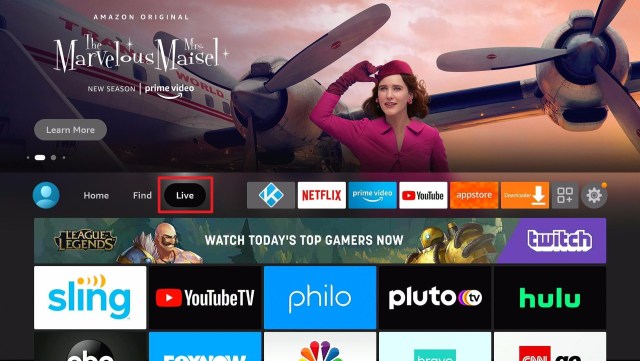
Live Tab

From here, we can see all the live tv apps available on the Amazon App Store.

How to Update Firestick (8)


List of Popular Apps

We can see next to the Live tab is a selection of a few but mostly used apps on Firestick.

How to Update Firestick (9)


Apps and Channels

If you are having a hard time looking for your installed apps, or channels, then you just have to scroll over the three-box and plus icon.

How to Update Firestick (10)


Clicking this icon will show you your installed Apps and Games.

How to Update Firestick (11)


Settings

One of the most important functions of any interface is the Settings. And of course, there is a new set of settings tab for the new update of our Amazon Firestick.

How to Update Firestick (12)


You can easily choose which function you like to change in the Settings tab.

How to Update Firestick (13)


New Update Home Page

Almost the same but still different. This is how we describe our new home page interface after updating the Amazon Firestick.

This portion includes 27 categories for users to navigate, explore and have an amazing Amazon firestick experience.


Popular Movies and TV Shows – From your Subscriptions

How to Update Firestick (15)


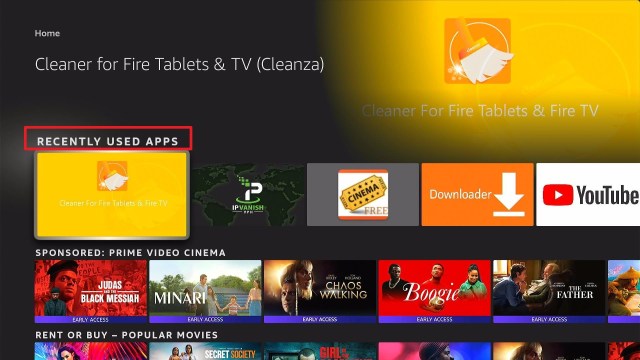
Recently Used Apps

How to Update Firestick (14)


Sponsored: Prime Video Cinema

How to Update Firestick (16)


Rent or Buy – Popular Movies

How to Update Firestick (17)


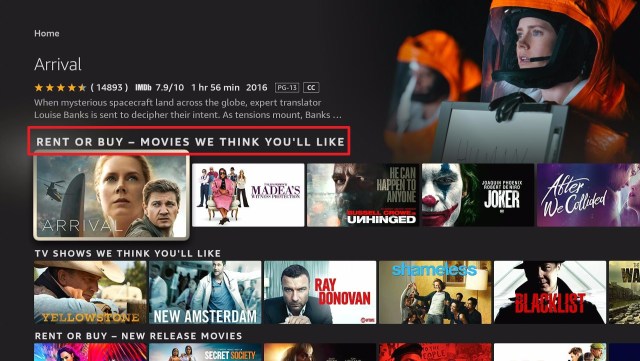
Rent or Buy – Movies We Think You’ll Like

How to Update Firestick (18)


TV Shows We Think You’ll Like

How to Update Firestick (19)


Rent or Buy – New Release Movies

How to Update Firestick (20)


Martial Arts Movies

How to Update Firestick (21)


Kids and Family Movies

How to Update Firestick (22)


Rent – New Releases Movies

How to Update Firestick (23)


$9.99 Or Less Movies Deals

How to Update Firestick (24)


Drama TV


Drama Movies


Science Fiction TV


Rent or Buy – Kids and Family Movies


Foreign TV


Country Movies


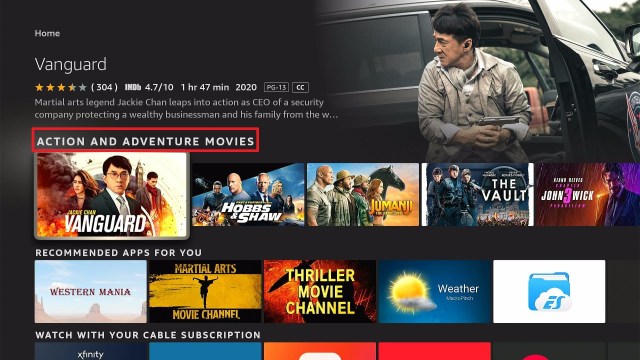
Action and Adventure Movies


Recommended Apps for You


Watch with Your Cable Subscription


Top Free Games


Popular Games for You


Celebrate National Pet Day


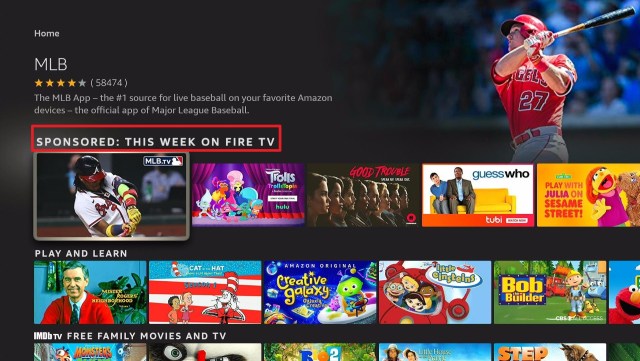
Sponsored: This Week on Fire TV


Play and Learn


IMDb TV Free Family Movies and TV


Stream Safely with a VPN

Surfshark vpn

Using the Amazon Firestick is fun. Although sometimes you may experience being blocked by a lot of content. Especially those that are not available in your region. Because of this, you won’t utilize the full potential of your firestick device.

If you want to completely use your device to the limit, you will need help from a VPN.

A VPN gives so many advantages when using Firestick. And you will have so much more enjoyable if you will be using a premium VPN. You see, using free ones is a little dangerous. That’s why we always recommend using Surfshark.

Surfshark is a tested and proven VPN that satisfies its user by giving a lot of premium and great features when using the Amazon Fire TV.

Some of these benefits are:

  • Adds up a wall of protection from your ISP and from hackers at all costs.
  • Connects you to other servers in different parts of the world to access geo-restricted content.
  • Helps you access and easily download shows from torrent sites.
  • Encrypts your connections and data
  • Serves as a shield against  malware
  • Speeds up your internet connection
  • Prevents Firestick Buffering and Kodi Buffering
  • Has 3200+ servers in 65 countries

Install Surfshark on Firestick

Best Surfshark Deal


How to Install Surfshark on Firestick with Screenshots

If your Firestick still has the older interface, read this article to learn how to update it: Update Firestick Interface.

You can download Surfshark directly from the Amazon App store. It will be easy for you to find Surfshark with your Firestick’s Find feature. Refer to our screenshots below.

Follow our screenshots below to install the Surfshark VPN app on your Fire TV stick.

1. Go to the Home screen of your Firestick.

step 1 Install Surfshark VPN on Firestick


2. Navigate towards the Find tab. Press the Search button from the resulting dropdown.

step 2 Install Surfshark VPN on Firestick


3. Type in the keyword of Surfshark and select from the suggestions that will appear.

step 3 Install Surfshark VPN on Firestick


4. Click the official Surfshark icon from your search results.

step 4 Install Surfshark VPN on Firestick


5. Press the Download (You own it) button.

step 5 Install Surfshark VPN on Firestick


6. The Surfshark VPN installer will download on your device.

step 6 Install Surfshark VPN on Firestick


7. Surfshark VPN’s app will automatically install itself on your Fire TV stick.

step 7 Install Surfshark VPN on Firestick


8. Press the Open button after completing Surfshark VPN’s installation process.

step 8 Install Surfshark VPN on Firestick


9. Please wait for the Surfshark VPN to load its user interface.

step 9 Install Surfshark VPN on Firestick


10. You can now log in with your Surfshark VPN account credentials.

step 10 Install Surfshark VPN on Firestick

Learn more about Surfshark and Grab the Best Surfshark Deal Now!


Install Surfshark on Firestick

Best Surfshark Deal

Other VPNs to Consider

NordVPN (Best for Streaming)

Best Features

  • 5000+ Server in 50+ Countries 
  • Military-Grade Encryption
  • Fast Connection Speed
  • Suitable to a lot of devices
  • No-Log Policy

Prices
  • Complete $5.89 per month (64% Discount)
  • Plus $4.59 per month (56% Discount)
  • Standard $3.69 per month (55% Discount)

Best Features

  • 750+ High-speed VPN Servers in 43 Locations
  • Military-Grade Encryption
  • Fastest HD Streaming and Gaming
  • 30-Day Money-Back Guarantee
  • Unlimited Data & Devices
  • No-Log Policy

Prices
  • 3 Years $1.99 per month (82% Discount)
  • 1 Years $3.29 per month (70% Discount)
  • 1 Month $10.99 per month

IPVanish VPN (Most Secure)

Best Features

  • 1200+ Servers in 60+ Countries around the world
  • Unlimited Connections
  • No-Log Policy
  • Top Notch Military-Grade VPN Protocols and Encryptions
  • 100% Safe and Secured
  • Most Trusted VPN
  • Best VPN for Firestick
  • 30-Day Money-Back Guarantee

Prices
  • Yearly $3.99 per month (63% Discount) – 30 days risk free + Ransomware & Malware Protection
  • Quarterly $5.32 per month (51% Discount)
  • Monthly $10.99 per month

For more VPN discounts, go to ReviewVPN Deals and purchase the best VPN for you.


Opinion

It’s pretty amazing. Although a lot has changed from the previous version compared to the new one, we can say that the upgrade is still awesome.

One noticeable con is how we usually search for shows and apps. It changed a lot, we can no longer see the magnifying glass. In order to search, we have to go to find, and then go to Seach, before we type. Compared to the previous version, once we click the magnifying glass, we are good to go. We can immediately type any topic we like to search.

But all in all, the update was really fantastic.


Final Words

We hope that this article was able to help you how to update your Amazon Firestick.

How to Install Christian Movie Channel on Firestick

Overview

In this article, I will be showing you how to install Christian Movie Channel on your Firestick device.


Christian Movie Channel is a free streaming app that features faith-based and inspiring movies that you can watch on your Firestick device. This app also allows you to upload videos, create your channel, and advertise on Christian Movie Channel so it’s a good start for those who would like to share their content on their Christian life.


Install Christian Movie Channel on Firestick Guide

Christian Movie Channel is an official app on the Amazon App Store so you can directly download the app without having to jailbreak your Firestick. For the steps on how to install Christian Movie Channel on your Firestick device, you may follow the guide below:

  1. Go to “Search”.
  2. You may use the Alexa voice command or simply type in “Christian Movie Channel”.
  3. Tap on the icon of the application to download.
  4. Select “Get”.
  5. Then wait for the app to be installed.
  6. Once done, click “Open” to launch the app.
  7. There you have it, Christian Movie Channel is now installed and you can start browsing the app through your Firestick device.


ANONYMOUSLY


If your Firestick still has the older interface, read this article to learn how to update it: Update Firestick Interface.


Install Christian Movie Channel on Firestick with Screenshots

1. Click FIND.

Movie Nite 1

2. Click Search.

Movie Nite2


3. Type in “Christian Movie Channel”.

Install Christian Movie Channel


4. Tap on the icon of the application to download.

Install Christian Movie Channel 2


5. Select “Get”.

Install Christian Movie Channel 3


6. Then wait for the app to be installed.

Install Christian Movie Channel 4


7. Once done, click “Open” to launch the app.

Install Christian Movie Channel 5


8. There you have it, Christian Movie Channel is now installed and you can start browsing the app through your Firestick device.

Install Christian Movie Channel 6


Grab your subscription now!

Click here to get the lowest price on Surfshark through our exclusive limited-time offer.


App Features

Interface

  • In the Homescreen is a featured movie content that you can start watching in just one click
  • The app has the following categories: B-Roll, Christian Movie Connect, and Christian Movie Trailers
  • Once you click on a movie, you’ll be able to see the following details:
    • Views
    • Length of video
    • Synopsis 
    • HD quality videos
  • It has a search function on the bottom of the home screen
  • It has an option to refresh content. Once you click on it, the featured movie will change
  • It has a tab wherein you can upload your videos 
  • There’s also a tab wherein you can get your channel
  • A tab wherein you can advertise on Christian Movie Channel with preroll-and-post-roll-videos


Video Quality

The videos available are in HD quality.


Playing Speed 

Christian Movie Channel is a fast-loading app so the video will immediately play after clicking on it.


Pros and Cons

Pros

  • The app is easy to navigate since there aren’t a lot of categories and commands
  • You can upload your videos to the app 
  • Christian Movie Channel allows you to have your channel inside Christian Movie Channel
  • You can reach new customers through advertisements in the app
  • There are no ads
  • The app is easy to install from the Amazon Appstore
  • It is 100% free
  • No premium version so no need to subscribe to get additional content
  • There’s no need to register to access the app

Cons

  • The app only plays trailers and short clips
  • It buffers
  • There’s no subtitle support
  • There is no setting


YOUR INTERNET ACTIVITY IS BEING WATCHED

ReviewVPN cannot attest to the legality, security and privacy of the applications discussed on this site. It is highly recommended that you use a VPN service while streaming or using Kodi.

Currently, your IP 216.73.216.1 is visible to everyone and your Browser is being tracked by Advertisers & ISP Provider.

Save 65% Now

Limited Time Offer

Here are the main reasons why you must use a VPN:

  • Your activities are hidden from your ISP, the government, and from the apps you are using.
  • You can access additional movies and TV streams.
  • ISP attempts to throttle are thrwarted thus reducing buffering issues.
  • Geographically restricted content like Netflix and Hulu can be unblocked.

A VPN works be replacing your ISP-assigned IP address and creating an encrypted tunnel. We recommend the no log service offered by IPVanish. It works well on a Firestick and offers the fastest possible speeds.

Special Limited Time Offer - Get IPVanish


FAQs

Is Christian Movie Channel safe? 

Yes, Christian Movie Channel is safe. But if you want a more safe and more secure streaming experience then you might want to consider getting a VPN.


Is Christian Movie Channel legal?

Yes, Christian Movie Channel is legal. It is a verified application of Amazon so you can directly install it through the AppStore on your Firestick device.


Is it free?

Yes, Christian Movie Channel is 100% free. No need for a subscription just so you could watch its content or access additional content.


Is there a need for registration?

No need for registration, you can immediately browse Christian Movie Channel right after installing it on your Firestick device.


How long has it been around?

Christian Movie Channel was released in June 2015.


Do I Need A VPN to Use This App?

You will not be needing a VPN to install and use this app but what you do after is where a VPN will be needed. Streaming online exposes your identity making your data vulnerable to potential phishers and hackers. So what you can do to avoid this is to have a VPN. A VPN like Surfshark will give you an anonymous IP address so these hackers will not be able to get the data stored in your device. Aside from that, you’ll get the following benefits:

  • You’ll get to access geo-restricted contents, websites, and applications by using an IP address from 70+ different countries 
  • Has a total of 3,200 VPN servers in 65 locations to choose from
  • You can avoid ISP throttling by having your internet activity hidden from your ISP 
  • You can enjoy unlimited streaming without lags and buffers
  • Your connection will be encrypted thus, maintaining your online activity as private
  • Download any content that you want without worrying that you’ve already reached your data cap

 To learn more about Surfshark, you can read this article: reviewvpn.com/install-surfshark-on-firestick/


Install Surfshark on Firestick

Best Surfshark Deal


How to Install Surfshark VPN on Firestick

If your Firestick still has the older interface, read this article to learn how to update it: Update Firestick Interface.

You can download Surfshark directly from the Amazon App store. It will be easy for you to find Surfshark with your Firestick’s Find feature. Refer to our screenshots below.

1. Go to the Home screen of your Firestick.

step 1 Install Surfshark VPN on Firestick


2. Navigate towards the Find tab. Press the Search button from the resulting dropdown.

step 2 Install Surfshark VPN on Firestick


3. Type in the keyword of SurfShark and select from the suggestions that will appear.

step 3 Install Surfshark VPN on Firestick


4. Click the official SurfShark icon from your search results.

step 4 Install Surfshark VPN on Firestick


5. Press the Download (You own it) button.

step 5 Install Surfshark VPN on Firestick


6. The SurfShark VPN installer will download on your device.

step 6 Install Surfshark VPN on Firestick


7. SurfShark VPN’s app will automatically install itself on your Fire TV stick.

step 7 Install Surfshark VPN on Firestick


8. Press the Open button after completing SurfShark VPN’s installation process.

step 8 Install Surfshark VPN on Firestick


9. Please wait for the SurfShark VPN to load its user interface.

step 9 Install Surfshark VPN on Firestick


10. You can now log in with your SurfShark VPN account credentials.

step 10 Install Surfshark VPN on Firestick

Learn more about Surfshark and Grab the Best Surfshark Deal Now!


Install Surfshark on Firestick

Best Surfshark Deal


Other VPNs to Consider

NordVPN (Best for Streaming)

Best Features

  • 5000+ Server in 50+ Countries 
  • Military-Grade Encryption
  • Fast Connection Speed
  • Suitable to a lot of devices
  • No-Log Policy

Prices
  • Complete $5.89 per month (64% Discount)
  • Plus $4.59 per month (56% Discount)
  • Standard $3.69 per month (55% Discount)

Best Features

  • 750+ High-speed VPN Servers in 43 Locations
  • Military-Grade Encryption
  • Fastest HD Streaming and Gaming
  • 30-Day Money-Back Guarantee
  • Unlimited Data & Devices
  • No-Log Policy

Prices
  • 3 Years $1.99 per month (82% Discount)
  • 1 Years $3.29 per month (70% Discount)
  • 1 Month $10.99 per month

IPVanish VPN (Most Secure)

Best Features

  • 1200+ Servers in 60+ Countries around the world
  • Unlimited Connections
  • No-Log Policy
  • Top Notch Military-Grade VPN Protocols and Encryptions
  • 100% Safe and Secured
  • Most Trusted VPN
  • Best VPN for Firestick
  • 30-Day Money-Back Guarantee

Prices
  • Yearly $3.99 per month (63% Discount) – 30 days risk free + Ransomware & Malware Protection
  • Quarterly $5.32 per month (51% Discount)
  • Monthly $10.99 per month


For more VPN discounts, go to ReviewVPN Deals and purchase the best VPN for you.

Click here to get the lowest price on Surfshark through our exclusive limited-time offer.


Conclusion

Though this app offers faith-based content, I think there are better Christian Movie applications that you can download on your device. This Channel has movie content but only trailers can be played and most of their videos are just short clips. But of course, it still depends on the user whether they’ll like the app or not so if you want to install Christian Movie Channel then you may go ahead and do so.

Thank you for reaching the end of this article. We hope we were able to give you an overview of the Christian Movie Channel on Firestick. Enjoy streaming! 


What Is Your Favorite Streaming App? Cast Your Vote Below.

How To Install HIDIVE On Firestick

HIDIVE App Overview

In this article, I will be teaching you how to install HIDIVE on your Amazon Firestick.


People who view anime as much as they can never see this application as a waste of time. It is an additional gem to every anime geek, mainly if it contains uncut shows you’ve never seen before. Its obscure content can be the start of your journey if you want to stream anime fresh and instantly.

HIDIVE App is your newest way to stream various Anime like GATE, Food Wars!, and many more! Its growing collection of the anime catalog includes the latest dubbed episodes, fan-favorite shows, and new anime content. It is all available with just one easy way to install and download.

In 2018, HIDIVE announced the release of the application in Amazon Fire, making it available to more audiences and adding at least 30 million users. HIDIVE subscribers can now enjoy an HD ad-free streaming application on multiple platforms. It is now available on the Fire TV app makes everything way more convenient than it used to be. As we go on, we will be discussing how you can install and make better use of the HIDIVE App.


ANONYMOUSLY

How to Install HIDIVE On Firestick

Since the release of HIDIVE in the Amazon App, it is now easier to download and integrate it on your Firestick. There is no need to sideload the application or use the download manager for the installation.

Follow these simple steps:

  1. On your Firestick home screen,  look for the Search button
  2. Type in HIDIVE
  3. Select HIDIVE on the search results
  4. Click the icon and choose Get
  5. HIDIVE will start its download and installation
  6. Stand by until the application completes its download
  7. Click Open to launch the app
  8. You can now use HIDIVE on your Firestick device


If your Firestick still has the older interface, read this article to learn how to update it: Update Firestick Interface.


Install HIDIVE On Firestick with Screenshots

1. Click FIND.

Movie Nite 1


2. Click Search.

Movie Nite2


3. Type in HIDIVE.

Install HIDIVE


4. Click the icon.

Install HIDIVE1


5. Click Download.

Install HIDIVE3


6. Click Open to launch the app.

Install HIDIVE3


7. You can now use HIDIVE on your Firestick device.

Install HIDIVE5


Note: After opening the Application, you can either:

  • Enter your log-in credentials. Activate your subscription on the Fire TV
  • Go to HIDIVE.com and sign up before using the HIDIVE app on Fire TV
  • Click “Browse Now” to proceed with the application and see the interface, latest update, and categories available.


YOUR INTERNET ACTIVITY IS BEING WATCHED

ReviewVPN cannot attest to the legality, security and privacy of the applications discussed on this site. It is highly recommended that you use a VPN service while streaming or using Kodi.

Currently, your IP 216.73.216.1 is visible to everyone and your Browser is being tracked by Advertisers & ISP Provider.

Save 65% Now

Limited Time Offer

Here are the main reasons why you must use a VPN:

  • Your activities are hidden from your ISP, the government, and from the apps you are using.
  • You can access additional movies and TV streams.
  • ISP attempts to throttle are thrwarted thus reducing buffering issues.
  • Geographically restricted content like Netflix and Hulu can be unblocked.

A VPN works be replacing your ISP-assigned IP address and creating an encrypted tunnel. We recommend the no log service offered by IPVanish. It works well on a Firestick and offers the fastest possible speeds.

Special Limited Time Offer - Get IPVanish


Legal Disclaimer: ReviewVPN.com does not encourage or endorse any illegal activity involved in the usage of services and applications referenced on this site. We do not verify the licensing agreements of services. The end-user is wholly responsible for ensuring that any media accessed through these services does not violate copyright and/or licensing laws. ReviewVPN does not promote, link to, or receive compensation from any Apps and IPTV services.


Install Surfshark on Firestick

Best Surfshark Deal


App Features

Content

  • 500+ anime shows and movies to watch such as Domestic Girlfriend, Run With The Wind, Food Wars!, and many more
  • DUBCAST editions
  • Exclusive anime contents with unseen cuts that you have never seen before
  • Movies and other genres are also in the HIDIVE catalog


Interface

  • You can add shows to your queue or favorite category
  • The succeeding episodes are on autoplay
  • Can host a watch party
  • Customizable subtitles
  • You can sync your watch list on multiple devices to instantly pick up where you left off.


Pros and Cons

Pros

  • The latest anime contents are highly accessible
  • Dubs and simulcast subs
  • You have category and genre sections that provide you with what anime to search for
  • Exclusive mature shows
  • Customizable subtitles depending on your language preference

Cons

  • The application is not free and needs a HIDIVE subscription
  • No search options
  • The interface is not user-friendly and not aesthetically updated
  • No offline downloads
  • Few recognizable shows


FAQs

What is HIDIVE?

HIDIVE is a streaming application that features the newest anime content, shows, and the latest updates on your favorite anime episodes.


Is HIDIVE App free of subscription?

No. It is not free. You have to have your subscription on its site.


Where can I find the HIDIVE Application?

It is available in Amazon App, and you can directly download it on your device.


Is it only available on Firestick devices?

No. You can also stream using your mobile devices. It is available on iOS, Android, Apple TV, and Fire TV.


Streaming Safely with a VPN

It is not easy to stream online without actually worrying if you are doing it safely. One of the constant interruptions that HIDIVE, and also other applications have, is the glitch from the internet connection and being monitored by the Internet Service Provider. 

These issues need concrete measures to stream everything online safely and securely. Good thing, a Virtual Private Network exists. VPN serves as the wall that provides you with everything you need – to keep your identity hidden and make you trust your internet connection without any hazards.

There are different VPNs that you can use to protect yourself. Most of them are showcasing 100% free but not everything is accurate. We strongly recommend the use of Surfshark. It is the best VPN when streaming and also has the best security with excellent speed. Here are some of the reasons why:

  • It secures protection on your ISP when you are streaming the app.
  • It provides safety measures from hackers that can track your identity.
  • You can stay anonymous
  • Keeps your data from harmful virus or malware
  • It makes your internet speed faster

Note: For more information about Surfshark, please read our Surfshark Review.


Grab your subscription now!


How to Install Surfshark VPN on Firestick

If your Firestick still has the older interface, read this article to learn how to update it: Update Firestick Interface.

Follow our screenshots below to install the SurfShark VPN app on your Fire TV stick.

1. Go to the Home screen of your Firestick.

step 1 Install Surfshark VPN on Firestick


2. Navigate towards the Find tab. Press the Search button from the resulting dropdown.

step 2 Install Surfshark VPN on Firestick


3. Type in the keyword of SurfShark and select from the suggestions that will appear.

step 3 Install Surfshark VPN on Firestick


4. Click the official SurfShark icon from your search results.

step 4 Install Surfshark VPN on Firestick


5. Press the Download (You own it) button.

step 5 Install Surfshark VPN on Firestick


6. The SurfShark VPN installer will download on your device.

step 6 Install Surfshark VPN on Firestick


7. SurfShark VPN’s app will automatically install itself on your Fire TV stick.

step 7 Install Surfshark VPN on Firestick


8. Press the Open button after completing SurfShark VPN’s installation process.

step 8 Install Surfshark VPN on Firestick


9. Please wait for the SurfShark VPN to load its user interface.

step 9 Install Surfshark VPN on Firestick


10. You can now log in with your SurfShark VPN account credentials.

step 10 Install Surfshark VPN on Firestick

Learn more about Surfshark and Grab the Best Surfshark Deal Now!


Install Surfshark on Firestick

Best Surfshark Deal


Other VPNs to Consider

NordVPN (Best for Streaming)

Best Features

  • 5000+ Server in 50+ Countries 
  • Military-Grade Encryption
  • Fast Connection Speed
  • Suitable to a lot of devices
  • No-Log Policy

Prices
  • Complete $5.89 per month (64% Discount)
  • Plus $4.59 per month (56% Discount)
  • Standard $3.69 per month (55% Discount)

Best Features

  • 750+ High-speed VPN Servers in 43 Locations
  • Military-Grade Encryption
  • Fastest HD Streaming and Gaming
  • 30-Day Money-Back Guarantee
  • Unlimited Data & Devices
  • No-Log Policy

Prices
  • 3 Years $1.99 per month (82% Discount)
  • 1 Years $3.29 per month (70% Discount)
  • 1 Month $10.99 per month

IPVanish VPN (Most Secure)

Best Features

  • 1200+ Servers in 60+ Countries around the world
  • Unlimited Connections
  • No-Log Policy
  • Top Notch Military-Grade VPN Protocols and Encryptions
  • 100% Safe and Secured
  • Most Trusted VPN
  • Best VPN for Firestick
  • 30-Day Money-Back Guarantee

Prices
  • Yearly $3.99 per month (63% Discount) – 30 days risk free + Ransomware & Malware Protection
  • Quarterly $5.32 per month (51% Discount)
  • Monthly $10.99 per month


For more VPN discounts, go to ReviewVPN Deals and purchase the best VPN for you.

Click here to get the lowest price on Surfshark through our exclusive limited-time offer.


Alternative App

If you are an anime superfan, there are tons of streaming apps where you can get your latest dosage of an anime show.

Here is the list of alternative apps for HIDIVE:


Conclusion

HIDIVE can be your go-to anime streaming application. Although, it does not offer unique features like other streaming platforms. But, you can still enjoy HIDIVE if you love doing a watch party or talking about uncensored episodes. Its wide-ranged catalog of anime shows is enough for you to keep updated and be on track with your binge-watching habits.

Even having less recognizable anime shows is a fun way to explore new shows that might be your next favorite.

We hope this article provided you with better information about HIDIVE and how you can install and use it.


What Is Your Favorite Streaming App? Cast Your Vote Below.

Watch VRV Website On All Devices

VRV Website Overview

This article will help you watch VRV websites on all devices.


VRV is an over-the-top streaming service owned by Otter Media that offers lots of anime, speculative fiction, and other gaming-related channels.

This app also offers a premium membership without ads, exclusive content, and updates for $9.99 per month.

It is the home of your favorite anime channels, communities celebrating anime, video games, comics, and more about anime.

VRV is geo-restricted, which means that you cannot access this website outside the US. They strictly won’t permit any non-US base viewers to access their website.

This app works well on any device such as ios, android, windows, and Firestick. Continue reading, and we will show you how you can watch on this website.


ANONYMOUSLY


If your Firestick still has the older interface, read this article to learn how to update it: Update Firestick Interface.


How to Watch VRV on Firestick with Screenshots

To stream VRV on Firestick, you need to install the Amazon Silk Browser first. If you are outside the US, you need to use a VPN to access this website, and we recommend Surfshark as your best choice.

1. Click FIND.

Movie Nite 1

2. Click Search.

Movie Nite2


3. Search for the Amazon Silk.

Step 2 Install Watch 4Anime on Firestick, Android, Windows, and iOS


4. Select the icon of Amazon Silk.

Step 3 Install Watch 4Anime on Firestick, Android, Windows, and iOS


5. Click Download.

Step 4 Install Watch 4Anime on Firestick, Android, Windows, and iOS


6. Before you open the browser, connect your VPN to the US area.

Watch VRV


6. Click Open to launch the Silk browser.

Step 5 Install Watch 4Anime on Firestick, Android, Windows, and iOS


7. Amazon Silk – Web Browser is Installed.

Step 6 Install Watch 4Anime on Firestick, Android, Windows, and iOS


8. Go to the search bar and type in “https://vrv.co” and click Go.

Watch VRV2


9. There you go! You can now stream on VRV on your Firestick. Create an account by entering your email and password and then click enter.

Watch VRV3

How to Watch VRV on Android

Here is a step-by-step Guide on how you can stream on VRV on Android.

  1. Connect your VPN in the US area. 
  2. After that, launch any browser on your android device.
  3. In the search bar, type in  https://vrv.co/ and Click Go.
  4. Create an account by entering your email and password and then click enter.
  5. A box will pop up, and click on a 30-Days free trial button.
  6. That’s it. Enjoy watching!


How to Watch VRV on iOs Devices

Here is a step-by-step guide on how you can watch VRV on iOS.

  1. Connect your VPN in the US area. 
  2. On your iOS device, go to your safari browser.
  3. In the search bar, type in  https://vrv.co/ and Click Go
  4. Create an account by entering your email and password and then click enter.
  5. A box will pop up, and tap on a 30-Days free trial button. 
  6. That’s it. Enjoy watching!


How to Watch VRV on Windows

  1. Connect your VPN in the US area. 
  2. Launch any browser on your computer, PC, or windows. 
  3. In the search bar, type in  https://vrv.co/ and Click Go.
  4. Create an account by entering your email and password and click enter.
  5. A box will pop up, and click on a 30-Days free trial button. 
  6. That’s it. Enjoy watching!


Install Surfshark on Firestick

Best Surfshark Deal


Legal Disclaimer: ReviewVPN.com does not encourage or endorse any illegal activity involved in the usage of services and applications referenced on this site. We do not verify the licensing agreements of services. The end-user is wholly responsible for ensuring that any media accessed through these services does not violate copyright and/or licensing laws. ReviewVPN does not promote, link to, or receive compensation from any Apps and IPTV services.


Features of VRV Website

Interface

  • It has a beautifully designed and user-friendly UI.
  • Search button to quickly find contents.
  • Easy to navigate on any device. 
  • You can customize your profile by changing your avatar and username.


VRV Premium

  • You can stream smoothly without ads or any interruption. 
  • Advance alert for anime updates.
  • Access exclusive content. 
  • Upgrade to premium and link other accounts such as Crunchyroll, Mondo, Rooster Teeth, Cartoon Hangover, and Hidive.


Contents

  • Anime series and movies are grouped into categories.
  • All videos are available to view in a good quality of 240p, 360p, and 480p.
  • It supports subtitles in multi-languages such as English, Dutch, Español, Portuguese and Turkish. 
  • Good quality of sounds. 
  • Each content is provided with details such as brief synopsis, released date, and subtitles.
  • You can sort contents from Oldest First and Newest First. 
  • It has a ‘Add to Watchlist button to compile all of your favorite content.
  • They have a complete series of old animes and an updated list of the latest anime series and movies. 


VRV Select

  • This website content is not all about anime. They also have comic-based movies and series.
  • All contents are organized alphabetically. 


YOUR INTERNET ACTIVITY IS BEING WATCHED

ReviewVPN cannot attest to the legality, security and privacy of the applications discussed on this site. It is highly recommended that you use a VPN service while streaming or using Kodi.

Currently, your IP 216.73.216.1 is visible to everyone and your Browser is being tracked by Advertisers & ISP Provider.

Save 65% Now

Limited Time Offer

Here are the main reasons why you must use a VPN:

  • Your activities are hidden from your ISP, the government, and from the apps you are using.
  • You can access additional movies and TV streams.
  • ISP attempts to throttle are thrwarted thus reducing buffering issues.
  • Geographically restricted content like Netflix and Hulu can be unblocked.

A VPN works be replacing your ISP-assigned IP address and creating an encrypted tunnel. We recommend the no log service offered by IPVanish. It works well on a Firestick and offers the fastest possible speeds.

Special Limited Time Offer - Get IPVanish


Compatible Devices

Here are some of the compatible devices for the VRV website.

  • Windows PC
  • Android
  •  iOS
  • Amazon Fire TV
  • Android TV
  • Roku TV
  • Apple TV


Pros and Cons

Pros

  • Beautifully designed and easy-to-use UI.
  • It provides a 30 day free trial.
  • Allows you to link other accounts.
  • It has a large database.

Cons

  • It serves ads for non-premium accounts.
  • It is geo-restricted and only works within the US area.


Why do I need a VPN?

This website is geo-restricted, which means it is only available within the US area only. That is why we recommend downloading a Virtual Private Network to bypass any restricted content and destroy geo-block. This VPN allows you to access this website and other geo-restricted websites and apps anywhere and anytime you want.

We highly recommend using Surfshark as your best choice as it is one of the fastest and most reliable VPNs that you can have. 

We list down some of the benefits Surfshark offers:

  • Bypass censorship and restrictions.
  • Destroys geo-block and gains access to different content globally.
  • Has a total of 3,200 VPN servers in 65 locations to choose from
  • Zero logs and no IP address leaks. 
  • A high standard of AES 256-bit encryptions will safeguard all of your data.
  • Prevent ISPs from interfering with your connection and speed up your internet.
  • It gives you unlimited bandwidth and makes your internet speed faster. 
  • Keep your identity anonymous to protect you from hackers, especially when you are using public wi-fi.
  • It provides a secure environment for everyday internet activity.
  • Keep your file protected from harmful malware.

Note: For more information about Surfshark, please read our Surfshark Review.


Grab your subscription now!

Click here to get the lowest price on Surfshark through our exclusive limited-time offer.


How to Install Surfshark VPN on Firestick

If your Firestick still has the older interface, read this article to learn how to update it: Update Firestick Interface.

You can download Surfshark directly from the Amazon App store. It will be easy for you to find Surfshark with your Firestick’s Find feature. Refer to our screenshots below.

1. Go to the Home screen of your Firestick.

step 1 Install Surfshark VPN on Firestick


2. Navigate towards the Find tab. Press the Search button from the resulting dropdown.

step 2 Install Surfshark VPN on Firestick


3. Type in the keyword of SurfShark and select from the suggestions that will appear.

step 3 Install Surfshark VPN on Firestick


4. Click the official SurfShark icon from your search results.

step 4 Install Surfshark VPN on Firestick


5. Press the Download (You own it) button.

step 5 Install Surfshark VPN on Firestick


6. The SurfShark VPN installer will download on your device.

step 6 Install Surfshark VPN on Firestick


7. SurfShark VPN’s app will automatically install itself on your Fire TV stick.

step 7 Install Surfshark VPN on Firestick


8. Press the Open button after completing SurfShark VPN’s installation process.

step 8 Install Surfshark VPN on Firestick


9. Please wait for the SurfShark VPN to load its user interface.

step 9 Install Surfshark VPN on Firestick


10. You can now log in with your SurfShark VPN account credentials.

step 10 Install Surfshark VPN on Firestick

Learn more about Surfshark and Grab the Best Surfshark Deal Now!


Other VPNs to Consider

NordVPN (Best for Streaming)

Best Features

  • 5000+ Server in 50+ Countries 
  • Military-Grade Encryption
  • Fast Connection Speed
  • Suitable to a lot of devices
  • No-Log Policy

Prices
  • Complete $5.89 per month (64% Discount)
  • Plus $4.59 per month (56% Discount)
  • Standard $3.69 per month (55% Discount)

Best Features

  • 750+ High-speed VPN Servers in 43 Locations
  • Military-Grade Encryption
  • Fastest HD Streaming and Gaming
  • 30-Day Money-Back Guarantee
  • Unlimited Data & Devices
  • No-Log Policy

Prices
  • 3 Years $1.99 per month (82% Discount)
  • 1 Years $3.29 per month (70% Discount)
  • 1 Month $10.99 per month

IPVanish VPN (Most Secure)

Best Features

  • 1200+ Servers in 60+ Countries around the world
  • Unlimited Connections
  • No-Log Policy
  • Top Notch Military-Grade VPN Protocols and Encryptions
  • 100% Safe and Secured
  • Most Trusted VPN
  • Best VPN for Firestick
  • 30-Day Money-Back Guarantee

Prices
  • Yearly $3.99 per month (63% Discount) – 30 days risk free + Ransomware & Malware Protection
  • Quarterly $5.32 per month (51% Discount)
  • Monthly $10.99 per month


For more VPN discounts, go to ReviewVPN Deals and purchase the best VPN for you.


Grab the Best Surfshark Deal Now!


Alternatives for VRV Website

Since this website is geo-restricted, we list down some of the best websites and alternatives to VRV. They are free and available at any location and to know more about the website, kindly read their corresponding articles. 


FAQs

Is there an official app for this website?

Yes, VRV is an official app of the Amazon store, Google Play store, and App Store.


Is this website free?

Yes, this website is free but has a premium subscription. 


Is this website safe?

Yes, this website is safe and free from any virus, but to ensure your safety, we recommend using Surfshark.


Is this website legal?

Yes, VRV is a legal website and offers 100% legal content.


Conclusion

VRV website is one of the websites with a large collection of anime series and movies. It is one of the best streaming apps that you can visit. However, the only downside of this app is it strictly blocks viewers from outside the US area and VRV is partnered with other popular streaming services where if you get a premium subscription, you will be able to link other application accounts altogether. We hope that this article gives you information about the VRV website and helps you with how to watch on all devices. 

How to Install VRV App‬ on Firestick

VRV App‬ Overview

This article will help you install the VRV app‬ on Firestick. 


VRV App is the first fanbase streaming service that offers various anime series and movies in different genres. It also brings you the old and latest comic-based TV series.

This app has partnered with popular streaming services like Crunchyroll and more. However, this app is geo-restricted, which means it is only available in a specific area. 

It also offers a premium subscription of $9.99 per month, in which by subscribing, you will get access to its premium features. VRV app has a simple and user-friendly interface and works well on any device such as the Firestick. 

The good thing is it is an official Amazon app that’s why you do not need to Jailbreak your Firestick and Install the Downloader App.


How to Install the VRV app on Firestick

Follow these simple steps below.

  1. On your Firestick home screen, look for the Search button.
  2. Type in VRV App.
  3. Click on the suggestion.
  4. Select the Icon of the VRV App.
  5. Tap on the Get or Download button to install the app.
  6. Wait a few minutes for the app to be installed.
  7. Click Open to launch the app.
  8. There you go! Enjoy streaming on the VRV App.


Note: This app is geo-restricted, which is why you cannot see or install this app if you are outside the US area.


ANONYMOUSLY


Install Surfshark on Firestick

Best Surfshark Deal


Legal Disclaimer: ReviewVPN.com does not encourage or endorse any illegal activity involved in the usage of services and applications referenced on this site. We do not verify the licensing agreements of services. The end-user is wholly responsible for ensuring that any media accessed through these services does not violate copyright and/or licensing laws. ReviewVPN does not promote, link to, or receive compensation from any Apps and IPTV services.


Features of VRV App

Interface

  • Allows you to change your profile avatar and username.
  • Search button to quickly find content.
  • Easy to navigate even without using a mouse toggle. 
  • It has a “show mature contents” button to control content viewing.


Registration

You can easily create an account only by putting in an email address and password.


VRV Premium

  • Offer a premium subscription of $9.99 per month with a 30-day free trial.
  • There are no single ads and any interruptions. 
  • You will get notified first for every anime update.
  • It has exclusive content. 
  • You can link other accounts/channels altogether in one app. 
  • It allows you to download content and offline viewing.


Channels

You can stream in different streaming services using one app only, including:

  • Cartoon Hangover
  • Crunchyroll
  • Hidive
  • Mondo
  • Rooster Teeth
  • VRV Select


Contents

  • Contents are categorized alphabetically.
  • All videos are subbed and dubbed in different languages.
  • Video quality is in 240p, 360p, and 480p, 720p and 1080p.
  • Each content provided with info such as brief synopsis, released date, and parental control.
  • It has a ‘Add to Watchlist button to compile all of the contents of your favorite altogether
  • They have a complete series of anime.

Compatible Devices

Here are some of the compatible devices for the VRV app.

  • Android
  •  iOS
  • Amazon Fire TV
  • Android TV
  • Roku TV
  • Apple TV


YOUR INTERNET ACTIVITY IS BEING WATCHED

ReviewVPN cannot attest to the legality, security and privacy of the applications discussed on this site. It is highly recommended that you use a VPN service while streaming or using Kodi.

Currently, your IP 216.73.216.1 is visible to everyone and your Browser is being tracked by Advertisers & ISP Provider.

Save 65% Now

Limited Time Offer

Here are the main reasons why you must use a VPN:

  • Your activities are hidden from your ISP, the government, and from the apps you are using.
  • You can access additional movies and TV streams.
  • ISP attempts to throttle are thrwarted thus reducing buffering issues.
  • Geographically restricted content like Netflix and Hulu can be unblocked.

A VPN works be replacing your ISP-assigned IP address and creating an encrypted tunnel. We recommend the no log service offered by IPVanish. It works well on a Firestick and offers the fastest possible speeds.

Special Limited Time Offer - Get IPVanish


Pros and Cons

Pros

  • Easy to navigate UI.
  • It provides a 30-day free trial.
  • Allows you to link other accounts.
  • Unlimited content to view.

Cons

  • It serves ads for non-premium accounts.
  • Geo-restricted, which is why it only works within the US area.


Do I need a VPN?

VRV app is geo-restricted, which is why you cannot use nor install this app on your device if you are outside the US area. However, to solve this problem, you will need a Virtual Private Network to destroy geo-blocked and use it anywhere you are. 

We recommend using Surfshark on your devices, as it is one of the leading VPNs that will automatically hide your IP address and lets you connect this VPN service has more than 5,300 servers in 60+ worldwide locations. This VPN also uses a high standard of encryption to safeguard your data to keep you safe and protected from trackers or hackers. 

Here is the reason why it is our VPN of choice:

  • Bypass censorship and restrictions.
  • Destroys geo-block and gains access to different content globally.
  • Zero logs and no IP address leaks. 
  • A high standard of AES 256-bit encryptions will safeguard all of your data.
  • Prevent ISPs from interfering with your connection and speed up your internet.
  • It gives you unlimited bandwidth and makes your internet speed faster. 
  • Keep your identity anonymous to protect you from hackers, especially when you are using public wi-fi.
  • It provides a secure environment for everyday internet activity.
  • Keep your file protected from harmful malware.

Note: For more information about Surfshark, please read our Surfshark Review.


Grab your subscription now!

Click here to get the lowest price on Surfshark through our exclusive limited-time offer.


How to Install Surfshark VPN on Firestick

If your Firestick still has the older interface, read this article to learn how to update it: Update Firestick Interface.

You can download Surfshark directly from the Amazon App store. It will be easy for you to find Surfshark with your Firestick’s Find feature. Refer to our screenshots below.

1. Go to the Home screen of your Firestick.

step 1 Install Surfshark VPN on Firestick


2. Navigate towards the Find tab. Press the Search button from the resulting dropdown.

step 2 Install Surfshark VPN on Firestick


3. Type in the keyword of SurfShark and select from the suggestions that will appear.

step 3 Install Surfshark VPN on Firestick


4. Click the official SurfShark icon from your search results.

step 4 Install Surfshark VPN on Firestick


5. Press the Download (You own it) button.

step 5 Install Surfshark VPN on Firestick


6. The SurfShark VPN installer will download on your device.

step 6 Install Surfshark VPN on Firestick


7. SurfShark VPN’s app will automatically install itself on your Fire TV stick.

step 7 Install Surfshark VPN on Firestick


8. Press the Open button after completing SurfShark VPN’s installation process.

step 8 Install Surfshark VPN on Firestick


9. Please wait for the SurfShark VPN to load its user interface.

step 9 Install Surfshark VPN on Firestick


10. You can now log in with your SurfShark VPN account credentials.

step 10 Install Surfshark VPN on Firestick

Learn more about Surfshark and Grab the Best Surfshark Deal Now!


Install Surfshark on Firestick

Best Surfshark Deal


Other VPNs to Consider

NordVPN (Best for Streaming)

Best Features

  • 5000+ Server in 50+ Countries 
  • Military-Grade Encryption
  • Fast Connection Speed
  • Suitable to a lot of devices
  • No-Log Policy

Prices
  • Complete $5.89 per month (64% Discount)
  • Plus $4.59 per month (56% Discount)
  • Standard $3.69 per month (55% Discount)

Best Features

  • 750+ High-speed VPN Servers in 43 Locations
  • Military-Grade Encryption
  • Fastest HD Streaming and Gaming
  • 30-Day Money-Back Guarantee
  • Unlimited Data & Devices
  • No-Log Policy

Prices
  • 3 Years $1.99 per month (82% Discount)
  • 1 Years $3.29 per month (70% Discount)
  • 1 Month $10.99 per month

IPVanish VPN (Most Secure)

Best Features

  • 1200+ Servers in 60+ Countries around the world
  • Unlimited Connections
  • No-Log Policy
  • Top Notch Military-Grade VPN Protocols and Encryptions
  • 100% Safe and Secured
  • Most Trusted VPN
  • Best VPN for Firestick
  • 30-Day Money-Back Guarantee

Prices
  • Yearly $3.99 per month (63% Discount) – 30 days risk free + Ransomware & Malware Protection
  • Quarterly $5.32 per month (51% Discount)
  • Monthly $10.99 per month


For more VPN discounts, go to ReviewVPN Deals and purchase the best VPN for you.

Click here to get the lowest price on Surfshark through our exclusive limited-time offer.


Alternatives for VRV App

Since this website is geo-restricted, we list down some of the applications that offer the same content as VRV. They are free and available at any location and to know more about these apps, kindly read their corresponding articles. 


FAQs

History

VRV app is offered by Ellation, LLC and released in 2016 with over 1,000,000+ downloads.


Is the VRV App free?

Yes, this app is free but offers in-app purchases.


Is the VRV App safe?

Yes, this app is safe, but to ensure your safety, we recommend using Surfshark.


Is the VRV App legal?

Yes, VRV is a legal website and offers 100% legal content.


How much does VRV cost?

VRV premium costs $9.99 per month, but even without a premium membership, you can still watch shows.


Where can I get this App?

You can get this app on Amazon, Google Play, and the App Store.


Is there an official website for this App?

Yes, and you can visit them on https://vrv.co/ 


Conclusion

VRV app is one of the best streaming services that has a huge database of content. This app is a good option for anime, comics, and cartoon lovers. It is a subscription-based app that brings video-on-demand of anime, gaming, animation, sci-fi, and more. A popular streaming service that is easy to control and works well on any device. This app also has an official website that offers the same content. We hope that this article gives you information about the VRV app and helps you with how to install it on Firestick.


What Is Your Favorite Streaming App? Cast Your Vote Below.


How to Install MTV on Firestick

MTV Overview

This article will help you install the MTV app on your Firestick.

Listening to music has been a favorite pastime for many of us. It is scientifically proven that music tends to reduce stress, change your mood into a positive state, and help people feel relaxed and tranquil.


Music is more than the combination of notes or the correct application of musical instruments – it is the expression of the human race.

Most of us have experienced the visceral dynamic of watching our favorite artists, bands, and celebrities perform on stage. Ever since the invention of the radio and television, videos showing musical performances have dramatically evolved through the decades. 

Modern short video clips have featured various artists and musical teams singing while operating their preferred instruments. A channel called MTV or Music Television is a dedicated network distributing copyrighted media material.

Also known as music videos, these musical collections marked the debut of a new song or the release of an entire album. We often find ourselves wanting to sing along with them or imagining doing the unique stunts and refined instrument playing they accomplish. 

For avid musicians, tune-lovers, and practitioners, a software called the MTV app can become your worthwhile companion in streaming the newest music videos and media content. 


ANONYMOUSLY


What is the MTV app?

The MTV app is the online streaming software officially launched by the Music Television Network. It is the premier 24/7 music video platform available for cyberspace connectivity. MTV app users can watch full clips and stream music videos. The app also offers full access to original series episodes that originally air with their primary television channel.


Installing the MTV app on Firestick

Here is our brief guide on installing the MTV app on your Firestick.

  1. Open the Search bar of your Firestick. 
  2. Tap on Find.
  3. Type in: MTV.
  4. Select the official MTV app icon.
  5. Press the GET button for the MTV application to download. 
  6. Download the MTV application.
  7. Install the MTV app into your Amazon Firestick right after download.
  8. Open the MTV app.
  9. You can now stream music and music videos.


Grab your subscription now!

Click here to get the lowest price on Surfshark through our exclusive limited-time offer.


App Features

  • Automatic saving of recent views.
  • Continue watching a clip from your last point.
  • Stream live music videos.
  • Live TV.
  • Chromecast Support.
  • Pluto TV is accessible via the MTV app.
  • MTV News videos.
  • Bonus content (backstage, after shows, sneak peeks, bonus clips, exclusive media content).
  • Inside access to MTV Video Music Awards (exclusive footage, backstage interviews, red carpet coverage, event highlights).
  • Real-time Live Stream Video Feed (Music Festivals, San Diego Comic-Con, etc.).

Media Content on MTV App

  • Catfish: The TV Show
  • CMT Crossroads, Dallas Cowboys Cheerleaders: Making the Team
  • Teen Mom OG
  • CMT Music Awards
  • Double Shot at Love
  • CMT’s Hot 20 Countdown
  • Jersey Shore Family Vacation
  • MTV Floribama Shore
  • Siesta Key
  • Teen Mom 2
  • The Challenge
  • Video Music Awards (VMAs)


Interface

  • User-Friendly interface
  • Video Player playback
  • Automated saving of video viewing
  • Simplified TV Provider sign-in
  • Home Section 
  • Systematic Categorization of content
  • Browse Section (Search for MTV shows)
  • Settings Section


YOUR INTERNET ACTIVITY IS BEING WATCHED

ReviewVPN cannot attest to the legality, security and privacy of the applications discussed on this site. It is highly recommended that you use a VPN service while streaming or using Kodi.

Currently, your IP 216.73.216.1 is visible to everyone and your Browser is being tracked by Advertisers & ISP Provider.

Save 65% Now

Limited Time Offer

Here are the main reasons why you must use a VPN:

  • Your activities are hidden from your ISP, the government, and from the apps you are using.
  • You can access additional movies and TV streams.
  • ISP attempts to throttle are thrwarted thus reducing buffering issues.
  • Geographically restricted content like Netflix and Hulu can be unblocked.

A VPN works be replacing your ISP-assigned IP address and creating an encrypted tunnel. We recommend the no log service offered by IPVanish. It works well on a Firestick and offers the fastest possible speeds.

Special Limited Time Offer - Get IPVanish


Pros and Cons

Pros

  • Dedicated App for Music Video Streaming
  • Quality resolution for Music Videos
  • Automated Saving of Video Views
  • Simplified Log-in
  • Updates on new media content
  • Live TV streaming
  • Access to exclusive MTV media material
  • News on musical artists

Cons

  • Full series episode streaming is only available within the U.S. 
  • Geo-restricted: Available only in the US and other countries.
  • Ads are popping up with its use.


FAQs

Is the MTV app free?

The MTV software app is free to download from various online app stores. To gain full usage of the app, users are required to log in with their Cable TV provider, Philo, or DirecTV account.


Can you use the MTV app without a Cable TV provider?

The MTV app is best utilized when obtaining credentials from certain Cable TV providers. However, for casual online streamers, you can watch MTV shows with accounts from Philo, Sling TV, fuboTV, Video, and AT&T TV Now.


Safely Watch Music Videos with a VPN

Streaming high-quality music videos can be monitored by your internet service provider (ISP). Streaming high-resolution videos can strain internet bandwidth. It causes your IP to request additional loads from the server which may result in lags, stuttering, and buffering. These factors often result in an inconvenient streaming experience while watching your favorite music videos. As the best solution, we recommend having a wonderful VPN like Surfshark.

Surfshark is created to protect you while streaming music videos. It is your best choice while accessing exclusive online content.

Here is a list of advantages that Surfshark may offer you:

  • Adds a virtual shield that prevents your ISP from monitoring your online activities.
  • Bridges you to digital tunnels in cyberspace that nullify the limits placed by geo-blocks stopping you from accessing exclusive online content.
  • Hides your identity from several online threats.
  • Secures your information and crucial documents from malware and ransomware.
  • Keeps you anonymous while using the internet.
  • Boosts your connectivity rate.
  • Torrent downloads are faster and easily accessible.
  • Aids your device while preventing Firestick buffering and Kodi buffering.


Install Surfshark on Firestick

Best Surfshark Deal


How to Install Surfshark VPN on Firestick

If your Firestick still has the older interface, read this article to learn how to update it: Update Firestick Interface.

You can download Surfshark directly from the Amazon App store. It will be easy for you to find Surfshark with your Firestick’s Find feature. Refer to our screenshots below.

1. Go to the Home screen of your Firestick.

step 1 Install Surfshark VPN on Firestick


2. Navigate towards the Find tab. Press the Search button from the resulting dropdown.

step 2 Install Surfshark VPN on Firestick


3. Type in the keyword of SurfShark and select from the suggestions that will appear.

step 3 Install Surfshark VPN on Firestick


4. Click the official SurfShark icon from your search results.

step 4 Install Surfshark VPN on Firestick


5. Press the Download (You own it) button.

step 5 Install Surfshark VPN on Firestick


6. The SurfShark VPN installer will download on your device.

step 6 Install Surfshark VPN on Firestick


7. SurfShark VPN’s app will automatically install itself on your Fire TV stick.

step 7 Install Surfshark VPN on Firestick


8. Press the Open button after completing SurfShark VPN’s installation process.

step 8 Install Surfshark VPN on Firestick


9. Please wait for the SurfShark VPN to load its user interface.

step 9 Install Surfshark VPN on Firestick


10. You can now log in with your SurfShark VPN account credentials.

step 10 Install Surfshark VPN on Firestick

Learn more about Surfshark and Grab the Best Surfshark Deal Now!


Install Surfshark on Firestick

Best Surfshark Deal


Other VPNs to Consider

NordVPN (Best for Streaming)

Best Features

  • 5000+ Server in 50+ Countries 
  • Military-Grade Encryption
  • Fast Connection Speed
  • Suitable to a lot of devices
  • No-Log Policy

Prices
  • Complete $5.89 per month (64% Discount)
  • Plus $4.59 per month (56% Discount)
  • Standard $3.69 per month (55% Discount)

Best Features

  • 750+ High-speed VPN Servers in 43 Locations
  • Military-Grade Encryption
  • Fastest HD Streaming and Gaming
  • 30-Day Money-Back Guarantee
  • Unlimited Data & Devices
  • No-Log Policy

Prices
  • 3 Years $1.99 per month (82% Discount)
  • 1 Years $3.29 per month (70% Discount)
  • 1 Month $10.99 per month

IPVanish VPN (Most Secure)

Best Features

  • 1200+ Servers in 60+ Countries around the world
  • Unlimited Connections
  • No-Log Policy
  • Top Notch Military-Grade VPN Protocols and Encryptions
  • 100% Safe and Secured
  • Most Trusted VPN
  • Best VPN for Firestick
  • 30-Day Money-Back Guarantee

Prices
  • Yearly $3.99 per month (63% Discount) – 30 days risk free + Ransomware & Malware Protection
  • Quarterly $5.32 per month (51% Discount)
  • Monthly $10.99 per month


For more VPN discounts, go to ReviewVPN Deals and purchase the best VPN for you.

Click here to get the lowest price on Surfshark through our exclusive limited-time offer.


Alternative Apps

In case your installation of the MTV app on your Firestick does not bode well: we have compiled a list of apps capable of streaming and playing music-based media content:

  • Twitch
  • Spotify
  • TuneIn
  • MX Player
  • Youtube

You can visit our article about the Best Firestick Apps for Music and live TV streaming.


Conclusion

The MTV app is the primary software representation of the popular.

How to Install CNNgo on Firestick

Overview

This article will help you install the CNNgo app on your Firestick device.


Cable Channel Network is a multinational pay television service. The channel has a primary focus on delivering the latest news stories. The news channel is owned by CNN Worldwide, a subunit of AT&T’s Warner Media.

CNN has established itself as a household name after its launch in the 1980s. The 24/7 news coverage of CNN has the network recognized as America’s first all-news television channel.

One of the advantages of CNN lies in its delivery of breaking news from different global locations. Although the network has its share of past controversies, it remains a reputable news channel.

The network became popular for showing dramatic live news coverage on television.

While many people are slowly transitioning into a wireless era, people who catch the news on CNN can use their app. Officially launched in the last months of 2014, the CNNgo app is the premier online streaming software of the news network. 


ANONYMOUSLY


What is the CNNgo App?

The CNNgo app is the primary online streaming software launched by CNN on September 30, 2014. Users of the application can stay updated with featured CNN news coverage. Directly connected to CNN.com, viewers can browse through collections of video feeds, on-demand media content, and news clips.

Now that several television viewers have transferred from conventional cable TV to faster online streaming services – TV networks created proprietary applications for showing live news footage in cyberspace.

Using the CNNgo app, you can stay informed with the latest live footage original with CNN. To gain access to live news streaming, app users are required to enter their CNN login information. News clips can be viewed without additional fees. 

Every channel related to the CNN network is now available within the app. You can have on-demand access to recent global events and political situations. You can also browse and search for your favorite CNN series featured in the Shows section of the application.


Installing the CNNgo App on Firestick

Suppose you are a person that starts your morning updated with recent global developments, or catches up with events before you rest. The CNNgo app is the right application built for delivering fresh news and media content. 

Here’s how you can watch CNNgo’s fresh news updates on your Firestick:

  1. Open the Search bar of your Firestick. 
  2. Tap on Find.
  3. Type in CNNGo app.
  4. Select the official CNNGo app icon.
  5. Press the GET button for the CNNGo application download. 
  6. Download the CNNGo application.
  7. Install the CNNGo app into your Amazon Firestick right after downloading.
  8. Open the CNNGo app.
  9. You can now view important news with the CNNgo application.


CNNgo App Features

  • 24/7 News Coverage
  • Live Video feeds from worldwide events
  • Live TV on CNN Channels (CNN, CNN International, and HLN)
  • Top News Stories
  • Follow Stories using the App
  • Presents a variety of stories (global news, politics, tech, trade, entertainment, etc.)
  • Re-watch video clips
  • Full viewing of original CNN Shows


Interface

  • User-Friendly Interface
  • Browse for CNN News clips
  • Live News Feed
  • Updates on recent events
  • Watch news by category (global news, politics, tech, trade, entertainment, etc.)
  • Live TV section (CNN, CNN International, and HLN)

Pros and Cons

Pros

  • Automated News Updates
  • Dramatic Live News Footage
  • News and events around the world
  • 24/7 Dedicated News Provision
  • Re-watch old news clips
  • Stream favorite CNN Video shows
  • News stories by category
  • App has organized Sections
  • Data management capability

Cons

  • Requires CNN subscription credentials for CNN Shows.
  • The difficult Registration process for new app users.
  • Geo-restricted (Available only in the US and other countries.


YOUR INTERNET ACTIVITY IS BEING WATCHED

ReviewVPN cannot attest to the legality, security and privacy of the applications discussed on this site. It is highly recommended that you use a VPN service while streaming or using Kodi.

Currently, your IP 216.73.216.1 is visible to everyone and your Browser is being tracked by Advertisers & ISP Provider.

Save 65% Now

Limited Time Offer

Here are the main reasons why you must use a VPN:

  • Your activities are hidden from your ISP, the government, and from the apps you are using.
  • You can access additional movies and TV streams.
  • ISP attempts to throttle are thrwarted thus reducing buffering issues.
  • Geographically restricted content like Netflix and Hulu can be unblocked.

A VPN works be replacing your ISP-assigned IP address and creating an encrypted tunnel. We recommend the no log service offered by IPVanish. It works well on a Firestick and offers the fastest possible speeds.

Special Limited Time Offer - Get IPVanish


Watch News Coverage with a VPN

https://get.surfshark.net/aff_c?offer_id=865&aff_id=12312

The streaming of live news coverage can be observed by your internet service provider (ISP). 

Downloading and playing high-quality media content can exceed the limitations of a server’s bandwidth. It causes your IP to request additional loads. This may cause difficulties which may result in lags, stuttering, and buffering. We have the best solution for your streaming difficulties. It is to have a reliable VPN like Surfshark.

There are several VPN apps available in cyberspace, but Surfshark is designed primarily for streaming and downloading your favorite videos. Surfshark is the best choice for streaming high-resolution media files.

Surfshark is your best ally for streaming purposes. Here is a list of advantages that Surfshark may offer you:

  • Adds a protective layer that stops your ISP from monitoring your online activities.
  • Bridges you to virtual tunnels that surpass the limits of geo-blocks stopping users from accessing exclusive online content.
  • Hides your identity from several online threats like hackers that want to steal your credentials and valuable information.
  • Provides data security and stops breaches from ransomware and malware.
  • Keeps your internet connection, online activities, and data anonymous.
  • Increases your internet speed.
  • Torrent downloads are faster and consistent until completion.
  • Helps in preventing Firestick buffering and Kodi buffering.


Install Surfshark on Firestick

Best Surfshark Deal


How to Install Surfshark VPN on Firestick

If your Firestick still has the older interface, read this article to learn how to update it: Update Firestick Interface.

You can download Surfshark directly from the Amazon App store. It will be easy for you to find Surfshark with your Firestick’s Find feature. Refer to our screenshots below.

1. Go to the Home screen of your Firestick.

step 1 Install Surfshark VPN on Firestick


2. Navigate towards the Find tab. Press the Search button from the resulting dropdown.

step 2 Install Surfshark VPN on Firestick


3. Type in the keyword of SurfShark and select from the suggestions that will appear.

step 3 Install Surfshark VPN on Firestick


4. Click the official SurfShark icon from your search results.

step 4 Install Surfshark VPN on Firestick


5. Press the Download (You own it) button.

step 5 Install Surfshark VPN on Firestick


6. The SurfShark VPN installer will download on your device.

step 6 Install Surfshark VPN on Firestick


7. SurfShark VPN’s app will automatically install itself on your Fire TV stick.

step 7 Install Surfshark VPN on Firestick


8. Press the Open button after completing SurfShark VPN’s installation process.

step 8 Install Surfshark VPN on Firestick


9. Please wait for the SurfShark VPN to load its user interface.

step 9 Install Surfshark VPN on Firestick


10. You can now log in with your SurfShark VPN account credentials.

step 10 Install Surfshark VPN on Firestick

Learn more about Surfshark and Grab the Best Surfshark Deal Now!


Install Surfshark on Firestick

Best Surfshark Deal


Other VPNs to Consider

NordVPN (Best for Streaming)

Best Features

  • 5000+ Server in 50+ Countries 
  • Military-Grade Encryption
  • Fast Connection Speed
  • Suitable to a lot of devices
  • No-Log Policy

Prices
  • Complete $5.89 per month (64% Discount)
  • Plus $4.59 per month (56% Discount)
  • Standard $3.69 per month (55% Discount)

Best Features

  • 750+ High-speed VPN Servers in 43 Locations
  • Military-Grade Encryption
  • Fastest HD Streaming and Gaming
  • 30-Day Money-Back Guarantee
  • Unlimited Data & Devices
  • No-Log Policy

Prices
  • 3 Years $1.99 per month (82% Discount)
  • 1 Years $3.29 per month (70% Discount)
  • 1 Month $10.99 per month

IPVanish VPN (Most Secure)

Best Features

  • 1200+ Servers in 60+ Countries around the world
  • Unlimited Connections
  • No-Log Policy
  • Top Notch Military-Grade VPN Protocols and Encryptions
  • 100% Safe and Secured
  • Most Trusted VPN
  • Best VPN for Firestick
  • 30-Day Money-Back Guarantee

Prices
  • Yearly $3.99 per month (63% Discount) – 30 days risk free + Ransomware & Malware Protection
  • Quarterly $5.32 per month (51% Discount)
  • Monthly $10.99 per month


For more VPN discounts, go to ReviewVPN Deals and purchase the best VPN for you.

Click here to get the lowest price on Surfshark through our exclusive limited-time offer.


Alternative Apps

Several apps have been developed to broadcast news with online streaming. Suppose your installation of the CNNgo app on Firestick is malfunctioning, here is a list of other news apps:

In case you are looking for live TV apps with a variety of media content other than news, you can visit our article about the best Live TV apps on Firestick.


FAQs

History

Observing that many people transfer to online streaming, television networks have created their streaming applications. The CNNgo app was launched by AT&T Warner Media on September 30, 2014, as their official online streaming software. Users can watch live TV news broadcasts and select original CNN shows with the CNNgo app.


Is the CNNgo app free?

CNNgo is the official online app for the CNN network. Users should input their valid CNN credentials with the CNN main website. App users are required to input their cable TV username and password to access live news coverage and CNN shows. Watching news clips does not require payment. 


Can I use the CNNgo app without a cable connection?

People without cable subscriptions can still stream CNN live news for free with apps such as Hulu, FuboTV, and Youtube TV. All three services mentioned provide live free trials. Availing SlingTV’s Blue package and AT&T’s plus plan grants you access to CNN media content.


Conclusion

The CNNgo app is the primary software launched by CNN in 2014. It is their official application that provides 24/7 news coverage on the internet. Users can watch CNN programs and other related content once they enter their valid CNN cable TV credentials.

We hope that this article has assisted with your installation of the CNNgo app on Firestick.


What Is Your Favorite Streaming App? Cast Your Vote Below.