How To Install Quicksilver Kodi Addon on Firestick

Quicksilver Kodi Addon

This article will show you how to install Quicksilver Kodi Addon on Firestick/Android.


Quicksilver is a fantastic Addon from the cMan Wizard’s Repository. It offers the most recent movies and TV episodes, which you can watch for free or with a debrid account. While it offers free content, you may still use it with your Real Debrid, AllDebrid, or other debrid account to access the best streaming connections. Additionally, it allows you to access your watchlist by syncing your Trakt and IMDb accounts.

However, because Quicksilver is a third-party addon and not one that is available in the official Kodi repository, we must suggest that you use a VPN. This is due to Kodi’s disclaimer of responsibility over data loss or device damage caused by utilizing unofficial Kodi addons. As a result, you must rely completely on personal safeguards to ensure your safety when using Quicksilver.


ANONYMOUSLY


How To Install Quicksilver Kodi Addon on Firestick (VIDEO)


How To Install Quicksilver Kodi Addon on Firestick

You can follow this tutorial to install the Quicksilver Kodi Addon on your Firestick.

1. Launch the Kodi app on your Firestick. Click on the gear wheel icon (Settings)

Quicksilver Kodi Addon on Firestick


2. Select “System

Quicksilver Kodi Addon on Firestick

3. Scroll down to “Add-ons” Then Go to “Unknown sources” then toggle it on.

Quicksilver Kodi Addon on Firestick


4. Select “Yes”. Then using your Firestick remote, press the return button to go back to the System page

Quicksilver Kodi Addon on Firestick


5. Now choose “File Manager

Quicksilver Kodi Addon on Firestick


6. Scroll down and select “Add source

Quicksilver Kodi Addon on Firestick


7. Click “<None>

Quicksilver Kodi Addon on Firestick


8. Type in “http://cmanbuilds.com/repo then click “OK”

Quicksilver Kodi Addon on Firestick


9. Highlight the box under the source to give the media source a name, and put “cman” or any other name that will help you identify it quickly. Click “OK”. Return to the System page by pressing the return button on your remote

Quicksilver Kodi Addon on Firestick


10. Select “Add-ons

Quicksilver Kodi Addon on Firestick


11. Choose “Install from zip file

Quicksilver Kodi Addon on Firestick


12. Click “Yes

Quicksilver Kodi Addon on Firestick


13. Select “cman

Quicksilver Kodi Addon on Firestick


14. Then click on the zip file URL – repository.cMaNWizard-x.x.x.zip

Quicksilver Kodi Addon on Firestick


15. Wait for the notification “cMaN’s Wizard Repository Add-on installed” to appear on the upper right part of the screen

Quicksilver Kodi Addon on Firestick


16. Then click “Install from repository

Quicksilver Kodi Addon on Firestick


17. Then click “cMaN’s Wizard Repository

Quicksilver Kodi Addon on Firestick


18. Select “Video add-ons

Quicksilver Kodi Addon on Firestick


19. Click on “Quicksilver

Quicksilver Kodi Addon on Firestick


20. Then click “Install

Quicksilver Kodi Addon on Firestick


21. Click “OK” for the additional add-ons that will be installed

Quicksilver Kodi Addon on Firestick


22. Then wait for it to install. It’s finished once you see the “Quicksilver Add-on Installed” message appears.

Quicksilver Kodi Addon on Firestick


23. Select “Quicksilver”.Then select “Open

Quicksilver Kodi Addon on Firestick


24. That’s it, Quicksilver Kodi Addon is already installed on your Firestick.

Quicksilver Kodi Addon on Firestick


YOUR INTERNET ACTIVITY IS BEING WATCHED

ReviewVPN cannot attest to the legality, security and privacy of the applications discussed on this site. It is highly recommended that you use a VPN service while streaming or using Kodi.

Currently, your IP 216.73.216.156 is visible to everyone and your Browser is being tracked by Advertisers & ISP Provider.

Save 65% Now

Limited Time Offer

Here are the main reasons why you must use a VPN:

  • Your activities are hidden from your ISP, the government, and from the apps you are using.
  • You can access additional movies and TV streams.
  • ISP attempts to throttle are thrwarted thus reducing buffering issues.
  • Geographically restricted content like Netflix and Hulu can be unblocked.

A VPN works be replacing your ISP-assigned IP address and creating an encrypted tunnel. We recommend the no log service offered by IPVanish. It works well on a Firestick and offers the fastest possible speeds.

Special Limited Time Offer - Get IPVanish


Legal Disclaimer: ReviewVPN.com does not encourage or endorse any illegal activity involved in the usage of services and applications referenced on this site. We do not verify the licensing agreements of services. The end-user is wholly responsible for ensuring that any media accessed through these services does not violate copyright and/or licensing laws. ReviewVPN does not promote, link to, or receive compensation from any Apps and IPTV services.


Install Surfshark on Firestick

Best Surfshark Deal


Features

  • There are several categories available, including Tools, Search, My Movies, My TV Shows, New Movies, and TV Shows.
  • Action, Adventure, Animation, Anime, Biography, Comedy, Crime, Documentary, Drama, Family, Fantasy, History, Horror, Music, Musical Mystery, Romance, Sci-Fi, Sport, Superhero, Thriller, War, and Western are some of the genres you can find.
  • There are many networks available, including A&E, Amazon, Animal Planet, BBC, CBS, Cinemax, Crackle, Disney+, HBO Max, Hulu, MTV, Netflix, Nickelodeon, TNT, and many others.
  • You’ll find one-click videos for movies, free 4K movies, and sports replays available.
  • Allows you to link your Trakt and IMDb accounts to view your movies and TV episodes.
  • Supports Real-Debrid, AllDebrid, Debrid-Link, MegaDebrid, Link Snappy, and other debrid applications.
  • It includes a search function that allows you to look for Movies, TV Shows, and People.


Pros & Cons

Pros

  • There are numerous streaming links available.
  • Provides HD videos even without a debrid account.
  • Offers streaming services without charge.


Cons

  • Some of the links don’t work.
  • There are a few loading failures.
  • Loading times do occur.


Stream Safely with a VPN

Surfshark vpn

Apps like Kodi provide limitless streaming possibilities. It gives us a never-ending supply of options while browsing for movies and television shows to watch on our chosen devices. However, we can never be certain of their security because there are so many unofficial builds and add-ons accessible.

First, you’re unsure about the legality of the streams you receive via these add-ons. The worst-case scenario is that you are apprehended and interrogated about your streaming behavior. Secondly, you are not aware that behind those screens there can be invisible eyes. Although you can access free movies, TV shows, and live TV, we sincerely hope that you won’t be sacrificing your data in the process. You will therefore need a powerful tool to assist you in keeping your online anonymity.

So, we strongly recommend using Surfshark as your VPN. It has the following safety features:

  • Unbreakable 256-bit GCM encryption.
  • Over 3,200 servers are spread across over 100 different locations.
  • There is a built-in consent pop-up blocker accessible.
  • It contains a CleanWeb feature that will block ads and viruses.
  • Its kill switch will instantly deactivate your access if your VPN connection is interrupted.
  • Enabling two-factor authentication will strengthen the security of your account.
  • Protects an unlimited number of devices at the same time.

Note: For more information about Surfshark, please read our Surfshark Review.


Install Surfshark on Firestick

Best Surfshark Deal


How to Install Surfshark VPN on Firestick

If your Firestick still has the older interface, read this article to learn how to update it: Update Firestick Interface.

1. Go to the Home screen of your Firestick.

step 1 Install Surfshark VPN on Firestick


2. Navigate toward the Find tab. Press the Search button from the resulting dropdown.

step 2 Install Surfshark VPN on Firestick


3. Type in the keyword of SurfShark and select from the suggestions that will appear.

step 3 Install Surfshark VPN on Firestick


4. Click the official SurfShark icon from your search results.

step 4 Install Surfshark VPN on Firestick


5. Press the Download button.

step 5 Install Surfshark VPN on Firestick


6. The SurfShark VPN installer will download on your device.

step 6 Install Surfshark VPN on Firestick


7. SurfShark VPN’s app will automatically install itself on your Fire TV stick.

step 7 Install Surfshark VPN on Firestick


8. Press the Open button after completing SurfShark VPN’s installation process.

step 8 Install Surfshark VPN on Firestick


9. Please wait for the SurfShark VPN to load its user interface.

step 9 Install Surfshark VPN on Firestick


10. You can now log in with your SurfShark VPN account credentials.

step 10 Install Surfshark VPN on Firestick

Learn more about Surfshark and Grab the Best Surfshark Deal Now!


Install Surfshark on Firestick

Best Surfshark Deal


Other VPNs to Consider

NordVPN (Best for Streaming)

Best Features

  • 5000+ Server in 50+ Countries 
  • Military-Grade Encryption
  • Fast Connection Speed
  • Suitable to a lot of devices
  • No-Log Policy

Prices
  • Complete $5.89 per month (64% Discount)
  • Plus $4.59 per month (56% Discount)
  • Standard $3.69 per month (55% Discount)

Best Features

  • 750+ High-speed VPN Servers in 43 Locations
  • Military-Grade Encryption
  • Fastest HD Streaming and Gaming
  • 30-Day Money-Back Guarantee
  • Unlimited Data & Devices
  • No-Log Policy

Prices
  • 3 Years $1.99 per month (82% Discount)
  • 1 Years $3.29 per month (70% Discount)
  • 1 Month $10.99 per month

IPVanish VPN (Most Secure)

Best Features

  • 1200+ Servers in 60+ Countries around the world
  • Unlimited Connections
  • No-Log Policy
  • Top Notch Military-Grade VPN Protocols and Encryptions
  • 100% Safe and Secured
  • Most Trusted VPN
  • Best VPN for Firestick
  • 30-Day Money-Back Guarantee

Prices
  • Yearly $3.99 per month (63% Discount) – 30 days risk free + Ransomware & Malware Protection
  • Quarterly $5.32 per month (51% Discount)
  • Monthly $10.99 per month


For more VPN discounts, go to ReviewVPN Deals and purchase the best VPN.

Click here to get the lowest price on Surfshark through our exclusive limited-time offer.


FAQs

What is Quicksilver Kodi Addon?

Quicksilver is a Kodi Addon that lets you view movies and television episodes on any device. Additionally, it allows you to integrate both your Trakt account and your debrid accounts.


Is Quicksilver Kodi Addon Safe?

It is safe to install and use the Quicksilver Kodi Addon on a Firestick and other devices. To ensure security while using Quicksilver, it is advisable to equip your device with an antivirus like TotalAV.


Is Quicksilver Kodi Addon legal?

The legitimacy of the streams offered by Quicksilver is not something we can guarantee. To avoid any legal difficulties relating to your use of Quicksilver, we recommend that you remain anonymous.


Do I Need a VPN to Use Quicksilver Kodi Addon?

We always recommend using a VPN when viewing content online to stop any unwanted data leaks or IP address breaches. The very last thing we want when you use the Quicksilver Kodi Addon is for your data to be compromised and used fraudulently.


Wrapping Up

If you’re looking for a reliable addon that enables you to watch movies and TV series, Quicksilver is worth looking into. Additionally, you have the choice of using a debrid account or watching for free. Even though some of the links aren’t working, Quicksilver is still a useful add-on to take into consideration because it provides the most recent movies and TV shows available.

How To Install Onyx Kodi Build on Firestick/Android

Install Onyx Kodi Build on Firestick/Android

This article will show you how to install Onyx Kodi Build on Firestick and other devices.


Onyx is a Kodi Build from the cMan Repository that allows you to stream the latest movies and TV series. Additionally, it offers access to Live TV and Sports, so you can find a ton of streaming options from this Build. Baseball, Boxing, Golf, Hockey, Motorsports, Basketball, Football, Rugby, and Tennis are a few sports that you may find content for.

In addition, Onyx Kodi Build provides free content that does not require the usage of a debrid account. So, if you enjoy free streaming or don’t have a debrid account for streaming, Onyx Kodi Build is for you. And the best part is that it comes with an extensive list of built-in Addons.

Without further ado, let’s begin the process of installing the Onyx Kodi Build on Firestick and other Kodi-compatible devices. And remember to activate your VPN because Onyx is a Kodi build that is not from the official Kodi Repository. In other words, Kodi will not be held liable for any leaks or harm resulting from the usage of this Build.


ANONYMOUSLY


How To Install Onyx Kodi Build on Firestick (Video)


How To Install Onyx Kodi Build on Firestick

The following is a step-by-step guide on how to install the Onyx Kodi Build:

1. Launch the Kodi app on your Firestick. Click on the gear wheel icon (Settings)

Onyx Kodi Build on Firestick/Android


2. Select “System

Onyx Kodi Build on Firestick/Android

3. Scroll down to “Add-ons” Then Go to “Unknown sources” then toggle it on.

Onyx Kodi Build on Firestick/Android


4. Select “Yes”. Then using your Firestick remote, press the return button to go back to the System page

Onyx Kodi Build on Firestick/Android


5. Now choose “File Manager

Onyx Kodi Build on Firestick/Android


6. Scroll down and select “Add source

Onyx Kodi Build on Firestick/Android


7. Click “<None>

Onyx Kodi Build on Firestick/Android


8. Type in “http://cmanbuilds.com/repo then click “OK”

Onyx Kodi Build on Firestick/Android


9. Highlight the box under the source to give the media source a name, and put “cman” or any other name that will help you identify it quickly. Click “OK”. Return to the System page by pressing the return button on your remote

Onyx Kodi Build on Firestick/Android


10. Select “Add-ons

Onyx Kodi Build on Firestick/Android


11. Choose “Install from zip file

Onyx Kodi Build on Firestick/Android


12. Click “Yes

Onyx Kodi Build on Firestick/Android


13. Select “cman

Onyx Kodi Build on Firestick/Android


14. Then click on the zip file URL – repository.cMaNWizard-x.x.x.zip

Onyx Kodi Build on Firestick/Android


15. Wait for the notification “cMaN’s Wizard Repository Add-on installed” to appear on the upper right part of the screen

Onyx Kodi Build on Firestick/Android


16. Then click “Install from repository

Onyx Kodi Build on Firestick/Android


17. Then click “cMaN’s Wizard Repository

Onyx Kodi Build on Firestick/Android


18. Then choose “Program add-ons

Onyx Kodi Build on Firestick/Android


19. Click on “CMaN & SG Builds Gui Wizard

Onyx Kodi Build on Firestick/Android


20. Then click “Install

Onyx Kodi Build on Firestick/Android


21. Simply wait for the “CMaN & SG Builds Gui Wizard Add-on installed” notification

Onyx Kodi Build on Firestick/Android


22. Click “Continue”

Onyx Kodi Build on Firestick/Android


23. Then select “Build Menu

Onyx Kodi Build on Firestick/Android


24. Click “Builds

Onyx Kodi Build on Firestick/Android


25. Select “Onyx

Onyx Kodi Build on Firestick/Android


26. Click “Install

Onyx Kodi Build on Firestick/Android


27. Select “Yes, Install”. The Build will then start to install, simply wait for it

Onyx Kodi Build on Firestick/Android


28. Then click “OK” to force close Kodi. Click “OK” once again

Onyx Kodi Build on Firestick/Android


29. Then relaunch Kodi. That’s it, Onyx Kodi Build is now successfully installed on your device

Onyx Kodi Build on Firestick/Android


YOUR INTERNET ACTIVITY IS BEING WATCHED

ReviewVPN cannot attest to the legality, security and privacy of the applications discussed on this site. It is highly recommended that you use a VPN service while streaming or using Kodi.

Currently, your IP 216.73.216.156 is visible to everyone and your Browser is being tracked by Advertisers & ISP Provider.

Save 65% Now

Limited Time Offer

Here are the main reasons why you must use a VPN:

  • Your activities are hidden from your ISP, the government, and from the apps you are using.
  • You can access additional movies and TV streams.
  • ISP attempts to throttle are thrwarted thus reducing buffering issues.
  • Geographically restricted content like Netflix and Hulu can be unblocked.

A VPN works be replacing your ISP-assigned IP address and creating an encrypted tunnel. We recommend the no log service offered by IPVanish. It works well on a Firestick and offers the fastest possible speeds.

Special Limited Time Offer - Get IPVanish


Legal Disclaimer: ReviewVPN.com does not encourage or endorse any illegal activity involved in the usage of services and applications referenced on this site. We do not verify the licensing agreements of services. The end-user is wholly responsible for ensuring that any media accessed through these services does not violate copyright and/or licensing laws. ReviewVPN does not promote, link to, or receive compensation from any Apps and IPTV services.


Install Surfshark on Firestick

Best Surfshark Deal


Features

  • You can browse the following categories: Live TV, Sports, Genres, TV Shows, Settings, Wizard, and Power.
  • Contains the most recent movies and television shows.
  • Streams in 4K, 1080p, 720p, and SD resolutions are available.
  • Subtitle support is available.
  • You can save your preferred films and TV series to watch at a later time.
  • Live television covers African/DSTV, All Cricket Matches, All Football Leagues, Arabian TV, Australia TV, Bally Sports, Bangla TV, Baseball, Boxing, Canada TV, FIFA, France TV, Germany TV, Golf, Hockey, NBA, NFL, and more.
  • Configurable options for the interface, skin, profile, PVR service, library, system, add-ons, player, and service.


Built-in Addons

  • Asgard
  • Scrubs v2
  • Rising Tides
  • Ghost TV
  • Torque Lite
  • Quicksilver
  • Gen X
  • Black Lightning
  • Daddylive
  • Fido K19
  • FTA Sport
  • Ghost
  • Gratis
  • Json IPTV
  • Mad Titan Sports
  • Magic Dragon
  • The Loop
  • TheMovieDb Helper
  • tvOne


Pros & Cons

Pros

  • The main page has been designed to display all of the accessible categories.
  • There are numerous streaming links offered.
  • Provides free streaming.

Cons

  • Does not support debrid accounts.
  • There are slight loading delays, but they are very acceptable.
  • Nothing can be found under the Genres tab.


Should I Use Onyx Kodi Build with a VPN?

Surfshark vpn

Due to the possibility of data breaches, it is always advisable to use a VPN when using third-party builds like Onyx. This is because you never know who is lurking in secret or who has access to your data while streaming your favorite movies and TV shows.

Furthermore, these are frequent targets for hackers and phishers due to their users’ vulnerability, especially when receiving free content. Therefore, using a VPN is the best way to be anonymous online.

Using a VPN, like Surfshark, will mask your IP address, making it impossible for any application to identify your real IP address. You may be sure that you won’t leave any records or information about yourself while utilizing its service. Additionally, some of its privacy features are listed below:

  • Unbreakable data security is ensured by AES 256-bit encryption.
  • Its CleanWeb feature will block viruses and advertisements.
  • There is also a popup blocker for cookie consent.
  • A kill switch will rapidly disconnect you from the internet if your VPN unintentionally disconnects.
  • To prevent account theft, it provides two-factor authentication.
  • Guarantees that their service won’t maintain any logs.
  • A 30-day money-back guarantee is available.

Note: For more information about Surfshark, please read our Surfshark Review.


Install Surfshark on Firestick

Best Surfshark Deal


How to Install Surfshark VPN on Firestick

If your Firestick still has the older interface, read this article to learn how to update it: Update Firestick Interface.

1. Go to the Home screen of your Firestick.

step 1 Install Surfshark VPN on Firestick


2. Navigate toward the Find tab. Press the Search button from the resulting dropdown.

step 2 Install Surfshark VPN on Firestick


3. Type in the keyword of SurfShark and select from the suggestions that will appear.

step 3 Install Surfshark VPN on Firestick


4. Click the official SurfShark icon from your search results.

step 4 Install Surfshark VPN on Firestick


5. Press the Download button.

step 5 Install Surfshark VPN on Firestick


6. The SurfShark VPN installer will download on your device.

step 6 Install Surfshark VPN on Firestick


7. SurfShark VPN’s app will automatically install itself on your Fire TV stick.

step 7 Install Surfshark VPN on Firestick


8. Press the Open button after completing SurfShark VPN’s installation process.

step 8 Install Surfshark VPN on Firestick


9. Please wait for the SurfShark VPN to load its user interface.

step 9 Install Surfshark VPN on Firestick


10. You can now log in with your SurfShark VPN account credentials.

step 10 Install Surfshark VPN on Firestick

Learn more about Surfshark and Grab the Best Surfshark Deal Now!


Install Surfshark on Firestick

Best Surfshark Deal


Other VPNs to Consider

NordVPN (Best for Streaming)

Best Features

  • 5000+ Server in 50+ Countries 
  • Military-Grade Encryption
  • Fast Connection Speed
  • Suitable to a lot of devices
  • No-Log Policy

Prices
  • Complete $5.89 per month (64% Discount)
  • Plus $4.59 per month (56% Discount)
  • Standard $3.69 per month (55% Discount)

Best Features

  • 750+ High-speed VPN Servers in 43 Locations
  • Military-Grade Encryption
  • Fastest HD Streaming and Gaming
  • 30-Day Money-Back Guarantee
  • Unlimited Data & Devices
  • No-Log Policy

Prices
  • 3 Years $1.99 per month (82% Discount)
  • 1 Years $3.29 per month (70% Discount)
  • 1 Month $10.99 per month

IPVanish VPN (Most Secure)

Best Features

  • 1200+ Servers in 60+ Countries around the world
  • Unlimited Connections
  • No-Log Policy
  • Top Notch Military-Grade VPN Protocols and Encryptions
  • 100% Safe and Secured
  • Most Trusted VPN
  • Best VPN for Firestick
  • 30-Day Money-Back Guarantee

Prices
  • Yearly $3.99 per month (63% Discount) – 30 days risk free + Ransomware & Malware Protection
  • Quarterly $5.32 per month (51% Discount)
  • Monthly $10.99 per month


For more VPN discounts, go to ReviewVPN Deals and purchase the best VPN.

Click here to get the lowest price on Surfshark through our exclusive limited-time offer.


FAQs

What is Onyx Kodi Build?

The cMan Repository’s Onyx Kodi Build offers its users a wide range of streaming options. You may watch movies, TV shows, live TV, and sports for free on its streaming service.


Is Onyx Kodi Build safe?

Onyx Kodi Build is safe to use, yes. However, to prevent malicious files like malware from infecting your system, we still advise using antivirus solutions like TotalAV.


Is Onyx Kodi Build free?

Yes, Onyx Kodi Build’s users may access free content, which is a great thing.


Is Onyx Kodi Build legal?

We cannot ensure that Onyx Kodi Build has the correct licensing for these since it is free. Therefore, if you’re unsure about the stuff you’re accessing, it’s best to just remain anonymous.


Wrapping Up

You must check out the Onyx Kodi Build if you enjoy free streaming. This Build includes many Addons that give users access to a variety of movies, TV series, live TV, and sports. As a result, there are a lot of good features in this Build.   Enjoy streaming!

SuperVPN Data Breach: 360 Million Customer Records Leaked

SuperVPN Data Breach

This article will offer you background information on the most recent SuperVPN data breach.


SuperVPN, a famous free VPN service, suffered a significant data breach in May 2022, compromising approximately 360 million customer records. A massive amount of sensitive information, including email addresses, device information, IP addresses, geolocation data, and hashed passwords, was exposed as a result of the security breach.

This is the second major data breach concerning SuperVPN. The first one happened in May 2021 when researchers discovered 10 GB of stolen data from SuperVPN and other free VPN providers being shared on Telegram, potentially affecting up to 21 million customers.

Consequently, it’s crucial to remember that free VPN services must find a way to pay their operating costs, and this usually entails selling user information to outside parties. Using free VPN services requires caution because user privacy and security may not always be given top priority.

Despite a VPN service’s claims to have a no-logs policy, it’s critically important to remember that this policy is not always as transparent as it seems. Further, the recent SuperVPN data breach is a clear example of this.


ANONYMOUSLY

When choosing a free VPN service, it’s necessary to be cautious and knowledgeable because many of them might put user data collection and sale above privacy and security.

Therefore, if you’re worried about your online privacy and security, it’s best to choose a reliable VPN service with a strict privacy policy that doesn’t log your data. It’s indeed essential to pick a VPN provider with a solid reputation and an open privacy policy.

Moreover, before choosing a VPN service, it’s also advisable to do some research and check customer reviews. You may considerably lower the danger of having your data hacked by selecting a reliable VPN service with a strict no-logs policy and a robust privacy policy.

Additionally, it’s very important to frequently change your passwords and use different ones for every account. Use strong passwords that are specific to each account, and change them periodically. By doing this, you can stop hackers from breaking into one account while trying to access others.


YOUR INTERNET ACTIVITY IS BEING WATCHED

ReviewVPN cannot attest to the legality, security and privacy of the applications discussed on this site. It is highly recommended that you use a VPN service while streaming or using Kodi.

Currently, your IP 216.73.216.156 is visible to everyone and your Browser is being tracked by Advertisers & ISP Provider.

Save 65% Now

Limited Time Offer

Here are the main reasons why you must use a VPN:

  • Your activities are hidden from your ISP, the government, and from the apps you are using.
  • You can access additional movies and TV streams.
  • ISP attempts to throttle are thrwarted thus reducing buffering issues.
  • Geographically restricted content like Netflix and Hulu can be unblocked.

A VPN works be replacing your ISP-assigned IP address and creating an encrypted tunnel. We recommend the no log service offered by IPVanish. It works well on a Firestick and offers the fastest possible speeds.

Special Limited Time Offer - Get IPVanish


Legal Disclaimer: ReviewVPN.com does not encourage or endorse any illegal activity involved in the usage of services and applications referenced on this site. We do not verify the licensing agreements of services. The end-user is wholly responsible for ensuring that any media accessed through these services does not violate copyright and/or licensing laws. ReviewVPN does not promote, link to, or receive compensation from any Apps and IPTV services.


Install Surfshark on Firestick

Best Surfshark Deal


Alternative VPN – Most Recommended

Surfshark vpn

As previously mentioned, it is better to utilize a reliable VPN service, even if it costs money, because it provides more security for its users than free ones provide. And Surfshark is the top VPN service currently available. It features top-notch encryption and protocols that provide your device with the highest level of protection.

Surfshark employs AES-256 GCM encryption, a newer and more effective type of encryption than standard AES-256 military-grade encryption. This type of encryption was developed by NIST and is appropriate for high-speed, secure electronic application performance.  Additionally, it makes use of the lightweight, fast, and secure WireGuard, IKEv2, and OpenVPN protocols.

Here are some of Surfshark’s additional features:

  • Unblocks geo-restrictions
  • Blocks ads, malware, and trackers
  • Cookie consent pop-up blocker
  • Protects unlimited simultaneous connections
  • Provides unlimited bandwidth
  • Camouflage mode
  • Kill Switch
  • Auto and quick connect
  • Zero log policy
  • 30-day money-back guarantee

Note: For more information about Surfshark, please read our Surfshark Review.


Install Surfshark on Firestick

Best Surfshark Deal


How to Install Surfshark VPN on Firestick

If your Firestick still has the older interface, read this article to learn how to update it: Update Firestick Interface.

1. Go to the Home screen of your Firestick.

step 1 Install Surfshark VPN on Firestick


2. Navigate toward the Find tab. Press the Search button from the resulting dropdown.

step 2 Install Surfshark VPN on Firestick


3. Type in the keyword of SurfShark and select from the suggestions that will appear.

step 3 Install Surfshark VPN on Firestick


4. Click the official SurfShark icon from your search results.

step 4 Install Surfshark VPN on Firestick


5. Press the Download button.

step 5 Install Surfshark VPN on Firestick


6. The SurfShark VPN installer will download on your device.

step 6 Install Surfshark VPN on Firestick


7. SurfShark VPN’s app will automatically install itself on your Fire TV stick.

step 7 Install Surfshark VPN on Firestick


8. Press the Open button after completing SurfShark VPN’s installation process.

step 8 Install Surfshark VPN on Firestick


9. Please wait for the SurfShark VPN to load its user interface.

step 9 Install Surfshark VPN on Firestick


10. You can now log in with your SurfShark VPN account credentials.

step 10 Install Surfshark VPN on Firestick

Learn more about Surfshark and Grab the Best Surfshark Deal Now!


Install Surfshark on Firestick

Best Surfshark Deal


Other VPNs to Consider

NordVPN (Best for Streaming)

Best Features

  • 5000+ Server in 50+ Countries 
  • Military-Grade Encryption
  • Fast Connection Speed
  • Suitable to a lot of devices
  • No-Log Policy

Prices
  • Complete $5.89 per month (64% Discount)
  • Plus $4.59 per month (56% Discount)
  • Standard $3.69 per month (55% Discount)

Best Features

  • 750+ High-speed VPN Servers in 43 Locations
  • Military-Grade Encryption
  • Fastest HD Streaming and Gaming
  • 30-Day Money-Back Guarantee
  • Unlimited Data & Devices
  • No-Log Policy

Prices
  • 3 Years $1.99 per month (82% Discount)
  • 1 Years $3.29 per month (70% Discount)
  • 1 Month $10.99 per month

IPVanish VPN (Most Secure)

Best Features

  • 1200+ Servers in 60+ Countries around the world
  • Unlimited Connections
  • No-Log Policy
  • Top Notch Military-Grade VPN Protocols and Encryptions
  • 100% Safe and Secured
  • Most Trusted VPN
  • Best VPN for Firestick
  • 30-Day Money-Back Guarantee

Prices
  • Yearly $3.99 per month (63% Discount) – 30 days risk free + Ransomware & Malware Protection
  • Quarterly $5.32 per month (51% Discount)
  • Monthly $10.99 per month


For more VPN discounts, go to ReviewVPN Deals and purchase the best VPN.

Click here to get the lowest price on Surfshark through our exclusive limited-time offer.


FAQs

What is SuperVPN?

SuperVPN, sometimes referred to as SuperVPN Fast VPN Client, is a well-known Android VPN that provides customers with free VPN service. It offers a one-click connection to its VPN servers and is simple to use. Additionally, it claims to offer worldwide fast servers and limitless bandwidth.


Is SuperVPN safe or not?

We may conclude that SuperVPN is not a safe VPN because it has already experienced two data breaches. It records user information and sells it to outside parties to make a profit. Moreover, it also lacks strong encryption, in contrast to other reliable VPN providers that make use of the industry-standard AES 256 encryption.


Is SuperVPN free?

Yes, SuperVPN provides its users with a free VPN service. However, we are refusing to recommend you use this free VPN due to concerns about its security. Check out our list of the best free VPNs if you’re seeking other free VPN providers.


Which country Super VPN is from?

Singapore serves as the home base for SuperVPN.


Wrapping Up

The data breach at SuperVPN serves as a perfect example of why free VPNs are not always reliable. And as the expression goes, nothing in our world is truly free anymore. When you use free things, especially those where your personal information is required, you have no idea what you are getting yourself into. Because of this, using a trustworthy VPN service is still recommended, even if you have to pay for it. Paying for these VPN services is significantly less expensive than the true cost of having your data stolen or even sold to a third party without your consent.

How to Install Arctic Rain Kodi Build on Firestick

Arctic Rain Kodi Build

This article will show you how to install Arctic Rain Kodi Build on Firestick/Android.


Arctic Rain is a Kodi Build from the 7o9 Repository that allows you to view movies and TV shows. It comes with the well-known Umbrella Addon, which you can rely on to deliver the best possible High Definition streaming. To fully appreciate everything this Build has to offer, you must also integrate your real Debrid account.

Additionally, we want to let you know that Arctic Rain is a third-party Kodi build. As a result, it is not accessible through the official Kodi Repository, and Kodi will not be held responsible for any data loss, unwanted behavior, or device damage.

Therefore, using a VPN is the best approach to keep yourself safe when using Arctic Kodi Build. This will prevent any data breaches or illicit tracking by providing you with an anonymous IP Address while using this Build.

So, let’s get started with installing the Arctic Kodi Build on Firestick.


ANONYMOUSLY


How to Install Arctic Rain Kodi Build on Firestick

Below is the step-by-step guide on how you can install Arctic Rain Kodi Build on Firestick and any Kodi-compatible device:

1. Launch the Kodi app on your Firestick. Click on the gear wheel icon (Settings)

Arctic Rain Kodi Build


2. Select “System

Arctic Rain Kodi Build

3. Scroll down to “Add-ons” Then Go to “Unknown sources” then toggle it on.

Arctic Rain Kodi Build


4. Select “Yes”. Then using your Firestick remote, press the return button to go back to the System page

Arctic Rain Kodi Build


5. Now choose “File Manager

Arctic Rain Kodi Build


6. Scroll down and select “Add source

Arctic Rain Kodi Build


7. Click “<None>

Arctic Rain Kodi Build


8. Type in “https://zaxxon709.github.io/repo” then click “OK

Arctic Rain Kodi Build


9. Highlight the box under the source to give the media source a name, and put “zax” or any other name that will help you identify it quickly. Click “OK”. Return to the System page by pressing the return button on your remote

Arctic Rain Kodi Build


10. Select “Add-ons

Arctic Rain Kodi Build


11. Choose “Install from zip file

Arctic Rain Kodi Build


12. Click “Yes

Arctic Rain Kodi Build


13. Select “zax

Arctic Rain Kodi Build


14. Then click on the zip file URL for Kodi 20 Nexus – 709-1.0-Nexus.zip

Arctic Rain Kodi Build


15. Wait for the notification “The 7o9Repo Add-on installed” to appear on the upper right part of the screen

Arctic Rain Kodi Build


16. Then click “Install from repository

Arctic Rain Kodi Build


17. Select “The7o9Repo

Arctic Rain Kodi Build


18. Then choose “Program add-ons

Arctic Rain Kodi Build


19. Click on “7o9Wizard

Arctic Rain Kodi Build


20. Then click “Install

Arctic Rain Kodi Build


21. Simply wait for the “7o9Wizard Add-on installed” notification

Arctic Rain Kodi Build


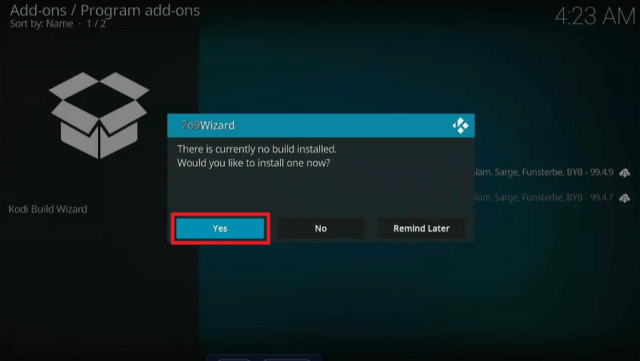
22. Click “Close

Arctic Rain Kodi Build


23. Then choose “Yes

Arctic Rain Kodi Build


24. Select “Arctic Rain

Arctic Rain Kodi Build


25. Click “Continue”. The Arctic Rain Kodi Build will then start to download

Arctic Rain Kodi Build


26. Once done, Click “OK” to force close Kodi

Arctic Rain Kodi Build


27. Relaunch Kodi. That’s it, Arctic Rain Kodi Build is now successfully installed on your Firestick

Arctic Rain Kodi Build


YOUR INTERNET ACTIVITY IS BEING WATCHED

ReviewVPN cannot attest to the legality, security and privacy of the applications discussed on this site. It is highly recommended that you use a VPN service while streaming or using Kodi.

Currently, your IP 216.73.216.156 is visible to everyone and your Browser is being tracked by Advertisers & ISP Provider.

Save 65% Now

Limited Time Offer

Here are the main reasons why you must use a VPN:

  • Your activities are hidden from your ISP, the government, and from the apps you are using.
  • You can access additional movies and TV streams.
  • ISP attempts to throttle are thrwarted thus reducing buffering issues.
  • Geographically restricted content like Netflix and Hulu can be unblocked.

A VPN works be replacing your ISP-assigned IP address and creating an encrypted tunnel. We recommend the no log service offered by IPVanish. It works well on a Firestick and offers the fastest possible speeds.

Special Limited Time Offer - Get IPVanish


Legal Disclaimer: ReviewVPN.com does not encourage or endorse any illegal activity involved in the usage of services and applications referenced on this site. We do not verify the licensing agreements of services. The end-user is wholly responsible for ensuring that any media accessed through these services does not violate copyright and/or licensing laws. ReviewVPN does not promote, link to, or receive compensation from any Apps and IPTV services.

Install Surfshark on Firestick

Best Surfshark Deal


Features

  • Contains Movies and TV Shows.
  • Gives access to the most recent movies and television shows available for streaming on Netflix, Amazon Prime Video, Hulu, Apple TV+, Disney+, and HBO Max.
  • Debrid authorization is available for Real Debrid, Premiumize, and AllDebrid.
  • Access your Watchlist, In Progress, Recently Watched, and Recommendations by syncing your Trakt account.
  • Allows you to use your TMDbHelper account.
  • There is a Search bar where you may immediately type in and enter a value.
  • You can access all the videos you’ve bookmarked on the Favorites tab.
  • Skin, interface, media, player, system, services, and PVR & Live TV settings are all customizable.


Pros & Cons

Pros

  • The user interface is modern and stylish.
  • Allows you to hide the videos you’ve watched.
  • You can manually update your library.


Cons

  • The only built-in add-on is Umbrella.
  • You must have a Debrid account to access its content.


Stream Safely With a VPN

Surfshark vpn

Securing your connection is always recommended when using unofficial Kodi builds like the Arctic Rain Kodi Build. By doing this, you will prevent any data breaches or illicit third-party logging when utilizing these unofficial Builds. You shouldn’t be complacent about your data security when using unofficial Kodi Builds, especially since you don’t know who is operating and maintaining these Builds.

To help you with this, a VPN like Surfshark will give you an anonymous IP address and route all of your traffic over a secure tunnel. As a result, all of your traffic will be encrypted with 256-bit GCM and will not be linked to your actual IP address.

Here are a few more features of Surfshark:

  • 3,200+ servers in 100 locations
  • Unblocks geo-restrictions
  • Blocks ads, trackers, and malware
  • Cookie consent pop-up blocker
  • Camouflage mode
  • Unlimited simultaneous connections
  • Kill switch
  • Auto connect
  • Unlimited bandwidth
  • 30-day money-back guarantee

Note: For more information about Surfshark, please read our Surfshark Review.


Install Surfshark on Firestick

Best Surfshark Deal


How to Install Surfshark VPN on Firestick

If your Firestick still has the older interface, read this article to learn how to update it: Update Firestick Interface.

1. Go to the Home screen of your Firestick.

step 1 Install Surfshark VPN on Firestick


2. Navigate toward the Find tab. Press the Search button from the resulting dropdown.

step 2 Install Surfshark VPN on Firestick


3. Type in the keyword of SurfShark and select from the suggestions that will appear.

step 3 Install Surfshark VPN on Firestick


4. Click the official SurfShark icon from your search results.

step 4 Install Surfshark VPN on Firestick


5. Press the Download button.

step 5 Install Surfshark VPN on Firestick


6. The SurfShark VPN installer will download on your device.

step 6 Install Surfshark VPN on Firestick


7. SurfShark VPN’s app will automatically install itself on your Fire TV stick.

step 7 Install Surfshark VPN on Firestick


8. Press the Open button after completing SurfShark VPN’s installation process.

step 8 Install Surfshark VPN on Firestick


9. Please wait for the SurfShark VPN to load its user interface.

step 9 Install Surfshark VPN on Firestick


10. You can now log in with your SurfShark VPN account credentials.

step 10 Install Surfshark VPN on Firestick

Learn more about Surfshark and Grab the Best Surfshark Deal Now!


Install Surfshark on Firestick

Best Surfshark Deal


Other VPNs to Consider

NordVPN (Best for Streaming)

Best Features

  • 5000+ Server in 50+ Countries 
  • Military-Grade Encryption
  • Fast Connection Speed
  • Suitable to a lot of devices
  • No-Log Policy

Prices
  • Complete $5.89 per month (64% Discount)
  • Plus $4.59 per month (56% Discount)
  • Standard $3.69 per month (55% Discount)

Best Features

  • 750+ High-speed VPN Servers in 43 Locations
  • Military-Grade Encryption
  • Fastest HD Streaming and Gaming
  • 30-Day Money-Back Guarantee
  • Unlimited Data & Devices
  • No-Log Policy

Prices
  • 3 Years $1.99 per month (82% Discount)
  • 1 Years $3.29 per month (70% Discount)
  • 1 Month $10.99 per month

IPVanish VPN (Most Secure)

Best Features

  • 1200+ Servers in 60+ Countries around the world
  • Unlimited Connections
  • No-Log Policy
  • Top Notch Military-Grade VPN Protocols and Encryptions
  • 100% Safe and Secured
  • Most Trusted VPN
  • Best VPN for Firestick
  • 30-Day Money-Back Guarantee

Prices
  • Yearly $3.99 per month (63% Discount) – 30 days risk free + Ransomware & Malware Protection
  • Quarterly $5.32 per month (51% Discount)
  • Monthly $10.99 per month


For more VPN discounts, go to ReviewVPN Deals and purchase the best VPN.

Click here to get the lowest price on Surfshark through our exclusive limited-time offer.


FAQs

What is Arctic Rain Kodi Build?

Arctic Rain is a Kodi Build from the 7o9 Repository that includes the Umbrella Addon. You can use it to watch the latest HD movies and TV shows.


Is Arctic Kodi Build safe?

The repository for Arctic Kodi Build is safe for downloading and using on Firestick or other devices. However, it is still best to equip your device with an anti-virus program such as TotalAV to ensure that your device is always secured against malware and other internet risks.


Is Arctic Kodi Build legal?

The legality of the streams available from the Arctic Kodi Build is not something we can guarantee. Therefore, it is better to only stream material that is in the public domain and not protected by copyright laws.


How to enable Real-Debrid with Arctic Rain Kodi Build?

Simply scroll to the right from the Homescreen and hover over Settings. Select Trakt & Debrid next. Choose Real-Debrid, then merely follow and finish the provided instructions.


Wrapping Up

Arctic Rain features a very sleek interface that you may appreciate at first glance. But unlike other builds, Arctic Rain only includes the Umbrella Addon, therefore you won’t find many addons in this build. Nevertheless, if you want to utilize a different addon than Umbrella, you may always add your preferred addons to Arctic Rain.

Boosting Student Privacy and Security: The Benefits of VPNs

Boosting Student Privacy and Security: The Benefits of VPNs

benefits of vpns

Source: Pexels

Every aspect of our daily lives is increasingly migrating online. In this digital age, students rely on the web for all their academic pursuits and personal affairs. But what attracts billions of daily users also attracts predators looking to prey on the vulnerable and exploit weak points in security. Forget your house being robbed or getting mugged on the street. Internet-based crime is the new everyday evil. 

Cybercrime has been on a steep rise over the past decade, with the US leading the charge in cybercrime density. Online criminals are constantly coming up with more ingenious and inventive ways of deception. A never-ending cat-and-mouse game is underway between hackers and security providers, where one is never more than a step ahead of the other. This back-and-forth one-upping means students – the core user base of the internet – are in the constant crosshairs of relentless hackers. They always need to remain alert and keep plugging security vulnerabilities. Let’s see how VPNs can help you fend off online threats.


Venture Online in a Stealthy Tank

Shove that door in the face of hackers, trackers, and, if you’re a conspiracy theorist, government spies. When connected to a VPN, all data transfers are encrypted. So, even if someone intercepts your data, they won’t be able to decipher it. This is especially important for students who use public Wi-Fi on campus and leach onto the coffee shop network when outside to conserve data. VPNs make the network connection private, turning you into a stealth aircraft equivalent of a web surfer. They know you are there but can’t lock onto you. 


Equip Yourself with a Master Key

As a matter of fact, VPN is not just for denying others access to your data. It’s also for giving you one to otherwise restricted areas. We have all come across those frustrating region restrictions that stop your web flow dead in its tracks. Students, of all people, most often encounter cases where they are unable to access the content because it is restricted in their region or by campus Wi-Fi. 

Is the new app not available in your region? Have no fear! VPN to your rescue. Did your campus restrict access to online writing tools? Worry not; flip that VPN switch and access WritingUniverse to your heart’s content. Your roommate’s ‘’documents’’ got stolen, and you’re worried about your own sensitive data? VPN.

It hides your location and encrypts your connection, so destination websites have no clue who you are, where you are located, or what Wi-Fi you are using, and readily display their content. It’s a master key of sorts that locks the door to your data and simultaneously opens doors for you to access closed websites.


Keep Your Favorite Type of Toothpaste to Yourself

There is a growing fear within society regarding online profiling. Every website you visit, whose photo you liked, how long you lingered on a particular section of a webpage, and so on, is being tracked, logged, and fed into an algorithm. This algorithm builds and progressively refines your virtual profile, which will help companies identify your interests and preferences to direct targeted ads, suggestions, and recommendations your way. A lot of people feel understandably worried about this non-consensual and undeclared mass-gathering of data and are looking for ways to minimize online exposure. VPN allows you to surf the web incognito, much like the private mode on your browser.


Final Thoughts 

From bulk phishing to social engineering to botnets, the dark side of the internet is evolving at a breakneck pace. It is only a matter of time before someone finds a way to circumvent every new layer of security. If only they applied all that brainpower to something productive, right? Installing a trusted VPN to secure your network is a fundamental layer of security and the least you can and should do to ensure a private connection and more. It’s a lock-your-door equivalent of online security. Taking a few clicks to install for free, VPNs are the embodiment of the saying better safe than sorry. You will never feel their value or know how many breaches they prevented, but ignore them, and you may eventually have to pay a hefty price. 


Author’s bio

Josh Garner is a skilled writer and an accomplished front-end software developer. With his dual passion for storytelling and technology, he seamlessly merges his creative and technical skills to craft engaging narratives. While his understanding of audiences’ needs as a writer helps him build approachable and user-friendly web interfaces. Josh’s ability to blend the worlds of literature and coding allows him to create compelling digital experiences that captivate audiences and inspire innovation.

Best StreamEast Alternatives

Overview

What is the best StreamEast alternative? This article will provide you with the best StreamEast alternatives accessible today.


One of the top sports streaming services available today is StreamEast. It offers streaming for a variety of sports, including baseball, basketball, football, hockey, racing, boxing, MMA, and more. In addition to offering free content, StreamEast is regarded as one of the best because you can always find HD streams there.

Of course, it’s best to have alternatives even if StreamEast is the best streaming service for your preferred sporting event. This is just in case the matches you’re looking for aren’t available, or the website is down for any reason.

That is why we have put together this article to present you with a selection of the best StreamEast alternatives that you can choose from.


ANONYMOUSLY


Best StreamEast Alternatives

Listed below are the best Streameast Alternatives:

Sportsurge

sportsurge - streameast alternative

First on our list of the best Streameast alternative is Sportsurge. This is due to Sportsurge consistently ranking at the top of the list of the best sports streaming websites available today by providing broadcasts for the most popular sporting events. It gives you access to basketball, baseball, hockey, soccer, football, boxing, MMA, and racing. Here, you may also find streaming from well-known leagues and sporting events. You may be sure that Sportsurge also exclusively provides HD streaming to its users.

Furthermore, what I appreciate about Sportsurge is that if a sports match is canceled, it will display that information. As a result, you won’t have to waste time looking for or waiting for the game.


FirstRow Sports

firstrow sports - streameast alternative

FirstRow Sports is also one of the most popular websites for free sports streaming, which makes it a good StreamEast alternative. It offers streaming for a variety of sports, including baseball, ice hockey, basketball, rugby, boxing, tennis, and more. Additionally, it allows you to browse through recent events and highlights while also providing access to current and upcoming matchups. In addition, FirstRow Sports has several servers available, allowing you to select the best host for your sports streams.


VIPLeague

vip league - streameast alternative

VIPLeague is yet another great Streameast alternative. It is a fantastic sports streaming website that allows you to watch your favorite sports matches and teams for free. It has a neat and well-organized user interface, making it simple to discover the right match. If you’re looking for streaming for football, rugby, tennis, golf, darts, basketball, ice hockey, motorsports, or anything else, you can just click on it to get to the free stream available. Its categories are displayed with large thumbnails.
Furthermore, you can be sure that the streams you find from VIPLeague are in HD even if it offers free content.


BilaSport

bila sport - streameast alternative

If you’re seeking to stream sports like basketball, baseball, hockey, soccer, football, boxing, mixed martial arts, and motorsports, you can also check out BilaSport. It offers a ton of streaming links and offers live streaming of the aforementioned sporting events. Additionally, BilaSport is one of the few sports streaming websites that provides a wide variety of streaming sources from which you can be certain to get HD feeds.

What’s good about BilaSport is that it’s easy to navigate. By just clicking on the tabs for each sport, you can discover if there are any live streams accessible.


Footybite

footybite - streameast alternative

Although Footybite first appears to be a soccer streaming website, it has more to offer. Live streaming is also available for other sports, giving you access to the Premier League, La Liga, NHL, NBA, MLB, tennis, and more. What I enjoy about Footybite is that it shows when the match has already begun or how long the stream has been active.

Additionally, it offers a ton of streaming connections from various sources to ensure that you can watch sports in HD.


YOUR INTERNET ACTIVITY IS BEING WATCHED

ReviewVPN cannot attest to the legality, security and privacy of the applications discussed on this site. It is highly recommended that you use a VPN service while streaming or using Kodi.

Currently, your IP 216.73.216.156 is visible to everyone and your Browser is being tracked by Advertisers & ISP Provider.

Save 65% Now

Limited Time Offer

Here are the main reasons why you must use a VPN:

  • Your activities are hidden from your ISP, the government, and from the apps you are using.
  • You can access additional movies and TV streams.
  • ISP attempts to throttle are thrwarted thus reducing buffering issues.
  • Geographically restricted content like Netflix and Hulu can be unblocked.

A VPN works be replacing your ISP-assigned IP address and creating an encrypted tunnel. We recommend the no log service offered by IPVanish. It works well on a Firestick and offers the fastest possible speeds.

Special Limited Time Offer - Get IPVanish


Legal Disclaimer: ReviewVPN.com does not encourage or endorse any illegal activity involved in the usage of services and applications referenced on this site. We do not verify the licensing agreements of services. The end-user is wholly responsible for ensuring that any media accessed through these services does not violate copyright and/or licensing laws. ReviewVPN does not promote, link to, or receive compensation from any Apps and IPTV services.


Install Surfshark on Firestick

Best Surfshark Deal


Strikeout

strikeout - streameast alternative

Another Streameast alternative that provides live streaming for a range of athletic events is Strikeout. These sports include football, baseball, basketball, hockey, soccer, tennis, golf, rugby, motorsports, MotoGP, cycling, wrestling, boxing, darts, racing, cricket, handball, volleyball, snooker, and more. Additionally, it offers premium feeds for the NFL, NBA, MLB, NHL, CFB, NCAAF, MMA, and EPL.

Furthermore, Strikeout provides a variety of streaming links that you can use to access HD and SD streaming, depending on your preferences.


Cricfree

cricfree - streameast alternative

Cricfree is another free sports streaming site that you can check out as a Streameast alternative. It offers access to competitive sports including baseball, basketball, rugby, hockey, boxing, tennis, football, soccer, and more. And on its homepage, you may already see events that are currently airing. So, if you’re a sports fan and want to watch any event that you currently have access to and stream, Cricfree is a terrific place to go.


Stream2Watch

stream2watch - streameast alternative

If you haven’t heard of Stream2Watch, you should know that it has been around for quite long. It launched its service in 2012 and has been a popular source of live sports since then. It offers streams for several sports including soccer, football, basketball, baseball, boxing, golf, tennis, hockey, rugby, motorsports, mixed martial arts, and wrestling.

Additionally, the fact that Stream2Watch also offers access to Live TV distinguishes it from other sports streaming websites. As a result, this website provides a diverse assortment of TV stations.


MamaHD

mamahd- streameast alternative

MamaHD is next on our list of the best StreamEast alternatives. This sports streaming site has a simple user interface because you can check upcoming sporting events with specifics on the time and teams that will compete right from the homepage. This streaming site offers a variety of sports, including volleyball, basketball, cricket, handball, tennis, football, golf, table tennis, and more. Additionally, it provides a variety of streaming connections so you can be certain to find one that works best for you.


MyP2P

myp2p - streameast alternative

MyP2P is the final StreamEast alternative on this list. Free streaming is available on MyP2P for both sporting events and other events outside of sports. Within this streaming website, you may find Live TV, Live Streams, and Sports Streams. Additionally, there are sporting events like soccer, tennis, basketball, baseball, volleyball, boxing, Moto GP, US Football, Handball, Rugby, Hockey, and other sports that you may find on MyP2P.

Although Spanish is the default language, you may always change it to English if you have to, so you won’t have to worry if you speak that language.


Stream Safely with a VPN

Surfshark vpn

There are several free sports streaming services available on the internet that allow access to your most sought sports events. However, you should never compromise your data security just for the free stuff that you can get from using these websites. It is still best to secure your connection to avoid any unauthorized logs and data breaches and that is with the help of a VPN.

A VPN, such as Surfshark, will disguise your real IP address, so all of your device’s ins and outs will not be linked to your true IP. You can guarantee that no one, not even your ISP or government surveillance, will be able to track you in this way. Additionally, the following are some additional Surfshark features:

  • allows you to circumvent geo-restrictions so you can access any sports streaming website worldwide.
  • has a Cleanweb function that disables trackers, malware, and advertisements.
  • you can enable a pop-up blocker for cookie consent.
  • there are more than 3,200 servers available in more than 100 locations.
  • contains a Kill Switch that, in the event of a sudden VPN interruption, will immediately unplug your device from the internet.
  • safeguards an unlimited amount of concurrent device connections.
  • adheres rigidly to a no-log policy and does not record or keep your internet activities.
  • you can be sure that you won’t appear to be using a VPN through its camouflage mode.
  • provides unlimited bandwidth so you can stream any online content you want.
  • stops ISP throttling that results in lag and buffering
  • a 30-day money-back guarantee is provided.
  • accessible on all operating systems and platforms, including Firestick/TV, Android, iOS, macOS, Windows, Roku, Chromecast, and more.

Note: For more information about Surfshark, please read our Surfshark Review.


Install Surfshark on Firestick

Best Surfshark Deal


How to Install Surfshark VPN on Firestick

If your Firestick still has the older interface, read this article to learn how to update it: Update Firestick Interface.

1. Go to the Home screen of your Firestick.

step 1 Install Surfshark VPN on Firestick


2. Navigate toward the Find tab. Press the Search button from the resulting dropdown.

step 2 Install Surfshark VPN on Firestick


3. Type in the keyword of SurfShark and select from the suggestions that will appear.

step 3 Install Surfshark VPN on Firestick


4. Click the official SurfShark icon from your search results.

step 4 Install Surfshark VPN on Firestick


5. Press the Download button.

step 5 Install Surfshark VPN on Firestick


6. The SurfShark VPN installer will download on your device.

step 6 Install Surfshark VPN on Firestick


7. SurfShark VPN’s app will automatically install itself on your Fire TV stick.

step 7 Install Surfshark VPN on Firestick


8. Press the Open button after completing SurfShark VPN’s installation process.

step 8 Install Surfshark VPN on Firestick


9. Please wait for the SurfShark VPN to load its user interface.

step 9 Install Surfshark VPN on Firestick


10. You can now log in with your SurfShark VPN account credentials.

step 10 Install Surfshark VPN on Firestick

Learn more about Surfshark and Grab the Best Surfshark Deal Now!


Install Surfshark on Firestick

Best Surfshark Deal


Other VPNs to Consider

NordVPN (Best for Streaming)

Best Features

  • 5000+ Server in 50+ Countries 
  • Military-Grade Encryption
  • Fast Connection Speed
  • Suitable to a lot of devices
  • No-Log Policy

Prices
  • Complete $5.89 per month (64% Discount)
  • Plus $4.59 per month (56% Discount)
  • Standard $3.69 per month (55% Discount)

Best Features

  • 750+ High-speed VPN Servers in 43 Locations
  • Military-Grade Encryption
  • Fastest HD Streaming and Gaming
  • 30-Day Money-Back Guarantee
  • Unlimited Data & Devices
  • No-Log Policy

Prices
  • 3 Years $1.99 per month (82% Discount)
  • 1 Years $3.29 per month (70% Discount)
  • 1 Month $10.99 per month

IPVanish VPN (Most Secure)

Best Features

  • 1200+ Servers in 60+ Countries around the world
  • Unlimited Connections
  • No-Log Policy
  • Top Notch Military-Grade VPN Protocols and Encryptions
  • 100% Safe and Secured
  • Most Trusted VPN
  • Best VPN for Firestick
  • 30-Day Money-Back Guarantee

Prices
  • Yearly $3.99 per month (63% Discount) – 30 days risk free + Ransomware & Malware Protection
  • Quarterly $5.32 per month (51% Discount)
  • Monthly $10.99 per month


For more VPN discounts, go to ReviewVPN Deals and purchase the best VPN.

Click here to get the lowest price on Surfshark through our exclusive limited-time offer.


FAQs

What is StreamEast?

StreamEast is a sports streaming website that offers live streaming of sporting events such as basketball, hockey, football, baseball, MMA, boxing, Motorsports, and more. Additionally, it provides HD streaming, which is available without charge.


Is StreamEast safe without a VPN?

Regardless of the streaming service they use, we constantly recommend to our readers to always utilize a VPN when streaming. This is because you can never be certain whether phishers, hackers, or other internet risks are hiding on these streaming websites. Because of this, it’s critical to use a VPN to encrypt your connection and guard against data theft and fraudulent use.


Is StreamEast free?

Yes, using StreamEast on any device is certainly free. It has thus been a dependable source of free sports streaming for a variety of sports, including soccer, baseball, basketball, hockey, boxing, MMA, and more.


What is the best StreamEast alternative?

All of the streaming sites we’ve placed on this list are the best ones that you can consider. Nonetheless, if we’ll be choosing just one StreamEast alternative, then we’ll have to go with Sportsurge. This is because Sportsurge provides easy access to free Sports streams and it delivers sports content in HD.


Are these StreamEast alternatives safe?

Given that some of these options contain adverts and redirects, we cannot guarantee the safety of all of them. Therefore, you will never know if your traffic is already being monitored or if there have already been data breaches. That is why it is best to utilize a VPN to conceal your true identity while using not only streameast alternatives but also simply streaming in general.


Are these StreamEast alternatives legal?

The legality of the mentioned websites is also not known. Therefore, if you want to avoid any legal issues, especially if you’re from a nation with extensive government surveillance, it’s advisable to remain anonymous while utilizing these streaming services.

Additionally, you can want to take into account legal providers like FuboTV, ESPN, Fox, and other relevant trusted alternatives.


Wrapping Up

There are many sports streaming websites available nowadays, but not all of them are on par with StreamEast. For this reason, we searched every sports website currently available to put together this list and offer it to you. Rest assured that all of these websites have been checked out and tested to ensure that they are functional before the publication of this article.

Additionally, we hope that this post has given you a list of the best StreamEast alternatives. As a result, you will have more options for watching sports, including football, tennis, hockey, basketball, baseball, and other sports. Furthermore, the majority of these websites provide HD streaming, therefore we are confident in the quality of these services.  Enjoy streaming!

VPN Apps for Android: Ensuring Secure Language Learning Online

VPN Apps for Android: Ensuring Secure Language Learning Online

vpn apps for android

https://unsplash.com/photos/CXlqHmQy3MY


Language learning requires you to be in a physical class in the past. However, technology has drastically changed how such knowledge spreads. Now, there are several online options to choose from. Through various platforms and Android apps, you can quickly master any dialect in the comfort of your home.

Yet, protecting your privacy and personal information is crucial while operating in cyberspace. Therefore, you should consider using a virtual private network (VPN). Using this technology provides an added layer of security. So, keep reading this article to secure your language learning endeavor on your Android device. Also, you will learn how to select the right VPN software and the best apps to install on your device.


Importance of Online Security When Learning a Language on the Internet

The Android platform offers users a world of possibilities when learning another dialect. However, the flexibility of the OS makes it a common target for cybercriminals. In addition, the requirements for staging an app on the Google Play Store are not as stringent as that of Apple’s App Store. Thus, hackers deliberately create dubious applications with nefarious intentions. Therefore, you may want to use a VPN app when accessing such sites. Below are more reasons you will want to consider.

Protect Personal Information

Your personal information includes your:

  • Date of birth;
  • Special security number;
  • Signature;
  • Address.

All this information combined can compromise your identity or finances in the hands of criminals. However, most of these language apps request these details without having the necessary security. Yet, using an appropriate VPN should encrypt your data and make it challenging to be intercepted.

Prevent Cyberattacks

In some cases, these applications serve as points of vulnerability, especially when using public Wi-Fi nodes. With an appropriate virtual private network, all your details are routed through a secured tunnel. On the other hand, if you want to translate information or documents, you should select a platform from the list of professional translation services. This page offers a detailed review of each translation service.

Bypass Geographical Restrictions

There are some language learning apps made for people in specific parts of the world. You will be unable to access these applications due to geographical restrictions. With the help of a VPN, you can easily bypass these limitations.


Choosing an Android VPN for Language Learning

Before choosing an Android virtual private network for language learning, there are several factors you should consider. Below are the most essential elements you should look at.

1. Strong Encryption

To protect your data and privacy, you must use a VPN with an exceptional encryption protocol. In most cases, an app with AES-256 encryption is ideal for accessing all types of Android applications.

2. Multiple Servers

With multiple servers, you should be better able to access different language-learning platforms.

3. User-friendly Interface

Never choose software that is challenging to operate. Instead, you will want an application that can easily connect and disengage with your local network.

4. Kill Switch

A kill switch is an essential feature for every virtual private network. It helps automatically disconnect the internet when your network drops to prevent unencrypted data from being accessed by other entities.


Recommended Android VPN Apps

There are hundreds of virtual private networks to choose from. However, below are some of the best to consider.

ExpressVPN

ExpressVPN has a user-friendly interface, which allows for easy access. Nonetheless, this software has excellent security features, blazing speed, and several servers.

NordVPN

NordVPN has a wide range of servers across the world. It also has excellent privacy and encryption options.

CyberGhost

CyberGhost is an ideal option when accessing an Android language learning app with many videos to stream. Plus, it has a user-friendly interface.


In Conclusion

If you choose to learn another language via Android apps, you should consider using a VPN. Doing this will help protect personal information and prevent cyberattacks. In addition, it can bypass geographical restrictions. Furthermore, you should consider an app with features like strong encryption, multiple servers, a user-friendly interface, and a kill switch. Finally, you should consider downloading ExpressVPN, NordVPN, or CyberGhost.


About the Author

As a writer, Josh Garner writes various articles for different publications. In particular, he likes to create content relating to technology. Due to Josh’s years of content creation experience, his articles are always helpful and informative.

A Guide to Unlocking the Power of Virtual Private Networks

A Guide to Unlocking the Power of Virtual Private Networks

Virtual Private Networks

Virtual private networks (VPNs) offer protection and accessibility in today’s interconnected world, where privacy and security concerns are high. Imagine this scenario: sitting in a bustling café, sipping your favorite latte, and relying on the free WiFi connection to catch up on work or connect with friends, whereas cybercriminals are waiting to exploit network vulnerabilities, and you may not even realize it.

But fear not, for the solution lies in the hands of a trusty companion – a WiFi signal tester Mac has, for instance, can be your ally. Its ability to detect weak signals and optimize your connection ensures seamless online experiences.

However, optimizing your WiFi connection is just the start. Enter the world of VPNs, where digital freedom and security converge. 

A VPN acts as a secure tunnel, encrypting your internet traffic and rerouting it through remote servers, providing many benefits beyond mere convenience. Let’s delve into the remarkable advantages of VPNs, making them an essential tool for individuals and organizations.


Benefits of Using Virtual Private Networks

Enhanced Security: Protecting Your Digital Footprint

Safeguarding sensitive data has become paramount in an era plagued by cyber threats. A VPN fortifies your online presence by encrypting your internet traffic, rendering it incomprehensible to malicious actors. VPNs create a shield against eavesdropping, hacking, or identity theft by leveraging cutting-edge encryption protocols like AES-256.

So whether you’re conducting sensitive financial transactions, sharing confidential files, or simply browsing the web, a VPN ensures that your data remains secure and confidential.


Preserving Online Privacy: Anonymity at Your Fingertips

When your every move is meticulously tracked and your personal information is constantly monetized, preserving online privacy has become a pressing concern. VPNs allow you to browse the web anonymously, shielding your digital identity from prying eyes.

By masking your IP address and replacing it with one from a different location, VPNs thwart online tracking, prevent targeted advertisements, and safeguard your online activities from ISPs, government surveillance, or intrusive third parties. With the best VPN, you regain control over your digital footprint, reclaiming your right to privacy. 


Bypassing Geo-Restrictions: Unlocking Boundless Possibilities

Picture this: you’re a passionate binge-watcher eagerly awaiting the release of an exclusive series available only in certain regions. Frustration mounts as you encounter the dreaded message, “This content is unavailable in your country.” Enter the VPN, your ultimate ally in circumventing geo-restrictions.

By connecting to a server in the desired location, a VPN tricks websites and streaming platforms into believing you’re accessing content within their permitted regions. Suddenly, a world of limitless entertainment and information opens up before your eyes. VPNs allow streaming your favorite shows, accessing region-specific news, or indulging in online gaming without limitations.


Public WiFi Protection: Surfing with Confidence

Public WiFi networks, while convenient, can be a breeding ground for cyber threats. Hackers can easily intercept data transmitted over these unsecured connections, compromising your sensitive information. Here’s where a VPN comes to the rescue. By encrypting your data and routing it through secure tunnels, VPNs shield your online activities from prying eyes, even on public networks.

So, whether you’re in a café, airport, or hotel, you can confidently browse the web, check emails, or access online banking services without fearing cyberattacks.


VPN Prevents Data Throttling

ISPs often throttle bandwidth for certain services to manage network congestion. This could result in slow streaming speeds, laggy gaming sessions, or inconsistent video calls. You can prevent your ISP from throttling your connection by masking your online activities so the ISP won’t recognize which service you’re using with a VPN.

By encrypting your data, a VPN ensures that you can enjoy uninterrupted streaming or gaming experiences with optimal performance.


VPN Increases Network Scalability

Organizations can seamlessly connect multiple remote locations or branch offices to a centralized network infrastructure by implementing VPNs. This enables efficient and secure communication between different network parts, regardless of geographical distances. VPNs eliminate the need for expensive dedicated leased lines by utilizing existing internet connections, making network expansion and scalability more cost-effective.

VPNs support a wide range of devices, allowing employees to access the network from various locations and devices. This flexibility and scalability provided by VPNs not only enhance productivity but also facilitate seamless collaboration and data sharing across the organization, making them valuable assets in today’s interconnected business world.


Final Thoughts

As we know the complexities of the digital landscape, virtual private networks have become an important tool for ensuring security, privacy, and accessibility. From protecting sensitive data to preserving your online anonymity and bypassing geo-restrictions, VPNs offer many benefits that empower individuals and organizations alike. 

Embrace the power of VPNs, and embark on your digital journey with confidence and peace of mind. Your online experiences will get better.

Best IPTV with Free Trial for 2023

Best IPTV with Free Trial

This article will provide you with the best options for IPTV free trial services.


Since many live TV viewers have learned to cord-cut after years of adhering to cable subscriptions, there are a ton of IPTVs available nowadays. And in addition to IPTVs being far less expensive than cable and satellite subscriptions, there are also several IPTV free trial selections on the market.

Doesn’t a few days of free trial seem appealing? Naturally, you’d want to try out a service first before committing to a long-term subscription to see if it meets your preferences.

And you’d be surprised to learn that there are numerous IPTV services with free trials available today.  We’ll run down some of the best ones in this article.

However, we’d like to point out that some of these services are only available in the United States. Therefore, if you’re outside its borders yet so eager to use these services, a VPN is required.


ANONYMOUSLY


Best Free Trial IPTV

Here is a list of the top IPTV free trials available right now:

Philo TV

Philo Logo

Philo TV is the first on our list of the best Free Trial IPTV, and it has also been around for quite some time, so most cord-cutters are probably familiar with it.

Movies, live TV, and on-demand content are all available on Philo TV. It has over 70+ live channels available, all of which can be accessed for free if you take advantage of its 7-day free trial. There are channels available in many different categories, such as sitcoms, drama, classics, kids, outdoor, home, news, music, and more.


Read this post to find out more about Philo TV.


FuboTV

Fubo tv

FuboTV is another free trial IPTV service that is currently available. This is one of the main and most popular IPTV services accessible today since it offers live sports and entertainment.

Their monthly subscriptions start at $74.99 and include 1000 hours of cloud DVR storage, access to up to 10 screens, 100+ sports events, and hundreds of channels (the exact number depends on where you live).

The good news about FuboTV is that all subscriptions include a 7-day free trial.


You can read our post about FuboTV to learn more about it.


OTT Ocean

ottocean logo

This IPTV free trial service is only available for 24 hours, but it offers a wide range of options to its users throughout the trial period. And I suppose their one-day free trial is enough to determine whether you like their service or not, given the abundance of free trial possibilities.

Their free trial includes 20,000+ Live TV stations, Sports, VOD, Movies, and even Adult channels that you can stream in 4k, FHD, HD, and SD. All kinds of devices are supported by OTT Ocean as well, however, only one connection is allowed for the free trial. Additionally, it has an EPG (Electronic Program Guide) and offers live chat support 24/7.


IPTVTune

IPTVTune claims to be the best and the top IPTV subscription according to Binge. Additionally, it provides a 24-hour free IPTV trial with access to more than 10,000 channels and 20,000 movies and TV shows. IPTVTune supports all types of devices and offers both premium HD & SD channels for their free trial. It also has a 99.99% uptime rate and AntiFreeze technology.

Furthermore, almost every device type is compatible with IPTVTune, including Firestick/TV, PC, MAC, iOS, Android, and more. If you use the Kodi app to stream IPTV, IPTVTune is compatible with Kodi as well.


YOUR INTERNET ACTIVITY IS BEING WATCHED

ReviewVPN cannot attest to the legality, security and privacy of the applications discussed on this site. It is highly recommended that you use a VPN service while streaming or using Kodi.

Currently, your IP 216.73.216.156 is visible to everyone and your Browser is being tracked by Advertisers & ISP Provider.

Save 65% Now

Limited Time Offer

Here are the main reasons why you must use a VPN:

  • Your activities are hidden from your ISP, the government, and from the apps you are using.
  • You can access additional movies and TV streams.
  • ISP attempts to throttle are thrwarted thus reducing buffering issues.
  • Geographically restricted content like Netflix and Hulu can be unblocked.

A VPN works be replacing your ISP-assigned IP address and creating an encrypted tunnel. We recommend the no log service offered by IPVanish. It works well on a Firestick and offers the fastest possible speeds.

Special Limited Time Offer - Get IPVanish


Legal Disclaimer: ReviewVPN.com does not encourage or endorse any illegal activity involved in the usage of services and applications referenced on this site. We do not verify the licensing agreements of services. The end-user is wholly responsible for ensuring that any media accessed through these services does not violate copyright and/or licensing laws. ReviewVPN does not promote, link to, or receive compensation from any Apps and IPTV services.


Install Surfshark on Firestick

Best Surfshark Deal


Worthystream

worthystream logo

Worthystream comes next on our list of the best IPTV free trial. It also has a 1-day free trial that includes TV channels, VOD channels, Adult Channels, Movies, and TV series. It supports the usage of an EPG and allows streaming in UHD, FHD, HD, and SD. WorthyStream uses both bufferless and antifreeze technology, in contrast to other IPTV systems that exclusively use the latter. Additionally, it offers live chat help around the clock and is compatible with nearly all apps and devices.

Furthermore, Worthystream offers a free IPTV trial that is quick, dependable, and stable that you might want to try out.


Nikon IPTV

nikon iptv logo

Nikon IPTV is another IPTV provider that offers a free trial period of 24 hours. It provides 20,000+ VOD options, which include movies and TV shows, and 10,000+ Live TV channels from all over the world. Even trailers and other library materials are accessible. Since then, they have been offering a complete and updated EPG because it has been one of their most requested features.

Additionally, Nikon IPTV is compatible with any device that supports M3U or portals, including Firestick, Android, Kodi, Mag, Smart TV, and Kodi.


Tugo TV

tugoTV logo

Tugo TV is one of the IPTV free trial services featuring a 5-day free trial. You may stream more than 100 HD TV channels live, including your preferred news, sports, entertainment, family, and religious networks.

Almost every device is compatible with it, including Android, Android TV, Apple TV, iOS, Fire TV, Chromecast, Roku, and more. Additionally, it enables simultaneous viewing on up to three devices.

Moreover, Tugo TV allows viewers to catch up on up to three days’ worth of previously recorded catch-up content. As a result, you wouldn’t have to worry about missing any episodes as you can still watch them during the allowable catch-up viewing days.


OneIPTV

oneiptv

Another IPTV free trial that offers a 24-hour free trial is OneIPTV. It also includes AntiFreeze Technology and No Buffer, just like Worthystreams.

OneIPTV allows you to watch live sports and VOD in 4K resolution. It offers around 20 VOD packages that are organized by country, including English movies, Indian movies, kid movies, 3D movies, and more. Additionally, it uploads fresh content almost every single day and offers superb picture quality, primarily in HD.

Furthermore, it enables catch-up viewing and is compatible with all devices.


Stream Safely with a VPN

Surfshark vpn

Fortunately, IPTV offers its clients several advantages, including the ability to watch premium live TV at a lower cost than cable subscriptions. However, protecting your connection is crucial, especially when streaming live video online.

A VPN is therefore a tool that is frequently used together with IPTV services. Meanwhile, not all VPNs are developed equally, so make certain that you are only using the best VPN for IPTV.

Surfshark is a reputable VPN service since it offers top-tier features such as AES-256-GCM encryption and a variety of security protocols such as WireGuard, OpenVPN, and IKEv2/IPSec.

Additionally, it contains a kill switch, which acts as a third tier of defense by rapidly cutting off your internet connection in the case that your VPN abruptly disconnects. This way, you can be certain that you are not streaming or browsing the internet without a VPN.

Here are a few additional advantages, besides that:

  • Allows you to avoid censorship and geo-restrictions to access IPTVs that are only available in certain regions.
  • It has a large number of connections available and boasts 3,200+ servers spread over 100+ locations.
  • They strictly adhere to the “no logs” rule and do not record, store, or keep an eye on your online actions.
  • It contains a Cleanweb feature that filters advertisements and malware.
  • There is a pop-up blocker for cookie consent.
  • Camouflage Mode ensures that even your ISP is unaware that you are using a VPN.
  • Ideal for regular streaming because it offers unlimited bandwidth to stream any IPTV service material you choose.
  • You may use your IPTV player on all of your devices and be sure to secure them all at once because it supports an unlimited number of simultaneous connections.


Note: For more information about Surfshark, please read our Surfshark Review.


Install Surfshark on Firestick

Best Surfshark Deal


How to Install Surfshark VPN on Firestick

If your Firestick still has the older interface, read this article to learn how to update it: Update Firestick Interface.

1. Go to the Home screen of your Firestick.

step 1 Install Surfshark VPN on Firestick


2. Navigate toward the Find tab. Press the Search button from the resulting dropdown.

step 2 Install Surfshark VPN on Firestick


3. Type in the keyword of SurfShark and select from the suggestions that will appear.

step 3 Install Surfshark VPN on Firestick


4. Click the official SurfShark icon from your search results.

step 4 Install Surfshark VPN on Firestick


5. Press the Download button.

step 5 Install Surfshark VPN on Firestick


6. The SurfShark VPN installer will download on your device.

step 6 Install Surfshark VPN on Firestick


7. SurfShark VPN’s app will automatically install itself on your Fire TV stick.

step 7 Install Surfshark VPN on Firestick


8. Press the Open button after completing SurfShark VPN’s installation process.

step 8 Install Surfshark VPN on Firestick


9. Please wait for the SurfShark VPN to load its user interface.

step 9 Install Surfshark VPN on Firestick


10. You can now log in with your SurfShark VPN account credentials.

step 10 Install Surfshark VPN on Firestick

Learn more about Surfshark and Grab the Best Surfshark Deal Now!


Install Surfshark on Firestick

Best Surfshark Deal


Other VPNs to Consider

NordVPN (Best for Streaming)

Best Features

  • 5000+ Server in 50+ Countries 
  • Military-Grade Encryption
  • Fast Connection Speed
  • Suitable to a lot of devices
  • No-Log Policy

Prices
  • Complete $5.89 per month (64% Discount)
  • Plus $4.59 per month (56% Discount)
  • Standard $3.69 per month (55% Discount)

Best Features

  • 750+ High-speed VPN Servers in 43 Locations
  • Military-Grade Encryption
  • Fastest HD Streaming and Gaming
  • 30-Day Money-Back Guarantee
  • Unlimited Data & Devices
  • No-Log Policy

Prices
  • 3 Years $1.99 per month (82% Discount)
  • 1 Years $3.29 per month (70% Discount)
  • 1 Month $10.99 per month

IPVanish VPN (Most Secure)

Best Features

  • 1200+ Servers in 60+ Countries around the world
  • Unlimited Connections
  • No-Log Policy
  • Top Notch Military-Grade VPN Protocols and Encryptions
  • 100% Safe and Secured
  • Most Trusted VPN
  • Best VPN for Firestick
  • 30-Day Money-Back Guarantee

Prices
  • Yearly $3.99 per month (63% Discount) – 30 days risk free + Ransomware & Malware Protection
  • Quarterly $5.32 per month (51% Discount)
  • Monthly $10.99 per month


For more VPN discounts, go to ReviewVPN Deals and purchase the best VPN.

Click here to get the lowest price on Surfshark through our exclusive limited-time offer.


FAQs

What is IPTV Free Trial?

The free trial period for IPTV tends to be offered to users who want to try out the service before committing to a long-term subscription. This can range from 24 hours to 7 days, depending on the IPTV service you want to trial.


What is the best free trial IPTV available today?

We can say that Philo and Fubo are the best IPTV services with free trials. This is because these are certified IPTV providers, meaning you can be confident they offer content for which they have the necessary licensing to make it available to their subscribers. This gives you the comfort of knowing that you are streaming lawfully even when using these IPTV providers.

Furthermore, these two IPTV free trials have the longest duration of 7 days. Following that, you can take advantage of this lengthy trial period to thoroughly evaluate their service. Of course, who wouldn’t want free streaming for a week?


How to get a free trial of IPTV?

Getting a free IPTV trial is a simple process. You can choose which ones appeal to you from our list and then visit their official website. You can already see from their homepage the free trial that they provide, which you can check out from their page for $0.

The best part is that you’ll be able to check what you can acquire or access by using these free trials of their IPTV service. Simply continue the signup process to begin receiving their free trial.


Is IPTV Free Trial Safe?

The safety associated with IPTV is dependent on the IPTV service you use. If you want to be certain that you are only using safe IPTVs, you can use the verified IPTV services that are accessible.


Is IPTV legal?

Once more, it depends on the IPTV service you’ll be using. There are IPTV services that provide streaming where they have the legal right to do so. Meanwhile, there are some for which we are unable to confirm whether they have the necessary licenses for providing access to such streams.

Furthermore, some nations have tight regulations regarding IPTV services.


Wrapping Up

IPTV is extremely convenient to use because it allows you to cut the cord and pay a low monthly fee for live TV streaming. And gladly there are IPTV services that you may use for free for a few hours to a few days. It’s because of these IPTV Free Trial services that you can test out their service before you buy it so that you won’t be forced to do so without knowing whether you’ll enjoy what they have to offer. Additionally, the absence of commitments is a benefit of IPTV services. As a result, you may simply cancel your subscription whenever you decide you no longer need or want it.

Nonetheless, we want to thank you for reading our article on the best IPTV services with free trials. We hope we were able to provide you with the best ones and make it easy for you to find these services for your next IPTV hunt. Enjoy the stream!

How to Install LA Times on Firestick and Android

LA Times App

This article will show you how to install LA Times on Firestick and Android Devices.


An application called LA Times, commonly referred to as the well-known Los Angeles Times, enables you to find the most current news available right now. There are many topics to choose from, including business, politics, lifestyle, science, travel, cooking, real estate, and more. It also includes news about High School Sports and your favorite LA Teams, including the Lakers, Dodgers, Clippers, and Chargers.

In addition, the LA Times has an electronic newspaper that lets you flip through the pages similarly to a printed newspaper. You can quickly search for issues or specific dates, and there is a main menu where you may access sections and older issues as well as share and download them.

So, without further ado, let’s get started with how to install LA Times on Firestick and Android.


ANONYMOUSLY


How to Install LA Times on Firestick (VIDEO)


How to Install LA Times on Firestick

1.  From your home screen, go to Settings.

Install LA Times on Firestick


2. Scroll down to the right until you reach My Fire TV. Click on it.

Install LA Times on Firestick


3. Select Developer options.

Install LA Times on Firestick


4. Turn on ADB debugging and Apps from Unknown Sources.

Install LA Times on Firestick


5. Click Turn On when the pop-up appears.

Install LA Times on Firestick


6. Click Home, click FIND.

Install LA Times on Firestick


7. Click Search.

Install LA Times on Firestick


8. You can either say Downloader to your Alexa voice-enabled remote or start typing it. If you typed it, click on the suggestion when it appears.

Install LA Times on Firestick


9. Click on the Downloader Icon.

Install LA Times on Firestick


10. Click Download.

Install LA Times on Firestick


Install LA Times on Firestick


11. Click on Open.

Install LA Times on Firestick


12. Click on Allow.

Install LA Times on Firestick


13. Use the Downloader search tab.

Install LA Times on Firestick


14. Type https://reviewvpn.com/latm and click go.

Install LA Times on Firestick


15. Wait for the APK to be downloaded.

Install LA Times on Firestick

Install LA Times on Firestick


16. Click install

Install LA Times on Firestick


17. Click open.

Install LA Times on Firestick


18. LA Times is already installed. Enjoy!

Install LA Times on Firestick


LA Times APK Download for Android Devices


LA Times Download button

Note: ReviewVPN.com does not host this APK file. It is hosted by Archive.org


YOUR INTERNET ACTIVITY IS BEING WATCHED

ReviewVPN cannot attest to the legality, security and privacy of the applications discussed on this site. It is highly recommended that you use a VPN service while streaming or using Kodi.

Currently, your IP 216.73.216.156 is visible to everyone and your Browser is being tracked by Advertisers & ISP Provider.

Save 65% Now

Limited Time Offer

Here are the main reasons why you must use a VPN:

  • Your activities are hidden from your ISP, the government, and from the apps you are using.
  • You can access additional movies and TV streams.
  • ISP attempts to throttle are thrwarted thus reducing buffering issues.
  • Geographically restricted content like Netflix and Hulu can be unblocked.

A VPN works be replacing your ISP-assigned IP address and creating an encrypted tunnel. We recommend the no log service offered by IPVanish. It works well on a Firestick and offers the fastest possible speeds.

Special Limited Time Offer - Get IPVanish


Legal Disclaimer: ReviewVPN.com does not encourage or endorse any illegal activity involved in the usage of services and applications referenced on this site. We do not verify the licensing agreements of services. The end-user is wholly responsible for ensuring that any media accessed through these services does not violate copyright and/or licensing laws. ReviewVPN does not promote, link to, or receive compensation from any Apps and IPTV services.


Install Surfshark on Firestick

Best Surfshark Deal


App Features

  • Provides unrestricted digital access to essential California News and other trusted reports.
  • Its primary tabs are Home, eNewspaper, Weekend, Media, and My Library.
  • There are sections for Top News, California, Sports, Food, Entertainment & Arts, Opinion, and Business.
  • You can search for certain issues, all issues, or specific dates in its eNewspaper.
  • Contains a Search bar that will let you look for topics directly.
  • Provides newsletters that are delivered to your email for free.
  • Enables you to share and download current and past issues.
  • Allows you to select the size of the article text among Small, Medium (default), Large, Extra Large, and Jumbo.

Categories

  • Top News
    • Politics
    • World & Nation
    • En Espanol
  • California
    • Climate & Environment
    • Housing & Homelessness
    • Lifestyle
    • Image
    • Obituaries
    • Science
    • Travel
  • Sports
    • Angels
    • Chargers
    • Clippers
    • Dodgers
    • High School Sports
    • Lakers
    • Rams
    • UCLA
    • USC
  • Food
    • Cooking
  • Entertainment & Arts
    • Awards
    • Books
    • Company Town
    • Movies
    • Music
    • Television
  • Opinion
  • Business
    • Autos
    • Real Estate
    • Technology


Pros & Cons

Pros

  • It provides access to eNewspaper.
  • Its content is available for sharing and downloading.
  • There are numerous topics that you can choose from.


Cons

  • I am unable to scroll down to read its content.
  • To click on the main menu at the bottom of the screen, you will need a mouse toggle.
  • There are some loading periods while navigating.


Access the Web Safely With a VPN

Surfshark vpn

You never know who has access to your data when you use third-party apps like LA Times. This is so because some of these apps, which are maintained by third-party developers, employ tools to track your browsing habits and data. Because of this, it’s crucial to make sure you’re always anonymous when streaming.

A VPN, such as Surfshark, will supply you with an anonymous IP address to mask your true IP address. That way, not even your ISP can monitor your online activities. Your data will also not be revealed on any page you visit, so you will leave no trace while using Surfshark.

Here are a few additional characteristics of Surfshark.

  • 32,000 servers in 100+ locations
  • AES-256-GCM encryption
  • IKEv2/IPSec, OpenVPN, and WireGuard protocols
  • Cleanweb function that blocks malware and advertisements
  • Cookie consent pop-up blocker
  • Unlimited number of simultaneous devices
  • Kill Switch
  • Quick connect
  • Port forwarding
  • Dedicated IP
  • Split Tunneling
  • No logs policy
  • Unlimited bandwidth
  • 30-day money-back guarantee


Note: For more information about Surfshark, please read our Surfshark Review.


Install Surfshark on Firestick

Best Surfshark Deal


How to Install Surfshark VPN on Firestick

If your Firestick still has the older interface, read this article to learn how to update it: Update Firestick Interface.

1. Go to the Home screen of your Firestick.

step 1 Install Surfshark VPN on Firestick


2. Navigate toward the Find tab. Press the Search button from the resulting dropdown.

step 2 Install Surfshark VPN on Firestick


3. Type in the keyword of SurfShark and select from the suggestions that will appear.

step 3 Install Surfshark VPN on Firestick


4. Click the official SurfShark icon from your search results.

step 4 Install Surfshark VPN on Firestick


5. Press the Download button.

step 5 Install Surfshark VPN on Firestick


6. The SurfShark VPN installer will download on your device.

step 6 Install Surfshark VPN on Firestick


7. SurfShark VPN’s app will automatically install itself on your Fire TV stick.

step 7 Install Surfshark VPN on Firestick


8. Press the Open button after completing SurfShark VPN’s installation process.

step 8 Install Surfshark VPN on Firestick


9. Please wait for the SurfShark VPN to load its user interface.

step 9 Install Surfshark VPN on Firestick


10. You can now log in with your SurfShark VPN account credentials.

step 10 Install Surfshark VPN on Firestick

Learn more about Surfshark and Grab the Best Surfshark Deal Now!


Install Surfshark on Firestick

Best Surfshark Deal


Other VPNs to Consider

NordVPN (Best for Streaming)

Best Features

  • 5000+ Server in 50+ Countries 
  • Military-Grade Encryption
  • Fast Connection Speed
  • Suitable to a lot of devices
  • No-Log Policy

Prices
  • Complete $5.89 per month (64% Discount)
  • Plus $4.59 per month (56% Discount)
  • Standard $3.69 per month (55% Discount)

Best Features

  • 750+ High-speed VPN Servers in 43 Locations
  • Military-Grade Encryption
  • Fastest HD Streaming and Gaming
  • 30-Day Money-Back Guarantee
  • Unlimited Data & Devices
  • No-Log Policy

Prices
  • 3 Years $1.99 per month (82% Discount)
  • 1 Years $3.29 per month (70% Discount)
  • 1 Month $10.99 per month

IPVanish VPN (Most Secure)

Best Features

  • 1200+ Servers in 60+ Countries around the world
  • Unlimited Connections
  • No-Log Policy
  • Top Notch Military-Grade VPN Protocols and Encryptions
  • 100% Safe and Secured
  • Most Trusted VPN
  • Best VPN for Firestick
  • 30-Day Money-Back Guarantee

Prices
  • Yearly $3.99 per month (63% Discount) – 30 days risk free + Ransomware & Malware Protection
  • Quarterly $5.32 per month (51% Discount)
  • Monthly $10.99 per month


For more VPN discounts, go to ReviewVPN Deals and purchase the best VPN.

Click here to get the lowest price on Surfshark through our exclusive limited-time offer.


FAQs

What is LA Times?

A News app called LA Times gives you access to current California news as well as other important news.


Is LA Times Safe?

Yes, installing and using LA Times on your device of choice is safe. To make sure your device is always safe from malware and other online threats, we constantly advise our readers to back up their devices with an antivirus program like TotalAV.


Is LA Times Legal?

Yes, LA Times is legal.


Wrapping Up

The LA Times covers a wide range of topics including politics, lifestyle, food, entertainment & arts, and more. On Firestick, though, it doesn’t function as effectively because you can’t scroll down to read its text. Hopefully, this will be resolved soon, but for the time being, you might try The Guardian, which works better with the Firestick.