How to Install AccuRadio on Firestick & Android

AccuRadio Overview

This article will show you how to install AccuRadio on Firestick and Android.


AccuRadio is a music streaming app that gives you access to over 1,400+ hand-crafted music channels. It is completely free to use; however, you must first register to make an account and access its content. Additionally, even though it’s free, you can enjoy unlimited skips and there aren’t any annoying ads while using it.

Categories in its Genres section include “Summertime Channel of the Day,” “This Week’s Throwback Year,” “Newest crowd-sourced channel,” “Adult Contemporary,” “Adult Rock,” “Americans,” “Artist Features,” “Beautiful Music,” and more.

Furthermore, we’d like to point out that AccuRadio is a music app that isn’t available in the official Amazon Appstore. That is, it is a third-party program that requires you to jailbreak your Firestick and utilize the Downloader app to sideload it on your device.

To avoid any undesired leaks and data breaches, it is advised to utilize a VPN like Surfshark when installing it on your device.


ANONYMOUSLY


How to Install AccuRadio On Firestick & Fire TV

1.  Click Home on your remote and scroll once to your Right. Click Setting (Gear Wheel Icon).

Install AccuRadio On Firestick


2. Scroll down and to the right until you get to My Fire TV. Click on it.

Install AccuRadio On Firestick


3. Select Developer options.

Install AccuRadio On Firestick


4. Turn on ADB debugging and Apps from Unknown Sources.

Install AccuRadio On Firestick


5. Click Turn On when the pop-up appears.

Install AccuRadio On Firestick


6. Click Home, click FIND.

Install AccuRadio On Firestick


7. Click Search.

Install AccuRadio On Firestick


8. You can either say Downloader to your Alexa voice-enabled remote or start typing it. If you typed it, click on the suggestion when it appears.

Install AccuRadio On Firestick


9. Click on the Downloader Icon.

Install AccuRadio On Firestick


10. Click Download.

Install AccuRadio On Firestick

Install AccuRadio On Firestick


11. Click on Open.

Install AccuRadio On Firestick


12. Click on Allow.

Install AccuRadio On Firestick


13. Use the Downloader search tab.

Install AccuRadio On Firestick


14. Open the Downloader App. Type https://reviewvpn.com/accr and click Go.

Install AccuRadio On Firestick


15. Wait for the APK to be downloaded.
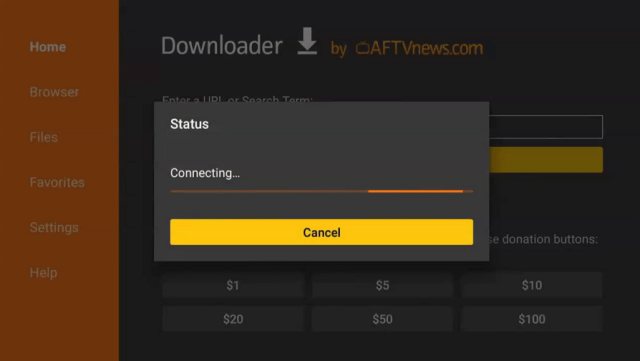
Install AccuRadio On Firestick

Install AccuRadio On Firestick


16. Click install

Install AccuRadio On Firestick


17. Click open.

Install AccuRadio On Firestick


18. AccuRadio is already installed! That’s it, Enjoy!

Install AccuRadio On Firestick


AccuRadio APK Download for Android Devices


Accuradio APK download

Note: ReviewVPN.com does not host this APK file. It is hosted by Archive.org


YOUR INTERNET ACTIVITY IS BEING WATCHED

ReviewVPN cannot attest to the legality, security and privacy of the applications discussed on this site. It is highly recommended that you use a VPN service while streaming or using Kodi.

Currently, your IP 216.73.216.156 is visible to everyone and your Browser is being tracked by Advertisers & ISP Provider.

Save 65% Now

Limited Time Offer

Here are the main reasons why you must use a VPN:

  • Your activities are hidden from your ISP, the government, and from the apps you are using.
  • You can access additional movies and TV streams.
  • ISP attempts to throttle are thrwarted thus reducing buffering issues.
  • Geographically restricted content like Netflix and Hulu can be unblocked.

A VPN works be replacing your ISP-assigned IP address and creating an encrypted tunnel. We recommend the no log service offered by IPVanish. It works well on a Firestick and offers the fastest possible speeds.

Special Limited Time Offer - Get IPVanish


Legal Disclaimer: ReviewVPN.com does not encourage or endorse any illegal activity involved in the usage of services and applications referenced on this site. We do not verify the licensing agreements of services. The end-user is wholly responsible for ensuring that any media accessed through these services does not violate copyright and/or licensing laws. ReviewVPN does not promote, link to, or receive compensation from any Apps and IPTV services.


Install Surfshark on Firestick

Best Surfshark Deal


AccuRadio Features

  • It includes 1,400+ handcrafted music channels.
  • Home, Genres, History, Favorites, and Settings are its primary tabs.
  • You can view the most recently played, favorited, suggested, and most popular channels.
  • Genres available include Adult Contemporary, Adult Rock, Dance, Electronic, Disco, Hip Hop, Indie, K-pop, Latino, Long Songs, Metas, Opera, Smooth Jazz, Soul, and more.
  • By giving at least 20 songs five stars, you can activate your own personal Five-star Radio.
  • Contains a Search tool to look for channels directly.
  • Your favorite music can be added to your favorites list.
  • Allows you to ban an artist or a song from a channel.
  • You can play, pause, or play the next song.
  • Its player options allow you to set a sleep timer, add a channel as a favorite, ban artists and songs, and close the player.
  • Sleep timers are available for 15 minutes, 30 minutes, 1 hour, and 2 hours.


Pros & Cons

Pros

  • Immediately starts playing music.
  • Provides free music streaming.
  • There are no advertisements.
  • Skips without limit.

Cons

  • When using it with a Firestick, you cannot scroll down.
  • A mouse toggle is required to click on some of the sections.
  • To enjoy its services, you must first register.
  • Stretched out screen.


Stream Safely with a VPN

Surfshark vpn

We can do a variety of things with the Firestick, including access to music streams through our television. However, while these apps allow you to stream your favorite material online, you never know when cyber threats like hackers and phishers are present. The next thing you know, your data is being exploited online for illegal and unethical activities without your knowledge.

Because of this, a VPN like Surfshark can assist you in protecting your online identity so you never have to worry about using both secured and unsecured apps. In this manner, you can stream worry-free on any Firestick-accessible app without having to worry about data breaches. Here are some of its extra advantages as well:

  • 3,200+ servers in 100 locations
  • Next-generation AES 256 GCM encryption
  • Unlimited simultaneous device connections
  • Its Cleanweb prevents ads and malware
  • Cookie consent pop-up blocker
  • Camouflage mode
  • Zero logs
  • Unlimited bandwidth
  • 30-day money-back guarantee

Note: For more information about Surfshark, please read our Surfshark Review.


Grab your subscription now!


How to Install Surfshark VPN on Firestick

If your Firestick still has the older interface, read this article to learn how to update it: Update Firestick Interface.

1. Go to the Home screen of your Firestick.

step 1 Install Surfshark VPN on Firestick


2. Navigate toward the Find tab. Press the Search button from the resulting dropdown.

step 2 Install Surfshark VPN on Firestick


3. Type in the keyword of SurfShark and select from the suggestions that will appear.

step 3 Install Surfshark VPN on Firestick


4. Click the official SurfShark icon from your search results.

step 4 Install Surfshark VPN on Firestick


5. Press the Download (You Own it) button.

step 5 Install Surfshark VPN on Firestick


6. The SurfShark VPN installer will download on your device.

step 6 Install Surfshark VPN on Firestick


7. SurfShark VPN’s app will automatically install itself on your Fire TV stick.

step 7 Install Surfshark VPN on Firestick


8. Press the Open button after completing SurfShark VPN’s installation process.

step 8 Install Surfshark VPN on Firestick


9. Please wait for the SurfShark VPN to load its user interface.

step 9 Install Surfshark VPN on Firestick


10. You can now log in with your SurfShark VPN account credentials.

step 10 Install Surfshark VPN on Firestick

Learn more about Surfshark and Grab the Best Surfshark Deal Now!


Install Surfshark on Firestick

Best Surfshark Deal


Other VPNs to Consider

NordVPN (Best for Streaming)

Best Features

  • 5000+ Server in 50+ Countries 
  • Military-Grade Encryption
  • Fast Connection Speed
  • Suitable to a lot of devices
  • No-Log Policy

Prices
  • Complete $5.89 per month (64% Discount)
  • Plus $4.59 per month (56% Discount)
  • Standard $3.69 per month (55% Discount)

Best Features

  • 750+ High-speed VPN Servers in 43 Locations
  • Military-Grade Encryption
  • Fastest HD Streaming and Gaming
  • 30-Day Money-Back Guarantee
  • Unlimited Data & Devices
  • No-Log Policy

Prices
  • 3 Years $1.99 per month (82% Discount)
  • 1 Years $3.29 per month (70% Discount)
  • 1 Month $10.99 per month

IPVanish VPN (Most Secure)

Best Features

  • 1200+ Servers in 60+ Countries around the world
  • Unlimited Connections
  • No-Log Policy
  • Top Notch Military-Grade VPN Protocols and Encryptions
  • 100% Safe and Secured
  • Most Trusted VPN
  • Best VPN for Firestick
  • 30-Day Money-Back Guarantee

Prices
  • Yearly $3.99 per month (63% Discount) – 30 days risk free + Ransomware & Malware Protection
  • Quarterly $5.32 per month (51% Discount)
  • Monthly $10.99 per month


For more VPN discounts, go to ReviewVPN Deals and purchase the best VPN for you.

Click here to get the lowest price on Surfshark through our exclusive limited-time offer.


FAQs

What is AccuRadio?

AccuRadio is a music streaming service that offers 1,400+ tracks of handcrafted music for free.


How to access five star radio in AccuRadio?

All you have to do is to give at least 20 songs five stars to access five star radio.


Is AccuRadio Safe?

It is safe to use AccuRadio. However, it is best to use an antivirus like TotalAV to ensure virus-free streaming to guarantee your safety at all times.


Is AccuRadio free?

AccuRadio is available for free download and usage on Firestick and Android devices.


Are there ads?

Even though it’s free, there aren’t any advertisements, which is a plus.


Is AccuRadio legal?

Yes, AccuRadio is legal. Their offerings are licensed, owned, and/or otherwise protected by international and domestic law.


Does AccuRadio have an official site?

Yes, you can go to their website at https://www.accuradio.com/.


Wrapping Up

You might want to check out AccuRadio if you’re seeking free music. You may stream thousands of free songs from it for free online. It also contains tons of music in different genres to choose from. Moreover, what I appreciate best about it is that it is ad-free. As a result, even though you’re streaming free music online, you won’t encounter the usual bothersome ads. Enjoy the stream!

How To Install Chive TV Kodi Build on Firestick/Fire TV

Chive TV Kodi Build

This article will show you how to install Chive TV Kodi Build on Firestick.


Chive TV is a Kodi build available from the Doomzday Repository that gives users access to a variety of content, including live TV, sports, music, movies, and TV series. It comes packed with several of the top Kodi add-ons, including Black Lightning, Umbrella, Quicksilver, Scrubs v2, Aliunde, Asgard, Magic Dragon, Mad Titan Sports, and The Loop.

Furthermore, it makes it possible for paid services like Real Debrid, All Debrid, Premiumize, Link Snappy, and Debrid Link to obtain the best streaming links available. Additionally, you could allow Trakt permission to sync your watchlist and favorite movies and TV episodes.

But first, we’d like to let you know that Chive TV is a third-party Build before we start the installation. This means that any device damage or data breaches that may occur while using this Build are not Kodi’s responsibility. Because of this, it is advised to utilize a VPN like Surfshark when using this Build to maintain your anonymity and stop any unlawful logging and tracking.


ANONYMOUSLY


How To Install Chive TV Kodi Build on Firestick (Video)


How To Install Chive TV Kodi Build on Firestick

You can follow along with this tutorial to install the Smokin Kodi Build on your Firestick.

1. Launch the Kodi app on your Firestick. Click on the gear wheel icon (Settings)

Chive TV Kodi Build


2. Select “System

Chive TV Kodi Build

3. Scroll down to “Add-ons” Then Go to “Unknown sources” then toggle it on.

Chive TV Kodi Build


4. Select “Yes”. Then using your Firestick remote, press the return button to go back to the System page

Chive TV Kodi Build


5. Now choose “File Manager

Chive TV Kodi Build


6. Scroll down and select “Add source

Chive TV Kodi Build


7. Click “<None>

Chive TV Kodi Build


8. Type in “https://doomzdayteam.github.io/doomzday” then click “OK”

Chive TV Kodi Build


9. Highlight the box under the source to give the media source a name, and put “doomzday” or any other name that will help you identify it quickly. Click “OK”. Return to the System page by pressing the return button on your remote.

Chive TV Kodi Build


10. Select “Add-ons

Chive TV Kodi Build


11. Choose “Install from zip file

Chive TV Kodi Build


12. Click “Yes

Chive TV Kodi Build


13. Select “doomzday

Chive TV Kodi Build


14. Then click on the zip file URL – repository.doomzday-x.x.x.zip

Chive TV Kodi Build


15. Wait for the notification “Doomzday Repo Add-on installed” to appear on the upper right part of the screen

Chive TV Kodi Build


16. Afterward, select “Install from repository

Chive TV Kodi Build


17. Then click “Doomzday Repo

Chive TV Kodi Build


18. Select “Program add-ons

Chive TV Kodi Build


19. Click on “Doomzday Simple Wizard

Chive TV Kodi Build


20. Then click “Install

Chive TV Kodi Build


21. Then wait for it to install. It’s finished once you see the “Doomzday Simple Wizard Add-on Installed” message appears.

Chive TV Kodi Build


22. Click “OK” for the additional add-on/s that will be installed

Chive TV Kodi Build


23. Click “Close

Chive TV Kodi Build


24. Select “Yes”

Chive TV Kodi Build


25. Choose “Chive TV

Chive TV Kodi Build


26. Click “Continue

Chive TV Kodi Build


27. Wait for the Build to install. Then click “OK” to force close Kodi

Chive TV Kodi Build


28. Finally, Relaunch Kodi. That’s it, Chive TV Kodi Build is now installed on your Firestick.

Chive TV Kodi Build


YOUR INTERNET ACTIVITY IS BEING WATCHED

ReviewVPN cannot attest to the legality, security and privacy of the applications discussed on this site. It is highly recommended that you use a VPN service while streaming or using Kodi.

Currently, your IP 216.73.216.156 is visible to everyone and your Browser is being tracked by Advertisers & ISP Provider.

Save 65% Now

Limited Time Offer

Here are the main reasons why you must use a VPN:

  • Your activities are hidden from your ISP, the government, and from the apps you are using.
  • You can access additional movies and TV streams.
  • ISP attempts to throttle are thrwarted thus reducing buffering issues.
  • Geographically restricted content like Netflix and Hulu can be unblocked.

A VPN works be replacing your ISP-assigned IP address and creating an encrypted tunnel. We recommend the no log service offered by IPVanish. It works well on a Firestick and offers the fastest possible speeds.

Special Limited Time Offer - Get IPVanish


Legal Disclaimer: ReviewVPN.com does not encourage or endorse any illegal activity involved in the usage of services and applications referenced on this site. We do not verify the licensing agreements of services. The end-user is wholly responsible for ensuring that any media accessed through these services does not violate copyright and/or licensing laws. ReviewVPN does not promote, link to, or receive compensation from any Apps and IPTV services.


Install Surfshark on Firestick

Best Surfshark Deal


Features

  • Its main sections are My Accounts, My Library, Family/Kids, Scrapers/AIO, Free Movies, Free TV Shows, Debrid, Sports, Sports TV, Wrestling, Live Streams, Live TV, Music Zone, Random Stuff, Wizard, Favourites, Weather/News, Addons/Apps, Setting/System, and Quit.
  • Allows you to grant permissions to Real Debrid, Premiumize, All Debrid, Link Snappy, and Debrid-Link.
  • Trakt may be integrated to access your watchlist.
  • Access to ABC News, ABP News, Bloomberg, CBS News, CNBC, CNews, CNN, Fox Business, Fox News, LCI, MSNBC, Rai News 24, Sky News, Sky TG24, TG Com 24, and The Weather Channel is available through News Zone.
  • It includes an Ookla speed test.
  • You can bookmark your favorite titles.
  • Adjustable settings for the audio, video, color scheme, and subtitles.
  • The following sports are available: PGA, Cricket, NASCAR, NFL, NHL, NBA, MLB, NCAAF, NCAAB, UFC/MMA, WWE, Boxing, FIFA, Tennis, Moto-GP, Formula 1, and LFL.
  • Includes live events as well as sports replays.
  • You can choose to play the video from the beginning or to continue watching.
  • Provides one-click streaming.


Chive TV Built-in Video Addons

  • Black Lightning
  • Quicksilver
  • The TV App
  • The Archives
  • Chain Reaction
  • Ghost
  • Halcyon
  • Asgard
  • Cumination
  • The Loop
  • tvOne
  • Seren
  • Mad Titan Sports
  • Fido K19
  • Magic Dragon
  • Aliunde
  • Scrubs v2
  • Umbrella
  • NHL66streams
  • NHL Streams
  • Torque Lite
  • Youtube
  • Json IPTV
  • Daddylive
  • Watch Pro Wrestling
  • Purely Wrestling
  • The Endzone
  • The Crew
  • BewbsandBeer
  • Duff You
  • SportowaTV
  • SportHD
  • IPTV AU
  • Ghost TV
  • Rising Tides
  • Fetch
  • Fights on Demand
  • JetProxy
  • Panty dropper
  • Replay Me
  • Skyline Webcams
  • WatchNixtoons2


Pros & Cons

Pros

  • Provides free and unlimited access to movies, TV shows, and live TV.
  • A speed test is available and can be used.
  • Preloaded with a lot of video add-ons.
  • Provides one-click streaming.


Cons

  • The UI is unappealing.
  • There are a few playback errors.
  • Some loading times do occur.
  • There are lags and buffering when streaming.


Stream Safely With a VPN

Surfshark vpn

Due to the potential for data breaches, it is always advisable to use a VPN when using third-party builds like Chive TV. This is because, while streaming your favorite movies and TV shows, you may never be sure of who is lurking in the unknown or who has access to your data.

Furthermore, these are frequent targets for hackers and phishers due to their users’ vulnerability, especially when receiving free content. Therefore, using a VPN is the best way to be anonymous online.

With the use of a VPN, like Surfshark, you can mask your IP address so that nobody else can identify your real IP address. You may be sure that you won’t leave any records or information about yourself while utilizing its service.

Additionally, some of its privacy features are listed below:

  • Unbreakable data security is ensured by AES 256-bit GCM encryption.
  • Its CleanWeb feature will block viruses and advertisements.
  • There is also a popup blocker for cookie consent.
  • Guarantees that their service won’t maintain any logs.
  • A kill switch will rapidly disconnect you from the internet if your VPN unintentionally disconnects.
  • To prevent account theft, it provides two-factor authentication.
  • Prevents ISP throttling that causes lags and buffers.

Note: For more information about Surfshark, please read our Surfshark Review.


How to Install Surfshark VPN on Firestick

If your Firestick still has the older interface, read this article to learn how to update it: Update Firestick Interface.

Follow our screenshots below to install the SurfShark VPN app on your Fire TV stick.

1. Go to the Home screen of your Firestick.

step 1 Install Surfshark VPN on Firestick


2. Navigate toward the Find tab. Press the Search button from the resulting dropdown.

step 2 Install Surfshark VPN on Firestick


3. Type in the keyword of SurfShark and select from the suggestions that will appear.

step 3 Install Surfshark VPN on Firestick


4. Click the official SurfShark icon from your search results.

step 4 Install Surfshark VPN on Firestick


5. Press the Download (You Own it) button.

step 5 Install Surfshark VPN on Firestick


6. The SurfShark VPN installer will download on your device.

step 6 Install Surfshark VPN on Firestick


7. SurfShark VPN’s app will automatically install itself on your Fire TV stick.

step 7 Install Surfshark VPN on Firestick


8. Press the Open button after completing SurfShark VPN’s installation process.

step 8 Install Surfshark VPN on Firestick


9. Please wait for the SurfShark VPN to load its user interface.

step 9 Install Surfshark VPN on Firestick


10. You can now log in with your SurfShark VPN account credentials.

step 10 Install Surfshark VPN on Firestick

Learn more about Surfshark and Grab the Best Surfshark Deal Now!


Install Surfshark on Firestick

Best Surfshark Deal


Other VPNs to Consider

NordVPN (Best for Streaming)

Best Features

  • 5000+ Server in 50+ Countries 
  • Military-Grade Encryption
  • Fast Connection Speed
  • Suitable to a lot of devices
  • No-Log Policy

Prices
  • Complete $5.89 per month (64% Discount)
  • Plus $4.59 per month (56% Discount)
  • Standard $3.69 per month (55% Discount)

Best Features

  • 750+ High-speed VPN Servers in 43 Locations
  • Military-Grade Encryption
  • Fastest HD Streaming and Gaming
  • 30-Day Money-Back Guarantee
  • Unlimited Data & Devices
  • No-Log Policy

Prices
  • 3 Years $1.99 per month (82% Discount)
  • 1 Years $3.29 per month (70% Discount)
  • 1 Month $10.99 per month

IPVanish VPN (Most Secure)

Best Features

  • 1200+ Servers in 60+ Countries around the world
  • Unlimited Connections
  • No-Log Policy
  • Top Notch Military-Grade VPN Protocols and Encryptions
  • 100% Safe and Secured
  • Most Trusted VPN
  • Best VPN for Firestick
  • 30-Day Money-Back Guarantee

Prices
  • Yearly $3.99 per month (63% Discount) – 30 days risk free + Ransomware & Malware Protection
  • Quarterly $5.32 per month (51% Discount)
  • Monthly $10.99 per month


For more VPN discounts, go to ReviewVPN Deals and purchase the best VPN for you.


FAQs

What is Chive TV Kodi Build?

Chive TV is a Kodi build from the Doomzday Repository that lets you stream movies, TV shows, live TV, sports, news, music, and more. It also comes preinstalled with some of the top add-ons for providing free and debrid streaming links.


Is Chive TV Kodi Build safe?

Yes, installing and using the Chive TV Kodi Build on your device is safe. However, to protect your identity and to find any online hazards, we still advise using a VPN and an antivirus program like TotalAV.


Is Chive TV Kodi Build free?

Yes, Chive TV Kodi Build has content that is free to access.


Is Chive TV Kodi Build legal?

Since Chive TV Kodi Build pulls content from numerous add-ons, we cannot ensure that the streams it offers are legal.


Wrapping Up

Surprisingly, Chive TV comes with a ton of add-ons for various streaming options, including movies, TV series, live TV, sports, and more. Therefore, you can undoubtedly locate what you’re seeking. However, there are noticeable buffers when streaming when compared to other builds. Nevertheless, if you’re looking for free streaming, Chive TV is something to check out.

How to Install NickFlix Kodi Build on Firestick/Fire TV

NickFlix Kodi Build

This article will show you how to install NickFlix Kodi Build on Firestick.


NickFlix is a Kodi Build from the funstersplace repository that allows you to view movies, TV shows, live TV, sports, kids, and other streaming material. Its primary tabs are Nickflix, Search, TV Shows, Movies, 1-Click, 4K 1-Click, Fido, Aliunde, Categories, Sports, Authorize Debrid, Video Add-ons, Settings, Maintenance, Funswizard, and Power.

Furthermore, it gives both free and debrid links in an extensive number of streaming connections available through its built-in extensions. These add-ons include Homelander, Asgard, Aliunde, Fido, Daddylive, Magic Dragon, The Loop, and more.

But first, we’d like to make sure you know that NickFlix is a third-party Kodi Build before we move on to how you can install it on your Kodi-compatible device. In other words, Kodi disclaims all liability for any data breaches or device damage that may occur. To safeguard your data and identity, it is best to utilize a VPN like Surfshark alongside it.


ANONYMOUSLY


How To Install NickFlix Kodi Build on Firestick

You can follow along with this tutorial to install NickFlix Kodi Build on your Firestick.

1. Launch the Kodi app on your Firestick. Click on the gear wheel icon (Settings)

NickFlix Kodi Build on Firestick


2. Select “System

NickFlix Kodi Build on Firestick

3. Scroll down to “Add-ons” Then Go to “Unknown sources” then toggle it on.

Install NickFlix Kodi Build on Firestick


4. Select “Yes”. Then using your Firestick remote, press the return button to go back to the System page

Install NickFlix Kodi Build on Firestick


5. Now choose “File Manager

Install NickFlix Kodi Build on Firestick


6. Scroll down and select “Add source

Install NickFlix Kodi Build on Firestick


7. Click “<None>

Install NickFlix Kodi Build on Firestick


8. Type in “https://funstersplace.net/funs/” then click “OK”

Install NickFlix Kodi Build on Firestick


9. Highlight the box under the source to give the media source a name, and put “funs” or any other name that will help you identify it quickly. Click “OK”. Return to the System page by pressing the return button on your remote

Install NickFlix Kodi Build on Firestick


10. Select “Add-ons

Install NickFlix Kodi Build on Firestick


11. Choose “Install from zip file

Install NickFlix Kodi Build on Firestick


12. Click “Yes

Install NickFlix Kodi Build on Firestick


13. Select “funs

Install NickFlix Kodi Build on Firestick


14. Then click on the zip file URL – repository.funstersplace-0.3.zip

Install NickFlix Kodi Build on Firestick


15. Wait for the notification “funstersplace Repository Add-on installed” to appear on the upper right part of the screen

Install NickFlix Kodi Build on Firestick


16. Then click “Install from repository

Install NickFlix Kodi Build on Firestick


17. Then click “funstersplace Repository

Install NickFlix Kodi Build on Firestick


18. Select “Program add-ons

Install NickFlix Kodi Build on Firestick


19. Click on “Funswizard

Install NickFlix Kodi Build on Firestick


20. Then click “Install

Install NickFlix Kodi Build on Firestick


21. Click “OK” for the additional add-ons that will be installed

Install NickFlix Kodi Build on Firestick


22. Then wait for it to install. It’s finished once you see the “Funswizard Add-on Installed” message appears.

Install NickFlix Kodi Build on Firestick


23. Click “Close

Install NickFlix Kodi Build on Firestick


24. Then select “Yes

Install NickFlix Kodi Build on Firestick


25. Scroll down and choose “NickFlix

Install NickFlix Kodi Build on Firestick


26. Click “Continue

Install NickFlix Kodi Build on Firestick


27. Wait for the Build to install then Click “OK” to force close Kodi.

Install NickFlix Kodi Build on Firestick


28. Then relaunch Kodi. That’s it, NickFlix Kodi Build is now installed on your Firestick.

Install NickFlix Kodi Build on Firestick


YOUR INTERNET ACTIVITY IS BEING WATCHED

ReviewVPN cannot attest to the legality, security and privacy of the applications discussed on this site. It is highly recommended that you use a VPN service while streaming or using Kodi.

Currently, your IP 216.73.216.156 is visible to everyone and your Browser is being tracked by Advertisers & ISP Provider.

Save 65% Now

Limited Time Offer

Here are the main reasons why you must use a VPN:

  • Your activities are hidden from your ISP, the government, and from the apps you are using.
  • You can access additional movies and TV streams.
  • ISP attempts to throttle are thrwarted thus reducing buffering issues.
  • Geographically restricted content like Netflix and Hulu can be unblocked.

A VPN works be replacing your ISP-assigned IP address and creating an encrypted tunnel. We recommend the no log service offered by IPVanish. It works well on a Firestick and offers the fastest possible speeds.

Special Limited Time Offer - Get IPVanish

Legal Disclaimer: ReviewVPN.com does not encourage or endorse any illegal activity involved in the usage of services and applications referenced on this site. We do not verify the licensing agreements of services. The end-user is wholly responsible for ensuring that any media accessed through these services does not violate copyright and/or licensing laws. ReviewVPN does not promote, link to, or receive compensation from any Apps and IPTV services.


Install Surfshark on Firestick

Best Surfshark Deal


Features

  • Includes a variety of content, including movies, TV series, live music, documentaries, sports, and more.
  • There are the following categories: Action, Adventure, Animation, Anime, Biography, Comedy, Crime, Documentary, Drama, Family, Fantasy, History, Horror, Music, Musical, Mystery, Romance, Science Fiction, Sport, Superhero, Thriller, War, and Western.
  • Provides support for Real Debrid, Trakt, Premiumize, All Debrid, Link Snappy, and Debrid Link.
  • Configurable player, interface, skin, profiles, add-ons, library, system, and PVR service.
  • Access to Netflix content is available under the TV Shows area.
  • You can use its Search feature to look up people, shows, movies by actors, and shows by actors.
  • A&E, ABC, Amazon, Apple TV+, BBC, CBS, Channel 4, Channel 5, Crackle, Disney Channel, FOX, and other networks are available.
  • Offers 4K, 1080P, 720P, and SD streaming.
  • Allows for the use of subtitles.
  • You can save your favorites to your bookmarks.


Built-in Addons

  • romyTV nexus
  • Aliunde
  • Mega IPTV
  • Asgard
  • Ghost TV
  • Homelander
  • Halcyon
  • AutoWidget
  • Black Lightning
  • Chain Reaction
  • Daddylive
  • DailyMotion
  • Fido K19
  • Ghost
  • Latin TV
  • Magic Dragon
  • The Loop
  • The TV app
  • Umbrella


Pros & Cons

Pros

  • Offers numerous streaming links
  • A lot of networks are accessible
  • There is free streaming available

Cons

  • While navigating, I’ve experienced lagging.
  • There are waiting periods.
  • The majority of free streaming is of SD quality.


Stream Safely With a VPN

Surfshark vpn

Although using Kodi for streaming is significantly advantageous, there is a serious privacy risk involved. Particularly when using third-party addons, you’ll never know who is behind the software or the hazards you’re taking on. Your personal information might even be sold to affiliated developers without your knowledge. Or if both the government and your ISP are monitoring your online activities.

As a result, we frequently suggest to our readers utilize a VPN to protect their anonymity when viewing or streaming any content online. You can be certain that no data breaches or leaks are taking place without your knowledge when you use a VPN like Surfshark.

This is because it will supply you with an anonymous IP address, which will disguise your identity. You can furthermore gain the following by using this anonymous IP address from one of its servers:

  • Your traffic will pass through an encrypted tunnel, ensuring that no records of your usage will be left on the websites or applications you use.
  • Encryption using the uncrackable AES 256 GCM standard will safeguard your data.
  • You can access information from anywhere in the world due to the ability to get around geographic restrictions.
  • It prevents ISP throttling, which causes slowness and buffering.
  • Protects an unlimited number of connections at once.
  • Provides unlimited bandwidth.
  • It has a Cleanweb that will stop malware and advertisements.

Note: For more information about Surfshark, please read our Surfshark Review.


How to Install Surfshark VPN on Firestick

If your Firestick still has the older interface, read this article to learn how to update it: Update Firestick Interface.

Follow our screenshots below to install the SurfShark VPN app on your Fire TV stick.

1. Go to the Home screen of your Firestick.

step 1 Install Surfshark VPN on Firestick


2. Navigate toward the Find tab. Press the Search button from the resulting dropdown.

step 2 Install Surfshark VPN on Firestick


3. Type in the keyword of SurfShark and select from the suggestions that will appear.

step 3 Install Surfshark VPN on Firestick


4. Click the official SurfShark icon from your search results.

step 4 Install Surfshark VPN on Firestick


5. Press the Download (You Own it) button.

step 5 Install Surfshark VPN on Firestick


6. The SurfShark VPN installer will download on your device.

step 6 Install Surfshark VPN on Firestick


7. SurfShark VPN’s app will automatically install itself on your Fire TV stick.

step 7 Install Surfshark VPN on Firestick


8. Press the Open button after completing SurfShark VPN’s installation process.

step 8 Install Surfshark VPN on Firestick


9. Please wait for the SurfShark VPN to load its user interface.

step 9 Install Surfshark VPN on Firestick


10. You can now log in with your SurfShark VPN account credentials.

step 10 Install Surfshark VPN on Firestick

Learn more about Surfshark and Grab the Best Surfshark Deal Now!


Install Surfshark on Firestick

Best Surfshark Deal


Other VPNs to Consider

NordVPN (Best for Streaming)

Best Features

  • 5000+ Server in 50+ Countries 
  • Military-Grade Encryption
  • Fast Connection Speed
  • Suitable to a lot of devices
  • No-Log Policy

Prices
  • Complete $5.89 per month (64% Discount)
  • Plus $4.59 per month (56% Discount)
  • Standard $3.69 per month (55% Discount)

Best Features

  • 750+ High-speed VPN Servers in 43 Locations
  • Military-Grade Encryption
  • Fastest HD Streaming and Gaming
  • 30-Day Money-Back Guarantee
  • Unlimited Data & Devices
  • No-Log Policy

Prices
  • 3 Years $1.99 per month (82% Discount)
  • 1 Years $3.29 per month (70% Discount)
  • 1 Month $10.99 per month

IPVanish VPN (Most Secure)

Best Features

  • 1200+ Servers in 60+ Countries around the world
  • Unlimited Connections
  • No-Log Policy
  • Top Notch Military-Grade VPN Protocols and Encryptions
  • 100% Safe and Secured
  • Most Trusted VPN
  • Best VPN for Firestick
  • 30-Day Money-Back Guarantee

Prices
  • Yearly $3.99 per month (63% Discount) – 30 days risk free + Ransomware & Malware Protection
  • Quarterly $5.32 per month (51% Discount)
  • Monthly $10.99 per month


For more VPN discounts, go to ReviewVPN Deals and purchase the best VPN for you.


FAQs

What is NickFlix Kodi Build?

With the NickFlix Kodi Build, you may view movies, TV shows, sports, documentaries, live TV, kids’ programming, and more. It is available through the Funstersplace Repository.


Is NickFlix Kodi Build Safe?

Installing the NickFlix Kodi Build is safe. However, as this is a third-party add-on, it is suggested that you use a VPN with it to guard against any accidental data breaches at all times.

Additionally, you might want to think about using an antivirus program like TotalAV to detect viruses and other internet dangers.


Is NickFlix Kodi Build Legal?

We cannot guarantee the legality of the content because the NickFlix Kodi Build includes content that is scraped from many sources.


Is a VPN Necessary for the NickFlix Kodi Build?

Yes, it is usually recommended to use a VPN with third-party builds like NickFlix. This is because you can never be sure of the sources of information or whether it is monitoring your internet activities. Even worse, your personal information might already be stolen or exposed.


Wrapping Up

There are numerous streaming options available via NickFlix Kodi Build. You can be sure to find the title you’re seeking because it comes packed with a ton of add-ons. Along with debrid links, it also has free streaming content. So if you’re searching for another Build to watch movies, TV series, live sports, and more, check out NickFlix.

How to Install Kids Preschool Nursery Rhymes on Firestick

Kids Preschool Nursery Rhymes Overview

This article will show you how to install Kids Preschool Nursery Rhymes on Firestick.


If you’re looking for a means to keep your kids occupied as they learn, you may want to check out Kids Preschool Nursery Rhymes. It has many educational content, including the alphabet, colors, shapes, numbers, fruits, and vegetables. In addition, Kid Preschool Nursery Rhymes also includes lullabies, phonics, rhymes, cartoons, and lessons for preschoolers.

Furthermore, the best thing is that it is simply accessible in the Amazon Appstore. As a result, you will not need to jailbreak your Firestick or utilize the Downloader program to download it onto your device. However, as most apps utilize a specific algorithm to track your streaming activity, make sure to always turn on your VPN to prevent any loggings that occur without your knowledge.


ANONYMOUSLY


How to Install Kids Preschool Nursery Rhymes on Firestick

1. Go to the Home screen of your Firestick, tap on the Search tab then scroll down to Appstore Icon then click on it.

Kids Preschool Nursery Rhymes


2. Click the Search bar.

Kids Preschool Nursery Rhymes


3. Now, type the Kids Preschool Nursery Rhymes and click on it.

Kids Preschool Nursery Rhymes


4. Scroll down to the Apps and Games then click the KIDS PRESCHOOL NURSERY RHYMES icon.

Kids Preschool Nursery Rhymes


5. Then click GET to free to download.

Kids Preschool Nursery Rhymes


6. Tap on OK!

Kids Preschool Nursery Rhymes


7. Click Open.

Kids Preschool Nursery Rhymes


8. Kids Preschool Nursery Rhymes is now installed! Enjoy!

Kids Preschool Nursery Rhymes


YOUR INTERNET ACTIVITY IS BEING WATCHED

ReviewVPN cannot attest to the legality, security and privacy of the applications discussed on this site. It is highly recommended that you use a VPN service while streaming or using Kodi.

Currently, your IP 216.73.216.156 is visible to everyone and your Browser is being tracked by Advertisers & ISP Provider.

Save 65% Now

Limited Time Offer

Here are the main reasons why you must use a VPN:

  • Your activities are hidden from your ISP, the government, and from the apps you are using.
  • You can access additional movies and TV streams.
  • ISP attempts to throttle are thrwarted thus reducing buffering issues.
  • Geographically restricted content like Netflix and Hulu can be unblocked.

A VPN works be replacing your ISP-assigned IP address and creating an encrypted tunnel. We recommend the no log service offered by IPVanish. It works well on a Firestick and offers the fastest possible speeds.

Special Limited Time Offer - Get IPVanish

Legal Disclaimer: ReviewVPN.com does not encourage or endorse any illegal activity involved in the usage of services and applications referenced on this site. We do not verify the licensing agreements of services. The end-user is wholly responsible for ensuring that any media accessed through these services does not violate copyright and/or licensing laws. ReviewVPN does not promote, link to, or receive compensation from any Apps and IPTV services.


Install Surfshark on Firestick

Best Surfshark Deal


Features

  • There are three main tabs: Home, About, and Search.
  • Contains nursery rhymes for young children.
  • Offers a wide range of selections to suit various streaming preferences.
  • Gives customers access to free streaming.
  • On the Home screen, you can view what you last watched.
  • Allows you to resume or start playing a video from the beginning.
  • You can pause, fast-forward, rewind, and play the previous and next videos, as well.


Categories

  • What’s New
  • Kids Preschool Nursery Rhymes
  • Non-Stop Learning
  • Most Popular
  • Alphabet Rhymes
  • Lullabies Compilation
  • Finger Family Songs
  • Best of Colors, Shapes, and Numbers
  • Phonics Letter Songs
  • Transportation Rhymes
  • Kindergarten Songs
  • Counting with Animals
  • Learn with Fruits and Vegetables
  • Ten Little Songs Collection
  • Sing and Learn
  • Deviled Eggz
  • Battle Bites
  • Big Number Songs
  • 5 Little Songs Collection
  • Wheels on The Bus Song Collection
  • 3D Rhymes
  • Animal Rhymes
  • Surprise Eggs
  • Fun Cartoons for Kids
  • 10 Minutes Lesson for Preschoolers
  • Classical Rhymes


Pros & Cons

Pros

  • Tons of streaming options to choose from
  • You can catch up from where you left off
  • Provides free streaming

Cons

  • The page takes a while to load its content
  • There are loading times


Stream Safely With a VPN

Surfshark vpn

The majority of streaming apps track your activities and store cookies to improve your viewing experience. You won’t ever know the amount of their data collection, though, as most of them also collect information on you and keep records of it. Because of this, it is always recommended to use a VPN to remain anonymous while streaming.

A VPN service, such as Surfshark, will offer you with an anonymous IP address, allowing you to hide your true IP address. In this manner, none of your activity will be connected to your actual IP address, preventing anyone from discovering your true identity. Additionally, it secures all of your traffic by encrypting it, ensuring that none of your streaming behaviors will be recorded or monitored.

Furthermore, here are some additional Surfshark features:

  • allows you to circumvent geo-restrictions
  • has over 3,200 servers spread across over 100 locations.
  • offers unlimited bandwidth.
  • protects unlimited device connections
  • include a Cleanweb that guards against malware and advertisements
  • pop-up blocker for cookie consent
  • camouflage mode that will give the impression that you are not utilizing a VPN
  • 30-day money-back promise

Note: For more information about Surfshark, please read our Surfshark Review.


How to Install Surfshark VPN on Firestick

If your Firestick still has the older interface, read this article to learn how to update it: Update Firestick Interface.

Follow our screenshots below to install the SurfShark VPN app on your Fire TV stick.

1. Go to the Home screen of your Firestick.

step 1 Install Surfshark VPN on Firestick


2. Navigate toward the Find tab. Press the Search button from the resulting dropdown.

step 2 Install Surfshark VPN on Firestick


3. Type in the keyword of SurfShark and select from the suggestions that will appear.

step 3 Install Surfshark VPN on Firestick


4. Click the official SurfShark icon from your search results.

step 4 Install Surfshark VPN on Firestick


5. Press the Download (You Own it) button.

step 5 Install Surfshark VPN on Firestick


6. The SurfShark VPN installer will download on your device.

step 6 Install Surfshark VPN on Firestick


7. SurfShark VPN’s app will automatically install itself on your Fire TV stick.

step 7 Install Surfshark VPN on Firestick


8. Press the Open button after completing SurfShark VPN’s installation process.

step 8 Install Surfshark VPN on Firestick


9. Please wait for the SurfShark VPN to load its user interface.

step 9 Install Surfshark VPN on Firestick


10. You can now log in with your SurfShark VPN account credentials.

step 10 Install Surfshark VPN on Firestick

Learn more about Surfshark and Grab the Best Surfshark Deal Now!


Install Surfshark on Firestick

Best Surfshark Deal


Other VPNs to Consider

NordVPN (Best for Streaming)

Best Features

  • 5000+ Server in 50+ Countries 
  • Military-Grade Encryption
  • Fast Connection Speed
  • Suitable to a lot of devices
  • No-Log Policy

Prices
  • Complete $5.89 per month (64% Discount)
  • Plus $4.59 per month (56% Discount)
  • Standard $3.69 per month (55% Discount)

Best Features

  • 750+ High-speed VPN Servers in 43 Locations
  • Military-Grade Encryption
  • Fastest HD Streaming and Gaming
  • 30-Day Money-Back Guarantee
  • Unlimited Data & Devices
  • No-Log Policy

Prices
  • 3 Years $1.99 per month (82% Discount)
  • 1 Years $3.29 per month (70% Discount)
  • 1 Month $10.99 per month

IPVanish VPN (Most Secure)

Best Features

  • 1200+ Servers in 60+ Countries around the world
  • Unlimited Connections
  • No-Log Policy
  • Top Notch Military-Grade VPN Protocols and Encryptions
  • 100% Safe and Secured
  • Most Trusted VPN
  • Best VPN for Firestick
  • 30-Day Money-Back Guarantee

Prices
  • Yearly $3.99 per month (63% Discount) – 30 days risk free + Ransomware & Malware Protection
  • Quarterly $5.32 per month (51% Discount)
  • Monthly $10.99 per month


For more VPN discounts, go to ReviewVPN Deals and purchase the best VPN for you.


FAQs

What is the Kids Preschool Nursery Rhymes app?

Kids Preschool Nursery Rhymes is an app available on the Amazon Appstore that offers kids streaming in a variety of media. This includes lullabies, rhymes, alphabets, colors, and more.


Is the Kids Preschool Nursery Rhymes app safe?

It is safe to install and use Kids Preschool Nursery Rhymes on your device. To ensure that your device is always safe from viruses and data breaches, it is still recommended to utilize a VPN for added security along with an antivirus like TotalAV.


Is the Kids Preschool Nursery Rhymes app free?

The great thing about Kids Preschool Nursery Rhymes is that it is completely free to use.


Is the Kids Preschool Nursery Rhymes app legal?

Yes, Kids Preschool Nursery Rhymes is legal.


Wrapping Up

Kids Preschool Nursery Rhymes is a reliable free online resource to broadcast kid-friendly media. There are many options, so you can undoubtedly discover one that is readily available.

In contrast to other musical videos, it also provides educational content, so you’re not just providing your child entertainment without teaching them anything.

As a result, Kids Preschool Nursery Rhymes is a streaming software that you can try if you’re a parent looking for something for your kids. Enjoy the stream!

How to Install Wizz Kodi Addon on Firestick/Android

Wizz Kodi Addon

This article will show you how to install Wizz Kodi Addon on Firestick/Android.


Wizz is yet another Kodi Addon from the well-known cMan’s Wizard Repository that allows you to stream movies and television shows. It gives you access to both free and debrid links, so you may be certain to find a streaming link whether you’re seeking free or the best streaming quality. Wizz also grants access to a variety of streaming links, giving you a greater selection.

Moreover, Wizz supplies channels and movies available in the UK and the US. It provides access to the most popular networks currently available.

However, we’d like to point out that Wizz is a third-party Kodi addon. It is not listed in the official Kodi repository, and Kodi will not be held liable for any device damage or data leaks that may result from using this Addon. Therefore, it is advised to use a VPN like Surfshark to guarantee complete anonymity and prevent breaches.


ANONYMOUSLY


How To Install Wizz Kodi Addon on Firestick

You can follow this tutorial to install Wizz Kodi Addon on your Firestick.

1. Launch the Kodi app on your Firestick. Click on the gear wheel icon (Settings)

Wizz Kodi Addon


2. Select “System

Wizz Kodi Addon

3. Scroll down to “Add-ons” Then Go to “Unknown sources” then toggle it on.

Wizz Kodi Addon


4. Select “Yes”. Then using your Firestick remote, press the return button to go back to the System page

Install Wizz Kodi Addon on Firestick


5. Now choose “File Manager

Install Wizz Kodi Addon on Firestick


6. Scroll down and select “Add source

Install Wizz Kodi Addon on Firestick


7. Click “<None>

Install Wizz Kodi Addon on Firestick


8. Type in “http://cmanbuilds.com/repo then click “OK”

Install Wizz Kodi Addon on Firestick


9. Highlight the box under the source to give the media source a name, and put “cman” or any other name that will help you identify it quickly. Click “OK”. Return to the System page by pressing the return button on your remote

Install Wizz Kodi Addon on Firestick


10. Select “Add-ons

Install Wizz Kodi Addon on Firestick


11. Choose “Install from zip file

Install Wizz Kodi Addon on Firestick


12. Click “Yes

Install Wizz Kodi Addon on Firestick


13. Select “cman

Install Wizz Kodi Addon on Firestick


14. Then click on the zip file URL – repository.cMaNWizard-x.x.zip

Install Wizz Kodi Addon on Firestick


15. Wait for the notification “cMaN’s Wizard Repository Add-on installed” to appear on the upper right part of the screen

Install Wizz Kodi Addon on Firestick


16. Afterward, select “Install from repository

Install Wizz Kodi Addon on Firestick


17. Then click “cMaN’s Wizard Repository

Install Wizz Kodi Addon on Firestick


18. Select “Video add-ons

Install Wizz Kodi Addon on Firestick


19. Click on “The Wizz

Install Wizz Kodi Addon on Firestick


20. Then click “Install

Install Wizz Kodi Addon on Firestick


21. Click “OK” for the additional add-ons that will be installed

Install Wizz Kodi Addon on Firestick


22. Then wait for it to install. It’s finished once you see the “The Wizz Add-on Installed” message appears.

Install Wizz Kodi Addon on Firestick


23. Select “The Wizz”. Then select “Open

Install Wizz Kodi Addon on Firestick


24. That’s it, Wizz Kodi Addon is already installed on your Firestick.

Install Wizz Kodi Addon on Firestick


YOUR INTERNET ACTIVITY IS BEING WATCHED

ReviewVPN cannot attest to the legality, security and privacy of the applications discussed on this site. It is highly recommended that you use a VPN service while streaming or using Kodi.

Currently, your IP 216.73.216.156 is visible to everyone and your Browser is being tracked by Advertisers & ISP Provider.

Save 65% Now

Limited Time Offer

Here are the main reasons why you must use a VPN:

  • Your activities are hidden from your ISP, the government, and from the apps you are using.
  • You can access additional movies and TV streams.
  • ISP attempts to throttle are thrwarted thus reducing buffering issues.
  • Geographically restricted content like Netflix and Hulu can be unblocked.

A VPN works be replacing your ISP-assigned IP address and creating an encrypted tunnel. We recommend the no log service offered by IPVanish. It works well on a Firestick and offers the fastest possible speeds.

Special Limited Time Offer - Get IPVanish

Legal Disclaimer: ReviewVPN.com does not encourage or endorse any illegal activity involved in the usage of services and applications referenced on this site. We do not verify the licensing agreements of services. The end-user is wholly responsible for ensuring that any media accessed through these services does not violate copyright and/or licensing laws. ReviewVPN does not promote, link to, or receive compensation from any Apps and IPTV services.


Install Surfshark on Firestick

Best Surfshark Deal


Features

  • Contains movies and TV shows
  • Its Playlist section contains New Movies, 4K Movies, British Cinema, New Documentaries, Documentary Channels, UK Channels, US Channels, BBC iPlayer, Crackle TV, Free Sports, and Music Channels
  • Networks available for its TV shows are Disney+, Apple TV+, Netflix, HBO, CBS, Syfy, The CW, ABC, NBC, Amazon, Hulu, Showtime, BBC One, BBC Two, BBC Three, and ITV
  • Provides HD streaming
  • Trakt account can be synced to access Movie Lists, TV Lists, TV Calendar, Progress, Watchlist, Collections, and others
  • Debrid accounts supported are Real-Debrid, Premiumize, and All-Debrid
  • Contains a Search function that enables you to directly type in a search term
  • Supports the use of subtitles
  • Enables filtering of minimum and maximum video quality


Pros & Cons

Pros

  • Provides access to multiple streaming links
  • Has both free and debrid links
  • All of its content is in HD
  • It provides live streaming for sports

Cons

  • There are additional addons required to watch some of its content
  • Loading times occur on some titles
  • There was a time when Kodi suddenly froze
  • Limited selections for their Free Shows category


Stream Safely with a VPN

Surfshark vpn

All of your traffic is being monitored by the authorities, especially if you are from a nation with rigorous government surveillance. There may also be lurking hackers and phishers looking for insecure IP addresses to utilize for harmful or financially hazardous attacks.

Therefore, it’s crucial to keep your identity secure when using Kodi Addons like Wizz. For instance, Surfshark will provide you with an anonymous IP address to conceal your real one. You can be certain that no information about you will be recorded or observed by an unwanted third party in this way.

The following additional security precautions are also offered by Surfshark.

  • 3,200 servers will be available to you, each of which will provide an encrypted connection.
  • You may get around geo-restrictions and access any content worldwide by connecting from one of its 100 locations worldwide.
  • In the event of a VPN failure, a kill switch in it will immediately disconnect you from the internet.
  • Malware and ads will be avoided thanks to a feature called CleanWeb.
  • For cookie consent, a pop-up blocker is present.
  • By using two-factor authentication, you can prevent illegal access to your account.
  • You may safeguard an unlimited number of devices with a single subscription.
  • Offers a 30-day money-back guarantee

Note: For more information about Surfshark, please read our Surfshark Review.


How to Install Surfshark VPN on Firestick

If your Firestick still has the older interface, read this article to learn how to update it: Update Firestick Interface.

Follow our screenshots below to install the SurfShark VPN app on your Fire TV stick.

1. Go to the Home screen of your Firestick.

step 1 Install Surfshark VPN on Firestick


2. Navigate toward the Find tab. Press the Search button from the resulting dropdown.

step 2 Install Surfshark VPN on Firestick


3. Type in the keyword of SurfShark and select from the suggestions that will appear.

step 3 Install Surfshark VPN on Firestick


4. Click the official SurfShark icon from your search results.

step 4 Install Surfshark VPN on Firestick


5. Press the Download (You Own it) button.

step 5 Install Surfshark VPN on Firestick


6. The SurfShark VPN installer will download on your device.

step 6 Install Surfshark VPN on Firestick


7. SurfShark VPN’s app will automatically install itself on your Fire TV stick.

step 7 Install Surfshark VPN on Firestick


8. Press the Open button after completing SurfShark VPN’s installation process.

step 8 Install Surfshark VPN on Firestick


9. Please wait for the SurfShark VPN to load its user interface.

step 9 Install Surfshark VPN on Firestick


10. You can now log in with your SurfShark VPN account credentials.

step 10 Install Surfshark VPN on Firestick

Learn more about Surfshark and Grab the Best Surfshark Deal Now!


Install Surfshark on Firestick

Best Surfshark Deal


Other VPNs to Consider

NordVPN (Best for Streaming)

Best Features

  • 5000+ Server in 50+ Countries 
  • Military-Grade Encryption
  • Fast Connection Speed
  • Suitable to a lot of devices
  • No-Log Policy

Prices
  • Complete $5.89 per month (64% Discount)
  • Plus $4.59 per month (56% Discount)
  • Standard $3.69 per month (55% Discount)

Best Features

  • 750+ High-speed VPN Servers in 43 Locations
  • Military-Grade Encryption
  • Fastest HD Streaming and Gaming
  • 30-Day Money-Back Guarantee
  • Unlimited Data & Devices
  • No-Log Policy

Prices
  • 3 Years $1.99 per month (82% Discount)
  • 1 Years $3.29 per month (70% Discount)
  • 1 Month $10.99 per month

IPVanish VPN (Most Secure)

Best Features

  • 1200+ Servers in 60+ Countries around the world
  • Unlimited Connections
  • No-Log Policy
  • Top Notch Military-Grade VPN Protocols and Encryptions
  • 100% Safe and Secured
  • Most Trusted VPN
  • Best VPN for Firestick
  • 30-Day Money-Back Guarantee

Prices
  • Yearly $3.99 per month (63% Discount) – 30 days risk free + Ransomware & Malware Protection
  • Quarterly $5.32 per month (51% Discount)
  • Monthly $10.99 per month


For more VPN discounts, go to ReviewVPN Deals and purchase the best VPN for you.


FAQs

What is Wizz Kodi Addon?

Wizz is a Kodi Addon that provides access to movies and TV shows. It contains both free and debrid streaming links which allow you to watch videos in HD.


Is Wizz Kodi Addon safe?

Yes, Wizz Kodi Addon is safe to install and use on Kodi-compatible devices like Firestick. However, to ensure safe streaming then we always advise you to equip a VPN for anonymous streaming and an anti-virus like TotalAV to prevent malware.


Is Wizz Kodi Addon legal?

Kodi Addons in general are legal. However, we cannot guarantee that Wizz has the proper licensing for its streaming.


Is Wizz Kodi Addon free?

You can find free content on Wizz if you don’t have a debrid account.


Wrapping Up

Wizz is a great Kodi Addon that provides access to the latest movies and TV shows in HD. It also has access to some of the most popular streaming networks today. Moreover, it supports both free and debrid streaming.

So if you’re seeking a Kodi movie and TV streaming addon, Wizz is certainly recommendable.

How To Install VIVA Kodi Build on Firestick

VIVA Kodi Build

This article will show you how to install VIVA Kodi Build on Firestick and other Kodi-compatible devices.


VIVA is a Kodi Build from the Funstersplace Repository that gives you access to movies, TV shows, and sports. It comes with some of the best add-ons, including Seren, The Crew, Ghost, Homelander, Genocide, Umbrella, Chains, Ezra, and more.

Also supported are debrid accounts like Real Debrid, All Debrid, Premiumize, Link Snappy, and Debrid Link. VIVA Kodi Build additionally allows you to authorize your Trakt account to sync your watchlist and calendar.

But first, we’d want to point out that VIVA is a third-party Kodi build before we proceed with the installation. This means that because it is not from the official Kodi Repository, Kodi is not responsible for any harm or security breaches that may occur as a result of using this Build.

Because of this, it’s recommended to utilize a VPN, such as Surfshark, to conceal your identity while using the VIVA Kodi Build.


ANONYMOUSLY


How To Install VIVA Kodi Build on Firestick

You can follow along with this tutorial to install the VIVA Kodi Build on your Firestick.

1. Launch the Kodi app on your Firestick. Click on the gear wheel icon (Settings)

Install VIVA Kodi Build on Firestick


2. Select “System

Install VIVA Kodi Build on Firestick

3. Scroll down to “Add-ons” Then Go to “Unknown sources” then toggle it on.

Install VIVA Kodi Build on Firestick


4. Select “Yes”. Then using your Firestick remote, press the return button to go back to the System page

Install VIVA Kodi Build on Firestick


5. Now choose “File Manager

Install VIVA Kodi Build on Firestick


6. Scroll down and select “Add source

Install VIVA Kodi Build on Firestick


7. Click “<None>

Install VIVA Kodi Build on Firestick


8. Type in “https://funstersplace.net/funs/” then click “OK”

Install VIVA Kodi Build on Firestick


9. Highlight the box under the source to give the media source a name, and put “funs” or any other name that will help you identify it quickly. Click “OK”. Return to the System page by pressing the return button on your remote.

Install VIVA Kodi Build on Firestick


10. Select “Add-ons

Install VIVA Kodi Build on Firestick


11. Choose “Install from zip file

Install VIVA Kodi Build on Firestick


12. Click “Yes

Install VIVA Kodi Build on Firestick


13. Select “funs

Install VIVA Kodi Build on Firestick


14. Then click on the zip file URL – repository.funstersplace-0.3.zip

Install VIVA Kodi Build on Firestick


15. Wait for the notification “funstersplace Repository Add-on installed” to appear on the upper right part of the screen

Install VIVA Kodi Build on Firestick


16. Then click “Install from repository

Install VIVA Kodi Build on Firestick


17. Then click “funstersplace Repository

Install VIVA Kodi Build on Firestick


18. Select “Program add-ons

Install VIVA Kodi Build on Firestick


19. Click on “Funswizard

Install VIVA Kodi Build on Firestick


20. Then click “Install

Install VIVA Kodi Build on Firestick


21. Click “OK” for the additional add-ons that will be installed

Install VIVA Kodi Build on Firestick


22. Then wait for it to install. It’s finished once you see the “Funswizard Add-on Installed” message appears.

Install VIVA Kodi Build on Firestick


23. Click “Close

Install VIVA Kodi Build on Firestick


24. Then select “Yes

Install VIVA Kodi Build on Firestick


25. Scroll down and choose “VIVA

Install VIVA Kodi Build on Firestick


26. Click “Continue

Install VIVA Kodi Build on Firestick


27. Wait for the Build to install then Click “OK” to force close Kodi

Install VIVA Kodi Build on Firestick


28. Then relaunch Kodi. That’s it, VIVA Kodi Build is now installed on your Firestick.

Install VIVA Kodi Build on Firestick


YOUR INTERNET ACTIVITY IS BEING WATCHED

ReviewVPN cannot attest to the legality, security and privacy of the applications discussed on this site. It is highly recommended that you use a VPN service while streaming or using Kodi.

Currently, your IP 216.73.216.156 is visible to everyone and your Browser is being tracked by Advertisers & ISP Provider.

Save 65% Now

Limited Time Offer

Here are the main reasons why you must use a VPN:

  • Your activities are hidden from your ISP, the government, and from the apps you are using.
  • You can access additional movies and TV streams.
  • ISP attempts to throttle are thrwarted thus reducing buffering issues.
  • Geographically restricted content like Netflix and Hulu can be unblocked.

A VPN works be replacing your ISP-assigned IP address and creating an encrypted tunnel. We recommend the no log service offered by IPVanish. It works well on a Firestick and offers the fastest possible speeds.

Special Limited Time Offer - Get IPVanish

Legal Disclaimer: ReviewVPN.com does not encourage or endorse any illegal activity involved in the usage of services and applications referenced on this site. We do not verify the licensing agreements of services. The end-user is wholly responsible for ensuring that any media accessed through these services does not violate copyright and/or licensing laws. ReviewVPN does not promote, link to, or receive compensation from any Apps and IPTV services.


Install Surfshark on Firestick

Best Surfshark Deal


Features

  • Its primary categories are Movies, Shows, Sports, Systems, Power, and Favs.
  • You can find a variety of genres, such as Western, Horror, Thriller, Action, Adventure, Anime, Biography, Comedy, Crime, Superhero, Romance, Musical, and more.
  • Live Sports and Replays are available.
  • The following sports are available: NFL, NHL, NBA, MLB, NCAAF, NCAAB, and UFC/MMA.
  • ESPN, ACC Network, Longhorn Network, SEC Network, Big Ten Network, NBC Sports, NESN Plus, Fox, Bally Sports, and numerous other sports networks are available.
  • Streams in 4K, 1080p, 720p, and SD resolutions.
  • Configurable options for the Player, Media Add-ons, PVR & Live TV, Games, Profiles, and Services.
  • Provides Trakt support.
  • It is compatible with Real Debrid, Premiumize, All Debrid, Link Snappy, and Debrid Link Debrid accounts.
  • Enables UPNP and Airplay support.
  • Allows for the activation of a proxy server.
  • Power-saving options are available.


VIVA Kodi Build – Addons

  • Ghost
  • Gratis
  • Seren
  • The Crew
  • Homelander
  • Genocide
  • Umbrella
  • Chains
  • Ezra
  • Fen
  • Shadow
  • The Promise
  • Scrubs
  • Magic Dragon
  • Asgard
  • KodiVerse
  • The Chains
  • Moria
  • METV
  • Patriot
  • Black Lightning


Pros & Cons

Pros

  • It shows the live TV schedule.
  • There are numerous streaming links accessible.
  • It is possible to access free streaming.


Cons

  • There are lags when using this Build.
  • To view some of its content, you must download additional add-ons.
  • Some videos abruptly stop playing.


Stream Safely with a VPN

Surfshark vpn

Third-party Kodi builds like Viva offers an extensive selection of streaming options to users. However, as they are not sourced from the official Kodi repository, utilizing third-party builds could have hazards.

Even after permitting unknown sources, Kodi disclaims responsibility for any harm it might do to your device and your data. Of course, we wouldn’t want to risk our data security in exchange for the free things we may access online.

This is why using a VPN like Surfshark is recommended at all times. A VPN will provide you with an anonymous IP address and will route all of your traffic over a secure tunnel.

In this manner, no one, not even your ISP, will be able to track or monitor the ins and outs of your data. Then, you can be certain that you can stop any logs or hackers that might occur when using Kodi.

Moreover, here are some more features of Surfshark:

  • More than 3,200 servers in 100+ locations
  • Powerful256 GCM encryption
  • Cleanweb prevents malware and ads
  • Cookie consent pop-up blocker
  • Kill switch
  • Camouflage mode
  • No logs policy
  • Protects an unlimited number of devices
  • Unlimited bandwidth
  • 30-day money-back guarantee

Note: For more information about Surfshark, please read our Surfshark Review.


How to Install Surfshark VPN on Firestick

If your Firestick still has the older interface, read this article to learn how to update it: Update Firestick Interface.

Follow our screenshots below to install the SurfShark VPN app on your Fire TV stick.

1. Go to the Home screen of your Firestick.

step 1 Install Surfshark VPN on Firestick


2. Navigate toward the Find tab. Press the Search button from the resulting dropdown.

step 2 Install Surfshark VPN on Firestick


3. Type in the keyword of SurfShark and select from the suggestions that will appear.

step 3 Install Surfshark VPN on Firestick


4. Click the official SurfShark icon from your search results.

step 4 Install Surfshark VPN on Firestick


5. Press the Download (You Own it) button.

step 5 Install Surfshark VPN on Firestick


6. The SurfShark VPN installer will download on your device.

step 6 Install Surfshark VPN on Firestick


7. SurfShark VPN’s app will automatically install itself on your Fire TV stick.

step 7 Install Surfshark VPN on Firestick


8. Press the Open button after completing SurfShark VPN’s installation process.

step 8 Install Surfshark VPN on Firestick


9. Please wait for the SurfShark VPN to load its user interface.

step 9 Install Surfshark VPN on Firestick


10. You can now log in with your SurfShark VPN account credentials.

step 10 Install Surfshark VPN on Firestick

Learn more about Surfshark and Grab the Best Surfshark Deal Now!


Install Surfshark on Firestick

Best Surfshark Deal


Other VPNs to Consider

NordVPN (Best for Streaming)

Best Features

  • 5000+ Server in 50+ Countries 
  • Military-Grade Encryption
  • Fast Connection Speed
  • Suitable to a lot of devices
  • No-Log Policy

Prices
  • Complete $5.89 per month (64% Discount)
  • Plus $4.59 per month (56% Discount)
  • Standard $3.69 per month (55% Discount)

Best Features

  • 750+ High-speed VPN Servers in 43 Locations
  • Military-Grade Encryption
  • Fastest HD Streaming and Gaming
  • 30-Day Money-Back Guarantee
  • Unlimited Data & Devices
  • No-Log Policy

Prices
  • 3 Years $1.99 per month (82% Discount)
  • 1 Years $3.29 per month (70% Discount)
  • 1 Month $10.99 per month

IPVanish VPN (Most Secure)

Best Features

  • 1200+ Servers in 60+ Countries around the world
  • Unlimited Connections
  • No-Log Policy
  • Top Notch Military-Grade VPN Protocols and Encryptions
  • 100% Safe and Secured
  • Most Trusted VPN
  • Best VPN for Firestick
  • 30-Day Money-Back Guarantee

Prices
  • Yearly $3.99 per month (63% Discount) – 30 days risk free + Ransomware & Malware Protection
  • Quarterly $5.32 per month (51% Discount)
  • Monthly $10.99 per month


For more VPN discounts, go to ReviewVPN Deals and purchase the best VPN for you.


FAQs

What is VIVA Kodi Build?

VIVA is a Funstersplace Kodi Build that allows you to view movies, TV shows, sports, and other content.


Is VIVA Kodi Build safe?

Yes, The URL Repository that contains VIVA is safe to install and use on any Kodi-compatible device. However, we always advise our readers to increase data security by using a VPN as well as antivirus software like TotalAV.


Is VIVA Kodi Build legal?

Since VIVA collects content from several add-ons, we cannot ensure that every stream available there is legal.


Wrapping Up

VIVA provides its users with a wide variety of streaming options. However, compared to the other best Kodi builds, I don’t find it as seamless to use. Nevertheless, you can still see if VIVA Kodi Build suits you best by checking it out. Enjoy your stream!

9 Best News Streaming Websites

Overview

This article will offer you the best news streaming websites accessible today.


Just as news is reliable for current situations, you’d also want a reliable source for your everyday news. Sure, there are several streaming choices available now, including cable antenna, IPTV services, and streaming apps.

However, you might not want to commit to either paying for these streaming services or simply not wanting the trouble of having to download specific applications to obtain the most recent news that is currently accessible.

Fortunately, there are several trustworthy news streaming websites that provide quick and simple access to news. Here, we’ll present the best news streaming websites you can check out to see the most recent and important stories you need to know. The good news is that these best sites for streaming news all happen to be free.


ANONYMOUSLY


Best News Streaming Websites (Video)


Best News Streaming Websites

If you want to watch these sites on your Firestick, you can make use of the Amazon Silk Browser.


NewsON

NewsON - News Streaming

https://newson.us/


Compatible with: Roku, Samsung Smart TV, Android, iOS, Fire TV/Stick, and the web


NewsON is first on our list of the best news streaming websites. This news streaming website allows you to watch live local news, previous newscasts, and local news at any time and from anywhere. You may easily choose from around 200 trusted nations by selecting live news on numerous options such as Stations Near Me, Stations in Top Cities, and Live Now. Additionally, you can add your favorite stations to your Favorites so that you can find them faster.

Some are from well-known networks including CBS, ABC, and NBC. And among these are the ff stations: KING, KIRO, KOMO, WBBM, KXTV, KARE, KIMA, KATU, and more. The video quality that you will stream can also be chosen from Auto, 343 Kbps, 607 Kbps, 981 Kbps, 1531 Kbps, 2191 Kbps, and 2631 Kbps.

The amazing thing about it is that practically any device may be used to install and use NewsON for free. Major platforms including Android, iOS, Amazon, Roku, and Samsung all support it.


HaystackNews

haystack - News Streaming

https://www.haystack.tv/


Compatible with: Android, Android TV, Chromecast, Fire TV, Google TV, Hisense, LG, Apple TV, iOS, Roku, Samsung, Sony, Toshiba, Vizio, and the web


Many people have become familiar with Haystack because it offers free newscasts for both local and global news from hundreds of channels. You can access news, entertainment news, science and technology, business, politics, and sports material from Haystack.

By connecting in with your Facebook or Google account, Haystack also offers the option of customizing headlines, suggestions, and preferences. Additionally, Haystack has an algorithm that monitors the content you access to deliver more pertinent news and better meet your streaming needs.

Furthermore, Haystack offers programming to several stations, including those from Bloomberg, KREX News, FOX, ABC News, WPSD News, Amaze Lab, Yahoo! Finance, and more.


Scripps News

Scripps News - News Streaming

https://scrippsnews.com/


Compatible with: Amazon Fire TV, Apple TV, Chromecast, Roku, Android, iOS, Android TV, LG TV, Vizio, Element, Samsung, Sony, and the web


One of the best news streaming websites is Scripps News, formerly known as Newsy. It offers not just news but also shows, documentaries, and investigations. You can choose to search particular news for issues like U.S. News, Life, Politics, Business, Science/Health, World, Tech, Entertainment, and Sports, or you can access a ton of the most recent news right off their homepage.

However, unlike other news streaming websites, Scripps News only delivers its programming, thus you won’t find any other stations on this website. Nonetheless, they have a lot of shows to choose from, including Early Rush (which starts at 6 a.m. ET), Morning Rush, Scripps News Live, The Debrief, Scripps News Tonight, The Why, In Real Life, Scripps News Showcase, Scripps News Timeline, The Upside, This Half Hour, Good To Know, The Race, and The List.

All of these provide content ranging from unique stories, top headlines, most interesting and important stories of the week, and up to how to save money, keep healthy, travel to communities across the country, inspirational news, people making positive impacts, and more.


Al Jazeera

al jazeera - News Streaming

https://www.aljazeera.com/


Compatible with: iOS, Android, Roku, and the web


Al Jazeera is also a nice alternative for news streaming as it provides global news to its users. You can even select specific news for countries like the Middle East, Africa, Asia, US & Canada, Latin America, Europe, and Asia Pacific.

Additionally, Al Jazeera offers free live news and even gives you the option to switch to audio alone if you prefer it. While there isn’t a way to choose a specific channel, you can flip between videos by clicking “Switch Player” in the upper right corner of the live broadcast, which appears to be like changing channels.

What’s more, Al Jazeera offers closed captioning in English. Also, you may choose among 1080p HD, 720p, 480p, 360p, 240p, or 144p for the broadcasts’ video quality.


ABC News

ABC News - News Streaming

https://abcnews.go.com/


Compatible with: iOS, Android, and the web


Of course, ABC News is an essential inclusion to the list of the top news streaming websites. ABC News Live delivers 24-hour coverage of breaking news and live events. Along with that, it has programs like Good Morning America, World News Tonight, Nightline, 20/20, This Week, The View, and What Would You Do?

In addition, ABC News has sections for U.S., International, Entertainment, Technology, Health, Weather, Sports, Climate, Politics, Covid-19, Business, Lifestyle, Virtual Reality, Tips, FiveThirtyEight, and more. You can find all the most significant and latest news on this streaming website because of the large variety of news content it offers on various topics.

Also, it has a search option that allows you to directly look up headlines, news, and videos.


YOUR INTERNET ACTIVITY IS BEING WATCHED

ReviewVPN cannot attest to the legality, security and privacy of the applications discussed on this site. It is highly recommended that you use a VPN service while streaming or using Kodi.

Currently, your IP 216.73.216.156 is visible to everyone and your Browser is being tracked by Advertisers & ISP Provider.

Save 65% Now

Limited Time Offer

Here are the main reasons why you must use a VPN:

  • Your activities are hidden from your ISP, the government, and from the apps you are using.
  • You can access additional movies and TV streams.
  • ISP attempts to throttle are thrwarted thus reducing buffering issues.
  • Geographically restricted content like Netflix and Hulu can be unblocked.

A VPN works be replacing your ISP-assigned IP address and creating an encrypted tunnel. We recommend the no log service offered by IPVanish. It works well on a Firestick and offers the fastest possible speeds.

Special Limited Time Offer - Get IPVanish


CBS News

CBS News - News Streaming

https://www.cbsnews.com/live/


Compatible with: iOS, Android, Android TV, Apple TV, Fire TV and Tablet, Smart TVs, Game Consoles, and the web


Among the best news streaming websites, CBS News is another that we shouldn’t miss. Given its reputation as one of the most reliable news sources in existence today, CBS News is without a doubt among the most notable news streaming websites currently available. On its website, it provides access to News, Shows, Live, and Local stations. Its news sections include US, World, Politics, Entertainment, HealthWatch, MoneyWatch, CBS Village, Technology, Science, Crime, Sports, and Essentials.

Moreover, it features CBS programs like CBS Mornings, CBS Evening News, CBS Saturday Morning, Face The Nation, CBS Reports, Prime Time with John Dickerson, Eye On America, The Dish, Person to Person with Norah O’Donnell, and more.

Additionally, it includes local stations in 17 US states that provide access to news on the weather and sports.  These are Atlanta, Baltimore, the Bay Area, Boston, Chicago, Colorado, Detroit, Los Angeles, Miami, Minnesota, New York, Philadelphia, Pittsburgh, Sacramento, Seattle, Tampa, and Texas.


Bloomberg

Bloomberg - Streaming News

https://www.bloomberg.com/


Compatible with: Android, iOS, Apple TV, Android TV, Roku, and the web


Bloomberg is the next website in our list of the best news streaming sites. On its website, Bloomberg offers live news streaming and covers a wide range of news topics. These categories include Businessweek, Equality, Green, Markets, Economics, Industries, Technology, Politics, Wealth, Pursuits, Opinion, CityLab, and Crypto.

You can also view Today’s Most Read and Top News to stay up to date on the most recent and important news stories. In addition, you may view the TV schedule to see what’s coming up on live TV.

Furthermore, Bloomberg leans more toward business, as shown by the availability of real-time data on stock and cryptocurrency trading. So, if you’re interested in markets and economics, you might want to check out Bloomberg for news streaming.


Sky News

Sky News - Streaming News

https://news.sky.com/


Compatible with: Android, iOS, Android TV, Apple TV, Roku, Chromecast, and the web


Of course, the Sky network is another dependable source for all news-related information, making it one of the best news streaming websites available today. Sky News offers the most recent information on events in the world, the UK, the US, politics, the climate, science and technology, business, entertainment and the arts, travel, and other topics. On this news streaming website, you can also view the most recent and essential videos and interviews.

Additionally, you may find top stories and breaking news on its homepage, both of which are highly intriguing to read about. The UI of News is likewise tidy and does not appear heavy, even though it comprises the top stories for many topics. However, if you’re looking for live TV stations, this website may not have them. This news website only offers highlights and stories that can be read.


FOX News

FOX - News Streaming

https://www.fox.com/live/


Compatible with: Android, iOS, Apple TV, Fire TV, Android TV, Xbox One, Roku, Samsung Smart TV, Vizio Smart TV, and the web


Last on our list of the best news streaming websites is FOX News. However, unlike the other websites mentioned in this post, FOX News requires you to sign in before you can enjoy the full range of live TV news streaming. Nonetheless, you can watch it for an hour without signing up.

What’s great about FOX is that it gives a preview of the show’s remaining time as well as what is coming next. You may also view which news channel is currently broadcasting. Fox 13, Live Now FOX, FOX Weather, FOX Business, and other sports live streaming are among the stations available.


Do I Need A VPN to Use These News Streaming Websites?

Surfshark vpn

Because the listed websites are primarily geo-restricted to the United States, you’ll certainly need one if you live somewhere other than the United States. A VPN service, such as Surfshark, will supply you with an IP address from a US server, allowing you to appear to be within its borders. Then, with just a click of a connect button, you may easily access these websites to watch US and world news.

Additionally, even if you are from the US, we still recommend that you install a VPN for safety reasons. This is due to rigorous government surveillance in the US about internet data usage. By using a VPN, you can keep hackers and phishers from monitoring your online activities. In this manner, your online activity won’t be linked to your actual IP address, and you won’t have to be concerned about online threats getting access to your data.

Moreover, below are other Surfshark features.

  • Has over 3,200 servers in 100+ locations so that content may be accessed from anywhere in the world.
  • Because of its camouflage mode, you won’t appear to be utilizing a VPN.
  • It employs powerful AES 256 GCM encryption.
  • Safeguards an unlimited number of concurrent device connections.
  • Has a Cleanweb function that prevents malware and ads.
  • A cookie consent pop-up blocker is also included.
  • It contains a Kill Switch that, in the event of a VPN outage, will immediately unplug your device from the internet.
  • Features Private DNS and leak protection
  • Adhere to the no-logs policy
  • Two-factor authentication.
  • 30-day money-back guarantee.

Note: For more information about Surfshark, please read our Surfshark Review.


How to Install Surfshark VPN on Firestick

If your Firestick still has the older interface, read this article to learn how to update it: Update Firestick Interface.

Follow our screenshots below to install the SurfShark VPN app on your Fire TV stick.

1. Go to the Home screen of your Firestick.

step 1 Install Surfshark VPN on Firestick


2. Navigate toward the Find tab. Press the Search button from the resulting dropdown.

step 2 Install Surfshark VPN on Firestick


3. Type in the keyword of SurfShark and select from the suggestions that will appear.

step 3 Install Surfshark VPN on Firestick


4. Click the official SurfShark icon from your search results.

step 4 Install Surfshark VPN on Firestick


5. Press the Download (You Own it) button.

step 5 Install Surfshark VPN on Firestick


6. The SurfShark VPN installer will download on your device.

step 6 Install Surfshark VPN on Firestick


7. SurfShark VPN’s app will automatically install itself on your Fire TV stick.

step 7 Install Surfshark VPN on Firestick


8. Press the Open button after completing SurfShark VPN’s installation process.

step 8 Install Surfshark VPN on Firestick


9. Please wait for the SurfShark VPN to load its user interface.

step 9 Install Surfshark VPN on Firestick


10. You can now log in with your SurfShark VPN account credentials.

step 10 Install Surfshark VPN on Firestick

Learn more about Surfshark and Grab the Best Surfshark Deal Now!


Install Surfshark on Firestick

Best Surfshark Deal


Other VPNs to Consider

NordVPN (Best for Streaming)

Best Features

  • 5000+ Server in 50+ Countries 
  • Military-Grade Encryption
  • Fast Connection Speed
  • Suitable to a lot of devices
  • No-Log Policy

Prices
  • Complete $5.89 per month (64% Discount)
  • Plus $4.59 per month (56% Discount)
  • Standard $3.69 per month (55% Discount)

Best Features

  • 750+ High-speed VPN Servers in 43 Locations
  • Military-Grade Encryption
  • Fastest HD Streaming and Gaming
  • 30-Day Money-Back Guarantee
  • Unlimited Data & Devices
  • No-Log Policy

Prices
  • 3 Years $1.99 per month (82% Discount)
  • 1 Years $3.29 per month (70% Discount)
  • 1 Month $10.99 per month

IPVanish VPN (Most Secure)

Best Features

  • 1200+ Servers in 60+ Countries around the world
  • Unlimited Connections
  • No-Log Policy
  • Top Notch Military-Grade VPN Protocols and Encryptions
  • 100% Safe and Secured
  • Most Trusted VPN
  • Best VPN for Firestick
  • 30-Day Money-Back Guarantee

Prices
  • Yearly $3.99 per month (63% Discount) – 30 days risk free + Ransomware & Malware Protection
  • Quarterly $5.32 per month (51% Discount)
  • Monthly $10.99 per month


For more VPN discounts, go to ReviewVPN Deals and purchase the best VPN for you.


FAQs

How to stream news channels?

We’ve prepared a list of sites where you can watch news channels on your favorite device. You only need to choose your preferred browser and enter their web pages there.


How to stream Fox News Live?

To watch Fox News Live, go to their website at https://www.fox.com/live/ and you may already use it to stream their live broadcasts.


Are these news streaming websites free?

Yes, the websites we’ve highlighted in this article for streaming news are free.


Are these news streaming websites safe?

We can never guarantee the safety of streaming sites because you never know if there are lurkers on these sites. The best course of action is to either utilize a VPN or install an antivirus program like TotalAV on your device.


Wrapping Up

Fortunately, an increasing number of news streaming websites offer live news streams. Additionally, you can access live new streams without having to register or purchase a subscription. With that, we hope we were able to give you a list of the best news streaming sites that are now available. Have fun watching the news!

How to Watch Asiancrush on Firestick/Android TV

Asiancrush

This article will show you how to watch Asiancrush on Firestick/Android TV.


If you enjoy Asian films and television programs, you may constantly be searching for a trustworthy streaming service that only offers Asian content. You certainly don’t want to go through the trouble of searching through thousands of titles from major streaming services simply to discover a movie or show that you want. The good news is that you can find exactly what you’re looking for on streaming websites like Asiancrush.

Asiancrush offers free access to Asian movies and TV series. Its primary sections include Home, Live TV, Movies, Shows, Genres, Watchlists, Search, and Login. There are many titles listed on the homepage for a variety of categories, giving you a wide range of options.

However, Asiancrush is only available in the US. Therefore, you won’t be able to access Asiancrush even if you reside in Asia or another country, such as the UK or Australia. Nevertheless, you can circumvent this restriction by using a VPN service such as Surfshark.


ANONYMOUSLY


How to Watch AsianCrush on Firestick/Android TV (Video)

How to Watch Asiancrush on Firestick/Android TV

There is a way to watch content from streaming websites like Asiancrush on a Firestick if you’re attempting to figure out how. And using the Silk Browser is how you can do it. Here’s a step-by-step guide on how to watch it on Firestick.


1. Go to the Home screen of your Firestick.

Watch Asian Crush on Firestick/Android TV


2. Click on Find.

Watch Asian Crush on Firestick/Android TV


3. Tap on the Search tab.

Watch Asian Crush on Firestick/Android TV


4. Type in Silk Browser and choose the item that appears on the results.

Watch Asian Crush on Firestick/Android TV


5. Click on the Silk Browser Icon.

Watch Asian Crush on Firestick/Android TV


6. Choose Download.

Watch Asian Crush on Firestick/Android TV


7. Silk Browser is Downloading into your Firestick.

Watch Asian Crush on Firestick/Android TV


8. The Silk Browser app will Install on Firestick.

Watch Asian Crush on Firestick/Android TV


9. Select Open to launch the browser.

Watch Asian Crush on Firestick/Android TV


10. You can now start using Amazon Silk Browser.

Watch Asian Crush on Firestick/Android TV


11. Type in: www.asiancrush.com then click GO

Watch Asian Crush on Firestick/Android TV


12. Tap on Cancel.

Watch Asian Crush on Firestick/Android TV


13. Click on Okay.

Watch Asian Crush on Firestick/Android TV


13.  That’s it! Enjoy!

Watch Asian Crush on Firestick/Android TV


YOUR INTERNET ACTIVITY IS BEING WATCHED

ReviewVPN cannot attest to the legality, security and privacy of the applications discussed on this site. It is highly recommended that you use a VPN service while streaming or using Kodi.

Currently, your IP 216.73.216.156 is visible to everyone and your Browser is being tracked by Advertisers & ISP Provider.

Save 65% Now

Limited Time Offer

Here are the main reasons why you must use a VPN:

  • Your activities are hidden from your ISP, the government, and from the apps you are using.
  • You can access additional movies and TV streams.
  • ISP attempts to throttle are thrwarted thus reducing buffering issues.
  • Geographically restricted content like Netflix and Hulu can be unblocked.

A VPN works be replacing your ISP-assigned IP address and creating an encrypted tunnel. We recommend the no log service offered by IPVanish. It works well on a Firestick and offers the fastest possible speeds.

Special Limited Time Offer - Get IPVanish

Legal Disclaimer: ReviewVPN.com does not encourage or endorse any illegal activity involved in the usage of services and applications referenced on this site. We do not verify the licensing agreements of services. The end-user is wholly responsible for ensuring that any media accessed through these services does not violate copyright and/or licensing laws. ReviewVPN does not promote, link to, or receive compensation from any Apps and IPTV services.

Install Surfshark on Firestick

Get the Best Surfshark Deal


Features

  • Contains Asian live TV, movies, and shows.
  • It offers a variety of genres, including Action & Adventure, Romance, Crime, Comedy, Horror, Animated, Documentaries, Thriller, and Sports.
  • Signing up allows you to create your watchlist and add your favorite movies and shows.
  • It offers a Search option that allows you to search directly by entering a title, genre, channel, cast, or director.
  • You have the option to pause, go back 10 seconds, or go forward 10 seconds.
  • English-language closed captioning is available.
  • Gives you the choice of liking or disliking a title.


Pros & Cons

Pros

  • Offers streaming services without charge.
  • Its material can be accessed without a subscription.
  • Contains a top 10 so you can see the most popular or trending content on the website.


Cons

  • Ads are in place.
  • There are certain titles I was hoping to find, but they’re not there.
  • I expected to see channels for its live TV section, but it just shows live streaming of its tv lineup.
  • There are no categories that separate titles by country.


Do I need a VPN to use Asiancrush?

Surfshark vpn

Yes, a VPN is needed if you are located outside of the United States. This is due to Asiancrush’s geo-restrictions, which prevent you from accessing any of its material if you are outside of the US. Therefore, even if you are Asian and want to watch certain movies and TV shows, you won’t be able to do so. You will be able to visit the homepage, but its content won’t be accessible since it will claim that it is not available in your region.

Nonetheless, a robust VPN like Surfshark will readily grant access to Asiancrush by simply selecting a US server from its service. You can use its connection to gain full access to Asiancrush and view any movie or show you desire.

Meanwhile, in addition to geo-restrictions, Surfshark offers its users additional security protections. Here is a rundown of some of them to provide you with some quick information:

  • AES 256 GCM encryption
  • Its Cleanweb blocks advertisements and malware
  • Pop-up blocker for cookie consent
  • If there is an unexpected VPN outage, a kill switch will immediately unplug your device from the internet
  • Camouflage mode that conceals the fact that you’re utilizing a VPN
  • Unlimited bandwidth prevents ISP throttling, which causes slowness and buffer overflows

Note: For more information about Surfshark, please read our Surfshark Review.


How to Install Surfshark VPN on Firestick

If your Firestick still has the older interface, read this article to learn how to update it: Update Firestick Interface.

Follow our screenshots below to install the SurfShark VPN app on your Fire TV stick.

1. Go to the Home screen of your Firestick.

step 1 Install Surfshark VPN on Firestick


2. Navigate toward the Find tab. Press the Search button from the resulting dropdown.

step 2 Install Surfshark VPN on Firestick


3. Type in the keyword of SurfShark and select from the suggestions that will appear.

step 3 Install Surfshark VPN on Firestick


4. Click the official SurfShark icon from your search results.

step 4 Install Surfshark VPN on Firestick


5. Press the Download (You Own it) button.

step 5 Install Surfshark VPN on Firestick


6. The SurfShark VPN installer will download on your device.

step 6 Install Surfshark VPN on Firestick


7. SurfShark VPN’s app will automatically install itself on your Fire TV stick.

step 7 Install Surfshark VPN on Firestick


8. Press the Open button after completing SurfShark VPN’s installation process.

step 8 Install Surfshark VPN on Firestick


9. Please wait for the SurfShark VPN to load its user interface.

step 9 Install Surfshark VPN on Firestick


10. You can now log in with your SurfShark VPN account credentials.

step 10 Install Surfshark VPN on Firestick

Learn more about Surfshark and Grab the Best Surfshark Deal Now!


Install Surfshark on Firestick

Best Surfshark Deal


Other VPNs to Consider

NordVPN (Best for Streaming)

Best Features

  • 5000+ Server in 50+ Countries 
  • Military-Grade Encryption
  • Fast Connection Speed
  • Suitable to a lot of devices
  • No-Log Policy

Prices
  • Complete $5.89 per month (64% Discount)
  • Plus $4.59 per month (56% Discount)
  • Standard $3.69 per month (55% Discount)

Best Features

  • 750+ High-speed VPN Servers in 43 Locations
  • Military-Grade Encryption
  • Fastest HD Streaming and Gaming
  • 30-Day Money-Back Guarantee
  • Unlimited Data & Devices
  • No-Log Policy

Prices
  • 3 Years $1.99 per month (82% Discount)
  • 1 Years $3.29 per month (70% Discount)
  • 1 Month $10.99 per month

IPVanish VPN (Most Secure)

Best Features

  • 1200+ Servers in 60+ Countries around the world
  • Unlimited Connections
  • No-Log Policy
  • Top Notch Military-Grade VPN Protocols and Encryptions
  • 100% Safe and Secured
  • Most Trusted VPN
  • Best VPN for Firestick
  • 30-Day Money-Back Guarantee

Prices
  • Yearly $3.99 per month (63% Discount) – 30 days risk free + Ransomware & Malware Protection
  • Quarterly $5.32 per month (51% Discount)
  • Monthly $10.99 per month


For more VPN discounts, go to ReviewVPN Deals and purchase the best VPN for you.


FAQs

What is Asiancrush?

Asiancrush is a free streaming site that provides access to movies and TV shows from countries like Korea, China, Thailand, and other Asian countries.


Is Asiancrush free?

Yes, anyone who wants to gain access to the content on Asiancrush can do so for free.


How to watch movies on Asiancrush?

The Homepage immediately displays a list of the movies available on Asiancrush. Or you can go to the Movies tab to find everything related to movies.


Is Asiancrush legal?

Certainly, Asian Crush is legal. Perhaps this explains why some titles in its massive collection of films and television episodes are unavailable. Because they only give streams for which they have the necessary permissions.


Is Asiancrush safe?

The safety of users of streaming websites like Asiancrush is not something we can guarantee. Because of this, we always advise using antivirus software like TotalAV, which has been shown to guarantee that it will alert you immediately in the event of any dangers with websites that you visit.


Wrapping Up

If you’re seeking a means to stream different films and TV episodes from Asia, you might want to consider Asiancrush. Although it doesn’t offer nearly all of the titles you might want to access, it nevertheless gives consumers a ton of streaming options. The best part about it is that it is free as well.

But another difficulty I have with this streaming service is that there is no country-specific filtering available; instead, movies and TV series are listed all together. Simply put, I find its list disorganized and random. Nevertheless, it’s still worthwhile to look into. Enjoy Asian television and film streaming!

How to Watch Anime Planet on Firestick

Anime Planet

This article will show you how to access Anime Planet on Firestick.


Do you enjoy watching anime or reading manga? Or perhaps you’re seeking a reliable streaming provider with an anime library? If you are still getting familiar with Animal Planet, we will show you some of its features in this article. That way, you’ll know whether Anime-Planet is to your liking or if it even covers what you’re looking for.

Anime Planet provides around 45,000 titles of legal and industry-supported anime episodes. You may watch a lot of anime episodes in both dubbed and subbed versions in a wide range of genres, including drama, fantasy, romance, shoujo, animal transformation, curse, based on manga, and more. And while we’re talking about manga, Animal Planet additionally offers manga that you may read.

Sounds quite intriguing, doesn’t it? However, before we continue with the guide, we’d like to remind you to always activate your VPN, such as Surfshark, when using streaming services like Animal Planet. This is done to avoid any online dangers linked to these sites that can jeopardize the security of your data.


ANONYMOUSLY


How to Watch Anime-Planet on Firestick (Video)

How to Watch Anime-Planet on Firestick/Android TV

To begin, you will need to install the Silk Browser so you can access Anime Planet on your Firestick device.

If you do not know how to install it, here is an easy guide for you:


1. Go to the Home screen of your Firestick.

Watch Anime-Planet on Firestick/Android TV


2. Click on Find.

Watch Anime-Planet on Firestick/Android TV


3. Tap on the Search tab.

Watch Anime-Planet on Firestick/Android TV


4. Type in Silk Browser and choose the item that appears on the results.

Watch Anime-Planet on Firestick/Android TV


5. Click on the Silk Browser Icon.

Watch Anime-Planet on Firestick/Android TV


6. Choose Download.

Watch Anime-Planet on Firestick/Android TV


7. Silk Browser is Downloading into your Firestick.

Watch Anime-Planet on Firestick/Android TV


8. The Silk Browser app will Install on Firestick.

Watch Anime-Planet on Firestick/Android TV


9. Select Open to launch the browser.

Watch Anime-Planet on Firestick/Android TV


10. You can now start using Amazon Silk Browser.

Watch Anime-Planet on Firestick/Android TV


11. Type in: https://www.anime-planet.com then click GO

Watch Anime-Planet on Firestick/Android TV


12. Tap on Cancel.

Watch Anime-Planet on Firestick/Android TV


13. Click on Okay.

Watch Anime-Planet on Firestick/Android TV


13.  That’s it! Enjoy!

Watch Anime-Planet on Firestick/Android TV


YOUR INTERNET ACTIVITY IS BEING WATCHED

ReviewVPN cannot attest to the legality, security and privacy of the applications discussed on this site. It is highly recommended that you use a VPN service while streaming or using Kodi.

Currently, your IP 216.73.216.156 is visible to everyone and your Browser is being tracked by Advertisers & ISP Provider.

Save 65% Now

Limited Time Offer

Here are the main reasons why you must use a VPN:

  • Your activities are hidden from your ISP, the government, and from the apps you are using.
  • You can access additional movies and TV streams.
  • ISP attempts to throttle are thrwarted thus reducing buffering issues.
  • Geographically restricted content like Netflix and Hulu can be unblocked.

A VPN works be replacing your ISP-assigned IP address and creating an encrypted tunnel. We recommend the no log service offered by IPVanish. It works well on a Firestick and offers the fastest possible speeds.

Special Limited Time Offer - Get IPVanish

Legal Disclaimer: ReviewVPN.com does not encourage or endorse any illegal activity involved in the usage of services and applications referenced on this site. We do not verify the licensing agreements of services. The end-user is wholly responsible for ensuring that any media accessed through these services does not violate copyright and/or licensing laws. ReviewVPN does not promote, link to, or receive compensation from any Apps and IPTV services.


Install Surfshark on Firestick

Get the Best Surfshark Deal


Features

  • Over 45,000 legal and industry-supported anime episodes are available.
  • Anime, Manga, Characters, and Community are the primary categories.
  • Its subsections include Popular anime this week, Popular manga this week, Newest anime suggestions, Season Anime, and Newest manga recommendations.
  • Allows you to filter items based on the ff: View All, Top Anime, Browse By Season, Browse By Studio, and Browse By Tag.
  • You can access material from some of the most beloved studios, like Madhouse, Studio Ghibli, Bones, Kyoto Animation, A-1 Pictures, J.C.Staff, Production I.G, Shaft, Sunrise, Toei Animation, Gainax, and others.
  • Features a Community with Anime reviews, Manga reviews, Custom lists, Challenges, Site news, and Discord chat.
  • Its Manga section contains a Webtoon database as well as a Light novel database.
  • Numerous manga series are available, including Shounen, Naver Webtoon, Lezhin, Kakao Page, LINE Webtoon, Hana to Yume, LaLa, and AC.QQ, Young Jump, Bessatsu Margaret, Afternoon, Jump SQ, GFantasy, Batsucomi, and others.
  • Other options for finding characters include browsing all characters, top loved characters, and top hated characters.
  • You may access tabs for your “My Liked Tags,” “My Watching,” “My Want to Watch,” and more.


Pros & Cons

Pros

  • There are numerous options for subcategory filtering.
  • There’s a part where you may search for characters and read about them, including their hair color, eye color, birthday, and other details. You can also like or dislike the character.
  • Titles can be marked with the ff: Unwatched, Watched, Watching, Want to Watch, Stalled, Dropped, and Won’t Watch.


Cons

  • There are certain titles available only to premium subscribers.
  • Ads are present.
  • You must register if you want to create a watchlist.


Stream Safely With a VPN

Surfshark vpn

Whether you’re using legal streaming sites such as Anime-Planet, it is crucial never to be complacent about data security when using these services. This is because you never know if there are prying eyes at any streaming site looking for susceptible IPs to steal. Or, you might reside in a nation where the government imposes severe surveillance and constantly monitors your online activity. That is why we always encourage the use of a VPN to keep your activity from being tracked or monitored by anyone on the internet.

With the use of a VPN, like Surfshark, all of your traffic will be routed through a secure tunnel and given an anonymous IP address. As a result, no IP address breaches or data leaks will occur while browsing or streaming your favorite websites. Additionally, it protects your data from phishers, hackers, and other potential online risks.

Here are some more features of Surfshark:

  • Has over 3,200 servers in 100 countries, allowing you to even get around geo limitations.
  • Include a Cleanweb that will prevent viruses and advertisements
  • It has a pop-up blocker for requesting cookie consent.
  • Offers a Kill Switch that will unplug your device from the internet in the event of an unexpected VPN outage.
  • It protects an unlimited number of devices at the same time.
  • Supplies unlimited bandwidth so you can watch whatever Anime Planet video you desire.

Note: For more information about Surfshark, please read our Surfshark Review.


How to Install Surfshark VPN on Firestick

If your Firestick still has the older interface, read this article to learn how to update it: Update Firestick Interface.

Follow our screenshots below to install the SurfShark VPN app on your Fire TV stick.

1. Go to the Home screen of your Firestick.

step 1 Install Surfshark VPN on Firestick


2. Navigate toward the Find tab. Press the Search button from the resulting dropdown.

step 2 Install Surfshark VPN on Firestick


3. Type in the keyword of SurfShark and select from the suggestions that will appear.

step 3 Install Surfshark VPN on Firestick


4. Click the official SurfShark icon from your search results.

step 4 Install Surfshark VPN on Firestick


5. Press the Download (You Own it) button.

step 5 Install Surfshark VPN on Firestick


6. The SurfShark VPN installer will download on your device.

step 6 Install Surfshark VPN on Firestick


7. SurfShark VPN’s app will automatically install itself on your Fire TV stick.

step 7 Install Surfshark VPN on Firestick


8. Press the Open button after completing SurfShark VPN’s installation process.

step 8 Install Surfshark VPN on Firestick


9. Please wait for the SurfShark VPN to load its user interface.

step 9 Install Surfshark VPN on Firestick


10. You can now log in with your SurfShark VPN account credentials.

step 10 Install Surfshark VPN on Firestick

Learn more about Surfshark and Grab the Best Surfshark Deal Now!


Install Surfshark on Firestick

Best Surfshark Deal


Other VPNs to Consider

NordVPN (Best for Streaming)

Best Features

  • 5000+ Server in 50+ Countries 
  • Military-Grade Encryption
  • Fast Connection Speed
  • Suitable to a lot of devices
  • No-Log Policy

Prices
  • Complete $5.89 per month (64% Discount)
  • Plus $4.59 per month (56% Discount)
  • Standard $3.69 per month (55% Discount)

Best Features

  • 750+ High-speed VPN Servers in 43 Locations
  • Military-Grade Encryption
  • Fastest HD Streaming and Gaming
  • 30-Day Money-Back Guarantee
  • Unlimited Data & Devices
  • No-Log Policy

Prices
  • 3 Years $1.99 per month (82% Discount)
  • 1 Years $3.29 per month (70% Discount)
  • 1 Month $10.99 per month

IPVanish VPN (Most Secure)

Best Features

  • 1200+ Servers in 60+ Countries around the world
  • Unlimited Connections
  • No-Log Policy
  • Top Notch Military-Grade VPN Protocols and Encryptions
  • 100% Safe and Secured
  • Most Trusted VPN
  • Best VPN for Firestick
  • 30-Day Money-Back Guarantee

Prices
  • Yearly $3.99 per month (63% Discount) – 30 days risk free + Ransomware & Malware Protection
  • Quarterly $5.32 per month (51% Discount)
  • Monthly $10.99 per month


For more VPN discounts, go to ReviewVPN Deals and purchase the best VPN for you.


FAQs

What is Anime-Planet?

Anime Planet is a legal streaming site that offers thousands of titles for anime and manga episodes. Additionally, you can choose between episodes that are dubbed or subbed.


Is Anime Planet free?

There is free content that you can find on Anime-Planet. Meanwhile, other titles, such as Fruits Basket, may be available only to Premium subscribers.


Is Anime Planet legal?

Yes, using and streaming from Anime Planet is legal.


Is Animal Planet safe?

Since we cannot always guarantee the safety of streaming services like Animal Planet, it is always advisable to install a VPN or antivirus software like TotalAV on your device to ensure safe streaming.


Wrapping Up

You might want to check out Anime Planet if you’re seeking for a safe way to legally view your favorite anime entertainment. It includes the most recent and popular anime and manga available at the moment.

Additionally, it is incredibly user-friendly because it features subcategories that allow for a variety of means to filter the content. Consequently, you won’t be confused about what to view based on your preferences.

So I can be sure that Anime-Planet is a good option for watching anime online.

How To Install Anonymous Kodi Build on Firestick

Anonymous Kodi Build

This article will show you how to install Anonymous Kodi Build on Firestick and other devices.


Anonymous Kodi Build offers an array of streaming alternatives to its users. You can get it through the Narcacist Repository, and it enables you to watch movies, TV series, sports, and live TV.

It has access to thousands of movie titles and hundreds of TV networks. Additionally, it enables you to view live and recorded broadcasts of popular sporting events including basketball, boxing, football, racing, and wrestling.

Furthermore, Anonymous allows streaming in video quality ranging from SD to 8K.

But, before we get started on the installation steps for setting up Anonymous Kodi Build on Firestick and other devices, we’d like to remind you that it is a third-party Build.

Since it is not from the official repository, Kodi is not responsible for any data breaches or device damage that may result from it.

Because of this, it is strongly advised to use a VPN like Surfshark while installing and running Anonymous Kodi Build.


ANONYMOUSLY


How To Install Anonymous Kodi Build on Firestick

You can follow this tutorial to install the Anonymous Kodi Build on your Firestick.

1. Launch the Kodi app on your Firestick. Click on the gear wheel icon (Settings)

Anonymous Kodi Build on Firestick


2. Select “System

Anonymous Kodi Build on Firestick

3. Scroll down to “Add-ons” Then Go to “Unknown sources” then toggle it on.

Anonymous Kodi Build on Firestick


4. Select “Yes”. Then using your Firestick remote, press the return button to go back to the System page

Anonymous Kodi Build on Firestick


5. Now choose “File Manager

Anonymous Kodi Build on Firestick


6. Scroll down and select “Add source

Anonymous Kodi Build on Firestick


7. Click “<None>

Anonymous Kodi Build on Firestick


8. Type in “http://www.narcacist.com/repo/” then click “OK”

Anonymous Kodi Build on Firestick


9. Highlight the box under the source to give the media source a name, and put “anonymous” or any other name that will help you identify it quickly. Click “OK”. Return to the System page by pressing the return button on your remote

Anonymous Kodi Build on Firestick


10. Select “Add-ons

Anonymous Kodi Build on Firestick


11. Choose “Install from zip file

Anonymous Kodi Build on Firestick


12. Click “Yes

Anonymous Kodi Build on Firestick


13. Select “anonymous

Anonymous Kodi Build on Firestick


14. Then click on the zip file URL – repository.NarcacistWizard-x.x.x.zip

Anonymous Kodi Build on Firestick


14. Wait for the notification “Narcacist’s Wizard Repository Add-on installed” to appear on the upper right part of the screen

Anonymous Kodi Build on Firestick


16. Then click “Install from repository

Anonymous Kodi Build on Firestick


17. Then click “Narcacist’s Wizard Repository

Anonymous Kodi Build on Firestick


18. Select “Program add-ons

Anonymous Kodi Build on Firestick


19. Click on “Team Asgard

Anonymous Kodi Build on Firestick


20. Then click “Install

Anonymous Kodi Build on Firestick


21. Then wait for it to install. It’s finished once you see the “Team Asgard Add-on Installed” message appears.

Anonymous Kodi Build on Firestick


22. Select “Team Asgard”. Then select “Continue

Anonymous Kodi Build on Firestick


23. Click “Team Asgard” again

Anonymous Kodi Build on Firestick


24. Then click the “Team Asgard” tab and scroll down then Choose “Anonymous

Anonymous Kodi Build on Firestick


25. Select “Clean Install

Anonymous Kodi Build on Firestick


26. Click “Yes”. Anonymous Kodi Build will then start to install.

Anonymous Kodi Build on Firestick


27. Then click “OK” to force close Kodi. Click “OK” once more.

Anonymous Kodi Build on Firestick


28. Then relaunch Kodi. That’s it, Anonymous Kodi Build is already installed on your Firestick.

Anonymous Kodi Build on Firestick


YOUR INTERNET ACTIVITY IS BEING WATCHED

ReviewVPN cannot attest to the legality, security and privacy of the applications discussed on this site. It is highly recommended that you use a VPN service while streaming or using Kodi.

Currently, your IP 216.73.216.156 is visible to everyone and your Browser is being tracked by Advertisers & ISP Provider.

Save 65% Now

Limited Time Offer

Here are the main reasons why you must use a VPN:

  • Your activities are hidden from your ISP, the government, and from the apps you are using.
  • You can access additional movies and TV streams.
  • ISP attempts to throttle are thrwarted thus reducing buffering issues.
  • Geographically restricted content like Netflix and Hulu can be unblocked.

A VPN works be replacing your ISP-assigned IP address and creating an encrypted tunnel. We recommend the no log service offered by IPVanish. It works well on a Firestick and offers the fastest possible speeds.

Special Limited Time Offer - Get IPVanish


Legal Disclaimer: ReviewVPN.com does not encourage or endorse any illegal activity involved in the usage of services and applications referenced on this site. We do not verify the licensing agreements of services. The end-user is wholly responsible for ensuring that any media accessed through these services does not violate copyright and/or licensing laws. ReviewVPN does not promote, link to, or receive compensation from any Apps and IPTV services.


Install Surfshark on Firestick

Best Surfshark Deal


Features

  • Access to movies, television shows, sports, and live television is available.
  • The main categories are Asgard, Scrubs, Sports, Live, Shazam, and System.
  • There are several networks available, including Animal Planet, BBC America, Bloomberg TV, Cartoon Network, Cinemax, ESPN, Fox, Hallmark, NFL Network, Showtime, Starz, TLC, TNT, USA Network, and more.
  • Offers live and on-demand access to events like the NFL, NBA, UFC, Wrestling, Formula 1, Premier League, and more.
  • Delivers broadcasts in resolutions of 8k, 6k, 4k, 2k, 1080p, 720p, and SD.
  • Subtitle support is available.
  • Allows you to create and clear bookmarks.
  • Adjustable Audio and Video Settings.


Anonymous Kodi Build – Addons

  • Asgard
  • Scrubs
  • Rising Tides
  • The Loop
  • Asgard Sports
  • Torque Lite
  • TvOne
  • Livenet
  • Json IPTV
  • Shazam


Pros & Cons

Pros

  • There are freely available streams.
  • Several streaming connections are accessible.
  • There are different built-in add-ons available for any category you want.


Cons

  • There are numerous playback errors.
  • Some titles don’t have streaming available.
  • There is no option for debrid integration.
  • Trakt support is unavailable.


Should I Use Anonymous Kodi Build with a VPN?

Surfshark vpn

Using a VPN, such as Surfshark when using Kodi and its builds is usually recommended. This is particularly the case if you’re using unofficial builds, such as Anonymous Kodi Build, which is not accessible through the official Kodi repository.

With the assistance of Surfshark, you could start by protecting your privacy. It enables you to conceal your real IP address, preventing anyone on the internet from finding anything about you.

Surfshark will provide you with an anonymous IP address and route all of your traffic through a secure tunnel. As a result, any third-party Build’s servers will be unable to gather any information from you.

Apart from that, the following are some additional advantages in support of using Surfshark:

  • It protects against hackers and phishers stealing your data.
  • IP address leaks and data breaches are guarded against by strict zero-log policies.
  • Allows you to circumvent geographical and censorship constraints.
  • It safeguards your device with 256-bit GCM encryption.
  • Protects simultaneous device connections, allowing you to safeguard all of your accounts at once.
  • Contains a Cleanweb that guards against viruses and advertisements.
  • It has a pop-up blocker for cookie consent.
  • If your VPN connection is suddenly lost, a kill switch will automatically disconnect your device from the internet.

Note: For more information about Surfshark, please read our Surfshark Review.


Install Surfshark on Firestick

Best Surfshark Deal


How to Install Surfshark VPN on Firestick

If your Firestick still has the older interface, read this article to learn how to update it: Update Firestick Interface.

1. Go to the Home screen of your Firestick.

step 1 Install Surfshark VPN on Firestick


2. Navigate toward the Find tab. Press the Search button from the resulting dropdown.

step 2 Install Surfshark VPN on Firestick


3. Type in the keyword of SurfShark and select from the suggestions that will appear.

step 3 Install Surfshark VPN on Firestick


4. Click the official SurfShark icon from your search results.

step 4 Install Surfshark VPN on Firestick


5. Press the Download button.

step 5 Install Surfshark VPN on Firestick


6. The SurfShark VPN installer will download on your device.

step 6 Install Surfshark VPN on Firestick


7. SurfShark VPN’s app will automatically install itself on your Fire TV stick.

step 7 Install Surfshark VPN on Firestick


8. Press the Open button after completing SurfShark VPN’s installation process.

step 8 Install Surfshark VPN on Firestick


9. Please wait for the SurfShark VPN to load its user interface.

step 9 Install Surfshark VPN on Firestick


10. You can now log in with your SurfShark VPN account credentials.

step 10 Install Surfshark VPN on Firestick

Learn more about Surfshark and Grab the Best Surfshark Deal Now!


Install Surfshark on Firestick

Best Surfshark Deal


Other VPNs to Consider

NordVPN (Best for Streaming)

Best Features

  • 5000+ Server in 50+ Countries 
  • Military-Grade Encryption
  • Fast Connection Speed
  • Suitable to a lot of devices
  • No-Log Policy

Prices
  • Complete $5.89 per month (64% Discount)
  • Plus $4.59 per month (56% Discount)
  • Standard $3.69 per month (55% Discount)

Best Features

  • 750+ High-speed VPN Servers in 43 Locations
  • Military-Grade Encryption
  • Fastest HD Streaming and Gaming
  • 30-Day Money-Back Guarantee
  • Unlimited Data & Devices
  • No-Log Policy

Prices
  • 3 Years $1.99 per month (82% Discount)
  • 1 Years $3.29 per month (70% Discount)
  • 1 Month $10.99 per month

IPVanish VPN (Most Secure)

Best Features

  • 1200+ Servers in 60+ Countries around the world
  • Unlimited Connections
  • No-Log Policy
  • Top Notch Military-Grade VPN Protocols and Encryptions
  • 100% Safe and Secured
  • Most Trusted VPN
  • Best VPN for Firestick
  • 30-Day Money-Back Guarantee

Prices
  • Yearly $3.99 per month (63% Discount) – 30 days risk free + Ransomware & Malware Protection
  • Quarterly $5.32 per month (51% Discount)
  • Monthly $10.99 per month


For more VPN discounts, go to ReviewVPN Deals and purchase the best VPN.

Click here to get the lowest price on Surfshark through our exclusive limited-time offer.


FAQs

What is Anonymous Kodi Build?

Anonymous is a Kodi Build that comes preinstalled with addons for watching movies, TV shows, live TV, sports, and other content.


Is Anonymous Kodi Build Safe?

The Anonymous Kodi Build’s Repository URL is safe to install and use on your device, such as the Firestick. However, using a VPN like Surfshark is still advised because Anonymous is a third-party Build.

Additionally, you can increase security on your device by providing it with an antivirus such as TotalAV.


Is Anonymous Kodi Build Legal?

Kodi Builds are generally legal. However, we cannot guarantee that anything offered in Anonymous is legal because it has several add-ons.


Wrapping Up

Anonymous Kodi Builds allow you to watch movies, TV shows, live TV, and sports. It also allows you to view its stuff for free. Additionally, it supports up to 8k streaming, so you can be sure that you’ll get video in the best quality available.

However, as Anonymous doesn’t offer support for debrid, you might want to have a look at our list of the best Kodi Builds if you use one.