How To Unblock YouTube At School

Unblock YouTube At School

This article will give you information on how to Unblock YouTube at Schools. We will also provide details as to why this app is banned at schools and universities. As we go along, we will teach you the best way to Unblock the app whenever you are at school. 


Censorship of YouTube

According to Alexa Internet, YouTube was declared as the second most popular website has more than one billion users. However, YouTube was completely blocked in some countries due to a number of violations and reasons which includes: 

  • Violation of national laws such as Copyright and intellectual property protection laws
  • Violation of Hate Speech,  Ethics, and Morality-based laws
  • National Security Legislation
  • Inappropriate content for youths
  • Prevents criticism of Religion and Religious Leaders.
  • Prevents criticism of a particular Country’s Ruler or Government.

As of 2021, these are the countries that have standing national bans on YouTube:  China, Iran, Syria, and Turkmenistan. There are plenty of countries that blocked YouTube because of some violations such as hosting a controversial film about their Religion, Government, Videos of Brutality, Videos of Harassment, and showing other sensitive and confidential videos to the public. 


ANONYMOUSLY


Why YouTube is Blocked at School

YouTube has been one of the most influential video-sharing platforms where everyone has gained access to every video’s content uploaded.  YouTube has an age-restriction policy, wherein some content may not be appropriate for viewers under 18, yet kids can still find a loophole by registering themselves as over 18. Thus, they can access content that is not appropriate for their age. That’s why youtube parent’s company lets schools limit students’ access to selected content wherein Schools across the country commonly blocked youtube to protect students and drove them away from any distractions and malicious content. Lots of schools globally have implemented and informed students that YouTube was blocked and everything that they search on the internet would be closely monitored and anyone who attempts to bypass the restriction will be punished. This action done by the school administration is to ensure students’ safety. One reason why schools block YouTube is to make students focus when computer classes and use computers in school to learn. Students are most likely not using YouTube for educational purposes but use it for their benefit, it shows that youtube can be an irresistible distraction for students. 

Here are some reasons why YouTube is Banned at School:

  • Students Access Inappropriate Content – on YouTube there is plenty of inappropriate content that students can gain access to. This content that they might adopt and get distracted because of these. Nudity, Brutality, Language, Themes, Harassment, and things that may not be appropriate in school.  
  • Students Become Exposed to Online Predators – The online world is not safe, it is prone to hacking where students give their personal information in creating an account not knowing that there are online predators who can steal their information and use it for their benefit.
  • Some Videos Not Reliable Youtube is a well-known platform where anyone who has an account can upload videos and gain money from them. This means that there are videos that are unreliable in terms of content. 
  • Irresistible Distraction YouTube is one of the greatest distractions for students, where instead of studying their lessons, students waste time watching videos on YouTube during their free time.


YOUR INTERNET ACTIVITY IS BEING WATCHED

ReviewVPN cannot attest to the legality, security and privacy of the applications discussed on this site. It is highly recommended that you use a VPN service while streaming or using Kodi.

Currently, your IP 216.73.216.84 is visible to everyone and your Browser is being tracked by Advertisers & ISP Provider.

Save 65% Now

Limited Time Offer

Here are the main reasons why you must use a VPN:

  • Your activities are hidden from your ISP, the government, and from the apps you are using.
  • You can access additional movies and TV streams.
  • ISP attempts to throttle are thrwarted thus reducing buffering issues.
  • Geographically restricted content like Netflix and Hulu can be unblocked.

A VPN works be replacing your ISP-assigned IP address and creating an encrypted tunnel. We recommend the no log service offered by IPVanish. It works well on a Firestick and offers the fastest possible speeds.

Special Limited Time Offer - Get IPVanish


How to Unblock Youtube at school using a VPN

One of the most effective tools to unblock YouTube is a Virtual Private Network or VPN. We highly recommend that you use Surfshark because it provides a lot of benefits to its users. 

Here are the reasons why it is our VPN of choice:

  • Bypass Restrictions
  • It hides your IP Address and puts one of your chosen locations.
  • It allows you to bypass censorship and restrictions at school to gain access to YouTube. 

Here is the Guide on how you can Install Surfshark In Order to Unblock YouTube.

  1. Download the Surfshark on your device.
  2. Install and run the app, then enter your username and password to log in.
  3. Connect to a server of an appropriate location. For school, connect to the closest server to your current location to get the fastest speed. To bypass a country restriction by connecting to a country server where Youtube is not restricted.
  4. After it is confirmed, open your YouTube all and start watching without restrictions.


Why do I need a VPN to Unblock YouTube?

There are different ways how you can unblock YouTube content while you are at school, and each method has its benefits. However, VPN is all in one, you gain access to the restricted contents and at the same time ensure security and privacy. In Surfshark you will be able to bypass ISP restrictions that blocked YouTube. This will allow you to bypass government censorship and access Geo-restricted content that is not available in your area. Surfshark will ensure your digital privacy every time you are connected to public WiFi. This will protect you from online advertisers and hackers as it encrypts all your online information. Surfshark is a highly recommended VPN where it is committed to giving its users the services and experience that they deserve. 

Note: For more information about Surfshark, please read our Surfshark Review.


Install Surfshark on Firestick

Best Surfshark Deal


How to Install Surfshark VPN on Firestick

If your Firestick still has the older interface, read this article to learn how to update it: Update Firestick Interface.

Follow our screenshots below to install the SurfShark VPN app on your Fire TV stick.

1. Go to the Home screen of your Firestick.

step 1 Install Surfshark VPN on Firestick


2. Navigate towards the Find tab. Press the Search button from the resulting dropdown.

step 2 Install Surfshark VPN on Firestick


3. Type in the keyword of SurfShark and select from the suggestions that will appear.

step 3 Install Surfshark VPN on Firestick


4. Click the official SurfShark icon from your search results.

step 4 Install Surfshark VPN on Firestick


5. Press the Download (You own it) button.

step 5 Install Surfshark VPN on Firestick


6. The SurfShark VPN installer will download on your device.

step 6 Install Surfshark VPN on Firestick


7. SurfShark VPN’s app will automatically install itself on your Fire TV stick.

step 7 Install Surfshark VPN on Firestick


8. Press the Open button after completing SurfShark VPN’s installation process.

step 8 Install Surfshark VPN on Firestick


9. Please wait for the SurfShark VPN to load its user interface.

step 9 Install Surfshark VPN on Firestick


10. You can now log in with your SurfShark VPN account credentials.

step 10 Install Surfshark VPN on Firestick

Learn more about Surfshark and Grab the Best Surfshark Deal Now!


Install Surfshark on Firestick

Best Surfshark Deal


Other VPNs to Consider

NordVPN (Best for Streaming)

Best Features

  • 5000+ Server in 50+ Countries 
  • Military-Grade Encryption
  • Fast Connection Speed
  • Suitable to a lot of devices
  • No-Log Policy

Prices
  • Complete $5.89 per month (64% Discount)
  • Plus $4.59 per month (56% Discount)
  • Standard $3.69 per month (55% Discount)

Best Features

  • 750+ High-speed VPN Servers in 43 Locations
  • Military-Grade Encryption
  • Fastest HD Streaming and Gaming
  • 30-Day Money-Back Guarantee
  • Unlimited Data & Devices
  • No-Log Policy

Prices
  • 3 Years $1.99 per month (82% Discount)
  • 1 Years $3.29 per month (70% Discount)
  • 1 Month $10.99 per month

IPVanish VPN (Most Secure)

Best Features

  • 1200+ Servers in 60+ Countries around the world
  • Unlimited Connections
  • No-Log Policy
  • Top Notch Military-Grade VPN Protocols and Encryptions
  • 100% Safe and Secured
  • Most Trusted VPN
  • Best VPN for Firestick
  • 30-Day Money-Back Guarantee

Prices
  • Yearly $3.99 per month (63% Discount) – 30 days risk free + Ransomware & Malware Protection
  • Quarterly $5.32 per month (51% Discount)
  • Monthly $10.99 per month


For more VPN discounts, go to ReviewVPN Deals and purchase the best VPN for you.

Click here to get the lowest price on Surfshark through our exclusive limited-time offer.


Dangers of YouTube in the Classroom

YouTube is one of the harmful platforms where everyone can gain access. 72% of teens now have smartphones which’s why they can watch YouTube videos anytime and anywhere. 

Here are some of the Dangers: 

  • Harmful Content 
  • Quality or Accuracy Issues
  • Privacy Concerns
  • Distraction
  • No Control over Link Permanence
  • Addiction


Final Thoughts

Schools blocked YouTube to help them focus on their studies and not wasting time watching videos. They also prevent students from accessing inappropriate content that they might adapt while at school. Youtube can be beneficial to all of us through entertainment but the downside is it has a lot of mature inappropriate content.

We hope that this article answers all your questions on why YouTube is blocked at school and helps you how to Unblock it.

How To Use PlayTube Website

How to Use PlayTube Website


What is PlayTube?

Play tube is a video playing website or a chrome extension for offline YouTube streaming. This website was launched in the United States, United Kingdom, and Canada right after YouTube was blocked in Universities and other certain places.

Billions of videos have been uploaded and shared on the platform since 2013. Play tube is like YouTube, it has all the videos that are available on YouTube.

This is very convenient to use, where all you just need to do is add your favorite music videos to your playlist and listen to them anywhere, anytime.

Nowadays, this website is getting popular because of its amazing streaming rate and because of its rare videos.

Many people thought Playtube is not legit and a scam but because of its positive reviews netizens are now using it.

Play tube is one of the competitors of YouTube, and the popularity of this website is spreading widely, especially in those countries where YouTube is Banned. 


ANONYMOUSLY

How to Create a PlayTube Account

Here is the step-by-step guide on how to use PlayTube.

  1. Open your device and go to the browser. Then type in www. playtube.pk 
  2. Look for the Signup button and Tap it
  3. Enter your information such as (Name, Email Address, Phone Number, and other verification information )
  4. Click on Submit button
  5. Wait for a few seconds and you will see a banner saying ‘Thank You For your time, we will reply to you as soon as possible.’
  6. Wait for a reply and there you can have your Playtube account.


How to use PlayTube?

  1. Open your device and go to the browser. Then type in www. playtube.pk 
  2. Look at the Login button and Tap it
  3. Login your account (if you don’t have an account, kindly follow the steps above)
  4. After a few seconds, it will direct you to the PlayTube home screen.
  5.  Choose from a variety of Categories and Enjoy watching!


Features of PlayTube

Here are some awesome features of Playtube that you will enjoy:

1. Free Sign Up

  • Create your account and enjoy streaming videos on PlayTube, anyone has the right to create or sign up for an account without any hidden fees. Your account serves as your playlist where you can add varieties of videos you love to watch. A very simple and easy account signing, you just need to put your details such as names, email address, phone number. This also has a verification that is bound by all US Laws and Regulations.


2. Variety of Video Genre

  • You will be delighted with a large number of Video genres. To ensure its user’s satisfaction PlayTube has been adding plenty of video genres such as Activism, Film & Animation, Autos & Vehicles, Comedy, Education, Gaming, and more. Stay up to date with trending videos all over the world. PlayTube continues to serve its users the quality of services by adding more video genres to enjoy.


3. Download Options

  • PlayTube also offers you high-quality options of videos to download.  You can download your favorite videos with good quality and choose from a format such as HD, MP3, and MP4. It also allows you to share videos worldwide by using their website without proxy or VPN. The downloading process is very easy and simple, just click on the download button and choose your format then download it. 


4. Private Video Playlist

  • Your videos are safe with PlayTube because this offers you a Private Video playlist, to add everything you’d love to watch and listen to privately.


5. Interface

  • The PlayTube interface is similar to YouTube, very simple and user-friendly. On your home screen, it will show you the recommended videos and menu bar that contains all the varieties of categories for you to choose from. 


YOUR INTERNET ACTIVITY IS BEING WATCHED

ReviewVPN cannot attest to the legality, security and privacy of the applications discussed on this site. It is highly recommended that you use a VPN service while streaming or using Kodi.

Currently, your IP 216.73.216.84 is visible to everyone and your Browser is being tracked by Advertisers & ISP Provider.

Save 65% Now

Limited Time Offer

Here are the main reasons why you must use a VPN:

  • Your activities are hidden from your ISP, the government, and from the apps you are using.
  • You can access additional movies and TV streams.
  • ISP attempts to throttle are thrwarted thus reducing buffering issues.
  • Geographically restricted content like Netflix and Hulu can be unblocked.

A VPN works be replacing your ISP-assigned IP address and creating an encrypted tunnel. We recommend the no log service offered by IPVanish. It works well on a Firestick and offers the fastest possible speeds.

Special Limited Time Offer - Get IPVanish


Legal Disclaimer: ReviewVPN.com does not encourage or endorse any illegal activity involved in the usage of services and applications referenced on this site. We do not verify the licensing agreements of services. The end-user is wholly responsible for ensuring that any media accessed through these services does not violate copyright and/or licensing laws. ReviewVPN does not promote, link to, or receive compensation from any Apps and IPTV services.


Install SurfShark on Firestick

Best SurfShark Deal


Categories of PlayTube

Here is the complete list of PlayTubes categories:

  • Activism
  • Film & Animation
  •  Autos & Vehicles
  • Comedy
  • Education
  • Entertainment
  • Gaming
  • How to & Style
  • Movies
  • Music
  • News & Politics
  • People and Blog
  • Pets & Animals
  • Science and Technology
  • Shows
  • Sports
  • Trailers
  • Vines

PlayTube continues to satisfy its users by adding lots of categories and rare videos to watch. 


Compatible Devices

PlayTube.pk website is accessible for any browser on iOs, Android, PC, Amazon devices such as the Firestick, and other smart TVs. 


Pros and Cons

Pros

  • User-Friendly Interface
  • Easy to Use
  • Available Rare Videos
  • Huge Library
  • Safe to Use


Cons

  • The website not Optimized for search engines
  • No website owners identity


FAQs

History

PlayTube was founded in 2013 and has been popular in all the countries where YouTube is banned. 


Why PlayTube?

It is one of the most popular video-sharing platforms that have a lot of rare and amazing videos to offer. It is one of the great competitors of YouTube. 


Who Uses PlayTube?

Anyone with access to a computer or mobile device that has an internet connection to play content. 


Is the PlayTube site legit?

Yes, this site is 100%  legit. 


Is PlayTube safe to use?

Play tube is rated as 93% safe to use with 80% child safety parameter.


What is the official website?

The official website of PlayTube is: www. playtube.pk 


The Alternative for the PlayTube Website

Here are the good streaming websites and services that operate just like PlayTube.

  • Plexamp
  • Kiwi music player
  • Onix Music Player
  • Videos
  • Stream Scout
  • Audius


Safe Streaming Online with a VPN


Online streaming requires lots of data to enjoy and to have a smooth streaming experience. Thus, at the same time ensuring safety and privacy. The best way to speed up your overall internet experience and at the same time increase your safety by securing all your online information is to have a VPN. The Virtual Private Network or VPN has become the useful and preferred method for protecting people’s privacy and speeding up the internet experience. We highly recommend that you use SurfShark because it provides a lot of benefits to its users. 

Here are the reasons why it is our VPN of choice:

  • Stop ISPs interfering with your internet connection
  • Fast Network and Secure Connections
  • Bypass Restrictions and Censorship
  • Automatically hide your IP Address to ensure your privacy.
  • Bypass Geo-Blocking

Note: For more information about SurfShark, please read our SURFSHARK REVIEW.


Grab your subscription now!


How to Install Surfshark on Firestick with Screenshots

If your Firestick still has the older interface, read this article to learn how to update it: Update Firestick Interface.

You can download Surfshark directly from the Amazon App store. It will be easy for you to find Surfshark with your Firestick’s Find feature. Refer to our screenshots below.

Follow our screenshots below to install the SurfShark VPN app on your Fire TV stick.

1. Go to the Home screen of your Firestick.

step 1 Install Surfshark VPN on Firestick


2. Navigate towards the Find tab. Press the Search button from the resulting dropdown.

step 2 Install Surfshark VPN on Firestick


3. Type in the keyword of SurfShark and select from the suggestions that will appear.

step 3 Install Surfshark VPN on Firestick


4. Click the official SurfShark icon from your search results.

step 4 Install Surfshark VPN on Firestick


5. Press the Download (You own it) button.

step 5 Install Surfshark VPN on Firestick


6. The SurfShark VPN installer will download on your device.

step 6 Install Surfshark VPN on Firestick


7. SurfShark VPN’s app will automatically install itself on your Fire TV stick.

step 7 Install Surfshark VPN on Firestick


8. Press the Open button after completing SurfShark VPN’s installation process.

step 8 Install Surfshark VPN on Firestick


9. Please wait for the SurfShark VPN to load its user interface.

step 9 Install Surfshark VPN on Firestick


10. You can now log in with your SurfShark VPN account credentials.

step 10 Install Surfshark VPN on Firestick

Learn more about Surfshark and Grab the Best Surfshark Deal Now!


Install Surfshark on Firestick

Best Surfshark Deal

Other VPNs to Consider

NordVPN (Best for Streaming)

Best Features

  • 5000+ Server in 50+ Countries 
  • Military-Grade Encryption
  • Fast Connection Speed
  • Suitable to a lot of devices
  • No-Log Policy

Prices
  • Complete $5.89 per month (64% Discount)
  • Plus $4.59 per month (56% Discount)
  • Standard $3.69 per month (55% Discount)

Best Features

  • 750+ High-speed VPN Servers in 43 Locations
  • Military-Grade Encryption
  • Fastest HD Streaming and Gaming
  • 30-Day Money-Back Guarantee
  • Unlimited Data & Devices
  • No-Log Policy

Prices
  • 3 Years $1.99 per month (82% Discount)
  • 1 Years $3.29 per month (70% Discount)
  • 1 Month $10.99 per month

IPVanish VPN (Most Secure)

Best Features

  • 1200+ Servers in 60+ Countries around the world
  • Unlimited Connections
  • No-Log Policy
  • Top Notch Military-Grade VPN Protocols and Encryptions
  • 100% Safe and Secured
  • Most Trusted VPN
  • Best VPN for Firestick
  • 30-Day Money-Back Guarantee

Prices
  • Yearly $3.99 per month (63% Discount) – 30 days risk free + Ransomware & Malware Protection
  • Quarterly $5.32 per month (51% Discount)
  • Monthly $10.99 per month

For more VPN discounts, go to ReviewVPN Deals and purchase the best VPN for you.


Final Thoughts

PlayTube gained popularity since YouTube was banned in many countries. It is a good option for streamers because it has plenty of genres and categories. This site has a lot of videos to offer to its users and will never disappoint you. 

We hope that this article gives you a clear vision of what PlayTube is and guides you in how you can use it. Thank you for Reading!

How To Watch IceFilms On Firestick

Watch IceFilms on Firestick

This article will give you information on how you can watch IceFilms on your Firestick. We will also provide details about this site.


About Icefilms

IceFilms started with a mission of collecting links to movies to provide its users with a collection of the best movies and TV shows to watch. Moreover, Icefilms is one of the free streaming sites that brings countless movies from different categories in a full-length HD quality or 720p/1080p resolution.

Every video has IMDb ratings consisting of a synopsis, characters, and other details about the movie. It has varieties of movies and TV shows to offer with a simple interface. 

This site is not just for streaming online, it also allows you to download movies using a third-party downloader. Additionally, this site offers you good-quality servers such as Streamango, Openload, GoUnlimited, Fembed, and more. 

Icefilms has an organized set of movies where movies and TV shows are categorized by the date they were released, the latest, recent, and trendings.  The only downside of this website is littered with ads anywhere, which is very annoying. To know more about IceFilms, please continue reading.


How to Watch Icefilms on Firestick?

  1. Go to your firestick browser and type in: wwv.icefilms-info.com
  2. Wait for a few minutes and it will redirect you to IceFilms home screen.
  3. After that, you will see a list of movies and categories. Click on your chosen movie.
  4. Wait a few seconds and you will see the different servers option. Click on your chosen server.
  5. That’s it! Tap the click on the play button and Enjoy watching!

Note: This website is littered with ads everywhere. If an ad pops up just click on the ‘Return’ button and click it once again. 


ANONYMOUSLY


If your Firestick still has the older interface, read this article to learn how to update it: Update Firestick Interface.


How to Install Watch Chia-Anime on Firestick with Screenshots

1.  Click Home on your remote and click “Find”.

Step 1 Install Watch Chia-Anime on Firestick

2. Click “Search”

Step 2 Step 1 Install Watch Chia-Anime on Firestick


3.Type in Silk Browser and choose this item that appears on the results.

Step 3 Install Watch Chia-Anime on Firestick


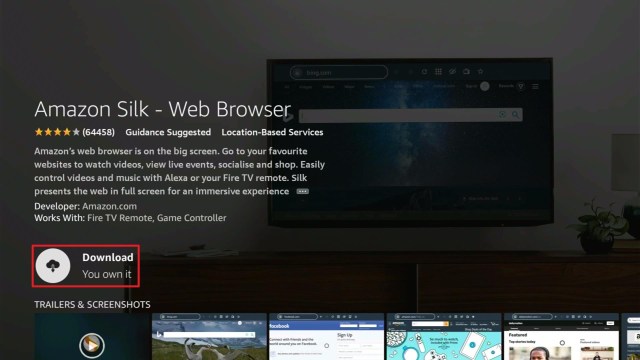
4. Click on the Silk Browser Icon.

Step 4 Install Watch Chia-Anime on Firestick


5. Choose Download

Step 5 Install Watch Chia-Anime on Firestick


6. Select Open to launch the browser.

Step 6 Install Watch Chia-Anime on Firestick


7. You can now start browsing using Amazon Silk Browser.

Step 7 Install Watch Chia-Anime on Firestick


8. Hover to the URL box of the browser. Type in “wwv.icefilms-info.com” and then click on Go.

Step 8 Install Watch Chia-Anime on Firestick


9. Enjoy watching.

Step 9 Install Watch Chia-Anime on Firestick


Grab your subscription now!

Click here to get the lowest price on Surfshark through our exclusive limited-time offer.


Features of IceFilms

Icefilms’ interface is very simple; it is a combination of black, red, and blue. This website’s features will satisfy you. Here are some of the features of Icefilms.

1. Search

  • This feature allows you to search for any type of content as long as it is stored within IceFilms’ categories. This also provides you with an A-Z list where you can view movies and shows alphabetically.


2. Home

  • In the home, you will see a date and the list of movies and tv shows that are ‘new in’ for today. This website will give you updates every day about movies and shows that are trending. Scroll down and you will also see yesterday’s new in’ list. 
  • On the right side of the screen, it will show you the list of movies and shows such as Recently updated episodes and movies and the Latest Releases episodes and movies.
  • On the left side of the screen, you will see the chatbox, in which every user can chat or give suggestions about a movie or shows that are great to watch. It is a worldwide chat box to which anyone has access to every message you will send. This amazing feature of Icefilms created a community that allows users to communicate with each other.  


3. Chat Policy

  • One unique feature of it is the Chat Box that allows each user to communicate about their favorite topics. You don’t need to worry about any spam messages because this website has a chat policy that includes:
    • Allowed: Discussing your favorite topics with fellow members and answering the question of your fellow users. 
    • Disallowed: This site does not tolerate Spamming, being cruel to others, sharing unauthorized external links, and offensive or false statements. 
    • Support:  This site also allows the public to send them a request via email. 


4. Download 

  • This site is not just for streaming it also allows users to download videos from their servers such as Vidoza, MixDL, Vidlox, VBin, ClipW, and FastDL. You can also learn how to download using these services because this site also provides you a tutorial explanation on how you can download in your chosen servers. 


5. IMDb Ratings

  • This site is supported by IMDb Ratings, in which every movie and show you will see their ratings, description or the synopsis, genre, release date, runtime, and category. 


YOUR INTERNET ACTIVITY IS BEING WATCHED

ReviewVPN cannot attest to the legality, security and privacy of the applications discussed on this site. It is highly recommended that you use a VPN service while streaming or using Kodi.

Currently, your IP 216.73.216.84 is visible to everyone and your Browser is being tracked by Advertisers & ISP Provider.

Save 65% Now

Limited Time Offer

Here are the main reasons why you must use a VPN:

  • Your activities are hidden from your ISP, the government, and from the apps you are using.
  • You can access additional movies and TV streams.
  • ISP attempts to throttle are thrwarted thus reducing buffering issues.
  • Geographically restricted content like Netflix and Hulu can be unblocked.

A VPN works be replacing your ISP-assigned IP address and creating an encrypted tunnel. We recommend the no log service offered by IPVanish. It works well on a Firestick and offers the fastest possible speeds.

Special Limited Time Offer - Get IPVanish


Categories

IceFilms has a lot of TV shows and movies to offer, and here is the list of genres for you to choose from:

  • Action
  • Adventure
  • Animation
  • Biography
  • Comedy
  • Crime
  • Documentary
  • Drama
  • Family
  • Fantasy
  • History
  • Horror
  • Music
  • Musical
  • Mystery
  • Reality
  • Romance
  • Sci-fi
  • Sport
  • Thriller
  • Unknown
  • War
  • Western


Pros and  Cons

Pros

  • High-Quality videos
  • Free Videos to download
  • The updated list of movies
  • Chat Policy


Cons

  • Non-licensed websites 
  • Some Illegally uploaded videos
  • Ads everywhere


 FAQs

Is it free?

Icefilms is totally free. 


Are there Ads?

Yes, Icefilms is littered with ads everywhere. 


Is it legal?

IceFilms is not 100% legal because some of the videos are illegally uploaded.


Is there an official website?

IceFilme ofgicails website is wwv.icefilms-info.com 


What other devices does it work on?

It works on all devices as long as you have a browser and internet connection.  


Alternatives for IceFilms

IceFilms is littered with ads anywhere, which can be annoying while streaming. The following are alternative streaming websites for you to watch free movies without ads. 

Stream Safely with Surfshark

https://get.surfshark.net/aff_c?offer_id=865&aff_id=12312

Streaming with an unsecured site is scary because your online information is shown and prone to identity theft and hackers. As the image showed above, IceFilms will automatically show your IP address while streaming. However, having a VPN while streaming will ensure your privacy and safety online by encrypting all your information to keep you away from online hackers. We highly recommend that you use Surfshark because it provides a lot of benefits to its users. Where in terms of encryption, Surfshark uses AES 256-bit encryption which is the same standard encryption to the United States that safeguards all your data. 

Here are the reasons why it is our VPN of choice:

  • Stop ISPs from interfering with your internet connection
  • Fast Network and Secure Connections
  • Bypass Restrictions and Censorship
  • Automatically hide your IP Address to ensure your privacy.
  • Bypass Geo-Blocking


Install Surfshark on Firestick

Best Surfshark Deal


How to Install Surfshark VPN on Firestick

If your Firestick still has the older interface, read this article to learn how to update it: Update Firestick Interface.

You can download Surfshark directly from the Amazon App store. It will be easy for you to find Surfshark with your Firestick’s Find feature. Refer to our screenshots below.

1. Go to the Home screen of your Firestick.

step 1 Install Surfshark VPN on Firestick


2. Navigate towards the Find tab. Press the Search button from the resulting dropdown.

step 2 Install Surfshark VPN on Firestick


3. Type in the keyword of SurfShark and select from the suggestions that will appear.

step 3 Install Surfshark VPN on Firestick


4. Click the official SurfShark icon from your search results.

step 4 Install Surfshark VPN on Firestick


5. Press the Download (You own it) button.

step 5 Install Surfshark VPN on Firestick


6. The SurfShark VPN installer will download on your device.

step 6 Install Surfshark VPN on Firestick


7. SurfShark VPN’s app will automatically install itself on your Fire TV stick.

step 7 Install Surfshark VPN on Firestick


8. Press the Open button after completing SurfShark VPN’s installation process.

step 8 Install Surfshark VPN on Firestick


9. Please wait for the SurfShark VPN to load its user interface.

step 9 Install Surfshark VPN on Firestick


10. You can now log in with your SurfShark VPN account credentials.

step 10 Install Surfshark VPN on Firestick

Learn more about Surfshark and Grab the Best Surfshark Deal Now!


Other VPNs to Consider

NordVPN (Best for Streaming)

Best Features

  • 5000+ Server in 50+ Countries 
  • Military-Grade Encryption
  • Fast Connection Speed
  • Suitable to a lot of devices
  • No-Log Policy

Prices
  • Complete $5.89 per month (64% Discount)
  • Plus $4.59 per month (56% Discount)
  • Standard $3.69 per month (55% Discount)

Best Features

  • 750+ High-speed VPN Servers in 43 Locations
  • Military-Grade Encryption
  • Fastest HD Streaming and Gaming
  • 30-Day Money-Back Guarantee
  • Unlimited Data & Devices
  • No-Log Policy

Prices
  • 3 Years $1.99 per month (82% Discount)
  • 1 Years $3.29 per month (70% Discount)
  • 1 Month $10.99 per month

IPVanish VPN (Most Secure)

Best Features

  • 1200+ Servers in 60+ Countries around the world
  • Unlimited Connections
  • No-Log Policy
  • Top Notch Military-Grade VPN Protocols and Encryptions
  • 100% Safe and Secured
  • Most Trusted VPN
  • Best VPN for Firestick
  • 30-Day Money-Back Guarantee

Prices
  • Yearly $3.99 per month (63% Discount) – 30 days risk free + Ransomware & Malware Protection
  • Quarterly $5.32 per month (51% Discount)
  • Monthly $10.99 per month


For more VPN discounts, go to ReviewVPN Deals and purchase the best VPN for you.


Grab the Best Surfshark Deal Now!

Final Thoughts

IceFilms is a well-known streaming site that provides you with different servers to watch high-quality videos. However, this app is very annoying because lots of ads will pop up. This app has a lot of categories and a huge list of videos that you will enjoy. 

We hope that this article provides you the information about Icefilms and helps you with how you can watch IceFilms on firestick. 

Free Secure Email

Free Secure Email

This article aims to provide you with information about the Free Secure Email services.


Do you think Outlook, Yahoo, and Gmail are safe? Well, they are not as safe and secure as you think because these services have been shown to scan users’ emails as advertising data.

You must be surprised but to tell you the truth Google and other email services are caught on using users’ emails for personalized ads. Don’t worry because this article will show you the best Free Secure  Emails that you can have.

Luckily, there are lots of secure email providers that are easy to use and trustworthy, but before we go to the main topic let me give you some insights into what is Secure Email.


ANONYMOUSLY


What does it mean to have Secure Email?

Secure Email also means Encryptions in which service providers ensure your Emails’ privacy by encrypting or hiding the contents of your emails such as messages and the sensitive content within. Having a secure email ensures that every email’s content is only readable by the intended recipient. Having a secure Email is very important because this controls access to emails and secures sensitive information and data that will be transmitted or received. You don’t need to worry about online hackers and online advertisers. 


The Best Free Secure Email Providers of 2021

If you are looking for the best email providers this article is for you. There are plenty of Secure Email Providers and this article will give you the best, free, most trusted services that you can have. 

Here are the lists of services that will keep your private email secured:


  • ProtonMail

ProtonMail is a Swiss-based email service, where you can sign up anonymously and do not require logging in with IP addresses. This email ensures that all of your emails are end-to-end encrypted, which means that no one even ProtonMail can access your contents. However, users are asked to verify their accounts by providing another email address. ProtonMail is also an open-source that has been audited and provides full PGP compatibility in sending encrypted emails which means all your emails are securely encrypted on its servers. This has 500MB storage free and does not keep any logs.

This Service has a lot of impressive features such as:

  • Swiss Privacy 
  • End-to-End Encryptions
  • Anonymous Email
  • Open-source
  • Free & Paid Options Available 
  • Self Destruct message functionality 
  • 2FA Available
  • Modern Inbox Design
  • Security without the Hassle

You can create your ProtonMail account here: Sign up ProtonMail

  • Tutanota

Tutanota is an encrypted email service provider that offers you 1GB of storage for free users. This is good for personal and business users. However, you would need a premium subscription to add a custom domain. It also provides you with some tools to protect your privacy such as an encrypted calendar or end-to-end encrypted forms. Tutanota brings you the AES and RSA instead of PGP encryption Tutanota is also supported a two-factor authentication and it also encrypts the name of the sender and receiver. This secure email service is really impressive when it comes to privacy, wherein your IP addresses and emails are automatically deleted from the heading metadata to protect you. 

Here are some impressive features of Tutanota:

  • Open Source
  • End-to-end encrypted 
  • Free & Paid options are available 
  • 2FA Available
  • White Label for Business
  • Custom Domains Supported
  • Provide Security Tools

You can create your account here: Sign up for Tunanota


  • Mailfence 

Mailfence is a Belgium-based email provider that gives you 1GB of storage, 500MB of email, and 500MB of documents. It is a Privacy-focused email service that does End-to-End encryption and supports OpenPGP encryption. You can also configure emails using IMAP (Internet Message Access Protocol) or POPS (Post Office Protocol Secure). You don’t need to worry about the sender’s identity because this service allows you to digitally sign your meals which is a way to verify it. There’s also two-factor authentication support that ensures your content privacy. you should know that this service logs your IP Address with some minor logging that can’t be disabled. However, it has strong end-to-end encryption provided that will encrypt your data, and contents will never give access. 

Here are some of the impressive features:

  • Free & Paid options
  • Custom domain support is available
  • 2FA Available 
  • Browser-based only (no mobiles apps)
  • RSA/ECC encryption 
  • Calendar
  • End-to-End encrypted

You can create your account here: Sign Up Mailfence


YOUR INTERNET ACTIVITY IS BEING WATCHED

ReviewVPN cannot attest to the legality, security and privacy of the applications discussed on this site. It is highly recommended that you use a VPN service while streaming or using Kodi.

Currently, your IP 216.73.216.84 is visible to everyone and your Browser is being tracked by Advertisers & ISP Provider.

Save 65% Now

Limited Time Offer

Here are the main reasons why you must use a VPN:

  • Your activities are hidden from your ISP, the government, and from the apps you are using.
  • You can access additional movies and TV streams.
  • ISP attempts to throttle are thrwarted thus reducing buffering issues.
  • Geographically restricted content like Netflix and Hulu can be unblocked.

A VPN works be replacing your ISP-assigned IP address and creating an encrypted tunnel. We recommend the no log service offered by IPVanish. It works well on a Firestick and offers the fastest possible speeds.

Special Limited Time Offer - Get IPVanish


  • Hushmail

HushMail is a secure email service by Canadians where you can get an account for free with 15MB storage for a single address. It also gives you a 14-day trial period. This service uses high-standard encryption algorithms such as TLA/SSL and OpenPGP. This has an impressive- privacy because it is Canada based which is a part of 5 Eyes. you don’t need to worry about your contents because they have strong end-to-end encryption and will never give access to your contents. 

Here is the awesome feature of this email service that you will surely care about: 

  • Separate plans & picking for business users
  • OpenPGP
  • Ability to create 2 web forms 
  • Automatically encrypted date before leaving
  • Supports face ID two-step verification and touch ID

You can create your account here:Sign up Hushmail


  • Counter Mail

Counter mail is a secure and convenient online email service provider that provides maximum security and privacy. It offers a 7-day free trial and works as a web application via thirds party email apps. It supports PGP Encryption which is an industry standard when it comes to security. This service also has MITM (man-in-the-middle) attack protection and AES and RSA algorithms. However, for  2FA you can use a USB key or a Time-based One-Time Password algorithm (TOTP). It will serve you a high standard quality of privacy and security because Sweden is one of the Fourteen Eyes countries. Other than that; this also offers an anonymous payment option and a Safebox which is protected with a strong password. The good thing with this app is it has a two-year plan that costs $3.29 monthly and gives you 4GB of storage but if 4GB isn’t enough you can also extend it by 1.75GB at a one-time purchase of $89. 


Here are the amazing features of Counter Mail.

  • OpenPGP end-to-end encryption
  • RAM-only servers
  • Custom Domain Support
  • Web Form support
  • MITM-attack protection
  • IMAP server, if you want to use your email client
  • Secure Forms
  • Windows, macOS X, and Linux Support
  • Anonymous Email Headers

You can create your account here:Sign up Counter Mail

These are just a few of the best Free Secure Email services.


Using Surfshark and Secure Email

Popular email services are caught on selling users’ information to third parties for their benefit. However, to ensure your security and privacy online you need a VPN that encrypts your email’s security and privacy. This VPN will encrypt all of your online information and prevent snooping third parties from accessing your contents such as the admins. The most recommended VPN to use is Surfshark, which works on email encryption while you are using public WiFi and keeps you safe from online hackers. 

Surfshark is one of the most recommended VPNs that has a lot of impressive features including: 

  • Geo-Blocking 
  • Bypass Censorship 
  • Hide your Identity Information to protect you from online hackers 
  • Prevent ISPs from interfering with your connection.
  • Unlimited Bandwidth 

So here is a guide on how you can combine Surfshark with your chosen free secure email accounts. First, register your secure email account then download the Surfshark software. You must first access your Surfshark before you access it with the internet and use your Secure Email account. 


Install Surfshark on Firestick

Best Surfshark Deal


How to Install Surfshark VPN on Firestick

If your Firestick still has the older interface, read this article to learn how to update it: Update Firestick Interface.

You can download Surfshark directly from the Amazon App store. It will be easy for you to find Surfshark with your Firestick’s Find feature. Refer to our screenshots below.

1. Go to the Home screen of your Firestick.

step 1 Install Surfshark VPN on Firestick


2. Navigate towards the Find tab. Press the Search button from the resulting dropdown.

step 2 Install Surfshark VPN on Firestick


3. Type in the keyword of SurfShark and select from the suggestions that will appear.

step 3 Install Surfshark VPN on Firestick


4. Click the official SurfShark icon from your search results.

step 4 Install Surfshark VPN on Firestick


5. Press the Download (You own it) button.

step 5 Install Surfshark VPN on Firestick


6. The SurfShark VPN installer will download on your device.

step 6 Install Surfshark VPN on Firestick


7. SurfShark VPN’s app will automatically install itself on your Fire TV stick.

step 7 Install Surfshark VPN on Firestick


8. Press the Open button after completing SurfShark VPN’s installation process.

step 8 Install Surfshark VPN on Firestick


9. Please wait for the SurfShark VPN to load its user interface.

step 9 Install Surfshark VPN on Firestick


10. You can now log in with your SurfShark VPN account credentials.

step 10 Install Surfshark VPN on Firestick

Learn more about Surfshark and Grab the Best Surfshark Deal Now!


Other VPNs to Consider

NordVPN (Best for Streaming)

Best Features

  • 5000+ Server in 50+ Countries 
  • Military-Grade Encryption
  • Fast Connection Speed
  • Suitable to a lot of devices
  • No-Log Policy

Prices
  • Complete $5.89 per month (64% Discount)
  • Plus $4.59 per month (56% Discount)
  • Standard $3.69 per month (55% Discount)

Best Features

  • 750+ High-speed VPN Servers in 43 Locations
  • Military-Grade Encryption
  • Fastest HD Streaming and Gaming
  • 30-Day Money-Back Guarantee
  • Unlimited Data & Devices
  • No-Log Policy

Prices
  • 3 Years $1.99 per month (82% Discount)
  • 1 Years $3.29 per month (70% Discount)
  • 1 Month $10.99 per month

IPVanish VPN (Most Secure)

Best Features

  • 1200+ Servers in 60+ Countries around the world
  • Unlimited Connections
  • No-Log Policy
  • Top Notch Military-Grade VPN Protocols and Encryptions
  • 100% Safe and Secured
  • Most Trusted VPN
  • Best VPN for Firestick
  • 30-Day Money-Back Guarantee

Prices
  • Yearly $3.99 per month (63% Discount) – 30 days risk free + Ransomware & Malware Protection
  • Quarterly $5.32 per month (51% Discount)
  • Monthly $10.99 per month


For more VPN discounts, go to ReviewVPN Deals and purchase the best VPN for you.


Final Thoughts

Nowadays, the online world is not as safe as we thought it would be, everything is prone to hacking so to secure your content, you need one of the best Free secure apps to send private and secure emails for free. They all provide strong end-to-end encryption, so worry no more about sensitive content. 

We hope this article gives you information about the Free Secure Email that you can have.