
Overview
Quick Navigation
KMPlayer Plus is a free media player app with many flexible, great features. You’ll be amazed by the KMPlayer Plus as it can play numerous audio & video formats. KMPlayer Plus is one of the most professional, awesome multimedia player apps available today.
If you’re looking for a media player of various media types in the best quality possible, then KMPlayer Plus is the perfect app for you. This multimedia player app maximizes the necessary features based on user requirements. Also, there are tons of exciting experiences the developer will bring in the KMPlayer Plus application.

KM Player Plus APK Installation on FireStick
- Turn on the FireStick device, go to the top menu bar and choose > Settings.
- Click My Fire TV > Developer Options.
- Enable Apps from Unknown Sources.
- Go back to FireStick’s home screen and go to the menu bar.
- Go to the Search option.
- Search & install the Downloader app on FireStick.
- After installing the Downloader app, launch it.
- Enter the KM Player Plus app download URL/APK – https://reviewvpn.com/kmp
- Click GO.
- When the KM Player Plus file download is complete – click Install.
- Now, you have successfully installed the KM Player Plus app on FireStick.

Install KM Player Plus APK on Firestick with Screenshots
Install the Downloader app and jailbreak your firestick by enabling unknown sources. To learn more about the procedure, you may read How to Install the Downloader App and Enable Unknown Sources.
1. After installing the Downloader app, launch it.
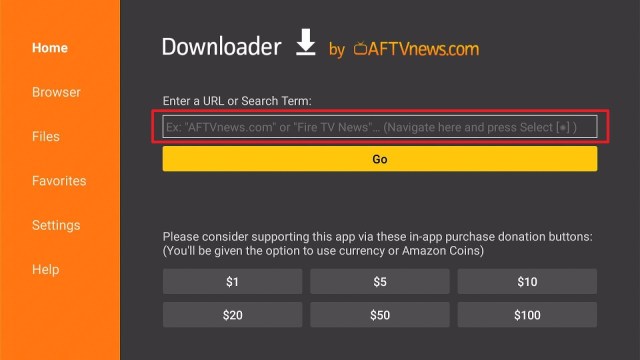
2. Enter the KM Player Plus app download URL/APK – https://reviewvpn.com/kmp and click GO.

3. When the KM Player Plus file download is complete – click Install.

4. Now, you have successfully installed the KM Player Plus app on FireStick.

Install Surfshark on Firestick
Moving the Newly Installed App to the Front
- Go back to FireStick’s Home Screen (you may click the Home Button on the Fire Stick remote)
- Go to Your Apps & Games/Channels
- Scroll once to the left
- Click See All
- All the newly installed apps are located at the bottom – you can move the XYZ Player app by clicking the Options button (at the right side of the Home Button)
What Is KM Plus?
KM Player Plus is a productive, amazing video player for your Android-based devices with tons of built-in codecs. This media player application supports nearly all of the current formats. The KM Player Plus app comes with an advanced design, simple intuitive controls, as well as various settings to optimize your Android device.
The video types you wish to play in the KM Player Plus app will be provided in the highest quality. The video quality levels are High Definition (HD), Full HD, Ultra HD, 4K, and 8K resolution. Additionally, you will be bookmarked in the video you’re playing. Thus, the next time you launch the app, you’ll be able to review the videos you played straightforwardly.
KM Player Plus Features
- Video playback in High Definition (HD), Full HD, Ultra HD, 4K, and 8K resolution
- Zoom in the video: The app zoom in and move the content you are streaming
- Color adjustment: you can change contrast, brightness, saturation, hue, and gamma information
- Invert videos left and right or upside down
- Repeat after section designation
- Pop-up windows that you can use with other applications
- The app selects & specify player options with a single click
- Playback speed control function
- Utilizes equalizer for video & music
- Subtitle Setting: You can change subtitle position, color, & size
- Great user interface: it has a beautiful video & music playback user interface
- It comes with a music & video timer function
KM Player Plus Functions
- The app searches for videos & music you want
- It creates a music & video playlist
- Plays content within Google Drive
- The app plays any video on the internet by entering a URL
- It loads external storage devices, such as USB memory or SD card
- It has a private server connection by UPNP, FTP, & SMB
Built-in Codecs
KMPlayer Plus is available with its own Codec. Thus, users are not required to install any codec. The KMPlayer Plus app’s Coded support includes DX50, DIVX, Avi File: DXMF, DIV3, MKV File: DX50, MP4V, DIVX, DIV3, MP4V, and DIV4. The unsupported Codecs in KMPlayer Plus include EAC3, DTS, mlp, TrueHD: Four CC: eac3, dts, trhd, dtsc, dtsb, dtsh, dtse, ms, & dtsl.
With the Codec list above, the KMPlayer Plus app is obviously being blended with the most well-known Codec series. The internal processing integration will make the file running process smoother and faster compared to other apps with similar functions.
ReviewVPN cannot attest to the legality, security and privacy of the applications discussed on this site. It is highly recommended that you use a VPN service while streaming or using Kodi. Currently, your IP 216.73.216.84 is visible to everyone and your Browser is being tracked by Advertisers & ISP Provider. Here are the main reasons why you must use a VPN: A VPN works be replacing your ISP-assigned IP address and creating an encrypted tunnel. We recommend the no log service offered by IPVanish. It works well on a Firestick and offers the fastest possible speeds.
YOUR INTERNET ACTIVITY IS BEING WATCHED
Always Use a VPN on Firestick

A Virtual Private Network or VPN for the Amazon Firestick will let you access limitless Netflix libraries. Firestick users will be able to watch all their favorite content on popular media platforms. Also, a VPN will provide features to secure you on the internet and safeguard the Firestick device from any internet threat.
However, the highly recommended VPN service for Firestick is Surfshark. It provides 3,200 VPN servers in 65 worldwide locations. Surfshark unblocks some of the most famous streaming platforms. Some of these include Hulu, Netflix, ESPN, Amazon Prime, Peacock, HBO NOW, and many more.
Click here to get the lowest price on Surfshark through our exclusive limited-time offer.
How to Install Surfshark VPN on Firestick
If your Firestick still has the older interface, read this article to learn how to update it: Update Firestick Interface.
You can download Surfshark directly from the Amazon App store. It will be easy for you to find Surfshark with your Firestick’s Find feature. Refer to our screenshots below.
1. Go to the Home screen of your Firestick.

2. Navigate towards the Find tab. Press the Search button from the resulting dropdown.

3. Type in the keyword of SurfShark and select from the suggestions that will appear.

4. Click the official SurfShark icon from your search results.

5. Press the Download (You own it) button.

6. The SurfShark VPN installer will download on your device.

7. SurfShark VPN’s app will automatically install itself on your Fire TV stick.

8. Press the Open button after completing SurfShark VPN’s installation process.

9. Please wait for the SurfShark VPN to load its user interface.

10. You can now log in with your SurfShark VPN account credentials.

Learn more about Surfshark and Grab the Best Surfshark Deal Now!
Install Surfshark on Firestick


For more VPN discounts, go to ReviewVPN Deals and purchase the best VPN for you.
Click here to get the lowest price on Surfshark through our exclusive limited-time offer.
FAQs
Is the KM Player Plus app free?
Yes, the KM Player Plus app is free to download, install, & use.
Is the KM Player Plus app legal?
Yes, the KM Player Plus app is legal.
Is the KM Player Plus app safe?
Yes, the KM Player Plus app is very safe to use and has no viruses or malware.
Compatibility
With the KM Player Plus app, you can easily play various media types in the best quality. Nonetheless, the KM Player Plus app is compatible with a bunch of Android devices, such as Firestick, Google Chromecast, and many more.
Alternatives
There are tons of media players available for Android devices. You can install these apps on your Firestick. However, in case the KM Player Plus app malfunctions, you may check out its alternatives below:
- VLC
- MX Player
- Ace Stream Engine
- DuplexPlay
- Wuffy Player
- Vimu Media Player
- MV CastPlayer
- X-Player
- iMPlayer
To know more about media player applications, you can visit our article about the Best Video Players for Firestick, Android, and iOS.
Wrapping Up
In this article, we have provided information on how to install the KM Player Plus APK on Firestick. The information above should really help enhance your Firestick experience. The KM Player Plus app lets you stream tons of video formats.
Nonetheless, always remember to use A VPN service every time you use your Firestick. If you have any thoughts about the KM Player Plus app, don’t hesitate to let us know in the comments section.


