
Overview
Quick Navigation
The Live Channels app is one of the great apps for Android devices to watch Live TV. The app primarily rolled out for the Android TV OS. Moreover, this app is quite interesting, and it comes along with nice features.
This live TV streaming app allows you to access your favorite movies, TV shows, news, sports, and more. The content is from numerous channel sources like IP-based tuners, built-in tuners, and more. Furthermore, the Live TV app has a cool concept that’s really needed for Android streaming devices.
In addition, the Live Channels app comes with amazing features, such as closed captioning, parental controls, and picture-in-picture.

Live Channels APK Installation on FireStick
- Turn on the FireStick device, go to the top menu bar and choose > Settings.
- Click My Fire TV > Developer Options.
- Enable Apps from Unknown Sources.
- Go back to FireStick’s home screen and go to the menu bar.
- Go to the Search option.
- Search & install the Downloader app on FireStick.
- After installing the Downloader app, launch it.
- Enter the Live Channels app download URL/APK – https://reviewvpn.com/lvc
- Click GO.
- When the Live Channels file download is complete – click Install.
- Now, you have successfully installed the Live Channels app on FireStick.

Install Live Channels App on Firestick with Screenshots
Install the Downloader app and jailbreak your firestick by enabling unknown sources. To learn more about the procedure, you may read How to Install the Downloader App and Enable Unknown Sources.
1. After installing the Downloader app, launch it.
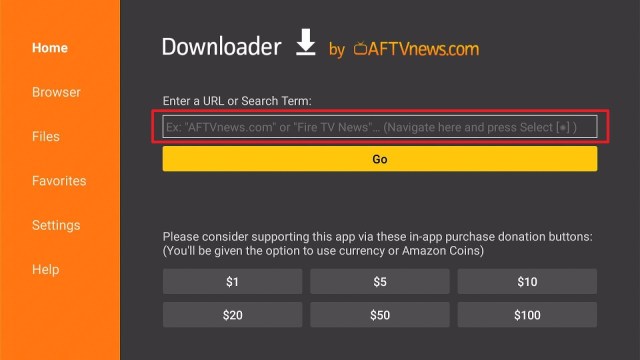
2. Enter the Live Channels app download URL/APK – https://reviewvpn.com/lvc and click GO

3. When the Live Channels file download is complete – click Install

4. Now, you have successfully installed the Live Channels app on FireStick

Moving the Newly Installed App to the Front
- Go back to FireStick’s Home Screen (you may click the Home Button on the Fire Stick remote)
- Go to Your Apps & Games/Channels
- Scroll once to the left
- Click See All
- All the newly installed apps are located at the bottom – you can move the Live Channels app by clicking the Options button (at the right side of the Home Button)
ReviewVPN cannot attest to the legality, security and privacy of the applications discussed on this site. It is highly recommended that you use a VPN service while streaming or using Kodi. Currently, your IP 40.77.167.63 is visible to everyone and your Browser is being tracked by Advertisers & ISP Provider. Here are the main reasons why you must use a VPN: A VPN works be replacing your ISP-assigned IP address and creating an encrypted tunnel. We recommend the no log service offered by IPVanish. It works well on a Firestick and offers the fastest possible speeds.
YOUR INTERNET ACTIVITY IS BEING WATCHED
What Is the Live Channels App?
The Live Channels APK is a great app for streaming live television. It lets you watch your favorite sports, movies, TV shows, news, and more. The Live Channels app shows the content instantaneously on your Android streaming devices.
Permissions
To access GEODATA, it is required to make a TV guide. It is needed to download posters to television programs in order to access the storage. You are required to display the TV guide & channel banner to access TV programs.
Compatibility
With the Live Channels app, you can easily watch your favorite live TV channels. It is compatible with numerous Android-powered devices, such as the Amazon Firestick, Google Chromecast, smartphones, and lots more.
Always Use a VPN on Firestick
A Virtual Private Network or VPN is a great service that conceals data by transmitting the web activities to a secure, safe location. The VPN service generates a secure tunnel to offer end-to-end protection. Thus, Internet Service Providers will not know what you are doing online.
The Amazon Firestick is a very useful device that allows you to stream Netflix, Hulu, as well as any other content you want.
Nonetheless, streaming apps or platforms come with geographical restrictions. Thus, if you’re not residing in the United States, you will not be able to watch the US content library of Netflix. That is the major benefit of using a VPN service like the Surfshark service. If the content is not accessible in your country, the Surfshark service gives you the option to replace your real IP address with the location where the content is available.
Install Surfshark on Firestick
How to Install Surfshark VPN on Firestick
If your Firestick still has the older interface, read this article to learn how to update it: Update Firestick Interface.
Follow our screenshots below to install the SurfShark VPN app on your Fire TV stick.
1. Go to the Home screen of your Firestick.

2. Navigate towards the Find tab. Press the Search button from the resulting dropdown.

3. Type in the keyword of SurfShark and select from the suggestions that will appear.

4. Click the official SurfShark icon from your search results.

5. Press the Download (You own it) button.

6. The SurfShark VPN installer will download on your device.

7. SurfShark VPN’s app will automatically install itself on your Fire TV stick.

8. Press the Open button after completing SurfShark VPN’s installation process.

9. Please wait for the SurfShark VPN to load its user interface.

10. You can now log in with your SurfShark VPN account credentials.

Learn more about Surfshark and Grab the Best Surfshark Deal Now!
Install Surfshark on Firestick


For more VPN discounts, go to ReviewVPN Deals and purchase the best VPN for you.
Click here to get the lowest price on Surfshark through our exclusive limited-time offer.
Live Channels App Alternatives
Oreo TV
Orea TV is an amazing live TV streaming app for your Android device. The app comes with proper navigation & options to speedily access the videos without subscription or login problems.
Pros & Cons
Pros
- Limitless movies, TV shows, & new releases
- Easy to use Interface
- Live TV in High Definition
- A small number of ads
Cons
- Several links may be unavailable
- Launching content may take some time
Live NetTV
Live NetTV is a great entertainment application that provides more than 800 Live Channels, VOD, Movies, TV Shows, Live Sports, and more. It has all popular programming from over 8 countries. The streaming platform is completely FREE. You can use the app easily and you will immediately love it.
Features:
- More than 800 channels in numerous categories & genres
- Access to Video on Demand or VOD
- Supports several famous external media players
- Access to numerous premium sports channels
- Simple & easy to use user interface
- Completely free without ads
- You may request channels from the developers
- It has a filter & sorting system
- Lets you access movies & TV Shows in High Definition
- You can report broken links
- Video playback support on particular external media players
- Does not require you to register
- You’ll get notifications when the latest shows are added
- Live Event scheduler
AOS TV
AOS TV is an awesome free live TV application that allows you to watch free television channels on Android-powered devices. The live TV app offers over 1000 channels. AOS TV’s interface is very straightforward. Simply search for the TV channel you want to watch and the app provides multiple links.
Features:
- Easy to use interface
- More than 1000 TV Channels
- TV channels from the USA, UK, Portugal, Italy, Canada, India, France, Bangladesh, Pakistan, France, & Saudi Arabia amongst others
- Easy navigation
- You may search by trending content, such as the latest sporting events
FAQs
How is the Live Channels app different from other live TV applications?
The Live Channels app uses a distinctive technology that functions on nearly all Android devices & networks.
Is the Live Channels app free?
Yes, the app is free to download, install, & use.
Is the Live Channels app legal?
Yes, this app is legal.
Is the Live Channels app safe?
Yes, the Live Channels app is very safe to use and has no viruses or malware.
Click here to get the lowest price on Surfshark through our exclusive limited-time offer.
Conclusion
In this article, we have provided information on how to install the Live Channels app on Firestick. The information above should really help enhance your Firestick experience. Moreover, the app lets you watch your favorite sports, movies, TV shows, news, and more.
However, always remember to use A VPN service every time you use your Firestick. If you have any thoughts about the Live Channels app, don’t hesitate to let us know in the comments section.


