

Overview
Quick Navigation

Shout Factory TV is a streaming app that lets you access catalogs of television shows, series, as well as movies. Its content has become a cultural reference in many ways. The app also constructs independent visual images.
Shout Factory TV is an online demand platform. It is aimed at people looking for something unique when watching movies or TV shows. Shout Factory TV tends to recover the essence of the VHS in the 80s & 90s. The Shout Factory TV app allows you to watch videos free of charge with its built-in player. Additionally, the app’s main menu lets you browse various categories.

Shout Factory TV APK Installation on FireStick
- Turn on the FireStick device, go to the top menu bar and choose > Settings
- Click My Fire TV > Developer Options
- Enable Apps from Unknown Sources
- Go back to FireStick’s home screen and go to the menu bar
- Go to the Search option
- Search & install the Downloader app on FireStick
- After installing the Downloader app, launch it
- Enter the Shout Factory TV app download URL/APK – https://reviewvpn.com/fac
- Click GO
- When the Shout Factory TV file download is complete – click Install
- Now, you have successfully installed the Shout Factory TV app on FireStick
Install Shout Factory TV on Firestick with Screenshots
1. Install the Downloader app and jailbreak your firestick by enabling unknown sources. To learn more about the procedure, you may read How to Install the Downloader App and Enable Unknown Sources.
2. After installing the Downloader app, launch it.
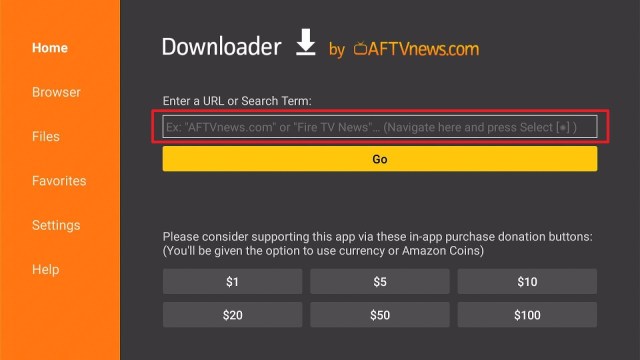
3. Enter the Shout Factory TV app download URL/APK – https://reviewvpn.com/fac and click GO

4. When the Shout Factory TV file download is complete – click Install

5. Now, you have successfully installed the Shout Factory TV app on FireStick

ReviewVPN cannot attest to the legality, security and privacy of the applications discussed on this site. It is highly recommended that you use a VPN service while streaming or using Kodi. Currently, your IP 216.73.216.109 is visible to everyone and your Browser is being tracked by Advertisers & ISP Provider. Here are the main reasons why you must use a VPN: A VPN works be replacing your ISP-assigned IP address and creating an encrypted tunnel. We recommend the no log service offered by IPVanish. It works well on a Firestick and offers the fastest possible speeds.
YOUR INTERNET ACTIVITY IS BEING WATCHED
Legal Disclaimer: ReviewVPN.com does not encourage or endorse any illegal activity involved in the usage of services and applications referenced on this site. We do not verify the licensing agreements of services. The end-user is wholly responsible for ensuring that any media accessed through these services does not violate copyright and/or licensing laws. ReviewVPN does not promote, link to, or receive compensation from any Apps and IPTV services.
Install Surfshark on Firestick

Moving the newly installed app to the front
- Go back to FireStick’s Home Screen (you may click the Home Button on the Fire Stick remote)
- Go to Your Apps & Games/Channels
- Scroll once to the left
- Click See All
- All the newly installed apps are located at the bottom – you can move the Shout Factory TV app by clicking the Options button (at the right side of the Home Button)
What is Shout! Factory TV?
Shout Factory TV is a great digital entertainment spot that offers timeless and present-day cult favorites for people who love pop culture. The app comes with a distinctively organized entertainment content library. It provides an unparalleled mix of cult movies, TV shows, original specials, comedy, and much more. Nonetheless, the app is free. It is an ad-supported video service that contains full-length movies, TV shows, original content, and more. The app is compatible with tons of Android devices.
Features
- Episodic television content
- Full-length movie playback
- Live streaming media content
Viewing Experience Across A Wide Variety Of Platforms
The Shout Factory TV application offers an enticing, high-quality streaming experience over a wide range of platforms. The app runs well on smartphones, tablets, and smart TVs. It works through apps on the Apple TV, Amazon Fire TV, Roku player, and more. This streaming app is also up for grabs as a branded channel on Crackle, Amazon Prime Channels, LocalNow, IMDbTV, Pluto TV, Plex, The Roku Channel, Redbox, Roku Premium Subscriptions, and lots more.
What To Watch on the Shout Factory TV app?
The Shout Factory TV app provides 24/7 live stream channels through numerous streaming services. Nonetheless, if you utilize one of the streaming platforms – which some do not need a subscription – then you can obtain the Shout Factory TV channel.
The Shout Factory TV application utilizes its Livestream channel to provide events, such as Super Sentai marathons and VHS era hits replays. Since Shout Factory TV is a linear livestream, users can’t select the content they will watch like they can through the Amazon Prime Video, or Shout Factory TV app. Also, users can’t pause or rewind the videos. It is like watching a standard television channel without a digital video recorder.
How Much Does the Shout Factory TV app Cost?
If you want to watch entertainment content with some ads, then using the Shout Factory TV app won’t cost anything at all. However, all the streaming app’s movies, TV shows, etc., are free of charge and ad-supported.
Nonetheless, if you want to subscribe to watch the videos advertisement-free through Roku Premium or Amazon Prime Video, it will cost you $2.99 a month. With regard to Amazon Prime Video, you are required to purchase a video subscription.
Compatibility
With the Shout Factory TV app, you can easily watch movies, TV shows, original specials, comedy, and much more on Android-powered devices. Fortunately, the Shout Factory TV app is compatible with lots of Android-based devices, such as Roku, Amazon Firestick, Google Chromecast, and lots more.
Pros & Cons
Pros
- Premiere digital entertainment
- Available on a number of devices
- Offering full-length content
Cons
- It has no entertainment library
- Doesn’t update its content
Stream Safely, Securely with VPN
A Virtual Private Network or VPN sets up a protected internet connection when you’re online. A VPN service, just like Surfshark, encrypts web traffic and conceals your online identity and internet activities. Wherein, it is more difficult for ISPs, third parties, or governments to track your web activities and obtain your data.
A VPN masks IP addresses by allowing the network to redirect them via a configured network server. Thus, if you surf, browse, or stream online with a Virtual Private Network, the server of the VPN will be the source of your web activity or data. Wherein, ISPs, third parties, or even hackers cannot see the websites you use or your data. A VPN service functions like a filter that makes all your online activities or data nonsense.
Other major benefits of a VPN service
- Disguising people’s whereabouts
- Secure encryption
- Access to geographically restricted content, websites, apps, and more
- It secures data transfer
Note: For more information about Surfshark, please read our Surfshark Review.
How to Install Surfshark VPN on Firestick
If your Firestick still has the older interface, read this article to learn how to update it: Update Firestick Interface.
Follow our screenshots below to install the SurfShark VPN app on your Fire TV stick.
1. Go to the Home screen of your Firestick.

2. Navigate towards the Find tab. Press the Search button from the resulting dropdown.

3. Type in the keyword of SurfShark and select from the suggestions that will appear.

4. Click the official SurfShark icon from your search results.

5. Press the Download (You own it) button.

6. The SurfShark VPN installer will download on your device.

7. SurfShark VPN’s app will automatically install itself on your Fire TV stick.

8. Press the Open button after completing SurfShark VPN’s installation process.

9. Please wait for the SurfShark VPN to load its user interface.

10. You can now log in with your SurfShark VPN account credentials.

Learn more about Surfshark and Grab the Best Surfshark Deal Now!
Install Surfshark on Firestick


For more VPN discounts, go to ReviewVPN Deals and purchase the best VPN for you.
Click here to get the lowest price on Surfshark through our exclusive limited-time offer.
FAQs
Can I submit content to the Shout Factory TV app?
If you have content you would like the app to exhibit, you may contact them at shoutfactorytv@shoutfactory.com.
Does Shout Factory TV have a newsletter, where to sign up?
The Shout Factory TV has a newsletter and you can sign up on shoutfactory.com
Can I download videos on Shout Factory TV?
The videos on the Shout Factory TV are for streaming only.
Alternatives
Conclusion
In this article, we have provided information on how to install the Shout Factory TV APK on Firestick. The information above should really help you watch tons of entertainment content on your Amazon Firestick.
Nonetheless, always remember to use A VPN service every time you use your Firestick. If you have any thoughts about the Shout Factory TV app, don’t hesitate to let us know in the comments section.
Note: ReviewVPN.com does not own or operate any app nor does it endorse any. The main purpose of this article is strictly for educational purposes only.


