

Creating App Shortcuts on Firestick
Quick Navigation
Are you constantly using a particular app, but having a hard time locating it? If it’s a yes, then this article is for you. It aims to help the readers learn how to create app shortcuts on the Firestick home page.

It is really helpful if you can easily navigate on your Firestick. Installing the best Firestick apps on your device will give you a vast library of applications. The more apps you install, the harder it gets to locate your favorite one.
Using your firestick remote, it’ll be easy to create app shortcuts.
We create app shortcuts for streaming apps, particularly for VPNs like Surfshark. This way we can connect to a different server fast and easily. Some apps are automatically installed and already have shortcuts on the homepage. These are Freevee (former IMDb TV), Prime Video, YouTube, and more. You can change that list by creating app shortcuts.
Creating shortcuts does not require users to jailbreak their firestick. Navigate through the app list, find the app, and easily create a shortcut. Let’s discuss this process thoroughly for you to understand it better.

How to Create App Shortcuts on Firestick Homepage
1. From the home page of your Firestick, scroll to the right until you reach Apps and Channels.
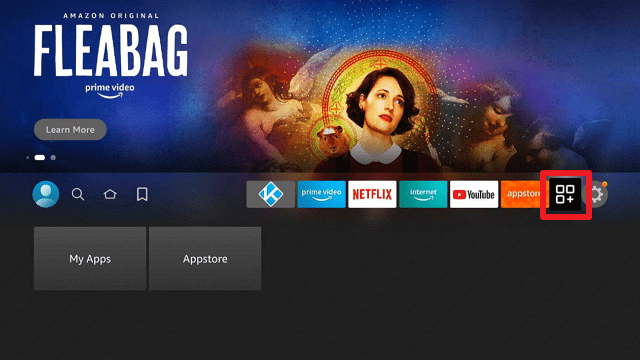
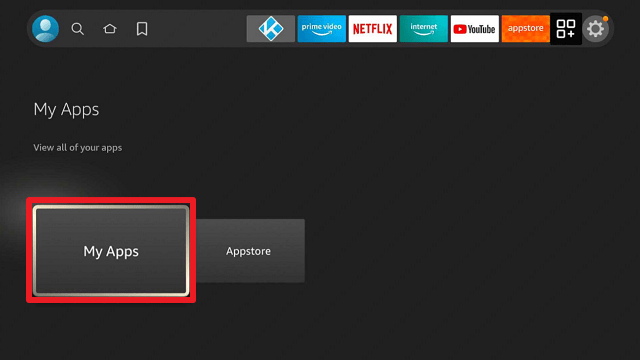
2. Go over to My Apps.
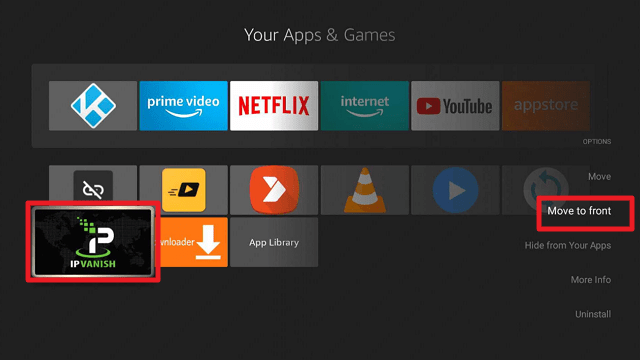
3. Locate the app that you wish to create a shortcut. For this example, we choose IPVaish. Using your Firestick remote, click the hamburger/options button. Click on Move to Front.
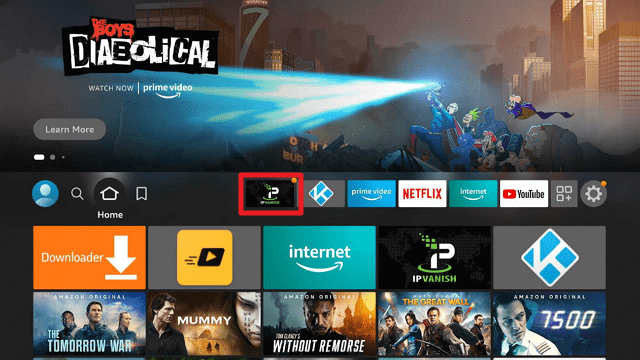
4. You will then see the app as part of the top apps.
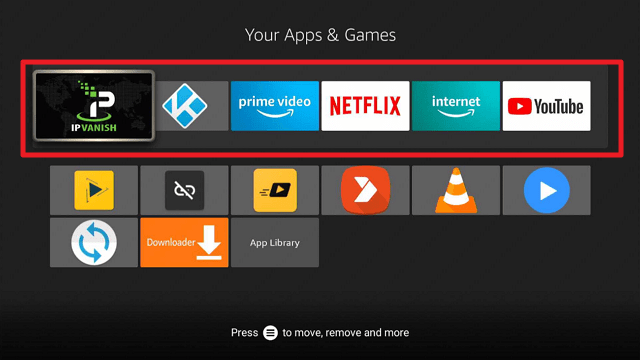
5. Go back to the home screen and see the app shortcut that you have made.
Best VPN for Firestick

There is no doubt that streaming on Firestick is a lot of fun. But there is always a threat on the internet. Even Firestick tracks its users. There are things that you need to turn off immediately before using Firestick.
Aside from the device you use, there are still other trackers like your Internet Service Provider (ISP), and other domains when you stream on different websites. That is where you need extra protection while streaming. Streaming is fun but it could be dangerous to your privacy.
By using a VPN, it will provide you with a new IP address that will mask your original one. Through this, you can go on websites and apps as an anonymous individual. No one will locate you, get your information, and record your online activities.
The best VPN for Firestick is none other than Surfshark. You can easily install it on your device.
Best Surfshark Features:
-
- Thousands of available locations
- Best for security and privacy
- Gives access to geo-restricted content
- No Log Policy
- Cloud Storage
- Amazing speed
- Keeps you anonymous
- 100% Sure money-back guarantee.
- Compatible with all kinds of devices.
- Unlimited capacity for connected devices.
- Best VPN for torrenting because of its P2P and SOCKS5 Proxy features.
- It has a Kill Switch, Split Tunneling, and DNS Leak Protection Features.
- Prevents Firestick Buffering and Kodi Buffering
Install Surfshark on Firestick
How to Install Surfshark VPN on Firestick
If your Firestick still has the older interface, read this article to learn how to update it: Update Firestick Interface.
Follow our screenshots below to install the SurfShark VPN app on your Fire TV stick.
1. Go to the Home screen of your Firestick.

2. Navigate towards the Find tab. Press the Search button from the resulting dropdown.

3. Type in the keyword of SurfShark and select from the suggestions that will appear.

4. Click the official SurfShark icon from your search results.

5. Press the Download (You own it) button.

6. The SurfShark VPN installer will download on your device.

7. SurfShark VPN’s app will automatically install itself on your Fire TV stick.

8. Press the Open button after completing SurfShark VPN’s installation process.

9. Please wait for the SurfShark VPN to load its user interface.

10. You can now log in with your SurfShark VPN account credentials.

Learn more about Surfshark and Grab the Best Surfshark Deal Now!
Install Surfshark on Firestick



For more VPN discounts, go to ReviewVPN Deals and purchase the best VPN for you.
Click here to get the lowest price on Surfshark through our exclusive limited-time offer.
FAQs
Does Apps Shortcuts Reset After Firestick Reboot?
A reboot or update might reset the manually created app shortcuts.
Are App Shortcuts Permanent?
The default list of app shortcuts for Firestick is permanent. You can create your list easily. It won’t change even if you turn off your device. If you update, reboot, and change the account, the list will go back to the default apps.
How to Remove An App From the App Shortcuts List?
This is the exact reverse of the process provided above. Just go to apps and channels again, click on Apps, choose the app, and click move to other rows.
How Many App Shortcuts Can I Make?
For Firestick, the maximum number of app shortcuts on the list is 6.
Wrapping Up
Creating app shortcuts will help you navigate to your favorite apps easily and fast. Especially if you have a vast library of apps installed.
It is very easy to make an app shortcut for yourself. Take a look at the FAQs above to see the details regarding this. If you have other questions, you can write them down in the comment section below.
We hope, that we can help you in creating app shortcuts on Firestick.






