

Overview
Quick Navigation
In this article, we will show you how to install the FilmRise Action app on your Fire TV stick.

There is nothing comparable to the blood rush and adrenaline surge that action movies can give us. The action genre of the movie industry continues to give us many dynamic movies. Watching the protagonist dish it out with their archenemy or multiple opponents makes us wish we are in their shoes.

So, are you an action movie enthusiast looking for an excellent app? If you agree, then you have come across the right article. Here at ReviewVPN, we perform reviews of the best apps available for streaming. We also ensure that these apps will work great on your Fire TV stick. For fans of action movies, we just got the right app for your taste.
Let us now introduce you to the FilmRise Action app. The brand of FilmRise has many apps with individual film genres. It has many categories you can select that fit your genre preference. If you love action movies, then the FilmRise Action app is the best for your daily needs.
The FilmRise Action app allows us to stream FREE action movies and TV shows. All of its videos include a variety of action movies with a mix of different genres. While using the FilmRise action app, expect puzzling crime stories, suspenseful thrillers, epic adventure films, military battles, war chronicles, martial arts movies, and more.
All of the movies that FilmRise Action offers are free of payment.
The FilmRise Action app is available for free from the Amazon App store. You don’t have to Jailbreak your Fire TV stick or sideload the app for its installation. Let us now teach you how to install the FilmRise Action app on your Fire TV stick.

How to Install the FilmRise Action App on your Firestick
Follow our guide below to successfully install the FilmRise Action app on your Fire TV stick:
1. Go to your Fire TV stick’s home screen.
2. Navigate towards the Find tab.
3. Select the Search button from the dropdown.
4. Type in FilmRise Action with your on-screen keyboard.
5. Press on the official FilmRise Action app icon.
6. Click on the ‘Get, Free to Download’ button.
7. The FilmRise Action app’s setup file will download.
8. Installation will begin after download, wait until the FilmRise Action app’s installation finishes.
9. You can now open the FilmRise Action app after its installation procedure.
10. Choose any action movie you like to watch from the FilmRise Action app’s gallery.
How to Install the FilmRise Action App on your Firestick with Screenshots
Follow our guide below to successfully install the FilmRise Action app on your Fire TV stick:
1. Go to your Fire TV stick’s home screen.
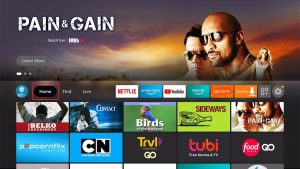
2. Navigate towards the Find tab.
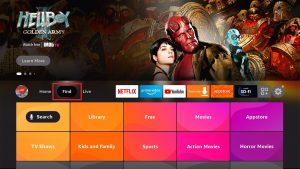
3. Select the Search button from the dropdown.
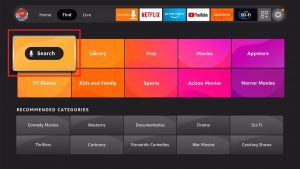
4. Type in FilmRise Action with your on-screen keyboard.

5. Press on the official FilmRise Action app icon.

6. Click on the ‘Get, Free to Download’ button.
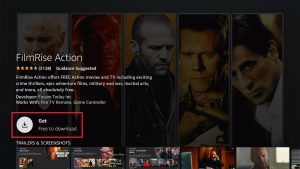
7. The FilmRise Action app’s setup file will download.
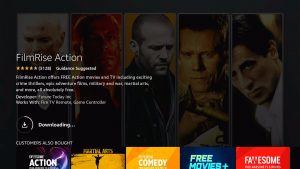
8. Installation will begin after download, wait until the FilmRise Action app’s installation finishes.
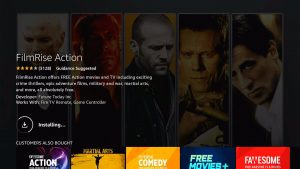
9. You can now open the FilmRise Action app after its installation procedure.
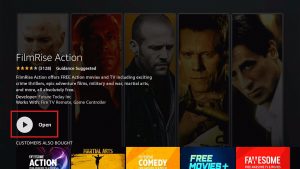
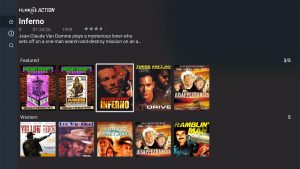
10. Choose any action movie you like to watch from the FilmRise Action app’s gallery.
Install Surfshark on Firestick
YOUR INTERNET ACTIVITY IS BEING WATCHED
ReviewVPN cannot attest to the legality, security and privacy of the applications discussed on this site. It is highly recommended that you use a VPN service while streaming or using Kodi.
Currently, your IP 216.73.217.61 is visible to everyone and your Browser is being tracked by Advertisers & ISP Provider.
Here are the main reasons why you must use a VPN:
- Your activities are hidden from your ISP, the government, and from the apps you are using.
- You can access additional movies and TV streams.
- ISP attempts to throttle are thrwarted thus reducing buffering issues.
- Geographically restricted content like Netflix and Hulu can be unblocked.
A VPN works be replacing your ISP-assigned IP address and creating an encrypted tunnel. We recommend the no log service offered by IPVanish. It works well on a Firestick and offers the fastest possible speeds.
Features of the FilmRise Action App
- Watch action films for free
- Wide selection of TV shows and videos
- Contains Hollywood and classic action movies
- Caters to any action film enthusiast
- Pick action movies with its gallery-style interface
- All of the movies and videos are shown in tiles for easy selection.
- Includes action movies from independent filmmakers
- All of its media content receive periodic updates
- Modern-day straight-to-video ‘B-grade’ movies
- Hidden action gems which are overlooked by critics
- Watch action movies in HD quality resolutions
- All the videos from the FilmRise Action app are free and legal
FilmRise Action App Interface
- Easy-to-use
- Responsive buttons
- Built-in Search bar
- Display movie titles in gallery-style
- Each movie title art are shown in tiles
- Provides a brief description of each action film
- Shows the maturity rating of each action movie
- Includes a summary of the plot of each action movie
- Default dark theme
FilmRise Action App Categories
- Present Feature
- Western
- Popular Categories
- Top Thrillers
- Television
- Trending Action
- Women-Led Action Films
- Adventure
- Martial Arts
- Thriller
- War
- Science Fiction
- Detective and Crime
- Classic Martial Arts
- Sports Action
- General Viewing
FilmRise Action Popular Categories
- All Genres
- Western
- True Crime
- British TV
- Sci-Fi
- Horror
- Classic TV
FilmRise Home Screen
- Home Tab
- About Us section
- Search Tab
- Gallery of Movies, Videos, and TV shows
Pros and Cons
Pros
- 100% Free
- Legal to Use
- Quality Action movies
- Hidden gems from the action genre
- A mix of different genres into action movies
- Search for movies within its wide movie collection
- Presents classic to modern action movies
Cons
- Some movie titles load slowly at first.
- The addition of more movies.
Watch Action Movies with a VPN
The FilmRise Action app delivers quality movies and TV shows from the action genre. Enjoy streaming these videos on your wide TV screen and hear the explosions and grunts of dynamic action scenes. However, your action movie experience may encounter hindrances.
Unfortunately, your ISP monitors your connection for heavy internet traffic. They will decrease your streaming speed server overload. It results in stuttering and buffering.
To prevent your ISP from reducing your bandwidth, we recommend Surfshark for your viewing purposes. The VPN can smoothen your video streaming. It also works well with media file downloads.
Surfshark is one of the best for your streaming purposes. The VPN offers you several advantages:
- Increases your bandwidth rate.
Surfshark creates virtual bridges that act as secure tunnels. These bridges hide your traffic from ISPs. They redirect your connection to its server network. Your online footprint is hidden from ISPs.
- Hides your online activity.
The virtual tunnels that Surfshark creates protect your entire traffic. Your online history stays hidden.
- Guards your device from cyber threats.
Surfshark has many security protocols. It guards your device against malicious software.
- Improves streaming speeds.
The VPN maintains great streaming speeds. It drives your traffic through efficient channels. Your streaming speed rate is therefore increased.
- Prevents stuttering and buffering with Kodi and Firestick.
Click here to get the lowest price on Surfshark through our exclusive limited-time offer.
How to Install Surfshark VPN on Firestick
If your Firestick still has the older interface, read this article to learn how to update it: Update Firestick Interface.
Follow our screenshots below to install the SurfShark VPN app on your Fire TV stick.
1. Go to the Home screen of your Firestick.

2. Navigate towards the Find tab. Press the Search button from the resulting dropdown.

3. Type in the keyword of SurfShark and select from the suggestions that will appear.

4. Click the official SurfShark icon from your search results.

5. Press the Download (You own it) button.

6. The SurfShark VPN installer will download on your device.

7. SurfShark VPN’s app will automatically install itself on your Fire TV stick.

8. Press the Open button after completing SurfShark VPN’s installation process.

9. Please wait for the SurfShark VPN to load its user interface.

10. You can now log in with your SurfShark VPN account credentials.

Learn more about Surfshark and Grab the Best Surfshark Deal Now!
Install Surfshark on Firestick



For more VPN discounts, go to ReviewVPN Deals and purchase the best VPN for you.
Click here to get the lowest price on Surfshark through our exclusive limited-time offer.
Alternative Apps for the FilmRise Action App
The FilmRise Action app offers you the daily streaming of action movies. It has many genres to choose select. However, not all people will enjoy using the app for various reasons. We will present you with some apps that function similarly to the FilmRise Action app:
FAQs
Are there ads while using the FilmRise Action app?
No, there are no pop-up ads while streaming movies with the FilmRise Action app.
Does the FilmRise Action app require payment?
No, its download, installation, and use are available for free from the Amazon App store.
Conclusion
The action genre continues to deliver many remarkable movies and TV shows. Inside the genre, there are subgenres with a huge following of people. Fans may get their daily need to watch action shows with the FilmRise Action app.
We hope that this article helps with your installation of the FilmRise Action app on your Fire TV stick.






