
Overview

The Quick Search TV app is a web browser that works well on Android TV, Amazon Firestick, and more. Many internet users have been experiencing issues with other internet browsers and the Quick Search TV browser app makes a good alternative. You can use the Quick Search TV browser app to listen to music, surf the web, watch entertainment content, and more. It is a robust web browser.
Quick Search TV is a great Android TV web browser and launcher. This Android TV web browser & launcher is functioning great. If you’re using an Amazon Firestick, below are the steps for installing the Quick Search TV launcher & browser app on your device.
Quick Search TV APK Installation on FireStick
- Turn on the FireStick device, go to the top menu bar and choose > Settings
- Click My Fire TV > Developer Options
- Enable Apps from Unknown Sources
- Go back to FireStick’s home screen and go to the menu bar
- Go to the Search option
- Search & install the Downloader app on FireStick
- After installing the Downloader app, launch it
- Enter the Quick Search TV app download URL/APK – https://reviewvpn.com/qst
- Click GO
- When the Quick Search TV file download is complete – click Install
- Now, you have successfully installed the Quick Search TV app on FireStick

Install Quick Search TV on Firestick with Screenshots
1. Install the Downloader app and jailbreak your firestick by enabling unknown sources. To learn more about the procedure, you may read How to Install the Downloader App and Enable Unknown Sources.
2. After installing the Downloader app, launch it.
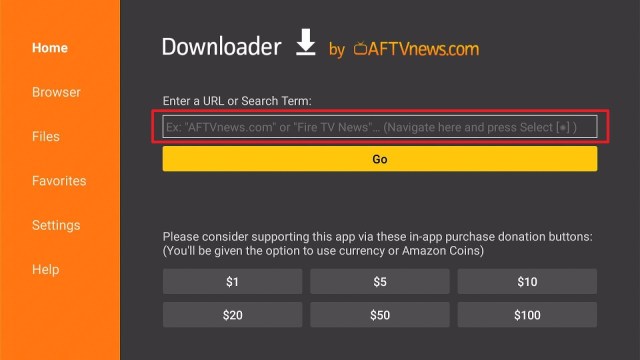
3. Enter the Quick Search TV app download URL/APK – https://reviewvpn.com/qst and click GO

4. When the Quick Search TV file download is complete – click Install

5. Now, you have successfully installed the Quick Search TV app on FireStick

ReviewVPN cannot attest to the legality, security and privacy of the applications discussed on this site. It is highly recommended that you use a VPN service while streaming or using Kodi. Currently, your IP 17.246.19.117 is visible to everyone and your Browser is being tracked by Advertisers & ISP Provider. Here are the main reasons why you must use a VPN: A VPN works be replacing your ISP-assigned IP address and creating an encrypted tunnel. We recommend the no log service offered by IPVanish. It works well on a Firestick and offers the fastest possible speeds.
YOUR INTERNET ACTIVITY IS BEING WATCHED
Legal Disclaimer: ReviewVPN.com does not encourage or endorse any illegal activity involved in the usage of services and applications referenced on this site. We do not verify the licensing agreements of services. The end-user is wholly responsible for ensuring that any media accessed through these services does not violate copyright and/or licensing laws. ReviewVPN does not promote, link to, or receive compensation from any Apps and IPTV services.
Install Surfshark on Firestick

Moving the newly installed app to the front
- Go back to FireStick’s Home Screen (you may click the Home Button on the Fire Stick remote)
- Go to Your Apps & Games/Channels
- Scroll once to the left
- Click See All
- All the newly installed apps are located at the bottom – you can move the Quick Search TV app by clicking the Options button (at the right side of the Home Button)
What Is Quick Search TV-Browser/Launcher App?
Quick Search TV is a launcher & browser app that lets you browse the web on your Android-powered gadget. Not only does the Quick Search TV launcher & browser app allow you to visit websites but it also allows you to download. A lot of people choose other internet browsers for their Android TVs, but since some browsers have been experiencing issues – it makes Quick Search TV launcher & browser app a great alternative.
Features of Quick Search TV
- Free to use web browser
- It runs well on the Android operating system (OS)
- Easy Settings configuration
- The app has a simple navigation
- Easy-to-use user interface
- Smooth video playback
- Functions on streaming devices that run on the Android operating system
- Quick page loading
- Support for tabs & bookmarks
- Quick rendering speed
Always Use a VPN To Stay Safe, Secure Online
A Virtual Private Network or VPN is not a new thing for internet users nowadays. VPN users around the world are increasing each day. VPN’s rising popularity brings up the question of what a Virtual Private Network or VPN is and whether web users should use one.
A VPN, like the Surfshark VPN provider, works by providing a safe mode for browsing the internet as it provides people online privacy as well as data security. Using a VPN correctly helps keep your internet connections secure and safeguards your device from hackers or cyber threats. Aside from online security, a VPN has many other benefits that are making it worth utilizing. However, below are some of the top reasons why you should use a VPN service.
- Safety and Security
- Bypassing Geo-Restrictions
- Anonymity
- Safety While Using Public Wi-Fi
- Secures Online Shopping
Note: For more information about Surfshark, please read our Surfshark Review.
Click here to get the lowest price on Surfshark through our exclusive limited-time offer.
How to Install Surfshark VPN on Firestick
If your Firestick still has the older interface, read this article to learn how to update it: Update Firestick Interface.
Follow our screenshots below to install the SurfShark VPN app on your Fire TV stick.
1. Go to the Home screen of your Firestick.

2. Navigate towards the Find tab. Press the Search button from the resulting dropdown.

3. Type in the keyword of SurfShark and select from the suggestions that will appear.

4. Click the official SurfShark icon from your search results.

5. Press the Download (You own it) button.

6. The SurfShark VPN installer will download on your device.

7. SurfShark VPN’s app will automatically install itself on your Fire TV stick.

8. Press the Open button after completing SurfShark VPN’s installation process.

9. Please wait for the SurfShark VPN to load its user interface.

10. You can now log in with your SurfShark VPN account credentials.

Learn more about Surfshark and Grab the Best Surfshark Deal Now!
Install Surfshark on Firestick


For more VPN discounts, go to ReviewVPN Deals and purchase the best VPN for you.
Click here to get the lowest price on Surfshark through our exclusive limited-time offer.
Alternatives
- Google Chrome – It is a secure internet browser and comes with strong encryption protocols & tools to keep people’s account information safe. The Google Chrome browser is unlike other web browsers on Firestick as it allows users to download files from various websites.
- Silk Browser – It is among the best internet browsers because it does not allow annoying unnecessary ads to pop up on device screens. Nonetheless, Silk Browser allows people to access the Best Free Movie Websites.
- Firefox Internet Browser – It is a great web browser that offers an app version on Amazon’s official App Store. After downloading & installing this internet browser on your device, you can access well-known video platforms. Nonetheless, the Firefox Internet Browser lets you visit any website, and even lets you search for content that you can play on your streaming device.
- Puffin TV-Browser – it is a web browser that you can download, install, and use free of charge. It works great on devices running Android OS. It is a good browser for surfing the internet, watching videos, or listening to your favorite music.
Pros & Cons
PROS
- Very easy to use
- It generates personal bookmarks
- Displays viral videos based on browsing history
- Private Browsing
- Allows users to change the default search engine
CONS
- It comes with a small number of settings
FAQs
Is anyone having trouble with Quick Search TV?
- Quick Search TV has no disruption to its service
Is the Quick Search TV app free?
- Yes, the Quick Search TV app is free to download, install, & use
Is Quick Search TV Good?
- The Quick Search TV app is good
Compatibility
With the Quick Search TV app, you can easily browse the web on your Android device. Fortunately, the Quick Search TV app works well on many Android devices, such as the Firestick and many more.
Wrapping Up
In this article, we have provided information on how to install the Quick Search TV APK on Firestick. The information above should really help you browse the internet easily.
However, always remember to use A VPN service every time you’re online. If you have any thoughts about the Quick Search TV app, don’t hesitate to let us know in the comments section.
Note: ReviewVPN.com does not own or operate any app nor does it endorse any. The main purpose of this article is strictly for educational purposes only.


