

Joker 2.0 Kodi Addon
Quick Navigation
Source: http://insanity-builds.tk/fracturedrepo/
Hailing from the famous Fracture Repository, Joker 2.0 Kodi addon is a revamped version of the older one. Its content is mainly focused on movies. It gives users high-definition video formats that include 720p and 1080p. It is also works-well with a Real-Debrid account signed-in. We tell you that this add-on does not joke. It is easily a go-to add-on for all the movie lovers out there.


Features
- Excellent User Interface
- Retro Feature
- Compatible with every platform and operating system
- Real-Debrid Integration
- 720p and 1080p Video Formats
- Subcategories include: Movies, Spotlight Movies 1930-1959, New Movies, Movie Decades, and Movie Collections
Easy Installation Guide
- Launch Kodi on your device
- Click on the “Gear Icon” and select “System”
- At the add-ons menu, turn on the “Unknown Sources” by clicking “yes”
- Go back to the “systems” page and choose “File Manager”
- Choose Add source and select “none”
- Type in http://insanity-builds.tk/fracturedrepo
- Highlight the source and rename it to “Fractured Repo” or any name you would like to use to identify this particular source and click “ok”
- Go back to the System Screen and click “Add-ons”
- Select “Install Zip File” choose “Fractured Repo” or whatever you renamed the file.
- Select the zip file URL- repository.fracturedrepo-0.0.6.zip
- Wait for the notification “Fractured Build Add-on Repo Installed” to appear.
- Select “Install Repository”
- Choose “Fractured Build Repo”
- Click on “Video Add-ons” and select “Joker 2.0” and “Install”
- Click “Ok” when a notification “the following add-ons will be installed” appears and wait for Joker 2.0 Add-on to install
- Once the add-on is installed go back to the home screen and select “add-ons”
- Choose “Video add-ons” and select “Joker 2.0”
YOUR INTERNET ACTIVITY IS BEING WATCHED
ReviewVPN cannot attest to the legality, security and privacy of the applications discussed on this site. It is highly recommended that you use a VPN service while streaming or using Kodi.
Currently, your IP 167.160.36.117 is visible to everyone and your Browser is being tracked by Advertisers & ISP Provider.
Here are the main reasons why you must use a VPN:
- Your activities are hidden from your ISP, the government, and from the apps you are using.
- You can access additional movies and TV streams.
- ISP attempts to throttle are thrwarted thus reducing buffering issues.
- Geographically restricted content like Netflix and Hulu can be unblocked.
A VPN works be replacing your ISP-assigned IP address and creating an encrypted tunnel. We recommend the no log service offered by IPVanish. It works well on a Firestick and offers the fastest possible speeds.
How to Install Joker 2.0 Addon on Kodi with Screenshots
1. From the home screen, select the cogwheel at the upper left.
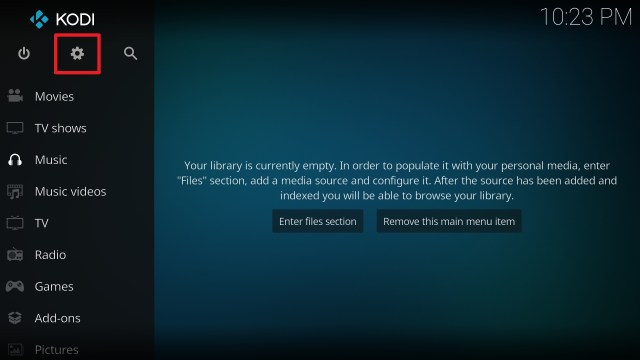
2. Select System in the bottom right corner.

3. Select Add-ons on the left side of the screen.

4. Select Unknown sources.

5. Click Yes to allow unknown sources.

6. Select File manager.

7. Click Add source.

8. Click on <None>.

9. Type exactly: http://insanity-builds.tk/fracturedrepo/

10. Click on OK.

11. Select enter a name for this media source.

12. Name is Joker 2.0 (this part isn’t critical as long as you remember the name).

13. Click on OK.

14. Click on OK.

15. Take one step back and click on Add-ons.

16. Select install from zip file.

17. Click on Joker 2.0 (or whatever you named the source).

18. Click on repository.fracturedrepo-0.1.3.zip

19. Select on Install from repository.

20. Click on Fracture Repo.

21. Pick Video add-ons.

22. Select Joker 2.0 Video again.

23. Click on Install.

24. Select OK after reviewing the add-ons that will be installed.

25. You should see a popup in the upper right corner saying Joker 2.0 has installed. There will actually be multiple popups for the various components.

26. Click on Open to start the Joker 2.0 add-on.

Real-Debrid Integration
- If you don’t possess a Real-Debrid account yet, you must register.
- When Launching Joker 2.0 add-on you will be notified with this message. Write down the code that will be given.
- Launch a web browser on a different device and enter https://real-debrid.com/device.
- Type in the code you got and select “Continue”
- You will then be granted your Real-Debrid Account
- Go back to Joker 2.0 and a notification that shows another successful authorization message will appear, select “ok”
- If notified with a changelog, just press the “ok” button on your remote and voila! Joker 2.0 is now Real-Debrid ready.
Alternatives
The downside when running an add-on is that sometimes it works well and sometimes it just doesn’t. What we always suggest here at ReviewVPN is to have a back-up plan ready. This is to ensure that your viewing experience doesn’t get interrupted. Just be sure to obtain your content from trusted and reliable sources. If and when Joker 2.0 doesn’t work properly, the following add-ons may serve as its replacement:
- Bumblebee Add-on
- Leviathan Add-on
- Chain Reaction Add-on
- Chucky Add-on
- Midian Add-on
Common Errors
These are some of the things that may cause an issue when installing Joker 2.0:
One of the main reasons why this happens is that you might have written the wrong URL. Please be careful when typing in the URL because the slightest mistake can totally ruin your download. Secondly, having a stable internet connection is always desired as it does not impend the speed of your download. Lastly, to protect your identity and internet trail, you must have a reliable VPN to mask your online activities and will help you remain anonymous. Check here for the best VPN deal. For more fixes read our fix guide linked above.
This issue usually arises when Kodi is not properly installed or has lacking features for it to work properly. If that is the case, you can redownload Kodi and install it properly. An in-depth guide on how to install the Kodi app is provided on our website. Lastly, if the issue is with the add-on itself, you can reinstall it by following the procedure given above.
A check log error only happens when your media cache is full. You can remedy this situation by emptying your cache. For more fixes read our fix guide linked above.
Joker 2.0 does not keep any of the content on its servers. It is distributed by 3rd party apps. Patience is key here, just wait for a couple of seconds for the other suggestions and click on them. For other solutions please take time to read our in-depth guide linked above.
Install Surfshark on Firestick
How to Install Surfshark VPN on Firestick
If your Firestick still has the older interface, read this article to learn how to update it: Update Firestick Interface.
Follow our screenshots below to install the SurfShark VPN app on your Fire TV stick.
1. Go to the Home screen of your Firestick.

2. Navigate towards the Find tab. Press the Search button from the resulting dropdown.

3. Type in the keyword of SurfShark and select from the suggestions that will appear.

4. Click the official SurfShark icon from your search results.

5. Press the Download (You own it) button.

6. The SurfShark VPN installer will download on your device.

7. SurfShark VPN’s app will automatically install itself on your Fire TV stick.

8. Press the Open button after completing SurfShark VPN’s installation process.

9. Please wait for the SurfShark VPN to load its user interface.

10. You can now log in with your SurfShark VPN account credentials.

Learn more about Surfshark and Grab the Best Surfshark Deal Now!
Install Surfshark on Firestick


For more VPN discounts, go to ReviewVPN Deals and purchase the best VPN for you.
Click here to get the lowest price on Surfshark through our exclusive limited-time offer.
Conclusion
Coming from a very famous repository, Joker 2.0 is not joking and it means business when delivering content to its users. What is amazing about this add-on is that it mainly focuses its attention on movies providing only the best video quality available.
You can rest assured that the quality of content that you get is of the highest caliber. We hope this article enlightened you regarding Joker 2.0. For questions and suggestions, please feel free to drop a comment below and contact us through any of our other social media platforms. Thank you for reading and have a great day ahead!


