

Jen of Debrid Kodi Addon
Quick Navigation
http://repo.rubyjewelwizard.com/

A lot of people today rely on Netflix, Hulu, HOOQ, Iflix, and others for their daily dose of movies and/or TV Shows. These platforms require a certain amount in order to avail of their services.
Netflix, for example, requires $10/month to be a member. Some may find that cheap and some may find it expensive. But for those who are very practical and don’t want to spend money, and want to maximize the money they pay for their internet connection, they rely on Kodi and many of its add-ons.
The majority of the add-ons we have today provide links from file hosts. Only a few are out there who provide content via torrent cache and one of those add-ons is Jen of Debrid.
Jen of Debrid Kodi Video Add-on is one of the unique add-ons under the Diamond Wizard Repository that uses torrent caches to provide content to its users. It can only be run by having a Real-Debrid account.

Key Features
– Real-Debrid Integration
– -Torrent-based streaming links (The Pirate Bay, EZTV, Glow Torrents, and recently YTS)
– Trakt Integration
– Diamond Movie Playlists
– Extensive categories to choose from
YOUR INTERNET ACTIVITY IS BEING WATCHED
ReviewVPN cannot attest to the legality, security and privacy of the applications discussed on this site. It is highly recommended that you use a VPN service while streaming or using Kodi.
Currently, your IP 54.163.136.244 is visible to everyone and your Browser is being tracked by Advertisers & ISP Provider.
Here are the main reasons why you must use a VPN:
- Your activities are hidden from your ISP, the government, and from the apps you are using.
- You can access additional movies and TV streams.
- ISP attempts to throttle are thrwarted thus reducing buffering issues.
- Geographically restricted content like Netflix and Hulu can be unblocked.
A VPN works be replacing your ISP-assigned IP address and creating an encrypted tunnel. We recommend the no log service offered by IPVanish. It works well on a Firestick and offers the fastest possible speeds.
Easy Installation Guide
- Open Kodi on your device
- Click on the “Gear Icon” and select “System”
- At the add-ons menu, turn on the “Unknown Sources” by clicking “yes”
- Go back to the “systems” page and choose “File Manager”
- Choose Add source and select “none”
- Type in http://repo.rubyjewelwizard.com
- Highlight the source and rename it to “diamond” or any name you would like to use to identify this particular source and click “ok”
- Go back to the System Screen and click “Add-ons”
- Select “Install Zip File” choose “diamond” or whatever you renamed the file.
- Select the zip file URL- repository.Diamond-Wizard-Repo-3.9.6.zip
- Wait for the notification “Diamond Build Add-on Repo Installed” to appear.
- Select “Install Repository”
- Choose “Diamond Build Repo”
- Click on “Video Add-ons” and select “Jen of Debrid” and “Install”
- Click “Ok” when a notification “the following add-ons will be installed” appears and wait for Jen of Debrid Add-on to install
- Once the add-on is installed go back to the home screen and select “add-ons”
- Choose “Video add-ons” and select “Jen of Debrid”
- There you go, Jen of Debrid is now installed.
Real-Debrid Integration
- If you don’t possess a Real-Debrid account yet, you must register.
- When Launching Jen of Debrid add-on you will be notified with this message. Write down the code that will be given.
- Launch a web browser on a different device and enter https://real-debrid.com/device.
- Type in the code you got and select “Continue”
- You will then be granted your Real-Debrid Account
- Go back to Jen of Debrid and a notification that shows another successful authorization message will appear, select “ok”
- If notified with a changelog, just press the “ok” button on your remote and voila! Jen of Debrid is now Real-Debrid ready.
How to Install Jen of Debrid on Kodi with Screenshots
1. From the home screen, select the cogwheel at the upper left.
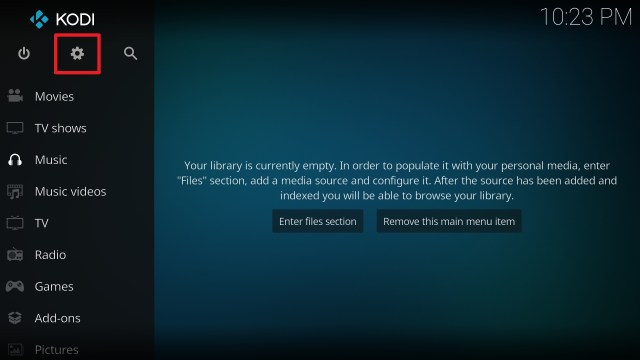
2. Select System in the bottom right corner.

3. Select Add-ons on the left side of the screen.

4. Select Unknown sources.

5. Click Yes to allow unknown sources.

6. Select File manager.

7. Click Add source.

8. Click on <None>.

9. Type exactly: http://repo.rubyjewelwizard.com/

10. Click on OK.

11. Select enter a name for this media source.

12. Name is Jen of Debrid (this part isn’t critical as long as you remember the name).

13. Click on OK.

14. Click on OK.

15. Take one step back and click on Add-ons.

16. Select install from zip file.

17. Click on Jen of Debrid(or whatever you named the source).

18. Click on repository.Diamond-Wizard-Repo-3.9.6.zip

19. Select on Install from repository.

20. Click on Diamond Repo.

21. Pick Video add-ons.

22. Select Jen of Debrid again.

23. Click on Install.

24. Select OK after reviewing the add-ons that will be installed.

25. You should see a popup in the upper right corner saying Jen of Debrid has installed. There will actually be multiple popups for the various components.

26. Click on Open to start the Jen of Debrid add-on.

Install Surfshark on Firestick
Alternatives
Rule of thumb that we always suggest is that you always have a back-up plan if ever things go sideways. This way, your viewing experience remains uninterrupted. Having said that, only a handful of add-ons host torrent cache for viewing. For its unique nature, the following add-ons that we are going to recommend are from trusted sources and believe that we only suggest only the best here at ReviewVPN. The following may be considered as alternatives for Jen of Debrid
– Kratos Reborn Add-on
– A Pirates Life For Me Add-on
– Open Meta Add-on
A Pirates Life for Me and Jen of Debrid come from the same repository so it should come as a surprise that both have the same features and abilities.
Common Errors
These are some of the things that may cause an issue when installing Jen of Debrid:
Your URL address should be written correctly or else this issue will arise. Also, be sure that your Repository is properly installed and the guide above will help you with that. Although cached torrents do not require VPN because you are accessing the torrent directly unlike torrent clients which act as middlemen, to be on the safer side of things, we still advise you to have a reliable VPN installed. Check here for the best VPN deal.
Make sure that the Kodi App is properly installed on your device to avoid this error. Also, you have to double-check if the add-on is installed correctly if not, reinstall it. Please refer to the guide above to help you in installing the add-on properly. An in-depth guide is also provided in this article with regards to the proper installation of Kodi.
This occurs when your media cache is full. We can prevent this by emptying your cache and making sure that it gets cleaned on a regular basis. Cache build is quite common nowadays because it is one way of making our streaming experience smoother.
Jen of Debrid supports torrent cached streaming and does not keep any content in its servers. If this issue arises, you may want to wait for a few seconds until the results refresh and choose a working link.
How to Install Surfshark VPN on Firestick
If your Firestick still has the older interface, read this article to learn how to update it: Update Firestick Interface.
Follow our screenshots below to install the SurfShark VPN app on your Fire TV stick.
1. Go to the Home screen of your Firestick.

2. Navigate towards the Find tab. Press the Search button from the resulting dropdown.

3. Type in the keyword of SurfShark and select from the suggestions that will appear.

4. Click the official SurfShark icon from your search results.

5. Press the Download (You own it) button.

6. The SurfShark VPN installer will download on your device.

7. SurfShark VPN’s app will automatically install itself on your Fire TV stick.

8. Press the Open button after completing SurfShark VPN’s installation process.

9. Please wait for the SurfShark VPN to load its user interface.

10. You can now log in with your SurfShark VPN account credentials.

Learn more about Surfshark and Grab the Best Surfshark Deal Now!
Install Surfshark on Firestick


For more VPN discounts, go to ReviewVPN Deals and purchase the best VPN for you.
Click here to get the lowest price on Surfshark through our exclusive limited-time offer.
Conclusion
Comparing traditional file hosts and cache torrents do have a lot of differences. For instance, traditional file hosts produce a lot of buffering due to bandwidth allocation. The files are compressed a lot and the resulting images/videos will be grainy and pixelated.
Jen of Debrid which hosts cached torrents moves otherwise. While regular torrent clients help you download the file, Jen of Debrid helps you by streaming those torrent links. It is an advantage for you if you do not have a high storage capacity as it saves you space from your hard drive.
We hope that this guide will be useful in your endeavor. If you have questions or suggestions, please feel free to drop a comment below or contact us through any of our social media platforms. Thank you for reading!


