

Overview
Quick Navigation
This article will feature the best apps to watch UFC Fights.
The internet has entirely changed how people stream sporting and pay-per-view (PPV) events. A couple of years ago, people would have to rely on cable TV to stream one of the greatest fighters in mixed martial arts (MMA) history – Georges St-Pierre.

However, people can now watch the world’s biggest UFC events on their smartphone, tablet, Firestick, or Google Chromecast from anywhere free of charge. This is because of the many Android APKs (Android Application Package) that have been available over the last couple of years.
Installing the right app, you can watch all PPVs live and Ultimate Fighting Championship fights without a subscription. Nonetheless, this article has rounded up the best apps to watch UFC fights free of charge – read on to check them out below.

What is the Ultimate Fighting Championship or UFC?
The Ultimate Fighting Championship or UFC is Mixed Martial Arts’ biggest promoter across the globe. Kicked off in 1993, the UFC has put on about 500 fighting events. Recently, a deal with ESPN for five years rights for $1.5 billion hardened its title as the topmost promoter for the biggest Mixed Martial Arts fights around the world. It has become the most profitable pay-per-view promoter surpassing WWE (World Wrestling Entertainment) and Boxing.
Best Apps to watch UFC Fights
Live NetTV
Live NetTV is among the most popular streaming apps, and tons of individuals find it as the best app to stream UFC fights free of charge. Just like its moniker implies, the streaming APK is dedicated to Live TV streaming. It features more than 800 channels.
One of Live NetTV’s features that make it a top option for UFC fights is the app’s live event section. The live event section lists all upcoming & ongoing UFC events, which makes it easy for people to watch live events. This section of the app will suggest the event’s best stream. However, people can also opt for a random channel. If Live NetTV users want a different broadcaster, they can head to the sports section or search for the TV channel they like. Nearly all channels provide multiple streams to make sure better service.
Screenshots with Step by Step Instruction to Install Live NetTV on a Firestick
1. Install the Downloader app and jailbreak your firestick by enabling unknown sources. To learn more about the procedure, you may read How to Install the Downloader App and Enable Unknown Sources.
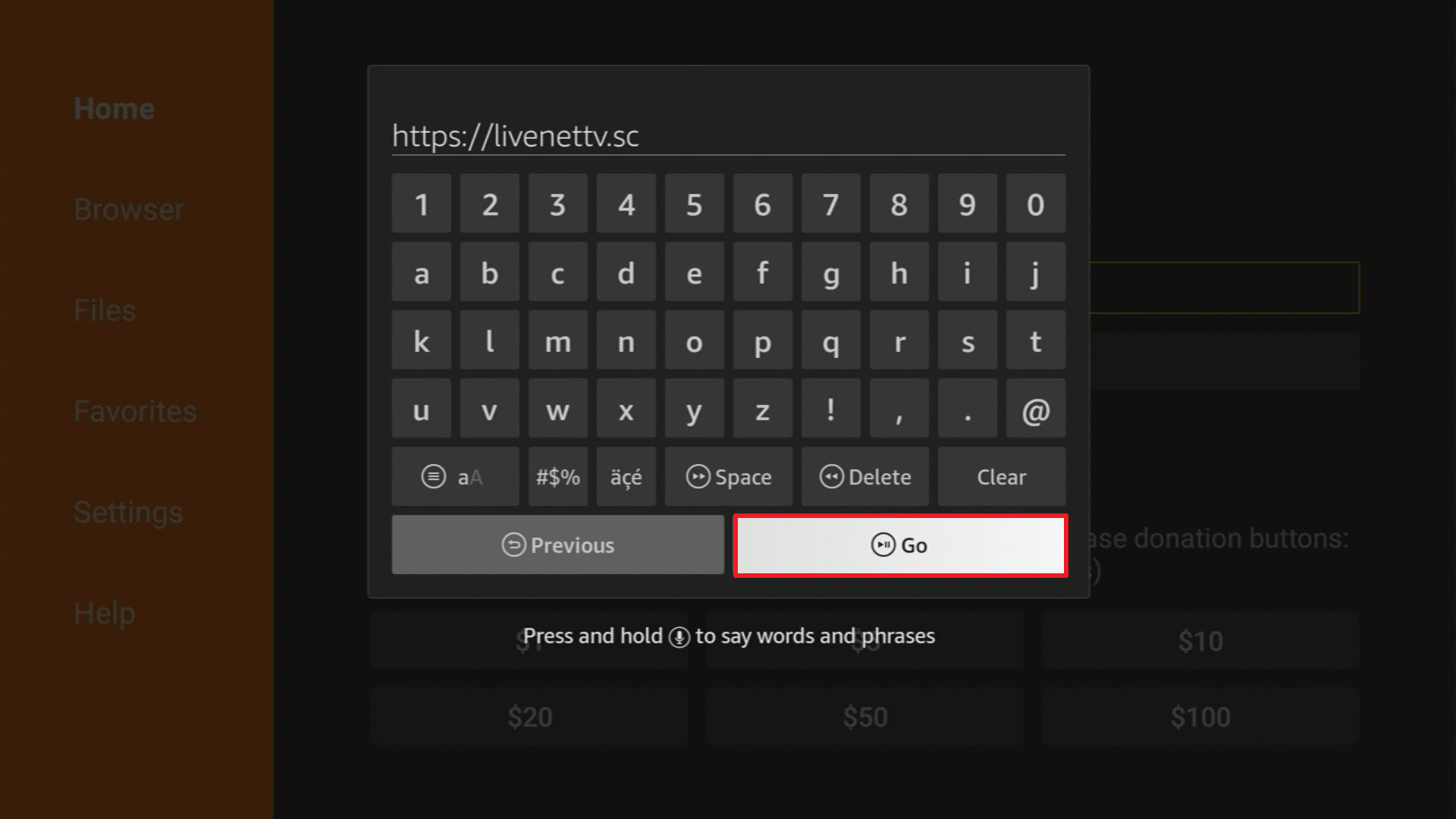
2. Open Downloader App. Type https://livenettv.sc and click Go.
3. Click on Download The App.

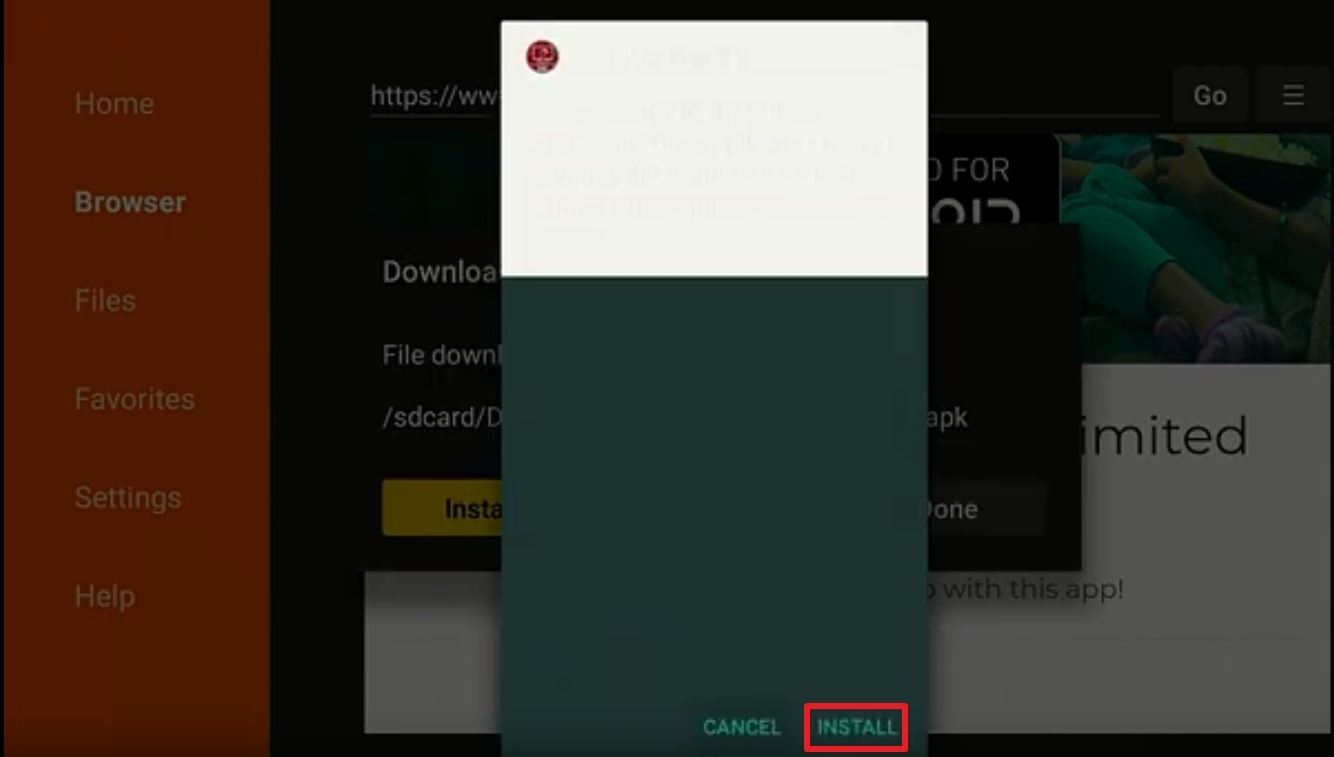
4. Click on Install and you should be all set. Remember to delete the APK file after installation to save space.
RedBox TV
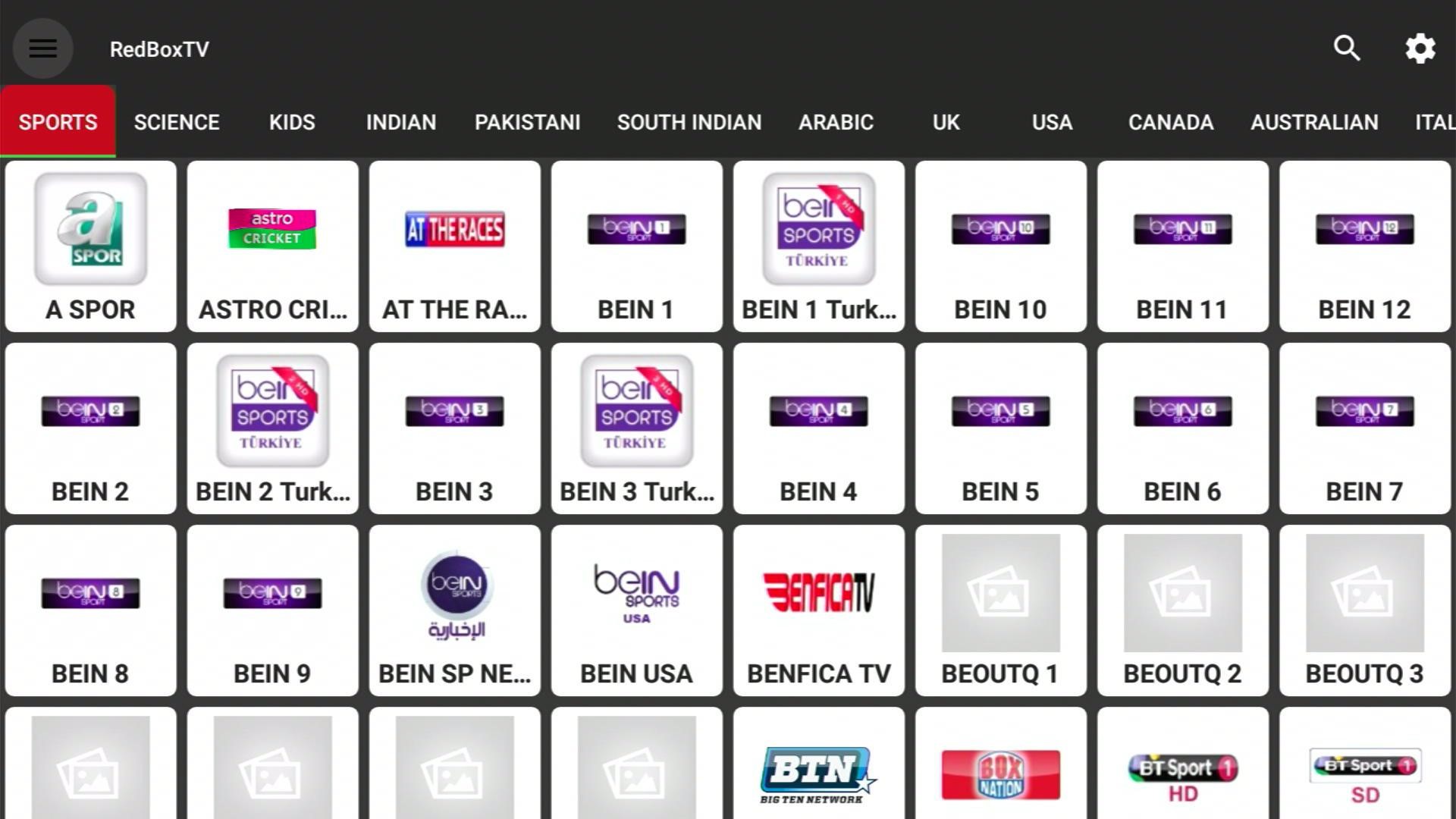
RedBox TV is an amazing streaming app that promises a load of entertainment. The streaming app stands out from other Live TV applications because of its consistent performance as well as the fact that it provides buffer-free streams.
The app lets you watch UFC fights free of charge via channels such as Sky, BT Sport, & Fox Sports. Also, you can enjoy TV channels from various countries, including the United States, the United Kingdom, France, Pakistan, India, Spain, Australia, and many more.
Install RedBox TV APK on Firestick with Screenshots
1. Install the Downloader app and jailbreak your firestick by enabling unknown sources. To learn more about the procedure, you may read How to Install the Downloader App and Enable Unknown Sources.
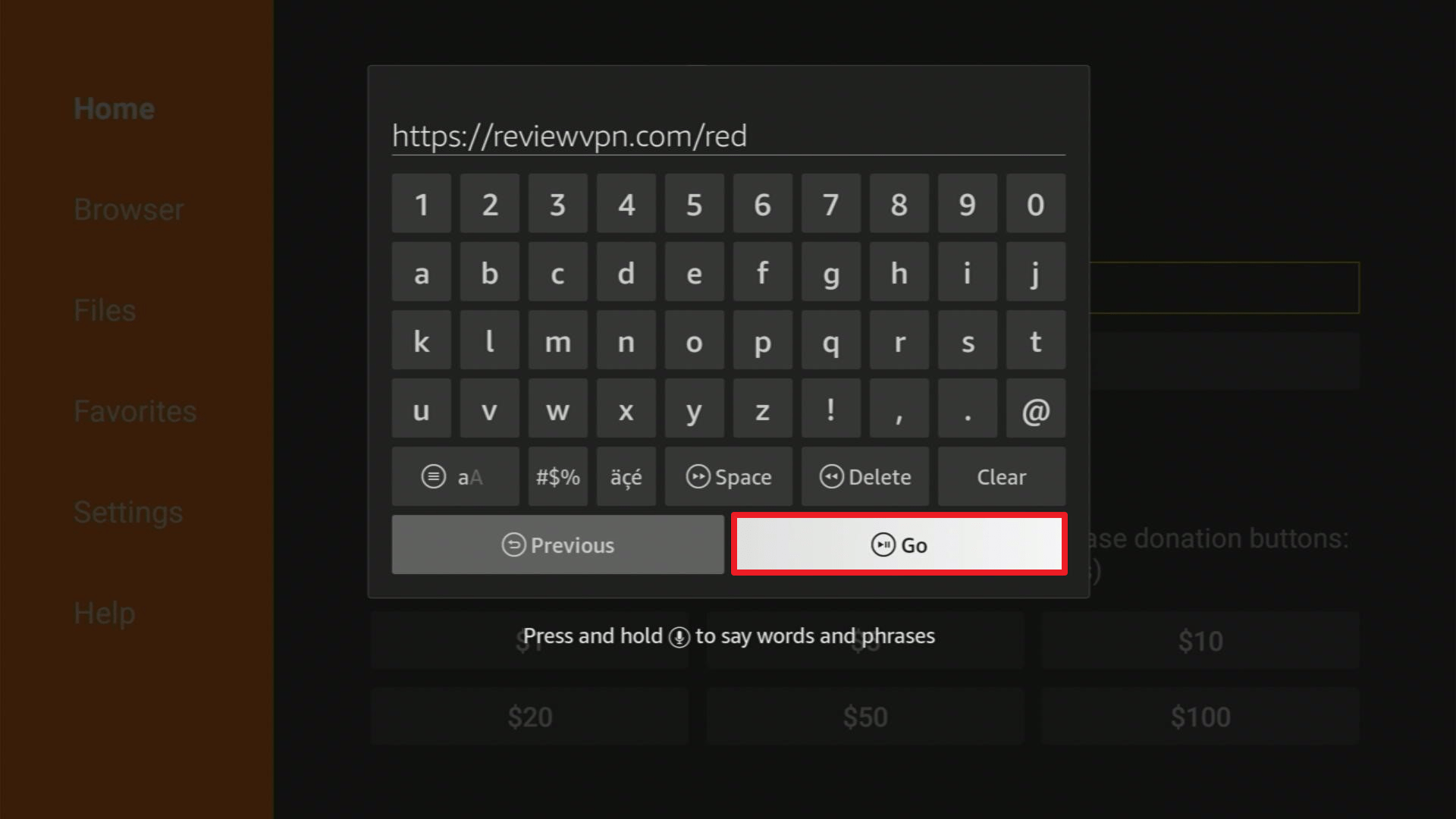
2. Open Downloader App. Type https://reviewvpn.com/red and click Go.
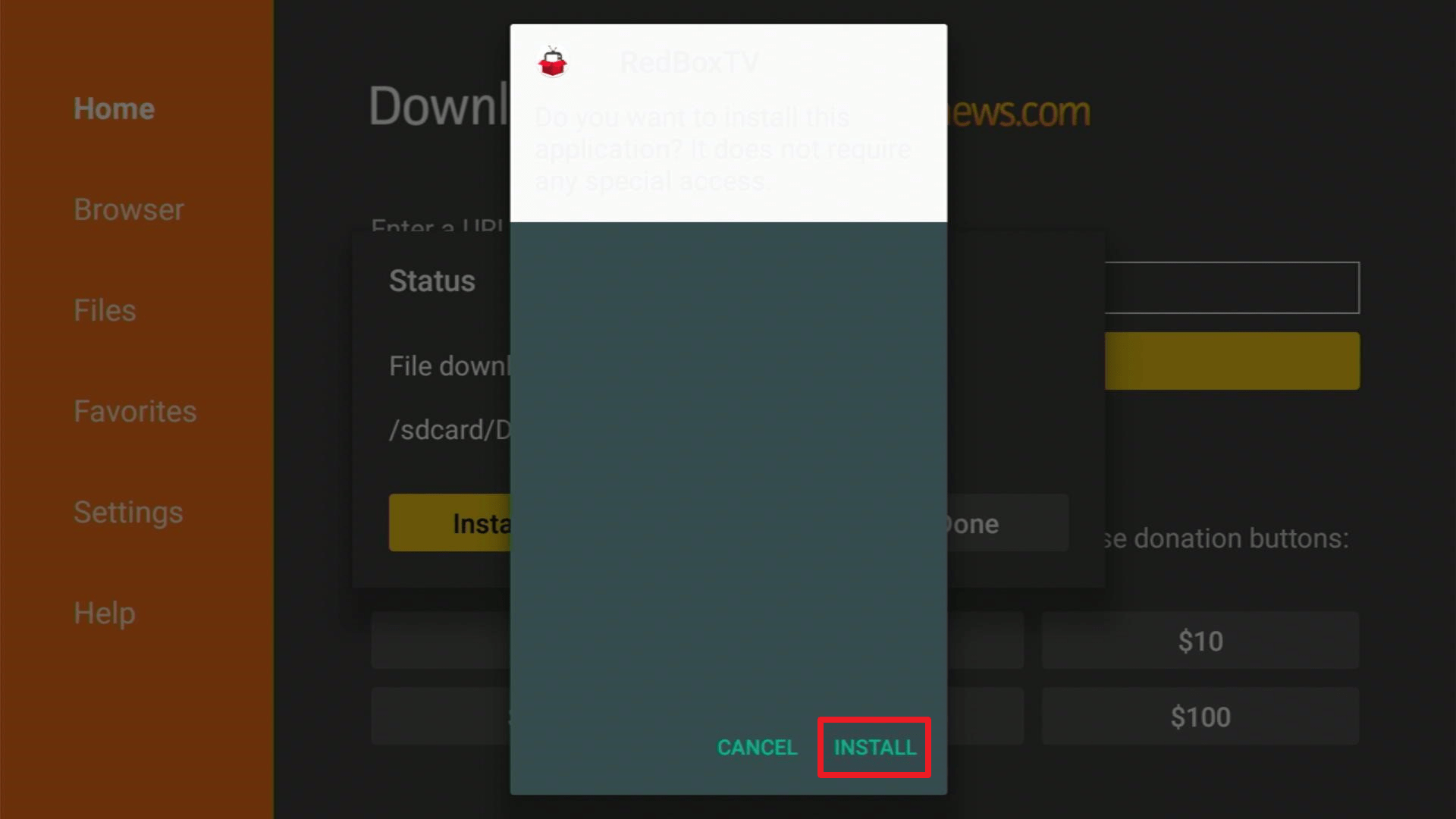
3. Click on INSTALL
4. Click on OPEN
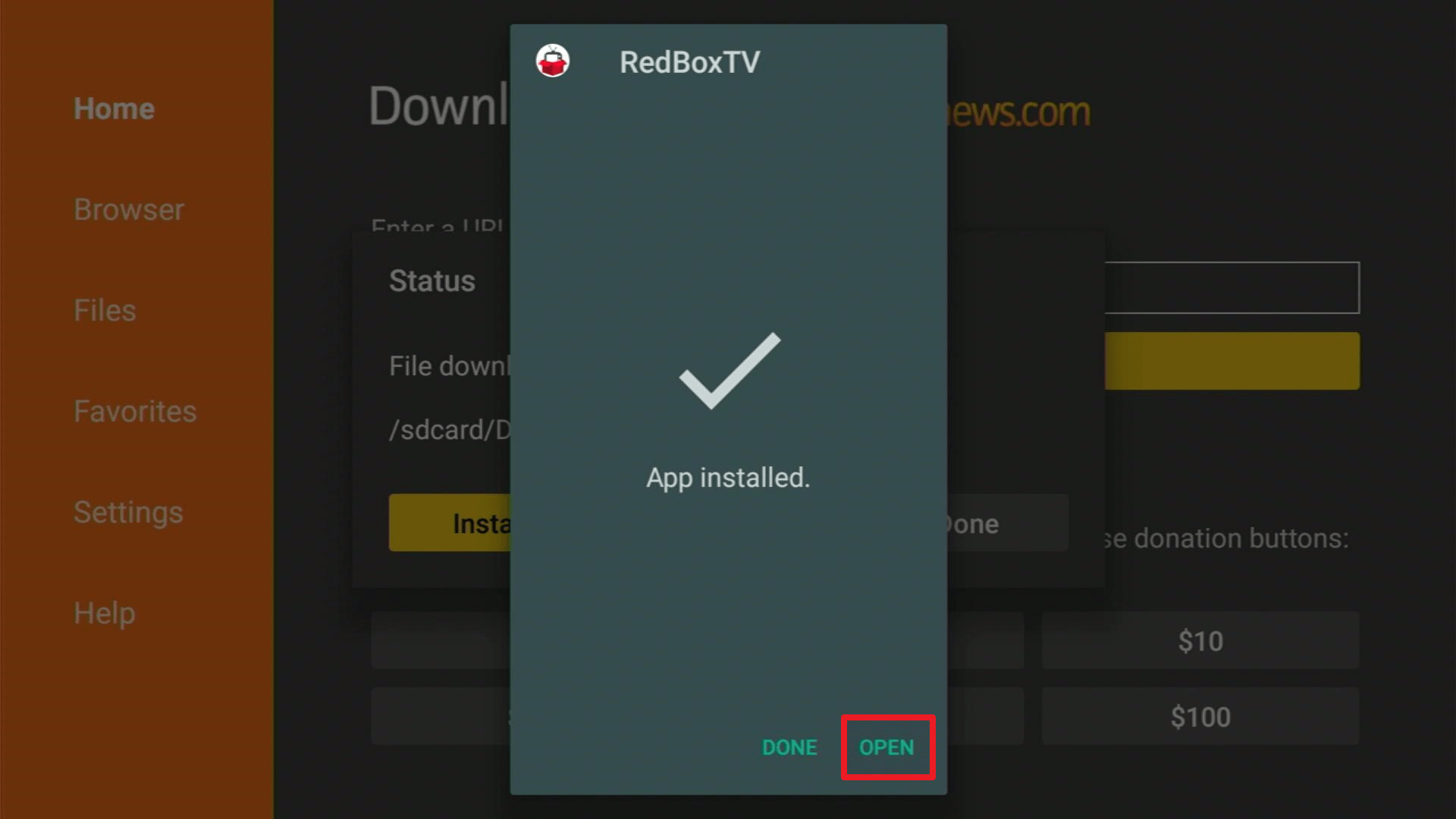
5. RedBox TV is Installed. Enjoy Watching.
Click here to get the lowest price on Surfshark through our exclusive limited-time offer.
TVTap Pro
If you are familiar with the popular streaming app UKTV Now, TVTap Pro is its updated version. TVTap Pro is one of the best apps to watch UFC fights because of its modern interface, a large number of sports channels. This app provides quality streaming. You can use the app to enjoy over 900 TV channels.
Most of TVTap Pro’s channels are from Europe. The app provides a lot of UFC broadcasters, including Sky, BT Sport, DAZN, ESPN, and Fox Sports. This streaming app lets you locate the official UFC Fight Pass stream
TVTap Pro lets you disable advertisements by sharing idle resources. Also, you can customize the TVTap Pro to your liking.
Install the TV Tap on Firestick with Screenshots
1. Install the Downloader app and jailbreak your firestick by enabling unknown sources. To learn more about the procedure, you may read How to Install the Downloader App and Enable Unknown Sources.
2. Open the Downloader App. Type https://reviewvpn.com/tvtap and click Go.

3. Wait for the file download to finish.

4. Click Install.

5. Select Open to launch the app.

6. There you go! You have successfully installed TV Tap.

Click here to get the lowest price on Surfshark through our exclusive limited-time offer.
HD Streamz
HD Streamz is a new streaming app but it’s one of the best applications to stream UFC fights for free. It provides users with more than 1000 live TV channels from around the globe. These channels are arranged into categories such as Entertainment, Sports, Movies, Music, Infotainment, Kids, and many more.
The sports section of HD Streamz consists of channels that people can use to watch live UFC matches. These include BT Sport, Sky Sports Arena, and Supersport. One of the best features of the streaming app is its modern interface. You can customize the HD Streamz app with a dark theme, disable advertisements by sharing idle resources, and floating-style streaming.
Install HD Streamz IPTV on Firestick with Screenshots
1. Install the Downloader app and jailbreak your firestick by enabling unknown sources. To learn more about the procedure, you may read How to Install the Downloader App and Enable Unknown Sources.
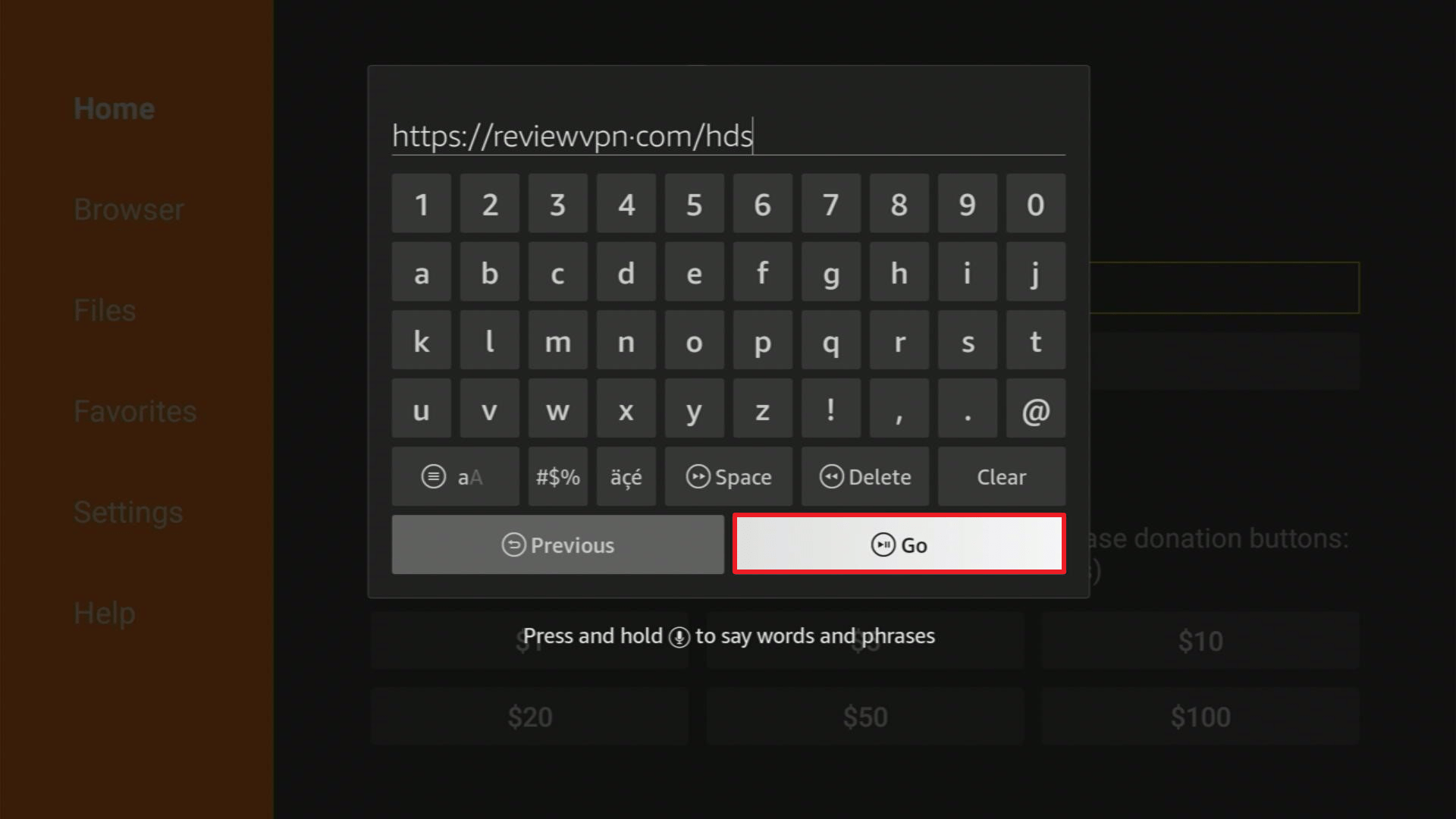
2. Open Downloader App. Type https://reviewvpn.com/hds and click Go.
3. Click on Install and you should be all set. Remember to delete the APK file after installation to save space.
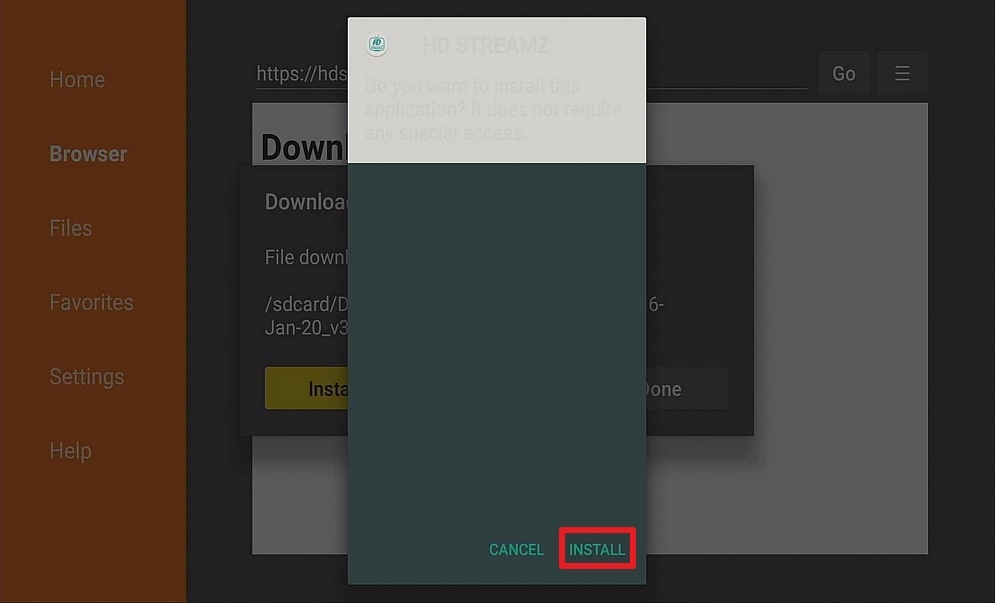
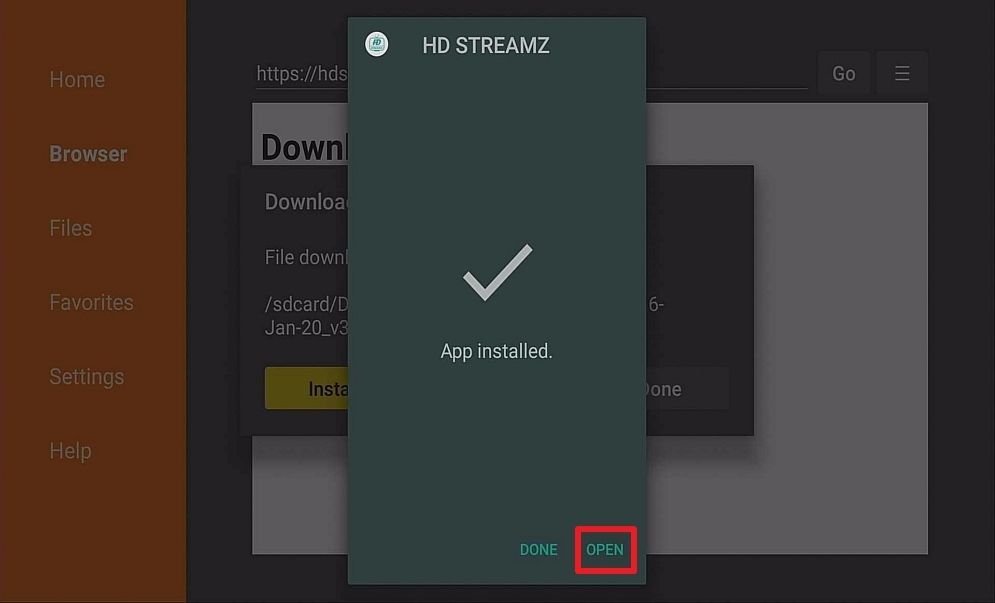
4. Click Open
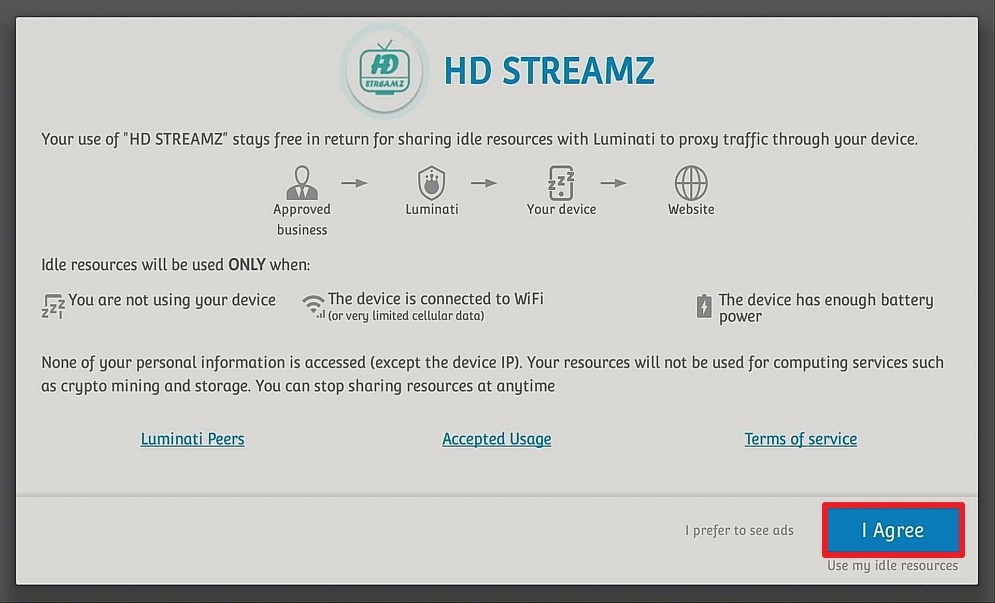
5. Click I Agree.
Click here to get the lowest price on Surfshark through our exclusive limited-time offer.
Swift Streamz
Swift Streamz is a great live TV streaming application and is one of the most searched apps on the internet. The app provides more than 700 TV channels from around the globe. These TV channels are divided into different categories such as UK TV, US TV, Sports TV, Kids TV, and much more.
The sports section of Swift Streamz has a number of UFC broadcasting channels that people can use to stream UFC fight events for free. In case a channel on Swift Streamz is not functioning, you can report it and request a new channel. Also, the Swift Streamz app allows you to customize the app to get rid of TV channels you don’t like.
Install Swift Streamz IPTV on Firestick with Screenshots
1. Install the Downloader app and jailbreak your firestick by enabling unknown sources. To learn more about the procedure, you may read How to Install the Downloader App and Enable Unknown Sources.
2. Open Downloader App. Type https://reviewvpn.com/swift and click Go.
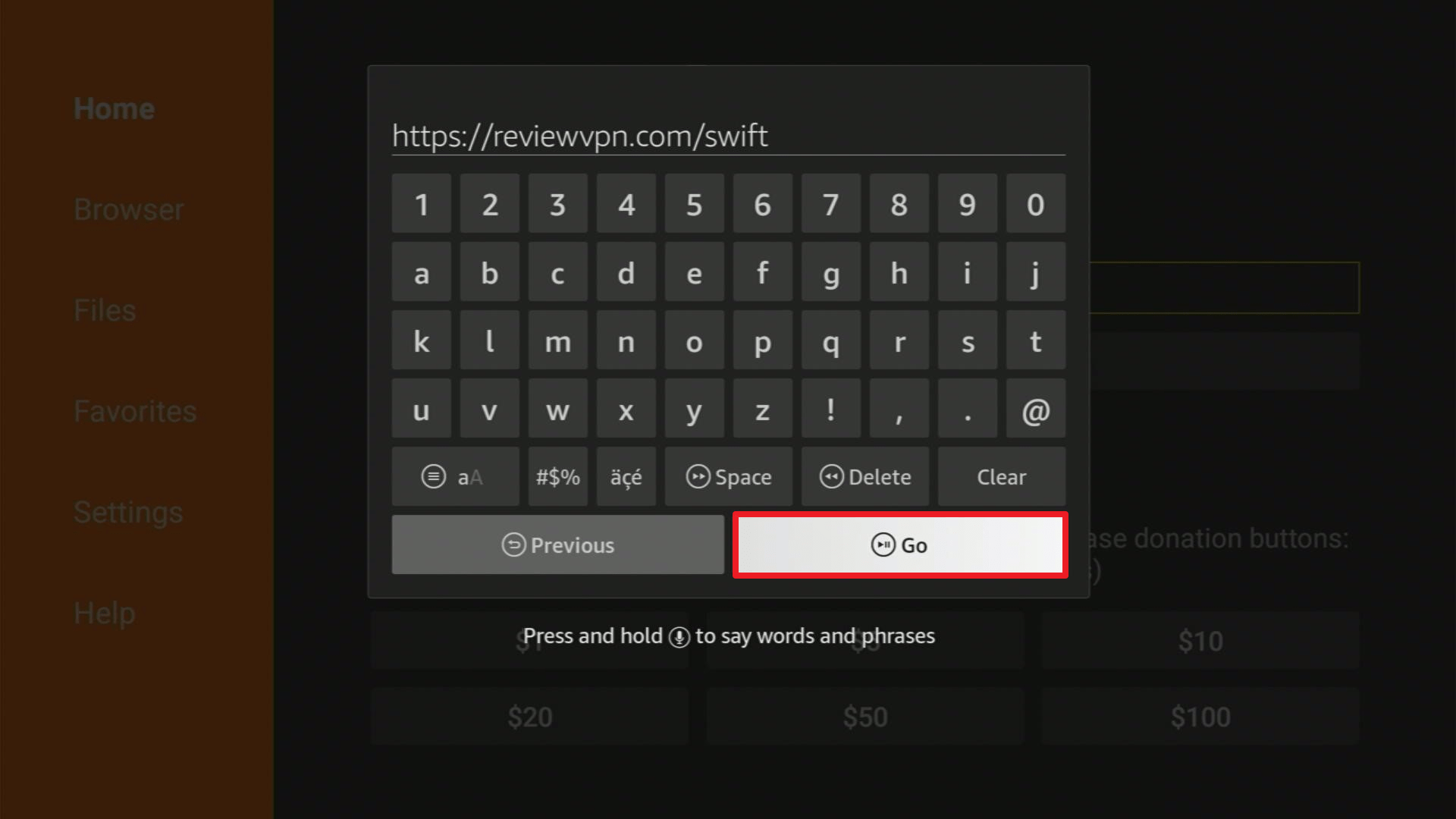
3. Click on Download.
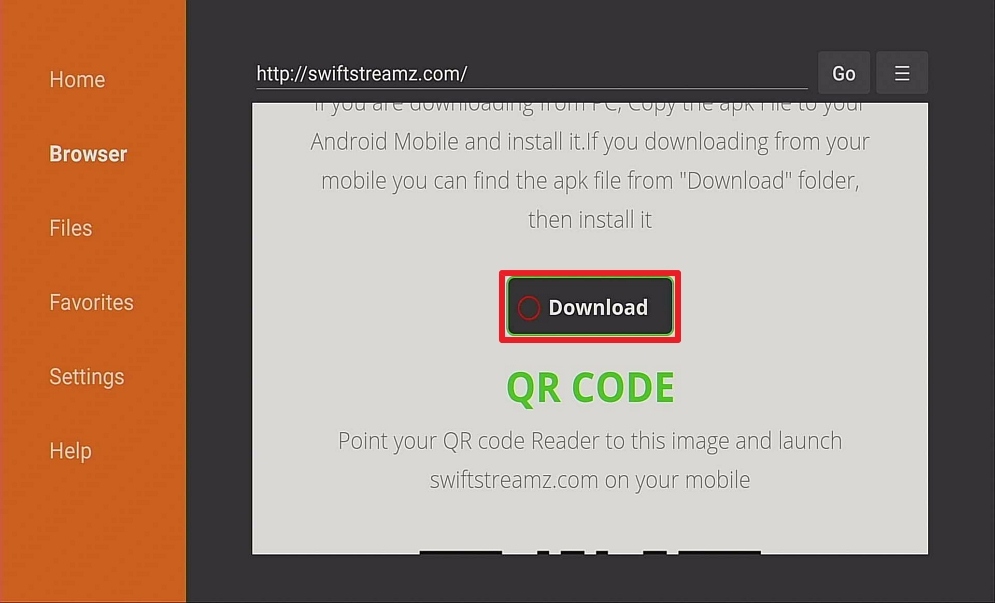
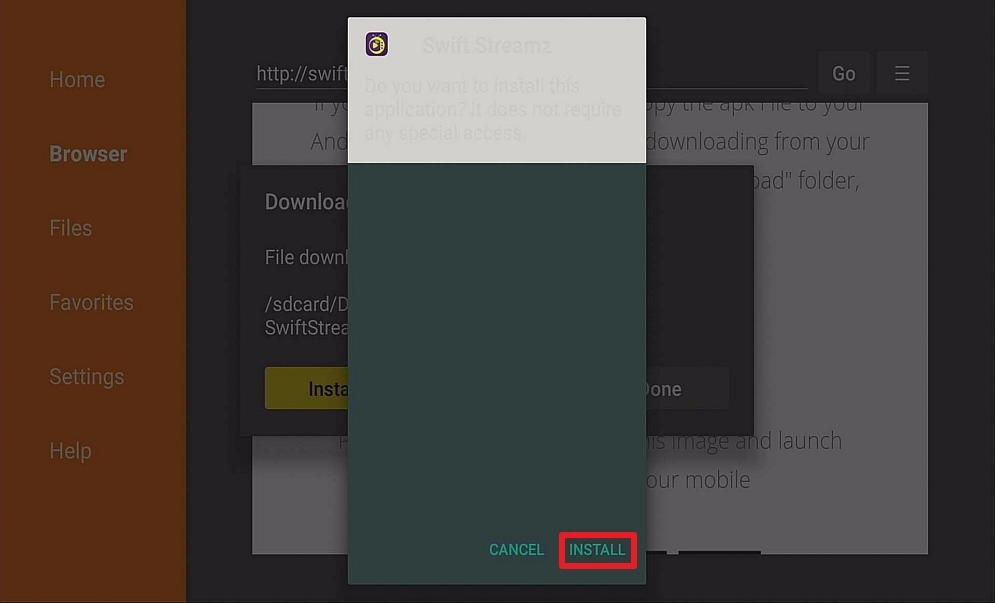
4. Click on Install and you should be all set. Remember to delete the APK file after installation to save space.
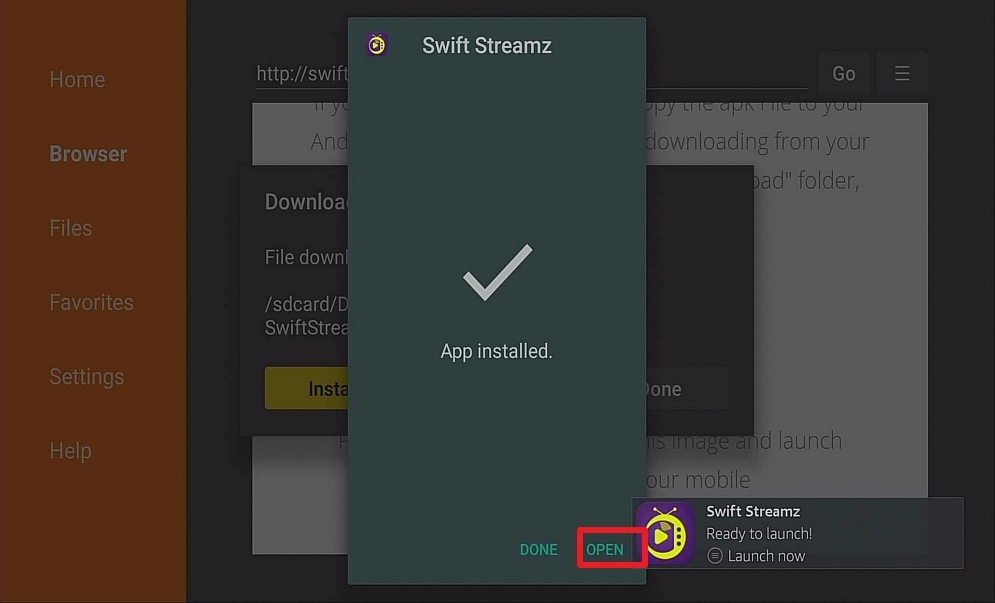
5. Click Open.
Click here to get the lowest price on Surfshark through our exclusive limited-time offer.
FuboTV
FuboTV is an awesome streaming app that is shaping up to be the best streaming service for sports enthusiasts, including people who want to watch live UFC fights. The app offers 2 standard plans. This includes ESPN: The Family plan that offers more than 100 TV channels and costs $65 a month. The Elite plan features over 150 channels along with other extras for $80 per month.
Install the FuboTV App on Firestick with Screenshots
1. Install the Downloader app and jailbreak your firestick by enabling unknown sources. To learn more about the procedure, you may read How to Install the Downloader App and Enable Unknown Sources.
2. Open the Downloader App. Type https://reviewvpn.com/apt and click Go.

3. Wait for the file download to finish.

4. Click Install.

5. Select Open to launch the app.

6. Click OK.

7. Choose Allow.

8. Click on the Search button.

9. Type in “FuboTV”.

10. Choose “Install”.

11. Once the download is complete, select “Install”.

12. Click

13. Click Open.

14. You can now sign in with your account to start streaming.

Click here to get the lowest price on Surfshark through our exclusive limited-time offer.
Hulu
Hulu could have significant name recognition regarding streaming TV shows & channels (with UFC). Thus, it’s one of the major players in the industry. Its $65 a month Live TV plan comes along with ESPN and users can add premium TV channels such as Starz, Showtime, HBO, and many more to the plan a la carte. However, if you like ESPN+, then another awesome option is The Disney Bundle that provides basic ad-supported Hulu (different from the complete Hulu Live package), ESPN+, & Disney+ for only $14 a month.
Install Hulu on Firestick with Screenshots
1. Install the Downloader app and jailbreak your firestick by enabling unknown sources. To learn more about the procedure, you may read How to Install the Downloader App and Enable Unknown Sources.
2. Open Downloader App. Type https://reviewvpn.com/hul and click Go.

3. Wait for the file download to finish

3. Click Install.
4. Click OPEN.

5. Click LOG IN.

ReviewVPN cannot attest to the legality, security and privacy of the applications discussed on this site. It is highly recommended that you use a VPN service while streaming or using Kodi. Currently, your IP 216.73.217.24 is visible to everyone and your Browser is being tracked by Advertisers & ISP Provider. Here are the main reasons why you must use a VPN: A VPN works be replacing your ISP-assigned IP address and creating an encrypted tunnel. We recommend the no log service offered by IPVanish. It works well on a Firestick and offers the fastest possible speeds.
YOUR INTERNET ACTIVITY IS BEING WATCHED
Install Surfshark on Firestick
Sling TV
Sling TV is a cost-effective option for people who don’t wish to pay for tons of channels they are not going to use. It has 2 plans, the Orange and Blue plans. You can get these plans for $35 a month each. The Orange plan has ESPN channels for stuff like UFC live streams. However, you can combine the packages into the Orange & Blue plan for $50 a month. With regard to Hulu, premium TV channels are up for grabs at extra cost.
Install Sling TV on Firestick with Screenshots
1. Install the Downloader app and jailbreak your firestick by enabling unknown sources. To learn more about the procedure, you may read How to Install the Downloader App and Enable Unknown Sources.
2. Open Downloader App. Type https://reviewvpn.com/sli and click Go.

3. Click Install.

4. Click Open.

5. Select Sign In to watch.

Click here to get the lowest price on Surfshark through our exclusive limited-time offer.
YouTube TV
YouTube TV is the foray of YouTube into the world of premium video streaming platforms. It costs $65 a month – just like Fubo or Hulu – and consists of ESPN, allowing you to stream live UFC events. The streaming app offers over 85 channels from the start with premium add-ons up for grabs.
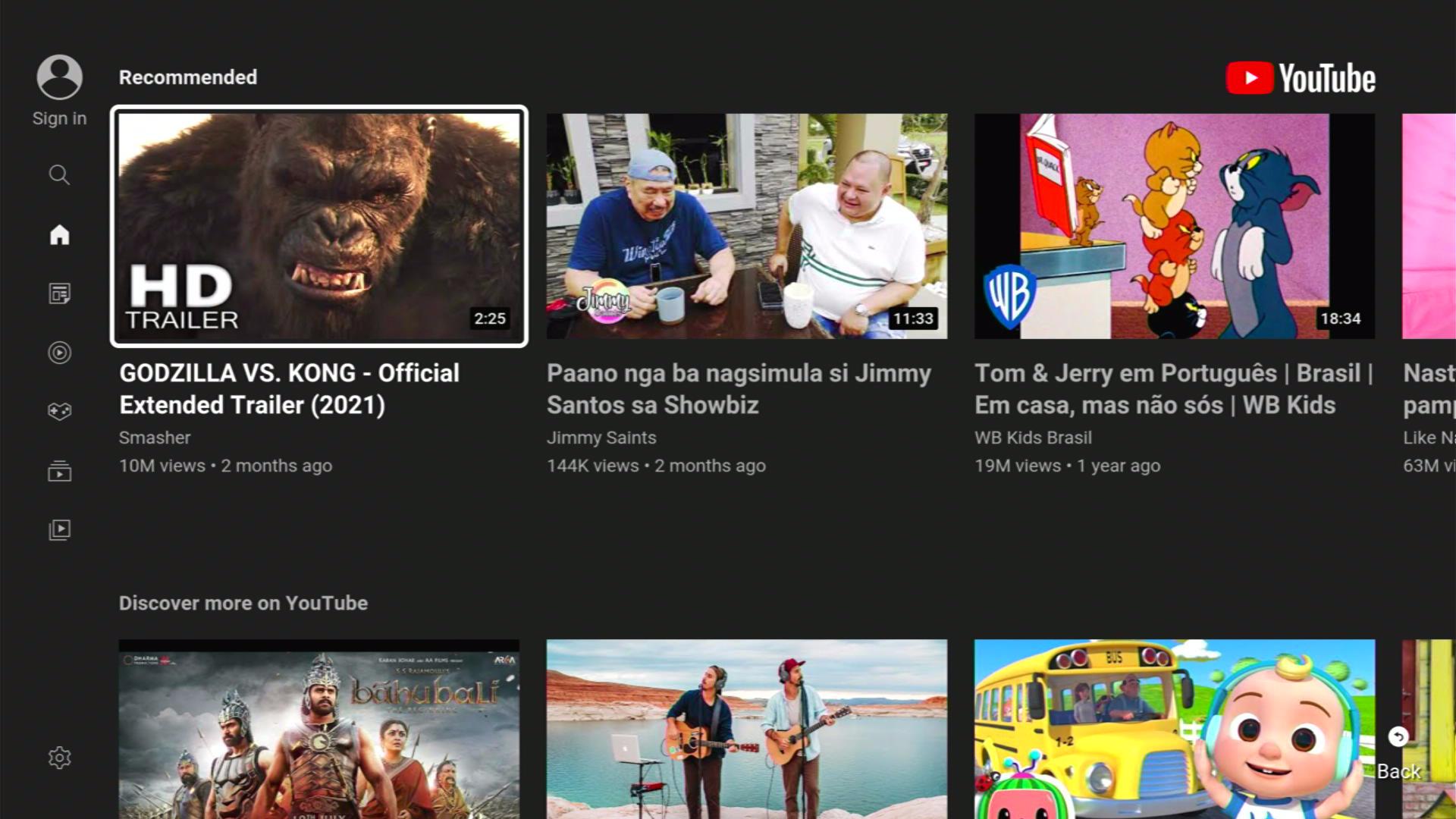
Screenshots with Step by Step Instruction to Install Youtube on a Firestick
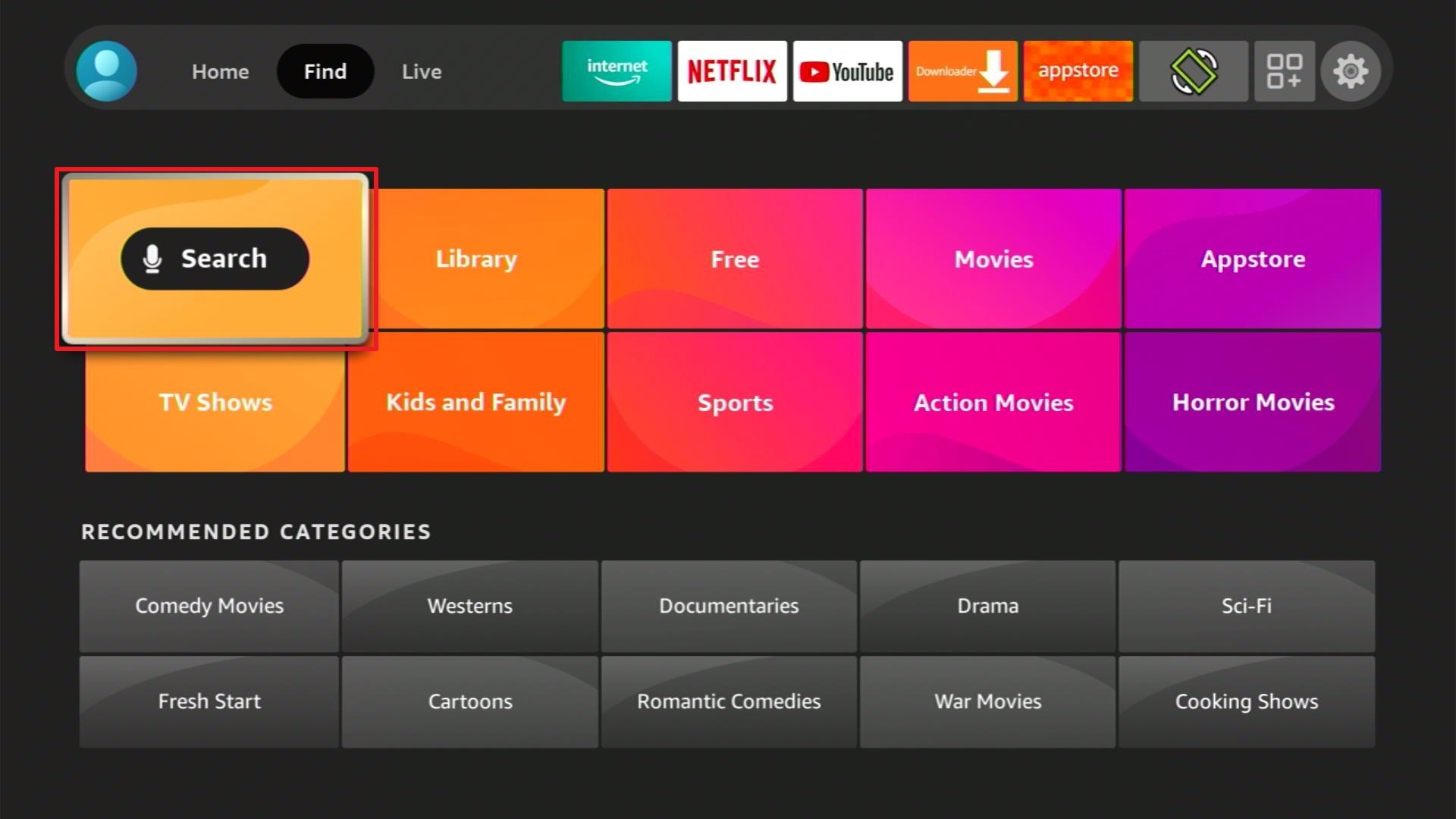
1. From the Firestick Home Screen, click Find and select Search.
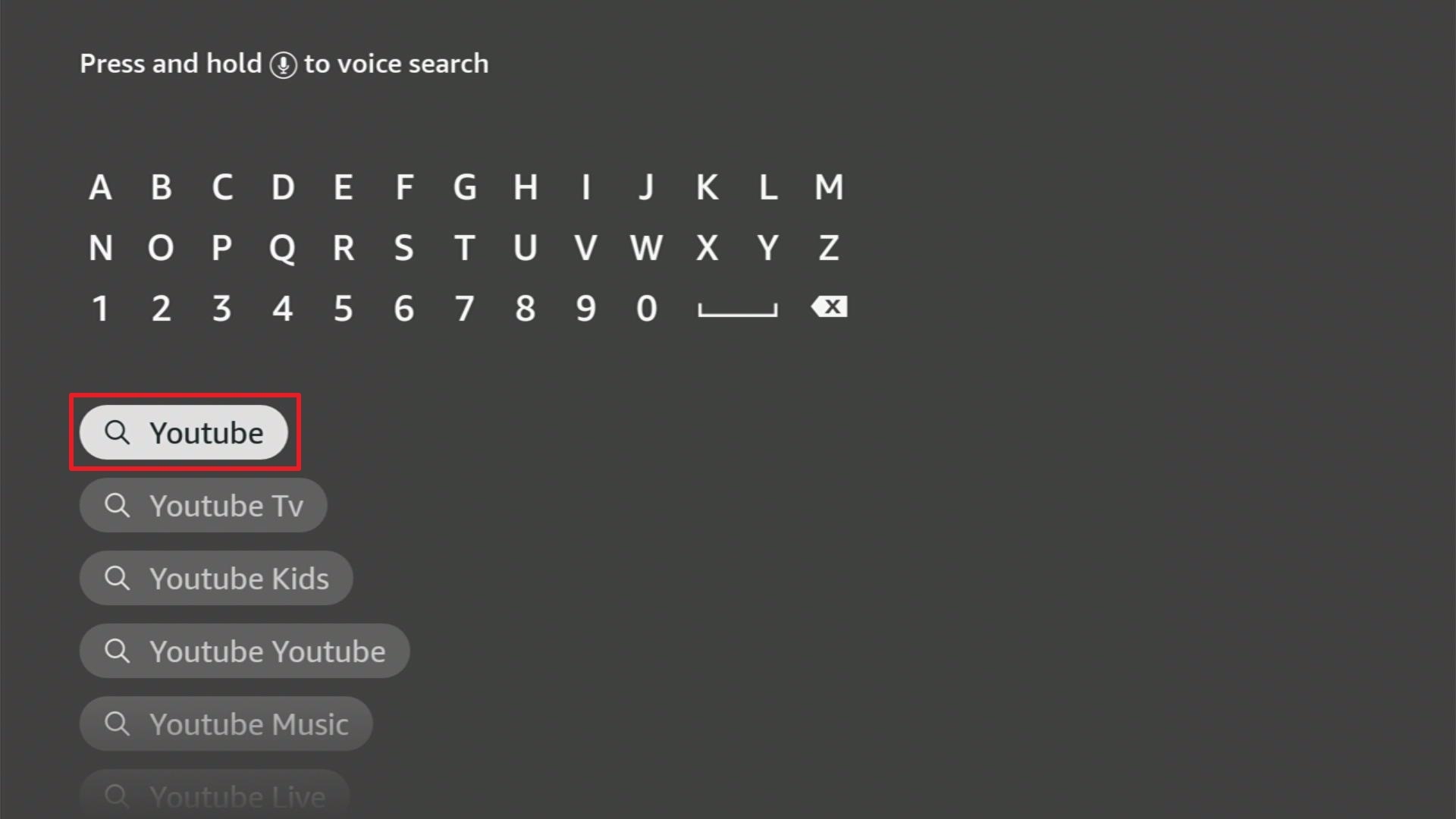
2. You can either say Youtube to your Alexa’s voice-enabled remote or start typing it. If you typed it, click on the suggestion when it appears.
3. Click on the Youtube icon.
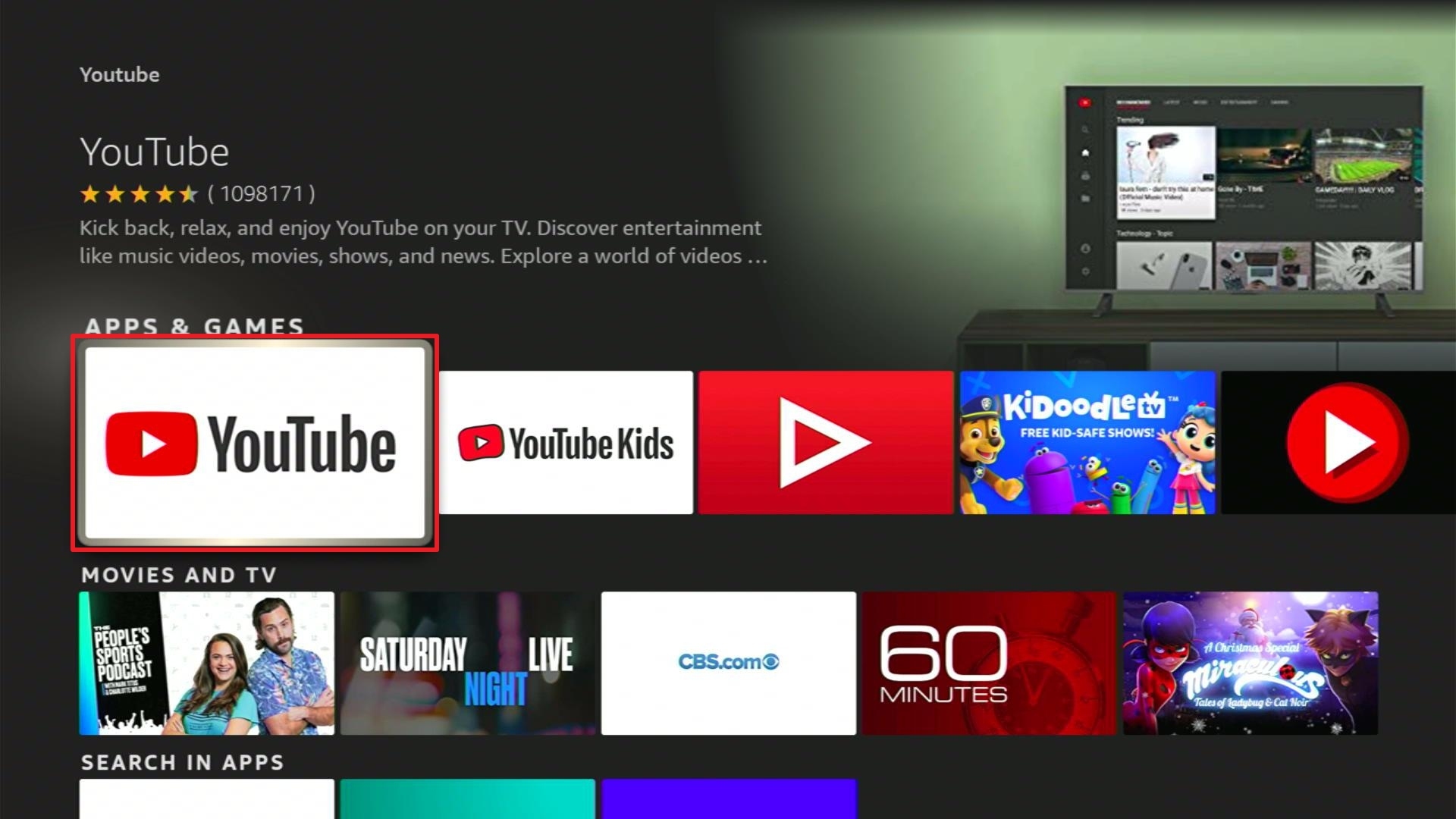
4. Click on Download
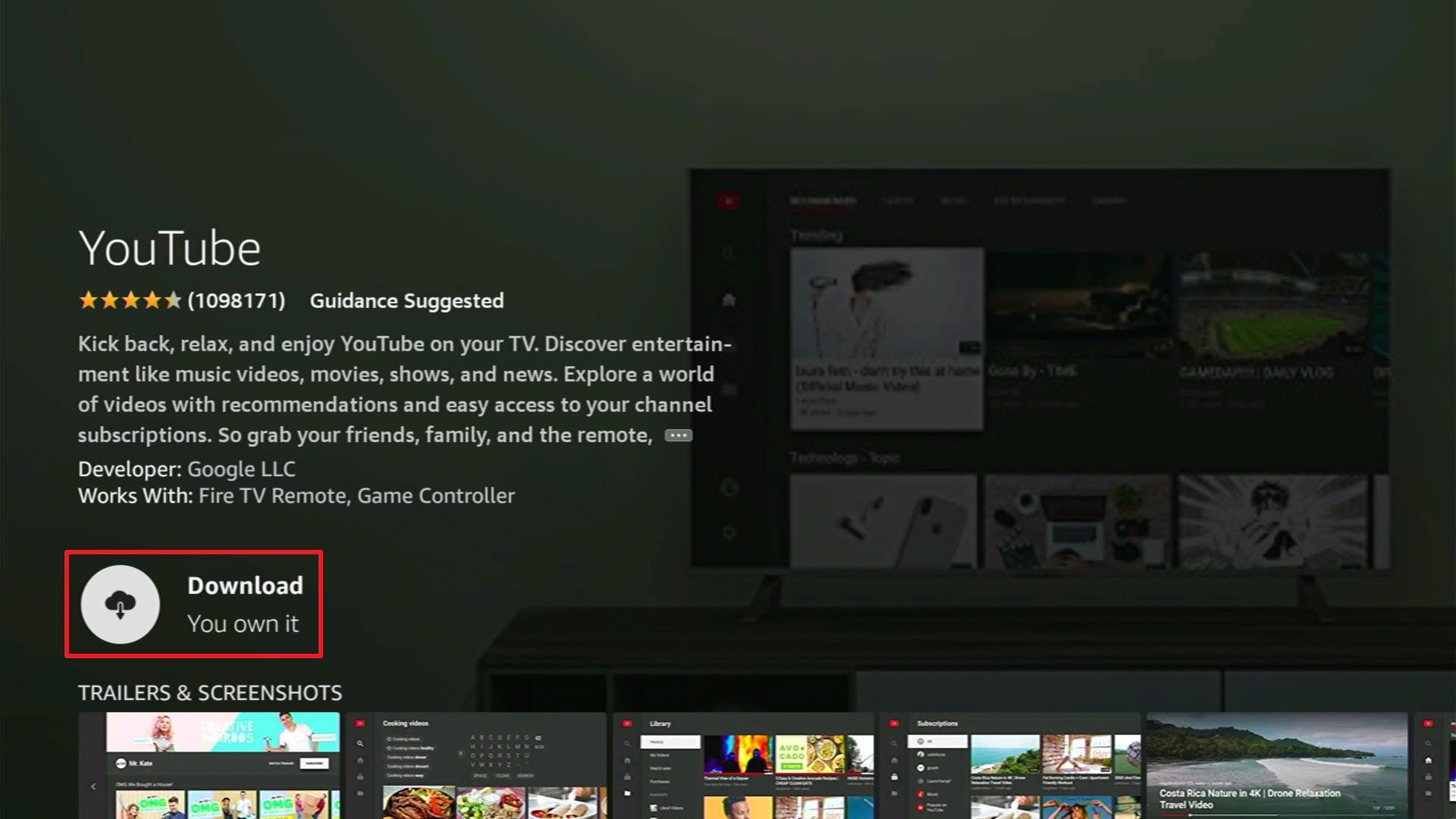
5. Click Open.
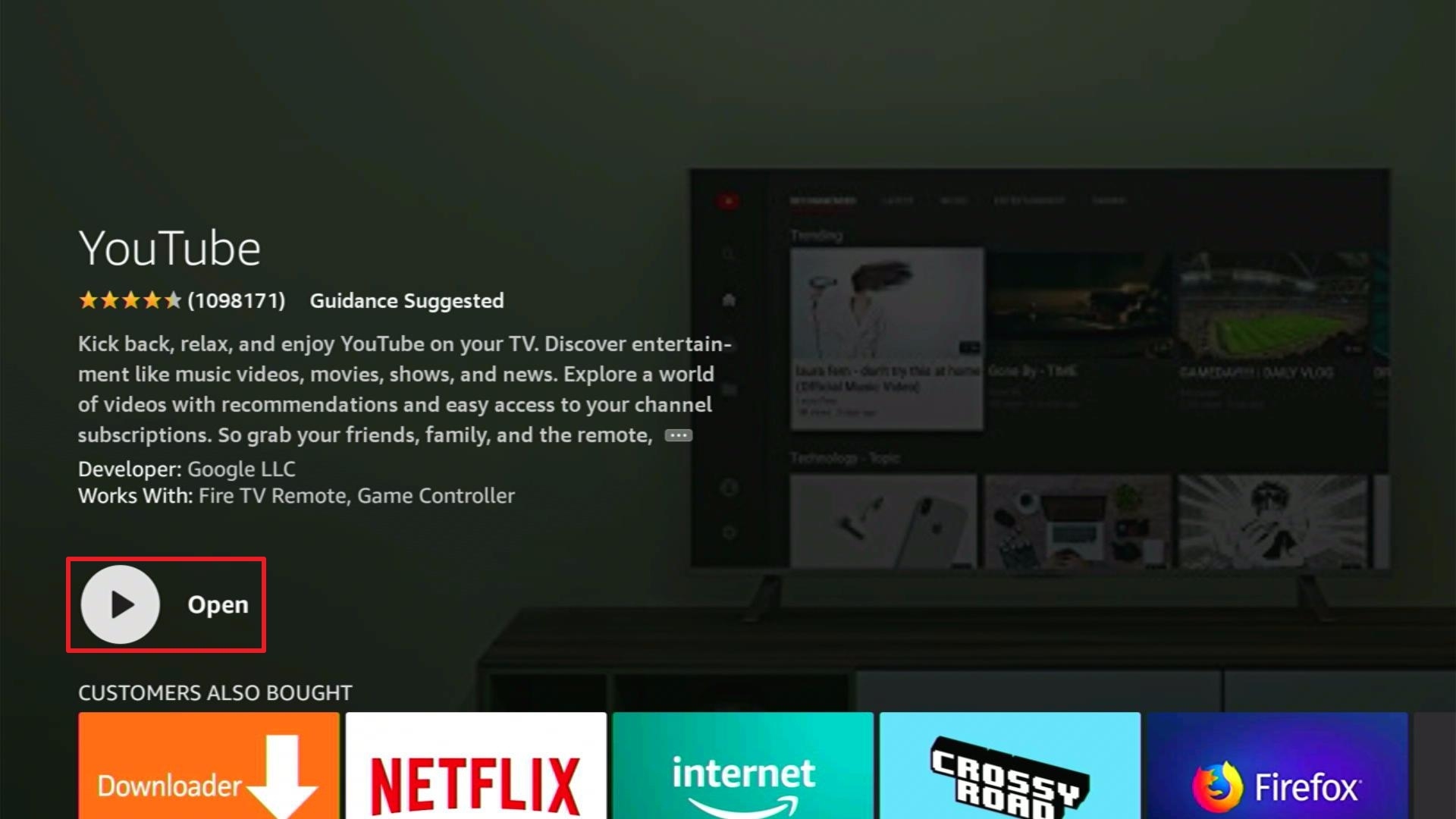
6. You can select Skip or Sign in on your TV.
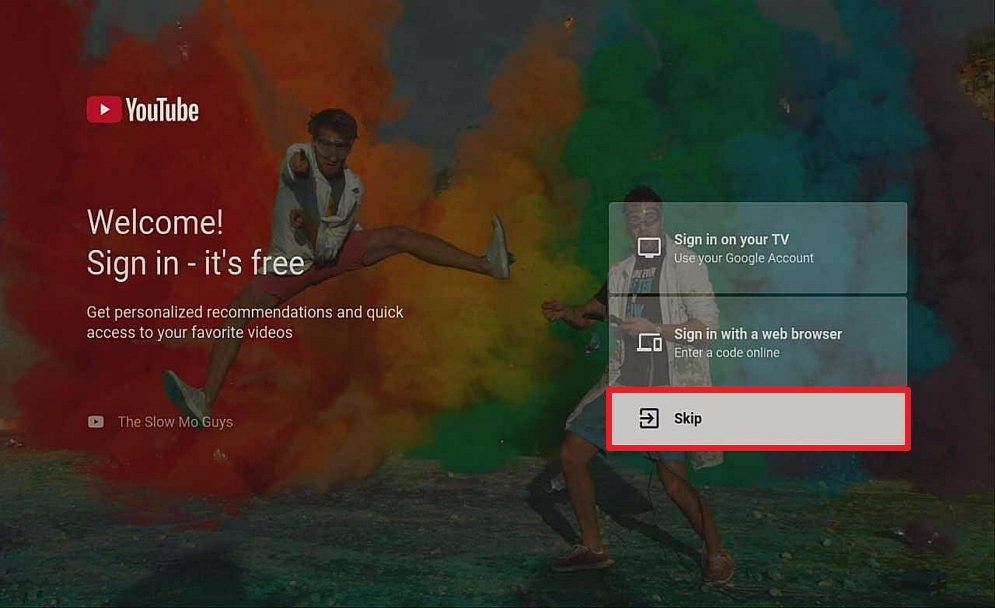
7. Enjoy Watching.
Click here to get the lowest price on Surfshark through our exclusive limited-time offer.
Kodi
Kodi is one of the best ways to watch UFC events. It is also multiplatform, thus, you can use Kodi to stream UFC fight events on Windows, Android, macOS, Raspberry Pi, and Linux. The app doesn’t offer direct streams, but once you properly configured it, Kodi can be a robust streaming service.
To watch UFC events using Kodi, you’ll need to download & install add-ons that offer the stream links you want. Installing add-ons on Kodi is quite easy, & we provide guides on how to install Kodi addons.
Steps with Screenshots on How to Install Kodi on a Firestick
1. Install the Downloader app and jailbreak your firestick by enabling unknown sources. To learn more about the procedure, you may read How to Install the Downloader App and Enable Unknown Sources.
2. Open the Downloader App. Type https://kodi.tv/download and click Go.

3. Scroll down the screen and select the Android icon once. Be patient because it might take it 30 seconds or so to load the next screen

4. Click on the 32-bit ARM version in the middle between Google Play and 64-bit ARM

5. The download should start (if it doesn’t, kick the screen a few times for good measure)

6. Click INSTALL .

7. After the Kodi App is installed, click OPEN (note, you will want to delete the APK in Downloader. You can do that at any point by going to Files and holding down on the APK file.)
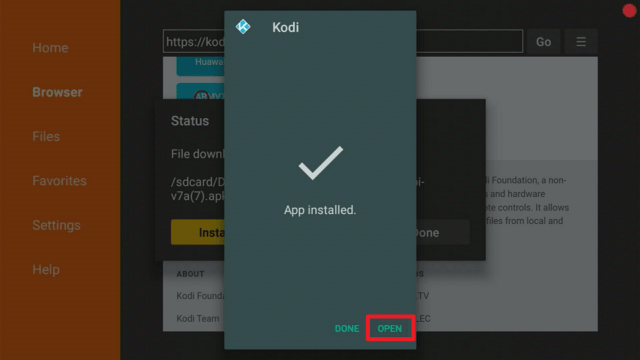
8. Click Continue .

9. Click Allow to allow Kodi to access files on your device.

10. Your new Kodi install on your firestick should now load. Enjoy!

Install Surfshark on Firestick
Best Kodi Addons for UFC
If you’re looking to obtain UFC events for free, then below are the addons perfect for you. Nonetheless, many of the streams you wish to stream contain good quality. It’s amazing to get live UFC fights with higher than 720p quality.
Planet MMA
The best Kodi addon particularly for Mixed Martial Arts or MMA. It has more than 30 sections that provide MMA, fighting, martial arts, and boxing. Planet MMA is your best option when looking for a live stream UFC fight.
Sections include:
- UFC Fight Night
- Born to Fight
- MMA Fight Night
- Fight Motion
- MMA Mindset
- Ultimate Fighter Series
- Fight Night Live
Sports Devil
Sports Devil is one of the best sports Kodi addons, even though Sportowa TV, its popular fork is closing in. However, there is not a sport that people can think of that will not be on the Sports Devil app.
Querying about ten massive public web pages and with over a hundred sources, the Sports Devil app will provide links to nearly all UFC fights. Users can navigate straight to the UFC & Boxing section.
Sports Devil provides a long list of websites where people can find links. You will not be short of links as the streaming app offers more than any other Kodi sports addon.
Click here to get the lowest price on Surfshark through our exclusive limited-time offer.
Always Use A VPN While Using The Internet
Using Virtual Private Network or VPN can be very handy while using the internet. Thanks to a VPN service, you can access platforms or services that are unavailable in your country or bypass the meaningless restrictions that several platforms sometimes impose. When you use the internet, an encrypted Virtual Private Network service provider is highly recommended to hide your online activities, identity, and location. Many internet users prefer Surfshark services for privacy, price, and speed.
Providing the fastest server speeds and amazing live chat support, Surfshark is also an easy-to-use VPN app. Make sure to enable the VPN service when you are streaming on the internet.
Surfshark Features:
- Unblocks Netflix, Disney+, and lots more
- It works on all unlimited simultaneous devices
- 30-day money-back guarantee
- Robust encryption
- Great download speed
- Zero log policy
- Great customer service
- Compatible with Android, Windows, Linux, iOS, Mac, and other routers
- 3200+ servers in 65 countries
How to Install Surfshark VPN on Firestick
If your Firestick still has the older interface, read this article to learn how to update it: Update Firestick Interface.
Follow our screenshots below to install the SurfShark VPN app on your Fire TV stick.
1. Go to the Home screen of your Firestick.

2. Navigate towards the Find tab. Press the Search button from the resulting dropdown.

3. Type in the keyword of SurfShark and select from the suggestions that will appear.

4. Click the official SurfShark icon from your search results.

5. Press the Download (You own it) button.

6. The SurfShark VPN installer will download on your device.

7. SurfShark VPN’s app will automatically install itself on your Fire TV stick.

8. Press the Open button after completing SurfShark VPN’s installation process.

9. Please wait for the SurfShark VPN to load its user interface.

10. You can now log in with your SurfShark VPN account credentials.

Learn more about Surfshark and Grab the Best Surfshark Deal Now!
Install Surfshark on Firestick



For more VPN discounts, go to ReviewVPN Deals and purchase the best VPN for you.
Streaming UFC on Android Devices
Firstly, you’ll need to download & install the ESPN app on your device. Then, sign in to your accounts. You are required to have an ESPN account to use ESPN+ and buy the PPV card.
You can download & install the ESPN app on your Android-based device from the ESPN app page found on Google’s Play Store. Nonetheless, if you are using a PC, login with a Google account, and then click the install button to transmit it to the Android device. If you have numerous devices, you’ll be asked to choose which one you wish ESPN to download & install.
If you launch the ESPN app on your Android-powered device, it will take you to the ESPN app in Google’s Play Store. Just tap install, and then login with a password to start the installation process. Then select open to run the ESPN app.
The ESPN app provides you the choice to Log In when you use the app for the first time. If ESPN did not give you that option, tap the gear icon of the app. In addition, on the Settings page, there are options to login to the ESPN Account and the TV Provider.
Once you logged in successfully, you’re all set to stream UFC fights on Android. Select the Watch section to see all the UFC programs, which include the Prelims as well as the Pay-Per-View card. The Featured tab provides a Combat Sports Live and Upcoming section. Also, there’s a dedicated UFC 264 spot on ESPN+.
Paying to Watch the UFC Fights
The UFC is among the most well-known Pay-Per-View events across the globe. It has big-ticket fight events costing $60.
ESPN+ grasps UFC’s full streaming rights in the United States. In the United States, you get to pay $79.99 for the full bundle. The bundle includes access to the forthcoming PPV fight night.
If you’re based in the United Kingdom, you can save some money if you subscribe via BT Sport which grasps the United Kingdom streaming rights for the Ultimate Fighting Championship. You can access BT Sport for as low as £10 per month, providing you access to five BT Sport Channels & ESPN. Also, you can settle up with £40 a month to obtain broadband as well.
Wrapping up
It’s quite easy to know the apps to watch UFC Fights, and the apps provided above should really help you do so. After obtaining apps to watch UFC Fights, you’ll be able to boost your sports entertainment by streaming nearly anything you want.
However, always remember to use A VPN every time you use your Android device. Please feel free to let us know what you think of this article in the comments section below.






