
Overview – 360 Security
Quick Navigation
Safe Security is an all-in-one smart speed booster, antivirus, & power cleaner app. It optimizes the device’s background apps, junk files, battery power, and memory storage. Safe security (360 Security) keeps Android devices safe from malware or viruses. Moreover, it is trusted by 200 million users. It comes along with a junk cleaner, speed booster, virus remover, as well as anti-spyware.
Furthermore, Safe Security is among the best antivirus and security apps for Android devices. Download 360 Security Safe APK to keep your devices safe from malicious threats online. However, it is from a famous internet security company that is known for its antivirus software, web browser, and mobile application store.

Safe Security (360 Security) App Installation on FireStick
- Turn on the FireStick device, go to the top menu bar and choose > Settings
- Click My Fire TV > Developer Options
- Enable Apps from Unknown Sources.
- Go back to FireStick’s home screen and go to the menu bar
- Go to the Search option.
- Search & install the Downloader app on FireStick.
- After installing the Downloader app, launch it.
- Enter the Safe security (360 Security) download URL/APK – https://reviewvpn.com/360
- Click GO.
- When the Safe security (360 Security) file download is complete – click Install
- Now, you have successfully installed the Safe security app on FireStick

Install Safe Security (360 Security) in Firestick with Screenshots
Install the Downloader app and jailbreak your firestick by enabling unknown sources. To learn more about the procedure, you may read How to Install the Downloader App and Enable Unknown Sources.
1. After installing the Downloader app, launch it.
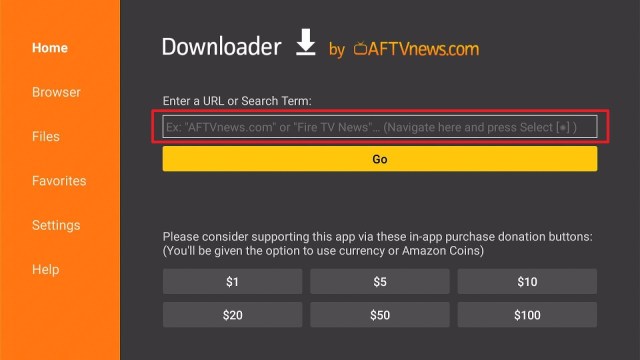
2. Enter the Safe Security (360 Security) download URL/APK – https://reviewvpn.com/360 and click GO.

3. When the Safe Security file download is complete – click Install

4. Now, you have successfully installed the Safe security app on FireStick

Install Surfshark on Firestick
Moving the Newly Installed App to the Front
- Go back to FireStick’s Home Screen (you may click the Home Button on the Fire Stick remote)
- Go to Your Apps & Games/Channels
- Scroll once to the left
- Click See All
- All the newly installed apps are located at the bottom. You can move the Safe security (360 Security) by clicking the Options button (at the right side of the Home Button)
What Is Safe Security (360 Security)?
Safe Security is a great antivirus app that provides a unified solution for device utility & security. The 360 Security app comes with the best optimization tools. It has total protection against malware, virus, as well as other web threats. It is a security & speeds cleaner app that is intuitively created to protect your Android devices with just one tap.
Nevertheless, Safe Security frees the device’s storage space to speed it up. The 360 Security app cleans up the device’s junk files & cache to make it run smoothly. This app saves the battery by disabling unnecessary applications in the background that eat up the battery fast. It is one of the most renowned security apps for Android that can protect devices against all types of malware.
Safe Security (360 Security) Highlights
- It automatically scans apps, new apps, & memory card content. It has state-of-the-art protection technologies against adware, viruses, malware, and many more.
- The app deletes all sorts of junk files, such as image cache, system cache, advertisement cache, & video cache to free up device storage space.
- Safe Security optimizes memory and speeds up the device. It cleans up RAM to amplify the speed and enhance device performance. Also, it boosts games to run smoothly.
- 360 Security lets you hide annoying & useless notifications. It stops excessive notifications from showing simultaneously.
- It prevents data on Instagram, Facebook, photo albums, Snapchat, and other private documents to be held by the wrong person or group.
- Moreover, it scans local Android Package (APK) files and monitors every installation process, providing online payment security.
How 360 Security Works
It scans your Android-powered device for malware, viruses, & system vulnerabilities. After 360 Security scans the device, users can view information about its detected vulnerabilities.
Also, Safe Security can boost the device’s performance by freeing up storage space & cleaning caches which could lead to a 15.3% boost in performance. Some of 360 Security’s tools include app manager, text message encryption, secure vault, anti-theft, and many more. Furthermore, Safe Security can boost speed and battery efficiency for some devices by 42.8% to 52.7%.
Complete Protection
Safe Security provides your Android device complete protection from trojans, viruses, malware, and other emerging threats online. Whether you’re downloading files or shopping online 360 Security guarantees to keep you safe and your device optimized. Additionally, the app’s clean-up utility is just a click away to keep Android devices in optimal condition.
Always Use The Best VPN on Firestick
Amazon FireStick allows you to watch your favorite content online. However, that content could be blocked or in a restricted network. Nonetheless, Surfshark service grants access to FireStick users wherever they are. Also, the VPN service protects your data or sensitive information from the prying eyes of hackers. With Surfshark, nobody can ever gather, keep, or distribute your information.
However, a VPN encrypts the Amazon Firestick. Once you connect to Surfshark, its servers direct the streaming traffic via a private tunnel. Wherein, it will keep the data private and will not allow your ISP to limit the bandwidth. Thus, Surfshark can take your streaming experience to the next level as it removes buffering, speed drops as well as speed loss.
Surfshark Features:
- unlimited devices
- Unblocks Disney+, Hulu, Netflix, and many more
- Strict NO log policy
- 30-day money-back guarantee
- Great customer service
- Robust encryption
- Great download speed
- Additionally, it is compatible with Android, Windows, Linux, iOS, and other routers
Click here to get the lowest price on Surfshark through our exclusive limited-time offer.
How to Install Surfshark VPN on Firestick
If your Firestick still has the older interface, read this article to learn how to update it: Update Firestick Interface.
Follow our screenshots below to install the SurfShark VPN app on your Fire TV stick.
1. Go to the Home screen of your Firestick.

2. Navigate towards the Find tab. Press the Search button from the resulting dropdown.

3. Type in the keyword of SurfShark and select from the suggestions that will appear.

4. Click the official SurfShark icon from your search results.

5. Press the Download (You own it) button.

6. The SurfShark VPN installer will download on your device.

7. SurfShark VPN’s app will automatically install itself on your Fire TV stick.

8. Press the Open button after completing SurfShark VPN’s installation process.

9. Please wait for the SurfShark VPN to load its user interface.

10. You can now log in with your SurfShark VPN account credentials.

Learn more about Surfshark and Grab the Best Surfshark Deal Now!
Install Surfshark on Firestick


For more VPN discounts, go to ReviewVPN Deals and purchase the best VPN for you.
Click here to get the lowest price on Surfshark through our exclusive limited-time offer.
FAQs
Is the Safe Security (360 Security) app free?
Yes, the app is free to use.
Is the Safe Security (360 Security) app legal?
Yes, the app is legal.
What devices can the Safe Security (360 Security) app be installed on?
The app is compatible and functions the best with Android-powered devices, such as Amazon Firestick, smartphones, as well as tablets.
Safe Security (360 Security) Pros & Cons
Pros
- It has an attractive user interface
- The app is fast and easy to use
- Comes with tons of optimization tools
Cons
- Without data monitor feature
Wrapping Up
In this article, we have provided information on how to install Safe Security on Firestick. Therefore, the information above should really help you boost your Firestick experience. Moreover, all you have to do to get started is follow the installation instructions provided above.
Nonetheless, always remember to use A VPN every time you use the internet. But, if you have any thoughts about the Safe Security (360 Security) app, don’t hesitate to let us know in the comments section.


