

Overview
Quick Navigation
Rumble is an awesome free video-sharing service that allows users to upload, vote on videos, and stream with ease. The video-sharing platform comes with all of YouTube’s features but without subscriptions or advertisements. With Rumble’s latest development, you’ll be able to upload videos from your Android device and generate channels for yourself.
Not only is the Rumble app an amazing way to share content on the internet, but it also offers users an opportunity to communicate directly with other content creators who have the same interests. Additionally, the Rumble app lets users earn from the videos they upload. Unlike other video-sharing apps, users will not need many views before their video starts generating income in the Rumble app.

Rumble APK Installation on FireStick
- Turn on the FireStick device, go to the top menu bar and choose > Settings
- Click My Fire TV > Developer Options
- Enable Apps from Unknown Sources
- Go back to FireStick’s home screen and go to the menu bar
- Go to the Search option
- Search & install the Downloader app on FireStick
- After installing the Downloader app, launch it
- Enter the Rumble app download URL/APK – https://reviewvpn.com/rum
- Click GO
- When the Rumble file download is complete – click Install
- Now, you have successfully installed the Rumble video-sharing app on FireStick

Install Rumble APK on Firestick with Screenshots
Install the Downloader app and jailbreak your firestick by enabling unknown sources. To learn more about the procedure, you may read How to Install the Downloader App and Enable Unknown Sources.
1. After installing the Downloader app, launch it.
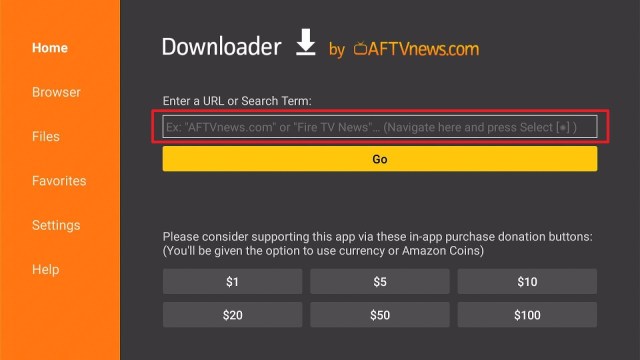
2. Enter the Rumble app download URL/APK – https://reviewvpn.com/rum and click GO.

3. When the Rumble file download is complete – click Install.

4. Now, you have successfully installed the Rumble video-sharing app on FireStick.

Install Surfshark on Firestick
Moving the Newly Installed App to the Front
- Go back to FireStick’s Home Screen (you may click the Home Button on the Fire Stick remote).
- Go to Your Apps & Games/Channels.
- Scroll once to the left.
- Click See All.
- All the newly installed apps are located at the bottom – you can move the Rumble video-sharing app by clicking the Options button (at the right side of the Home Button).
What is the Rumble app?
The Rumble video platform is a smaller-scale YouTube alternative that grants you access to all types of videos. This video-sharing will not censor users for scientific or political content.
The Rumble app is not a political platform, but a service to offer video creators a method to manage, host, distribute, and then monetize their video content. This video-sharing app brings the best viral videos in the world to keep people entertained. Rumble app comes with a unique voting feature that allows you to achieve cash rewards by taking part in battles to vote for your favorite content. Also, you can upload your own videos and witness them go viral.
How is the Rumble App different from Others?
In response to YouTube content creators protesting about how their content was being excluded from the algorithm. The Rumble app rolled out as a result. The idea came up when the Rumble app creator started seeing people uploading great comedy videos and ended up disappointed.
The launch of Rumble came when numerous YouTube content creators were annoyed with the platform. The famous American online video sharing was generating greater hurdles for containing videos showing up on feeds and only favored professional video publishers’ content. Moreover, YouTube is popular for providing content with high levels of engagement. YouTube gives well-known creators a huge advantage. However, Rumble makes the situation fair by not actively giving video promotions, providing people an even chance to acquire popularity.
Make videos & generate money
The Rumble app allows anyone to monetize videos. The video-sharing app is like famous video platforms, such as YouTube. Rumble app users can easily start sharing their videos on the internet immediately. The video-sharing app comes with four different methods to earn cash off the videos. Rumble app is a great platform for those who possess many talents or hobbies.
However, users need to make sure to fully read the entire fine print prior to signing up on Rumble and start uploading videos. The app’s fine print details the kinds of content that are allowed. Wherein, the app will prevent any banned videos or content flagged as inappropriate video clips.
Compatibility
With the Rumble APK, you can easily share videos with the world. However, the Rumble app is compatible with many Android devices, such as Amazon Firestick, Roku, Google Chromecast, and many more.
Pros & Cons
Pros
- The app monetizes videos in 4 ways
- You can easily monetize your videos than YouTube
- It promotes videos on famous third-party platforms
Cons
- The video-sharing platform is battery-intensive
ReviewVPN cannot attest to the legality, security and privacy of the applications discussed on this site. It is highly recommended that you use a VPN service while streaming or using Kodi. Currently, your IP 216.73.216.84 is visible to everyone and your Browser is being tracked by Advertisers & ISP Provider. Here are the main reasons why you must use a VPN: A VPN works be replacing your ISP-assigned IP address and creating an encrypted tunnel. We recommend the no log service offered by IPVanish. It works well on a Firestick and offers the fastest possible speeds.
YOUR INTERNET ACTIVITY IS BEING WATCHED
Grab your subscription now!
Click here to get the lowest price on Surfshark through our exclusive limited-time offer.
Stream Safely with VPN
For a lot of people, getting a Virtual Private Network or VPN service is all about privacy on the internet. Web-users may want to use VPN to help keep their online activities completely anonymous. A VPN service will free you from ISP’s prying eyes or even the government.
Nonetheless, you can also use a VPN to bypass geo-restrictions and explore new movies or TV shows. A VPN, such as the Surfshark service, connects people through an encrypted tunnel to servers (from any country) they want. Because the VPN services also allow users to change their IP address to a totally different country, these platforms could be used much wider. A VPN service is great for streamers. For instance, VPNs let you have access to a wide range of movies or TV shows. You can also stream sporting events from anywhere.
How to Install Surfshark VPN on Firestick
If your Firestick still has the older interface, read this article to learn how to update it: Update Firestick Interface.
Follow our screenshots below to install the SurfShark VPN app on your Fire TV stick.
1. Go to the Home screen of your Firestick.

2. Navigate towards the Find tab. Press the Search button from the resulting dropdown.

3. Type in the keyword of SurfShark and select from the suggestions that will appear.

4. Click the official SurfShark icon from your search results.

5. Press the Download (You own it) button.

6. The SurfShark VPN installer will download on your device.

7. SurfShark VPN’s app will automatically install itself on your Fire TV stick.

8. Press the Open button after completing SurfShark VPN’s installation process.

9. Please wait for the SurfShark VPN to load its user interface.

10. You can now log in with your SurfShark VPN account credentials.

Learn more about Surfshark and Grab the Best Surfshark Deal Now!
Install Surfshark on Firestick


For more VPN discounts, go to ReviewVPN Deals and purchase the best VPN for you.
Alternatives For Rumble
Firestick provides many apps that let you share videos. Nonetheless, if the Rumble app malfunctions, below are apps that allow you to manage, host, distribute video content:
Best YouTube Alternatives to Stream Videos Online
FAQs
Is the Rumble app free?
Yes, the Rumble video-sharing app is free to download, install, & use
Is the Rumble app legal?
Yes, the Rumble video-sharing app is legal.
Is the Rumble app safe?
Yes, the Rumble app video-sharing is very safe to use and has no viruses or malware.
Wrapping Up
In this article, we have provided information on how to install the Rumble APK on Firestick. The information above should really help you share your videos on the internet.
Nonetheless, always remember to use A VPN service every time you use your Firestick. If you have any thoughts about the Rumble app, don’t hesitate to let us know in the comments section.


