
Overview
Quick Navigation

Calorie Counter – MyFitnessPal is a great app designed to help people lose weight. MyFitnessPal is the fastest, uncomplicated calorie counter application for Android-based devices. Nonetheless. it comes with a database of over 3,000,000 various foods that is bigger compared to other calorie counters.
The My Fitness Pal app lets users add the foods that they eat manually, using the bar code reader, or searching in the food database. However, if users use the bar code reader, they will scan the barcode with the camera of their device and they’ll quickly have all the data.
Aside from the Calorie Counter – MyFitnessPal app lets users count the calories that they ingest as food. However, it also lets users keep track of the calories that they consume when they exercise. For instance, users can record that they consume 500 calorie pasta and burn 200 calories while running for 30 minutes.

Calorie Counter – MyFitnessPal APK Installation on FireStick
- Turn on the FireStick device, go to the top menu bar and choose > Settings
- Click My Fire TV > Developer Options
- Enable Apps from Unknown Sources
- Go back to FireStick’s home screen and go to the menu bar
- Go to the Search option
- Search & install the Downloader app on FireStick
- After installing the Downloader app, launch it
- Enter the Calorie Counter – MyFitnessPal app download URL/APK – https://reviewvpn.com/cal
- Click GO
- When the file download is complete – click Install
- Now, you have successfully installed the Calorie Counter – MyFitnessPal app on FireStick
Install Calorie Counter – MyFitnessPal on Firestick with Screenshots
1. Install the Downloader app and jailbreak your firestick by enabling unknown sources. To learn more about the procedure, you may read How to Install the Downloader App and Enable Unknown Sources.
2. After installing the Downloader app, launch it.
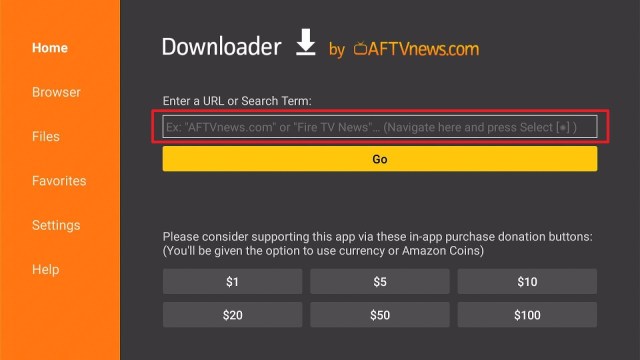
3. Enter the app download URL/APK – https://reviewvpn.com/cal and click GO

4. When the file download is complete – click Install

5. Now, you have successfully installed the Calorie Counter – MyFitnessPal app on FireStick

ReviewVPN cannot attest to the legality, security and privacy of the applications discussed on this site. It is highly recommended that you use a VPN service while streaming or using Kodi. Currently, your IP 116.82.86.222 is visible to everyone and your Browser is being tracked by Advertisers & ISP Provider. Here are the main reasons why you must use a VPN: A VPN works be replacing your ISP-assigned IP address and creating an encrypted tunnel. We recommend the no log service offered by IPVanish. It works well on a Firestick and offers the fastest possible speeds.
YOUR INTERNET ACTIVITY IS BEING WATCHED
Legal Disclaimer: ReviewVPN.com does not encourage or endorse any illegal activity involved in the usage of services and applications referenced on this site. We do not verify the licensing agreements of services. The end-user is wholly responsible for ensuring that any media accessed through these services does not violate copyright and/or licensing laws. ReviewVPN does not promote, link to, or receive compensation from any Apps and IPTV services.
Install Surfshark on Firestick

Moving the newly installed app to the front
- Go back to FireStick’s Home Screen (you may click the Home Button on the Fire Stick remote)
- Go to Your Apps & Games/Channels
- Scroll once to the left
- Click See All
- All the newly installed apps are located at the bottom. You can move the Calorie Counter – MyFitnessPal app by clicking the Options button (on the right side of the Home Button)
What Is Calorie Counter – MyFitnessPal App?
Calorie Counter – MyFitnessPal is an app designed to help a person monitor his/her fitness and to achieve his/her exercise goals. You can use Calorie Counter – MyFitnessPal on Android-powered devices. Nonetheless, this app is an ideal way to keep track of many health metrics and users can plan their diet accordingly. It is easy to use and you can download the app for free.
However, MyFitnessPal is among the best weight-loss apps available today. MyFitnessPal app users can sync their progress with the app’s official website. The app allows users to keep a dependable, orderly record of the food they consume. However, with the app’s engaged community of 200 million subscribers, you will find limitless advice & inspiration as you strive to stay healthy.
Calorie Counter – MyFitnessPal Features
The major benefit linked with the MyFitnessPal app, in terms of obtaining the highest level of health, is that it will remove much of the guesswork. Not only will the MyFitnessPal app count calories, but it comes with a database of more than 5 million different kinds of food. However, the MyFitnessPal app will provide its users with details like carbohydrates, the presence of fat, vitamins & minerals. Nonetheless, the app has been rated the best fitness app by many reputable sources.
Additional Benefits Of MyFitnessPal
The MyFitnessPal app is able to function well with more than 50 other apps. Nonetheless, this fitness app is ideal if you want to integrate multiple programs. Additionally, it can count the number of steps you’ve taken throughout the day and it scans barcodes to find out specific food’s health values.
Compatibility
With the Calorie Counter – MyFitnessPal app, you can easily monitor your fitness and achieve your exercise goals on your Android device. Fortunately, the MyFitnessPal app works well on many Android devices, such as Firestick and many more.
Pros & Cons
Pros
- This fitness application is free to download, install, & use
- You can use the app alongside other popular packages
Cons
- It has no built-in breath counter & heart rate, monitor
- Some users are complaining that the list of foods is hard to navigate
Always Use a VPN To Stay Safe, Secure Online
If you want to keep your device safe, have online privacy, and bypass streaming services’ geographical restrictions, you need a VPN service. Also, a Virtual Private Network or VPN can prevent ads. However, the best tool to protect your Amazon Firestick is to utilize a VPN service. While there are tons of premium VPNs out there, you need to choose the best one for you.
However, Surfshark service is one of the best VPNs for the Firestick device that lets you stream Hulu, Amazon Prime, Netflix, and other popular streaming services. It is a fantastic choice if you’re looking for a VPN provider that comes along with good security. This VPN successfully conceals your IP address.
Surfshark Features:
- Unlimited simultaneous devices
- Great customer service
- Robust encryption
- 30-day money-back guarantee
- Zero log policy
- Amazing download speed
- Unblocks Netflix, Disney+, and many more
- Compatible with Android, Windows, Linux, iOS, Mac, and other routers
Note: For more information about Surfshark, please read our Surfshark Review.
How to Install Surfshark VPN on Firestick
If your Firestick still has the older interface, read this article to learn how to update it: Update Firestick Interface.
You can download Surfshark directly from the Amazon App store. It will be easy for you to find Surfshark with your Firestick’s Find feature. Refer to our screenshots below.
1. Go to the Home screen of your Firestick.

2. Navigate towards the Find tab. Press the Search button from the resulting dropdown.

3. Type in the keyword of SurfShark and select from the suggestions that will appear.

4. Click the official SurfShark icon from your search results.

5. Press the Download (You own it) button.

6. The SurfShark VPN installer will download on your device.

7. SurfShark VPN’s app will automatically install itself on your Fire TV stick.

8. Press the Open button after completing SurfShark VPN’s installation process.

9. Please wait for the SurfShark VPN to load its user interface.

10. You can now log in with your SurfShark VPN account credentials.

Learn more about Surfshark and Grab the Best Surfshark Deal Now!
Install Surfshark on Firestick


For more VPN discounts, go to ReviewVPN Deals and purchase the best VPN for you.
Click here to get the lowest price on Surfshark through our exclusive limited-time offer.
Calorie Counter – MyFitnessPal Alternatives
- CalorieTracker
- Lifesum
- Calorie Counter by FatSecret
- Cronometer
- Open Food Facts
FAQs
Is Calorie Counter – MyFitnessPal Good?
The app is good
Is anyone having trouble with Calorie Counter – MyFitnessPal?
It has no disruption to its service
Is the Calorie Counter – MyFitnessPal app free?
Yes, the application is free to download, install, & use
Wrapping Up
In this article, we have provided information on how to install the Calorie Counter – MyFitnessPal APK on Firestick. The information above should really help you monitor your fitness and achieve your exercise goals.
However, always remember to use A VPN service every time you’re online. If you have any thoughts about the Calorie Counter – MyFitnessPal app, don’t hesitate to let us know in the comments section.
Note: ReviewVPN.com does not own or operate any app nor does it endorse any. The main purpose of this article is strictly for educational purposes only.


