
Overview
Quick Navigation
Are you tired of playing the same tracks on the radio and creating playlists repeatedly? Or listening to a bunch of radio commercials? Then, download & install the Dash Radio app on your Android device. It is a free digital radio broadcasting platform with zero commercials, credible & authentic DJs, personalities as well as stations.

This digital radio broadcasting service provides an amazing platform for artists while offering music without limitations. Dash Radio is the biggest radio broadcasting service across the globe. It allows you to stream music 24/7. Moreover, it features the biggest DJs, curators, personalities across the globe on more than 75 exclusive and original stations in all genres.
However, the digital radio broadcasting platform has a fast and very easy-to-use interface. Simply click on your favorite preset stations and go. It has no advertisements, searching, or pop-up windows. All you do is done with a tap.

Dash Radio App Installation on FireStick
- Turn on the FireStick device, go to the top menu bar and choose > Settings.
- Click My Fire TV > Developer Options.
- Enable Apps from Unknown Sources.
- Go back to FireStick’s home screen and go to the menu bar.
- Go to the Search option.
- Search & install the Downloader app on FireStick.
- After installing the Downloader app, launch it.
- Enter the Dash Radio app download URL/APK – https://reviewvpn.com/dar
- Click GO.
- When the Dash Radio file download is complete – click Install.
- Now, you have successfully installed the Dash Radio app on FireStick.
Install Dash Radio on Firestick with Screenshots
Install the Downloader app and jailbreak your firestick by enabling unknown sources. To learn more about the procedure, you may read How to Install the Downloader App and Enable Unknown Sources.
1. After installing the Downloader app, launch it.
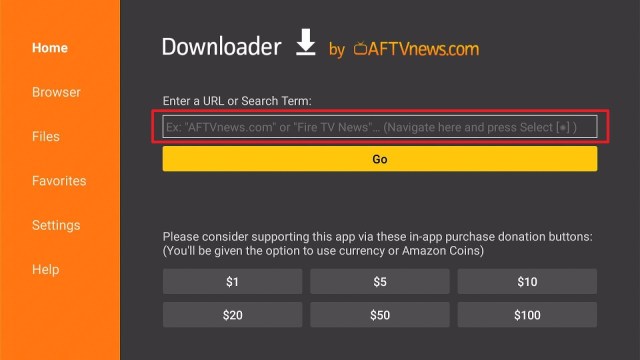
2. Enter the Dash Radio app download URL/APK – https://reviewvpn.com/dar and click GO.

3. When the Dash Radio file download is complete – click Install.

4. Now, you have successfully installed the Dash Radio app on FireStick.

Install Surfshark on Firestick
Moving the Newly Installed app to the Front
- Go back to FireStick’s Home Screen (you may click the Home Button on the Fire Stick remote)
- Go to Your Apps & Games/Channels
- Scroll once to the left
- Click See All
- All the newly installed apps are located at the bottom – you can move the Dash Radio app by clicking the Options button (at the right side of the Home Button)
What Is Dash Radio App?
Dash Radio is a digital radio broadcasting platform that lets you listen to radio stations broadcasting on the internet directly from your Android device. You can choose from a wide variety of radio stations or choose the genres you like. However, users can have the platform recommend radio channels for them to listen to. Nevertheless, the digital radio broadcasting app doesn’t come along with any advertisements or pop-ups.
Dash Radio functions on Android & iOS devices. Also, you can download & install this app on your computer/PC by utilizing an emulator app. But, with a community of more than 450 personalities across over 80 stations, this digital radio broadcasting app is the largest, original digital radio broadcast service in the world.
Features Of Dash Radio
- It has zero commercials or awkward pauses
- The app has real DJs and personalities playing your music. It has no algorithms & computers controlling you
- With more than 75 original live streaming stations
- It lets you stream music through Bluetooth or cord to devices
- Comes with an amazing sound quality
- It is the best programming across the globe
- You may win prizes every day by listening
- Completely free music, more variety, no ads
- A radio app that is a great Radio USA alternative
- The Dash Radio APK is available for free download
Genres
- Hip-Hop
- Pop
- Latin
- Electronic & Dance
- Decades
- Rock
- Talk
- R&B
- Country
- Jazz & Classical
- World
- Faith & Gospel
- Health & Wellness
Sample Stations:
- Insomniac Radio
- DoggyStyle
- Snoop Dogg’s Cadillacc Music
- Monstercat Radio
- YG Presents
- and many more
No Sign Up Needed
The Dash Radio app doesn’t need you to sign- up for an account or tediously create a playlist repeatedly. Just choose a station that suits your mood and start listening to the music. Nonetheless, all original ad-free stations of the app have everything users need to straightforwardly set any mood on their device.
What does the Dash Radio app do?
The Dash Radio app provides free non-stop music without creating a playlist. It lets you choose any station (select from more than 80 premium stations) or select genres. The platform lets you instantly play its hand-curated stations.
ReviewVPN cannot attest to the legality, security and privacy of the applications discussed on this site. It is highly recommended that you use a VPN service while streaming or using Kodi. Currently, your IP 216.73.216.109 is visible to everyone and your Browser is being tracked by Advertisers & ISP Provider. Here are the main reasons why you must use a VPN: A VPN works be replacing your ISP-assigned IP address and creating an encrypted tunnel. We recommend the no log service offered by IPVanish. It works well on a Firestick and offers the fastest possible speeds.
YOUR INTERNET ACTIVITY IS BEING WATCHED
Importance of a VPN on Firestick

While Amazon’s Firestick is available in multiple countries across the world, the content provided on the gadget varies from country to country. Wherein, movies, music, TV shows, games, & apps that are available in one region may be unavailable in others. Nonetheless, there’s a method to bypass these geographical restrictions. A Virtual Private Network or VPN is the best, most dependable way to acquire access content with geo-restrictions, thanks to the location-spoofing abilities of a VPN service.
Nonetheless, when you connect your Firestick to a VPN server, the Virtual Private Network makes it seem the device is in the same location as the VPN server. This will provide you access to content available for that particular region. However, it is recommended to utilize Surfshark. It is among the fastest, most dependable, and most secure VPN service providers. You can use the Surfshark service with all types of video streaming platforms or applications. Additionally, the app is very easy to use.
Click here to get the lowest price on Surfshark through our exclusive limited-time offer.
How to Install Surfshark VPN on Firestick
If your Firestick still has the older interface, read this article to learn how to update it: Update Firestick Interface.
Follow our screenshots below to install the SurfShark VPN app on your Fire TV stick.
1. Go to the Home screen of your Firestick.

2. Navigate towards the Find tab. Press the Search button from the resulting dropdown.

3. Type in the keyword of SurfShark and select from the suggestions that will appear.

4. Click the official SurfShark icon from your search results.

5. Press the Download (You own it) button.

6. The SurfShark VPN installer will download on your device.

7. SurfShark VPN’s app will automatically install itself on your Fire TV stick.

8. Press the Open button after completing SurfShark VPN’s installation process.

9. Please wait for the SurfShark VPN to load its user interface.

10. You can now log in with your SurfShark VPN account credentials.

Learn more about Surfshark and Grab the Best Surfshark Deal Now!
Install Surfshark on Firestick


For more VPN discounts, go to ReviewVPN Deals and purchase the best VPN for you.
Click here to get the lowest price on Surfshark through our exclusive limited-time offer.
FAQs
Is the Dash Radio APK free?
Yes, the Dash Radio APK is free to download, install, & use.
Is the Dash Radio app legal?
Yes, the Dash Radio App is legal.
Is the Dash Radio app safe?
Yes, the Dash Radio is very safe to use and has no viruses or malware.
Compatibility
With the Dash Radio app, you can easily listen to radio stations broadcasting on the web. The digital radio broadcasting platform lets you create a playlist. It is compatible with an impressive number of iOS & Android-based devices, Generally, Dash Radio is a great digital radio broadcasting platform.
Conclusion
In this article, we have provided information on how to install the Google TV Launcher App on Firestick. The information above should really help enhance your Firestick experience.
However, always remember to use A VPN service every time you use your Firestick. If you have any thoughts about the Dash Radio app, don’t hesitate to let us know in the comments section.


