

Overview
Quick Navigation
BubbleUPnP is an extremely useful app when you want to virtually transmit content to any other Android-based device with DLNA (Digital Living Network Alliance) support. The app comes with support for Firestick, Google Chromecast, Nvidia Shield, Nexus Player, and many more. Also, it allows users to send content to smart TVs (with DLNA), game consoles (Xbox One & PlayStation 4), Amazon FireStick, as well as the local Android Playback.

However, the BubbleUPnP lets you stream all the content that is stored underneath an Android device. Additionally, the app allows you to synchronize Dropbox, Google Drive, etc., to stream video, music, and other photos available in the cloud.
BubbleUPnP’s support on devices includes interesting features like playing video formats that you can’t usually play. Thus, the movie format you wish to stream does not matter. It supports AVI, MKV, WMV, MOV, RMVB, WTV, FLAC, WMA, or TS.
BubbleUPnP App Installation on FireStick
- Turn on the FireStick device, go to the top menu bar and choose > Settings.
- Click My Fire TV > Developer Options.
- Enable Apps from Unknown Sources.
- Go back to FireStick’s home screen and go to the menu bar.
- Go to the Search option.
- Search & install the Downloader app on FireStick.
- After installing the Downloader app, launch it.
- Enter the BubbleUPnP app download URL/APK – https://reviewvpn.com/bbu
- Click GO.
- When the BubbleUPnP file download is complete – click Install.
- Now, you have successfully installed the BubbleUPnP app on FireStick.

Install BubbleUPnP App on Firestick with Screenshots
Install the Downloader app and jailbreak your firestick by enabling unknown sources. To learn more about the procedure, you may read How to Install the Downloader App and Enable Unknown Sources.
1. After installing the Downloader app, launch it.
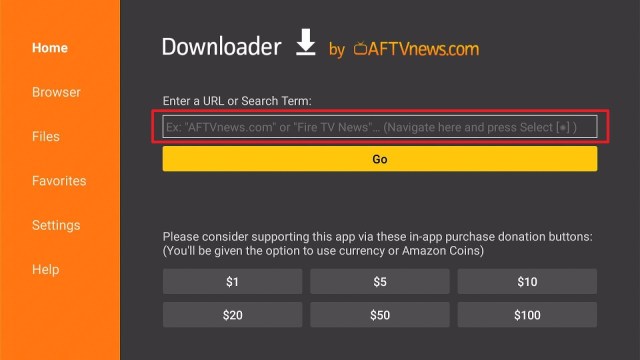
2. Enter the BubbleUPnP app download URL/APK – https://reviewvpn.com/bbu and click GO.

3. When the BubbleUPnP file download is complete – click Install.

4. Now, you have successfully installed the BubbleUPnP app on FireStick.

Install Surfshark on Firestick
Moving the Newly Installed Spp to the Front
- Go back to FireStick’s Home Screen (you may click the Home Button on the Fire Stick remote).
- Go to Your Apps & Games/Channels.
- Scroll once to the left.
- Click See All.
- All the newly installed apps are located at the bottom – you can move the BubbleUPnP app by clicking the Options button (at the right side of the Home Button).
How Does the BubbleUPnP App Work?
BubbleUPnP app’s primary function is to help people cast any multimedia content on a variety of Android devices. Then, people can view or listen to the content on other Android devices with a high-quality structure for a new, amazing experience. Aside from that, the app’s ability to search for content is amazing when everything functions automatically to provide users complete convenience.
The BubbleUPnP app automatically scans the entire device and then showcases any media files available to send to other devices. Nonetheless, this app can also link to several other online sources and then send to the device for live streaming. Additionally, the streaming platform is the app’s absolute priority. Thus, it will have tons of free and high-standard multimedia content for you to enjoy.
Features
- It comes with editable playlists, playback queue, sleep timer, scrobbling, as well as various shuffle modes
- The app has an integrated full-screen photo viewer & controller
- Renderer functionality – lets you play content to a device from other Android devices
- Media server functionality – it can access all local & cloud content from other Android devices
- It allows you to download media content to your SD Card
Customize & Personalize The App
Many individuals find it annoying to use similar themes or presets. Thus, the BubbleUPnP app comes with a great personalization & customization tool. Users can easily find the ideal user experience and then add particular themes. Also, users can synchronize the personalization process on various platforms, providing the freedom to enjoy preferred settings without undergoing the re-installation process.
BubbleUPnP app’s convenience & versatility guarantee to give you the most smooth & preeminent experience in utilizing streaming platforms thoroughly. Furthermore, all settings & activities of a user will be saved and synchronized, taking its performance to the next level.
Stream Videos & Listen To Music From Other Devices
The BubbleUPnP app is a two-way casting tool, so you can watch videos or listen to music straight from other Android devices. This is the BubbleUPnP app’s effective & convenient feature where users don’t have to share media content. Once connected to a Wi-Fi network, just being close to someone can comfortably stream tons of entertainment content conveniently.
However, the transmission quality of the BubbleUPnP app is absolute so that you can have the best experience when you continuously stream numerous videos for a long time. Also, the app lets you create a playlist that comes with all the videos coming from various devices. You may download those media content to watch even without an internet connection.
ReviewVPN cannot attest to the legality, security and privacy of the applications discussed on this site. It is highly recommended that you use a VPN service while streaming or using Kodi. Currently, your IP 51.195.183.111 is visible to everyone and your Browser is being tracked by Advertisers & ISP Provider. Here are the main reasons why you must use a VPN: A VPN works be replacing your ISP-assigned IP address and creating an encrypted tunnel. We recommend the no log service offered by IPVanish. It works well on a Firestick and offers the fastest possible speeds.
YOUR INTERNET ACTIVITY IS BEING WATCHED
Always Use The Best VPN on Firestick
Amazon’s Firestick device is an amazing way to provide you on-demand access to tons of movies, TV shows, news, and more. But, with the Surfshark VPN service on FireStick, you’ll have the ability to access well-known streaming platforms such as Hulu, Netflix, BBC iPlayer, Amazon Prime Video, and more. Wherein, you can stream all the famous movies, TV shows, and TV channels on the FireStick device.
Surfshark has over 3200+ servers in 65 countries. It provides unrestricted access to tons of live TV channels across the globe. It has unlimited server changes, peer-to-peer (P2P) traffic, & bandwidth that will not slow down the internet connection speed.
The Surfshark service utilizes 256-bit AES encryption. It doesn’t store activity & connection logs. The VPN service supports a variety of connections, such as OpenVPN, L2TP / IPsec VPN, & IKEv2 protocols. This VPN conceals IP addresses when connected to P2P & voice over Internet Protocol (VoIP).
Click here to get the lowest price on Surfshark through our exclusive limited-time offer.
How to Install Surfshark VPN on Firestick
If your Firestick still has the older interface, read this article to learn how to update it: Update Firestick Interface.
Follow our screenshots below to install the SurfShark VPN app on your Fire TV stick.
1. Go to the Home screen of your Firestick.

2. Navigate towards the Find tab. Press the Search button from the resulting dropdown.

3. Type in the keyword of SurfShark and select from the suggestions that will appear.

4. Click the official SurfShark icon from your search results.

5. Press the Download (You own it) button.

6. The SurfShark VPN installer will download on your device.

7. SurfShark VPN’s app will automatically install itself on your Fire TV stick.

8. Press the Open button after completing SurfShark VPN’s installation process.

9. Please wait for the SurfShark VPN to load its user interface.

10. You can now log in with your SurfShark VPN account credentials.

Learn more about Surfshark and Grab the Best Surfshark Deal Now!
Install Surfshark on Firestick


For more VPN discounts, go to ReviewVPN Deals and purchase the best VPN for you.
Click here to get the lowest price on Surfshark through our exclusive limited-time offer.
FAQs
Is the BubbleUPnP app free?
Yes, the BubbleUPnP app is free to download, install, & use
Is the BubbleUPnP app legal?
Yes, the BubbleUPnP app is legal.
Is the BubbleUPnP app safe?
Yes, the BubbleUPnP app is very safe to use and has no viruses or malware.
Conclusion
In this article, we have provided information on how to install the BubbleUPnP App on Firestick. As a result, the information above should really help you boost your streaming experience on Firestick.
However, always remember to use A VPN service every time you use your Firestick. If you have any thoughts about the BubbleUPnP app, don’t hesitate to let us know in the comments section.


