
Overview
Quick Navigation
Baseball Live Streaming is among the best applications to stream Major League Baseball games. This MLB Live streaming app keeps users in touch with the latest sports events, such as MLB sports, MLB scores ESPN, live baseball, MLB season opener, and many more. Baseball Live Streaming app helps baseball fans stream MLB games live on their Android devices anytime, anywhere.
This is the best platform for baseball fans, Dofu fanatics, and even Hockey fans. The Baseball Live Streaming app lets you watch all baseball games for free. It also provides all ongoing games for Major League Baseball. The app helps baseball enthusiasts see the scoreboard, live score, team standings, and team rankings.

Baseball Live Streaming APK Installation on FireStick
- Turn on the FireStick device, go to the top menu bar and choose > Settings
- Click My Fire TV > Developer Options
- Enable Apps from Unknown Sources
- Go back to FireStick’s home screen and go to the menu bar
- Go to the Search option
- Search & install the Downloader app on FireStick
- After installing the Downloader app, launch it
- Enter the Baseball Live Streaming app download URL/APK – https://reviewvpn.com/bls
- Click GO
- When the Baseball Live Streaming file download is complete – click Install
- Now, you have successfully installed the Baseball Live Streaming app on FireStick

Install Baseball Live Streaming APK on Firestick with Screenshots
Install the Downloader app and jailbreak your firestick by enabling unknown sources. To learn more about the procedure, you may read How to Install the Downloader App and Enable Unknown Sources.
1. After installing the Downloader app, launch it.
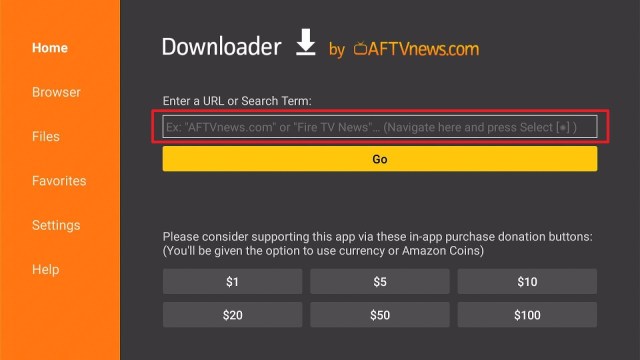
2. Enter the Baseball Live Streaming app download URL/APK – https://reviewvpn.com/bls and click GO.

3. When the Baseball Live Streaming file download is complete – click Install.

4. Now, you have successfully installed the Baseball Live Streaming app on FireStick.

Install Surfshark on Firestick
Moving the Newly Installed App to the Front
- Go back to FireStick’s Home Screen (you may click the Home Button on the Fire Stick remote)
- Go to Your Apps & Games/Channels
- Scroll once to the left
- Click See All
- All the newly installed apps are located at the bottom – you can move the Baseball Live Streaming app by clicking the Options button (at the right side of the Home Button)
What Is Baseball Live Streaming?
Baseball Live Streaming is an app to stream live baseball games. It is one of the best apps to watch live MLB games. The Baseball Live Streaming app allows you to watch your favorite baseball teams.
The Baseball Live Streaming ensures users will not miss a minute with the Major League Baseball live coverage. This app provides MLB lovers the MLB schedule and lots more about Major League Baseball live streams.
Features
- The app lets baseball fanatics see MLB games live anytime & anywhere.
- It provides updated results directly from matches that are transpiring. The app lets you watch all of the MLB live games as well as MLB streams.
- Users can keep track of the live Major League Baseball score of all ongoing games.
- The app lets users track MLB schedules & MLB standings
- Users can view a list of the Major League Baseball team standings
- You’ll never miss a game with the Baseball Live Streaming app
- You’ll get immediate notifications for Major League Baseball scores, MLB games, and many more
Baseball Live Streaming Compatibility
With the Baseball Live Streaming app, you can easily, securely watch all the Major League Baseball (MLB) games. Fortunately, the Baseball Live Streaming app works well with multiple Android-based devices, such as Firestick, Roku, Chromecast, and many more.
ReviewVPN cannot attest to the legality, security and privacy of the applications discussed on this site. It is highly recommended that you use a VPN service while streaming or using Kodi. Currently, your IP 216.73.216.84 is visible to everyone and your Browser is being tracked by Advertisers & ISP Provider. Here are the main reasons why you must use a VPN: A VPN works be replacing your ISP-assigned IP address and creating an encrypted tunnel. We recommend the no log service offered by IPVanish. It works well on a Firestick and offers the fastest possible speeds.
YOUR INTERNET ACTIVITY IS BEING WATCHED
Stream Safely with a VPN
Professional sports provide a noteworthy influence on various individuals around the world. Be it baseball, soccer, tennis, basketball, hockey, or any other sport, sports enthusiasts love to watch their most-liked teams in action. Nonetheless, due to the frustrating broadcasting rights, sports fanatics need to be in a particular country to stream live games. But, if you use a Virtual Private Network or VPN, it gives you the opportunity to have a list of servers globally.
Using a VPN, like Surfshark, for live sports streaming will give you a front-row seat in the comfort of your home. Use the Surfshark service to stream live sporting events.
With the Surfshark service:
- All web traffic passes via a secure tunnel
- You can watch a number of sporting events on many devices
- You can immediately watch media content originating from any country
- The entertainment media you want to access will be automatically unblocked
- You obtain a secure, reliable, fast connection with no interruption
- Information you send when or browse the web is encrypted
Click here to get the lowest price on Surfshark through our exclusive limited-time offer.
How to Install Surfshark VPN on Firestick
If your Firestick still has the older interface, read this article to learn how to update it: Update Firestick Interface.
Follow our screenshots below to install the SurfShark VPN app on your Fire TV stick.
1. Go to the Home screen of your Firestick.

2. Navigate towards the Find tab. Press the Search button from the resulting dropdown.

3. Type in the keyword of SurfShark and select from the suggestions that will appear.

4. Click the official SurfShark icon from your search results.

5. Press the Download (You own it) button.

6. The SurfShark VPN installer will download on your device.

7. SurfShark VPN’s app will automatically install itself on your Fire TV stick.

8. Press the Open button after completing SurfShark VPN’s installation process.

9. Please wait for the SurfShark VPN to load its user interface.

10. You can now log in with your SurfShark VPN account credentials.

Learn more about Surfshark and Grab the Best Surfshark Deal Now!
Install Surfshark on Firestick


For more VPN discounts, go to ReviewVPN Deals and purchase the best VPN for you.
Click here to get the lowest price on Surfshark through our exclusive limited-time offer.
Baseball Live Streaming Alternatives
The Baseball Live Streaming app allows you to watch live sporting events. However, if this app malfunctions, below are alternative apps for your sports viewing:
- MLB Live Streaming – MLB Live Streaming is an awesome application to watch Major League Baseball (MLB) games on your Android device free of charge. It offers live MLB scores. You’ll get a list of the best baseball matches. Also, the sports streaming app is compatible with any Android-based device.
- ESPN – If you want a streaming platform to watch live sports, then ESPN could be the perfect app for you. One of the reasons why sports fans prefer the ESPN app is for live sporting events. It comes with a good amount of live sports coverage every week. The platform features various sports leagues, such as live coverage of Major League Baseball, National Hockey League, as well as the US Open & the PGA Tour.
- MLB – The MLB app is a great platform to stream Major League Baseball (MLB) events. It is the primary sports streaming app that works well with several mobile phones, Android TV, tablet, and many more Android-powered devices.
FAQs
Is the Baseball Live Streaming app free?
Yes, the Baseball Live Streaming app is free to download, install, & use
Is the Baseball Live Streaming app legal?
Yes, the Baseball Live Streaming app is legal.
Is the Baseball Live Streaming app safe?
Yes, the Baseball Live Streaming app is very safe to use and has no viruses or malware.
Conclusion
In this article, we have provided information on how to install the Baseball Live Streaming APK on Firestick. The information above should really help you stream Major League Baseball (MLB) games on your Amazon Firestick or other Android-powered devices for free.
Nonetheless, always remember to use A VPN service every time you use your Firestick. If you have any thoughts about the Baseball Live Streaming app, don’t hesitate to let us know in the comments section.


