

Mobilism Overview
This article will show you how to install Mobilism on Firestick and Android devices.

Mobilism is a firm favorite for people who love books, modded apps, and games. With over 300,000 applications and 600,000 eBooks on their site and application. This is another specialized application that likely has everything you could possibly need.
What is an APK File?
Quick Navigation
APK stands for Android package and is the file extension that you would see at the end of an executable file which when clicked will install any Android Application on your device.
These files are initially downloaded as a zip file, which you download unzip, and then run the executable .apk file.
You would only tend to download and use .apk files on an Android device, however, you can open and use them on Windows or Mac using an Android emulator.
You should always be cautious when downloading an app file. Any executable file can contain malware that will be automatically installed on your device if you are not careful.
We always recommend that you source your file from a trusted provider, and if unsure, once downloaded scan the .zip file using Malwarebytes to check there isn’t any Malware present within the file.

Why Can’t I Just Download the App on the Google Play Store?
The Google Play Store has risen over 10 years to become the biggest app store on the planet with well over 2 million applications available.
The chances are if you want an app, you’ll find it on the Google Play Store.
However, just like Apple, Google Play has terms of use policy which means applications that may allow users to circumvent the law will be pulled from the site.
A popular application used to say stream tv and movies for free, which may pull content from illegal sources won’t be found on the Google Play Store because they breach their terms of use policy.
So, when looking for these applications you need to find a trusted provider of applications outside of the Google Play Store.
How do I Install Unknown Files?
Most modern devices have an inbuilt fail-safe, which means that unless your application comes from the Google Play Store then you won’t be allowed to download the app.
This protection stops you from downloading malicious code onto your device.
Before you try to use a third-party site that isn’t the Google Play Store you will need to do the following:
- Go to your settings on your device
- Click Security
- Look for a button that says Install unknown applications / Allow third-party applications
The setting may vary by device, and if you are unable to find it using the above instructions then just Google your device name and model along with “allow third-party apps”
YOUR INTERNET ACTIVITY IS BEING WATCHED
ReviewVPN cannot attest to the legality, security and privacy of the applications discussed on this site. It is highly recommended that you use a VPN service while streaming or using Kodi.
Currently, your IP 216.73.217.61 is visible to everyone and your Browser is being tracked by Advertisers & ISP Provider.
Here are the main reasons why you must use a VPN:
- Your activities are hidden from your ISP, the government, and from the apps you are using.
- You can access additional movies and TV streams.
- ISP attempts to throttle are thrwarted thus reducing buffering issues.
- Geographically restricted content like Netflix and Hulu can be unblocked.
A VPN works be replacing your ISP-assigned IP address and creating an encrypted tunnel. We recommend the no log service offered by IPVanish. It works well on a Firestick and offers the fastest possible speeds.

What is Mobilism?
Mobilism is less of an application and more of a community-powered database of links and files spread across the internet.
They have a thriving community, where you can post, share links, and even enter contests and they have been going since 2006.
So, you can access an enormous library, and they are a favorite for people who don’t want to pay for eBooks.
Aptoide is the best place to download their app. The forum website is https://forum.mobilism.org/.
You can choose to register or log in as a guest. You also get the option to become a premium member allowing you to download straight from their servers rather than having to go through a load of ads to get your download.
The two main sections you get are books and apps. The book sections are massive and cover everything from textbooks to fiction novels as well as audiobooks. The app section is equally diverse.
It’s worth pointing out that with a community-driven marketplace it’s tough to know if all the links are secure. But we doubt it. Make sure everything you download is getting scanned as we reckon there is going to be a fair few pieces of Malware flying around.
Screenshots with Step by Step Instruction to Install Mobilism on a Firestick
1. Scroll to Settings from the home screen.

2. Scroll down and to the right until you get to My Fire TV. Click on it.

3. Select Developer options.

4. Turn on ADB debugging and Apps from Unknown Sources.

5. Click Turn On when the pop-up appears.

6. Click Home on your remote and scroll once to your left. It will be the search icon.

7. You can either say Downloader to your Alexa voice-enabled remote or start typing it. If you typed it, click on the suggestion when it appears.

8. Click on the Downloader icon

9. Click Download

10. Click on Open

11. Click on Allow.

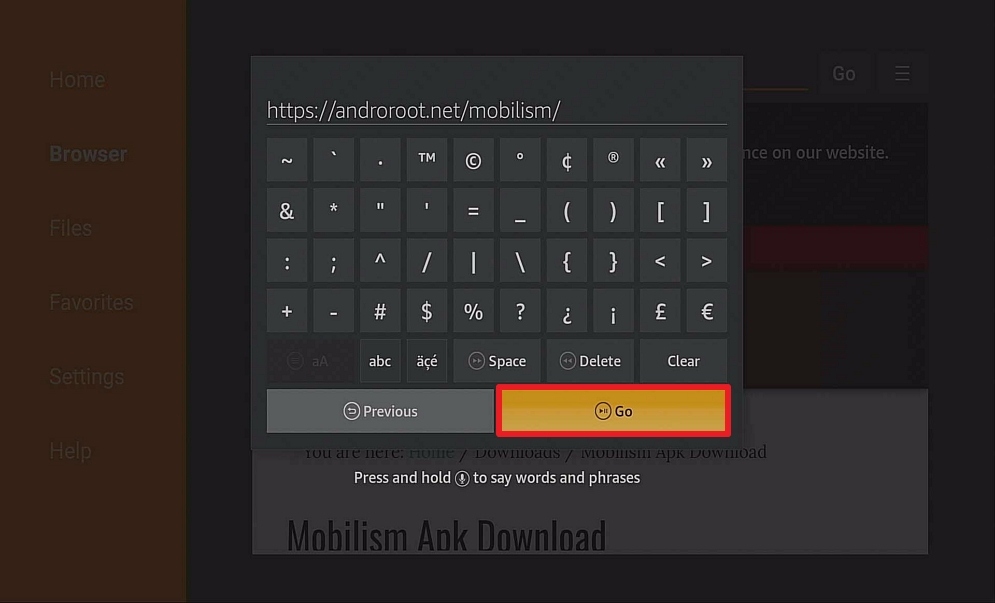
12. Type https://androroot.net/mobilism/ and click Go.
13. Click on Download
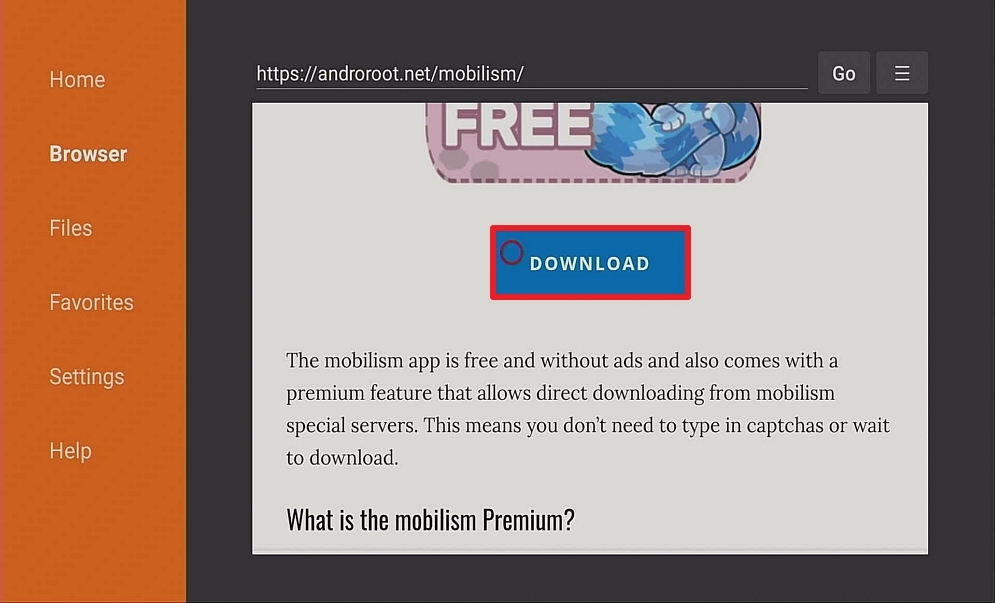
14. Click on Download

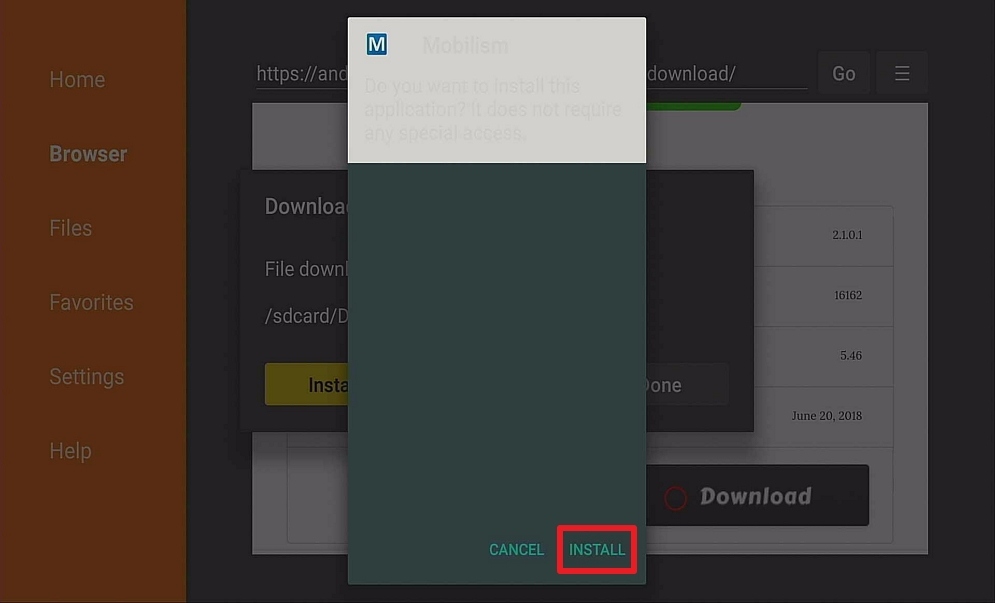
15. Click on Install and you should be all set. Remember to delete the APK file after installation to save space.
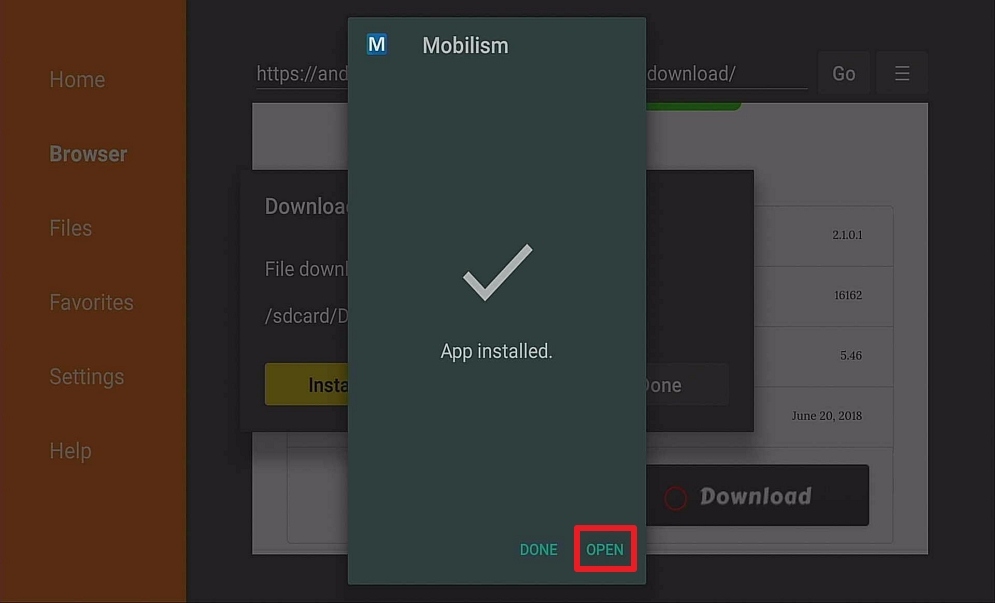
16. Select OPEN.
Features
- Massive library dating back to 2006
- One of the biggest collections of Android applications and free eBooks online
- Choice of apps for various platforms including Windows and iPhone
- Strong community
- Constantly updated content
- Report dead links function
- Active forum with lots to get involved in
- Browse and use anonymously if you don’t want to register
Is it Safe?
Mobilism has been around for a long time and built a solid reputation for giving great content and variety.
We would urge some caution around the applications that it allows onto the site, as no team can be exhaustive in scanning each application which is also liable to be modified once uploaded.
Mobilism has got a strong community and great reviews, but we’d still scan any of their applications with Malwarebytes before using it. Particularly as links can be added by any member of the community and link to sources outside of the application.
Top Apps Available on Mobilism
There are too many to count, unlike APK Time, Mobilism doesn’t keep tabs on their most downloaded apps because the download function is not done within the application.
But you can find everything from Spotify to Run Planner and beyond. What we would say is that with over 300,000 applications you should have a rough idea of what you want to find on Mobilism, otherwise you may get lost for hours in pages and pages of forum posts.
Should I Use Mobilism With a VPN?
Mobilism provides endless possibilities to its users through its diverse APK offerings. However, we would like to advise our readers, particularly those who live in countries with strict internet monitoring, to always use a Virtual Private Network (VPN) to avoid internet activity tracking and logging.
As a result, a VPN, such as Surfshark, assists you in avoiding your data being stolen and exploited for malicious purposes, jeopardizing your privacy. It encrypts your connection end to end with AES 256-bit encryption, ensuring that no logs or IP addresses are leaked while you use its service.
Note: For more information about SurfShark, please read our SURFSHARK REVIEW.
Click here to get the lowest price on Surfshark through our exclusive limited-time offer.
How to Install Surfshark VPN on Firestick
If your Firestick still has the older interface, read this article to learn how to update it: Update Firestick Interface.
You can download Surfshark directly from the Amazon App store. It will be easy for you to find Surfshark with your Firestick’s Find feature. Refer to our screenshots below.
1. Go to the Home screen of your Firestick.

2. Navigate towards the Find tab. Press the Search button from the resulting dropdown.

3. Type in the keyword of SurfShark and select from the suggestions that will appear.

4. Click the official SurfShark icon from your search results.

5. Press the Download (You own it) button.

6. The SurfShark VPN installer will download on your device.

7. SurfShark VPN’s app will automatically install itself on your Fire TV stick.

8. Press the Open button after completing SurfShark VPN’s installation process.

9. Please wait for the SurfShark VPN to load its user interface.

10. You can now log in with your SurfShark VPN account credentials.

Learn more about Surfshark and Grab the Best Surfshark Deal Now!
Install Surfshark on Firestick



For more VPN discounts, go to ReviewVPN Deals and purchase the best VPN for you.
Click here to get the lowest price on Surfshark through our exclusive limited-time offer.
Best Alternatives
There are quite a few great alternatives out there that may be a bit safer than Mobilism because they scan and check the applications that they are hosting rather than just allow external links
- APK Mirror – One of the more popular APK sites that seem to get flagged a lot by reviewers. You can get access to about 10,000 applications. A lot of these applications aren’t allowed on other platforms and find a home here
- APK Time – A lesser-known platform than some of the others, but a great source if you particularly want apps based around Android TV and TV streaming. Also, it gives you a library of applications within the application which is neat.
- Aptoide – The third biggest mobile application provider behind Apple and Google, they have well over 1 million applications and over 10 billion downloads






