

Install Kingpin Kodi Addon on Firestick/Fire TV/Android
Quick Navigation
This article will show how to set up the Kingpin Kodi Addon on a Firestick and everything else you need to know.

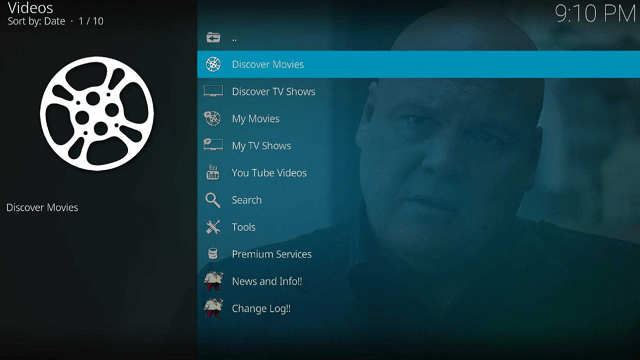
If you like Venom, this is probably good news for you. Kingpin Kodi Addon is a Venom clone and a new Kodi addon from the Kingpin repository. It offers the most recent movies, TV series, and on-demand entertainment. In addition, it offers a ton of features that you may customize and change in its settings.
Furthermore, it scrapes from the most popular premium link generators, such as Real-Debrid, AllDebrid, and Premiumize, as well as other significant sources and accounts. However, we’d just like to let you know that you’ll need a Debrid account to watch any of Kingpin’s content.
So without further ado, let’s get started on how to install it on your Firestick or Android device.

How To Install Kingpin Kodi Addon on Firestick
You can follow this tutorial to install the Kingpin Kodi Addon on your Firestick.
1. On your Firestick, open Kodi and go to Settings.
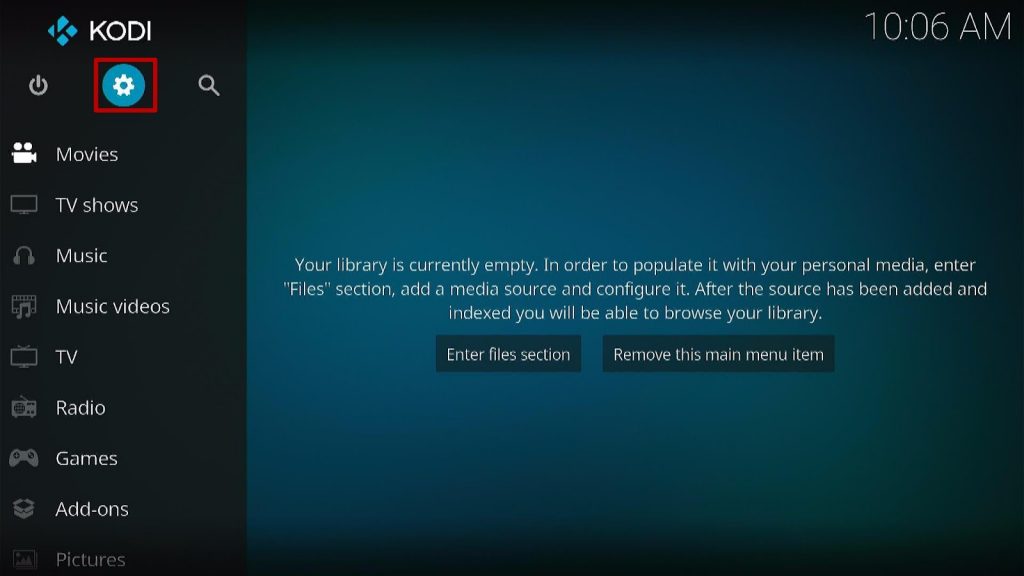
2. Select System.
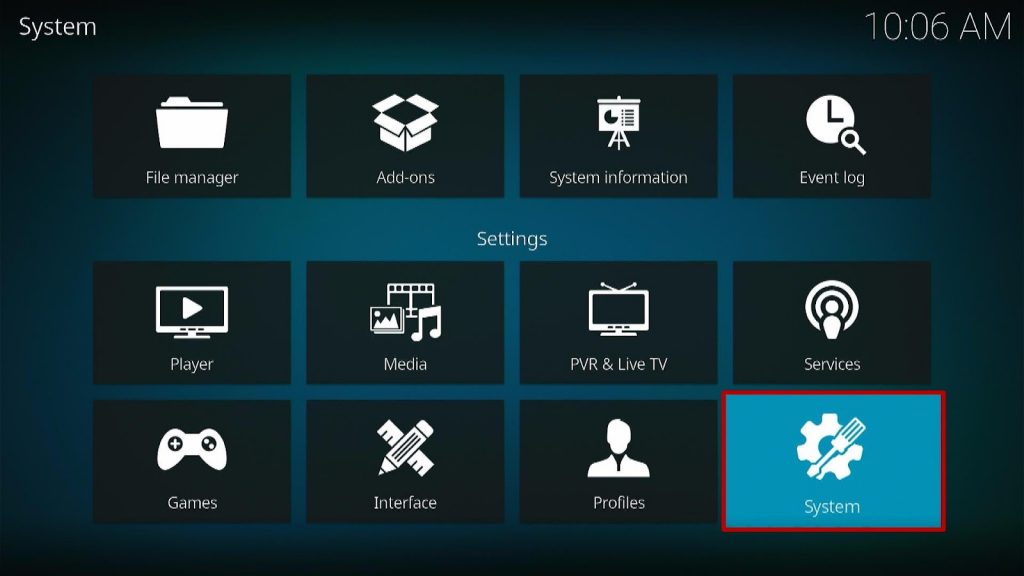
3. Click on the Add-ons menu and Turn ON the Unknown Sources.
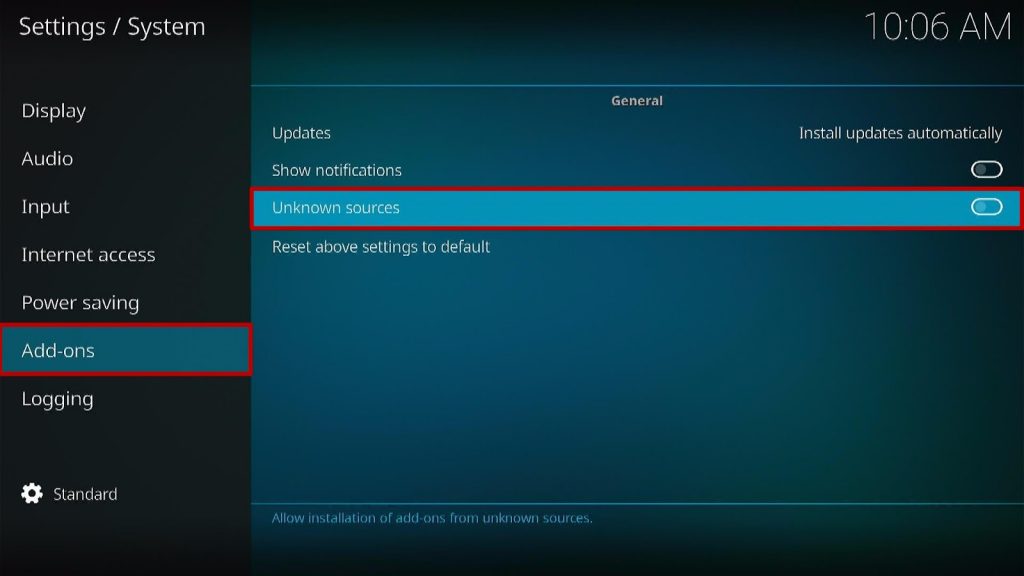
4. Select Yes when the box appears.
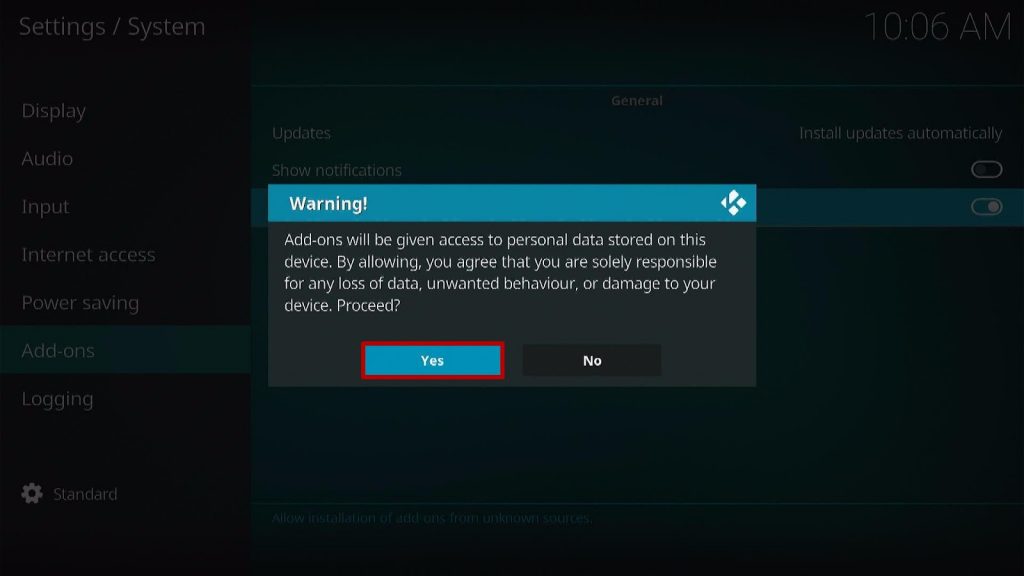
5. Go back one step and click on File Manager.
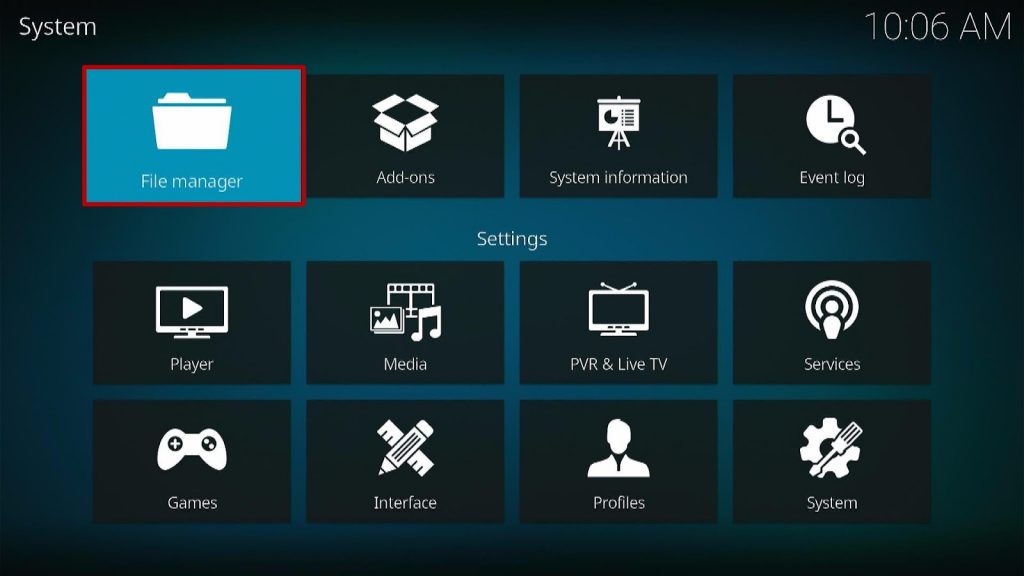
6. Select the Add Source.
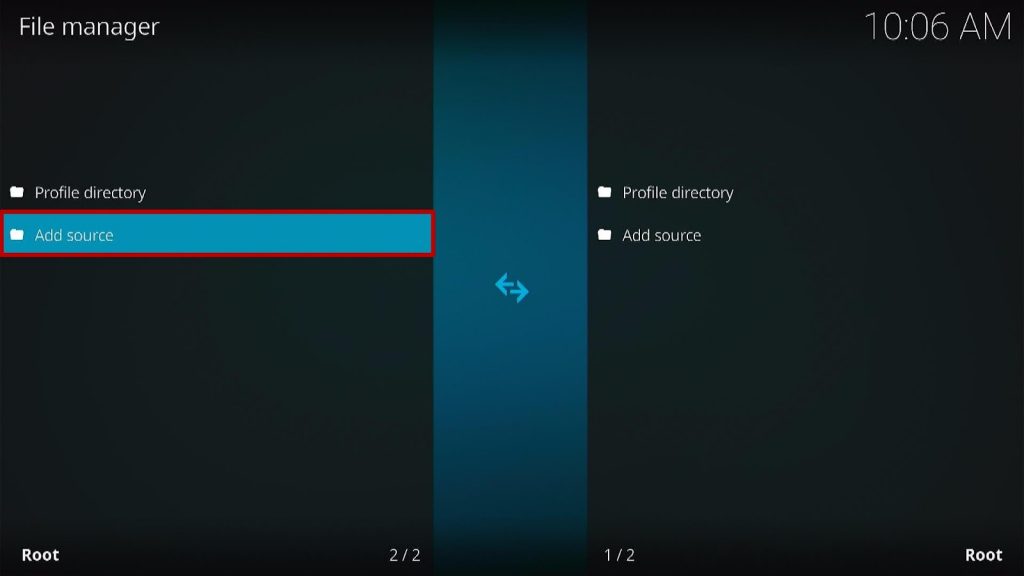
7. A box will pop up, so click on the ‘None’ option.
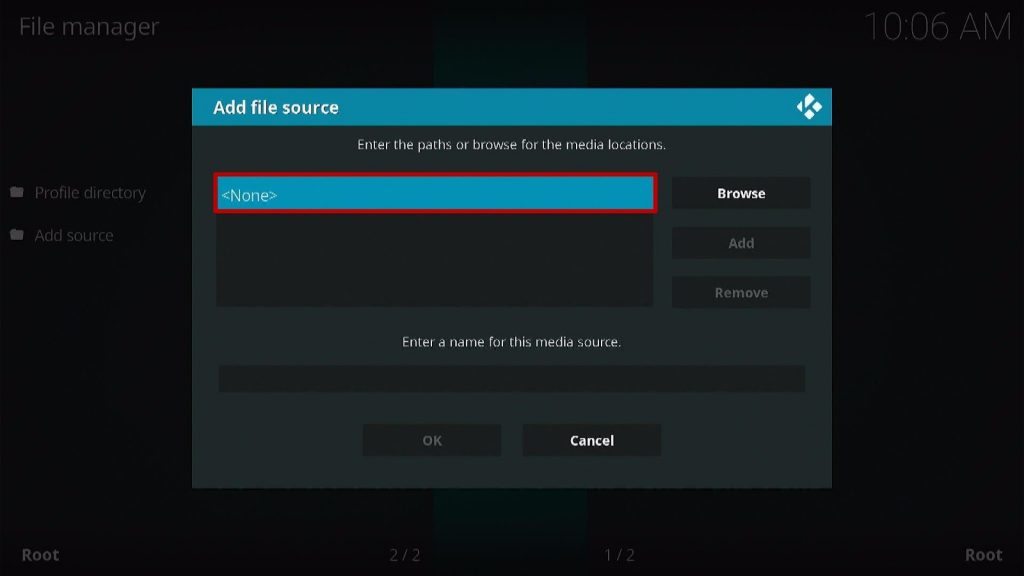
8. Type in “https://wilson-fisk.github.io” then click “OK”
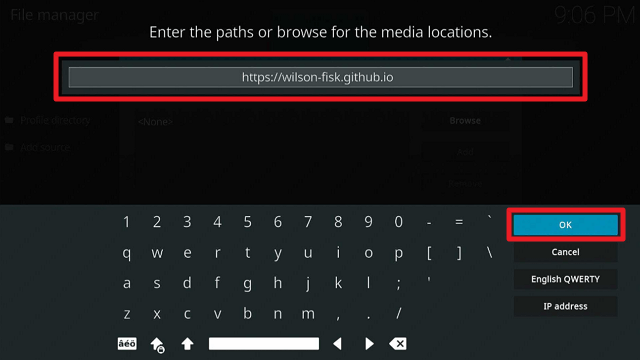
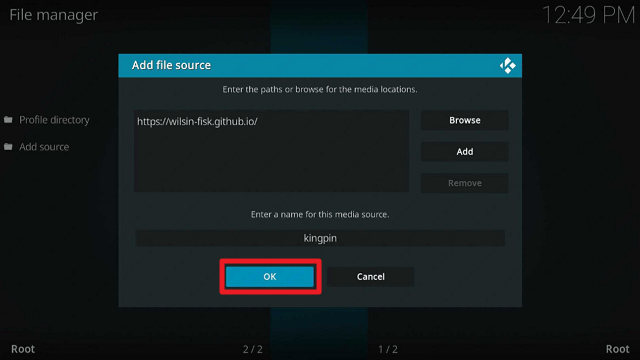
9. Highlight the box under the source to give the media source a name, and put “kingpin” or any other name that will help you identify it quickly and Click “OK”.
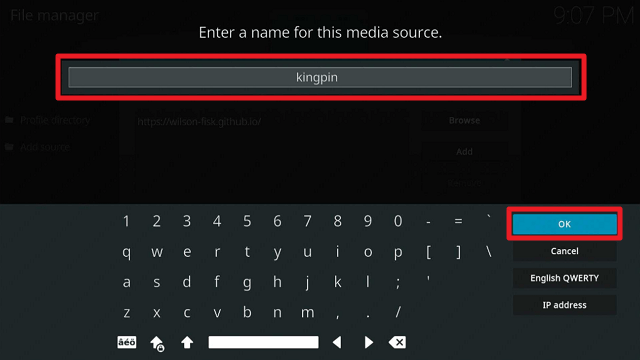
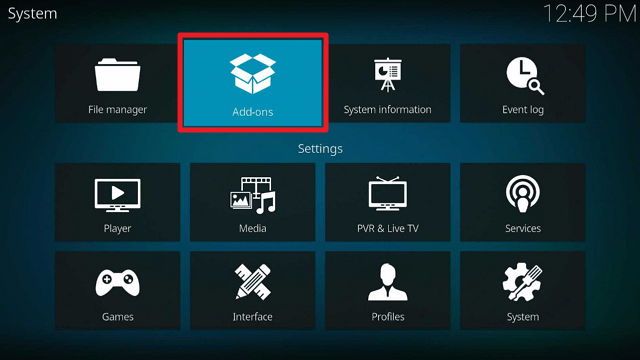
10. Then click “OK” again. Return to the System page by pressing the return button on your remote
11. Select “Add-ons”
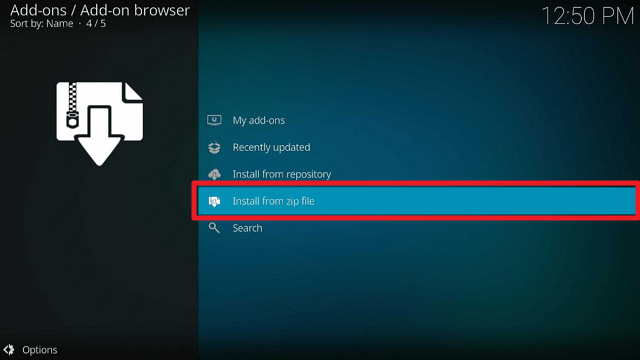
12. Choose “Install from zip file”
13. Click “Yes”
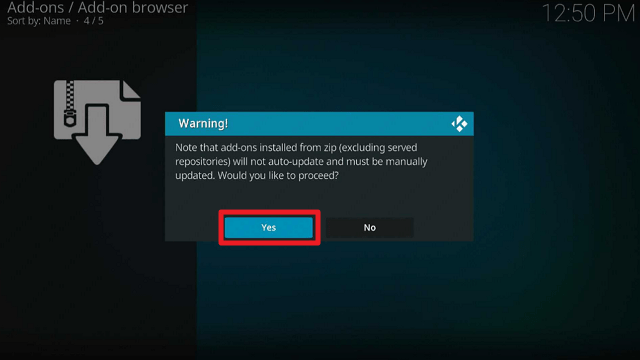
14. Select “kingpin”
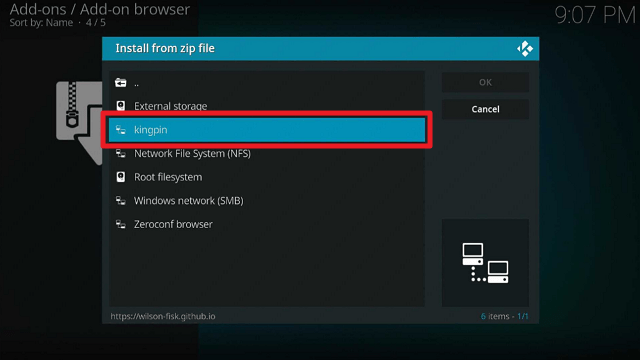
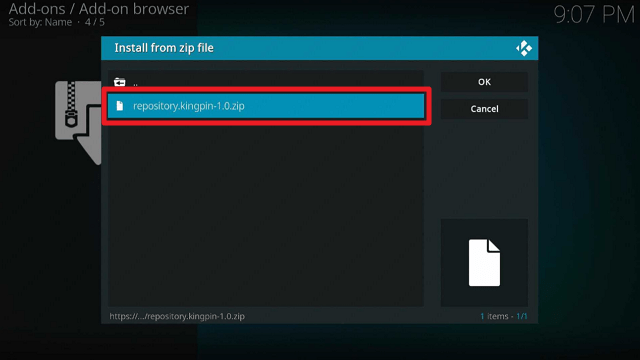
15. Then click on the zip file URL – repository.kingpin-1.0.zip
16. Wait for the notification “Kingpin Repo Add-on installed” to appear on the upper right part of the screen
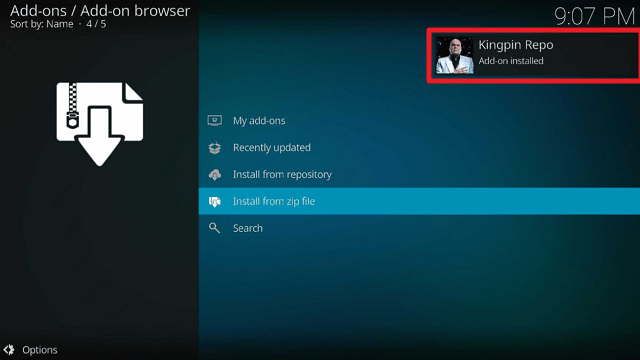
17. Afterward, select “Install from repository”
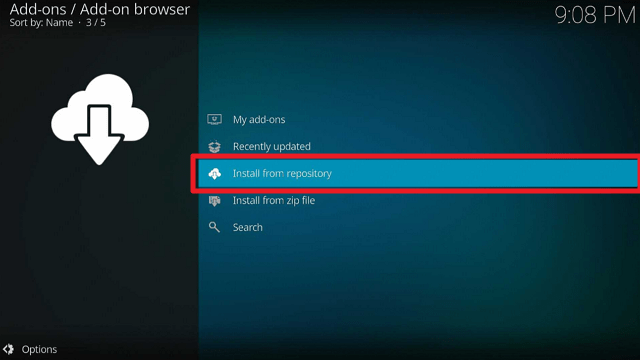
18. Then click “Kingpin Repo”
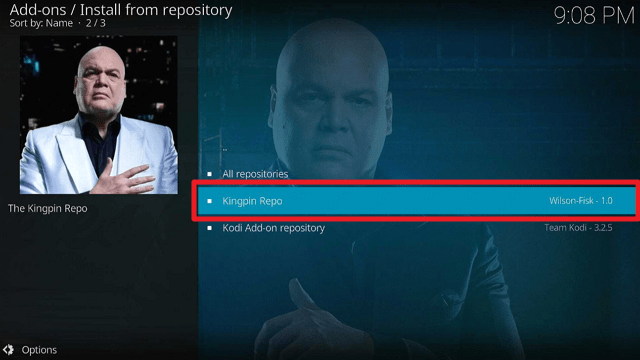
19. Select “Video add-ons”
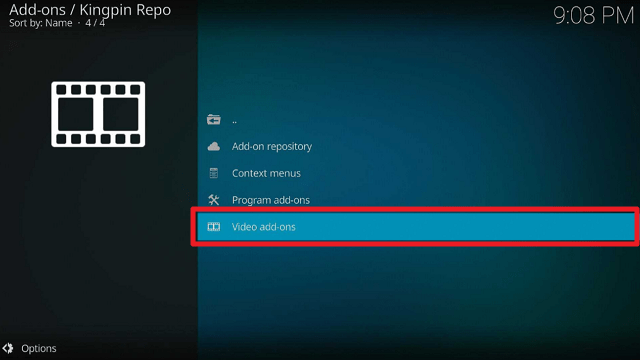
20. Click on “kingpin”
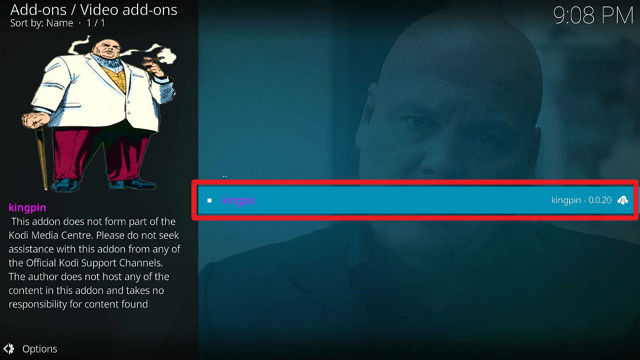
21. Then click “Install”
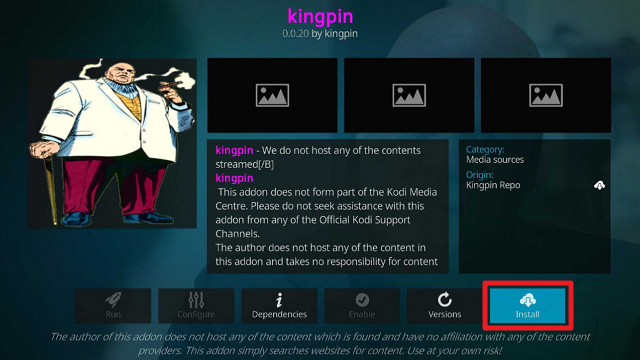
22. Click “OK” for the additional add-ons that will be installed
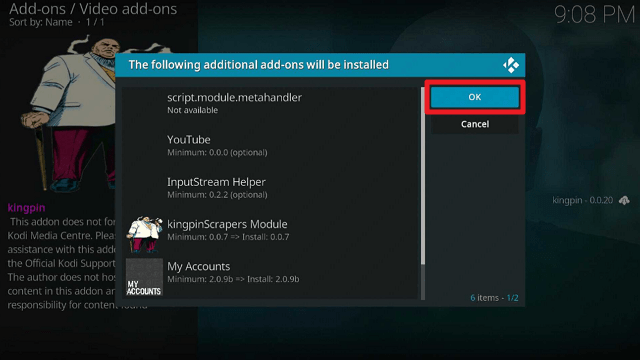
23. Then wait for it to install. It’s finished once you see the “Kingpin Add-on Installed” message appears. Then click once again.
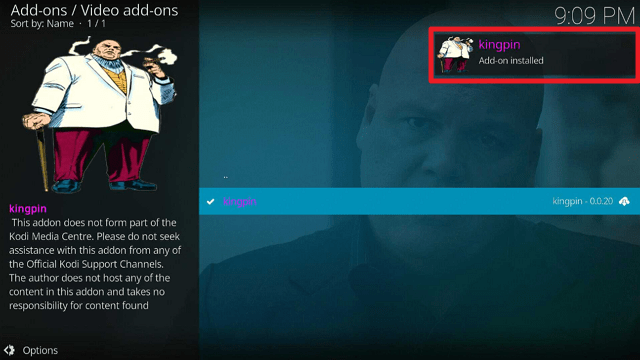
24. Then select “Open”
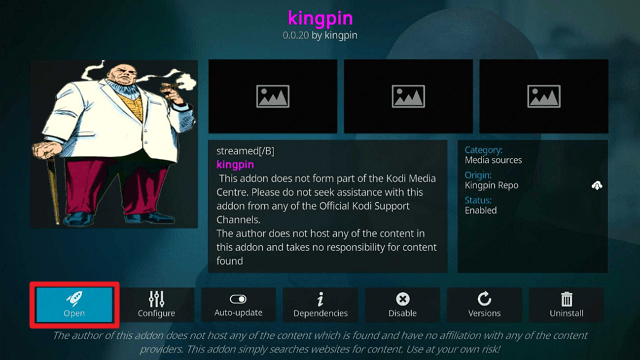
25. That’s it, Kingpin Kodi Addon is already installed in your Firestick.
ReviewVPN cannot attest to the legality, security and privacy of the applications discussed on this site. It is highly recommended that you use a VPN service while streaming or using Kodi. Currently, your IP 216.73.216.193 is visible to everyone and your Browser is being tracked by Advertisers & ISP Provider. Here are the main reasons why you must use a VPN: A VPN works be replacing your ISP-assigned IP address and creating an encrypted tunnel. We recommend the no log service offered by IPVanish. It works well on a Firestick and offers the fastest possible speeds.
YOUR INTERNET ACTIVITY IS BEING WATCHED
Legal Disclaimer: ReviewVPN.com does not encourage or endorse any illegal activity involved in the usage of services and applications referenced on this site. We do not verify the licensing agreements of services. The end-user is wholly responsible for ensuring that any media accessed through these services does not violate copyright and/or licensing laws. ReviewVPN does not promote, link to, or receive compensation from any Apps and IPTV services.
Install SurfShark on Firestick
How to Use Kingpin Kodi Addon With Real-Debrid
Using Real debrid is the best way to watch the most recent and popular movies and TV episodes. Fortunately, Homelander supports real debrid integration, allowing you to locate the best streaming sources for the best video quality.
1. Launch the Kingpin Kodi Addon on your Firestick. Scroll down and select “Tools”
2. Choose “My Account Settings”
3. Then go to “Debrid Accounts”. Scroll down to Real-Debrid then click “Authorize”
4. You’ll be given a code to input by going to “https://real-debrid.com/device” on any device browser
5. Once the code is entered, simply click “Continue” on your web browser to enable your real debrid integration with Kingpin
6. Once the integration is complete, go back to Kingpin Kodi Addon
7. Then you’ll see a notification stating “ Real-Debrid Authorization Successful” on the top of your screen
8. Go back and select “kingpin Scrapers Settings”
9. Then hover to “Scraper Accounts” then click “sync(re) with My Accounts”
10. You’ve successfully integrated your account once you see a “My Accounts sync complete” at the upper right part of the screen.
Features
- Contains movies, television shows, and YouTube videos.
- There are options for IMDb, TMDb, and Trakt content.
- You may quickly search for movies, shows, movies by actors, and shows by actors using its search feature.
- The user can customize the navigation, TV Shows, Playback, Providers, Source Options, Library, Downloads, and many other features.
- Offers support for Trakt and automatic Trakt Collections Syncing
- Support is also available for Debrid Accounts, Meta Accounts, and Scraper Accounts.
- Debrid Accounts – All Debrid, Premiumize, Real-Debrid
- Meta Accounts – Fanart, TMDb, TVDb, IMDb
- Scrapers Accounts – Furk.net, Easynews, Ororo.tv
- There is subtitle support available.
- Numerous premium hosts are available, such as 300MBFILMS, MAXRLS, MYVIDEOLINK, RAPIDMOVIEZ, RLSBB, and SCENERLS.
- Torrent providers include well-known ones like 1337X, KICKASS, LIMETORRENTS, MAGNETDL, PIRATEBAY, TORLOCK, TORRENTAPI, ZOOQLE, and others.
Pros & Cons
Pros
- There are numerous configurable settings to let you tailor your streaming experience.
- Supports Real-Debrid, All Debrid, and Premiumize
- Scrapes from a variety of different sources and accounts
Cons
- Watching any of its videos requires having a debrid account.
- Sometimes, loading takes a while.
- Some videos won’t play, and I get a notification that Playback failed.
Stream Safely With a VPN

The most practical way for watching your favorite movies and TV shows on your Firestick is through third-party Kodi addons. It gives you a ton of streaming possibilities that you can use whenever you want, from the comfort of your own home.
However, because these are third-party add-ons, they do not come from the official Kodi Repository. Because of this, you can never be sure who is truly behind these sites or whether they are recording your account information while you stream. That is why you will need the security services of a VPN.
- A VPN service, such as SurfShark, will hide your IP address by supplying you with an anonymous one. And by doing so, it offers you the following security:
- Prevents internet risks like hackers and phishers from stealing your info.
- Ensures that no traces will be left on any apps or websites you visit and that no logs will be kept.
- All of the information stored on your device will be protected with uncrackable 256-bit military-grade encryption.
- It offers a kill switch function that, in the event of an unanticipated VPN disruption, will immediately unplug your device from the internet.
- Your daily device connections have access to thousands of anonymous IP addresses from more than 3,200 servers.
- You can safeguard all of your devices simultaneously with SurfShark due to its unlimited simultaneous connection capability.
Note: For more information about SurfShark, please read our SurfShark REVIEW.
How to Install Surfshark on Firestick with Screenshots
If your Firestick still has the older interface, read this article to learn how to update it: Update Firestick Interface.
You can download Surfshark directly from the Amazon App store. It will be easy for you to find Surfshark with your Firestick’s Find feature. Refer to our screenshots below.
Follow our screenshots below to install the SurfShark VPN app on your Fire TV stick.
1. Go to the Home screen of your Firestick.

2. Navigate towards the Find tab. Press the Search button from the resulting dropdown.

3. Type in the keyword of SurfShark and select from the suggestions that will appear.

4. Click the official SurfShark icon from your search results.

5. Press the Download (You own it) button.

6. The SurfShark VPN installer will download on your device.

7. SurfShark VPN’s app will automatically install itself on your Fire TV stick.

8. Press the Open button after completing SurfShark VPN’s installation process.

9. Please wait for the SurfShark VPN to load its user interface.

10. You can now log in with your SurfShark VPN account credentials.

Learn more about Surfshark and Grab the Best Surfshark Deal Now!
Install Surfshark on Firestick



For more VPN discounts, go to ReviewVPN Deals and purchase the best VPN for you.
FAQs
Is Kingpin Kodi Addon Safe?
It is safe to download and use the Kingpin Kodi Addon on your device. However, you may add an extra layer of security by using a VPN service like SurfShark.
Is Kingpin Kodi Addon Legal?
All of the Addons that you can install on your Kodi are legal. We cannot, however, vouch for the legitimacy of the streaming Links that it provides because it scrapes content from torrent sites.
Should I Use a VPN with the Kingpin Kodi Addon?
Yes, we constantly recommend that our users get an SurfShark to protect themselves from any threats while streaming, particularly from unofficial Kodi addons. This helps to avoid complications by providing you with privacy and security while browsing and streaming.
Conclusion
Kingpin is another good and functional addon that you can install and use on your Firestick. However, since you’ll need a debrid account to watch any of its content, this may not be the best addon for people looking for free options. Nevertheless, Kingpin may be a reliable streaming option for you if you have a Real-Debrid or other debrid accounts.






