

Overview
Quick Navigation
The 3C All-in-One Toolbox app is a useful tool that lets people take full control of their Android devices. It lets users monitor the status & heating of the memory, battery, network’s presence & quality, processor, clean & reboot, SD-card, and backup & restore. Also, it indicates adapters’ connection & disconnection, and many more.

Furthermore, the 3C All-in-One Toolbox pro combines several features from other awesome apps into one huge toolbox with an easy-to-use and state-of-the-art interface. This app has every tool people need to control, fine-tune, and monitor all their Android-based devices.
In addition, it offers very powerful activity scheduling, device watchdogs, and profiles to optimize device performance and battery savings based on your situation. The app comes with a great File manager. Finally, the 3C All-in-One Toolbox app lets you stream videos & images directly to your desired player.

3C All in One Toolbox APK Installation on FireStick
- Turn on the FireStick device, go to the top menu bar and choose > Settings.
- Click My Fire TV > Developer Options.
- Enable Apps from Unknown Sources.
- Go back to FireStick’s home screen and go to the menu bar.
- Go to the Search option.
- Search & install the Downloader app on FireStick.
- After installing the Downloader app, launch it.
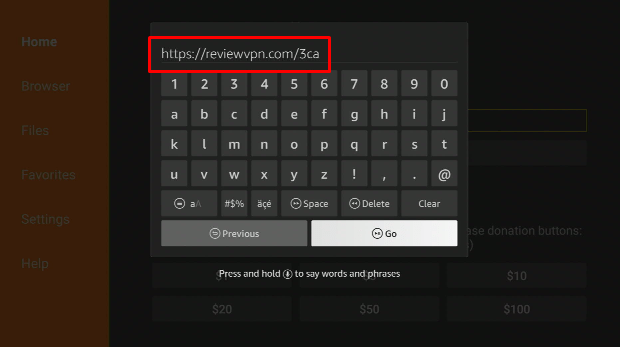
- Enter the 3C All in One Toolbox app download URL/APK – https://reviewvpn.com/3ca
- Click GO.
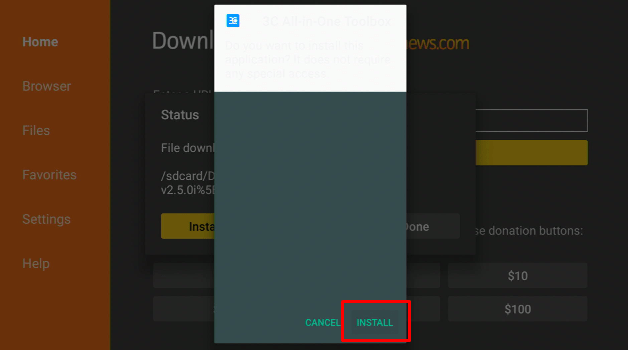
- When the 3C All in One Toolbox file download is complete – click Install.
- Now, you have successfully installed the 3C All in One Toolbox app on FireStick.
Install 3C All in One Toolbox APK on Firestick with Screenshots
Install the Downloader app and jailbreak your firestick by enabling unknown sources. To learn more about the procedure, you may read How to Install the Downloader App and Enable Unknown Sources.
1. After installing the Downloader app, launch it.
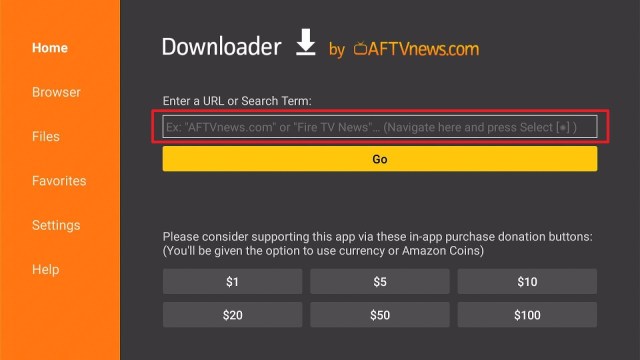
2. Enter the 3C All in One Toolbox app download URL/APK – https://reviewvpn.com/3ca and click GO.
3. When the 3C All in One Toolbox file download is complete – click Install.
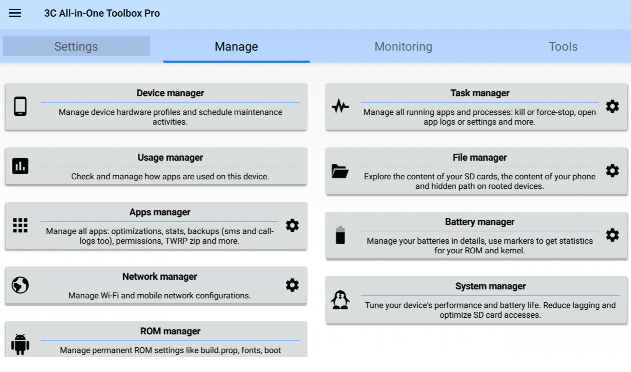
4. Now, you have successfully installed the 3C All in One Toolbox app on FireStick
Install Surfshark on Firestick
Moving the Newly Installed App to the Front
- Go back to FireStick’s Home Screen (you may click the Home Button on the Fire Stick remote)
- Go to Your Apps & Games/Channels
- Scroll once to the left
- Click See All
- All the newly installed apps are located at the bottom – you can move the 3C All in One Toolbox app by clicking the Options button (at the right side of the Home Button)
What Is 3C All in One Toolbox?
The 3C All-in-One Toolbox Pro app is an absolute solution for people who need to set up and control their Android-powered devices. It is a useful app that will keep your Android devices clean and under control. Nonetheless, the 3C All-in-One Toolbox application comes with a File Manager, device Manager, battery Manager, application Manager, task Manager, Network Manager, CPU Manager, and many more.
The 3C All-in-One Toolbox app lets you access the file manage section to see all the files. Then, you can manage the files by deleting some files to make some storage for new files. Also, the app displays info about all the applications running in the background.
ReviewVPN cannot attest to the legality, security and privacy of the applications discussed on this site. It is highly recommended that you use a VPN service while streaming or using Kodi. Currently, your IP 216.73.216.193 is visible to everyone and your Browser is being tracked by Advertisers & ISP Provider. Here are the main reasons why you must use a VPN: A VPN works be replacing your ISP-assigned IP address and creating an encrypted tunnel. We recommend the no log service offered by IPVanish. It works well on a Firestick and offers the fastest possible speeds.
YOUR INTERNET ACTIVITY IS BEING WATCHED
App Features
- Device manager provides powerful profiles, device watchdog, and task scheduling to optimize performance and saves battery.
- It has a File manager with folder size, thumbnails, and many more. It allows you to stream videos & photos. You can stream locally or from FTP, Samba, Google Drive, Dropbox, or WebDAV.
- The 3C All in One Toolbox provides backup or restore of all the apps, which include the ability to import Android’s most powerful backup tool – Titanium Backup. Additionally, the app lets you customize & secure applications’ orientation, events, control permissions, and full-screen
- Its battery manager helps improve and analyze your device consumption. The app provides complete data on charge cycles history, approximate calculations in use or standby, as well as custom statistics on profiles. Nonetheless, it has special support for battery changes and dual battery devices
- The app lets you configure and monitor network traffic.
- The 3C All in One Toolbox app offers a simple user interface yet is extremely effective in sorting applications by different usage and eliminating unwanted applications
- It has a CPU manager that controls single to octa-core central processing units, multi-core, most custom kernel settings, and thermal
- The 3C All in One Toolbox app allows you to configure Linux kernel settings
- The app allows you to configure Android operating system settings.
- You can monitor and record all your apps and hardware components’ activities. However, it comes with status bar notifications accompanied by historical graphics.
- The 3C All in One Toolbox app switches in-app or in-widgets. It allows you to switch on or off more than 20 device components, including Bluetooth, Wi-Fi, and more
- It has information notifications allowing you to display major info in the status bar.
- The app has line indicators to display simple data
- The app allows you to quickly access application features or toggle different system components
- It comes with a toolbox integration that saves battery and optimizes performance. Nonetheless, you can control hardware and manage applications from anywhere.
- Highly configurable user interface allowing you to change the app based on your liking
- The widgets are highly configurable, from a basic gauge to more compound data display, historical graphics, as well as component toggles
Pro-only Features
- Conceal tabs or menu item
- Multi or auto-select & sort applications
- You can edit the main screen buttons
- Recording items & options
- Auto backup & new application notification
- Automatic battery markers
- Make multiple watchers, profiles, and schedules
- Notification shortcut
- Be in charge of multiple batteries
- Several extra widgets
Always Use a VPN on Firestick
A Virtual Private Network or VPN is a great service that conceals data by transmitting web activities to a secure, safe location. The VPN service generates a secure tunnel to offer end-to-end protection. Thus, Internet Service Providers will not know what you are doing online. The Amazon Firestick is a very useful device that allows you to stream Netflix, Hulu, as well as any other content you want.
Nonetheless, streaming apps or platforms come with geographical restrictions. Thus, if you’re not residing in the United States, you will not be able to watch the US content library of Netflix. That is the major benefit of using a VPN service like the Surfshark service. If the content is not accessible in your country, the Surfshark service gives you the option to replace your real IP address with the location where the content is available.
Click here to get the lowest price on Surfshark through our exclusive limited-time offer.
How to Install Surfshark VPN on Firestick
If your Firestick still has the older interface, read this article to learn how to update it: Update Firestick Interface.
Follow our screenshots below to install the SurfShark VPN app on your Fire TV stick.
1. Go to the Home screen of your Firestick.

2. Navigate towards the Find tab. Press the Search button from the resulting dropdown.

3. Type in the keyword of SurfShark and select from the suggestions that will appear.

4. Click the official SurfShark icon from your search results.

5. Press the Download (You own it) button.

6. The SurfShark VPN installer will download on your device.

7. SurfShark VPN’s app will automatically install itself on your Fire TV stick.

8. Press the Open button after completing SurfShark VPN’s installation process.

9. Please wait for the SurfShark VPN to load its user interface.

10. You can now log in with your SurfShark VPN account credentials.

Learn more about Surfshark and Grab the Best Surfshark Deal Now!
Install Surfshark on Firestick



For more VPN discounts, go to ReviewVPN Deals and purchase the best VPN for you.
Click here to get the lowest price on Surfshark through our exclusive limited-time offer.
FAQs
Is the 3C All in One Toolbox app Good?
Yes, the 3C All in One Toolbox app is good and worth trying.
Is the 3C All in One Toolbox app free?
Yes, the 3C All in One Toolbox app is free to download, install, & use.
Conclusion
In this article, we have provided information on how to install the 3C All in One Toolbox app on Firestick. The information above should really help enhance your Firestick.
However, always remember to use A VPN service every time you use your Firestick. If you have any thoughts about the 3C All in One Toolbox app, don’t hesitate to let us know in the comments section.






