

Overview
Quick Navigation
Yandex Music is an amazing music app. It is one of the most famous music platforms to cater to the needs of people listening to music on Android devices. Even though this app is from a Russian publisher, you can still adjust it to the English language.

Yandex Music comes with an extremely user-friendly interface due to its design being almost identical to well-known music apps today. Yandex Music users can sort all apps just like the famous Spotify. However, users will see Yandex Music’s various distinctions, such as the app’s mainstream wallpaper as well as the main features organized in various places.

Yandex Music App Installation on FireStick
- Turn on the FireStick device, go to the top menu bar and choose > Settings.
- Click My Fire TV > Developer Options.
- Enable Apps from Unknown Sources.
- Go back to FireStick’s home screen and go to the menu bar.
- Go to the Search option.
- Search & install the Downloader app on FireStick.
- After installing the Downloader app, launch it.
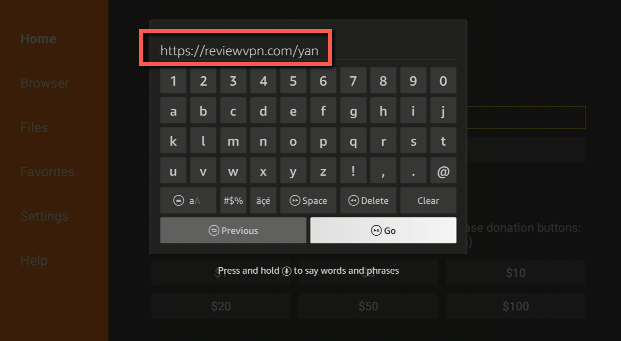
- Enter the Yandex Music app download URL/APK – https://reviewvpn.com/yan
- Click GO.
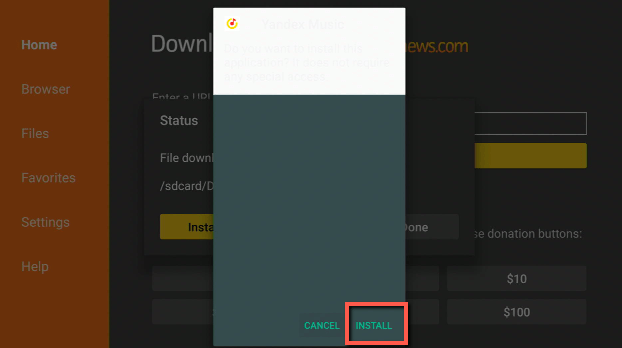
- When the Yandex Music file download is complete – click Install.
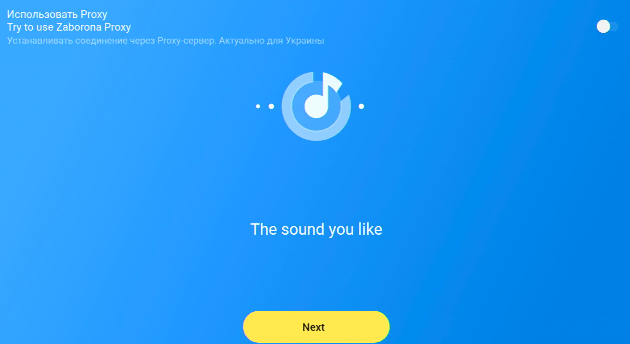
- Now, you have successfully installed the Yandex Music app on FireStick.
How to Install Yandex Music APK On Firestick with Screenshots
Install the Downloader app and jailbreak your firestick by enabling unknown sources. To learn more about the procedure, you may read How to Install the Downloader App and Enable Unknown Sources.
1. After installing the Downloader app, launch it
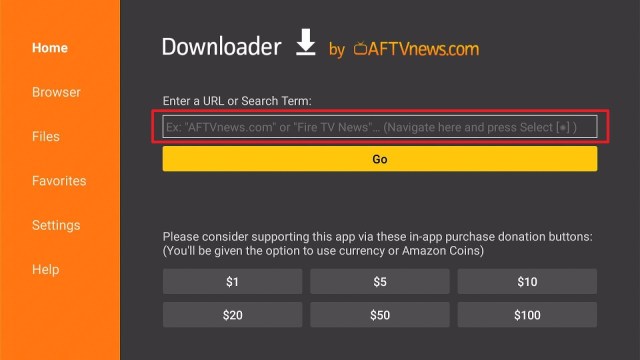
2. Enter the Yandex Music app download URL/APK – https://reviewvpn.com/yan and click GO.
3. When the Yandex Music file download is complete – click Install
4. Now, you have successfully installed the Yandex Music app on FireStick.
Moving the Newly Installed App to the Front
- Go back to FireStick’s Home Screen (you may click the Home Button on the Fire Stick remote)
- Go to Your Apps & Games/Channels
- Scroll once to the left
- Click See All
- All the newly installed apps are located at the bottom – you can move the Yandex Music app by clicking the Options button (at the right side of the Home Button)
What Is Yandex Music App?
Yandex Music is a music service that allows you to listen to your favorite music on your Android-based device. Similar to other music platforms – like Spotify, for instance – users will just have to browse via the various lists of artists and tracks to select what they want to listen to.
Yandex Music’s interface looks pretty nice due to how the app arranges all its features. Also, it is worth mentioning that the app provides an amazing dark mode. However, one of the best features of this music app is that users can play numerous songs in offline mode – not needing an internet connection.
The Yandex Music app provides users the option to create their own radio stations & playlists with a selection of their favorite songs as well as artists. Additionally, Yandex Music users can share their own radio stations & playlists with the rest of the platform’s users. On top of all that, the app even allows users to download some songs directly to their devices.
Yandex Music Features
- New Releases – It offers new releases and free access to selections with more than 50 million tracks. The Yandex Music app offers different genres, such as rock, rap, pop, R&B, jazz, classical, world music, & electronic.
- Personalized music recommendations – the app may select music & songs for you – for instance, deep cuts (non-radio singles by an artist) and new releases in your genres — and provide those recommendations for your listening pleasure. You may log in with a Yandex account to make the app’s recommendations more relevant to your likings.
- Song Recognition – Simply click on the app’s microphone button and let the song play. The Yandex Music app will recognize what song is playing and you can save it in the Recognized playlist. The app’s song recognition feature is very convenient.
- Popular music selections – Yandex Music provides themed selections. Including classical music for studying, TV series soundtracks, 80’s and 90’s songs, relaxation music, workout songs, electronic music for work, and road trip rock. All of them are free to play online.
- Easy-to-use app – The app lets you easily create your personal playlists & selections by adding directly from the platform. You can easily choose your favorite artists and you will get notifications about their new releases. You may see song lyrics in the app. Songs that are on your device that are in the app’s library are compiled in a different playlist. The Yandex Music app lets you link your Facebook account to see what others are listening to.
ReviewVPN cannot attest to the legality, security and privacy of the applications discussed on this site. It is highly recommended that you use a VPN service while streaming or using Kodi. Currently, your IP 216.73.216.193 is visible to everyone and your Browser is being tracked by Advertisers & ISP Provider. Here are the main reasons why you must use a VPN: A VPN works be replacing your ISP-assigned IP address and creating an encrypted tunnel. We recommend the no log service offered by IPVanish. It works well on a Firestick and offers the fastest possible speeds.
YOUR INTERNET ACTIVITY IS BEING WATCHED
Always Use The Best VPN on Firestick

Your FireStick device lets you stream videos & listen to your favorite music. However, before you start streaming or listen to music, always remember that everything you do on the internet is visible to your Internet Service Provider (ISP) and your government. Thus, listening to music or streaming entertainment content might lead to legal issues.
However, all you have to do to bypass this issue is to download & install a good Virtual Private Network or VPN on your Android device. The highly recommended VPN service to use is the Surfshark VPN service. It is one of the most secure VPN service providers available today. The Surfshark VPN service works well with all types of streaming services or apps. Additionally, this VPN service is extremely easy to use.
How to Install Surfshark VPN on Firestick
If your Firestick still has the older interface, read this article to learn how to update it: Update Firestick Interface.
Follow our screenshots below to install the SurfShark VPN app on your Fire TV stick.
1. Go to the Home screen of your Firestick.

2. Navigate towards the Find tab. Press the Search button from the resulting dropdown.

3. Type in the keyword of SurfShark and select from the suggestions that will appear.

4. Click the official SurfShark icon from your search results.

5. Press the Download (You own it) button.

6. The SurfShark VPN installer will download on your device.

7. SurfShark VPN’s app will automatically install itself on your Fire TV stick.

8. Press the Open button after completing SurfShark VPN’s installation process.

9. Please wait for the SurfShark VPN to load its user interface.

10. You can now log in with your SurfShark VPN account credentials.

Learn more about Surfshark and Grab the Best Surfshark Deal Now!
Install Surfshark on Firestick



For more VPN discounts, go to ReviewVPN Deals and purchase the best VPN for you.
Click here to get the lowest price on Surfshark through our exclusive limited-time offer.
Yandex Music Compatibility
With the Yandex Music app, you can easily listen to your favorite music on an Android device. The music platform lets you download songs. It is compatible with numerous Android-powered devices, such as the Firestick, Google Chromecast, mobile phones, tablets, and many more.
FAQs
Is the Yandex Music APK free?
Yes, the Yandex Music APK is free to download, install, & use.
Is the Yandex Music app legal?
Yes, the Yandex Music app is legal.
Is the Yandex Music app safe?
Yes, the Yandex Music app is very safe to use and has no viruses or malware.
Conclusion
In this article, we have provided information on how to install the Yandex Music App on Firestick. The information above should really help enhance your music streaming experience on your Firestick.
However, always remember to use A VPN service every time you use your Firestick. If you have any thoughts about the Yandex Music app, don’t hesitate to let us know in the comments section.






