

Overview
Quick Navigation
In this article, we will show you how to watch the NFL 2023 Playoffs even without cable.

In 2020, during the surge of the pandemic: The NFL increased the number of all playing teams from the traditional twelve to a groundbreaking fourteen. It is exhausting to observe all of the eighteen weeks where these teams met and battled each other.
Still, the NFL 2022-2023 is yet to wrap up. In the past few weeks, we have seen twelve teams make it to the event’s postseason. You might be anxiously wondering what is in store next for the remaining matches of NFL 2023.
We assure you that we’ll be getting the latest updates in our next section. The 2023 NFL Playoffs are set to begin on Saturday, January 14, and run through the 2023 Superbowl on February 12, then cast your worries aside! We will teach you how to watch the NFL 2023 Playoffs even without a cable connection.

2023 NFL Playoff Schedule
The 2023 NFL Playoff schedule is as follows.
AFC
- Jacksonville Jaguars (4 seed) vs. Los Angeles Chargers (5 seed)
- Buffalo Bills (2 seed) vs. Miami Dolphins (7 seed)
- Baltimore Ravens (6 seed) vs. Cincinnati Bengals (3 seed)
NFC
- Tampa Bay Buccaneers (4 seed) vs. Dallas Cowboys (5 seed)
- Minnesota Vikings (3 seed) vs. New York Giants (6 seed)
- San Fransisco 49ers (2 seed) vs. Seattle Seahawks (7 seed)
Saturday, January 14
| Matchup | Start Time | Network | Streaming |
| Seattle Seahawks at San Fransisco 49ers | 4:30 PM ET | FOX | FOX Sports App |
| Los Angeles Chargers at Jacksonville Jaguars | 8:15 PM ET | NBC | Peacock |
Sunday, January 15
| Matchup | Start Time | Network | Streaming |
| Miami Dolphins at Buffalo Bills | 1:00 PM ET | CBS, Nickelodeon | Paramount+ |
| New York Giants at Minnesota Vikings | 4:30 PM ET | FOX | FOX Sports App |
Monday, January 16
| Matchup | Start Time | Network | Streaming |
| Baltimore Ravens at Cincinnati Bengals | 8:15 PM ET | NBC | Peacock |
How to Watch the NFL 2023 Playoffs
You might be wondering how to stream the NFL 2023 Playoffs even without cable. Well, it is possible on your Firestick and Android smartphone. All you need is a reliable and consistent internet connection and to install the Downloader app.
Downloader App
Let us first show you how to Jailbreak your Fire TV Stick and install the Downloader app.
1. Click Home on your remote and scroll once to your Right. Click Setting (Gear Wheel Icon).

2. Scroll down and to the right until you get to My Fire TV. Click on it.

3. Select Developer options.

4. Turn on ADB debugging and Apps from Unknown Sources.

5. Click Turn On when the pop-up appears.

6. Click Home, click FIND.

7. Click Search.

8. You can either say Downloader to your Alexa voice-enabled remote or start typing it. If you typed it, click on the suggestion when it appears.

9. Click on the Downloader Icon.

10. Click Download.


11. Click on Open.

12. Click on Allow.

13. Use the Downloader search tab.

Third-Party Installation
The apps we will suggest below require you first to install the Downloader app.
Fubo TV
Streaming NFL annual events can be a difficult task for many people. It is one of the few TV shows and content providers we trust to bring us sports videos.
Aside from NFL, the Fubo TV app can also stream NHL, Cricket, and the UEFA Champions League. The Fubo TV app is also one of the few streaming services that offer sports channels. By watching these channels, there is no doubt you’ll be able to stream NFL Sports events.
A subscription to the Fubo TV app gives you more than 220 Live TV channels. It is generous in sharing with you DVR Storage that can support up to ten simultaneous connections.
Available in the North American region, Fubo TV is a reliable service for streaming sports. You will also enjoy streaming other sports like basketball, baseball, golf, football, and worldwide cricket events.
Features of the Fubo TV app:
- Access to more than 220 live TV channels.
- Offers to stream to major broadcasting networks and sports channels.
- Supports 4K quality for video streaming of live sports channels.
- Easy to navigate interface.
- Offers 250 Hours of Cloud DVR for storage.
- Create your playlist containing your favorite sports TV shows.
How to Install Fubo TV on your Fire TV Stick
1. Go to your Fire TV stick’s Downloader app search engine.
2. Type in the URL: https://reviewvpn.com/apt and click Go.

3. Wait for the file download to finish.

4. Click on the Install button.

5. Select Open to launch the app.

6. Press the OK button after opening the app.

7. Choose Allow.

8. Click on the Search button.

9. Type in FuboTV as your search term.

10. Click on the Install button on the front menu.

11. Once the download is complete, press the Install button.

12. Open the Fubo TV installer file with the Package Installer app.

13. Click the Open button.

14. You can now sign in with your account to start streaming.

Visit our article about a Fubo TV App Review and Installation on Firestick and learn more about the Fubo TV app.
Hulu + Live TV
Another excellent app for streaming sports is the Hulu app. We all now know that the Hulu service is closely affiliated with Disney. This only means one thing. All of the app’s content matches up to standards. The app won’t disappoint you with your expectations.
One of the best things about the Hulu app is its library of more than 65 premium live TV channels. The Hulu app also contains many original Disney films, TV shows, and media content from its contributors.
There is no doubt you will enjoy a variety of content while using the Hulu Live TV app. Whether you are using the Hulu app for streaming cartoons, shows, or sports, you will enjoy streaming with Hulu.
Some of the sports channels you will get with the Hulu app is CBS, Fox, Turner, and NBC Universal. The app also has tennis video channels such as ESPN and ESPN2. While using your Fire TV stick, you can also catch the ESPN3 channel.
Features of the Hulu + Live TV app:
- 30-Day Free Trial
- Massive collection of VODs and movies
- The Hulu app allows you to download and watch the content offline.
- Watch Party feature: Connect you to all your favorite people
- Offers Cloud DVR Storage up to 50 hours
- Allows you to stream two screens
- Create six profiles with one account
How to Install the Hulu+Live TV app on your Fire TV Stick
1. Go to your Fire TV stick’s Downloader app search engine.
2. Type in: reviewvpn.com/hul and click Go.

3. Wait for the file download to finish.
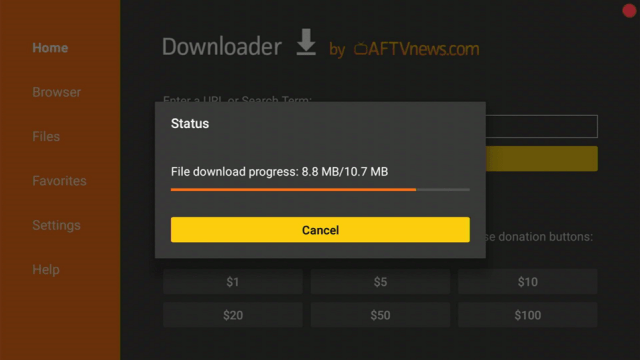
4. Click Install.

5. Click on the Open button.

6. Press the login button.

Visit our article about Hulu App Review and Installation guide on your Fire TV stick and learn more about its features.
Sling TV
You might be a fan of the NFL but cannot make it to the stadium where your favorite teams battle each other. Let us remind you to cheer up and not to worry! The Sling TV app is one of the best services that offer some of the sports channels that cover the NFL 2023 sports event.
Famous sports channels like ESPN 1, ESPN 2, Fox, FS1, and FS2 are available with the Sling TV app. All of the media content that Sling TV shows us is from NBC Universal. This means you can enjoy a variety of content after streaming an NFL game event.
Today, you can get the Sling TV with two of its popular plans: Sling Blue and Sling Orange. Each of Sling TV’s subscription plans costs $35. If you want to add more sports content, you can add the Sports Extra on top of each Sling TV plan. It costs an additional $11 of payment.
Features of the Sling TV App
- Sports Extra addition
- Flexible payment plans.
- Select from a variety of media content.
- Cloud DVR Storage
- Provides access to famous and reputable live TV channels.
- Compatible with many streaming devices and OTT platforms.
How to Install the Sling TV app on your Fire TV Stick
1. Go to your Fire TV stick’s Downloader app search engine.
2. Type in: https://reviewvpn.com/sli and click on the Go button.

3. Click on the Install button.

4. Press the Open button.

5. Tap on the Sign In button to watch.

Learn more about the app’s features by visiting our article about Sling TV: App Review and Installation on your Fire TV stick.
ReviewVPN cannot attest to the legality, security and privacy of the applications discussed on this site. It is highly recommended that you use a VPN service while streaming or using Kodi. Currently, your IP 35.169.102.85 is visible to everyone and your Browser is being tracked by Advertisers & ISP Provider. Here are the main reasons why you must use a VPN: A VPN works be replacing your ISP-assigned IP address and creating an encrypted tunnel. We recommend the no log service offered by IPVanish. It works well on a Firestick and offers the fastest possible speeds.
YOUR INTERNET ACTIVITY IS BEING WATCHED

Direct Download Apps
The following apps do not require the downloader app. You can find them easily with your Fire TV stick’s search and find features.
YouTube TV
Fans of the NFL annual events will rejoice knowing that the popular YouTube TV app will stream the NFL 2023 Playoffs.
What excites us the most is that the app can live to stream some of its events. You won’t have a hard time streaming the NFL 2023 game with the YouTube TV app.
The YouTube TV app provides us with a simple interface nearly similar to its mother site. This makes it easier for NFL enthusiasts to find any match they want to stream.
You can even catch the Divisional Round of the NFL 2023 which will happen on January 23, 2023.
Like the famous website, there are many sports videos to select from. The app also has a search engine that will help you get results with each word you input. If it excites you, go ahead and type in NFL 2023 on its search bar!
Features of the YouTube TV app
- Simple User Interface.
- The YouTube TV app is easy to use.
- Reputable online sources for streaming live NFL games.
- Offers reliable streaming services for Fire TV device users.
- Gives its users a sizable Cloud DVR storage
- Built-in search engine.
- Smooth navigation with its user interface.
How to Install the YouTube TV app on your Fire TV Stick
1. Go to the Home button from the main menu of your Fire TV stick’s interface.

2. Navigate to the Find button of its main menu.

3. Press on the Search tab from the resulting drop-down.

4. On the search screen, type in YouTube or YouTube TV.

5. Click on the primary YouTube icon that represents the YouTube TV app.

6. Press on the Download – You Own It button just below the app’s description.

7. YouTube TV app’s installer will download shortly.

8. The YouTube TV app will automatically install itself on your Fire TV stick.

9. After its installation process, you can now press the Open button to launch the YouTube TV app.

Paramount Plus
Relatively new as a streaming service, it is an original app from the reputable CBS networks. If you are looking for more apps for watching the NFL 2023 Playoffs even without a cable, then the Paramount Plus app will answer your needs!
The Paramount Plus app is previously known as CBS All Access. From now on, the Paramount Plus app will stream content from the defunct CBS All Access app while adding new content.
Today, the Paramount Plus app continues to give us TV shows from its parent network which is CBS. All of the remarkable TV shows from CBS will also stream with the Paramount Plus app.
You may also use the Paramount Plus app to stream each game from the NFL 2023 sports event.
Paramount Plus can stream sports events like the Champions League, UEFA Champions League, Serie A, March Madness, Europa League, and many more.
Features of the Paramount Plus App:
- 30,000+ TV Show episodes
- Live Sports Videos
- Watch original TV shows while using the Paramount Plus app
- Expect blockbuster hits and fan-favorite movies
- 24/7 News coverage and updates
- Create 6 profiles with one account
How to Install the Paramount Plus App:
1. Navigate your Firestick’s Home screen.

2. Press your remote’s scroll-right button to the Find tab.

3. Choose Search from the dropdown.

4. Type in Paramount Plus with your on-screen keyboard.

5. Select the official Paramount Plus app.

6. You can open the app and stream exclusive Paramount Plus programs and films.

Visit our article showing you how to install the Paramount Plus app on your Fire TV stick and learn about its features.
Watch NFL 2023 Playoffs with a VPN

Streaming the NFL events is a treat for many of its fans worldwide. Not all of us can actually attend each of its games. That is why we rely on apps to deliver our videos.
Whether live streaming or watching past matches, our viewing can be disturbed in unusual ways. For example, your ISP might throttle your connection if they notice a large request of traffic. You may also live in a country that applies strict geo-blocks.
To help you watch the NFL 2023 Playoffs even without cable, we suggest getting Surfshark.
Here are some advantages of using Surfshark:
- All your online activities will remain hidden.
- Access content with geo-restrictions.
- Faster streaming of online videos.
- Supports large file downloads.
- Hide your identity while browsing the world wide web.
- Prevent buffering and stuttering both on Kodi and Firestick.
How to Install Surfshark VPN on Firestick
If your Firestick still has the older interface, read this article to learn how to update it: Update Firestick Interface.
You can download Surfshark directly from the Amazon App store. It will be easy for you to find Surfshark with your Firestick’s Find feature. Refer to our screenshots below.
1. Go to the Home screen of your Firestick.

2. Navigate towards the Find tab. Press the Search button from the resulting dropdown.

3. Type in the keyword of SurfShark and select from the suggestions that will appear.

4. Click the official SurfShark icon from your search results.

5. Press the Download (You own it) button.

6. The SurfShark VPN installer will download on your device.

7. SurfShark VPN’s app will automatically install itself on your Fire TV stick.

8. Press the Open button after completing SurfShark VPN’s installation process.

9. Please wait for the SurfShark VPN to load its user interface.

10. You can now log in with your SurfShark VPN account credentials.

Learn more about Surfshark and Grab the Best Surfshark Deal Now!
Install Surfshark on Firestick


For more VPN discounts, go to ReviewVPN Deals and purchase the best VPN for you.
Click here to get the lowest price on Surfshark through our exclusive limited-time offer.
FAQs
Are all the apps free?
No. If you are on a budget, some of these apps offer affordable plans. You can also try their free trial versions for streaming NFL 2023.
Are the apps above safe to use?
Yes. They do not contain malware and viruses. Be aware that some might contain ads and commercials.
Conclusion
The first game of all the upcoming NFL 2023 games will wrap up during its Divisional Round. We are excited to see the Cincinnati Bengals clash with the Tennessee Titans team! If you want to catch this match, then choose from all the apps we have above. You can then watch NFL 2023 Playoffs even without cable!
We hope this article helps you Watch the NFL 2023 Playoffs even without cable. Thank you for reading!


