

Install PBS Live Kodi Addon
This article will show you how to install PBS Live Kodi Addon on Firestick/Android.

PBS Live is a Live TV streaming addon that can be found in the SlyGuy Repository. It offers thousands of live TV channels in a variety of genres such as sports, entertainment, news, international, and more.
You may also search stations from certain states to help you find live TV entertainment in your selected state or from where you live. It also comes with a mini EPG so you can see what shows are currently airing.
Keep in mind, though, that PBS Live is a third-party Kodi addon. It is not available through the official Kodi repository, and Kodi disclaims all liability for any breaches and damages that might arise as a result of using this addon.
For this reason, before installing and utilizing PBS Live on your Kodi-compatible device, such as the Firestick, we advise using a VPN like Surfshark.

How To Install PBS Live Kodi Addon on Firestick/Android
You can follow along with this tutorial to install PBS Live Kodi Addon on your Firestick.
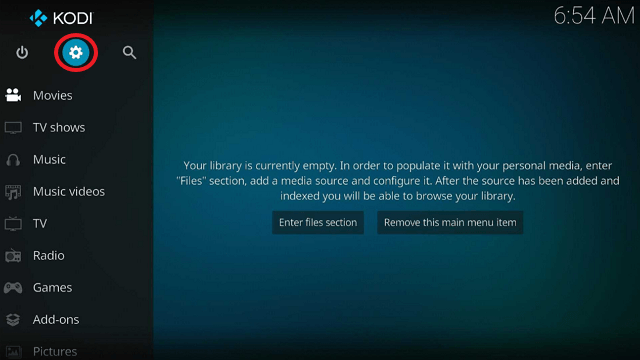
1. Launch the Kodi app on your Firestick. Click on the gear wheel icon (Settings)
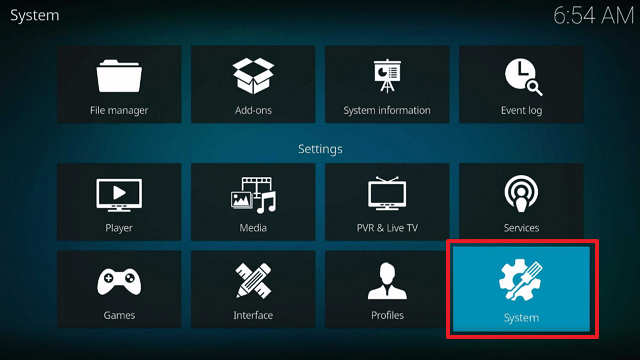
2. Select “System”
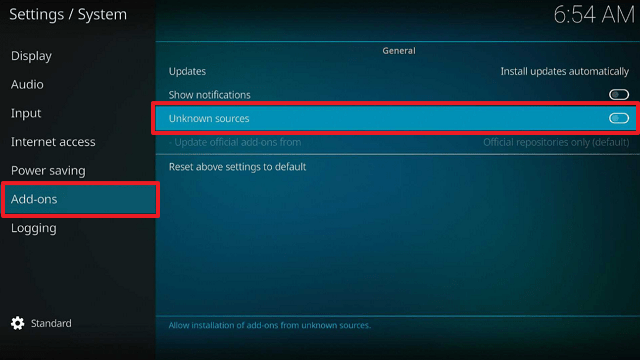
3. Scroll down to “Add-ons” Then Go to “Unknown sources” then toggle it on.
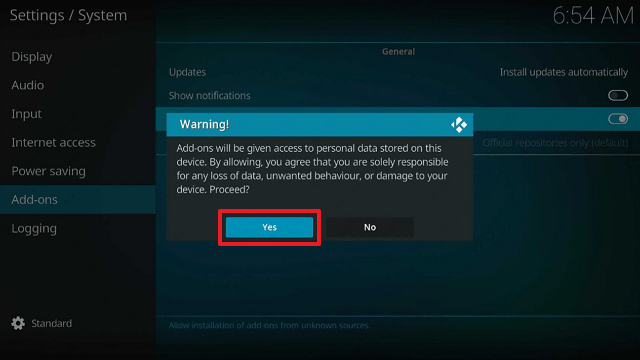
4. Select “Yes”. Then using your Firestick remote, press the return button to go back to the System page
5. Now choose “File Manager”
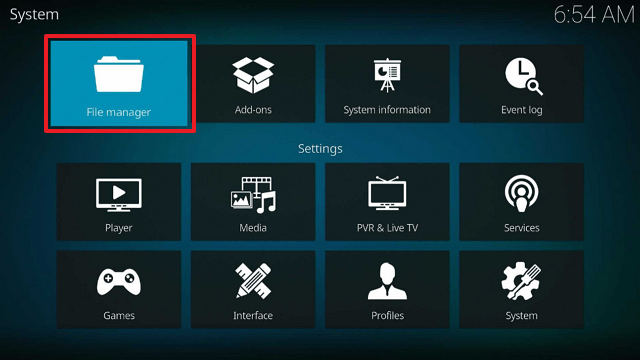
6. Scroll down and select “Add source”
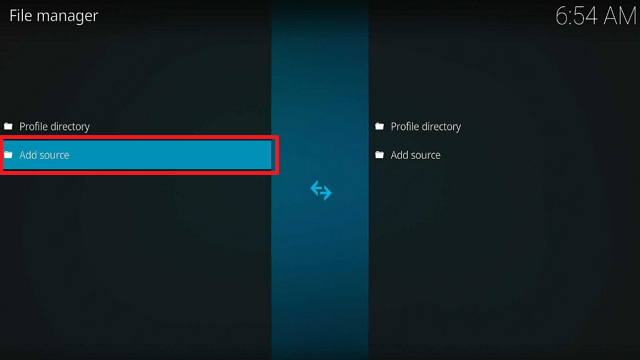
7. Click “<None>”
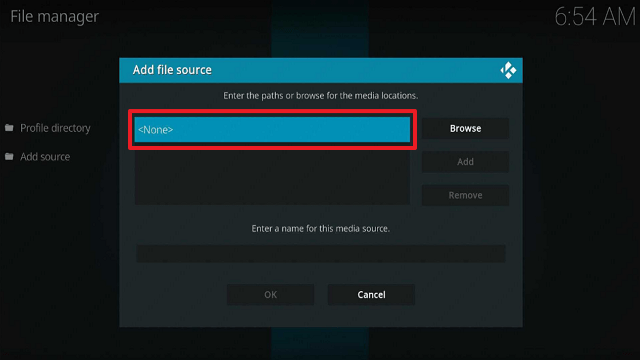
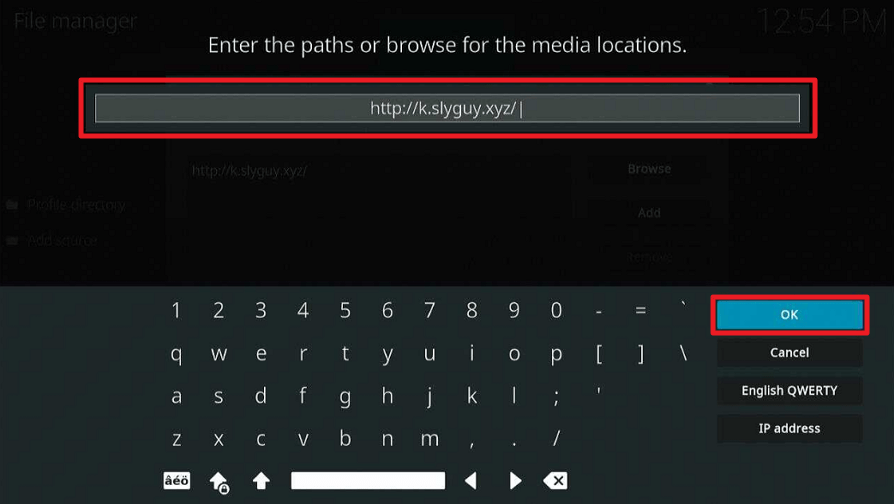
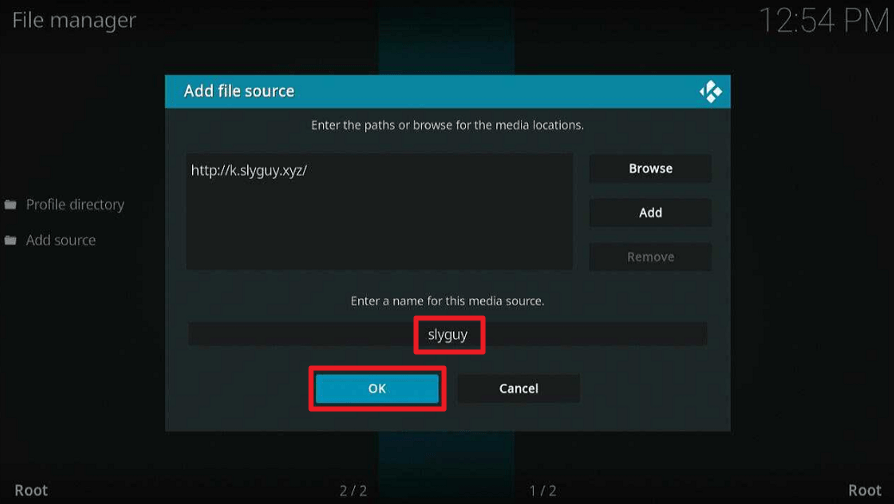
8. Type in “http://k.slyguy.xyz/” then click “OK”
9. Highlight the box under the source to give the media source a name, and put “slyguy” or any other name that will help you identify it quickly. Click “OK”. Return to the System page by pressing the return button on your remote
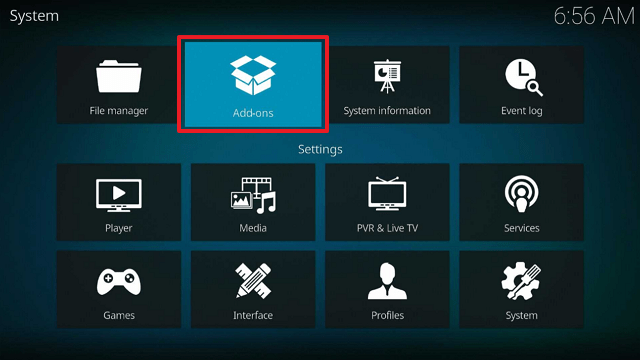
10. Select “Add-ons”
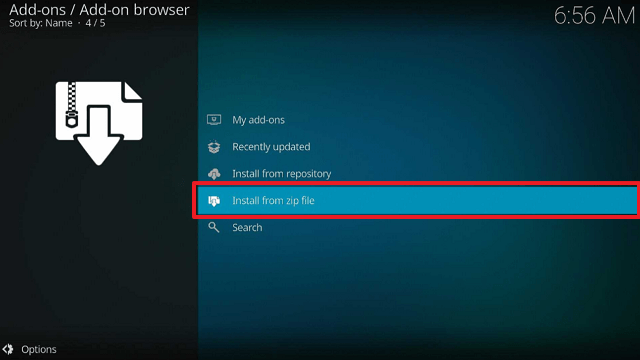
11. Choose “Install from zip file”
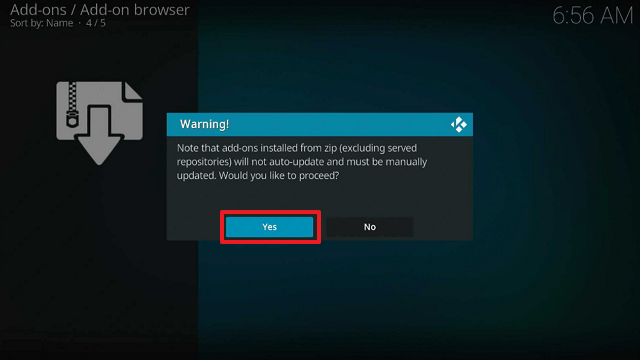
12. Click “Yes”
13. Select “slyguy”
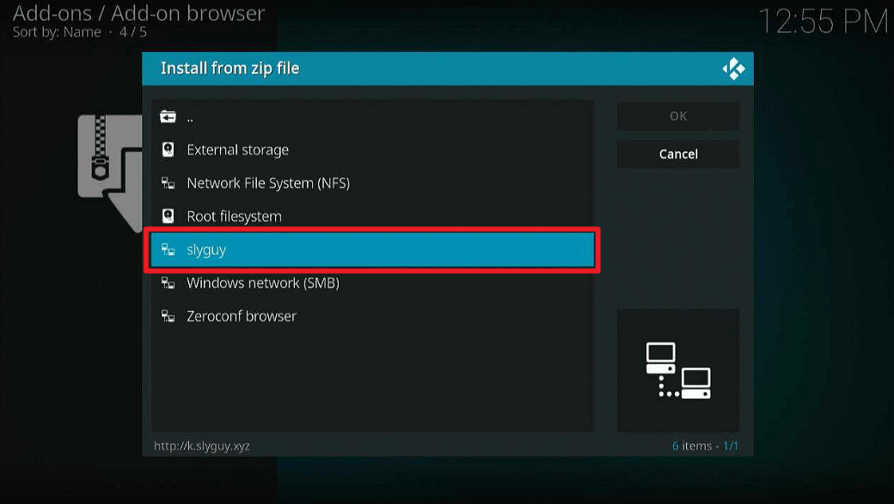
14. Then click on the zip file URL – repository.slyguy.zip
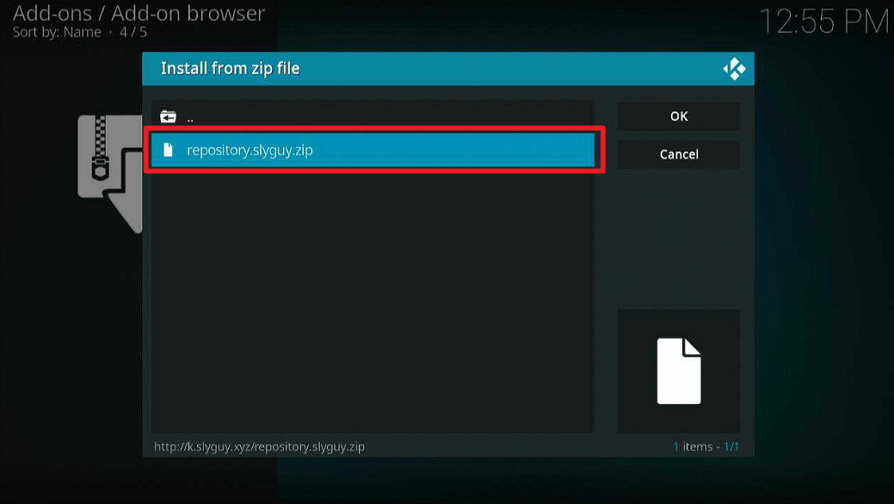
15. Wait for the notification “SlyGuy Repository Add-on installed” to appear on the upper right part of the screen
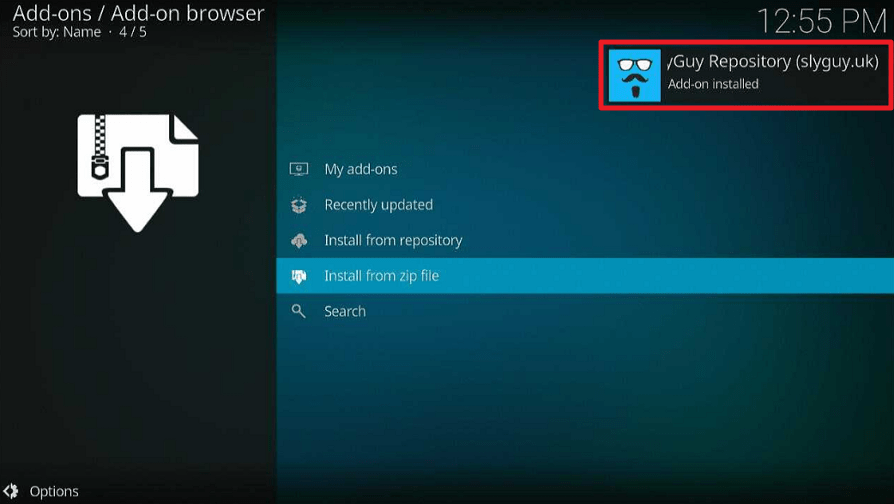
16. Afterward, select “Install from repository”
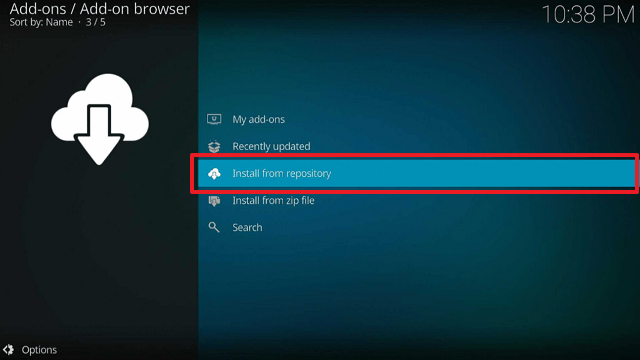
17. Then click “SlyGuy Repository”
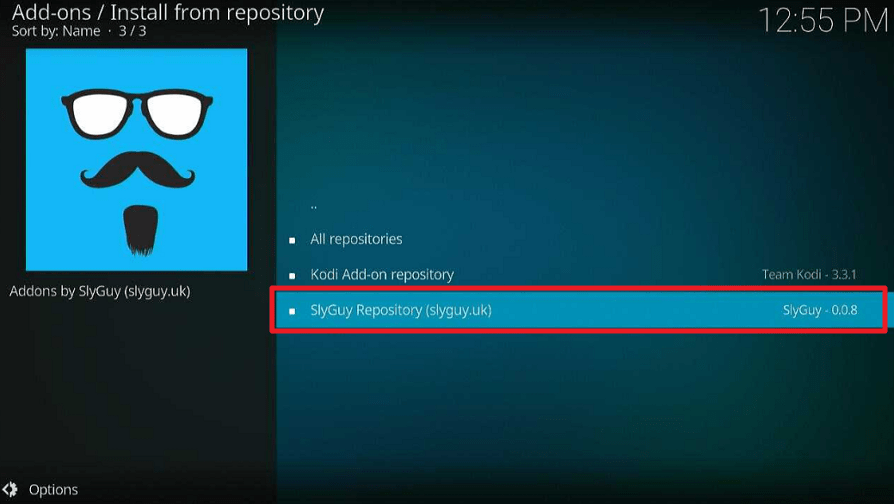
18. Select “Video Addons”
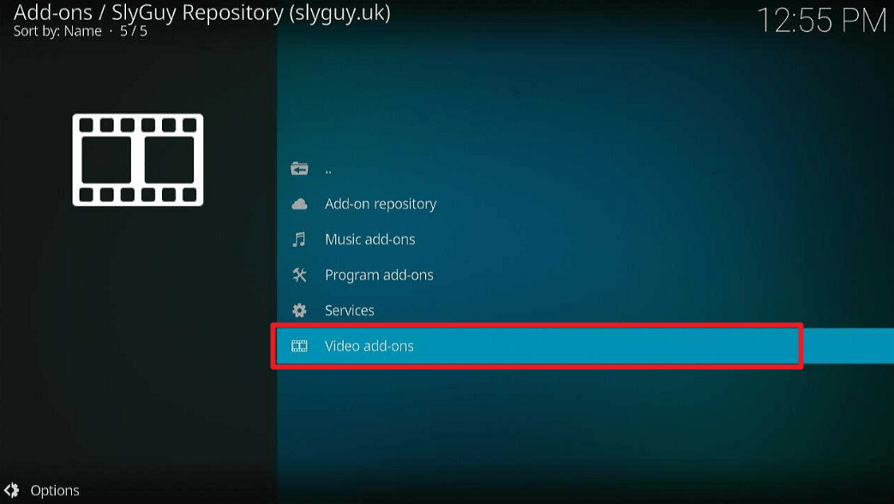
19. Scroll down and click on “PBS Live”
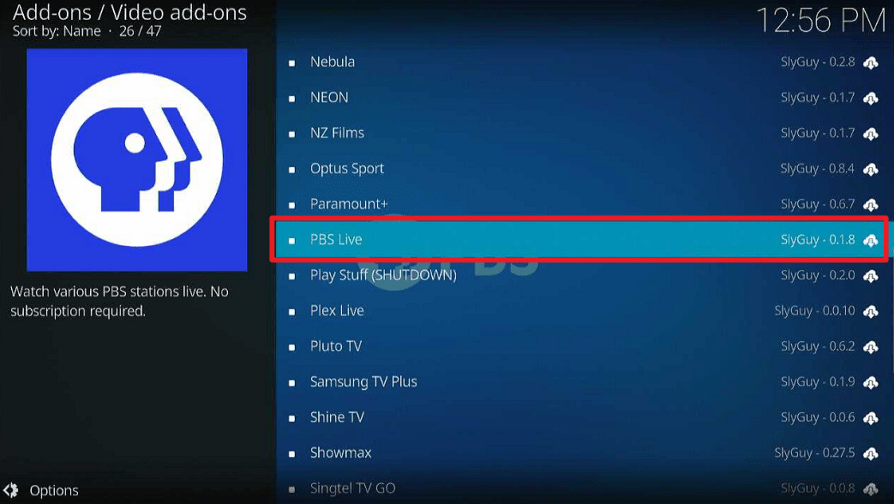
20. Then click “Install”
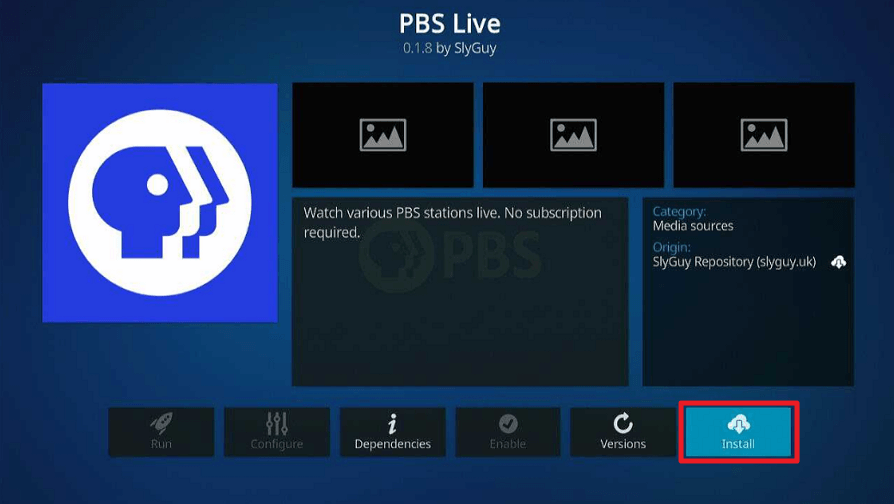
21. Click “OK” for the additional add-ons that will be installed
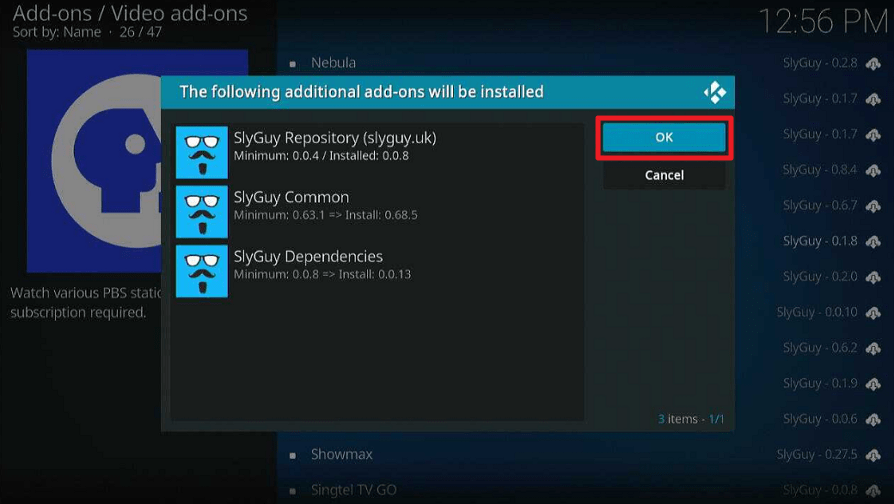
22. Then wait for it to install. It’s finished once you see the “PBS Live Add-on Installed” message appears.
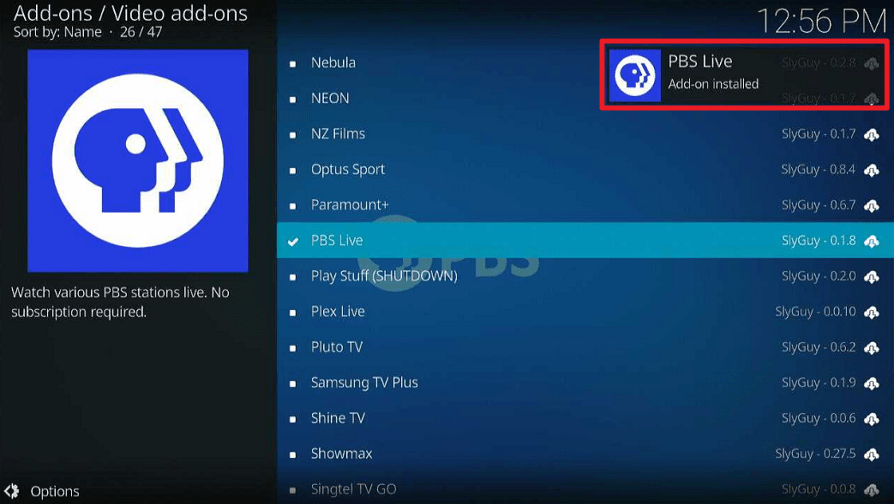
23. Select “PBS Live” Then select “Open”
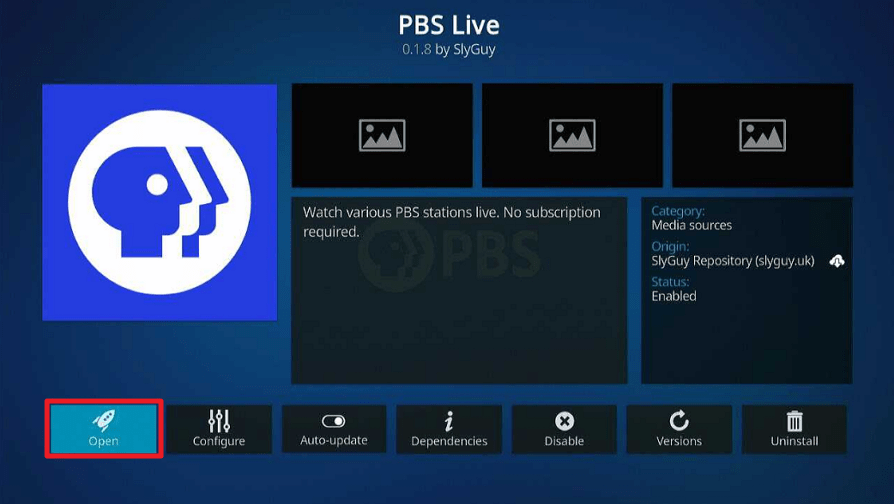
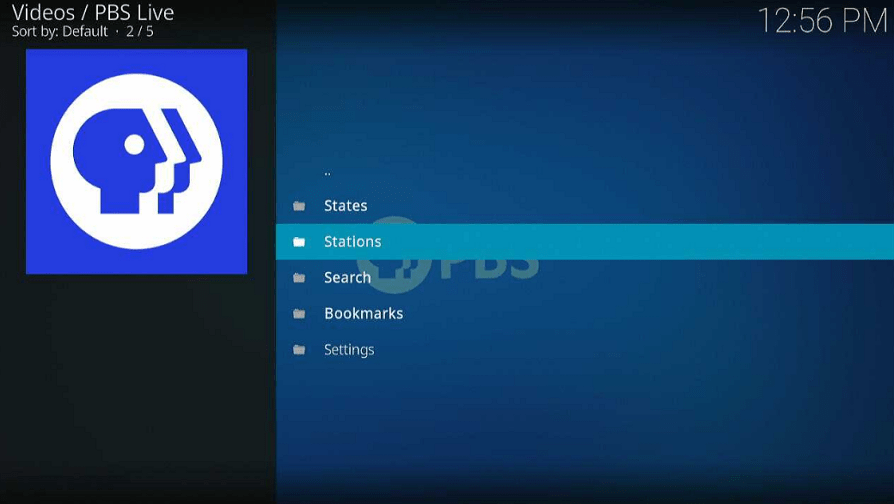
24. That’s it, PBS Live Kodi Addon is already installed in your Firestick.
YOUR INTERNET ACTIVITY IS BEING WATCHED
ReviewVPN cannot attest to the legality, security and privacy of the applications discussed on this site. It is highly recommended that you use a VPN service while streaming or using Kodi.
Currently, your IP 216.73.216.193 is visible to everyone and your Browser is being tracked by Advertisers & ISP Provider.
Here are the main reasons why you must use a VPN:
- Your activities are hidden from your ISP, the government, and from the apps you are using.
- You can access additional movies and TV streams.
- ISP attempts to throttle are thrwarted thus reducing buffering issues.
- Geographically restricted content like Netflix and Hulu can be unblocked.
A VPN works be replacing your ISP-assigned IP address and creating an encrypted tunnel. We recommend the no log service offered by IPVanish. It works well on a Firestick and offers the fastest possible speeds.
Legal Disclaimer: ReviewVPN.com does not encourage or endorse any illegal activity involved in the usage of services and applications referenced on this site. We do not verify the licensing agreements of services. The end-user is wholly responsible for ensuring that any media accessed through these services does not violate copyright and/or licensing laws. ReviewVPN does not promote, link to, or receive compensation from any Apps and IPTV services.
Install Surfshark on Firestick

PBS Live Features
- Allows you to watch several PBS stations live.
- Its primary categories are States, Stations, Search, Bookmarks, and Settings.
- You can choose from several states, including Alaska, Arizona, Indianapolis, Maryland, Mississippi, Texas, New York, Utah, Nebraska, and more.
- Its Search tool will allow you to directly enter a term.
- You can choose to display stations that do not have streams.
- There are four playback quality options: Best, Lowest, Bypass, and Custom.
- A mini EPG is available.
- You can set up IPTV Merge.
Pros & Cons
Pros
- There are numerous channels to select from.
- Channels can be found depending on the state.
Cons
- There have been numerous playback failures.
- Some of the streaming links have been removed.
Stream Safely With a VPN

When using unofficial Kodi addons like PBS Live Kodi Addon, it’s critical to keep your identity hidden. This is because they may include shady or harmful files in them that could infect your device. And the best method for streaming anonymously is with a VPN.
If you use a VPN, like Surfshark, no one online will be able to see your real IP address because it will be hidden behind an anonymous one. The information associated with your account or device won’t be accessible to anyone in this way.
This prevents anyone from stealing or logging your information. It also holds for state surveillance, which is eager to keep tabs on its citizens’ online activities for reasons such as piracy.
The following are some additional advantages of making use of Surfshark:
- Ensures that all of your traffic is protected with unbreakable security by using AES-256 GCM encryption.
- Allows you to circumvent geoblocks so you can access content from any location in the world.
- A feature called Cleanweb prevents malware and disruptive advertising.
- To stop those intrusive cookie consent pop-ups from appearing, it includes a cookie consent pop-up blocker.
- Allows you to safeguard an unlimited amount of devices with a single subscription.
- Eliminates ISP throttling, which stutters your internet and creates lags and buffering.
- Provides you with unlimited bandwidth so you can download and watch any online stuff you want.
Note: For more information about Surfshark, please read our Surfshark Review.
How to Install Surfshark VPN on Firestick
If your Firestick still has the older interface, read this article to learn how to update it: Update Firestick Interface.
1. Go to the Home screen of your Firestick.

2. Navigate toward the Find tab. Press the Search button from the resulting dropdown.

3. Type in the keyword of SurfShark and select from the suggestions that will appear.

4. Click the official SurfShark icon from your search results.

5. Press the Download (You Own it) button.

6. The SurfShark VPN installer will download on your device.

7. SurfShark VPN’s app will automatically install itself on your Fire TV stick.

8. Press the Open button after completing SurfShark VPN’s installation process.

9. Please wait for the SurfShark VPN to load its user interface.

10. You can now log in with your SurfShark VPN account credentials.

Learn more about Surfshark and Grab the Best Surfshark Deal Now!
Install Surfshark on Firestick



For more VPN discounts, go to ReviewVPN Deals and purchase the best VPN for you.
Click here to get the lowest price on Surfshark through our exclusive limited-time offer.
FAQs
What is PBS Live Kodi Addon?
PBS Live is a Slyguy repository addon for Kodi that offers live TV streaming from several TV stations.
Is PBS Live Kodi Addon safe?
Installing it on a Firestick or other Kodi-compatible device is safe. However, to make sure that your device is constantly protected against online hazards like malware, we still advise using antivirus software like TotalAV.
Is PBS Live Kodi Addon legal?
The legitimacy of the streams offered by PBS Live TV Kodi Addon is not something we can guarantee. Using Kodi Addons like PBS Live is entirely the user’s responsibility.
Wrapping Up
The PBS Live Kodi Addon gives users access to a variety of American TV channels. From any US state, you can undoubtedly discover the channels you’re looking for.
However, while testing this Addon, we ran into several playback difficulties. You might nevertheless give it a shot to see whether it works for you.
Enjoy your Kodi streaming!






