

Overview
Quick Navigation
You can learn how to install the RBTv Kodi Addon and everything else you need to know about it in this article.

RBTv is a Kodi Addon from The WareHouse Repository that enables you to locate Live TV channels in various categories.
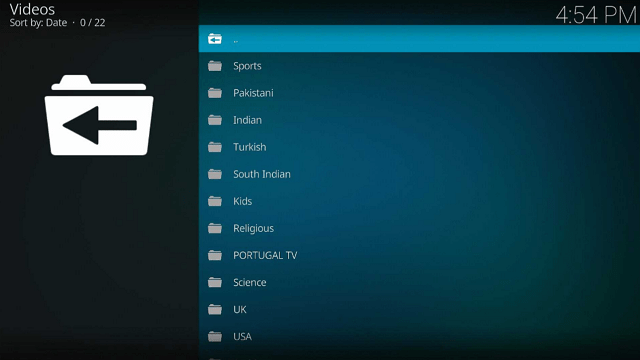
Some of the categories you can find are Sports, Kids, Religious, and Science, and there are also local channels available. These local channels originate from various countries, including the United States, France, Canada, Italy, Sri Lanka, and many others.
Additionally, we want to let you know upfront that RBTv is a third-party addon and isn’t accessible through the official Kodi Repository.
As a result, we’d like to recommend that you turn on your VPN before installing and using this add-on. This prevents any unintended data leaks or security breaches since Kodi won’t be held responsible for any harm caused to your device by third-party add-ons.

How To Install RBTv Kodi Addon on Firestick
You can follow along with this tutorial to install the RBTv Kodi Addon on your Firestick.
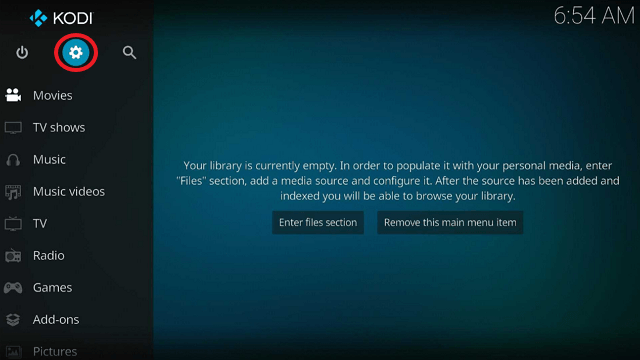
1. Launch the Kodi app on your Firestick. Click on the gear wheel icon (Settings)
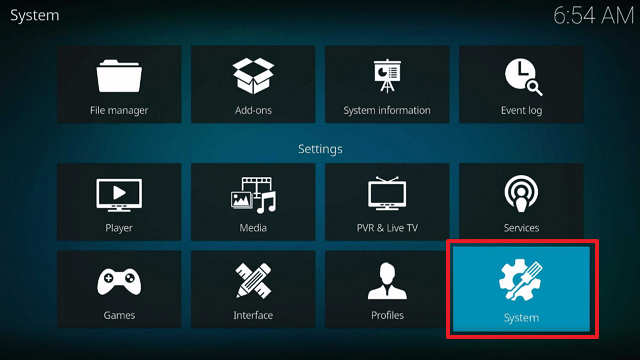
2. Select “System”
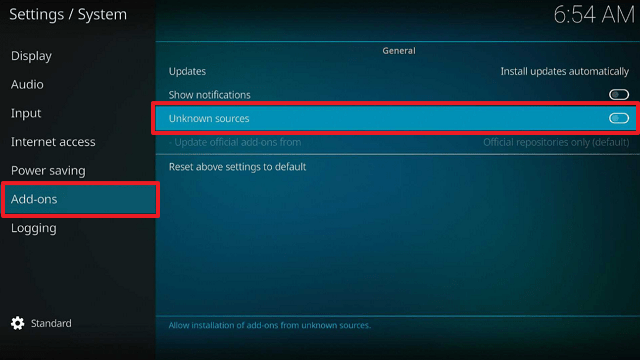
3. Scroll down to “Add-ons” Then Go to “Unknown sources” then toggle it on.
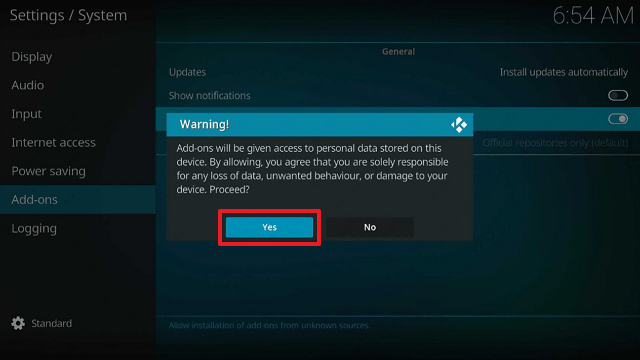
4. Select “Yes”. Then using your Firestick remote, press the return button to go back to the System page
5. Now choose “File Manager”
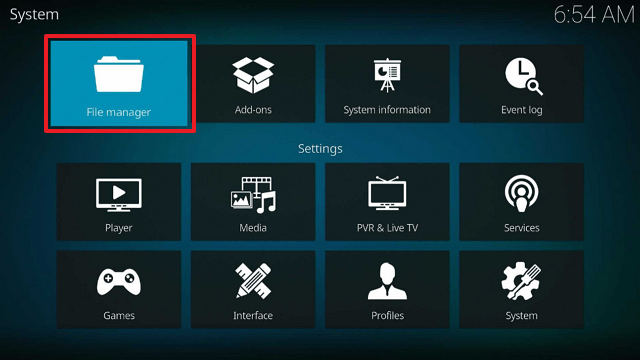
6. Scroll down and select “Add source”
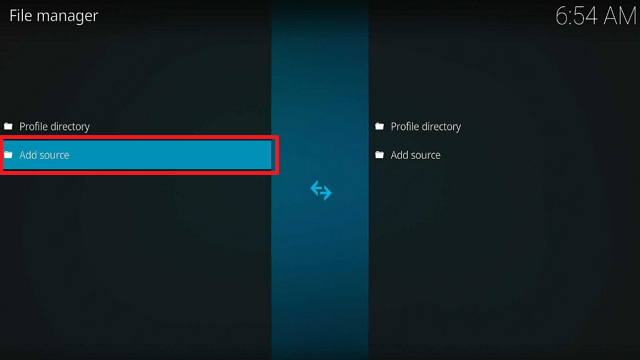
7. Click “<None>”
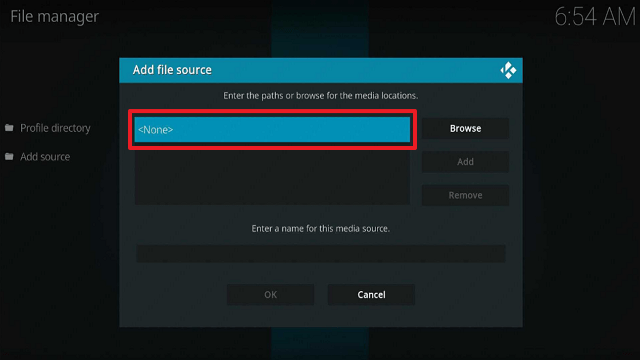
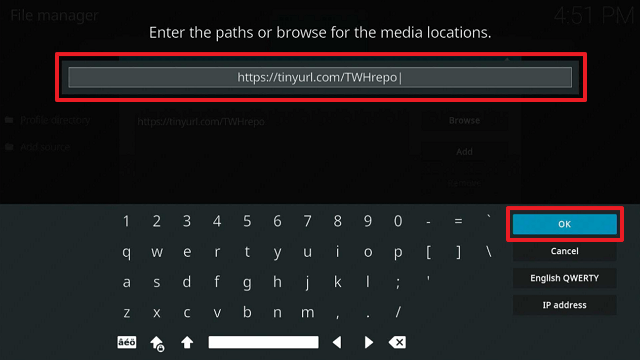
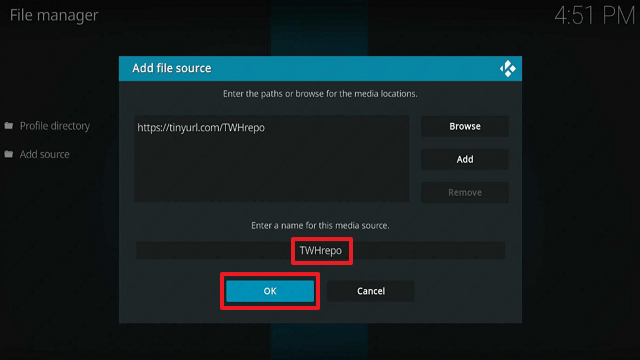
8. Type in “https://tinyurl.com/TWHrepo” then click “OK”
9. Highlight the box under the source to give the media source a name, and put “TWHrepo” or any other name that will help you identify it quickly. Click “OK”. Return to the System page by pressing the return button on your remote
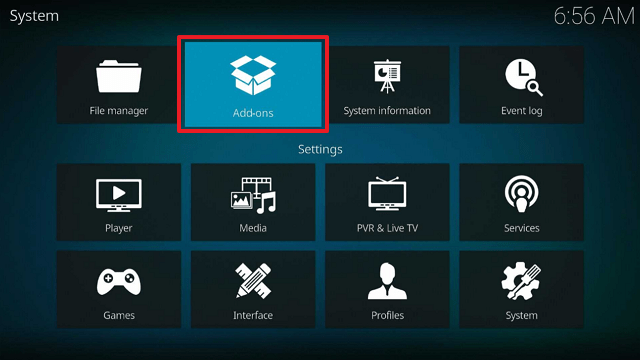
10. Select “Add-ons”
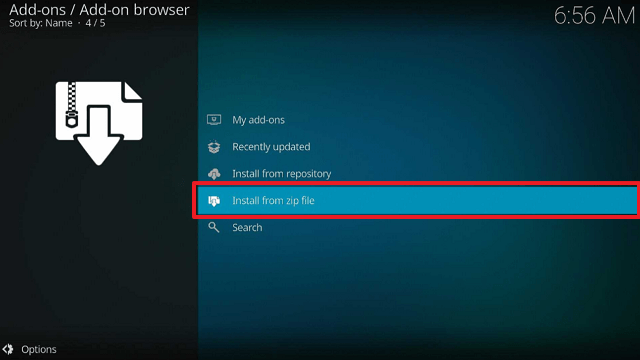
11. Choose “Install from zip file”
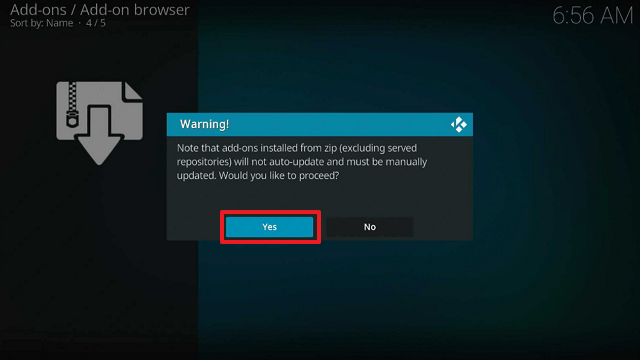
12. Click “Yes”
13. Select “TWHrepo”
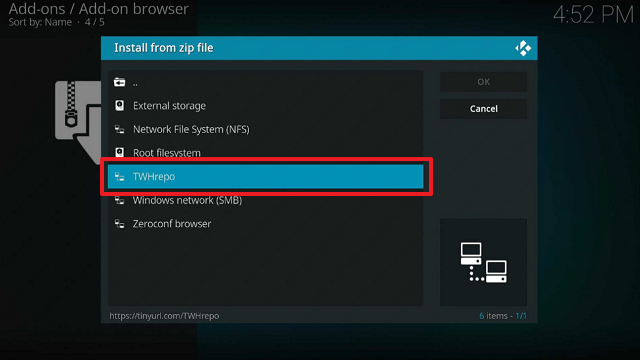
14. Then click on the zip file URL – repository.thewarehouse-x.x.x.zip
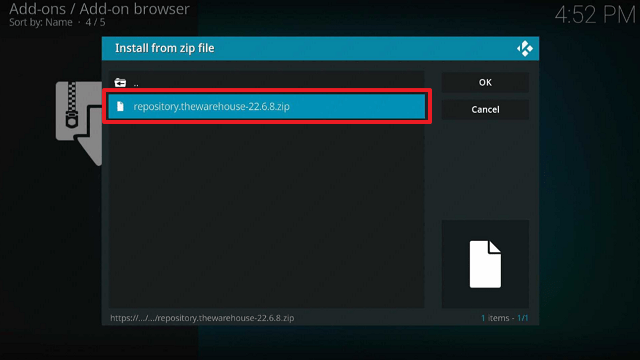
15. Wait for the notification “The WareHouse Repository Add-on installed” to appear on the upper right part of the screen
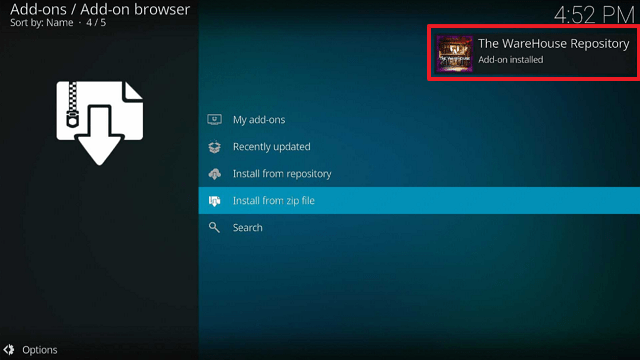
16. Afterward, select “Install from repository”
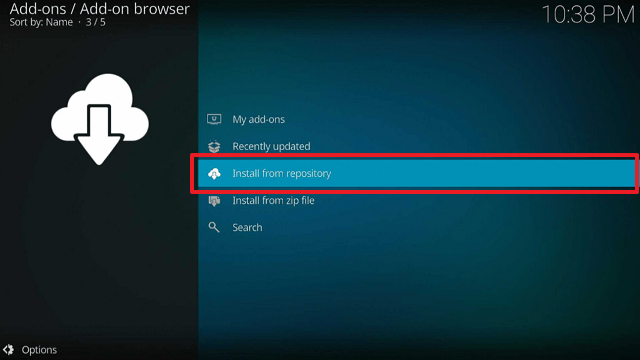
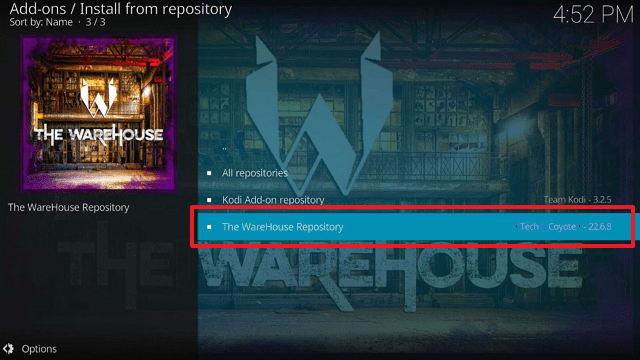
17. Then click “The WareHouse Repository”
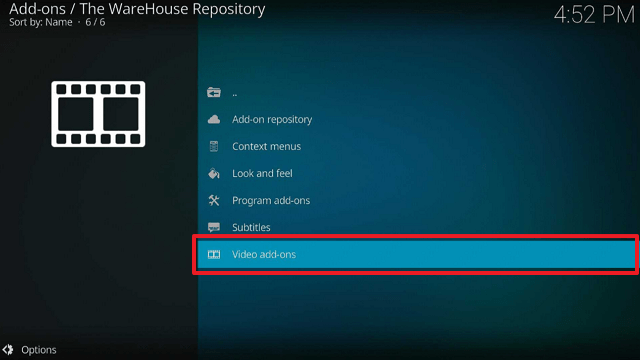
18. Select “Video Addons”
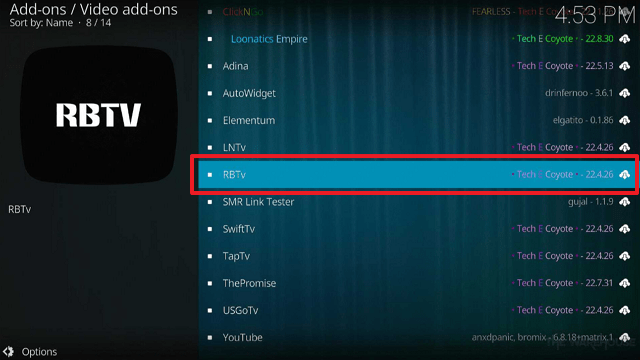
19. Click on “RBTv”
20. Then click “Install”
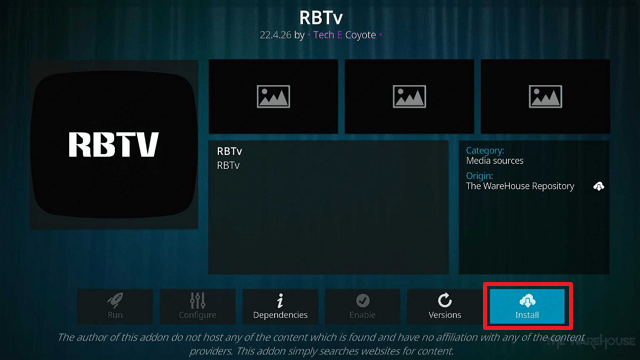
21. Then wait for it to install. It’s finished once you see the “RBTv Add-on Installed” message appears.
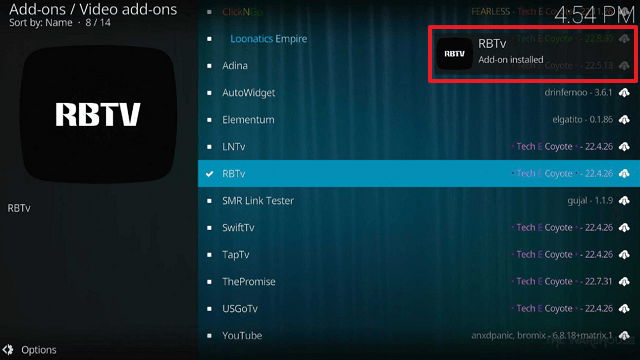
22. Select “RBTv”. Then select “Open”
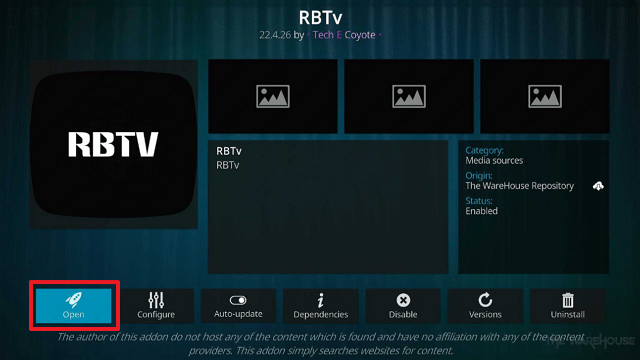
23. That’s it, RBTv Kodi Addon is already installed on your Firestick.
ReviewVPN cannot attest to the legality, security and privacy of the applications discussed on this site. It is highly recommended that you use a VPN service while streaming or using Kodi. Currently, your IP 216.73.217.138 is visible to everyone and your Browser is being tracked by Advertisers & ISP Provider. Here are the main reasons why you must use a VPN: A VPN works be replacing your ISP-assigned IP address and creating an encrypted tunnel. We recommend the no log service offered by IPVanish. It works well on a Firestick and offers the fastest possible speeds.
YOUR INTERNET ACTIVITY IS BEING WATCHED
Legal Disclaimer: ReviewVPN.com does not encourage or endorse any illegal activity involved in the usage of services and applications referenced on this site. We do not verify the licensing agreements of services. The end-user is wholly responsible for ensuring that any media accessed through these services does not violate copyright and/or licensing laws. ReviewVPN does not promote, link to, or receive compensation from any Apps and IPTV services.
Install Surfshark on Firestick

Features
- Enables you to watch live television networks.
- You can explore categories like Sports, Kids, Religion, and Science.
- There are numerous local channels available, including the following: Pakistani, Indian, Turkish, South Indian, Portugal TV, UK, USA, Arabic, Bangla, Indonesian, Australian, German, French, Sri Lankan, Iranian, Punjabi, Canadian, and Italian.
- Sports channels include PTV Sports, TEN, STAR SP, Sky Sports, BEIN, Super Sports, BEOUTQ, Fight Network, UFC Fight Pass, and Big Ten Network.
- Its Kids Section features a variety of channels for children, including Baby TV, Nickelodeon, Cartoon Network, PBS Kids, and more.
- There are Kids’ channels in Hindi, Arabic, Tamil, and Telugu.
- Medine TV, Bereket TV, Rehber TV, Yasin TV, Semerkand TV, Hadi TV, and other religious channels are available.
- The Science Category includes channels from Animal Planet, Nat Geo, Discovery, and Sony.
- Your favorite channels can be added to your bookmarks.
- Allows for one-click streaming.
Pros & Cons
Pros
- It offers free live TV streaming.
- There are numerous options for live TV.
- Allows you to stream easily by providing one-click play streams.
Cons
- SD video resolution is provided.
- Some buffering occurs.
- No subtitle is available for some channels.
Stream Safely With a VPN

When using unofficial addons like RBTv, we always advise our readers to use a VPN like Surfshark to protect their online privacy. This is because these add-ons are not developed or maintained by Kodi, so you never know who could be able to watch what you are streaming.
As a result, there can be hazards involved with it that affect your privacy. You won’t be able to tell if hackers and phishers who prowl around these Builds are targeting your data for dubious monetary gain.
Therefore, it is recommended to use a VPN to remain anonymous when using these Addons. To prevent your real IP address from being linked to your streaming, Surfshark will mask your IP address.
By doing this, you may be certain that you are not disclosing your IP address to any streaming platform you use. You may be confident that there won’t be any logs or IP address leaks when using its service because it uses military-grade AES-256-bit encryption, which is guaranteed to be uncrackable. Along with that, the following are some other advantages:
- Its CleanWeb function prevents viruses and advertising.
- It has a pop-up blocker for cookie consent.
- Supports two-factor authentication.
- Unlimited bandwidth is provided.
- Allows you to circumvent geo-restrictions.
- It safeguards an unlimited number of devices.
- A 30-day money-back guarantee is provided.
Note: For more information about Surfshark, please read our Surfshark Review.
How to Install Surfshark VPN on Firestick
If your Firestick still has the older interface, read this article to learn how to update it: Update Firestick Interface.
Follow our screenshots below to install the Surfshark VPN app on your Fire TV stick.
1. Go to the Home screen of your Firestick.

2. Navigate toward the Find tab. Press the Search button from the resulting dropdown.

3. Type in the keyword of Surfshark and select from the suggestions that will appear.

4. Click the official SurfShark icon from your search results.

5. Press the Download (You own it) button.

6. The Surfshark VPN installer will download on your device.

7. SurfShark VPN’s app will automatically install itself on your Fire TV stick.

8. Press the Open button after completing Surfshark VPN’s installation process.

9. Please wait for the SurfShark VPN to load its user interface.

10. You can now log in with your Surfshark VPN account credentials.

Learn more about Surfshark and Grab the Best Surfshark Deal Now!
Install Surfshark on Firestick



FAQs
What is RBTv Kodi Addon?
The RBTv Kodi Addon enables users to view live TV across a range of genres, including local stations, sports, kids’ programming, and religious content.
Is RBTv Kodi Addon Safe?
Installing and using RBTv is safe. To ensure complete safety, we still advise pairing it with a VPN like Surfshark.
Is RBTv Kodi Addon Legal?
Since it appears that RBTv is offering copyrighted content, we cannot ensure that the streams it offers are legal. It is therefore advised to only stream from sources that are in the public domain.
Should I use a VPN and RBTv?
Since RBTv is a third-party addon, we advise using a VPN to access it. Apart from preventing data breaches and other potential security hazards, it’s critical to maintain your anonymity to protect yourself from any online attacks.
Click here to get the lowest price on Surfshark through our exclusive limited-time offer.
For more VPN discounts, go to ReviewVPN Deals and purchase the best VPN for you.
Wrapping Up
If you’re looking for live TV streaming, the RBTv Kodi Addon is recommended because it has a ton of different options. It is also simple and incredibly convenient to use because it offers one-click play streaming, saving you time from having to select links. Furthermore, what I appreciate about it is that it offers a free streaming solution to individuals looking for free live TV.






