

Apollo TV
Quick Navigation
Is it Any Good?
Apollo TV was custom built-in 2018 and allows you to stream and watch a large library of television and movies with some cool additional features like voice control and IMDB integration.
A relatively new app its quickly gained support as a solid Terrarium online alternative with a wide array of functionality.
Apollo TV is different because it is a server-side scraper rather than a client-side scraper like Terrarium. Meaning the application can be more easily ported to other platforms, meaning we can expect applications across Android, iOS, Windows, and Linux.


Screenshots with Step by Step Instruction to Apollo TV on a Firestick
- Scroll to Settings from the home screen.

2. Scroll down and to the right until you get to My Fire TV. Click on it.

3. Select Developer options.

4. Turn on ADB debugging and Apps from Unknown Source.

5. Click Turn On when the pop-up appears.

6. Click home on your remote and scroll once to your left. It will be the search icon.

7. You can either say Downloader to your Alexa voice enabled remote or start typing it. If you typed it, click on the suggestion when it appears.

8. Click on the Downloader icon

9. Click Download

10. Click on Open

11. Click on Allow.

12. Type https://www.relaxtv.xyz/download-apollo-tv-apk/ and click Go.

13. Click on Download The App.
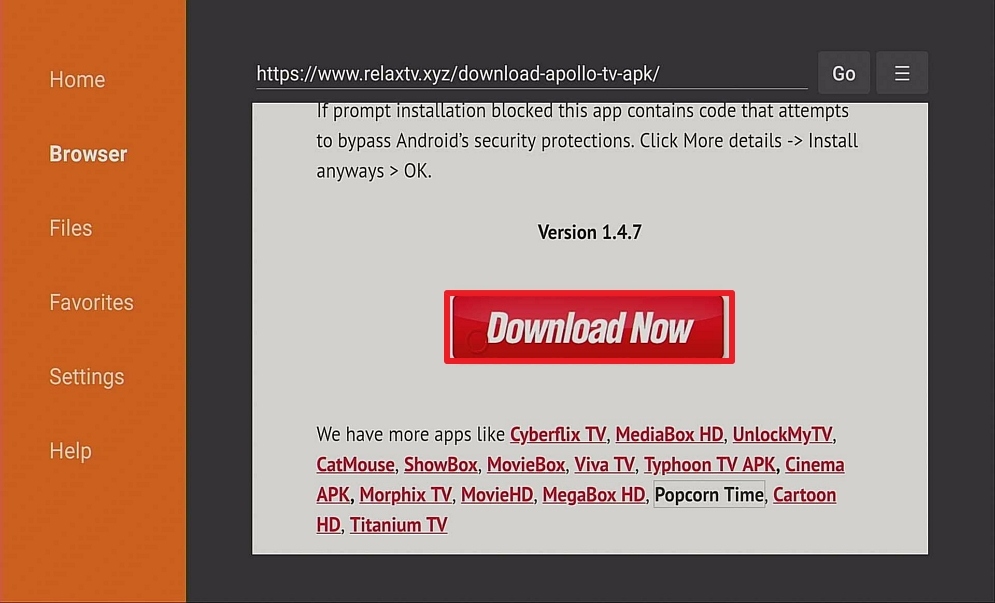
14. Click on Install and you should be all set. Remember to delete the APK file after installation to save space.

15. Click Open

Install Surfshark on Firestick
What Does it Do?
Apollo TV has gained a lot of support and commentary around the speed of the scrapers that it used. It acts as a third-party library, scraping links from open websites and then putting them together within the application to be viewed by the user
What Platforms Does it Work on?
Apollo TV works on all Android devices. An iPhone application is currently being beta tested
Features
- AMOLED user interface which is clean simple and elegant
- Trakt.tv compatible
- Real Debrian compatible
- IMDB integrated
- Easy to use categories
- Search and filter functions
- Chrome cast support
- A detailed synopsis of episodes
- Favorite your shows and get notifications of new episodes
- Swipe navigation
- Autoplay feature
YOUR INTERNET ACTIVITY IS BEING WATCHED
ReviewVPN cannot attest to the legality, security and privacy of the applications discussed on this site. It is highly recommended that you use a VPN service while streaming or using Kodi.
Currently, your IP 216.73.217.24 is visible to everyone and your Browser is being tracked by Advertisers & ISP Provider.
Here are the main reasons why you must use a VPN:
- Your activities are hidden from your ISP, the government, and from the apps you are using.
- You can access additional movies and TV streams.
- ISP attempts to throttle are thrwarted thus reducing buffering issues.
- Geographically restricted content like Netflix and Hulu can be unblocked.
A VPN works be replacing your ISP-assigned IP address and creating an encrypted tunnel. We recommend the no log service offered by IPVanish. It works well on a Firestick and offers the fastest possible speeds.
Pros and Cons
Pros
- One of the biggest pro’s users have is the beautiful UI in AMOLED with clear lines and great color
- Trak.tv compatible means you can pick up watching shows where you left off
- Deep Real Debrian integration means that you can download torrents high speed and access extensive playlists from other users
- Ability to favorite episodes and also overlay for episodes that you have already watched
- History of movies watching which you can clear and cache
- Load up autoplay to play a number of movies one after the other
- You can see the latency and speed for each link source
- A massive Reddit community with over 6K members
- An active development team who are actively rolling out updates and hopefully the application to work on multiple platforms
- Talk of releasing an electron app which means the application will work even if it blocked in your home country, by allowing you to run it on their home servers
- 100% free without ads, currently funded by donations
Cons
- Still relatively new with features in the pipeline
- No auto next function
- Unable to download content
FAQ
Is it Safe to Use?
Yes, the application is available to download from the Amazon Store. Always make sure you download it from an official website.
Is it Legal or Grey?
It’s a grey area, but we’d say Apollo TV leans towards the less legal side of things. They are actively trying to keep the app as grey as possible by preventing the content download from within the app. Also, they seem to be pretty open and transparent to the same level we have only seen with Zion TV
Should I Use This App With a VPN?
A Virtual Private Network allows you to form a secure connection over the internet. Using a VPN, you can create an encrypted tunnel between your VPN client and their DNS server.
ISP’s work with media producers to make it difficult to access copyrighted material as it is illegal. When using a VPN, you can change your IP to register in a number of different countries around the world. Also, all your data is encrypted using military-style encryption meaning that your ISP can’t see what you are streaming, or even what website you are visiting.
There isn’t much point trying to connect to Apollo TV without a VPN. The website itself would likely be blocked and even if you were able to connect to Apollo TV your connection would be logged and could later be blocked.
How to Install Surfshark VPN on Firestick
If your Firestick still has the older interface, read this article to learn how to update it: Update Firestick Interface.
Follow our screenshots below to install the SurfShark VPN app on your Fire TV stick.
1. Go to the Home screen of your Firestick.

2. Navigate towards the Find tab. Press the Search button from the resulting dropdown.

3. Type in the keyword of SurfShark and select from the suggestions that will appear.

4. Click the official SurfShark icon from your search results.

5. Press the Download (You own it) button.

6. The SurfShark VPN installer will download on your device.

7. SurfShark VPN’s app will automatically install itself on your Fire TV stick.

8. Press the Open button after completing SurfShark VPN’s installation process.

9. Please wait for the SurfShark VPN to load its user interface.

10. You can now log in with your SurfShark VPN account credentials.

Learn more about Surfshark and Grab the Best Surfshark Deal Now!
Install Surfshark on Firestick



For more VPN discounts, go to ReviewVPN Deals and purchase the best VPN for you.
Click here to get the lowest price on Surfshark through our exclusive limited-time offer.
Is it Free?
No, you are asked to make a nominal donation, even if it’s just $0.01
Are There Ads? (If it has ads is there a modded version)
No, currently they are supported by donations
Is There a Premium Version?
No, but there is talk of releasing a premium service similar to Zion TV
Is There an Official Website?
Yes, Apollo TV have got a great website at https://apollotv.xyz/
This even has an open link to their GitHub as well as a learning page, which would be familiar for people who contribute to open-source software.
What Other Devices Does it Work on?
Apollo YV only works on Android Devices and is compatible with Chrome Cast
How Does The App Work?
You can download the application on the Amazon store, or directly download the apk file from the Apollo TV website
What is the Minimum Version of Android I Need?
Android 4.0
History
How Long Has it Been Around?
Apollo TV has been around since September 2018
Is it a Terrarium Clone?
No
What is the Development Team Like?
The developers are really active, and we saw at least 2 commenting developers as well as one moderator on their Reddit sub-thread: https://www.reddit.com/r/ApolloTV/
Unlike any other application, they also have an open page on GitHub showing the upcoming features being added.
Users can flag bugs on GitHub, as well as submit features through Reddit.
This is the best development team we have seen of any Android TV app currently apart from maybe Zion TV
Best Alternatives
The only alternative which even comes close is Zion TV. You could also try Cyber Flix, Tea TV, and Bee TV
Our Opinion
We can understand why there is so much excitement about Apollo TV. With an active community, open-source code as well a clear and transparent road plan, along with a plan for an iOS and electron application, we can see Apollo TV becoming one of the most popular Android TV applications online.
The fact that it works server-side is also quite unique to all the other Terrarium clones out there.
The only feasible competitor we see is Zion TV, now they will face the same problems of an increasing number of modded apps. Unless their donation model works.






