

What VPN Protocol Should I Use
Quick Navigation

As you become more familiar with your VPN you are ready to learn about VPN protocols. These security protocols are how your VPN tunnels from the application to the DNS server and back.
These are the rules that negotiation your VPN connection.
When evaluating a VPN protocol, you must consider several considerations.
Most important are speed and encryption.
Followed by stability, compatibility (do many VPN providers offer it), and how it handles streaming and torrenting.
In this article, we look at the 5 most common VPN protocols, as well as 4 lesser-known newer protocols that are making waves.

OpenVPN – Industry Standard, Best All Round
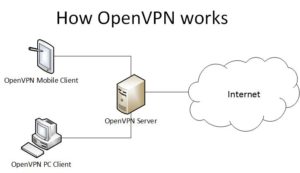
OpenVPN is the de-facto protocol for the industry. Almost all VPN providers will use it as your automatic settings on your security panel.
OpenVPN is the connection of choice for multiple reasons. Firstly, it is open source and has strong support from the online community, meaning bugs and fixes are quick and crowdsourced. Secondly, their traffic is very similar to HTTPS/SSL and is hard to discern. Though in countries with network monitors like China, they have managed to do this, which is why we see some lesser-used protocols being rolled out for countries that have a higher bar for censorship.
Lastly, OpenVPN can run on any port and uses TCP and UDP protocols. The only two protocols that work on top of the IP (Internet Protocol)
TCP – Best for Stability
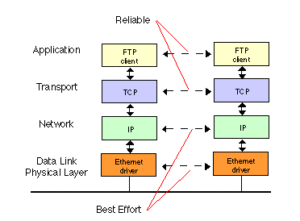
The Transmission Control Protocol is the most commonly used on the internet. In basic terms, it needs a connection and tends to be slower but more secure and stable as there is a need for authentication on either end. TCP is preferred because data packets are sent in order and checked for errors. Also, the server that receives the packets will confirm it has received them
Use Open VPN TCP if you want the most stable connection.
UDP – Best for Speed
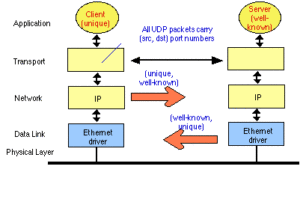
The User Datagram Protocol, on the other hand, does not need a connection but sacrifices error checking for speed.
Unlike TCP, UDP simply sends packets without error checking or waiting to hear a response.
That’s why OpenVPN UDP is sometimes preferred for live streaming and gaming because it can increase the speed of transmission, though at reduced stability.
Use OpenVPN UDP for gaming and live to stream.
PPTP – Best for Speed, Worst for Security
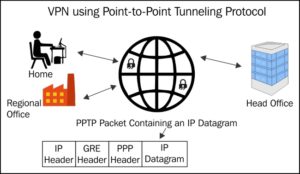
The Point to Point Tunnelling Protocol dates to Windows 95 and is the oldest VPN protocol still being used. Sent using TCP.
PPTP is still around because it is simple, easy to use and the fastest VPN protocol around.
You will get the best speeds out of your VPN using PPTP, just only use with a trusted site, because the authentication protocols have been repeatedly cracked by security experts.
PPTP is still around because you get the best speeds for gaming and streaming on Netflix or Kodi.
ReviewVPN cannot attest to the legality, security and privacy of the applications discussed on this site. It is highly recommended that you use a VPN service while streaming or using Kodi. Currently, your IP 216.73.217.24 is visible to everyone and your Browser is being tracked by Advertisers & ISP Provider. Here are the main reasons why you must use a VPN: A VPN works be replacing your ISP-assigned IP address and creating an encrypted tunnel. We recommend the no log service offered by IPVanish. It works well on a Firestick and offers the fastest possible speeds.
YOUR INTERNET ACTIVITY IS BEING WATCHED
Install Surfshark on Firestick




L2TP/IPsec – Good Speed/ Average Security

These long abbreviations can be confusing but usually indicate the protocol being used and after the slash is the encryption used to secure that protocol.
The Layer 2 Tunnelling Protocol dates to 2000 and is one of the older protocols still in use. Currently, it uses Version 3 which was released in 2005. It was hailed as an evolution of the PPTP protocol with enhanced security.
The transmission is sent over UDP which tends to make it fast, but with less stability. Also, as an older protocol, it is likely to be blocked by most firewalls.
The IP Security suite of protocols secures communication across an IP network, including encryption, decryption, authentication, and confidentiality. IPSec has known vulnerabilities to a man in the middle. Often the IPSec protocol will have been modified to remove these vulnerabilities.
IKEv2/IPsec – Good Speed/ Modern Technology

The Internet Key Exchange version 2 is the successor to the older IKEv1 which is no longer in use. Mainly due to the increase of use of VPN’s on mobile phones. Using UDP.
IKEv2 made several improvements, by offering support for remote access, using encryption keys on both sides, consuming less bandwidth as well as detecting if a VPN tunnel is “alive.” Meaning the protocol will then automatically re-establish a dropped connection.
The newer versions also made it more resistant to DDOS attacks, by verifying a request that comes from a genuine request before processing it. DDOS attacks use botnets to floor requests for a website and overload its servers. IKEv2 prevents this by screening the request before handling it.
Importantly IKEv2 supports the latest encryption including 256-bit AES encryption. The industry-standard encryption is considered unbreakable and used by governments around the world.
Generally used with IPSec built-in. Another reason it’s popular is that speeds are comparable to PPTP and Soft Ether.
SSTP – Safe But Potentially Compromised

The Secure Socket Tunnelling Protocol is one of the more up-to-date protocols. Introduced by Microsoft with Window’s Vista and seen as a safer option to PPTP and L2TP/IPSec. Through TCP.
SSTP like PPTP has its own inbuilt encryption method. However, it does so by using an SSL/TLS Channel. This is much more secure because all data and traffic pass through the tunnel, where data packets are checked for integrity, secure keys are negotiated, and encryption and decryption occur.
Another reason why some people like SSTP that it uses TCP port 443 the same as HTTPS traffic, which can make it very useful for disguising VPN traffic as normal network traffic.
In many ways, it is comparable to OpenVPN but less widely used and understood. Though a lot of people tend to avoid it because it is owned by Microsoft rather than being Open Source like Open VPN.
This suspicion relates to Microsoft being part of the PRISM surveillance program which is run by the NSA. Many large technology companies belong to PRISM, allowing the NSA to check any data associated with its users. Some feel that the protocol has been compromised and has a back door to allow the NSA to snoop data used on this protocol.
Less Common Protocols
In the wonderful world of Open Source software, there are plenty of other VPN protocols that have been developed mainly due to coders learning about all the pre-requisites from OpenVPN and then coding a protocol that is adapted to their needs.
This is mainly due to two concerns.
Firstly, speed. OpenVPN is highly stable but not as fast as some feel it could be. In part, this is due to its large codebase and sometimes overly complex cryptography which makes OpenVPN highly secure but bulky.
Secondly, China. Since the early 2000’s China Golden Shield Project enacted a nationwide firewall which has actively pushed back against the use of VPN’s to access outside content in China.
OpenVPN has compromised long ago because Chinese network sensors have been calibrated to detect OpenVPN encrypted traffic from their data packets metadata. So, in response to this, a new breed of security protocols have come about, as VPN’s and freedom of speed activists tussle with the Chinese censorship machine.
Soft Ether – Faster Open Source Alternative to OpenVPN

Soft Ether standing for Software Ethernet is free open source software that operates faster than OpenVPN. They are also modified for Deep Packet Inspections used by firewalls to detect disallowed encrypted traffic.
Using SSL Tunnelling on HTTPS to appear just like regular secured traffic. As well as supporting 256-bit AES encryption.
Soft Ether is relatively new, made by a Japanese student in 2013 compared to OpenVPN which dates to 2002 and is still gaining traction. It also supports more protocols including the popular Microsoft SSTP mentioned above.
The big selling point is that Soft Ether allows for throughput speeds up to 9 times faster than OpenVPN. OpenVPN reaches 100-200MBps while Soft Ether can reach 90MBps. Of course, depending on your internet provider.
So good for those with high-speed internet who want to get the most out of their bandwidth. We reserve judgment on its ability to penetrate secure firewalls, as Soft Ether is not the protocol of choice for China-centric VPN’s.
Wire Guard – Lightweight CodeBase and Fast But Still Experimental

The wire guard is the new kid on the block. Many people are excited at the results seen with Wire guard but it’s still early days. One thing people like about it is the relatively small code base giving less surface area to attack. Less code means fewer vulnerabilities and glitches (if the code that’s written does the job!)
Wire guard has a minuscule 4,000 lines compared to OpenVPN/OpenSSL’s 600,000 lines!
It also has a major fan in Linus Torvalds, as in the man who wrote most of the Linux code based single handily.
Wire guard has a host of exciting improvements, including better speed and performance, more agile, compatible with more security protocols than OpenVPN, better battery life and roaming support for devices, faster connection speeds, and is more reliability.
So why isn’t everyone using it?
Well, in short, there are still some kinks. The code is not yet audited and the handful of companies that have used stress that is in a testing phase. But probably the biggest problem it faces is that using a Wire guard means assigning a single IP to each device. Essentially creating a log. For zero logs providers like ExpressVPN, this has meant they have applauded the direction but still not agreed to test its implementation.
But, one to watch.
Open Web – TCP Based Browsing Specialist

Our final two protocols come courtesy of one of the pioneers of the industry. Astrill VPN. For years Astrill has been heavily China-centric and developed two inhouse VPN protocols specifically designed to overcome network censors and The Golder Shield Project.
Open Web has not predominantly been replaced by Stealth but works well for quick browsing. A TCP-based proprietary protocol Open Web allows lightweight switching between servers without waiting for your VPN to reconnect.
This also means there is less chance of your browser is detected. Developed to look like HTTP/HTTPS traffic, this makes it hard to detect by DPI.
Also, it’s fast. The connection is a stateless protocol, so it means handshakes are much quicker. Some slower protocols can take a few seconds to connect but Open Web is almost instant.
Great for high censorship countries like China.
StealthVPN – Firewall Specialist

Stealth VPN is Astrill’s latest protocol which has since been used by several other providers (whether this is modified by each company is unclear)
Based on OpenVPN it also provides an additional layer of obfuscation which makes your traffic appear to be nothing more than HTTPS, allowing it to pass DPI and any firewall.
Stealth’s success has led to it being used by several high-profile VPN companies because it has been successful in circumventing Chinese censorship.
The VPN protocol is extremely reliable working with 256-bit AES encryption, as well as allowing for port forwarding and site filtering.
What makes it like OpenVPN is that it works both on TCP and UDP protocols, allowing you to choose any port for your connection. So, you can simulate traffic by saying routing through port 443 and making it look like HTTPS traffic.
Which Protocol Should I Choose?
We know that we have got technical in this article. Because we love all things VPN. Ultimately a lot of this is just for casual interest. If you really love cryptography and networking then what’s makes most of these protocols great is all of them have great support, an open-source code base, and an active community.
But ultimately, we suggest you keep it simple.
In China use a protocol that obfuscates traffic and simulates HTTPS, this could be using Stealth VPN or simply an obfuscated server used by NordVPN and ExpressVPN.
For normal browsing use Open VPN TCP for a stable and highly secure connection.
Finally, if you plan on streaming or gaming on a reputable site like Netflix or using Kodi then use PPTP to squeeze the most speed out of your connection at the cost of security, but never use PPTP with any provider you are unsure of.






