
MrZip TV IPTV Overview
In this article, we will be divulging important details on how to install MrZip TV IPTV on Firestick and other devices that run on the android platform.


MrZIP TV is a free cable IPTV application that is very similar to the Live Lounge app, and TV Pato 2. It offers Live TV and movies that are updated on a regular basis. Popular channels include channels from the US that feature trending TV Shows and Documentaries. It is compatible with most of the platforms we have today.

What Does It Do?
Quick Navigation
MrZip TV IPTV scours the internet for links that show Live TV, Movies, and TV Shows. It does so by collecting links and arranging them so that users have the option on what link to pick.
Compatible Platforms
It runs on almost all types of platforms namely: Android Tv Boxes, NVIDIA Shield, Fire Stick, Fire TV and many more
Features
- Live TV Channels
- Ola TV 9, WWE HD, Viceland, VH1 FHD, USA Network, Travel Channel, TNT HD, TLC HD, The Weather Channel, Tennis Channel HD
- More than 50000 channels that cover worldwide
- Adult Content
- Constantly updated
- Sports Channels
Installation Guide on a Firestick

- On the Home Screen, open Settings
- Choose My Fire TV
- Select Developer Options
- Select Apps from Unknown Sources option.
- Select the Turn On button.
- Head back to the Home Screen and select the search icon.
- Key in “Downloader”
- Choose the Downloader app and install it.
- Select Open
- Choose Allow
- Click OK
- Go back to Settings in the Downloader app
- Select ok Enable JavaScript.
- Go back to the homepage
- Type in https://reviewvpn.com/zip (Note: ReviewVPN.com does not host this APK file. It is hosted on Archive.org. )
- Wait for the download to finish
- Choose Next
- Choose Install
- Wait for the installation to be done
- Choose Done
- Click on Delete
- Click the Delete again button.
- Press the Home button on your remote
- MrZip TV will be located at the bottom.
- Choose MrZip TV and long press the menu button on your firestick, a notification “Move to front” will appear
- Select Ok
- There you go, the app is already installed.
Note: ReviewVPN.com does not host this APK file. It is hosted on Archive.org.

Install MrZip TV IPTV on Firestick with Screenshots
If your Firestick still has the older interface, read this article to learn how to update it: Update Firestick Interface.
1. Install the Downloader app and jailbreak your firestick by enabling unknown sources. To learn more about the procedure, you may read How to Install the Downloader App and Enable Unknown Sources.
2. Open Downloader. Type https://reviewvpn.com/zip (Note: ReviewVPN.com does not host this APK file. It is hosted on Archive.org. ) and click Go.
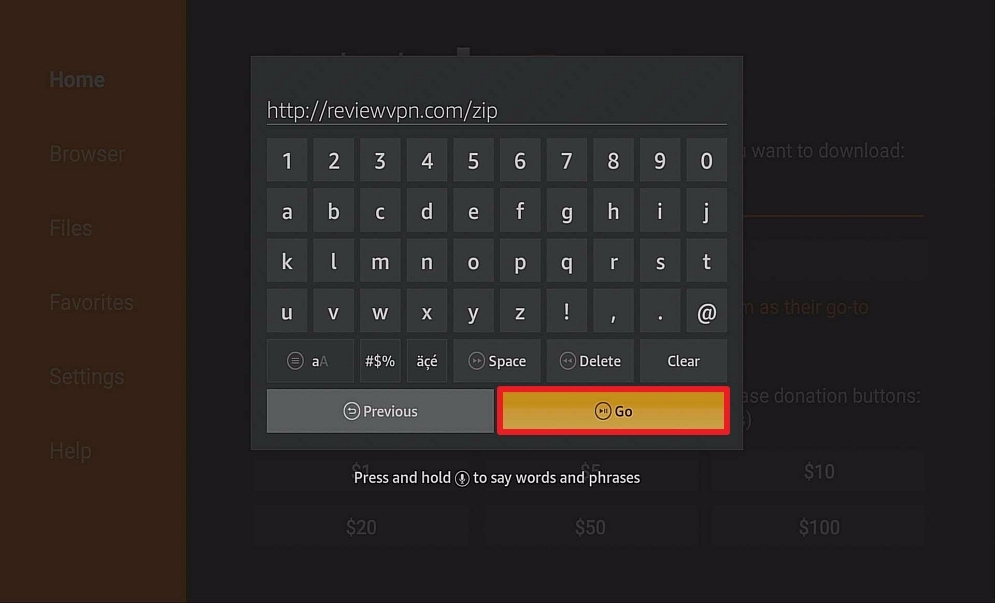
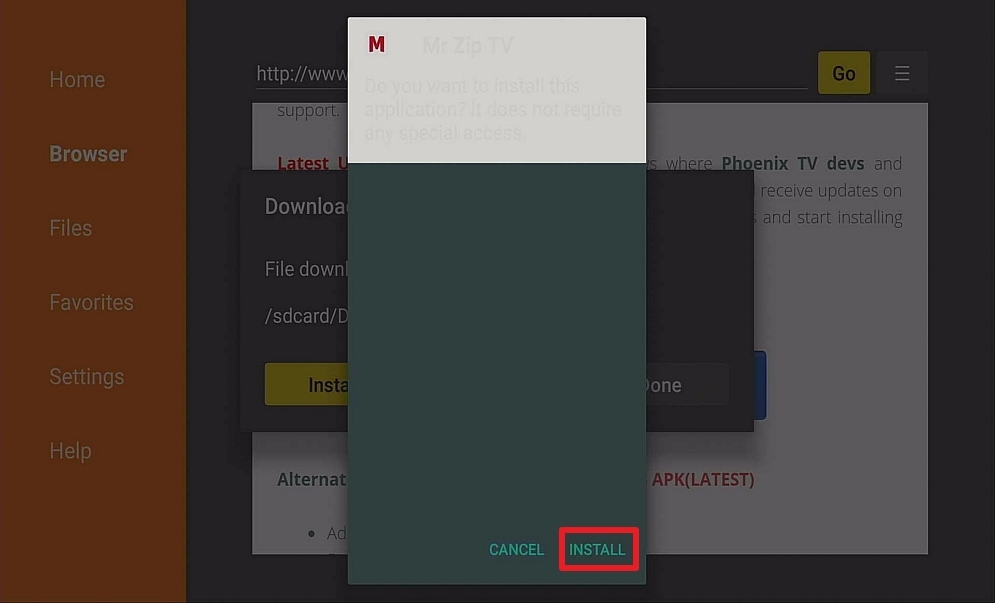
3. Click on Install and you should be all set. Remember to delete the APK file after installation to save space.
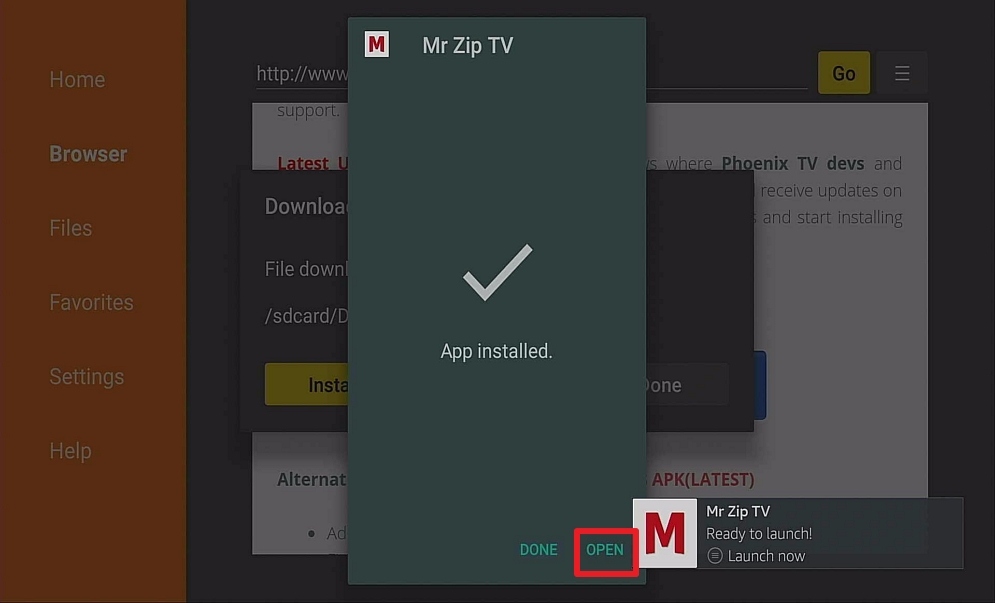
4. Click Open
Pros and Cons
Pros
- Channels are High-Definition
- Channels from other countries
- Easy and effortless user interface
- Sports Channel Categories
- Adult content is Pincode secured
- Minimum Ads
Cons
- It only allows Ludio Player to play its content unlike other IPTV apps
- As of writing this article, the app has been known to be down a lot.
YOUR INTERNET ACTIVITY IS BEING WATCHED
ReviewVPN cannot attest to the legality, security and privacy of the applications discussed on this site. It is highly recommended that you use a VPN service while streaming or using Kodi.
Currently, your IP 216.73.216.68 is visible to everyone and your Browser is being tracked by Advertisers & ISP Provider.
Here are the main reasons why you must use a VPN:
- Your activities are hidden from your ISP, the government, and from the apps you are using.
- You can access additional movies and TV streams.
- ISP attempts to throttle are thrwarted thus reducing buffering issues.
- Geographically restricted content like Netflix and Hulu can be unblocked.
A VPN works be replacing your ISP-assigned IP address and creating an encrypted tunnel. We recommend the no log service offered by IPVanish. It works well on a Firestick and offers the fastest possible speeds.
FAQ
Is It Safe To Use?
MrZip TV is safe to use but it is very unreliable nowadays.
Is It Legal or Grey?
It is a grey area because we have no way of knowing how it obtains its streams. Either it gets them legally, or illegally. That’s why it’s a grey area.
Should I Use VPN?

Always use a reliable VPN in order to hide your online identity. Your ISP tracks all of your online activities so if ever you are engaging in some illegal activity, you will be reported and may face some penalties. It is also advisable to install a VPN because it will allow you access to geo-restricted content and also allows you to enjoy better connection speed as it blocks internet throttling. With a good VPN, you are going to get your money’s worth because of these awesome perks.
Note: For more information about SurfShark, please read our SURFSHARK REVIEW.
How to Install Surfshark VPN on Firestick
If your Firestick still has the older interface, read this article to learn how to update it: Update Firestick Interface.
You can download Surfshark directly from the Amazon App store. It will be easy for you to find Surfshark with your Firestick’s Find feature. Refer to our screenshots below.
1. Go to the Home screen of your Firestick.

2. Navigate towards the Find tab. Press the Search button from the resulting dropdown.

3. Type in the keyword of SurfShark and select from the suggestions that will appear.

4. Click the official SurfShark icon from your search results.

5. Press the Download (You own it) button.

6. The SurfShark VPN installer will download on your device.

7. SurfShark VPN’s app will automatically install itself on your Fire TV stick.

8. Press the Open button after completing SurfShark VPN’s installation process.

9. Please wait for the SurfShark VPN to load its user interface.

10. You can now log in with your SurfShark VPN account credentials.

Learn more about Surfshark and Grab the Best Surfshark Deal Now!
Install Surfshark on Firestick



For more VPN discounts, go to ReviewVPN Deals and purchase the best VPN for you.
Click here to get the lowest price on Surfshark through our exclusive limited-time offer.
Is It Free?
Yes, MrZip TV is free to download
Are There ADS?
Yes, it has ads to generate income in order to maintain the run of the app.
Is There A Premium Version?
None.
Is There An Official Website?
The official posted in-app is https://fb.me/MRZIPTV
What Other Devices Does It Work On?
It also runs on Kodi, Android Box, Fire Cube, and Smart TVs that run on android
How Does The App Work?
You can download the APK at this unofficial website https://www.husham.com/mtziptvapk
Minimum Version Required
For Android users, version 5.0 and above is needed to run the application
History
How Long Has It Been Around?
As far as its Facebook page is concerned, the oldest post can be traced back to October 2019. There is no official website whatsoever that can give the date of its establishment.
Is It A Terrarium Clone?
In a way it is. It offers Live TV, Movies, Sports Channels, Adult Content, etc. but that is there is to it, unlike terrarium tv that covers a broader range.
What Is The Development Team Like?
They are pretty active on the Facebook page until recently. The app has been down for a while now and they seem to be promoting Ola TV 9 more than Mrzip TV.
Alternatives
– Swift Streamz
– HD Streamz
– Morph TV
– Nova TV
Although there are some interesting features in MrZip TV, we find that the apps listed above do a better job of providing quality content.
Our Opinion
At first, MrZip TV IPTV had an amazing run, but now, it has been down for a while unable to provide what it promised. Also, it was very promising to see that its Facebook page was active in updating users but now that seems all for naught. The problem with apps like this is sometimes it works and sometimes it doesn’t. Compared to the BIGGER apps that can sustain stability, this app has lagged behind by a thousand miles. It is disappointing, to say the least. We would like to reiterate that you only obtain content from trusted, reliable, and credible sources so as not to waste any of your time in figuring out why this app lost its sparkle. Also, please check out our other reviews because our aim is to provide you guys honest and no-holds-barred reviews we believe that it is our responsibility to help you in choosing the best apps for your firestick. If you wish to ask us questions, please do so by leaving a comment below and messaging us on any of our other social media platforms. We will gladly indulge you guys as a way of paying back for all the support that we have received. Thank you for reading and have a great day ahead!






