
Overview
Quick Navigation
In this article, we will help you install the Wireless File Manager app on your Firestick.
Nowadays, with rapidly growing technology each day, the Amazon App Store or Google Play Store launches and adds numerous new apps. Thus, if you search on these app stores, you’ll find that there are various file manager applications.

Even though you’ll find various file manager applications on Amazon App Store or Google Play Store, all of these applications are not useful. As you’ll find that most of them are equipped with annoying ads. And even if you find a satisfactory app, still it might not be compatible with Firestick or other Android-based devices.
Moreover, even though there are numerous file manager apps, there are only a few apps that are useful. These file manager apps will help in managing or transferring files over Firestick or other Android devices. But, the best file manager app to transfer & manage files is the File Manager app.

How to Download Wireless File Manager on FireStick with Amazon Silk Browser
1. Click Home on your remote & Select Find.

2. Click Search.

3. Type Wireless File Manager, and select the Wireless File Manager app.
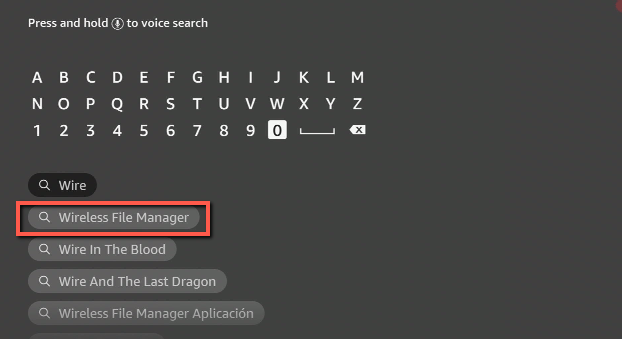
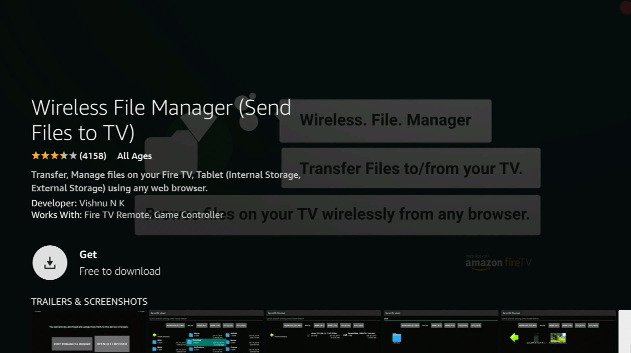
4. Click Download.
5. After the download is complete, click open to launch the app.
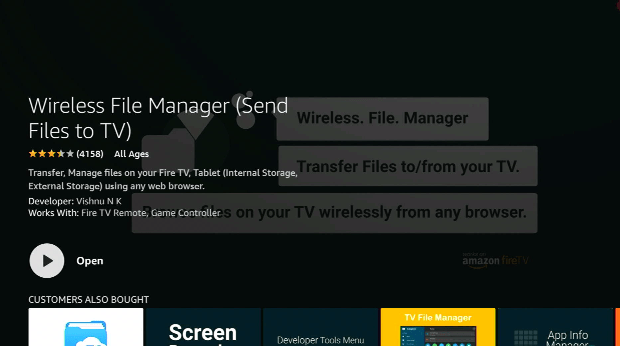
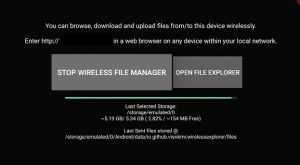
6. Now, you have installed the Wireless File Manager.
ReviewVPN cannot attest to the legality, security and privacy of the applications discussed on this site. It is highly recommended that you use a VPN service while streaming or using Kodi. Currently, your IP 216.73.216.193 is visible to everyone and your Browser is being tracked by Advertisers & ISP Provider. Here are the main reasons why you must use a VPN: A VPN works be replacing your ISP-assigned IP address and creating an encrypted tunnel. We recommend the no log service offered by IPVanish. It works well on a Firestick and offers the fastest possible speeds.
YOUR INTERNET ACTIVITY IS BEING WATCHED
Install SurfShark on Firestick
Features of Wireless File Manager
- Send or receive files, brows or save files kept on TV utilizing any web browser.
- It comes along with a file explorer that lets you browse, launch, & delete sent files.
- The file manager sends files to external storage devices, such as SD cards utilizing any internet browser
- It has a dark theme that is easy on your eyes
- The file manager can work on any network connection
- From the WebUI, users can open apps, launch files on any storage
- It lets you utilize the Open file manager button to open, browse, as well as delete recent files received through the app
Wireless File Manager Supports
- Android-based mobile phones & tablets
- TVs running Android OS and are Remote Friendly
Transfer, Manage files on Android, iOS devices (Internal & External Storage) using any internet browser
Transfer files between:
- Android and Android
- Windows and Android
- iOS and Android
- Android and Mac OS
- Linux and Android
How often is the Wireless File Explorer updated?
The Wireless File Explorer is regularly updated which keeps it functioning at its best performance.
What’s New on Wireless File Manager
- Fixed a problem where a file that has a greater size than available internal storage space that’s impossible to transmit to external storage
- Utilize the Open file manager feature to browse newly sent files
- Transmit files to external storage devices
- The file manager app can open all photos in the app itself
- It can function on any network connection
FAQs
Is the Wireless File Manager app legal?
Yes, the Wireless File Manager app is absolutely legal to download, install, & use.
Is the Wireless File Manager app safe?
Yes, the Wireless File Manager app is safe to use and doesn’t have any viruses & malware.
What devices can Wireless File Manager be installed on?
The Wireless File Manager is compatible and functions the best with devices running the Android & iOS operating systems. It runs on Amazon Firestick, Google Chromecast, PCs, Android boxes, iOS devices, Android mobile phones/tablets, and many more.
Wireless File Manager Alternatives
ES File Explorer
It is an all-in-one file managing platform for most users. This file manager app has tons of features such as exploring root files, recycle bin, cloud drive, hiding files, File Transfer Protocol (FTP), local area network (LAN), space analyzer to eliminate junk files, built-in download manager, and more.
Apps 2 Fire
It is a file manager, utility/maintenance app that can be installed on Android-powered devices. You just need to link to the same Wi-Fi network and finish the set-up process by putting the Firestick IP address. From there, you can access all the installed applications, files, etc. from the device. You can also download or upload files as well.
Features:
- Push applications from the Android mobile device to the Firestick
- Open apps on the Firestick
- Upload files (such as .jpg, .apk, .mp4, & more) from the SD card to the Firestick
- Scanner for devices
- Uninstall applications from the Firestick
- You can rename files on Firestick’s SD card
- Download apps from the Firestick to Android mobile device
- Lets you take Screenshots from the Firestick screen
- Pause & restart Firestick
Amaze File Manager
Amaze File Manager is a free & open-source file manager app. Even though this file manager app is not as feature-rich, it contains a set of benefits such as themes with cool icons, multiple tabs, moving, copying, extracting, compressing, and more. It can also do basic stuff such as cutting. Nonetheless, the Amaze File Manager contains no ads.
Always Use A VPN While Using The Amazon Firestick

Using Virtual Private Network or VPN is very useful on a Firestick. Props to a VPN service, people can access platforms, services, or websites that are unavailable in your country or bypass restrictions that many platforms impose. Upon using the Amazon Firestick, an encrypted Virtual Private Network service provider is highly recommended to hide your online activities, identity, and location. Many Firestick or Fire TV Stick users prefer SurfShark service for privacy, price, and speed.
Offering superfast servers and great live chat support, SurfShark is also an easy-to-use app. Ensure to turn on SurfShark when you are streaming on the internet.
SurfShark Features:
- Unlimited devices
- Unblocks Netflix, Disney+, and lots more
- Robust encryption
- Great customer service
- 30-day money-back guarantee
- Zero log policy
- Great download speed
- Works well on Windows, Android, iOS, Linux, Mac, as well other routers
Click here to get the lowest price on SurfShark through our exclusive limited-time offer.
How to Install Surfshark on Firestick with Screenshots
If your Firestick still has the older interface, read this article to learn how to update it: Update Firestick Interface.
You can download Surfshark directly from the Amazon App store. It will be easy for you to find Surfshark with your Firestick’s Find feature. Refer to our screenshots below.
Follow our screenshots below to install the SurfShark VPN app on your Fire TV stick.
1. Go to the Home screen of your Firestick.

2. Navigate towards the Find tab. Press the Search button from the resulting dropdown.

3. Type in the keyword of SurfShark and select from the suggestions that will appear.

4. Click the official SurfShark icon from your search results.

5. Press the Download (You own it) button.

6. The SurfShark VPN installer will download on your device.

7. SurfShark VPN’s app will automatically install itself on your Fire TV stick.

8. Press the Open button after completing SurfShark VPN’s installation process.

9. Please wait for the SurfShark VPN to load its user interface.

10. You can now log in with your SurfShark VPN account credentials.

Learn more about Surfshark and Grab the Best Surfshark Deal Now!
Install Surfshark on Firestick



For more VPN discounts, go to ReviewVPN Deals and purchase the best VPN for you.
Conclusion
In this article, we have provided information on Wireless File Manager for Amazon Firestick. The information above should really help you boost your Firestick or other Fire devices.
However, always remember to use A VPN every time you use the Firestick. Please let us know what you think about this article in the comments section.






